Hi everyone! This is Jimmy, and this is the very first article in my series "Breaking Things with Go." In this series, I document my journey through Jon Bodner's Second Edition: Learning Go – An Idiomatic Approach to Real-World Go Programming and explore how to use Go in the most practical way I can.
In this series the resources are the book itself, the Go documentation, and any AI model to clarify some things.
Why Did I Choose Go?
I chose Go because it provides some kind of balance between simplicity, performance, and practicality. Coming from languages like Python, I wanted something that could handle real-world projects without unnecessary complexity. Go's clean syntax, fast compilation, built-in concurrency, and strong standard library make it ideal for building efficient, reliable software.
So let's jump into it!
Literals in Go
Generally, a literal is a notation that represents a fixed value in the source code.
In this break we will start with the basic literals and will get to the composite literals in the next break.
Integer Literal
A sequence of numbers — could be decimal (base 10), binary (base 2), octal (base 8), or hexadecimal (base 16).
- Go allows using underscores in numbers without affecting their value, for better readability — so
112_234_124is exactly112234124but easier to read. - Zero value for integers is
0.
Floating-Point Literal
A decimal point that indicates the fractional portion of the value.
- The zero value is
0.0.
Rune Literal
Unlike other programming languages, single quotes and double quotes are not interchangeable. Single quotes hold runes, not strings.
A rune represents a single Unicode code point enclosed in single quotes and can be simple characters, escape sequences like \n \t, or numeric escapes (valid but not recommended).
- The zero value is
0.
String Literal
Can be represented using:
- Interpreted string using double quotes
""— can hold strings or runes inside them, but you have to escape backslashes, unescaped newlines, and unescaped double quotes. - Raw string using backticks
``— you can include any character except backticks, which allows you to use quotes and newlines without escaping.
The zero value is "" (empty quotes).
Boolean Literal
Holds either true or false. Its zero value is false.
There is also the Complex literal, but it's not used that much — they actually considered removing it.
Numeric Types
There are 12 numeric types in Go.
Integer Types
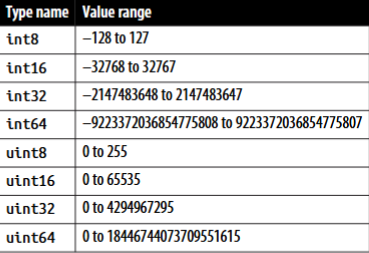
There are also special integer types:
byteisuint8intisint32for 32-bit CPUs andint64for 64-bit CPUs — so it is a compile-time error to compare or perform math betweenintandint32orint64without explicit type conversionuintfollows the same rule asintbut unsignedruneisint32uintptr— we'll get to this later in pointers
When to Use What?
How to decide which type to use? Follow these rules:
- If a binary file format or network protocol specifies an integer of a specific size or sign, use its corresponding integer type.
- Use a generic type parameter to represent an integer type in functions.
- In all other cases, just use
int.
Integer Operators
Go supports +, -, *, /, % (for modulus).
Combine arithmetic operators with = to modify a value: +=, -=, /=, *=, %=
Compare using ==, !=, >, >=, <, <=
Shift left or right using >>, <<
Logic operators: AND &, OR |, XOR ^, AND NOT &^
b := ^a    // NOT operation
c := a ^ b // XOR operation
Modify values with assignment: &=, |=, ^=, &^=, <<=, >>=
Floating-Point Types
There is float32 and float64.
- Dividing a nonzero floating variable by
0returns either+Infor-Infbased on the sign. - Dividing a floating variable set to
0by0returnsNaN.
Should we use float numbers at all?
In many cases, the answer is no — they can't store exact numbers, only the nearest approximation. This makes some operations harder, like equality checks where two numbers might not be equal when you expect them to be.
Use floats only in situations where inexact values are acceptable. Otherwise, don't use them.
Complex Types
var num = complex(12, 24)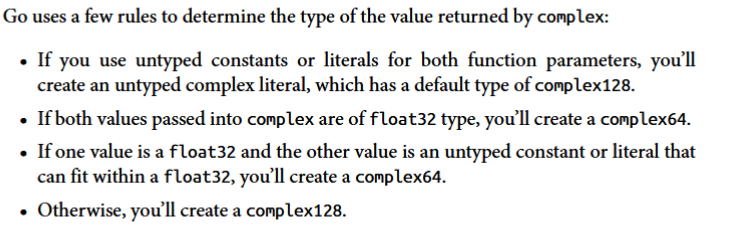 Zero value is
 0+0i.
String Type
Strings are compared for equality using ==, inequality using !=, ordered using >, >=, <, <=, and concatenated using +.
Strings are immutable, but we can reassign the value of a string variable:
x := "first value"
x = "second value"
The value of x will be "second value" — we changed the memory location by creating a new pointer to "second value". The original value will be handled by the garbage collector.
Type Conversion
There is no implicit conversion in Go. We must do explicit conversion between different types.
package main

import "fmt"

func main() {
    var x int = 10
    var y float64 = 30.2
    var sum1 float64 = y + float64(x)
    var sum2 int = x + int(y)
    fmt.Println(sum1, sum2)
}
Some notes:
- Assigning a value bigger than its type's size will cause an overflow.
- If a value exceeds the size via an operation, it will wrap around its maximum value (for integers), or return
+Inf/-Inf(for floats). - Storing a
float64number infloat32loses precision if the value is withinfloat32range but holds more precision thanfloat32can handle.
You cannot use nonzero numbers or nonempty strings as boolean true.
# Python — this works
x = 'hello'
if x:
print('not empty')// Go — this is NOT valid
var x string = "hello"
if x { // compile error
fmt.Println("not empty")
}var versus :=
There is more than one way to declare a variable:
// Verbose
var name string = "jimmy"

// Type inferred from value
var x = 10

// Zero value
var x int // x == 0

// Multiple values
var x, y int = 10, 20

// Multiple zero values
var x, y int

// Multiple types
var x, y = 10, "hello"
You can also use a declaration list:
var (
    x int
    y = 20
    z int = 30
    d, e = 40, "hello"
    f, g string
)
At function level, you can use the short declaration:
x := 10           // same as var x = 10
x, y := 10, "hello"

x := 10
x, y := 30, "hello" // reassigns x, declares y
The
:=has only one limitation: when declaring a variable at package level, you must use thevarform.
The Idiomatic Approach
- Use
var x intwhen declaring a variable with its zero value. - When assigning an untyped constant or literal and the default type isn't what you want, use the verbose form — e.g.,
var x byte = 20is more idiomatic thanx := byte(20). :=assigns to both new and existing variables (known as shadowing — we'll get to it later). It's better to declare new variables withvarand use=for assignment of both new and old variables.
Declaring multiple variables at once doesn't mean you should — prefer it only when returning multiple values from a function or using the comma-ok idiom:
value, err := expression // e.g., opening a fileConstants
const name type = valueConstants can hold numeric, boolean, string, or rune values, as well as values returned by built-in functions, or expressions composed of operators and preceding constant values:
const y = 10
const z = 12
const x = z + y // compiles to 22

a := 10
b := 12
const c = a + b // won't compile — a and b are variables
Constants in Go aren't stored in memory like normal variables. Instead, the compiler performs constant inlining — replacing the constant name with its value directly in the generated code.
So trying this causes an error:
const x int8 = 10
fmt.Println(&x) // unaddressable operand error
Typed vs. Untyped Constants
const x = 10         // untyped
var y int = x        // x acts as int here
var z float64 = x    // x acts as float64 here
var d byte = x       // x acts as byte here

const typedX int = 10 // typed — only works as int
Constants may be untyped; variables never are.
Unused Variables
One of Go's requirements is that every declared local variable must be read — it's a compile-time error to declare a variable and never use its value.
This applies at the function (local) level only. At package level, you can create variables without reading them.
This doesn't affect constants, since they're calculated at compile time and either inlined into generated code or discarded.
Naming Variables
Identifiers must start with a letter or underscore and can contain numbers, underscores, and letters. In Go, "letter" means any Unicode letter character — not just A–Z/a–z:
var café = 1
var عدد = 5
var π = 3.14
var 数据 = 42
var _0 = 0
var __ = "double underscore"
Idiomatic Naming Conventions
- Use short variable names within functions or small blocks:
i,jin loops;k,vfor key and value. - Use more descriptive, longer names for package-level variables or constants.
- Use
camelCasefor non-exported functions or variables. - Use
PascalCasefor exported variables, functions, and types (structs, interfaces, slices, etc.).
Takes
So far, Go doesn't feel very different from Python at the surface level — the differences are mostly syntactic. The only differences I've seen so far:
- No implicit type conversion
- Constants aren't stored in memory but inlined into generated code if they're used
- Naming conventions
Stick around for the next break where we'll break more stuff!
Feel free to reach out.