HTTP stands for Hypertext Transfer Protocol and at its core, it is the set of rules that defines how data is exchanged between a web browser (the client) and a web server whenever you type a URL into your address bar or click a link, your browser sends an HTTP request to a server somewhere and this server will sent you what you need HTTP operates on a simple cycle:
- The Request: The client sends a message to the server, this message includes a Method like
GETto fetch data orPOSTto send data, a path to the resource, and headers providing metadata. - The Response: The server processes the request and sends back a message, this includes a Status Code like
200 OKif everything went well, or404 Not Foundif the page is missing and the actual content of the page.
this requests and responses look like this
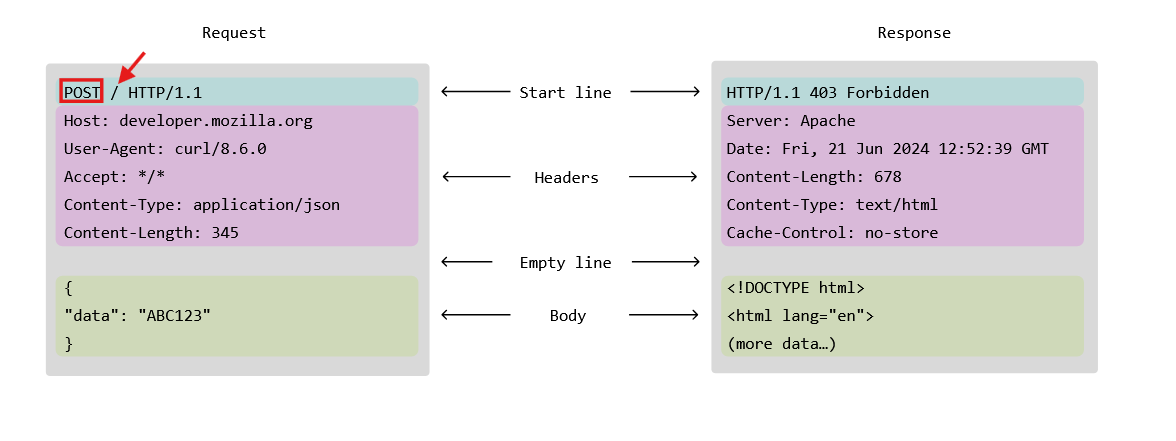
the red rectangle is the request method
- HTTP has more than method and these methods inform the server what are we trying to accomplish using this request
- so if the method is GET we are telling the server we are just getting this page
- sometimes it is used to send data to the server but it isn't a safe way to do it
- if it is a POST so we are sending data to the server
- and there is some other methods like PUT, DELETE, PATCH, TRACE, HEAD
and the arrow is the path of the resource
- and this tells the server which resource we are applying that action on
- so if we are trying to delete a profile it will look like this
/profile/idfor example
GET Requests
lets start with the simple one GET Requests there is two ways to do a GET request
- simple one if we don't need custom headers or behavior
- custom headers and behavior way lets start with the easy one
http.Get(url)lets say we need to fetch a page
http.Get("http://google.com")what does this return ? it returns an http response (pointer) and an error this http response isn't just the response text but every thing about it, the status, the status code, the actual body, and the headers the status and status code and headers are easy to read but the Body has a trick you should know about
the resp.Body not a string, it is an io.ReadCloser which an interface representing a stream of bytes coming over the network and we can read it and close it
the close part is easy just defer respo.Body.Close() to avoid any memory leaks
but the challenge is the Read() we don't know what is the response size so we can't just create a buffer with a fixed size and we shouldn't be bothered by checking the size
that's why using io.ReadAll()to drain the entire stream into a []byte slice
just so you know this io.ReadAll() accepts anything that implements the io.Reader interface like a file or a buffer or Stdin
with all that being said, if we need to make a request to fetch google.com/robots.txt it would look like that
package main

import (
    "fmt"
    "io"
    "log"
    "net/http"
    "os"
)

func main() {

    resp, err := http.Get("https://google.com/robots.txt")
    if err != nil {
        log.Fatal(err)
    }
    defer resp.Body.Close()

    body, err := io.ReadAll(resp.Body)
    if err != nil {
        log.Fatal(err)
    }
    fmt.Println(resp.Status)
    fmt.Println(resp.StatusCode)
    resp.Header.Write(os.Stdout) // the resp.Header is a map[string][]string so we either loop over it or we use the Write method with it
    fmt.Println(resp.Header.Get("Content-Type")) //if we need a specific header
    fmt.Println(string(body[:100]))
}
this was the easy way lets see what we can do if we need to modify the behavior
like adding a timeout or proxy or having custom headers for example
now the http.Get uses the default Client so it doesn't provide all that control and we have to create a client and a request
this client will customize the client behavior like timeouts and proxies
the request will customize the req like having custom headers
and we create a client using http.Client{} and then add the custom behavior in those brackets
and for the request we create it using this http.NewRequest(method, url, body) and because this is a GET request the body will be just nil
so lets do the same request this way
package main

import (
    "net/http"
    "strings"
    "time"
)

func main() {
    client := &http.Client{Timeout: 10 * time.Second} // this tells the server if the response takes more than 10 seconds to return, return an error instead

    req, _ := http.NewRequest("GET", "http://localhost:8080/", nil)
    // note: body is nil for GET
    req.Header.Set("Authorization", "token123")
    req.Header.Set("Accept", "application/json")

    resp, _ := client.Do(req)
    defer resp.Body.Close()
}
and just to prove a point that you can put a body in GET request but the server will silently ignore it
package main

import (
    "net/http"
    "strings"
    "time"
)

func main() {
    client := &http.Client{Timeout: 10 * time.Second}

    body := strings.NewReader("hi")
    req, _ := http.NewRequest("GET", "http://localhost:8080/", body)
    // note: body is nil for GET
    req.Header.Set("Authorization", "Bearer token123")
    req.Header.Add("Authorization", "Bearer token456")
    req.Header.Set("Accept", "application/json")

    resp, _ := client.Do(req)
    defer resp.Body.Close()
}
and in some strict servers it might reject the entire request
if you need to add a new headers you will use either one of those
req.Header.Set("Content-Type", "application/json") //set a new pair, if the key already exists replace it with the new one
req.Header.Add("Authorization", "Bearer TOKEN") //append a new pair, it can lead to duplicate headers
so what happened when we used http.Get() it just used the default client like this
package main

import (
    "io"
    "net/http"
    "os"
)

func main() {
    client := http.DefaultClient
    req, _ := http.NewRequest("GET", "http://127.0.0.1:8080", nil)
    resp1, _ := client.Do(req)
    io.Copy(os.Stdout, resp1.Body)

    resp2, _ := http.Get("http://127.0.0.1:8080")
    io.Copy(os.Stdout, resp2.Body)

}
and those two are the exact same thing
Query Parameters using GET Request
we can just append them to the URL if it is a fixed value we can do
http.Get("http://something.com/?q=123")if it is some kind of input we can format it as a string first
    value1 := "123"
    url := fmt.Sprintf("http://127.0.0.1:8080/?q=%s", value1)
    http.Get(url)
but the proper way is through the url.Values for the values to get encoded if there is any special characters
func main() {
    client := http.DefaultClient
    req, _ := http.NewRequest("GET", "http://127.0.0.1:8080", nil)
    q := url.Values{} // creates an empty map
    q.Add("q", "123") // adds first param
    q.Add("a", "drama") // adds second param
    req.URL.RawQuery = q.Encode() // convert it to string and encode it then attach it to the url
    client.Do(req)
}
the issue with this way that if there is any parameters in the URL it'll be overwritten completely but we can preserve the existing ones by using this
    client := http.DefaultClient
    req, _ := http.NewRequest("GET", "http://127.0.0.1:8080", nil)
    q := req.URL.Query() // query the existing ones first and adds them to the map
    q.Add("q", "123")
    q.Add("a", "drama")
    req.URL.RawQuery = q.Encode()
    client.Do(req)
and we're done with GET Requests see you in the next one