Hi everyone! this is Jimmy , and this is the third article in my series “Breaking Things with Go.” In this series, I document my journey through Jon Bodner’s Second Edition: Learning Go – An Idiomatic Approach to Real-World Go Programming and explore how to use Go in the most practical way I can
in this series the resources are the book itself, go documentation, and any AI model to clarify some things
lets Jump into it

in the last Break we scratched the composite types surface and mentioned Array datatype and its shortage and this time we'll go through solution for that shortage
Slices
Most of the time when we need to store sequence of values we should use slices not arrays
A slice is a reference to a segment of an array
each slice descriptor has 3 things
- Pointer → pointer to the first element of the underlying array
- Length → number of currently visible and accessible elements through the slice
- Capacity → maximum number of elements that slice can hold (via growing) through appending or re-slicing without requiring a new underlying array
the zero value of Slice in
nilnotnulland we will get tonilvalue later
var x = [...]int{10, 20,30} //declaring a [3]int array
var y = []int{10,20,30} //declaring an []int slice with length 3 and capacity 3 [10 20 30]
var x = []int{} //declaring nil slice with length 0 and capacity 0- the good thing about slices that they are reference to segment so all slices with different sizes are just slices of the defined type
we can do exactly as arrays where we specify non-zero indices only var x = []int{1, 5: 4, 6, 10: 100, 15} also create multidimensional slices using var x[][]int
we can't read or write past the end (using indexing) or use negative index
nil is an identifier that represents the lack of a value for some types so it can be assigned and compared against values from different types
a nil slice contains nothing []
it is compile time error to compare two slices with == or inequality using != but you can compare it only to nil x==nil
we can compare them using slices.Equal(x, y) that compares by same length and same elements
there is also slices.EqualFunc that lets you pass function to determine equality based on its logic
we can also get the length or slices using len(x) if the slice is nil it will return 0
Append
append(variable, value) it takes at least 2 parameters slice of any type and value of that type the slice can either be nil or slice that already has elements inside it you can append more than value at once x = append(x, 4, 4, 3, 2) we can append a slice elements to another slice by using expand operator like unpacking in python
var x = []int{1, 2, 3}
var y []int
y = append(y, x...)
fmt.Println(y) // [1, 2, 3]
Passing a slice to the append function actually passes a copy of the slice to the function. The function adds the values to the copy of the slice and returns the copy. You then assign the returned slice back to the variable in the calling function
it is compile error to do append operation without assigning the returned value to a variable for example
var x = [] int{1, 2, 3}
append(x, 12) //compile error
x = append(x, 12) //appends 12
Capacity
cap(x) length returns the number of elements you can use right now the capacity returns the number of consecutive memory locations reserved
when we initialize something like this var x = []int {1, 2, 3} this will create slice with length 3 and capacity 3 but when we do append an item like x=append(x, 4) this will allocate a new backing array with length 4 and capacity 6 (will get to why exactly 6 not 5 not 4 later) and re-slices the underlying array
if you try to add additional values when the length equals the capacity, the append function uses the Go runtime to allocate a new backing array for the slice with a larger capacity by copying the old array to new array and append new values then return the new array
is there a rule for capacity change on appending ? yes there is
- double the capacity of a slice when the current capacity is less than 256
- bigger slices increases by next formula
(current_capacity+768 )/4 - slice with capacity 512 grow by 63%
- and 4096 slice grows by only 30%
usually cap not used as much as len and only used to check if the capacity is enough to hold new data or we need to create a new slice
in arrays the
capis always equal tolenbecause the array predefined fixed size unlike slices
why does it double or append capacity with more that needed for length?
- this happens to minimize the overhead of memory allocation and copying data so instead of appending with tiny chunks we just add bigger blocks
- while it is good to have a growing data type it still overheads if it reallocates too much so try to anticipate the possible capacity and declare it
Make
another way to declare slices with a known length or capacity specified they are know and specified but no fixed! (it is like a gesture what is the expected length and capacity but we can append)
x := make([]int , 5)this creates an int slice with length 5 and capacity 5 x[0] to x[4] are valid elements initialized to the zero value of int
if you did x= append(x, 10) the new slice will be [0, 0, 0, 0, 0, 10] with length 6 and capacity 10 unlike the nil slice where you start appending from index 0
we can also specify different length and capacity at declaration
x := make ([]int, 5, 10)this is a slice with length 5 (5 zeros initialized) with capacity of 10
what if i need to initialize a specific values
- then you have to create a length zero and append after it like this
x := make([]int, 0, 10)
x = append(x, 1, 2, 3, 4, 5)
now x is [1, 2, 3, 4, 5]
specifying capacity less than length gives
- compile-time error if the capacity specified by constant or numeric literal
- runtime panic if the capacity specified with variable
Emptying a slice
clear(x) to empty the slice emptying in go is setting all slice elements to their zero value based on the type
How to declare you slice ? idiomatic approach
primary goal → minimize the number of times slice needs to grow
- if it's possible that slice won't need to grow at all use var declaration to create a nil slice and here is example where it might not grow
func collect(flag bool) []int {
    var s []int // nil
    if flag {
        s = append(s, 1, 2, 3) // the growth here based on a condition
    }
    return s
}- if you have some starting values or the values aren't going to change then slice literal is good
data := []int{1, 2, 3,4} - if you know how large slice needs to be but don't know the values then use make instead
- but should you specify nonzero length to make or zero length with nonzero capacity
- there is 3 possibilities
using it as a buffer → specify nonzero length
if you sure the exact size you want → specify the length and index into the slice to set the values (using loops for example)
- what might go wrong if you got wrong size and this size is larger than data → you will have trailing zeros till you fill the rest of the slice with zero
- if the size is smaller than the data → you will get panic runtime when trying to access the index with the loop
use make with zero length and specified capacity so you can append without the previous problems
- if the size is larger you won't get trailing zeros
- if it is smaller you will grow without panic
Slicing slices
creating a slice from a slice written in brackets and consists of two offsets starting offset (default is zero indicates first position in the slice =indexed 0) and ending offset (default is last position) and it is one position past the index you need
    letters := []string{"a", "b", "c", "d", "e"}
    x := letters[0:2] // a b
    y := letters[0:]  // a b c d e
    z := letters[2:4] // c d
    a := letters[:]   // a b c d e
    b := letters[:2]  // a b
taking a slice from a slice isn't copying of the data but you have two variables that are sharing memory so changing of the original will affect all sharing slices
letters := []string{"a", "b", "c", "d", "e"}
x := letters[0:2]
fmt.Println(x) // a b
letters[0] = "z"
fmt.Println(x) // z b
and this is also happens the other way around
letters := []string{"a", "b", "c", "d", "e"}
x := letters[0:2] // a b
x[0] = "z"
fmt.Println(letters) // z b c d e
the coming part is pure math but it makes so much since when you think about it when slicing from a slice the subslice capacity = original capacity - the subslice starting offset so the elements of original beyond the subslice including the unised capacity are shared by both slices
x := []string{"a", "b", "c", "d"} // a b c d 4 4
y := x[:2]                        // a b 2 4
fmt.Println(cap(x), cap(y))      // 4 4
y = append(y, "z")               // a b z 3 4
fmt.Println("x:", x)             // a b z d
fmt.Println("y:", y)            // a b z
appending from the subslice overwritten the element c to be z
if subslice length same as capacity and you tried to append it will get separated from the original array and reallocate to a new backing array
x := []string{"a", "b", "c", "d"} // x = a b c d 4 4
y := x[2:4]                       // y =     c d 2 2
fmt.Println(cap(x), cap(y))       // 4 2
y = append(y, "z")   // y has length of two so to append we will create new backing array
                    // so y will no longer share the backing array with x
fmt.Println(x)     // x is gonna be a b c d
in an example like this
x := make([]string, 0, 5)
x = append(x, "a", "b", "c", "d")
y := x[2:]
y = append(y, "z")
x = append(x, "s")
fmt.Println("x: ", x, len(x)) //x:  [a b c d s] 5
fmt.Println("y: ", y, len(y)) //y:  [c d s] 3
when appending it appends starting from the length so the length of x is 4 so it over writes the z written by the y append
and this is the mind blowing challenge
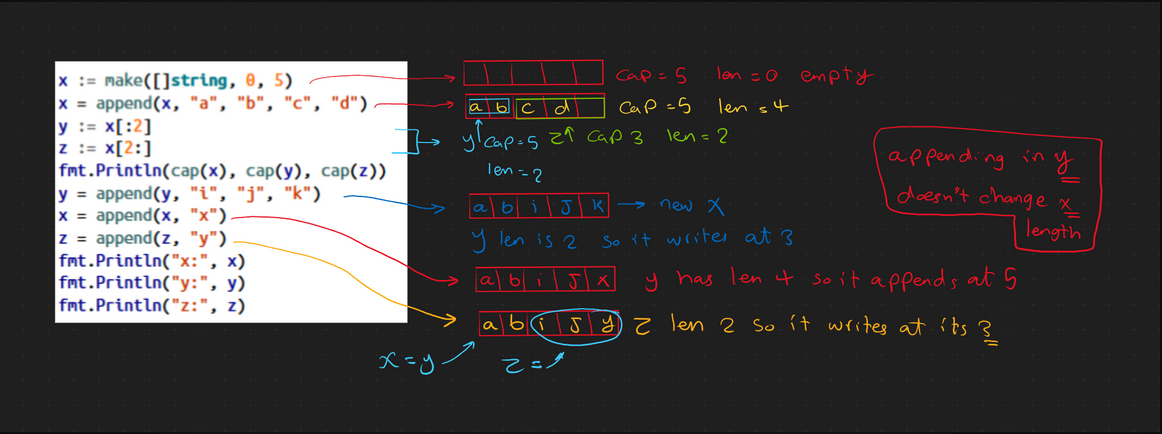
note that when we appended in the subslice y it changed the actual values in x but the length of x stayed the same because its length still 4 and even if you tried to print it it will print only 4 elements not 5
How to avoid all this complications ?
two solutions
- never use append with subslice
- using full slice to make sure append doesn't cause an overwrite
it adds one more number in the subslice declaration that indicates the last position in the parent slice's capacity that's available for subslice in this situation the subslice capacity = that number - starting offset
x:= make([]string, 0, 5)
x = append(x, "a", "b", "c", "d")
y := x[:2:2] // a b length=2 capacity=2
z := x[2:4:4] // c d length=2 capacity=2 so you can't overwrite the index 4 at the original
in this approach if you tried to append you will always lose the share that you have with the original slice
Copy
create independent slice from the original
    x := []int{1, 2, 3, 4, 5, 6}
    y := make([]int, 4)
    num := copy(y, x)
    fmt.Println(y, num)
copy takes two parameters (destination slice, source slice) and it copies as much as it can from source to destinations limited by whichever is smaller slice and returns the number of copied elements
if you copy a smaller slice into a bigger slice it will auto fill the remaining with 0 and return the number of the copied elements only
you can also copy a subslice copy(y, x[2:]) to copy from the middle of x in y you don't have to store the return if you don't need the number of copied elements
you can also copy and paste from the same slice copy(x[:3], x[1:]) which copies from 1 to the end on top of 0 to 2
you can copy from or to an array but you have to slice it first
x := []int{1, 2, 3, 4}
d := [4]int{5, 6, 7, 8}
y := make([]int, 2)
copy(y, d[:])
fmt.Println(y)
copy(d[:], x)
fmt.Println(d)
Arrays to slices
- you can slice arrays too
- you can slice entire array as a way to convert array to slice or you can slice a subset only
- slicing from an array has the same-memory sharing properties as taking slice from a slice so care while using it
xArray = [4]int{1,2,3,4}
xSlice = xArray[:]
xSliceTwo = xArray[2:]
Slices to Arrays
we have to use type conversion to convert slices to arrays
converting slice to array → the data is copied to new memory so there is no sharing
xSlice := []int{1, 2, 3, 4}
xArray := [4]int(xSlice) // 1, 2, 3, 4
smallArray := [2]int(xSlice) // 1, 2
xSlice[0] = 10 //10, 2, 3, 4 and xArray and smallArray stays the same
while converting slice to array you have to specify the array size and you can't use [...] due to compile-time size dependency in arrays so it has to know the size at compile time
Slices in Go operate entirely at runtime, with their length and capacity being dynamic values that can change during program execution through operations like appending or re-slicing, unlike arrays whose size is fixed as part of their type at compile time
size of the array can be smaller → it copies as much values in the new one and leaves the rest the size of array can't be bigger than the length and it will cause panic at runtime
we can also use pointers to convert
xSlice := []int{1, 2, 3, 4}
xArrayPointer := (*[4]int)(xSlice)
what happens here ? the slices are descriptors so it doesn't own the data but it exists somewhere in the memory so the second line tells go treat the data that xSlice already points to as if it were a [4]int
You don’t convert the slice into an array.
You ask for an array-shaped view of the slice’s data.
Takes
- Slice is not data, it is a view to the data and the actual data lives in the backing array
lencontrols access,capcontrols growth- If a slice must not affect another, force reallocation (copy or cap-limit using full slicing)
- Arrays are compile-time, slices are runtime
Coming Next
the next break will be about representation of strings, runes, and bytes (short one)
so stick around for next break where we will break more stuff
 feel free to reach out to me